

Software-ul de telemedicină conform cu HIPAA vă permite să oferiți îngrijire virtuală pacienților, respectând în același timp standardele stricte de confidențialitate și securitate a datelor impuse de lege. Dacă sunteți în căutarea unor instrumente care protejează informațiile medicale sensibile și facilitează consultațiile la distanță pentru echipa și pacienții dumneavoastră, ați ajuns în locul potrivit. În acest ghid, voi explica ce diferențiază soluțiile de top și vă voi ajuta să găsiți o platformă de telemedicină potrivită pentru fluxul dumneavoastră de lucru, așteptările privind confidențialitatea și nevoile cabinetului.
Why Trust Our Software Recommendations
6,700+
Reviews
20
Industry experts
16+
Evaluation factors
14
Years
Our team has been testing and reviewing software since 2012. As medical practice leaders ourselves, we know how difficult—and important—it is to choose the right software.
For this guide, we evaluated tools using hands-on testing and independent research, scoring tools using our selection criteria.
Our reviews reflect our human editorial judgment, not a sales pitch.
Tabel comparativ pentru telemedicina conformă cu HIPAA
Acest tabel comparativ sintetizează detaliile de preț pentru selecțiile mele de software de telemedicină conform cu HIPAA:
Sorted by: Default
| Tool | Starting Price | Website | |
|---|---|---|---|
Best for practice-level data privacy controls | 4.7 out of 5 | $29/user/month Free demo + 14-day free trial available | Website |
Best for telehealth and client engagement | 4.4 out of 5 | $49.99/month Free demo + 14-day free trial available | Website |
Best for behavioral health telehealth | 4.4 out of 5 | $69/user/month 30-day free trial + demo available | Website |
Best for interactive teletherapy | 4.4 out of 5 | $39/month 30-day free trial | Website |
Best for behavioral health teletherapy | 4.5 out of 5 | $29/user/month 21-day free trial + free demo available | Website |
Best for browser-based telehealth | 4.6 out of 5 | Pricing upon request Free plan available | Website |
Best for scalable healthcare video visits | 4.5 out of 5 | Pricing upon request Free demo available | Website |
Best for therapy telehealth workflows | 4.6 out of 5 | $49/month Free demo + 30-day free trial available | Website |
Best for configurable virtual care | 4.1 out of 5 | $29/user/month Free plan available OR 14-day free trial | Website |
Best for independent practice telehealth | 3.9 out of 5 | Pricing upon request Free demo available | Website |


Recenzii ale software-urilor de telemedicină conforme cu HIPAA
Mai jos sunt rezumatele mele detaliate ale celor mai bune software-uri de telemedicină conforme cu HIPAA care au ajuns pe lista mea scurtă. Recenziile mele oferă o privire detaliată asupra funcțiilor, celor mai potrivite cazuri de utilizare și integrărilor fiecărei platforme, pentru a vă ajuta să o găsiți pe cea mai potrivită pentru dumneavoastră.
 Best for practice-level data privacy controls
- Free demo + 14-day free trial available
- From $29/user/month
Visit WebsiteCustomer Rating:4.7/5
Zanda supports HIPAA-compliant telehealth video sessions between providers and patients. Zanda is an all-in-one health practice management platform that combines HIPAA-compliant telehealth, appointment scheduling, clinical documentation, billing, and client communications.
Who Is Zanda Best For?
Zanda suits small to mid-sized health practices—solo clinicians through to multi-location teams—that need scheduling, billing, clinical documentation, and HIPAA-compliant telehealth managed from a single platform.
Why I Picked Zanda
Zanda earns its spot on my shortlist because its data privacy architecture goes deeper than a standard BAA: clinical notes and intake forms are encrypted with a unique key per practice, stored separately from the main database. I also like that user permissions, audit logs, and two-factor authentication are configurable at the practice level, so compliance officers can control exactly who sees what across locations. That granular access control is what makes Zanda stand out for practices that treat data governance as a clinical responsibility, not just an IT checkbox.
Zanda Key Features
- Zoom-powered telehealth: Practitioners can launch encrypted video sessions directly from a calendar appointment, with clients joining through a Zoom waiting room via the client portal.
- BizzyAI Scribe: AI transcribes live sessions or dictation and drafts clinical notes using a selected template, with four Scribe appointments per practitioner included each month.
- Automated appointment reminders: SMS and email reminders are sent up to seven days before an appointment, with clients able to confirm or cancel by replying to the SMS.
- Multi-practitioner calendar management: Practices can view and manage appointments across multiple practitioners, locations, and rooms with drag-and-drop scheduling and conflict alerts.
Zanda Integrations
Zanda offers documented native integrations with Zoom, Google Calendar, Apple Calendar, Outlook Calendar, Stripe, Xero, Physitrack, Mailchimp, and Google Analytics. It also documents a read-only Public API for custom integrations, but beta enrollment is currently closed.
Pros and Cons
Pros:
- Clients can confirm appointments by SMS
- Reviewers praise integrated telehealth workflows
- Per-practice encryption isolates notes and forms
Cons:
- Basic visits stop at 40 minutes
- Zoom-only visits constrain platform choice
Learn more about Zanda: Best for telehealth and client engagement
- Free demo + 14-day free trial available
- From $49.99/month
Visit WebsiteCustomer Rating:4.4/5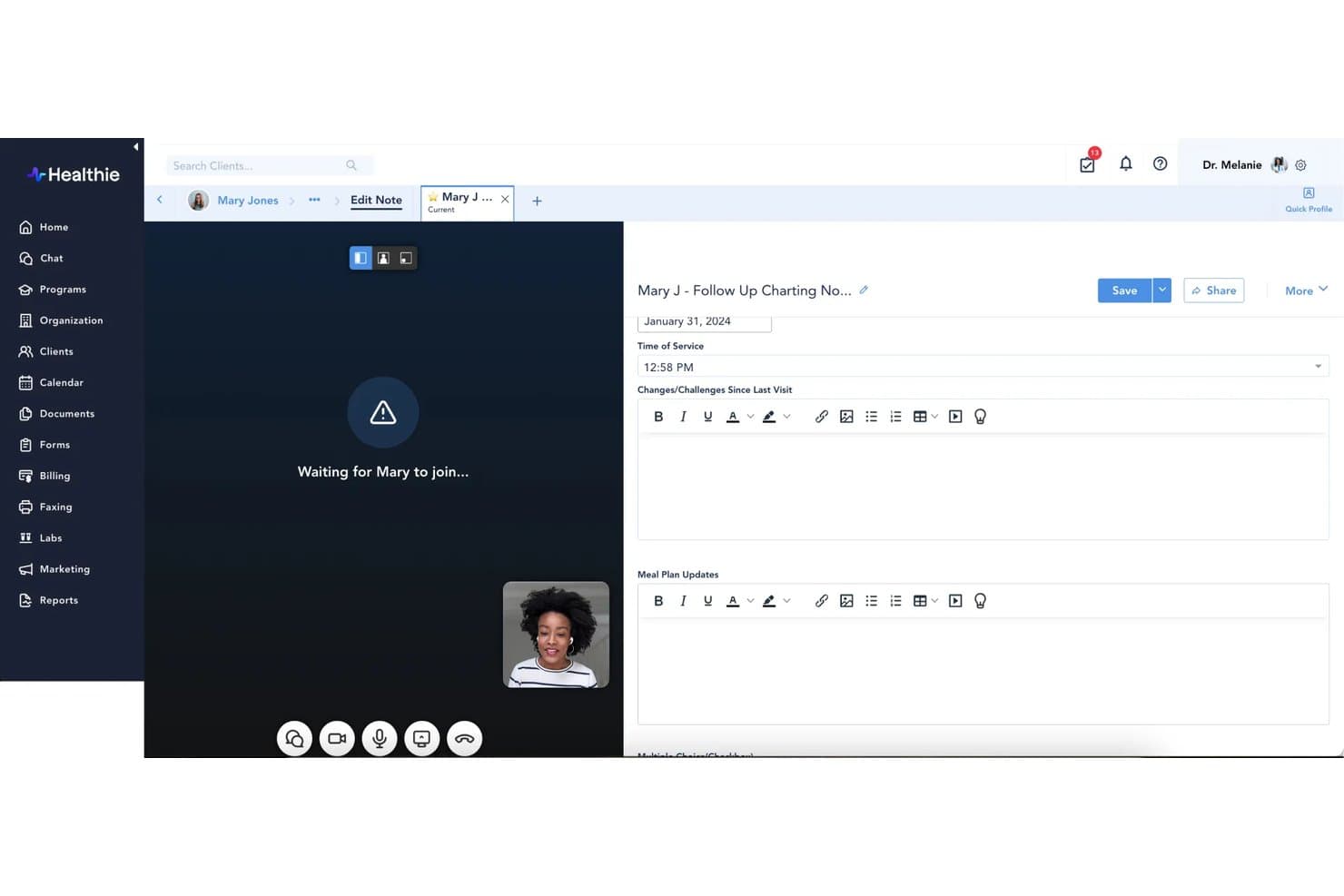
Healthie offers a split-screen telehealth interface that allows providers to conduct video visits and complete clinical charting notes simultaneously in real time. Healthie is a HIPAA-compliant EHR and practice management platform that combines built-in telehealth, client scheduling, intake forms, secure messaging, charting, and billing in one system.
Who Is Healthie Best For?
Healthie is a strong fit for independent and group practices in behavioral health, nutrition, and wellness specialties that need a full clinical and client management toolkit.
Why I Picked Healthie
Healthie earns its spot as one of the best on my shortlist because built-in telehealth is included on every plan, even the entry-level Core tier. I particularly like the white-labelable client mobile app, where patients can book appointments, join video sessions, complete intake forms, and message their provider, all under your practice's branding. The group telehealth and webinar functionality on the Plus plan also stands out for practices running wellness programs or group therapy sessions.
Healthie Key Features
- HIPAA-compliant audit logging: Tracks all user actions and access to patient records for full PHI security compliance.
- Customizable digital intake forms: Lets you collect patient consent, demographics, and insurance details before each session.
- Integrated telehealth billing workflows: Generates superbills and supports telemedicine CPT codes and claims submission directly from the platform.
- ePrescribing for controlled substances: Offers Surescripts-certified eRx and EPCS for sending prescriptions during a telehealth visit.
Healthie Integrations
Healthie offers native integrations with Stripe, Zoom, ClaimMD, Fullscript, Labcorp, Quest Diagnostics, BioReference, DoseSpot, IntakeQ, Google Calendar, and Apple Calendar. An open API is available for custom integrations.
Pros and Cons
Pros:
- EPCS-certified ePrescribing within telehealth encounters
- White-labeled client app included natively
- Built-in telehealth on every plan tier
Cons:
- Setup time needed for complex clinical workflows
- Reporting tools lack depth for analytics
Learn more about Healthie: Best for behavioral health telehealth
- 30-day free trial + demo available
- From $69/user/month
Visit WebsiteCustomer Rating:4.4/5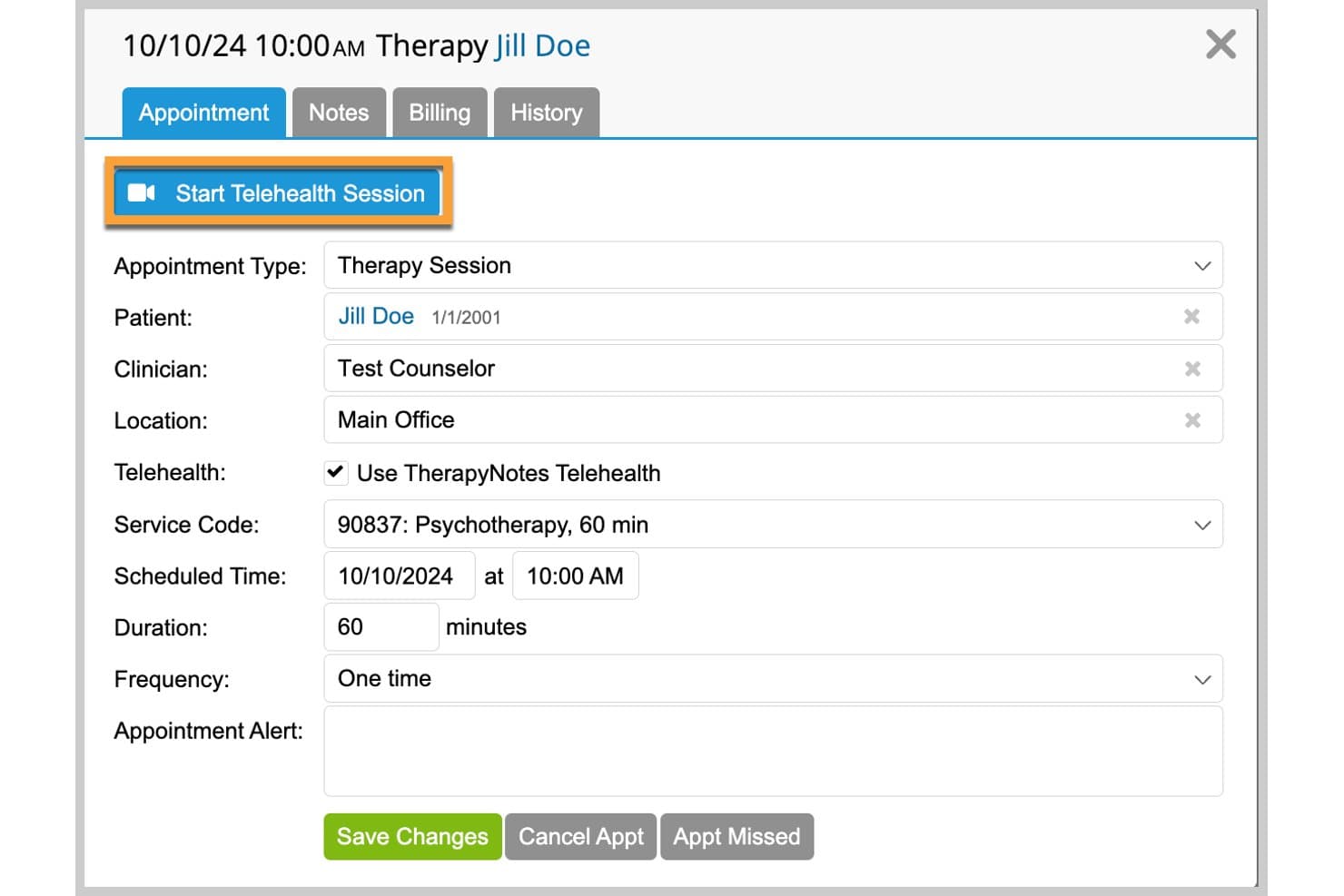
TherapyNotes offers a built-in telehealth session launcher within its appointment scheduling interface, supporting HIPAA-compliant video sessions. TherapyNotes is a behavioral health EHR that brings together HIPAA-compliant telehealth, clinical documentation, appointment scheduling, and integrated billing in a single platform built for mental health practices.
Who Is TherapyNotes Best For?
TherapyNotes is a strong fit for solo therapists, group therapy practices, and behavioral health clinics that need telehealth tightly integrated with clinical notes and insurance billing.
Why I Picked TherapyNotes
TherapyNotes earns its spot on my shortlist because behavioral health telehealth is built directly into the EHR, not layered on top. I love that Premium Telehealth supports group sessions with up to 16 participants, which is genuinely useful for running group therapy remotely. The Guest Access feature also lets patients join a waiting room without creating a portal account, removing a real barrier for clients who aren't comfortable navigating a patient portal before a session.
TherapyNotes Key Features
- HIPAA-compliant secure messaging: Providers and clients can exchange messages and documents within a secure, encrypted portal.
- Integrated e-prescribing: Clinicians can send prescriptions, including controlled substances, directly through the platform.
- Full audit logging: Every user action and change is logged for compliance, supervision, and accountability.
- Automated appointment reminders: TherapyNotes sends SMS, email, or phone reminders to reduce no-shows and keep schedules on track.
TherapyNotes Integrations
TherapyNotes offers native integrations with Google Calendar and Outlook Calendar. An API is available for custom integrations.
Pros and Cons
Pros:
- BAA included on all plans by default
- Group sessions support up to 16 participants
- Built specifically for behavioral health workflows
Cons:
- No native FHIR or HL7 data exchange
- Limited specialty support outside behavioral health
Learn more about TherapyNotes:
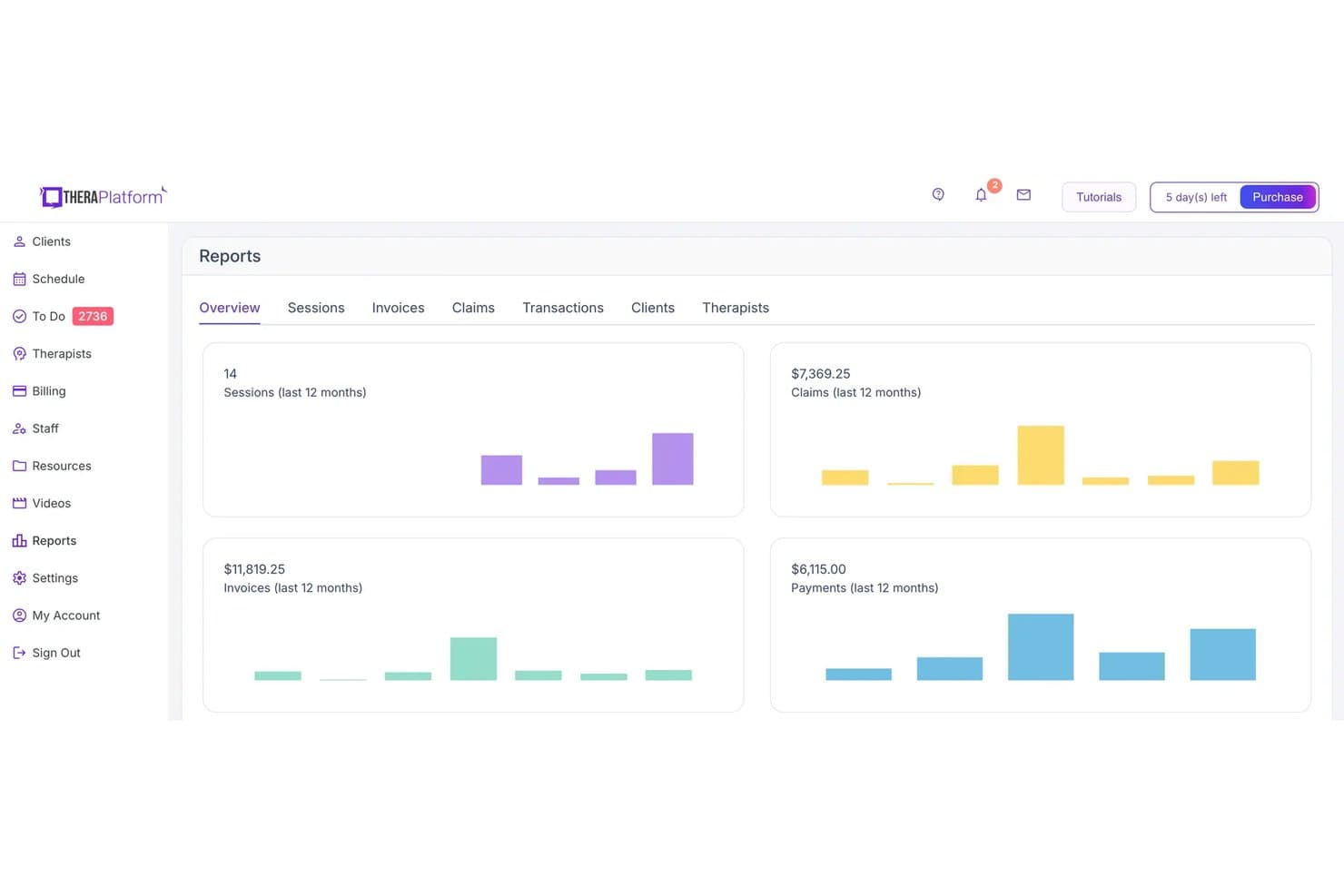
TheraPlatform displays a Reports overview dashboard with metrics for sessions, claims, invoices, and payments over the last 12 months. TheraPlatform is a HIPAA-compliant telehealth and practice management platform built specifically for mental health and therapy providers, combining secure video sessions, EHR documentation, scheduling, and billing in one system.
Who Is TheraPlatform Best For?
TheraPlatform is a strong fit for solo therapists and small behavioral health practices that deliver most of their care virtually.
Why I Picked TheraPlatform
I picked TheraPlatform as one of the best because of how much it puts inside the active video session itself. While a client is on-screen, I can pull up therapy games, display visual scenes, or open a shared whiteboard without ever switching windows. I also like that supervisors can join live sessions and send the clinician private in-session chat messages, then review HIPAA-compliant session recordings for follow-up coaching.
TheraPlatform Key Features
- HIPAA-compliant secure messaging: Exchange files and messages with clients using encrypted chat within the client portal.
- All-in-one practice management: Schedule appointments, manage billing, and handle documentation in a single platform.
- Digital intake and consent forms: Send and collect required forms and insurance information electronically before sessions.
- Electronic claims filing: Submit insurance claims directly through the platform and track payment status online.
TheraPlatform Integrations
TheraPlatform offers native integrations with Stripe for payment processing, Google Calendar for scheduling, and Wiley Treatment Planner for clinical content. An API is available for custom integrations.
Pros and Cons
Pros:
- BAA included across all plans
- Supervisor co-session and private messaging supported
- Built-in therapy tools usable during live sessions
Cons:
- Billing features less developed than standalone RCM tools
- Limited EHR integrations outside behavioral health
Learn more about TheraPlatform: Best for behavioral health teletherapy
- 21-day free trial + free demo available
- From $29/user/month
Visit WebsiteCustomer Rating:4.5/5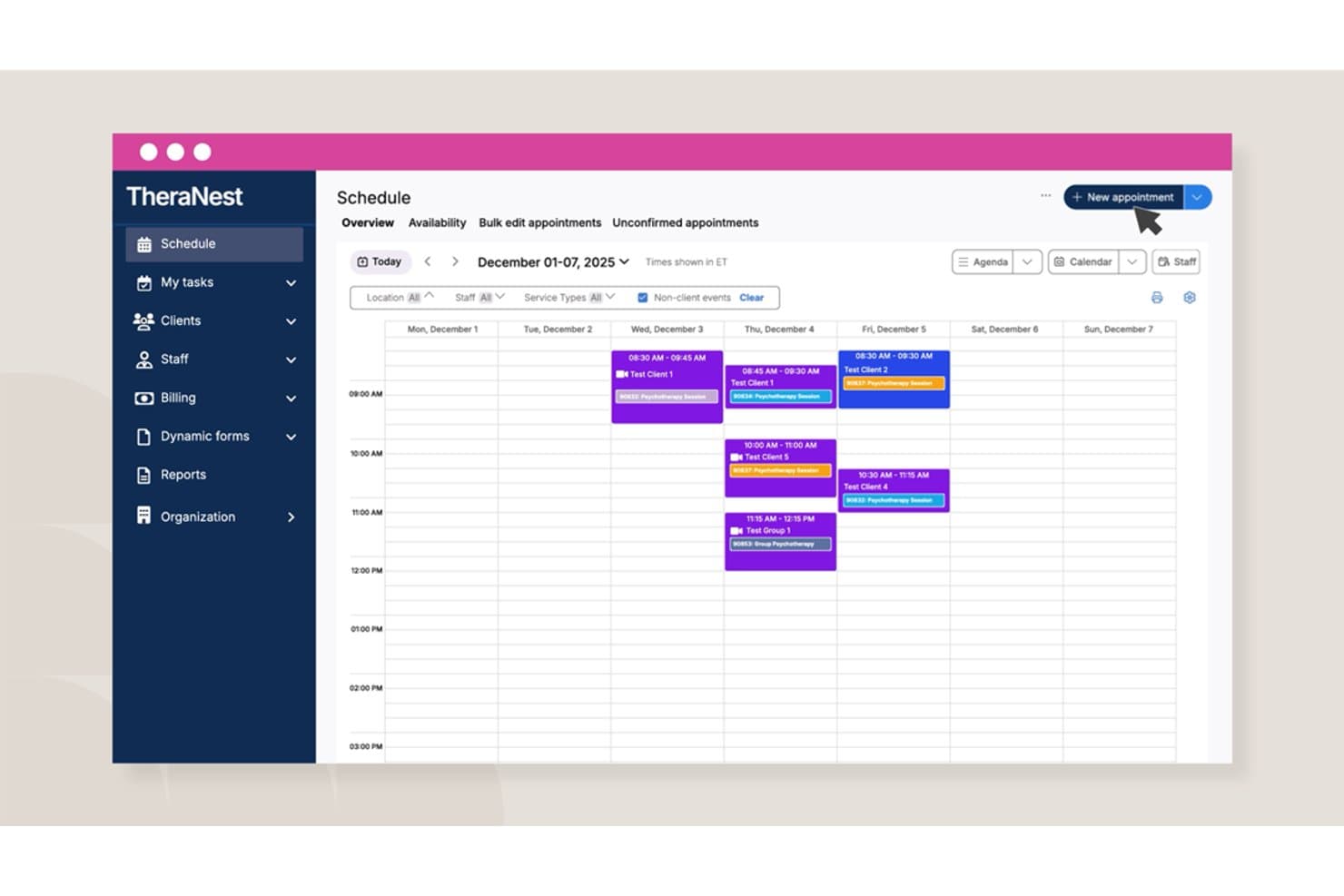
Ensora Health TheraNest offers a weekly calendar scheduling view with appointment management, staff filters, and a 'New appointment' button for organizing client sessions. TheraNest by Ensora Health is a behavioral health EHR and practice management platform with built-in HIPAA-compliant telehealth, clinical documentation, scheduling, billing, and secure client messaging.
Who Is TheraNest Best For?
TheraNest is a strong fit for solo therapists, group practices, and behavioral health clinics that need an all-in-one EHR with telehealth built in.
Why I Picked TheraNest
I picked TheraNest because it's built specifically around behavioral health teletherapy, not retrofitted for it. I like that it supports group telehealth sessions with up to six participants, which is genuinely useful for group and couples therapy workflows. The Ensai Session Assistant generates SOAP notes directly from telehealth sessions, picking up on clinical interventions and recurring client themes rather than producing generic summaries.
TheraNest Key Features
- HIPAA-compliant client portal: Clients can complete intake forms, schedule appointments, and join telehealth sessions securely online.
- Integrated e-prescribing: Allows clinicians to send prescriptions, including controlled substances, directly within the platform.
- Virtual waiting room: Lets staff manage patient check-ins and admissions, mirroring real-world clinical workflows.
- Automated insurance billing: Supports unlimited claims processing, eligibility checks, and ERA posting for telehealth visits.
TheraNest Integrations
TheraNest offers native integrations with NewCrop for e-prescribing, Beam Health for telehealth, Wiley Practice Planners for treatment planning, Google Calendar, and several insurance clearinghouses. An API is available for custom integrations.
Pros and Cons
Pros:
- AI-assisted SOAP notes from telehealth sessions
- Supports group telehealth sessions natively
- Built exclusively for behavioral health workflows
Cons:
- Mobile app has reported performance issues
- Not designed for non-behavioral health specialties
Learn more about Ensora Health TheraNest: Best for browser-based telehealth
- Free plan available
- Pricing upon request
Visit WebsiteCustomer Rating:4.6/5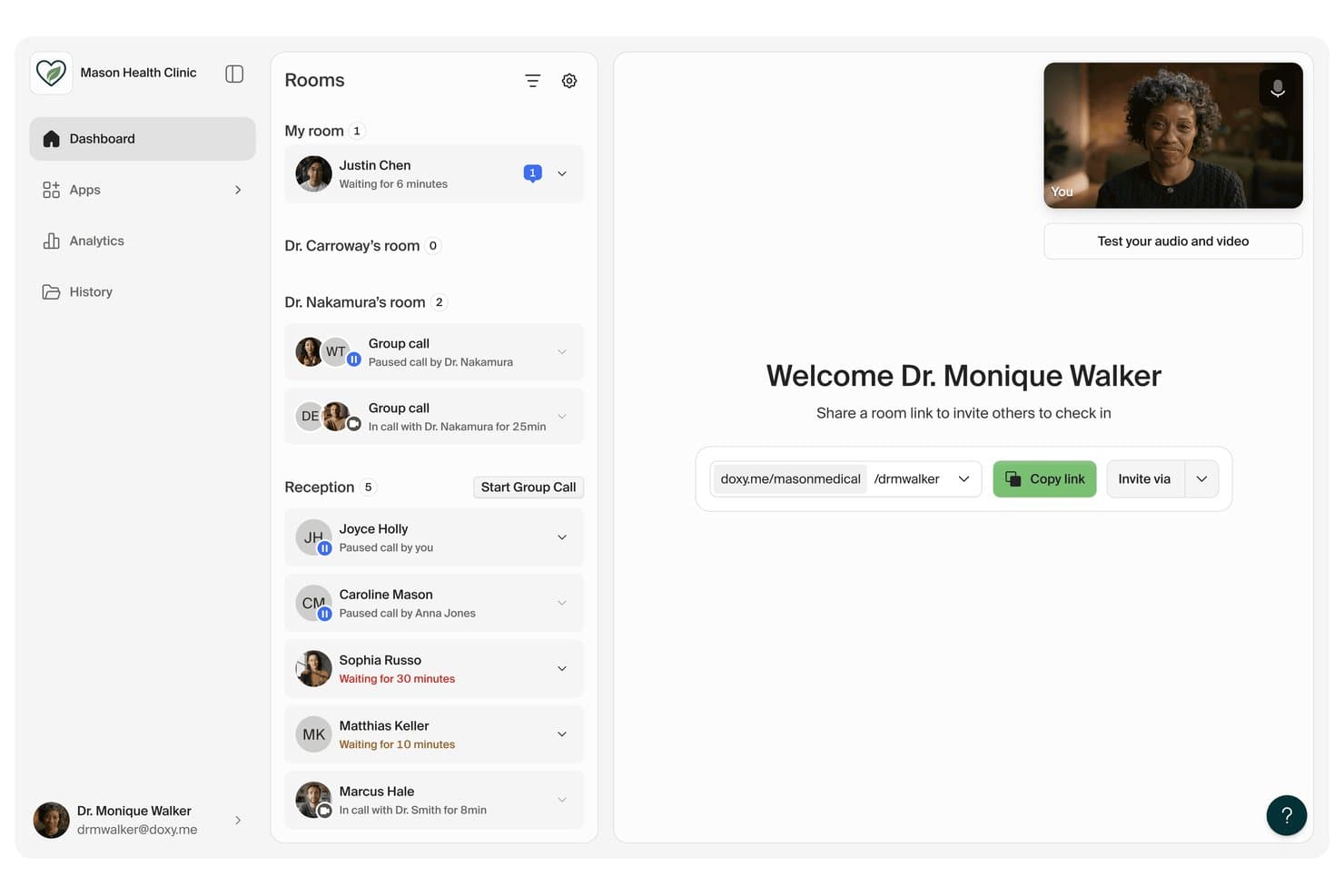
doxy.me offers a HIPAA-compliant telemedicine dashboard with patient waiting rooms, group calls, and video conferencing tools for clinic staff. Doxy.me is a browser-based telemedicine platform with HIPAA-compliant video visits, virtual waiting rooms, secure in-session chat, file transfer, and a suite of clinical add-on apps for patient care.
Who Is doxy.me Best For?
Doxy.me is a strong fit for solo clinicians and small behavioral health practices that need simple, HIPAA-compliant video visits without complex setup.
Why I Picked doxy.me
I picked doxy.me as one of the best because its fully browser-based setup means patients join a visit through a single link, with no app to download and no account to create. What I find genuinely useful are the built-in clinical apps, like Scribe for automated session notes and EMDR tools for behavioral health providers. HIPAA compliance with a signed BAA is included on paid plans, and sessions support up to 25 participants for group visits.
doxy.me Key Features
- Shared Rooms: Set up shared telehealth rooms to support team-based care and provider collaboration.
- Virtual waiting room: Move patients into a virtual queue where providers can admit them individually to sessions.
- Teleconsent: Collect electronic signatures on consent forms during a session through a built-in teleconsent workflow.
- Interpreter app: Bring a medical interpreter into live sessions to support care in over 240 languages.
doxy.me Integrations
doxy.me offers native integrations with Epic MyChart and Luminello. An API is available for custom integrations.
Pros and Cons
Pros:
- Built-in EMDR tools for behavioral health
- BAA included on all paid plans
- No patient app download required for visits
Cons:
- No built-in billing or claims submission
- Limited EHR integration options available
Learn more about doxy.me: Best for scalable healthcare video visits
- Free demo available
- Pricing upon request
Visit WebsiteCustomer Rating:4.5/5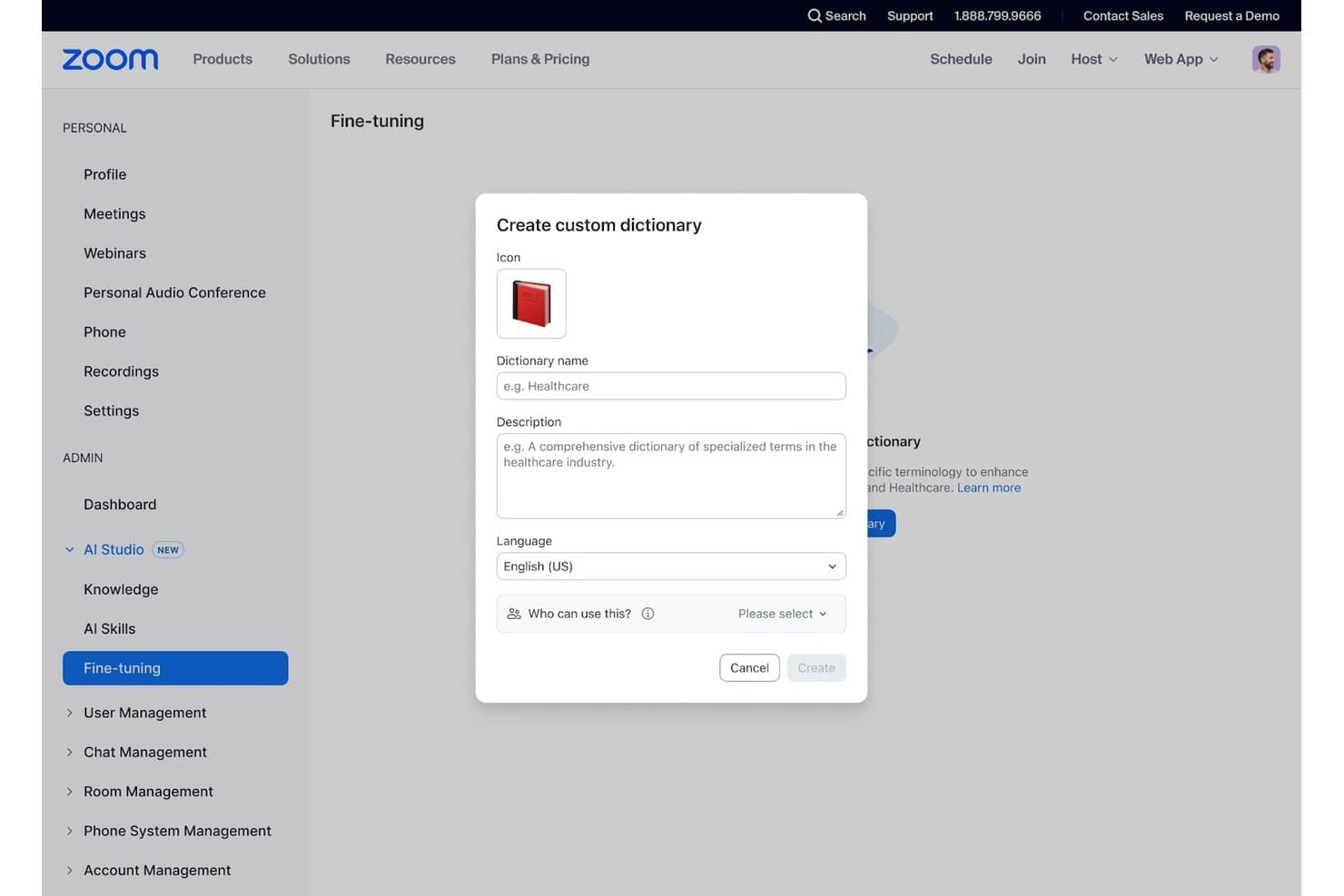
Zoom for Healthcare offers a custom dictionary creation feature within its AI Studio Fine-tuning section, allowing administrators to add specialized medical terminology. Zoom for Healthcare is a HIPAA-compliant unified communications platform that combines secure video visits, team messaging, phone, EHR integration, and AI-assisted clinical workflows for healthcare organizations.
Who Is Zoom for Healthcare Best For?
It's a strong fit for mid-to-large healthcare organizations and multi-location clinic networks that need a reliable, enterprise-grade video infrastructure layered on top of existing EHR and billing systems.
Why I Picked Zoom for Healthcare
I've included Zoom for Healthcare in my top picks because no other platform on this list handles concurrent video visits at scale the way Zoom does. Its virtual waiting room keeps patients queued without exposing PHI, and the 99.999% uptime SLA on Zoom Phone means providers across multiple locations stay connected even at peak hours. With a signed BAA covering meetings, phone, and rooms, the HIPAA compliance layer scales right alongside the visit volume.
Zoom for Healthcare Key Features
- Signed Business Associate Agreement: Provides a signed BAA to help meet HIPAA compliance requirements across video, phone, and chat.
- EHR integration: Offers native integrations with Epic, Athena, DrChrono, Elation, and supports telehealth scheduling and documentation workflows.
- AI-assisted meeting documentation: Includes AI Companion to generate meeting summaries and automate note-taking during clinical visits.
- Phreesia intake platform integration: Seamlessly integrates with Phreesia for digital patient intake, appointment scheduling, and unique telehealth meeting links.
Zoom for Healthcare Integrations
Native integrations include Epic, Cerner, Athena, DrChrono, Elation, Phreesia, Current Health, Microsoft 365, and telehealth hardware solutions from Capsa, Logitech, and Poly. An API is available for custom integrations.
Pros and Cons
Pros:
- No-download patient join links supported
- BAA included across all plan tiers
- Handles massive concurrent video visit volumes
Cons:
- Scheduling depends on third-party EHR tools
- Limited built-in telehealth billing features
Learn more about Zoom for Healthcare: Best for therapy telehealth workflows
- Free demo + 30-day free trial available
- From $49/month
Visit WebsiteCustomer Rating:4.6/5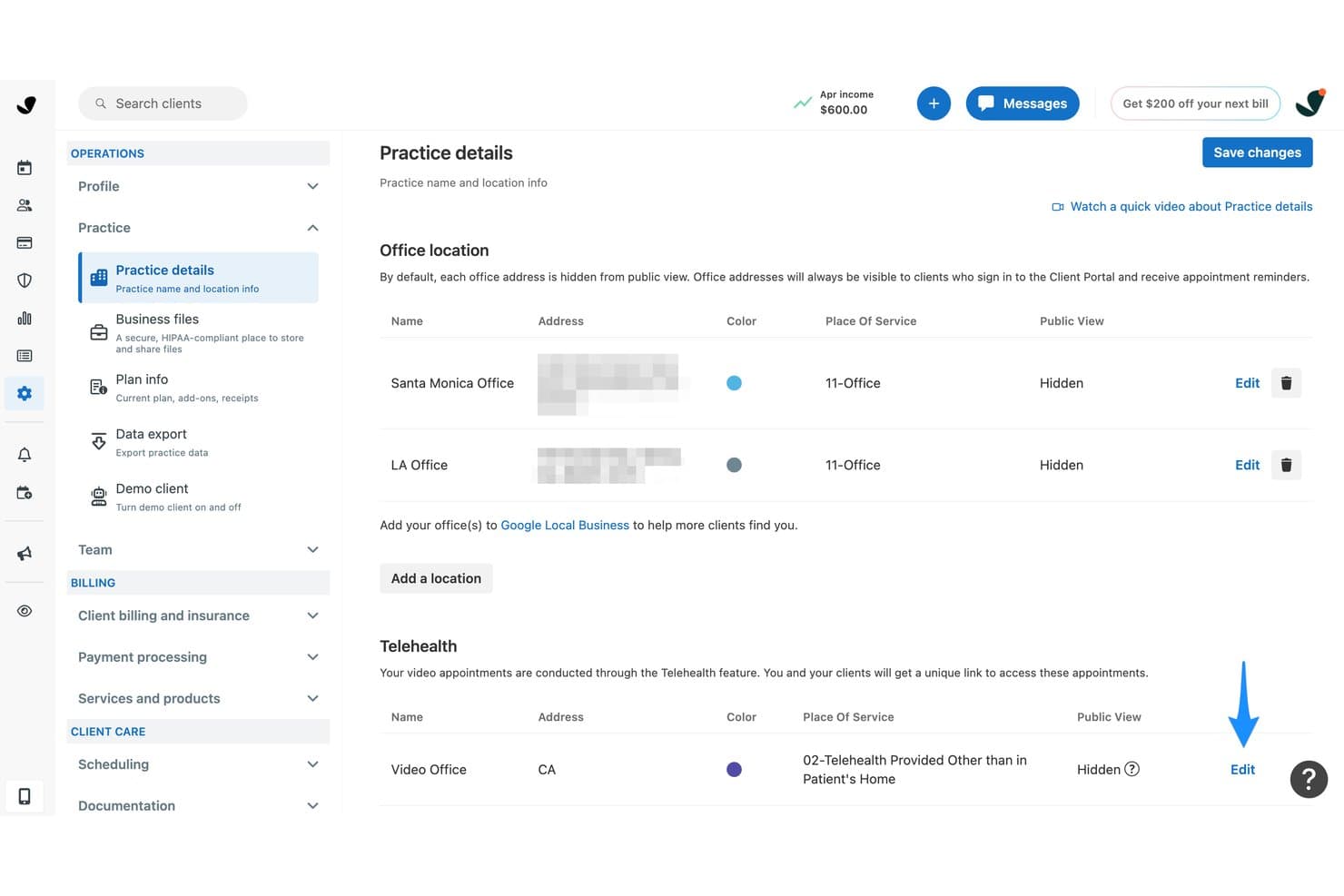
SimplePractice offers a Practice Details settings page where providers can manage office locations, telehealth video office configuration, and public visibility settings in a HIPAA-compliant platform. SimplePractice is an EHR and practice management platform for behavioral and mental health providers that combines HIPAA-compliant telehealth, clinical documentation, scheduling, secure messaging, and insurance billing in one system.
Who Is SimplePractice Best For?
It's a strong fit for solo therapists and small independent mental health practices that want to run their entire practice from one platform.
Why I Picked SimplePractice
I've included SimplePractice in my top picks because it's one of the few platforms where telehealth and clinical documentation are genuinely built as one workflow, not bolted together. I particularly like the in-session whiteboard and screen-share with sound, which are practical tools for therapy modalities like CBT exercises or psychoeducation. The AI Note Taker drafts session notes automatically after each telehealth call, cutting the post-session documentation load that most therapists deal with daily.
SimplePractice Key Features
- HIPAA-compliant secure messaging: Communicate asynchronously with patients through encrypted chat in the client portal.
- Digital intake forms: Collect consent, demographics, and insurance information online before appointments.
- ePrescribe integration: Prescribe medications directly within the platform with Surescripts certification.
- Insurance claim management: Submit telehealth claims and generate superbills electronically for insurance reimbursement.
SimplePractice Integrations
SimplePractice offers native integrations with Google Calendar and Stripe, and provides ePrescribe powered by DrFirst. An API for custom integrations is not available.
Pros and Cons
Pros:
- Therapy-specific templates built into clinical documentation
- AI note taker drafts post-session documentation
- Built-in telehealth needs no third-party app
Cons:
- Restricted to behavioral and mental health only
- Group practice admin controls are limited
Learn more about SimplePractice: 9Best for configurable virtual care
Vsee
- Free plan available OR 14-day free trial
- From $29/user/month
Visit WebsiteCustomer Rating:4.1/5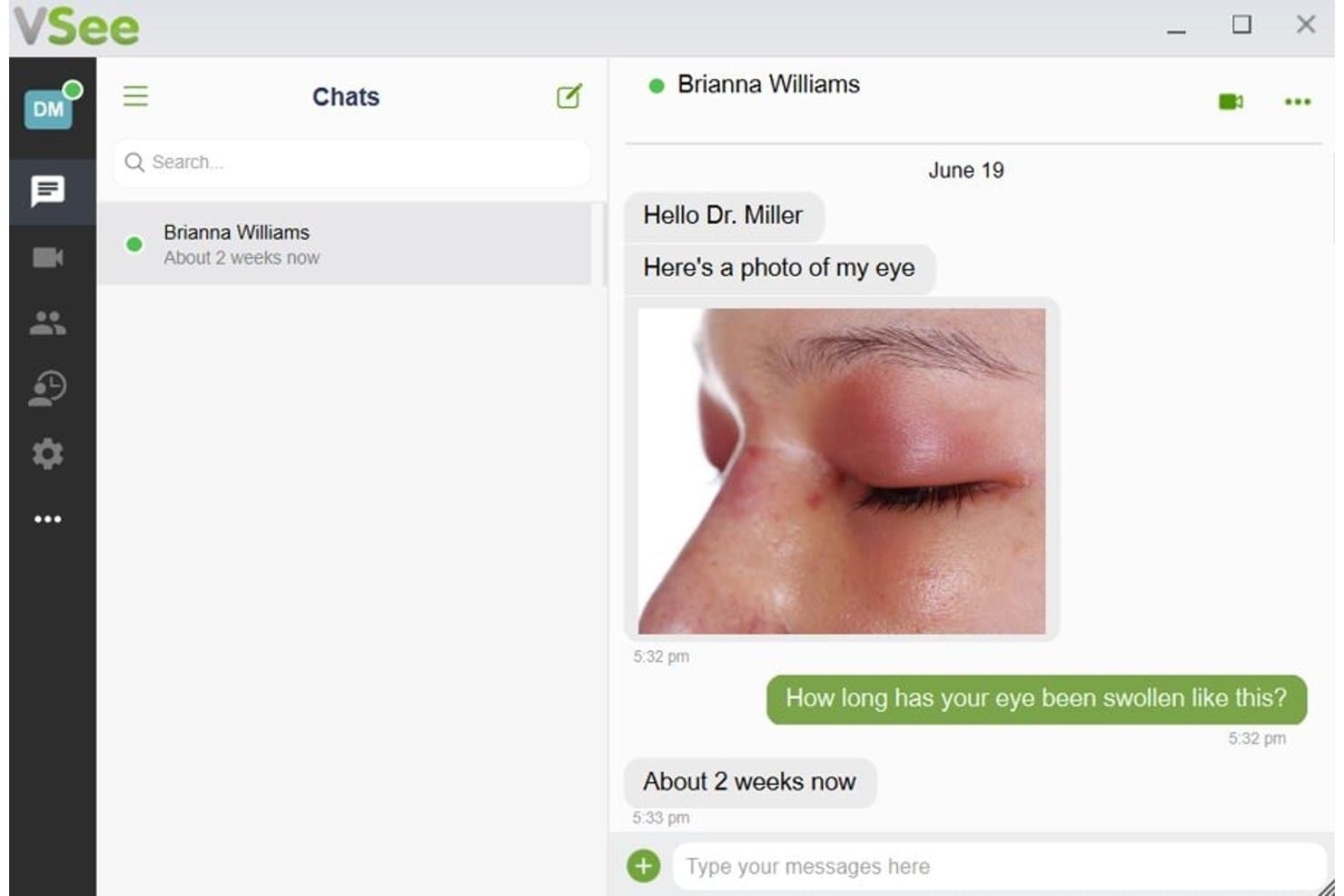
VSee offers a HIPAA-compliant secure messaging chat interface where patients can send photos and communicate directly with their doctor. VSee is a no-code telehealth platform that covers the full virtual care workflow, including HIPAA-compliant video visits, patient scheduling, digital intake forms, remote patient monitoring, and integrated telehealth billing.
Who Is VSee Best For?
VSee is a strong fit for healthcare organizations that need to configure virtual care workflows around specialized service lines like telepsychiatry, urgent care, or chronic care management.
Why I Picked VSee
I picked VSee as one of the best because its workflow configurability goes well beyond what most HIPAA compliant telehealth platforms offer. I love how you can build specialty-specific routing logic, so a telepsychiatry intake follows a completely different path than an urgent care walk-in. The Form Builder with branching logic, combined with shared waiting room management, lets me replicate complex care structures in a virtual setting without writing a single line of code.
VSee Key Features
- Signed Business Associate Agreement (BAA): Every plan comes with a signed BAA covering all video, chat, and stored data.
- Integrated remote patient monitoring: Supports Bluetooth and cellular devices for real-time data capture without manual pairing.
- Multi-party video visits: Schedule or host group or multi-provider sessions with configurable patient and provider routing.
- EHR and billing system integration: Offers API and native integrations with major EHRs like Epic and Cerner for syncing clinical data.
VSee Integrations
VSee offers native integrations with Epic, Cerner, NextGen, and Credible, and provides an API for custom integrations.
Pros and Cons
Pros:
- Supports low-bandwidth mode for rural providers
- BAA standard across all subscription tiers
- Includes EPCS for controlled substance prescribing
Cons:
- Setup timeline longer than self-serve competitors
- Patient app has documented connectivity issues
Learn more about Vsee: 10Best for independent practice telehealth
Tebra
- Free demo available
- Pricing upon request
Visit WebsiteCustomer Rating:3.9/5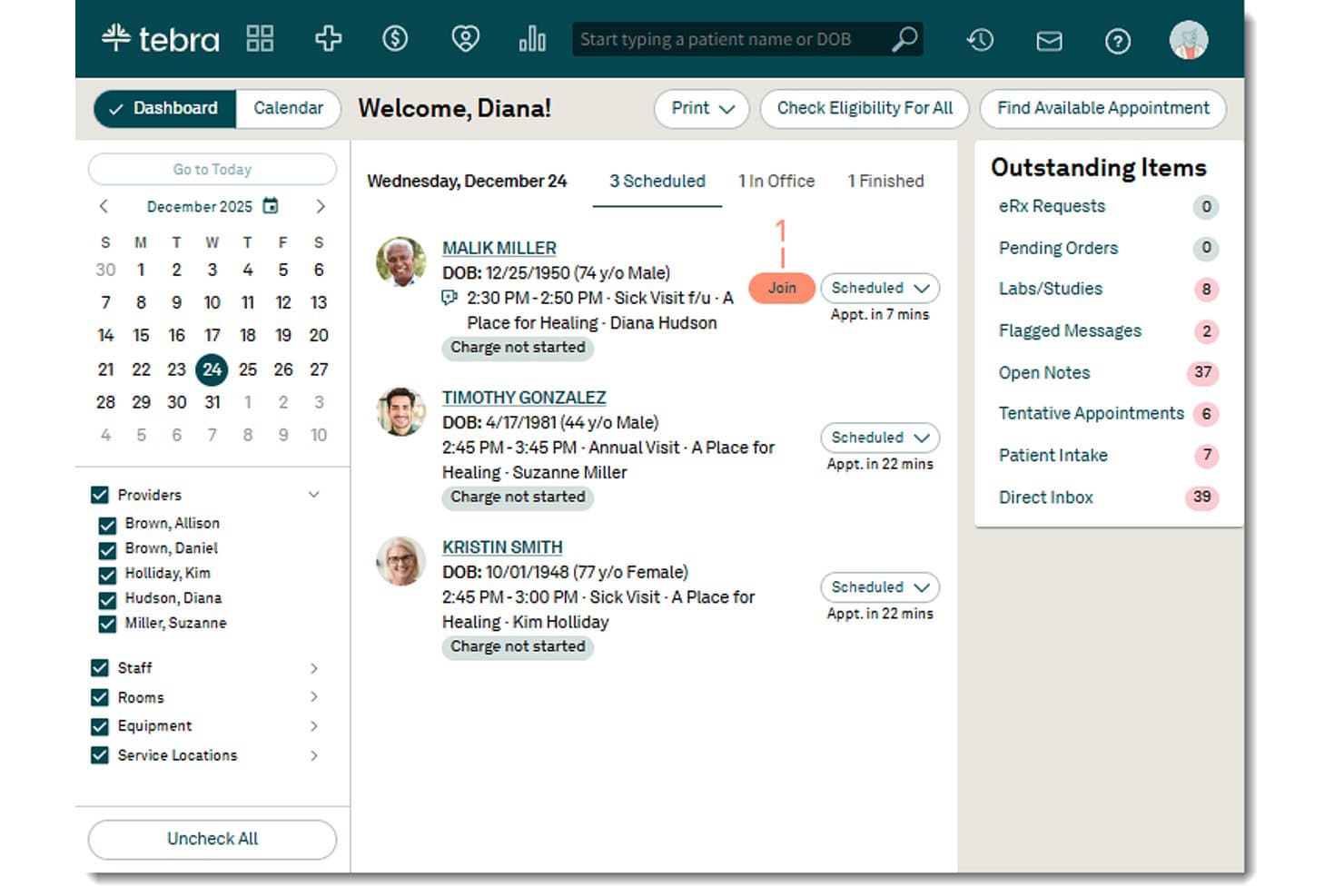
Tebra offers a telehealth dashboard with a 'Join' button for telemedicine appointments, enabling HIPAA-compliant virtual visits directly from the scheduling interface. Tebra is an EHR-native telehealth platform built for independent practices, combining HIPAA- and HITRUST-certified video visits, virtual waiting rooms, group appointments, and integrated billing within a single clinical system.
Who Is Tebra Best For?
Tebra is a strong fit for independent and small-group practices, particularly in primary care, behavioral health, and specialty care, that want telehealth built into their existing EHR rather than bolted on.
Why I Picked Tebra
I picked Tebra as one of the best because telehealth launches directly from the patient chart inside the EHR, with HIPAA- and HITRUST-certified video, so I never have to leave the clinical workflow. I especially like the dedicated provider URL feature, which lets patients join from any browser with a single click and no app download needed. The dual-screen charting option also means I can document the visit in real time while the video call runs in a separate tab.
Tebra Key Features
- Virtual waiting rooms: Staff can admit, message, and manage patients in a secure digital check-in queue.
- ePrescribing with EPCS: Providers can order medications, including controlled substances, directly within the telehealth visit.
- Integrated superbill generation: Automatically create superbills during encounters for faster billing workflows.
- Secure asynchronous messaging: Communicate with patients and share clinical documents using HIPAA-compliant chat.
Tebra Integrations
Tebra offers native integrations with DrChrono, Epic, LabCorp, Quest Diagnostics, Surescripts, and Office Ally. An API is available for custom integrations.
Pros and Cons
Pros:
- EPCS-enabled prescribing within the telehealth encounter
- HITRUST-certified video meets strict compliance standards
- Telehealth launches directly from the patient chart
Cons:
- Not suited for large health systems
- Customer support response times can be slow
Learn more about Tebra:
Alte software-uri de telemedicină conforme cu HIPAA
Iată câteva opțiuni suplimentare de software de telemedicină conforme cu HIPAA care nu au ajuns pe lista mea scurtă, dar care merită totuși analizate:
- 11Teladoc HealthBest for large-scale virtual care
- 12AmwellBest for enterprise virtual care
- 13MendBest for patient-focused virtual visits
- 14CarepatronBest for simple telehealth workflows
- 15JaneBest for multidisciplinary telehealth
- 16KlaraBest for patient communication and telehealth
- 17Practice BetterBest for wellness telehealth programs
- 18UpdoxBest for integrated practice telehealth
- 19eVisitBest for health system virtual care
How I Evaluate HIPAA Compliant Telemedicine Software
I evaluate these platforms in two layers: the compliance and clinical workflow baseline every tool must clear, and the differentiators that matter when providers and patients rely on them daily.
Core Functionality (Table Stakes For This List)
When I'm selecting tools for my list, I rank each one on a scale from 0 (does not offer the functionality) to 5 (excels in this area) for each core functionality listed below. I then calculate the tool's total score into a percentage, using 65% as a benchmark to help assess its overall fit for the list.
- HIPAA compliance: I check for a signed BAA, end-to-end encryption, audit logging, and access controls that cover every data touchpoint including video and chat.
- Video visits: Reliable HD video with a virtual waiting room matters—providers need screen sharing and multi-party support for family or group sessions.
- EHR/PMS integration: I look for bidirectional sync with major EHRs so patient demographics, appointments, and notes flow between systems without manual entry.
- Scheduling and intake: Digital intake forms, e-consent capture, and self-scheduling links should let patients prepare for visits before the provider joins.
- Secure messaging: The platform should support HIPAA-compliant threaded messaging and file sharing for follow-ups like sending lab results or wound photos.
- Telehealth billing: I evaluate whether superbill generation, telehealth-specific CPT codes, and claims workflows align with payer rules so visits translate into revenue.
Once I have a list of tools that meet the criteria, I consider what sets each platform apart.
Differentiating Factors (What Sets Vendors Apart)
Here's how I compare and contrast different vendors:
Standout Features
ePrescribing within a telehealth session is a real differentiator—providers can send prescriptions, including controlled substances via EPCS, without switching to a separate system mid-visit. Group and multi-party video support also matters, especially for behavioral health practices running family or group therapy where every participant needs HIPAA-grade protection. I look for asynchronous store-and-forward capabilities too, which let patients submit photos or messages for non-urgent follow-ups without scheduling a live visit.
Beyond Features
EHR integration depth is a big differentiator—I check whether a platform supports bidirectional sync with systems like Epic or athenahealth via FHIR/HL7 standards, since manual data entry between tools defeats the purpose. Pricing structure matters too: a solo therapist needs per-provider licensing, while a multi-location clinic benefits from enterprise plans with centralized admin controls. I also evaluate how quickly a practice can go live, including whether patients can join visits from a browser link with no app download required.
Cum să alegeți un software de telemedicină conform cu HIPAA
Luarea deciziei corecte presupune să potriviți punctele forte ale fiecărei platforme cu fluxul dumneavoastră real de lucru pentru telemedicină, cu prioritățile privind securitatea și cu cele privind facturarea:
| Dacă prioritatea dumneavoastră este… | Acordați prioritate… |
| Maximizarea securității și posibilității de auditare a PHI | BAA semnat, criptare completă, jurnale exportabile |
| Integrarea fluentă cu EHR/gestionarea cabinetului | Integrări EHR/PM native, bidirecționale |
| Înregistrarea și pregătirea rapidă a pacienților | Colectare digitală personalizabilă a datelor și programare autonomă |
| Sprijinirea consultațiilor complexe (de grup, de familie, cu mai multe părți) | Opțiuni video și asincrone flexibile |
| Asigurarea rambursării facile pentru furnizori | Codificare specifică telemedicinei și fluxuri de lucru pentru solicitările de rambursare |
Cum să vă evaluați lista scurtă
- Solicitați modelul BAA semnat: Cereți fiecărui furnizor să vă pună la dispoziție acordul standard de asociat comercial, pentru a fi analizat de departamentul juridic înainte de demonstrație.
- Testați sincronizarea EHR cu înregistrări de test: Efectuați o probă folosind date sintetice despre pacienți pentru a confirma integrarea în timp real — capturile de ecran nu sunt suficiente.
- Trimiteți și primiți mesaje de test cu fișiere clinice: Trimiteți un rezumat de probă al consultației, o imagine sau un formular de înregistrare pentru a verifica mesageria securizată conformă cu HIPAA.
- Analizați un model complet de superbill: Solicitați un superbill recent pentru o consultație de telemedicină sau un model de solicitare de rambursare acceptat de plătitor.
- Decideți: integrare EHR de top sau fluxuri de lucru mai flexibile? Platformele care excelează la conformitate și conectivitate clinică necesită adesea configurare și costuri suplimentare, în timp ce altele pot pune accentul pe ușurința de utilizare și rapiditatea pentru echipele mici.
Ce este software-ul de telemedicină conform cu HIPAA?
Software-ul de telemedicină conform cu HIPAA este o platformă digitală care permite furnizorilor de servicii medicale să ofere îngrijire virtuală pacienților, respectând în același timp cerințele stricte privind confidențialitatea și securitatea datelor medicale. Aceste platforme includ funcții precum consultații video securizate, formulare digitale de înregistrare și mesagerie criptată, pentru a păstra informațiile medicale protejate în siguranță și accesibile în timpul consultațiilor la distanță. Ele sunt concepute pentru clinici și cadre medicale care trebuie să protejeze în mod fiabil datele pacienților și să mențină conformitatea cu reglementările în timpul fiecărei consultații de telemedicină.
Funcțiile software-ului de telemedicină conform cu HIPAA
Atunci când selectați un software de telemedicină conform cu HIPAA, urmăriți următoarele funcții esențiale:
- Consultații video securizate: Consultații video în timp real, criptate de la un capăt la altul, pentru a păstra confidențialitatea interacțiunilor dintre pacienți și furnizori și pentru a asigura conformitatea.
- Formulare digitale de preluare a informațiilor: Formulare online care le permit pacienților să transmită în siguranță date demografice, consimțământul și informațiile despre asigurare înainte de consultația de telesănătate.
- Acord BAA semnat inclus: Furnizorul de software oferă un Acord de asociat comercial care acoperă toate punctele de contact cu datele, pentru liniște sufletească în ceea ce privește conformitatea.
- Integrare cu dosarul electronic de sănătate: Posibilitatea de sincronizare cu dosarul electronic de sănătate sau cu sistemul de gestionare a cabinetului, astfel încât notele consultațiilor și programările să fie transferate automat.
- Sală de așteptare virtuală: Pacienții se conectează online, completează formularele necesare și așteaptă să fie primiți, la fel ca într-o clinică fizică.
- Mesagerie securizată HIPAA: Chat criptat care le permite furnizorilor și pacienților să schimbe mesaje, imagini și documente fără a încălca normele privind confidențialitatea.
- Prescriere electronică: Instrumente de nivel clinic pentru trimiterea rețetelor noi — inclusiv pentru substanțe controlate — direct la farmacia preferată a pacientului.
- Asistență pentru facturarea serviciilor de telesănătate: Funcții pentru eficientizarea codificării, generarea notelor de plată detaliate și facilitarea solicitărilor de despăgubire către asigurări pentru consultațiile virtuale.
- Controale de acces pentru furnizori și pacienți: Setări solide de permisiuni pentru gestionarea persoanelor care pot vizualiza, edita sau partaja date sensibile despre sănătate în cadrul echipei de îngrijire.
- Jurnalizarea auditurilor: Înregistrarea automată a istoricului accesărilor și activităților pentru a asigura responsabilitatea în fața cerințelor de reglementare și pentru a permite trasabilitatea ulterioară consultației.
Beneficiile software-ului de telemedicină conform HIPAA
Implementarea unui software de telemedicină conform HIPAA oferă mai multe beneficii pentru echipa și afacerea dumneavoastră. Iată câteva dintre acestea:
- Securitate mai bună a datelor: Criptarea integrată, controalele de acces și jurnalele de audit contribuie la protejarea informațiilor sensibile despre sănătatea pacienților în fiecare etapă a îngrijirii.
- Liniște sufletească în ceea ce privește reglementările: Acordurile BAA automate, mesageria securizată și fluxurile de lucru conforme asigură respectarea cerințelor HIPAA de către operațiunile de telesănătate și evitarea penalităților costisitoare.
- Flux de lucru virtual integrat: Preluarea digitală a informațiilor, integrarea cu dosarul electronic de sănătate și consultațiile video securizate le permit echipelor să gestioneze fără probleme programările de telesănătate împreună cu îngrijirea în persoană.
- Înrolarea mai rapidă a pacienților: Funcții precum programarea individuală și formularele digitale reduc efortul administrativ și îi pregătesc pe pacienți pentru consultațiile virtuale cu mai puțină muncă manuală.
- Colaborare flexibilă între furnizori: Sesiunile de grup securizate, mesageria și partajarea fișierelor sprijină sănătatea comportamentală, sesiunile de familie și consultațiile bazate pe colaborarea echipei.
- Facturare și rambursare simplificate: Instrumentele de facturare specifice telesănătății facilitează generarea notelor de plată detaliate și trimiterea solicitărilor conforme pentru personalul dumneavoastră.
- Experiență îmbunătățită pentru pacienți: Sălile de așteptare virtuale, prescrierea electronică și linkurile de conectare fără descărcare le facilitează pacienților accesul confortabil la îngrijire.
Costurile și prețurile software-ului de telemedicină conform HIPAA
Selectarea unui software de telemedicină conform HIPAA necesită înțelegerea diferitelor modele de tarifare și planuri disponibile. Costurile variază în funcție de funcții, dimensiunea echipei, suplimente și alți factori. Tabelul de mai jos sintetizează planurile comune, prețurile lor medii și funcțiile incluse de obicei în soluțiile software de telemedicină conforme HIPAA:
Tabel comparativ al planurilor pentru software de telemedicină conform HIPAA
| Tipul planului | Preț mediu | Funcții comune |
| Plan gratuit | $0 | Consultații video de bază, mesagerie limitată și formulare manuale de preluare a informațiilor. |
| Plan personal | $30-$70/utilizator/lună | Consultații video securizate, preluare digitală a informațiilor, programare, Acord BAA conform HIPAA și asistență standard. |
| Plan pentru companii | $80-$200/utilizator/lună | Consultații de grup, prescriere electronică, integrare cu dosarul electronic de sănătate, mesagerie pentru echipă, facturarea serviciilor de telesănătate și fluxuri de lucru personalizabile. |
| Plan pentru întreprinderi | $200+/utilizator/lună | Asistență pentru mai multe locații, analize avansate, SSO, integrări personalizate, controale administrative dedicate și SLA-uri. |
Întrebări frecvente despre software-ul de telemedicină conform cu HIPAA
Iată câteva răspunsuri la întrebările frecvente despre software-ul de telemedicină conform cu HIPAA:
Ce face ca software-ul de telemedicină să fie conform cu HIPAA?
Software-ul de telemedicină conform cu HIPAA trebuie să implementeze funcții de securitate precum criptarea, controalele de acces și jurnalele de audit și să ofere un acord de asociat comercial (BAA) semnat pentru a proteja informațiile medicale ale pacienților.
Pot practicienii independenți să utilizeze software de telemedicină conform cu HIPAA la un preț accesibil?
Da, majoritatea furnizorilor oferă planuri pentru utilizatori individuali și grupuri mici, concepute pentru practicienii independenți, cu funcții esențiale de telesănătate, conformitate cu HIPAA și costuri lunare mai mici.
Cum contribuie sălile de așteptare virtuale la fluxul de lucru clinic?
Sălile de așteptare virtuale le permit pacienților să se înregistreze, să completeze formulare și să aștepte să fie primiți, ajutând personalul să gestioneze programările, să mențină ordinea și să păstreze un flux al consultațiilor similar celui din vizitele în persoană.
Software-ul de telemedicină conform cu HIPAA acceptă prescrierea electronică?
Da, multe platforme includ prescriere electronică integrată, adesea cu suport pentru substanțe controlate și selectarea în timp real a farmaciei în timpul vizitei virtuale.
Cum pot confirma afirmațiile unui furnizor privind conformitatea cu HIPAA?
Solicitați furnizorilor să vă ofere o copie a BAA, detalii despre practicile lor de criptare și documentație privind controalele de acces sau jurnalizarea auditurilor înainte de a finaliza alegerea furnizorului.