

Software-ul accesibil de facturare medicală oferă cabinetului dumneavoastră funcțiile esențiale de facturare de care aveți nevoie — precum trimiterea cererilor de rambursare, înregistrarea plăților și verificarea asigurărilor — fără costuri lunare ridicate sau suplimente ascunse. Dacă comparați opțiuni pentru a reduce costurile, respectând în același timp cerințele de reglementare și ciclurile de rambursare, ați ajuns în locul potrivit.
Mai jos veți găsi alegerile mele principale de software accesibil de facturare, potrivite pentru echipele care trebuie să echilibreze îngrijirea pacienților, eficiența și bugetele stricte. Folosiți acest ghid pentru a identifica rapid opțiunea potrivită, pentru a înțelege de unde provin cu adevărat economiile și pentru a evita problemele costisitoare pe termen lung.
Why Trust Our Software Recommendations
6,700+
Reviews
20
Industry experts
16+
Evaluation factors
14
Years
Our team has been testing and reviewing software since 2012. As medical practice leaders ourselves, we know how difficult—and important—it is to choose the right software.
For this guide, we evaluated tools using hands-on testing and independent research, scoring tools using our selection criteria.
Our reviews reflect our human editorial judgment, not a sales pitch.
Tabel comparativ al software-urilor accesibile de facturare medicală
Acest tabel comparativ rezumă detaliile privind prețurile pentru software-ul meu accesibil de facturare medicală.
Sorted by: Default
| Tool | Starting Price | Website | |
|---|---|---|---|
Best for integrated scheduling and billing | 4.2 out of 5 | Pricing upon request Not available | Website |
Best for mobile device billing access | 3.9 out of 5 | Pricing upon request Free demo available | Website |
Best for desktop-based billing solutions | 4.4 out of 5 | Pricing upon request Free consultation available | Website |
Best for analytics-driven billing insights | 3.6 out of 5 | Pricing upon request Free demo available | Website |
Best for large practice automation features | 3.6 out of 5 | $130/user/month 30-day free trial + free demo available | Website |
Best for simple claim submission workflows | 4.5 out of 5 | $199/user/month Free demo available | Website |
Best for real-time claim tracking tools | 4.1 out of 5 | Pricing upon request Free demo available | Website |
Best for combining billing with patient engagement | 3.9 out of 5 | Pricing upon request Free demo available | Website |
Best for multi-location practice management | 4.1 out of 5 | Pricing upon request Free demo available | Website |
Best for built-in clearinghouse at no extra cost | Not rated | Free Free plan available | Website |


Recenzii ale celor mai bune software-uri accesibile de facturare medicală
Mai jos sunt prezentate rezumatele mele detaliate ale celor mai bune software-uri accesibile de facturare medicală care au ajuns pe lista mea scurtă. Recenziile mele oferă o privire detaliată asupra funcțiilor, prețurilor și celor mai potrivite situații de utilizare pentru fiecare software, pentru a vă ajuta să îl găsiți pe cel mai potrivit pentru dumneavoastră.
 Best for integrated scheduling and billing
- Not available
- Pricing upon request
Visit WebsiteCustomer Rating:4.2/5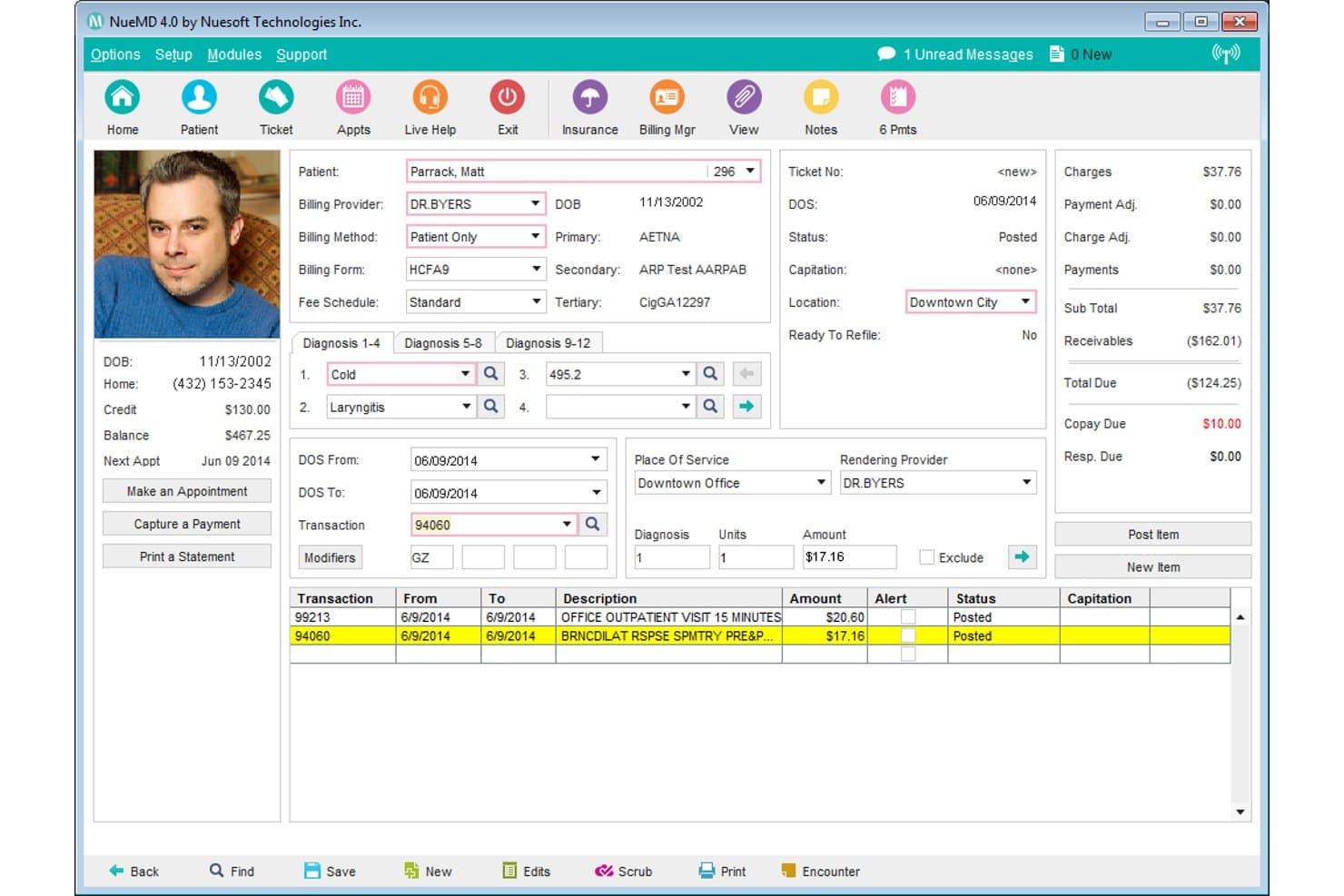
NueMD offers a detailed patient billing ticket screen displaying diagnoses, transactions, charges, and payment summaries in one view. NueMD is a cloud-based medical billing and practice management platform that combines electronic claims submission, appointment scheduling, EHR, and patient billing tools for small and independent practices.
Who Is NueMD Best For?
NueMD is a good fit for solo physicians and small independent practices that need scheduling and billing managed within a single platform.
Why I Picked NueMD
NueMD earns its spot on my shortlist because scheduling and billing genuinely operate as one system, not two tools bolted together. I like that appointment data flows directly into the billing workflow, so claims are tied to patient visits without manual re-entry. NueMD also runs its own HIPAA-compliant clearinghouse, processing unlimited claims with built-in scrubbing against a database of over 10 million federal and commercial claims.
NueMD Key Features
- Customizable templates: Create specialty-specific documentation and billing forms for over 100 medical specialties.
- ONC-ATCB certified EHR: Access integrated electronic health records with e-prescribing and lab results management built in.
- Patient portal: Allow patients to view statements, securely message your office, and view or pay balances online.
- Mobile app access: Manage schedules, records, and billing tasks from iOS or Android devices.
NueMD Integrations
Native integrations are not clearly documented. The tool supports data exports and API access for custom integrations.
Pros and Cons
Pros:
- Patient portal for statements and payments
- Unlimited electronic claims through built-in clearinghouse
- Scheduling integrated directly with billing workflow
Cons:
- Product scheduled for end-of-life December 2026
- No transparent or current pricing listed
Learn more about NueMD: Best for mobile device billing access
- Free demo available
- Pricing upon request
Visit WebsiteCustomer Rating:3.9/5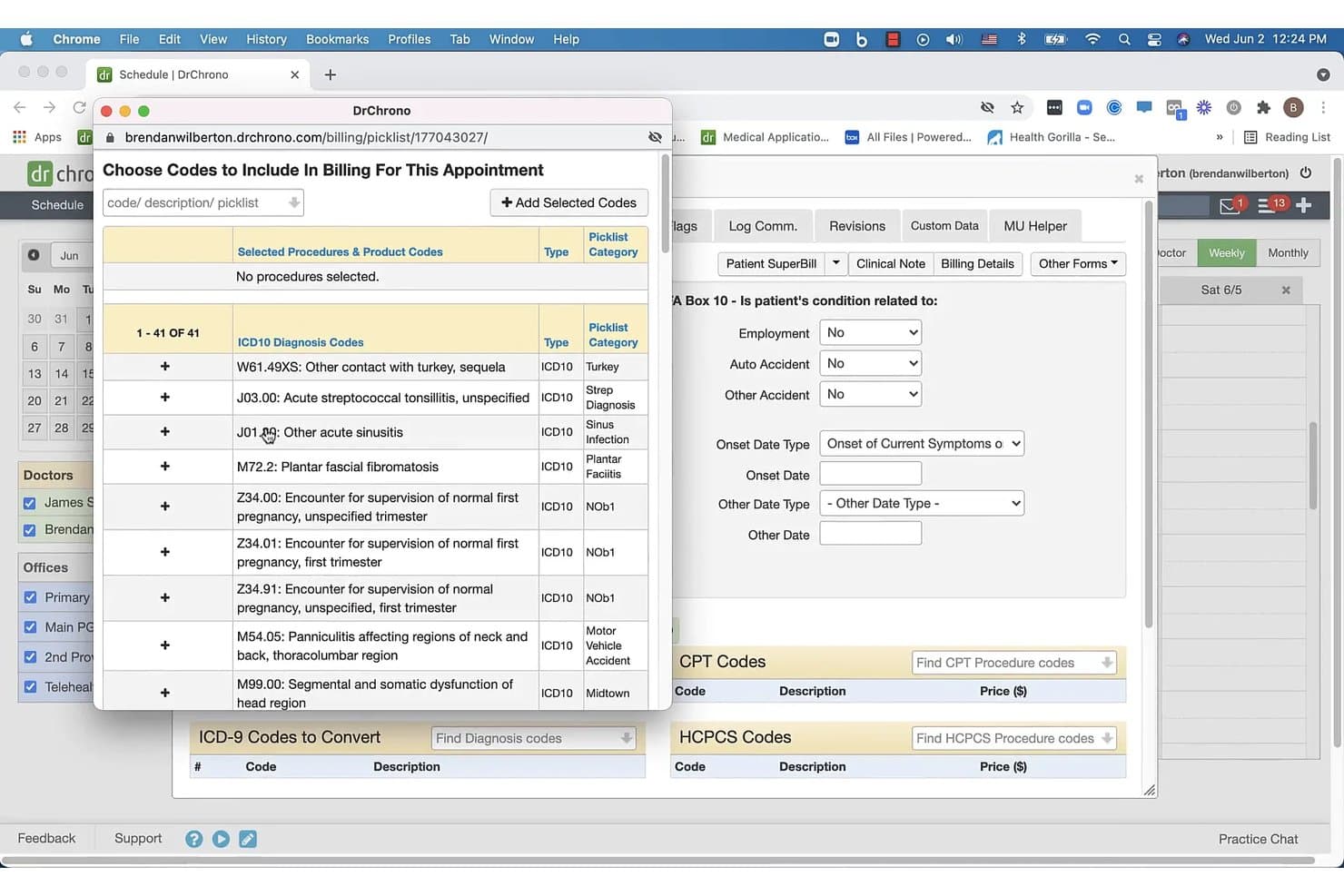
DrChrono offers a billing picklist interface where users can select ICD-10 diagnosis codes to include in patient appointment billing. DrChrono is an EHR-integrated medical billing platform that combines claims submission, coding support, ERA auto-posting, denial management, and patient billing in a single system built for independent practices.
Who Is DrChrono Best For?
DrChrono is a strong fit for independent physicians and small practice administrators who run their workflows primarily on Apple devices.
Why I Picked DrChrono
DrChrono earns its spot on my shortlist because it's the only billing platform in this space built natively for Apple hardware from the ground up. I can pull up the live claims feed, review denial statuses, and post ERA payments directly from an iPhone or iPad between patient visits. Because the billing and EHR modules share the same data layer, a completed encounter on my iPad flows directly into a claim without any re-entry.
DrChrono Key Features
- Integrated coding libraries: Access and search updated ICD-10, CPT, and HCPCS codes directly within the billing module.
- Automated ERA payment posting: Automatically post payments and adjustments from electronic remittance advice files to patient accounts.
- Custom billing profiles: Set up profiles for common procedures and payer requirements to speed up charge entry.
- Electronic patient statements: Generate and send electronic or printed statements to patients, with patient portal balance viewing.
DrChrono Integrations
DrChrono offers over 20 native integrations, including Box, Square Point of Sale, Ambra, ClearGage, Collectly, Curogram, DeepScribe, Demandforce, Quest, and LabCorp, and provides an API for custom integrations.
Pros and Cons
Pros:
- Automated patient statement generation
- Robust mobile apps for iPhone and iPad
- Full billing and EHR data integration
Cons:
- No public base pricing for billing plans
- Billing module requires full EHR subscription
Learn more about DrChrono: Best for desktop-based billing solutions
- Free consultation available
- Pricing upon request
Visit WebsiteCustomer Rating:4.4/5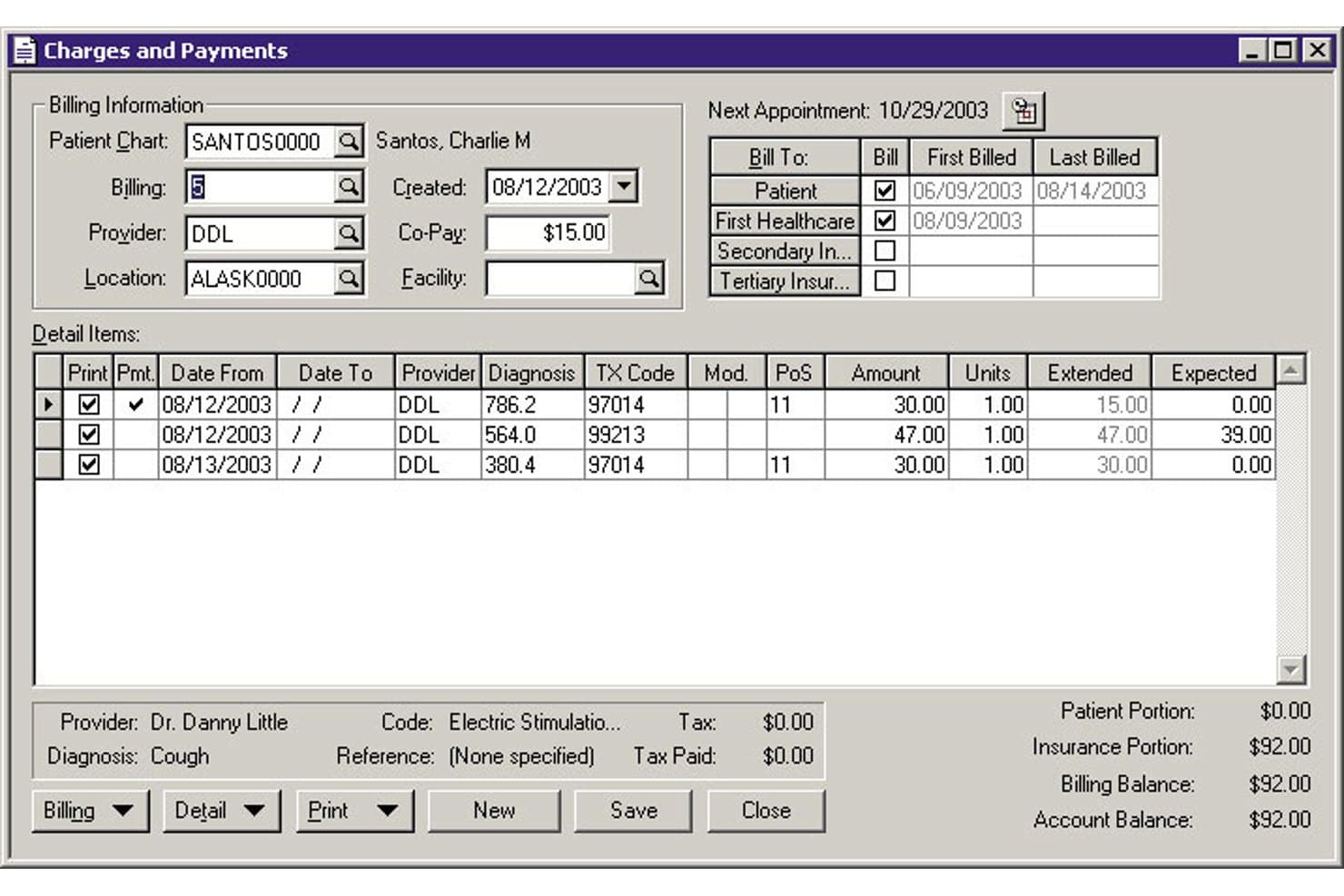
MEDISOFT offers a detailed Charges and Payments screen for managing patient billing, insurance portions, and itemized service entries. MEDISOFT is a medical billing and practice management software that handles claims submission, payment posting, patient scheduling, and coding — available as either a one-time perpetual desktop license or a monthly cloud subscription.
Who Is MEDISOFT Best For?
MEDISOFT is a strong fit for independent billing specialists and small practices that prefer owning their software outright rather than paying ongoing subscription fees.
Why I Picked MEDISOFT
MEDISOFT earns its spot on my shortlist because it's one of the few billing platforms that still offers a true perpetual desktop license, starting at $675 one-time for solo providers. I particularly like the built-in Office Hours scheduler and the 200+ pre-configured reports, which cover financial, managed care, and chiropractic billing without requiring separate add-ons. Version 30's Enhanced Patient Responsibility Estimates also let practices generate upfront cost breakdowns before a claim is even submitted.
MEDISOFT Key Features
- Mobile patient kiosk: Patients can check in and update information using a mobile app in your office.
- Final Draft word processor: Write and customize medical documents with built-in templates and spell check.
- Integrated payment processing: Collect card and ACH payments directly through CGM PAY integration.
- Electronic claims add-on: Submit claims electronically to payers and clearinghouses from within MEDISOFT.
MEDISOFT Integrations
MEDISOFT offers native integrations with eMEDIX for electronic claims, Review Wave and AutoReminder for patient reminders, Vosita for online appointments, and CGM PAY for payment processing. An API is available for custom integrations.
Pros and Cons
Pros:
- Reliable offline use for billing operations
- Includes industry-specific workflow templates
- Offers perpetual desktop and cloud versions
Cons:
- Slow report generation with large datasets
- Limited modern coding assistance built in
Learn more about MEDISOFT: Best for analytics-driven billing insights
- Free demo available
- Pricing upon request
Visit WebsiteCustomer Rating:3.6/5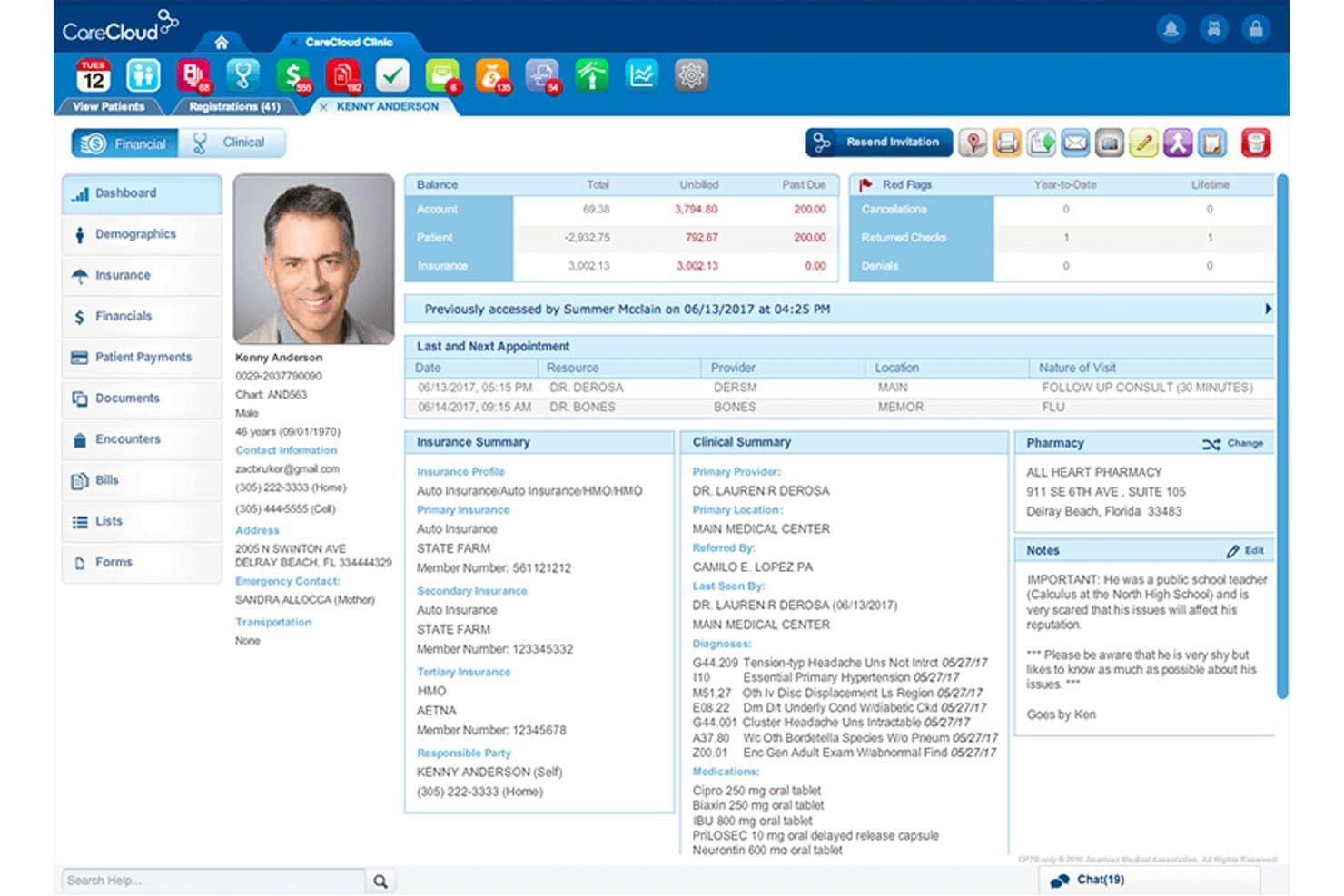
CareCloud offers a comprehensive patient profile dashboard displaying billing balances, insurance summaries, clinical notes, and appointment history in one view. CareCloud is a cloud-based medical billing platform that combines claims submission, denial management, ERA auto-posting, and analytics-driven reporting for small and mid-size practices.
Who Is CareCloud Best For?
CareCloud is a good fit for small group practices and practice administrators who need billing analytics and RCM oversight without building a dedicated in-house billing team.
Why I Picked CareCloud
CareCloud earns its spot on my shortlist because of how it turns billing data into actionable insight. The Advanced Analytics dashboard lets me segment performance by payer, provider, and location, pinpointing exactly where denials are clustering. I also rely on the CollectiveIQ rules engine, which catches payer-specific coding errors before claims go out, keeping the first-pass rate consistently high.
CareCloud Key Features
- Built-in clearinghouse: Submit claims directly to multiple payers without relying on an external clearinghouse.
- Centralized billing dashboard: Manage billing for all providers or locations in a single interface.
- ERA auto-posting: Automatically posts electronic remittance advice to patient accounts for easy reconciliation.
- Batch payment processing: Record payments across multiple claims or patients in one step.
CareCloud Integrations
CareCloud offers native integrations with CodoniX EHR, EHRYourWay, ICANotes, MD Logic, Optivate, Praxis EMR, Sevocity, TeleVox, and Vital Interaction. An API is available for custom integrations. The platform also integrates with clearinghouses like Change Healthcare, TriZetto, and Availity.
Pros and Cons
Pros:
- Automated denial resolution process
- CollectiveIQ rules engine for claim scrubbing
- Advanced analytics dashboard for billing insights
Cons:
- Three-year contract commitments commonly required
- Quote-based pricing, not transparent
Learn more about CareCloud: Best for large practice automation features
- 30-day free trial + free demo available
- From $130/user/month
Visit WebsiteCustomer Rating:3.6/5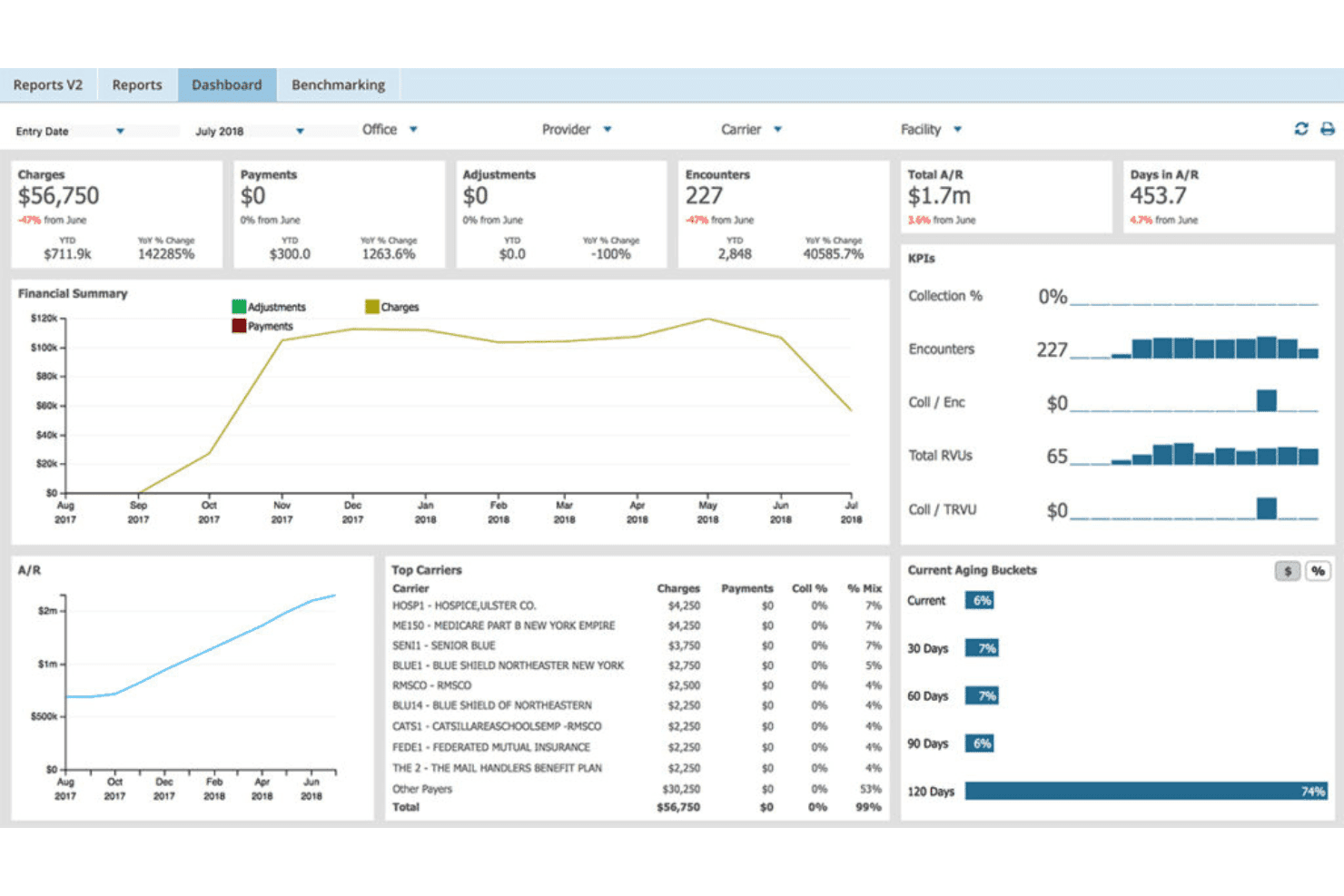
AdvancedMD unites EMR, documentation, billing, claims, eligibility, and RCM. AdvancedMD is a cloud-based medical billing platform that combines claims scrubbing, ERA processing, denial management, patient billing, and a built-in clearinghouse into a unified system for independent and multi-provider practices.
Who Is AdvancedMD Best For?
AdvancedMD is a strong fit for growing group practices and independent billing specialists managing claims across multiple providers or locations.
Why I Picked AdvancedMD
AdvancedMD earns its spot on my shortlist because of how far its automation goes at the claims level. I particularly like ClaimInspector, which runs nearly 3.5 million edits per claim against HIPAA, CCI, and payer-specific rules before a claim ever leaves the system. The Central Billing Office (CBO) module is also something I rely on for multi-provider work, letting me toggle across client databases under one login without re-authenticating each time.
AdvancedMD Key Features
- Integrated ERA and EOB processing: Automatically ingests and posts electronic remittance advice for smoother payment reconciliation.
- Patient payment portal: Lets patients view balances and pay online through a dedicated portal.
- Insurance eligibility verification: Checks patient coverage before appointments to reduce rejections.
- Customizable patient statements: Generates branded, detailed statements for individual or batch printing.
AdvancedMD Integrations
AdvancedMD offers native integrations with OpenEdge for payment processing and provides a marketplace of partner integrations. An open API is available for custom integrations.
Pros and Cons
Pros:
- Built-in patient payment portal
- Automated ERA and denial management workflows
- Advanced claims scrubbing and batch edits
Cons:
- Training and setup require notable time investment
- Pricing is not transparent for most users
 Best for simple claim submission workflows
- Free demo available
- From $199/user/month
Visit WebsiteCustomer Rating:4.5/5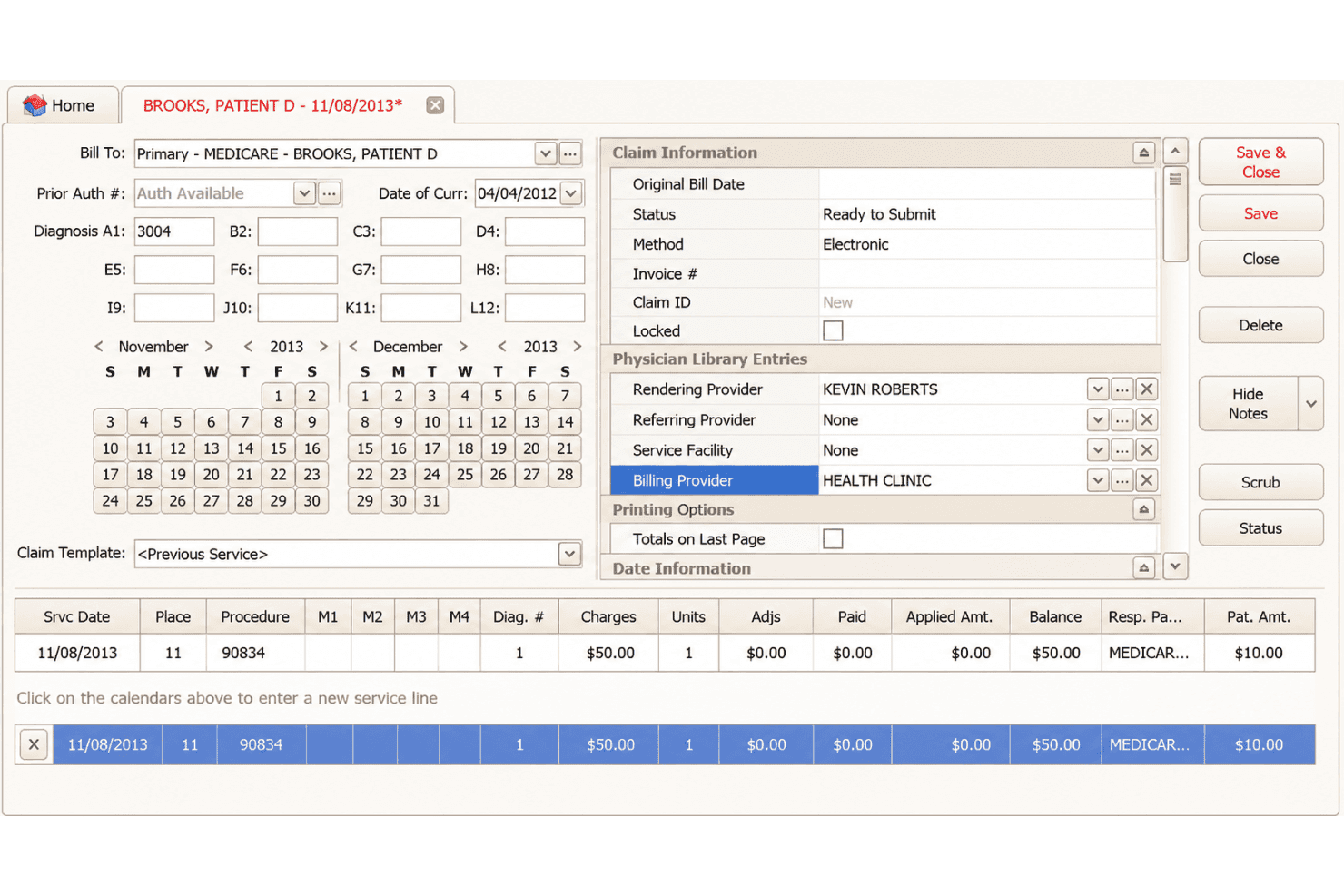
EZClaim covers claims, ERA posting, eligibility, statements and online payments. EZClaim is a cloud-based medical billing platform for small-to-mid-sized practices that covers electronic claim submission, ERA auto-posting, eligibility verification, patient statements, and integrated payment processing.
Who Is EZClaim Best For?
EZClaim is a strong fit for independent billing specialists and small practice administrators who need a no-frills claims management tool without enterprise-level pricing.
Why I Picked EZClaim
EZClaim earns its spot on my shortlist because its end-to-end claim submission workflow is genuinely self-contained. I like that Alpha II claim scrubbing catches coding errors before submission, cutting down on rework before claims even reach the clearinghouse. From there, ANSI 837 files route to payers through TriZetto, Change Healthcare, or Availity, and ERA auto-posting handles remittances on the back end without manual entry.
EZClaim Key Features
- EZClaimPay payment processing: Collect patient payments and store cards securely within the billing workflow.
- Integrated scheduling calendar: Drag-and-drop scheduling links appointments directly to claims.
- Customizable built-in reports: Access and modify over 40 preloaded reports for billing insights.
- HIPAA-compliant portal: Offer read-only, branded access for patients and external users.
EZClaim Integrations
EZClaim offers native integrations with TriZetto, Change Healthcare, Availity, Practice Fusion, WebPT, Amazing Charts, QuickEMR, BillFlash, ReminderCall, and Alpha II. An API is available for custom integrations.
Pros and Cons
Pros:
- Patient payment portal with cards on file
- Reliable ERA auto-posting saves manual work
- Claim scrubbing catches errors before submission
Cons:
- No AI-assisted coding or suggestions
- No built-in payer contract management
Learn more about EZClaim: Best for real-time claim tracking tools
- Free demo available
- Pricing upon request
Visit WebsiteCustomer Rating:4.1/5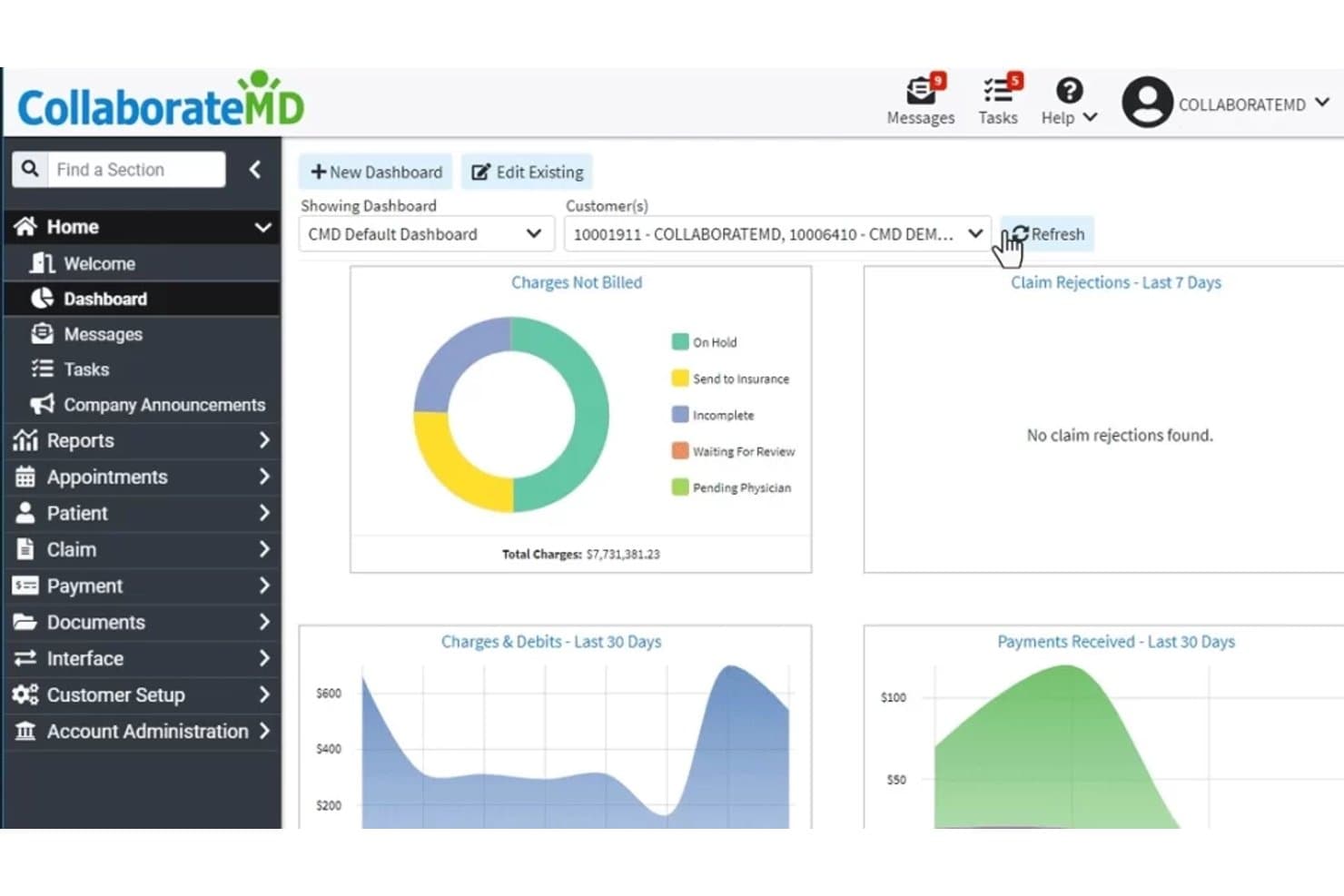
CollaborateMD offers an intuitive dashboard displaying charges not billed, claim rejections, charges and debits, and payments received over the last 30 days. CollaborateMD is a cloud-based medical billing platform that combines real-time claim submission, built-in clearinghouse processing, denial management, ERA auto-posting, and patient payment collection for independent practices and billing companies.
Who Is CollaborateMD Best For?
CollaborateMD is a strong fit for independent billing companies and small private practices that manage claims across multiple payers and specialties.
Why I Picked CollaborateMD
CollaborateMD earns its spot on my shortlist because of how it handles claim visibility from submission through payment. I particularly like that real-time claim submission runs through a built-in clearinghouse, so I can see exactly where a claim stands the moment it's transmitted. The Intelligent Claim Rejection Support feature translates payer rejection codes into plain language with suggested corrective steps, so my team spends less time decoding denials and more time fixing them.
CollaborateMD Key Features
- Automated eligibility verification: Quickly checks patient insurance eligibility before services are rendered.
- Customizable reporting dashboard: Lets you generate and filter financial, operational, and workflow reports across your practice.
- Integrated patient payment portal: Patients can make online payments directly through a secure interface.
- Appointment scheduler: Allows users to book, modify, and track appointments from within the billing platform.
CollaborateMD Integrations
CollaborateMD offers 12 native integrations, including Practice Fusion, Elation, Amazing Charts, Hello Health, Kipu, Medical Mime, Praxis EMR, PrognoCIS, Ritten, Sevocity, WebPT, and Alleva. Native diagnostic integrations include Quest Diagnostics, LabCorp, and LabDAQ. An API is available for custom integrations.
Pros and Cons
Pros:
- Patient payment portal with card-on-file option
- Automated ERA posting and claim scrubbing
- Real-time claim status updates with tracking
Cons:
- Occasional downtime reported during system updates
- Pricing is not published on the website
Learn more about CollaborateMD: Best for combining billing with patient engagement
- Free demo available
- Pricing upon request
Visit WebsiteCustomer Rating:3.9/5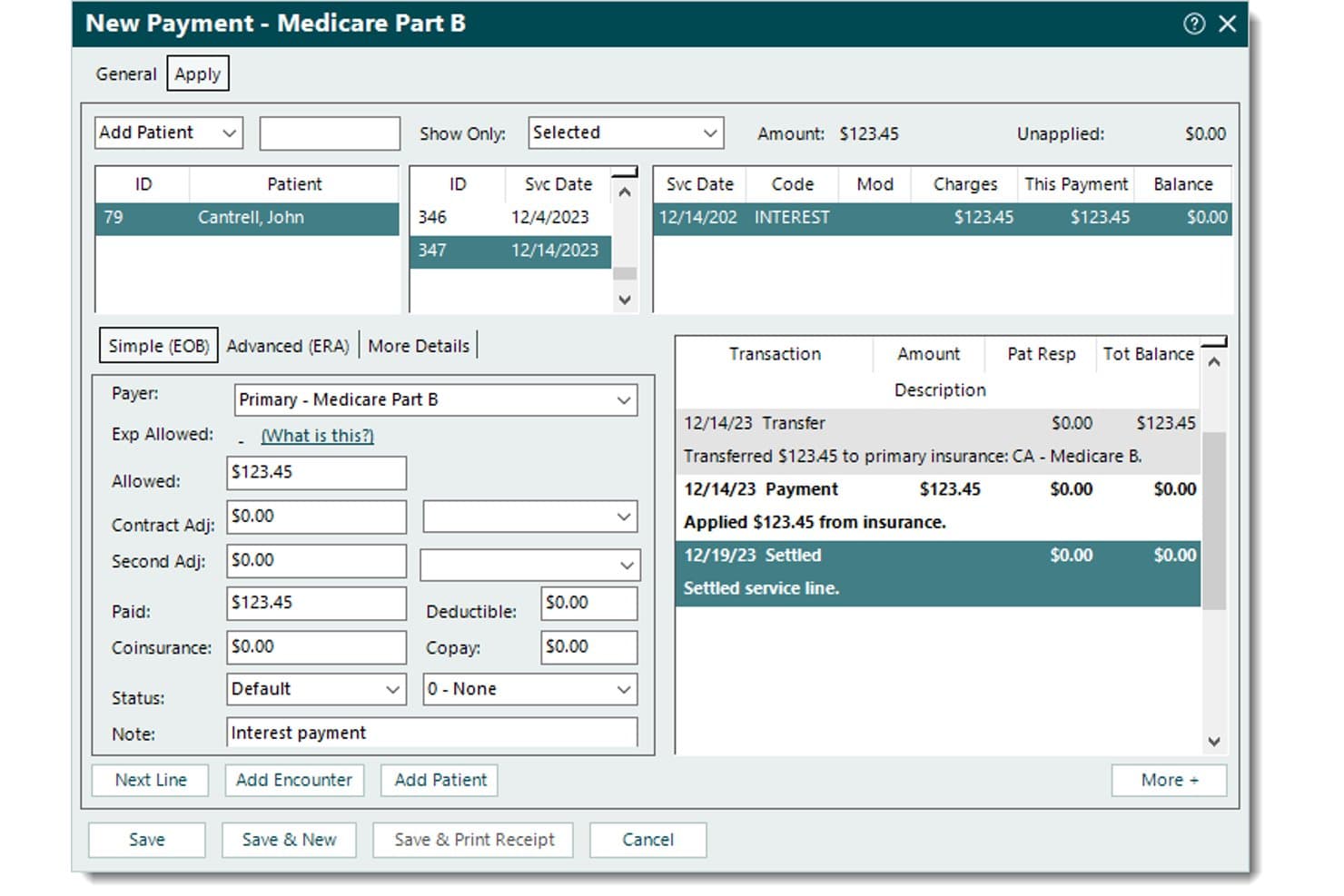
Tebra records Medicare payments, applied amounts, patient balances, adjustments, and transaction history. Tebra is a billing and practice management platform designed for independent practices that pairs electronic claims submission, ERA auto-posting, and denial management with built-in patient engagement tools.
Who Is Tebra Best For?
Tebra is a strong fit for independent practices with up to 10 providers that want billing and patient engagement managed within a single platform.
Why I Picked Tebra
I picked Tebra as one of the best because it's the only platform I've used that connects billing directly to patient engagement without switching tools. I like that it sends automated statements with QR codes and embedded payment links via text or email, so patients can pay from their phones. Card-on-file and in-person payment options sit in the same workflow as insurance claim submission, which keeps the full payment cycle in one place.
Tebra Key Features
- Automated insurance eligibility checks: Instantly verifies coverage, copays, and deductibles through integrated payer connections.
- Rules engine for real-time claim scrubbing: Identifies and flags coding errors before electronic claim submission.
- RPA-based ERA auto-posting: Automatically posts electronic remittance advice and reconciles insurance payments.
- Provider-based licensing model: Includes unlimited non-clinical staff access at no extra cost for each subscribing provider.
Tebra Integrations
Tebra offers native integrations with WebPT, QuickEMR, Relatient, NextPatient, PayPal, Stripe Terminal, DocSpera, Kareo Billing, Stripe, Microsoft Excel, and QuickBooks Online Advanced. It also provides an API for custom integrations.
Pros and Cons
Pros:
- Patient payment links via QR and email
- Automated denial management and claim scrubbing included
- Combines billing and patient engagement features
Cons:
- Clearinghouse issues can delay claim acceptance
- Custom pricing only, no public tiers
Learn more about Tebra: Best for multi-location practice management
- Free demo available
- Pricing upon request
Visit WebsiteCustomer Rating:4.1/5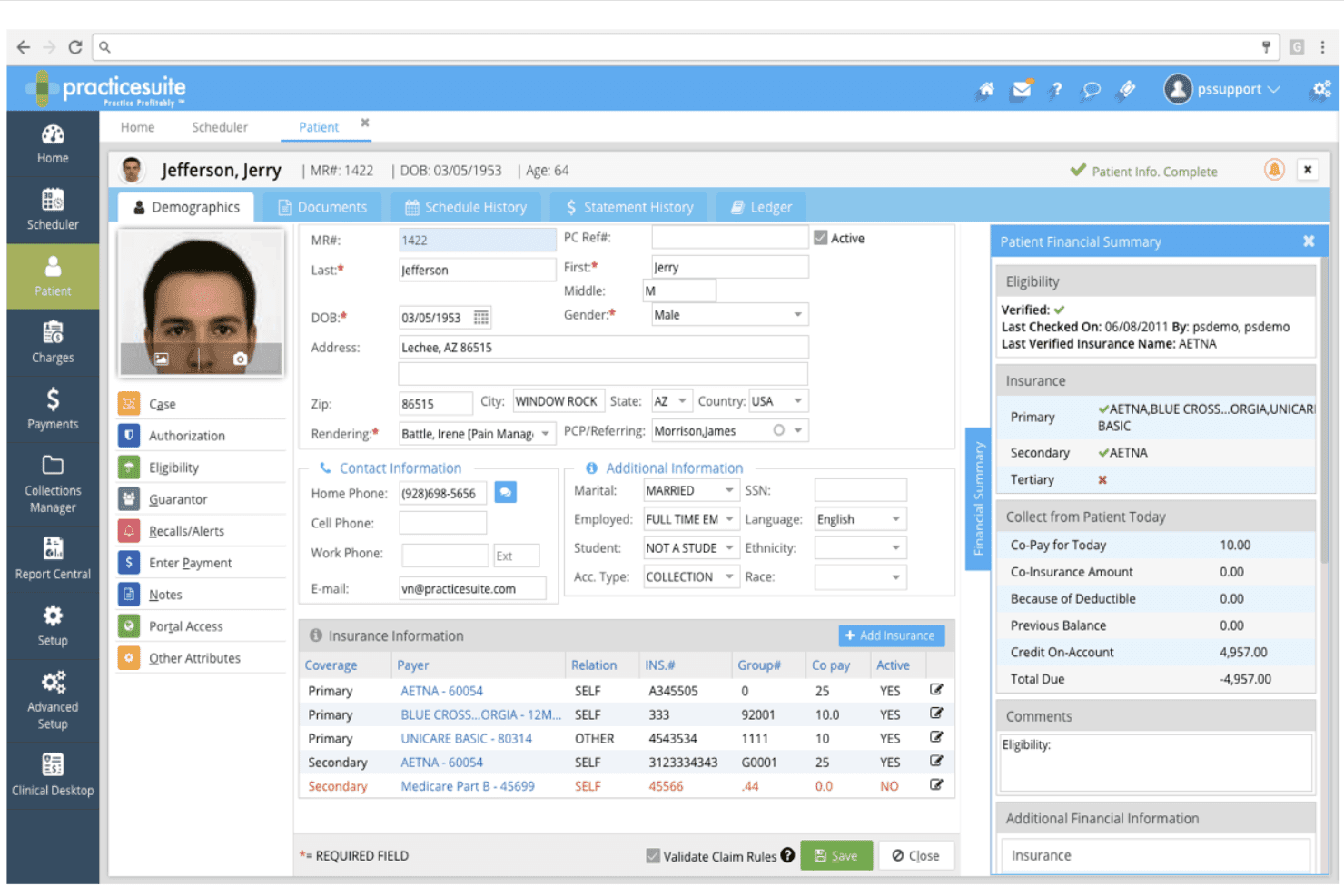
PracticeSuite supports claims, billing, payments, denials, eligibility, and ARs. PracticeSuite is a cloud-based medical billing platform that handles electronic claims submission, denial management, payment posting, patient billing, and coding validation across solo practices, small groups, and multi-location clinics.
Who Is PracticeSuite Best For?
PracticeSuite suits independent billing companies and practice administrators who manage billing workflows across multiple provider accounts or clinic locations.
Why I Picked PracticeSuite
PracticeSuite earns its spot on my shortlist because of how it centralizes billing across multiple locations. I like that mass claim corrections can be applied across all provider accounts at once, instead of working through each location separately. The granular security settings also let me control access by location, hours, and days, which is genuinely useful when staff responsibilities differ across sites.
PracticeSuite Key Features
- AI-powered denial intelligence: Flags potential claim issues before submission to reduce rejections.
- Integrated coding validation module: Checks diagnosis and procedure codes for errors and compliance.
- Patient portal with statement delivery: Lets patients view and download billing statements securely online.
- Automated payment posting from ERA files: Matches payments to claims and updates balances automatically.
PracticeSuite Integrations
PracticeSuite offers native integrations with Practice Fusion and Elation, and supports payer and clearinghouse networks. An API is available for custom integrations.
Pros and Cons
Pros:
- Payment posting and corrections are streamlined
- Claim denial prevention with AI review rules
- Handles multi-location billing from one platform
Cons:
- Complaints about unexpected per-encounter charges
- No public pricing or free trial listed
Learn more about PracticeSuite: Best for built-in clearinghouse at no extra cost
- Free plan available
- Free
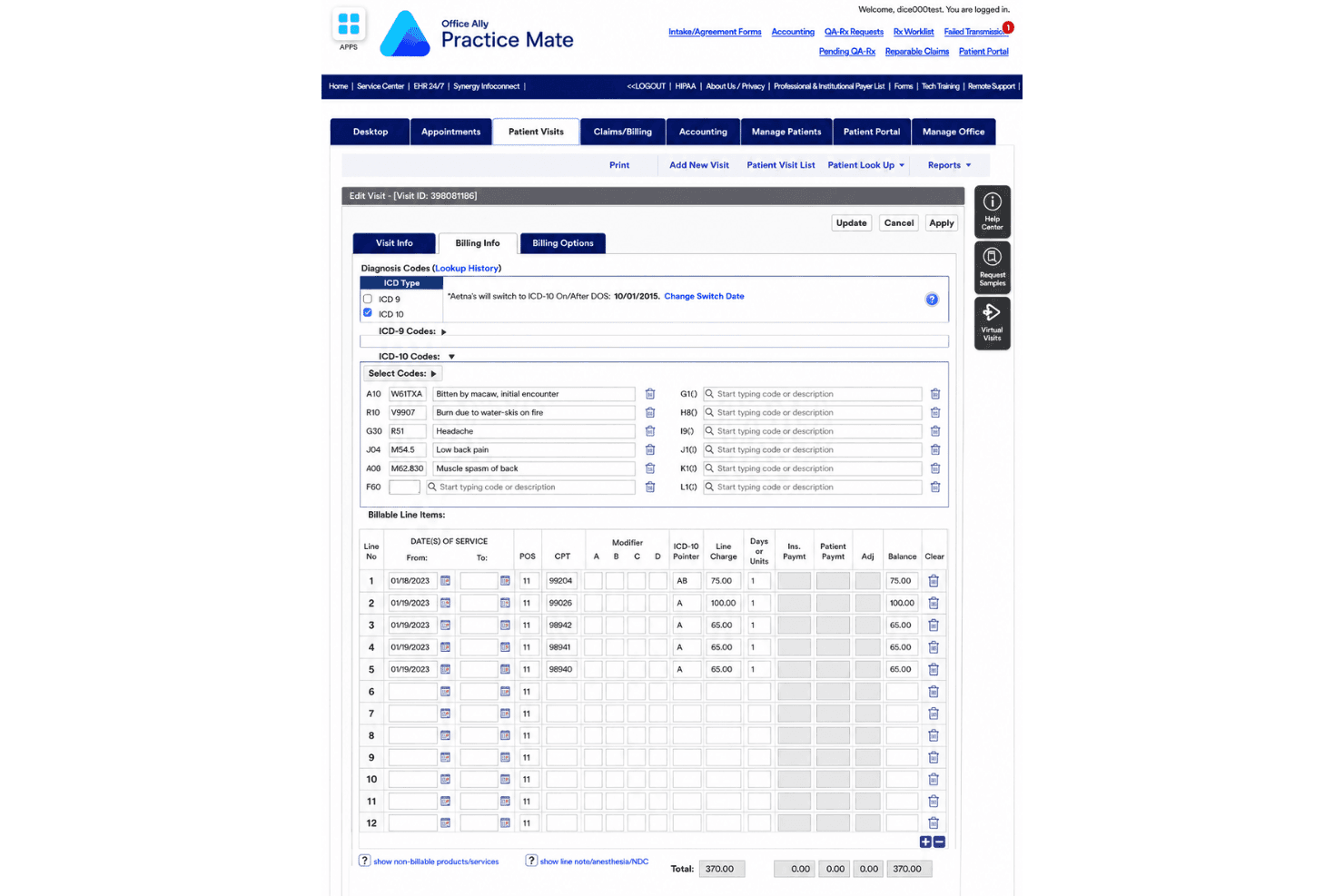
Office Ally Practice Mate joins scheduling, billing, superbills, and e-claims. Office Ally Practice Mate is a free practice management and medical billing platform that combines appointment scheduling, patient billing, superbill configuration, and electronic claims submission through a built-in clearinghouse.
Who Is Office Ally Practice Mate Best For?
Practice Mate is a strong fit for solo practitioners and small independent practices that need a functional billing and scheduling system without a monthly software budget.
Why I Picked Office Ally Practice Mate
Practice Mate earns its spot on my shortlist because the built-in Service Center clearinghouse connects to 5,000+ payers at no monthly cost. I like that claim creation, 837 submission, ERA/835 auto-posting, and real-time eligibility verification are all included without add-on fees. Most billing platforms charge separately for clearinghouse access, so having it bundled into a $0/month platform is genuinely rare.
Office Ally Practice Mate Key Features
- Appointment scheduling: Manage provider calendars with custom views and handle patient scheduling from a web-based dashboard.
- Configurable superbills: Customize charge entry templates to fit your specialty’s coding and billing needs.
- Patient ledger: Track patient balances, charges, adjustments, and payment history within each patient profile.
- Integrated patient portal: Offer patients secure, no-cost access to view billing statements and update demographic information online.
Office Ally Practice Mate Integrations
Practice Mate offers native integrations with Office Ally EHR 24/7, Patient Ally, Reminder Mate, and Patient Payments (Stripe). An API is available for custom integrations.
Pros and Cons
Pros:
- Integrated patient portal and statement mailing
- Unlimited claim volume for solo and group practices
- No-cost multi-payer electronic claims submission
Cons:
- Interface appears outdated and unintuitive
- Denial management features are limited
Learn more about Office Ally Practice Mate:
Alte software-uri accesibile de facturare medicală
Iată câteva opțiuni suplimentare de software accesibil de facturare medicală care nu au ajuns pe lista mea scurtă, dar merită totuși analizate:
- 11athenahealthBest for hands-on billing support services
- 12CureMDBest for customizable billing reports
- 13MedeskBest for international practice compatibility
- 14SimplePracticeBest for integrated client invoicing options
- 15CharmHealthBest for multi-specialty billing capabilities
- 16TherapyNotesBest for automatic payment posting
- 17DocVillaBest for quick superbill generation
- 18Ensora Health TheraNestBest for mental health insurance billing needs
- 19OpenEMRBest for open-source customization flexibility
- 20ClaimocityBest for hospitalist group workflow support
How I Evaluate Affordable Medical Billing Software
I evaluate these tools in two layers: baseline billing requirements like 837 submission and ERA processing, and the differentiators that show which tools are actually built for small-practice budgets.
Core Functionality (Table Stakes For This List)
When I'm selecting tools for my list, I rank each one on a scale from 0 (does not offer the functionality) to 5 (excels in this area) for each core functionality listed below. Then, I calculate the tool's total score into a percentage. Each tool needs to achieve a minimum total score of 65% to be considered for inclusion.
- Claims Submission: I check whether the tool can generate, scrub, and submit 837 files to clearinghouses with built-in error detection before claims go out.
- Coding Support: Full ICD-10, CPT, and HCPCS code sets with searchable lookup matter—especially for practices handling diverse visit types without a dedicated coder.
- ERA/EOB Processing: I look for automated 835 ingestion and payment posting so your team isn't manually keying in every remittance from each payer.
- Denial Management: Rejected claims need a clear queue with reason codes and resubmission workflows, so nothing slips through the cracks during follow-up.
- Patient Billing: I evaluate how the tool handles patient statements, balance tracking, and payment collection—like offering an online portal for card payments.
- Affordable Pricing: Transparent pricing tiers accessible to solo and small practices are key, whether the model is per-provider, per-claim, or flat monthly.
Once I have a list of tools that meet the criteria, I consider what sets each platform apart.
Differentiating Factors (What Sets Vendors Apart)
Here's how I compare and contrast different vendors:
Standout Features
Claim scrubbing is a big differentiator—I look for tools that validate claims against payer-specific rules before submission, which directly cuts down denial rates and rework. Real-time eligibility verification matters just as much because catching a lapsed policy at check-in saves your team from chasing a denied claim weeks later. I also evaluate patient payment portals, since letting patients view balances and pay online via card or ACH helps practices collect faster without extra phone calls.
Beyond Features
Total cost of ownership is where I spend the most time. I look at whether clearinghouse fees, patient statement charges, and setup costs are bundled or billed separately—those extras add up fast for a small practice. Specialty fit also matters; a mental health practice needs different code sets and payer rules than a primary care office. I also check for native EHR/EMR integrations, since a billing tool that can't sync with your clinical system creates duplicate data entry your team doesn't have time for.
Cum să alegeți un software accesibil de facturare medicală
Este ușor să vă pierdeți în liste lungi de funcții și structuri complexe de prețuri. Pentru a vă ajuta să rămâneți concentrat în timp ce parcurgeți procesul unic de selecție a software-ului, iată o listă de verificare a factorilor de care trebuie să țineți cont:
| Factor | Ce trebuie luat în considerare |
|---|---|
| FactorCost | Ce trebuie luat în considerarePuteți prevedea factura lunară incluzând toți utilizatorii, toate cererile de rambursare și toate conexiunile la centrele de compensare? Fiți atenți la taxele suplimentare care pot crește costurile. |
| FactorScalabilitate | Ce trebuie luat în considerareVa crește software-ul odată cu cabinetul dumneavoastră? Verificați dacă adăugarea unor furnizori, locații sau volume de cereri de rambursare va necesita schimbarea planului sau instruire suplimentară. |
| FactorIntegrări | Ce trebuie luat în considerareSe conectează ușor la sistemele dumneavoastră EHR/EMR și de programare? Întrebați dacă integrările sunt incluse sau necesită un modul suplimentar. |
| FactorUșurință în utilizare | Ce trebuie luat în considerareEste sistemul intuitiv pentru cadrele medicale sau personalul fără experiență în facturare? Căutați tablouri de bord clare, un număr minim de clicuri și o navigare simplă. |
| FactorImplementare și configurare inițială | Ce trebuie luat în considerareCât de repede puteți începe utilizarea? Întrebați dacă configurarea, înscrierea la asigurători și instruirea sunt incluse și care sunt, de obicei, duratele tranziției. |
| FactorMăsuri de securitate | Ce trebuie luat în considerareEste instrumentul conform cu HIPAA? Căutați detalii despre criptarea datelor, jurnalele de acces și dacă este furnizat un acord cu asociatul comercial (BAA). |
| FactorPosibilitate de personalizare | Ce trebuie luat în considerarePuteți adapta extrasele, regulile sau rapoartele la specialitatea ori modul de lucru al cabinetului dumneavoastră? Unele instrumente limitează modificările dacă nu plătiți mai mult. |
| FactorDisponibilitatea asistenței | Ce trebuie luat în considerarePuteți primi ajutor real atunci când o eroare vă blochează cererile de rambursare? Verificați programul, timpii de răspuns și dacă asistența este oferită din SUA sau externalizată. |
Ce este software-ul accesibil de facturare medicală?
Software-ul accesibil de facturare medicală este o categorie de instrumente digitale concepute pentru a ajuta cabinetele mici și specialiștii independenți în facturare să gestioneze cererile de rambursare, plățile și extrasele pacienților fără costuri ridicate de licențiere.
Aceste soluții se concentrează pe funcțiile esențiale de facturare și oferă prețuri transparente, fiind astfel accesibile utilizatorilor care au nevoie de o gestionare fiabilă a veniturilor cu un buget limitat.
Funcțiile software-ului accesibil de facturare medicală
Când selectați un software accesibil de facturare medicală, urmăriți următoarele funcții esențiale:
- Trimiterea cererilor: Permite crearea, verificarea și trimiterea electronică a cererilor către plătitori, ajutând cabinetele să fie plătite mai rapid și să reducă documentele procesate manual.
- Asistență pentru codificare: Oferă biblioteci de coduri ICD-10, CPT și HCPCS care pot fi căutate, permițând selectarea corectă a codurilor pentru fiecare consultație sau procedură.
- Procesarea ERA/EOB: Automatizează primirea și înregistrarea electronică a explicațiilor privind plățile, eliminând introducerea manuală a plăților și simplificând fluxurile de reconciliere.
- Gestionarea refuzurilor: Semnalează cererile respinse sau refuzate și ghidează utilizatorii prin procesele de corectare, contestare și retrimitere automată.
- Facturarea pacienților: Generează și urmărește extrasele pentru soldurile datorate de pacienți și acceptă mai multe opțiuni de colectare a plăților.
- Portal de plăți pentru pacienți: Oferă pacienților acces online pentru achitarea extraselor prin card, ACH sau portofel digital, îmbunătățind rapiditatea și comoditatea colectării plăților.
- Raportare personalizată: Oferă rapoarte și tablouri de bord configurabile pentru cereri, plăți și creanțe, evidențiind informațiile esențiale despre facturare.
- Verificarea eligibilității asigurării: Confirmă statutul asigurării și beneficiile pacientului la momentul sosirii sau înainte de aceasta, reducând numărul cererilor respinse ulterior.
- Măsuri de securitate: Protejează datele sensibile medicale și de facturare prin criptare, controale de acces și respectarea HIPAA sau a altor reglementări.
- Integrări: Se conectează direct la EHR-uri, instrumente de gestionare a cabinetului și case de compensare, pentru a minimiza introducerea duplicată a datelor și a asigura circulația fluentă a informațiilor.
Beneficiile software-ului accesibil de facturare medicală
Implementarea unui software accesibil de facturare medicală oferă mai multe beneficii echipei și afacerii dumneavoastră. Iată câteva dintre acestea:
- Costuri administrative mai reduse: Procesarea automată a cererilor și înregistrarea plăților reduc munca manuală, ajutându-vă să evitați angajarea de personal suplimentar pentru facturare.
- Plăți mai rapide: Trimiterea electronică a cererilor și portalurile de plăți pentru pacienți accelerează rambursările de la asigurări și colectarea plăților de la pacienți.
- Mai puține refuzuri și erori: Verificarea integrată a cererilor, căutarea codurilor și fluxurile de gestionare a refuzurilor vă ajută să trimiteți cereri corecte și să remediați rapid problemele.
- Conformitate simplificată: Măsurile de securitate și actualizările codurilor sprijină conformitatea cu reglementările fără monitorizarea manuală constantă din partea echipei.
- Transparență sporită: Tablourile de bord personalizate și modelele transparente de tarifare oferă claritate atât asupra finanțelor cabinetului, cât și asupra cheltuielilor curente pentru software.
- Experiență mai bună pentru pacienți: Portalurile de plăți cu autoservire și extrasele clare le facilitează pacienților înțelegerea și achitarea soldurilor.
- Extindere ușoară pe măsură ce creșteți: Nivelurile de tarifare accesibile și flexibile, precum și infrastructura scalabilă răspund nevoilor cabinetelor individuale și ale clinicilor în dezvoltare.
Costurile și tarifele software-ului accesibil de facturare medicală
Selectarea unui software accesibil de facturare medicală necesită înțelegerea diferitelor modele și planuri de tarifare disponibile. Acestea pot varia de la instrumente gratuite de facturare medicală până la planuri plătite cu funcționalități mai ample. Costurile variază în funcție de funcții, dimensiunea echipei, suplimente și multe altele. Tabelul de mai jos prezintă planurile uzuale, prețurile medii ale acestora și funcțiile tipice incluse în soluțiile accesibile de facturare medicală:
Tabel comparativ al planurilor pentru software accesibil de facturare medicală
| Tipul planului | Preț mediu | Funcții uzuale |
|---|---|---|
| Tipul planuluiPlan gratuit | Preț mediu$0 | Funcții uzualeTrimiterea de bază a cererilor, asistență limitată, extrase pentru pacienți și înregistrarea manuală a ERA. |
| Tipul planuluiPlan personal | Preț mediu$20-$50/utilizator/lună | Funcții uzualeCereri electronice, biblioteci de coduri, urmărirea simplă a refuzurilor și asistență prin e-mail. |
| Tipul planuluiPlan pentru companii | Preț mediu$50-$150/utilizator/lună | Funcții uzualeCasă de compensare integrată, înregistrarea automată a ERA, plăți online pentru pacienți, tablouri de bord pentru raportare și asistență prin telefon sau chat. |
| Tipul planuluiPlan pentru întreprinderi | Preț mediu$150+/utilizator/lună | Funcții uzualeIntegrări personalizate, analize avansate, verificări ale eligibilității, controale bazate pe roluri, asistență prioritară și migrarea datelor. |
Întrebări frecvente despre software-ul accesibil de facturare medicală
Iată câteva răspunsuri la întrebările frecvente despre software-ul accesibil de facturare medicală:
Ce tipuri de cabinete sunt potrivite pentru software-ul accesibil de facturare medicală?
Software-ul accesibil de facturare medicală este ideal pentru cabinete mici și mijlocii, furnizori independenți și servicii de facturare care au nevoie de funcții de bază pentru facturare, fără suplimentele costisitoare specifice soluțiilor pentru întreprinderi.
Pot sistemele accesibile de facturare să gestioneze coduri specifice specialităților și regulile plătitorilor?
Da, majoritatea soluțiilor accesibile includ biblioteci actualizate de coduri ICD-10, CPT și HCPCS și acceptă șabloane specifice specialităților sau reguli personalizate pentru diverse tipuri de cabinete.
Aceste platforme includ portaluri de plăți pentru pacienți?
Da, multe platforme accesibile de facturare oferă portaluri integrate de plăți pentru pacienți, permițându-le acestora să vizualizeze extrasele și să achite soldurile online folosind carduri sau transferuri bancare.
Datele pacienților sunt securizate pe platformele de facturare accesibile?
Da, sistemele de facturare accesibile și de încredere folosesc măsuri de securitate conforme cu HIPAA, inclusiv criptare și acces bazat pe roluri, pentru a contribui la protejarea datelor pacienților și a celor financiare.
Cât de dificil este să treci de la facturarea manuală sau de la un alt software?
Majoritatea platformelor oferă asistență pentru configurare și integrare, inclusiv importul datelor și îndrumare pentru înscrierea plătitorilor, astfel încât cabinetele să poată face schimbarea cu un timp de nefuncționare minim.
Există costuri ascunse la care trebuie să fiți atenți?
Ar trebui să verificați întotdeauna prețurile pentru taxele caselor de compensare, pachetele de asistență și livrarea extraselor, deoarece este posibil ca unele planuri economice să nu includă aceste servicii suplimentare în tariful de bază.