

Gestionarea cu succes a unui centru de îngrijiri urgente vine cu propriile provocări. Gestionarea fluxului de pacienți, asigurarea acurateței înregistrărilor și furnizarea rapidă a serviciilor sunt doar câteva dintre acestea. Aici intervin sistemele EMR pentru îngrijiri urgente. Acestea vă ajută să păstrați totul organizat și eficient.
Am petrecut timp testând și evaluând aceste sisteme pentru a le identifica pe cele mai bune pentru dumneavoastră. Scopul meu este să vă ofer o privire imparțială asupra principalelor opțiuni care pot face o diferență reală în activitatea dumneavoastră.
În acest articol, vă voi prezenta alegerile mele principale pentru soluții EMR destinate îngrijirilor urgente, evidențiind ceea ce face ca fiecare dintre acestea să fie specială. Veți găsi informații care vă vor ajuta echipa să aleagă sistemul potrivit pentru nevoile dumneavoastră.
Why Trust Our Software Recommendations
6,700+
Reviews
20
Industry experts
16+
Evaluation factors
14
Years
Our team has been testing and reviewing software since 2012. As medical practice leaders ourselves, we know how difficult—and important—it is to choose the right software.
For this guide, we evaluated tools using hands-on testing and independent research, scoring tools using our selection criteria.
Our reviews reflect our human editorial judgment, not a sales pitch.
Tabel comparativ al sistemelor EMR pentru îngrijiri urgente
Score legend (out of 5)
- Excellent4.5–5
- Good4–4.4
- Average3–3.9
- Below average2–2.9
- Poor1–1.9
Sorted by: Default
| Tool | Starting Price | Website | |||||||
|---|---|---|---|---|---|---|---|---|---|
Best for e-prescribing safety checks in urgent care | Not rated | 3 | 3 | 1 | 2 | Not rated | 2 | $335/month Free demo available | Book Demo |
Best for customizable charting in urgent care | 2.0 out of 5 | 3 | 2 | 1 | 2 | 1 | 3 | $99/month 15-day free trial | Website |
Best for data-driven multi-site performance tracking | 2.7 out of 5 | 3 | 3 | 2 | 3 | 1 | 4 | Pricing upon request Free demo available | Website |
Best for billing-integrated EHR in small practices | 2.5 out of 5 | 3 | 3 | 2 | 3 | 2 | 2 | Pricing upon request Not available | Website |
Best for all-in-one urgent care billing and EHR | Not rated | 3 | 4 | 2 | 3 | Not rated | 3 | Pricing upon request Free demo available | Website |
Best for AI-driven note drafting in urgent care | 3.0 out of 5 | 3 | 3 | 4 | 4 | 1 | 3 | $499/user/month Free demo available | Website |
Best for urgent care charting speed and OccMed visits | 3.3 out of 5 | 4 | 3 | 3 | 4 | 4 | 2 | Pricing upon request Not available | Website |
Best for kiosk check-in and walk-in registration | Not rated | 4 | 3 | 2 | 4 | Not rated | 4 | $229/user/month Free demo available | Website |
Best for health-system-connected urgent care visits | 2.8 out of 5 | 3 | 2 | 2 | 3 | 4 | 3 | Pricing upon request Not available | Website |


Recenzii ale celor mai bune sisteme EMR pentru îngrijiri urgente
 1Best for e-prescribing safety checks in urgent care
RXNT
- Free demo available
- From $335/month(billed annually)
Visit WebsiteCustomer Rating:4.3/5
RXNT Urgent Care EMR Interface RXNT is an integrated EHR and practice management solution that focuses on delivering a seamless healthcare experience. It stands out with its superior prescription management capabilities, which contribute significantly to enhancing patient safety.
Why I Picked RXNT: In my selection process, I judged RXNT to have a clear edge because of its efficient prescription management system. It integrates prescribing practices with patient records, ensuring that safety checks are in place. I determined that RXNT's commitment to patient safety through careful prescription management made it a standout choice.
Standout features & integrations:
RXNT features include a robust EHR, efficient practice management, and an advanced e-prescribing system. Its e-prescribing system is of particular note as it integrates with the national pharmacy database, ensuring up-to-date prescription information. Additionally, RXNT offers seamless integrations with labs, radiology centers, and pharmacies.
Pros and Cons
Pros:
- Robust EHR for comprehensive patient record management
- Integration with national pharmacy database for accurate prescription information
- Advanced e-prescribing system enhancing patient safety
Cons:
- Interface could benefit from a design update
- Customization options could be more extensive
- Setup process can be somewhat complex
Learn more about RXNT: Best for customizable charting in urgent care
- 15-day free trial
- From $99/month
Visit WebsiteCustomer Rating:4.8/5
OptiMantra’s customizable charting tools with annotatable images help medspas document treatments and engage patients effectively. OptiMantra is a versatile EMR platform that supports urgent care centers with tools for clinical documentation, patient engagement, billing, and inventory management. Designed with flexibility in mind, it lets you tailor charting templates and workflows to match the fast-paced and variable needs of urgent care practices.
Why I Picked OptiMantra: I picked OptiMantra because customizable charting is a major advantage in urgent care, where no two patient visits are alike. You can adapt templates to fit your clinical style and streamline record keeping without slowing down patient flow. The ability to pair charting with built-in e-prescriptions, lab integrations, and inventory alerts makes it especially practical if you need an all-in-one system that adapts to your workflow rather than forcing you into rigid documentation.
Standout features & integrations:
OptiMantra’s standout features include customizable charting and patient dashboards that track screenings, immunizations, and care history. It also offers HIPAA-compliant telehealth for remote consultations and inventory management that alerts you when supplies run low. On the financial side, it supports superbills, insurance claims, and integrated payment processing. Integrations include Surescripts, LabCorp, Quest Diagnostics, Clinical Pathology Laboratories (CPL), Fullscript, Rupa Health, and more, extending its utility across labs, pharmacies, and diagnostics partners.
Pros and Cons
Pros:
- Inventory tracking supports supply readiness
- Integrated labs and prescriptions included
- Flexible charting templates save time
Cons:
- Steep learning curve for new users
- Interface design is not very intuitive
Learn more about OptiMantra: Best for data-driven multi-site performance tracking
- Free demo available
- Pricing upon request
Visit WebsiteCustomer Rating:3.8/5
AthenaOne Urgent Care EMR Interface athenaOne is a comprehensive electronic health record (EHR) solution, offering integrated medical billing, patient engagement, and care coordination services. It's specifically designed to support data-driven decision making, providing healthcare practices with valuable analytics to enhance care and streamline operations.
Why I Picked athenaOne: I picked athenaOne because of its strong emphasis on data analytics. It delivers actionable insights that enable healthcare providers to make informed, data-driven decisions. These analytics capabilities make athenaOne stand out among other EHR solutions, and in my opinion, it's the best choice for healthcare practices seeking to leverage data for enhancing their services.
Standout features & integrations:
athenaOne comes with robust features such as automated medical billing, telehealth services, and a patient portal. But the standout feature is its powerful healthcare analytics capabilities. It integrates with popular software like MedLine Plus and Epocrates, making it easier for providers to access relevant medical information.
Pros and Cons
Pros:
- Easy integration with popular software like MedLine Plus and Epocrates
- Integrated medical billing, patient engagement, and care coordination
- Powerful healthcare analytics for data-driven decision making
Cons:
- Might be overkill for smaller practices or those not interested in advanced analytics
- The user interface may be complex for some users
- Pricing information is not readily available
Learn more about athenaOne: Best for billing-integrated EHR in small practices
- Not available
- Pricing upon request
Visit WebsiteCustomer Rating:3.7/5
Nextgen Office Urgent Care EMR Interface NextGen Office is a robust EMR solution designed to streamline medical practice operations. The software shines with its comprehensive billing solutions, which go a long way in optimizing revenue streams.
Why I Picked NextGen Office: NextGen Office made its way into my selection for its exceptional billing solutions. The software differentiates itself with its comprehensive billing module that ensures accurate invoicing and efficient revenue management. This makes it an ideal choice for medical practices looking to maximize their revenue, making it best for comprehensive billing solutions.
Standout features & integrations:
NextGen Office offers a suite of features, including electronic prescribing, patient scheduling, and a robust billing system. The tool's standout billing solution supports claim scrubbing, eligibility checking, and electronic remittance advice. NextGen Office integrates well with various healthcare systems like labs, pharmacies, and radiology departments, complementing its robust feature set.
Pros and Cons
Pros:
- Affordable pricing compared to other EMR solutions
- Offers a suite of features that streamline practice operations
- Comprehensive billing solutions for effective revenue management
Cons:
- Customization options might be limited for certain practice needs
- User interface could be more intuitive
- Might take time to fully understand the billing system
Learn more about NextGen Office: Best for all-in-one urgent care billing and EHR
- Free demo available
- Pricing upon request
Visit WebsiteCustomer Rating:3.5/5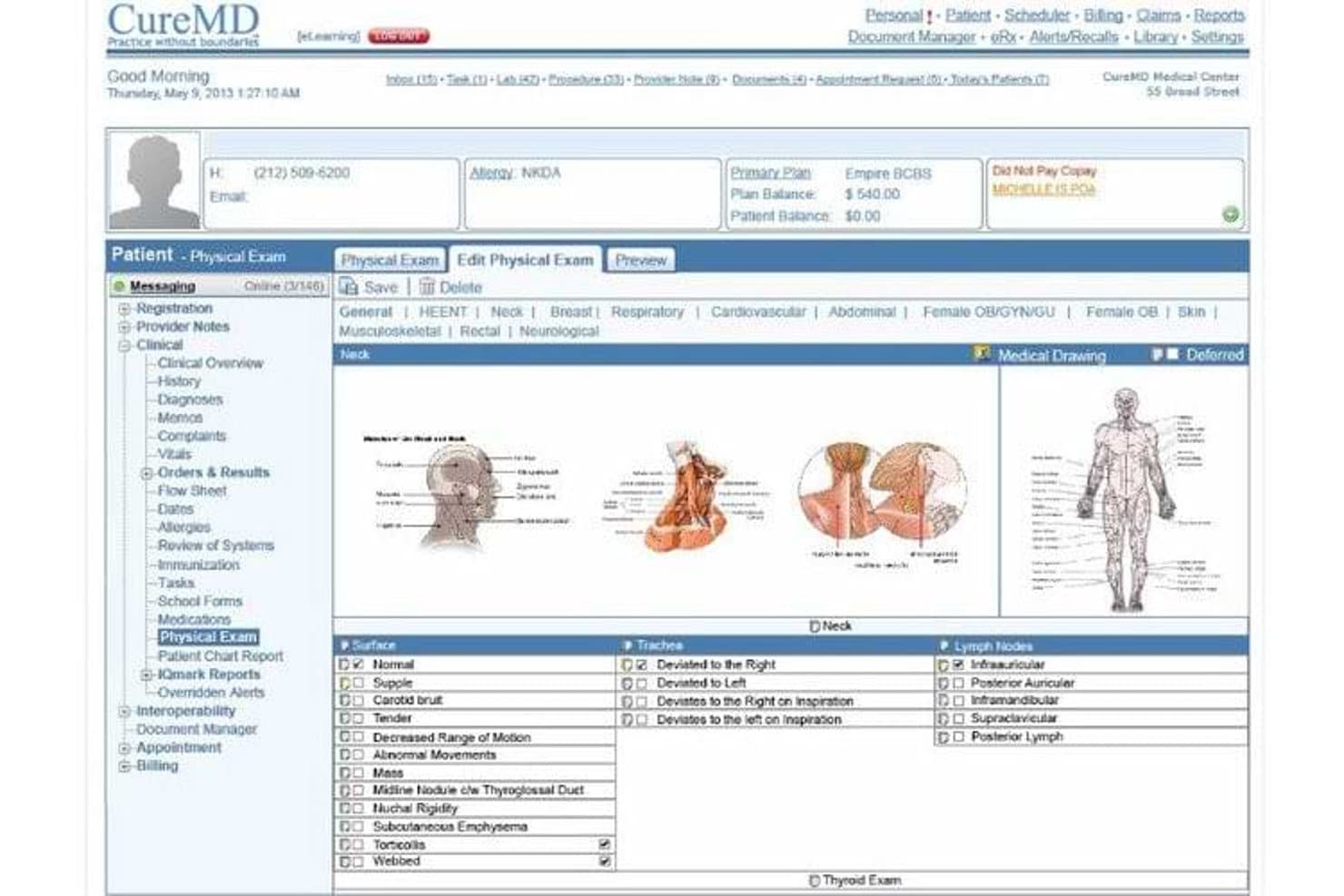
CureMD's physical exam module supports detailed neck assessments for urgent care. CureMD is a cloud-based urgent care EHR and billing platform that combines electronic medical records, practice management, and revenue cycle management into a single system with template-driven charting, triage workflows, and integrated coding support.
Who Is CureMD Best For?
CureMD suits urgent care practices that want to manage clinical documentation, scheduling, and billing from a single platform without juggling separate systems.
Why I Picked CureMD
CureMD earns its spot on my shortlist because it collapses EHR, practice management, and billing into one system purpose-built for urgent care. I particularly like its urgent-care-specific coding support, which handles walk-in CPT codes, modifiers -25 and -59, and extended-hours claims without requiring a separate billing platform. The e-superbill feature recommends E&M levels based on documented information and flags missing components before submission, which keeps claim quality tight across high-volume shifts.
CureMD Key Features
- AI medical scribe: Ambient listening captures clinical notes in real time and supports coding and order workflows without manual transcription.
- Digital check-in kiosk: Patients update demographics, verify insurance, and complete intake forms on arrival via kiosk or mobile app.
- Real-time eligibility verification: Insurance eligibility is checked automatically before the encounter, reducing claim rejections at the point of registration.
- FHIR R4 API: A standards-based API connects CureMD to external systems, labs, and health networks for structured data exchange.
CureMD Integrations
CureMD lists integrations with Quest Diagnostics, LabCorp, Orchard Software, Lenox Hill Radiology, Midmark, Welch Allyn, and GE. It also offers a FHIR R4 API for custom connectivity.
Pros and Cons
Pros:
- Reviewers report smoother billing and reimbursement
- EHR and billing share one workflow
- Urgent-care coding supports walk-in claims
Cons:
- Support experiences vary across reviewers
- Reviewers report charting lag and freezing
Learn more about CureMD: Best for AI-driven note drafting in urgent care
- Free demo available
- From $499/user/month
Visit WebsiteCustomer Rating:3.4/5
eClinicalWorks Urgent Care EMR Interface eClinicalWorks is a comprehensive EMR software that offers a suite of solutions designed to optimize healthcare delivery. With its robust cloud infrastructure, it supports efficient data management and access across multiple locations.
Why I Picked eClinicalWorks: I picked eClinicalWorks for this list due to its exceptional ability to support multi-location practices. Given the complexity of managing multiple facilities, a tool with robust cloud capabilities was an essential inclusion. eClinicalWorks stands out in this regard, providing seamless, unified access to records across different locations, making it the best for multi-location practices.
Standout features & integrations:
eClinicalWorks offers an array of features like customizable templates, patient portal, and telehealth capabilities. These features collectively aid in delivering superior patient care while streamlining administrative processes. The software integrates effectively with multiple healthcare systems, from labs and pharmacies to radiology departments and medical billing services, providing a holistic healthcare management solution.
Pros and Cons
Pros:
- Integrates with a range of healthcare systems
- Customizable templates aid in record keeping
- Robust cloud infrastructure for multi-location accessibility
Cons:
- Billed annually, which could impact budgeting for smaller practices
- The platform could have a learning curve for some users
- High starting price may be prohibitive for small practices
Learn more about eClinicalWorks: Best for urgent care charting speed and OccMed visits
- Not available
- Pricing upon request
Visit WebsiteCustomer Rating:2.7/5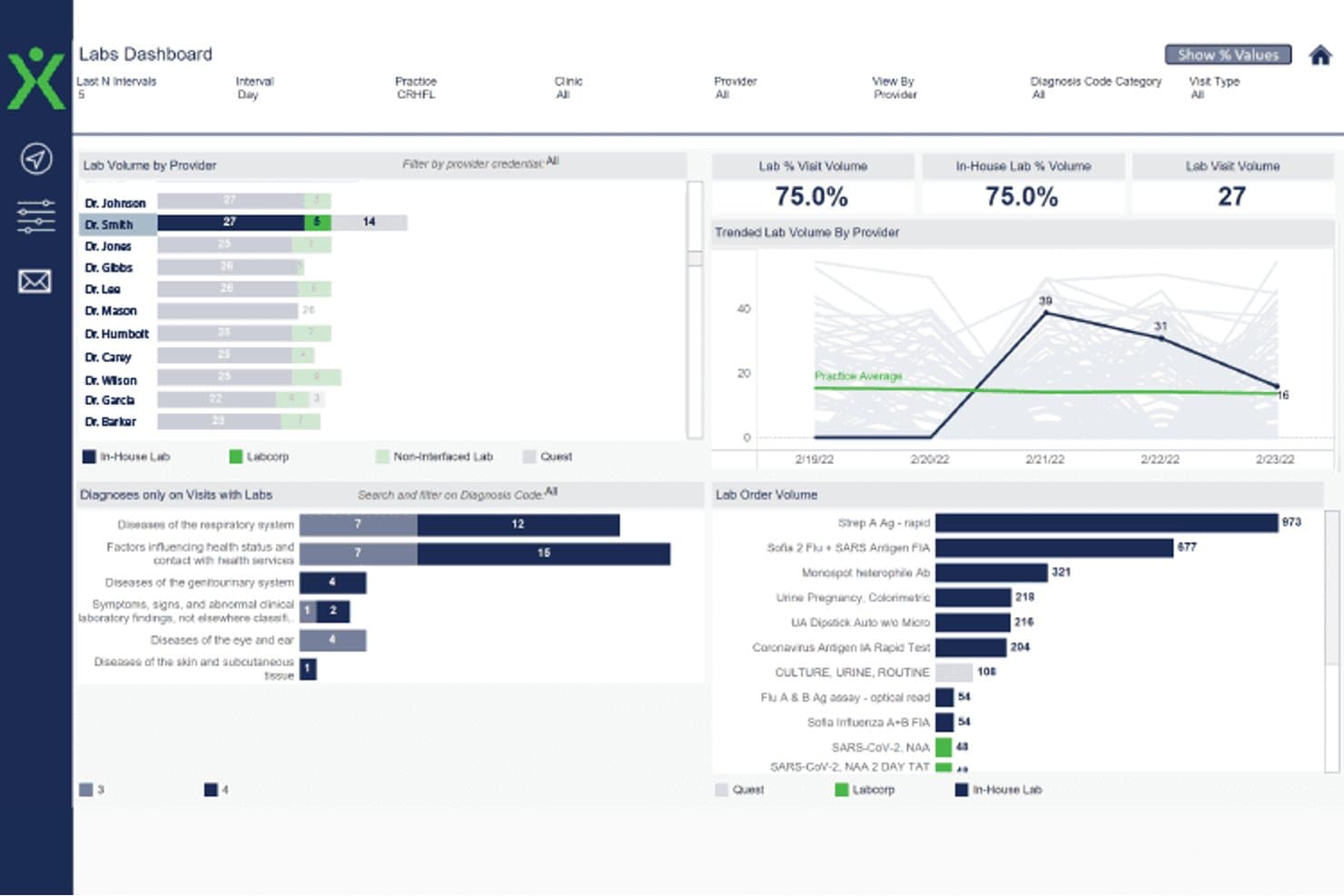
Experity labs dashboard showing provider lab volume, visit trends, diagnoses, and test orders Experity is a purpose-built urgent care EMR and practice management system that combines complaint-driven charting, walk-in patient registration, billing and coding, and occupational medicine workflows in one platform.
Who Is Experity Best For?
Experity is a strong fit for urgent care clinics that need to move patients from walk-in registration to discharge quickly, especially those running occupational medicine programs alongside standard urgent care visits.
Why I Picked Experity
I picked Experity as one of the best because its complaint-driven templates let providers chart 80% of common urgent care visits in under 60 seconds, which matters when your waiting room doesn't stop filling up. I also love how ExperityOccMed handles the split between standard walk-in visits and employer-based occupational medicine, including configurable split billing and a portal where employers can pull arrival times, work restrictions, and test results directly.
Experity Key Features
- AI Scribe: Listens to and transcribes patient encounters, then generates structured clinical notes with ICD, CPT, and E/M coding support.
- Carequality integration: Lets providers search, send, and retrieve patient health data from Carequality network partners directly within the EMR/PM.
- Experity Payments: Supports online bill pay, tap-to-pay devices, and transaction-to-reconciliation visibility through a self-service admin portal.
- Care Agent: Delivers a HIPAA-compliant, AI-powered patient assistant via secure text and web, handling pre-visit insurance verification and post-visit follow-ups without requiring an app.
Experity Integrations
Experity offers marketplace integrations via its partner ecosystem, including Relaymed, Aidoc, ChartSwap, Collectly, TeleCloud, and Zocdoc. It also provides limited API access for custom integrations, but the total integration count isn’t stated.
Pros and Cons
Pros:
- Employer protocols support occupational medicine visits
- Check-in and patient tracking suit busy shifts
- Complaint-driven templates speed routine charting
Cons:
- Lab and imaging orders feel cumbersome
- Billing tasks can require extra steps
Learn more about Experity: Best for kiosk check-in and walk-in registration
- Free demo available
- From $229/user/month
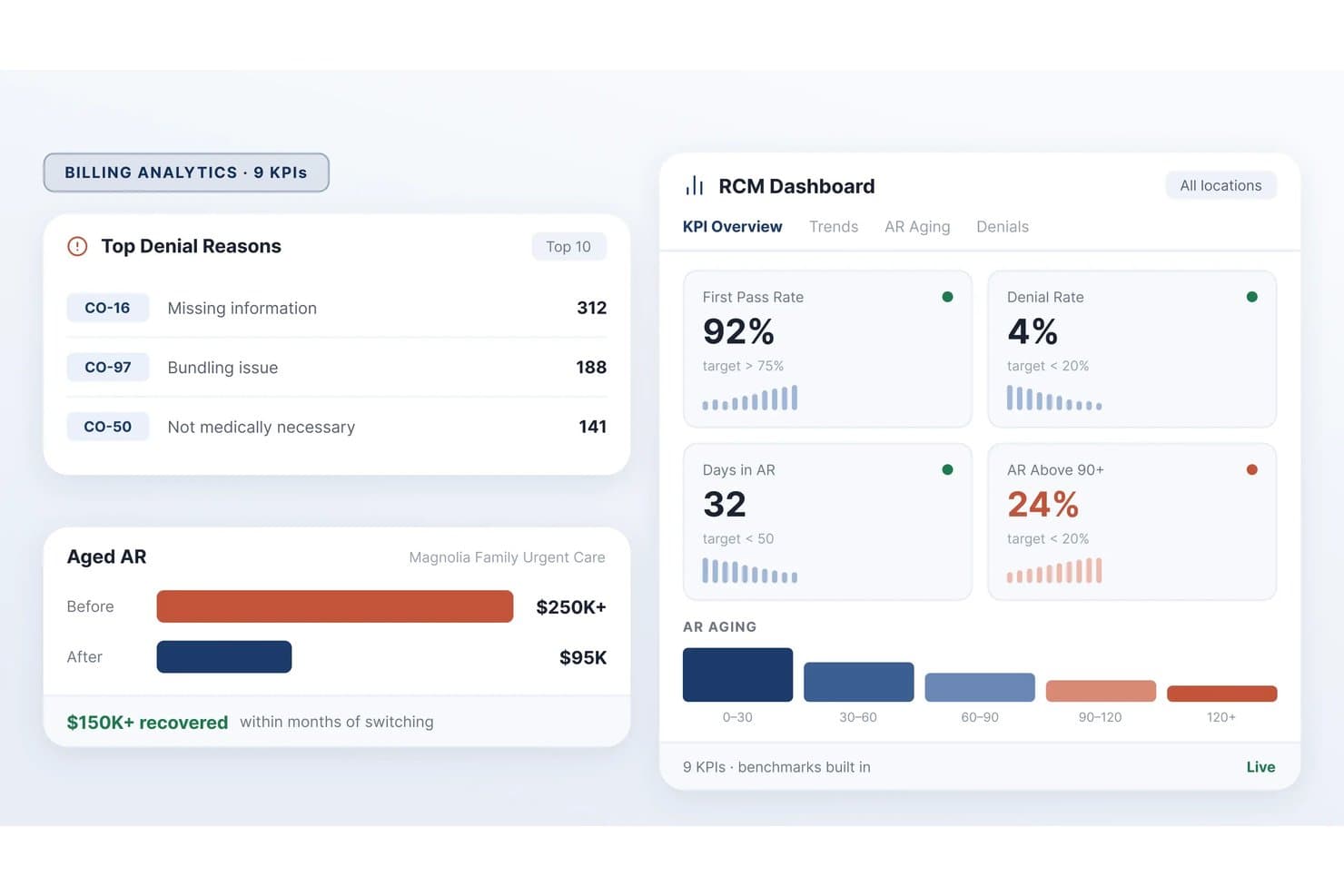
Practice EHR tracks billing KPIs and denial trends in real time. PracticeEHR is a cloud-based urgent care EHR that combines episodic visit charting, specialty-specific templates, point-of-care diagnostics integration, multi-site scheduling, and AI-assisted documentation tools.
Who Is PracticeEHR Best For?
PracticeEHR is a strong fit for urgent care clinics and multi-site walk-in practices that need specialty-specific charting, self-service kiosk registration, and location-level performance dashboards in one platform.
Why I Picked PracticeEHR
I picked PracticeEHR as one of the best because its self-service kiosk handles the full walk-in registration sequence in under three minutes, capturing government ID, insurance cards, demographics, and copay in one pass with real-time eligibility verification. I also like that the kiosk syncs directly into the clinical workflow, so by the time a provider opens the chart, registration is already complete. Urgent-care procedure templates with built-in CPT codes and modifiers round out the charting side for high-volume episodic visits.
PracticeEHR Key Features
- AI Scribe: Listens to patient visits, transcribes in 20+ languages, and drafts SOAP notes with suggested ICD/CPT codes for provider review.
- Multi-location dashboards: Displays KPIs like door-to-door time, AR days, and charge capture across all clinic sites from a single view.
- Telehealth (TeleVisit): Supports HD video visits with in-visit charting, billing in the same workflow, and automated reminders sent to patients.
- Lab and imaging integration: Sends LabCorp and Quest orders directly from the encounter and pulls rapid test results and on-site PACS images into the patient chart.
Practice EHR Integrations
PracticeEHR offers native integrations with LabCorp, Quest Diagnostics, BioReference, and Surescripts, plus outside-record access through Kno2, Carequality, and TEFCA. Its FHIR-based API supports custom integrations.
Pros and Cons
Pros:
- Reviewers praise manageable chart documentation
- Procedure templates include codes and consent
- Walk-in kiosk captures registration before charting
Cons:
- Patient queues lack documented live wait-time alerts
- Reviewers report kiosk and consent-form glitches
Learn more about Practice EHR: 9Best for health-system-connected urgent care visits
EPIC
- Not available
- Pricing upon request
Visit WebsiteCustomer Rating:4.5/5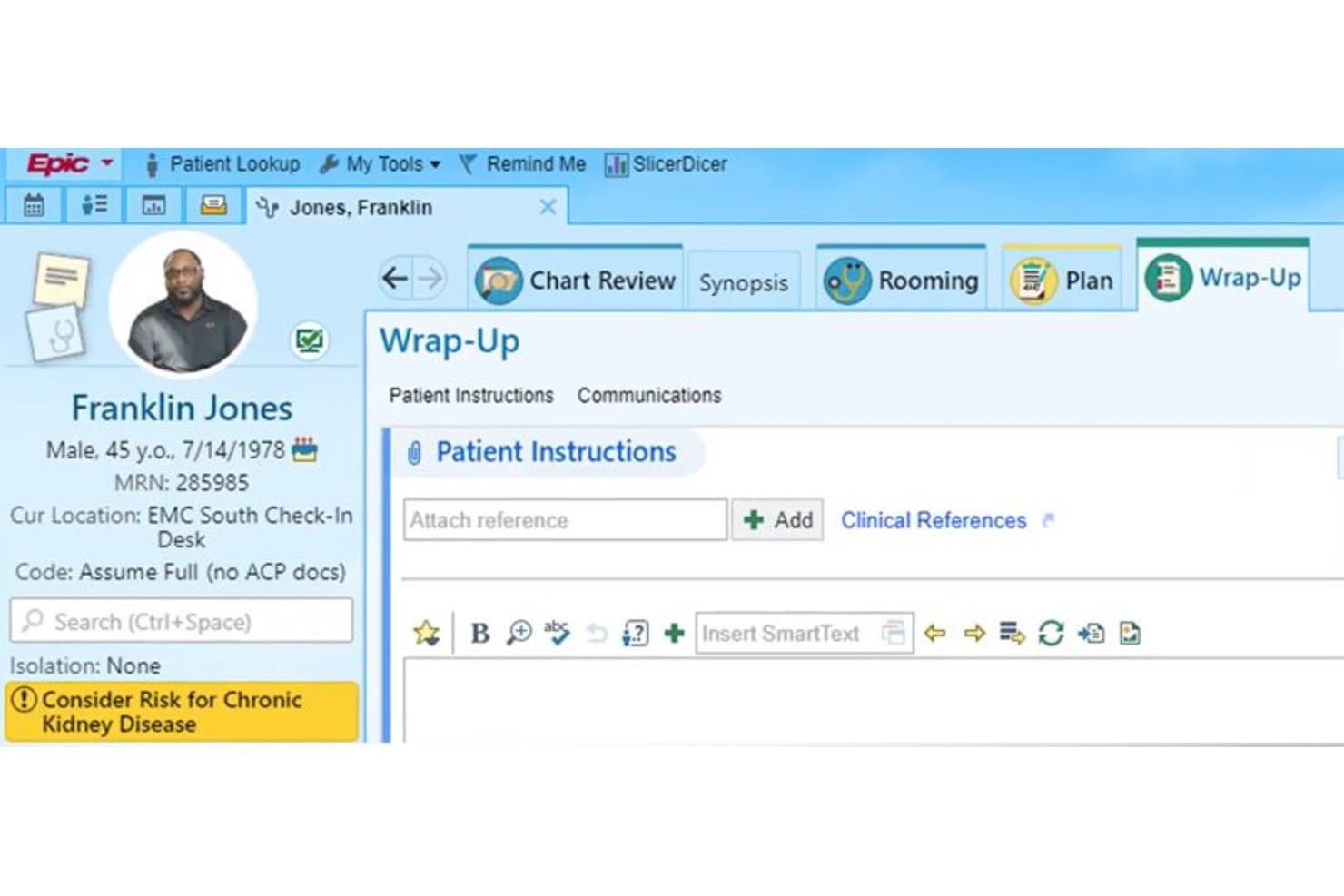
EPIC streamlines patient discharge with wrap-up instructions and communications. Epic is a healthcare EMR platform built for large health systems that includes an Emergency & Urgent Care specialty application (ASAP) with clinical decision support, occupational health workflows, lab and imaging order integration, and nationwide record exchange through its Care Everywhere network.
Who Is Epic Best For?
Epic is the strongest fit for urgent care departments operating within a larger health system already running Epic's EHR.
Why I Picked Epic
I've included Epic in my top picks because it's the only option here built from the ground up for health-system-scale clinical environments, making it the natural fit when urgent care runs as a department inside a larger Epic-using network. Its Emergency & Urgent Care (ASAP) application gives physicians active clinical decision support alongside a full longitudinal record, and Care Everywhere pulls in records from other participating organizations automatically. The occupational health module also handles pre-employment physicals, drug screens, and work-injury visits with employer-specific access controls built in.
Epic Key Features
- Care Everywhere network: Automatically pulls in patient records from other participating organizations during a visit.
- CDS hooks configuration: Customers configure when decision-support alerts fire and what actions or information they return.
- Self-arrival kiosk authentication: Supports patient identification and enrollment at check-in without front-desk intervention.
- RTLS patient and asset tracking: Tracks patients, staff, and medical devices within a facility using tags and a sensory network.
Epic Integrations
Epic’s interface directory lists connections with Surescripts, CoverMyMeds, DrFirst, Arrive Health, CenterX, Humana, HUS, and Polycon. Its API supports FHIR, HL7, DICOM, NCPDP, and ASC X12 for custom integrations.
Pros and Cons
Pros:
- Urgent-care charting includes active decision support
- Occupational health supports employer-specific visits
- Unified records surface notes, labs, and medications
Cons:
- Complex setup may burden standalone clinics
- Navigation-heavy tasks can slow visit documentation
Learn more about EPIC:
How I Evaluate Urgent Care EMRs
I split my evaluation into three parts, giving the most weight to core functionality: chart walk-in visits quickly and track patients from check-in to discharge. Next, I look for differentiators such as self-check-in kiosks or multi-site dashboards. Finally, I consider onboarding, responsive support, and whether pricing fits a clinic’s visit volume.
Core Functionality (Table Stakes For This List)
When I'm selecting tools for my list, I score each one on a scale from 0 (does not offer the functionality) to 5 (excels in this area) for each core functionality listed below. I then convert the total into a percentage to help assess each tool's overall fit, with extra weight on any functionalities I’ve deemed essential.
- Episodic Charting (Essential): I look for customizable templates that let clinicians document common walk-in complaints quickly without excessive manual entry.
- Patient Flow Tracking (Essential): I assess whether the team can see real-time patient status, from check-in and rooming to provider visit and discharge.
- Urgent Care Billing: I check support for visit-level coding, point-of-care procedures, and occupational health claims.
- Lab And Imaging Links: I look for connections that bring lab and imaging orders or results into the patient chart.
- Walk-In Registration: I assess how quickly staff can register unscheduled patients while keeping the queue and appointments organized.
- Occupational Health: I check for dedicated workflows and documentation for drug screens, physicals, and workers’ compensation visits.
Once I have a list of tools that meet the criteria, I consider what sets each platform apart.
Differentiating Factors (What Sets Vendors Apart)
Here's how I compare and contrast different vendors:
Standout Features
I look for multi-site dashboards that let operators compare volume, revenue, and staffing across locations from one screen—essential when you're running three or more clinics and need to spot a underperforming site fast. Patient self-check-in kiosks matter just as much, since a lobby full of walk-ins during flu season can overwhelm a front desk in minutes. I also evaluate whether the system includes an employer portal for occupational health clients to submit referrals and pull results directly, which cuts phone tag out of workers' comp workflows.
Beyond Features
I evaluate how fast a vendor can get a clinic live, since a delayed go-live during an ownership change or new site opening means lost visits and lost revenue. Pre-built urgent care content packages cut weeks off configuration compared to a blank-slate build. I also check whether the pricing model fits high-volume episodic care—a per-visit fee that balloons during flu season hits differently than a flat subscription. Finally, I look at support responsiveness, because a charting outage at a walk-in clinic with a packed lobby can't wait for a next-day ticket reply.
Cum să alegeți un sistem EMR pentru îngrijiri urgente
Este ușor să vă pierdeți în liste lungi de funcții și structuri complexe de prețuri. Pentru a vă ajuta să rămâneți concentrat în timp ce parcurgeți procesul unic de selectare a software-ului, iată o listă de verificare a factorilor de care trebuie să țineți cont:
| Factor | Aspecte de luat în considerare |
|---|---|
| FactorScalabilitate | Aspecte de luat în considerareVa crește sistemul EMR odată cu cabinetul dumneavoastră? Verificați dacă instrumentul poate gestiona un volum mai mare de pacienți fără probleme de performanță sau actualizări costisitoare. |
| FactorIntegrări | Aspecte de luat în considerareFuncționează cu sistemele dumneavoastră existente? Verificați dacă EMR se integrează cu sistemele de facturare, programare și laborator pe care le utilizați deja, pentru a evita întreruperile fluxului de lucru. |
| FactorPosibilități de personalizare | Aspecte de luat în considerarePuteți adapta sistemul EMR la nevoile dumneavoastră? Căutați opțiuni pentru personalizarea șabloanelor și fluxurilor de lucru, astfel încât să corespundă proceselor unice ale cabinetului dumneavoastră. |
| FactorUșurință în utilizare | Aspecte de luat în considerareEste interfața intuitivă? Asigurați-vă că echipa dumneavoastră poate naviga în sistemul EMR fără o instruire extinsă, reducând timpul de tranziție și minimizând erorile. |
| FactorImplementare și integrare inițială | Aspecte de luat în considerareCât timp va dura până veți putea începe? Evaluați timpul și resursele necesare pentru configurare și instruire, ținând cont de disponibilitatea personalului și de curba de învățare. |
| FactorCost | Aspecte de luat în considerareSe încadrează în bugetul dumneavoastră? Comparați costul total, inclusiv licențele, întreținerea și eventualele taxe ascunse, cu planul dumneavoastră financiar. |
| FactorMăsuri de securitate | Aspecte de luat în considerareSunt protejate datele pacienților? Verificați dacă sistemul EMR respectă standardele din domeniu privind securitatea datelor, precum criptarea și controalele de acces, pentru a proteja informațiile sensibile. |
| FactorCerințe de conformitate | Aspecte de luat în considerareRespectă standardele legale? Asigurați-vă că sistemul EMR respectă reglementările din domeniul sănătății, precum HIPAA, pentru a evita complicațiile juridice și amenzile. |
Ce este un sistem EMR pentru îngrijiri urgente?
Un sistem EMR pentru îngrijiri urgente este un software care gestionează dosarele pacienților, programările și facturarea pentru centrele de îngrijiri urgente. Profesioniștii din domeniul sănătății, precum medicii și personalul administrativ, utilizează aceste instrumente pentru a îmbunătăți îngrijirea pacienților și eficiența operațională. Funcții precum programarea pacienților, gestionarea facturării și securitatea datelor ajută la gestionarea unui număr mare de pacienți și asigură accesul rapid la informații. În general, aceste instrumente îmbunătățesc fluxul de lucru și organizarea unităților de îngrijiri urgente.
Funcții
Atunci când selectați un sistem EMR pentru îngrijiri urgente, acordați atenție următoarelor funcții esențiale:
- Programarea pacienților: Permite gestionarea eficientă a programărilor, reducând timpii de așteptare și îmbunătățind satisfacția pacienților.
- Gestionarea facturării: Simplifică procesul de facturare, asigurând facturi exacte și urmărirea plăților.
- Securitatea datelor: Protejează informațiile sensibile ale pacienților prin criptare și controale de acces, respectând standardele legale.
- Șabloane personalizabile: Permite personalizarea documentelor și fluxurilor de lucru pentru a corespunde nevoilor specifice ale cabinetului dumneavoastră.
- Integrarea telemedicinei: Oferă posibilități de consultații la distanță, extinzând accesul pacienților la îngrijire.
- Analize în timp real: Oferă informații despre performanța cabinetului, contribuind la luarea deciziilor și la îmbunătățirea eficienței.
- Suport pentru mai multe locații: Gestionează operațiunile din diverse locații, asigurând consecvența și coordonarea.
- Tururi interactive ale produsului: Ajută la integrarea noilor utilizatori, ghidându-i prin funcțiile și caracteristicile sistemului.
- Asistență pentru clienți 24/7: Asigură disponibilitatea asistenței ori de câte ori este necesar, minimizând întreruperile și rezolvând rapid problemele.
Beneficii
Implementarea unui EMR pentru îngrijiri urgente oferă mai multe beneficii pentru echipa și afacerea dumneavoastră. Iată câteva dintre acestea:
- Gestionarea îmbunătățită a pacienților: Programarea și gestionarea eficientă a evidențelor îmbunătățesc experiența pacienților și reduc timpii de așteptare.
- Eficiență operațională sporită: Facturarea automatizată și analizele în timp real contribuie la simplificarea proceselor și la îmbunătățirea luării deciziilor.
- Securitate îmbunătățită a datelor: Protejarea informațiilor pacienților prin măsuri de securitate solide asigură respectarea cerințelor legale.
- Alocarea mai bună a resurselor: Șabloanele personalizabile și suportul pentru mai multe locații permit fluxuri de lucru adaptate și operațiuni coordonate.
- Acces extins la îngrijire: Integrarea telemedicinei oferă opțiuni de consultații la distanță, ajungând în mod eficient la mai mulți pacienți.
- Integrare rapidă: Tururile interactive ale produsului și asistența cuprinzătoare facilitează adaptarea personalului la noul sistem.
Costuri și prețuri
Selectarea unui EMR pentru îngrijiri urgente necesită înțelegerea diferitelor modele și planuri de preț disponibile. Costurile variază în funcție de funcții, dimensiunea echipei, suplimente și alți factori. Tabelul de mai jos prezintă pe scurt planurile comune, prețurile medii ale acestora și funcțiile incluse de obicei în soluțiile EMR pentru îngrijiri urgente:
Tabel comparativ al planurilor pentru EMR pentru îngrijiri urgente
| Tipul planului | Preț mediu | Funcții comune |
|---|---|---|
| Tipul planuluiPlan gratuit | Preț mediu$0 | Funcții comuneProgramare de bază, evidențe limitate ale pacienților și raportare de bază. |
| Tipul planuluiPlan personal | Preț mediu$20-$50/user/month | Funcții comuneGestionarea pacienților, programarea consultațiilor și funcții standard de facturare. |
| Tipul planuluiPlan pentru companii | Preț mediu$50-$100/user/month | Funcții comuneAnalize avansate, șabloane personalizabile și integrarea telemedicinei. |
| Tipul planuluiPlan pentru întreprinderi | Preț mediu$100+/user/month | Funcții comuneSuport pentru mai multe locații, funcții de securitate îmbunătățite și asistență dedicată pentru clienți. |
Întrebări frecvente despre EMR pentru îngrijiri urgente
Ce sistem EMR utilizează centrul de îngrijiri urgente WellNow?
Centrul de îngrijiri urgente WellNow utilizează sistemul EMR și PM Experity. Acest sistem oferă o experiență de utilizare simplă, la care personalul de la recepție s-a adaptat rapid. Este conceput pentru a îmbunătăți satisfacția pacienților, oferind un flux de lucru intuitiv și servicii eficiente.
Ce ar trebui să iau în considerare atunci când implementez un EMR pentru îngrijiri urgente?
Atunci când implementați un EMR pentru îngrijiri urgente, luați în considerare factori precum integrarea cu sistemele existente, instruirea utilizatorilor și migrarea datelor. Asigurați-vă că sistemul corespunde nevoilor cabinetului dumneavoastră și că echipa este pregătită pentru tranziție.
Ce tip de programare utilizează centrele de îngrijiri urgente?
Centrele de îngrijiri urgente utilizează în mod obișnuit programarea deschisă sau programarea pentru pacienții fără programare prealabilă. Această abordare permite furnizorilor de servicii medicale să gestioneze nevoile imediate și urgențele fără programări anterioare, adaptându-se orelor imprevizibile la care sosesc pacienții.