

Software-ul medical ușor de utilizat pentru facturare este conceput pentru a automatiza și simplifica sarcini precum gestionarea cererilor de plată, a plăților și a verificărilor eligibilității pentru asigurare în cadrul organizațiilor medicale. Dacă jonglați cu facturarea și îngrijirea pacienților și doriți o soluție ușor de învățat și de utilizat, nu sunteți singuri. Multe echipe caută modalități de a reduce problemele administrative și de a evita erorile care pot întârzia rambursările.
Acest ghid prezintă cele mai bune soluții software medicale ușor de utilizat pentru facturare în 2026, astfel încât să puteți compara rapid instrumentele de top, să vedeți prin ce se remarcă fiecare și să alegeți soluția potrivită pentru fluxul de lucru și nevoile dumneavoastră.
Why Trust Our Software Recommendations
6,700+
Reviews
20
Industry experts
16+
Evaluation factors
14
Years
Our team has been testing and reviewing software since 2012. As medical practice leaders ourselves, we know how difficult—and important—it is to choose the right software.
For this guide, we evaluated tools using hands-on testing and independent research, scoring tools using our selection criteria.
Our reviews reflect our human editorial judgment, not a sales pitch.
Tabel comparativ al software-urilor medicale ușor de utilizat pentru facturare
Tabelul de mai jos compară detaliile de preț pentru selecția mea de top de software medical ușor de utilizat pentru facturare.
Sorted by: Default
| Tool | Starting Price | Website | |
|---|---|---|---|
Best for quick staff onboarding features | 4.2 out of 5 | Pricing upon request Not available | Website |
Best for direct clearinghouse integration | 4.1 out of 5 | Pricing upon request Free demo available | Website |
Best for multi-location management tools | 4.1 out of 5 | Pricing upon request Free demo available | Website |
Best for small practice scalability | 3.7 out of 5 | Pricing upon request Not available | Website |
Best for frequent payer rule updates | 3.4 out of 5 | Pricing upon request Free demo available | Website |
Best for custom claim form configurability | 4.5 out of 5 | $199/user/month Free demo available | Website |
Best for automated insurance eligibility checks | 3.9 out of 5 | Pricing upon request Free demo available | Website |
Best with AI-powered billing workflow automation | 3.9 out of 5 | Pricing upon request Free demo available | Website |
Best for real-time claim tracking | 3.6 out of 5 | Pricing upon request Free demo available | Website |
Best for robust reporting and analytics | 3.6 out of 5 | $130/user/month 30-day free trial + free demo available | Website |


Recenzii ale celor mai bune software-uri medicale ușor de utilizat pentru facturare
Mai jos sunt prezentate rezumatele mele detaliate ale celor mai bune software-uri medicale ușor de utilizat pentru facturare care au ajuns pe lista mea scurtă. Recenziile mele oferă o perspectivă detaliată asupra funcțiilor, celor mai potrivite cazuri de utilizare și prețurilor fiecărui software, pentru a vă ajuta să găsiți cea mai bună soluție pentru dumneavoastră.
 Best for quick staff onboarding features
- Not available
- Pricing upon request
Visit WebsiteCustomer Rating:4.2/5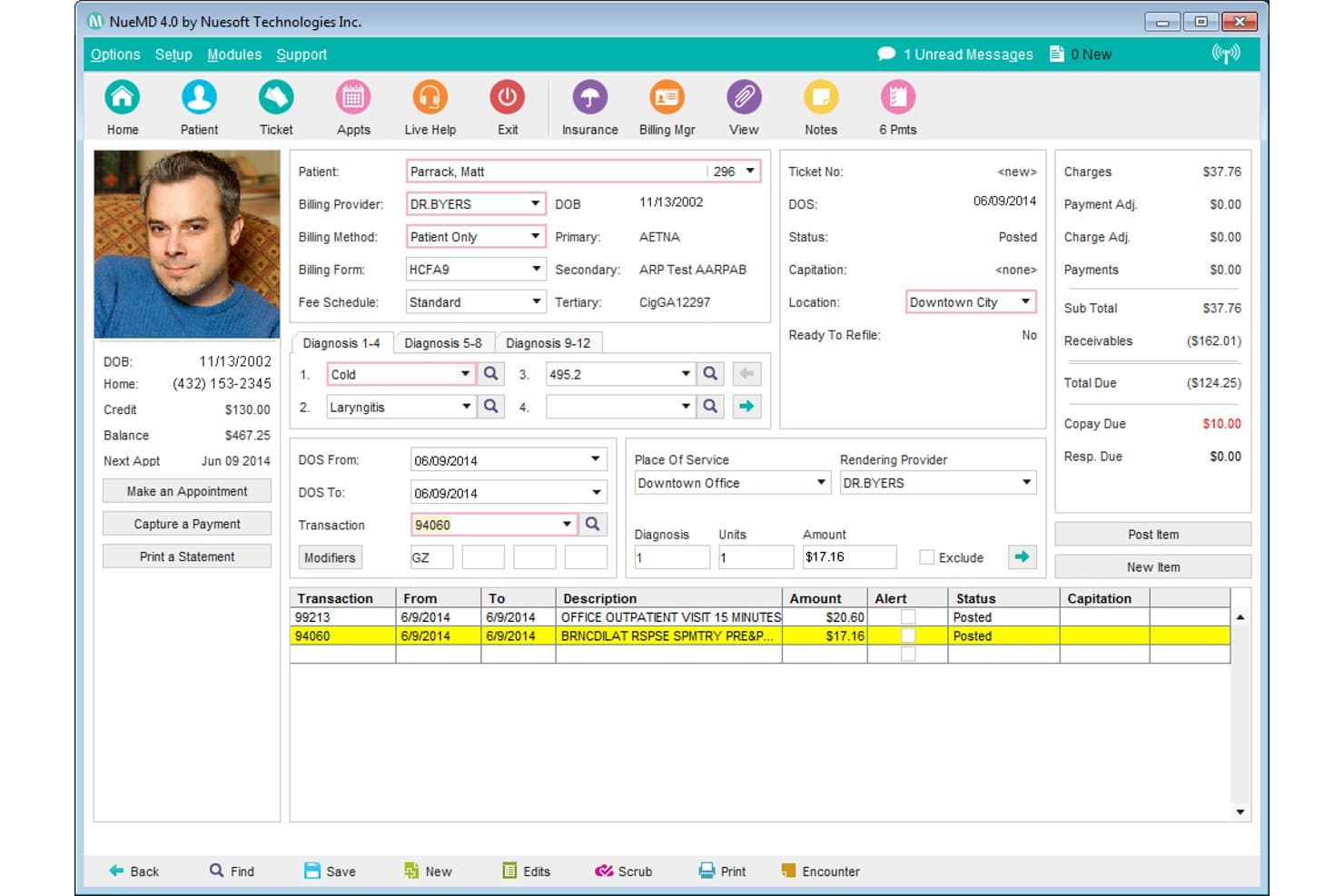
NueMD offers a detailed patient billing ticket screen with diagnosis codes, transactions, and payment summaries for streamlined medical billing. NueMD is a cloud-based medical billing and practice management platform for small practices that covers claims submission, ERA posting, patient billing, scheduling, and EHR documentation.
Who Is NueMD Best For?
NueMD suits independent medical billers and small practice billing staff who need to get up and running on a billing platform without a long learning curve.
Why I Picked NueMD
NueMD earns its spot on my shortlist because the learning curve for new billing staff is genuinely short. I've seen reviewers describe being fully independent by day one and self-sufficient by day three, which is rare. The interface keeps claim entry and ERA posting straightforward, without burying staff in unnecessary screens. NueMD's own clearinghouse handles submission, so new users aren't juggling a separate clearinghouse login on top of learning the platform.
NueMD Key Features
- Real-time claim tracking: View claim statuses and updates as they move through the billing process.
- Customizable appointment scheduling: Schedule patient visits with multi-day and multi-location support.
- Patient statement generation: Produce and send statements directly from the billing system.
- Mobile app access: Manage schedules, billing, and records from iOS and Android devices.
NueMD Integrations
Native integrations are not clearly documented. An API is available for custom integrations.
Pros and Cons
Pros:
- Fast onboarding for staff with minimal downtime
- Patient statements generated directly from platform
- Reliable in-house claims clearinghouse streamlines billing
Cons:
- Limited options for patient payment automation
- Robust AR and denial reports are lacking
Learn more about NueMD: Best for direct clearinghouse integration
- Free demo available
- Pricing upon request
Visit WebsiteCustomer Rating:4.1/5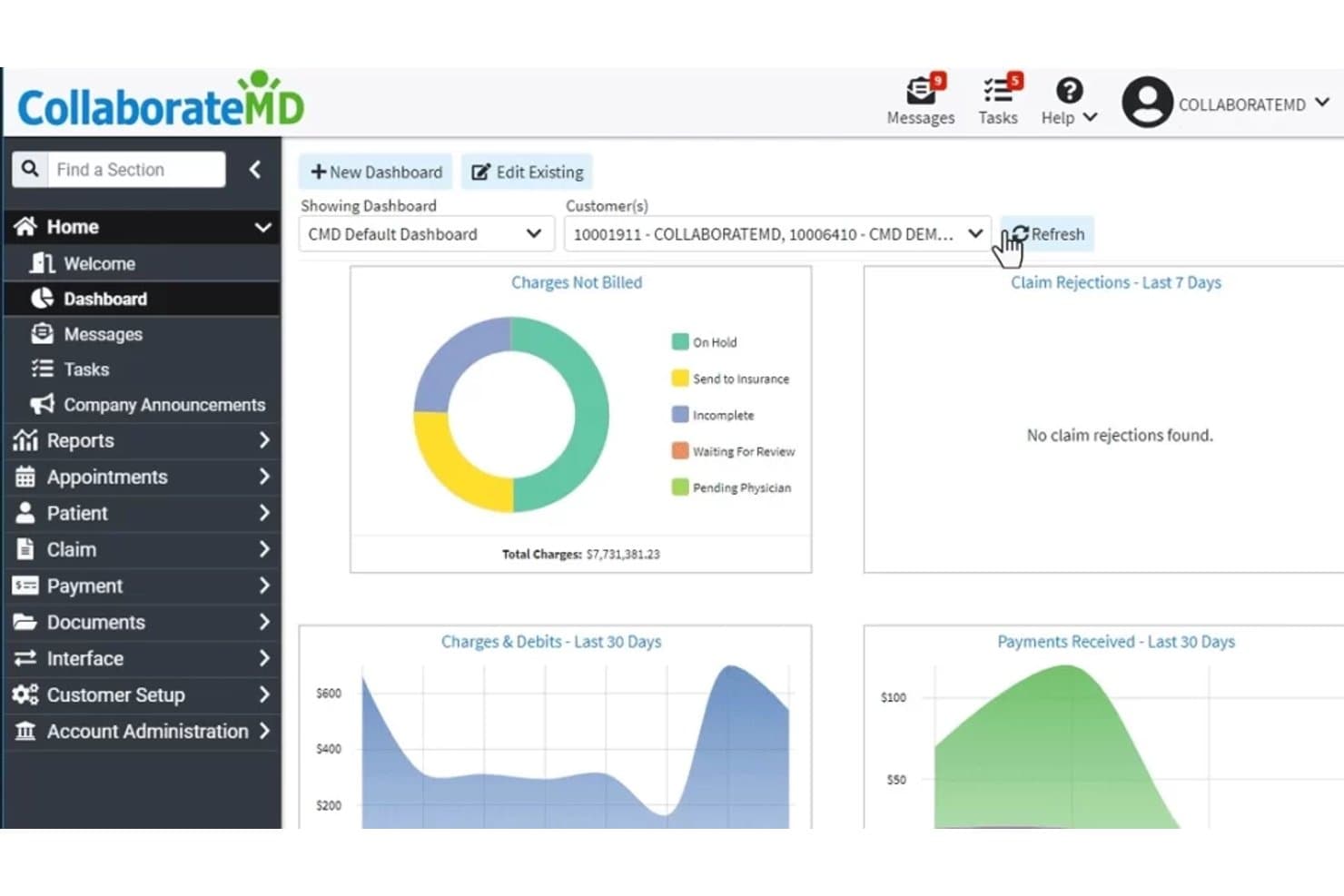
CollaborateMD offers an intuitive dashboard displaying charges not billed, claim rejections, charges and debits, and payments received over the last 30 days. CollaborateMD is a cloud-based medical billing and practice management platform that combines real-time claim submission, AI-powered denial management, eligibility verification, and patient billing tools for small to mid-size practices and independent billing services.
Who Is CollaborateMD Best For?
It's a strong fit for independent medical billers and small practice office managers who handle revenue cycle work without a dedicated billing team.
Why I Picked CollaborateMD
CollaborateMD earns its spot on my shortlist because of its built-in clearinghouse, which submits claims in real time without routing through a third-party service. I like that Level 2 Claim Edits (CCI, NCD/LCD, and LMRP rules) run automatically before submission, catching errors that typically cause denials. When a payer does reject a claim, the AI-powered rejection support translates the denial code into plain language, so I can act on it right away rather than decoding payer-specific terminology.
CollaborateMD Key Features
- Real-time eligibility verification: Check patient insurance coverage instantly before appointments or claims submission.
- Customizable reporting dashboards: Access and tailor over 125 detailed billing and practice management reports.
- Integrated patient payment portal: Let patients pay bills online through a secure web portal linked to their account.
- Appointment scheduling and check-in: Schedule patient visits and manage digital check-ins directly within the platform.
CollaborateMD Integrations
CollaborateMD offers native integrations with Practice Fusion, Elation, Amazing Charts, Hello Health, Kipu, Medical Mime, Praxis EMR, PrognoCIS, Ritten, Sevocity, WebPT, and Alleva. An API is available for custom EHR and billing integrations.
Pros and Cons
Pros:
- Convenient online patient balance payment portal
- AI-powered rejection explanation and suggestions
- Direct clearinghouse claim submission and tracking
Cons:
- No 24/7 live customer support
- Storage fees for large document uploads
Learn more about CollaborateMD: Best for multi-location management tools
- Free demo available
- Pricing upon request
Visit WebsiteCustomer Rating:4.1/5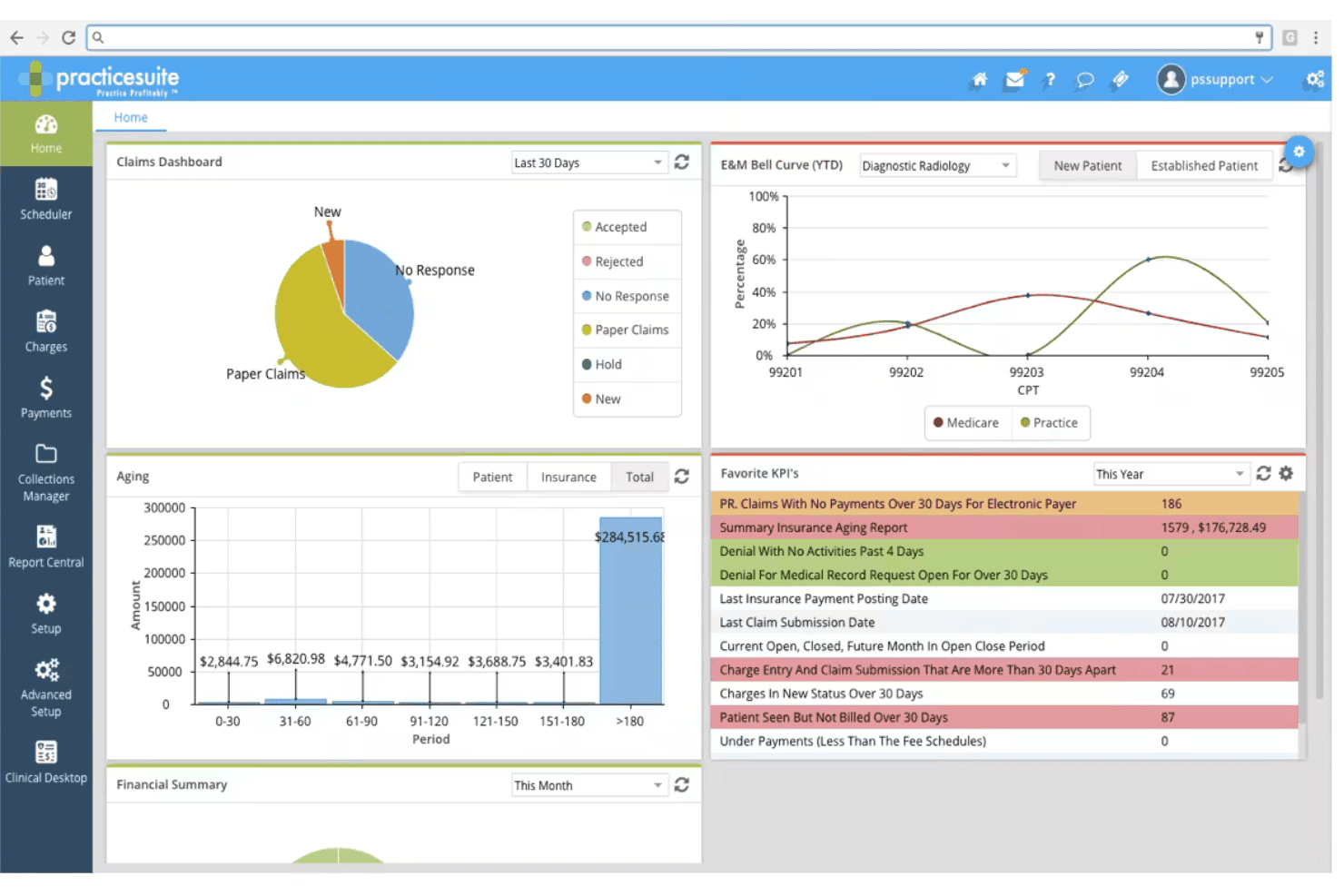
PracticeSuite spans claims, denials, ERA posting, eligibility, and billing. PracticeSuite is a cloud-based medical billing platform that covers claims submission, denial management, ERA posting, eligibility verification, and patient billing across solo practices, group practices, and medical billing companies.
Who Is PracticeSuite Best For?
It's a strong fit for independent medical billing companies and multi-location group practices managing claims, denials, and AR across multiple client accounts.
Why I Picked PracticeSuite
I've included PracticeSuite in my top picks because the Central Billing Office is genuinely built for managing multiple locations. With a single sign-on, I can navigate claims, ERAs, denials, and mass claim corrections across all client accounts from one dashboard. The multi-practice KPI reporting also lets me monitor each location's financial performance independently, which most billing tools don't support at this level.
PracticeSuite Key Features
- Patient portal: Lets patients view statements, pay bills, and communicate requests online.
- AI-driven denial intelligence: Flags potential claim issues before submission for cleaner billing.
- Automated eligibility verification: Confirms patient insurance eligibility in real time or in batch mode.
- Report Central: Offers more than 140 built-in reports for financial and operational tracking.
PracticeSuite Integrations
PracticeSuite offers native integrations with Practice Fusion, Elation, Relay Health, and Dragon dictation. Lab and pharmacy integrations are built in, and an API is available for custom integrations.
Pros and Cons
Pros:
- Built-in denial intelligence and analytics
- Automated ERA and payment posting workflows
- Centralized dashboard for multiple locations
Cons:
- Dashboard navigation can feel cluttered
- Initial onboarding requires frequent vendor support
Learn more about PracticeSuite: Best for small practice scalability
- Not available
- Pricing upon request
Visit WebsiteCustomer Rating:3.7/5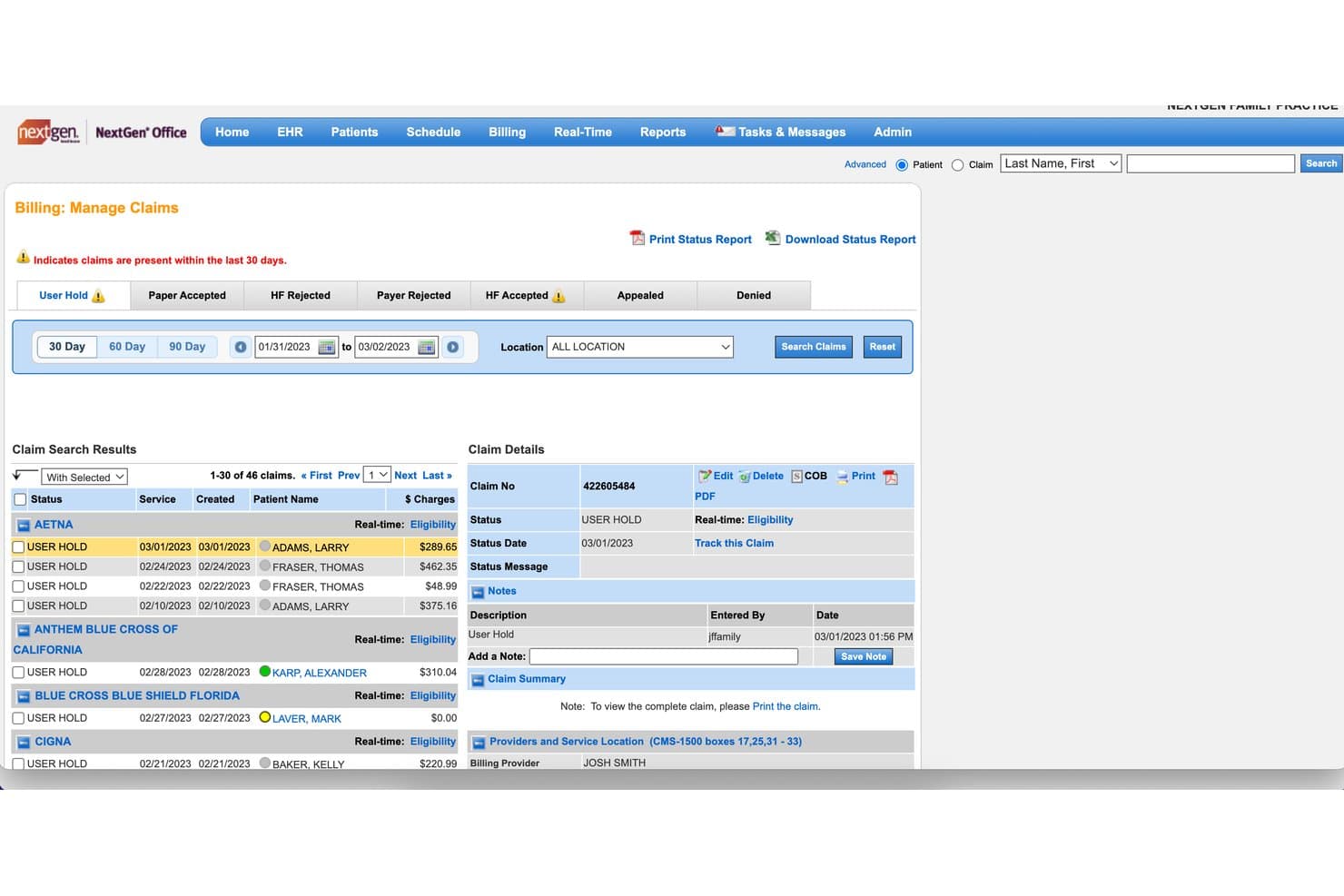
NextGen Office offers a Billing: Manage Claims dashboard that allows users to track, filter, and manage patient claims by status, payer, and date range. NextGen Office is a cloud-based EHR and practice management platform for small practices that integrates electronic claims submission, eligibility verification, patient billing, payment posting, and denial tracking.
Who Is NextGen Office Best For?
NextGen Office is a good fit for independent physicians and small practice administrators managing billing, scheduling, and clinical documentation through a single platform.
Why I Picked NextGen Office
NextGen Office earns its spot on my shortlist because it's built to scale with your practice, not just serve you at your current headcount. I like that EHR, practice management, and billing all run on a single cloud platform, so adding providers doesn't require layering in new tools. The built-in RCM services option sets it apart: when billing volume outgrows in-house capacity, you can move to managed revenue cycle services without switching platforms.
NextGen Office Key Features
- Electronic claims submission: Send CMS-1500 claims directly to clearinghouses from the integrated platform.
- Automated claim scrubbing: Validate claims for errors and compliance before submission.
- ERA payment posting: Import and auto-post electronic remittance advice to patient accounts.
- Real-time eligibility verification: Check insurance eligibility instantly within the scheduling workflow.
NextGen Office Integrations
NextGen Office offers native integrations with major labs and e-prescribing networks, supports Apple Health data import, and provides a native medical billing clearinghouse. An API for custom integrations is not available.
Pros and Cons
Pros:
- Centralized billing for multiple practice locations
- Real-time insurance eligibility checking
- End-to-end billing with EHR integration
Cons:
- Portal design can be confusing for patients
- Click-heavy workflows for routine billing tasks
Learn more about NextGen Office: Best for frequent payer rule updates
- Free demo available
- Pricing upon request
Visit WebsiteCustomer Rating:3.4/5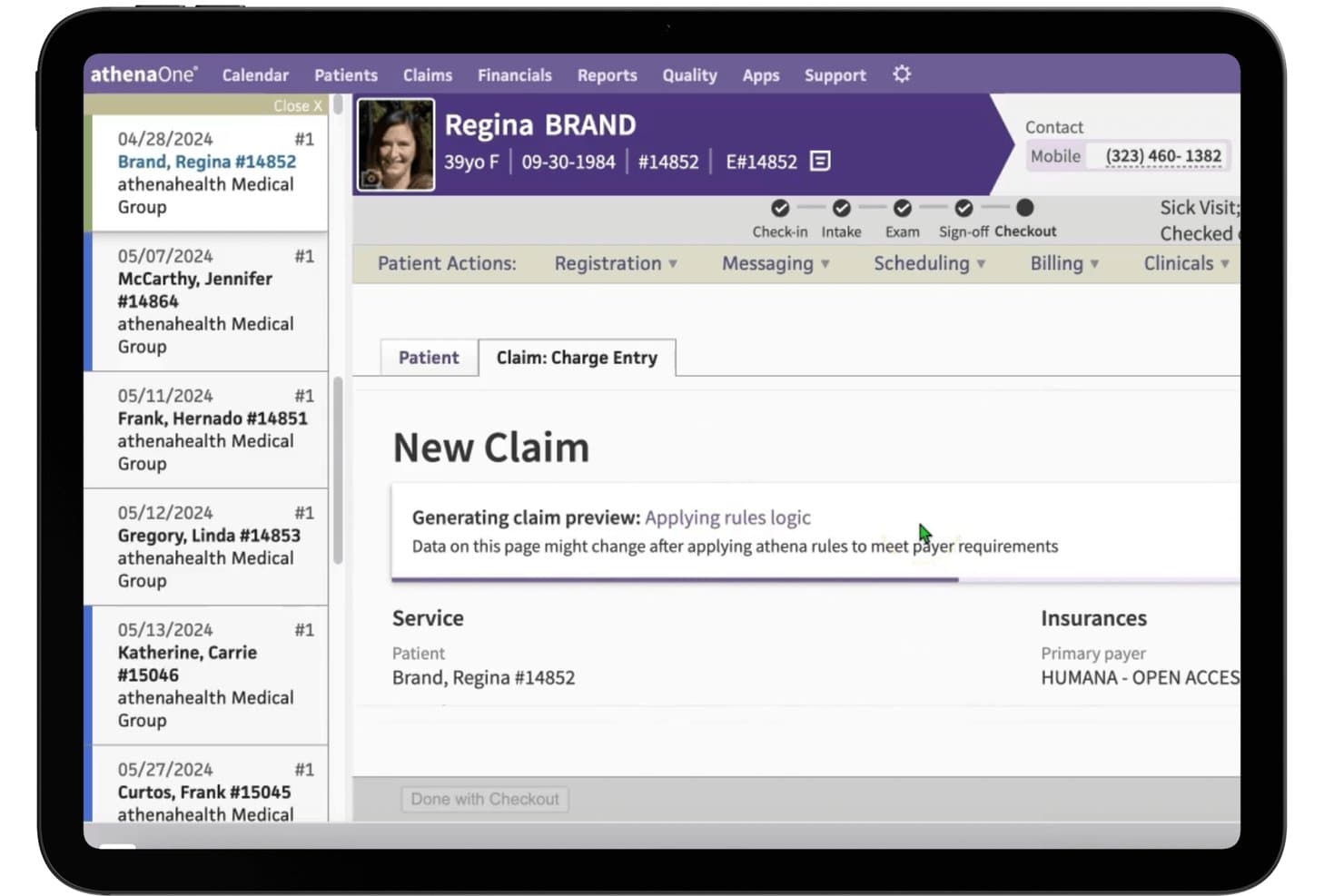
athenahealth offers an automated claim charge entry screen that applies rules logic to meet payer requirements during patient checkout. athenaOne is a cloud-based medical billing and EHR platform that combines claims submission, automated claim scrubbing, ERA posting, eligibility verification, and denial management in a single system built for independent and small practices.
Who Is athenahealth Best For?
athenaOne is a strong fit for independent physicians and small-to-mid-size ambulatory practices that handle billing in-house and need a system that keeps pace with payer policy changes.
Why I Picked athenahealth
athenahealth earns its spot on my shortlist because of its billing rules engine, which I think is genuinely unmatched for keeping pace with payer policy changes. It runs roughly 29,000 rules against every claim before submission, and those rules update continuously based on denial patterns across more than 150,000 providers in the network. The result is a 99% first-pass acceptance rate, which means far fewer claims cycling back for rework.
athenahealth Key Features
- Automated payment posting: Payments from electronic remittance advice are posted directly to patient accounts without manual data entry.
- Patient statement generation: The system produces statements for outstanding balances and delivers them through multiple formats.
- Eligibility verification: Real-time and batch checks allow you to confirm insurance coverage and benefits prior to visits.
- Denial worklist dashboard: A dashboard tracks claim denials and aging accounts receivable, organizing follow-up and appeal tasks.
athenahealth Integrations
athenahealth offers dozens of marketplace integrations through the athenahealth Marketplace, including GetWell Practice, Experian Health Patient Estimates, and Healthjump. An API is available for custom integrations.
Pros and Cons
Pros:
- Patient portal offers online bill payment
- Denial insights dashboard for ongoing AR tracking
- Claims scrubbing engine updates daily from network trends
Cons:
- No built-in claims coding assistance
- Percentage-of-collections pricing model only
Learn more about athenahealth: Best for custom claim form configurability
- Free demo available
- From $199/user/month
Visit WebsiteCustomer Rating:4.5/5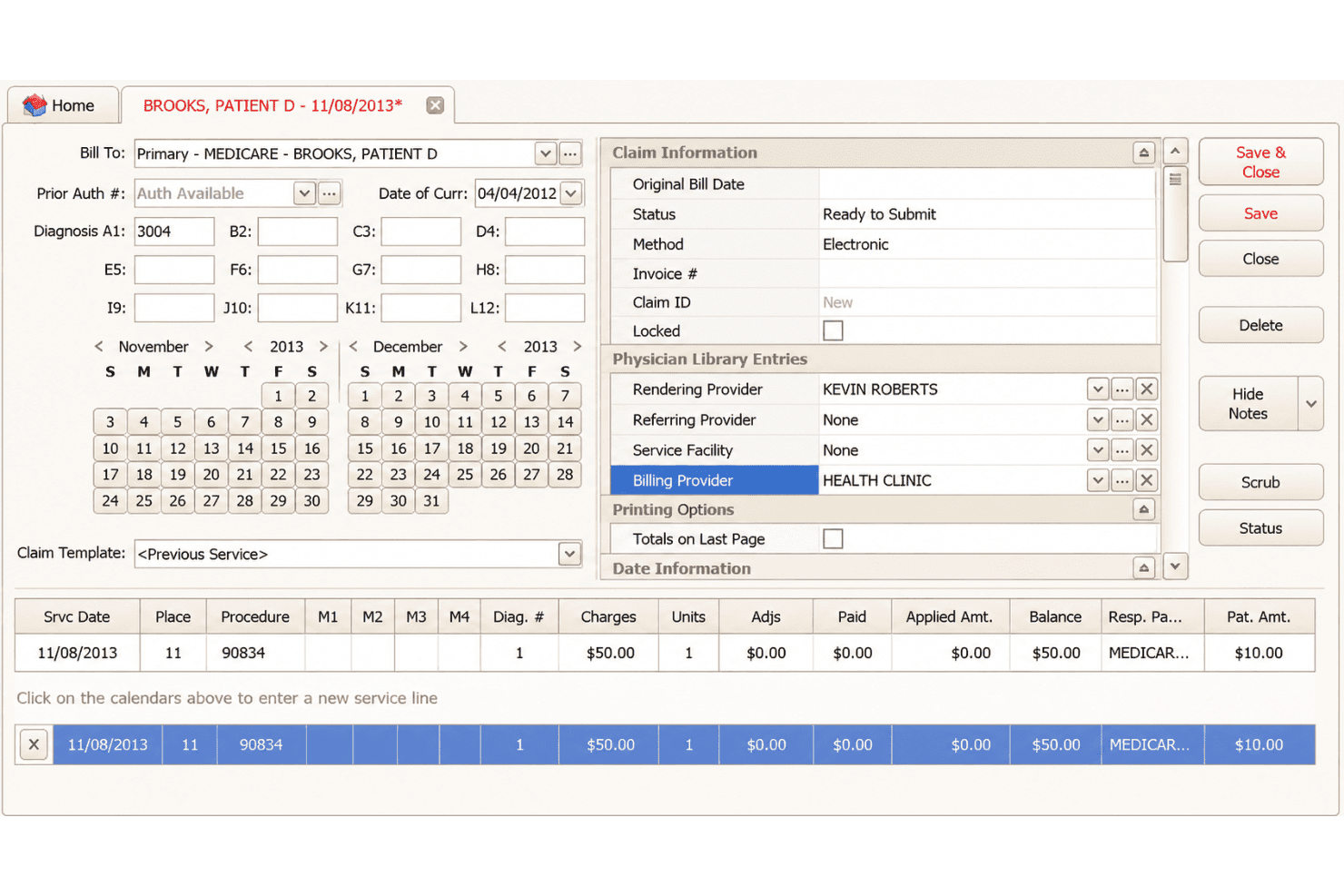
EZClaim supports claims, ERA posting, eligibility checks, forms, and scheduling. EZClaim is a cloud-based medical billing and scheduling platform that supports CMS-1500 and UB-04 claim submission, ERA auto-posting, real-time eligibility verification, and configurable claim forms for small practices and billing services.
Who Is EZClaim Best For?
EZClaim is a solid fit for independent medical billers and small practice administrators who manage claims across multiple payers and specialty types.
Why I Picked EZClaim
EZClaim earns its spot on my shortlist because it gives billing teams more control over claim form configuration than most tools at this price point. I can configure payor-specific settings across Medicare, Medicaid, Tricare, auto insurance, and worker compensation groups from a single platform. What I especially like is the support for both CMS-1500 and UB-04 forms, which means my team isn't locked into one claim type when the practice mix changes.
EZClaim Key Features
- ERA auto-posting: Import electronic remittance advice and apply payments automatically to patient accounts.
- Real-time eligibility checks: Verify patient insurance eligibility directly from the billing or scheduling interface.
- Integrated credit card processing: Collect payments using EZClaimPay, with support for major credit cards.
- Task list and follow-up management: Track unpaid claims, authorizations, and required actions with customizable reminders.
EZClaim Integrations
EZClaim offers native integrations with TriZetto, Carisk, Change Healthcare, AxisCare, BestNotes, NextStep Solutions, Nexus Clinical, Practice Fusion, Sevocity, WebPT, and BillFlash. An API is available for custom integrations.
Pros and Cons
Pros:
- Automated ERA posting and electronic statements
- Extensive payor and claim configuration options
- Supports both CMS-1500 and UB-04 claims
Cons:
- No built-in patient payment portal
- Scrubbing requires separate Alpha II add-on
Learn more about EZClaim: Best for automated insurance eligibility checks
- Free demo available
- Pricing upon request
Visit WebsiteCustomer Rating:3.9/5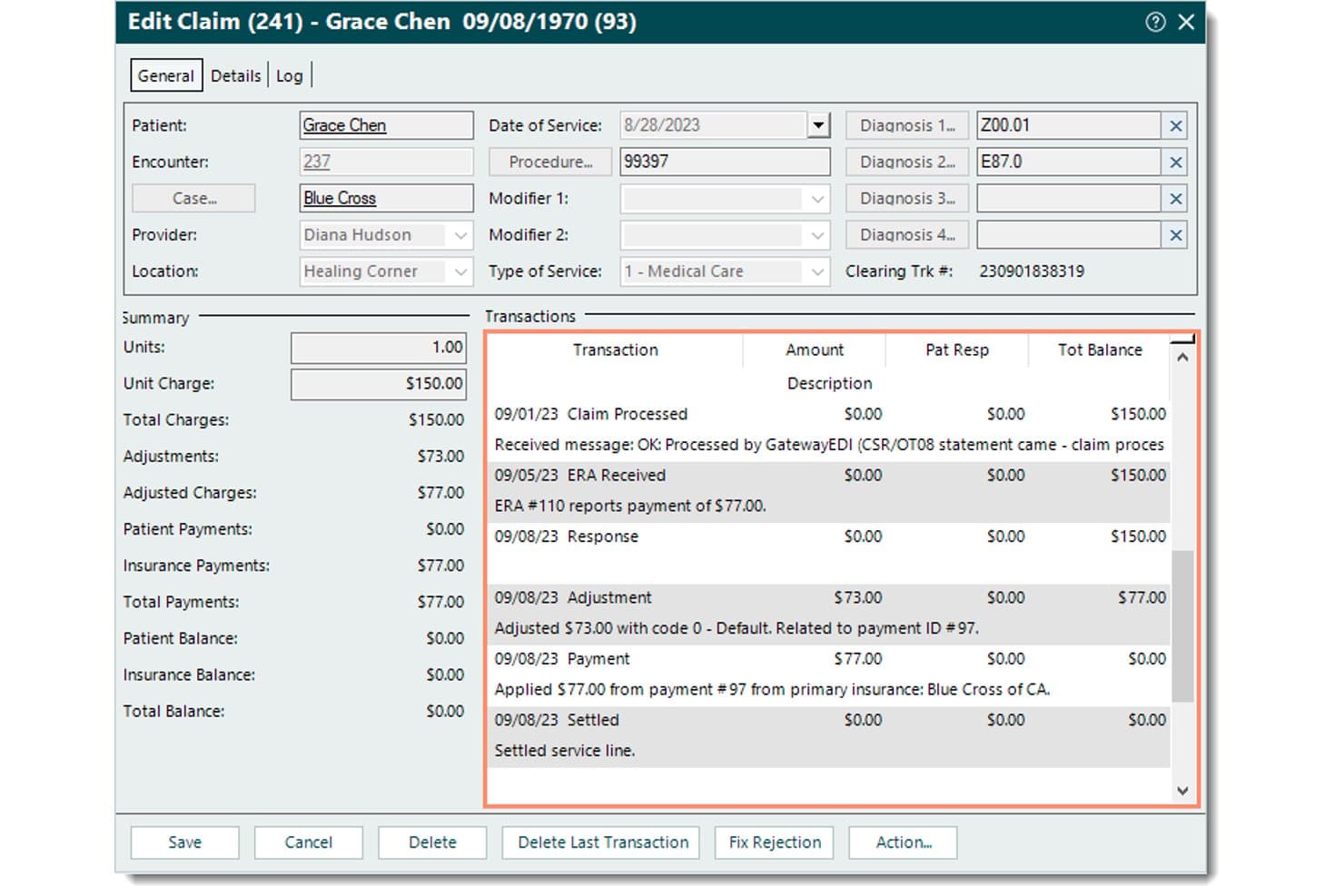
Tebra offers a detailed Edit Claim view that displays transaction history, payment breakdowns, adjustments, and insurance payments for streamlined medical billing management. Tebra is a medical billing and practice management platform for independent practices that combines electronic claim submission, automated eligibility verification, ERA posting, patient statements, and denial tracking in one system.
Who Is Tebra Best For?
Tebra is a strong fit for small independent practices with up to 10 providers that handle billing in-house and want automation without enterprise-level complexity.
Why I Picked Tebra
I picked Tebra as one of the best because its eligibility verification goes beyond a basic coverage check. It sends an ANSI-X12 270 inquiry to 2,700+ payers and returns a 271 response in seconds, surfacing active coverage, copay, deductible, and coinsurance details before the patient ever walks in. I also like the rules engine, which catches coding errors against payer-specific edits before claims go out, cutting down on the back-and-forth that typically follows a denial.
Tebra Key Features
- Automated patient statements: Generate branded statements with QR codes and direct payment links sent by email or text.
- Batch electronic claim submission: Submit claims to multiple payers simultaneously for faster processing and reduced manual entry.
- Robotic process automation for payment posting: Auto-post ERAs with speed and precision using customizable business rules.
- Unlimited non-clinical staff access: Allow front desk, billers, and office admins full use of scheduling, charting, and claims modules at no extra cost.
Tebra Integrations
Tebra offers native integrations with Kareo Billing, WebPT, Stripe, QuickBooks Online Advanced, Microsoft Excel, DocSpera, QuickEMR, Relatient, NextPatient, and PayPal. An API is available for custom integrations, and it supports HL7 and FHIR connectivity with most major EHRs.
Pros and Cons
Pros:
- Unlimited office staff seats included on all plans
- ERA payment posting uses robotic process automation
- Automated eligibility checks update in real time
Cons:
- Claim correction workflows can be confusing
- Denial reporting and analytics are limited
Learn more about Tebra: Best with AI-powered billing workflow automation
- Free demo available
- Pricing upon request
Visit WebsiteCustomer Rating:3.9/5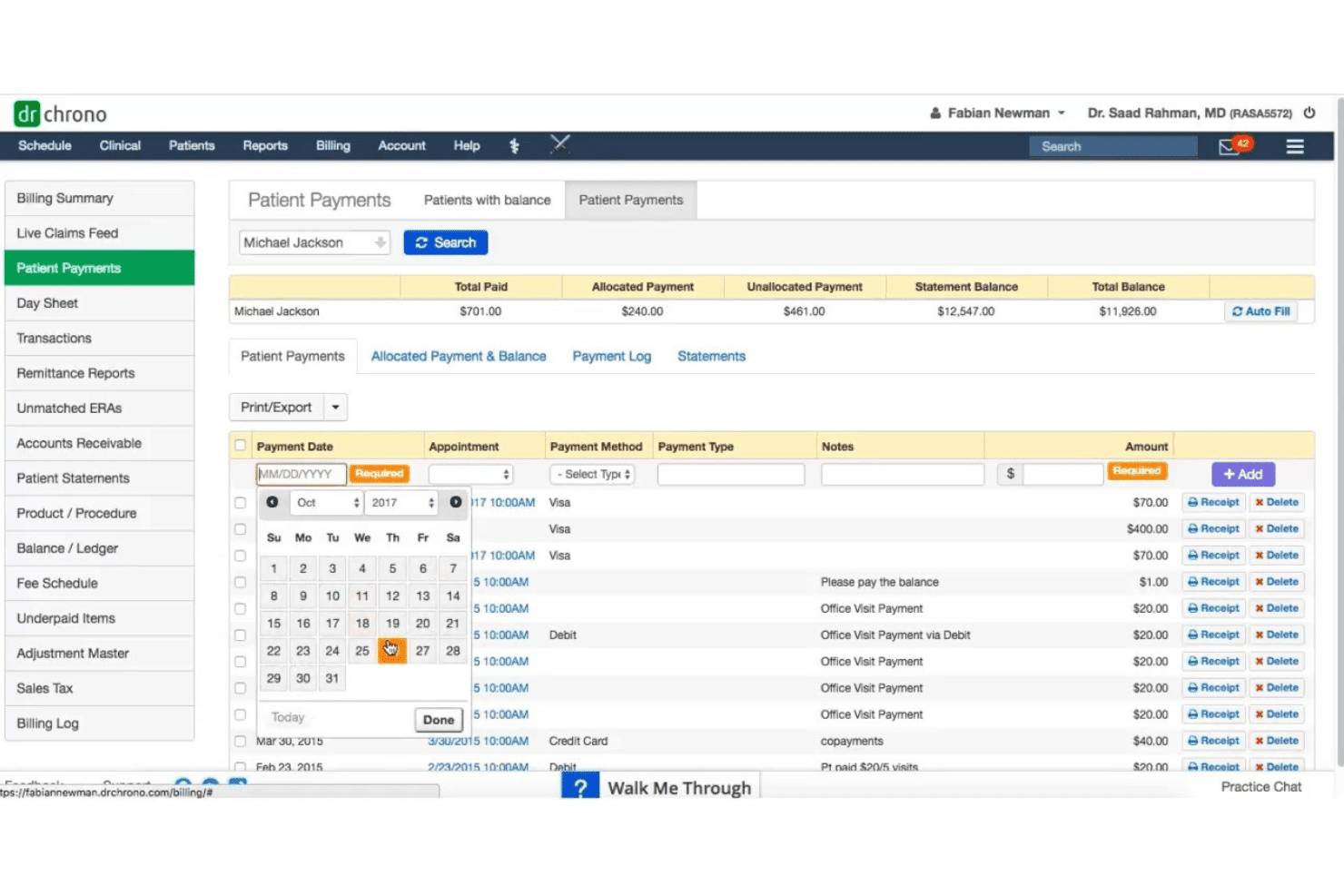
DrChrono links mobile EHR, claims, scrubbing, denials, eligibility, and billing. DrChrono is a cloud-based medical billing and EHR platform that combines claims submission, automated scrubbing, denial management, eligibility verification, and patient billing in a single, mobile-native system built for independent practices.
Who Is DrChrono Best For?
DrChrono is a strong fit for solo physicians and small independent practices that run on Apple devices and want EHR, scheduling, and billing managed in one place.
Why I Picked DrChrono
DrChrono earns its spot on my shortlist because its AI automation goes beyond documentation. EverHealth Scribe captures clinical notes automatically, and that coded data flows directly into claim generation, cutting the gap between the exam room and the clearinghouse. I also like the live-claims feed, which lets me catch rejections the moment they hit rather than discovering a denial weeks later.
DrChrono Key Features
- Customizable billing profiles: Save common codes and diagnoses to speed up charge entry and improve consistency.
- Integrated real-time eligibility checks: Verify patient insurance eligibility instantly with automated pre-visit workflows.
- HIPAA-compliant patient portal: Give patients secure access to statements, balances, and medical documents online.
- Mobile-native EHR and billing: Access and manage all billing and clinical tools on iPad, iPhone, and web.
DrChrono Integrations
DrChrono offers native integrations with Labcorp, Quest Diagnostics, Health Gorilla, Lifepoint, Curogram, Square, Birdeye, and Updox. An API is available for custom integrations.
Pros and Cons
Pros:
- Integrated electronic and paper patient statements
- Mobile-native design for iPad and iPhone
- Clean claims rate exceeds 98 percent
Cons:
- Support quality has declined post-acquisition
- Occasional system slowdowns and glitches
Learn more about DrChrono: Best for real-time claim tracking
- Free demo available
- Pricing upon request
Visit WebsiteCustomer Rating:3.6/5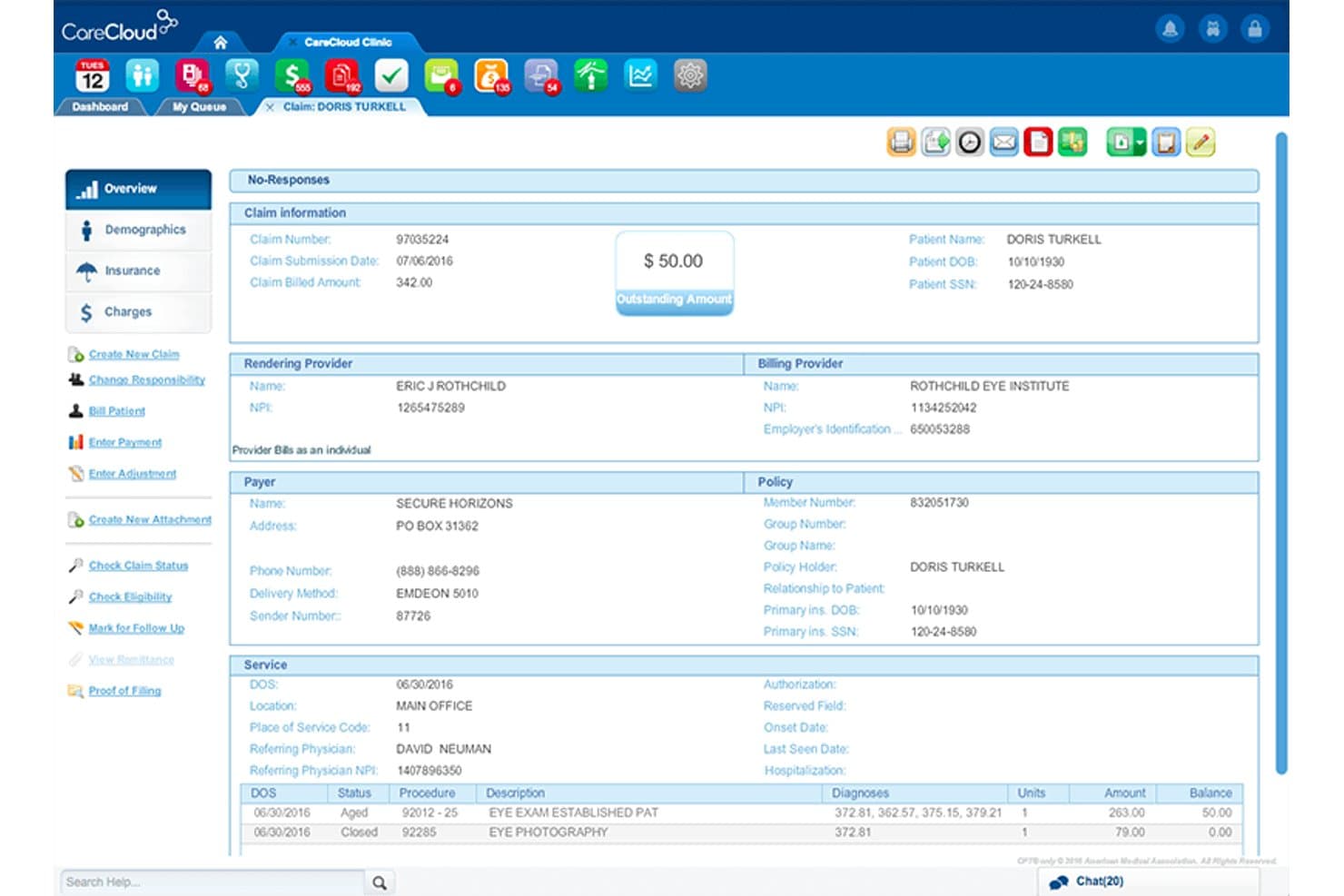
CareCloud offers a detailed claim overview screen displaying patient billing information, provider details, payer policy, and service line items with balances. CareCloud is a cloud-based medical billing platform that combines an integrated clearinghouse, AI-powered claim scrubbing, ERA posting, eligibility verification, and denial and AR tracking.
Who Is CareCloud Best For?
CareCloud is a good fit for independent and small-to-mid-size practices across 70+ specialties that need a fully integrated billing and RCM solution.
Why I Picked CareCloud
I picked CareCloud as one of the best because of how it handles real-time claim visibility across every stage of the billing cycle. Every claim sits in a fully transparent queue, so I can see exactly where it stands in the submission and adjudication process at any point. The CollectiveIQ rules engine scrubs claims against 180 million billing rules before submission, catching payer-specific errors before they trigger a denial.
CareCloud Key Features
- Integrated clearinghouse: Submit claims directly from the platform to payers with built-in clearinghouse functionality.
- ERA auto-posting: Automatically process electronic remittance advice and post payments to patient accounts.
- Batch insurance eligibility: Run bulk insurance verification checks for upcoming appointments to confirm patient coverage.
- Patient statement automation: Generate and send statements in batches and accept credit card payments through the Breeze module.
CareCloud Integrations
CareCloud offers native integrations with pVerify for batch insurance eligibility and connects directly with its own EHR, practice management, and patient portal modules. An API is available for custom integrations.
Pros and Cons
Pros:
- Batch eligibility verification with detailed payer response
- Automated ERA payment posting and reconciliation
- Real-time claim tracking across all billing stages
Cons:
- Per-provider onboarding fees can be high
- Requires multi-year commitment for most plans
Learn more about CareCloud: Best for robust reporting and analytics
- 30-day free trial + free demo available
- From $130/user/month
Visit WebsiteCustomer Rating:3.6/5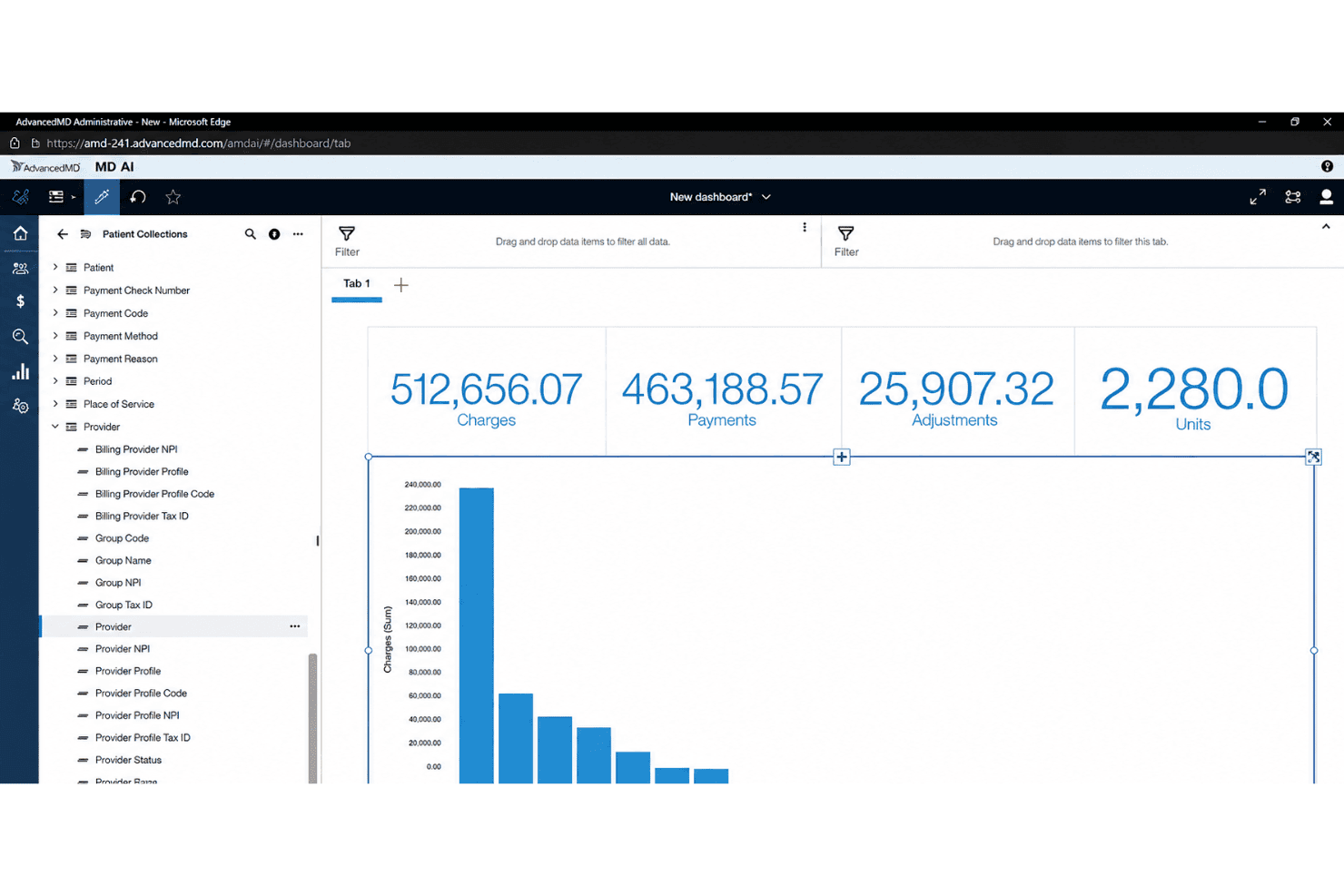
AdvancedMD tracks billing trends, denial causes, and revenue gaps in real time. AdvancedMD is a cloud-based medical billing platform that covers claims submission, automated claim scrubbing, ERA processing, eligibility verification, patient statements, and denial and A/R management for small to mid-sized practices.
Who Is AdvancedMD Best For?
AdvancedMD suits independent billing companies and small-to-mid-sized practices that need a full claims lifecycle platform with detailed revenue reporting.
Why I Picked AdvancedMD
AdvancedMD earns its spot on my shortlist because of the depth its reporting tools bring to day-to-day billing. I especially like the AdvancedInsight module, which lets me build customized reports that go well beyond standard aging summaries. The real-time dashboards surface MTD and YTD comparisons alongside denial root-cause data, so I can pinpoint exactly where revenue is leaking before it compounds.
AdvancedMD Key Features
- ClaimInspector automated scrubbing: Flags coding and eligibility errors before submission to help prevent denials.
- A/R Control Center: Tracks denials, outstanding claims, and collections worklists in one place.
- Patient payment processing: Lets patients pay online and supports customizable statements and copay collection.
- Integrated clearinghouse: Submits claims directly and manages remittances without manual transfers.
AdvancedMD Integrations
AdvancedMD offers native integrations with Waystar, QuickBooks (via qbSolutioneers), InstaMed, 3M M*Modal Fluency Direct, and Healthix HIE, with additional marketplace integrations and an open API for building custom integrations.
Pros and Cons
Pros:
- Detailed patient billing and statement tools
- Claims lifecycle tracked from submission to payment
- Highly customizable revenue analytics dashboards
Cons:
- Training and onboarding support can be limited
- Navigation is complex for new users
Alte software-uri medicale ușor de utilizat pentru facturare
Iată câteva opțiuni suplimentare de software medical ușor de utilizat pentru facturare care nu au ajuns pe lista mea scurtă, dar merită totuși analizate:
- 11CureMDBest for specialty-specific billing modules
- 12RXNTBest for unlimited user access
- 13SimplePracticeBest for intuitive claim submission interface
- 14TherapyNotesBest for behavioral health progress tracking
- 15Elation HealthBest for care team collaboration support
- 16Ensora Health TheraNestBest for mental health insurance billing tools
- 17eClinicalWorksBest for integrated patient portal billing
- 18MEDISOFTBest for customizable patient payment plans
- 19Greenway HealthBest for compliance with industry standards
- 20Practice FusionBest for EHR-integrated claims processing
How I Evaluate Easy Medical Billing Software
I split my evaluation into the core functionality a tool must cover—clean claim submission, ERA posting, eligibility checks—and the differentiators that separate a genuinely easy tool from the rest.
Core Functionality (Table Stakes For This List)
When I'm selecting tools for my list, I rank each one on a scale from 0 (does not offer the functionality) to 5 (excels in this area) for each core functionality listed below. Then, I calculate the tool's total score into a percentage. Each tool needs to achieve a minimum total score of 65% to be considered for inclusion.
- Claims Submission: I check whether the tool supports electronic 837P submission to multiple clearinghouses and look for UB-04 support for practices that handle facility billing.
- Claim Scrubbing: Before a claim goes out, the software should flag coding mismatches, missing modifiers, and payer-specific formatting issues to reduce rework after submission.
- ERA/EOB Posting: I evaluate how each tool handles electronic remittance advice—specifically whether it auto-posts payments or requires staff to manually reconcile every line item.
- Patient Billing & Statements: Generating and sending patient statements should take minimal clicks, and I look for built-in options like online payments and automated balance reminders.
- Eligibility Verification: Real-time 270/271 eligibility checks at scheduling or check-in help front desk staff catch expired coverage before the patient is seen, so I look for both single and batch verification.
- Denial & AR Management: I evaluate whether the tool provides a clear worklist or dashboard that surfaces denied claims, groups aging receivables, and guides follow-up steps for rebilling or appeals.
Once I have a list of tools that meet the criteria, I consider what sets each platform apart.
Differentiating Factors (What Sets Vendors Apart)
Here's how I compare and contrast different vendors:
Standout Features
A built-in clearinghouse is a big differentiator—it means your team can submit and track claims without juggling a separate vendor relationship. I also look for patient payment portals that offer text-to-pay and card-on-file options, since chasing balances manually eats up staff time. Pre-loaded CPT, ICD-10, and HCPCS code libraries with smart search help billers code accurately without memorizing every modifier.
Beyond Features
Ease of onboarding matters a lot here. A solo physician shouldn't need weeks of training or an IT consultant to go live, so I look for guided setup, data migration help, and role-based tutorials. Pricing transparency is equally important—hidden per-claim or clearinghouse fees can quietly inflate costs for small practices. I also evaluate how well each tool connects to existing EHR/EMR systems and accounting software, since billing rarely lives in isolation.
Cum să alegeți un software medical ușor de utilizat pentru facturare
Este ușor să vă pierdeți în liste lungi de funcții și structuri complexe de prețuri. Pentru a vă menține concentrarea în timp ce parcurgeți procesul unic de alegere a software-ului, iată o listă de verificare a factorilor de care trebuie să țineți cont:
| Factor | Ce trebuie luat în considerare |
|---|---|
| FactorUșurința utilizării | Ce trebuie luat în considerareVă veți simți dumneavoastră sau personalul confortabil navigând în sistem în decurs de o săptămână? Solicitați demonstrații și întrebați care este perioada obișnuită de învățare. |
| FactorImplementare și integrare inițială | Ce trebuie luat în considerareCât de mult sprijin este disponibil în timpul configurării? Căutați ajutor pentru integrarea inițială, opțiuni de migrare a datelor și informații despre tipurile de instruire oferite. |
| FactorCost | Ce trebuie luat în considerareExistă taxe ascunse pentru cereri de plată, utilizatori sau acces la centrul de compensare? Confirmați costurile lunare și întrebați despre suplimentele contra cost înainte de a vă înscrie. |
| FactorScalabilitate | Ce trebuie luat în considerarePlatforma va rămâne potrivită dacă cabinetul dumneavoastră își dublează dimensiunea? Luați în considerare dacă instrumentul acceptă mai mulți furnizori, servicii sau locații pe măsură ce vă dezvoltați. |
| FactorIntegrări | Ce trebuie luat în considerareSe va conecta la sistemul dumneavoastră EHR, la software-ul de contabilitate sau la sistemul de programare a consultațiilor? Confirmați integrările acceptate și întrebați despre planurile de dezvoltare viitoare. |
| FactorPosibilități de personalizare | Ce trebuie luat în considerarePuteți adapta fluxurile de lucru, formularele și rapoartele pentru a corespunde specializării sau nevoilor dumneavoastră de facturare? Solicitați exemple din lumea reală în timpul demonstrației. |
| FactorMăsuri de securitate | Ce trebuie luat în considerareFurnizorul oferă un BAA actual, criptarea datelor și jurnale de audit? Verificați standardele de conformitate și modul în care sunt comunicate actualizările. |
| FactorDisponibilitatea asistenței | Ce trebuie luat în considerareEste ajutorul accesibil atunci când aveți cea mai mare nevoie? Verificați programul, canalele de comunicare și timpii de răspuns estimați pentru problemele urgente de facturare. |
Ce este software-ul medical ușor de utilizat pentru facturare?
Software-ul medical ușor de utilizat pentru facturare este conceput astfel încât cabinetele individuale și cabinetele mici să poată gestiona cererile de plată, plățile și facturarea pacienților cu instruire minimă. Aceste platforme automatizează pași esențiali precum trimiterea cererilor de plată, înregistrarea plăților și verificările eligibilității, ajutând echipele să evite erorile, să economisească timp și să se concentreze mai mult asupra îngrijirii pacienților. Majoritatea opțiunilor pun accent pe fluxuri de lucru intuitive și pe o integrare inițială simplă, pentru o adoptare mai rapidă.
Funcțiile software-ului medical ușor de utilizat pentru facturare
Când alegeți un software medical ușor de utilizat pentru facturare, urmăriți următoarele funcții esențiale:
- Trimiterea cererilor de plată: Creați și trimiteți cereri de plată în format electronic direct către plătitori sau case de compensare, eliminând documentele pe suport hârtie și accelerând ciclurile de rambursare.
- Verificarea cererilor de plată: Verificați automat cererile pentru a identifica erori de codificare, eligibilitate sau formatare înainte de trimitere, reducând respingerile și necesitatea reluării procesării.
- Înregistrarea electronică a remiterilor: Importați și înregistrați automat detaliile plăților de la plătitori, minimizând introducerea manuală a datelor și îmbunătățind reconcilierea.
- Extrase pentru pacienți: Generați și transmiteți pacienților extrase profesionale pentru soldurile restante, eficientizând urmărirea și recuperarea sumelor.
- Verificarea eligibilității: Efectuați verificări în timp real sau în lot ale acoperirii și beneficiilor asigurării pacientului pentru a identifica problemele înainte de vizita pacientului.
- Gestionarea respingerilor: Urmăriți cererile respinse, identificați cauzele principale și organizați acțiunile ulterioare într-un tablou de bord ușor de utilizat pentru a recupera prompt veniturile.
- Procesarea plăților online: Acceptați plăți de la pacienți prin card de credit sau plăți electronice, adesea cu un portal pentru autoservire și opțiuni de plată recurentă.
- Biblioteci de coduri preîncărcate: Căutați și selectați coduri CPT, ICD și HCPCS actualizate, cu îndrumare integrată, reducând greșelile de codificare și economisind timp.
- Acces bazat pe roluri: Controlați vizibilitatea datelor și permisiunile în funcție de rolurile utilizatorilor, sprijinind conformitatea și securitatea datelor în cadrul echipei.
- Raportare automatizată: Generați la cerere rapoarte financiare, operaționale și privind creanțele pentru a urmări ciclurile veniturilor, a identifica zonele problematice și a sprijini luarea deciziilor.
Beneficiile unui software medical ușor de utilizat pentru facturare
Implementarea unui software medical ușor de utilizat pentru facturare oferă mai multe beneficii echipei și companiei dumneavoastră. Iată câteva dintre avantajele pe care le puteți anticipa:
- Rambursări mai rapide: Trimiterea automatizată a cererilor și înregistrarea plăților reduc întârzierile dintre furnizarea serviciilor și încasarea banilor în cont.
- Mai puține cereri respinse: Verificarea integrată a cererilor și controalele de eligibilitate identifică erorile din timp, reducând numărul cererilor returnate sau respinse.
- Sarcină administrativă redusă: Tablourile de bord intuitive și fluxurile de lucru integrate permit chiar și echipelor mici să gestioneze facturarea fără a angaja specialiști.
- Colectarea îmbunătățită a sumelor: Portalurile de plată online și automatizarea extraselor pentru pacienți facilitează plata de către pacienți, sprijinind un ciclu al veniturilor mai sănătos.
- Precizie mai mare a facturării: Bibliotecile de coduri preîncărcate și instrumentele de validare sistematică contribuie la prevenirea greșelilor costisitoare de codificare și a problemelor de conformitate.
- Integrare inițială mai simplă: Interfețele ușor de utilizat și configurarea ghidată permit echipei să se familiarizeze rapid cu sistemul, cu perturbări minime ale operațiunilor zilnice.
- Vizibilitate financiară mai bună: Raportarea automatizată și urmărirea creanțelor vă oferă informații în timp real despre starea și tendințele facturării cabinetului dumneavoastră.
Costurile și prețurile software-ului medical ușor de utilizat pentru facturare
Alegerea unui software medical ușor de utilizat pentru facturare necesită înțelegerea diferitelor modele și planuri de preț disponibile. Costurile variază în funcție de caracteristici, dimensiunea echipei, suplimente și alți factori. Tabelul de mai jos rezumă planurile comune, prețurile medii ale acestora și caracteristicile incluse de obicei în soluțiile software medicale ușor de utilizat pentru facturare:
Tabel comparativ al planurilor pentru software medical ușor de utilizat pentru facturare
| Tipul planului | Preț mediu | Caracteristici comune |
|---|---|---|
| Tipul planuluiPlan gratuit | Preț mediu$0 | Caracteristici comuneIntroducerea de bază a cererilor, raportare esențială, extrase manuale pentru pacienți și asistență limitată. |
| Tipul planuluiPlan personal | Preț mediu$30-$60/lună | Caracteristici comuneTrimiterea electronică a cererilor, verificarea cererilor, rapoarte standard, verificări de eligibilitate și asistență prin e-mail. |
| Tipul planuluiPlan pentru companii | Preț mediu$80-$200/lună | Caracteristici comuneÎnregistrarea automată a ERA, portal de plată pentru pacienți, urmărirea respingerilor, plăți online, rapoarte personalizate și asistență live. |
| Tipul planuluiPlan pentru întreprinderi | Preț mediu$250+/lună | Caracteristici comuneOpțiuni complete de integrare, conformitate avansată, automatizarea fluxurilor de lucru, integrare inițială dedicată și asistență premium. |
Întrebări frecvente despre software-ul ușor de facturare medicală
Iată câteva răspunsuri la întrebările frecvente despre software-ul ușor de facturare medicală:
Cât de repede pot începe majoritatea echipelor să utilizeze software-ul ușor de facturare medicală?
Majoritatea echipelor pot începe în câteva zile datorită accesului bazat pe cloud, procesului de integrare pas cu pas și șabloanelor preconfigurate. Căutați opțiuni care oferă asistență pentru migrarea datelor și instruire live pentru o lansare mai simplă.
Funcționează aceste platforme pentru cabinetele de specialitate sau doar pentru clinicile generale?
Da, multe opțiuni de software ușor de facturare medicală acceptă cabinete de specialitate, precum cele de sănătate mintală, chiropractică și fizioterapie. Verificați întotdeauna dacă platforma oferă modificatori, șabloane și rapoarte specifice specialității.
Pot aceste instrumente să gestioneze atât plățile asigurătorilor, cât și plățile pacienților?
Da, software-ul ușor de facturare medicală este conceput pentru a procesa atât rambursările de la asigurători, cât și plățile directe ale pacienților. Majoritatea instrumentelor oferă portaluri de plată online, procesarea cardurilor de credit și generarea automată a extraselor de plată.
Există riscul unor taxe ascunse în cazul opțiunilor accesibile?
Da, unele planuri promovează tarife mici, dar pot percepe taxe suplimentare pentru cereri de plată, utilizatori sau accesul la casa de compensare. Solicitați întotdeauna o defalcare detaliată a taxelor și citiți contractul înainte de a vă angaja.
La ce nivel de asistență pentru clienți ar trebui să mă aștept?
În planurile cu costuri mai mici, ar trebui să vă așteptați la asistență standard prin e-mail sau chat, iar planurile superioare sau pentru întreprinderi pot include asistență telefonică, instruire live sau un manager de cont dedicat. Verificați programul de asistență și timpii de răspuns înainte de achiziție.