

O software de agendamento de EMR permite marcar, gerir e acompanhar as consultas dos pacientes no seu sistema de registos médicos eletrónicos. Se está a pesquisar o melhor software de agendamento de EMR, provavelmente precisa de uma forma de tornar o agendamento menos demorado e mais preciso para a sua equipa. Desde evitar marcações duplicadas até permitir um acesso mais rápido dos pacientes e manter os registos organizados, a ferramenta certa pode eliminar muitas das dificuldades do seu dia a dia. Neste guia, encontrará opções claras adaptadas a diferentes dimensões de clínicas, fluxos de trabalho e especialidades, para que possa escolher o sistema que realmente se adapta à forma como a sua equipa presta cuidados.
Why Trust Our Software Recommendations
6,700+
Reviews
20
Industry experts
16+
Evaluation factors
14
Years
Our team has been testing and reviewing software since 2012. As medical practice leaders ourselves, we know how difficult—and important—it is to choose the right software.
For this guide, we evaluated tools using hands-on testing and independent research, scoring tools using our selection criteria.
Our reviews reflect our human editorial judgment, not a sales pitch.
Tabela comparativa de software de agendamento de EMR
Esta tabela comparativa apresenta os preços das minhas principais escolhas de software de agendamento de EMR:
| Tool | Best For | Trial Info | Price | ||
|---|---|---|---|---|---|
| 1 | Best for practices with free admin users | 14-day free trial | From $29/month | Website | |
| 2 | Best for allied health scheduling and charting | Free demo available | From $59/month | Website | |
| 3 | Best for scheduling backed by 60-plus EHR syncs | Free demo available | Pricing upon request | Website | |
| 4 | Best for automating patient access | Free demo available | Pricing upon request | Website | |
| 5 | Best for scheduling tied to kiosk check-in | Free plan available | From $25/month | Website | |
| 6 | Best for intake-linked scheduling and charting | Free trial available. | $59.90/month | Website | |
| 7 | Best for independent practice scheduling and intake | Free demo available | Pricing upon request | Website | |
| 8 | Best for AI-driven waitlist and slot recovery | Free demo available | Pricing upon request | Website | |
| 9 | Best for health record-native scheduling at scale | Not available | Pricing upon request | Website |


Avaliações do melhor software de agendamento de EMR
\u003cspan style=\u0022font-weight: 400\u0022\u003eSeguem-se os meus resumos detalhados dos softwares gratuitos de agendamento de EMR que entraram na minha seleção. As minhas avaliações apresentam uma análise detalhada das funcionalidades, dos melhores casos de utilização e dos preços de cada plataforma, para o ajudar a encontrar a melhor opção para si.\u003c/span\u003e
 Best for practices with free admin users
- 14-day free trial
- From $29/month
Visit WebsiteCustomer Rating:4.7/5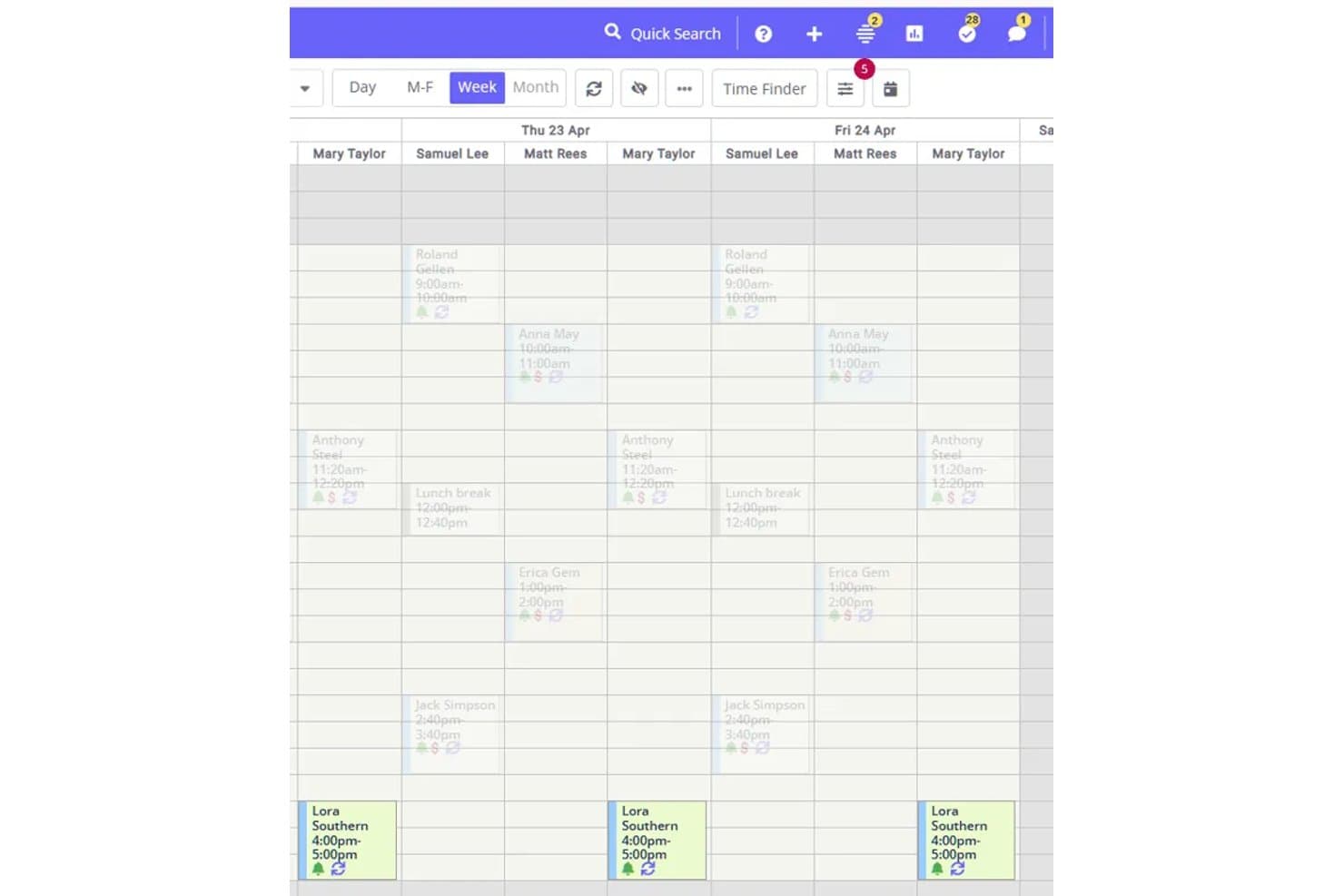
Here's where you can view multi-provider weekly schedules by day and time slot in Zanda. Zanda is an all-in-one practice management platform for allied health practices that brings together appointment scheduling, client records, clinical notes, billing, and automated communications.
Who Is Zanda Best For?
Zanda works well for allied health practices that want front-desk and admin staff included at no extra cost, keeping scheduling and client records in one place without paying per-seat for every user.
Why I Picked Zanda
I've included Zanda in my top picks because it's the only platform on this list where front-desk staff, billers, and practice managers come at no extra cost. Rather than paying per seat for every admin user, your per-practitioner fee covers the clinical work while the whole support team gets full access to scheduling, client records, and communications. I particularly like how waitlist matching surfaces automatically when an appointment is cancelled, letting staff send an SMS to a matched client without leaving the calendar.
Zanda Key Features
- Multi-channel appointment reminders: Automatically send SMS and email reminders up to seven days before an appointment, with clients able to confirm or cancel by replying to a text.
- Client self-booking portal: Clients book, reschedule, or cancel appointments online in real time, with completed bookings appearing on the calendar immediately.
- Room and resource allocation: Assign rooms or equipment to individual appointments so each item can only be booked for one appointment per time slot.
- Recall automations: Send automated SMS, email, or internal task reminders to clients who haven't rebooked after a configured number of days since their last appointment.
Zanda Integrations
Zanda offers native integrations with Google Calendar, Apple Calendar, Outlook Calendar, Zoom, Stripe, Xero, and Physitrack. A public API is available in closed beta for read-oriented custom integrations, with write endpoints not yet documented.
Pros and Cons
Pros:
- Front-desk staff access shared workflows
- SMS reminders reduce manual follow-up
- Client portal reduces booking back-and-forth
Cons:
- Calendar edits can require extra clicks
- No real-time sync with external EMRs
Learn more about Zanda: 2Best for allied health scheduling and charting
Jane
- Free demo available
- From $59/month
Visit WebsiteCustomer Rating:4.8/5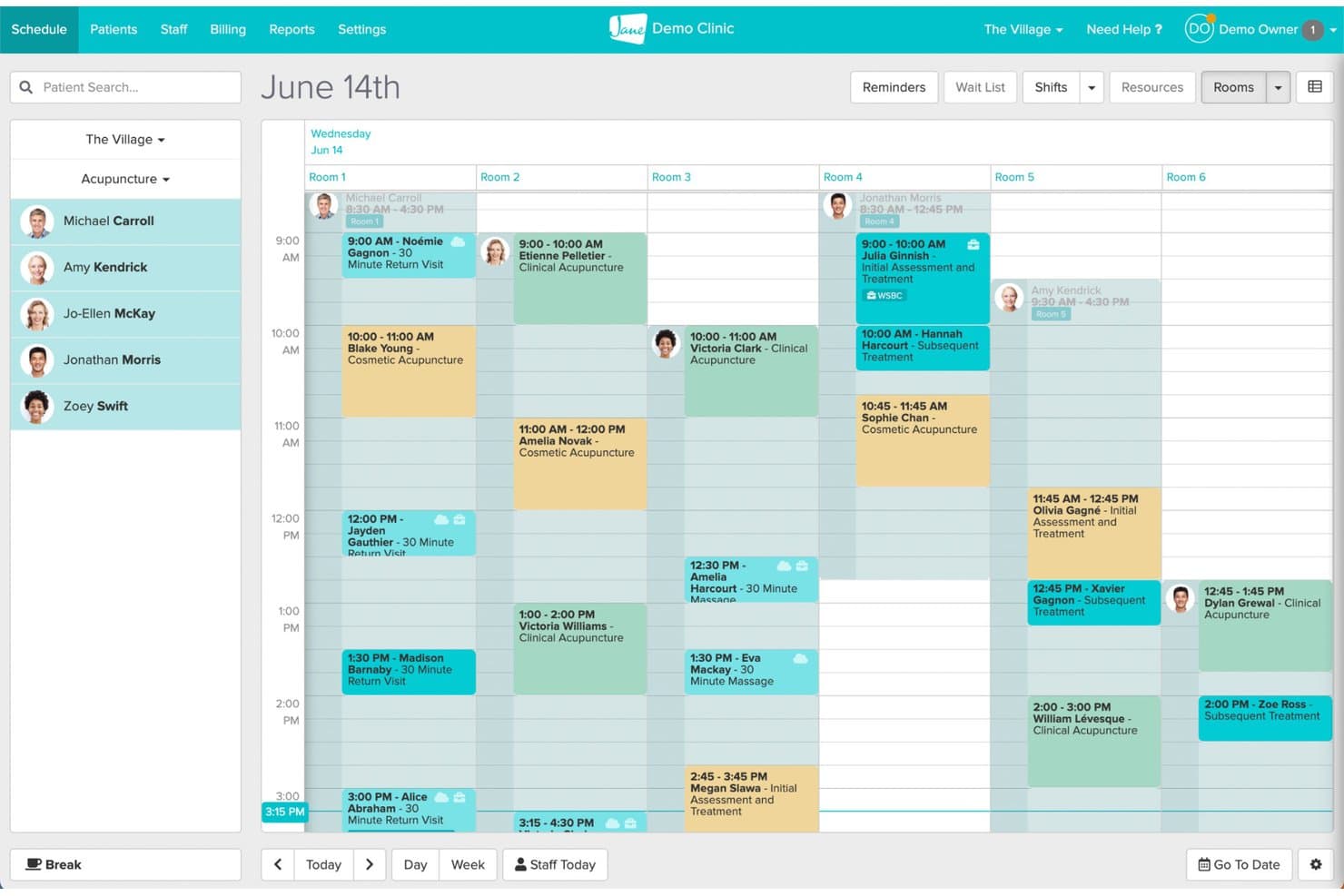
Jane's room-based scheduling view organizes daily appointments across multiple rooms. Jane is a clinic management platform that brings together online booking, scheduling, clinical charting, billing, and patient communication in one connected system built for allied health practices.
Who Is Jane Best For?
Jane fits allied health clinics—chiropractic, physiotherapy, occupational therapy—that want scheduling, charting, and billing managed in one place without juggling separate tools.
Why I Picked Jane
I picked Jane as one of the best because it's built specifically for allied health workflows, keeping scheduling and clinical charting genuinely connected in one system. I like how chart status (No Chart, Draft, Signed, Pending Review) surfaces directly in the Appointments Report, so nothing slips through after a visit. Jane's AI Scribe also lets practitioners generate draft notes from session recordings, which cuts documentation time without breaking the clinical workflow.
Jane Key Features
- Online patient booking: Patients can book appointments in real time through a custom-branded booking site with configurable practitioner, treatment, and location options.
- Intake form assignment: Forms can be automatically assigned by clinic, discipline, practitioner, or appointment type and sent at the time of booking.
- Telehealth scheduling: 1:1 virtual appointments can be scheduled and offered through online booking, with a waiting room, screen sharing, and secure joining links included.
- Activity log: Every user action—including chart access and changes—is recorded with timestamps and filterable by staff member, action type, and date range.
Jane Integrations
Jane lists 20 marketplace integrations, including Claim.MD, TELUS eClaims, Teleplan, Healthcode, Reserve With Google, and Google Analytics. Google Calendar sync is also documented, but Jane doesn't provide an open API or API keys for custom integrations.
Pros and Cons
Pros:
- Reminders support busy clinic workflows
- Patients praise straightforward online booking
- Appointments connect to chart statuses
Cons:
- Chart templates can take time to adapt
- Reports offer limited filtering and saved views
Learn more about Jane: Best for scheduling backed by 60-plus EHR syncs
- Free demo available
- Pricing upon request
Visit WebsiteCustomer Rating:4.8/5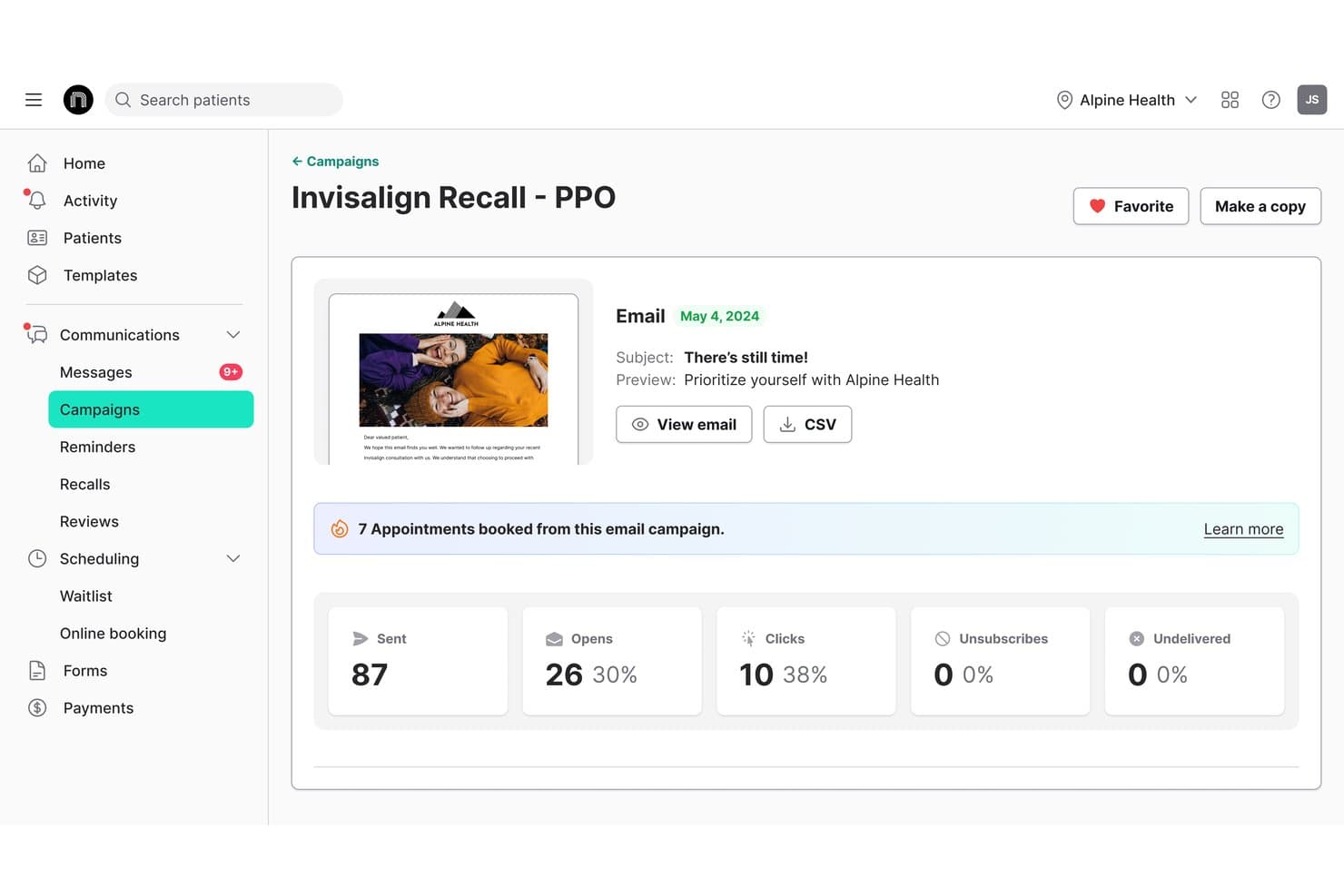
NexHealth offers campaign analytics tracking for email campaigns, showing appointments booked, open rates, clicks, and unsubscribes directly within the platform. NexHealth is an EMR scheduling software that connects patient self-scheduling, waitlist management, automated reminders, and one-click recalls directly to your practice management system.
Who Is NexHealth Best For?
NexHealth is a strong fit for multi-provider medical and dental practices that need online booking, waitlist management, and reminders tightly connected to an existing EHR or practice management system.
Why I Picked NexHealth
I picked NexHealth as one of the best because no other tool on my list matches its breadth of EHR connections, with over 60 supported systems spanning dental, medical, and specialty practices. What I find especially compelling is the waitlist feature: when a slot opens, NexHealth texts eligible patients a one-click booking link, and the confirmed appointment writes directly back to the EHR calendar within minutes. The one-click recall tool works the same way, pulling due dates and procedure codes from the EHR to trigger personalized outreach automatically.
NexHealth Key Features
- Multi-channel online booking: Patients can schedule appointments through your website, Google, social media, email, text, or QR codes, around the clock.
- Appointment-type insertion rules: When a patient books online or claims a waitlist slot, NexHealth can write specified procedure codes or visit types directly to the health record.
- Configurable reminder sequences: Staff can set up branching SMS and email reminder chains, with timing and messaging that adjusts based on whether a patient has confirmed.
- iPhone app for scheduling staff: Front-office staff can view the day's appointments, filter by provider or operatory, create bookings, and update confirmation status from their phone.
NexHealth Integrations
NexHealth supports 60-plus EHR syncs, including Epic Systems, athenaClinicals, eClinicalWorks, Dentrix, Eaglesoft, Open Dental, and Cerner PowerChart. Its REST API and webhooks support custom integrations.
Pros and Cons
Pros:
- Automated reminders cut follow-up work
- Waitlist helps fill canceled openings
- Online booking reduces front-desk calls
Cons:
- Rescheduled visits may lack patient notice
- Online slots can misstate availability
Learn more about NexHealth: Best for automating patient access
- Free demo available
- Pricing upon request
Visit WebsiteCustomer Rating:4.7/5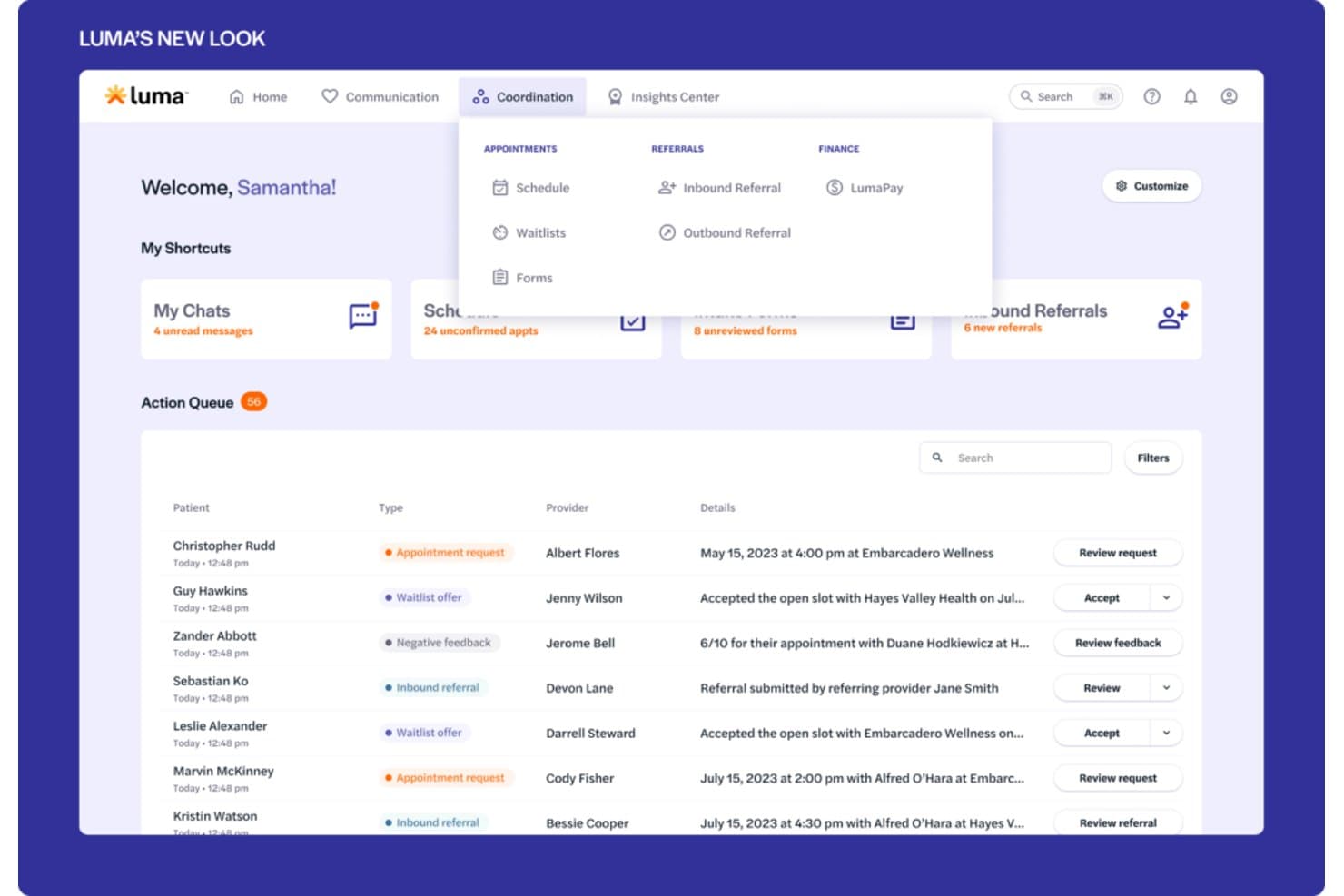
Luma Health offers a coordination dashboard with an action queue displaying appointment requests, waitlist offers, inbound referrals, and scheduling details for multiple patients. Luma Health is an AI-powered patient scheduling platform that handles self-scheduling, smart waitlist management, referral coordination, and EHR-integrated appointment management across text, web, phone, and Google.
Who Is Luma Health Best For?
Luma Health is a strong fit for medical groups and health systems that want to reduce front-office call volume by letting patients self-schedule, reschedule, and manage appointments across text, web, and Google.
Why I Picked Luma Health
I picked Luma Health as one of the best because it's purpose-built to automate patient access end-to-end, not just surface-level self-scheduling. I love that its smart waitlist automatically matches newly opened slots to patients by appointment type and books directly into the EHR, no staff intervention needed. Its AI-driven outbound outreach also contacts no-shows and late cancellations until they rebook, which is where most scheduling tools fall short.
Luma Health Key Features
- Referral fax coordination: Luma's AI parses incoming referral faxes, contacts the patient to schedule, and closes the referral in the EHR automatically.
- Insurance eligibility verification: Luma checks eligibility in real time or in bulk, matched to the appointment's service type, with a dashboard showing coverage details, payer alerts, and verification history.
- Multilingual patient reminders: Automated appointment reminders are sent in more than 20 languages across text, email, and phone, with patient responses writing back to the EHR.
- Capacity Intelligence reporting: Slot-level availability is reported by provider, specialty, visit type, location, and department, including open slots and earliest available dates.
Luma Health Integrations
Luma Health has six documented native EHR integrations: MEDITECH, Oracle Health, eClinicalWorks, Epic, athenahealth, and ModMed. It also connects with Google and Google Ads and offers an API for custom integrations.
Pros and Cons
Pros:
- Automated reminders reduce manual no-show outreach
- Waitlists help refill newly opened appointment slots
- Online booking reduces front-desk phone traffic
Cons:
- Custom workflow configuration can require extended setup
- Some reminders fail to reach patients
Learn more about Luma Health: Best for scheduling tied to kiosk check-in
- Free plan available
- From $25/month
Visit WebsiteCustomer Rating:4.2/5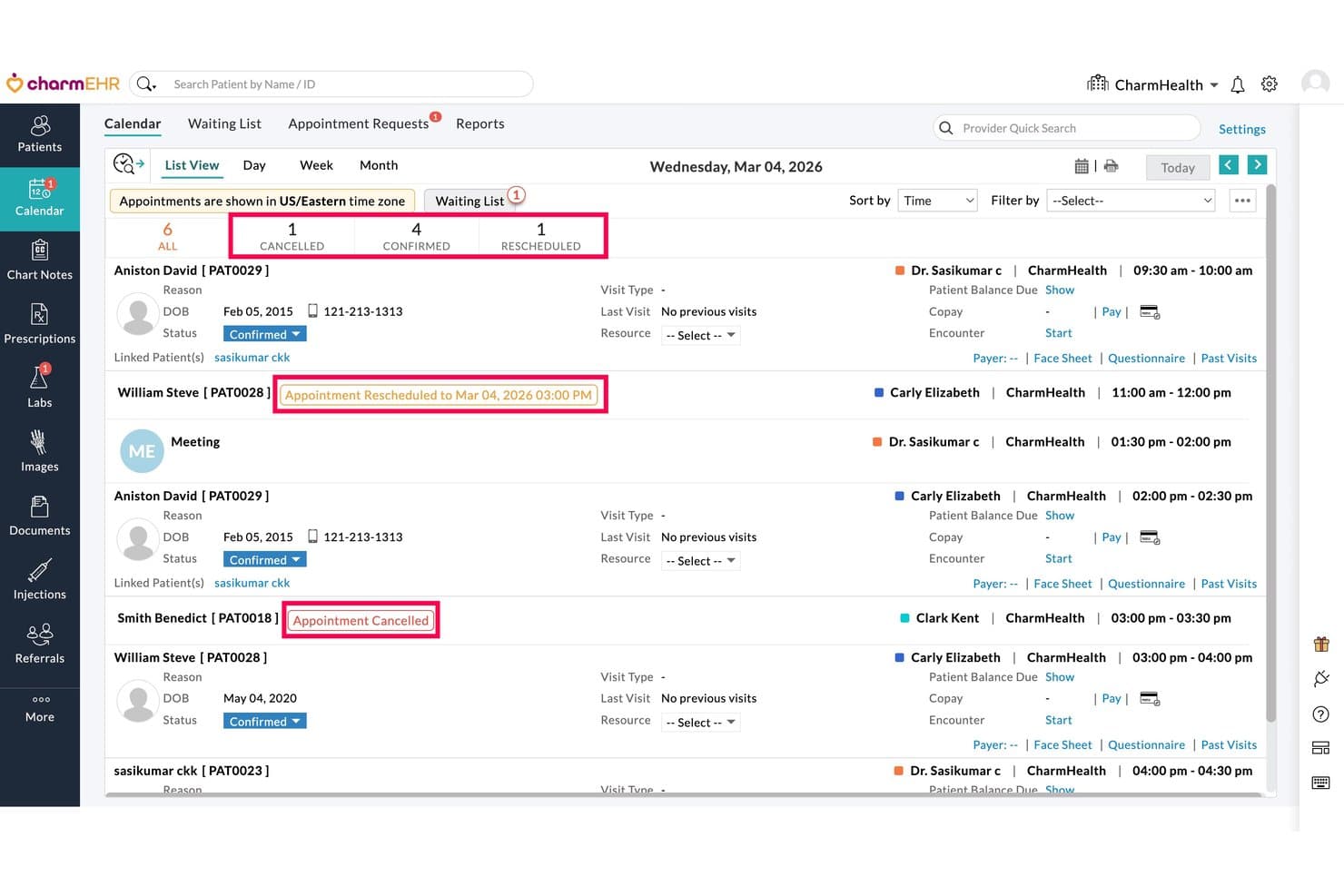
CharmHealth displays daily appointments with cancel and reschedule status indicators. CharmHealth is a browser-based EHR platform that combines appointment scheduling, clinical charting, patient intake, multi-facility calendar management, and telehealth booking in a single system.
Who Is CharmHealth Best For?
CharmHealth is a strong fit for small to mid-sized practices that need scheduling, charting, and patient check-in managed within a single browser-based system.
Why I Picked CharmHealth
I've included CharmHealth in my top picks because the kiosk check-in workflow is genuinely built into the scheduling layer, not bolted on as an afterthought. When a patient arrives, the kiosk app collects demographics, insurance details, and consent forms tied directly to that booked appointment, with questionnaires automatically assigned by visit type or provider. I also like that the Virtual Appointment Bot pre-screens patients before they even arrive, pulling from the same scheduling configuration used across the EHR calendar.
CharmHealth Key Features
- Multi-facility calendar management: View and manage appointment schedules across all practice locations from a single calendar, with filters for provider, resource, and visit type.
- Automated Booking Assistant: Lets patients confirm, cancel, or reschedule appointments by replying to reminder texts, and sends rescheduling links to patients marked as no-shows.
- Configurable appointment notifications: Set up email, SMS, and voice reminders for confirmations, reschedules, cancellations, and upcoming appointments, with editable message templates.
- Real-time insurance eligibility inquiry: Automatically runs eligibility checks a set number of days before appointments and displays policy, copay, and deductible details directly in the calendar.
CharmHealth Integrations
CharmHealth offers native integrations with Surescripts, LabCorp, Quest, QuickBooks, and Bluefin, plus HL7-based data exchange. REST APIs, FHIR documentation, and an SDK support custom integrations.
Pros and Cons
Pros:
- Patient reminders reduce manual follow-up
- Kiosk intake collects forms for booked visits
- Appointment-to-encounter workflow keeps charting connected
Cons:
- Support delays can leave scheduling issues unresolved
- CAPTCHA can interrupt online booking
Learn more about CharmHealth: Best for intake-linked scheduling and charting
- Free trial available.
- $59.90/month
Visit WebsiteCustomer Rating:4.5/5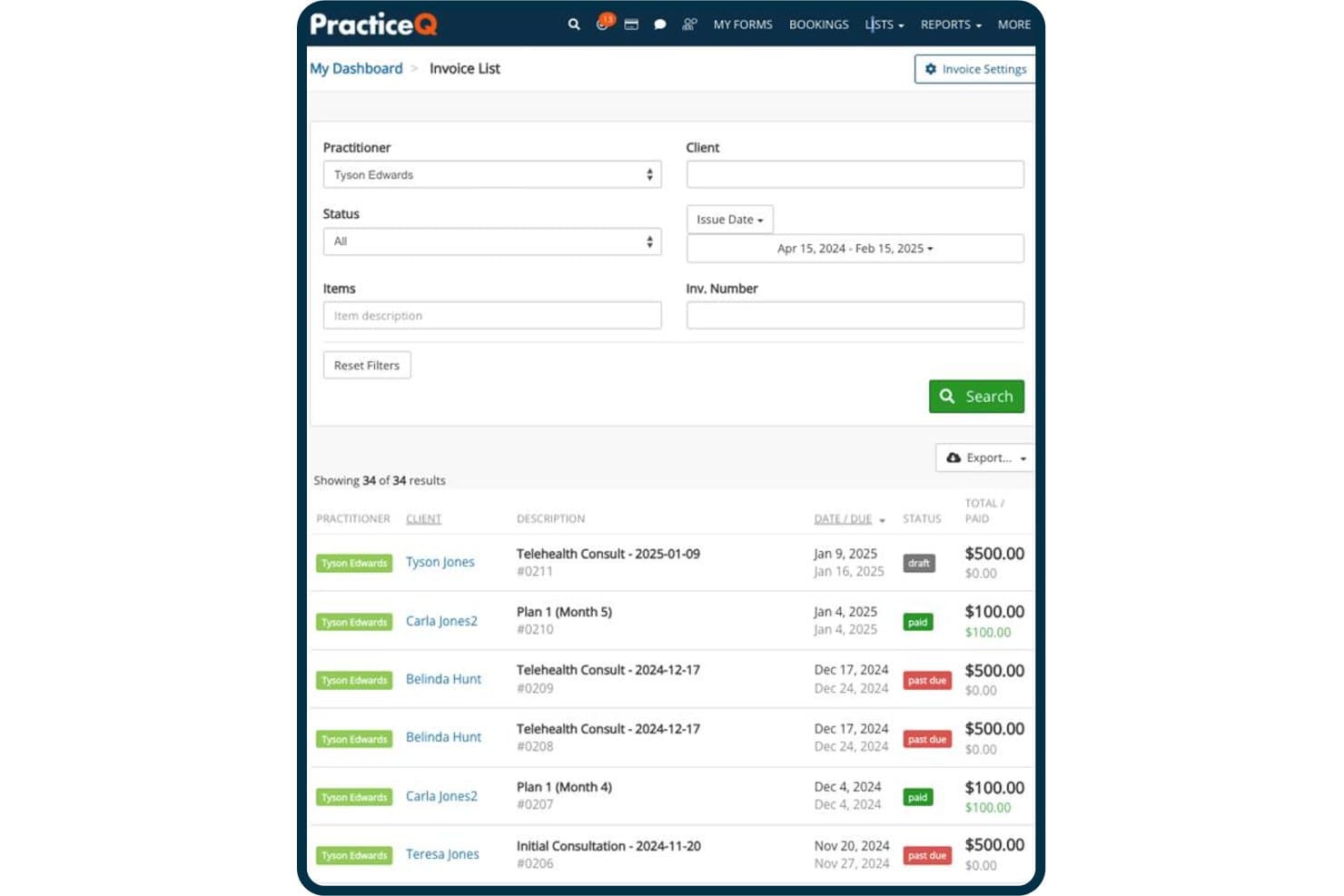
PracticeQ tracks invoice statuses, amounts, and due dates in one view. PracticeQ is an EHR and practice management platform that combines scheduling, patient records, digital intake forms, SOAP charting, billing, and automated patient communication in one system.
Who Is PracticeQ Best For?
PracticeQ suits small to mid-sized allied health and chiropractic practices that want intake forms, scheduling, and clinical charting managed in a single system.
Why I Picked PracticeQ
I picked PracticeQ as one of the best because it's built around the idea that intake and scheduling should never be separate workflows. When a patient books an appointment, their intake forms go out automatically, and submitted data pulls directly into charting notes, so your front desk isn't re-entering information before the visit. I also like the chiropractic-specific SOAP templates, including a spine-chart question type, which means clinical documentation is ready to use without building everything from scratch.
PracticeQ Key Features
- Multi-channel appointment reminders: Send automated SMS, email, or voice reminders with built-in confirm-or-cancel prompts that update appointment status in your calendar.
- EasyFill waitlist: Detects cancellations within five minutes and texts selected waitlisted patients so they can claim the open slot.
- Multi-provider, multi-location calendar: Each practitioner gets a separate calendar with individual availability rules, time zones, and location-specific hours.
- Patient portal: Patients book appointments, complete forms, pay invoices, and message your practice through a single branded online portal.
PracticeQ Integrations
PracticeQ offers native integrations with Google Calendar, Outlook Calendar, Google Meet, Zoom, and Google Drive. It also provides an open REST API and supports integrations with TriZetto, Office Ally, athenahealth, and Zapier.
Pros and Cons
Pros:
- Separate provider calendars include resource checks
- Submitted intake data carries into charting notes
- Chiropractic SOAP templates include spine charts
Cons:
- Time-zone errors can distort appointments and reminders
- Some self-bookings create duplicate patient charts
Learn more about PracticeQ: Best for independent practice scheduling and intake
- Free demo available
- Pricing upon request
Visit WebsiteCustomer Rating:3.9/5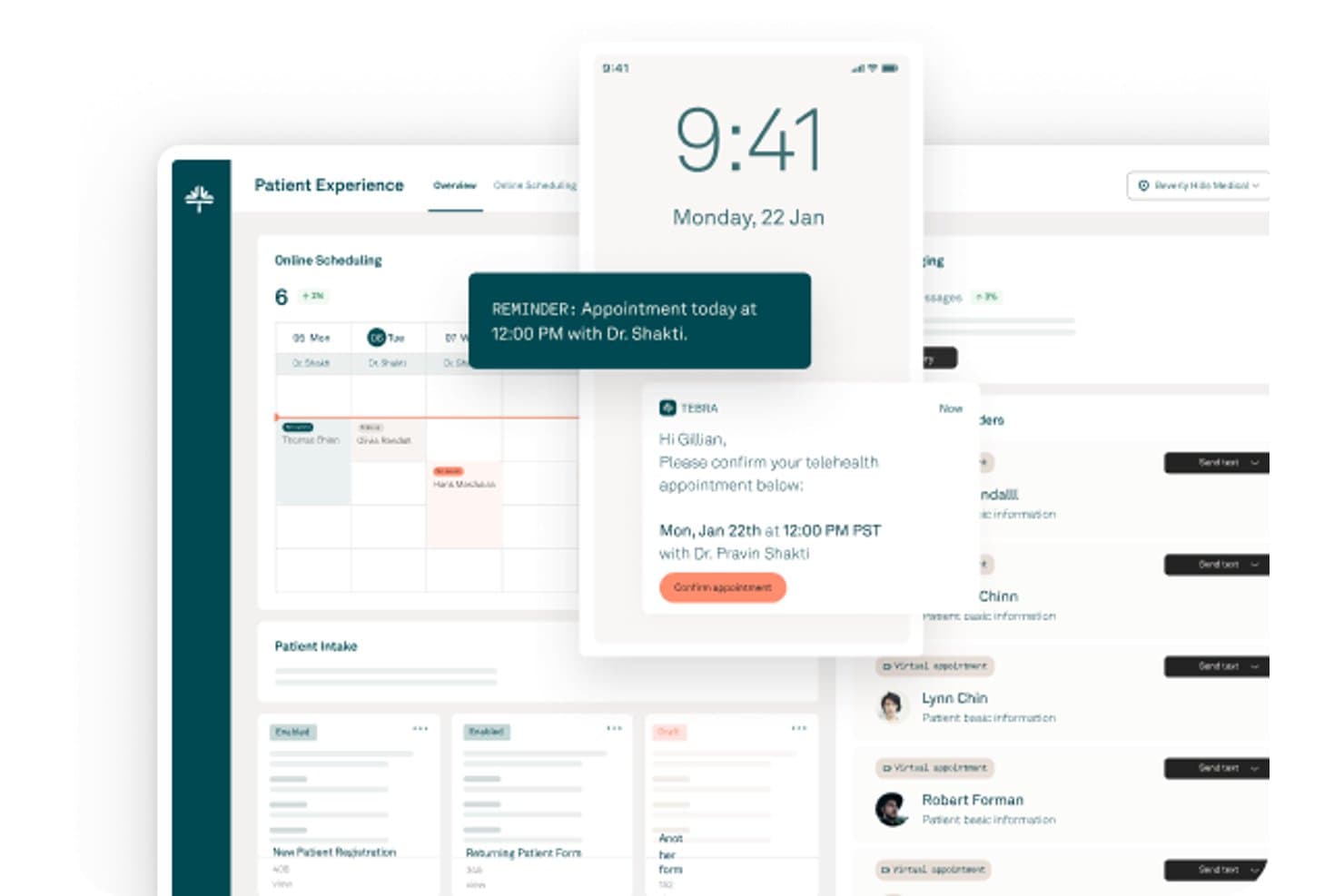
Tebra offers a patient experience dashboard with online scheduling, appointment reminders, telehealth confirmations, and patient intake management. Tebra is a cloud-based EHR platform built for independent healthcare practices that connects appointment scheduling, clinical charting, patient intake, electronic prescriptions, lab ordering, and integrated telehealth in a single workflow.
Who Is Tebra Best For?
Tebra is a strong fit for independent practices—solo providers, small groups, and specialty clinics—that want scheduling, intake, and clinical documentation in one place.
Why I Picked Tebra
I picked Tebra as one of the best because it's purpose-built for independent practices that need scheduling and clinical workflows in one place. I particularly like how appointment notes automatically populate the chief complaint in the clinical chart, so providers aren't re-entering context before a visit. Online booking ties directly to each provider's calendar, and patients can reschedule or cancel from their reminder texts without calling the front desk.
Tebra Key Features
- Multi-channel appointment reminders: Sends automated reminders by email, text, or phone call, with configurable timing from one to six days before the appointment.
- Real-time insurance eligibility checks: Verifies patient coverage from the Dashboard, Calendar, or Appointment page and saves results directly to the patient's insurance record.
- Multi-resource scheduling: Lets staff assign providers, rooms, and equipment to appointments with live availability and conflict indicators.
- All Appointments report: Tracks each provider's appointment volume alongside cancellation, reschedule, and no-show rates, with CSV or Excel export.
Tebra Integrations
Tebra offers native integrations with GoodRx, Google Business Profile, and Tebra Care Connect. It also provides SOAP APIs for custom integrations.
Pros and Cons
Pros:
- Patients can book outside office hours
- Text, email, and phone reminders
- Appointment notes populate clinical chief complaints
Cons:
- Support responses can be slow
- Calendar updates occasionally appear incorrectly
Learn more about Tebra: Best for AI-driven waitlist and slot recovery
- Free demo available
- Pricing upon request
Visit WebsiteCustomer Rating:3.4/5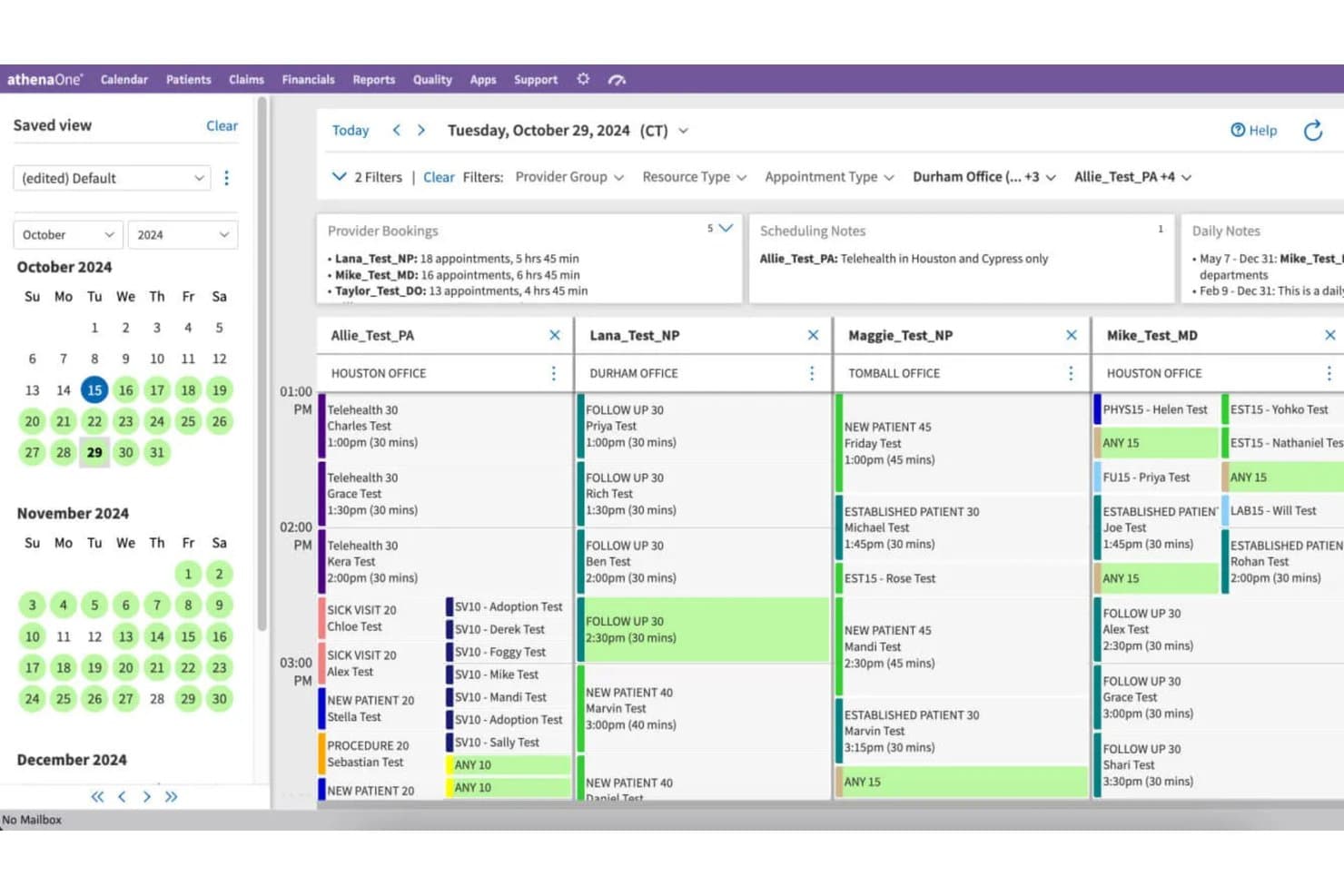
athenahealth offers a multi-provider calendar scheduling view with appointment details, office locations, and scheduling notes across providers. athenaOne is an integrated EHR, practice management, and patient engagement platform that combines native scheduling, clinical documentation, medical billing, and AI-powered waitlist and reminder tools in a single system.
Who Is athenaOne Best For?
athenaOne suits ambulatory practices that want scheduling, clinical documentation, billing, and AI-driven waitlist recovery built into a single system rather than stitched together from separate tools.
Why I Picked athenahealth
athenaOne earns its spot on my shortlist because its AI-driven waitlist tools actively recover lost appointment slots rather than leaving gaps unfilled. When a cancellation comes in, athenaOne's Waitlist Scheduling scans the waitlist and automatically contacts patients to fill the opening, including same-day slots. I also like that its proactive waitlist feature sends outbound notifications to patients about available appointments before a slot goes to waste.
athenaOne Key Features
- Schedule Builder: Create, preview, and apply scheduling templates for individual providers, departments, or provider groups, with configurable appointment types, times, and date ranges.
- Self check-in: Let patients confirm appointment details, update demographics, upload insurance cards, and complete consent forms before arrival.
- Multi-resource scheduling: Book multiple providers, rooms, or equipment resources for the same or different days and times, including surgical room schedules and provider block time.
- ReminderCall: Send automated appointment reminders by phone, email, or text, with delivery and confirmation outcome tracking reported directly in athenaOne.
athenahealth Integrations
athenaOne advertises 277K+ direct clinical integrations, including Labcorp Diagnostic Assistant, Zio by iRhythm, and Fullscript. It also supports Marketplace integrations and REST and FHIR APIs with 700+ endpoints for custom connectivity.
Pros and Cons
Pros:
- Reminder tracking reports confirmations and delivery
- Calendar templates cover providers and departments
- AI waitlists refill canceled appointments
Cons:
- Guest self-scheduling cannot reschedule or cancel
- Routine scheduling can require many clicks
Learn more about athenahealth: 9Best for health record-native scheduling at scale
EPIC
- Not available
- Pricing upon request
Visit WebsiteCustomer Rating:4.5/5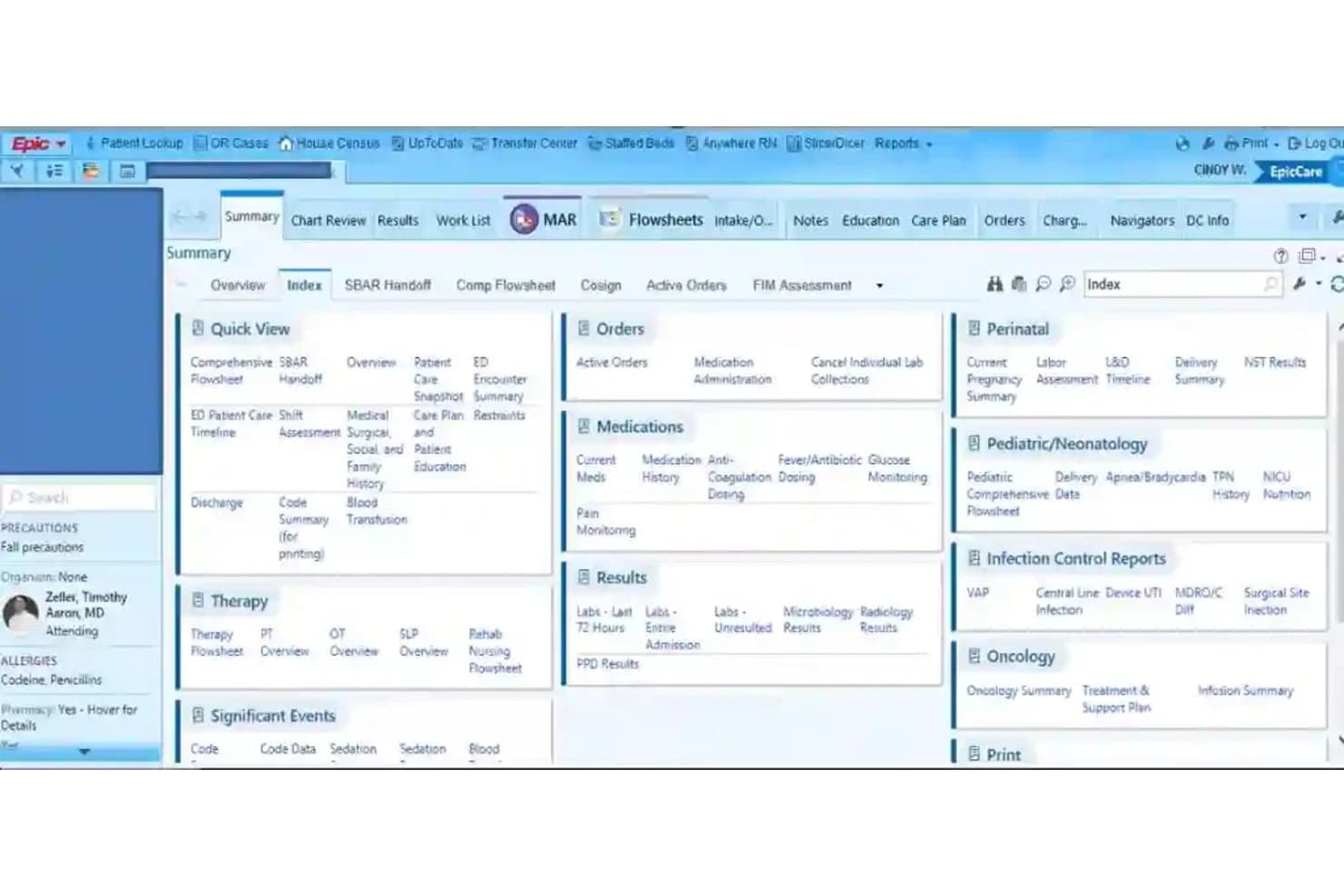
EPIC organizes patient data into a tabbed clinical dashboard for quick access. Epic is an EMR platform that brings together health records and appointment scheduling, including patient self-scheduling, centralized multi-specialty booking, automated reminders, and waitlist management across large healthcare organizations.
Who Is Epic Best For?
Epic is a strong fit for large health systems and multi-specialty organizations that need scheduling embedded directly within a unified patient record.
Why I Picked Epic
I picked Epic as one of the best because scheduling lives inside the same patient record your clinical team already works in, which means no syncing between separate systems. I like how Fast Pass automatically surfaces open slots to waitlisted patients, and how Hello World sends multi-channel reminders via SMS and voice, drawing each patient's preferred contact method directly from their chart. Epic reported more than 3.4 million no-shows prevented across U.S. health systems in a single year, which reflects the scale this platform is built to handle.
Epic Key Features
- Centralized scheduling: Lets scheduling staff book appointments across an organization using built-in decision support for specialty-specific and complex appointment needs.
- Patient self-scheduling: Allows new and existing patients to schedule online with or without a MyChart account, including sequential appointments like imaging before a visit.
- Digital check-in: Gives patients a way to complete check-in digitally before their appointment through Epic's patient experience tools.
- Insurance eligibility verification: Checks patient coverage electronically without requiring staff to log into separate payer portals.
Epic Integrations
Epic reports 3,294 live apps using open.epic web services. Native vendor integrations aren’t clearly documented, but Epic supports custom connections through FHIR, REST APIs, and HL7v2 interfaces.
Pros and Cons
Pros:
- Specialty-aware booking supports complex appointments
- Automated reminders and waitlists fill openings
- Patient records stay alongside scheduling
Cons:
- External appointments can’t be checked in or charted from the clinical schedule
- Booking can take multiple selections
Learn more about EPIC:
How I Evaluate EMR Scheduling Software
I split my evaluation into three parts, with core functionality carrying the most weight: link bookings to patient charts and coordinate provider calendars, visit types, and reminders. Next, I consider standout features such as automated waitlist fills. Finally, I assess implementation support and pricing value.
Core Functionality (Table Stakes For This List)
When I'm selecting tools for my list, I score each one on a scale from 0 (does not offer the functionality) to 5 (excels in this area) for each core functionality listed below. I then convert the total into a percentage to help assess each tool's overall fit, with extra weight on any functionalities I’ve deemed essential.
- EMR-Integrated Scheduling (Essential): I look for appointments that connect to patient charts, so staff can review visit details without re-entering scheduling information.
- Appointment Calendar (Essential): I assess how staff coordinate providers, locations, and rooms, such as avoiding exam-room conflicts across overlapping visits.
- Automated Reminders: I check which channels send reminders and confirmations, and whether patients can confirm or cancel directly from a message.
- Patient Self-Scheduling: I look for real-time availability and booking options that let patients choose appropriate visit types and manage appointments online.
- Availability Rules: I evaluate whether teams can set provider hours, visit types, durations, and resource rules to prevent scheduling conflicts.
- Waitlist & Recall: I check whether staff can match patients to cancellations and prompt follow-up visits based on appointment history.
Once I have a list of tools that meet the criteria, I consider what sets each platform apart.
Differentiating Factors (What Sets Vendors Apart)
Here's how I compare and contrast different vendors:
Standout Features
I check whether a platform offers real-time eligibility verification at booking. Catching coverage gaps before a patient arrives saves front-desk staff from scrambling and reduces claim denials. I also evaluate analytics dashboards that report on no-show rates and provider utilization, since those numbers drive staffing and template adjustments. A mobile provider app matters too—clinicians who can confirm availability or respond to waitlist openings between rooms keep slots filled without calling the front desk.
Beyond Features
I check whether a vendor supports HL7 or FHIR standards, since proprietary integrations can lock you into a single EMR long after your needs change. Implementation support matters just as much—a platform with dedicated onboarding specialists and realistic go-live timelines protects you from the scheduling downtime that delays patient care. I also evaluate total cost of ownership, including per-provider licensing, SMS fees, and support tiers that add up well beyond the base price.
Como escolher software de agendamento de EMR
É fácil perder-se em listas extensas de funcionalidades e estruturas de preços complexas. Para o ajudar a manter-se concentrado enquanto analisa o seu processo específico de seleção de software, eis uma lista de verificação dos fatores a ter em conta:
| Fator | O que deve considerar |
| Escalabilidade | O software consegue lidar com mais localizações, profissionais e volume de pacientes à medida que a sua clínica cresce? |
| Integrações | Integra-se facilmente com o seu EMR, ferramentas de faturação, telemedicina e comunicação existentes? |
| Personalização | É possível configurar tipos de consulta, regras de agendamento e controlos de acesso de acordo com os seus fluxos de trabalho? |
| Facilidade de utilização | As suas equipas administrativa e clínica aprenderão rapidamente a utilizar o sistema ou será necessária uma formação extensa? |
| Implementação e integração inicial | Que apoio receberá durante a implementação? Informe-se sobre a migração, os prazos de configuração e os recursos de formação disponíveis. |
| Custo | Qual é o custo total real, incluindo a configuração, os complementos, a manutenção e as taxas por profissional? |
| Medidas de segurança | O produto cumpre, desde o início, os seus requisitos relativos à HIPAA, auditorias e acesso aos dados? |
| Disponibilidade do apoio | É disponibilizado apoio em direto durante o horário em que trabalha ou apenas durante o horário comercial de outro fuso horário? |
O que é o software de agendamento de EMR?
O software de agendamento de EMR é uma ferramenta digital que permite à sua equipa marcar, gerir e acompanhar as consultas dos pacientes diretamente no seu sistema de registos médicos eletrónicos. Liga o agendamento aos processos clínicos dos pacientes, centraliza os calendários de vários profissionais e localizações e automatiza os lembretes para reduzir as faltas às consultas. Este software ajuda as clínicas a personalizar os tipos de consulta, gerir listas de espera e melhorar o fluxo de informação entre as equipas clínica e administrativa.
Funcionalidades do software de agendamento de EMR
Ao selecionar um software de agendamento de EMR, procure as seguintes funcionalidades essenciais:
- Integração EMR/EHR: Os agendamentos atualizam os registos dos pacientes em tempo real, para que as equipas clínicas e administrativas utilizem sempre o mesmo conjunto de dados.
- Agendamento de vários profissionais: Faça a gestão dos calendários de vários profissionais, salas e localizações, com alertas de conflitos e sobreposições.
- Tipos e regras de consultas: Defina tipos e durações de consultas personalizáveis que correspondam às especialidades dos profissionais, aos requisitos dos pagadores e aos fluxos de trabalho clínicos.
- Lembretes para pacientes: Envie lembretes automáticos por SMS, e-mail ou voz aos pacientes, com confirmações para ajudar a reduzir o risco de faltas.
- Agendamento autónomo online: Permita que os pacientes marquem, reagendem ou cancelem consultas através de um portal ou widget que apresente a disponibilidade em tempo real.
- Gestão de listas de espera: Mantenha listas de pacientes que solicitam consultas mais cedo e preencha rapidamente os cancelamentos, associando-os a horários disponíveis.
- Atribuição de recursos e salas: Reserve os recursos necessários juntamente com as consultas, coordenando a utilização de salas de exame, equipamento ou enfermeiros.
- Suporte para consultas recorrentes: Agende séries de consultas — como terapia, procedimentos ou planos de cuidados em várias etapas — com base em padrões ou dependências definidos.
- Controlos de acesso e permissões: Limite quem pode consultar ou editar os dados das consultas, garantindo que os fluxos de trabalho sensíveis são protegidos por função ou departamento.
- Relatórios e análises: Gere dados detalhados sobre tendências de consultas, taxas de faltas, utilização dos profissionais e estrangulamentos nos fluxos de trabalho, para orientar melhorias.
Funcionalidades comuns de IA do software de agendamento EMR
Para além das funcionalidades padrão do software de agendamento EMR listadas acima, muitas destas soluções estão a incorporar IA com funcionalidades como:
- Análise preditiva de faltas: Utiliza dados históricos de consultas e o comportamento dos pacientes para prever quais têm maior probabilidade de faltar, permitindo que os funcionários intervenham proativamente.
- Otimização inteligente da lista de espera: A IA associa os cancelamentos aos pacientes mais adequados da lista de espera, com base na urgência, na preferência do profissional e nos padrões de agendamento.
- Otimização automática do calendário: Analisa continuamente os calendários dos profissionais e a procura dos pacientes para sugerir horários de consulta ideais, reduzindo períodos vazios e maximizando a utilização.
- Assistentes de agendamento em linguagem natural: Permite que funcionários ou pacientes marquem consultas utilizando linguagem conversacional, com a IA a interpretar os pedidos e a gerir a lógica de agendamento.
- Previsão da procura: Prevê o volume futuro de consultas e as necessidades de pessoal através da análise de tendências, sazonalidade e fatores externos, ajudando as clínicas a planear os recursos com maior precisão.
Benefícios do software de agendamento EMR
A implementação de software de agendamento EMR proporciona vários benefícios à sua equipa e à sua empresa. Eis alguns dos que pode esperar:
- Menos faltas: Os lembretes automáticos e as funcionalidades inteligentes de lista de espera mantêm os horários de consulta preenchidos e reduzem os períodos vazios no seu calendário.
- Fluxos de trabalho simplificados: A integração direta com o EMR poupa tempo aos funcionários, atualizando instantaneamente os registos dos pacientes e os detalhes das consultas em todos os sistemas.
- Melhor acesso dos pacientes: O agendamento autónomo online e a disponibilidade em tempo real ajudam os pacientes a encontrar e marcar os cuidados de que necessitam, sem chamadas telefónicas repetidas.
- Maior utilização dos recursos: As funcionalidades de gestão de salas, profissionais e equipamento reduzem as reservas duplicadas e maximizam a utilização do espaço e dos funcionários.
- Melhores informações para a tomada de decisões: As ferramentas de relatórios e análises revelam tendências, estrangulamentos e oportunidades de melhoria dos processos num relance.
- Maior conformidade e segurança: Os controlos de acesso integrados e os registos de auditoria ajudam a manter a conformidade com a HIPAA e a proteger dados de agendamento sensíveis.
- Adaptação à sua especialidade: Os tipos de consultas e os fluxos de trabalho personalizáveis respondem às necessidades específicas de várias especialidades médicas e de clínicas de diferentes dimensões.
Custos e preços do software de agendamento EMR
A seleção de software de agendamento EMR requer uma compreensão dos vários modelos de preços e planos disponíveis. Os custos variam consoante as funcionalidades, a dimensão da equipa, os complementos, entre outros fatores. A tabela abaixo resume os planos comuns, os respetivos preços médios e as funcionalidades normalmente incluídas nas soluções de software de agendamento EMR:
Tabela de comparação de planos de software de agendamento EMR
| Tipo de plano | Preço médio | Funcionalidades comuns |
| Plano gratuito | $0 | Inclui agendamento de consultas limitado, sincronização básica do calendário e suporte mínimo. |
| Plano pessoal | $10-$30/user/month | Disponibiliza o agendamento individual por profissional, lembretes para os pacientes, marcação online e relatórios básicos. |
| Plano empresarial | $35-$80/user/month | Adiciona suporte para vários profissionais, integração com EMR/EHR, tipos de consulta personalizados, calendários de grupo e análises avançadas. |
| Plano empresarial de grande dimensão | $100-$200+/user/month | Suporta a gestão de várias localizações, integrações avançadas, alocação de recursos, suporte dedicado e ferramentas de conformidade. |
Perguntas frequentes sobre software de agendamento EMR
Eis algumas respostas a perguntas comuns sobre software de agendamento EMR:
De que forma o software de agendamento EMR melhora a experiência do paciente?
Estas ferramentas permitem que os pacientes marquem, cancelem ou reagendem consultas online, recebam lembretes automáticos e preencham antecipadamente os formulários de admissão. Isto reduz os tempos de espera e mantém os pacientes mais bem informados sobre os seus cuidados.
O software de agendamento EMR pode funcionar com o meu sistema EHR existente?
Sim, a maioria das soluções disponibiliza opções de integração com as principais plataformas EHR. Procure integrações nativas ou um suporte sólido para API/HL7, de modo a garantir que os dados dos pacientes, os detalhes das consultas e as notas clínicas são sincronizados corretamente entre os sistemas.
Que medidas de segurança devo esperar de um software de agendamento EMR?
Espere um tratamento de dados em conformidade com a HIPAA, registos de auditoria, controlos de acesso baseados em funções e armazenamento de dados encriptado. Alguns fornecedores disponibilizam também certificação SOC 2 e ferramentas para gerir as permissões dos utilizadores, de modo a cumprir os requisitos de conformidade.
É possível gerir consultas recorrentes ou de grupo?
Sim, muitas plataformas permitem configurar consultas repetidas para terapias ou infusões e coordenar sessões com vários profissionais ou em grupo, para que possa gerir padrões de agendamento complexos sem acompanhamento manual.
Que recursos de integração e suporte estão normalmente disponíveis?
Os fornecedores podem oferecer integração personalizada, migração de dados e formação. Informe-se sobre contactos dedicados de apoio ao cliente, suporte 24 horas por dia, 7 dias por semana, e bases de conhecimento online para ajudar a sua equipa a efetuar a transição sem problemas e a resolver rapidamente eventuais problemas.