

O software IDX para faturação médica é um sistema especializado que ajuda as equipas de saúde a gerir pedidos de reembolso de seguros, automatizar tarefas de faturação e acompanhar pagamentos com precisão. Se está a avaliar as melhores opções, é provável que esteja a lidar com processos desatualizados, pedidos de reembolso rejeitados ou o incómodo de ter de acompanhar cada pagamento — enquanto gere a conformidade e os cuidados prestados aos doentes.
Este guia pretende ajudá-lo a encontrar um software IDX que se adapte ao seu fluxo de trabalho real, reduza os erros e mantenha as suas receitas em movimento. Verá quais as plataformas que oferecem funcionalidades práticas para as suas prioridades, como se comparam entre si e qual poderá ser a mais adequada para o seu consultório ou organização.
Why Trust Our Software Recommendations
6,700+
Reviews
20
Industry experts
16+
Evaluation factors
14
Years
Our team has been testing and reviewing software since 2012. As medical practice leaders ourselves, we know how difficult—and important—it is to choose the right software.
For this guide, we evaluated tools using hands-on testing and independent research, scoring tools using our selection criteria.
Our reviews reflect our human editorial judgment, not a sales pitch.
Tabela comparativa de software IDX para faturação médica
Esta tabela comparativa resume os detalhes de preços do meu software IDX para faturação médica:
| Tool | Best For | Trial Info | Price | ||
|---|---|---|---|---|---|
| 1 | Best for independent practice workflows | Free demo available | Pricing upon request | Website | |
| 2 | Best for efficient medical billing workflows | Free demo available | Pricing upon request | Website | |
| 3 | Best for mobile-friendly billing access | Free demo available | Pricing upon request | Website | |
| 4 | Best for scalable solution options | Free demo available | Pricing upon request | Website | |
| 5 | Best for specialty-specific billing needs | Free demo available | Pricing upon request | Website | |
| 6 | Best for claims and payment analytics | Free demo available | Pricing upon request | Website | |
| 7 | Best for unified billing and scheduling | Free demo available | Pricing upon request | Website | |
| 8 | Best for integrated reporting tools | Free demo available | Pricing upon request | Website | |
| 9 | Best for customizable workflow automation | Free demo available | Pricing upon request | Website | |
| 10 | Best for hands-on revenue cycle support | Free demo available | Pricing upon request | Website |


Avaliações do melhor software IDX para faturação médica
Seguem-se os meus resumos detalhados dos melhores softwares IDX para faturação médica que entraram na minha seleção. As minhas avaliações apresentam uma análise detalhada das funcionalidades, dos casos de utilização mais adequados e dos preços de cada plataforma, para o ajudar a encontrar a melhor opção para si.
 Best for independent practice workflows
- Free demo available
- Pricing upon request
Visit WebsiteCustomer Rating:4.1/5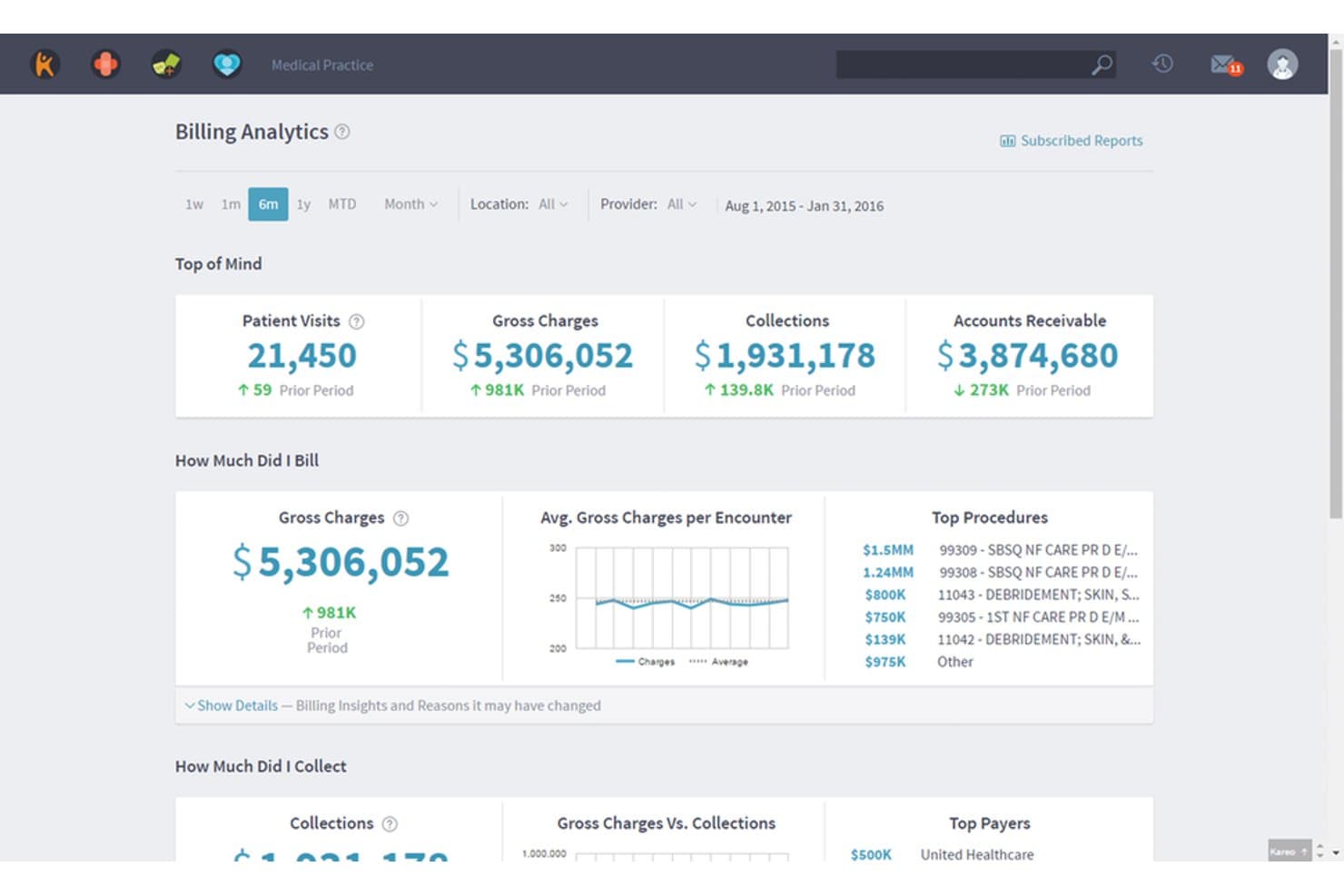
Kareo Billing offers a comprehensive billing analytics dashboard displaying patient visits, gross charges, collections, and accounts receivable metrics. Kareo Billing is a cloud-based medical billing platform built for independent practices that handles claims submission, insurance eligibility verification, ERA auto-posting, and patient statement generation in a single system.
Who Is Kareo Billing Best For?
Kareo Billing is a strong fit for independent practices and small billing companies that manage the full revenue cycle without a dedicated enterprise IT team.
Why I Picked Kareo Billing
I picked Kareo Billing as one of the best because its real-time eligibility verification checks coverage, copays, and deductibles across 2,700+ payers and feeds directly into scheduling and billing workflows. The RPA engine auto-posts ERAs and applies unapplied payments using business rules, which matters when a small practice team handles billing without a dedicated RCM staff. Payer-specific scrubbing rules catch errors before claims go out.
Kareo Billing Key Features
- Automated patient statements: Generate and send branded batch statements with QR codes for online payment.
- Third-party EHR integration: Connect with external EHRs through HL7/FHIR or API bridges.
- Customizable AR dashboards: Track accounts receivable aging and denials with interactive visual analytics.
- Multi-channel payment collection: Accept patient payments via online portal, card on file, or in-person options.
Kareo Billing Integrations
Kareo Billing offers native integrations with third-party EHR systems via HL7 and FHIR connections. An API is available for custom integrations.
Pros and Cons
Pros:
- Batch patient statements with QR code payments
- Automated ERA posting with unapplied payment logic
- Real-time insurance eligibility checks with most payers
Cons:
- No predictive denial analytics or AI code suggestions
- Reports require manual exporting for customization
Learn more about Kareo Billing: Best for efficient medical billing workflows
- Free demo available
- Pricing upon request
Visit WebsiteCustomer Rating:4.1/5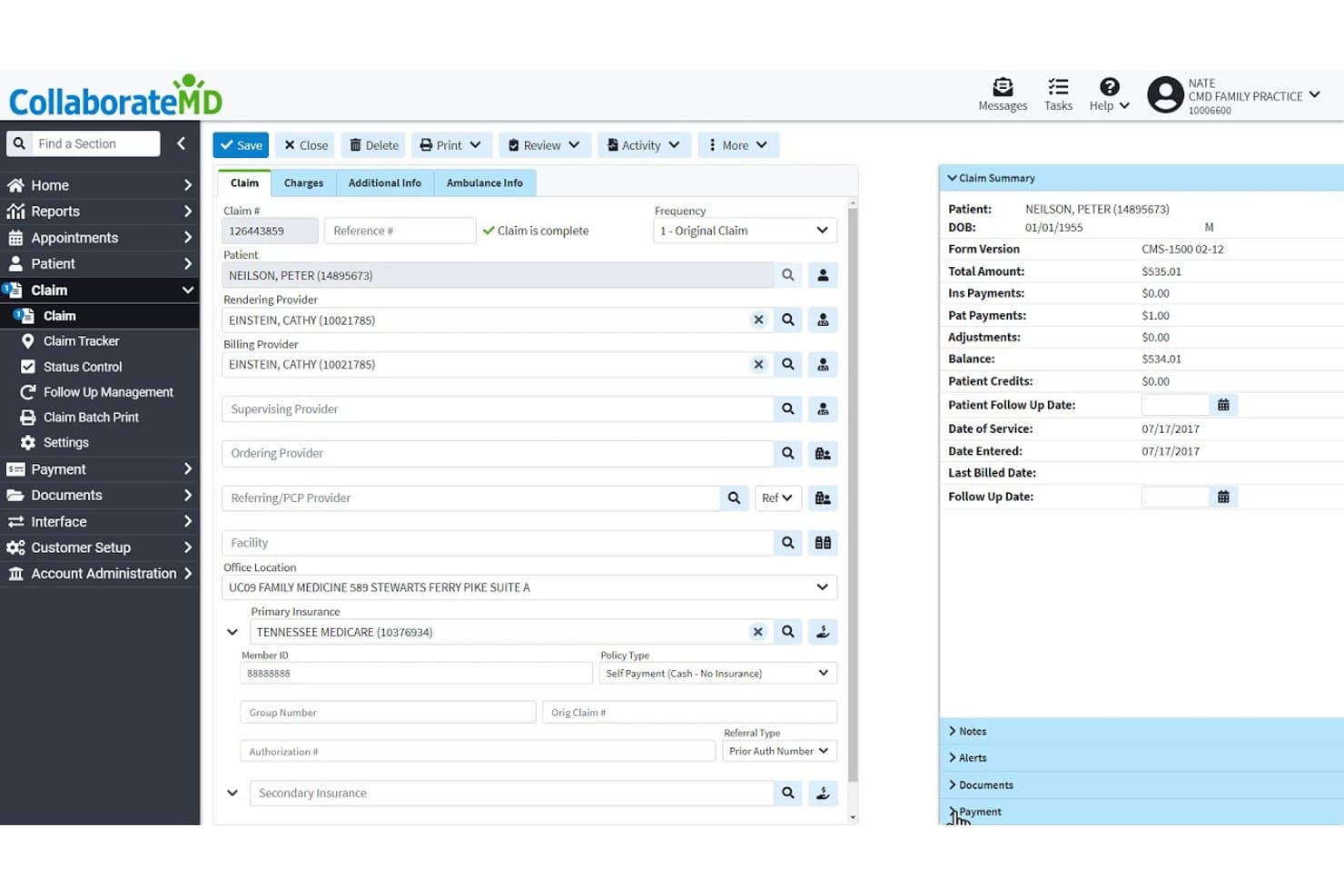
CollaborateMD offers a detailed claim management interface displaying patient info, provider details, insurance data, and a claim summary panel with billing financials. CollaborateMD is a cloud-based medical billing and practice management platform that combines claims processing, clearinghouse integration, real-time eligibility verification, denial management, and patient payment collection in a single system.
Who Is CollaborateMD Best For?
It's a strong fit for small to mid-sized medical practices and independent billing services managing high claim volumes across multiple specialties.
Why I Picked CollaborateMD
CollaborateMD earns its spot because of how tightly its billing workflow holds together from claim creation to payment posting. I particularly like its built-in clearinghouse with Level 2 Claim Edits, which checks for CCI, NCD/LCD, and modifier conflicts before a claim ever leaves the system. The AI-powered rejection support then translates payer rejection codes into plain-language explanations, so billing staff spend less time decoding remittances and more time resolving issues.
CollaborateMD Key Features
- Real-time insurance eligibility checks: Instantly verify patient insurance coverage and benefits within the platform.
- Appointment scheduling module: Manage patient and provider calendars using a built-in scheduling tool connected to billing.
- Patient payment portal: Accept online payments and enable set-up of payment plans for patient balances.
- Custom HL7 and EHR integrations: Connect to a wide range of EHRs with HL7 interfaces and custom mapping options.
CollaborateMD Integrations
CollaborateMD offers native integrations with Practice Fusion, Elation, Kipu, Amazing Charts, Alleva, and Hello Health, plus supports custom HL7 interfaces and provides an API for custom integrations.
Pros and Cons
Pros:
- Patient payment portal with online billing statements
- Real-time eligibility checks for insurance verification
- Automated claim scrubbing for CCI and LCD edits
Cons:
- Support available only during business hours
- No mobile app for claim management
Learn more about CollaborateMD: Best for mobile-friendly billing access
- Free demo available
- Pricing upon request
Visit WebsiteCustomer Rating:3.9/5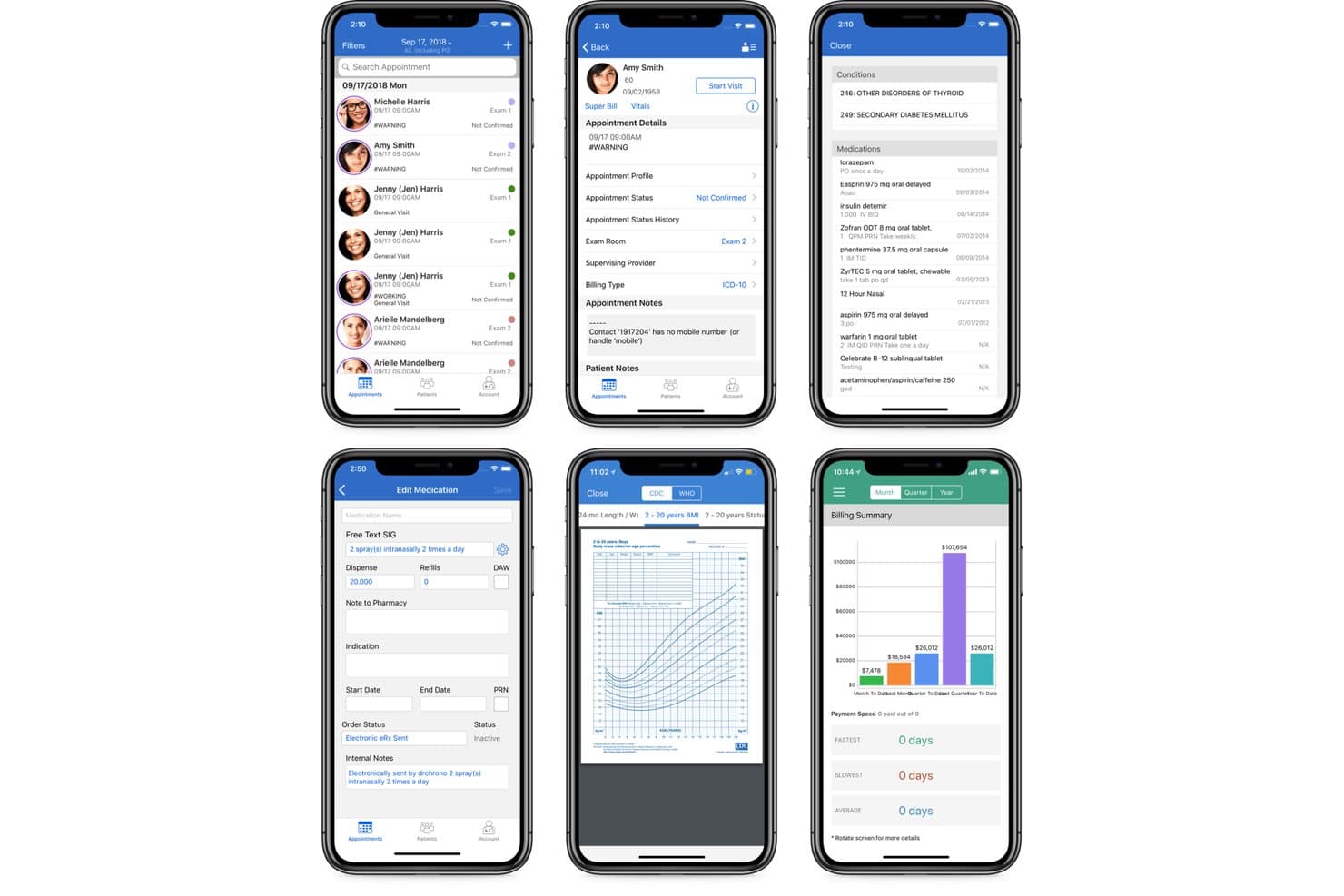
DrChrono offers a mobile billing summary dashboard alongside appointment scheduling, patient records, and medication management screens for family practice workflows. DrChrono is a cloud-based EHR and medical billing platform that combines claims submission, insurance eligibility verification, denial management, and revenue cycle management in a single system built natively for iOS devices.
Who Is DrChrono Best For?
DrChrono is a strong fit for independent practices and small-to-mid-size clinics that run on Apple devices and want billing built into their EHR.
Why I Picked DrChrono
DrChrono earns its spot as one of the best on my shortlist because it's the only medical billing platform built natively for iOS from the ground up. I can pull up the Live Claims Feed on an iPad mid-rounds, run a real-time insurance eligibility check before a patient walks in, and review denial statuses without touching a desktop. The integrated ePS clearinghouse is fully accessible from iPhone or iPad, so claim submission doesn't have to wait until someone's back at a workstation.
DrChrono Key Features
- Billing profiles: Store frequently used code combinations for faster charge entry.
- Automated ERA and EOB posting: Manage both electronic and paper remittance directly within the platform.
- Patient statements by text, email, or mail: Send balance due notifications through multiple channels with embedded payment links.
- Integrated eligibility verification: Run bulk or on-demand checks for insurance coverage before or during patient visits.
DrChrono Integrations
DrChrono offers native integrations with Quest Diagnostics, LabCorp, eProvider Solutions, and Carisk Partners. Extended lab integrations cover 40,000+ individual labs and imaging centers. An API is available for custom integrations.
Pros and Cons
Pros:
- Integrated billing and EHR on iOS devices
- Built-in denial management with AI translation
- Mobile-first billing and claims management
Cons:
- Limited advanced AR reporting features
- Requires use of DrChrono EHR system
Learn more about DrChrono: Best for scalable solution options
- Free demo available
- Pricing upon request
Visit WebsiteCustomer Rating:3.6/5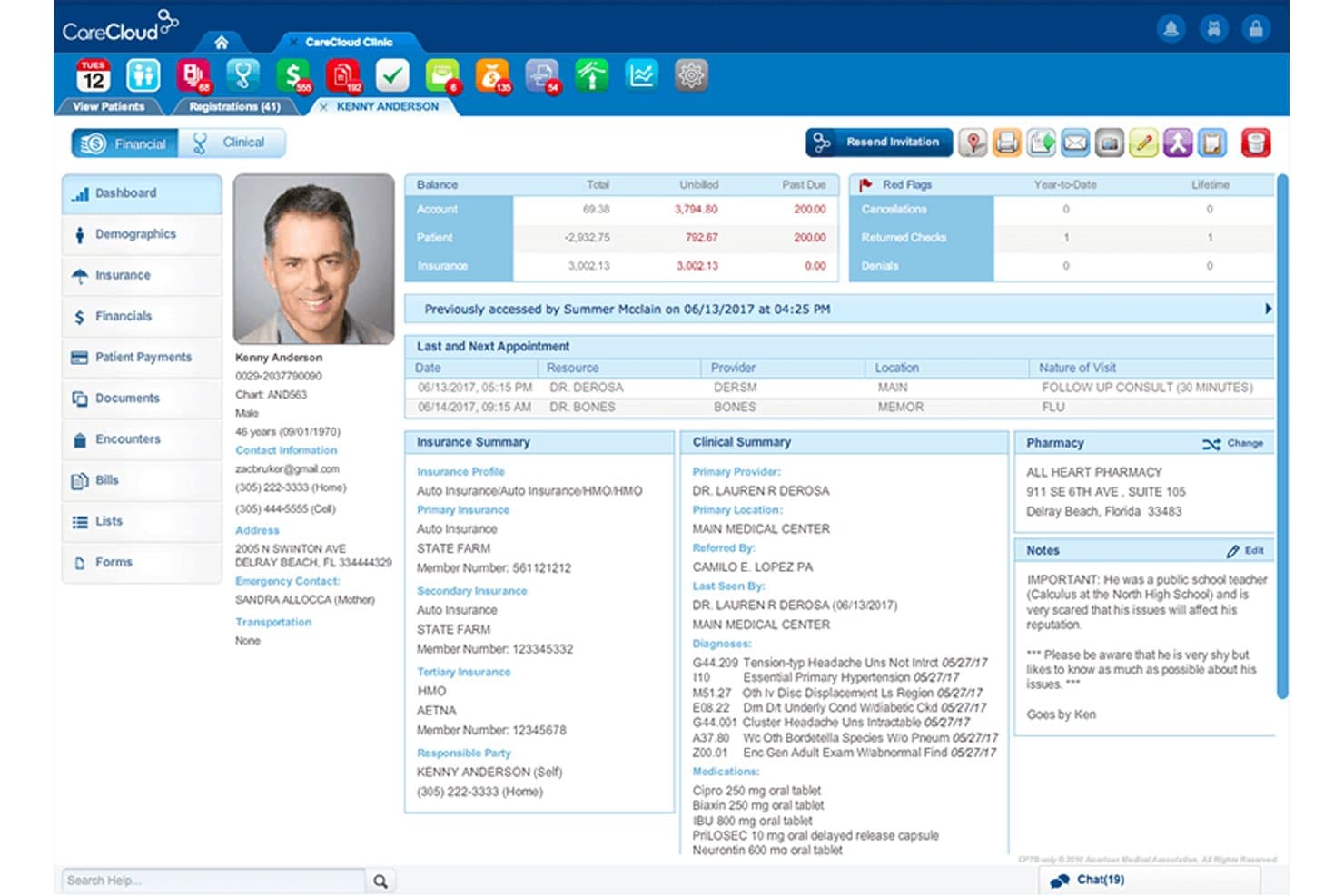
CareCloud offers a comprehensive patient portal dashboard displaying financial summaries, insurance details, clinical notes, and appointment history in one unified view. CareCloud is a cloud-based medical billing platform that combines claims management, automated scrubbing via its CollectiveIQ rules engine, ERA posting, eligibility verification, and RCM services across self-service, hybrid, and fully outsourced engagement models.
Who Is CareCloud Best For?
CareCloud is a strong fit for medical practices of any size that want to choose how much of their billing they manage in-house versus outsource.
Why I Picked CareCloud
I picked CareCloud as one of the best because its three-tier engagement model is genuinely rare in medical billing. You can start with self-service claims software, layer in hybrid billing support, or hand off your full RCM to CareCloud's Concierge service, all without switching platforms. I also like that it's PM-agnostic, so the CollectiveIQ billing engine layers onto your existing practice management system without forcing a full migration.
CareCloud Key Features
- Built-in clearinghouse: Process and submit electronic claims directly to payers without manual data entry.
- Batch payment posting: Post multiple payments across claims in a single workflow to save time.
- Real-time eligibility verification: Instantly check patients’ insurance coverage before services are rendered.
- Practice analytics dashboard: Access real-time reporting on accounts receivable, denials, and revenue cycle KPIs.
CareCloud Integrations
CareCloud integrates with third-party platforms like AdvancedMD, Allscripts Practice Management, Kareo Clinical, Nextech EHR, Raintree Systems, and pVerify for eligibility. An API is available for custom integrations.
Pros and Cons
Pros:
- Real-time insurance eligibility checks
- Built-in clearinghouse for electronic claims
- Multi-tiered self-service and RCM options
Cons:
- Medical coding services excluded from base tier
- Some users report slow customer support
Learn more about CareCloud: Best for specialty-specific billing needs
- Free demo available
- Pricing upon request
Visit WebsiteCustomer Rating:3.5/5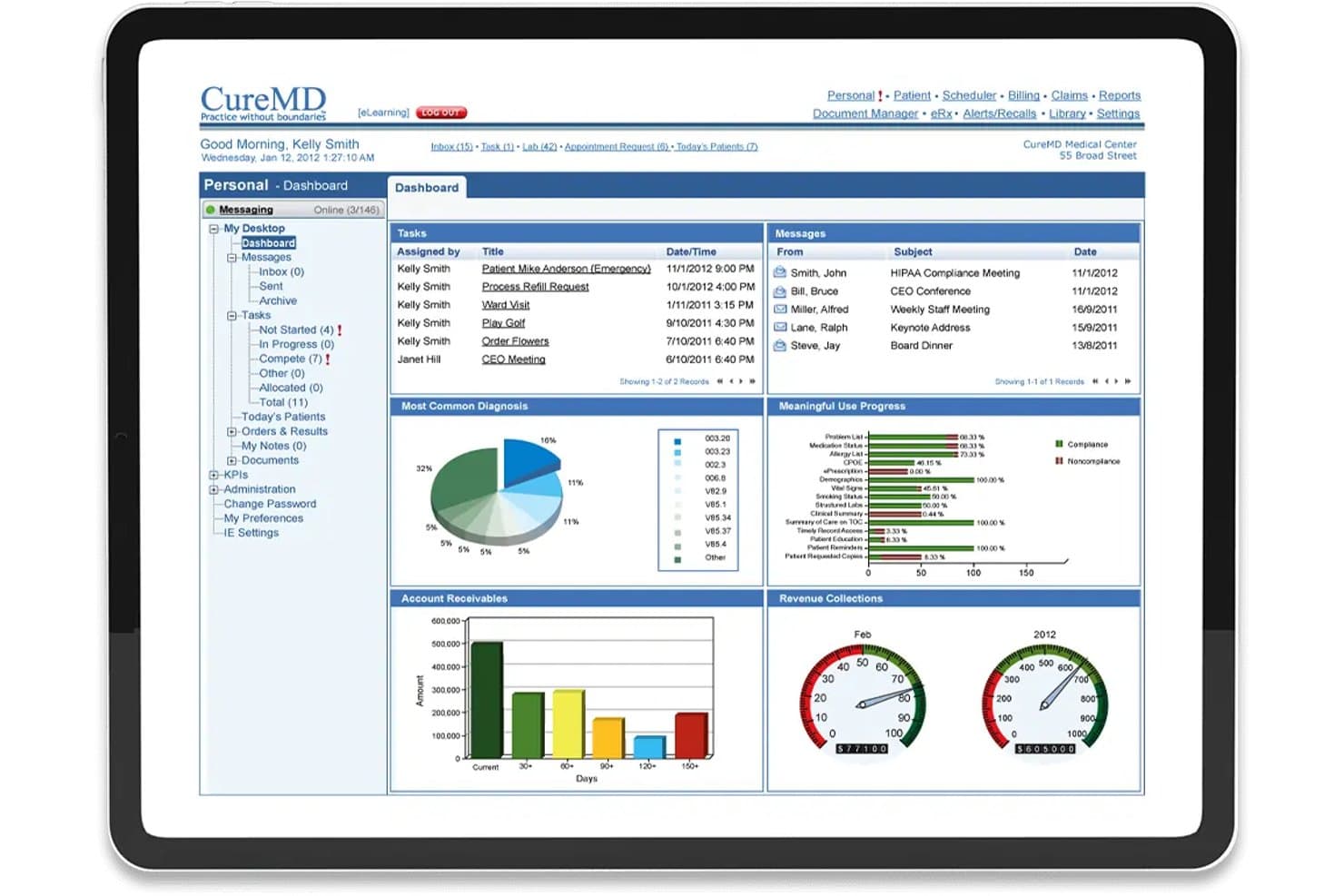
CureMD offers a comprehensive medical billing dashboard with revenue collections, account receivables, tasks, and meaningful use progress tracking. CureMD is a cloud-based EHR and medical billing platform that integrates claims management, coding support, eligibility verification, and revenue cycle tools across 30+ specialty-specific workflows.
Who Is CureMD Best For?
CureMD is a strong fit for small to midsize specialty practices that need an integrated EHR and billing platform tailored to their specific clinical workflows.
Why I Picked CureMD
I picked CureMD as one of the best because its billing intelligence goes deeper than a generic code library. For a cardiology practice, that means the system applies bundling logic across stress tests, echos, and catheterization procedures automatically. I also like how oncology billing incorporates cancer staging and chemotherapy regimen tracking directly into the coding workflow. The LCD-aligned documentation tools for pain management keep injection service claims defensible without extra manual review.
CureMD Key Features
- Integrated clearinghouse: Electronic claims and remittances process through a connected clearinghouse without switching platforms.
- Real-time insurance eligibility verification: Instantly check patient insurance eligibility and benefits before visits.
- Workflow automation tools: Claim scrubbing, denial management, and payment posting are all automated to reduce manual steps.
- Advanced reporting dashboards: Access real-time financial data and revenue cycle analytics directly from centralized dashboards.
CureMD Integrations
CureMD offers native integrations with Quest Diagnostics, LabCorp, Surescripts, and supports connectivity with over 400 EHRs and external systems. An API is available for custom integrations.
Pros and Cons
Pros:
- AI-powered claim scrubbing with coding intelligence
- Real-time eligibility and denial tracking dashboard
- Specialty billing logic for over 30 specialties
Cons:
- No published trial or transparent pricing
- Occasional delays processing claim batches
Learn more about CureMD: Best for claims and payment analytics
- Free demo available
- Pricing upon request
Visit WebsiteCustomer Rating:4.4/5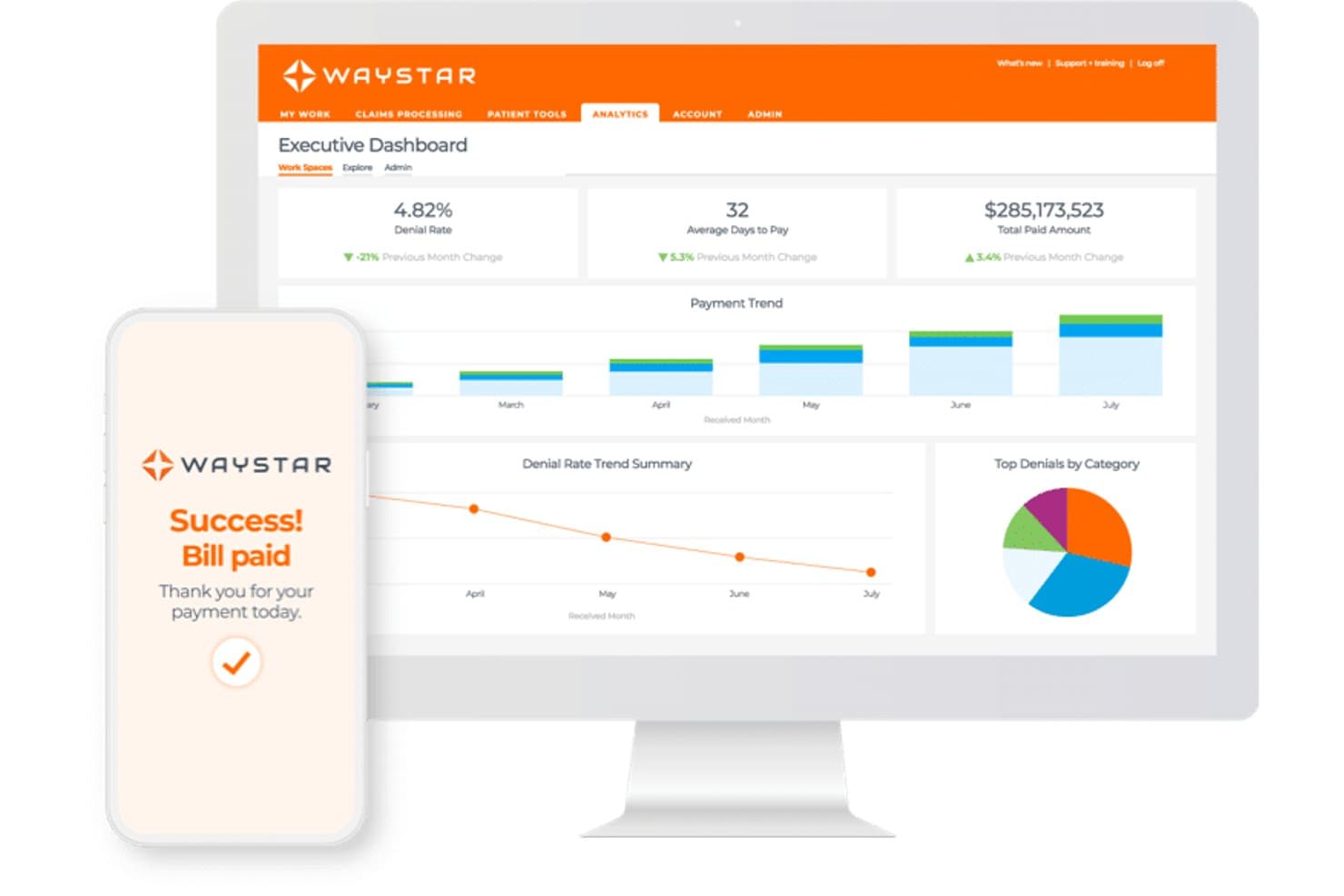
Waystar offers an Executive Dashboard with denial rate tracking, payment trends, and a mobile bill payment confirmation screen. Waystar is an AI-powered revenue cycle management platform that handles claims submission and scrubbing, insurance eligibility verification, denial management, payment posting, and patient billing across the full billing lifecycle.
Who Is Waystar Best For?
Waystar is a strong fit for revenue cycle teams at mid-to-large health systems and hospitals that manage high claim volumes across multiple payers.
Why I Picked Waystar
Waystar earns its spot on my shortlist because of how its analytics layer surfaces actionable claims data at every step of the revenue cycle. I particularly like the ClaimFlow Scoreboard, which shows exactly where each claim sits in the lifecycle so my team can intervene before a denial compounds. The predictive AI inside Claim Manager also determines the optimal time to status or appeal each claim, which keeps A/R moving without manual follow-up guesswork.
Waystar Key Features
- Eligibility verification: Verify patient insurance coverage in real time for 600+ payers.
- Automated payment posting: Auto-post electronic remittance advice and reconcile payments across payers.
- Denial and appeal management: Manage denials and launch payer-specific appeals using built-in templates.
- Patient statement tools: Generate and deliver electronic and print patient statements with integrated payment options.
Waystar Integrations
Waystar offers native integrations with Allscripts Practice Management, CGM eMDs, ChiroTouch, ICANotes, Practice Pro, AdvancedMD EHR, Cerner Millennium, and eClinicalWorks. An API is available for custom integrations.
Pros and Cons
Pros:
- Extensive payer-specific denial management tools
- Predictive AI for claim resolution timing
- Industry-leading claim analytics dashboard
Cons:
- Slow support response for complex cases
- Requires multi-year contract for most accounts
Learn more about Waystar: Best for unified billing and scheduling
- Free demo available
- Pricing upon request
Visit WebsiteCustomer Rating:3.9/5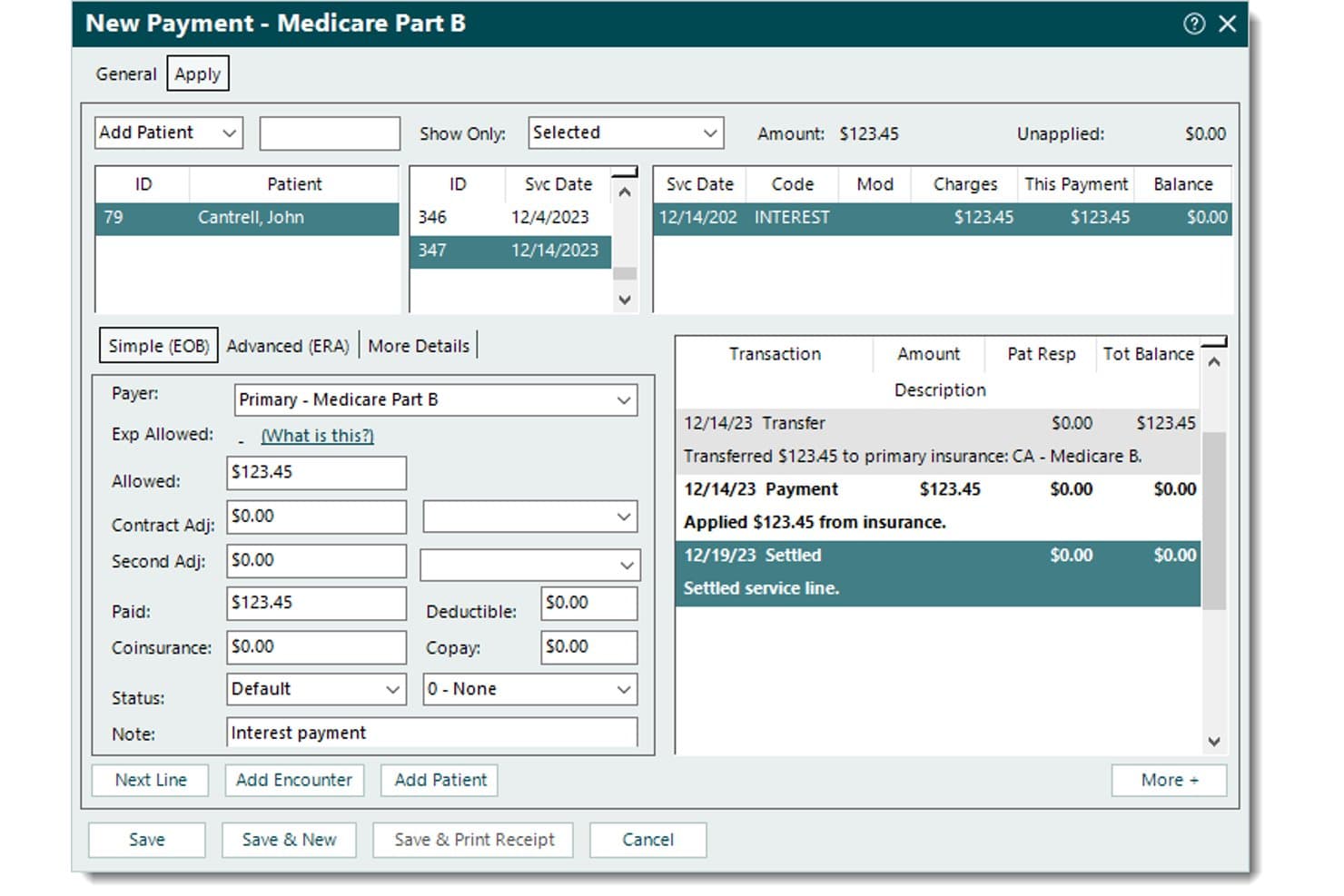
Tebra records Medicare payments, applied amounts, patient balances, adjustments, and transaction history. Tebra is a cloud-based medical billing and practice management platform that combines electronic claims submission, insurance eligibility verification, ERA auto-posting, and patient billing with integrated scheduling tools.
Who Is Tebra Best For?
Tebra works well for small independent practices and billing service companies that manage claims across multiple provider clients from a single platform.
Why I Picked Tebra
I've included Tebra in my top picks because its billing and scheduling tools share the same patient and provider data layer, which removes a real friction point in claim preparation. When a patient's appointment is confirmed, insurance eligibility verification triggers automatically via ANSI-X12 270/271 inquiries across 2,700+ payers. That real-time connection means my team catches coverage gaps before the encounter, not after the claim drops.
Tebra Key Features
- Automated claim scrubbing: Built-in rules engine reviews claims for errors before submission to reduce rejections.
- Electronic remittance auto-posting: ERA files are automatically posted to patient accounts for faster payment reconciliation.
- Multi-client billing dashboard: Access and manage billing for multiple provider clients from a single interface.
- Automated patient statements: Generate and send patient billing statements with payment links embedded for direct payment collection.
Tebra Integrations
Tebra offers native integrations with WebPT, QuickEMR, Relatient, NextPatient, PayPal, Stripe Terminal, and DocSpera. It supports connectivity with most major EHRs via HL7, FHIR, or API bridges, and provides an API for custom integrations.
Pros and Cons
Pros:
- Automated ERA import and autoposting included
- Multi-client billing dashboard for service companies
- Real-time insurance eligibility verification built in
Cons:
- Lacks batch claim correction for rejected claims
- Reporting features are limited and inflexible
Learn more about Tebra: Best for integrated reporting tools
- Free demo available
- Pricing upon request
Visit WebsiteCustomer Rating:3.7/5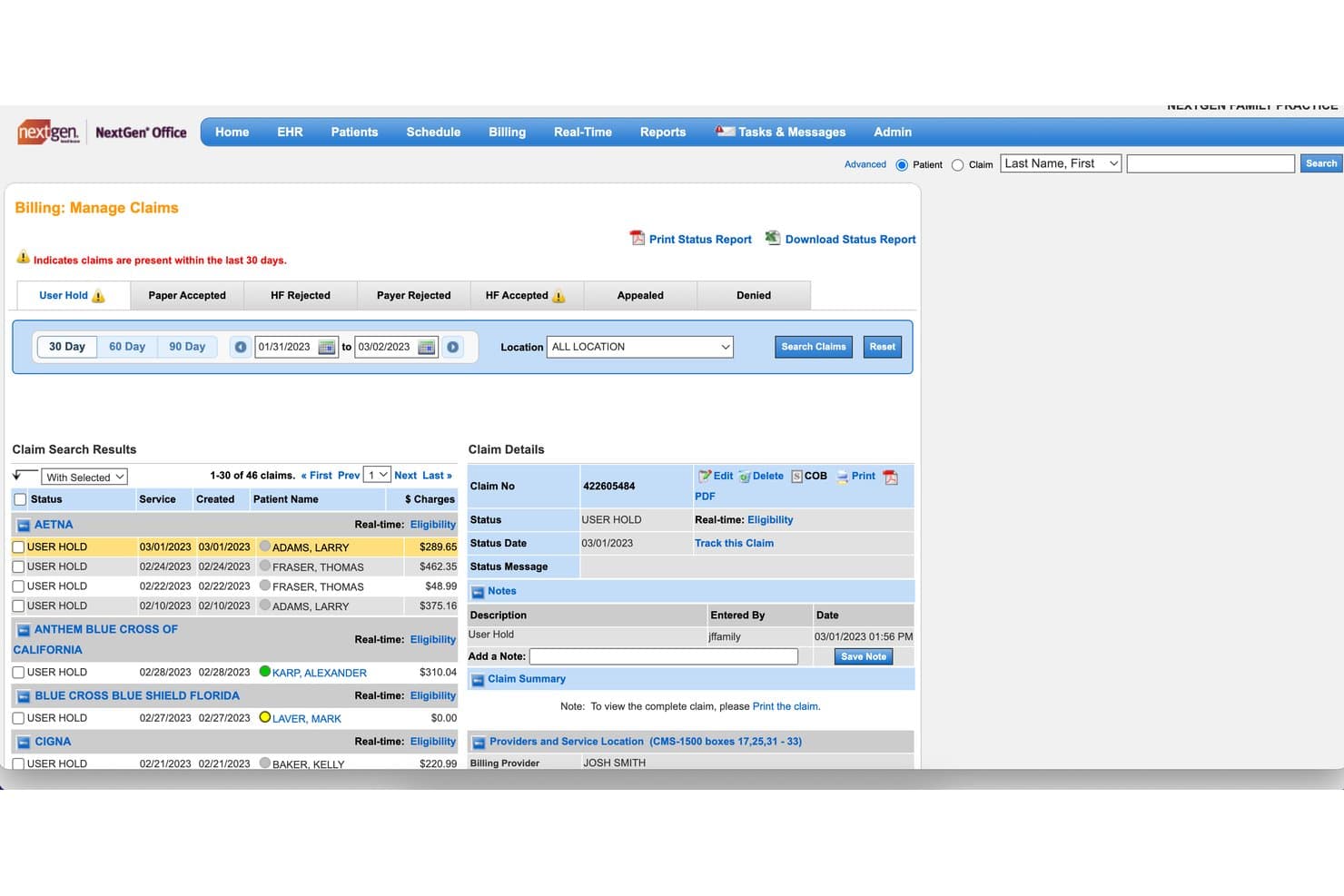
NextGen Healthcare offers a Billing Manage Claims screen that allows medical billers to view, filter, and manage claims by status, payer, and date range. NextGen Healthcare is a revenue cycle management platform that combines claims management, eligibility verification, medical coding, payment posting, A/R tracking, and patient billing for ambulatory practices.
Who Is NextGen Healthcare Best For?
NextGen Healthcare fits mid-size to enterprise ambulatory practices with dedicated revenue cycle staff who need specialty-specific billing workflows.
Why I Picked NextGen Healthcare
I picked NextGen Healthcare as one of the best because its reporting layer is more developed than most IDX billing platforms I've used. It tracks 100+ KPIs across all payers and specialties, with dashboards that drill into denial patterns and A/R aging by provider. I especially like that the reporting is SQL-based. Billing managers can build precise custom queries instead of working around pre-built views.
NextGen Healthcare Key Features
- Automated claims scrubbing: Built-in claim edits flag errors before submission to reduce denials.
- Eligibility verification module: Real-time or batch insurance checks help confirm patient coverage before visits.
- Integrated payment processing: NextGen Pay allows for credit card, Apple Pay, or Google Pay transactions from the patient portal.
- Multi-specialty coding engine: Dedicated coding team supports ICD-10, CPT, and HCPCS code workflows for over 40 specialties.
NextGen Healthcare Integrations
NextGen Healthcare offers native integrations with NextGen Office, OnBase by Hyland, InstaMed (NextGen Pay), Mirth Connect, and NextGen Share Diagnostic Hub. An API is available for custom integrations.
Pros and Cons
Pros:
- Denial management includes root-cause analytics
- Handles multi-specialty coding with dedicated services
- Reporting dashboards support 100+ customizable KPIs
Cons:
- System setup requires extensive initial configuration
- Patient portal interface feels dated
Learn more about NextGen Healthcare: Best for customizable workflow automation
- Free demo available
- Pricing upon request
Visit WebsiteCustomer Rating:3.6/5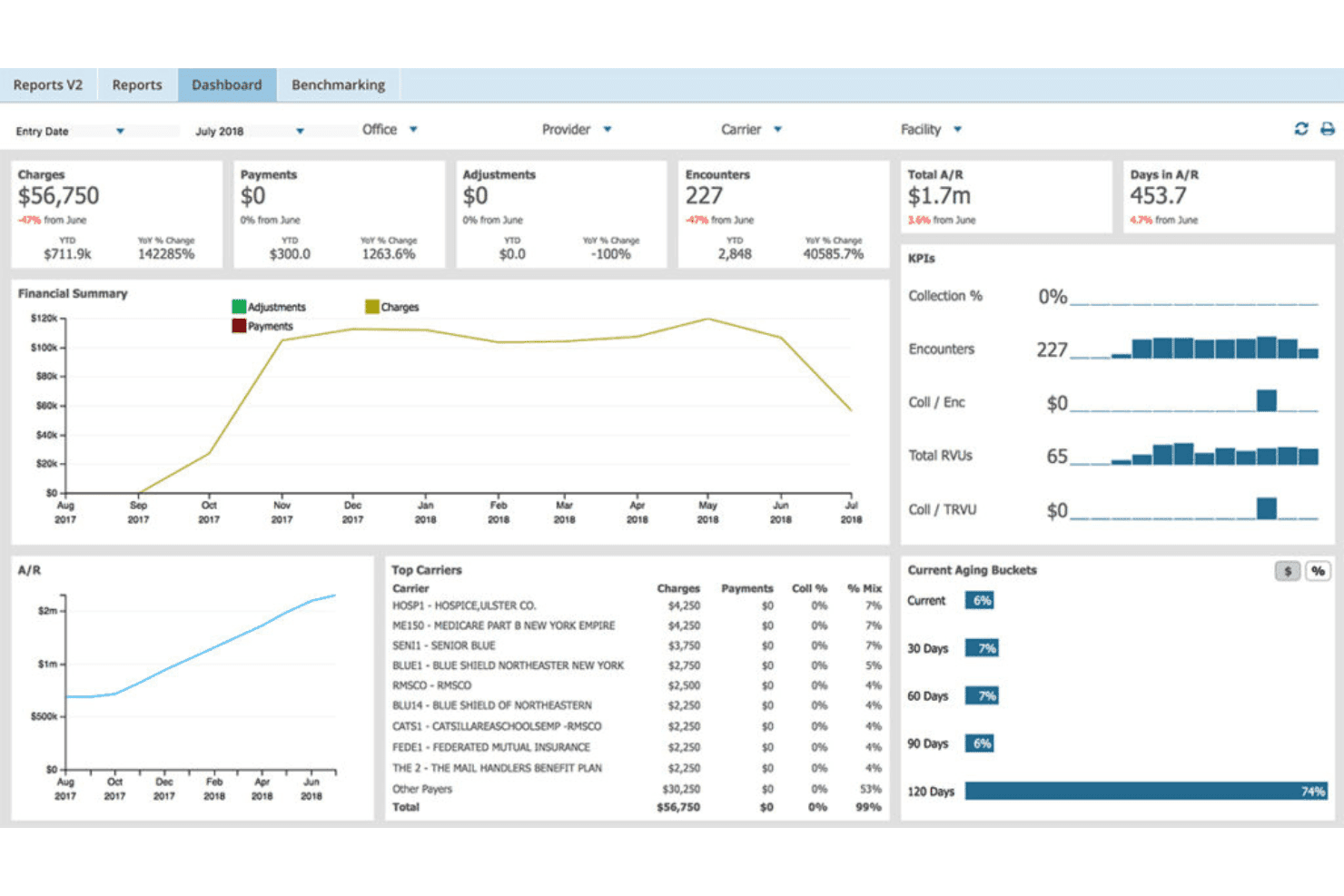
AdvancedMD unites EMR, documentation, billing, claims, eligibility, and RCM. AdvancedMD is a cloud-based medical billing platform that combines claims management, coding validation, eligibility verification, ERA processing, and A/R tracking in a single unified suite built for practices and billing companies.
Who Is AdvancedMD Best For?
AdvancedMD is a strong fit for independent billing service owners and multi-provider practices that need centralized billing office tools to manage multiple clients or locations from one system.
Why I Picked AdvancedMD
I picked AdvancedMD because its ClaimInspector lets me configure scrubbing rules against CCI, HIPAA, and LCD edits before a claim ever leaves the system. I also use the A/R Control Center's customizable worklists to build denial queues sorted by payer, reason code, or age bucket. In practice, that means my team routes specific denial types directly to assigned staff without manually sorting through a general queue each morning.
AdvancedMD Key Features
- Integrated clearinghouse: Submit electronic claims directly without needing third-party upload or download steps.
- Batch eligibility verification: Check patient insurance eligibility for multiple appointments at once using real-time 270/271 transactions.
- Electronic remittance advice (ERA) processing: Automatically apply 835 remittance files and reconcile patient accounts.
- Practice analytics dashboard: Access dashboards and reports showing AR, denials, productivity and payer trends in real time.
AdvancedMD Integrations
AdvancedMD offers 50+ marketplace integrations with tools like QuickBooks (via qbSolutioneers), InstaMed, Healthix HIE, Promptly, NextPatient, and ChartRequest, and provides FHIR and ODBC APIs for custom integrations.
Pros and Cons
Pros:
- Supports multi-client centralized billing offices
- Denial management with configurable worklists
- Extensive rules engine for claim scrubbing
Cons:
- EHR and billing setup requires considerable onboarding
- Dashboard widgets provide limited customization
 Best for hands-on revenue cycle support
- Free demo available
- Pricing upon request
Visit WebsiteCustomer Rating:3.4/5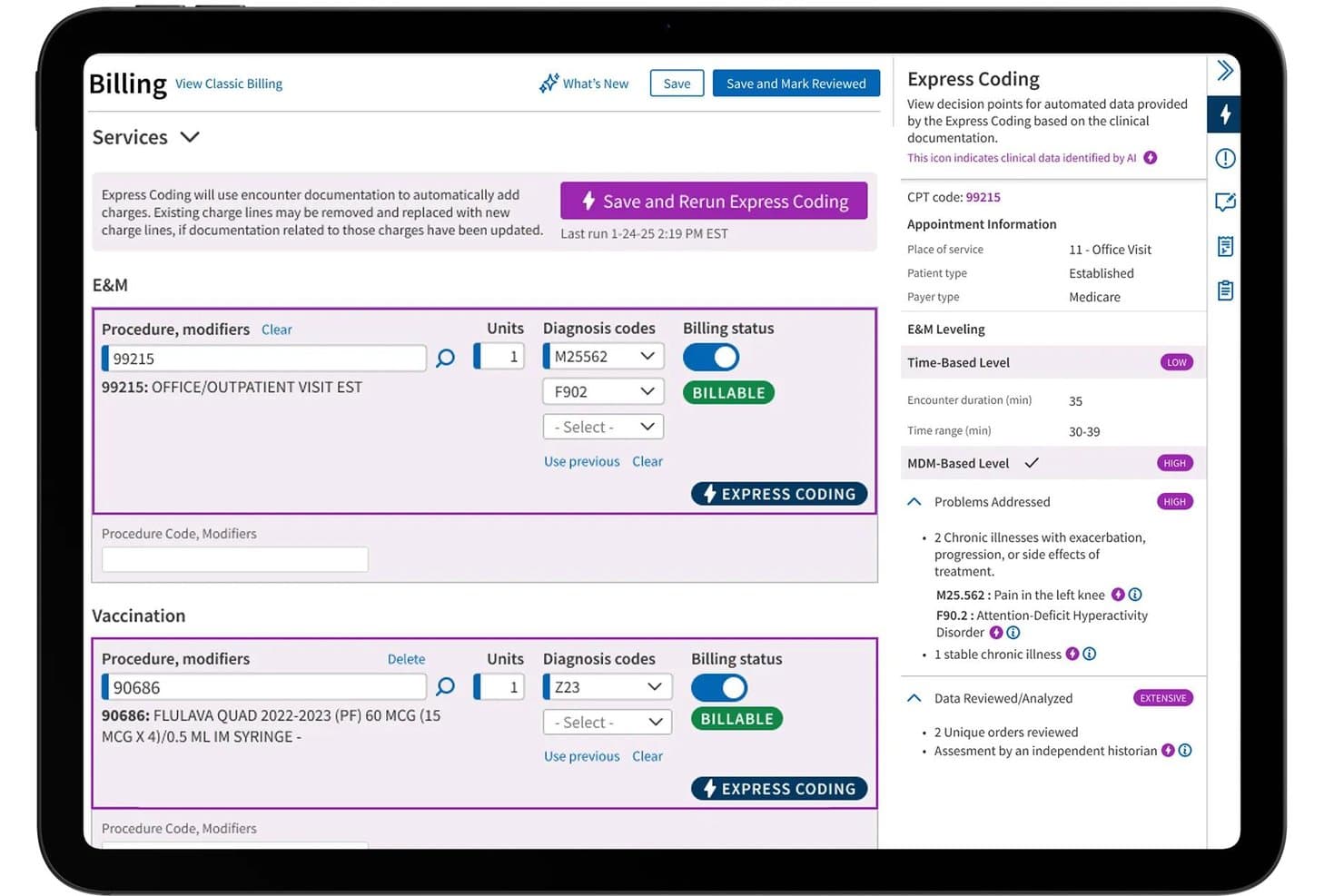
athenahealth offers an Express Coding feature that automates medical billing charge entry using AI-driven clinical documentation analysis. athenahealth is a cloud-based revenue cycle management platform that combines claims scrubbing, insurance eligibility verification, payment posting, denial management, and AR reporting across a single billing infrastructure.
Who Is athenahealth Best For?
It's a strong fit for revenue cycle directors and billing teams at mid-to-large medical groups, health systems, and BPO billing organizations managing complex, multi-payer environments.
Why I Picked athenahealth
athenahealth earns its spot on my shortlist because its co-sourcing model sets it apart from pure-software RCM tools. Rather than leaving denial follow-up entirely to your billing team, athenahealth's staff takes on the most cumbersome RCM tasks at scale, including automatic payment posting reviewed by an expert team. I also like that a dedicated customer success manager is built into the service, not sold as an add-on.
athenahealth Key Features
- Automated claims scrubbing: Applies over 30,000 billing rules to every claim before submission to reduce rejections.
- Intelligent coding engine: Supports ICD-10, CPT, and HCPCS code validation for accurate and compliant claim processing.
- Real-time insurance eligibility verification: Automatically checks patient coverage and benefits prior to scheduling.
- Accounts receivable and denial reporting dashboards: Provides actionable reporting on AR aging, denial trends, and collection efficiency.
athenahealth Integrations
athenahealth offers native integrations with Epic, Cerner, Meditech, Allscripts, and eClinicalWorks, as well as an API for custom integrations. Additional integration options are available through the athenahealth Marketplace.
Pros and Cons
Pros:
- Automatic payment posting with human review
- Strong AR and denial reporting dashboards
- Expert staff handles claim denials directly
Cons:
- Some users report delayed onboarding timelines
- Quoting process can be slow and complex
Learn more about athenahealth:
Outros softwares IDX para faturação médica
Eis algumas opções adicionais de software IDX para faturação médica que não entraram na minha seleção, mas que ainda vale a pena conhecer:
- 11eClinicalWorksBest for cloud-based claims management
- 12RXNTBest for real-time claim tracking
- 13PracticeSuiteBest for multi-location revenue management
- 14TherapyNotesBest for mental health practice billing
- 15EZClaimBest for rapid insurance claim entry
- 16Office Ally (Service Center)Best for clearinghouse integration
- 17AllegianceMDBest for AI-powered billing automation
- 18AvailityBest for payer-provider connectivity
- 19TherabillBest for behavioral health billing workflows
- 20MedicsPremier (ADS)Best for specialty coding support
How I Evaluate IDX Software for Medical Billing
I split my evaluation into two layers: the core billing functions a tool must handle—like claim scrubbing and ERA posting—and the differentiators that separate the best from the rest.
Core Functionality (Table Stakes for This List)
When I'm selecting tools for my list, I rank each one on a scale from 0 (does not offer the functionality) to 5 (excels in this area) for each core functionality listed below. Then, I calculate the tool's total score into a percentage. Each tool needs to achieve a minimum total score of 65% to be considered for inclusion.
- Claims Management: I evaluate how each tool handles 837 generation, claim scrubbing, and clearinghouse connectivity—plus whether denial workflows let billers act on rejections without leaving the platform.
- Medical Coding Support: The code libraries should cover ICD-10, CPT, and HCPCS with built-in validation, so coders catch modifier errors or bundling issues before claims go out the door.
- Insurance Eligibility Verification: I check whether real-time 270/271 checks pull back benefits detail like copays and deductibles, not just a simple active/inactive status from the payer.
- Payment Posting & ERA: Auto-posting 835/ERA files saves hours of manual reconciliation, so I look at how each tool handles exceptions, adjustments, and secondary payer balances.
- Patient Billing & Statements: Generating statements is table stakes, but I look for options like online payment portals, payment plans, and e-statements that reduce days in AR on the patient side.
- AR & Denial Reporting: Good reporting means more than a basic aging bucket. I look for dashboards that break down denials by reason code, payer, and provider so you can spot patterns fast.
Once I have a list of tools that meet the criteria, I consider what sets each platform apart.
Differentiating Factors (What Sets Vendors Apart)
Here's how I compare and contrast different vendors:
Standout Features
Denial management workflows are a big differentiator. I look for configurable worklists that sort denials by reason code and assign follow-up tasks, so your team isn't manually tracking appeals in spreadsheets. A patient payment portal also matters—patients who can view balances, set up payment plans, and pay online tend to resolve accounts faster. I also evaluate KPI dashboards that let you drill into clean claim rates and days in AR by payer or provider, which helps you pinpoint where revenue is stalling.
Beyond Features
Practice size and specialty fit shape which platform works for you. A solo dermatology office has very different needs than a multi-entity billing company managing claims across several tax IDs. I also evaluate EHR and clearinghouse integrations—bidirectional connections cut down on duplicate charge entry and speed up remittance cycles. Pricing model matters too, since a percentage-of-collections structure hits your margin very differently at high volume than a flat per-provider subscription.
Como escolher um software IDX para faturação médica
É fácil perder-se em listas extensas de funcionalidades e estruturas de preços complexas. Para o ajudar a manter o foco enquanto analisa o seu processo específico de seleção de software, eis uma lista de verificação dos fatores a ter em conta:
| Fator | O que considerar |
|---|---|
| FatorEscalabilidade | O que considerarO software conseguirá gerir um aumento do volume de pedidos de reembolso, novas especialidades ou novas localizações à medida que a sua organização cresce? |
| FatorIntegrações | O que considerarEstabelece ligação nativa ao seu sistema de registo clínico eletrónico, à câmara de compensação e aos sistemas de contabilidade, ou é necessária uma integração personalizada? |
| FatorPersonalização | O que considerarPode adaptar fluxos de trabalho, conjuntos de códigos e relatórios à sua especialidade ou modelo de faturação sem intervenção do fornecedor? |
| FatorFacilidade de utilização | O que considerarOs responsáveis pela faturação e os administradores precisarão de formação extensa ou a interface é intuitiva para as tarefas diárias? |
| FatorImplementação e integração inicial | O que considerarO que está envolvido na migração de contas a receber antigas, na formação dos funcionários e na entrada em funcionamento — existem custos de configuração, prazos ou riscos relacionados com os dados? |
| FatorCusto | O que considerarTem uma visão clara de todos os custos, incluindo transações, extratos, taxas da câmara de compensação e encargos recorrentes? |
| FatorMedidas de segurança | O que considerarA plataforma oferece conformidade com a HIPAA, registos de auditoria e permissões de utilizador para proteger as informações de saúde protegidas e reduzir os riscos de violação? |
| FatorDisponibilidade do suporte | O que considerarCom que rapidez pode contactar o suporte para resolver problemas urgentes relacionados com pedidos de reembolso — oferecem chat em direto, apoio telefónico ou apenas pedidos de suporte? |
O que é um software IDX para faturação médica?
O software IDX para faturação médica é uma plataforma especializada que automatiza e gere pedidos de reembolso de seguros, codificação, registo de pagamentos e contas a receber para prestadores de cuidados de saúde. Estes sistemas ajudam as equipas de faturação e administrativas a reduzir erros, acompanhar rejeições, verificar a elegibilidade do seguro e cumprir os regulamentos, tornando a gestão do ciclo de receitas mais precisa e eficiente.
Funcionalidades do software IDX para faturação médica
Ao selecionar um software IDX para faturação médica, procure as seguintes funcionalidades principais:
- Gestão de pedidos: Automatiza a geração, verificação, submissão e acompanhamento de pedidos para melhorar a precisão e acelerar o reembolso por parte das seguradoras.
- Suporte à codificação médica: Disponibiliza bibliotecas integradas de códigos ICD-10, CPT e HCPCS, com ferramentas de validação para garantir uma codificação em conformidade e reduzir as rejeições de pedidos.
- Verificação da elegibilidade do seguro: Permite verificações da elegibilidade em tempo real ou em lote para confirmar a cobertura e os benefícios do paciente antes da prestação dos serviços.
- Registo de pagamentos e ERA: Suporta o registo automático dos avisos eletrónicos de pagamento e a introdução manual de pagamentos para uma reconciliação eficiente de todas as transações das seguradoras e dos pacientes.
- Faturação e extratos dos pacientes: Gera e envia extratos aos pacientes, suporta vários modelos de faturação e disponibiliza portais de pagamento para maior comodidade dos pacientes.
- Relatórios de contas a receber: Disponibiliza relatórios de antiguidade, acompanhamento de rejeições e painéis financeiros para ajudar os utilizadores a gerir saldos pendentes e a monitorizar os principais indicadores de desempenho do ciclo de receitas.
- Fluxos de trabalho de gestão de rejeições: Assinala pedidos rejeitados, organiza tarefas de acompanhamento e monitoriza recursos para ajudar as equipas a resolver problemas e evitar perdas de receitas.
- Integração com câmaras de compensação: Liga-se diretamente às principais câmaras de compensação para simplificar a submissão eletrónica de pedidos, o registo de pagamentos e o processamento de avisos de pagamento.
- Segurança e conformidade: Disponibiliza ferramentas e medidas de proteção, como registos de auditoria, permissões de utilizador e suporte à conformidade com a HIPAA e os regulamentos de faturação na área da saúde.
Vantagens do software IDX para faturação médica
A implementação de software IDX para faturação médica proporciona várias vantagens à sua equipa e à sua empresa. Eis algumas das vantagens que pode esperar:
- Menos rejeições de pedidos: A verificação automatizada dos pedidos e a validação da codificação detetam erros antes da submissão, reduzindo rejeições e novas submissões dispendiosas.
- Pagamentos mais rápidos das seguradoras: As verificações de elegibilidade em tempo real e a integração com câmaras de compensação aceleram o processamento dos pedidos e os ciclos de pagamento.
- Melhoria do fluxo de caixa: As ferramentas robustas de registo de pagamentos e faturação dos pacientes facilitam a cobrança rápida e precisa dos saldos.
- Melhores informações sobre as receitas: Os painéis de relatórios de contas a receber e de rejeições permitem monitorizar os principais indicadores de desempenho e identificar atempadamente fugas de receitas.
- Conformidade simplificada: O suporte integrado para normas regulamentares e o tratamento seguro dos dados dos pacientes ajudam a manter a preparação para auditorias e a conformidade com a HIPAA.
- Fluxos de trabalho simplificados: A gestão centralizada de pedidos, pagamentos e tarefas de acompanhamento poupa tempo aos funcionários e reduz a carga administrativa.
- Melhor experiência para os pacientes: Os portais de pagamento e os extratos claros permitem aos pacientes consultar os saldos e pagar online quando lhes for mais conveniente.
Custos e preços do software IDX para faturação médica
A seleção de software IDX para faturação médica exige uma compreensão dos vários modelos e planos de preços disponíveis. Os custos variam consoante as funcionalidades, a dimensão da equipa, os complementos e outros fatores. A tabela abaixo resume os planos mais comuns, os respetivos preços médios e as funcionalidades normalmente incluídas nas soluções de software IDX para faturação médica:
Tabela de comparação de planos do software IDX para faturação médica
| Tipo de plano | Preço médio | Funcionalidades comuns |
|---|---|---|
| Tipo de planoPlano gratuito | Preço médio$0 | Funcionalidades comunsProcessamento limitado de pedidos, relatórios básicos, acesso para um único utilizador e suporte por e-mail. |
| Tipo de planoPlano pessoal | Preço médio$50-$150/utilizador/mês | Funcionalidades comunsGestão normal de pedidos, suporte à codificação médica, verificação de seguros, registo de pagamentos e suporte telefónico. |
| Tipo de planoPlano empresarial | Preço médio$200-$500/mês | Funcionalidades comunsAcesso para vários utilizadores, integrações com EHR e câmaras de compensação, envio automatizado de extratos e análises avançadas. |
| Tipo de planoPlano empresarial de grande dimensão | Preço médio$1,000+/mês | Funcionalidades comunsFluxos de trabalho personalizados, suporte para várias entidades, acesso à API, suporte prioritário, assistência na migração e ferramentas de conformidade. |
Software IDX para faturação médica: perguntas frequentes
Eis algumas respostas a perguntas comuns sobre o software IDX para faturação médica:
Que tipos de unidades de saúde beneficiam mais do software IDX para faturação médica?
O software IDX para faturação médica é adequado para clínicas ambulatórias, grupos de especialidades, consultórios individuais e serviços de faturação. É especialmente útil para grupos que lidam com um elevado volume de sinistros, regras complexas das entidades pagadoras ou operações em vários locais.
O software IDX pode integrar-se com o meu EHR e a minha câmara de compensação existentes?
Sim, a maioria das soluções IDX oferece integrações com os principais EHR e câmaras de compensação. Confirme sempre a sincronização bidirecional de encargos, pagamentos e dados dos pacientes para evitar introduções duplicadas e erros de reconciliação.
Quanto tempo demora normalmente a implementação?
A maioria dos softwares IDX baseados na nuvem demora algumas semanas a ser totalmente implementada, incluindo a migração de dados, a formação e as inscrições junto das entidades pagadoras. As unidades de saúde com necessidades complexas envolvendo várias entidades podem necessitar de um período de integração mais longo.
O software IDX pode ser personalizado para diferentes especialidades?
Sim, muitas plataformas oferecem modelos, bibliotecas de códigos e fluxos de trabalho configuráveis para especialidades como radiologia, saúde comportamental ou fisioterapia. Verifique se são compatíveis com os códigos CPT e de diagnóstico que utiliza com maior frequência.
Que opções de suporte estão disponíveis se tiver problemas com o envio de sinistros?
Pode contar com suporte por telefone, chat ou sistema de pedidos, além de bases de conhecimento em linha. Os planos de nível superior podem incluir gestores de conta dedicados ou tempos de resposta garantidos para problemas urgentes de faturação.
Que medidas de segurança existem para proteger os dados dos pacientes?
O software IDX oferece geralmente conformidade com a HIPAA, acesso baseado em funções e atualizações contínuas para manter as informações de saúde dos pacientes protegidas. Reveja sempre as certificações do fornecedor e os registos de auditoria para garantir a responsabilização.