

O software de faturação médica dos EUA é uma ferramenta digital que gere a faturação dos pacientes, os pedidos de reembolso às seguradoras e as tarefas do ciclo de receitas dos prestadores de cuidados de saúde nos Estados Unidos. Se procura uma forma de tratar os pedidos de reembolso com precisão, acelerar os reembolsos e reduzir a introdução manual de dados, está no sítio certo.
Escolher a plataforma certa pode ajudar a sua clínica a reduzir as recusas, manter os pagamentos em dia e aliviar a carga da documentação — permitindo-lhe concentrar-se nos cuidados prestados aos pacientes. Esta lista inclui as opções em que mais confio, para que possa comparar funcionalidades, preços e especialidades e encontrar uma solução que funcione verdadeiramente para a sua equipa.
Why Trust Our Software Recommendations
6,700+
Reviews
20
Industry experts
16+
Evaluation factors
14
Years
Our team has been testing and reviewing software since 2012. As medical practice leaders ourselves, we know how difficult—and important—it is to choose the right software.
For this guide, we evaluated tools using hands-on testing and independent research, scoring tools using our selection criteria.
Our reviews reflect our human editorial judgment, not a sales pitch.
Tabela de comparação de software de faturação médica dos EUA
Esta tabela de comparação apresenta os preços das minhas principais escolhas de software de faturação médica dos EUA:
| Tool | Best For | Trial Info | Price | ||
|---|---|---|---|---|---|
| 1 | Best for claims, denials, and payment automation | Free demo available | Pricing upon request | Website | |
| 2 | Best for simple claims and billing management | Free demo available | From $199/user/month | Website | |
| 3 | Best for cloud-based medical billing | Free demo available | Pricing upon request | Website | |
| 4 | Best for multi-specialty practices | Free demo available | Pricing upon request | Website | |
| 5 | Best for enterprise revenue cycle management | Free demo available | Pricing upon request | Website | |
| 6 | Best for independent practice billing | Free demo available | Pricing upon request | Website | |
| 7 | Best for mobile billing and RCM workflows | Free demo available | Pricing upon request | Website | |
| 8 | Best for outsourced billing and revenue cycle | Free demo available | Pricing upon request | Website | |
| 9 | Best for automated billing and claims workflows | Free demo available | Pricing upon request | Website | |
| 10 | Best for network-driven billing and collections | Free demo available | Pricing upon request | Website |


Avaliações do melhor software de faturação médica dos EUA
Apresento abaixo os meus resumos detalhados dos melhores softwares de faturação médica dos EUA que entraram na minha lista restrita. As minhas avaliações oferecem uma análise detalhada das funcionalidades, dos preços e das integrações de cada plataforma, para o ajudar a encontrar a melhor opção para si.
 Best for claims, denials, and payment automation
- Free demo available
- Pricing upon request
Visit WebsiteCustomer Rating:4.4/5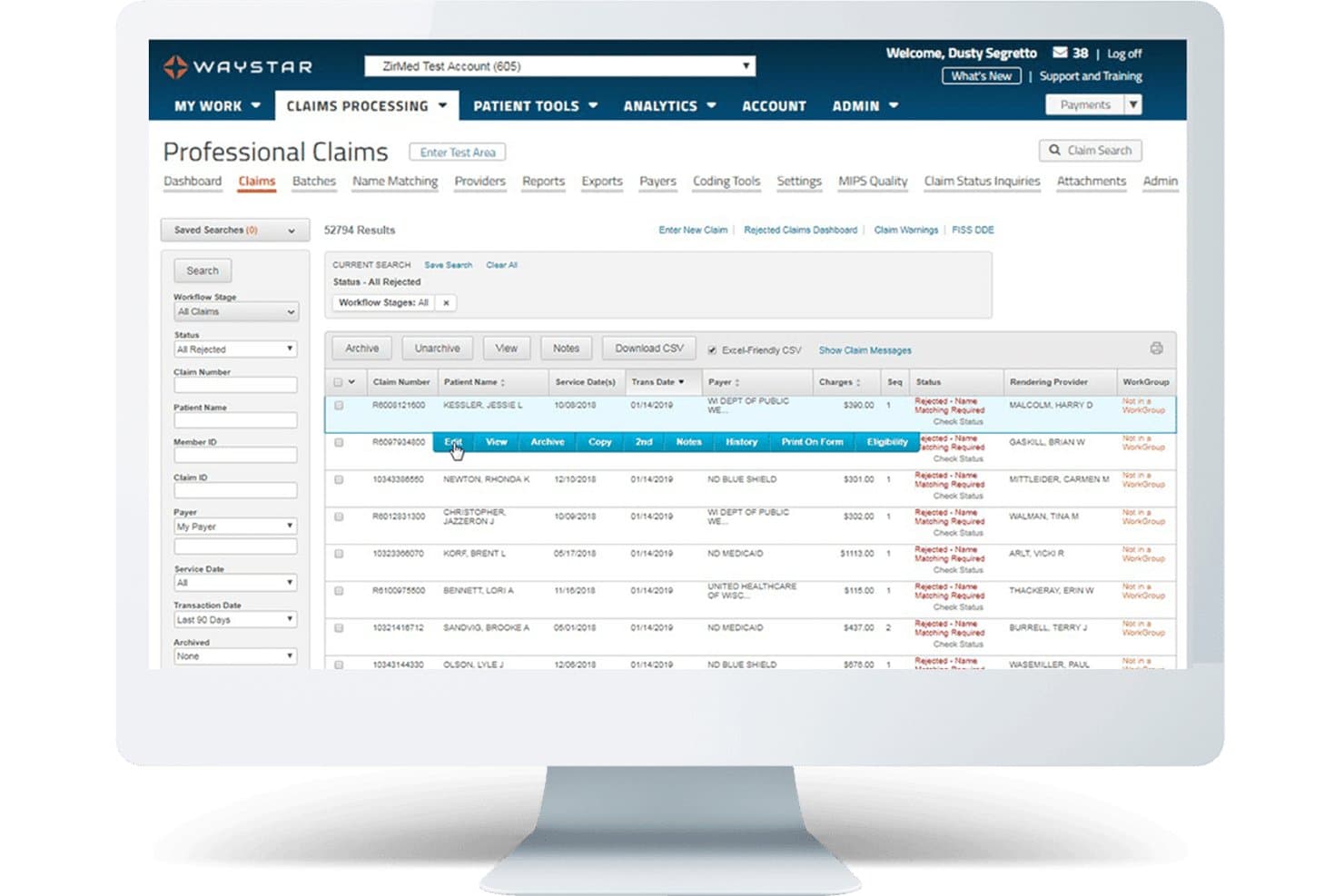
Waystar offers a Professional Claims dashboard that displays rejected claims with filtering options, claim details, and inline action menus for efficient medical billing management. Waystar is a cloud-based revenue cycle management platform built for US healthcare providers that handles claims processing, denial management, eligibility verification, patient billing, and payment automation across the full billing lifecycle.
Who Is Waystar Best For?
Waystar is a strong fit for mid-sized to large healthcare organizations with dedicated billing or revenue cycle teams managing high claim volumes.
Why I Picked Waystar
I picked Waystar as one of the best because its Appeals Wizard makes paperless denial recovery genuinely practical. My team can generate payer-specific appeal letters from 1,100+ pre-populated templates, then batch up to 100 similar appeals to the same payer in one action. I also like the root cause reporting, which identifies recurring denial patterns so the billing team can address upstream issues rather than just resubmitting the same claims.
Waystar Key Features
- Automated eligibility verification: Verify patient insurance status in real time using 270/271 transactions before care is provided.
- Patient payment portal: Let patients pay bills, manage payment plans, and access digital statements online.
- ERA and EFT auto-posting: Automatically post electronic remittance and EFT payments directly to patient accounts.
- Configurable analytics dashboards: Track revenue cycle KPIs, denial rates, and payer performance with customizable visual dashboards.
Waystar Integrations
Waystar offers native integrations with leading EHR and practice management platforms such as Epic, eClinicalWorks, and athenahealth, supports connectivity with 5,000+ payers, and provides an API for custom integrations.
Pros and Cons
Pros:
- Batch claims processing for large volumes
- Real-time eligibility and benefits checking
- Efficient denial and appeal workflow automation
Cons:
- May be complex for solo practices
- Limited transparency on contract terms
Learn more about Waystar: Best for simple claims and billing management
- Free demo available
- From $199/user/month
Visit WebsiteCustomer Rating:4.5/5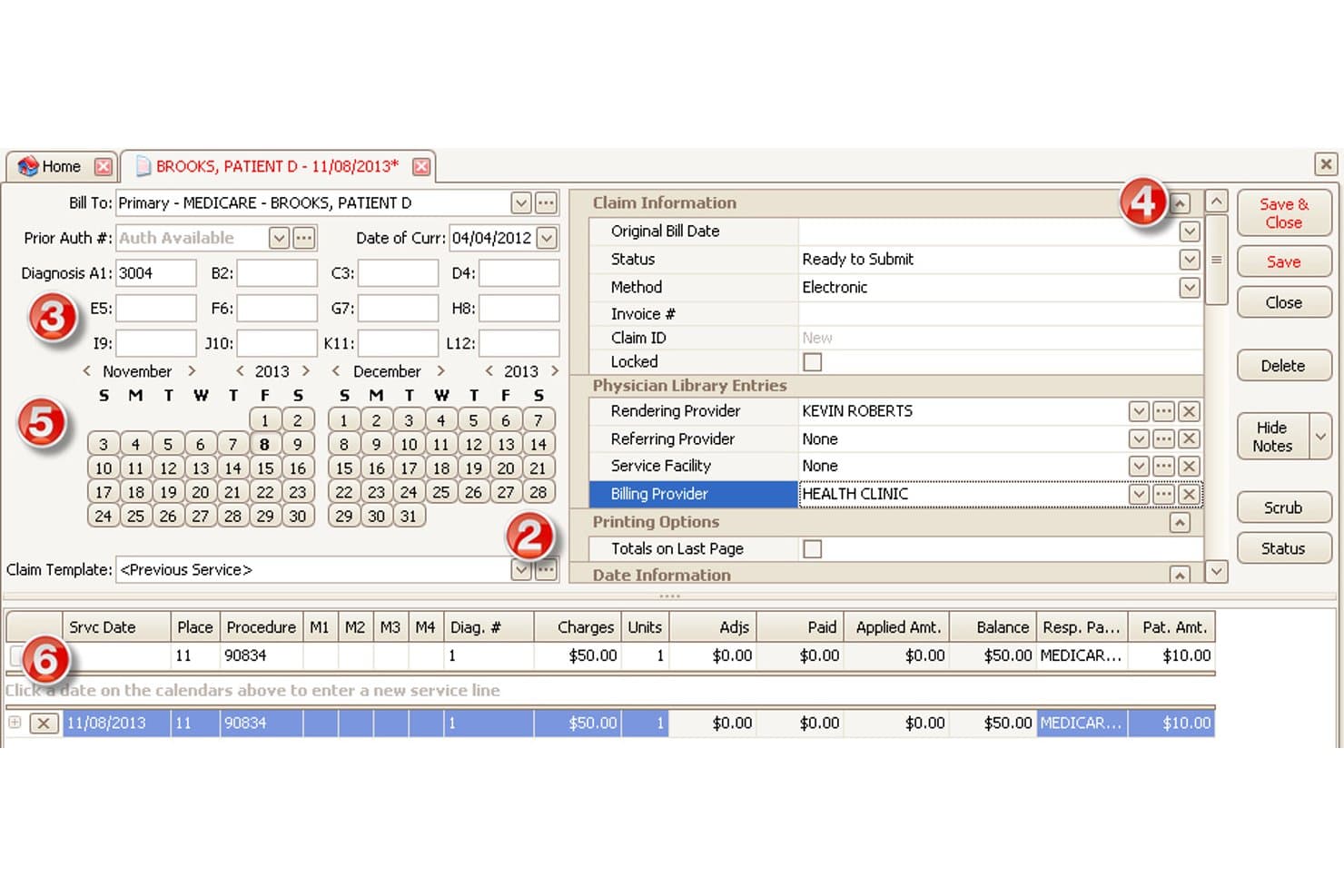
EZClaim offers a detailed claim entry screen with diagnosis codes, billing provider fields, service line charges, and calendar-based date selection for medical billing. EZClaim is a cloud-based medical billing and scheduling software for small-to-mid-sized practices that handles electronic claim submission, real-time eligibility verification, patient statements, and payment processing for US payers.
Who Is EZClaim Best For?
EZClaim is a strong fit for independent practices and outsourced billing companies that need straightforward US claims management without the complexity of enterprise RCM platforms.
Why I Picked EZClaim
EZClaim earns its spot on my shortlist because it keeps the claims process genuinely straightforward without stripping out the features that matter. I particularly like the built-in claim scrubbing, which catches coding and formatting errors before submission rather than after a payer rejection. The task management system is also something I use to flag and follow up on outstanding claims directly within the platform, which keeps accounts receivable from slipping through the cracks.
EZClaim Key Features
- Real-time eligibility verification: Instantly checks patient insurance eligibility and coverage through direct payer connections.
- HIPAA-compliant patient statements: Generates branded, compliant statements with integrated payment processing and audit tracking.
- Customizable reporting dashboards: Creates, filters, and exports over 40 financial and billing reports for operational insights.
- EHR and clearinghouse integrations: Connects with partner EHRs and supports direct claim submission via TriZetto and other clearinghouses.
EZClaim Integrations
EZClaim offers native integrations with TriZetto, Practice Fusion, WebPT, QuickEMR, HomeTrak, BillFlash, and ReminderCall. An API is available for custom integrations.
Pros and Cons
Pros:
- Useful reporting suite for billing staff
- Real-time insurance eligibility checks included
- Claim scrubbing flags errors before submission
Cons:
- Reporting interface looks dated
- Denial management is mostly manual
Learn more about EZClaim: Best for cloud-based medical billing
- Free demo available
- Pricing upon request
Visit WebsiteCustomer Rating:4.1/5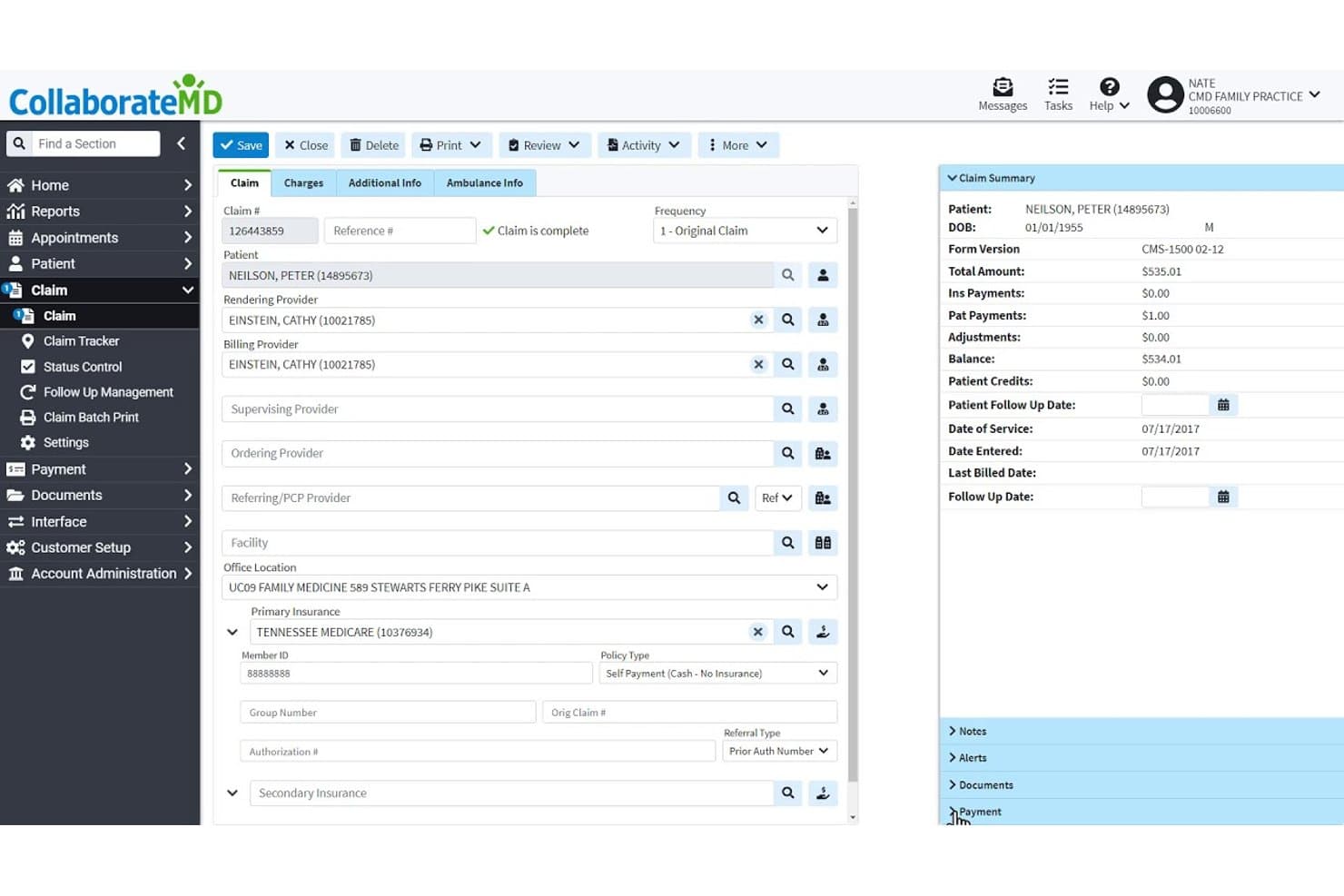
CollaborateMD offers a detailed claim management screen with patient info, provider fields, insurance details, and a real-time claim summary panel. CollaborateMD is a cloud-based medical billing and practice management platform with a built-in clearinghouse, real-time eligibility verification, AI-powered claim rejection support, and revenue cycle analytics for US practices and billing companies.
Who Is CollaborateMD Best For?
CollaborateMD is a strong fit for small to mid-sized US practices and independent medical billing companies that want a dedicated billing platform without a built-in EHR.
Why I Picked CollaborateMD
CollaborateMD earns its spot on my shortlist because it's purpose-built as a cloud-native billing platform with real-time claim submission and no server infrastructure to manage. I particularly like the AI-powered Universal Import, which maps EHR exports from virtually any system directly into claims, cutting manual data re-entry. The Intelligent Claim Rejection Support then translates payer rejection codes into plain-language next steps inside the claim workflow itself.
CollaborateMD Key Features
- Real-time eligibility verification: Instantly checks patient insurance coverage through 270/271 transactions with US payers.
- Built-in clearinghouse: Processes electronic claims, ERAs, and paper claims directly within the software.
- Customizable reporting tools: Offers over 125 configurable reports for tracking AR, denial reasons, and practice KPIs.
- Patient payment portal: Supports secure online payments, payment plans, and digital patient statements in one interface.
CollaborateMD Integrations
CollaborateMD offers native interfaces with preferred EHR partners and lab systems including Quest Diagnostics and LabCorp, and provides a WebAPI for custom EHR, mobile, and billing integrations.
Pros and Cons
Pros:
- Detailed AR and denial management reports
- Real-time eligibility and benefits checking
- Built-in clearinghouse for claim submissions
Cons:
- Limited clearinghouse flexibility compared to competitors
- No built-in electronic health record
Learn more about CollaborateMD: Best for multi-specialty practices
- Free demo available
- Pricing upon request
Visit WebsiteCustomer Rating:4.1/5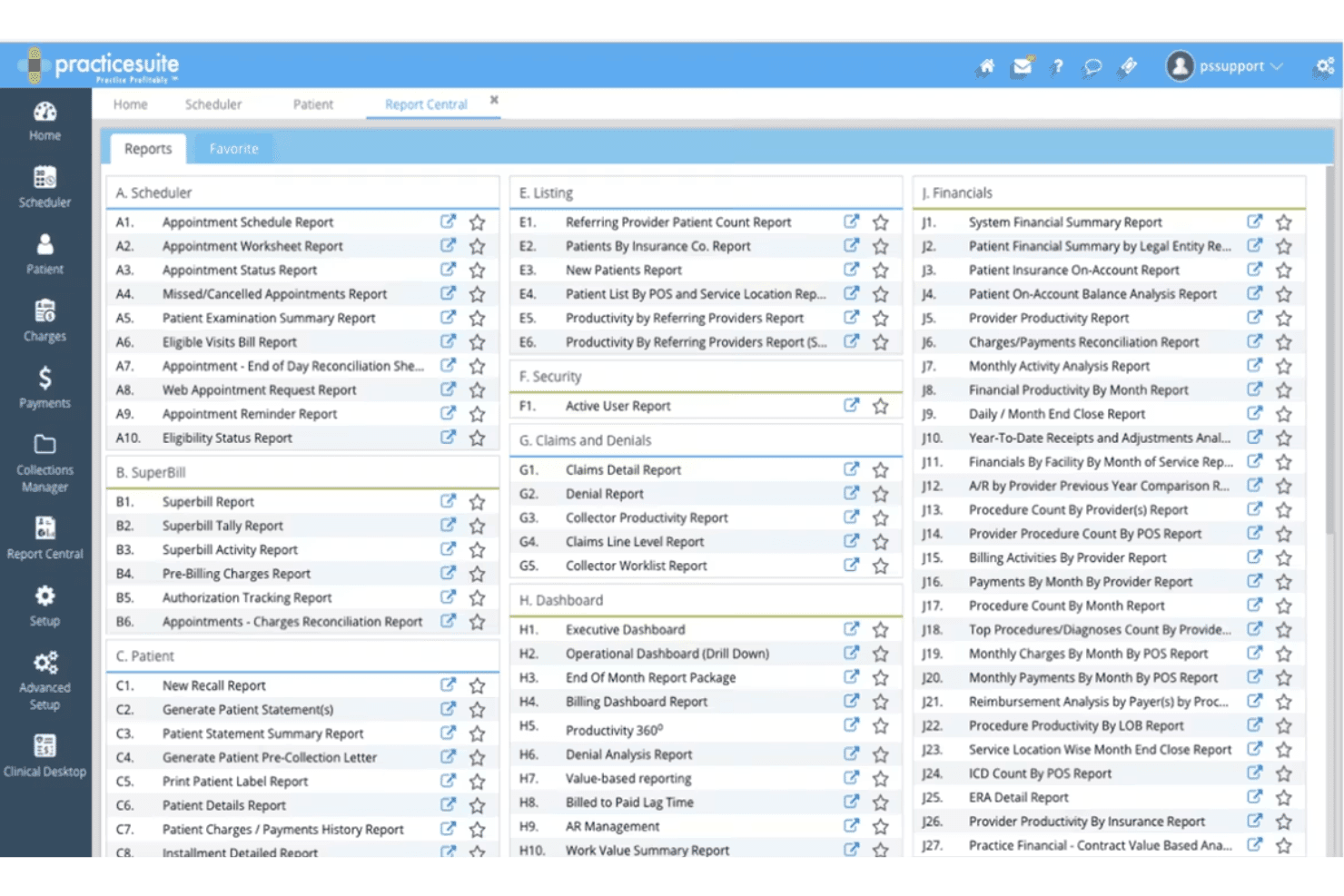
PracticeSuite Report Center highlights service location reports. PracticeSuite is a cloud-based medical billing platform covering claims submission, eligibility verification, coding validation, denial management, and RCM across 150+ billing specialties for both physician practices and billing companies.
Who Is PracticeSuite Best For?
PracticeSuite is a strong fit for multi-specialty group practices and medical billing companies that manage claims across multiple clients or provider types from a single platform.
Why I Picked PracticeSuite
PracticeSuite earns its spot on my shortlist because it supports 150+ billing specialties natively, so I'm not building workarounds when a practice adds a new specialty. I particularly like the Enterprise Claims Management dashboard, which lets my team track denials, payment posting, and AR across every specialty from one view. The AI-driven pre-submission denial intelligence also catches payer-specific issues before claims go out, which matters when managing multiple billing workflows at once.
PracticeSuite Key Features
- Automated claim scrubbing: Runs claims through error and compliance checks before submission to reduce rejections.
- Era/eft auto-posting: Posts remittances and payments electronically, reconciling contractual adjustments automatically.
- Real-time eligibility verification: Checks patient insurance benefits with payers during scheduling or at the point of service.
- Patient payment portal: Lets patients pay online, set up payment plans, and access digital statements through a secure branded portal.
PracticeSuite Integrations
PracticeSuite offers native integrations with Practice Fusion, Elation Health, Opus EHR, and clearinghouse partners including Change Healthcare, Trizetto, and Availity. Lab and pharmacy connections, e-prescribing, and an API for custom integrations are also available.
Pros and Cons
Pros:
- Central billing office dashboard for groups
- Bulk claim editing and batch processing
- Supports 150+ billing specialties and subspecialties
Cons:
- Contract disputes occasionally reported by users
- Reporting setup can be time-intensive
Learn more about PracticeSuite: Best for enterprise revenue cycle management
- Free demo available
- Pricing upon request
Visit WebsiteCustomer Rating:3.7/5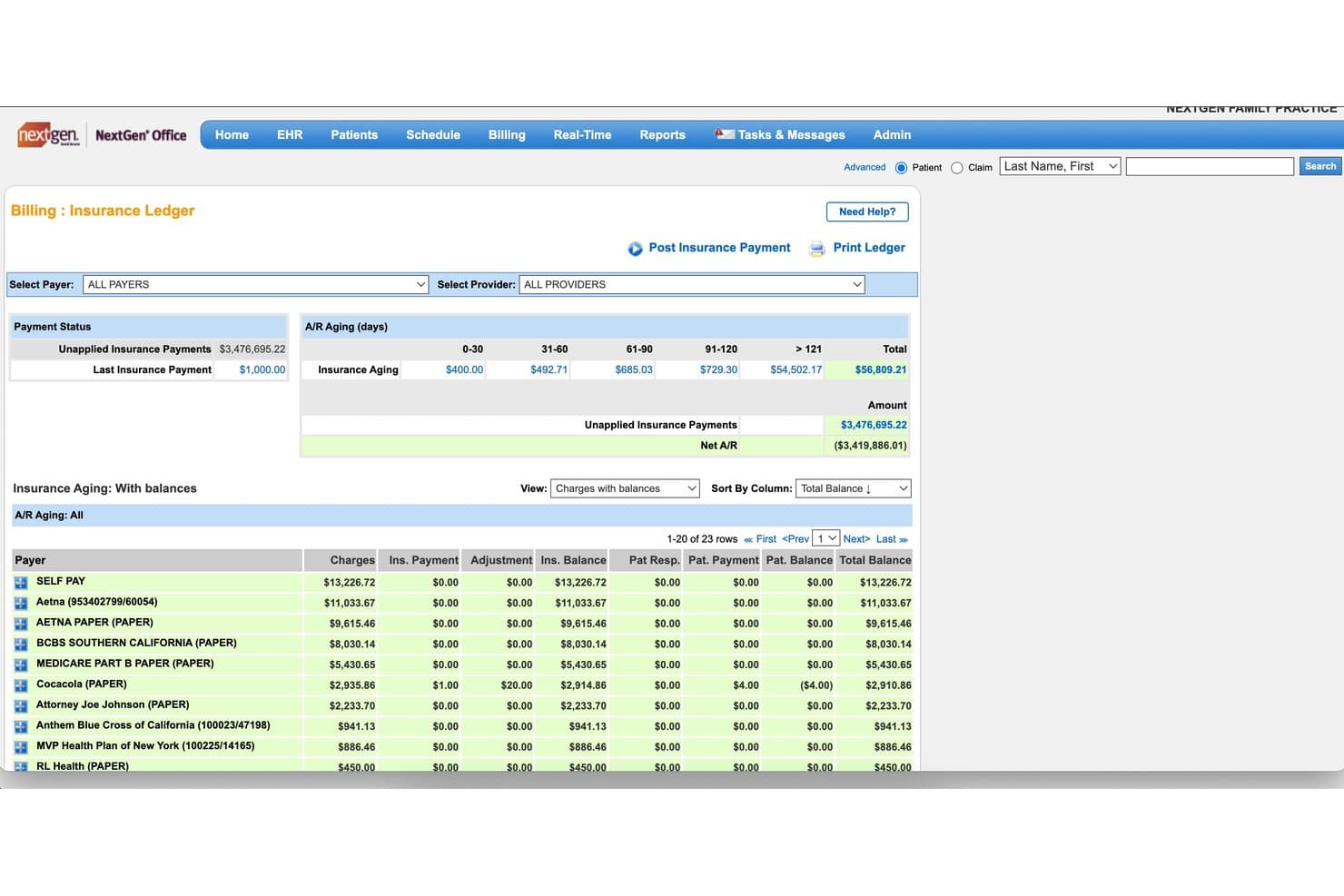
NextGen Healthcare offers a detailed Insurance Ledger with A/R aging buckets, payer balances, and unapplied payment tracking for medical billing management. NextGen Healthcare is an ambulatory-focused medical billing and RCM platform that handles claims submission, eligibility verification, denial management, coding services, and payment posting for mid-size to enterprise US practices.
Who Is NextGen Healthcare Best For?
It's a strong fit for multi-specialty ambulatory practices and medical billing teams managing high claim volumes across complex payer mixes.
Why I Picked NextGen Healthcare
NextGen Healthcare earns its spot on my shortlist because of how it handles enterprise-scale RCM without sacrificing specialty-specific nuance. I especially like the AI Rules Engine, which scrubs claims before submission using payer-specific edits to reduce rejections before they reach the clearinghouse. I also appreciate the dedicated A/R Recovery service, where a professional recovery team follows outstanding balances, paired with monthly consultative analytics reviews from RCM subject-matter experts assigned to your specialty.
NextGen Healthcare Key Features
- Integrated clearinghouse connectivity: Connects directly to major US clearinghouses for real-time claim routing and remittance processing.
- Real-time eligibility verification: Performs instant insurance eligibility checks with US payers through automated 270/271 transactions.
- Patient payment portal: Offers a branded online portal for bill pay, payment planning, text-to-pay, and digital statement delivery.
- ERA and EFT auto-posting: Automates electronic remittance advice and electronic funds transfer posting, including contractual adjustment reconciliation.
NextGen Healthcare Integrations
NextGen Healthcare offers native integrations with NextGen Enterprise EHR, NextGen Practice Management, Mirth Connect Integration Engine, and NextGen Share for lab connectivity. An API is available for custom integrations.
Pros and Cons
Pros:
- Real-time insurance eligibility verification
- Dedicated A/R specialists monitor aged claims
- Claim scrubbing reduces payer rejections
Cons:
- Reporting customization can be limited
- Steep onboarding process for new staff
Learn more about NextGen Healthcare: Best for independent practice billing
- Free demo available
- Pricing upon request
Visit WebsiteCustomer Rating:3.9/5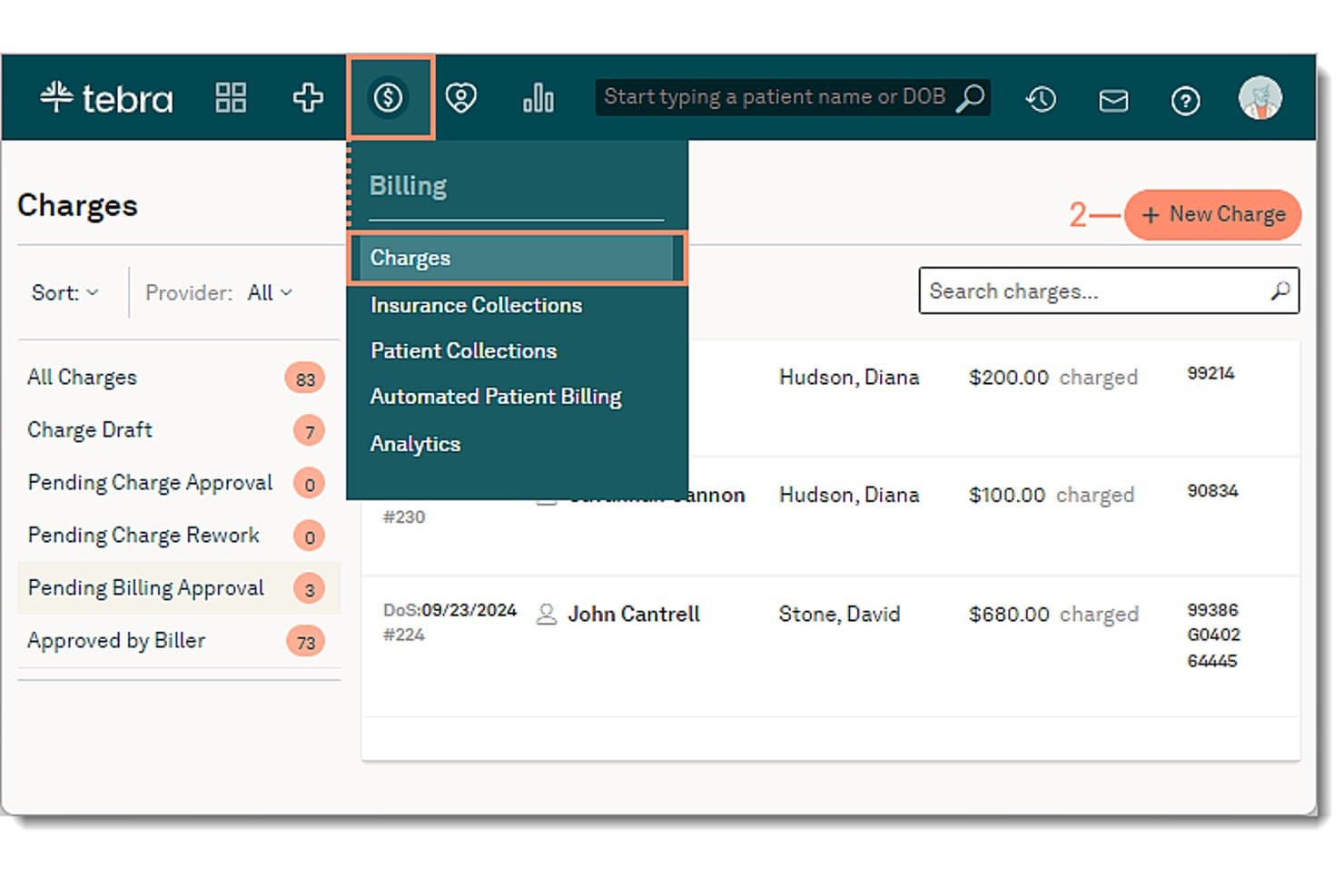
Tebra offers a Charges billing dashboard where users can create new charges, filter by provider, and view patient billing details with procedure codes. Tebra is an EHR+ platform built for independent medical practices that combines clinical charting, insurance claims processing, eligibility verification, denial management, and patient billing in a single system.
Who Is Tebra Best For?
Tebra fits small independent practices—particularly those with one to a few providers—that want one platform to handle both clinical and billing workflows.
Why I Picked Tebra
I picked Tebra as one of the best because it keeps billing tightly connected to clinical workflows from the very start. The scheduling calendar runs real-time 270/271 eligibility checks before a patient is ever seen, which cuts denials before a claim is created. Claims then pass through TriZetto scrubbing for coding errors, and ERAs post back automatically via RPA. I like that billers can track every outstanding claim from a single dashboard without switching between systems.
Tebra Key Features
- ICD-10 and CPT code lookup: Search and validate codes using updated US coding standards within claims and encounters.
- Patient payment portal: Allow patients to review statements and make payments securely online.
- ERA auto-posting: Automatically post electronic remittance advice to patient accounts without manual data entry.
- Configurable KPI dashboards: Display key revenue and claims metrics for at-a-glance financial reporting and workflow monitoring.
Tebra Integrations
Tebra offers native integrations with TriZetto for claim scrubbing, Appriss Health for PDMP, and supports HL7 and FHIR API bridges for interoperability with many major EHR systems. An API is available for custom integrations.
Pros and Cons
Pros:
- Patient payment portal with online billing
- Automated claim scrubbing reduces payer denials
- Real-time insurance eligibility at appointment scheduling
Cons:
- Occasional delays with electronic remittance posting
- Claims reporting is less customizable than competitors
Learn more about Tebra: Best for mobile billing and RCM workflows
- Free demo available
- Pricing upon request
Visit WebsiteCustomer Rating:3.9/5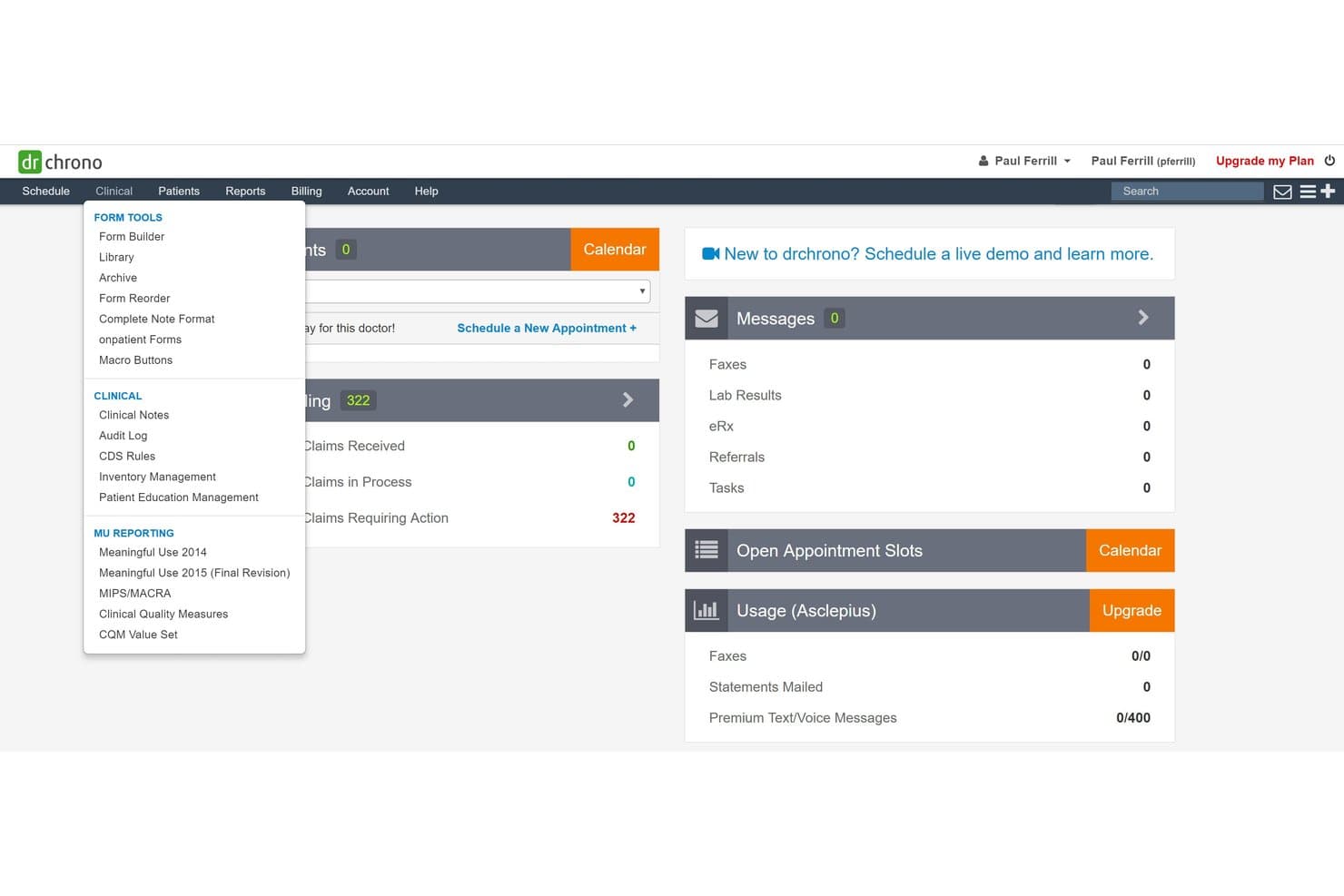
DrChrono offers a Clinical dropdown menu with form tools, clinical notes, and MU reporting options within its medical billing dashboard. DrChrono is a cloud-based EHR and medical billing platform that combines claim submission, RCM, eligibility verification, denial management, and patient billing in a single system built for independent US medical practices.
Who Is DrChrono Best For?
DrChrono is a strong fit for small independent practices that need a mobile-first billing and clinical workflow, particularly those operating across multiple locations or on the go.
Why I Picked DrChrono
I've included DrChrono in my top picks because its native iOS app lets providers complete a full clinical encounter and submit claims without switching to a desktop. The Live Claims Feed gives real-time visibility into claim status directly from an iPad, which I find genuinely useful for mobile or multi-site billing workflows. The integrated EHR-to-billing pipeline also means diagnoses and procedure codes flow directly into claim generation, cutting out manual data re-entry.
DrChrono Key Features
- Integrated clearinghouse connection: Submit and manage claims directly through a built-in integration with eProvider Solutions.
- Real-time insurance eligibility verification: Check patient eligibility and benefits instantly using automated 270/271 transactions before appointments.
- Customizable billing profiles: Store and apply specialty-specific coding templates and charge structures for different visit types.
- Electronic remittance auto-posting: Automatically post ERA and EOB data to patient accounts to speed up payment reconciliation.
DrChrono Integrations
DrChrono offers native integrations with Quest Diagnostics, LabCorp, Fullscript, Collectly, eProvider Solutions, Square, and Medsender. An API is available for custom integrations, and additional apps can be accessed through the DrChrono Marketplace.
Pros and Cons
Pros:
- Built-in automated eligibility and payment posting
- Real-time claims feed on iPad and web
- Mobile app supports full billing cycle
Cons:
- No institutional UB-04 billing support
- Single clearinghouse limits payer options
Learn more about DrChrono: Best for outsourced billing and revenue cycle
- Free demo available
- Pricing upon request
Visit WebsiteCustomer Rating:3.6/5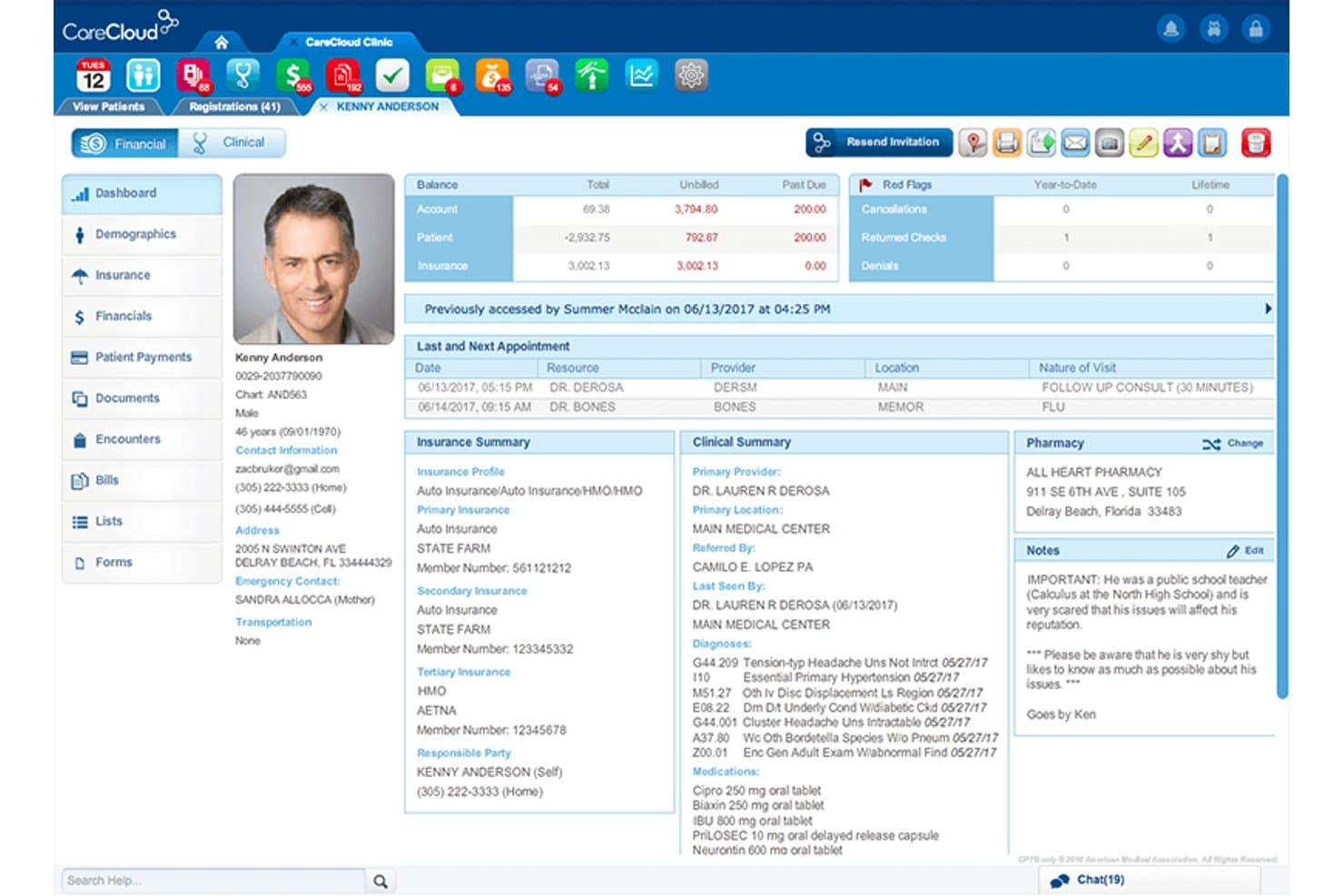
CareCloud offers a comprehensive patient profile dashboard displaying billing balances, insurance summaries, clinical notes, and appointment history in one unified view. CareCloud is a cloud-based RCM platform that combines AI-powered claims scrubbing, medical coding, denial management, and eligibility verification with an optional fully outsourced billing service.
Who Is CareCloud Best For?
CareCloud suits independent and group practices that want to outsource their revenue cycle without replacing their existing practice management system.
Why I Picked CareCloud
CareCloud earns its spot on my shortlist because of the CareCloud Concierge service, which pairs the RCM platform with a dedicated back-office billing team. What I like most is the PM-agnostic setup: you don't have to replace your existing practice management system to outsource your billing. The CollectiveIQ billing rules engine scrubs every claim before submission, which is what drives first-pass rates above 94%.
CareCloud Key Features
- Real-time eligibility checks: Instantly verifies patient insurance details with US payers using 270/271 transactions.
- Integrated patient payment portal: Lets patients pay bills online, enroll in payment plans, and view digital statements.
- Advanced denial analytics: Tracks denial reasons, payer performance, and exposes trends using dashboard reporting.
- ERA/EOB auto-posting: Automatically posts electronic remittance advices and explanations of benefits for faster reconciliation.
CareCloud Integrations
CareCloud offers native integrations with CareCloud Central, Charts-EHR, Breeze, and Community. It is EHR and practice management system agnostic and provides an API for custom integrations.
Pros and Cons
Pros:
- Detailed denial and AR analytics dashboards
- CollectiveIQ engine boosts first-pass claim rates
- Outsourced billing available for any PM system
Cons:
- Some users report slow billing support responses
- Opaque contract terms and early termination fees
Learn more about CareCloud: Best for automated billing and claims workflows
- Free demo available
- Pricing upon request
Visit WebsiteCustomer Rating:3.6/5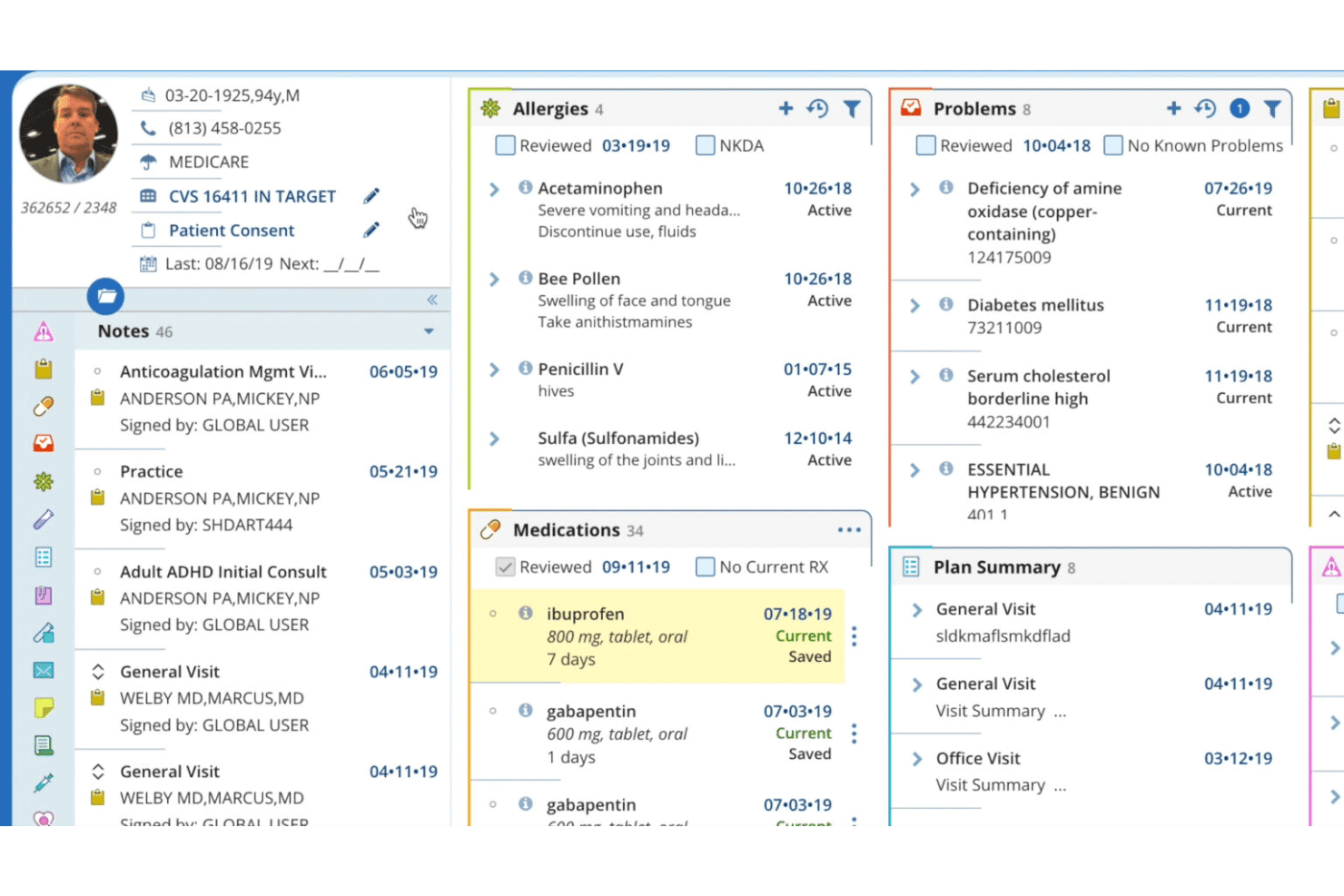
AdvancedMD patient record view with allergies, medications, and care plans. AdvancedMD is a cloud-based medical billing and practice management platform built for independent practices, offering claims management, clearinghouse integration, eligibility verification, denial tracking, and patient payment processing.
Who Is AdvancedMD Best For?
AdvancedMD is a strong fit for high-volume independent practices and third-party billing companies managing claims across multiple providers or locations.
Why I Picked AdvancedMD
I picked AdvancedMD as one of the best because its ClaimInspector engine runs 3.5 million pre-submission edits, catching CCI conflicts, LCD errors, and HIPAA issues before a claim ever reaches a payer. That level of automated scrubbing is what backs its 95% first-pass acceptance rate. I also rely on the A/R Control Center, which organizes denial reason codes into actionable worklists so my billing team can prioritize resubmissions without manually combing through payer portals.
AdvancedMD Key Features
- Integrated clearinghouse: Connects directly with 1,800+ US payers for ERA/835 remittance downloads and real-time claim status.
- Real-time eligibility verification: Performs instant eligibility and benefits checks using 270/271 transactions at check-in or scheduling.
- Patient payment portal: Offers a branded online portal for bill pay, payment plans, and digital statements.
- Role-based access controls: Lets you customize user permissions by provider, location, or role across multi-site practices.
AdvancedMD Integrations
AdvancedMD offers native integrations with Waystar Clearinghouse, Inbox Health, ChartRequest, DAX Copilot, DeepScribe, Doctorsoft, InstaMed, LeadSquared, NextPatient, and QuickBooks. An API is available for custom integrations.
Pros and Cons
Pros:
- Detailed denial tracking with actionable worklists
- Batch eligibility checks for multiple patients
- Claims scrubbing detects payer-specific errors pre-submission
Cons:
- Clearinghouse enrollment process is sometimes slow
- Reporting customization can require vendor assistance
 Best for network-driven billing and collections
- Free demo available
- Pricing upon request
Visit WebsiteCustomer Rating:5/5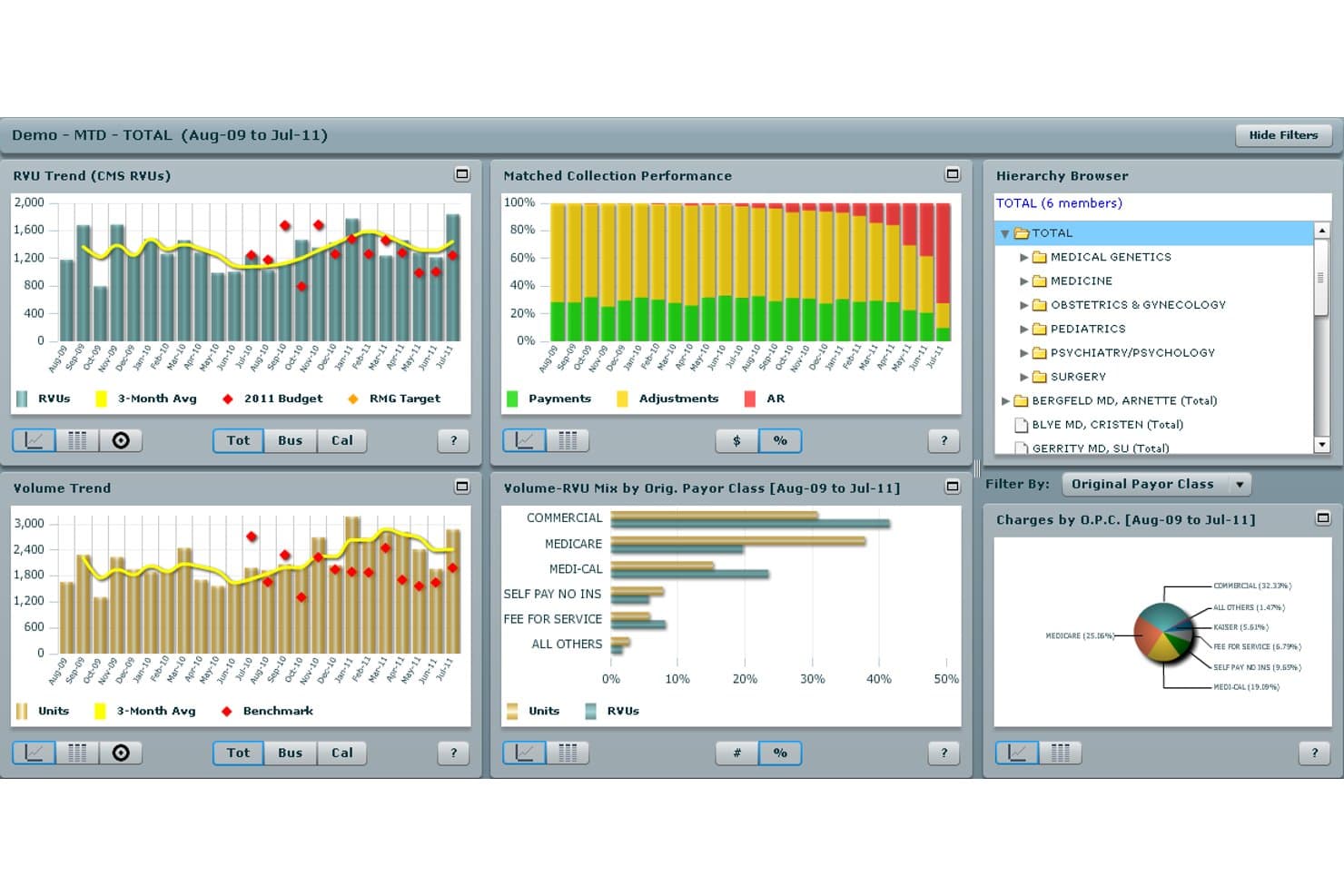
Athenahealth offers a comprehensive medical billing dashboard with RVU trends, matched collection performance, volume trends, and payor class breakdowns for practice analytics. athenaOne is a cloud-based EHR and revenue cycle management platform that combines claims processing, coding, eligibility verification, denial management, and patient billing within a network-connected system shared across 100,000+ providers.
Who Is Athenahealth Best For?
Athenahealth is a strong fit for independent and small-to-mid-sized practices that want a fully managed billing operation without building a large in-house RCM team.
Why I Picked Athenahealth
I picked Athenahealth as one of the best because its billing rules engine draws on real claims data from over 100,000 providers across its network. Before a single claim leaves my practice, the system runs it through 30,000+ payer-specific rules built from that collective experience. I also like the AI-powered denial advice, which gives plain-language guidance on why a claim was flagged rather than leaving my billing team to decode reason codes manually.
Athenahealth Key Features
- AI-powered express coding: Suggests E&M and CPT codes based on documentation and practice guidance to expedite accurate coding.
- Real-time eligibility verification: Instantly checks patient insurance eligibility using 270/271 transactions for US payers.
- Patient payment portal: Supports online bill pay, payment plans, and secure patient statements with HIPAA safeguards.
- ERA and EFT auto-posting: Automatically posts remittance advices and electronic funds transfers with exception management queues.
Athenahealth Integrations
Athenahealth offers native integrations with over 277,000 clinical endpoints, including labs, pharmacies, diagnostic centers, and clearinghouses such as Change Healthcare, Availity, and Trizetto. An API is available for custom integrations.
Pros and Cons
Pros:
- High clean-claim rates across payer types
- Robust medical coding assistance with AI suggestions
- Network-driven denial intelligence updates continuously
Cons:
- Reporting customization can be limited
- Some denials not managed by billing service
Learn more about Athenahealth:
Outros softwares de faturação médica dos EUA
Eis algumas opções adicionais de software de faturação médica dos EUA que não entraram na minha lista restrita, mas que ainda vale a pena consultar:
- 11CureMDBest for practice management
- 12eClinicalWorksBest for integrated EHR and billing workflows
- 13RXNTBest for affordable integrated medical billing
- 14PrognoCIS Psychiatry EHRBest for customizable billing workflows
- 15ModMedBest for specialty billing and practice management
- 16MEDISOFTBest for established billing offices
- 17Greenway HealthBest for specialty billing and RCM
- 18AllegianceMDBest for automated claims and payment posting
- 19AvailityBest for payer connectivity and eligibility checks
Como escolher um software de faturação médica dos EUA
É fácil perder-se em listas extensas de funcionalidades e estruturas de preços complexas. Para o ajudar a manter-se concentrado enquanto percorre o seu processo específico de seleção de software, apresentamos uma lista de verificação dos fatores a ter em conta:
| Fator | O que considerar |
| Escalabilidade | Este software acompanhará o crescimento da sua clínica se adicionar localizações, prestadores ou especialidades? Considere a expansão futura e o suporte para vários números de identificação fiscal ou várias localizações. |
| Integrações | Sincroniza com o seu EHR, sistema de gestão da clínica e câmara de compensação? Evite a introdução manual de dados e verifique a compatibilidade da API HL7 ou FHIR com os seus sistemas atuais. |
| Personalização | Com que facilidade pode configurar regras de codificação, fluxos de trabalho de faturação ou permissões de utilizadores para corresponder à sua especialidade ou aos processos da organização? |
| Facilidade de utilização | A sua equipa consegue aprender rapidamente a utilizar o sistema? Procure uma navegação clara, fluxos de trabalho simples para os pedidos de reembolso e recursos sólidos de formação dos utilizadores, para evitar dificuldades na adoção. |
| Implementação e integração inicial | Qual é o prazo habitual para a configuração, a formação e a migração de dados? Informe-se sobre o apoio do fornecedor durante a integração inicial e sobre quaisquer tarefas da responsabilidade do cliente. |
| Custo | As taxas são cobradas por pedido de reembolso, por prestador ou como percentagem dos recebimentos? Tenha em conta custos ocultos, como taxas da câmara de compensação, complementos, apoio e aumentos de preços a longo prazo. |
| Medidas de segurança | A plataforma garante a conformidade com a HIPAA, o armazenamento encriptado de dados, registos de auditoria e um BAA assinado? Confirme a abordagem à segurança das informações de saúde protegidas e à resposta a incidentes. |
| Disponibilidade do apoio | Com que rapidez consegue contactar o apoio em direto para resolver problemas urgentes? Confirme se o apoio está sediado nos EUA e quais os horários ou canais disponíveis para questões técnicas ou de faturação. |
O que é um software de faturação médica dos EUA?
O software de faturação médica dos EUA é uma plataforma digital que automatiza o processo de preparação, envio e acompanhamento de pedidos de reembolso às seguradoras e da faturação dos pacientes para os prestadores de cuidados de saúde nos Estados Unidos. Estes sistemas tratam da codificação dos seguros, da conformidade, do registo dos pagamentos e das cobranças, ao mesmo tempo que apoiam as normas de privacidade de dados da HIPAA, ajudando as clínicas a gerir eficazmente as receitas e as tarefas administrativas.
Funcionalidades do software de faturação médica dos EUA
Ao selecionar software de faturação médica dos EUA, esteja atento às seguintes funcionalidades essenciais:
- Submissão eletrónica de pedidos: Automatiza a geração e o envio eletrónico de pedidos CMS-1500 e UB-04 para seguradoras comerciais, Medicare e Medicaid.
- Verificação de pedidos: Analisa os pedidos quanto a erros de codificação, informações em falta ou regras específicas das seguradoras antes da submissão, ajudando a reduzir as taxas de recusa.
- Verificação da elegibilidade: Efetua verificações em tempo real da elegibilidade do seguro e das prestações no momento do agendamento ou do registo, reduzindo as rejeições de pedidos devido a problemas de cobertura.
- Suporte para códigos ICD-10 e CPT: Inclui ferramentas de pesquisa de códigos e validação com base nas normas atuais de codificação médica, melhorando a precisão da codificação e a conformidade.
- Gestão de recusas: Acompanha os pedidos recusados, assinala os códigos dos motivos e disponibiliza fluxos de trabalho para recursos ou novas submissões, acelerando o reembolso.
- ERA e registo de pagamentos: Regista automaticamente os avisos eletrónicos de remessa e os pagamentos das seguradoras, conciliando os saldos dos doentes e reduzindo a introdução manual de dados.
- Faturação do doente e portal de pagamentos: Gera extratos e disponibiliza um portal online seguro para que os doentes possam pagar faturas, configurar planos de pagamento ou gerir saldos.
- Relatórios e análises: Disponibiliza painéis e relatórios sobre o estado dos pedidos, os dias em contas a receber, as recusas e as cobranças, permitindo monitorizar o desempenho financeiro.
- Conformidade com a HIPAA: Protege as informações de saúde dos doentes através de encriptação, acesso baseado em funções e salvaguardas legais, em conformidade com as leis de privacidade dos cuidados de saúde dos EUA.
- Integração com a gestão do consultório: Sincroniza-se com sistemas de registos de saúde eletrónicos, agendamento e atendimento administrativo, reduzindo a introdução duplicada de dados e simplificando os fluxos de trabalho.
Benefícios do software de faturação médica dos EUA
A implementação de software de faturação médica dos EUA proporciona vários benefícios à sua equipa e à sua empresa. Eis alguns dos benefícios que pode esperar:
- Ciclos de reembolso mais rápidos: A submissão automatizada de pedidos e o registo eletrónico de pagamentos ajudam a acelerar os pagamentos das seguradoras e dos doentes.
- Taxas de recusa mais baixas: A verificação integrada de pedidos e as verificações de elegibilidade em tempo real detetam erros e problemas de cobertura antes do envio dos pedidos.
- Maior precisão na faturação: A validação dos códigos ICD-10 e CPT reduz os erros de codificação e mantém o seu consultório atualizado relativamente aos requisitos de conformidade em evolução.
- Redução da carga administrativa: As ferramentas de gestão de recusas, elaboração de relatórios e o portal de faturação dos doentes minimizam as tarefas manuais e ajudam a sua equipa a concentrar-se em trabalho de maior valor.
- Maior visibilidade financeira: Os painéis e as análises proporcionam uma visão em tempo real das contas a receber, do estado dos pedidos e das tendências das receitas, para uma tomada de decisões informada.
- Maior segurança dos dados: A encriptação em conformidade com a HIPAA, os controlos de acesso e os registos de auditoria ajudam a proteger as informações de saúde protegidas e a garantir a conformidade com os requisitos de privacidade.
- Melhor experiência para o doente: Os portais de pagamento seguros e os extratos online claros facilitam a gestão e o pagamento das faturas pelos doentes, melhorando a satisfação.
Custos e preços do software de faturação médica dos EUA
A seleção de software de faturação médica dos EUA requer uma compreensão dos vários modelos e planos de preços disponíveis. Os custos variam consoante as funcionalidades, o tamanho da equipa, os complementos e outros fatores. A tabela abaixo resume os planos mais comuns, os respetivos preços médios e as funcionalidades normalmente incluídas nas soluções de software de faturação médica dos EUA:
Tabela de comparação de planos de software de faturação médica dos EUA
| Tipo de plano | Preço médio | Funcionalidades comuns |
| Plano gratuito | $0 | Submissão eletrónica básica de pedidos, verificações manuais de elegibilidade, relatórios limitados e apoio da comunidade. |
| Plano pessoal | $50-$100/mês | Submissão eletrónica de pedidos, verificação básica de pedidos, registo manual de pagamentos, ferramentas de conformidade com a HIPAA e apoio padrão ao utilizador. |
| Plano empresarial | $200-$500/mês | Verificação da elegibilidade em tempo real, registo automatizado de pagamentos, análises avançadas, portal de faturação dos doentes e gestão de funções. |
| Plano empresarial de grande dimensão | $800-$2000+/mês | Integrações completas com sistemas de registos de saúde eletrónicos e gestão de consultórios, gestão de vários locais, integração inicial dedicada, relatórios personalizados e apoio prioritário ao cliente. |
How I Evaluate US Medical Billing Software
I evaluate these tools in two layers: baseline billing requirements like 837 claim submission and denial tracking, and the differentiators that separate one platform from another.
Core Functionality (Table Stakes for This List)
When I'm selecting tools for my list, I rank each one on a scale from 0 (does not offer the functionality) to 5 (excels in this area) for each core functionality listed below. Then, I calculate the tool's total score into a percentage. Each tool needs to achieve a minimum total score of 65% to be considered for inclusion.
- US Claims Processing: I check whether the platform handles electronic CMS-1500 and UB-04 submission via 837P/I formats, including claim scrubbing that catches errors before they reach the payer.
- Clearinghouse Integration: The tool should connect to major US clearinghouses like Change Healthcare, Availity, or Trizetto for claim routing and ERA/835 remittance retrieval.
- Eligibility Verification: I look for real-time 270/271 eligibility checks that pull benefits, copays, and coverage details at scheduling or check-in to prevent denials downstream.
- ICD-10 and CPT Coding: Built-in code lookup and validation for ICD-10-CM, CPT, and HCPCS matters here, especially modifier support and NCCI edit checks that flag bundling issues.
- Denial and AR Management: I evaluate how each platform tracks claim status, surfaces denial reason codes, and supports appeal workflows with aging reports to keep receivables moving.
- HIPAA-Compliant Patient Billing: Each tool should generate patient statements and process payments within HIPAA safeguards, ideally with online payment options and BAA-backed compliance.
Once I have a list of tools that meet the criteria, I consider what sets each platform apart.
Differentiating Factors (What Sets Vendors Apart)
Here's how I compare and contrast different vendors:
Standout Features
Analytics dashboards are where I see the biggest gap between vendors. I look for configurable reporting on days in A/R, clean claim rate, and denial reasons so you can spot revenue leakage fast. ERA/EFT auto-posting is another major differentiator—platforms that reconcile contractual adjustments and flag underpayments save billing teams hours of manual work. I also evaluate patient payment portals, especially features like text-to-pay, payment plans, and card-on-file that make it easier to collect patient balances.
Beyond Features
Clearinghouse and payer connectivity is a big one—I check whether a platform supports Medicare, Medicaid, Tricare, and Workers' Comp alongside commercial payers, since gaps here mean manual workarounds. EHR integration matters just as much. Bidirectional syncing of demographics, charges, and encounters via HL7 or FHIR APIs prevents double entry and keeps billing data accurate. I also evaluate specialty and practice size fit, especially configurable coding rules for areas like behavioral health, anesthesia, or DME, and multi-location, multi-tax-ID support for growing groups.
Perguntas frequentes sobre software de faturação médica nos EUA
Eis algumas respostas a perguntas comuns sobre software de faturação médica nos EUA:
Como é que o software de faturação médica apoia a conformidade com os seguros?
O software de faturação médica nos EUA mantém-se atualizado relativamente à HIPAA, ICD-10, CMS e outras regras das entidades pagadoras, ajudando a sua equipa a submeter pedidos de reembolso nos formatos e com os códigos corretos. A maioria das plataformas também disponibiliza ferramentas de conformidade integradas e atualizações regulares para manter os consultórios alinhados com os regulamentos.
Posso utilizar software de faturação médica com o meu sistema EHR existente?
Sim, a maioria dos principais softwares de faturação médica nos EUA oferece integrações com plataformas EHR comuns através de APIs HL7 ou FHIR. Isto permite sincronizar dados dos pacientes, encargos e documentação clínica, ajudando a reduzir a introdução duplicada de dados e a melhorar a precisão da faturação.
O que devo verificar antes de escolher um fornecedor de software de faturação?
Informe-se sobre as ligações a entidades de processamento, o suporte das redes de entidades pagadoras, os termos do contrato, os tempos de resposta do serviço de apoio ao cliente e o processo de integração. Certifique-se de que a ferramenta corresponde à dimensão da sua operação e consegue suportar quaisquer especialidades ou situações de faturação específicas do seu consultório.
Estas soluções tratam da faturação e dos pagamentos dos pacientes?
Sim, a maioria dos softwares de faturação médica nos EUA inclui funcionalidades para enviar extratos aos pacientes e cobrar pagamentos online. Procure sistemas com portais de pacientes personalizados, pagamento por mensagem de texto ou planos de pagamento se quiser melhorar o processo de cobrança.
Quanto tempo demora a implementação de software de faturação médica?
Os prazos de implementação podem variar bastante. Para consultórios mais pequenos, a configuração pode demorar alguns dias a duas semanas; para grupos maiores ou com várias localizações, conte com várias semanas ou mais, especialmente se forem necessárias migrações de dados complexas ou integrações personalizadas.