

O software simples de faturação médica foi concebido para automatizar e simplificar tarefas como pedidos de reembolso, pagamentos e verificações da elegibilidade do seguro para organizações de cuidados de saúde. Se está a gerir a faturação em simultâneo com os cuidados aos pacientes e procura uma solução rápida de aprender e simples de utilizar, não está sozinho. Muitas equipas procuram formas de reduzir as dificuldades administrativas e evitar erros que podem atrasar os reembolsos.
Este guia destaca o melhor software simples de faturação médica em 2026, para que possa comparar rapidamente as principais ferramentas, perceber o que distingue cada uma e escolher a opção mais adequada ao seu fluxo de trabalho e às suas necessidades.
Why Trust Our Software Recommendations
6,700+
Reviews
20
Industry experts
16+
Evaluation factors
14
Years
Our team has been testing and reviewing software since 2012. As medical practice leaders ourselves, we know how difficult—and important—it is to choose the right software.
For this guide, we evaluated tools using hands-on testing and independent research, scoring tools using our selection criteria.
Our reviews reflect our human editorial judgment, not a sales pitch.
Tabela de comparação de software simples de faturação médica
A tabela abaixo compara os detalhes de preços das minhas principais seleções de software simples de faturação médica.
| Tool | Best For | Trial Info | Price | ||
|---|---|---|---|---|---|
| 1 | Best for direct clearinghouse integration | Free demo available | Pricing upon request | Website | |
| 2 | Best for multi-location management tools | Free demo available | Pricing upon request | Website | |
| 3 | Best for quick staff onboarding features | Not available | Pricing upon request | Website | |
| 4 | Best for small practice scalability | Not available | Pricing upon request | Website | |
| 5 | Best for frequent payer rule updates | Free demo available | Pricing upon request | Website | |
| 6 | Best for custom claim form configurability | Free demo available | From $199/user/month | Website | |
| 7 | Best for automated insurance eligibility checks | Free demo available | Pricing upon request | Website | |
| 8 | Best with AI-powered billing workflow automation | Free demo available | Pricing upon request | Website | |
| 9 | Best for real-time claim tracking | Free demo available | Pricing upon request | Website | |
| 10 | Best for robust reporting and analytics | Free demo available | Pricing upon request | Website |


Avaliações do melhor software simples de faturação médica
Abaixo encontram-se os meus resumos detalhados do melhor software simples de faturação médica que integrou a minha seleção. As minhas avaliações apresentam uma análise detalhada das funcionalidades, dos melhores casos de utilização e dos preços de cada software, para o ajudar a encontrar a melhor opção para si.
 Best for direct clearinghouse integration
- Free demo available
- Pricing upon request
Visit WebsiteCustomer Rating:4.1/5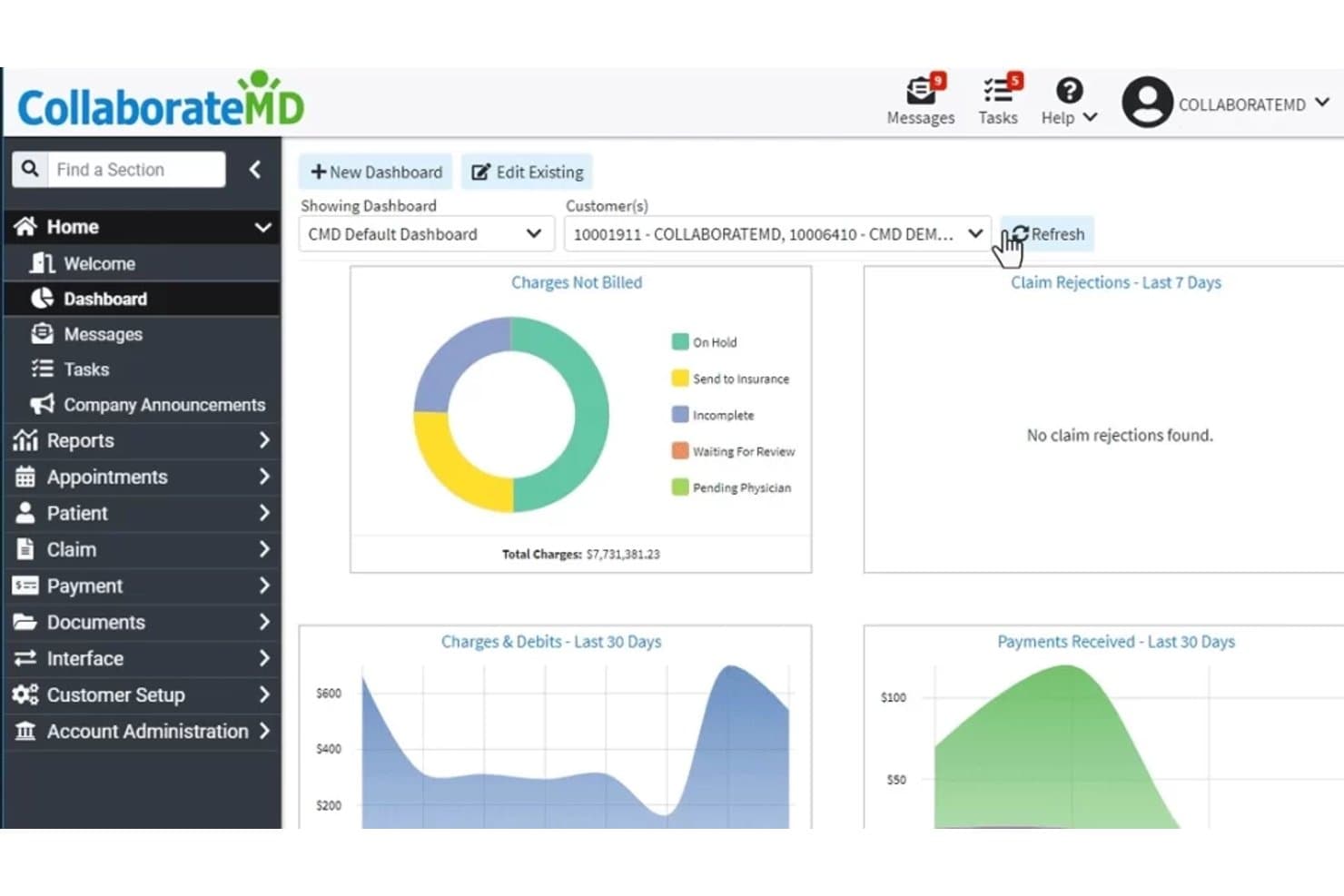
CollaborateMD offers an intuitive dashboard displaying charges not billed, claim rejections, charges and debits, and payments received over the last 30 days. CollaborateMD is a cloud-based medical billing and practice management platform that combines real-time claim submission, AI-powered denial management, eligibility verification, and patient billing tools for small to mid-size practices and independent billing services.
Who Is CollaborateMD Best For?
It's a strong fit for independent medical billers and small practice office managers who handle revenue cycle work without a dedicated billing team.
Why I Picked CollaborateMD
CollaborateMD earns its spot on my shortlist because of its built-in clearinghouse, which submits claims in real time without routing through a third-party service. I like that Level 2 Claim Edits (CCI, NCD/LCD, and LMRP rules) run automatically before submission, catching errors that typically cause denials. When a payer does reject a claim, the AI-powered rejection support translates the denial code into plain language, so I can act on it right away rather than decoding payer-specific terminology.
CollaborateMD Key Features
- Real-time eligibility verification: Check patient insurance coverage instantly before appointments or claims submission.
- Customizable reporting dashboards: Access and tailor over 125 detailed billing and practice management reports.
- Integrated patient payment portal: Let patients pay bills online through a secure web portal linked to their account.
- Appointment scheduling and check-in: Schedule patient visits and manage digital check-ins directly within the platform.
CollaborateMD Integrations
CollaborateMD offers native integrations with Practice Fusion, Elation, Amazing Charts, Hello Health, Kipu, Medical Mime, Praxis EMR, PrognoCIS, Ritten, Sevocity, WebPT, and Alleva. An API is available for custom EHR and billing integrations.
Pros and Cons
Pros:
- Convenient online patient balance payment portal
- AI-powered rejection explanation and suggestions
- Direct clearinghouse claim submission and tracking
Cons:
- No 24/7 live customer support
- Storage fees for large document uploads
Learn more about CollaborateMD: Best for multi-location management tools
- Free demo available
- Pricing upon request
Visit WebsiteCustomer Rating:4.1/5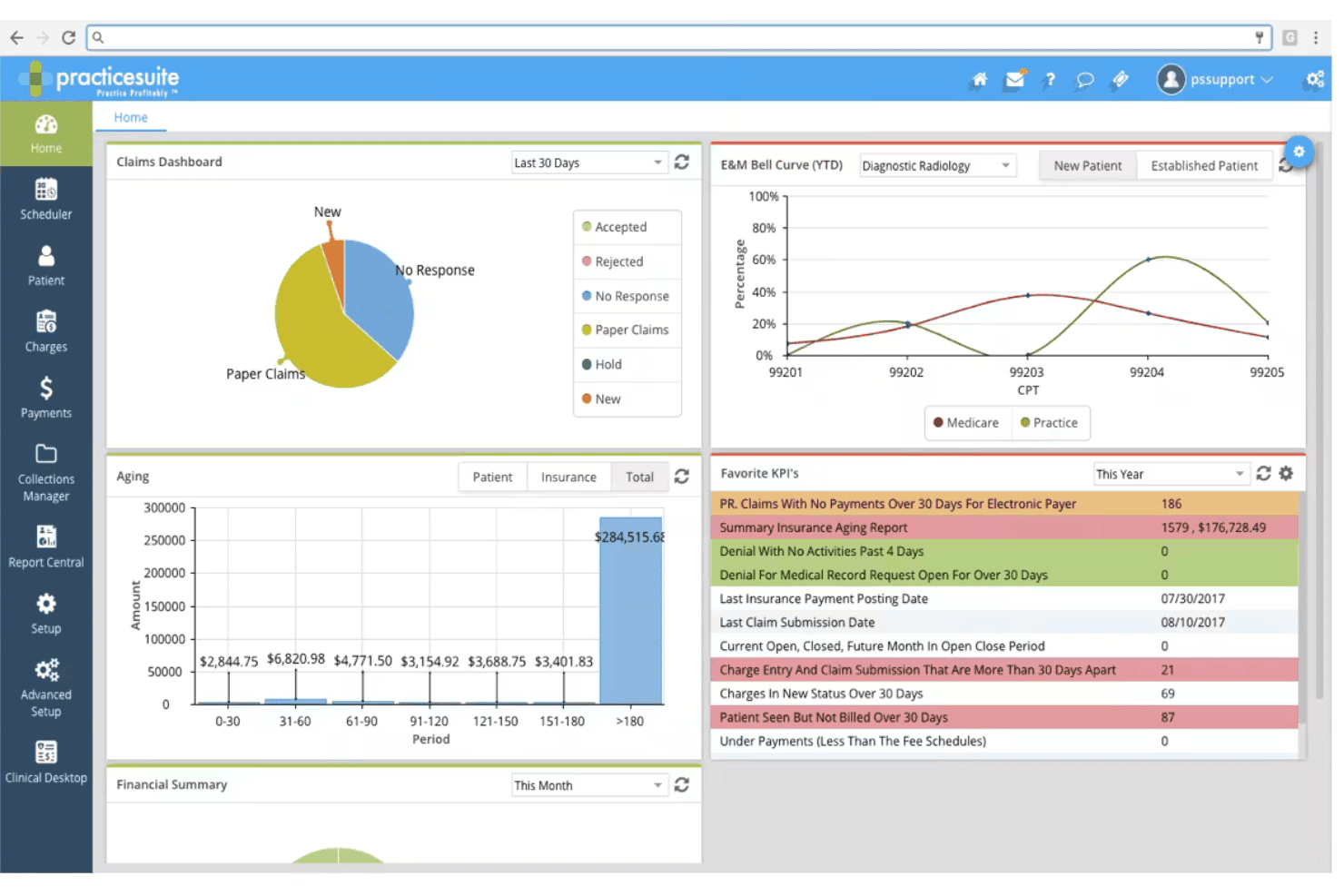
PracticeSuite spans claims, denials, ERA posting, eligibility, and billing. PracticeSuite is a cloud-based medical billing platform that covers claims submission, denial management, ERA posting, eligibility verification, and patient billing across solo practices, group practices, and medical billing companies.
Who Is PracticeSuite Best For?
It's a strong fit for independent medical billing companies and multi-location group practices managing claims, denials, and AR across multiple client accounts.
Why I Picked PracticeSuite
I've included PracticeSuite in my top picks because the Central Billing Office is genuinely built for managing multiple locations. With a single sign-on, I can navigate claims, ERAs, denials, and mass claim corrections across all client accounts from one dashboard. The multi-practice KPI reporting also lets me monitor each location's financial performance independently, which most billing tools don't support at this level.
PracticeSuite Key Features
- Patient portal: Lets patients view statements, pay bills, and communicate requests online.
- AI-driven denial intelligence: Flags potential claim issues before submission for cleaner billing.
- Automated eligibility verification: Confirms patient insurance eligibility in real time or in batch mode.
- Report Central: Offers more than 140 built-in reports for financial and operational tracking.
PracticeSuite Integrations
PracticeSuite offers native integrations with Practice Fusion, Elation, Relay Health, and Dragon dictation. Lab and pharmacy integrations are built in, and an API is available for custom integrations.
Pros and Cons
Pros:
- Built-in denial intelligence and analytics
- Automated ERA and payment posting workflows
- Centralized dashboard for multiple locations
Cons:
- Dashboard navigation can feel cluttered
- Initial onboarding requires frequent vendor support
Learn more about PracticeSuite: Best for quick staff onboarding features
- Not available
- Pricing upon request
Visit WebsiteCustomer Rating:3.9/5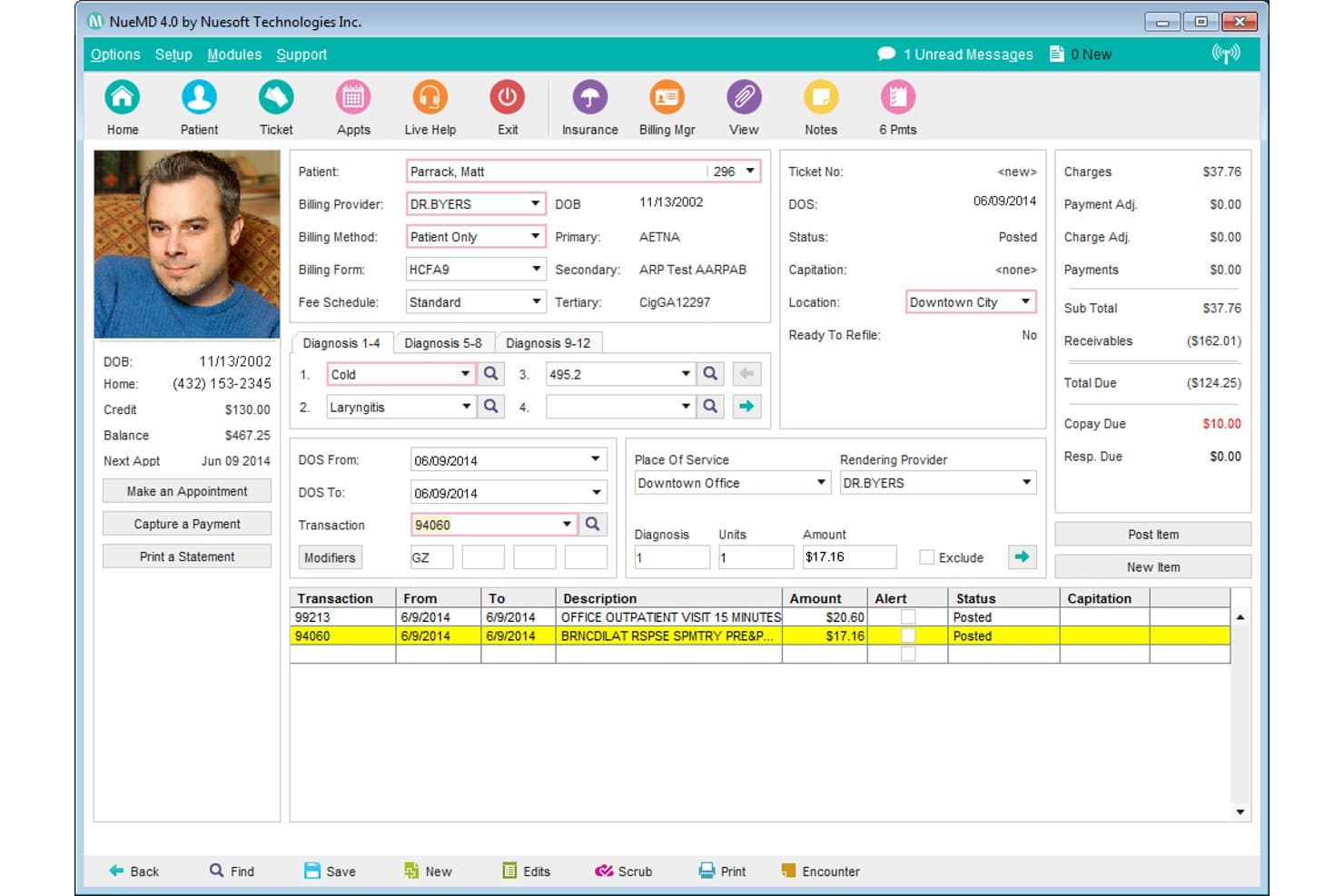
NueMD offers a detailed patient billing ticket screen with diagnosis codes, transactions, and payment summaries for streamlined medical billing. NueMD is a cloud-based medical billing and practice management platform for small practices that covers claims submission, ERA posting, patient billing, scheduling, and EHR documentation.
Who Is NueMD Best For?
NueMD suits independent medical billers and small practice billing staff who need to get up and running on a billing platform without a long learning curve.
Why I Picked NueMD
NueMD earns its spot on my shortlist because the learning curve for new billing staff is genuinely short. I've seen reviewers describe being fully independent by day one and self-sufficient by day three, which is rare. The interface keeps claim entry and ERA posting straightforward, without burying staff in unnecessary screens. NueMD's own clearinghouse handles submission, so new users aren't juggling a separate clearinghouse login on top of learning the platform.
NueMD Key Features
- Real-time claim tracking: View claim statuses and updates as they move through the billing process.
- Customizable appointment scheduling: Schedule patient visits with multi-day and multi-location support.
- Patient statement generation: Produce and send statements directly from the billing system.
- Mobile app access: Manage schedules, billing, and records from iOS and Android devices.
NueMD Integrations
Native integrations are not clearly documented. An API is available for custom integrations.
Pros and Cons
Pros:
- Fast onboarding for staff with minimal downtime
- Patient statements generated directly from platform
- Reliable in-house claims clearinghouse streamlines billing
Cons:
- Limited options for patient payment automation
- Robust AR and denial reports are lacking
Learn more about NueMD: Best for small practice scalability
- Not available
- Pricing upon request
Visit WebsiteCustomer Rating:3.7/5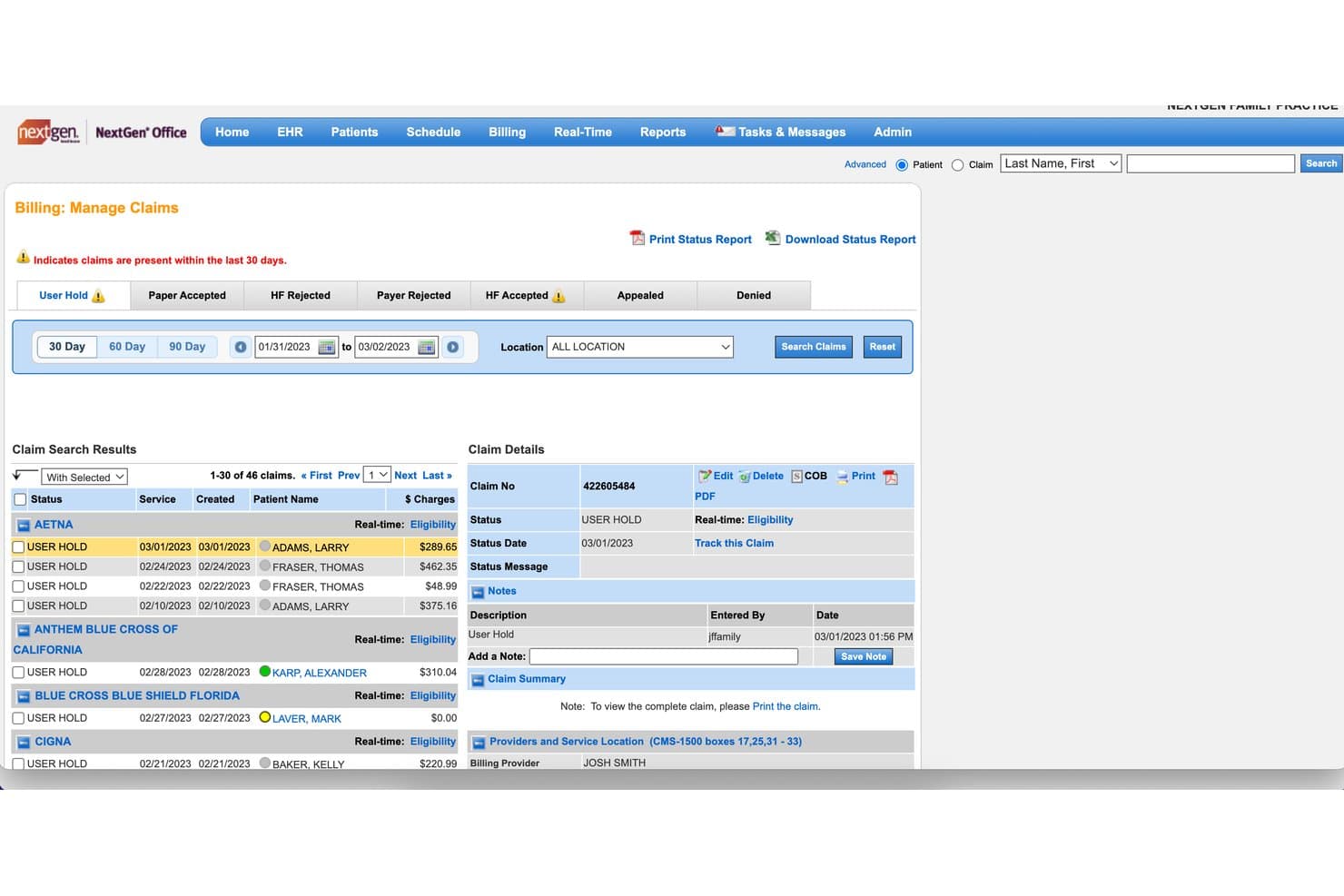
NextGen Office offers a Billing: Manage Claims dashboard that allows users to track, filter, and manage patient claims by status, payer, and date range. NextGen Office is a cloud-based EHR and practice management platform for small practices that integrates electronic claims submission, eligibility verification, patient billing, payment posting, and denial tracking.
Who Is NextGen Office Best For?
NextGen Office is a good fit for independent physicians and small practice administrators managing billing, scheduling, and clinical documentation through a single platform.
Why I Picked NextGen Office
NextGen Office earns its spot on my shortlist because it's built to scale with your practice, not just serve you at your current headcount. I like that EHR, practice management, and billing all run on a single cloud platform, so adding providers doesn't require layering in new tools. The built-in RCM services option sets it apart: when billing volume outgrows in-house capacity, you can move to managed revenue cycle services without switching platforms.
NextGen Office Key Features
- Electronic claims submission: Send CMS-1500 claims directly to clearinghouses from the integrated platform.
- Automated claim scrubbing: Validate claims for errors and compliance before submission.
- ERA payment posting: Import and auto-post electronic remittance advice to patient accounts.
- Real-time eligibility verification: Check insurance eligibility instantly within the scheduling workflow.
NextGen Office Integrations
NextGen Office offers native integrations with major labs and e-prescribing networks, supports Apple Health data import, and provides a native medical billing clearinghouse. An API for custom integrations is not available.
Pros and Cons
Pros:
- Centralized billing for multiple practice locations
- Real-time insurance eligibility checking
- End-to-end billing with EHR integration
Cons:
- Portal design can be confusing for patients
- Click-heavy workflows for routine billing tasks
Learn more about NextGen Office: Best for frequent payer rule updates
- Free demo available
- Pricing upon request
Visit WebsiteCustomer Rating:3.4/5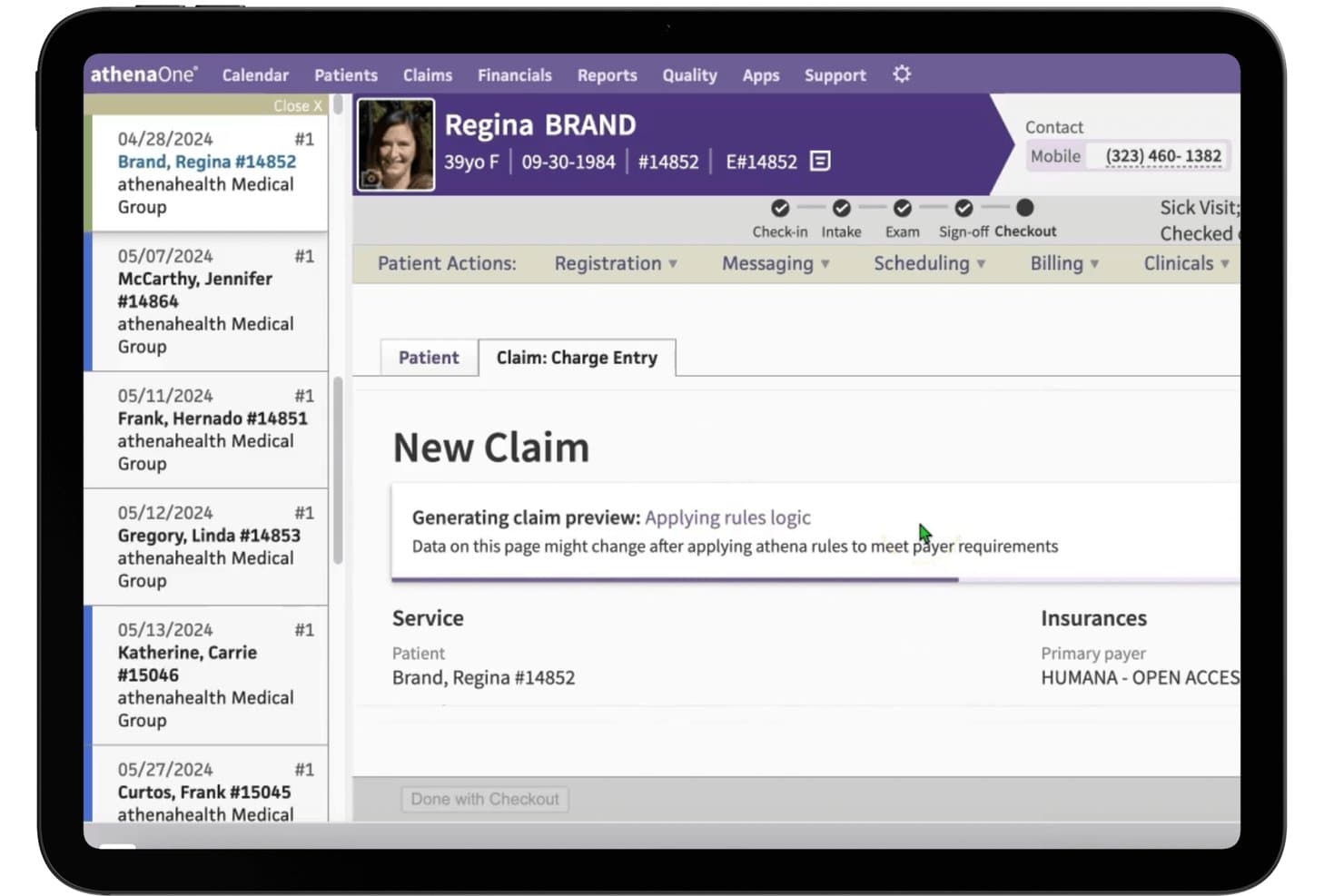
athenahealth offers an automated claim charge entry screen that applies rules logic to meet payer requirements during patient checkout. athenaOne is a cloud-based medical billing and EHR platform that combines claims submission, automated claim scrubbing, ERA posting, eligibility verification, and denial management in a single system built for independent and small practices.
Who Is athenahealth Best For?
athenaOne is a strong fit for independent physicians and small-to-mid-size ambulatory practices that handle billing in-house and need a system that keeps pace with payer policy changes.
Why I Picked athenahealth
athenahealth earns its spot on my shortlist because of its billing rules engine, which I think is genuinely unmatched for keeping pace with payer policy changes. It runs roughly 29,000 rules against every claim before submission, and those rules update continuously based on denial patterns across more than 150,000 providers in the network. The result is a 99% first-pass acceptance rate, which means far fewer claims cycling back for rework.
athenahealth Key Features
- Automated payment posting: Payments from electronic remittance advice are posted directly to patient accounts without manual data entry.
- Patient statement generation: The system produces statements for outstanding balances and delivers them through multiple formats.
- Eligibility verification: Real-time and batch checks allow you to confirm insurance coverage and benefits prior to visits.
- Denial worklist dashboard: A dashboard tracks claim denials and aging accounts receivable, organizing follow-up and appeal tasks.
athenahealth Integrations
athenahealth offers dozens of marketplace integrations through the athenahealth Marketplace, including GetWell Practice, Experian Health Patient Estimates, and Healthjump. An API is available for custom integrations.
Pros and Cons
Pros:
- Patient portal offers online bill payment
- Denial insights dashboard for ongoing AR tracking
- Claims scrubbing engine updates daily from network trends
Cons:
- No built-in claims coding assistance
- Percentage-of-collections pricing model only
Learn more about athenahealth: Best for custom claim form configurability
- Free demo available
- From $199/user/month
Visit WebsiteCustomer Rating:4.5/5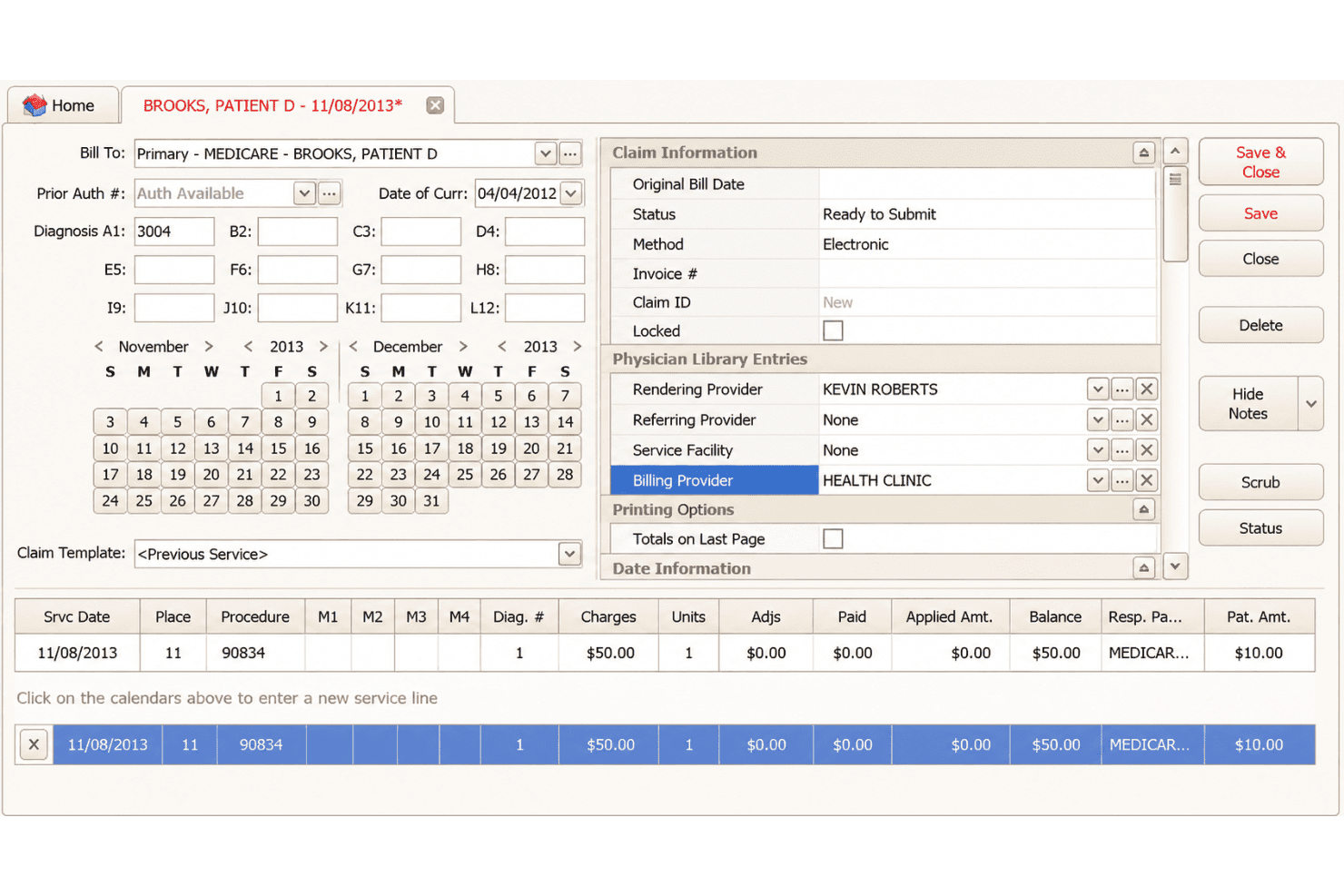
EZClaim supports claims, ERA posting, eligibility checks, forms, and scheduling. EZClaim is a cloud-based medical billing and scheduling platform that supports CMS-1500 and UB-04 claim submission, ERA auto-posting, real-time eligibility verification, and configurable claim forms for small practices and billing services.
Who Is EZClaim Best For?
EZClaim is a solid fit for independent medical billers and small practice administrators who manage claims across multiple payers and specialty types.
Why I Picked EZClaim
EZClaim earns its spot on my shortlist because it gives billing teams more control over claim form configuration than most tools at this price point. I can configure payor-specific settings across Medicare, Medicaid, Tricare, auto insurance, and worker compensation groups from a single platform. What I especially like is the support for both CMS-1500 and UB-04 forms, which means my team isn't locked into one claim type when the practice mix changes.
EZClaim Key Features
- ERA auto-posting: Import electronic remittance advice and apply payments automatically to patient accounts.
- Real-time eligibility checks: Verify patient insurance eligibility directly from the billing or scheduling interface.
- Integrated credit card processing: Collect payments using EZClaimPay, with support for major credit cards.
- Task list and follow-up management: Track unpaid claims, authorizations, and required actions with customizable reminders.
EZClaim Integrations
EZClaim offers native integrations with TriZetto, Carisk, Change Healthcare, AxisCare, BestNotes, NextStep Solutions, Nexus Clinical, Practice Fusion, Sevocity, WebPT, and BillFlash. An API is available for custom integrations.
Pros and Cons
Pros:
- Automated ERA posting and electronic statements
- Extensive payor and claim configuration options
- Supports both CMS-1500 and UB-04 claims
Cons:
- No built-in patient payment portal
- Scrubbing requires separate Alpha II add-on
Learn more about EZClaim: Best for automated insurance eligibility checks
- Free demo available
- Pricing upon request
Visit WebsiteCustomer Rating:3.9/5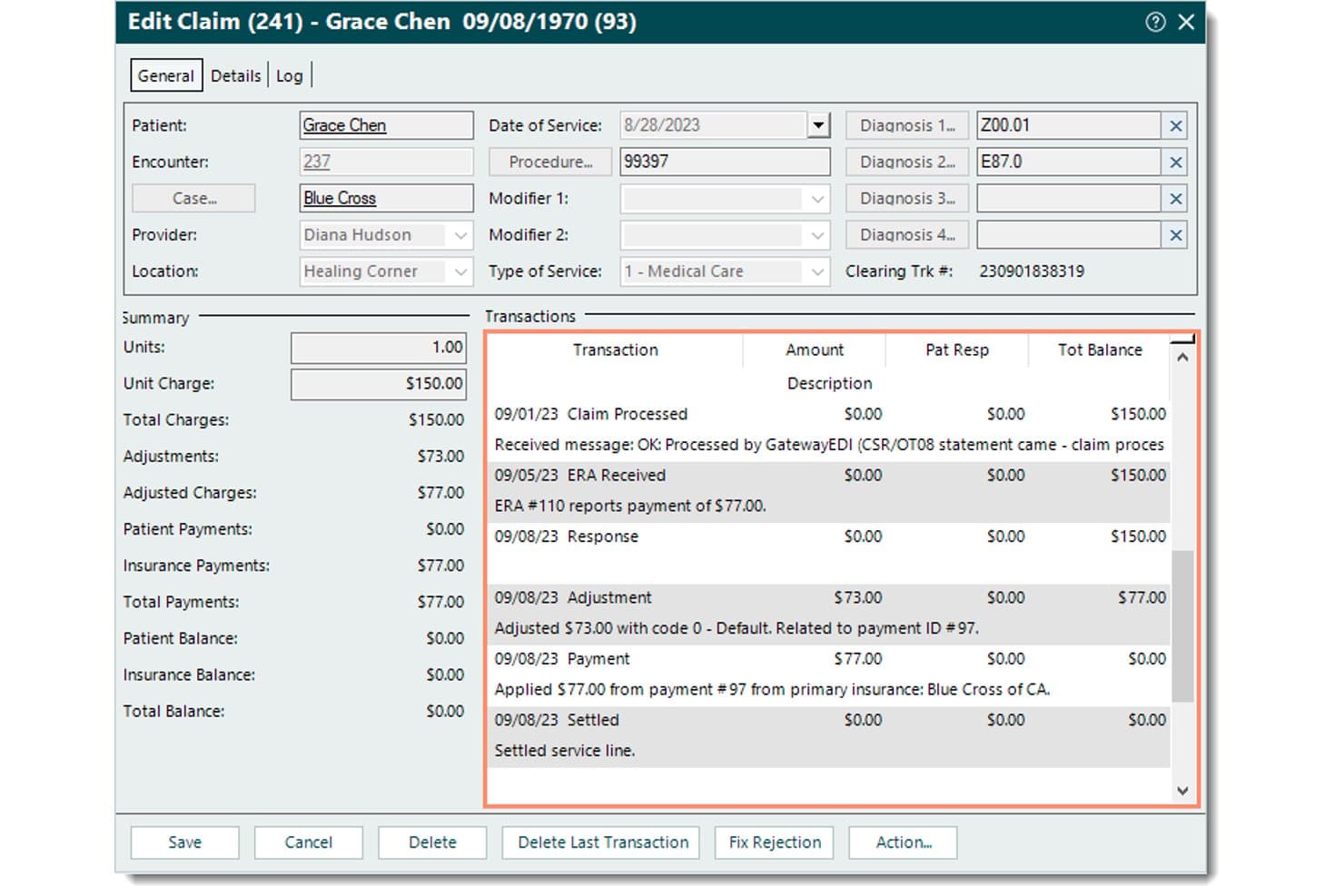
Tebra offers a detailed Edit Claim view that displays transaction history, payment breakdowns, adjustments, and insurance payments for streamlined medical billing management. Tebra is a medical billing and practice management platform for independent practices that combines electronic claim submission, automated eligibility verification, ERA posting, patient statements, and denial tracking in one system.
Who Is Tebra Best For?
Tebra is a strong fit for small independent practices with up to 10 providers that handle billing in-house and want automation without enterprise-level complexity.
Why I Picked Tebra
I picked Tebra as one of the best because its eligibility verification goes beyond a basic coverage check. It sends an ANSI-X12 270 inquiry to 2,700+ payers and returns a 271 response in seconds, surfacing active coverage, copay, deductible, and coinsurance details before the patient ever walks in. I also like the rules engine, which catches coding errors against payer-specific edits before claims go out, cutting down on the back-and-forth that typically follows a denial.
Tebra Key Features
- Automated patient statements: Generate branded statements with QR codes and direct payment links sent by email or text.
- Batch electronic claim submission: Submit claims to multiple payers simultaneously for faster processing and reduced manual entry.
- Robotic process automation for payment posting: Auto-post ERAs with speed and precision using customizable business rules.
- Unlimited non-clinical staff access: Allow front desk, billers, and office admins full use of scheduling, charting, and claims modules at no extra cost.
Tebra Integrations
Tebra offers native integrations with Kareo Billing, WebPT, Stripe, QuickBooks Online Advanced, Microsoft Excel, DocSpera, QuickEMR, Relatient, NextPatient, and PayPal. An API is available for custom integrations, and it supports HL7 and FHIR connectivity with most major EHRs.
Pros and Cons
Pros:
- Unlimited office staff seats included on all plans
- ERA payment posting uses robotic process automation
- Automated eligibility checks update in real time
Cons:
- Claim correction workflows can be confusing
- Denial reporting and analytics are limited
Learn more about Tebra: Best with AI-powered billing workflow automation
- Free demo available
- Pricing upon request
Visit WebsiteCustomer Rating:3.9/5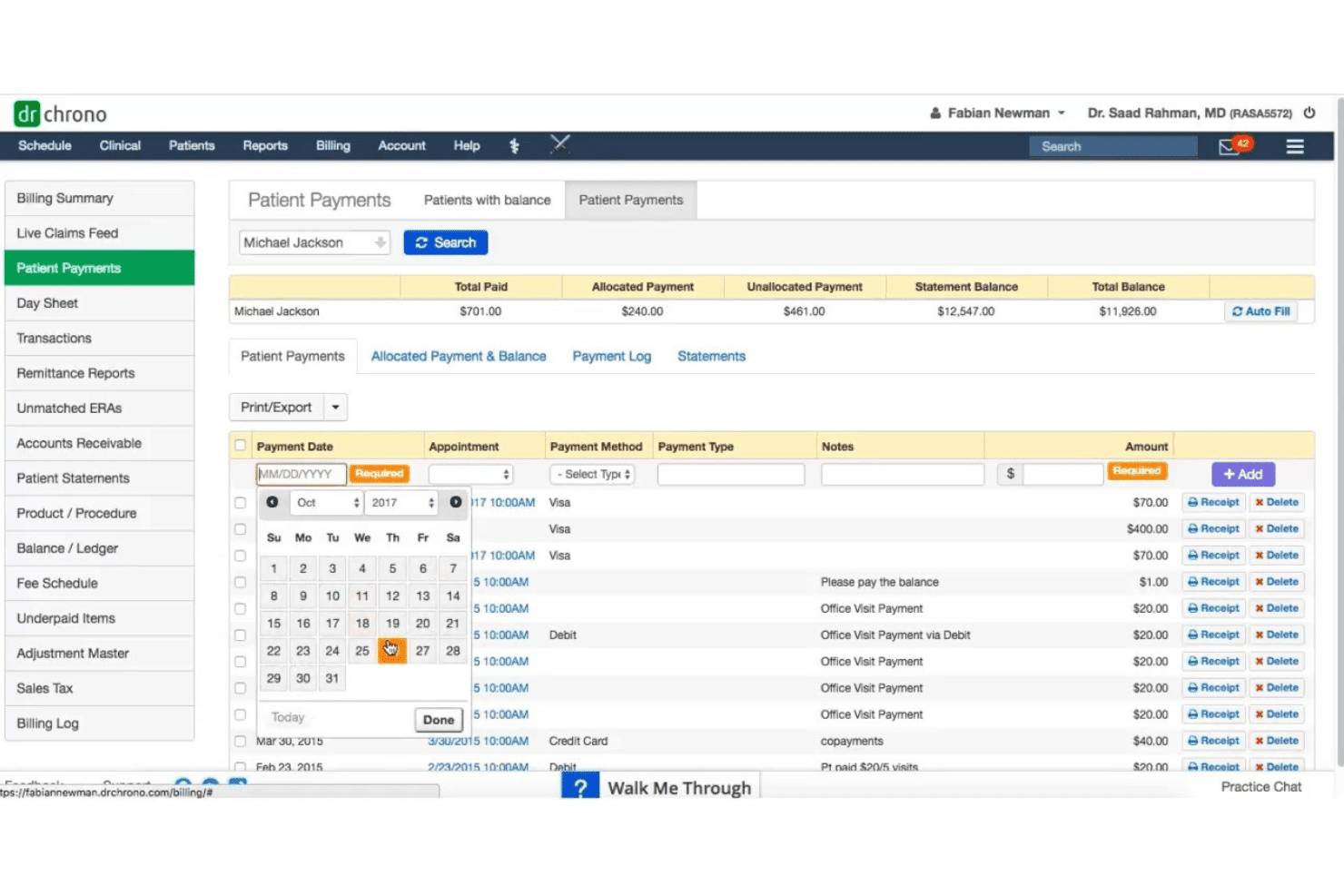
DrChrono links mobile EHR, claims, scrubbing, denials, eligibility, and billing. DrChrono is a cloud-based medical billing and EHR platform that combines claims submission, automated scrubbing, denial management, eligibility verification, and patient billing in a single, mobile-native system built for independent practices.
Who Is DrChrono Best For?
DrChrono is a strong fit for solo physicians and small independent practices that run on Apple devices and want EHR, scheduling, and billing managed in one place.
Why I Picked DrChrono
DrChrono earns its spot on my shortlist because its AI automation goes beyond documentation. EverHealth Scribe captures clinical notes automatically, and that coded data flows directly into claim generation, cutting the gap between the exam room and the clearinghouse. I also like the live-claims feed, which lets me catch rejections the moment they hit rather than discovering a denial weeks later.
DrChrono Key Features
- Customizable billing profiles: Save common codes and diagnoses to speed up charge entry and improve consistency.
- Integrated real-time eligibility checks: Verify patient insurance eligibility instantly with automated pre-visit workflows.
- HIPAA-compliant patient portal: Give patients secure access to statements, balances, and medical documents online.
- Mobile-native EHR and billing: Access and manage all billing and clinical tools on iPad, iPhone, and web.
DrChrono Integrations
DrChrono offers native integrations with Labcorp, Quest Diagnostics, Health Gorilla, Lifepoint, Curogram, Square, Birdeye, and Updox. An API is available for custom integrations.
Pros and Cons
Pros:
- Integrated electronic and paper patient statements
- Mobile-native design for iPad and iPhone
- Clean claims rate exceeds 98 percent
Cons:
- Support quality has declined post-acquisition
- Occasional system slowdowns and glitches
Learn more about DrChrono: Best for real-time claim tracking
- Free demo available
- Pricing upon request
Visit WebsiteCustomer Rating:3.6/5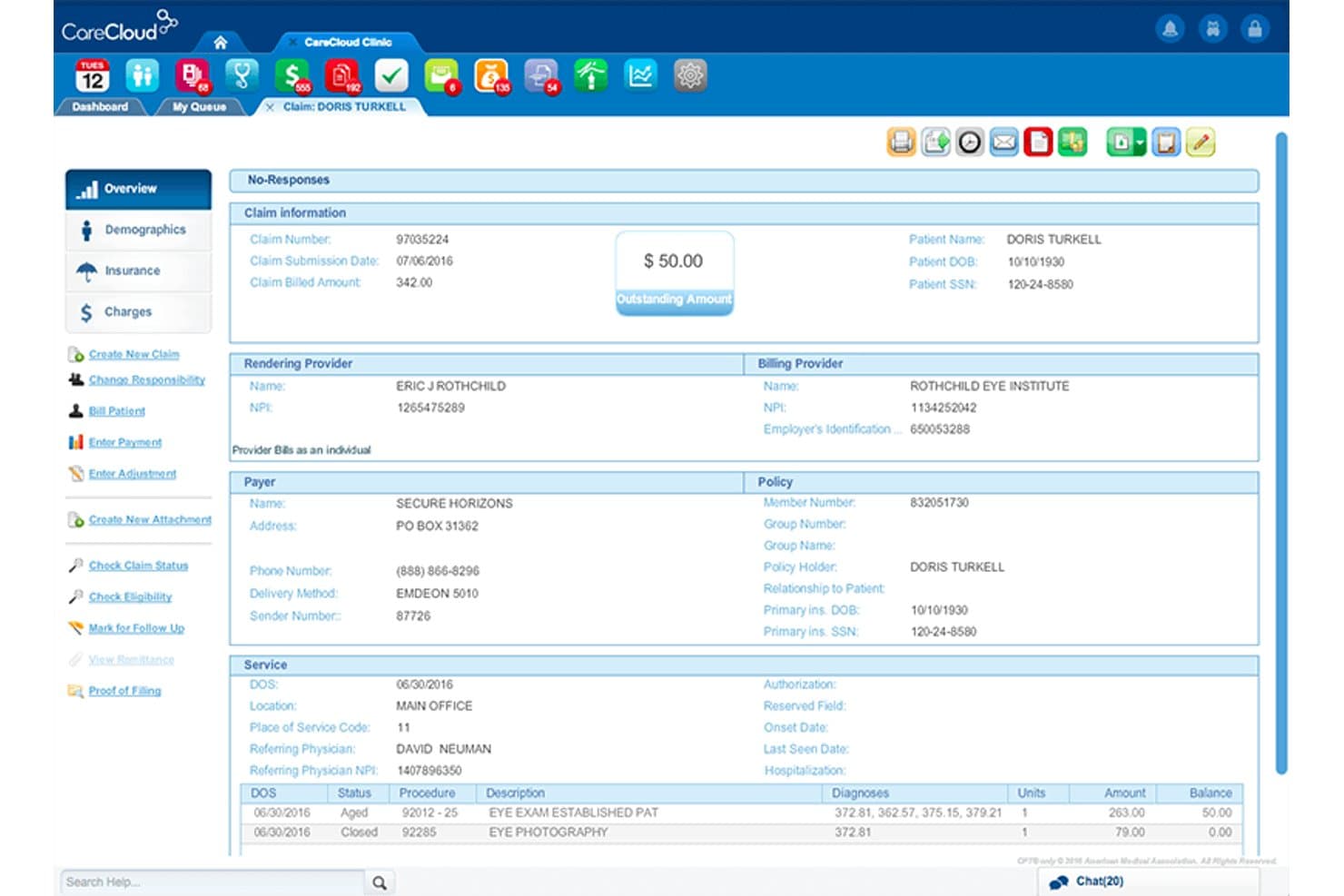
CareCloud offers a detailed claim overview screen displaying patient billing information, provider details, payer policy, and service line items with balances. CareCloud is a cloud-based medical billing platform that combines an integrated clearinghouse, AI-powered claim scrubbing, ERA posting, eligibility verification, and denial and AR tracking.
Who Is CareCloud Best For?
CareCloud is a good fit for independent and small-to-mid-size practices across 70+ specialties that need a fully integrated billing and RCM solution.
Why I Picked CareCloud
I picked CareCloud as one of the best because of how it handles real-time claim visibility across every stage of the billing cycle. Every claim sits in a fully transparent queue, so I can see exactly where it stands in the submission and adjudication process at any point. The CollectiveIQ rules engine scrubs claims against 180 million billing rules before submission, catching payer-specific errors before they trigger a denial.
CareCloud Key Features
- Integrated clearinghouse: Submit claims directly from the platform to payers with built-in clearinghouse functionality.
- ERA auto-posting: Automatically process electronic remittance advice and post payments to patient accounts.
- Batch insurance eligibility: Run bulk insurance verification checks for upcoming appointments to confirm patient coverage.
- Patient statement automation: Generate and send statements in batches and accept credit card payments through the Breeze module.
CareCloud Integrations
CareCloud offers native integrations with pVerify for batch insurance eligibility and connects directly with its own EHR, practice management, and patient portal modules. An API is available for custom integrations.
Pros and Cons
Pros:
- Batch eligibility verification with detailed payer response
- Automated ERA payment posting and reconciliation
- Real-time claim tracking across all billing stages
Cons:
- Per-provider onboarding fees can be high
- Requires multi-year commitment for most plans
Learn more about CareCloud: Best for robust reporting and analytics
- Free demo available
- Pricing upon request
Visit WebsiteCustomer Rating:3.6/5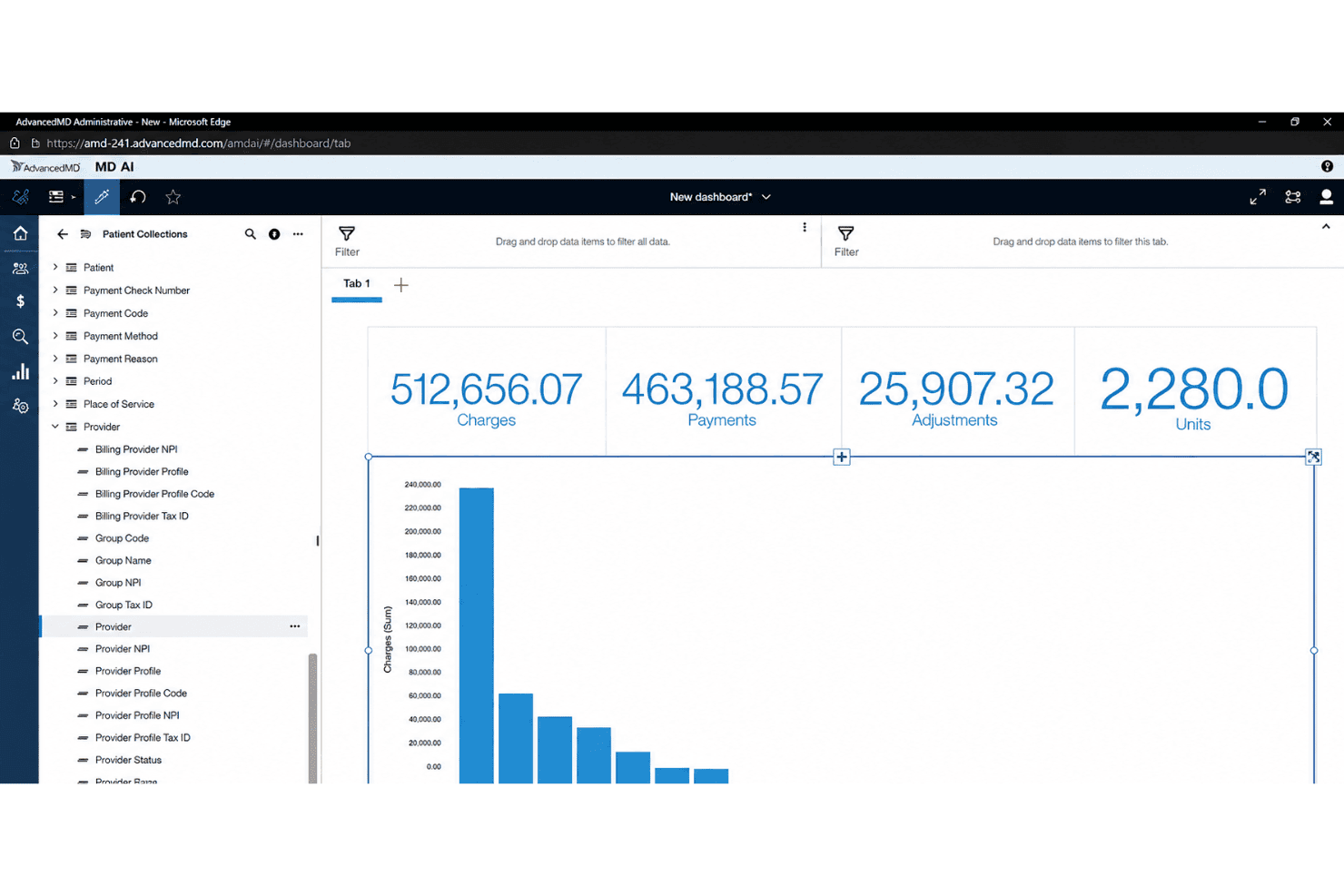
AdvancedMD tracks billing trends, denial causes, and revenue gaps in real time. AdvancedMD is a cloud-based medical billing platform that covers claims submission, automated claim scrubbing, ERA processing, eligibility verification, patient statements, and denial and A/R management for small to mid-sized practices.
Who Is AdvancedMD Best For?
AdvancedMD suits independent billing companies and small-to-mid-sized practices that need a full claims lifecycle platform with detailed revenue reporting.
Why I Picked AdvancedMD
AdvancedMD earns its spot on my shortlist because of the depth its reporting tools bring to day-to-day billing. I especially like the AdvancedInsight module, which lets me build customized reports that go well beyond standard aging summaries. The real-time dashboards surface MTD and YTD comparisons alongside denial root-cause data, so I can pinpoint exactly where revenue is leaking before it compounds.
AdvancedMD Key Features
- ClaimInspector automated scrubbing: Flags coding and eligibility errors before submission to help prevent denials.
- A/R Control Center: Tracks denials, outstanding claims, and collections worklists in one place.
- Patient payment processing: Lets patients pay online and supports customizable statements and copay collection.
- Integrated clearinghouse: Submits claims directly and manages remittances without manual transfers.
AdvancedMD Integrations
AdvancedMD offers native integrations with Waystar, QuickBooks (via qbSolutioneers), InstaMed, 3M M*Modal Fluency Direct, and Healthix HIE, with additional marketplace integrations and an open API for building custom integrations.
Pros and Cons
Pros:
- Detailed patient billing and statement tools
- Claims lifecycle tracked from submission to payment
- Highly customizable revenue analytics dashboards
Cons:
- Training and onboarding support can be limited
- Navigation is complex for new users
Outro software simples de faturação médica
Eis algumas opções adicionais de software simples de faturação médica que não integraram a minha seleção, mas que ainda vale a pena conhecer:
- 11CureMDBest for specialty-specific billing modules
- 12RXNTBest for unlimited user access
- 13SimplePracticeBest for intuitive claim submission interface
- 14TherapyNotesBest for behavioral health progress tracking
- 15Elation HealthBest for care team collaboration support
- 16Ensora Health TheraNestBest for mental health insurance billing tools
- 17eClinicalWorksBest for integrated patient portal billing
- 18MEDISOFTBest for customizable patient payment plans
- 19Greenway HealthBest for compliance with industry standards
- 20Practice FusionBest for EHR-integrated claims processing
How I Evaluate Easy Medical Billing Software
I split my evaluation into the core functionality a tool must cover—clean claim submission, ERA posting, eligibility checks—and the differentiators that separate a genuinely easy tool from the rest.
Core Functionality (Table Stakes For This List)
When I'm selecting tools for my list, I rank each one on a scale from 0 (does not offer the functionality) to 5 (excels in this area) for each core functionality listed below. Then, I calculate the tool's total score into a percentage. Each tool needs to achieve a minimum total score of 65% to be considered for inclusion.
- Claims Submission: I check whether the tool supports electronic 837P submission to multiple clearinghouses and look for UB-04 support for practices that handle facility billing.
- Claim Scrubbing: Before a claim goes out, the software should flag coding mismatches, missing modifiers, and payer-specific formatting issues to reduce rework after submission.
- ERA/EOB Posting: I evaluate how each tool handles electronic remittance advice—specifically whether it auto-posts payments or requires staff to manually reconcile every line item.
- Patient Billing & Statements: Generating and sending patient statements should take minimal clicks, and I look for built-in options like online payments and automated balance reminders.
- Eligibility Verification: Real-time 270/271 eligibility checks at scheduling or check-in help front desk staff catch expired coverage before the patient is seen, so I look for both single and batch verification.
- Denial & AR Management: I evaluate whether the tool provides a clear worklist or dashboard that surfaces denied claims, groups aging receivables, and guides follow-up steps for rebilling or appeals.
Once I have a list of tools that meet the criteria, I consider what sets each platform apart.
Differentiating Factors (What Sets Vendors Apart)
Here's how I compare and contrast different vendors:
Standout Features
A built-in clearinghouse is a big differentiator—it means your team can submit and track claims without juggling a separate vendor relationship. I also look for patient payment portals that offer text-to-pay and card-on-file options, since chasing balances manually eats up staff time. Pre-loaded CPT, ICD-10, and HCPCS code libraries with smart search help billers code accurately without memorizing every modifier.
Beyond Features
Ease of onboarding matters a lot here. A solo physician shouldn't need weeks of training or an IT consultant to go live, so I look for guided setup, data migration help, and role-based tutorials. Pricing transparency is equally important—hidden per-claim or clearinghouse fees can quietly inflate costs for small practices. I also evaluate how well each tool connects to existing EHR/EMR systems and accounting software, since billing rarely lives in isolation.
Como escolher um software simples de faturação médica
É fácil ficar sobrecarregado com listas longas de funcionalidades e estruturas de preços complexas. Para o ajudar a manter-se concentrado enquanto percorre o seu processo específico de seleção de software, eis uma lista de verificação dos fatores a ter em conta:
| Fator | O que deve considerar |
|---|---|
| FatorFacilidade de utilização | O que deve considerarSentir-se-á confortável, ou sentir-se-ão os seus funcionários confortáveis, a navegar no sistema no prazo de uma semana? Peça demonstrações e informe-se sobre a curva de aprendizagem habitual. |
| FatorImplementação e integração inicial | O que deve considerarQue nível de apoio está disponível durante a configuração? Procure ajuda na integração inicial, opções de migração de dados e os tipos de formação disponibilizados. |
| FatorCusto | O que deve considerarExistem taxas ocultas para pedidos de reembolso, utilizadores ou acesso a uma câmara de compensação? Confirme os custos mensais e informe-se sobre complementos pagos antes de se inscrever. |
| FatorEscalabilidade | O que deve considerarA plataforma continuará a ser adequada se a sua clínica duplicar de dimensão? Verifique se a ferramenta suporta mais prestadores, serviços ou localizações à medida que cresce. |
| FatorIntegrações | O que deve considerarSerá possível ligá-la ao seu registo clínico eletrónico, sistema de contabilidade ou agendamento de consultas? Confirme as integrações suportadas e informe-se sobre os planos de desenvolvimento futuros. |
| FatorPersonalização | O que deve considerarPode adaptar os fluxos de trabalho, formulários e relatórios à sua especialidade ou às suas necessidades de faturação? Peça exemplos reais durante a demonstração. |
| FatorMedidas de segurança | O que deve considerarO fornecedor disponibiliza um acordo de associado comercial atualizado, encriptação de dados e registos de auditoria? Verifique as normas de conformidade e a forma como as atualizações são comunicadas. |
| FatorDisponibilidade do apoio | O que deve considerarConsegue obter ajuda quando mais precisa? Verifique os horários, os canais de comunicação e os tempos de resposta previstos para problemas urgentes de faturação. |
O que é um software simples de faturação médica?
O software simples de faturação médica é um software de faturação concebido para que clínicas individuais e pequenas clínicas possam gerir pedidos de reembolso, pagamentos e faturação de pacientes com uma formação mínima. Estas plataformas automatizam etapas essenciais, como o envio de pedidos de reembolso, o registo de pagamentos e as verificações de elegibilidade, ajudando as equipas a evitar erros, poupar tempo e concentrar mais esforços nos cuidados aos pacientes. A maioria das opções privilegia fluxos de trabalho intuitivos e uma integração inicial simples, para uma adoção mais rápida.
Funcionalidades do software simples de faturação médica
Ao selecionar um software de faturação médica fácil de utilizar, esteja atento às seguintes funcionalidades essenciais:
- Submissão de pedidos: Crie e envie pedidos eletrónicos diretamente para pagadores ou câmaras de compensação, eliminando a documentação manual e acelerando os ciclos de reembolso.
- Validação de pedidos: Reveja automaticamente os pedidos para detetar erros de codificação, elegibilidade ou formatação antes da submissão, reduzindo as rejeições e o trabalho de correção.
- Registo eletrónico de remessas: Importe e registe automaticamente os detalhes dos pagamentos dos pagadores, minimizando a introdução manual de dados e melhorando a reconciliação.
- Extratos dos pacientes: Crie e envie extratos profissionais aos pacientes relativamente a saldos pendentes, tornando o acompanhamento e as cobranças mais eficientes.
- Verificação da elegibilidade: Efetue verificações em tempo real ou em lote da cobertura e dos benefícios do seguro dos pacientes, para detetar problemas antes da consulta.
- Gestão de rejeições: Acompanhe os pedidos rejeitados, identifique as causas subjacentes e organize o acompanhamento num painel fácil de utilizar, para recuperar receitas rapidamente.
- Processamento de pagamentos online: Aceite pagamentos dos pacientes através de cartão de crédito ou pagamentos eletrónicos, frequentemente com um portal de autosserviço e opções de pagamentos recorrentes.
- Bibliotecas de códigos pré-carregadas: Pesquise e selecione códigos CPT, ICD e HCPCS atualizados, com orientação integrada, reduzindo os erros de codificação e poupando tempo.
- Acesso baseado em funções: Controle a visibilidade dos dados e as permissões com base nas funções dos utilizadores, promovendo a conformidade e a segurança dos dados em toda a equipa.
- Relatórios automatizados: Gere relatórios financeiros, operacionais e de contas a receber a pedido, para acompanhar os ciclos de receitas, identificar áreas problemáticas e apoiar a tomada de decisões.
Vantagens do software de faturação médica fácil de utilizar
A implementação de um software de faturação médica fácil de utilizar proporciona várias vantagens à sua equipa e à sua empresa. Eis algumas das vantagens que pode esperar:
- Reembolsos mais rápidos: A submissão automatizada de pedidos e o registo de pagamentos reduzem os atrasos entre a prestação dos serviços e a entrada do dinheiro na sua conta.
- Menos rejeições de pedidos: A validação integrada dos pedidos e as verificações de elegibilidade detetam os erros antecipadamente, reduzindo os pedidos recusados ou rejeitados.
- Menor carga administrativa: Os painéis intuitivos e os fluxos de trabalho integrados permitem que até as equipas pequenas tratem da faturação sem contratar especialistas.
- Melhoria na cobrança de valores: Os portais de pagamento online e a automatização dos extratos dos pacientes facilitam os pagamentos por parte dos pacientes, contribuindo para um ciclo de receitas mais saudável.
- Maior precisão na faturação: As bibliotecas de códigos pré-carregadas e as ferramentas de validação sistemática ajudam a evitar erros de codificação dispendiosos e problemas de conformidade.
- Integração mais simples: As interfaces fáceis de utilizar e a configuração orientada permitem que a sua equipa se adapte rapidamente, com uma perturbação mínima das operações diárias.
- Maior visibilidade financeira: Os relatórios automatizados e o acompanhamento das contas a receber fornecem informações em tempo real sobre a situação e as tendências da faturação da sua clínica.
Custos e preços do software de faturação médica fácil de utilizar
A seleção de um software de faturação médica fácil de utilizar exige compreender os vários modelos de preços e planos disponíveis. Os custos variam consoante as funcionalidades, o tamanho da equipa, os complementos e outros fatores. A tabela abaixo resume os planos comuns, os respetivos preços médios e as funcionalidades normalmente incluídas nas soluções de software de faturação médica fácil de utilizar:
Tabela de comparação de planos para software de faturação médica fácil de utilizar
| Tipo de plano | Preço médio | Funcionalidades comuns |
|---|---|---|
| Tipo de planoPlano gratuito | Preço médio$0 | Funcionalidades comunsIntrodução básica de pedidos, relatórios essenciais, extratos manuais dos pacientes e suporte limitado. |
| Tipo de planoPlano pessoal | Preço médio$30-$60/mês | Funcionalidades comunsSubmissão eletrónica de pedidos, validação de pedidos, relatórios padrão, verificações de elegibilidade e suporte por e-mail. |
| Tipo de planoPlano empresarial | Preço médio$80-$200/mês | Funcionalidades comunsRegisto automático de remessas eletrónicas, portal de pagamentos dos pacientes, acompanhamento de rejeições, pagamentos online, relatórios personalizados e suporte em direto. |
| Tipo de planoPlano empresarial avançado | Preço médio$250+/mês | Funcionalidades comunsOpções completas de integração, conformidade avançada, automatização de fluxos de trabalho, integração dedicada e suporte premium. |
Perguntas frequentes sobre software fácil de faturação médica
Eis algumas respostas a perguntas frequentes sobre software fácil de faturação médica:
Com que rapidez é que a maioria das equipas pode começar a utilizar software fácil de faturação médica?
A maioria das equipas pode começar a utilizar o software em poucos dias, graças ao acesso baseado na nuvem, à integração passo a passo e aos modelos pré-configurados. Procure opções que ofereçam ajuda na migração de dados e formação em direto para uma implementação mais simples.
Estas plataformas funcionam para consultórios especializados ou apenas para clínicas gerais?
Sim, muitas opções de software fácil de faturação médica são compatíveis com consultórios especializados, como os de saúde mental, quiropraxia e fisioterapia. Verifique sempre se a plataforma disponibiliza modificadores, modelos e relatórios específicos para cada especialidade.
Estas ferramentas conseguem processar pagamentos de seguradoras e de pacientes?
Sim, o software fácil de faturação médica foi concebido para processar tanto reembolsos de seguradoras como pagamentos diretos de pacientes. A maioria das ferramentas disponibiliza portais de pagamento online, processamento de cartões de crédito e criação automática de extratos.
Existe o risco de haver taxas ocultas nas opções económicas?
Sim, alguns planos anunciam tarifas baixas, mas podem cobrar valores adicionais por pedidos, utilizadores ou acesso a câmaras de compensação. Peça sempre uma discriminação detalhada das taxas e leia o contrato antes de assumir um compromisso.
Que nível de apoio ao cliente devo esperar?
Nos planos de menor custo, deve esperar apoio padrão por email ou chat, com opções de apoio telefónico, formação em direto ou um gestor de conta dedicado nos planos de nível superior ou empresariais. Verifique o horário do apoio e os tempos de resposta antes de efetuar a compra.