

Et EMR-system, eller et elektronisk pasientjournalsystem, er en digital plattform som lar deg administrere pasientjournaler, klinisk dokumentasjon og arbeidsflyter i praksisen på ett sted. Hvis du ser etter den beste EMR-programvaren, balanserer du sannsynligvis kliniske resultater, effektivitet og regulatoriske krav – samtidig som du prøver å redusere teknologiske utfordringer for teamet ditt. Med så mange alternativer kan det føles overveldende å finne den rette løsningen for legepraksisen din. Denne veiledningen tar deg gjennom de beste EMR-alternativene, viser hva som skiller dem fra hverandre, og hjelper deg med å velge et system som dekker dine unike kliniske og administrative behov.
Hvorfor du kan stole på våre programvareanbefalinger
6,700+
Reviews
20
Industry experts
16+
Evaluation factors
14
Years
Teamet vårt har testet og anmeldt programvare siden 2012. Vi leder selv legekontorer, så vi vet hvor vanskelig og hvor viktig det er å velge riktig programvare.
I denne guiden har vi vurdert verktøyene gjennom praktisk testing og uavhengig research og gitt dem poeng ut fra våre utvelgelseskriterier.
Anmeldelsene våre bygger på vår egen redaksjonelle vurdering. De er ikke et salgsargument.
Sammenligningstabell for EMR-systemer
Tabellen nedenfor sammenligner prisdetaljene for mine beste utvalgte EMR-systemer.
| Tool | Best For | Trial Info | Price | ||
|---|---|---|---|---|---|
| 1 | Best for allied and behavioral health scheduling | 14-day free trial | From $19/month | Website | |
| 2 | Best for ambulatory care settings | Free demo available | Pricing upon request | Website | |
| 3 | Best for cloud-based access and mobile EHR app | Free demo available | Pricing upon request | Website | |
| 4 | Best for large hospitals and enterprise health systems | Not available | Pricing upon request | Website | |
| 5 | Best for small practice e-prescribing and AI charting | Free demo available | Pricing upon request | Website | |
| 6 | Best for iPad-native charting across 20+ specialties | Free demo available | Pricing upon request | Website | |
| 7 | Best for QHIN-connected enterprise health data exchange | Not available | Pricing upon request | Website | |
| 8 | Best for ambulatory EMR and native telehealth | Free demo available | Pricing upon request | Website | |
| 9 | Best for AI charting that learns each physician's style | Free demo available | Pricing upon request | Website | |
| 10 | Best for AI-driven EHR at enterprise health systems | Not available | Pricing upon request | Website |


Anmeldelser av de beste EMR-systemene
\u003cspan style=\u0022font-weight: 400\u0022\u003eNedenfor finner du mine detaljerte sammendrag av den beste EMR-programvaren som kom med på kortlisten min. Anmeldelsene mine gir et detaljert innblikk i funksjonene, integrasjonene og de beste bruksområdene for hver plattform, slik at du kan finne den beste løsningen for deg.\u003c/span\u003e
 Best for allied and behavioral health scheduling
- 14-day free trial
- From $19/month
Visit WebsiteCustomer Rating:4.7/5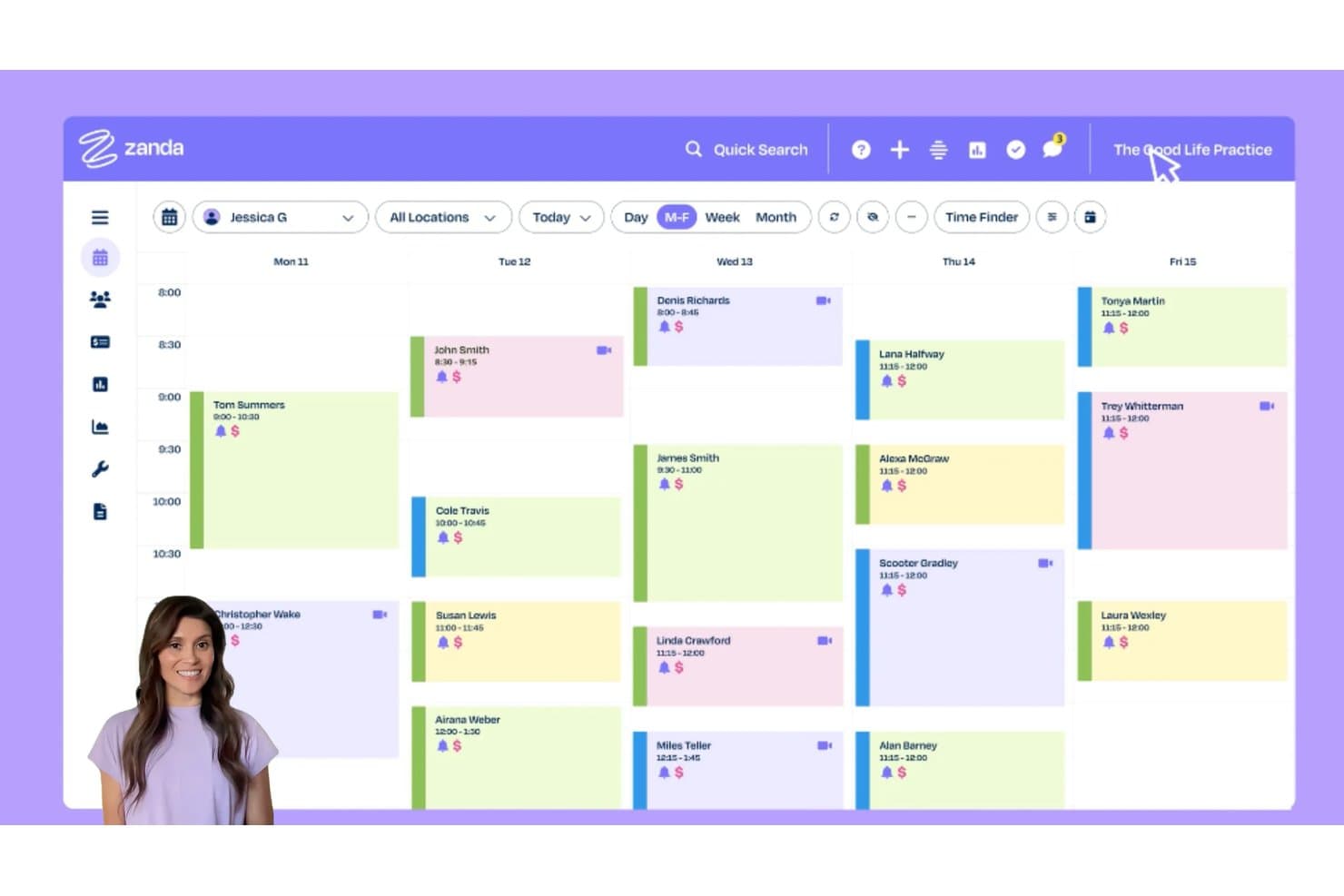
Zanda lets users view and manage weekly client appointments at a glance. Zanda is a practice management and EMR platform built for allied and behavioral health providers, with tools for clinical documentation, appointment scheduling, billing, client portal, and telehealth.
Who Is Zanda Best For?
Zanda is a strong fit for solo and small-group allied and behavioral health practitioners—think psychologists, counselors, physical therapists, and occupational therapists—who need scheduling, notes, and billing in one place.
Why I Picked Zanda
I picked Zanda as one of the best because its scheduling tools are genuinely built around how allied and behavioral health practices operate. The self-booking portal lets clients book, reschedule, and cancel on their own, and the waitlist automatically notifies clients the moment a slot opens. I also like that automated reminders support up to three touchpoints per appointment, cutting down on no-shows without any manual follow-up.
Zanda Key Features
- AI-assisted clinical notes: BizzyAI generates and edits session notes using AI Scribe, included on every plan with up to four AI Scribe appointments per month.
- Customizable note templates: The Growth plan gives you access to over 187 customizable templates with text fields, checkboxes, body charts, and auto-scored assessments.
- US insurance claims submission: Zanda integrates with the Ensora clearinghouse to handle CMS-1500 preparation, eligibility checks, and ERA/EOB posting directly inside the platform.
- Telehealth with group sessions: Zoom-powered video sessions run in the browser and support up to 20 participants, with unlimited 40-minute sessions included on every plan.
Zanda Integrations
Zanda integrates with Google Calendar, Outlook, Apple/iCal, Zoom, Stripe, Square, Xero, Mailchimp, Physitrack, and Ensora. A public API is in beta for custom integrations.
Pros and Cons
Pros:
- Behavioral health notes include scored assessments
- Automated reminders support fewer missed appointments
- Self-booking and waitlists reduce administrative messages
Cons:
- Notes lack structured medication lists
- No e-prescribing or EPCS support
Learn more about Zanda: Best for ambulatory care settings
- Free demo available
- Pricing upon request
Visit WebsiteCustomer Rating:5/5
Nextgen EMR Systems Interface NextGen is a healthcare software that supports medical and dental providers in managing ambulatory care settings. With a suite of solutions, including electronic health records, practice management, and patient portal applications, NextGen simplifies many aspects of healthcare management. Its particular strength in ambulatory settings gives it a unique edge.
Why I Picked NextGen: I picked NextGen for its focus on ambulatory care settings, making it stand out among other healthcare software. The tool's design aligns with the specific workflows and data needs that characterize ambulatory care. I firmly believe it's the "best for" this use case because it offers customized solutions to address the unique challenges of outpatient care.
Standout features & integrations:
NextGen's most important features include appointment scheduling, medical billing, electronic health records, and a patient portal. These tools help to streamline processes, improve patient care, and boost productivity in an ambulatory care setting. It also offers important integrations with lab management systems and electronic prescription services to further enhance clinical workflows.
Pros and Cons
Pros:
- Provides important integrations with other healthcare systems
- Comprehensive suite of solutions
- Tailored for ambulatory care settings
Cons:
- Can be complex to customize without sufficient technical expertise
- The learning curve can be steep due to its breadth of features
- High starting price for smaller practices
Learn more about NextGEN: Best for cloud-based access and mobile EHR app
- Free demo available
- Pricing upon request
Visit WebsiteCustomer Rating:5/5
Athenahealth's EMR system, athenaOne offers robust patient history documentation as well as other functions for medical records. Athenahealth is a suite of healthcare software tools designed to manage medical records, revenue cycles, patient engagement, and care coordination. It particularly stands out for its capabilities in facilitating coordinated care delivery, allowing healthcare providers to streamline workflows and improve patient outcomes.
Why I Picked Athenahealth: Athena Health's EMR system, athenaOne, stands out with its comprehensive and user-friendly features that significantly enhance clinical efficiency and patient care. One of the most notable features is its cloud-based architecture, which allows healthcare providers to access patient records and manage clinical workflows from any device with internet connectivity. The system also includes a mobile EHR app, enabling real-time updates and patient data access, which streamlines the documentation process and reduces administrative burdens.
Standout features & integrations:
Key features of athenaOne include electronic health records, practice management, patient engagement tools, and a care coordination platform. Together, these features provide a unified solution to improve healthcare delivery. As for integrations, athenaOne offers connectivity with a wide array of healthcare apps, devices, and other systems, further enabling comprehensive and coordinated care.
Pros and Cons
Pros:
- Cloud-based system for remote access
- Robust patient engagement tools
- Broad range of integrations with other healthcare systems and devices
Cons:
- Limited customization options for certain workflows
- Complexity of the system may result in a learning curve
Learn more about Athenahealth: Best for large hospitals and enterprise health systems
- Not available
- Pricing upon request
Visit WebsiteCustomer Rating:4.3/5
Epic physician practice dashboard for tracking visits, quality measures, and care summaries. Epic is a modular EMR/EHR platform that covers clinical documentation, inpatient and ambulatory care, revenue cycle management, population health, and patient engagement across large-scale health systems.
Who Is Epic Best For?
Epic is a strong fit for large hospitals, academic medical centers, and integrated health systems that manage high patient volumes across multiple departments or facilities.
Why I Picked Epic
Epic earns its spot as one of the best on my shortlist because it's built specifically for the scale and complexity that large hospitals and enterprise health systems actually deal with. I particularly like the Care Everywhere interoperability network, which lets clinicians view patient records across affiliated organizations without manual data transfers. The Healthy Planet module is also worth calling out: it tracks population trends and risk factors across patient cohorts, which is something a multi-facility health system running chronic care programs genuinely needs. Add in specialty-specific modules like Beacon for oncology and Cupid for cardiology, and Epic covers a level of clinical depth that few other platforms can match.
Epic Key Features
- MyChart patient portal: Gives patients access to health records, appointment scheduling, and secure messaging with care teams.
- Computerized physician order entry (CPOE): Lets clinicians place medication, lab, and imaging orders directly within the patient chart.
- Clinical decision support: Surfaces real-time alerts, dosage warnings, and care gap reminders during clinical workflows.
- Epic Haiku: A mobile app that gives clinicians access to patient charts, results, and secure messaging from their smartphones.
Epic Integrations
Epic's Showroom marketplace provides access to over 340 verified third-party applications spanning clinical, operational, and patient engagement categories. Epic supports integration via FHIR R4 APIs, HL7 v2 messaging, CCDA document exchange, and proprietary APIs, and its cornerstone partners include Microsoft and InterSystems. Microsoft Teams is also available through the marketplace. Open.Epic provides public API access for custom integrations.
Pros and Cons
Pros:
- Strong interoperability through Care Everywhere network
- Unified patient record across all facilities
- Specialty-specific modules for oncology and cardiology
Cons:
- Not practical for small or independent practices
- Implementation timelines often span multiple years
Learn more about Epic EMR Software: Best for small practice e-prescribing and AI charting
- Free demo available
- Pricing upon request
Visit WebsiteCustomer Rating:3.9/5
Tebra helps practices manage appointment reports, patient schedules, missed charges, notes, encounters, claims, and reporting workflows in one EHR platform. Built specifically for independent medical practices, Tebra brings together EHR charting, patient intake, telehealth, and practice management tools in a single cloud-based platform.
Who Is Tebra Best For?
Tebra is a natural fit for outpatient specialty and primary care practices that want to manage clinical documentation and patient scheduling without a dedicated IT team.
Why I Picked Tebra
Tebra earns its spot on my shortlist because it keeps clinical and administrative work in one place without requiring extra configuration to get there. I love that the scheduling and charting tools are connected, so when a patient checks in, the chart is ready to open. The built-in telehealth feature also lets you run a video visit and document it in the same workflow, which is exactly what a small practice needs to avoid juggling separate platforms.
Tebra Key Features
- Encounter-based charting: Document visits using specialty-specific note templates built directly into the chart.
- Claims management: Submit and track claim status without leaving the clinical dashboard.
- Care plan builder: Create patient-specific care plans with follow-up tasks and goal tracking.
- MIPS reporting: Track and submit quality measures for Medicare performance scoring from within the platform.
Tebra Integrations
Tebra integrates with labs, clearinghouses, and other third-party healthcare tools to support clinical workflows. You can connect your EHR with labs, imaging centers, supplement ordering, and other healthcare tools. PDMP integration is available through Appriss Health for controlled substance compliance checks. Tebra also offers a SOAP API that interacts with third-party applications, giving developers the ability to build custom integrations.
Pros and Cons
Pros:
- SALT charting pulls forward prior visits
- Patient portal handles refills and messaging
- AI Note Assist auto-generates visit documentation
Cons:
- Report filters often return incorrect results
- Mobile app calendar sync is unreliable
Learn more about Tebra: Best for iPad-native charting across 20+ specialties
- Free demo available
- Pricing upon request
Visit WebsiteCustomer Rating:3.9/5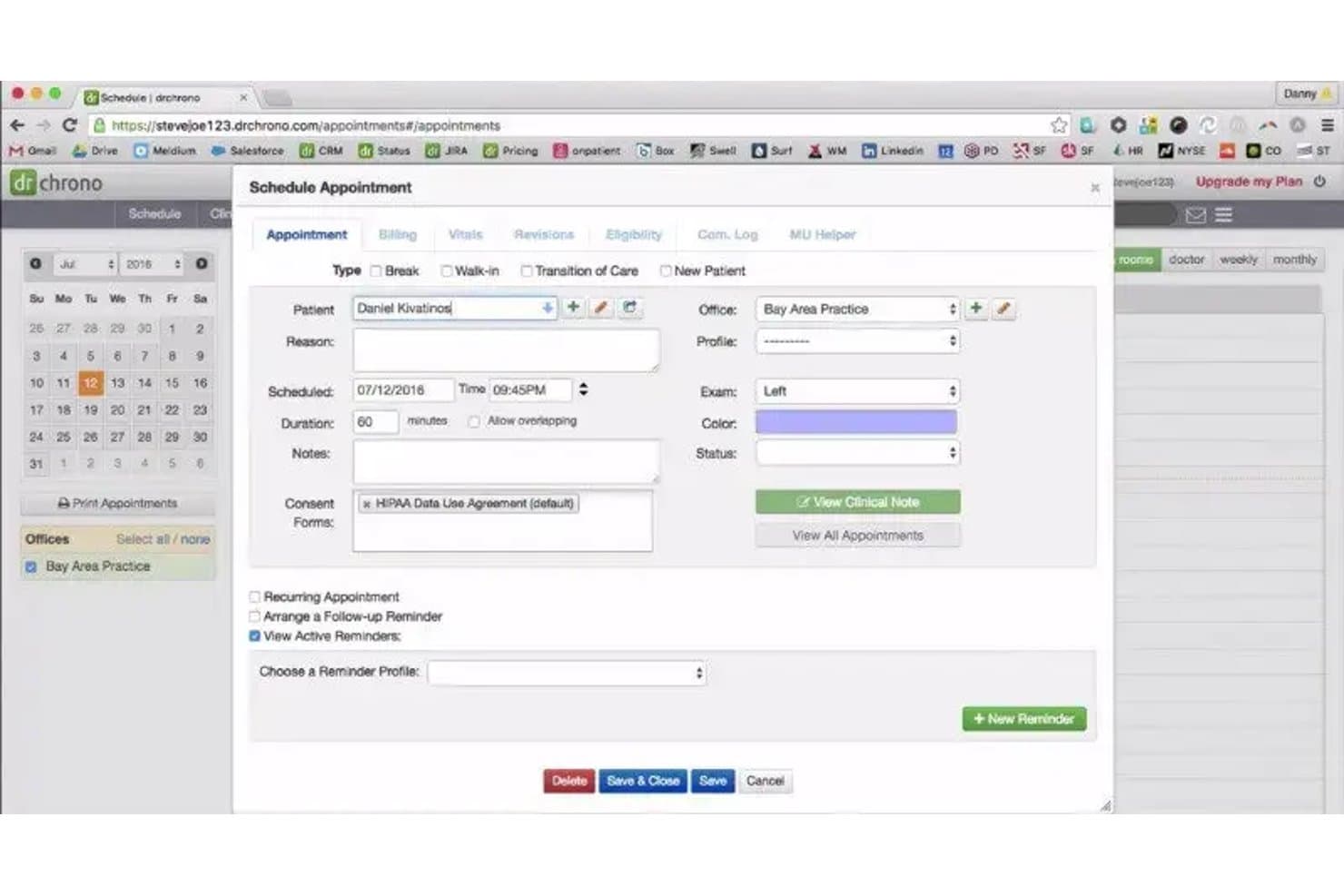
DrChrono lets users schedule appointments with reminders and consent forms. DrChrono by EverHealth is a cloud-based EHR platform built for iPad and iPhone that combines clinical charting, e-prescribing, practice management, billing, telehealth, and an AI ambient scribe in one mobile-first system.
Who Is DrChrono Best For?
DrChrono is a strong fit for independent and specialty practices that do most of their clinical work on iPad or iPhone.
Why I Picked DrChrono
DrChrono earns its spot on my shortlist because it's the only EHR I've seen built around iPad from the ground up, covering 20+ specialties with templates that actually reflect how those clinicians work. A dermatologist can annotate photos directly in the chart, while an orthopedic provider tracks surgical progress with structured notes, all from an iPad. The AI ambient scribe (EverHealth Scribe) drafts HPI, Assessment, and Plan sections in real time, which cuts post-visit documentation significantly.
DrChrono Key Features
- E-prescribing with prior authorization: Send prescriptions through Surescripts with EPCS support and initiate prior authorization requests via CoverMyMeds directly from the prescribing workflow.
- Extended lab and imaging integration: Order labs and receive structured results electronically from Quest, LabCorp, and a network of 40,000+ labs and imaging centers through Health Gorilla and Lifepoint.
- Telehealth with in-visit charting: Run video visits from within the EHR and complete charting, collect copays, and obtain e-consent without switching platforms.
- MIPS Assist quality reporting: Track MIPS measures, manage plan creation, and submit performance data through a built-in quality reporting tool with immunization registry integration via Iron Bridge.
DrChrono Integrations
DrChrono integrates with Surescripts, CoverMyMeds, Quest Diagnostics, Labcorp, Health Gorilla, Lifepoint, Iron Bridge, and Carequality. Its REST API, FHIR developer program, and partner marketplace support custom integrations.
Pros and Cons
Pros:
- Built-in billing and telehealth reduce switching
- Ambient scribe drafts structured clinical notes
- Native iPad charting across 20+ specialties
Cons:
- App and web behavior sometimes differs
- Support responses can be slow or unhelpful
Learn more about DrChrono: Best for QHIN-connected enterprise health data exchange
- Not available
- Pricing upon request
Visit WebsiteCustomer Rating:4/5
Oracle Health helps healthcare teams manage patient analytics, provider filters, visit metrics, diagnoses, procedures, encounter types, and clinical performance insights. Oracle Health is a cloud-native EMR platform that covers clinical documentation, inpatient and ambulatory care, revenue cycle management, and population health management for hospitals and health systems.
Who Is Oracle Health Best For?
Oracle Health is a strong fit for mid-to-large health systems and government or federal healthcare organizations that need a scalable EMR with built-in population health capabilities.
Why I Picked Oracle Health
I picked Oracle Health as one of the best because of how well it handles population health at scale. The Care Coordination Intelligence module uses AI to summarize longitudinal patient records and flag patients for proactive outreach, which is genuinely useful for managing chronic condition cohorts across a large health system. I also like the AI Data Platform, an EHR-agnostic enterprise data warehouse that pulls from clinical, financial, and operational sources to surface care gap and readmission risk insights in one place.
Oracle Health Key Features
- PowerChart: Oracle Health's core clinical workspace for reviewing patient histories, lab results, and active medication lists across care settings.
- FirstNet: An ED-specific workflow module that manages triage documentation, patient tracking boards, and order sets for emergency department teams.
- Revenue cycle management: Built-in charge capture, claim submission, coding, and denial management tools across inpatient and ambulatory encounters.
- Ambulatory scheduling: A scheduling and registration module that handles appointment booking, patient check-in, and waitlist management.
Oracle Health Integrations
Oracle Health supports integrations through its Oracle Healthcare Marketplace, where validated third-party apps like Zoom, Phreesia, CozevaConnect, and Nuance Dragon Medical One are available. The platform uses an open architecture with FHIR R4 APIs, HL7 v2 messaging, SMART on FHIR, CDS Hooks, and proprietary Millennium APIs for custom integrations, and it participates in the CommonWell Health Alliance and Carequality interoperability networks for cross-vendor health data exchange.
Pros and Cons
Pros:
- Founding member of CommonWell Health Alliance
- Clinical AI Agent covers 30+ specialties
- Deep configuration of screens and order sets
Cons:
- Support ticket resolution often requires escalation
- Too many clicks for routine charting tasks
Learn more about Oracle Health: Best for ambulatory EMR and native telehealth
- Free demo available
- Pricing upon request
Visit WebsiteCustomer Rating:3.4/5
eClinicalWorks helps healthcare teams manage claims analytics, payment tracking, balances, claim responsibility, billing summaries, and revenue cycle workflows. Built around the workflows of outpatient care, eClinicalWorks is an EHR platform that covers clinical documentation, telehealth, AI-assisted scribing, patient engagement, and revenue cycle management.
Who Is eClinicalWorks Best For?
eClinicalWorks is well-suited for primary care and specialty providers in outpatient settings who manage high patient volumes and need integrated telehealth built into their daily clinical workflow.
Why I Picked eClinicalWorks
eClinicalWorks earns its spot on my shortlist because it's purpose-built for ambulatory care, with specialty-specific templates that let providers document visits without adapting generic forms to their workflows. I also like PRISMA, the platform's health information search tool, which pulls a patient's records from outside facilities directly into the chart. That matters in outpatient settings where patients often come in with histories spread across multiple systems.
eClinicalWorks Key Features
- healow patient portal: Lets patients view records, request prescription refills, and message their care team from a mobile app.
- Automated appointment reminders: Sends SMS and email reminders to patients before scheduled visits to reduce no-shows.
- Clinical decision support: Surfaces evidence-based alerts and order sets within the chart during active documentation.
- Chronic care management tools: Structured tracking and documentation for patients managing long-term conditions like diabetes or hypertension.
eClinicalWorks Integrations
eClinicalWorks has established partnerships across categories like clearinghouses, medical devices, health trackers, and specialty software. Verified partners include Waystar and Weave, along with device and tracker integrations with Midmark, Welch Allyn, Dexcom, Fitbit, Apple Health, Google Fit, iHealth, Omron, and Withings. The platform also supports FHIR-based integrations through its Open Development portal, and provides RESTful APIs for custom integrations.
Pros and Cons
Pros:
- Supports 40+ medical specialties
- Color-coded scheduling with map view
- Telehealth visits built into the EHR
Cons:
- Support relies on slow ticketing system
- Outdated interface feels visually dated
Learn more about eClinicalWorks: Best for AI charting that learns each physician's style
- Free demo available
- Pricing upon request
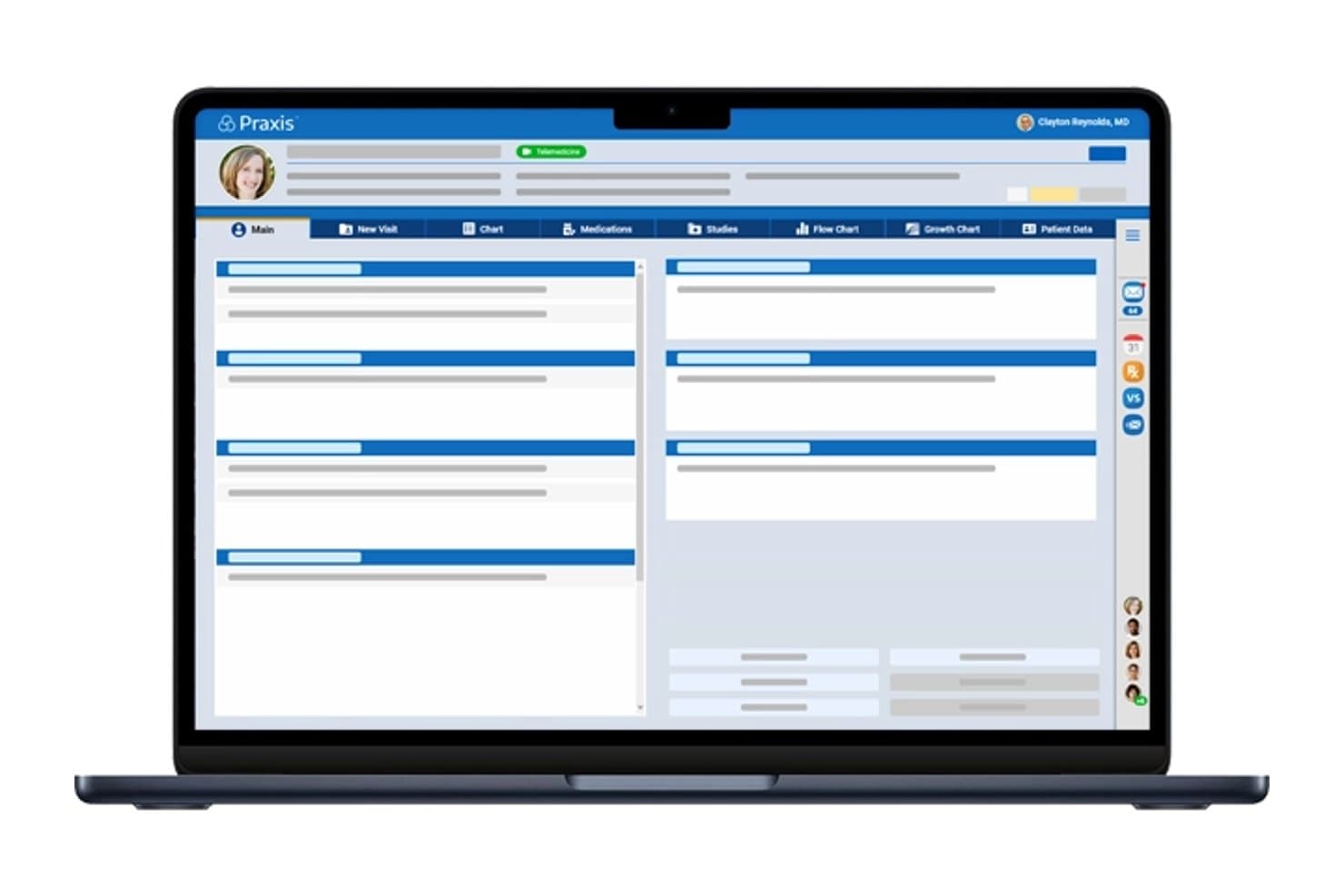
Praxis EMR centralizes patient data across visits in one dashboard. Praxis EMR is a specialty-agnostic electronic medical records system that uses an AI-driven, template-free charting engine, ambient documentation, e-prescribing, lab integrations, telehealth, and patient self-scheduling.
Who Is Praxis EMR Best For?
Praxis EMR is a strong fit for independent physicians and small specialty practices who want a charting system that adapts to how they already think and document.
Why I Picked Praxis EMR
Praxis EMR earns its spot on my shortlist because its AI Concept Processor doesn't just assist with charting—it builds a personalized knowledge base from each physician's own past notes, so documentation genuinely reflects how that doctor thinks and writes. I'm also impressed by the Reflective Ambient Intelligence (RAI) feature, which listens to visits and drafts notes using that physician-specific knowledge base, keeping all PHI within the Praxis environment rather than routing it through external AI models.
Praxis EMR Key Features
- Datum+ structured data capture: Stores discrete clinical data within free-text notes, enabling lab result graphing and longitudinal flow-charting over time.
- Knowledge Exchanger: Lets physicians import specialty-specific charting knowledge shared by peers to accelerate their personal knowledge base from day one.
- ONC-certified quality reporting: Automates MIPS, ACO, eCQM, and P4P reporting with certified clinical quality measures built into the system.
- Patient self-scheduling and intake: Offers online booking, AI-driven intake forms, automated reminders, and a check-in kiosk for front-desk workflow support.
Praxis EMR Integrations
Praxis EMR integrates with Quest Diagnostics, Labcorp, Surescripts, EMR Direct, athenahealth, Tebra, CollaborateMD, and OpenPM. It also supports HL7, C-CDA, HIE connections, immunization registries, and ONC-certified API access.
Pros and Cons
Pros:
- Personalized charting reduces repetitive documentation
- Ambient notes keep PHI inside Praxis
- AI charting learns each physician's style
Cons:
- Remote terminal access can feel sluggish
- Initial knowledge-base setup slows adoption
Learn more about Praxis EMR: Best for AI-driven EHR at enterprise health systems
- Not available
- Pricing upon request
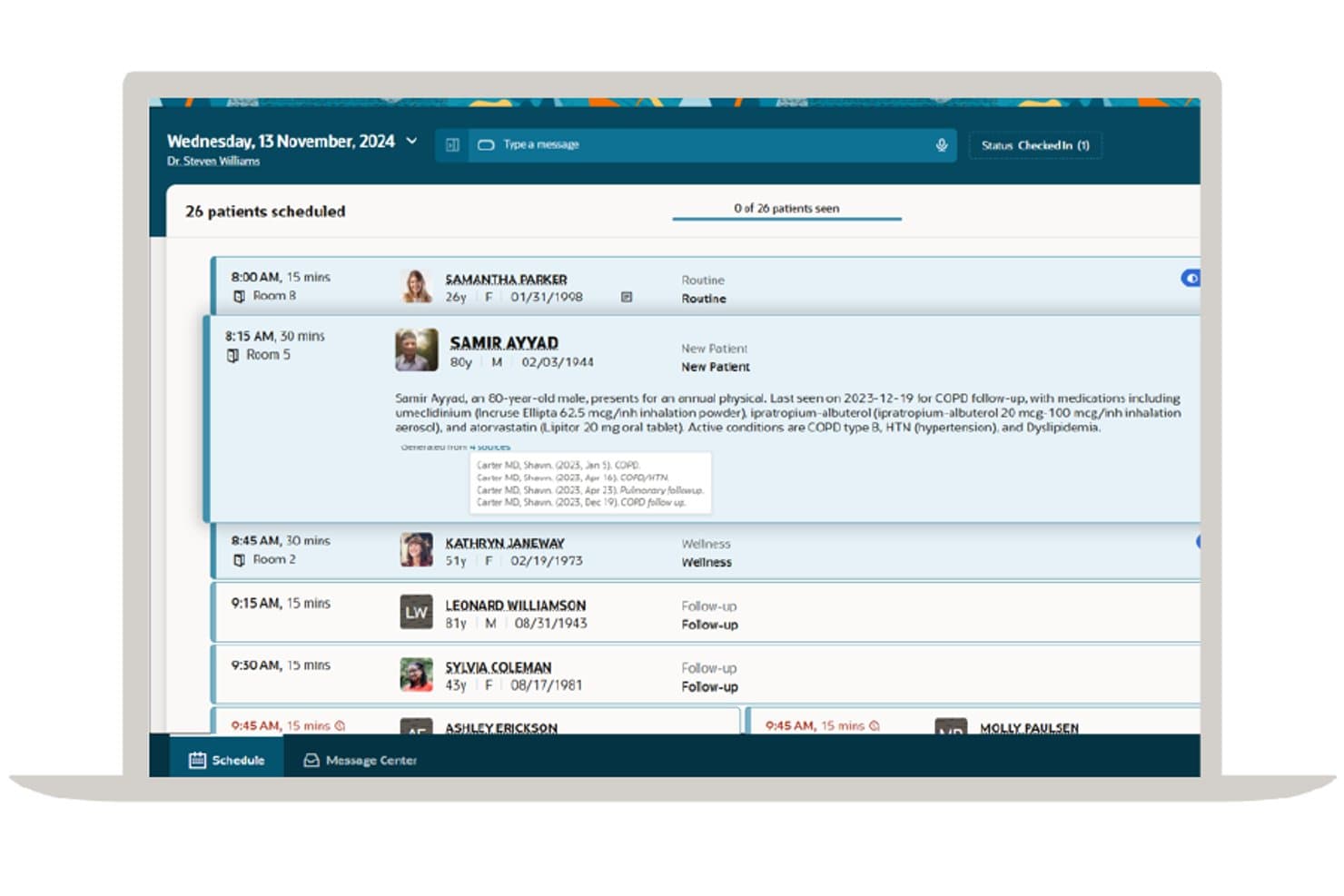
Oracle Health EHR surfaces AI-generated patient summaries within the daily schedule. Oracle Health EHR is a cloud-based, AI-driven electronic health records system built for enterprise health systems, combining clinical documentation, voice dictation, decision support, e-prescribing, lab integration, and nationwide interoperability.
Who Is Oracle Health EHR Best For?
Oracle Health EHR is built for large health systems and enterprise hospitals that need AI-driven documentation, nationwide interoperability, and deep clinical workflow integration at scale.
Why I Picked Oracle Health EHR
I picked Oracle Health EHR because its Clinical AI Agent genuinely changes how documentation works at scale. In the exam room, it drafts notes and orders directly from the patient conversation, and its real-time dictation into any text field cuts after-hours charting significantly. Southwest General reported an 18.6% reduction in documentation time per patient using it. Paired with its QHIN-designated national network for record exchange, it's a serious fit for enterprise health systems.
Oracle Health EHR Key Features
- Clinical decision support: Clinical Intelligence flags care gaps, readmission risk, and financial concerns using drug databases, clinical guidelines, and patient data.
- Privacy Analytics: Near real-time audit tracking monitors who accesses confidential records, flags unusual behavior, and supports controlled-substance compliance.
- FHIR APIs and developer marketplace: Open APIs connect Oracle Health EHR to third-party tools and validated integrations through the Oracle Healthcare Marketplace.
- Telehealth visits: Native scheduled video visits let patients join directly from the patient portal, with on-demand video available via Amwell.
Oracle Health EHR Integrations
Oracle Health EHR integrates with Amwell and CommonWell through Oracle Health Information Network. It also supports FHIR APIs and marketplace integrations for validated third-party tools, plus medical device connectivity.
Pros and Cons
Pros:
- Privacy auditing flags unusual record access
- Real-time dictation reduces documentation time
- AI drafts notes from exam conversations
Cons:
- Support responses can take months
- Reviewers report cluttered multi-click workflows
Learn more about Oracle Health EHR:
Andre EMR-systemer
\u003cspan style=\u0022font-weight: 400\u0022\u003eHer er noen flere alternativer for EMR-systemer som ikke kom med på kortlisten min, men som likevel er verdt å se nærmere på:\u003c/span\u003e
- 11ModMedBest for specialty EMR across 11 clinical areas
- 12Elation HealthBest for primary care and DPC physician charting
- 13RXNTBest for affordable EMR with e-prescribing and billing
- 14OptiMantraBest for integrative and wellness practice EMR
- 15CareCloudBest for customizable cloud EMR and revenue cycle tools
- 16AdvancedMDBest for multi-specialty EMR and built-in billing
- 17MEDITECH ExpanseBest for web-based hospital and ambulatory EMR
- 18DrChrono EHRBest for mobile-friendly EMR and patient workflows
How I Evaluate EMR Software
I split my evaluation into baseline criteria—things like ONC-certified charting, EPCS, and HIPAA compliance—and differentiating factors like specialty templates, AI scribing, and pricing transparency.
Core Functionality (Table Stakes For This List)
When I'm selecting tools for my list, I rank each one on a scale from 0 (does not offer the functionality) to 5 (excels in this area) for each core functionality listed below. Then, I calculate the tool's total score into a percentage. Each tool needs to achieve a minimum total score of 65% to be considered for inclusion.
- Electronic Charting & Documentation: I check whether the platform supports structured SOAP notes, problem lists, medication histories, and specialty-specific templates rather than just free-text entry.
- E-Prescribing (eRx/EPCS): Providers need to send scripts directly to pharmacies, so I evaluate whether eRx includes controlled substance support, drug interaction checks, and formulary lookups.
- HIPAA-Compliant Data Security: Each platform should offer encryption, audit logs, role-based access controls, and a signed BAA—basics that protect patient data during storage and exchange.
- Practice Management Integration: I look at how tightly scheduling, demographics, billing, and ICD-10/CPT coding connect to the clinical side so front-desk and billing staff aren't toggling between systems.
- Lab & Interoperability Standards: The ability to send lab orders and pull results electronically matters, and I evaluate support for HL7, FHIR, and CCDA for sharing records across providers.
- Patient Portal & Telehealth: Patients expect online access to records and messaging, so I check whether each EMR includes a portal alongside integrated or native video visit capabilities.
Once I have a list of tools that meet this criteria, I consider what sets each platform apart.
Differentiating Factors (What Sets Vendors Apart)
Here's how I compare and contrast different vendors:
Standout Features
AI-powered ambient documentation is a big differentiator—platforms like athenahealth and eClinicalWorks offer AI scribes that generate notes from live patient conversations, cutting hours of after-visit charting. I also evaluate specialty-specific template libraries, since a dermatology practice and a cardiology group need very different documentation workflows out of the box. Built-in MIPS/MACRA reporting matters too, because quality measure dashboards help practices track performance and avoid reimbursement penalties without relying on third-party tools.
Beyond Features
ONC certification status is one of the first things I check—it determines whether a practice can participate in incentive programs and meet federal interoperability requirements. Implementation support also varies widely; vendors like Epic and NextGen offer dedicated migration teams for legacy chart conversion, while others leave practices to handle it largely on their own. Pricing transparency matters just as much. I evaluate whether vendors charge per provider, bundle telehealth and portal access into base plans, or tack on add-on fees that inflate total cost over time.
Slik velger du EMR-systemer
Det er lett å gå seg vill i lange funksjonslister og komplekse prisstrukturer. For å hjelpe deg med å holde fokus mens du går gjennom den unike prosessen med å velge programvare, er her en sjekkliste over faktorer du bør ha i mente:
| Faktor | Hva du bør vurdere |
| Skalerbarhet | Vil systemet håndtere vekst i praksisen din, nye lokasjoner eller flere spesialiteter uten store forstyrrelser eller kostbare oppgraderinger? |
| Integrasjoner | Kobler plattformen seg direkte til verktøyene dine for fakturering, laboratoriearbeid, bildediagnostikk og henvisningsadministrasjon – eller trenger du kostbare omveier eller spesialutvikling? |
| Tilpasningsmuligheter | Kan du tilpasse dokumentasjonsmaler, arbeidsflyter og rapportering til spesialiteten og klinikkprosessene dine, eller er alternativene låst? |
| Brukervennlighet | Er grensesnittet intuitivt for kliniske og administrative brukere i det daglige? Ta hensyn til behovet for opplæring av ansatte og tidligere erfaring med lignende plattformer. |
| Implementering og oppstart | Hvilket nivå av leverandørstøtte tilbys for migrering, oppsett og opplæring av ansatte? Vil planleggingen av overgangen unngå forstyrrelser i pasientbehandlingen? |
| Kostnad | Er alle moduler og all støtte inkludert i den oppgitte prisen, eller medfører tillegg som fjernhelsetjenester, fakturering eller mobil tilgang ekstra kostnader? |
| Sikkerhetstiltak | Hvilke personvern- og sikkerhetsbeskyttelser er på plass – for eksempel ende-til-ende-kryptering, revisjonslogger og flerfaktorautentisering? |
| Tilgjengelig støtte | Er hjelp tilgjengelig i klinikkens åpningstid og utenom åpningstid? Hvor raskt kan du forvente at kritiske problemer eller driftsavbrudd blir løst? |
Hva er EMR-systemer?
Et EMR-system er en digital plattform som administrerer og lagrer pasientjournaler, kliniske notater og behandlingshistorikk for helsepersonell. Det støtter klinikere med verktøy for journalføring, resepter, dokumentasjon og informasjonsdeling innad i en praksis. Denne programvaren forbedrer nøyaktigheten, etterlevelsen og effektiviteten i håndteringen av pasientbehandlingen.
Funksjoner
Vær oppmerksom på følgende viktige funksjoner når du velger EMR-programvare:
- Klinisk dokumentasjon: Gjør det mulig for behandlere å registrere, lagre og hente detaljerte pasientnotater, pasienthistorikk og konsultasjonsopplysninger ved hjelp av standardiserte maler.
- Elektronisk forskrivning: Gjør det mulig for klinikere å sende resepter elektronisk til apotek, noe som reduserer feil og forbedrer oppfølgingen av legemidler.
- Pasientportal: Gir pasienter tilgang til helseopplysningene sine gjennom pasientportalverktøy, med mulighet for timebestilling og sikker meldingsutveksling med behandlingsteam.
- Timebestilling: Tilbyr digitale verktøy for å bestille, avlyse og flytte pasientavtaler, administrere behandlernes kalendere og redusere uteblivelser.
- Ordre- og resultatstyring: Gjør det enklere å opprette og følge opp laboratorie-, bilde- og henvisningsordrer, med resultater som automatisk kobles til pasientjournaler.
- Fakturering og koding: Integreres med praksisadministrasjonen for å registrere kostnader, effektivisere forsikringskrav og håndtere avstemming av betalinger.
- Samhandling: Støtter deling av helsedata med andre systemer og behandlere ved hjelp av bransjestandarder, slik at koordinering av behandlingen blir enklere.
- Verktøy for etterlevelse: Tilbyr innebygde revisjonsspor, kontroller for brukertillatelser og støtte for regulatorisk rapportering, slik at krav til personvern og helsestandarder kan oppfylles.
- Tilpassbare maler: Gjør det mulig å tilpasse dokumentasjonsskjemaer og arbeidsflyter slik at de passer bedre til behovene innen en bestemt spesialitet eller klinikk.
- Rapportering og analyse: Tilbyr oversikter og rapporter for å følge med på kliniske, økonomiske og driftsmessige resultater med tanke på kvalitetsforbedring.
Vanlige AI-funksjoner i EMR-systemer
I tillegg til standardfunksjonene i EMR-systemer som er nevnt ovenfor, tar mange av disse løsningene i bruk AI med funksjoner som:
- Prediktiv analyse: Bruker AI til å identifisere pasienter med risiko for komplikasjoner eller reinnleggelser ved å analysere trender i kliniske data og flagge høyrisikotilfeller for tidlig oppfølging.
- Automatisert kodestøtte: AI gjennomgår kliniske notater og foreslår nøyaktige faktureringskoder, noe som reduserer manuelle feil og fremskynder prosessen for skademeldinger.
- Dokumentasjon fra tale til tekst: Konverterer muntlige behandlernotater til strukturert tekst i pasientjournalen, noe som sparer tid og forbedrer dokumentasjonens nøyaktighet.
- Støtte for kliniske beslutninger: Leverer sanntidsvarsler og anbefalinger basert på AI og pasientdata, slik at behandlere kan ta kunnskapsbaserte beslutninger om behandling.
- Intelligente timepåminnelser: AI analyserer pasientenes preferanser og historikk for å sende personlige påminnelser, redusere uteblivelser og effektivisere timeplanleggingen.
Fordeler
Implementering av et EMR-system gir flere fordeler for teamet og virksomheten din. Her er noen av fordelene du kan se frem til:
- Bedre klinisk nøyaktighet: Digital journalføring og dokumentasjon reduserer manuelle feil og holder pasientopplysningene oversiktlige og oppdaterte.
- Bedre koordinering av behandlingen: Sikker deling og samhandling gjør det enkelt for team å utveksle pasientdata og sikre kontinuitet i behandlingen.
- Raskere faktureringssykluser: Integrerte verktøy for elektronisk forskrivning og automatisert koding bidrar til å fremskynde innsending av krav og innkreving av betalinger.
- Mer effektive arbeidsflyter: Timebestilling, automatisering av oppgaver og notater basert på maler sparer tid for både administrativt og klinisk personale.
- Bedre etterlevelse og sikkerhet: Revisjonsspor, brukertillatelser og verktøy for regulatorisk rapportering gjør det enklere å oppfylle krav til personvern og dokumentasjon i helsesektoren.
- Større pasientengasjement: Pasientportaler og kommunikasjonsverktøy holder pasientene informert, tilknyttet og involvert i beslutninger om egen helse.
- Skalerbar vekst: Skybaserte plattformer og modulære funksjoner støtter praksiser når de utvider virksomheten eller tar inn nye spesialiteter.
Kostnader og priser
Valg av EMR-systemer krever en forståelse av de ulike prismodellene og abonnementene som er tilgjengelige. Kostnadene varierer basert på funksjoner, teamstørrelse, tillegg og mer. Tabellen nedenfor oppsummerer vanlige abonnementer, gjennomsnittsprisene deres og typiske funksjoner som er inkludert i EMR-programvareløsninger:
Sammenligningstabell for abonnementer til EMR-systemer
| Plantype | Gjennomsnittspris | Vanlige funksjoner |
| Gratisabonnement | $0 | Grunnleggende dokumentasjon, begrensede pasientjournaler og minimal brukerstøtte. |
| Privatabonnement | $20–$70/bruker/måned | Fullstendig journalføring, elektronisk reseptforskrivning, timeplanlegging og sikre meldinger. |
| Bedriftsabonnement | $100–$300/leverandør/måned | Avansert fakturering, integrerte analyser, tilpassbare maler og verktøy for interoperabilitet. |
| Storskalabonnement | $400+/leverandør/måned | Egen onboarding, prioritert brukerstøtte, samsvarsadministrasjon, avanserte integrasjoner og robust sikkerhet. |
Vanlige spørsmål om EMR-systemer
Her er noen svar på vanlige spørsmål om EMR-systemer:
Hvordan forbedrer EMR-systemer pasientsikkerheten?
EMR-programvare reduserer medisinske feil ved å gi tydelig og oppdatert pasientinformasjon, legemiddelvarsler og verktøy for klinisk beslutningsstøtte direkte ved behandlingsstedet.
Kan EMR-systemer kobles til laboratorier og apotek?
Ja, de fleste EMR-systemer tilbyr integrasjoner med laboratorier, apotek og bildediagnostiske sentre, slik at testresultater og resepter utveksles elektronisk og nøyaktig.
Hvilken opplæring trenger ansatte vanligvis for EMR-systemer?
Ansatte trenger vanligvis opplæring i arbeidsflyter for journalføring, timeplanlegging og elektronisk reseptforskrivning, samt øvelse i bruk av pasientportalens funksjoner og grunnleggende sikkerhet.
Hvordan støtter EMR-plattformer overholdelse av regelverk?
EMR-plattformer inneholder revisjonsspor, rapporteringsfunksjoner og sikkerhetskontroller som hjelper brukerne med å oppfylle HIPAA, HITECH og andre regelverk for helsedata.
Er det mulig å migrere data fra et tidligere EMR-system?
Ja, mange EMR-leverandører tilbyr datamigreringstjenester, men prosessen kan variere i kompleksitet avhengig av det nåværende systemet og dataformatene dine.