

Rimelig programvare for medisinsk fakturering gir legekontoret ditt de viktigste faktureringsfunksjonene du trenger – som innsending av krav, registrering av betalinger og forsikringsverifisering – uten høye månedlige kostnader eller skjulte tillegg. Hvis du sammenligner alternativer for å holde kostnadene nede samtidig som du håndterer regulatoriske krav og refusjonssykluser, har du kommet til rett sted.
Nedenfor finner du mine beste anbefalinger for rimelig faktureringsprogramvare som passer team som balanserer pasientbehandling, effektivitet og stramme budsjetter. Bruk denne veiledningen til raskt å finne riktig løsning, forstå hvor besparelsene faktisk oppstår, og unngå kostbare problemer senere.
Why Trust Our Software Recommendations
6,700+
Reviews
20
Industry experts
16+
Evaluation factors
14
Years
Our team has been testing and reviewing software since 2012. As medical practice leaders ourselves, we know how difficult—and important—it is to choose the right software.
For this guide, we evaluated tools using hands-on testing and independent research, scoring tools using our selection criteria.
Our reviews reflect our human editorial judgment, not a sales pitch.
Sammenligningstabell for rimelig programvare for medisinsk fakturering
Denne sammenligningstabellen oppsummerer prisdetaljene for min rimelige programvare for medisinsk fakturering.
| Tool | Best For | Trial Info | Price | ||
|---|---|---|---|---|---|
| 1 | Best for integrated scheduling and billing | Not available | Pricing upon request | Website | |
| 2 | Best for mobile device billing access | Free demo available | Pricing upon request | Website | |
| 3 | Best for desktop-based billing solutions | Free consultation available | Pricing upon request | Website | |
| 4 | Best for analytics-driven billing insights | Free demo available | Pricing upon request | Website | |
| 5 | Best for large practice automation features | Free demo available | Pricing upon request | Website | |
| 6 | Best for simple claim submission workflows | Free demo available | From $199/user/month | Website | |
| 7 | Best for real-time claim tracking tools | Free demo available | Pricing upon request | Website | |
| 8 | Best for combining billing with patient engagement | Free demo available | Pricing upon request | Website | |
| 9 | Best for multi-location practice management | Free demo available | Pricing upon request | Website | |
| 10 | Best for built-in clearinghouse at no extra cost | Free plan available | Free | Website |


Anmeldelser av den beste rimelige programvaren for medisinsk fakturering
Nedenfor finner du mine detaljerte sammendrag av den beste rimelige programvaren for medisinsk fakturering som kom med på kortlisten min. Anmeldelsene mine gir en grundig gjennomgang av funksjonene, prisene og de beste bruksområdene for hver programvare, slik at du kan finne den som passer best for deg.
 Best for integrated scheduling and billing
- Not available
- Pricing upon request
Visit WebsiteCustomer Rating:3.9/5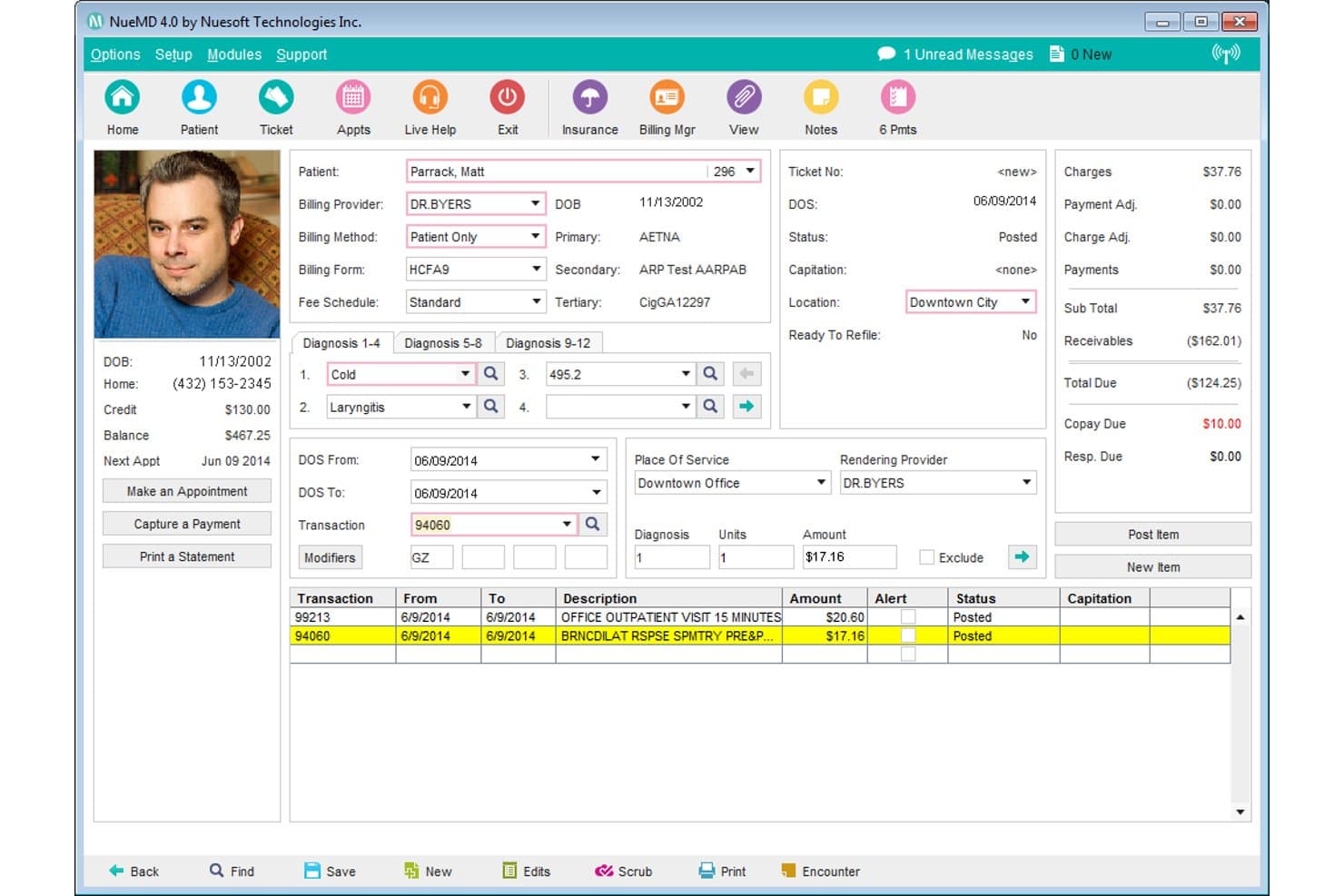
NueMD offers a detailed patient billing ticket screen displaying diagnoses, transactions, charges, and payment summaries in one view. NueMD is a cloud-based medical billing and practice management platform that combines electronic claims submission, appointment scheduling, EHR, and patient billing tools for small and independent practices.
Who Is NueMD Best For?
NueMD is a good fit for solo physicians and small independent practices that need scheduling and billing managed within a single platform.
Why I Picked NueMD
NueMD earns its spot on my shortlist because scheduling and billing genuinely operate as one system, not two tools bolted together. I like that appointment data flows directly into the billing workflow, so claims are tied to patient visits without manual re-entry. NueMD also runs its own HIPAA-compliant clearinghouse, processing unlimited claims with built-in scrubbing against a database of over 10 million federal and commercial claims.
NueMD Key Features
- Customizable templates: Create specialty-specific documentation and billing forms for over 100 medical specialties.
- ONC-ATCB certified EHR: Access integrated electronic health records with e-prescribing and lab results management built in.
- Patient portal: Allow patients to view statements, securely message your office, and view or pay balances online.
- Mobile app access: Manage schedules, records, and billing tasks from iOS or Android devices.
NueMD Integrations
Native integrations are not clearly documented. The tool supports data exports and API access for custom integrations.
Pros and Cons
Pros:
- Patient portal for statements and payments
- Unlimited electronic claims through built-in clearinghouse
- Scheduling integrated directly with billing workflow
Cons:
- Product scheduled for end-of-life December 2026
- No transparent or current pricing listed
Learn more about NueMD: Best for mobile device billing access
- Free demo available
- Pricing upon request
Visit WebsiteCustomer Rating:3.9/5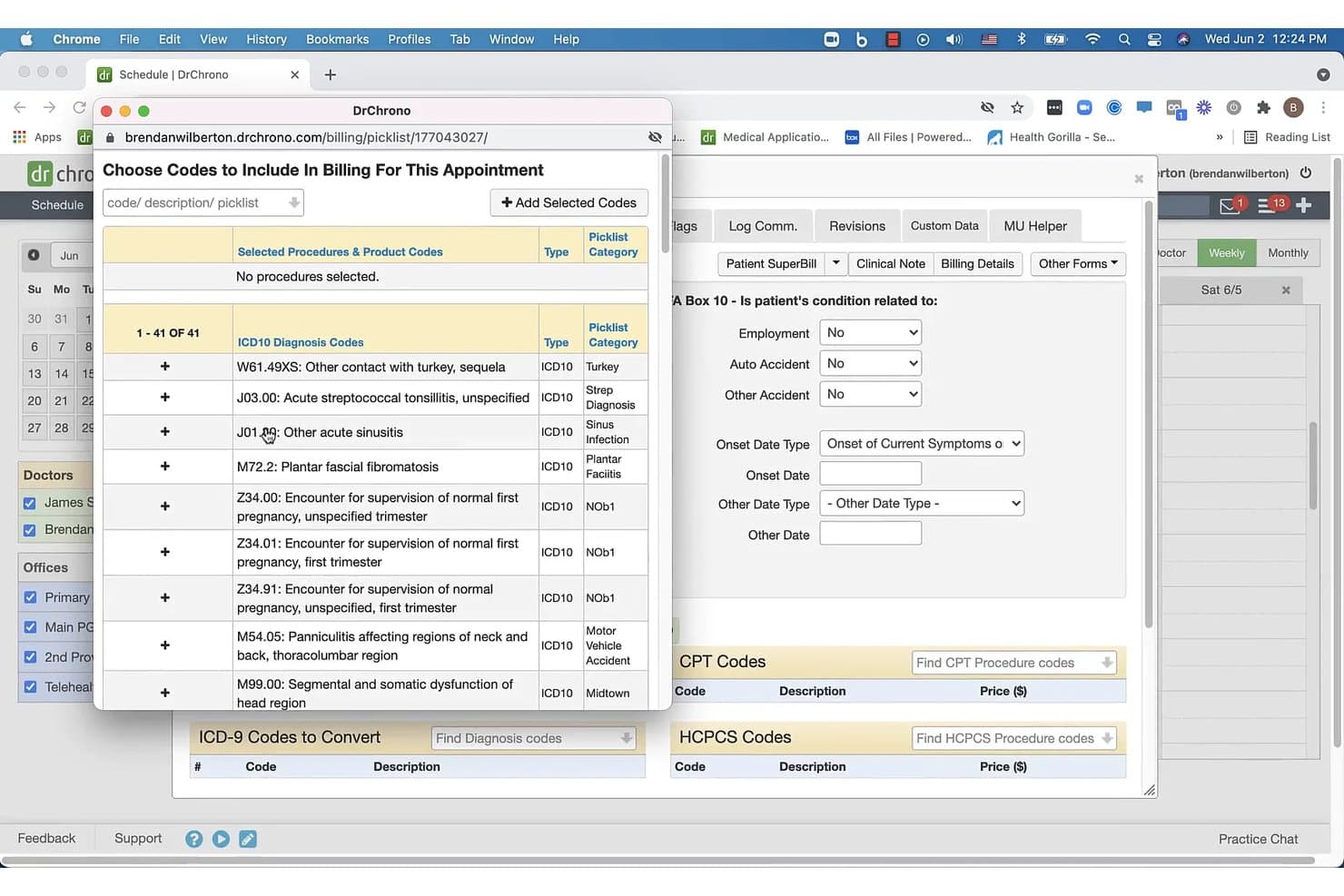
DrChrono offers a billing picklist interface where users can select ICD-10 diagnosis codes to include in patient appointment billing. DrChrono is an EHR-integrated medical billing platform that combines claims submission, coding support, ERA auto-posting, denial management, and patient billing in a single system built for independent practices.
Who Is DrChrono Best For?
DrChrono is a strong fit for independent physicians and small practice administrators who run their workflows primarily on Apple devices.
Why I Picked DrChrono
DrChrono earns its spot on my shortlist because it's the only billing platform in this space built natively for Apple hardware from the ground up. I can pull up the live claims feed, review denial statuses, and post ERA payments directly from an iPhone or iPad between patient visits. Because the billing and EHR modules share the same data layer, a completed encounter on my iPad flows directly into a claim without any re-entry.
DrChrono Key Features
- Integrated coding libraries: Access and search updated ICD-10, CPT, and HCPCS codes directly within the billing module.
- Automated ERA payment posting: Automatically post payments and adjustments from electronic remittance advice files to patient accounts.
- Custom billing profiles: Set up profiles for common procedures and payer requirements to speed up charge entry.
- Electronic patient statements: Generate and send electronic or printed statements to patients, with patient portal balance viewing.
DrChrono Integrations
DrChrono offers over 20 native integrations, including Box, Square Point of Sale, Ambra, ClearGage, Collectly, Curogram, DeepScribe, Demandforce, Quest, and LabCorp, and provides an API for custom integrations.
Pros and Cons
Pros:
- Automated patient statement generation
- Robust mobile apps for iPhone and iPad
- Full billing and EHR data integration
Cons:
- No public base pricing for billing plans
- Billing module requires full EHR subscription
Learn more about DrChrono: Best for desktop-based billing solutions
- Free consultation available
- Pricing upon request
Visit WebsiteCustomer Rating:4.4/5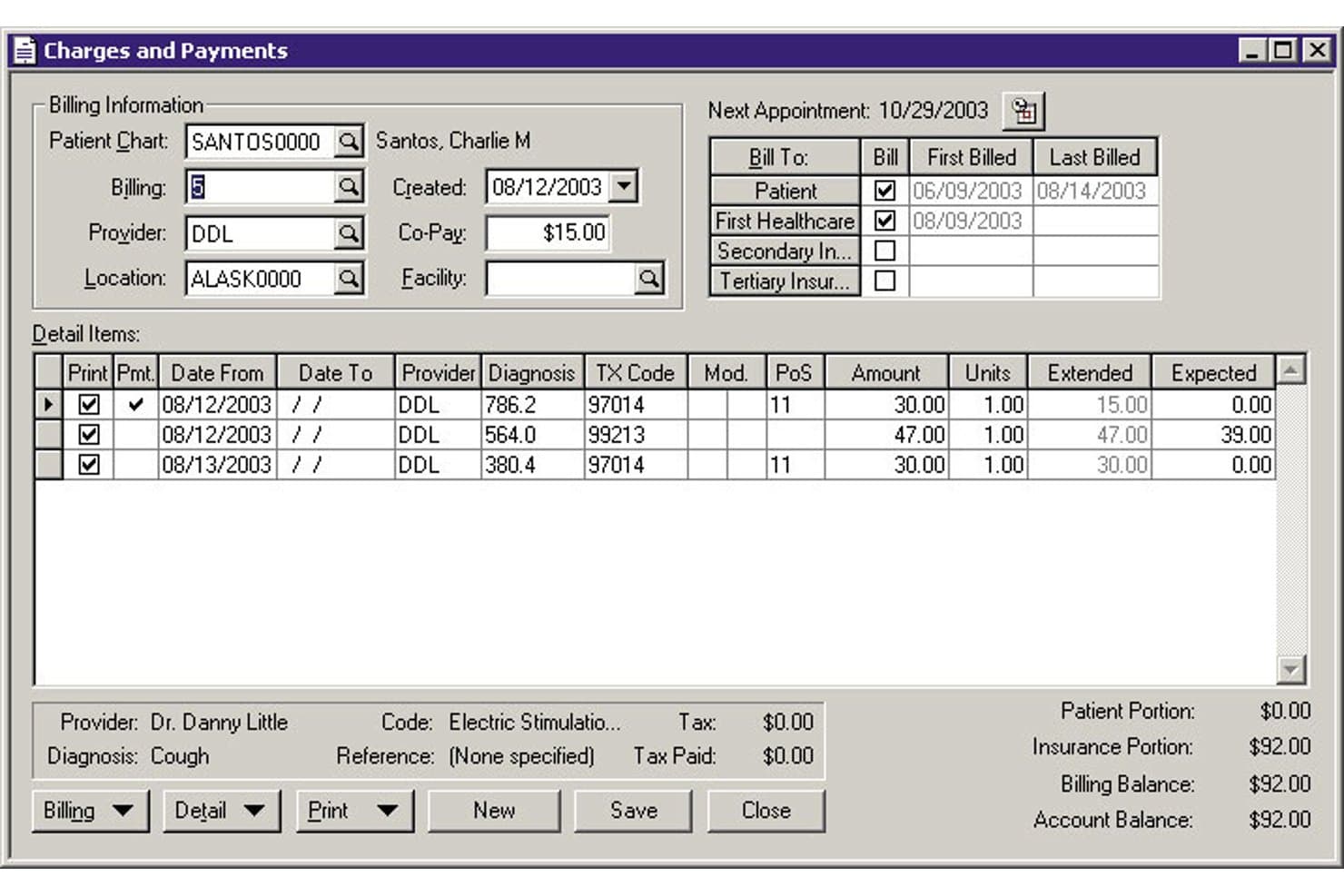
MEDISOFT offers a detailed Charges and Payments screen for managing patient billing, insurance portions, and itemized service entries. MEDISOFT is a medical billing and practice management software that handles claims submission, payment posting, patient scheduling, and coding — available as either a one-time perpetual desktop license or a monthly cloud subscription.
Who Is MEDISOFT Best For?
MEDISOFT is a strong fit for independent billing specialists and small practices that prefer owning their software outright rather than paying ongoing subscription fees.
Why I Picked MEDISOFT
MEDISOFT earns its spot on my shortlist because it's one of the few billing platforms that still offers a true perpetual desktop license, starting at $675 one-time for solo providers. I particularly like the built-in Office Hours scheduler and the 200+ pre-configured reports, which cover financial, managed care, and chiropractic billing without requiring separate add-ons. Version 30's Enhanced Patient Responsibility Estimates also let practices generate upfront cost breakdowns before a claim is even submitted.
MEDISOFT Key Features
- Mobile patient kiosk: Patients can check in and update information using a mobile app in your office.
- Final Draft word processor: Write and customize medical documents with built-in templates and spell check.
- Integrated payment processing: Collect card and ACH payments directly through CGM PAY integration.
- Electronic claims add-on: Submit claims electronically to payers and clearinghouses from within MEDISOFT.
MEDISOFT Integrations
MEDISOFT offers native integrations with eMEDIX for electronic claims, Review Wave and AutoReminder for patient reminders, Vosita for online appointments, and CGM PAY for payment processing. An API is available for custom integrations.
Pros and Cons
Pros:
- Reliable offline use for billing operations
- Includes industry-specific workflow templates
- Offers perpetual desktop and cloud versions
Cons:
- Slow report generation with large datasets
- Limited modern coding assistance built in
Learn more about MEDISOFT: Best for analytics-driven billing insights
- Free demo available
- Pricing upon request
Visit WebsiteCustomer Rating:3.6/5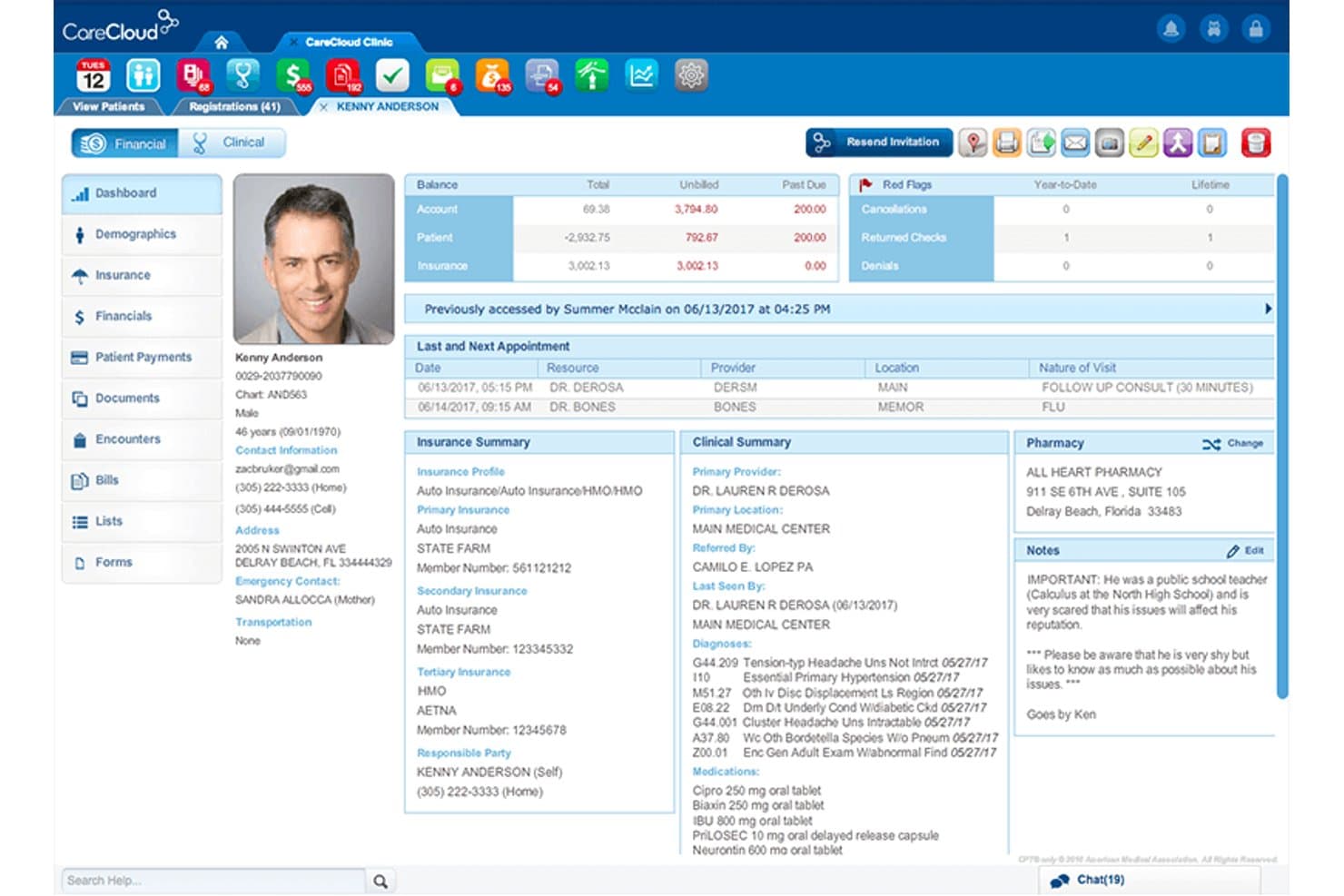
CareCloud offers a comprehensive patient profile dashboard displaying billing balances, insurance summaries, clinical notes, and appointment history in one view. CareCloud is a cloud-based medical billing platform that combines claims submission, denial management, ERA auto-posting, and analytics-driven reporting for small and mid-size practices.
Who Is CareCloud Best For?
CareCloud is a good fit for small group practices and practice administrators who need billing analytics and RCM oversight without building a dedicated in-house billing team.
Why I Picked CareCloud
CareCloud earns its spot on my shortlist because of how it turns billing data into actionable insight. The Advanced Analytics dashboard lets me segment performance by payer, provider, and location, pinpointing exactly where denials are clustering. I also rely on the CollectiveIQ rules engine, which catches payer-specific coding errors before claims go out, keeping the first-pass rate consistently high.
CareCloud Key Features
- Built-in clearinghouse: Submit claims directly to multiple payers without relying on an external clearinghouse.
- Centralized billing dashboard: Manage billing for all providers or locations in a single interface.
- ERA auto-posting: Automatically posts electronic remittance advice to patient accounts for easy reconciliation.
- Batch payment processing: Record payments across multiple claims or patients in one step.
CareCloud Integrations
CareCloud offers native integrations with CodoniX EHR, EHRYourWay, ICANotes, MD Logic, Optivate, Praxis EMR, Sevocity, TeleVox, and Vital Interaction. An API is available for custom integrations. The platform also integrates with clearinghouses like Change Healthcare, TriZetto, and Availity.
Pros and Cons
Pros:
- Automated denial resolution process
- CollectiveIQ rules engine for claim scrubbing
- Advanced analytics dashboard for billing insights
Cons:
- Three-year contract commitments commonly required
- Quote-based pricing, not transparent
Learn more about CareCloud: Best for large practice automation features
- Free demo available
- Pricing upon request
Visit WebsiteCustomer Rating:3.6/5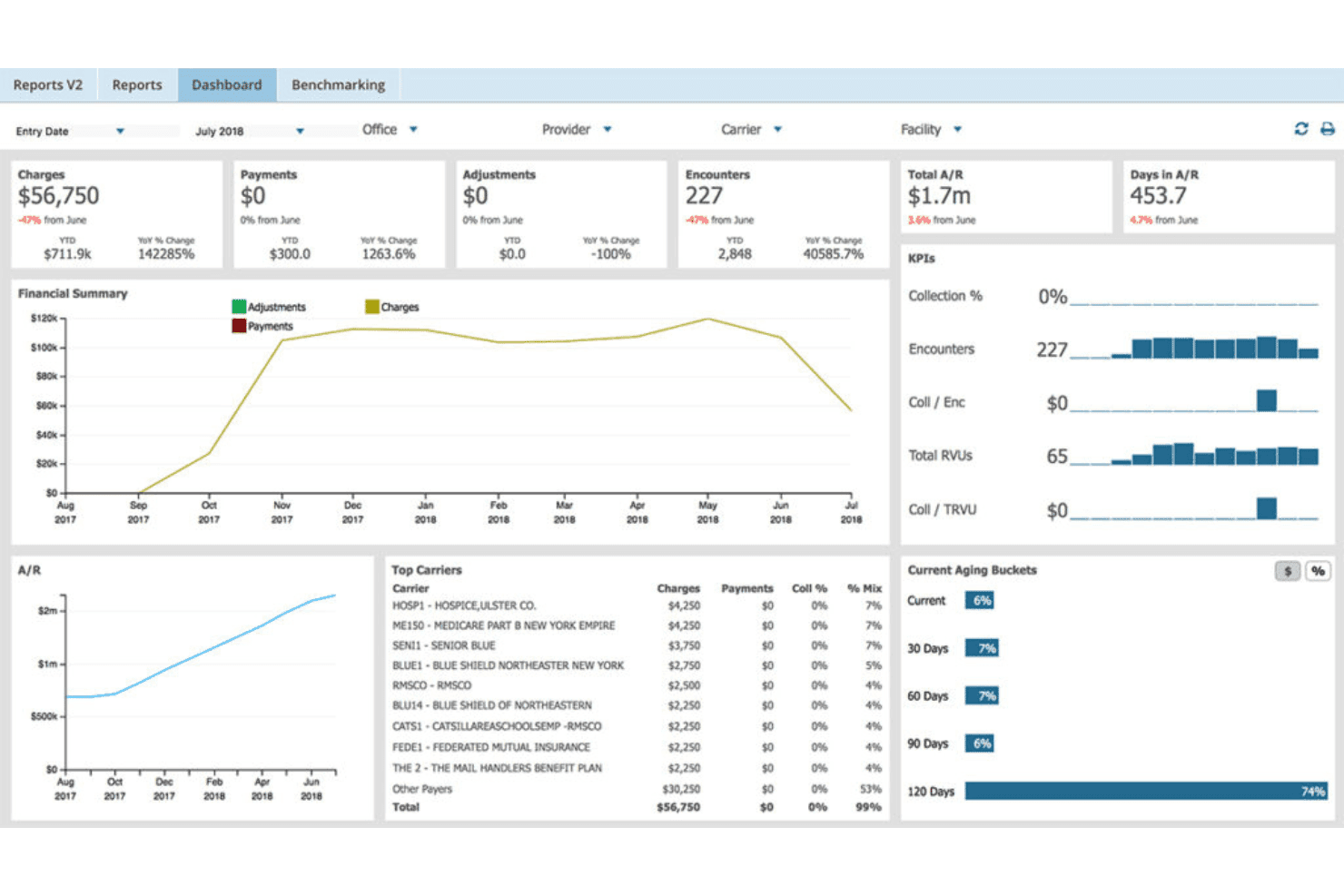
AdvancedMD unites EMR, documentation, billing, claims, eligibility, and RCM. AdvancedMD is a cloud-based medical billing platform that combines claims scrubbing, ERA processing, denial management, patient billing, and a built-in clearinghouse into a unified system for independent and multi-provider practices.
Who Is AdvancedMD Best For?
AdvancedMD is a strong fit for growing group practices and independent billing specialists managing claims across multiple providers or locations.
Why I Picked AdvancedMD
AdvancedMD earns its spot on my shortlist because of how far its automation goes at the claims level. I particularly like ClaimInspector, which runs nearly 3.5 million edits per claim against HIPAA, CCI, and payer-specific rules before a claim ever leaves the system. The Central Billing Office (CBO) module is also something I rely on for multi-provider work, letting me toggle across client databases under one login without re-authenticating each time.
AdvancedMD Key Features
- Integrated ERA and EOB processing: Automatically ingests and posts electronic remittance advice for smoother payment reconciliation.
- Patient payment portal: Lets patients view balances and pay online through a dedicated portal.
- Insurance eligibility verification: Checks patient coverage before appointments to reduce rejections.
- Customizable patient statements: Generates branded, detailed statements for individual or batch printing.
AdvancedMD Integrations
AdvancedMD offers native integrations with OpenEdge for payment processing and provides a marketplace of partner integrations. An open API is available for custom integrations.
Pros and Cons
Pros:
- Built-in patient payment portal
- Automated ERA and denial management workflows
- Advanced claims scrubbing and batch edits
Cons:
- Training and setup require notable time investment
- Pricing is not transparent for most users
 Best for simple claim submission workflows
- Free demo available
- From $199/user/month
Visit WebsiteCustomer Rating:4.5/5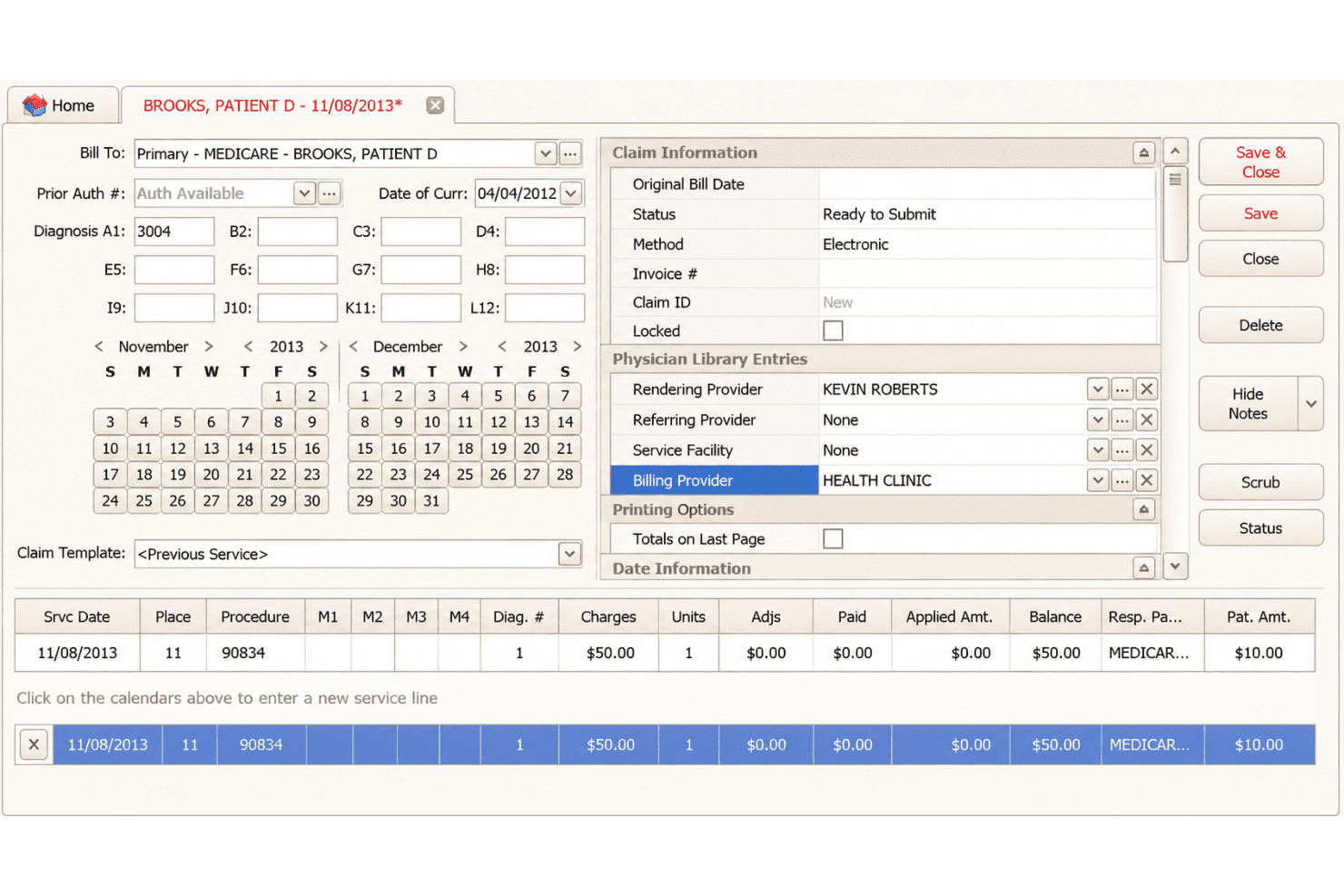
EZClaim covers claims, ERA posting, eligibility, statements and online payments. EZClaim is a cloud-based medical billing platform for small-to-mid-sized practices that covers electronic claim submission, ERA auto-posting, eligibility verification, patient statements, and integrated payment processing.
Who Is EZClaim Best For?
EZClaim is a strong fit for independent billing specialists and small practice administrators who need a no-frills claims management tool without enterprise-level pricing.
Why I Picked EZClaim
EZClaim earns its spot on my shortlist because its end-to-end claim submission workflow is genuinely self-contained. I like that Alpha II claim scrubbing catches coding errors before submission, cutting down on rework before claims even reach the clearinghouse. From there, ANSI 837 files route to payers through TriZetto, Change Healthcare, or Availity, and ERA auto-posting handles remittances on the back end without manual entry.
EZClaim Key Features
- EZClaimPay payment processing: Collect patient payments and store cards securely within the billing workflow.
- Integrated scheduling calendar: Drag-and-drop scheduling links appointments directly to claims.
- Customizable built-in reports: Access and modify over 40 preloaded reports for billing insights.
- HIPAA-compliant portal: Offer read-only, branded access for patients and external users.
EZClaim Integrations
EZClaim offers native integrations with TriZetto, Change Healthcare, Availity, Practice Fusion, WebPT, Amazing Charts, QuickEMR, BillFlash, ReminderCall, and Alpha II. An API is available for custom integrations.
Pros and Cons
Pros:
- Patient payment portal with cards on file
- Reliable ERA auto-posting saves manual work
- Claim scrubbing catches errors before submission
Cons:
- No AI-assisted coding or suggestions
- No built-in payer contract management
Learn more about EZClaim: Best for real-time claim tracking tools
- Free demo available
- Pricing upon request
Visit WebsiteCustomer Rating:4.1/5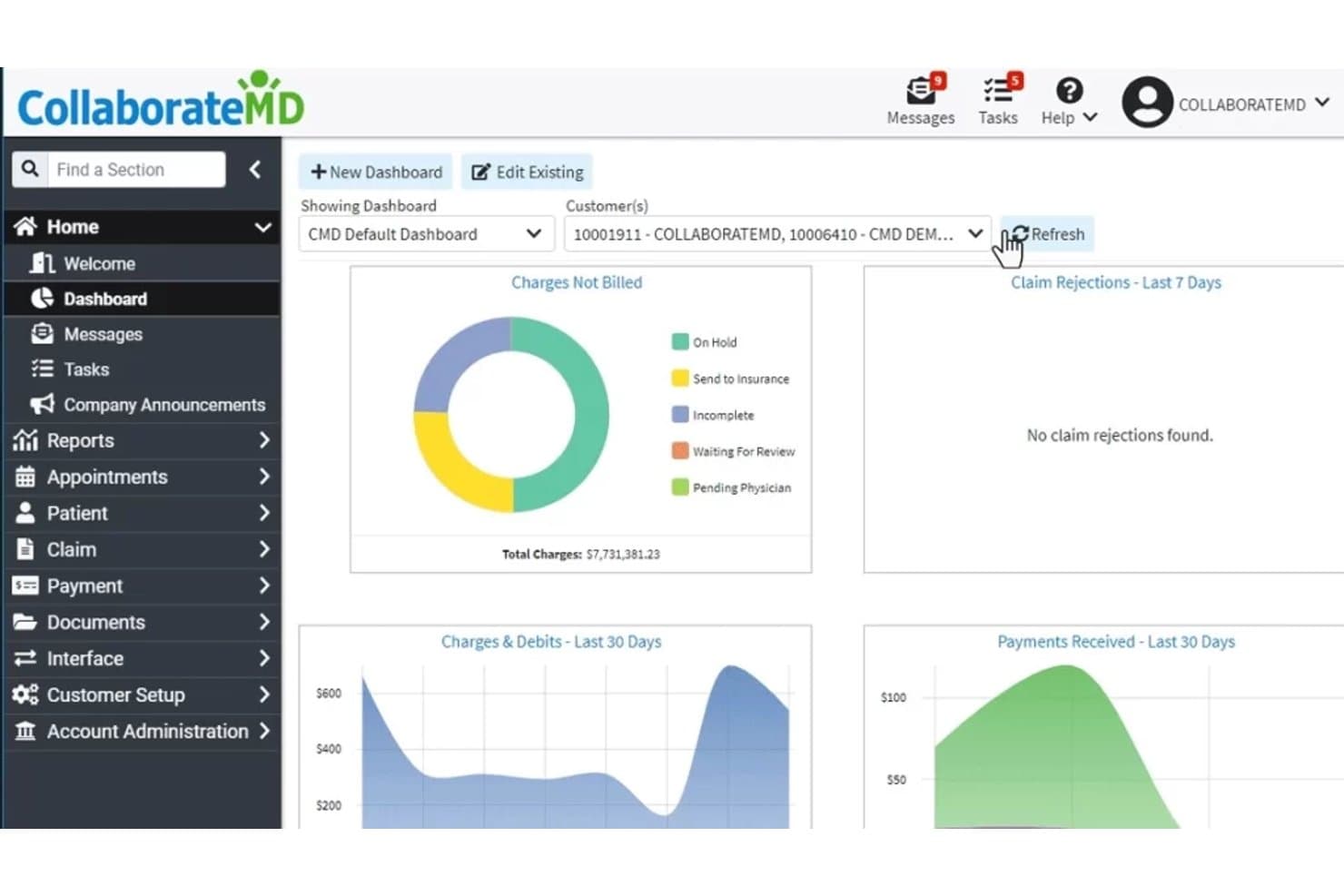
CollaborateMD offers an intuitive dashboard displaying charges not billed, claim rejections, charges and debits, and payments received over the last 30 days. CollaborateMD is a cloud-based medical billing platform that combines real-time claim submission, built-in clearinghouse processing, denial management, ERA auto-posting, and patient payment collection for independent practices and billing companies.
Who Is CollaborateMD Best For?
CollaborateMD is a strong fit for independent billing companies and small private practices that manage claims across multiple payers and specialties.
Why I Picked CollaborateMD
CollaborateMD earns its spot on my shortlist because of how it handles claim visibility from submission through payment. I particularly like that real-time claim submission runs through a built-in clearinghouse, so I can see exactly where a claim stands the moment it's transmitted. The Intelligent Claim Rejection Support feature translates payer rejection codes into plain language with suggested corrective steps, so my team spends less time decoding denials and more time fixing them.
CollaborateMD Key Features
- Automated eligibility verification: Quickly checks patient insurance eligibility before services are rendered.
- Customizable reporting dashboard: Lets you generate and filter financial, operational, and workflow reports across your practice.
- Integrated patient payment portal: Patients can make online payments directly through a secure interface.
- Appointment scheduler: Allows users to book, modify, and track appointments from within the billing platform.
CollaborateMD Integrations
CollaborateMD offers 12 native integrations, including Practice Fusion, Elation, Amazing Charts, Hello Health, Kipu, Medical Mime, Praxis EMR, PrognoCIS, Ritten, Sevocity, WebPT, and Alleva. Native diagnostic integrations include Quest Diagnostics, LabCorp, and LabDAQ. An API is available for custom integrations.
Pros and Cons
Pros:
- Patient payment portal with card-on-file option
- Automated ERA posting and claim scrubbing
- Real-time claim status updates with tracking
Cons:
- Occasional downtime reported during system updates
- Pricing is not published on the website
Learn more about CollaborateMD: Best for combining billing with patient engagement
- Free demo available
- Pricing upon request
Visit WebsiteCustomer Rating:3.9/5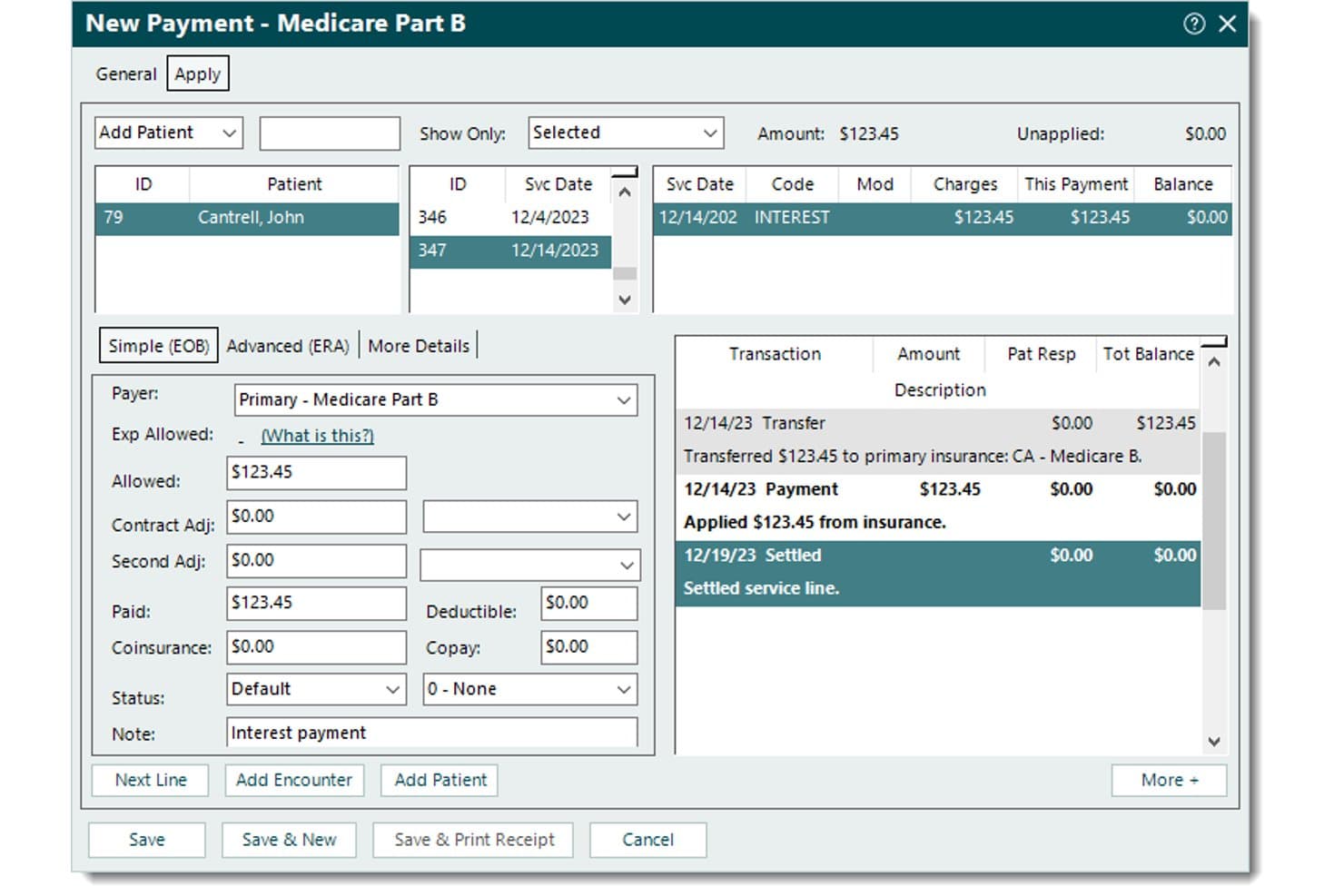
Tebra records Medicare payments, applied amounts, patient balances, adjustments, and transaction history. Tebra is a billing and practice management platform designed for independent practices that pairs electronic claims submission, ERA auto-posting, and denial management with built-in patient engagement tools.
Who Is Tebra Best For?
Tebra is a strong fit for independent practices with up to 10 providers that want billing and patient engagement managed within a single platform.
Why I Picked Tebra
I picked Tebra as one of the best because it's the only platform I've used that connects billing directly to patient engagement without switching tools. I like that it sends automated statements with QR codes and embedded payment links via text or email, so patients can pay from their phones. Card-on-file and in-person payment options sit in the same workflow as insurance claim submission, which keeps the full payment cycle in one place.
Tebra Key Features
- Automated insurance eligibility checks: Instantly verifies coverage, copays, and deductibles through integrated payer connections.
- Rules engine for real-time claim scrubbing: Identifies and flags coding errors before electronic claim submission.
- RPA-based ERA auto-posting: Automatically posts electronic remittance advice and reconciles insurance payments.
- Provider-based licensing model: Includes unlimited non-clinical staff access at no extra cost for each subscribing provider.
Tebra Integrations
Tebra offers native integrations with WebPT, QuickEMR, Relatient, NextPatient, PayPal, Stripe Terminal, DocSpera, Kareo Billing, Stripe, Microsoft Excel, and QuickBooks Online Advanced. It also provides an API for custom integrations.
Pros and Cons
Pros:
- Patient payment links via QR and email
- Automated denial management and claim scrubbing included
- Combines billing and patient engagement features
Cons:
- Clearinghouse issues can delay claim acceptance
- Custom pricing only, no public tiers
Learn more about Tebra: Best for multi-location practice management
- Free demo available
- Pricing upon request
Visit WebsiteCustomer Rating:4.1/5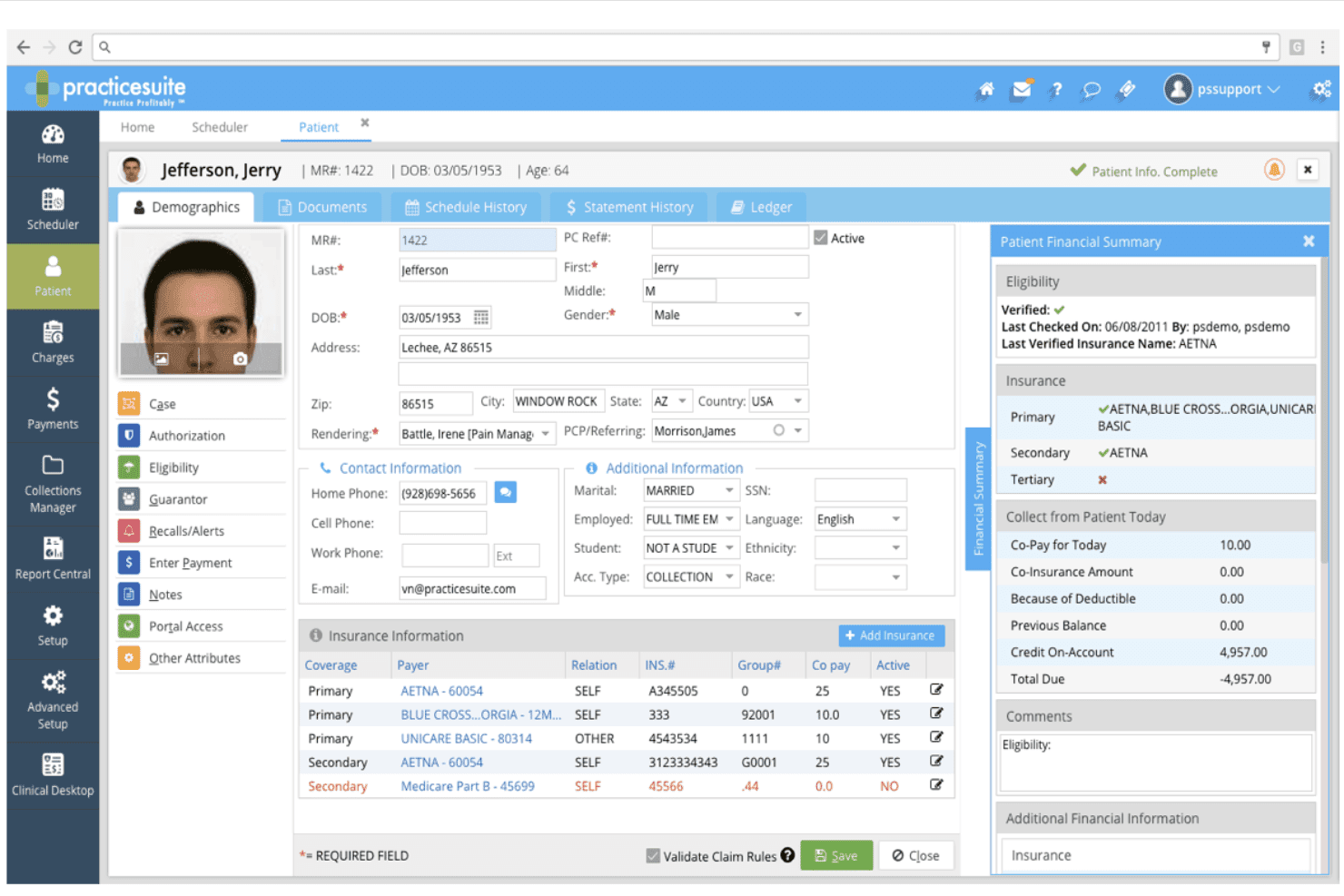
PracticeSuite supports claims, billing, payments, denials, eligibility, and ARs. PracticeSuite is a cloud-based medical billing platform that handles electronic claims submission, denial management, payment posting, patient billing, and coding validation across solo practices, small groups, and multi-location clinics.
Who Is PracticeSuite Best For?
PracticeSuite suits independent billing companies and practice administrators who manage billing workflows across multiple provider accounts or clinic locations.
Why I Picked PracticeSuite
PracticeSuite earns its spot on my shortlist because of how it centralizes billing across multiple locations. I like that mass claim corrections can be applied across all provider accounts at once, instead of working through each location separately. The granular security settings also let me control access by location, hours, and days, which is genuinely useful when staff responsibilities differ across sites.
PracticeSuite Key Features
- AI-powered denial intelligence: Flags potential claim issues before submission to reduce rejections.
- Integrated coding validation module: Checks diagnosis and procedure codes for errors and compliance.
- Patient portal with statement delivery: Lets patients view and download billing statements securely online.
- Automated payment posting from ERA files: Matches payments to claims and updates balances automatically.
PracticeSuite Integrations
PracticeSuite offers native integrations with Practice Fusion and Elation, and supports payer and clearinghouse networks. An API is available for custom integrations.
Pros and Cons
Pros:
- Payment posting and corrections are streamlined
- Claim denial prevention with AI review rules
- Handles multi-location billing from one platform
Cons:
- Complaints about unexpected per-encounter charges
- No public pricing or free trial listed
Learn more about PracticeSuite: Best for built-in clearinghouse at no extra cost
- Free plan available
- Free
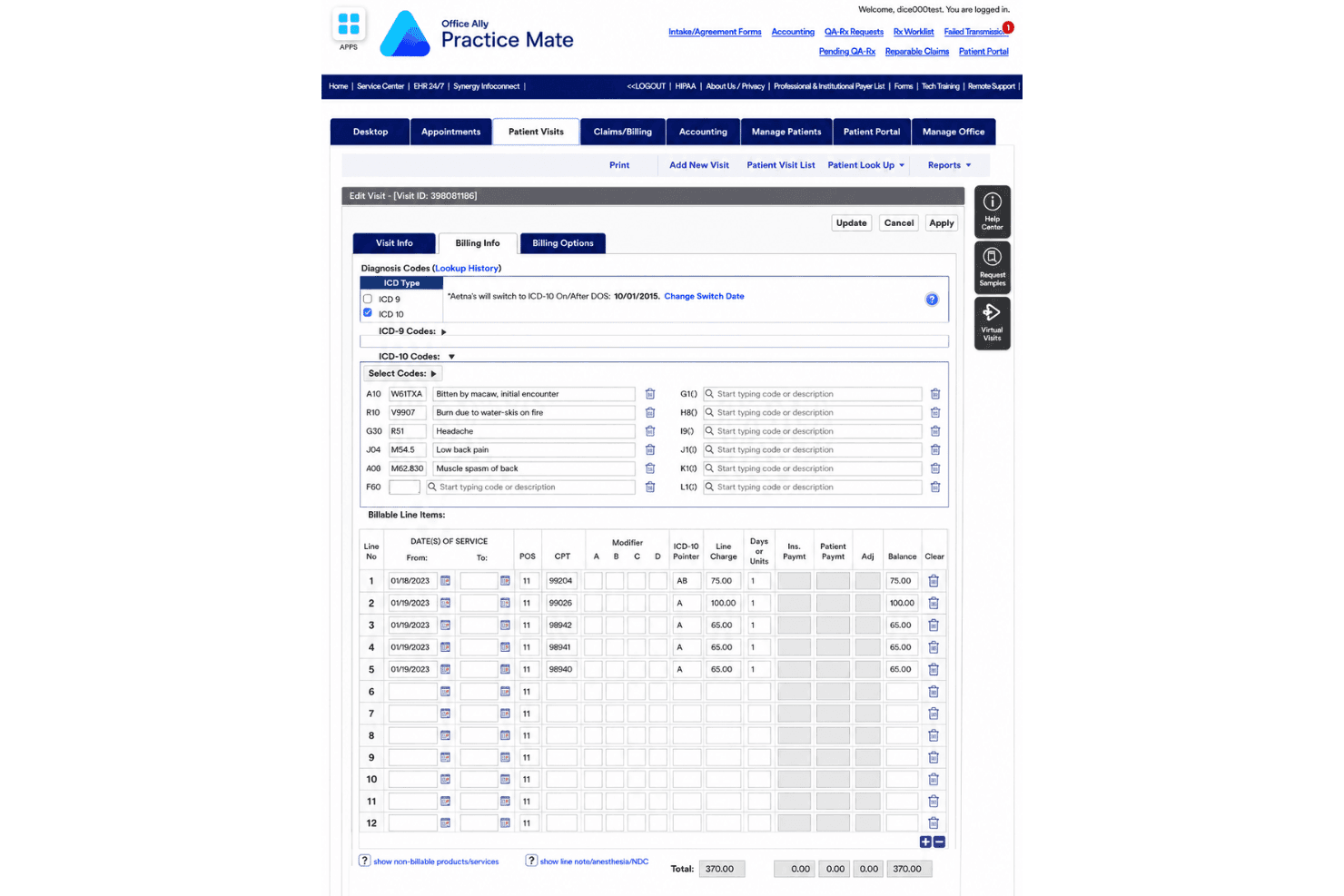
Office Ally Practice Mate joins scheduling, billing, superbills, and e-claims. Office Ally Practice Mate is a free practice management and medical billing platform that combines appointment scheduling, patient billing, superbill configuration, and electronic claims submission through a built-in clearinghouse.
Who Is Office Ally Practice Mate Best For?
Practice Mate is a strong fit for solo practitioners and small independent practices that need a functional billing and scheduling system without a monthly software budget.
Why I Picked Office Ally Practice Mate
Practice Mate earns its spot on my shortlist because the built-in Service Center clearinghouse connects to 5,000+ payers at no monthly cost. I like that claim creation, 837 submission, ERA/835 auto-posting, and real-time eligibility verification are all included without add-on fees. Most billing platforms charge separately for clearinghouse access, so having it bundled into a $0/month platform is genuinely rare.
Office Ally Practice Mate Key Features
- Appointment scheduling: Manage provider calendars with custom views and handle patient scheduling from a web-based dashboard.
- Configurable superbills: Customize charge entry templates to fit your specialty’s coding and billing needs.
- Patient ledger: Track patient balances, charges, adjustments, and payment history within each patient profile.
- Integrated patient portal: Offer patients secure, no-cost access to view billing statements and update demographic information online.
Office Ally Practice Mate Integrations
Practice Mate offers native integrations with Office Ally EHR 24/7, Patient Ally, Reminder Mate, and Patient Payments (Stripe). An API is available for custom integrations.
Pros and Cons
Pros:
- Integrated patient portal and statement mailing
- Unlimited claim volume for solo and group practices
- No-cost multi-payer electronic claims submission
Cons:
- Interface appears outdated and unintuitive
- Denial management features are limited
Learn more about Office Ally Practice Mate:
Annen rimelig programvare for medisinsk fakturering
Her er noen flere alternativer for rimelig programvare for medisinsk fakturering som ikke kom med på kortlisten min, men som fortsatt er verdt å sjekke ut:
- 11athenahealthBest for hands-on billing support services
- 12CureMDBest for customizable billing reports
- 13MedeskBest for international practice compatibility
- 14SimplePracticeBest for integrated client invoicing options
- 15CharmHealthBest for multi-specialty billing capabilities
- 16TherapyNotesBest for automatic payment posting
- 17DocVillaBest for quick superbill generation
- 18Ensora Health TheraNestBest for mental health insurance billing needs
- 19OpenEMRBest for open-source customization flexibility
- 20ClaimocityBest for hospitalist group workflow support
How I Evaluate Affordable Medical Billing Software
I evaluate these tools in two layers: baseline billing requirements like 837 submission and ERA processing, and the differentiators that show which tools are actually built for small-practice budgets.
Core Functionality (Table Stakes For This List)
When I'm selecting tools for my list, I rank each one on a scale from 0 (does not offer the functionality) to 5 (excels in this area) for each core functionality listed below. Then, I calculate the tool's total score into a percentage. Each tool needs to achieve a minimum total score of 65% to be considered for inclusion.
- Claims Submission: I check whether the tool can generate, scrub, and submit 837 files to clearinghouses with built-in error detection before claims go out.
- Coding Support: Full ICD-10, CPT, and HCPCS code sets with searchable lookup matter—especially for practices handling diverse visit types without a dedicated coder.
- ERA/EOB Processing: I look for automated 835 ingestion and payment posting so your team isn't manually keying in every remittance from each payer.
- Denial Management: Rejected claims need a clear queue with reason codes and resubmission workflows, so nothing slips through the cracks during follow-up.
- Patient Billing: I evaluate how the tool handles patient statements, balance tracking, and payment collection—like offering an online portal for card payments.
- Affordable Pricing: Transparent pricing tiers accessible to solo and small practices are key, whether the model is per-provider, per-claim, or flat monthly.
Once I have a list of tools that meet the criteria, I consider what sets each platform apart.
Differentiating Factors (What Sets Vendors Apart)
Here's how I compare and contrast different vendors:
Standout Features
Claim scrubbing is a big differentiator—I look for tools that validate claims against payer-specific rules before submission, which directly cuts down denial rates and rework. Real-time eligibility verification matters just as much because catching a lapsed policy at check-in saves your team from chasing a denied claim weeks later. I also evaluate patient payment portals, since letting patients view balances and pay online via card or ACH helps practices collect faster without extra phone calls.
Beyond Features
Total cost of ownership is where I spend the most time. I look at whether clearinghouse fees, patient statement charges, and setup costs are bundled or billed separately—those extras add up fast for a small practice. Specialty fit also matters; a mental health practice needs different code sets and payer rules than a primary care office. I also check for native EHR/EMR integrations, since a billing tool that can't sync with your clinical system creates duplicate data entry your team doesn't have time for.
Slik velger du rimelig programvare for medisinsk fakturering
Det er lett å gå seg vill i lange funksjonslister og komplekse prisstrukturer. For å hjelpe deg med å holde fokus mens du går gjennom den unike prosessen med å velge programvare, får du her en sjekkliste over faktorer du bør ha i tankene:
| Faktor | Hva du bør vurdere |
|---|---|
| FaktorKostnad | Hva du bør vurdereKan du forutsi den månedlige regningen med alle brukere, krav og tilkoblinger til oppgjørssentraler? Se opp for tilleggsgebyrer som kan presse kostnadene opp. |
| FaktorSkalerbarhet | Hva du bør vurdereVil programvaren vokse sammen med legekontoret ditt? Vurder om det å legge til behandlere, lokasjoner eller større kravvolum vil kreve bytte av abonnement eller ny opplæring. |
| FaktorIntegrasjoner | Hva du bør vurdereKobler den enkelt til EHR/EMR- og timebestillingssystemene dine? Spør om integrasjoner er inkludert eller krever en ekstra modul. |
| FaktorBrukervennlighet | Hva du bør vurdereEr systemet intuitivt for klinikere eller ansatte uten faktureringserfaring? Se etter oversiktlige kontrollpaneler, få klikk og enkel navigering. |
| FaktorImplementering og oppstart | Hva du bør vurdereHvor raskt kan du ta systemet i bruk? Spør om oppsett, registrering hos betalere og opplæring er inkludert, og hvor lang overgangstiden vanligvis er. |
| FaktorSikkerhetstiltak | Hva du bør vurdereEr verktøyet i samsvar med HIPAA? Se etter informasjon om datakryptering, tilgangslogger og om det tilbys en avtale med forretningsforbindelse (BAA). |
| FaktorTilpasningsmuligheter | Hva du bør vurdereKan du tilpasse erklæringer, regler eller rapporter til spesialiteten eller arbeidsmåten ved legekontoret ditt? Noen verktøy begrenser endringer med mindre du betaler mer. |
| FaktorTilgjengelig kundestøtte | Hva du bør vurdereKan du få reell hjelp når en feil stopper kravene dine? Sjekk åpningstider, svartider og om kundestøtten er basert i USA eller satt ut til en ekstern leverandør. |
Hva er rimelig programvare for medisinsk fakturering?
Rimelig programvare for medisinsk fakturering er en kategori digitale verktøy som er utviklet for å hjelpe små legekontorer og uavhengige fakturaspesialister med å håndtere krav, betalinger og pasientregninger uten høye lisenskostnader.
Disse løsningene fokuserer på kjernefunksjonalitet for fakturering med transparente priser, noe som gjør dem tilgjengelige for brukere som trenger pålitelig inntektsstyring med et begrenset budsjett.
Funksjoner i rimelig programvare for medisinsk fakturering
Når du velger rimelig programvare for medisinsk fakturering, bør du se etter følgende nøkkelfunksjoner:
- Innsending av krav: Muliggjør elektronisk oppretting, kontroll og innsending av krav til betalere, slik at praksiser får raskere betalt og reduserer manuelt papirarbeid.
- Støtte for koding: Tilbyr søkbare ICD-10-, CPT- og HCPCS-kodebiblioteker, slik at du kan velge riktige koder for hver konsultasjon eller prosedyre.
- ERA/EOB-behandling: Automatiserer mottak og registrering av elektroniske betalingsmeldinger, eliminerer manuell registrering av betalinger og forenkler arbeidsflyter for avstemming.
- Håndtering av avviste krav: Merker avviste eller avslåtte krav og veileder brukerne gjennom prosesser for korrigering, klage og automatisert innsending på nytt.
- Pasientfakturering: Oppretter og sporer kontoutskrifter for pasientens utestående ansvar og støtter flere alternativer for innkreving av betaling.
- Betalingsportal for pasienter: Gir pasienter tilgang på nett til å betale kontoutskrifter med kort, ACH eller digital lommebok, noe som gjør innkrevingen raskere og mer praktisk.
- Tilpasset rapportering: Leverer konfigurerbare rapporter og oversikter for krav, betalinger og utestående fordringer, slik at du får frem viktig innsikt i faktureringen.
- Kontroll av forsikringsberettigelse: Bekrefter pasientens forsikringsstatus og ytelser ved eller før innsjekking, noe som reduserer senere avviste krav.
- Sikkerhetstiltak: Beskytter sensitive helse- og faktureringsdata med kryptering, tilgangskontroller og overholdelse av HIPAA eller andre forskrifter.
- Integrasjoner: Kobler direkte til elektroniske pasientjournalsystemer, verktøy for praksisadministrasjon og oppgjørssentraler for å minimere dobbeltregistrering og sikre en smidig informasjonsflyt.
Fordeler med rimelig programvare for medisinsk fakturering
Implementering av rimelig programvare for medisinsk fakturering gir flere fordeler for teamet og virksomheten din. Her er noen av fordelene du kan se frem til:
- Lavere administrative kostnader: Automatisert behandling av krav og registrering av betalinger reduserer manuelt arbeid, slik at du kan unngå å ansette ekstra faktureringspersonell.
- Raskere betalinger: Elektronisk innsending av krav og betalingsportaler for pasienter fremskynder forsikringsrefusjoner og innbetalinger fra pasienter.
- Færre avviste krav og feil: Innebygd kontroll av krav, oppslag i kodebiblioteker og arbeidsflyter for håndtering av avviste krav hjelper deg med å sende inn korrekte krav og rette opp problemer raskt.
- Forenklet overholdelse av regelverk: Sikkerhetstiltak og kodeoppdateringer støtter overholdelse av regelverket uten at teamet hele tiden må overvåke dette manuelt.
- Større åpenhet: Tilpassede oversikter og transparente prismodeller gir klarhet i både praksisens økonomi og løpende programvareutgifter.
- Bedre pasientopplevelse: Selvbetjente betalingsportaler og tydelige kontoutskrifter gjør det enklere for pasienter å forstå og gjøre opp utestående beløp.
- Enkel skalering etter hvert som du vokser: Rimelige, fleksible prisnivåer og skalerbar infrastruktur støtter behovene til både enkeltstående praksiser og klinikker i vekst.
Kostnader og priser for rimelig programvare for medisinsk fakturering
Å velge rimelig programvare for medisinsk fakturering krever en forståelse av de ulike prismodellene og abonnementene som er tilgjengelige. Disse kan variere fra gratis verktøy for medisinsk fakturering til betalte abonnementer med bredere funksjonalitet. Kostnadene varierer basert på funksjoner, teamstørrelse, tillegg og mer. Tabellen nedenfor oppsummerer vanlige abonnementer, gjennomsnittsprisene deres og typiske funksjoner som inngår i rimelige løsninger for medisinsk fakturering:
Sammenligningstabell for abonnementer for rimelig programvare for medisinsk fakturering
| Abonnementstype | Gjennomsnittspris | Vanlige funksjoner |
|---|---|---|
| AbonnementstypeGratisabonnement | Gjennomsnittspris$0 | Vanlige funksjonerGrunnleggende innsending av krav, begrenset støtte, pasientkontoutskrifter og manuell registrering av ERA. |
| AbonnementstypePersonlig abonnement | Gjennomsnittspris$20-$50/bruker/måned | Vanlige funksjonerElektroniske krav, kodebiblioteker, enkel sporing av avviste krav og støtte via e-post. |
| AbonnementstypeBedriftsabonnement | Gjennomsnittspris$50-$150/bruker/måned | Vanlige funksjonerIntegrert oppgjørssentral, automatisk registrering av ERA, nettbaserte pasientbetalinger, rapporteringsoversikter og støtte via telefon eller chat. |
| AbonnementstypeVirksomhetsabonnement | Gjennomsnittspris$150+/bruker/måned | Vanlige funksjonerTilpassede integrasjoner, avansert analyse, kontroll av forsikringsberettigelse, rollebaserte kontroller, prioritert støtte og datamigrering. |
Vanlige spørsmål om rimelig programvare for medisinsk fakturering
Her er noen svar på vanlige spørsmål om rimelig programvare for medisinsk fakturering:
Hvilke typer praksiser passer godt for rimelig programvare for medisinsk fakturering?
Rimelig programvare for medisinsk fakturering er ideell for små og mellomstore praksiser, uavhengige behandlere og faktureringstjenester som trenger grunnleggende faktureringsfunksjoner uten kostbare ekstrafunksjoner for større virksomheter.
Kan rimelige faktureringssystemer håndtere spesifikke koder for ulike fagområder og regler fra betalere?
Ja, de fleste rimelige løsninger inkluderer oppdaterte ICD-10-, CPT- og HCPCS-kodebiblioteker og støtter fagområdespesifikke maler eller tilpassede regler for ulike praksistyper.
Inkluderer disse plattformene betalingsportaler for pasienter?
Ja, mange rimelige faktureringsplattformer tilbyr integrerte betalingsportaler for pasienter, slik at pasientene kan se kontoutskrifter og betale utestående beløp på nettet med kort eller bankoverføring.
Er pasientopplysninger sikre på budsjettvennlige faktureringsplattformer?
Ja, anerkjente rimelige faktureringssystemer bruker HIPAA-kompatibel sikkerhet, med kryptering og rollebasert tilgang, for å bidra til å beskytte pasient- og økonomiske opplysninger.
Hvor vanskelig er det å gå over fra manuell fakturering eller annen programvare?
De fleste plattformer tilbyr støtte for oppsett og innføring, inkludert import av data og veiledning for registrering hos betalere, slik at praksiser kan bytte med minimal nedetid.
Finnes det skjulte kostnader man bør være oppmerksom på?
Du bør alltid undersøke prisene for oppgjørssentralgebyrer, supportpakker og levering av kontoutskrifter, ettersom enkelte budsjettplaner kanskje ikke inkluderer disse tilleggene i grunnprisen.