

Programvare for EMR-timeplanlegging lar deg bestille, administrere og følge opp pasientavtaler i det elektroniske pasientjournalsystemet ditt. Hvis du undersøker den beste programvaren for EMR-timeplanlegging, trenger du sannsynligvis en måte å gjøre timebestillingen mindre tidkrevende og mer nøyaktig for teamet ditt på. Det riktige verktøyet kan redusere mye av frustrasjonen ved å forhindre dobbeltbookede tider, gi pasientene raskere tilgang og holde journalene organiserte. I denne veiledningen finner du tydelige alternativer tilpasset ulike praksisstørrelser, arbeidsflyter og spesialiteter, slik at du kan velge systemet som faktisk passer til måten teamet ditt leverer helsehjelp på.
Why Trust Our Software Recommendations
6,700+
Reviews
20
Industry experts
16+
Evaluation factors
14
Years
Our team has been testing and reviewing software since 2012. As medical practice leaders ourselves, we know how difficult—and important—it is to choose the right software.
For this guide, we evaluated tools using hands-on testing and independent research, scoring tools using our selection criteria.
Our reviews reflect our human editorial judgment, not a sales pitch.
Sammenligningstabell for programvare for EMR-timeplanlegging
Denne sammenligningstabellen viser prisene for mine beste valg av programvare for EMR-timeplanlegging:
| Tool | Best For | Trial Info | Price | ||
|---|---|---|---|---|---|
| 1 | Best for allied health scheduling and charting | Free demo available | From $59/month | Website | |
| 2 | Best for scheduling backed by 60-plus EHR syncs | Free demo available | Pricing upon request | Website | |
| 3 | Best for automating patient access | Free demo available | Pricing upon request | Website | |
| 4 | Best for scheduling tied to kiosk check-in | Free plan available | From $25/month | Website | |
| 5 | Best for intake-linked scheduling and charting | Free trial available. | $59.90/month | Website | |
| 6 | Best for independent practice scheduling and intake | Free demo available | Pricing upon request | Website | |
| 7 | Best for AI-driven waitlist and slot recovery | Free demo available | Pricing upon request | Website | |
| 8 | Best for health record-native scheduling at scale | Not available | Pricing upon request | Website |


Anmeldelser av den beste programvaren for EMR-timeplanlegging
\u003cspan style=\u0022font-weight: 400\u0022\u003eNedenfor finner du mine detaljerte sammendrag av den kostnadsfrie programvaren for EMR-timeplanlegging som kom med på kortlisten min. Anmeldelsene mine gir en detaljert oversikt over funksjonene, de beste bruksområdene og prisene for hver plattform, slik at du kan finne den beste løsningen for deg.\u003c/span\u003e
 1Best for allied health scheduling and charting
Jane
- Free demo available
- From $59/month
Visit WebsiteCustomer Rating:4.8/5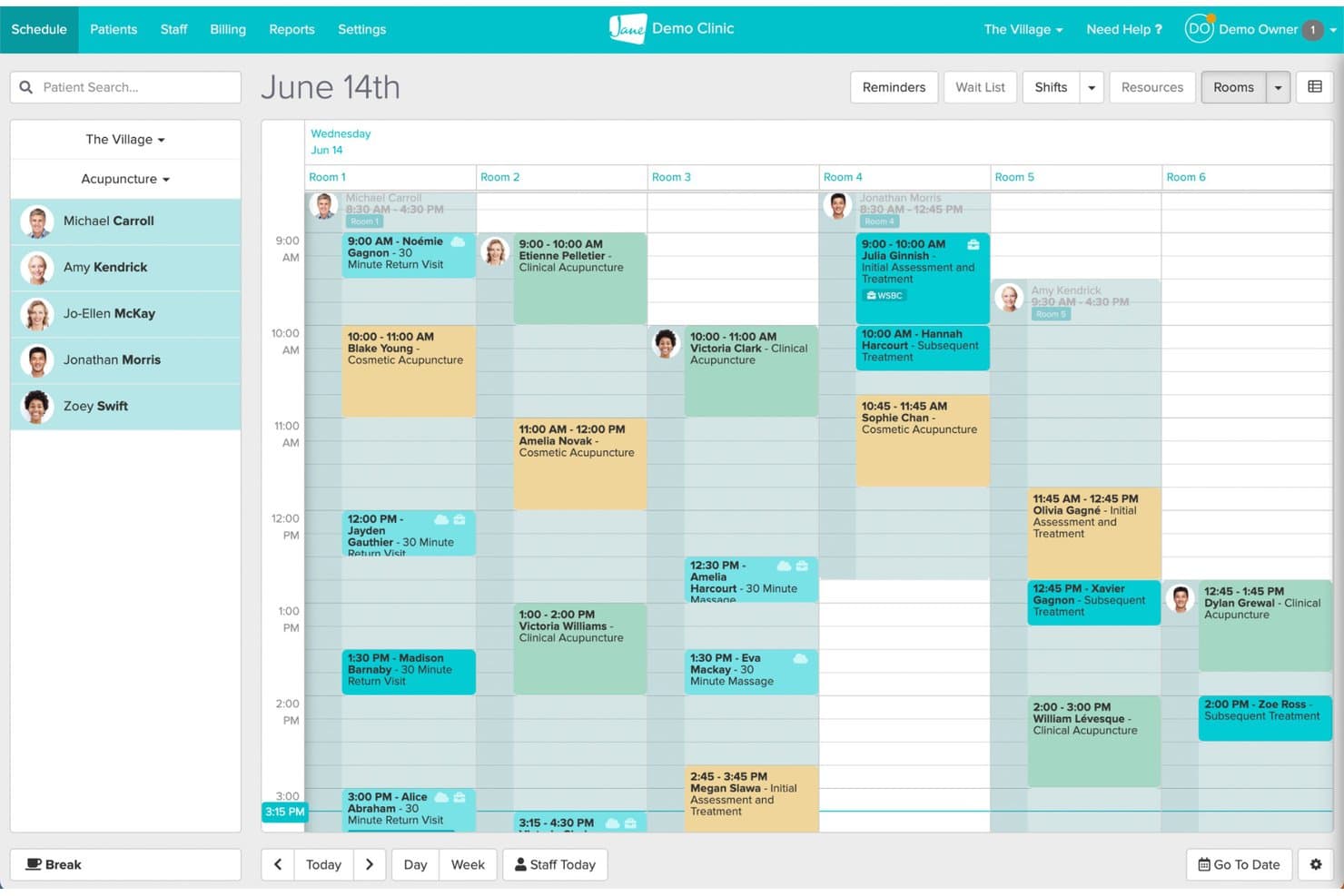
Jane's room-based scheduling view organizes daily appointments across multiple rooms. Jane is a clinic management platform that brings together online booking, scheduling, clinical charting, billing, and patient communication in one connected system built for allied health practices.
Who Is Jane Best For?
Jane fits allied health clinics—chiropractic, physiotherapy, occupational therapy—that want scheduling, charting, and billing managed in one place without juggling separate tools.
Why I Picked Jane
I picked Jane as one of the best because it's built specifically for allied health workflows, keeping scheduling and clinical charting genuinely connected in one system. I like how chart status (No Chart, Draft, Signed, Pending Review) surfaces directly in the Appointments Report, so nothing slips through after a visit. Jane's AI Scribe also lets practitioners generate draft notes from session recordings, which cuts documentation time without breaking the clinical workflow.
Jane Key Features
- Online patient booking: Patients can book appointments in real time through a custom-branded booking site with configurable practitioner, treatment, and location options.
- Intake form assignment: Forms can be automatically assigned by clinic, discipline, practitioner, or appointment type and sent at the time of booking.
- Telehealth scheduling: 1:1 virtual appointments can be scheduled and offered through online booking, with a waiting room, screen sharing, and secure joining links included.
- Activity log: Every user action—including chart access and changes—is recorded with timestamps and filterable by staff member, action type, and date range.
Jane Integrations
Jane lists 20 marketplace integrations, including Claim.MD, TELUS eClaims, Teleplan, Healthcode, Reserve With Google, and Google Analytics. Google Calendar sync is also documented, but Jane doesn't provide an open API or API keys for custom integrations.
Pros and Cons
Pros:
- Reminders support busy clinic workflows
- Patients praise straightforward online booking
- Appointments connect to chart statuses
Cons:
- Chart templates can take time to adapt
- Reports offer limited filtering and saved views
Learn more about Jane: Best for scheduling backed by 60-plus EHR syncs
- Free demo available
- Pricing upon request
Visit WebsiteCustomer Rating:4.8/5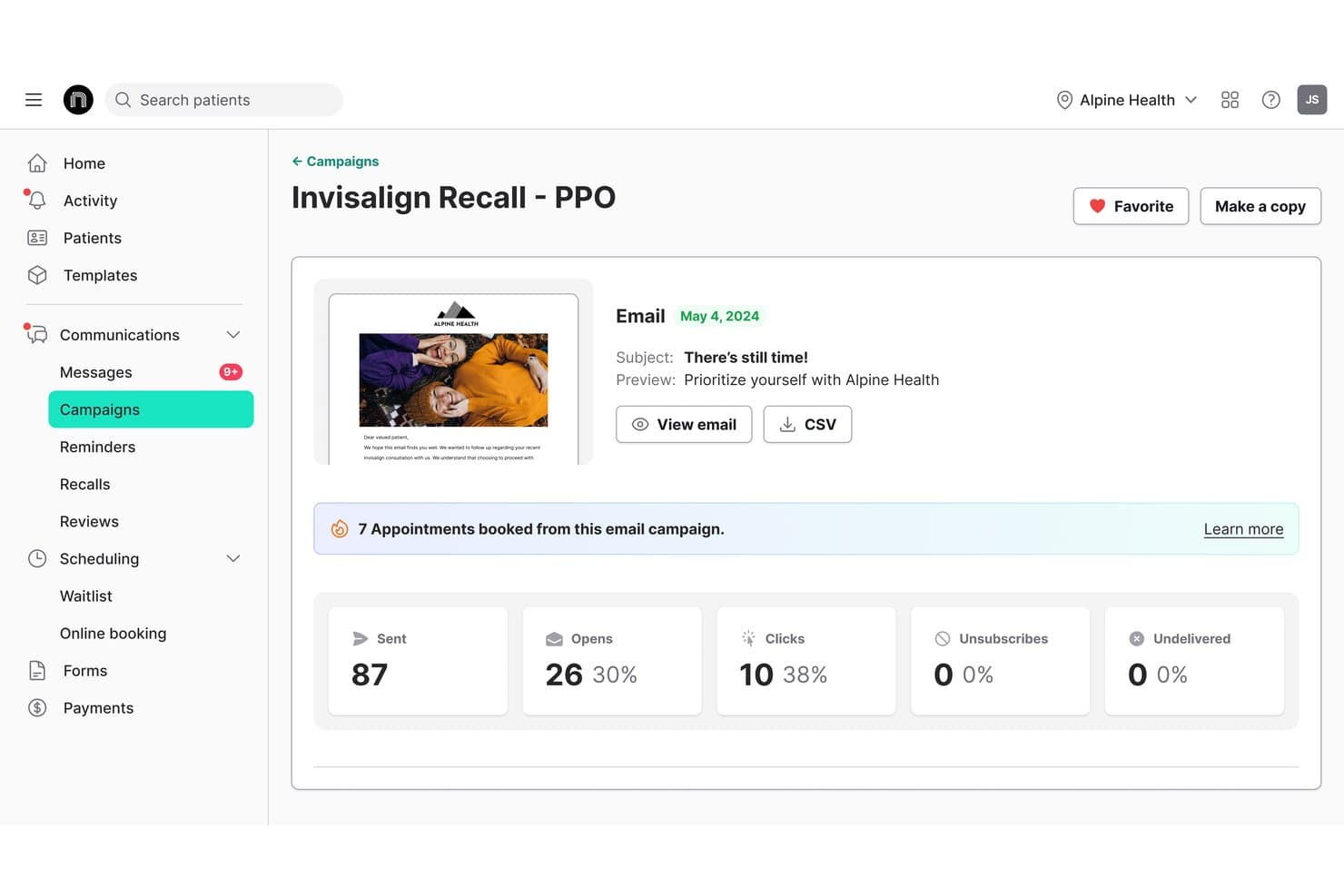
NexHealth offers campaign analytics tracking for email campaigns, showing appointments booked, open rates, clicks, and unsubscribes directly within the platform. NexHealth is an EMR scheduling software that connects patient self-scheduling, waitlist management, automated reminders, and one-click recalls directly to your practice management system.
Who Is NexHealth Best For?
NexHealth is a strong fit for multi-provider medical and dental practices that need online booking, waitlist management, and reminders tightly connected to an existing EHR or practice management system.
Why I Picked NexHealth
I picked NexHealth as one of the best because no other tool on my list matches its breadth of EHR connections, with over 60 supported systems spanning dental, medical, and specialty practices. What I find especially compelling is the waitlist feature: when a slot opens, NexHealth texts eligible patients a one-click booking link, and the confirmed appointment writes directly back to the EHR calendar within minutes. The one-click recall tool works the same way, pulling due dates and procedure codes from the EHR to trigger personalized outreach automatically.
NexHealth Key Features
- Multi-channel online booking: Patients can schedule appointments through your website, Google, social media, email, text, or QR codes, around the clock.
- Appointment-type insertion rules: When a patient books online or claims a waitlist slot, NexHealth can write specified procedure codes or visit types directly to the health record.
- Configurable reminder sequences: Staff can set up branching SMS and email reminder chains, with timing and messaging that adjusts based on whether a patient has confirmed.
- iPhone app for scheduling staff: Front-office staff can view the day's appointments, filter by provider or operatory, create bookings, and update confirmation status from their phone.
NexHealth Integrations
NexHealth supports 60-plus EHR syncs, including Epic Systems, athenaClinicals, eClinicalWorks, Dentrix, Eaglesoft, Open Dental, and Cerner PowerChart. Its REST API and webhooks support custom integrations.
Pros and Cons
Pros:
- Automated reminders cut follow-up work
- Waitlist helps fill canceled openings
- Online booking reduces front-desk calls
Cons:
- Rescheduled visits may lack patient notice
- Online slots can misstate availability
Learn more about NexHealth: Best for automating patient access
- Free demo available
- Pricing upon request
Visit WebsiteCustomer Rating:4.7/5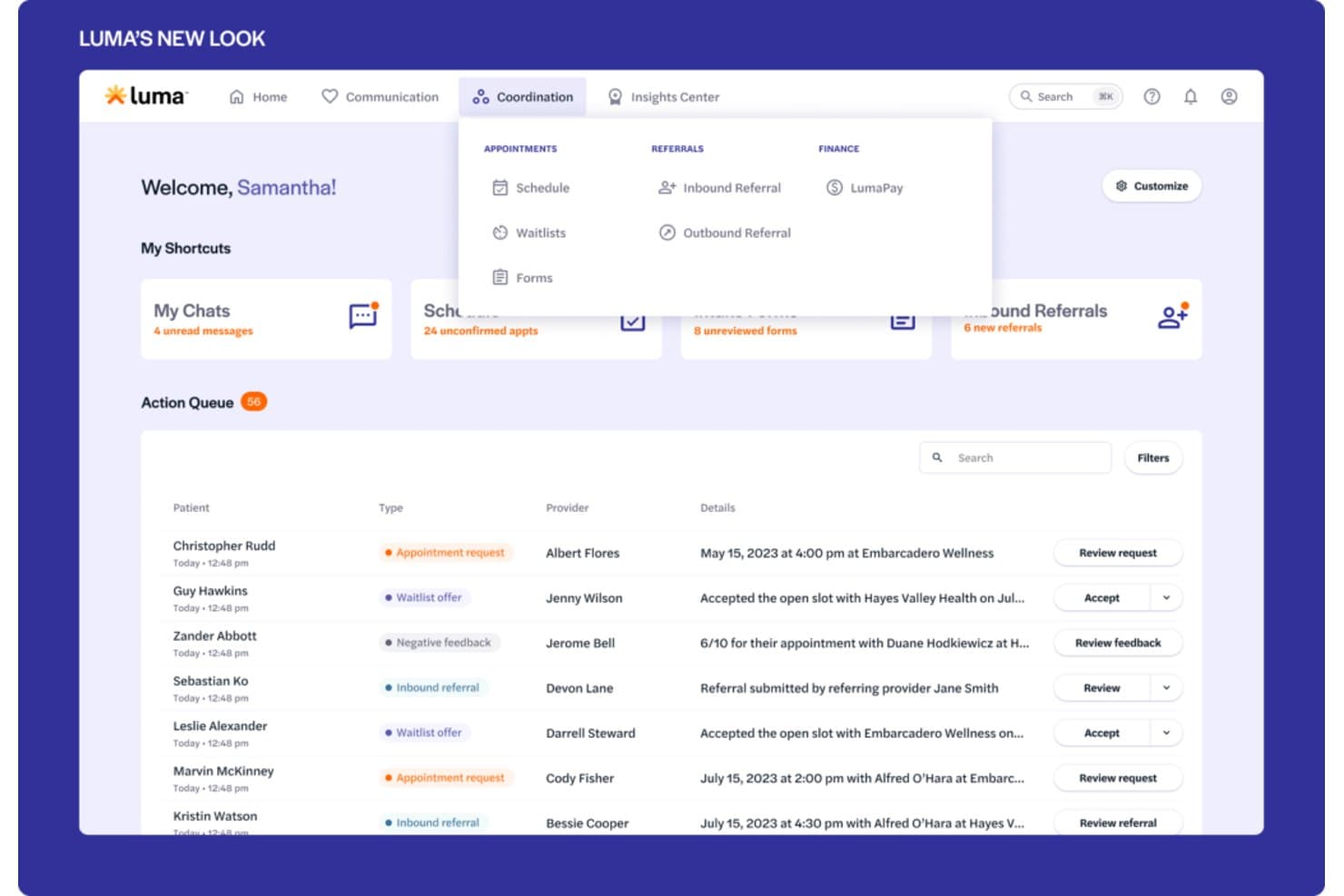
Luma Health offers a coordination dashboard with an action queue displaying appointment requests, waitlist offers, inbound referrals, and scheduling details for multiple patients. Luma Health is an AI-powered patient scheduling platform that handles self-scheduling, smart waitlist management, referral coordination, and EHR-integrated appointment management across text, web, phone, and Google.
Who Is Luma Health Best For?
Luma Health is a strong fit for medical groups and health systems that want to reduce front-office call volume by letting patients self-schedule, reschedule, and manage appointments across text, web, and Google.
Why I Picked Luma Health
I picked Luma Health as one of the best because it's purpose-built to automate patient access end-to-end, not just surface-level self-scheduling. I love that its smart waitlist automatically matches newly opened slots to patients by appointment type and books directly into the EHR, no staff intervention needed. Its AI-driven outbound outreach also contacts no-shows and late cancellations until they rebook, which is where most scheduling tools fall short.
Luma Health Key Features
- Referral fax coordination: Luma's AI parses incoming referral faxes, contacts the patient to schedule, and closes the referral in the EHR automatically.
- Insurance eligibility verification: Luma checks eligibility in real time or in bulk, matched to the appointment's service type, with a dashboard showing coverage details, payer alerts, and verification history.
- Multilingual patient reminders: Automated appointment reminders are sent in more than 20 languages across text, email, and phone, with patient responses writing back to the EHR.
- Capacity Intelligence reporting: Slot-level availability is reported by provider, specialty, visit type, location, and department, including open slots and earliest available dates.
Luma Health Integrations
Luma Health has six documented native EHR integrations: MEDITECH, Oracle Health, eClinicalWorks, Epic, athenahealth, and ModMed. It also connects with Google and Google Ads and offers an API for custom integrations.
Pros and Cons
Pros:
- Automated reminders reduce manual no-show outreach
- Waitlists help refill newly opened appointment slots
- Online booking reduces front-desk phone traffic
Cons:
- Custom workflow configuration can require extended setup
- Some reminders fail to reach patients
Learn more about Luma Health: Best for scheduling tied to kiosk check-in
- Free plan available
- From $25/month
Visit WebsiteCustomer Rating:4.2/5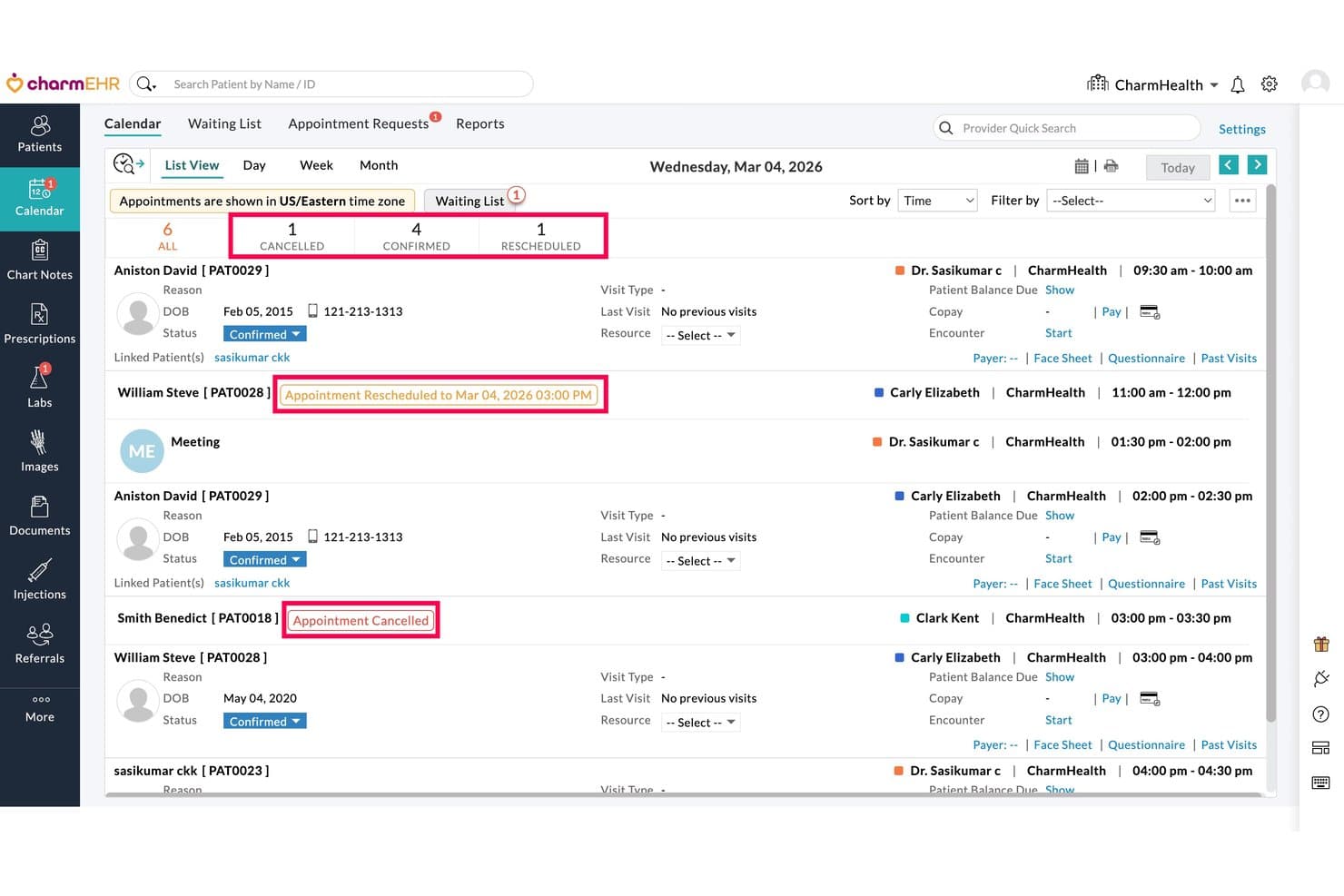
CharmHealth displays daily appointments with cancel and reschedule status indicators. CharmHealth is a browser-based EHR platform that combines appointment scheduling, clinical charting, patient intake, multi-facility calendar management, and telehealth booking in a single system.
Who Is CharmHealth Best For?
CharmHealth is a strong fit for small to mid-sized practices that need scheduling, charting, and patient check-in managed within a single browser-based system.
Why I Picked CharmHealth
I've included CharmHealth in my top picks because the kiosk check-in workflow is genuinely built into the scheduling layer, not bolted on as an afterthought. When a patient arrives, the kiosk app collects demographics, insurance details, and consent forms tied directly to that booked appointment, with questionnaires automatically assigned by visit type or provider. I also like that the Virtual Appointment Bot pre-screens patients before they even arrive, pulling from the same scheduling configuration used across the EHR calendar.
CharmHealth Key Features
- Multi-facility calendar management: View and manage appointment schedules across all practice locations from a single calendar, with filters for provider, resource, and visit type.
- Automated Booking Assistant: Lets patients confirm, cancel, or reschedule appointments by replying to reminder texts, and sends rescheduling links to patients marked as no-shows.
- Configurable appointment notifications: Set up email, SMS, and voice reminders for confirmations, reschedules, cancellations, and upcoming appointments, with editable message templates.
- Real-time insurance eligibility inquiry: Automatically runs eligibility checks a set number of days before appointments and displays policy, copay, and deductible details directly in the calendar.
CharmHealth Integrations
CharmHealth offers native integrations with Surescripts, LabCorp, Quest, QuickBooks, and Bluefin, plus HL7-based data exchange. REST APIs, FHIR documentation, and an SDK support custom integrations.
Pros and Cons
Pros:
- Patient reminders reduce manual follow-up
- Kiosk intake collects forms for booked visits
- Appointment-to-encounter workflow keeps charting connected
Cons:
- Support delays can leave scheduling issues unresolved
- CAPTCHA can interrupt online booking
Learn more about CharmHealth: Best for intake-linked scheduling and charting
- Free trial available.
- $59.90/month
Visit WebsiteCustomer Rating:4.5/5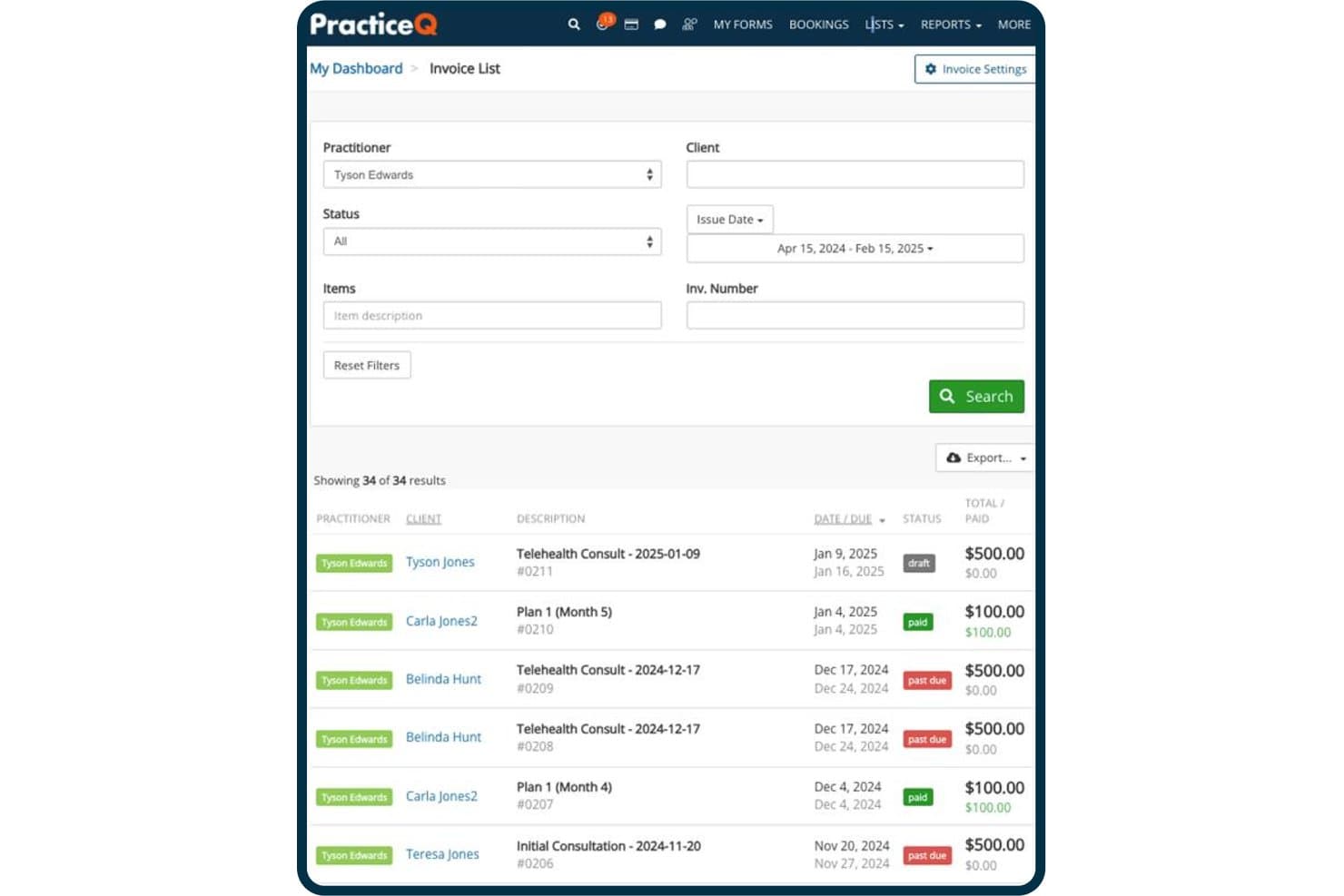
PracticeQ tracks invoice statuses, amounts, and due dates in one view. PracticeQ is an EHR and practice management platform that combines scheduling, patient records, digital intake forms, SOAP charting, billing, and automated patient communication in one system.
Who Is PracticeQ Best For?
PracticeQ suits small to mid-sized allied health and chiropractic practices that want intake forms, scheduling, and clinical charting managed in a single system.
Why I Picked PracticeQ
I picked PracticeQ as one of the best because it's built around the idea that intake and scheduling should never be separate workflows. When a patient books an appointment, their intake forms go out automatically, and submitted data pulls directly into charting notes, so your front desk isn't re-entering information before the visit. I also like the chiropractic-specific SOAP templates, including a spine-chart question type, which means clinical documentation is ready to use without building everything from scratch.
PracticeQ Key Features
- Multi-channel appointment reminders: Send automated SMS, email, or voice reminders with built-in confirm-or-cancel prompts that update appointment status in your calendar.
- EasyFill waitlist: Detects cancellations within five minutes and texts selected waitlisted patients so they can claim the open slot.
- Multi-provider, multi-location calendar: Each practitioner gets a separate calendar with individual availability rules, time zones, and location-specific hours.
- Patient portal: Patients book appointments, complete forms, pay invoices, and message your practice through a single branded online portal.
PracticeQ Integrations
PracticeQ offers native integrations with Google Calendar, Outlook Calendar, Google Meet, Zoom, and Google Drive. It also provides an open REST API and supports integrations with TriZetto, Office Ally, athenahealth, and Zapier.
Pros and Cons
Pros:
- Separate provider calendars include resource checks
- Submitted intake data carries into charting notes
- Chiropractic SOAP templates include spine charts
Cons:
- Time-zone errors can distort appointments and reminders
- Some self-bookings create duplicate patient charts
Learn more about PracticeQ: Best for independent practice scheduling and intake
- Free demo available
- Pricing upon request
Visit WebsiteCustomer Rating:3.9/5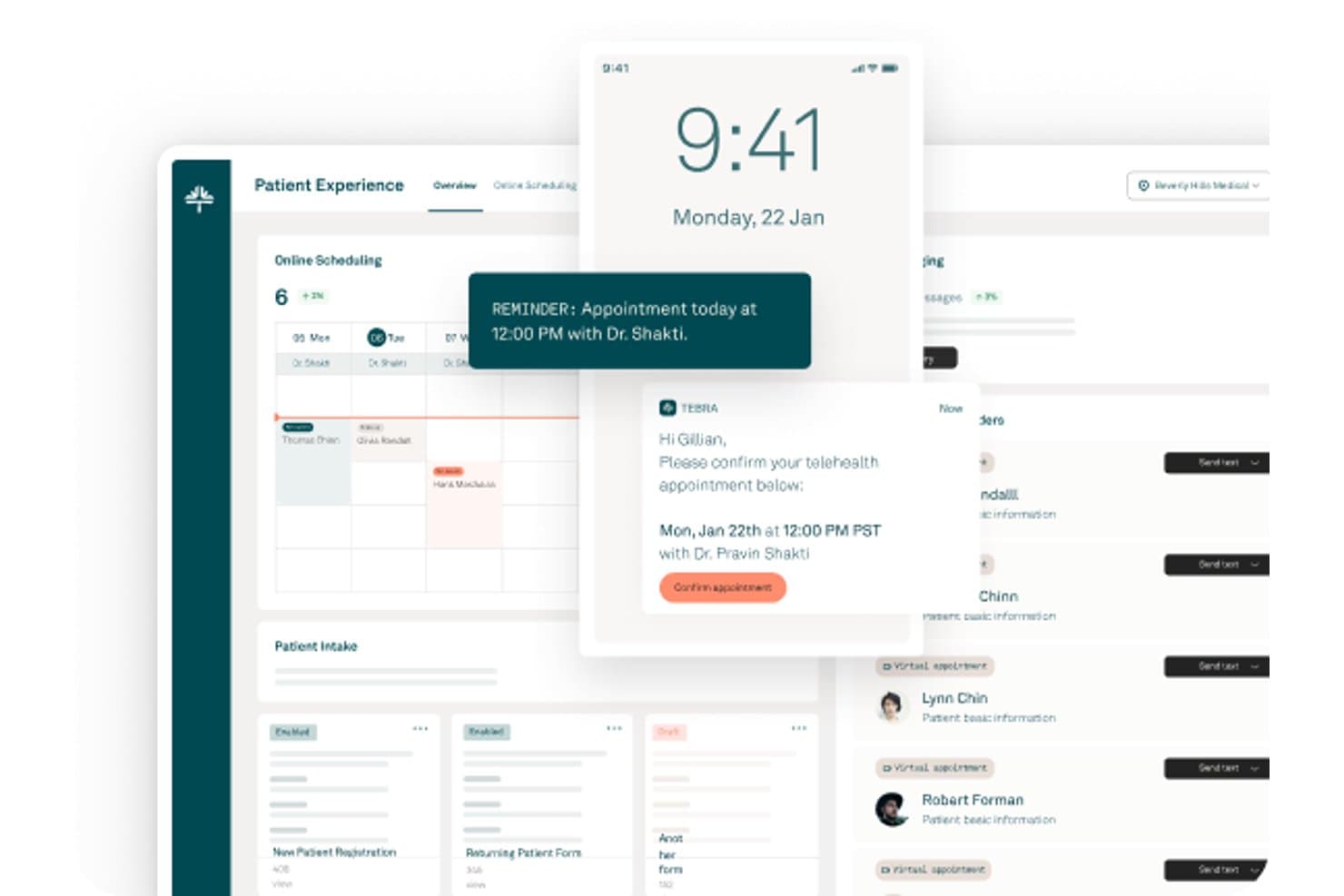
Tebra offers a patient experience dashboard with online scheduling, appointment reminders, telehealth confirmations, and patient intake management. Tebra is a cloud-based EHR platform built for independent healthcare practices that connects appointment scheduling, clinical charting, patient intake, electronic prescriptions, lab ordering, and integrated telehealth in a single workflow.
Who Is Tebra Best For?
Tebra is a strong fit for independent practices—solo providers, small groups, and specialty clinics—that want scheduling, intake, and clinical documentation in one place.
Why I Picked Tebra
I picked Tebra as one of the best because it's purpose-built for independent practices that need scheduling and clinical workflows in one place. I particularly like how appointment notes automatically populate the chief complaint in the clinical chart, so providers aren't re-entering context before a visit. Online booking ties directly to each provider's calendar, and patients can reschedule or cancel from their reminder texts without calling the front desk.
Tebra Key Features
- Multi-channel appointment reminders: Sends automated reminders by email, text, or phone call, with configurable timing from one to six days before the appointment.
- Real-time insurance eligibility checks: Verifies patient coverage from the Dashboard, Calendar, or Appointment page and saves results directly to the patient's insurance record.
- Multi-resource scheduling: Lets staff assign providers, rooms, and equipment to appointments with live availability and conflict indicators.
- All Appointments report: Tracks each provider's appointment volume alongside cancellation, reschedule, and no-show rates, with CSV or Excel export.
Tebra Integrations
Tebra offers native integrations with GoodRx, Google Business Profile, and Tebra Care Connect. It also provides SOAP APIs for custom integrations.
Pros and Cons
Pros:
- Patients can book outside office hours
- Text, email, and phone reminders
- Appointment notes populate clinical chief complaints
Cons:
- Support responses can be slow
- Calendar updates occasionally appear incorrectly
Learn more about Tebra: Best for AI-driven waitlist and slot recovery
- Free demo available
- Pricing upon request
Visit WebsiteCustomer Rating:3.4/5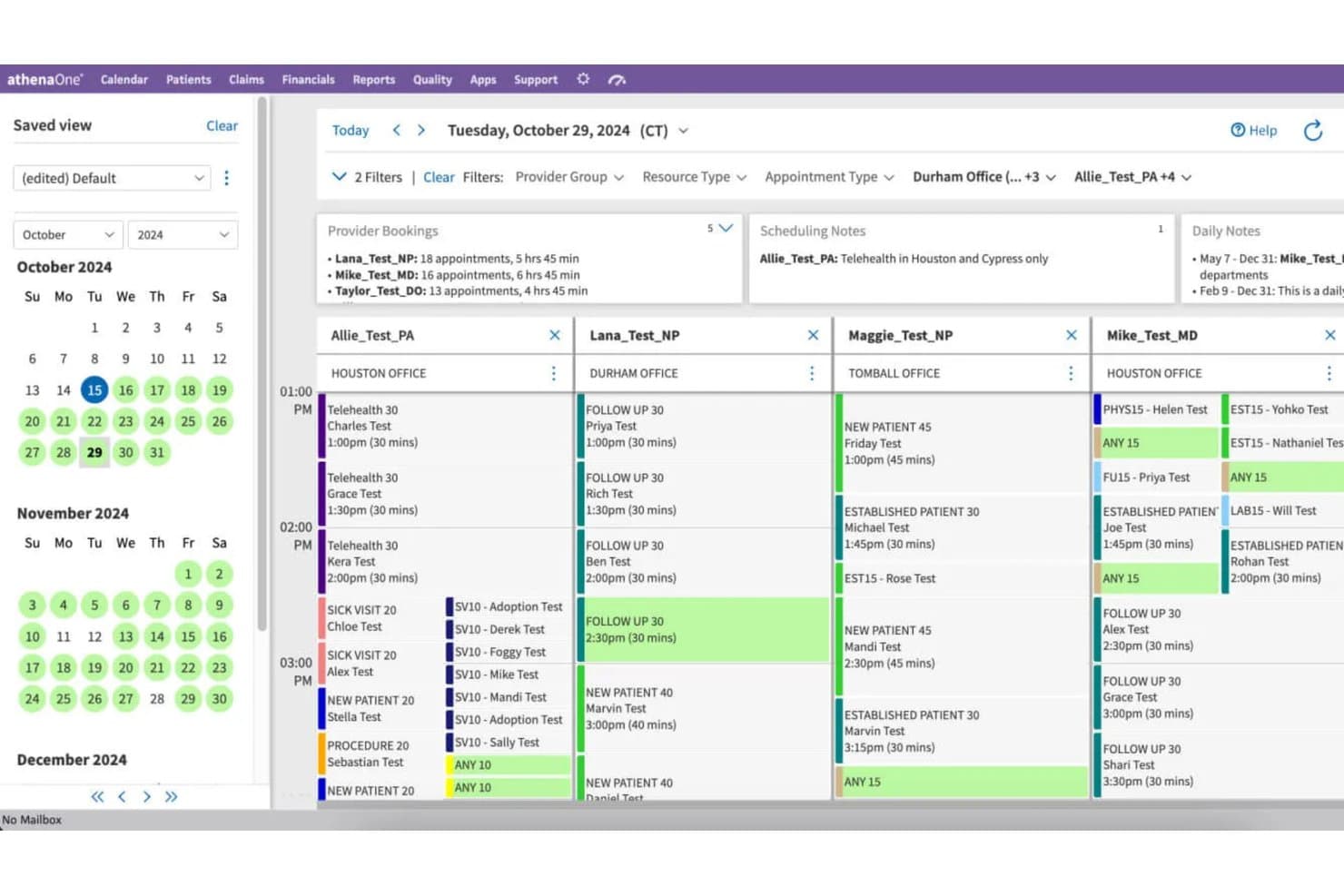
athenahealth offers a multi-provider calendar scheduling view with appointment details, office locations, and scheduling notes across providers. athenaOne is an integrated EHR, practice management, and patient engagement platform that combines native scheduling, clinical documentation, medical billing, and AI-powered waitlist and reminder tools in a single system.
Who Is athenaOne Best For?
athenaOne suits ambulatory practices that want scheduling, clinical documentation, billing, and AI-driven waitlist recovery built into a single system rather than stitched together from separate tools.
Why I Picked athenahealth
athenaOne earns its spot on my shortlist because its AI-driven waitlist tools actively recover lost appointment slots rather than leaving gaps unfilled. When a cancellation comes in, athenaOne's Waitlist Scheduling scans the waitlist and automatically contacts patients to fill the opening, including same-day slots. I also like that its proactive waitlist feature sends outbound notifications to patients about available appointments before a slot goes to waste.
athenaOne Key Features
- Schedule Builder: Create, preview, and apply scheduling templates for individual providers, departments, or provider groups, with configurable appointment types, times, and date ranges.
- Self check-in: Let patients confirm appointment details, update demographics, upload insurance cards, and complete consent forms before arrival.
- Multi-resource scheduling: Book multiple providers, rooms, or equipment resources for the same or different days and times, including surgical room schedules and provider block time.
- ReminderCall: Send automated appointment reminders by phone, email, or text, with delivery and confirmation outcome tracking reported directly in athenaOne.
athenahealth Integrations
athenaOne advertises 277K+ direct clinical integrations, including Labcorp Diagnostic Assistant, Zio by iRhythm, and Fullscript. It also supports Marketplace integrations and REST and FHIR APIs with 700+ endpoints for custom connectivity.
Pros and Cons
Pros:
- Reminder tracking reports confirmations and delivery
- Calendar templates cover providers and departments
- AI waitlists refill canceled appointments
Cons:
- Guest self-scheduling cannot reschedule or cancel
- Routine scheduling can require many clicks
Learn more about athenahealth: 8Best for health record-native scheduling at scale
EPIC
- Not available
- Pricing upon request
Visit WebsiteCustomer Rating:4.5/5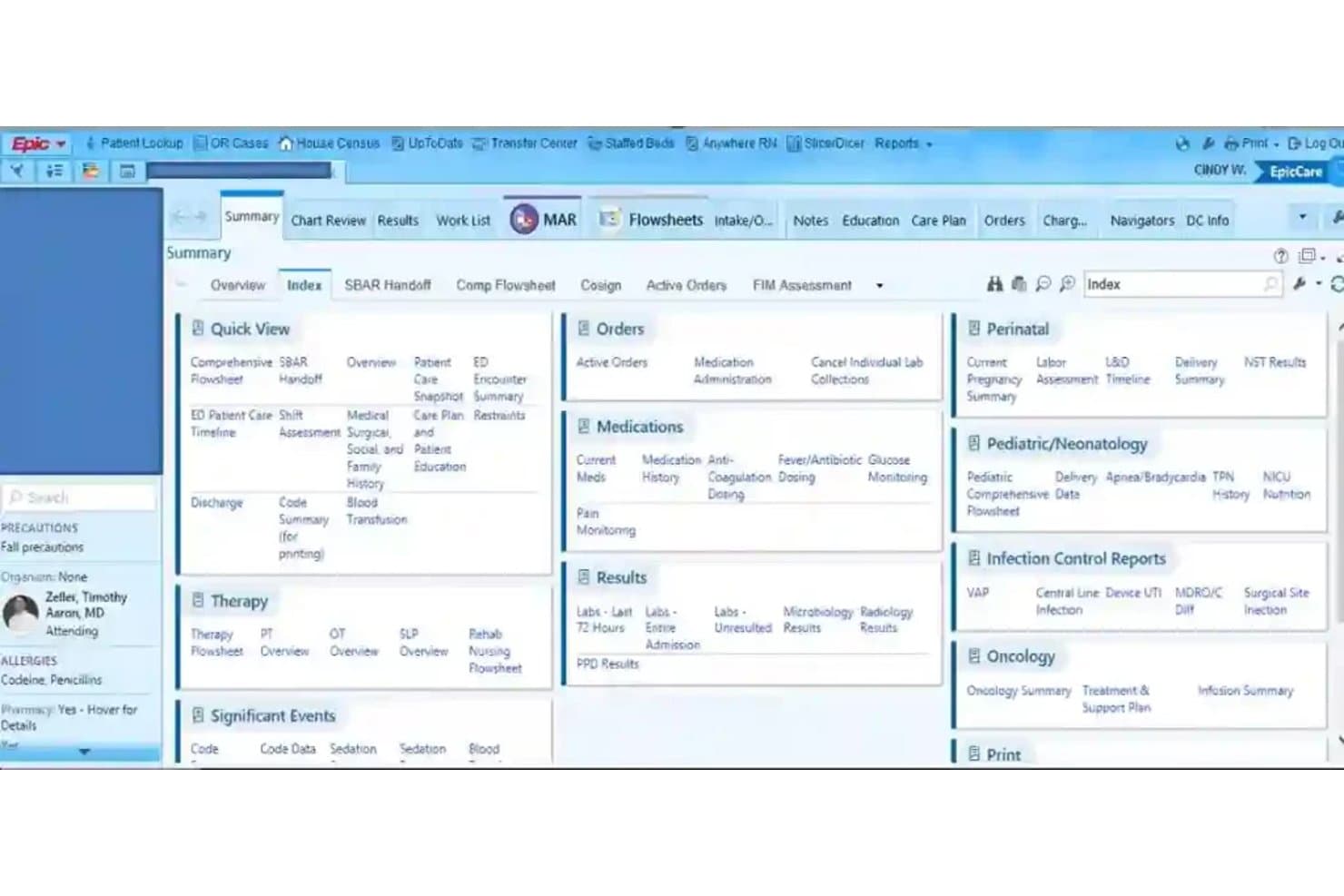
EPIC organizes patient data into a tabbed clinical dashboard for quick access. Epic is an EMR platform that brings together health records and appointment scheduling, including patient self-scheduling, centralized multi-specialty booking, automated reminders, and waitlist management across large healthcare organizations.
Who Is Epic Best For?
Epic is a strong fit for large health systems and multi-specialty organizations that need scheduling embedded directly within a unified patient record.
Why I Picked Epic
I picked Epic as one of the best because scheduling lives inside the same patient record your clinical team already works in, which means no syncing between separate systems. I like how Fast Pass automatically surfaces open slots to waitlisted patients, and how Hello World sends multi-channel reminders via SMS and voice, drawing each patient's preferred contact method directly from their chart. Epic reported more than 3.4 million no-shows prevented across U.S. health systems in a single year, which reflects the scale this platform is built to handle.
Epic Key Features
- Centralized scheduling: Lets scheduling staff book appointments across an organization using built-in decision support for specialty-specific and complex appointment needs.
- Patient self-scheduling: Allows new and existing patients to schedule online with or without a MyChart account, including sequential appointments like imaging before a visit.
- Digital check-in: Gives patients a way to complete check-in digitally before their appointment through Epic's patient experience tools.
- Insurance eligibility verification: Checks patient coverage electronically without requiring staff to log into separate payer portals.
Epic Integrations
Epic reports 3,294 live apps using open.epic web services. Native vendor integrations aren’t clearly documented, but Epic supports custom connections through FHIR, REST APIs, and HL7v2 interfaces.
Pros and Cons
Pros:
- Specialty-aware booking supports complex appointments
- Automated reminders and waitlists fill openings
- Patient records stay alongside scheduling
Cons:
- External appointments can’t be checked in or charted from the clinical schedule
- Booking can take multiple selections
Learn more about EPIC:
How I Evaluate EMR Scheduling Software
I split my evaluation into three parts, giving the most weight to core functions: syncing appointments with patient records and managing provider calendars and bookings. Next, I look for differentiators such as specialty-specific templates or automated waitlists. Finally, I consider onboarding, support, interoperability, and total cost.
Core Functionality (Table Stakes For This List)
When I'm selecting tools for my list, I score each one on a scale from 0 (does not offer the functionality) to 5 (excels in this area) for each core functionality listed below. I then convert the total into a percentage to help assess each tool's overall fit, with extra weight on any functionalities I’ve deemed essential.
- EMR Integration (Essential): I look for appointments to update patient records reliably, so staff aren’t entering visit details twice or reconciling mismatched records.
- Appointment Calendar (Essential): I assess whether staff can manage providers, locations, and rooms in one calendar and spot scheduling conflicts.
- Patient Reminders: I check which channels send reminders and whether patients can confirm or cancel without calling the clinic.
- Self-Scheduling: I look for real-time availability and options for patients to book, reschedule, or cancel the appointment types your clinic offers.
- Availability Rules: I assess how precisely teams can set provider hours, visit types, durations, and resource availability to prevent conflicts.
- Waitlists And Recall: I check how the system matches patients to canceled slots and supports follow-up scheduling from recall lists.
Once I have a list of tools that meet the criteria, I consider what sets each platform apart.
Differentiating Factors (What Sets Vendors Apart)
Here's how I compare and contrast different vendors:
Standout Features
I look for specialty-specific templates that match a clinic's actual visit types and durations—a behavioral health practice needs intake slots that look nothing like a dental hygiene appointment. Real-time eligibility verification at booking is another priority, since catching coverage gaps before a patient arrives saves front-desk staff from last-minute scrambles and reduces claim denials. I also evaluate analytics dashboards that track no-show rates and provider utilization, because those numbers directly shape staffing and scheduling decisions as a practice grows.
Beyond Features
I check whether vendors support HL7 or FHIR standards, since proprietary integrations can lock you into one EMR long after it stops fitting your practice. Implementation support matters just as much—a vendor that offers dedicated migration specialists and staff training reduces the real clinical risk of scheduling downtime during a cutover. I also evaluate total cost of ownership, looking past the base subscription to per-provider licensing, SMS reminder fees, and integration surcharges that add up fast in a multi-physician clinic.
Slik velger du programvare for EMR-timeplanlegging
Det er lett å gå seg vill i lange funksjonslister og kompliserte prismodeller. For å holde fokus mens du går gjennom den unike prosessen din for valg av programvare, er her en sjekkliste over faktorer du bør ha i tankene:
| Faktor | Hva du bør vurdere |
| Skalerbarhet | Kan programvaren håndtere flere lokasjoner, behandlere og pasienter etter hvert som praksisen din vokser? |
| Integrasjoner | Fungerer den sømløst sammen med eksisterende EMR-, fakturerings-, telehelse- og kommunikasjonsverktøy? |
| Tilpasningsmuligheter | Kan du konfigurere avtale- og timetyper, regler for timeplanlegging og tilgangskontroller for arbeidsflytene dine? |
| Brukervennlighet | Vil administrasjons- og klinikkteamene dine lære systemet raskt, eller krever det omfattende opplæring? |
| Implementering og innføring | Hvor mye støtte får du under utrullingen? Spør om migrering, tidsplaner for oppsett og tilgjengelige opplæringsressurser. |
| Kostnad | Hva er den faktiske totalkostnaden, inkludert oppsett, tillegg, vedlikehold og gebyrer per behandler? |
| Sikkerhetstiltak | Oppfyller produktet HIPAA-kravene, revisjonskravene og behovene dine for datatilgang uten at det kreves ekstra oppsett? |
| Tilgjengelig brukerstøtte | Tilbys direkte brukerstøtte i tidsrommet du driver virksomhet, eller bare i åpningstiden i en annen tidssone? |
Hva er programvare for EMR-timeplanlegging?
Programvare for EMR-timeplanlegging er et digitalt verktøy som lar teamet ditt bestille, administrere og følge opp pasientavtaler direkte i det elektroniske pasientjournalsystemet. Den kobler timeplanlegging sammen med pasientjournaler, samler kalendere for flere behandlere og lokasjoner og automatiserer påminnelser for å redusere antallet pasienter som ikke møter opp. Denne programvaren hjelper praksiser med å tilpasse avtale- og timetyper, administrere ventelister og forbedre informasjonsflyten mellom kliniske og administrative team.
Funksjoner i programvare for EMR-timeplanlegging
Når du velger programvare for EMR-timeplanlegging, bør du se etter følgende viktige funksjoner:
- EMR/EHR-integrasjon: Timeplaner oppdaterer pasientjournaler i sanntid, slik at kliniske team og administrasjonsteam alltid bruker det samme datasettet.
- Planlegging for flere behandlere: Administrer kalendere for flere behandlere, rom og lokasjoner, med varsler om konflikter og overlapp.
- Timeavtaletyper og regler: Angi tilpassbare besøkstyper og varigheter som samsvarer med behandlernes spesialiteter, krav fra betalere og kliniske arbeidsflyter.
- Pasientpåminnelser: Send automatiserte SMS-er, e-poster eller talemeldinger til pasienter, med bekreftelser som bidrar til å redusere risikoen for uteblivelser.
- Selvbestilling på nett: La pasienter bestille, endre eller avbestille timer fra en portal eller widget som viser tilgjengelighet i sanntid.
- Ventelistehåndtering: Holder oversikt over pasienter som ønsker tidligere timer, og fyller raskt avbestilte timer ved å matche dem med ledige tidspunkt.
- Tildeling av ressurser og rom: Bestill nødvendige ressurser sammen med timer, og koordiner bruken av undersøkelsesrom, utstyr eller sykepleiere.
- Støtte for gjentakende timer: Planlegg serier med besøk – for eksempel behandlinger, prosedyrer eller pleieplaner med flere trinn – basert på angitte mønstre eller avhengigheter.
- Tilgangskontroller og tillatelser: Begrens hvem som kan se eller redigere timeavtaledata, slik at sensitive arbeidsflyter beskyttes basert på rolle eller avdeling.
- Rapportering og analyse: Generer detaljerte data om trender for timeavtaler, uteblivelsesrater, utnyttelse av behandlere og flaskehalser i arbeidsflyten for å finne forbedringsmuligheter.
Vanlige AI-funksjoner i EMR-planleggingsprogramvare
I tillegg til standardfunksjonene i EMR-planleggingsprogramvare som er nevnt ovenfor, tar mange av disse løsningene i bruk AI med funksjoner som:
- Prediktiv analyse av uteblivelser: Bruker historiske data om timeavtaler og pasientatferd til å forutsi hvilke pasienter som mest sannsynlig vil utebli, slik at personalet kan gripe inn proaktivt.
- Smart optimalisering av ventelister: AI matcher avbestilte timer med de best egnede pasientene på ventelisten basert på hvor mye det haster, behandlerpreferanser og planleggingsmønstre.
- Automatisert optimalisering av timeplaner: Analyserer kontinuerlig behandlernes kalendere og pasientetterspørselen for å foreslå ideelle tidspunkt, redusere tomrom og maksimere utnyttelsen.
- Planleggingsassistenter med naturlig språk: Lar personalet eller pasientene bestille timer ved hjelp av et samtalebasert språk, der AI tolker forespørsler og håndterer planleggingslogikken.
- Etterspørselsprognoser: Forutsier fremtidig volum av timeavtaler og bemanningsbehov ved å analysere trender, sesongvariasjoner og eksterne faktorer, slik at virksomheter kan planlegge ressursene mer nøyaktig.
Fordeler med EMR-planleggingsprogramvare
Implementering av EMR-planleggingsprogramvare gir flere fordeler for teamet og virksomheten din. Her er noen av fordelene du kan se frem til:
- Færre uteblivelser: Automatiserte påminnelser og smarte ventelistefunksjoner sørger for at timeavtaler fylles opp, og reduserer tomrom i timeplanen.
- Effektiviserte arbeidsflyter: Direkte EMR-integrasjon sparer personalet for tid ved å oppdatere pasientjournaler og detaljer om timeavtaler umiddelbart på tvers av systemer.
- Bedre pasienttilgang: Selvbestilling på nett og tilgjengelighet i sanntid hjelper pasienter med å finne og bestille helsehjelpen de trenger, uten gjentatte telefoner.
- Bedre ressursutnyttelse: Funksjoner for håndtering av rom, behandlere og utstyr reduserer dobbeltbookinger og maksimerer bruken av lokaler og personale.
- Bedre beslutningsgrunnlag: Verktøy for rapportering og analyse synliggjør trender, flaskehalser og muligheter for prosessforbedring på et øyeblikk.
- Styrket samsvar og sikkerhet: Innebygde tilgangskontroller og revisjonsspor hjelper deg med å opprettholde HIPAA-samsvar og beskytte sensitive data om timeavtaler.
- Tilpasset din spesialitet: Tilpassbare timeavtaletyper og arbeidsflyter støtter de unike behovene til ulike medisinske spesialiteter og praksiser av forskjellig størrelse.
Kostnader og priser for EMR-planleggingsprogramvare
Ved valg av EMR-planleggingsprogramvare er det nødvendig å forstå de ulike prismodellene og abonnementene som er tilgjengelige. Kostnadene varierer basert på funksjoner, teamstørrelse, tillegg og mer. Tabellen nedenfor oppsummerer vanlige abonnementer, gjennomsnittsprisene deres og typiske funksjoner som er inkludert i løsninger for EMR-planleggingsprogramvare:
Sammenligningstabell for abonnementer for EMR-planleggingsprogramvare
| Plantype | Gjennomsnittspris | Vanlige funksjoner |
| Gratisabonnement | $0 | Inkluderer begrenset timebestilling, grunnleggende kalendersynkronisering og minimal kundestøtte. |
| Personlig abonnement | $10-$30/user/month | Tilbyr timebestilling for individuelle behandlere, pasientpåminnelser, nettbasert bestilling og grunnleggende rapportering. |
| Bedriftsabonnement | $35-$80/user/month | Legger til støtte for flere behandlere, integrasjon med EMR/EHR, egendefinerte timetyper, gruppekalendere og forbedret analyse. |
| Virksomhetsabonnement | $100-$200+/user/month | Støtter administrasjon av flere lokasjoner, avanserte integrasjoner, ressursfordeling, dedikert kundestøtte og verktøy for etterlevelse. |
Vanlige spørsmål om EMR-planleggingsprogramvare
\u003cspan style=\u0022font-weight: 400\u0022\u003eHer er noen svar på vanlige spørsmål om EMR-planleggingsprogramvare:\u003c/span\u003e
Hvordan forbedrer EMR-planleggingsprogramvare pasientopplevelsen?
\u003cspan style=\u0022font-weight: 400\u0022\u003eMed disse verktøyene kan pasienter bestille, avbestille eller endre timer på nettet, motta automatiske påminnelser og fylle ut inntaksskjemaer på forhånd. Dette reduserer ventetiden og holder pasientene bedre informert om behandlingen sin.\u003c/span\u003e
Kan EMR-planleggingsprogramvare fungere med det eksisterende EHR-systemet mitt?
\u003cspan style=\u0022font-weight: 400\u0022\u003eJa, de fleste løsninger tilbyr integrasjonsalternativer med ledende EHR-plattformer. Se etter innebygde integrasjoner eller god støtte for API/HL7 for å sikre at pasientdata, timeopplysninger og kliniske notater synkroniseres sømløst mellom systemene.\u003c/span\u003e
Hvilke sikkerhetstiltak bør jeg forvente av EMR-planleggingsprogramvare?
\u003cspan style=\u0022font-weight: 400\u0022\u003eForvent HIPAA-kompatibel datahåndtering, revisjonslogger, rollebasert tilgangskontroll og kryptert datalagring. Noen leverandører tilbyr også SOC 2-sertifisering og verktøy for administrasjon av brukertillatelser for å oppfylle krav til etterlevelse.\u003c/span\u003e
Er det mulig å administrere gjentakende timer eller gruppetimer?
\u003cspan style=\u0022font-weight: 400\u0022\u003eJa, mange plattformer lar deg sette opp gjentakende timer for behandlinger eller infusjoner og koordinere økter med flere behandlere eller grupper, slik at du kan håndtere komplekse planleggingsmønstre uten manuell oppfølging.\u003c/span\u003e
Hvilke ressurser for innføring og kundestøtte er vanligvis tilgjengelige?
\u003cspan style=\u0022font-weight: 400\u0022\u003eLeverandører kan tilby personlig tilpasset innføring, datamigrering og opplæring. Spør om dedikerte kontaktpersoner for kundesuksess, kundestøtte døgnet rundt og nettbaserte kunnskapsbaser som kan hjelpe teamet med en smidig overgang og rask problemløsning.\u003c/span\u003e