

Programvare for resultatstyring i helsetjenesten hjelper praksisen din med å følge med på, analysere og forbedre kvalitet, effektivitet og resultater på tvers av kliniske og administrative områder. Hvis du sammenligner alternativer for å forbedre behandlernes resultater, kliniske resultater eller økonomirapportering, viser denne veiledningen deg hva du bør se etter, og hvordan hvert verktøy dekker behovene dine som eier av en medisinsk praksis.
Why Trust Our Software Recommendations
6,700+
Reviews
20
Industry experts
16+
Evaluation factors
14
Years
Our team has been testing and reviewing software since 2012. As medical practice leaders ourselves, we know how difficult—and important—it is to choose the right software.
For this guide, we evaluated tools using hands-on testing and independent research, scoring tools using our selection criteria.
Our reviews reflect our human editorial judgment, not a sales pitch.
Sammenligningstabell for programvare for resultatstyring i helsetjenesten
Denne sammenligningstabellen oppsummerer prisopplysningene for mine beste utvalgte programmer for resultatstyring i helsetjenesten:
| Tool | Best For | Trial Info | Price | ||
|---|---|---|---|---|---|
| 1 | Best for practice performance reporting | Free demo available | Pricing upon request | Website | |
| 2 | Best for practice financial performance | Free demo available | Pricing upon request | Website | |
| 3 | Best for enterprise healthcare analytics | Free demo available | Pricing upon request | Website | |
| 4 | Best for healthcare performance analytics | Free demo available | Pricing upon request | Website | |
| 5 | Best for provider performance insights | Free demo available | Pricing upon request | Website | |
| 6 | Best for independent practice performance | Free demo available | Pricing upon request | Website | |
| 7 | Best for ambulatory performance tracking | Free demo available | Pricing upon request | Website | |
| 8 | Best for clinical performance analytics | Free demo available | Pricing upon request | Website | |
| 9 | Best for network-based practice insights | Free demo available | Pricing upon request | Website | |
| 10 | Best for healthcare benchmarking | Free demo available | Pricing upon request | Website |


Anmeldelser av programvare for resultatstyring i helsetjenesten
\u003cspan style=\u0022font-weight: 400;\u0022\u003eNedenfor finner du mine detaljerte sammendrag av de beste programmene for resultatstyring i helsetjenesten som kom med på kortlisten min. Anmeldelsene mine gir en detaljert gjennomgang av funksjonene, de beste bruksområdene og mulighetene til hver plattform, slik at du kan finne den som passer best for deg.\u003c/span\u003e
 Best for practice performance reporting
- Free demo available
- Pricing upon request
Visit WebsiteCustomer Rating:3.6/5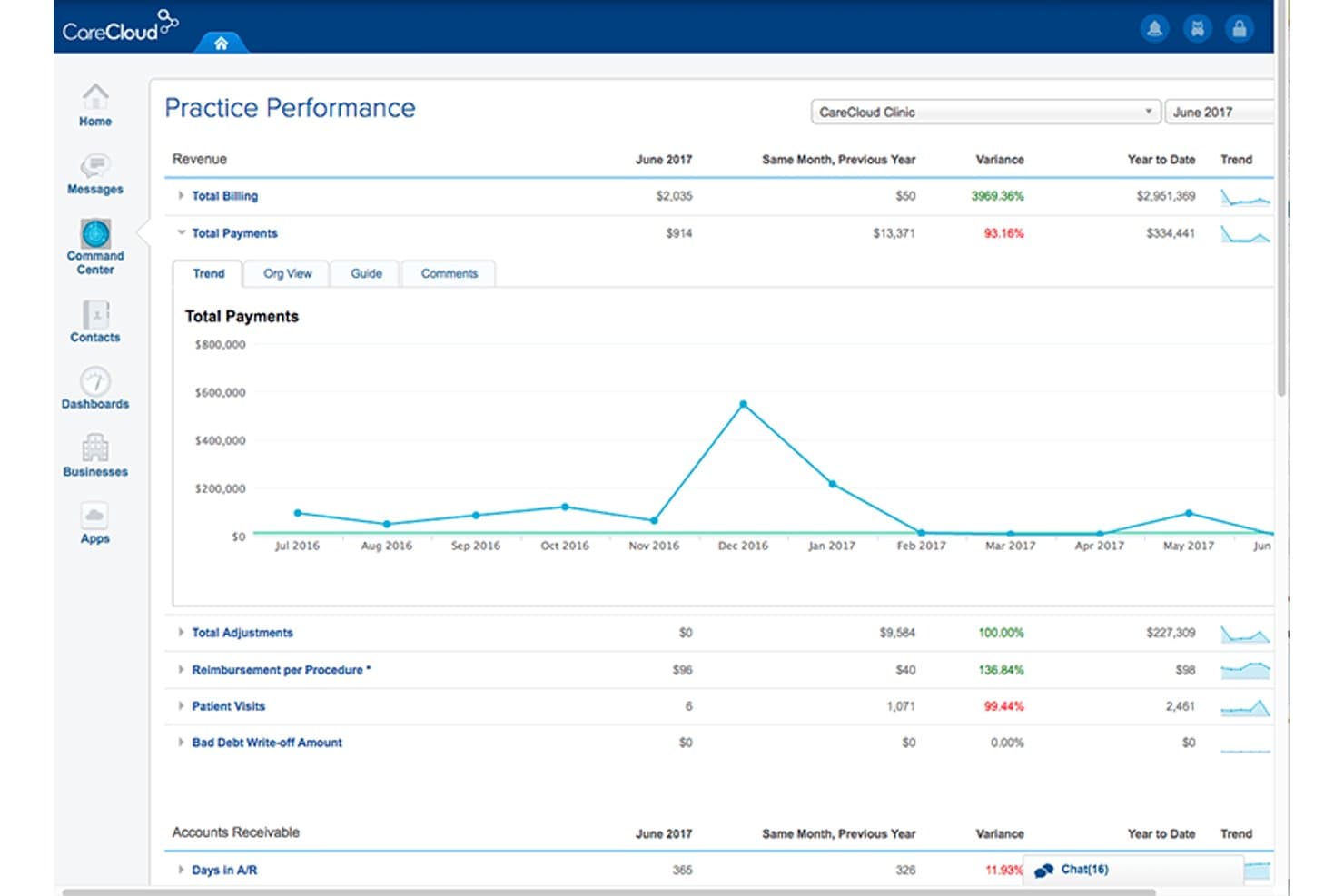
CareCloud offers a practice performance dashboard with revenue trends. CareCloud is a cloud-based healthcare platform that combines EHR, practice management, revenue cycle management, and financial and clinical performance analytics through its built-in PrecisionBI business intelligence module.
Who Is CareCloud Best For?
CareCloud is a strong fit for mid-to-large specialty medical practices that need integrated billing, clinical documentation, and financial performance reporting in one platform.
Why I Picked CareCloud
CareCloud earns its spot on my shortlist because PrecisionBI is built directly into the platform, not bolted on as a separate tool. I can track denial rates by payer, monitor clinical quality metrics, and pull custom financial dashboards without ever leaving the system. The HFMA MAP App integration adds AI-driven revenue cycle benchmarking, so I'm comparing practice performance against real industry data rather than just internal period-over-period trends.
CareCloud Key Features
- CareCloud Charts EHR: Specialty-driven electronic health records with customizable documentation templates for various clinical workflows.
- Integrated telehealth: HIPAA-compliant telehealth module directly connected to the EHR and billing workflows.
- Breeze patient engagement: Digital intake, online payment, appointment reminders, and patient portal tools for front-desk and self-service.
- API and HL7 data integrations: Supports HL7, FHIR, and broad API access to connect with labs, billing software, and third-party applications.
CareCloud Integrations
CareCloud offers native integrations with Epic, Meditech, ProPath, HealthLink, Google Cloud Healthcare API, Zocdoc, and RevSpring, and provides an API for custom integrations.
Pros and Cons
Pros:
- Specialty-specific clinical KPI tracking available
- MIPS and HEDIS reporting natively supported
- PrecisionBI analytics built directly into EHR
Cons:
- Mobile app lacks full reporting functionality
- Custom reports often require vendor assistance
Learn more about CareCloud: Best for practice financial performance
- Free demo available
- Pricing upon request
Visit WebsiteCustomer Rating:3.6/5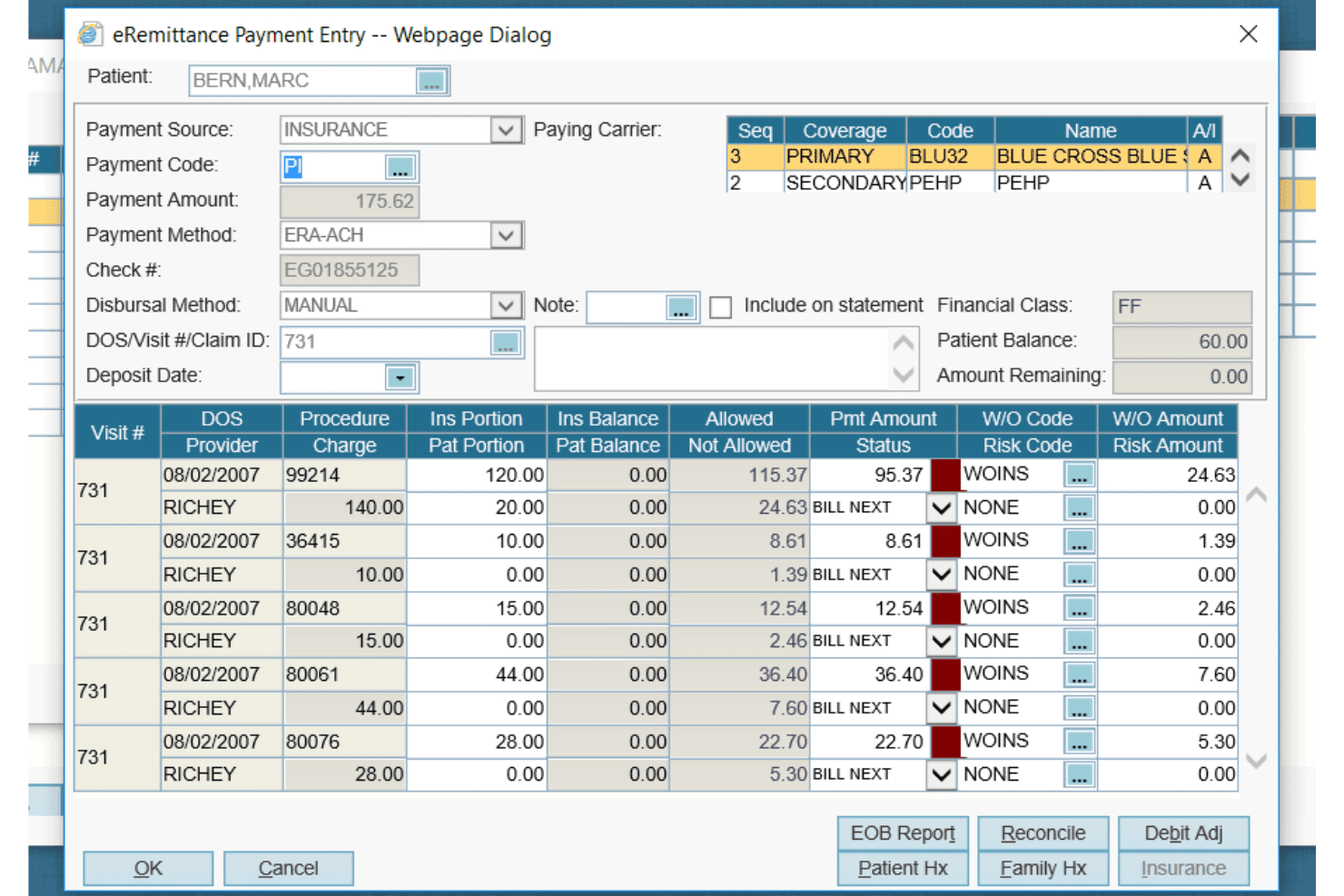
AdvancedMD offers a detailed eRemittance Payment Entry dialog for managing insurance billing, claim payments, and write-off codes per procedure. AdvancedMD is a cloud-based EHR, practice management, and patient engagement platform built for independent medical practices, combining clinical documentation, scheduling, billing, revenue cycle management, and real-time financial and operational reporting in one system.
Who Is AdvancedMD Best For?
It's a strong fit for independent medical practices where the practice owner or administrator is directly responsible for billing, collections, and revenue cycle oversight.
Why I Picked AdvancedMD
AdvancedMD earns its spot on my shortlist because the A/R Control Center and real-time financial dashboards give practice owners a live view of collections, denial rates, and payer mix without waiting for month-end reports. I also like the automated claim scrubbing paired with Waystar clearinghouse connectivity, which catches billing errors before submission and reduces the denial cycle. In practice, that means I can spot a payer trending toward higher denials and act on it the same week.
AdvancedMD Key Features
- Population health reporting: Enables clinics to track, analyze, and report on quality-of-care and regulatory measures such as MIPS and HEDIS.
- Customizable clinical templates: Allows providers to tailor charting workflows and documentation to meet specialty requirements.
- 1,400+ third-party integrations: Connects with lab systems, billing partners, and external health data sources across clinical, financial, and operational domains.
- Role-based access control: Supports HIPAA compliance by letting admins define user permissions for sensitive clinical and financial data.
AdvancedMD Integrations
AdvancedMD offers over 1,400 native integrations, including Quest Diagnostics, LabCorp, Surescripts, Waystar, Change Healthcare, TriZetto, Availity, QuickBooks, DocuSign, Updox, and ChartRequest. An API is available for custom integrations.
Pros and Cons
Pros:
- Automated claim scrubbing reduces denial rates
- Built-in MIPS and quality reporting tools
- Real-time A/R and collections dashboards
Cons:
- Mobile app lacks full reporting functionality
- Reporting customization requires significant setup time
 Best for enterprise healthcare analytics
- Free demo available
- Pricing upon request
Visit WebsiteCustomer Rating:3.3/5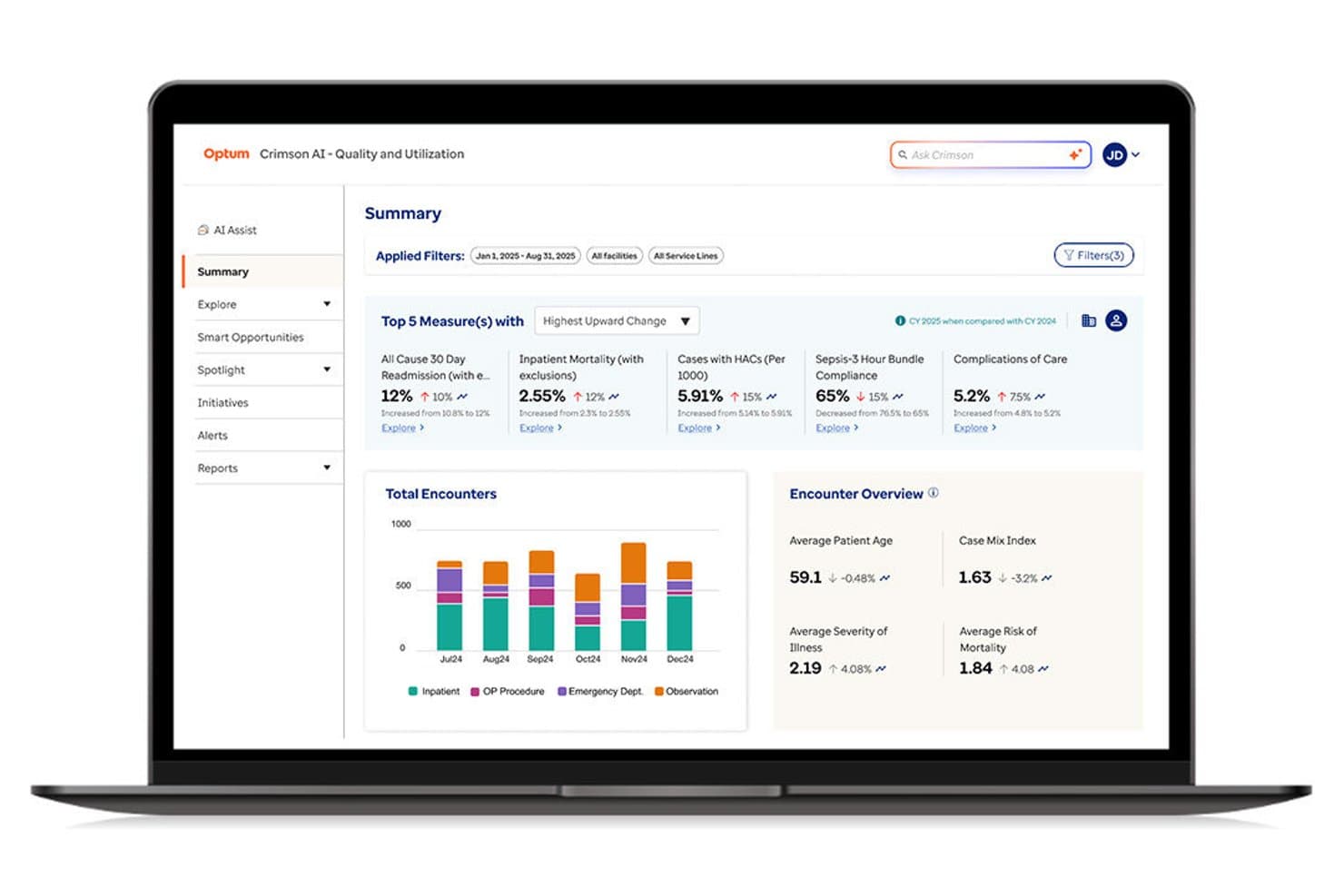
Optum offers AI-driven quality and utilization performance dashboards. Optum is an enterprise healthcare analytics platform that combines clinical KPI tracking, provider productivity review, quality benchmarking, and financial performance analysis across health systems and payer organizations.
Who Is Optum Best For?
Optum is built for large health systems, hospital networks, and payer organizations that need enterprise-scale analytics across clinical, operational, and financial data.
Why I Picked Optum
I picked Optum as one of the best because its Crimson AI platform gives health system leaders access to over 1,000 risk adjustment and quality measures aligned with CMS methodology. I particularly like the Provider Review module, which automates OPPE and FPPE workflows across thousands of providers at once. The AI-Assist feature lets me query performance data in plain language, which speeds up how quickly I can surface clinical variation and quality opportunities.
Optum Key Features
- Pre-built regulatory reporting dashboards: Track HEDIS, MIPS, and CMS Star Ratings measures with drill-down to the provider and patient level.
- Specialty and peer benchmarking: Compare performance against national datasets and internal cohorts across diverse clinical specialties.
- Native EHR and data integrations: Connect with major EHR systems and ingest clinical, claims, and financial data using standard healthcare exchange formats.
- Predictive risk stratification: AI models identify high-risk patients and prioritize them for targeted care management.
Optum Integrations
Optum offers native integrations with Epic, Tableau, Azure Data Factory, Databricks, and Power BI. An API is available for custom integrations.
Pros and Cons
Pros:
- AI-driven clinical variation analysis available
- Handles multi-facility health system data at scale
- Deep CMS quality measure library built-in
Cons:
- Not suited for small ambulatory practices
- Implementation requires significant IT resources
Learn more about Optum: Best for healthcare performance analytics
- Free demo available
- Pricing upon request
Visit WebsiteCustomer Rating:3.9/5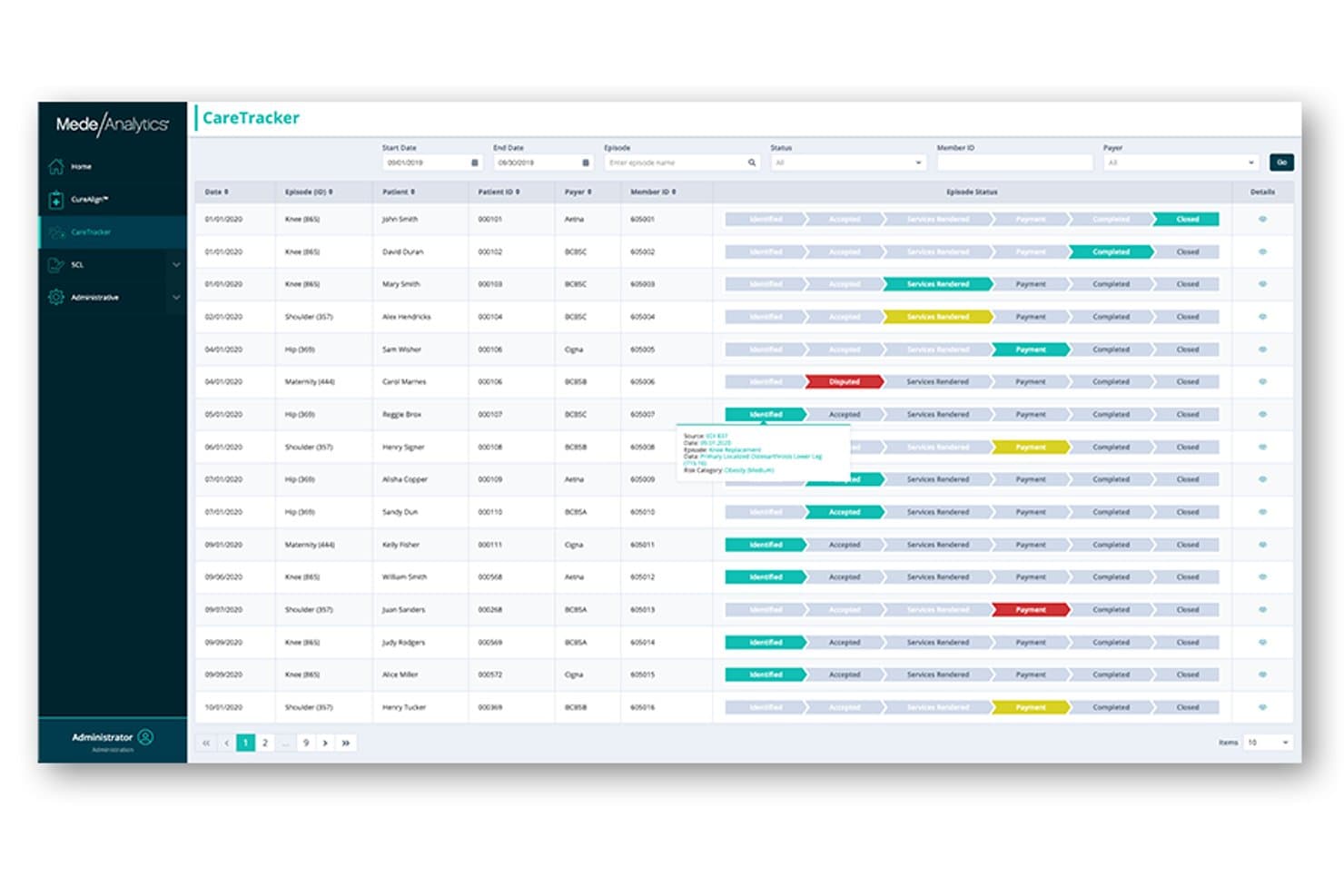
MedeAnalytics offers CareTracker for episode-based care management. MedeAnalytics is an enterprise healthcare analytics platform that unifies clinical, claims, and financial data to support performance measurement, population health analysis, and value-based care reporting for payers and health systems.
Who Is MedeAnalytics Best For?
MedeAnalytics is well-suited to enterprise-scale health plans, health systems, and risk-bearing organizations managing large member populations across multiple lines of business.
Why I Picked MedeAnalytics
I picked MedeAnalytics as one of the best because its Health Fabric platform pulls together clinical, claims, and SDOH data into a single, curated dataset purpose-built for analytics. I also like how the Managed Action feature surfaces next-best-action insights directly from that data, so performance gaps don't just get reported, they get actioned. The built-in AI Studio lets my team run custom models alongside pre-built ones without rebuilding the data pipeline from scratch.
MedeAnalytics Key Features
- Population health dashboards: Visualize and track risk, utilization, and outcomes across large member populations.
- Quality measure reporting: Generate and submit reports for HEDIS, Stars, and other regulatory programs directly from the platform.
- Multi-source data ingestion: Import structured and unstructured data from HL7, FHIR, and third-party data warehouses.
- Role-based access controls: Manage user permissions, data access, and audit logging for data privacy and compliance.
MedeAnalytics Integrations
Native integrations are not clearly documented. MedeAnalytics supports integrations via HL7 and FHIR standards, and provides an API for custom integrations.
Pros and Cons
Pros:
- AI-driven risk stratification across member populations
- Handles payer and health system scale data
- Pre-built HEDIS and Stars measure tracking
Cons:
- Reporting setup needs healthcare analytics expertise
- Implementation requires significant IT and data resources
Learn more about MedeAnalytics: Best for provider performance insights
- Free demo available
- Pricing upon request
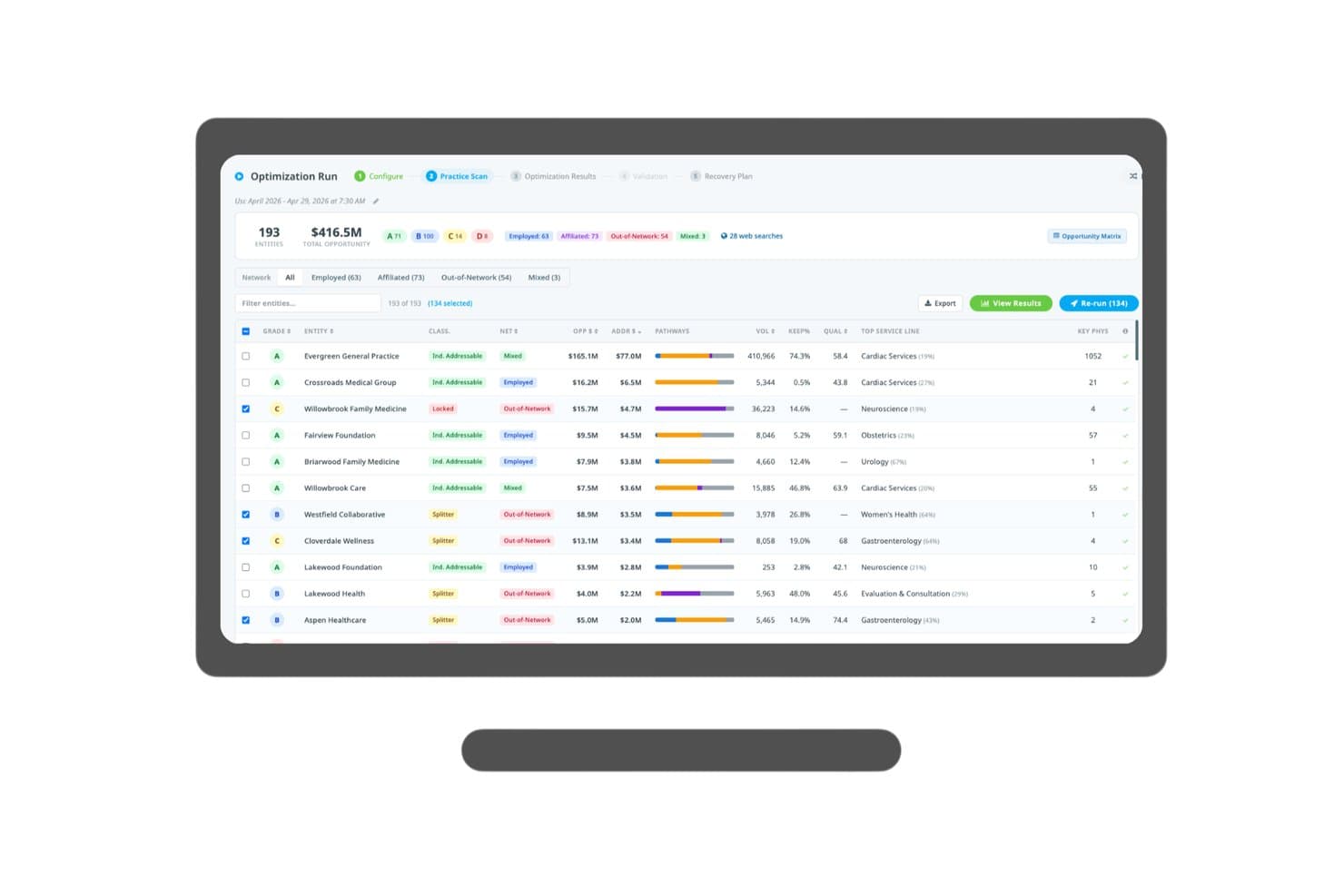
Clarify Health offers a network optimization run with entity grading and opportunity data. Clarify Health is a healthcare analytics platform that combines provider performance benchmarking, value-based care program management, referral intelligence, and AI-powered episode-based quality insights for health systems and payers.
Who Is Clarify Health Best For?
Clarify Health is a strong fit for enterprise health systems and ACOs managing value-based care contracts across large provider networks.
Why I Picked Clarify Health
I picked Clarify Health as one of the best because its episode-based quality assessment gives health systems a genuinely granular view of provider performance across care episodes, not just encounter counts. The Atlas Platform's benchmarking draws from over 300 million patient lives, so provider comparisons are grounded in real population-scale data. I also like the constraint-aware optimization engine, which factors payer mix and recapture-likelihood scoring into provider network decisions.
Clarify Health Key Features
- Scenario modeling: Users can run what-if analyses on performance and referral changes before implementing new strategies.
- Multi-agent AI engine: The platform incorporates a six-node iterative AI system for high-confidence predictive insights.
- Episode-based quality assessment: Measures performance using proprietary patient care episode analysis for a deeper view of care quality.
- Market share and rate intelligence: Tracks competitive positioning and values opportunities at actual payer-specific rates from price transparency records.
Clarify Health Integrations
Native integrations are not clearly documented. Clarify Health supports custom integrations via its API.
Pros and Cons
Pros:
- Outcome-linked partnership model with shared accountability
- Episode-level quality scoring across service lines
- Benchmarks against 300M+ patient lives
Cons:
- Pricing and implementation complexity not publicly disclosed
- Positioned for large health systems, not smaller practices
Learn more about Clarify Health: Best for independent practice performance
- Free demo available
- Pricing upon request
Visit WebsiteCustomer Rating:3.9/5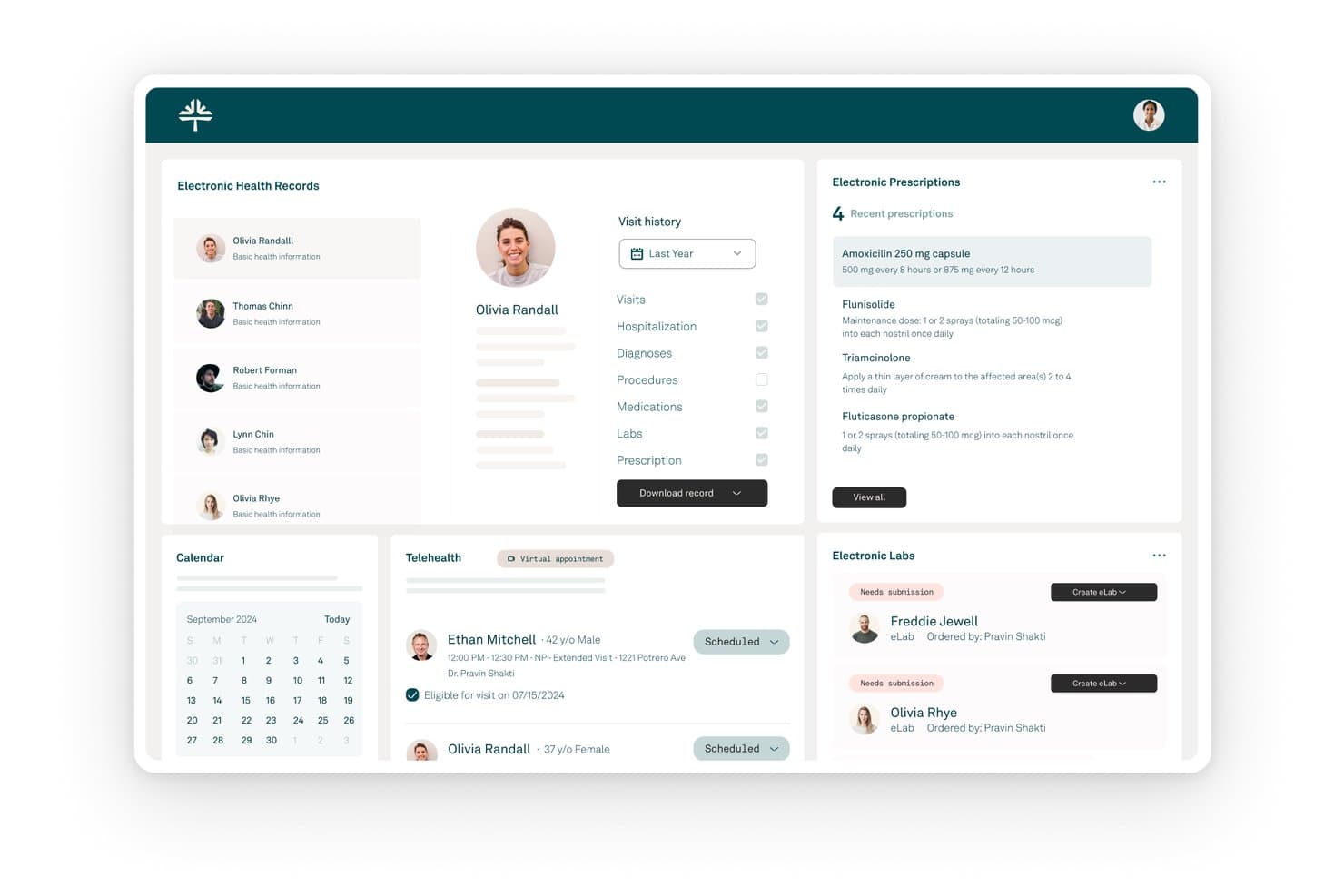
Tebra offers a unified healthcare dashboard with electronic health records, prescriptions, telehealth scheduling, labs, and a calendar view for streamlined practice management. Tebra is an all-in-one EHR+ platform for independent practices that combines clinical documentation, billing management, revenue cycle tools, and patient experience features in a single system.
Who Is Tebra Best For?
Tebra is a strong fit for independent and small-to-mid-size private practices that need a single platform to manage clinical, billing, and patient operations.
Why I Picked Tebra
I picked Tebra as one of the best because its platform is purpose-built for independent practice performance: clinical documentation, revenue capture, and patient pipeline management. AI Note Assist transcribes encounters in real time, cutting documentation time by up to 50%. I also like that AI Review Insights, native within the EHR, analyzes patient sentiment across online reviews, something I haven't seen built directly into a practice management platform before.
Tebra Key Features
- Customizable clinical templates: Build and adapt encounter forms and clinical templates to fit specialty workflows within the EHR.
- Automated claims management: Streamline insurance claim creation, tracking, and denial resolution from a single dashboard.
- Patient intake and scheduling tools: Enable digital intake, appointment reminders, and self-scheduling via one platform.
- Integration with multiple EHRs: Connect with Athena, AdvancedMD, DrChrono, Allscripts, Elation, and other major EHR and practice management systems.
Tebra Integrations
Tebra offers native integrations with Athena, AdvancedMD, DrChrono, Allscripts, Elation, and NextGen, and provides an API for custom integrations.
Pros and Cons
Pros:
- Unifies clinical and revenue cycle data
- AI-assisted documentation cuts encounter note time
- Built specifically for independent practice workflows
Cons:
- Not suited for large health system scale
- Limited external industry benchmarking capabilities
Learn more about Tebra: Best for ambulatory performance tracking
- Free demo available
- Pricing upon request
Visit WebsiteCustomer Rating:3.7/5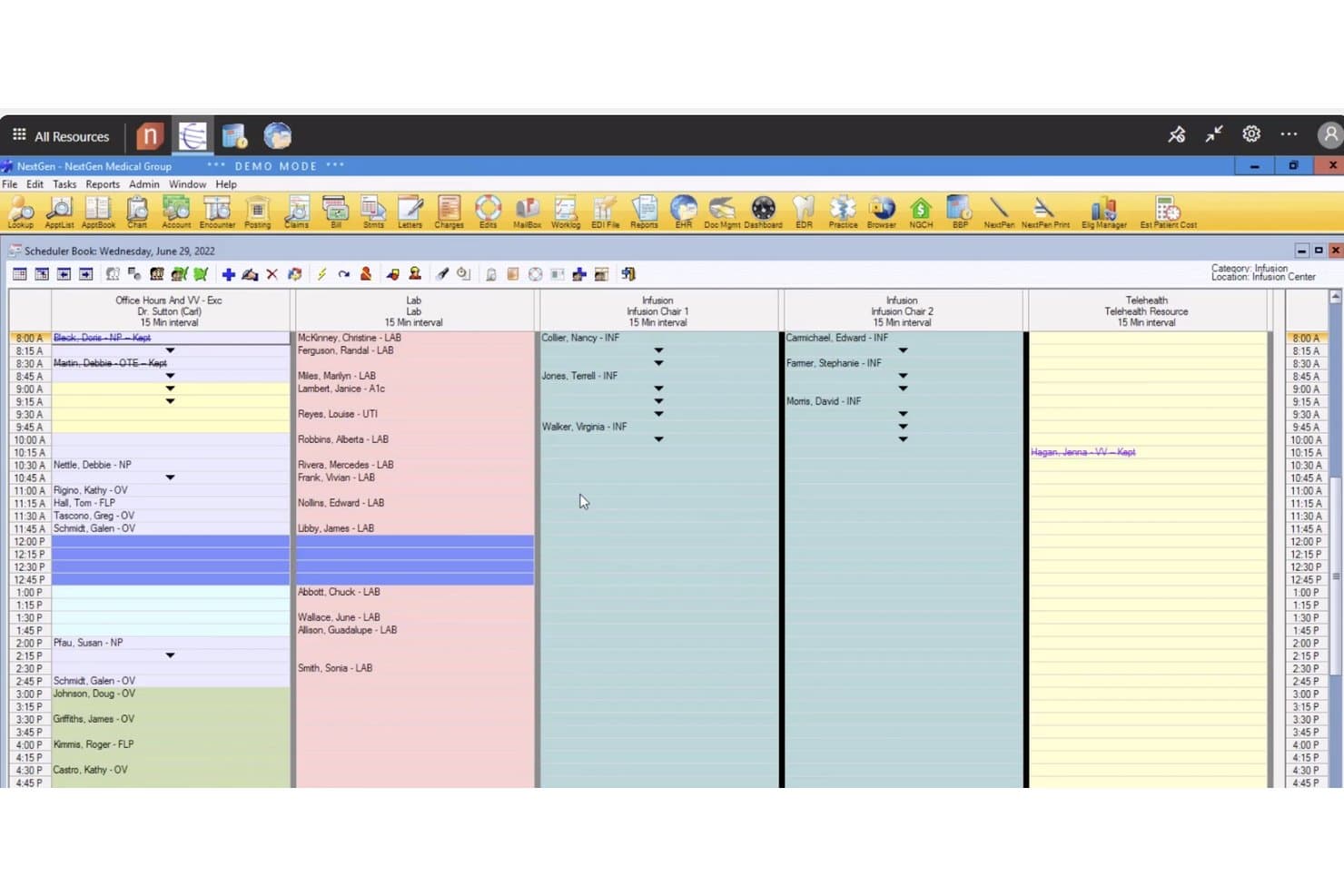
NextGen Healthcare offers a detailed Scheduler Book view displaying multi-resource appointment management across office, lab, infusion, and telehealth categories. NextGen Healthcare is an ambulatory practice management platform that integrates EHR, revenue cycle management, population health analytics, and clinical performance tracking across independent medical practices.
Who Is NextGen Healthcare Best For?
NextGen Healthcare suits independent ambulatory practices of any size, from small clinics with a single provider up to large multi-specialty physician groups.
Why I Picked NextGen Healthcare
I picked NextGen Healthcare as one of the best because its Population Health Sync pulls patient data into the EHR every 48 hours, surfacing gaps-in-care and risk scores inside the clinical workflow. NextGen Insights then lets my team build custom data models across clinical, financial, and claims data in a single view. The platform is built exclusively for ambulatory care, so the KPIs and reporting structures reflect how outpatient practices actually operate.
NextGen Healthcare Key Features
- Revenue cycle management module: Lets you track claim statuses, denial rates, A/R days, and payer mix in real time.
- Regulatory compliance dashboards: Supports automated MIPS, MACRA, and HEDIS quality reporting requirements within the platform.
- Integrated document management: Centralizes patient forms, insurance cards, and scanned clinical documents for every encounter.
- Mirth Connect interoperability engine: Enables data exchange with other EHRs, labs, and external health systems using HL7 and FHIR standards.
NextGen Healthcare Integrations
NextGen Healthcare offers native integrations with EHRs, labs such as Labcorp and Quest Diagnostics, and imaging systems including Change Healthcare. Mirth Connect enables HL7 and FHIR data exchange, and an API is available for custom integrations.
Pros and Cons
Pros:
- Population health sync refreshes patient risk data
- MIPS and HEDIS reporting built in
- Built exclusively for ambulatory care settings
Cons:
- Reporting customization requires vendor support involvement
- Implementation timelines often run longer than expected
Learn more about NextGen Healthcare: Best for clinical performance analytics
- Free demo available
- Pricing upon request
Visit WebsiteCustomer Rating:5/5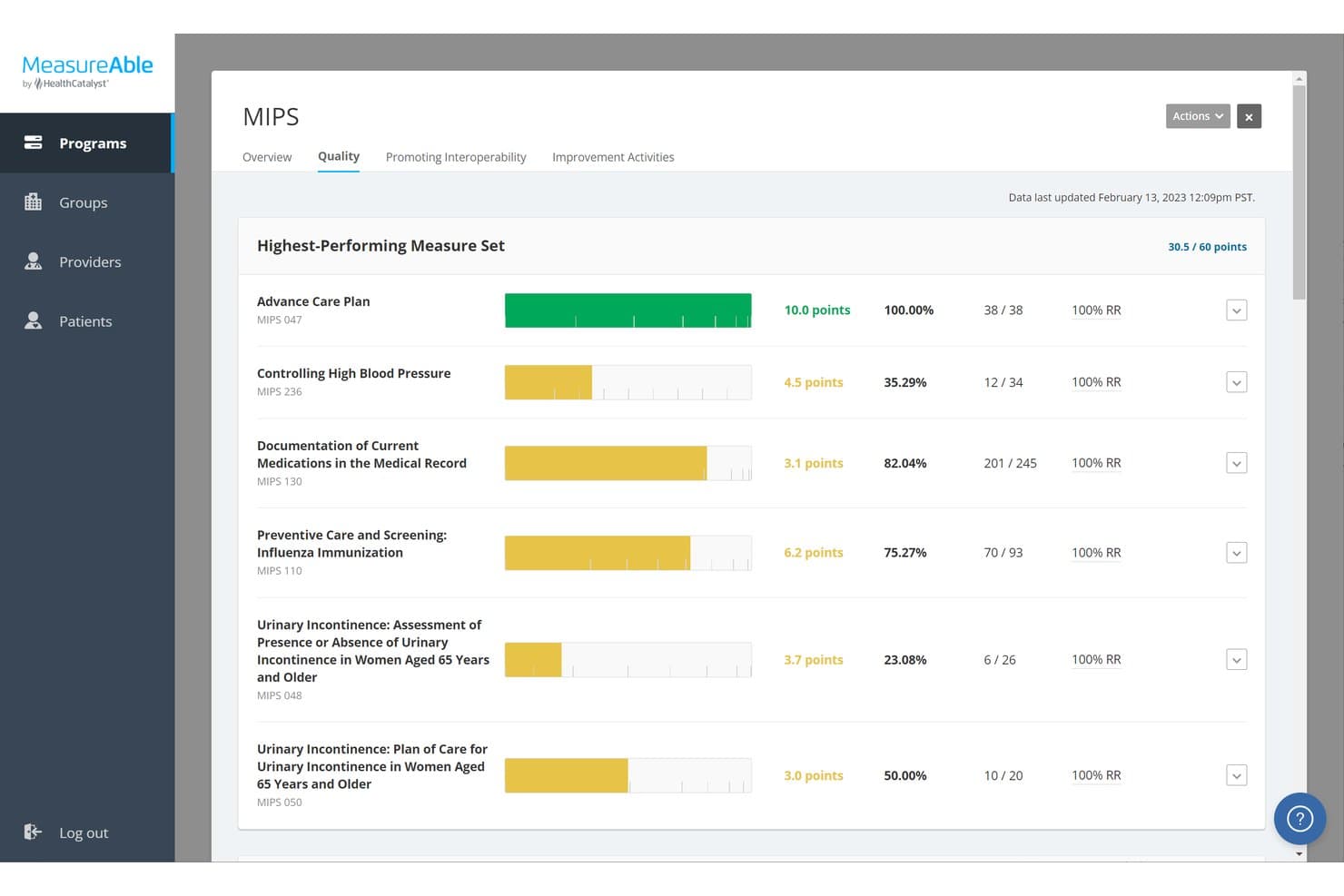
Health Catalyst offers a MIPS Quality performance dashboard that tracks measure scores, percentages, and reporting rates across clinical care measures. Health Catalyst is a healthcare data and analytics platform that unifies clinical, financial, and operational data to support performance tracking, quality reporting, and value-based care analytics.
Who Is Health Catalyst Best For?
Health Catalyst is built for large health systems, hospitals, and ACOs with complex, multi-source data environments and enterprise-scale analytics needs.
Why I Picked Health Catalyst
Health Catalyst earns its spot on my shortlist because of how it handles clinical variation analytics. I particularly like the AI-driven tools that surface unexplained practice variation across physicians, giving clinical leaders something concrete to investigate and act on. The platform's ML-powered risk stratification flags patients at high risk for sepsis or readmission before they escalate, which is where the clinical performance tracking gets genuinely useful.
Health Catalyst Key Features
- Automated provider scorecards: Generate individualized scorecards for physicians and care teams with scheduled distribution tied to performance programs.
- Peer benchmarking: Compare departments and providers against internal peers and national datasets using built-in benchmarking tools.
- Regulatory reporting suite: Submit regulatory quality measures like MIPS, MACRA, and CMS Star Ratings through integrated workflows.
- Native EHR and claims integration: Connect with major EHRs and ingest claims, cost accounting, and lab data using HL7 and FHIR standards.
Health Catalyst Integrations
Health Catalyst offers native integrations with Epic, Cerner, Redox, Databricks, and Microsoft, and provides an API for custom integrations.
Pros and Cons
Pros:
- AI-driven patient risk stratification tools
- Pre-built HEDIS and MIPS reporting workflows
- Deep clinical quality measure tracking built-in
Cons:
- Steep ramp-up for non-technical clinical staff
- Long implementation timelines for large deployments
Learn more about Health Catalyst: Best for network-based practice insights
- Free demo available
- Pricing upon request
Visit WebsiteCustomer Rating:5/5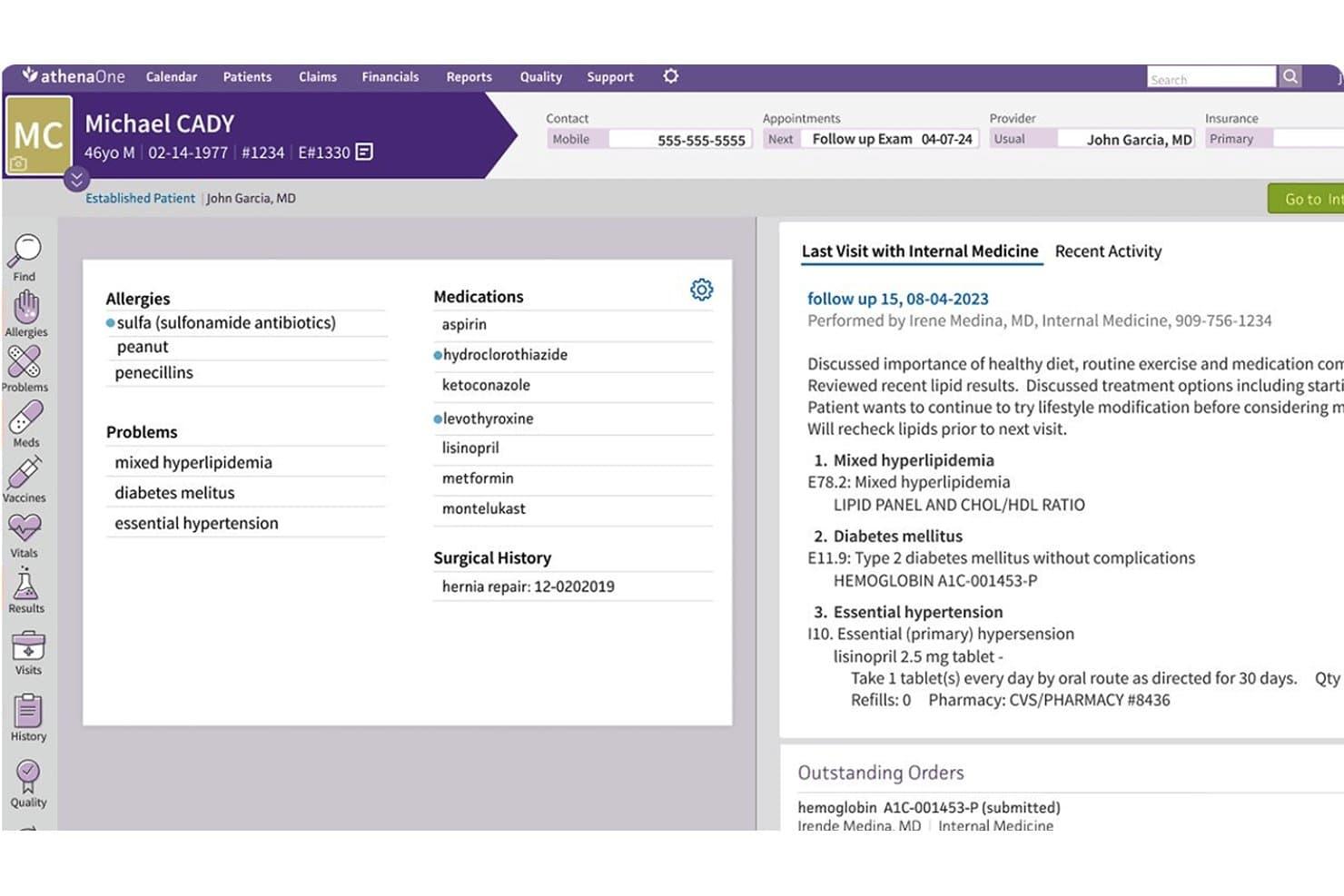
Athenahealth offers a patient chart view displaying allergies, medications, problems, surgical history, visit summaries, and outstanding lab orders in a unified EHR interface. athenaOne is a cloud-based EHR, practice management, and revenue cycle platform that tracks clinical KPIs, provider productivity, financial performance, and value-based care metrics across ambulatory practices.
Who Is Athenahealth Best For?
It's a strong fit for independent and group ambulatory practices that need a single platform for clinical, operational, and financial performance management.
Why I Picked Athenahealth
Athenahealth earns its spot on my shortlist because of its network-based benchmarking via Data View reporting. It pulls live performance data from the athenaOne national network. That lets me compare a practice's metrics against specialty peers without external data subscriptions. I also like the automated CMS fee schedule logic in the Payment Mismatch Tracking report, which flags underpayments and overpayments in real time.
Athenahealth Key Features
- Clinical quality dashboards: Track key regulatory measures like MIPS and HEDIS with drill-down to provider or patient level.
- Automated provider scorecards: Generate and distribute individualized physician scorecards tied to performance metrics.
- FHIR-based integrations: Connect and exchange data with labs, outside providers, and over 500 third-party healthcare apps.
- AI-powered document workflows: Automate scanning, organizing, and attaching clinical documents directly to patient records.
Athenahealth Integrations
Athenahealth offers native integrations with Epic, Cerner, Meditech, NextGen, and over 500 marketplace healthcare apps. FHIR-based API and Platform Services API are available for custom integrations.
Pros and Cons
Pros:
- MIPS and HEDIS reporting natively supported
- Real-time payment mismatch tracking built in
- Network-wide peer benchmarking across specialties
Cons:
- Implementation takes months for larger practices
- Reporting customization limited outside preset templates
Learn more about Athenahealth:
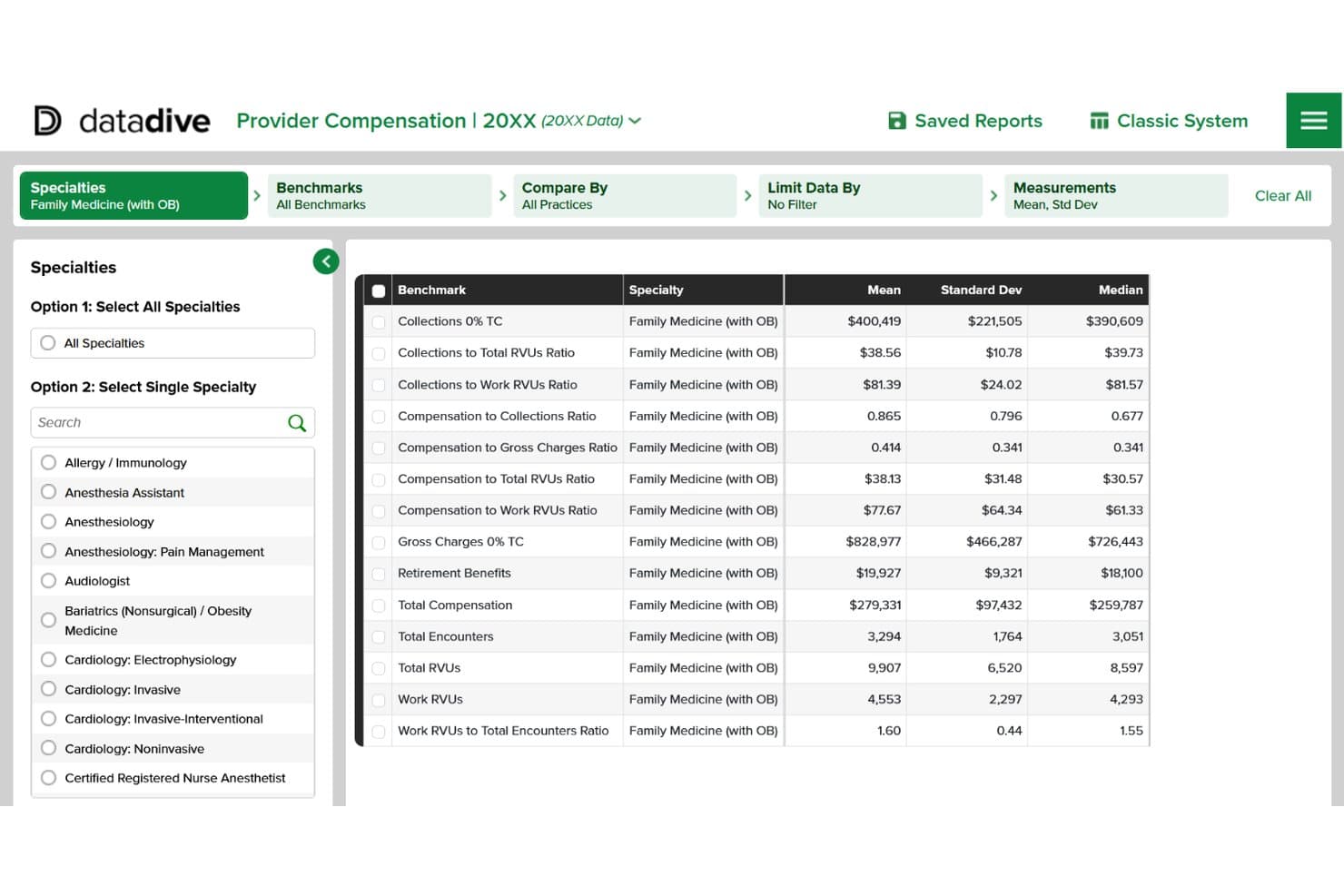
MGMA DataDive offers a provider compensation benchmarking dashboard displaying mean, standard deviation, and median metrics for Family Medicine (with OB) across collections, RVUs, and total compensation. MGMA DataDive is a healthcare benchmarking data platform that gives medical practices access to compensation, provider productivity, and operational benchmark data across hundreds of specialties and thousands of metrics.
Who Is MGMA DataDive Best For?
It's a strong fit for medical practice administrators and physician partners who need reliable industry data to set compensation, evaluate productivity, or justify staffing decisions.
Why I Picked MGMA DataDive
I picked MGMA DataDive because no other tool I've used gives you this depth of industry comparison data. The Provider Report Card ranks your providers directly against MGMA benchmarks, and the Pay-to-Production Plotter lets me plot compensation against RVUs or collections with specialty-specific filters. That kind of external reference data is what I reach for when setting physician compensation or evaluating whether a group's staffing costs are out of line with peers.
MGMA DataDive Key Features
- Customizable data tables: Build, save, and manage personalized metric and peer comparison tables for ongoing analysis.
- Five-year trend analysis: Assess trends with access to historical benchmarking data across compensation, operations, and costs.
- Procedural profile benchmarking: Compare detailed coding patterns and CPT code usage across specialties and regions.
- Organizational membership tools: Includes access to dedicated MGMA Data experts and training modules for member organizations.
MGMA DataDive Integrations
Native integrations are not clearly documented. The tool supports manual data uploads and provides an API for custom integrations.
Pros and Cons
Pros:
- Covers hundreds of specialties and metrics
- Multi-year historical benchmark trend data
- Specialty-specific compensation and RVU benchmarks
Cons:
- Limited financial dashboard and reporting features
- No real-time clinical KPI tracking
Learn more about MGMA DataDive:
Annen programvare for resultatstyring i helsetjenesten
\u003cspan style=\u0022font-weight: 400;\u0022\u003eHer er noen flere alternativer for programvare for resultatstyring i helsetjenesten som ikke kom med på kortlisten min, men som likevel er verdt å undersøke:\u003c/span\u003e
- 11InnovaccerBest for population health performance
- 12Clinician NexusBest for clinician performance management
- 13ModMedBest for specialty practice performance
- 14Mingle HealthBest for MIPS performance management
- 15Whitespace HealthBest for revenue performance analytics
How I Evaluate Healthcare Performance Management Software
I split my evaluation into core requirements—like EHR integration and clinical KPI tracking—and differentiators like peer benchmarking that separate good tools from great ones.
Core Functionality (Table Stakes For This List)
When I'm selecting tools for my list, I rank each one on a scale from 0 (does not offer the functionality) to 5 (excels in this area) for each core functionality listed below. I then calculate the tool's total score into a percentage, using 65% as a benchmark to help assess its overall fit for the list.
- Clinical KPI Tracking: I look for tools that track metrics like no-show rates, patient wait times, and quality scores with trend analysis over time.
- Provider Productivity Analytics: Each tool should measure output by provider using RVUs, encounter counts, and panel size to spot workload imbalances.
- Financial Performance Dashboards: I evaluate how well dashboards visualize collections, A/R days, denial rates, and payer mix with drill-down by provider.
- EHR/PM System Integration: The platform should connect with major EHR and practice management systems to pull clinical and billing data without manual uploads.
- Benchmarking Capabilities: I check whether the tool compares your practice data against industry standards like MGMA or specialty-specific benchmarks.
- Regulatory Compliance Reporting: Support for MIPS, MACRA, HEDIS, and CMS quality measures matters, especially when submission deadlines are tight.
Once I have a list of tools that meet the criteria, I consider what sets each platform apart.
Differentiating Factors (What Sets Vendors Apart)
Here's how I compare and contrast different vendors:
Standout Features
Automated provider scorecards are a big differentiator—I look for platforms that generate and distribute individualized physician scorecards tied to compensation models on a set schedule. Predictive risk stratification is another feature I evaluate closely, since AI-driven models that flag high-risk patients can directly shape care management priorities. I also consider how well a tool tracks performance under value-based contracts like ACOs and bundled payments, where shared savings hinge on risk-adjusted outcomes.
Beyond Features
HIPAA compliance is where I start—I check for BAA availability, SOC 2 Type II certification, and role-based access controls that limit PHI exposure to authorized staff. Regulatory reporting support also matters, especially built-in submission workflows for CMS programs that update as measures evolve. I evaluate implementation services too, since platforms that offer clinical advisory teams and change management support tend to get stronger physician buy-in during rollout.
Slik velger du programvare for resultatstyring i helsetjenesten
Prøver du å finne programvare for resultatstyring i helsetjenesten som passer med målene for praksisen din? Bruk tabellen nedenfor til å rette søket mot løsninger som samsvarer med de viktigste prioriteringene dine:
| Hvis prioriteten din er … | Se etter … |
| Sammenligning av behandlernes produktivitet | Tilgang til nasjonale data eller datasett for spesialiteten |
| Økonomiske resultater i sanntid | Dynamiske dashbord og detaljert analyse på betaler-nivå |
| Rapportering om regelverk og samsvar | Innebygde arbeidsflyter for oppdateringer av CMS og MIPS |
| Effektivisering av integrasjonen av EHR-data | Integrerte tilkoblinger til ledende EHR-systemer |
| Samsvar mellom legelønn og resultater | Automatiserte resultatkort for behandlere etter avlønningsmodell |
Slik vurderer du kortlisten din
- Be om en eksempelrapport for en behandler: Be om en avidentifisert rapport som viser kvalitetsdata, økonomiske data og RVU-data per behandler.
- Test et arbeidsflytscenario: Gjennomfør en prøveoppgave – for eksempel å følge opp et nytt HEDIS-mål – ved hjelp av en testkonto eller sandkasse.
- Be om dokumentasjon på integrasjoner: Be leverandøren legge frem dokumentasjon eller en direkte demonstrasjon som kobler til EHR- eller PM-systemet ditt.
- Få dokumentasjon på støtte for regelverket: Be om leverandørens nyeste logg over CMS-måleoppdateringer og dokumentasjon av arbeidsflyten for innsending.
- Vurder integrasjonsdybde opp mot behovet for tilpasning: Finn ut om bred EHR-tilkobling eller omfattende tilpasningsmuligheter er viktigst i miljøet ditt.
Hva er programvare for resultatstyring i helsetjenesten?
Programvare for resultatstyring i helsetjenesten er en digital plattform som sporer, analyserer og rapporterer kliniske, økonomiske og operasjonelle resultater på tvers av medisinske praksiser. Den hjelper deg med å overvåke viktige måltall som behandlernes produktivitet, pasientvolum, indikatorer for behandlingskvalitet og inntektsresultater, slik at du kan identifisere trender, sammenligne med bransjestandarder og støtte samsvar med programmer for verdibasert behandling. Denne programvaren sentraliserer resultatdata for å hjelpe ledere med å drive forbedringer på tvers av team og arbeidsflyter.
Funksjoner i programvare for resultatstyring i helsetjenesten
Når du velger programvare for resultatstyring i helsetjenesten, bør du se etter følgende viktige funksjoner:
- Sporing av kliniske KPI-er: Overvåker pasientvolum, ventetider og kvalitetsmålinger for å hjelpe deg med å identifisere trender og muligheter for forbedring.
- Analyser av behandlernes produktivitet: Evaluerer arbeidsmengde, RVU-er og konsultasjonsrater for den enkelte behandler, og fremhever behandlere med høy og lav ytelse på tvers av praksisen din.
- Dashbord for økonomiske resultater: Visualiserer data fra inntektssyklusen i sanntid – inkludert innbetalinger, antall dager med utestående fordringer og avslagsrater – slik at du kan overvåke praksisens økonomiske helse med et blikk.
- Integrasjon med EHR- og PM-systemer: Kobler seg direkte til dine eksisterende elektroniske pasientjournalsystemer og systemer for praksisadministrasjon for å synkronisere data automatisk uten manuelle opplastinger.
- Rapportering av regelverksetterlevelse: Støtter kravene i MIPS, MACRA og andre kvalitetsprogrammer ved å tilby rapporter som er klare for innsending, samt sporing av oppdateringer av måleparametere.
- Funksjoner for sammenligning: Lar deg sammenligne resultatdataene dine med regionale eller nasjonale standarder, slik at du kan se hvor du presterer bedre eller dårligere.
- Resultatkort for kolleger og team: Genererer individualiserte resultatkort for leger og behandlingsteam for å støtte lønns- og insentivordninger.
- Automatiserte varsler og meldinger: Sender oppdateringer i sanntid om mål som ikke er nådd, frister for regelverksetterlevelse eller betydelige trender, slik at du holder oversikt over problemene.
- Datasikkerhet og tilgangskontroller: Beskytter sensitiv informasjon med HIPAA-kompatible protokoller, inkludert rollebaserte tillatelser og revisjonslogger.
- Tilpassbar rapportering: Gjør det mulig å tilpasse dashbord og rapporter til de spesifikke behovene til ulike brukere, ledelsen eller komiteer i organisasjonen.
Fordeler med programvare for resultatstyring i helsetjenesten
Implementering av programvare for resultatstyring i helsetjenesten gir flere fordeler for teamet og virksomheten din. Her er noen av fordelene du kan se frem til:
- Bedre kliniske resultater: Automatisert sporing og analyse av viktige resultatmålinger støtter målrettede forbedringer i behandlingen og bedre pasientresultater.
- Større åpenhet rundt behandlernes innsats: Produktivitetsanalyser og individualiserte resultatkort lar deg måle og sammenligne behandlernes bidrag på tvers av praksisen din på en objektiv måte.
- Raskere etterlevelse av regelverk: Innebygde verktøy for regelverksetterlevelse og automatisert rapportering gjør det enklere å følge programmer som MIPS, MACRA og andre kvalitetsinitiativer.
- Bedre økonomisk oversikt: Dashbord i sanntid og sammenligningsdata gir et tydelig øyeblikksbilde av resultatene i inntektssyklusen og fremhever områder som trenger oppmerksomhet.
- Datadrevet beslutningstaking: Enkel tilgang til omfattende kliniske, økonomiske og operasjonelle rapporter gjør ledere i stand til å handle trygt og raskt.
- Effektivisert arbeidsbelastningsstyring: Integrasjon med EHR-systemet ditt og automatiserte varsler hjelper deg med å håndtere tildeling av behandlere, pasientvolum eller planleggingsproblemer proaktivt.
- Forbedret datasikkerhet: Rollebaserte tillatelser og revisjonslogger beskytter helseopplysninger i tråd med HIPAA og bransjestandarder.
Kostnader og priser for programvare for resultatstyring i helsetjenesten
Valg av programvare for resultatstyring i helsetjenesten krever en forståelse av de ulike prismodellene og abonnementene som er tilgjengelige. Kostnadene varierer ut fra funksjoner, teamstørrelse, tillegg og mer. Tabellen nedenfor oppsummerer vanlige abonnementer, gjennomsnittsprisene deres og typiske funksjoner som er inkludert i programvareløsninger for resultatstyring i helsetjenesten:
Sammenligningstabell for abonnementer for programvare for resultatstyring i helsetjenesten
| Plantype | Gjennomsnittspris | Vanlige funksjoner |
| Gratisplan | $0 | Tilbyr grunnleggende dashbord, begrenset KPI-rapportering, tilgang for én bruker og brukerstøtte via e-post. |
| Personlig plan | $25–$75/bruker/måned | Gir flere muligheter for funksjonstilpasning, grunnleggende leverandøranalyse, viktige verktøy for etterlevelse og begrenset brukerstøtte. |
| Forretningsplan | $75–$150/bruker/måned | Inkluderer produktivitetsdashbord, tilgang for flere brukere, EHR-integrasjoner, resultatkort for team og standard brukerstøtte. |
| Virksomhetsplan | $150+/bruker/måned | Legger til avansert referansemåling, robust datasikkerhet, tilpassede arbeidsflyter, dedikert oppstart og førsteklasses brukerstøtte. |
Vanlige spørsmål om programvare for resultatstyring i helsevesenet
\u003cspan style=\u0022font-weight: 400;\u0022\u003eHer er noen svar på vanlige spørsmål om programvare for resultatstyring i helsevesenet:\u003c/span\u003e
Hvordan kobler programvare for resultatstyring i helsevesenet seg til andre systemer?
\u003cspan style=\u0022font-weight: 400;\u0022\u003eDe fleste løsninger tilbyr integrasjoner med ledende EHR- og praksisstyringssystemer ved hjelp av HL7-, FHIR- eller API-tilkoblinger. Dette gjør at du automatisk kan hente kliniske, økonomiske og driftsrelaterte data inn i én plattform.\u003c/span\u003e
Kan denne programvaren støtte initiativer for verdibasert behandling?
\u003cspan style=\u0022font-weight: 400;\u0022\u003eJa, mange plattformer tilbyr analyseverktøy for å følge opp resultater under programmer som ACO-er, pakkebetalinger eller CMS-kvalitetsmål. Dette hjelper deg med å overvåke delte besparelser, risikojustering og resultatmål.\u003c/span\u003e
Hva slags referansemåling kan jeg forvente?
\u003cspan style=\u0022font-weight: 400;\u0022\u003eDu kan forvente muligheter for å sammenligne med nasjonale standarder, spesifikke KPI-er for fagområder eller interne resultater på tvers av kolleger. Dette gir deg detaljert kontekst for hvordan teamet ditt presterer sammenlignet med andre.\u003c/span\u003e
Er datasikkerhet en standardfunksjon i disse systemene?
\u003cspan style=\u0022font-weight: 400;\u0022\u003eJa, programvare for resultatstyring i helsevesenet inkluderer vanligvis HIPAA-kompatibel sikkerhet, rollebasert tilgang og revisjonslogging for å beskytte informasjon om pasienter og behandlere.\u003c/span\u003e
Hvor mye kan rapporter og dashbord tilpasses?
\u003cspan style=\u0022font-weight: 400;\u0022\u003eDe fleste løsninger lar deg tilpasse dashbord og rapporter etter prioriteringene, målgruppen eller behandlingsmiljøet ditt, slik at du kan fokusere på målene som er viktigst for det du ønsker å oppnå.\u003c/span\u003e