

Jeg forstår utfordringene som følger med å drifte en travel helsetjeneste. Et av de største problemområdene? Å sørge for at personalet har den nyeste kunnskapen de trenger for å levere fremragende behandling, samtidig som dere overholder stadig skiftende regelverk. Det er her et robust læringsstyringssystem (LMS) for helsetjenesten kommer inn i bildet – en skybasert plattform som leverer e-læring, følger opplæringsfremdriften og sørger for at dere alltid er oppdatert på den nyeste praksisen.
LMS-programvare gir ikke bare teamet den nødvendige kunnskapen, men er også et kraftig verktøy for å forbedre pasientbehandlingen. Så hvorfor vente? Det er på tide å utforske disse LMS-løsningene og omfavne fremtidens helseutdanning.
Why Trust Our Software Recommendations
6,700+
Reviews
20
Industry experts
16+
Evaluation factors
14
Years
Our team has been testing and reviewing software since 2012. As medical practice leaders ourselves, we know how difficult—and important—it is to choose the right software.
For this guide, we evaluated tools using hands-on testing and independent research, scoring tools using our selection criteria.
Our reviews reflect our human editorial judgment, not a sales pitch.
Sammenligningstabell: LMS-plattformer for helsetjenesten
Denne sammenligningstabellen oppsummerer prisdetaljene for mine beste utvalgte LMS-løsninger for helsetjenesten.
| Tool | Best For | Trial Info | Price | ||
|---|---|---|---|---|---|
| 1 | Best for training certifications | 14-day free trial | Pricing upon request | Website | |
| 2 | Best for AI-assisted content creation | Free demo available | Pricing upon request | Website | |
| 3 | Best for role-based healthcare training | Free plan + free demo available | From $119/month (billed annually) | Website | |
| 4 | Best for managing clinical competencies at scale | Free demo + 30-day free trial available | From $3.97/user/month (billed annually) | Website | |
| 5 | Best for automated onboarding and course assignments | Free demo available | Pricing upon request | Website | |
| 6 | Best for a drag-and-drop LMS interface | Free demo available | From $5/user/month | Website | |
| 7 | Best with broad third-party content integrations | Free demo available | From $6,000/year | Website | |
| 8 | Best for intuitive, self-paced learning in healthcare | Free demo available | Pricing upon request | Website | |
| 9 | Best for fast deployment and scaling healthcare training | Free demo available | Pricing upon request | Website | |
| 10 | Best for interactive and engaging online medical courses | Free demo available | Pricing upon request | Website |


Anmeldelser av de beste LMS-plattformene for helsetjenesten
Nedenfor finner du mine detaljerte sammendrag av de beste LMS-løsningene for helsetjenesten som kom med på kortlisten. Anmeldelsene mine gir en grundig gjennomgang av de viktigste funksjonene, fordelene og ulempene, integrasjonene og ideelle bruksområdene for hvert verktøy, slik at du kan finne det beste alternativet for deg.
 Best for training certifications
- 14-day free trial
- Pricing upon request
Visit WebsiteCustomer Rating:4.7/5
SkyPrep’s Management Overview dashboard highlights training progress, pending tasks, and key admin shortcuts. SkyPrep is a learning management system designed for businesses and organizations seeking to efficiently deliver training and educational content. It allows users to create, manage, and track online courses, assessments, and learning paths tailored to their specific needs.
Why I Picked SkyPrep: It supports certification training by allowing you to award certificates with e-signatures upon course completion, ensuring your team meets the necessary qualifications. Additionally, SkyPrep facilitates HIPAA and policy compliance training, helping your organization adhere to essential regulations through detailed reporting.
Standout Features & Integrations:
Other features include mobile accessibility, allowing your team to access training materials anytime, anywhere, which is vital for healthcare professionals who may work irregular hours. The platform also offers compliance reporting, providing real-time tracking of user progress to ensure all training requirements are met.
Integrations include ADP, Workday, SAP SuccessFactors, BambooHR, UKG Ready, UKG Pro, Oracle HCM, Paycom, HubSpot, Salesforce, Zoom, and Microsoft Teams.
Pros and Cons
Pros:
- Provides useful insights and reporting features
- Accommodates various content types and learning paths
- Effective course creation tools
Cons:
- Mobile app lacks certain functionalities
- Initial setup can be complex
Learn more about SkyPrep: Best for AI-assisted content creation
- Free demo available
- Pricing upon request

Use AI to instantly generate course modules and interactive activities with EducateMe. EducateMe LMS is designed to meet the unique needs of healthcare organizations by providing a centralized platform for training and development. It appeals to healthcare administrators and training managers seeking a solution that enhances employee training, onboarding, and compliance processes. With its AI-driven content creation tools and performance analytics, EducateMe LMS addresses the challenges of maintaining regulatory compliance and improving learner engagement, making it a valuable asset for healthcare teams.
Why I Picked EducateMe LMS
I picked EducateMe LMS because of its powerful AI-driven approach to content creation, which is a major time-saver for busy medical practices and healthtech teams. Unlike legacy systems that require manual input for every module, EducateMe uses AI to draft roleplay simulations and knowledge checks that reflect real-world clinical scenarios. As a result, it is an excellent choice for scaling healthcare organizations that need to push out high-quality training materials without a dedicated team of instructional designers.
EducateMe LMS Key Features
In addition to the AI-driven roleplay coach and performance analytics, I also found:
- Smart Cohort Management: Automates the process of grouping learners by department or hire date, ensuring the right practitioners receive the correct training paths automatically.
- White-Label Branding: This feature allows you to customize the platform to reflect your organization's branding, ensuring a consistent learning experience.
- Collaborative Learning Support: Facilitates teamwork and knowledge sharing among healthcare professionals, fostering a collaborative learning environment.
- SCORM File Support: This compatibility ensures that your existing e-learning content can be easily integrated into the platform, maximizing resource utilization.
EducateMe LMS Integrations
Integrations include Google Workspace, Slack, Zoom, Salesforce, Figma, Calendly, and various other tools through its API.
Pros and Cons
Pros:
- Regular updates maintain an innovative platform
- Offers centralized content creation
- Provides learner engagement insights
Cons:
- Lacks advanced gamification features
- Minimum user requirement for pricing
Learn more about EducateMe LMS: Best for role-based healthcare training
- Free plan + free demo available
- From $119/month (billed annually)
Visit WebsiteCustomer Rating:4.6/5
TalentLMS’ compliance course dashboard shows training content, learner progress, and AI-powered course creation tools in one view. You’re likely looking for a healthcare LMS that helps your clinical and non-clinical teams stay compliant, trained, and prepared for the demands of a regulated environment, and TalentLMS meets those needs with a setup that gets you delivering training quickly. Whether you’re onboarding new staff, standardizing patient-care procedures, or keeping up with mandatory certifications, it gives you a flexible way to build or upload content and guide learners through structured paths.
Why I Picked TalentLMS
I picked TalentLMS because its support for branches, user roles, and learning paths gives healthcare organizations a clear way to deliver department-specific and role-specific training without creating separate systems. You can upload your own policies, SOPs, and clinical training materials or use built-in tools like the AI course generator and assessments to create content tailored to your protocols. I also like that automations manage recurring compliance tasks—such as re-certification reminders or enrolment rules—so you don’t have to track them manually. And its reporting suite provides visibility into completion status across teams, which matters when audits and regulatory checks require proof of ongoing training.
TalentLMS Key Features
In addition to its strong user-assignment and compliance-focused controls, TalentLMS offers several features that support training needs common in healthcare environments:
- Skills-based learning: AI-driven skill mapping helps you identify competency gaps and connect staff to targeted training.
- Blended learning tools: Lets you combine online modules with in-person sessions for clinical check-offs or hands-on practice.
- Learning paths: Provides structured sequences so staff know exactly which courses to take for their role or certification track.
- Gamification: Uses points, badges, and leaderboards to help keep learners engaged in required training.
TalentLMS Integrations
TalentLMS offers native integrations with popular tools such as Zoom, Salesforce, Shopify, WordPress, BambooHR, GoToMeeting, LinkedIn Learning, Microsoft Teams, Slack, and Google Workspace. An API is also available for custom integrations, providing flexibility to tailor the platform to your organization's specific needs.
Pros and Cons
Pros:
- AI course tools help staff develop training from existing materials quickly.
- Automation rules reduce manual oversight of recurring certifications.
- Clear learning paths support structured clinical and nonclinical training.
Cons:
- Reporting customization may fall short for complex regulatory needs.
- Editor offers limited flexibility for highly specialized medical modules.
Learn more about TalentLMS: Best for managing clinical competencies at scale
- Free demo + 30-day free trial available
- From $3.97/user/month (billed annually)
Visit WebsiteCustomer Rating:4.6/5
iSpring LMS provides a centralized LMS to train healthcare workers on everything from compliance to new practices. iSpring LMS offers features designed to power the entire cycle of healthcare training. With iSpring LMS, healthcare organizations can onboard new hires, manage compliance training, and train staff on products and customer service processes. It offers secure data management, which is crucial to maintaining confidentiality and meeting regulations such as HIPAA.
Why I Picked iSpring LMS: The platform ensures that healthcare staff stay up to date with current regulations through cheat-proof assessments and practical training with dialogue simulations. The advanced reporting and analytics provide detailed insights into employees' performance, helping organizations maintain high standards and reduce the risk of non-compliance penalties. iSpring LMS also stands out for its automated training and recertification capabilities, which help you manage clinical competencies at scale and enhance the training process by automatically assigning required courses and tracking their completion. This is especially important for ongoing compliance.
Standout Features and Integrations:
Features include a built-in course-building tool that allows you to quickly create interactive, scrollable courses right in the LMS. For more complex content with training videos, role-plays, and branching scenarios, you can use the bundled iSpring Suite authoring tool. Employees can access the content on their mobile devices through the app, even when offline, which ensures continuous training even outside the office or medical center.
Integrations include human resources information systems like BambooHR, PeopleWeek, and OrangeHRM. The platform also integrates with proctoring and analytics software, like ProctorEdu and Power BI. Other integrations include Zoom, Microsoft Teams, Zapier, Microsoft Outlook, Udemy Business, Oracle PeopleSoft, and LinkedIn Learning.
Pros and Cons
Pros:
- Advanced reporting and analytics
- Automated training and (re)certification at scale
- Robust mobile access to training material
Cons:
- Limited customization options
- Could have better feedback mechanisms within the platform
Learn more about iSpring LMS: Best for automated onboarding and course assignments
- Free demo available
- Pricing upon request
Visit WebsiteCustomer Rating:4.3/5
Mitratech Perform facilitates the creation of educational programs and training paths for onboarding and employee development. Mitratech Perform is a comprehensive performance management software with an LMS that enhances training and development for healthcare professionals through its user-friendly interface and robust features.
Why I Picked Mitratech Perform: It offers automated onboarding, which simplifies the integration of new healthcare hires by automatically assigning relevant courses and assessments. Additionally, the auto-enrollment feature simplifies the training process by automatically enrolling employees in courses based on their roles, departments, or tenure, ensuring that all staff members receive the appropriate training without administrative overhead.
Standout Features & Integrations:
Features include course content creation, multimedia content, gamification, upskilling program creation, online course libraries, interactive quizzes and assessments, and training reports. It also offers performance management tools.
Integrations include ADP Workforce Now, Paylocity, BambooHR, Namely, Ramco, UKG Pro, Syntrio, SFTP, Azure, Okta, Salesforce, Zoom, GoToWebinar, and Docusign.
Pros and Cons
Pros:
- Robust reporting and analytics
- Good performance management features
- User-friendly interface
Cons:
- May not integrate with some specialized third-party healthcare apps
- Customization options can be overwhelming
Learn more about Mitratech Perform: Best for a drag-and-drop LMS interface
- Free demo available
- From $5/user/month
Visit WebsiteCustomer Rating:4.8/5
Deel allows you to presonalize learning experience through various interactive elements, like quizzes. Deel is a comprehensive platform designed to simplify payroll, HR, and compliance for global teams. It enables businesses to hire employees and contractors in over 150 countries quickly and efficiently, automating essential processes such as payroll, benefits management, and learning.
Why I Picked Deel: As part of its Engage suite, Deel offers an LMS that allows healthcare institutions to design and deliver customized training programs efficiently through its drag-and-drop interface. Its automation features also allow for the automatic assignment of courses based on specific criteria, like departments, start dates, and employee roles. The LMS also integrates development and performance reviews to help ensure learning is applied in practice.
Standout Features & Integrations:
Features include an AI-driven career progression framework, customizable performance reviews, 360° feedback, advanced analytics like heatmaps and 9-box grids, and payroll and compliance features.
Integrations include BambooHR, Personio, Workday, and other HR systems. It also offers a Slack integration and an API for custom integrations.
Pros and Cons
Pros:
- Automates training workflows
- Intuitive drag-and-drop interface
- Integrates with Deel HR
Cons:
- Learning curve for new users
- Could offer more customization options
Learn more about Deel HR: Best with broad third-party content integrations
- Free demo available
- From $6,000/year
Visit WebsiteCustomer Rating:3.8/5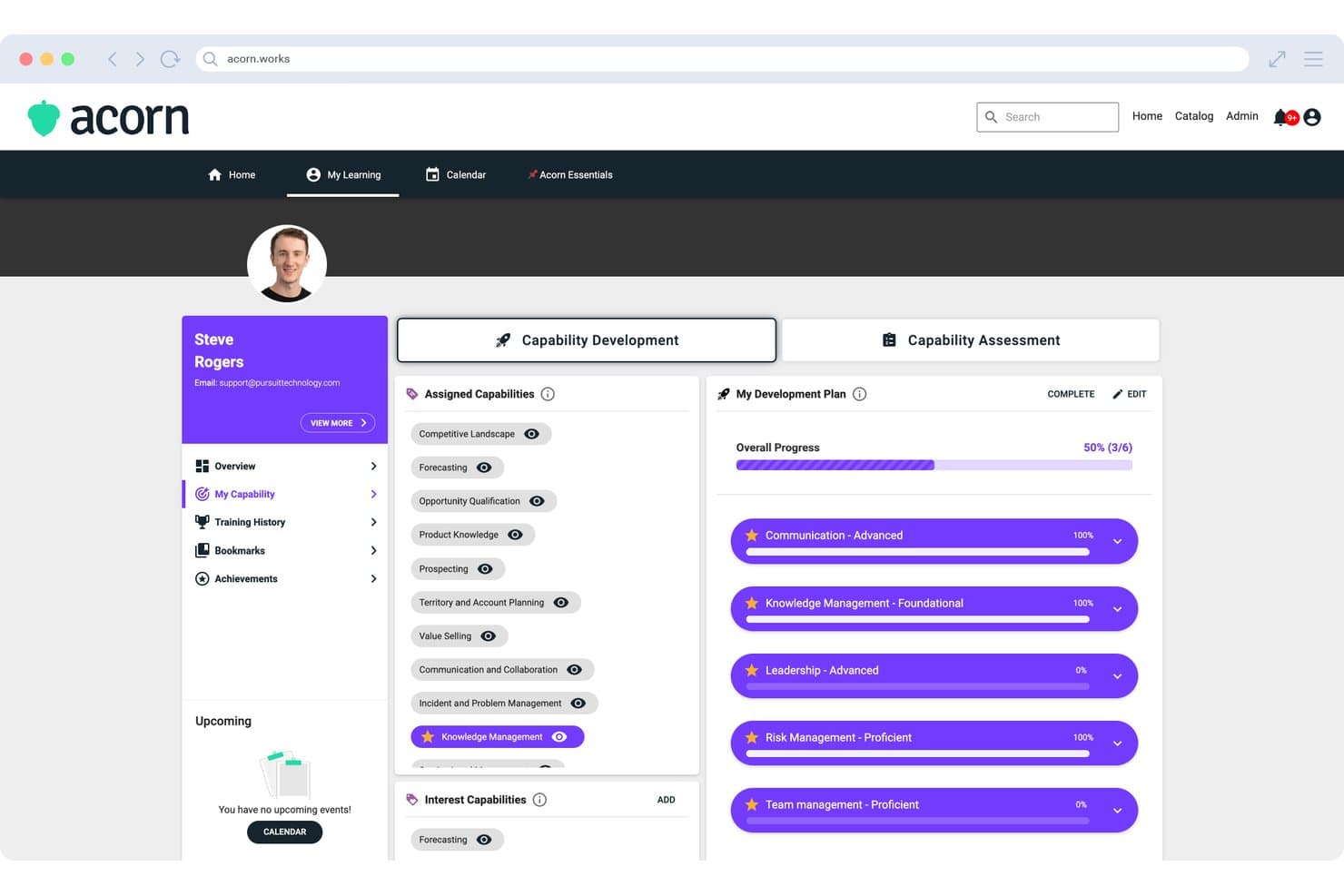
Acorn displays a Capability Development Plan with assigned capabilities, development progress tracking, and starred priority skills for individual learners. Acorn is a performance-focused LMS that combines learning delivery, CE credit tracking, capability management, and onboarding workflows in a single platform for midsize and enterprise healthcare organizations.
Who Is Acorn Best For?
Acorn is built for midsize-to-enterprise healthcare organizations and associations that manage CE delivery across large, distributed provider networks.
Why I Picked Acorn
Acorn earns its spot on my shortlist because of how it pulls compliance content from across the market into one platform. I like that it connects natively to OpenSesame, Go1, LinkedIn Learning, and Skillsoft, and its Universal Adapter auto-syncs external completions back into Acorn so nothing falls through the cracks. I've seen this matter most when sourcing HIPAA, OSHA, and CE content from different vendors — everything lands in one consolidated audit trail.
Acorn Key Features
- CE credit consolidation: Tracks and auto-updates continuing education credits and certificates for clinical staff across multiple content sources.
- Role and capability frameworks: Configures training assignments based on clinical roles, credential requirements, and capability assessments.
- Multi-tenancy management: Supports separate learner portals, shared content, and central administration across distributed healthcare networks.
- Mobile learning app: Provides native Android and iOS applications for on-the-go access to assigned training and certification records.
Acorn Integrations
Acorn offers native integrations with OpenSesame, Go1, LinkedIn Learning, and Skillsoft, plus an API for custom integrations.
Pros and Cons
Pros:
- Capability frameworks built for clinical role mapping
- Multi-tenant structure suits distributed healthcare networks
- Automated CE credit tracking across providers
Cons:
- Reporting customization limited for complex org structures
- No proprietary healthcare compliance content library
Learn more about Acorn: Best for intuitive, self-paced learning in healthcare
- Free demo available
- Pricing upon request
Visit WebsiteCustomer Rating:4.6/5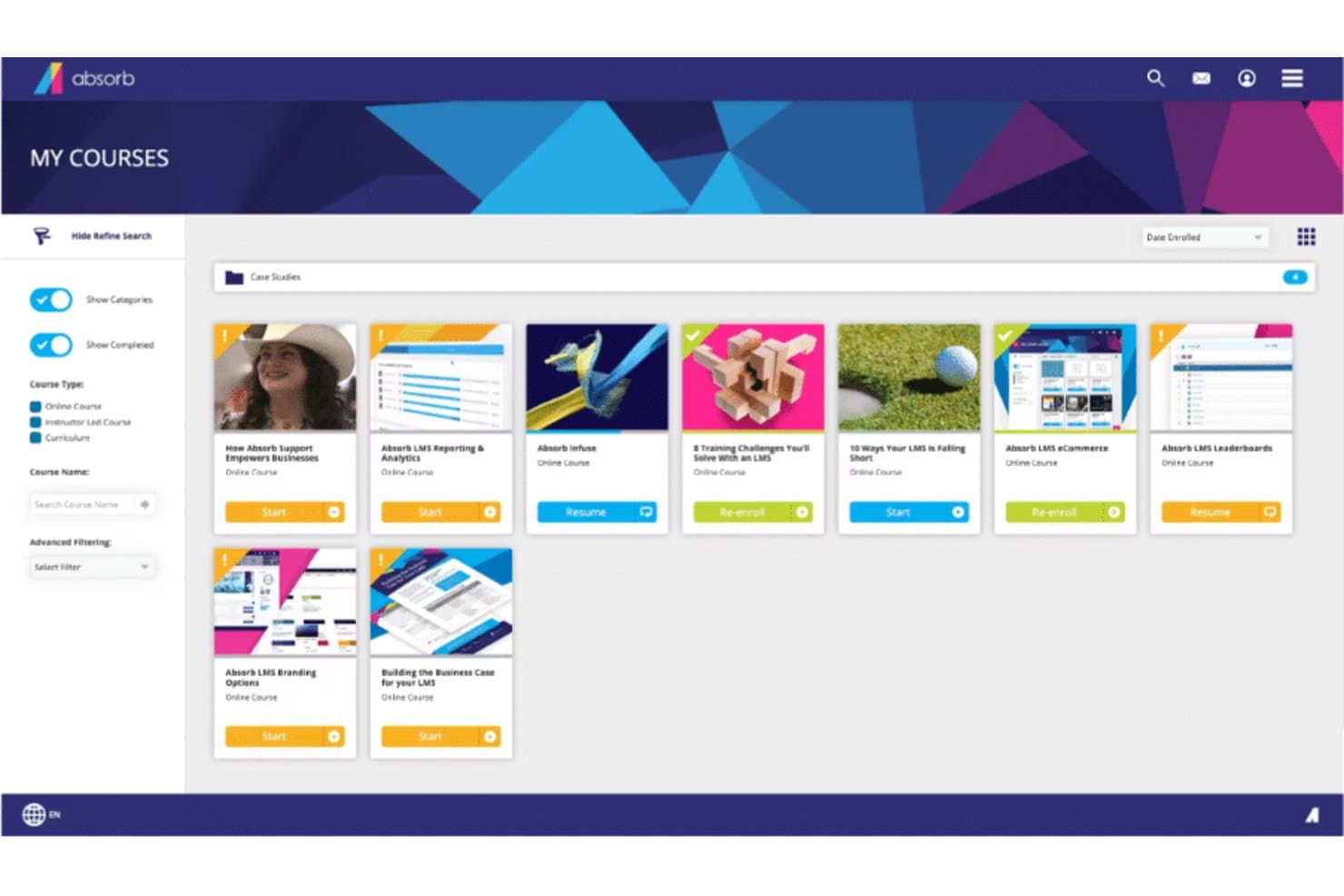
Here's Absorb's courses overview Absorb is a learning management system offering an intuitive, modern interface that is easy to navigate, even for those with limited technical skills. It offers an array of features including course creation, assessment tools, and analytics, which makes it a great choice for organizations seeking a user-friendly LMS.
Why I Picked Absorb: Absorb captured my attention with its intuitive design and user-friendly interface, distinguishing itself from other more complex LMS platforms. Ease of use is a critical factor for any LMS, and in this regard, Absorb shines. This led me to select it as the best LMS for a user-friendly interface.
Standout Features & Integrations:
Key features of Absorb include course creation, assessment tools, learner portals, and analytics. In addition, it provides social learning opportunities through its bulletin board feature. As for integrations, Absorb can be integrated with several software systems such as HRIS, CRM, and e-commerce platforms, adding convenience for its users.
Pros and Cons
Pros:
- Offers integration with various software systems
- Extensive features for course management and learner engagement
- User-friendly interface
Cons:
- User interface may be too simplistic for users seeking a high level of customization
- May lack advanced features compared to some other LMS platforms
- Pricing information is not readily available
Learn more about Absorb: Best for fast deployment and scaling healthcare training
- Free demo available
- Pricing upon request
Visit WebsiteCustomer Rating:4.6/5
A view in LearnUpon dashboard LearnUpon is a learning management system built to accommodate growth. It offers a scalable LMS platform that helps businesses manage, track, and achieve their diverse learning goals. It's designed to expand in line with your business needs, which is why I tagged it as 'best for' scalability.
Why I Picked LearnUpon: I selected LearnUpon for its capability to effectively grow with an organization's learning needs. Its scalable architecture ensures it remains efficient even as a business expands, making it different from other LMSs that may struggle with increased loads.
Based on my judgment, LearnUpon stands as the optimal choice for businesses planning significant growth and expansion.
Standout Features & Integrations:
LearnUpon's standout features include its easy-to-use interface, detailed analytics, eCommerce capabilities, and multi-portal architecture, which allows businesses to create separate learning environments for different audiences.
For integrations, it connects with a wide array of tools including Salesforce, Webex, and Zoom, making it flexible and adaptable to diverse workflows.
Pros and Cons
Pros:
- Excellent customer support
- Wide range of integrations
- Robust and scalable infrastructure
Cons:
- Limited customization options for course appearance
- More advanced features may require a learning curve
- Starting price is higher compared to some other LMS platforms
Learn more about LearnUpon: 10Best for interactive and engaging online medical courses
Tovuti
- Free demo available
- Pricing upon request
Visit WebsiteCustomer Rating:4.7/5
Here's a Tovuti all devices dashboard sample screenshot. Tovuti is a comprehensive learning management system designed to support an engaging and interactive learning environment. It provides a suite of tools and features that make it an excellent platform for developing and delivering immersive online medical courses.
Why I Picked Tovuti: When I was selecting an LMS that could truly revolutionize online medical education, Tovuti immediately stood out. It brings unique interactivity and engagement to the online learning experience, making it truly dynamic.
Its course authoring tools allow for the creation of rich, engaging content, setting it apart as the best choice for those who prioritize interactive learning in their course delivery.
Standout Features & Integrations:
Tovuti offers an interactive course authoring tool that enables the creation of compelling, multimedia-rich courses. Its interactive lessons include elements like gamification and quizzes, enhancing the learning experience.
Additionally, Tovuti offers a wide range of integrations, including with popular systems like Salesforce, Zoom, and WordPress, allowing for seamless data sharing and functionality enhancement across your organization's tool stack.
Pros and Cons
Pros:
- Gamification enhances learner engagement
- Wide range of integrations
- Interactive course authoring tool
Cons:
- Customization can be challenging for non-technical users
- Might be overwhelming for first-time users
- No disclosed pricing information
Learn more about Tovuti:
Andre LMS-plattformer for helsetjenesten
Nedenfor finner du en liste over flere LMS-verktøy for helsetjenesten som jeg hadde på kortlisten, men som ikke kom med blant de 10 beste. Det er absolutt verdt å ta en titt på dem.
- 11DoceboBest for AI-powered personalized learning experiences
- 12eFrontBest for customization and security in medical training
- 13HealthStreamBest for compliance and regulatory training in healthcare
- 14MedTrainerBest for healthcare-specific courses
- 15MedTrainerBest for healthcare workflow automation and training
- 16Litmos LMSBest for mobile-friendly, flexible learning paths
- 17CornerstoneBest for robust healthcare skill development
- 18ReliasBest for reducing risk and ensuring high-quality patient care
- 19MedBridgeBest for clinical performance and patient engagement enhancement
- 20ParadisoBest for multi-language and blended learning experiences
- 21ContinuBest for healthcare compliance training
- 22ConnecteamBest for a HIPAA compliant mobile app LMS for frontline workers
- 23Synergy LearningBest for bespoke learning management systems
- 24AcademyOceanGood for businesses looking to create educational marketing funnels
- 25Blackboard LearnGood for educational institutions seeking comprehensive digital learning features
- 26CareAcademyGood for home care agencies needing caregiver training
- 27KallidusGood for businesses seeking extensive employee development features
How I Evaluate Healthcare LMS
I split my evaluation into two layers: the baseline requirements every platform must meet—like HIPAA-compliant hosting and a real compliance library—and the factors that set top picks apart.
Core Functionality (Table Stakes For This List)
When I'm selecting tools for my list, I rank each one on a scale from 0 (does not offer the functionality) to 5 (excels in this area) for each core functionality listed below. Then, I calculate the tool's total score into a percentage. Each tool needs to achieve a minimum total score of 65% to be considered for inclusion.
- Healthcare Compliance Content Library: I check whether the platform ships with up-to-date HIPAA, OSHA, and Bloodborne Pathogen courses rather than requiring you to build all compliance training from scratch.
- CE/CME Credit Tracking: Tracking credit hours, license types, and expiration dates matters—especially when your RNs, MAs, and providers each carry different renewal timelines.
- Audit-Ready Reporting: I look for pre-built reports that map to Joint Commission or CMS survey requirements so your compliance team can pull records on demand during an audit.
- Role-Based Learning Paths: The platform should let you assign different course tracks by job role, like separating front-desk HIPAA awareness training from clinical staff safety modules.
- Automated Recertification Workflows: I evaluate how the system handles recurring annual training—automated reassignment, escalation alerts, and manager notifications reduce the manual follow-up burden.
- HIPAA-Compliant Infrastructure: A signed BAA, encryption standards, and role-based access controls are baseline expectations for any platform handling training data adjacent to PHI.
Once I have a list of tools that meet the criteria, I consider what sets each platform apart.
Differentiating Factors (What Sets Vendors Apart)
Here's how I compare and contrast different vendors:
Standout Features
Mobile access is a real differentiator—I look for native apps that let clinical staff finish a module between patients without being tied to a workstation. Skills checklists and competency assessments also separate platforms, especially when preceptors can sign off on observed clinical skills directly in the system. For multi-site practices or DSOs, I evaluate how well the platform handles location-based reporting and hierarchical org structures across facilities.
Beyond Features
I check whether a vendor's compliance courses carry actual ACCME or ANCC accreditation, since platforms that can issue valid CE/CME credits save your team from managing a separate accreditation workflow. Integration with your existing EHR and HRIS matters too—automated user provisioning through systems like ADP or BambooHR prevents orphaned accounts when staff turn over. Pricing structure is worth evaluating closely, particularly whether the content library is bundled or sold à la carte, which can significantly shift total cost for growing practices.
Slik velger du et LMS for helsetjenesten
Det er lett å gå seg vill i lange funksjonslister og komplekse prisstrukturer. For å hjelpe deg med å holde fokus mens du går gjennom den unike prosessen med å velge programvare, får du her en sjekkliste over faktorer du bør ha i mente:
| Faktor | Hva du bør vurdere |
|---|---|
| FaktorSkalerbarhet | Hva du bør vurdereHvor godt vokser LMS-løsningen med virksomheten din? Vurder hvor mange brukere den støtter, og om den kan håndtere økte datamengder etter hvert som behovene dine vokser. |
| FaktorIntegrasjoner | Hva du bør vurdereKan LMS-løsningen integreres med de eksisterende systemene dine? Se etter kompatibilitet med elektronisk pasientjournal, HR-systemer og andre verktøy for å unngå datasiloer og effektivisere arbeidsflytene. |
| FaktorTilpasningsmuligheter | Hva du bør vurdereKan du tilpasse LMS-løsningen til virksomhetens behov? Sjekk om du kan tilpasse læringsstier, dashbord og rapporter slik at de samsvarer med de unike prosessene dine. |
| FaktorBrukervennlighet | Hva du bør vurdereEr LMS-løsningen brukervennlig for ansatte på alle nivåer? Et enkelt grensesnitt reduserer opplæringstiden og hjelper de ansatte med å ta systemet raskt i bruk. |
| FaktorImplementering og introduksjon | Hva du bør vurdereHvor lang tid tar det å komme i gang? Vurder oppsettprosessen og tilgjengelige ressurser, som opplæringsvideoer eller produktomvisninger, for å sikre en smidig overgang. |
| FaktorKostnad | Hva du bør vurderePasser prisene inn i budsjettet ditt? Sammenlign kostnadene for ulike abonnementer og ta hensyn til eventuelle skjulte gebyrer. Se etter løsninger som gir en god balanse mellom funksjoner og pris. |
| FaktorSikkerhetstiltak | Hva du bør vurdereHvor sikker er LMS-løsningen? Sørg for at den overholder personvernregler og tilbyr funksjoner som kryptering og tilgangskontroller for å beskytte sensitiv informasjon. |
| FaktorEtterlevelseskrav | Hva du bør vurdereStøtter LMS-løsningen etterlevelseskravene i bransjen din? Sjekk om den tilbyr verktøy for å spore sertifiseringer, håndtere revisjoner og holde seg oppdatert på endringer i regelverket. |
Hva er et LMS for helsetjenesten?
LMS for helsesektoren er et læringsstyringssystem utviklet for helsesektoren for å legge til rette for opplæring og håndtering av samsvar. Disse verktøyene brukes vanligvis av helsepersonell, inkludert administratorer, undervisere og klinisk personale, for å effektivisere opplæringen og sikre samsvar med myndighetskrav.
Funksjoner som nettbaserte opplæringsmoduler, fremdriftssporing og håndtering av sertifiseringer bidrar til å levere enhetlig opplæring og opprettholde samsvar med bransjestandarder. Samlet sett gir disse verktøyene betydelig verdi ved å forbedre de ansattes ferdigheter og sikre at helseforskriftene overholdes.
Funksjoner i LMS for helsesektoren
Når du velger et LMS for helsesektoren, bør du se etter følgende viktige funksjoner:
- Samsvarssporing: Hjelper deg med å overvåke og dokumentere opplæring, sertifiseringer og myndighetskrav for ansatte, slik at alle holder seg oppdatert på bransjestandarder og juridiske forventninger.
- Kursadministrasjon: Lar deg opprette, organisere og oppdatere opplæringsmoduler for ulike avdelinger eller roller, noe som gjør det enkelt å innføre nye retningslinjer og holde alle informert.
- Vurderingsverktøy: Tilbyr quizer, tester og undersøkelser slik at du kan måle forståelsen, identifisere kunnskapshull og se hvor det kan være behov for ekstra støtte.
- Rapportering og analyse: Gir detaljert innsikt i fullføringsgrad for kurs, deltakernes fremdrift og opplæringens effektivitet, slik at du raskt kan oppdage trender og ta datadrevne beslutninger.
- Tilgjengelighet på mobile enheter: Gjør det mulig for deltakere å få tilgang til kurs, ressurser og vurderinger fra smarttelefoner eller nettbrett – læring kan finne sted hvor som helst, ikke bare ved et skrivebord.
- Brukeradministrasjon: Lar deg tildele roller, administrere deltakergrupper og håndtere tillatelser på en enkel måte, slik at opplæringsprosessen forblir organisert og sikker.
- Integrasjonsmuligheter: Kobler seg til andre HR- eller medisinske systemer du allerede bruker, effektiviserer kommunikasjonen og reduserer manuelt arbeid for teamet ditt.
- Innholdsbibliotek: Tilbyr et innebygd utvalg av relevante og oppdaterte medisinske kurs og ressurser, slik at du sparer tid på innholdsproduksjon samtidig som viktige opplæringsbehov dekkes.
- Tilpassbare læringsstier: Gjør det mulig å tilpasse opplæringsforløp for ulike personer eller team, slik at hver deltaker får riktig informasjon til riktig tid.
Vanlige KI-funksjoner i LMS for helsesektoren
I tillegg til standardfunksjonene i LMS for helsesektoren som er nevnt ovenfor, integrerer mange av disse løsningene KI med funksjoner som:
- Personlige læringsanbefalinger: Bruker KI til å foreslå kurs og ressurser basert på den enkeltes rolle, historikk og interesser, noe som gjør opplæringen både effektiv og engasjerende.
- Automatisert analyse av ferdighetsgap: KI undersøker deltakernes prestasjoner og identifiserer automatisk områder der det er behov for mer opplæring eller støtte, slik at du proaktivt kan håndtere svakheter.
- Chatboter på naturlig språk: Gir umiddelbar, KI-drevet støtte og svar på opplæringsrelaterte spørsmål, slik at deltakerne raskt og selvstendig kan finne informasjon.
- Prediktiv analyse: KI forutsier fremtidige opplæringsbehov og potensielle samsvarsrisikoer ved å analysere deltakelsesdata, slik at du ligger flere skritt foran.
- Adaptive vurderinger: Justerer dynamisk vanskelighetsgraden og typen spørsmål basert på deltakernes svar i sanntid, slik at vurderingene gjenspeiler hver persons ferdighetsnivå nøyaktig.
Fordeler
Implementering av et LMS for helsesektoren gir flere fordeler for teamet og virksomheten din. Her er noen av fordelene du kan se frem til:
- Bedre samsvar: Spor enkelt sertifiseringer og myndighetskrav, slik at teamet ditt overholder bransjestandardene.
- Mer effektiv opplæring: Lever enhetlige nettbaserte opplæringsmoduler, og reduser tiden og ressursene som brukes på fysiske opplæringsøkter.
- Bedre tilgjengelighet: Tilgang via mobile enheter gjør det mulig for ansatte å lære mens de er på farten, gir fleksibilitet og ivaretar ulike læringsstiler.
- Bedre innsikt i prestasjoner: Avansert analyse gir verdifulle data om de ansattes fremdrift i opplæringen, slik at du kan ta informerte beslutninger.
- Tilpassede læringsopplevelser: Tilpassbare læringsstier ivaretar de unike behovene til ulike roller, noe som øker relevansen og engasjementet.
- Effektivisert introduksjon: Interaktive produktvisninger og opplæringsressurser gjør det enklere for nyansatte å komme raskt i gang.
- Integrasjon med andre systemer: Sømløs integrasjon med eksisterende verktøy reduserer manuell dataregistrering og forbedrer effektiviteten i arbeidsflyten.
Kostnader & priser
Valg av LMS for helsesektoren krever en forståelse av de ulike prismodellene og tilgjengelige abonnementene. Kostnadene varierer avhengig av funksjoner, teamstørrelse, tillegg og mer. Tabellen nedenfor oppsummerer vanlige abonnementer, gjennomsnittsprisene deres og typiske funksjoner som er inkludert i LMS-løsninger for helsesektoren:
Sammenligningstabell for LMS for helsesektoren
| Abonnementstype | Gjennomsnittspris | Vanlige funksjoner |
|---|---|---|
| AbonnementstypeGratisabonnement | Gjennomsnittspris$0 | Vanlige funksjonerGrunnleggende opplæringsmoduler, fremdriftssporing og begrenset brukerstøtte. |
| AbonnementstypePersonlig abonnement | Gjennomsnittspris$5-$25/bruker/måned | Vanlige funksjonerTilpassbare læringsstier, mobiltilgang og sertifiseringsadministrasjon. |
| AbonnementstypeForretningsabonnement | Gjennomsnittspris$30-$60/bruker/måned | Vanlige funksjonerAvansert analyse, integrasjoner med eksisterende systemer og utvidet brukerstøtte. |
| AbonnementstypeVirksomhetsabonnement | Gjennomsnittspris$70-$100/bruker/måned | Vanlige funksjonerFull tilpasning, dedikert kundeansvarlig og verktøy for samsvarssporing. |
Vanlige spørsmål om LMS for helsesektoren
Her er noen svar på vanlige spørsmål om LMS for helsesektoren:
Hvordan kan LMS for helsesektoren forbedre samsvar?
LMS for helsesektoren bidrar til å spore og administrere opplæring i samsvar, slik at teamet ditt oppfyller regulatoriske krav. Det gir automatiske påminnelser og rapporter, slik at du enkelt kan følge med på hvem som har fullført nødvendige kurs. Dette reduserer risikoen for manglende samsvar og mulige sanksjoner.
Hvilke sikkerhetshensyn gjelder for LMS for helsesektoren?
Sikkerhet er avgjørende i LMS for helsesektoren for å beskytte sensitive data. Se etter funksjoner som datakryptering, brukerautentisering og samsvar med regelverk som HIPAA. Vurder leverandørens sikkerhetsprotokoller for å sikre at pasientdata og organisatoriske data forblir beskyttet.
Hvilke utfordringer oppstår vanligvis ved implementering av et LMS i en helsekontekst?
Vanlige utfordringer omfatter motstand fra travelt klinisk personell, tilpasning av opplæringen til skiftarbeidsplaner og håndtering av flere brukerroller (sykepleiere, leger og støttepersonell). Du trenger en plan for innføring, opplæring av administratorbrukere og vedlikehold av innholdet slik at det forblir relevant. Planlegg også for endringsledelse, og sørg for at toppledelsen støtter utrullingen.
Hva bør vi vurdere når det gjelder skalerbarhet og løpende vedlikehold av LMS-et?
Hvis organisasjonen vokser (nye avdelinger, lokasjoner eller fjernarbeidende ansatte), må LMS-et kunne skaleres uten betydelig ytelsesforringelse. Vurder også hvor ofte leverandørene oppdaterer systemet, hvor enkelt det er å laste opp og vedlikeholde innhold, og hvordan den administrative innsatsen øker når dere utvider. Manglende planlegging for skalerbarhet kan føre til høyere kostnader eller at systemet må erstattes tidligere enn forventet.