

Gratis EMR-systemer (elektroniske pasientjournalsystemer) er digitale verktøy som lar praksisen din håndtere pasientjournaler, timeplanlegging, journalføring, fakturering og sikker meldingsutveksling uten forhåndskostnader – disse leverandørene tilbyr en kostnadsfri plan eller prøveperiode. Hvis du leter etter det beste gratis EMR-systemet, trenger du sannsynligvis å forbedre dokumentasjon, kommunikasjon eller etterlevelse uten å legge press på et nytt budsjett. Når du velger riktig EMR-system, kan teamet ditt få mer klinisk tid, raskere opplæring og færre administrative forstyrrelser. Nedenfor finner du en håndplukket liste over topprangerte gratis EMR-alternativer for 2026, med viktige funksjoner og detaljer slik at du kan velge det som passer best til dine kliniske og operative behov.
Why Trust Our Software Recommendations
6,700+
Reviews
20
Industry experts
16+
Evaluation factors
14
Years
Our team has been testing and reviewing software since 2012. As medical practice leaders ourselves, we know how difficult—and important—it is to choose the right software.
For this guide, we evaluated tools using hands-on testing and independent research, scoring tools using our selection criteria.
Our reviews reflect our human editorial judgment, not a sales pitch.
Sammenligningstabell for gratis EMR-systemer
Selv om alle EMR-systemene på listen min har kostnadsfrie tilbud, har de også betalingsplaner dersom du ønsker å oppgradere:
| Tool | Best For | Trial Info | Price | ||
|---|---|---|---|---|---|
| 1 | Best freemium EMR for notes and telehealth | Free plan available; 14-day free trial | From $31/user/month | Website | |
| 2 | Best for behavioral health charting and compliance | 30-day free trial | From $69/month | Website | |
| 3 | Best free-plan EMR for solo providers | Free plan available | From $25/month | Website | |
| 4 | Best for independent practices trialing before buying | Free demo available | Pricing upon request | Website | |
| 5 | Best for trialing a mature e-prescribing EMR | Free demo available | From $199/user/month | Website | |
| 6 | Best for low-cost behavioral health trial charting | 30-day free trial | From $59/month | Website | |
| 7 | Best for independent NP-led practice charting | Free demo available | Pricing upon request | Website | |
| 8 | Best for free, self-hosted clinical workflows | Free demo available | Pricing upon request | Website | |
| 9 | Best open-source EMR for global health programs | Free demo available | Free | Website | |
| 10 | Best free EMR for low-resource global clinics | Free demo available | Free | Website |


Anmeldelser av de beste gratis EMR-systemene
\u003cspan style=\u0022font-weight: 400\u0022\u003eNedenfor finner du mine detaljerte sammendrag av de gratis EMR-systemene som kom med på kortlisten min. Anmeldelsene mine gir en detaljert gjennomgang av funksjonene, prisene og de beste bruksområdene for hvert system, slik at du kan finne det som passer best for deg.\u003c/span\u003e
 Best freemium EMR for notes and telehealth
- Free plan available; 14-day free trial
- From $31/user/month
Visit WebsiteCustomer Rating:4.4/5
Carepatron helps practices manage client records, personal details, contact information, provider details, staff assignments, tags, and custom client record sections. Carepatron is a freemium EHR platform for healthcare practitioners that combines clinical documentation, appointment scheduling, telehealth, billing, and a client portal in a single workspace.
Who Is Carepatron Best For?
Carepatron is a good fit for solo practitioners and small multidisciplinary clinics that need an all-in-one free EHR without committing to a paid plan upfront.
Why I Picked Carepatron
I picked Carepatron as one of the best because its free plan doesn't gate the three features that matter most to a solo clinician: telehealth, clinical notes, and appointment scheduling. What I find genuinely useful is the AI scribe, which drafts notes during a session and saves them directly to the client record. The telehealth window also keeps the client chart and past session notes open alongside the video call, so there's no switching between tabs mid-session.
Carepatron Key Features
- Client portal: Clients can self-book appointments, complete intake forms, and access shared documents from a dedicated portal.
- Treatment plan builder: Create structured treatment plans from templates and track progress across multiple sessions in a single client record.
- Online invoicing and payments: Generate invoices directly from completed appointments and collect payments online without leaving the platform.
- Insurance claims management: Submit insurance claims with built-in validation that checks for errors before sending.
Carepatron Integrations
Carepatron integrates with Zoom, Google Meet, Microsoft Teams, and Stripe for payments. It also connects with Google Calendar, Google Analytics, Xero, and Mailchimp. The integration library is more limited than some competing platforms, but it connects with Zapier, and an API is available for custom integrations.
Pros and Cons
Pros:
- Free plan includes telehealth and scheduling
- Large community-shared template library included
- AI scribe drafts notes during sessions
Cons:
- No e-prescribing on the free plan
- Telehealth video calls have reliability issues
Learn more about Carepatron: Best for behavioral health charting and compliance
- 30-day free trial
- From $69/month
Visit WebsiteCustomer Rating:4.4/5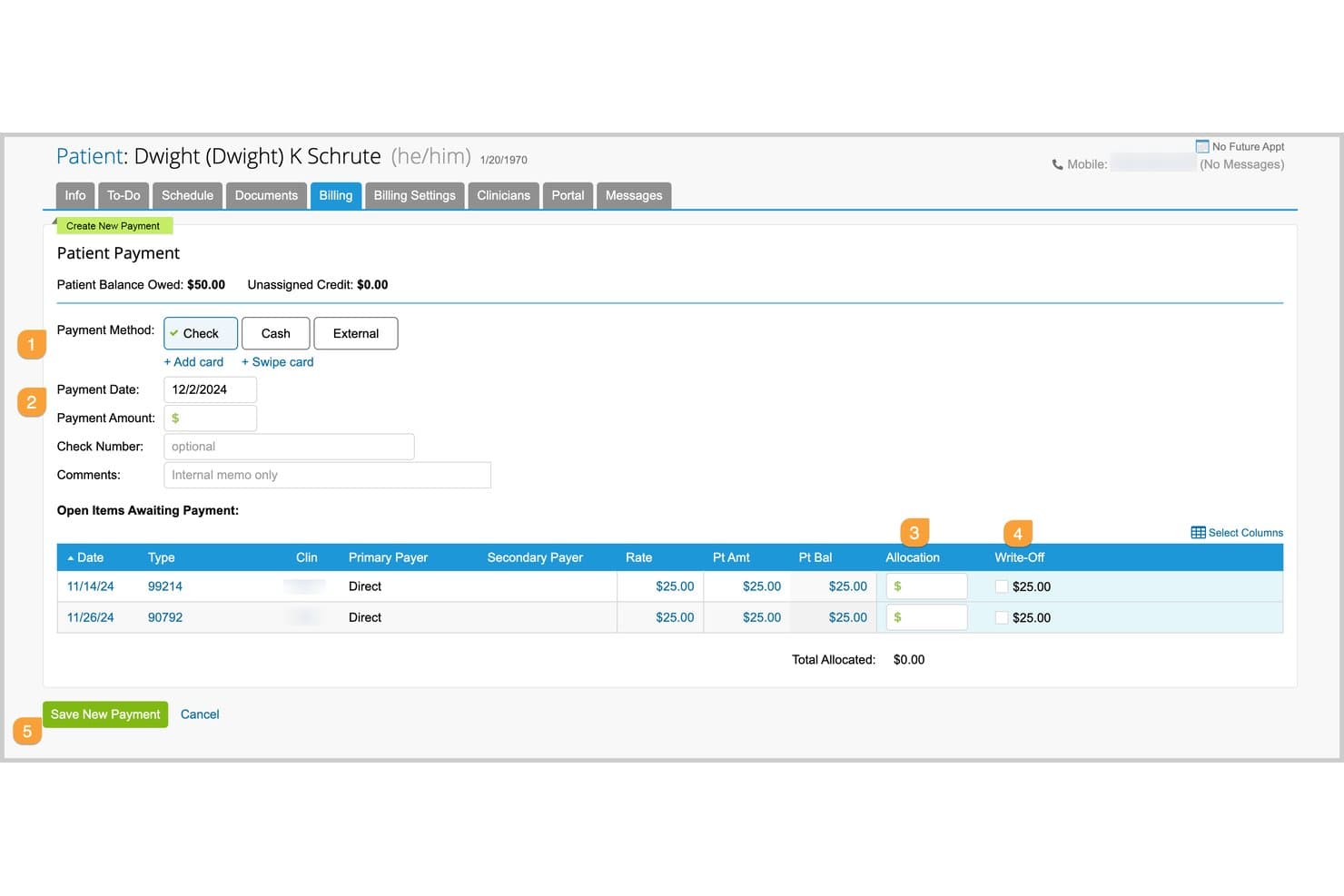
TherapyNotes lets users record and allocate patient payments to open invoices. For clinicians comparing free EMRs, TherapyNotes is a paid behavioral health EHR with charting, scheduling, billing, a client portal, and optional e-prescribing; it offers a 30-day trial rather than a free-forever plan.
Who Is TherapyNotes Best For?
TherapyNotes fits behavioral health clinicians who need specialized clinical workflows; its stated focus is “Best for behavioral health charting and compliance.”
Why I Picked TherapyNotes
I picked TherapyNotes for its specialty focus: Best for behavioral health charting and compliance. Structured SOAP-style notes and treatment-plan templates support therapy documentation, while audit logs help track chart activity. It has no free-forever plan, only a 30-day trial, so it’s a paid option to evaluate rather than a free EMR.
TherapyNotes Key Features
- Client portal: TherapyPortal supports paperless intake, self-scheduling, secure messaging, and online bill pay.
- Appointment scheduling: Create recurring sessions, group appointments, and automated reminders.
- Claims management: Submit electronic claims, receive ERAs, check eligibility, and create superbills.
- Telehealth: Basic video visits support two participants; Premium adds HD, screen sharing, and up to 16 participants.
TherapyNotes Integrations
TherapyNotes integrates with Google Calendar, Microsoft Outlook, iCloud, and Surescripts; calendar sync is one-way, and e-prescribing is a paid add-on.
What's Free?
TherapyNotes has no free-forever plan, but it offers a 30-day free trial. After the trial, it’s a paid service starting at $69 per month.
Pros and Cons
Pros:
- Audit logs support supervision and co-signing
- Reviewers praise responsive 24/7 human support
- Structured SOAP notes carry details forward
Cons:
- Behavioral-health focus excludes general practices
- No free-forever plan
Learn more about TherapyNotes: Best free-plan EMR for solo providers
- Free plan available
- From $25/month
Visit WebsiteCustomer Rating:4.2/5
CharmHealth helps practices manage invoices, receipts, refunds, claims, patient statements, billing reports, and net collection tracking. CharmHealth is a cloud-based EHR, practice management, and medical billing platform built around a free-tier model that makes it accessible to solo providers and small practices without upfront commitment.
Who Is CharmHealth Best For?
CharmHealth is a strong fit for independent ambulatory practices and solo providers who need a full EHR without the overhead of an enterprise system.
Why I Picked CharmHealth
CharmHealth earns its spot as one of the best on my shortlist because the free plan isn't a stripped-down teaser. Solo providers get real clinical tools, including SOAP note templates, a flowsheet for tracking vitals across visits, and e-prescribing connected to 70,000+ pharmacies. I also like that the AI Scribe is available as an add-on even on the free tier, so small practices can adopt ambient documentation without committing to a paid plan first.
CharmHealth Key Features
- Referral management: Track and manage patient referrals directly within the EHR without a separate tool.
- Role-based access control: Assign different permission levels to staff members based on their role in the practice.
- Pre-screening forms: Send customizable intake and pre-screening forms to patients before their appointment through the patient portal.
- Inventory management: Track and manage in-practice product inventory from within CharmHealth.
CharmHealth Integrations
CharmHealth integrates with major labs using the standard HL7 interface, routing lab orders directly and pushing results back into the EHR. Verified lab partners include LabCorp and Quest. It also integrates with Fullscript for supplement prescribing and fulfillment, Surescripts for e-prescribing, and marketplace partners like CrossTx, Dialog One, Docere Systems (DRIP), DocHelp, and DoctorConnect. Interoperability is supported through HL7 and FHIR standards for data sharing with third-party applications, laboratories, pharmacies, and medical devices. An API program is available for custom integrations.
Pros and Cons
Pros:
- Built-in patient portal and kiosk check-in
- Free plan includes real clinical tools
- Customizable charting templates and macros
Cons:
- Billing features require paid add-ons
- Customer support response times vary widely
Learn more about CharmHealth: Best for independent practices trialing before buying
- Free demo available
- Pricing upon request
Visit WebsiteCustomer Rating:4.4/5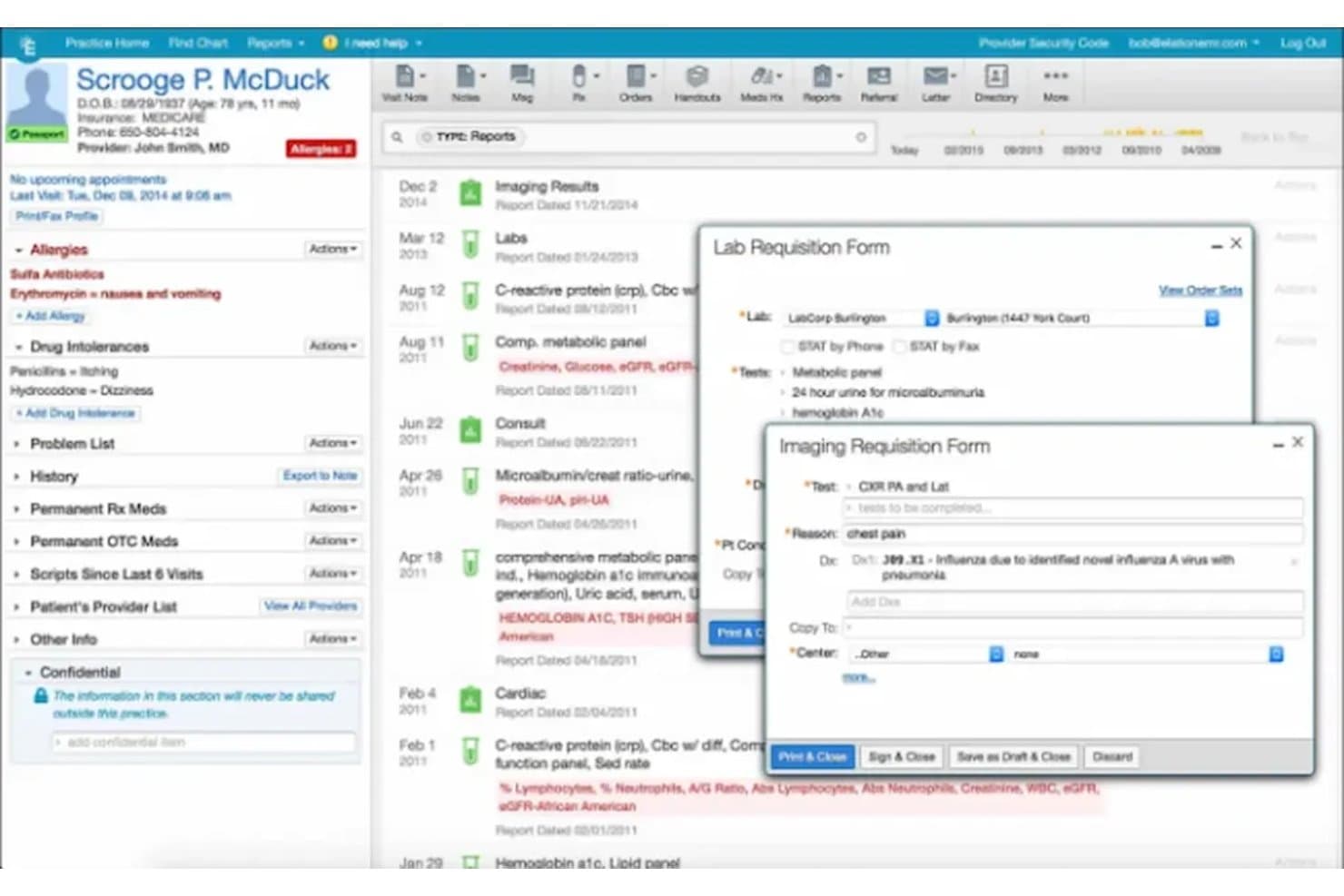
Elation Health streamlines lab and imaging orders from the patient chart. Elation Health is a cloud-based EMR for independent practices with structured patient charting, AI-assisted notes, e-prescribing, appointment scheduling, automated reminders, and a patient portal.
Who Is Elation Health Best For?
Elation Health is Best for independent practices trialing before buying, with demos and free trials available but no permanent free plan.
Why I Picked Elation Health
Elation Health fits “Best for independent practices trialing before buying” because its free trial lets me assess structured chart timelines and visit-note templates in practice. I can also test appointment scheduling and automated reminders within the same workflow. There’s no free-forever plan, so I consider it a trial option, not an ongoing free EMR.
Elation Health Key Features
- Free trial and demo: Elation offers demos and trials, but no permanent free plan; trial terms aren’t stated.
- E-prescribing: Send prescriptions through Surescripts, with controlled-substance prescribing available through MDToolbox.
- Patient portal: Elation Passport supports secure messaging, appointment management, and patient access to visit summaries.
- Telehealth: Built-in Zoom video appears within Elation’s clinical workspace.
Elation Health Integrations
Elation’s Partner Hub lists 300+ integrations, including Zocdoc, Fullscript, Zus, and Nsight Health. Built-in partners include Surescripts, MDToolbox, Medispan, Zoom, and Ribbon, and API access is available to existing customers and partners.
What's Free?
Elation Health has no free-forever plan, but it offers a free demo and trial; trial duration and restrictions aren’t stated.
Pros and Cons
Pros:
- Scheduling includes reminders and patient booking
- AI scribe drafts structured visit notes
- Reviewers praise intuitive, fast charting
Cons:
- Support response times draw complaints
- No free-forever plan
Learn more about Elation Health: Best for trialing a mature e-prescribing EMR
- Free demo available
- From $199/user/month
Visit WebsiteCustomer Rating:3.7/5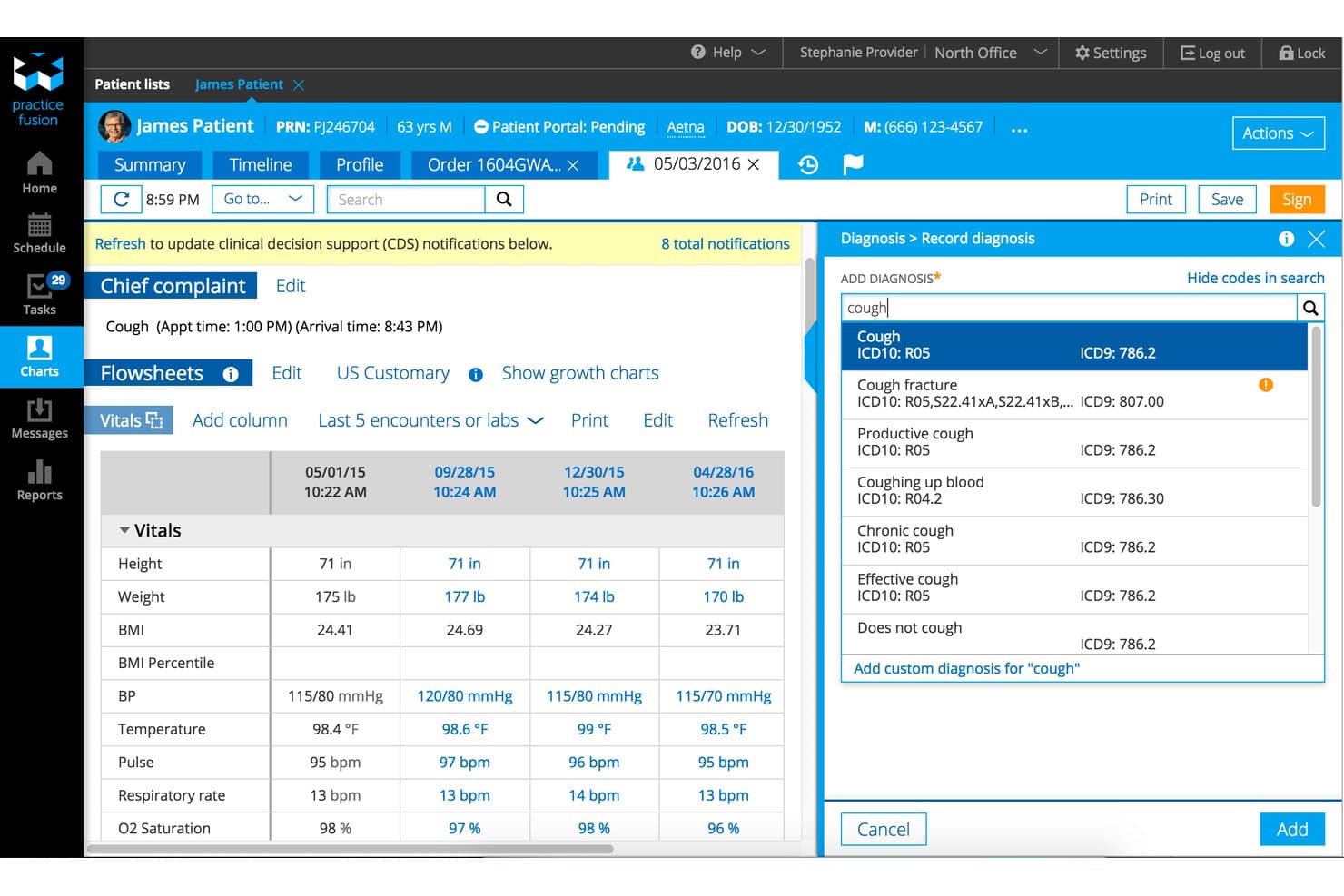
Practice Fusion streamlines diagnosis coding with ICD-10 search during visits. Practice Fusion is a cloud-based EMR with patient charting, e-prescribing, appointment scheduling, lab and imaging connections, and a patient portal; it offers a 14-day trial, not a free-forever plan.
Who Is Practice Fusion Best For?
Practice Fusion suits small practices comparing EMRs before purchase, with a 14-day trial; its positioning is “Best for evaluating EMR options before buying.”
Why I Picked Practice Fusion
I picked Practice Fusion as a comparison entry because its fit is “Best for evaluating EMR options before buying,” not free-forever use. Its 14-day trial and free demo let you assess specialty chart templates and e-prescribing workflows. I also look at its bulk CCD/C-CDA export option when evaluating how patient records can move to another system.
Practice Fusion Key Features
- Appointment scheduling : Schedule recurring visits and send email, text, or voice reminders.
- Patient portal : FollowMyHealth lets patients book appointments, check in, view instructions, and message the practice.
- Lab and imaging connections : Order tests and receive structured results from connected centers.
- Audit reports : Review account activity and track user actions.
Practice Fusion Integrations
Practice Fusion supports daily patient-record imports from athenahealth, NextGen, Amazing Charts, and eClinicalWorks, plus connections to pharmacy, health information exchange, immunization registry, lab, and imaging services.
What's Free?
Practice Fusion offers a 14-day free trial, not a free-forever plan; a free demo is also available. After the trial, plans start at $199 per user per month.
Pros and Cons
Pros:
- Bulk record exports support future transitions
- E-prescribing supports controlled-substance workflows
- Custom templates help organize patient charts
Cons:
- Annual commitment limits low-volume practices
- No free tier beyond evaluation
Learn more about Practice Fusion: Best for low-cost behavioral health trial charting
- 30-day free trial
- From $59/month
Visit WebsiteCustomer Rating:4.2/5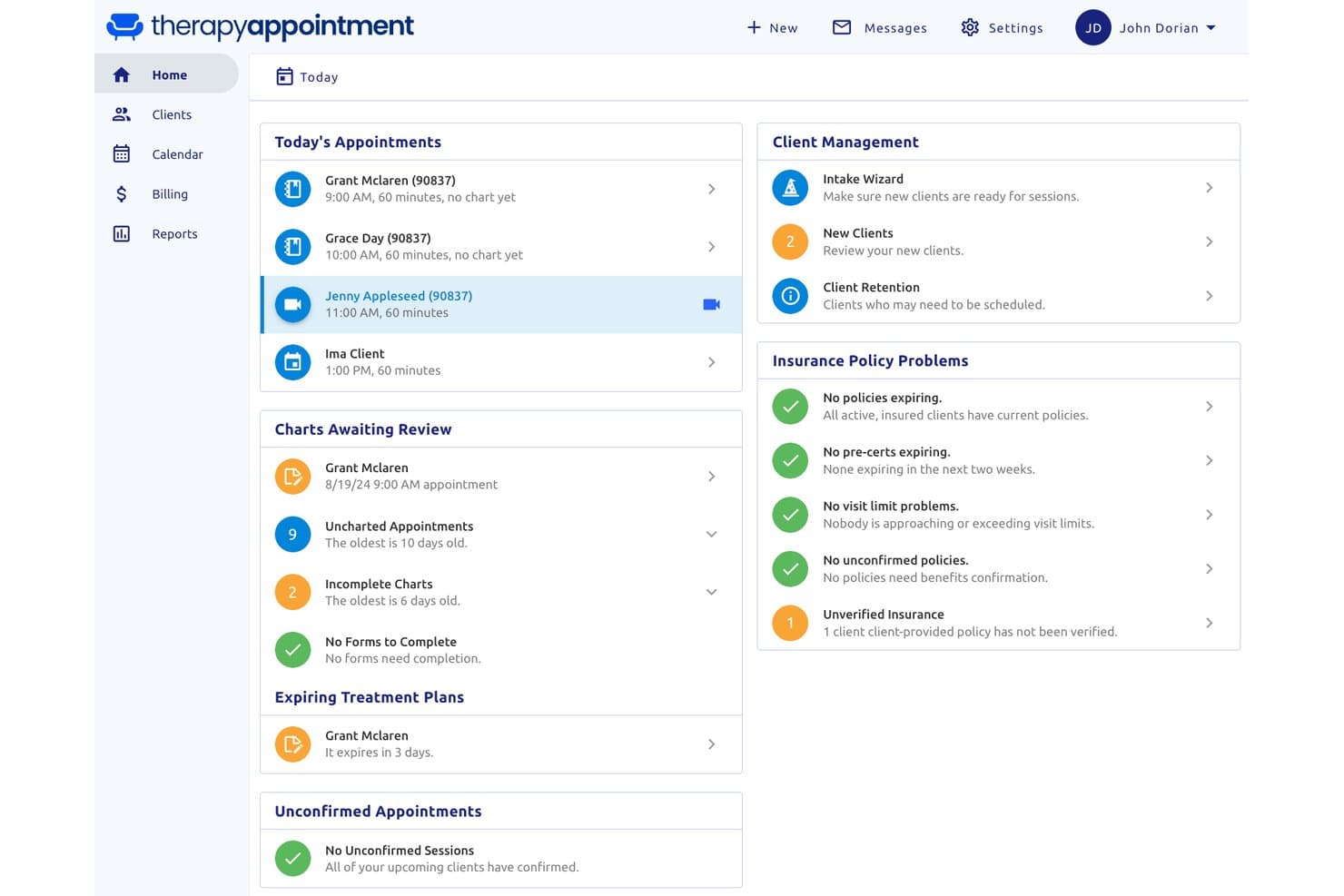
TherapyAppointment centralizes daily appointments, charts, and insurance status. For clinicians comparing free EMRs, TherapyAppointment is a behavioral health EMR and practice-management platform for session notes, treatment plans, intake, scheduling, and billing; it offers a 30-day trial, not a permanent free plan.
Who Is TherapyAppointment Best For?
TherapyAppointment—Best for low-cost behavioral health trial charting—fits solo and group practices focused on psychotherapy and related clinical care.
Why I Picked TherapyAppointment
I picked TherapyAppointment for low-cost behavioral health trial charting because its session notes, treatment plans, and 70+ intake and assessment templates support therapists’ day-to-day documentation. Supervisors can review and sign clinicians’ notes, a useful workflow for training practices. It has no permanent free plan, and the 30-day trial requires a credit card and converts to a paid plan.
TherapyAppointment Key Features
- Automated reminders: Sends appointment reminders by text, email, or phone.
- Client portal: Supports intake forms, e-signatures, self-scheduling, secure messaging, and invoice payments.
- Electronic claims: Connects to Office Ally for claims submission and automatic ERA posting.
- Security controls: Includes AES-256 encryption, two-factor authentication, role-based permissions, and audit trails.
TherapyAppointment Integrations
TherapyAppointment integrates with DoseSpot for e-prescribing, Office Ally for electronic claims, Zoom for Healthcare, and Google Calendar, iCal, and Outlook. State HIE connections are available in Connecticut, North Carolina, and Oklahoma; the vendor doesn’t document an API.
What’s Free?
TherapyAppointment offers a 30-day free trial, not a free-forever plan. The trial requires a credit card and converts to a paid plan when it ends.
Pros and Cons
Pros:
- Automated reminders and self-scheduling ease appointment coordination
- Session notes support supervisor review and sign-off
- Therapists praise responsive customer support
Cons:
- Mental-health-only charting excludes general medical workflows
- Trial requires a card and converts automatically
Learn more about TherapyAppointment: Best for independent NP-led practice charting
- Free demo available
- Pricing upon request
Visit WebsiteCustomer Rating:3.9/5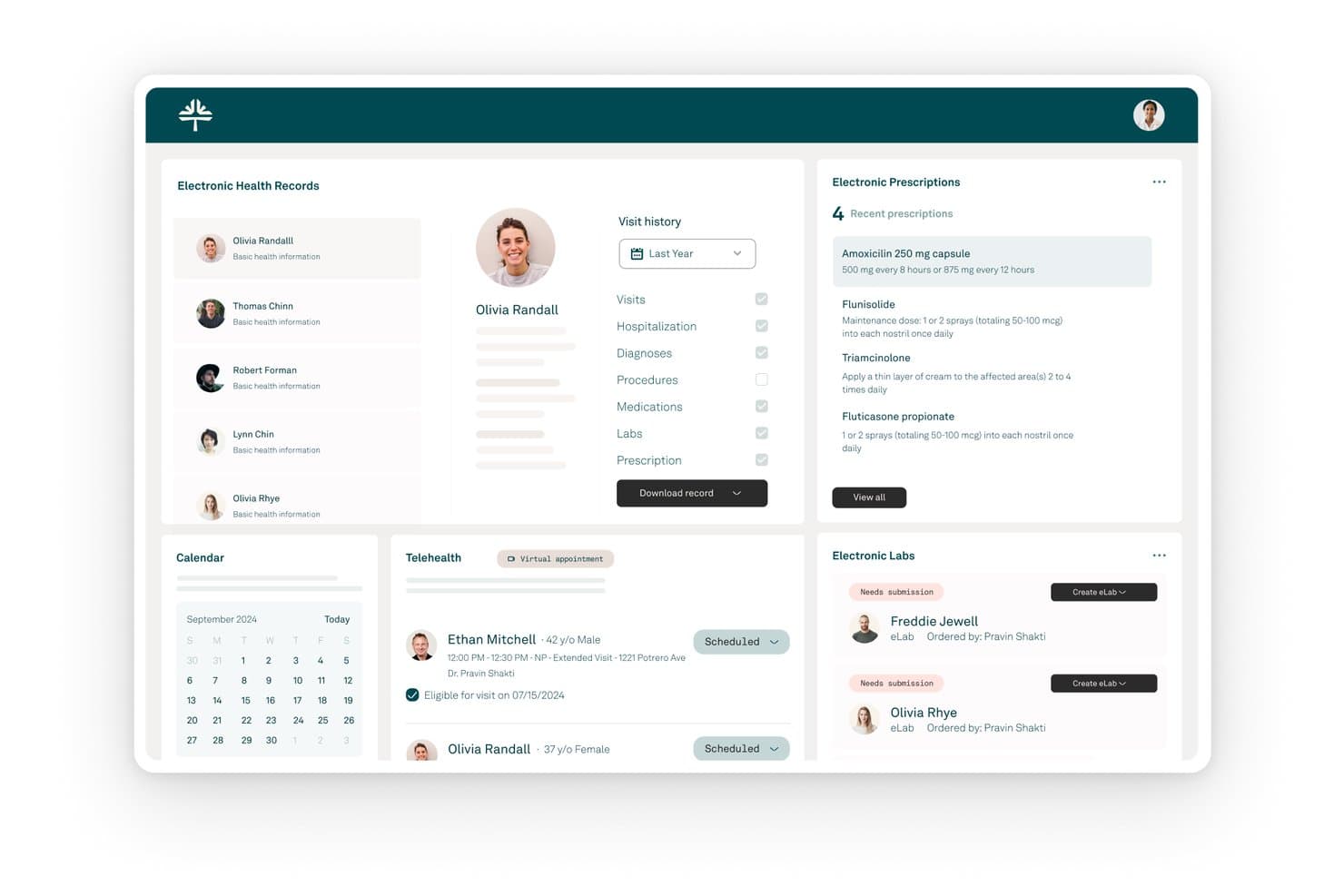
Kareo (Tebra) centralizes patient records, prescriptions, and lab orders in one dashboard. Kareo (Tebra) is a paid, cloud-based EMR and practice management platform with patient charting, e-prescribing, scheduling, billing, telehealth, and patient engagement; it has no free-forever plan.
Who Is Kareo (Tebra) Best For?
Kareo (Tebra): Best for independent NP-led practice charting, with integrated scheduling and billing on a paid subscription.
Why I Picked Kareo (Tebra)
I include Kareo (Tebra) as best for independent NP-led practice charting, with SOAP templates and co-signature tools for supervised visits. AI Note Assist can draft visit notes, which clinicians can review and complete. It has no free-forever plan, so it suits practices willing to consider a paid EMR, not buyers who require ongoing free access.
Kareo (Tebra) Key Features
- Patient portal: Patients can view visit summaries and test results, send secure messages, request appointments, and pay online.
- Lab and imaging orders: Send orders electronically from the chart and receive results in the patient record.
- Mobile charting: The iOS app supports clinical notes, medications, vitals, and patient history.
- Appointment reminders: Send reminders by text, email, or phone, with two-way confirmations.
Kareo (Tebra) Integrations
Tebra connects with Appriss Health for PDMP checks and GoodRx; reviewers also mention TriZetto and Practice Fusion integrations. It offers API access and HL7/FHIR connections for linking Tebra Billing with outside EHRs.
What’s Free?
Kareo (Tebra) has no free-forever plan, but it offers a 14-day free trial and a free demo. The platform is paid after the trial; confirm any trial terms with Tebra before signing up.
Pros and Cons
Pros:
- Scheduling and records share one system
- SOAP templates support structured visit notes
- NPs praise simple prescriber workflows
Cons:
- Billing reports frustrate some reviewers
- No ongoing free access for practices
Learn more about Kareo (Tebra): Best for free, self-hosted clinical workflows
- Free demo available
- Pricing upon request
Visit WebsiteCustomer Rating:3.9/5
OpenEMR patient dashboard showing billing, insurance eligibility, clinical reminders, appointments, and prescriptions. OpenEMR is a free, open-source electronic health records and practice management system that covers scheduling, clinical charting, e-prescribing, medical billing, lab integration, and clinical decision support across 30+ languages.
Who Is OpenEMR Best For?
OpenEMR is a strong fit for independent clinics, community health centers, and multi-specialty practices that need a fully featured EMR without licensing costs.
Why I Picked OpenEMR
OpenEMR is one of my top picks because I love that it covers both clinical and practice workflows without splitting those into paid tiers. The clinical decision rules engine is genuinely useful, letting your team navigate complex patient care algorithms directly within a chart encounter. I also like that lab orders can be sent automatically to a lab and results pulled back into the patient's record, which cuts out the manual data entry that bogs down clinical staff. On top of that, OpenEMR is ONC Certified, so you're not trading compliance credibility for cost savings.
OpenEMR Key Features
- Advanced scheduling: Create repeating events, automated workflows triggered by patient check-in, and patient appointment reminders.
- e-Prescribing: Enter a prescription during an encounter and send it directly to the patient's pharmacy.
- Medical billing: Built-in billing module supports HIPAA ASC X12 Version 5010 Transaction and Code Set Standards.
- Advanced security: HIPAA-friendly access control with fine-grained permissions and industry-standard password hashing to protect patient data.
OpenEMR Integrations
OpenEMR provides REST and FHIR R4 APIs for external system integration, along with SMART on FHIR app launch support for connecting third-party clinical apps. It also offers installable modules for WENO Exchange (e-prescribing), Comlink (telehealth), ClaimRev (billing clearinghouse), and Sphere (payment processing), plus HL7 v2 messaging for lab orders, results, and ADT events via middleware like Mirth Connect.
Pros and Cons
Pros:
- Full source code access for customization
- ONC certified for regulatory compliance
- Supports 30+ languages for global use
Cons:
- Dated interface compared to newer EMRs
- Requires technical skill for self-hosting
Learn more about OpenEMR: Best open-source EMR for global health programs
- Free demo available
- Free
Visit WebsiteCustomer Rating:4.8/5
OpenMRS helps healthcare teams manage patient visits, appointments, service queues, active visits, check-ins, laboratory workflows, and billing in one open-source EMR platform. OpenMRS is an open-source EMR for global health programs, with configurable patient charts and forms, medication and test-result records, appointment management, and FHIR and REST APIs.
Who Is OpenMRS Best For?
OpenMRS fits global health programs, NGOs, and public health organizations with technical teams to configure and maintain an open-source EMR.
Why I Picked OpenMRS
I picked OpenMRS because its open-source EMR is designed for global health programs, not just small private practices. An NGO clinic can configure patient forms and track vitals, conditions, medications, and program enrollment in structured charts. FHIR and REST APIs support sharing records with other health systems, while implementation and ongoing maintenance require technical support.
OpenMRS Key Features
- Appointment statuses: Track appointments as requested, scheduled, checked in, completed, cancelled, or missed.
- Test results viewer: Review test results with trend displays.
- Clinical attachments: Add PDF, JPG, and PNG files or capture images with a webcam.
- Service queues: Manage patient queues, active visits, wards, and beds.
OpenMRS Integrations
OpenMRS supports integrations with DHIS2, while the OpenMRS HIS/Ozone distribution connects to Odoo, OpenELIS Global, and Apache Superset. FHIR and REST APIs support custom integrations, and OHDSI tools support OMOP data mapping.
What's Free?
OpenMRS is free open-source software with no license fees, not a time-limited trial. No user or integration limits are specified, but your organization should plan for hosting, implementation, configuration, and ongoing technical support.
Pros and Cons
Pros:
- Data ownership supports future system changes
- Frequent releases add clinical workflow updates
- Users praise flexible, configurable clinical records
Cons:
- No US e-prescribing or insurance claims
- Self-hosting demands dedicated technical support
Learn more about OpenMRS:
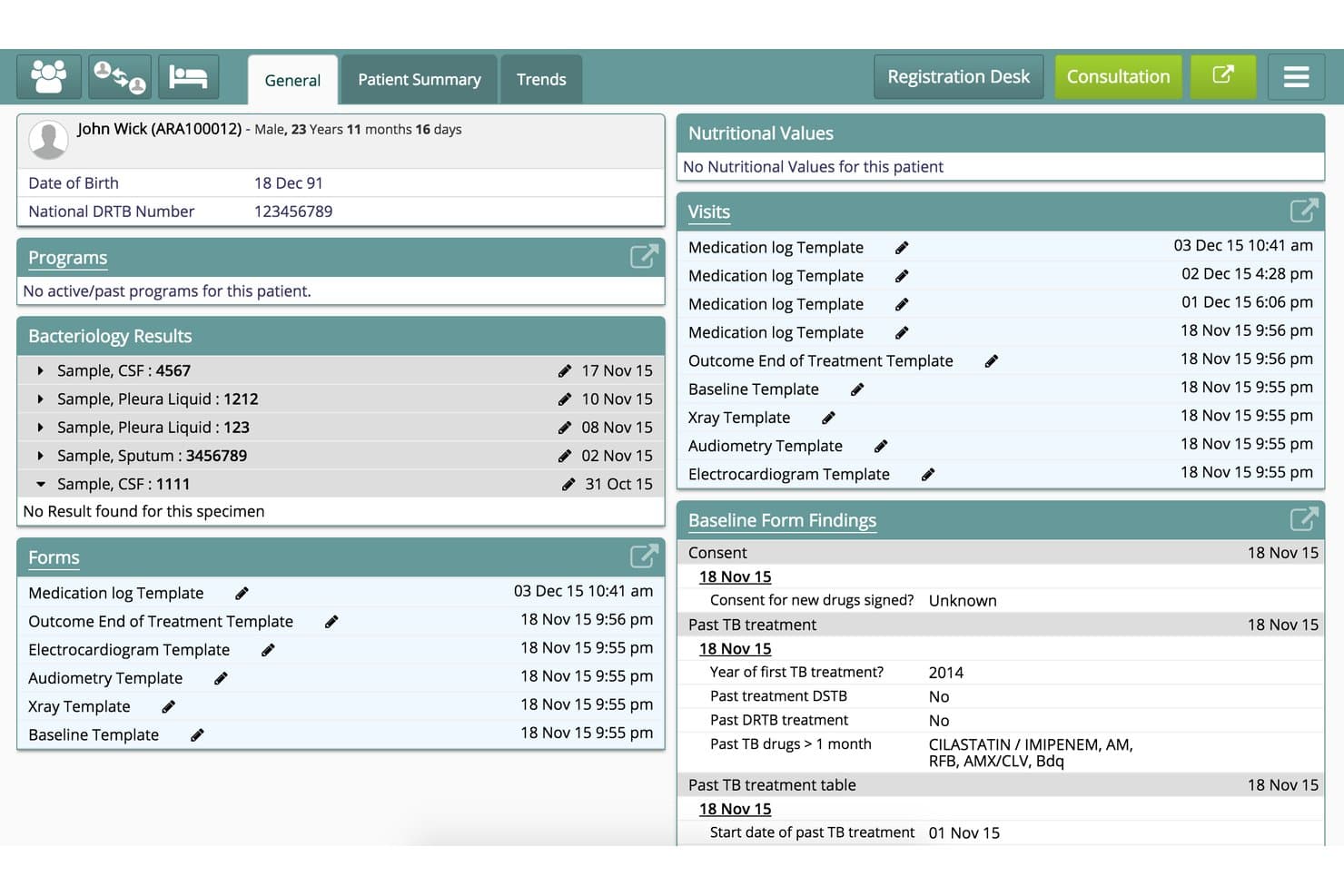
Bahmni centralizes patient history, lab results, and visits in one dashboard. Bahmni is an open-source EMR and hospital system that combines patient registration, configurable clinical charting, appointments, prescribing, laboratory, imaging, inpatient, billing, and reporting modules in a self-hosted platform.
Who Is Bahmni Best For?
Bahmni suits clinics and hospitals in low-resource settings that need a free, configurable, self-hosted EMR and have the technical capacity to run it.
Why I Picked Bahmni
I picked Bahmni as “Best free EMR for low-resource global clinics” because its on-site setup can keep working without internet. Configurable clinical forms and patient dashboards support structured charting, while its lab and inpatient modules cover workflows beyond the exam room. Self-hosting does require technical capacity.
Bahmni Key Features
- Patient registration: Records demographics, contacts, identifiers, and patient photos.
- Appointment management: Schedules visits across providers and supports SMS, WhatsApp, and email notifications.
- Audit logs: Tracks logins, access to clinical data, visits, and other system activity.
- Record exports: Exports reports as PDF or CSV and supports FHIR and HL7 data exchange.
Bahmni Integrations
Bahmni has documented integrations with OpenMRS, Odoo, OpenELIS, DCM4chee/Oviyam, Crater, Metabase, Jasper Reports, and Jitsi; available components depend on the version. It supports FHIR/HL7 and REST/HTTP APIs for custom connections.
What’s Free?
Bahmni is free, open-source software, not a time-limited trial. You’ll need to manage hosting and setup, and implementation or support services may cost extra.
Pros and Cons
Pros:
- Proven across large public health deployments
- Configurable clinical forms and dashboards
- Works without reliable internet
Cons:
- No US pharmacy e-prescribing or claims workflows
- Self-hosting demands dedicated technical support
Learn more about Bahmni:
How I Evaluate Free EMR
I look at free EMR options in two layers—baseline must-haves like HIPAA-compliant charting and eRx for a solo practice, and differentiators that reveal which tools hold up in real clinical use.
Core Functionality (Table Stakes For This List)
When I'm selecting tools for my list, I rank each one on a scale from 0 (does not offer the functionality) to 5 (excels in this area) for each core functionality listed below. Then, I calculate the tool's total score into a percentage. Each tool needs to achieve a minimum total score of 65% to be considered for inclusion.
- Electronic Charting: I check whether the EMR supports structured SOAP notes, problem lists, and allergy tracking—not just a blank text field where clinicians dump visit notes.
- Genuinely Free Access Tier: Each tool's free offering gets scrutinized for what's actually usable—some platforms like Practice Fusion and OpenEMR take very different approaches to delivering free access.
- E-Prescribing (eRx): I look for Surescripts-connected eRx so prescriptions route directly to the patient's pharmacy, including whether drug interaction alerts fire during ordering.
- HIPAA-Compliant Data Handling: Encryption, audit logs, role-based access, and a signed BAA all factor in—especially for cloud-hosted platforms where PHI lives on vendor servers.
- Clinical Coding & Billing: I evaluate whether the system includes ICD-10 and CPT code lookup at the point of documentation and can generate superbills or export claims for submission.
- Patient Scheduling & Demographics: A functional appointment calendar tied to patient demographics matters—clinicians need to book visits and pull up insurance or contact details in the same workflow.
Once I have a list of tools that meet this criteria, I consider what sets each platform apart.
Differentiating Factors (What Sets Vendors Apart)
Here's how I compare and contrast different vendors:
Standout Features
Telehealth is a big one—I look for built-in video visits so behavioral health and primary care providers aren't juggling a separate platform. A patient portal also makes a real difference when a small practice wants patients to handle intake forms and refill requests on their own. I evaluate lab integrations too, since direct connections to reference labs like Quest or LabCorp mean results flow back into the chart without manual entry.
Beyond Features
"Free" doesn't always mean free in practice, so I check for hidden costs like eRx surcharges or paid support tiers that can catch a solo provider off guard. Regulatory certifications matter just as much—ONC Health IT Certification determines whether a platform qualifies for Promoting Interoperability incentives. I also evaluate the deployment model, since open-source options like OpenEMR require self-hosting and IT overhead, while cloud platforms handle updates automatically but introduce vendor dependency.
Slik velger du et gratis EMR-system
Det er lett å gå seg vill i lange funksjonslister og kompliserte prisstrukturer. For å hjelpe deg med å holde fokus mens du går gjennom den unike prosessen med å velge programvare, får du her en sjekkliste over faktorer du bør ha i tankene:
| Faktor | Hva du bør vurdere |
| Skalerbarhet | Vil verktøyet håndtere fremtidig vekst – flere pasienter, klinikere eller lokasjoner – uten store forstyrrelser? |
| Integrasjoner | Kan det kobles til laboratoriene, faktureringssystemet, telehelsetjenestene eller de eksisterende systemene dine direkte eller via API? |
| Tilpasningsmuligheter | Kan du tilpasse arbeidsflyter, maler eller journaloppsett slik at de samsvarer med hvordan teamet ditt arbeider i dag? |
| Brukervennlighet | Hvor raskt kan de ansatte lære systemet, og vil det skape friksjon i kliniske arbeidsflyter med høyt tempo? |
| Implementering og opplæring | Hvilke ressurser, hvilken støtte for datamigrering og hvilken opplæring er inkludert – trenger du hjelp fra ekstern IT-støtte? |
| Kostnad | Utover det «gratis» nivået, finnes det kostnader for oppsett, støtte eller tilleggstjenester som kan overraske deg senere? |
| Sikkerhetstiltak | Er kryptering, revisjonsspor og tilgangskontroller tydelige og tilstrekkelige for HIPAA og pasientsikkerheten? |
| Tilgjengelig kundestøtte | Er hjelp tilgjengelig når du trenger det – via brukerfellesskap, e-post eller direkte brukerstøtte, og varierer dette etter plan? |
Hva er gratis EMR-systemer?
Gratis EMR-systemer er elektroniske pasientjournalsystemer som tilbyr grunnleggende verktøy for klinisk dokumentasjon, elektronisk forskrivning og timeplanlegging uten løpende programvarekostnader. Disse plattformene gir små praksiser og klinikker viktige digitale journalføringsfunksjoner gjennom åpen kildekode-lisenser eller funksjonsrike gratisnivåer, slik at de kan håndtere pasientinformasjon uten forhåndsinvesteringer.
Funksjoner i gratis EMR-systemer
La oss se nærmere på funksjonene som vanligvis finnes i elektroniske pasientjournalsystemer, og hvilke som vanligvis er inkludert i gratis- og betalingsplaner.
Vanligvis gratis funksjoner i elektroniske pasientjournalsystemer
- Pasientjournalføring: Lar klinikere opprette, organisere og hente frem notater fra pasientbesøk, sykehistorikk, allergier og diagnoser i en sikker digital journal.
- Timebestilling: Tilbyr en innebygd kalender for bestilling, visning og oppdatering av pasientavtaler, noe som gjør det enklere å håndtere den daglige arbeidsflyten.
- Grunnleggende elektronisk forskrivning: Gjør det mulig å opprette og skrive ut resepter, noen ganger med begrenset digital overføring til apotek for vanlige legemidler.
- Pasientdemografi: Lagrer og oppdaterer pasientenes kontaktopplysninger, forsikringsinformasjon og grunnleggende inntaksdata for å holde journalene fullstendige og oppdaterte.
- Rollebasert tilgang: Støtter brukertillatelser slik at bare autorisert personale kan vise, redigere eller slette ulike typer pasient- og kliniske data.
- Oppslag i ICD-10/CPT: Forenkler kodingen ved å tilby søkbare lister over diagnose- og prosedyrekoder, slik at behandlere kan klargjøre refusjonskrav eller regningsgrunnlag.
- Revisjonslogger: Sporer brukertilgang og endringer i pasientjournaler for å styrke ansvarligheten og støtte grunnleggende krav til etterlevelse.
Vanligvis betalt EMR
- Avansert elektronisk forskrivning (EPCS): Støtter elektronisk forskrivning av kontrollerte stoffer og inkluderer kontroll av legemiddelformularer, legemiddelhistorikk og varsler om legemiddelinteraksjoner.
- Tilpassbare maler: Lar brukere opprette eller endre journalføringsmaler for spesialiserte arbeidsflyter, unik klinisk dokumentasjon eller organisasjonens preferanser.
- Integrert fakturering: Automatiserer innsending av refusjonskrav, integrasjon med oppgjørssentraler og betalingssporing, og støtter flere betalertyper for styring av inntektssyklusen.
- Pasientportal: Gir pasienter tilgang på nett til å se laboratoriesvar, be om fornyelse av resepter, sende meldinger til behandlere og administrere egne journaler og opplysninger.
- Integrasjon med telehelse: Innebygger sikre videokonsultasjoner direkte i EMR-systemet for å støtte pasientbesøk på avstand og levering av virtuell helsehjelp.
- Grensesnitt for laboratorier og bildediagnostikk: Kobler seg direkte til laboratorier eller bildediagnostiske sentre for å automatisere bestillinger, motta resultater og arkivere rapporter i journalen.
- Automatiske påminnelser: Sender bekreftelser på avtaler og innkallinger via e-post, SMS eller telefon for å redusere uteblivelser og forbedre oppmøtet til konsultasjoner.
- Verktøy for datamigrering: Tilbyr støtte for import av journaler fra eldre EMR-systemer, papirjournaler eller eksterne systemer ved overgang til den nye plattformen.
- Avansert analyse og rapportering: Leverer dashbord og konfigurerbare rapporter for kvalitetsprogrammer, resultatoppfølging eller regulatorisk rapportering som MIPS.
- Administrasjon av flere lokasjoner: Gjør det mulig å sentralisere administrasjon, timebestilling og rapportering for grupper eller organisasjoner som driver på mer enn ett sted.
Fordeler
Implementering av et gratis EMR-system gir flere fordeler for teamet og virksomheten din. Her er noen av fordelene du kan se frem til:
- Kostnadsbesparelser: Ingen lisensavgifter for programvare og alternativer med åpen kildekode hjelper små praksiser med å digitalisere journaler uten belastningen av kostnader ved oppstart eller løpende utgifter.
- Papirløs dokumentasjon: Elektronisk journalføring, timebestilling og elektronisk forskrivning eliminerer håndskrevne notater og reduserer papirarbeidet i de kliniske arbeidsflytene.
- Enklere etterlevelse av regelverk: Funksjoner som revisjonslogger, tilgangskontroller og kryptert lagring støtter HIPAA-etterlevelse og gjør det enklere å beskytte pasientdata.
- Effektivisert pasienthåndtering: Timebestilling, oppfølging av demografiske opplysninger og journaltilgang i ett system forbedrer timeadministrasjonen og nøyaktigheten i pasientjournalene.
- Fleksibilitet for vekst: Mange gratisabonnementer og plattformer med åpen kildekode kan skaleres når du legger til brukere eller lokasjoner, slik at arbeidsflyten kan tilpasses etter hvert som praksisen utvides.
- Datatilgang og dataportabilitet: Muligheten til å eksportere eller migrere data støtter interoperabilitet og reduserer risikoen for leverandørbinding hvis du må bytte system.
- Rask implementering: Mange gratis EMR-løsninger tilbyr enkelt oppsett, nettbasert dokumentasjon og innebygde maler som hjelper klinikker med å komme i drift med minimal nedetid.
Kostnader og priser
Jeg forstår at du kom til denne artikkelen på jakt etter de beste alternativene for elektroniske pasientjournalsystemer som er tilgjengelige gratis. Siden gratisabonnementer imidlertid bare tilbyr begrensede funksjoner, er det en god sjanse for at du må oppgradere abonnementet ditt i fremtiden.
Tabellen nedenfor oppsummerer vanlige abonnementer, gjennomsnittsprisene deres og typiske funksjoner som er inkludert i elektroniske pasientjournalsystemer:
Sammenligningstabell for EMR-abonnementer
| Plantype | Gjennomsnittlig pris | Vanlige funksjoner |
| Gratisabonnement | $0 | Grunnleggende journalføring, timebestilling, pasientdemografi, grunnleggende e-reseptforskrivning og begrenset brukerstøtte. |
| Personlig abonnement | $10–$40/bruker/måned | Forbedrede journalføringsmaler, utvidet e-reseptforskrivning, tilgang til pasientportal, grunnleggende rapportering og e-poststøtte. |
| Bedriftsabonnement | $30–$80/bruker/måned | Integrert fakturering, telehelse, grensesnitt for laboratorie- og bildediagnostikk, tilpassbare arbeidsflyter og direkte brukerstøtte. |
| Virksomhetsabonnement | $80–$150/bruker/måned | Avansert analyse, administrasjon av flere lokasjoner, omfattende integrasjoner, prioritert brukerstøtte og dedikert oppstart. |
Vanlige spørsmål om gratis EMR
Her er noen svar på vanlige spørsmål om gratis EMR:
Er gratis EMR-systemer virkelig HIPAA-kompatible?
Ja, enkelte gratis EMR-systemer tilbyr HIPAA-kompatibel hosting, revisjonsspor og tilgangskontroller, men du bør alltid bekrefte om en avtale med forretningsforbindelse (BAA) er tilgjengelig, og gjennomgå sikkerhetsdokumentasjonen deres før du lagrer pasientdata.
Kan jeg migrere data fra en gratis EMR hvis jeg oppgraderer eller bytter leverandør?
Ja, de fleste gratis EMR-plattformer lar deg eksportere pasientdata i standardformater som CSV eller CCD, men datamigreringsverktøy kan være begrenset eller kreve manuelle prosesser, så planlegg på forhånd før du bytter.
Hvilke brukerstøttealternativer er tilgjengelige for brukere av gratis EMR?
Brukerstøtte for gratis EMR-er omfatter vanligvis brukerfora, kunnskapsbaser eller fellesskapskanaler i stedet for dedikert direkte- eller telefonstøtte; betalte brukerstøtteabonnementer kan være tilgjengelige etter hvert som du skalerer.
Er e-reseptforskrivning og telehelse inkludert i gratis EMR-abonnementer?
Enkelte plattformer inkluderer grunnleggende e-reseptforskrivning og begrensede telehelseverktøy i gratisabonnementer, men mer avanserte funksjoner – som EPCS eller integrert video – er vanligvis betalingsbelagte.
Er det vanskelig å implementere en gratis EMR i en solopraksis eller liten praksis?
Nei, de fleste gratis EMR-systemer er utviklet for enkel implementering med nettbaserte oppsettsveiledninger og grunnleggende maler, men verktøy med åpen kildekode kan kreve ekstra teknisk oppsett.