

Il software di gestione appuntamenti aiuta a gestire doppie prenotazioni, cancellazioni, inviare promemoria via email ai pazienti, ordini di pacchetti/carte regalo ed abilitare pagamenti online in modo semplice. Questi strumenti fanno risparmiare tempo ai membri del team automatizzando attività di routine, eliminando le doppie prenotazioni e accomodando anche i diversi fusi orari.
Offrono inoltre un'esperienza cliente migliorata mettendo a disposizione un sito di prenotazione, integrazione con strumenti di videoconferenza per consulti virtuali e piani a pagamento che comprendono funzionalità avanzate, inclusi i sistemi di punto vendita per una clientela attenta al benessere. Con questi strumenti puoi personalizzare gli orari degli appuntamenti, usare modelli personalizzati per email e sms, ed assicurare che gli operatori abbiano una panoramica dettagliata degli appuntamenti giornalieri.
Perché fidarsi dei nostri consigli sui software
6,700+
Reviews
20
Industry experts
16+
Evaluation factors
14
Years
Il nostro team testa e recensisce software dal 2012. In quanto leader di studi medici noi stessi, sappiamo quanto sia difficile — e importante — scegliere il software giusto.
Per questa guida, abbiamo valutato gli strumenti attraverso test pratici e ricerche indipendenti, assegnando un punteggio agli strumenti in base ai nostri criteri di selezione.
Le nostre recensioni riflettono il nostro giudizio editoriale umano, non un discorso di vendita.
Riepilogo dei migliori software di gestione appuntamenti
| Tool | Best For | Trial Info | Price | ||
|---|---|---|---|---|---|
| 1 | Best for flexible appointment views | Free demo + free expert consultation available | Pricing upon request | Website | |
| 2 | Best instant online booking updates | Free demo available | Pricing upon request | Website | |
| 3 | Best with real-time two-way patient texting | Free demo available | Pricing upon request | Website | |
| 4 | Best for linking EHR with patient engagement tools | Free demo available | Pricing upon request | Website | |
| 5 | Best for secure and compliant medical scheduling | 15-day free trial | From $630/site/year (billed annually) | Website | |
| 6 | Best with built-in credentialing support | 30-day free trial | From $49/month | Website | |
| 7 | Best for automated patient reminders | Free demo available | Pricing upon request | Website | |
| 8 | Best built-in telehealth scheduling | Free demo available | Pricing upon request | Website | |
| 9 | Best with automated waitlist management | Free trial + free demo available | From $22.45/month (billed annually) | Website | |
| 10 | Best for integrated appointment scheduling | Free demo available | From $99/month | Website |


Recensioni sui migliori software di gestione appuntamenti
 1Best for flexible appointment views
RXNT
- Free demo + free expert consultation available
- Pricing upon request
Visit WebsiteCustomer Rating:4.3/5
RXNT's Quick Add feature allows for the rapid addition of new patients using minimal information. RXNT is a cloud-based medical scheduling and practice management platform that combines multi-provider appointment scheduling, automated patient reminders, eligibility verification, and EHR and billing integration for healthcare practices.
Who Is RXNT Best For?
RXNT is a good fit for ambulatory medical practices of any size, from solo physicians to large multi-specialty groups managing appointments across multiple locations.
Why I Picked RXNT
RXNT earns its spot on my shortlist because of how it handles calendar flexibility for busy medical practices. I particularly like the ability to toggle between day, week, and month views while managing appointments across multiple locations from a single sign-on. Resource scheduling, which lets you block time for treatment rooms and equipment alongside provider calendars, is something I don't see in every medical scheduling tool.
RXNT Key Features
- Automated patient reminders: Send appointment confirmations and reminders by email, SMS, or phone to reduce missed visits.
- Eligibility verification: Check patient insurance eligibility directly from the scheduler before appointments.
- Mobile app access: Manage scheduling, charge capture, and patient check-in from iOS or Android devices.
- Integrated billing workflows: Link scheduled appointments to medical billing and claims within the same platform.
RXNT Integrations
RXNT offers native integrations across its own suite, including Clinical EHR, Practice Management, Medical Billing, Electronic Prescribing, Patient Portal, and Google Calendar. An API is available for custom integrations.
Pros and Cons
Pros:
- Mobile app for on-the-go scheduling
- Native billing and EHR functionality in platform
- Detailed day, week, and month calendar views
Cons:
- Occasional software glitches reported in reviews
- Limited patient self-scheduling options
Learn more about RXNT: Best instant online booking updates
- Free demo available
- Pricing upon request
Visit WebsiteCustomer Rating:4.8/5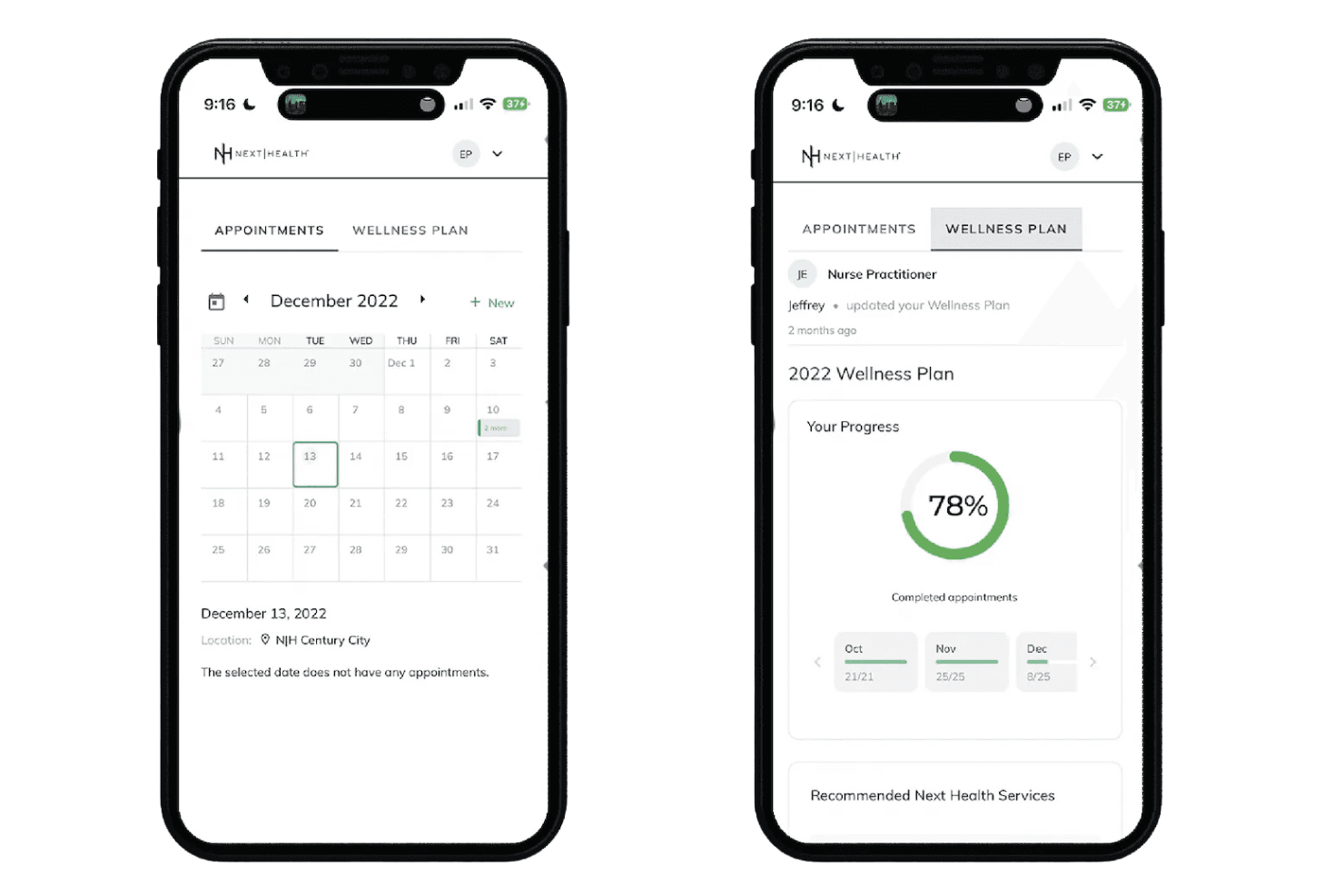
NexHealth connects scheduling, intake, reminders, insurance, and EHR/PMS sync. NexHealth is a patient experience platform for medical and dental practices that combines online self-scheduling, digital intake forms, automated reminders, insurance verification, and real-time bidirectional EHR/PMS sync.
Who Is NexHealth Best For?
NexHealth is a strong fit for dental and medical specialty practices that need appointment scheduling to sync directly with an existing EHR or practice management system.
Why I Picked NexHealth
I picked NexHealth because the NexHealth Synchronizer genuinely sets it apart: availability updates push to the patient-facing booking portal within 10 to 15 seconds of any change in the practice management system. That means a slot opened up by a cancellation in Dentrix or Eaglesoft is bookable online almost instantly. I also like the One-Click Recalls feature, which pulls overdue patients directly from the EHR and sends targeted outreach to fill those gaps without any manual list-building.
NexHealth Key Features
- Waitlist automation: Automatically reaches out to patients on the waitlist when new slots open up.
- Integrated patient payments: Supports text and email billing with payments auto-posted to the patient ledger.
- Unified messaging inbox: Consolidates patient messages, reminders, and payment requests into one platform view.
- Insurance verification: Confirms eligibility before appointments and provides detailed coverage breakdowns.
NexHealth Integrations
NexHealth offers native integrations with over 70 major EHR and practice management systems, including Dentrix, Eaglesoft, Open Dental, Curve Dental, Denticon, Epic, athenahealth, eClinicalWorks, NextGen, and drchrono. An API is also available for custom integrations.
Pros and Cons
Pros:
- Seamless integration with popular practice management software
- Automated reminders reduce no-show rates
- Online booking enhances patient convenience
Cons:
- Certain features may not be customizable to specific practice needs
- May require a learning curve for staff not used to digital systems
Learn more about NexHealth: Best with real-time two-way patient texting
- Free demo available
- Pricing upon request
Visit WebsiteCustomer Rating:4/5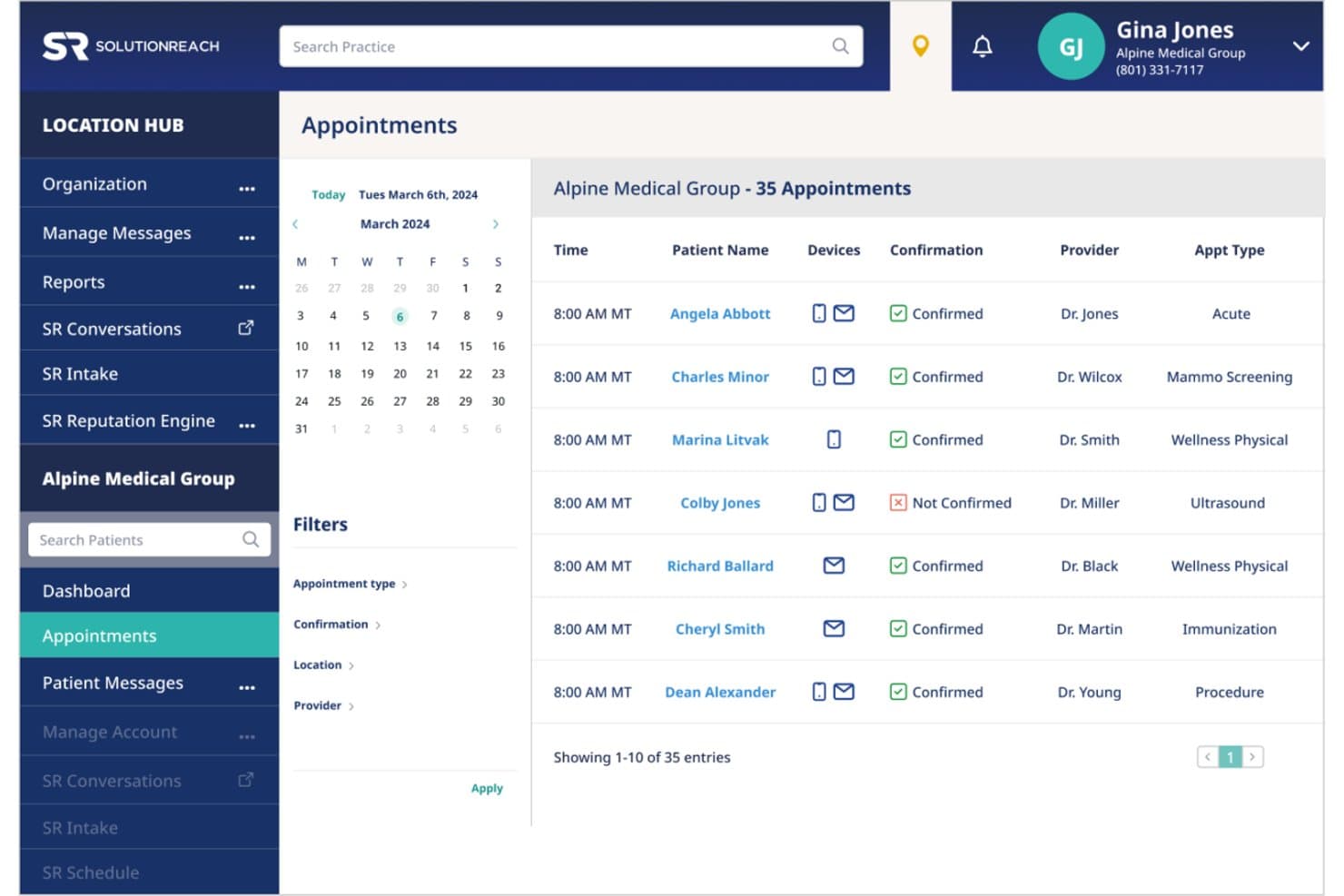
SolutionReach offers an appointment management dashboard displaying 35 scheduled appointments with confirmation status, provider, and appointment type filters. SolutionReach is a healthcare patient engagement platform that combines appointment scheduling, automated reminders, two-way texting, digital intake, mobile check-in, and EHR/PM integration for medical practices.
Who Is SolutionReach Best For?
It's a strong fit for dental, optometry, and medical practices—from single-provider offices to multi-location groups managing high appointment volumes.
Why I Picked SolutionReach
SolutionReach earns its spot on my shortlist because the two-way texting isn't just for sending reminders. When a patient replies to cancel, staff see it in real time and can act before the slot goes empty. I also like the Recall feature, which automatically targets overdue patients with outreach campaigns to refill schedule gaps without any manual effort from the front desk.
SolutionReach Key Features
- Digital intake forms: Collect patient information securely before the appointment and send it directly to your practice system.
- Mobile check-in: Patients can check in from their phones on arrival, reducing front-desk congestion.
- Batch messaging: Send communication to specific patient groups for updates, recalls, or announcements.
- EHR and PM system integration: Syncs with over 400 practice management and electronic health record platforms.
SolutionReach Integrations
SolutionReach offers native integrations with over 400 practice management and EHR systems, including Epic, Kareo, ModMed, Allscripts, and Athenahealth. An API is available for custom integrations.
Pros and Cons
Pros:
- Mobile check-in reduces front desk workload
- Automated recall campaigns for missing patients
- Real-time two-way texting with patients
Cons:
- Phone support responsiveness can be inconsistent
- Occasional sync delays with appointment data
Learn more about SolutionReach: Best for linking EHR with patient engagement tools
- Free demo available
- Pricing upon request
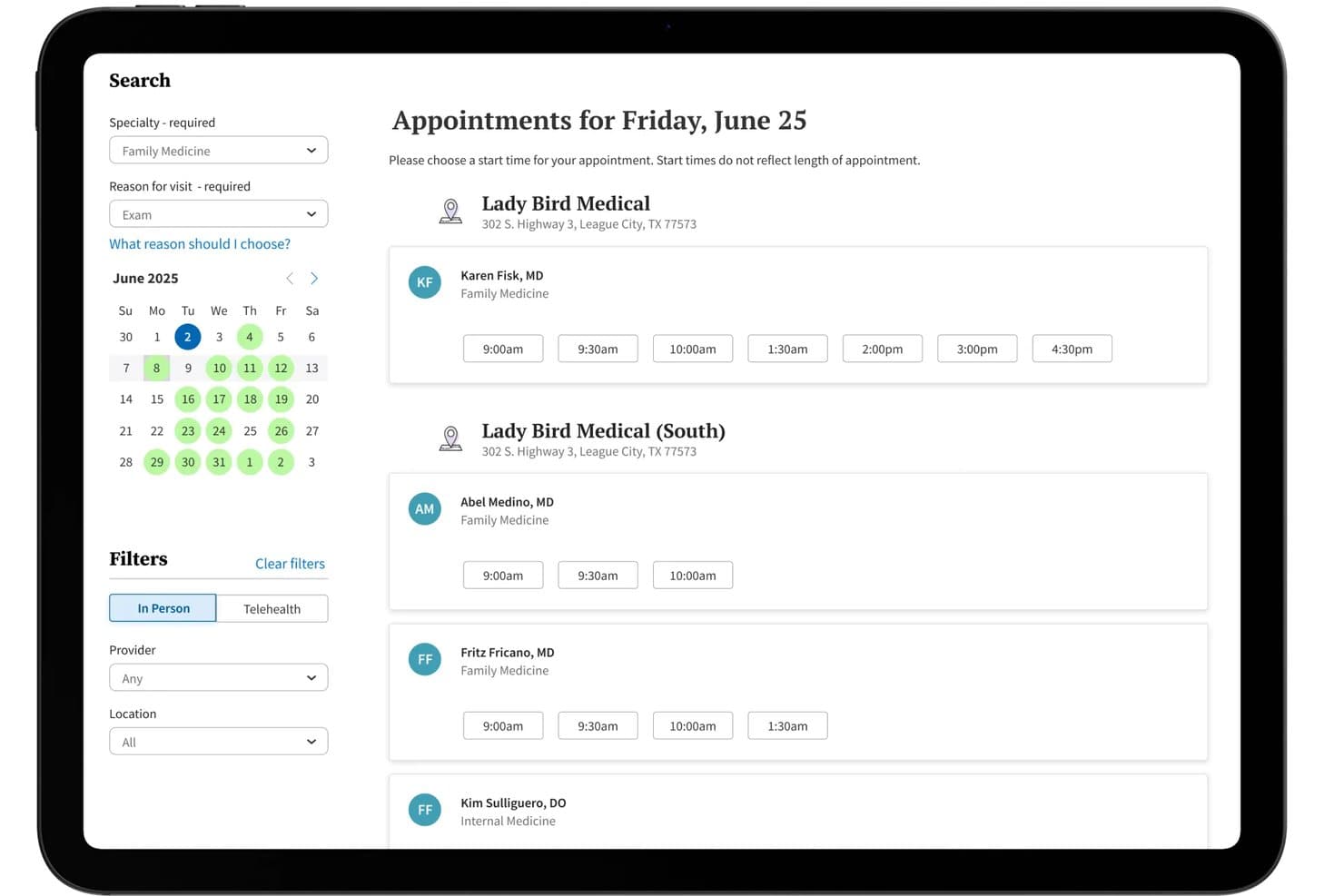
athenaCommunicator offers a self-scheduling interface where patients can browse available appointment times by provider, location, and date. athenaCommunicator is athenahealth's patient engagement module built into the athenaOne platform, combining appointment scheduling, automated reminders, self check-in, and secure messaging within a native EHR environment.
Who Is athenaCommunicator Best For?
It's a strong fit for multi-provider medical practices and clinics that want scheduling, patient communication, and EHR data managed within a single platform.
Why I Picked athenaCommunicator
athenaCommunicator earns its spot as one of the best on my shortlist because scheduling and the EHR aren't connected via a third-party integration: they're the same system. I particularly like how patient self-scheduling writes directly into the clinical record with no manual reconciliation needed. On top of that, AI-suggested replies let staff handle secure patient messages from inside the same interface they use for clinical notes and billing.
athenaCommunicator Key Features
- Patient mobile app: Patients can access their health records and appointment details through the athenaPatient mobile app.
- Automated wellness outreach: The system can send tailored reminders to patients for annual exams and follow-up visits.
- Self check-in kiosks and online check-in: Enables patients to complete forms and check in remotely or through on-site kiosks.
- Embedded telehealth: Providers can conduct virtual visits using integrated telehealth functionality within the platform.
athenaCommunicator Integrations
athenaCommunicator is fully embedded within the athenaOne platform and connects with over 277,000 clinical systems, including labs and pharmacies, through native athenahealth network integrations. An API is available for custom integrations, and third-party extensions are offered through the athenahealth Marketplace.
Pros and Cons
Pros:
- Telehealth built directly into the platform
- Automated patient intake and self check-in
- Unified scheduling and EHR workflow
Cons:
- Slower support response reported by some users
- No public free trial option
Learn more about athenaCommunicator: Best for secure and compliant medical scheduling
- 15-day free trial
- From $630/site/year (billed annually)
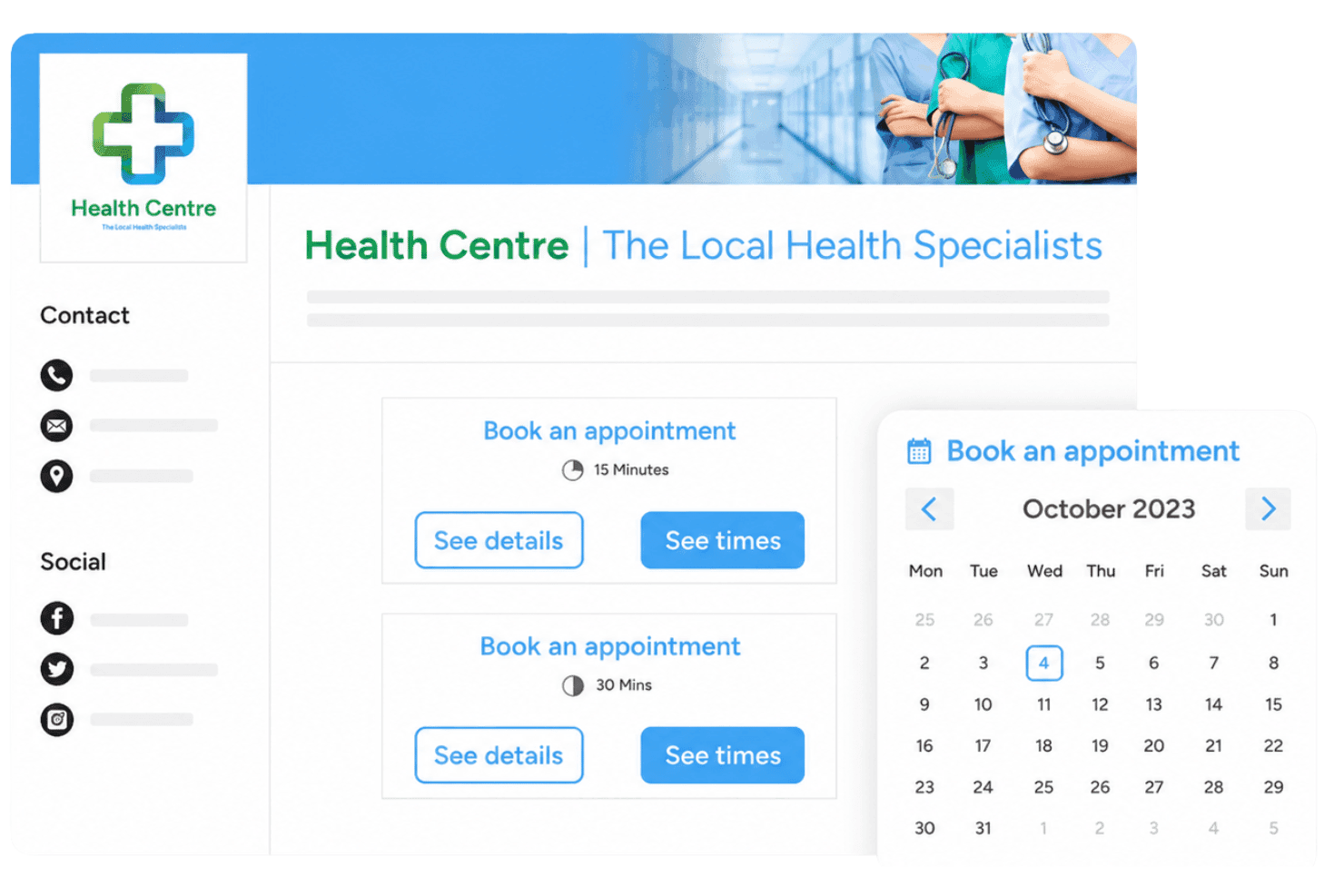
Sign In App (former 10to8) offers a patient check-in kiosk alongside an online appointment booking interface with calendar scheduling. Sign In App (formerly 10to8) is a HIPAA- and GDPR-compliant appointment scheduling platform that combines patient self-booking, multi-provider calendar management, automated multi-channel reminders, and pre-registration workflows.
Who Is Sign In App (Former 10to8) Best For?
It's a strong fit for independent clinics and small-to-mid-sized practices that prioritize compliance-first scheduling without needing deep EHR integration.
Why I Picked Sign In App (Former 10to8)
I picked Sign In App (former 10to8) as one of the best because it's one of the few scheduling platforms that pairs HIPAA compliance and encrypted data handling with a genuinely useful two-way patient messaging system. I particularly like how automated reminders work here: patients receive SMS or email reminders on custom cadences and can confirm or cancel directly from the message, triggering an automatic status update in the calendar. In practice, that means my team can run a complete appointment confirmation workflow without a single manual follow-up call.
Sign In App (Former 10to8) Key Features
- Multi-provider calendar management: Manage appointments for multiple clinicians, rooms, and locations in one platform.
- Custom branded booking pages: Create fully branded online booking pages tailored to your clinic’s identity.
- Automatic pre-registration: Register clients automatically when appointments are booked, saving front desk time.
- Multi-location reporting: Access central dashboards with analytics covering all sites and team members.
Sign In App (Former 10to8) Integrations
Sign In App (former 10to8) offers native integrations with Google Calendar, Outlook, Office 365, Zoom, Microsoft Teams, Salesforce, and Stripe. It's available on Zapier and has an API for custom integrations.
Pros and Cons
Pros:
- Supports multi-site, multi-provider appointment bookings
- SMS reminders included at no extra cost
- HIPAA and GDPR compliance across all plans
Cons:
- Intake forms lack medical-specialized fields
- No direct EHR or EMR integration
Learn more about Sign In App (former 10to8): Best with built-in credentialing support
- 30-day free trial
- From $49/month
Visit WebsiteCustomer Rating:4.6/5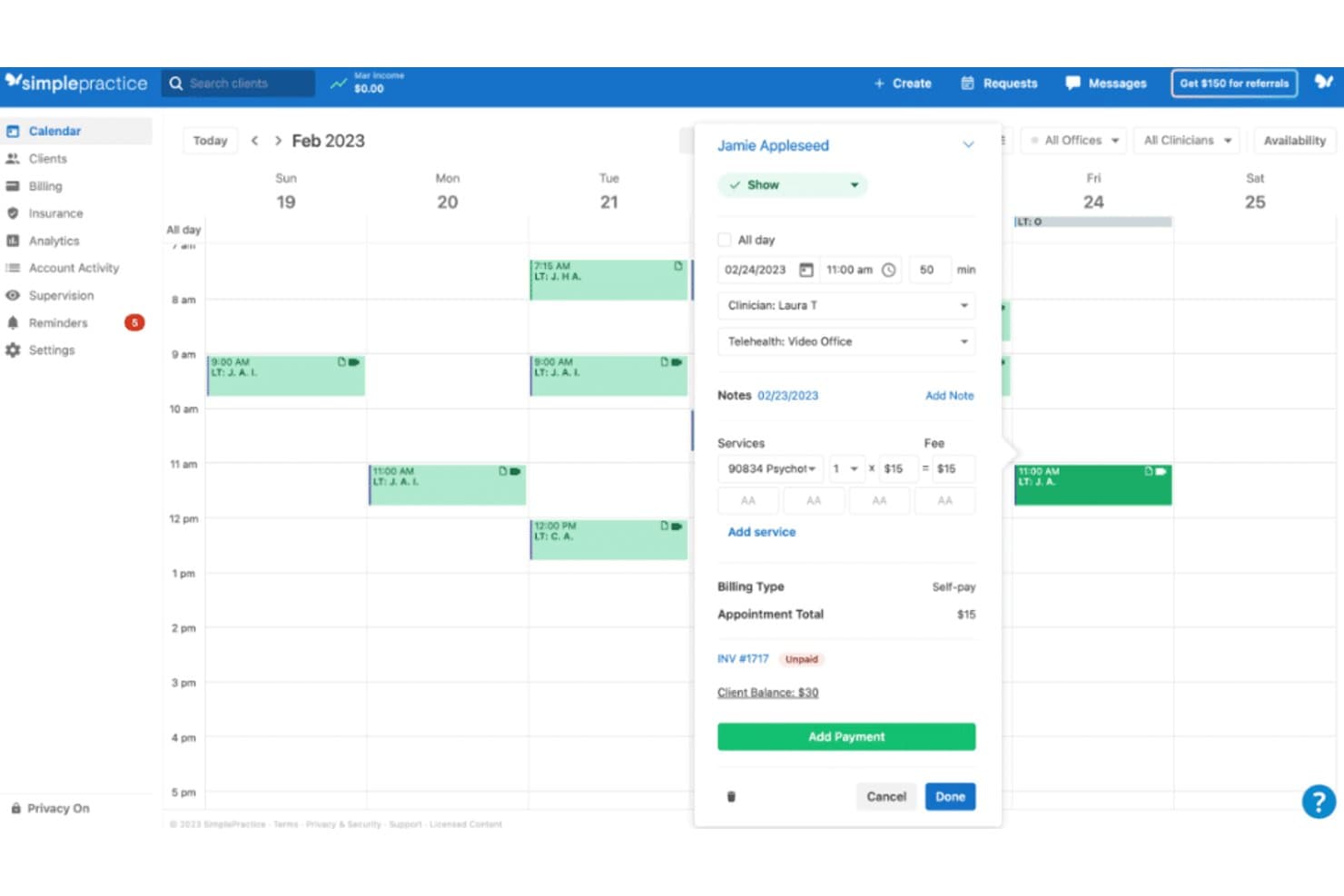
A look at the SimplePractice's calendar feature. SimplePractice is a practice management and appointment scheduling platform built for health and wellness professionals, combining online booking, automated reminders, telehealth, clinical documentation, and insurance billing in one system.
Who Is SimplePractice Best For?
SimplePractice is built for US-based solo and small-group mental health and allied health practitioners managing their own private practices.
Why I Picked SimplePractice
I picked SimplePractice because it's the only scheduling platform I know that bundles payer credentialing directly into the signup process. Getting paneled with insurance is a real barrier for new clinicians, and SimplePractice removes it by covering up to two payers at no added cost. I also like that it connects those credentialed payers straight to insurance claims, with real-time eligibility checks and 35 free claim submissions per month on the Plus plan.
SimplePractice Key Features
- Automated appointment reminders: Send email, text, or voice reminders to reduce no-shows and late cancellations.
- HIPAA-compliant telehealth: Host secure video sessions directly within the platform for one-on-one or group appointments.
- Client portal: Let clients schedule, view, and manage appointments, complete intake forms, and make payments online.
- Google Calendar sync: Keep your practice schedule up to date by automatically connecting with your external calendar.
SimplePractice Integrations
SimplePractice offers native integrations with Google Calendar, Stripe, Wiley Treatment Planners, and thousands of insurance payers for direct claims processing. An API is not currently available for custom integrations.
Pros and Cons
Pros:
- Digital intake forms tied to appointments
- Integrated insurance billing and eligibility checks
- Free credentialing for private practice clinicians
Cons:
- US only, not available internationally
- No bidirectional EHR data integrations
Learn more about SimplePractice: Best for automated patient reminders
- Free demo available
- Pricing upon request
Visit WebsiteCustomer Rating:3.9/5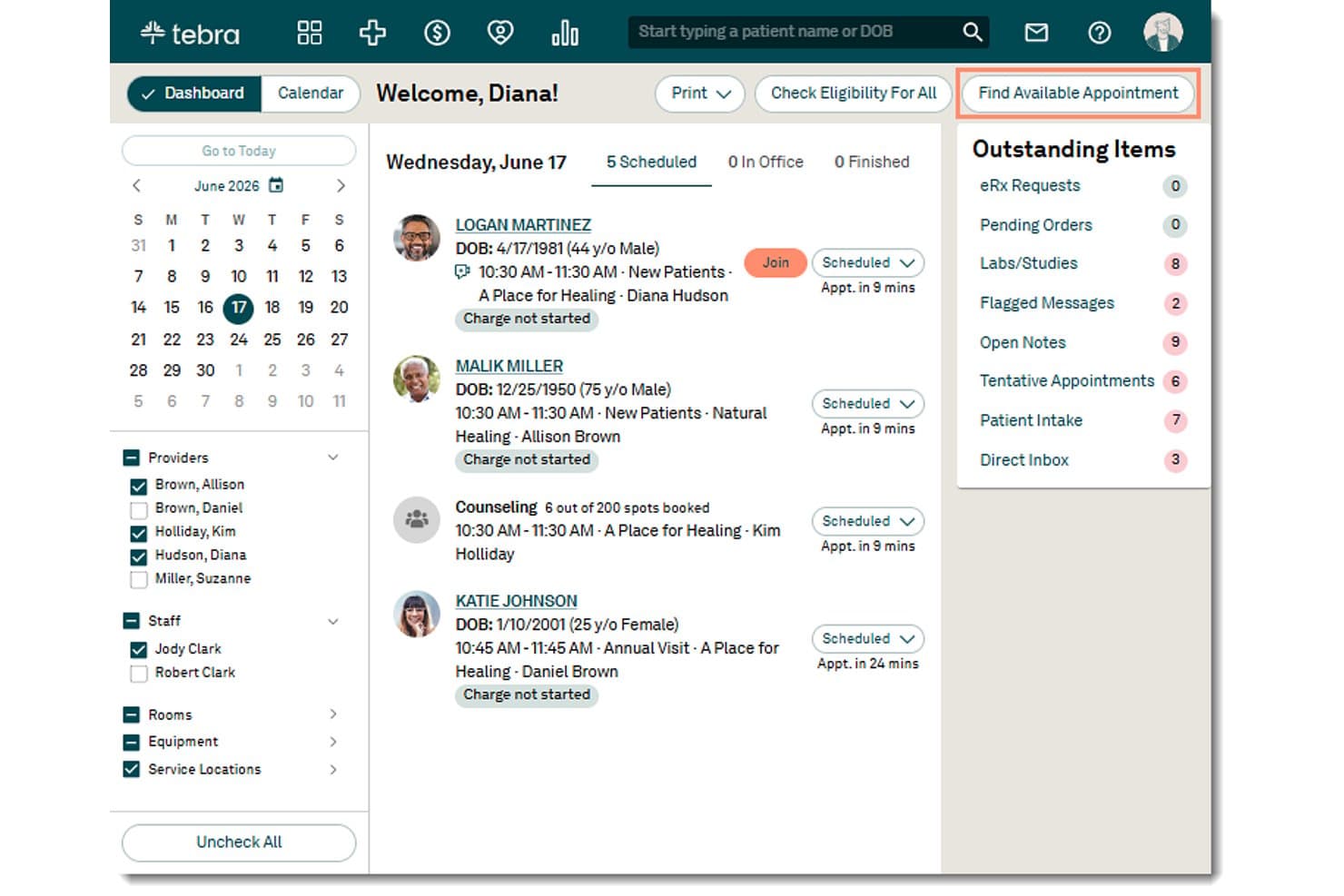
Tebra offers a dashboard with appointment scheduling, patient status tracking, and a 'Find Available Appointment' feature for streamlined appointment management. Tebra is a cloud-based medical practice management platform that combines online patient scheduling, automated appointment reminders, EHR documentation, billing, and patient engagement tools built specifically for independent practices.
Who Is Tebra Best For?
Tebra is a strong fit for independent medical practices and small group clinics that need scheduling, reminders, and clinical documentation in a single system.
Why I Picked Tebra
Tebra earns its spot as one of the best on my shortlist because of how deeply its automated reminder system is woven into the clinical workflow. I like that reminders go out via SMS, email, and voice, and patients can confirm or cancel directly from the message thread, with responses syncing back to the provider calendar in real time. That two-way communication loop is what separates it from tools that simply blast notifications with no feedback mechanism, and it's what drives Tebra's documented 38% reduction in no-shows.
Tebra Key Features
- Real-time online patient scheduling: Patients can book, reschedule, or cancel appointments anytime with real-time provider availability.
- Integrated digital intake forms: Practices can send electronic intake forms for patients to complete before their visit, including e-signature.
- Calendar sync with EHR: Appointment calendars update instantly across the scheduling tool and the electronic health record system.
- Multi-location and provider support: Manage appointments and resources across several providers and clinic locations in one unified platform.
Tebra Integrations
Tebra offers native integrations with Kareo Billing, WebPT, Stripe, Microsoft Excel, QuickBooks Online Advanced, Athena, AdvancedMD, DrChrono, Allscripts, Elation, NextGen, and Practice Fusion. An API is available for custom integrations.
Pros and Cons
Pros:
- Real-time calendar sync with EHR platform
- Digital intake forms with e-signature support
- Automated reminders reduce patient no-show rates
Cons:
- Some users report occasional scheduling interface lag
- Appointment reports lack granular filtering options
Learn more about Tebra: Best built-in telehealth scheduling
- Free demo available
- Pricing upon request
Visit WebsiteCustomer Rating:3.4/5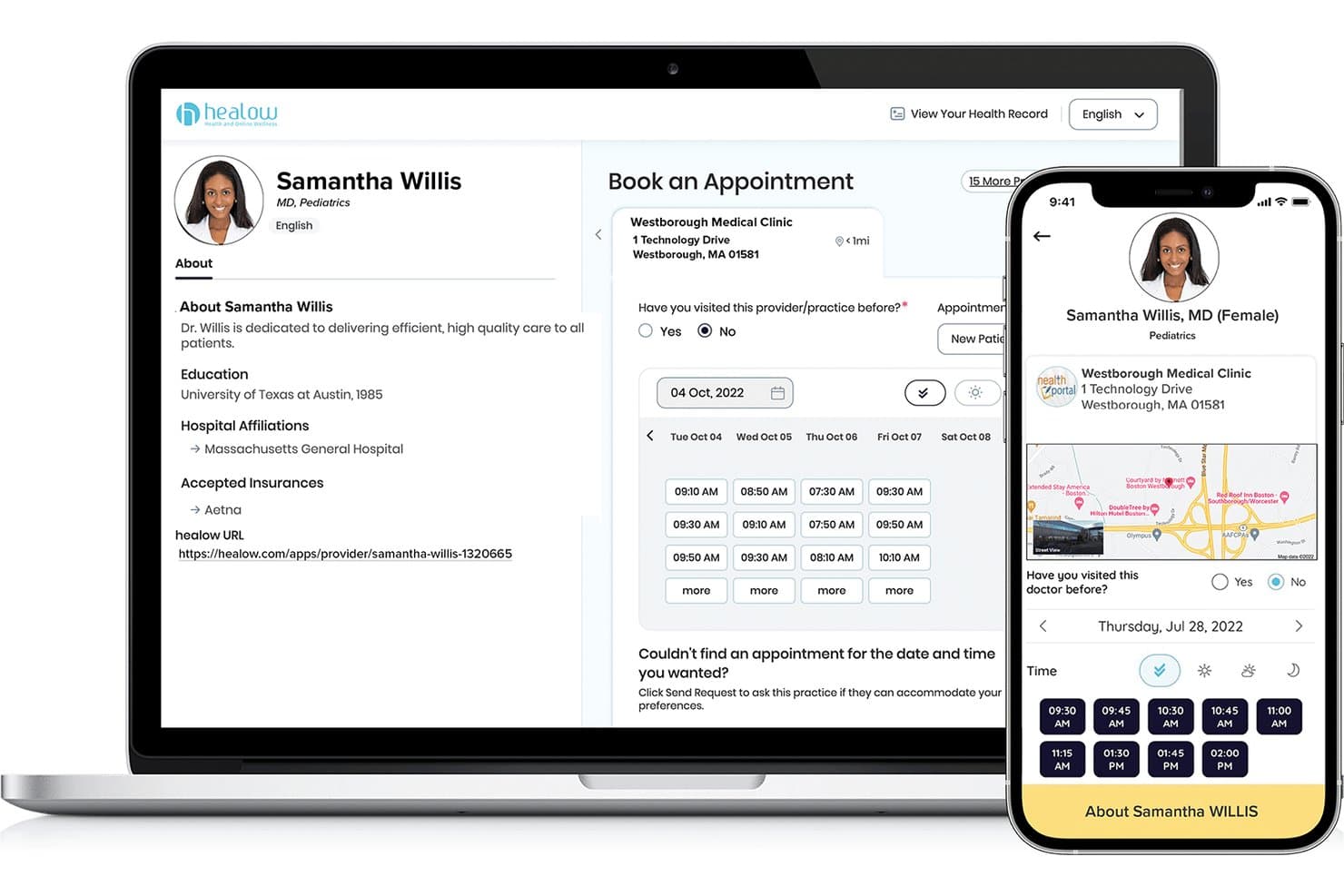
eClinicalWorks offers a patient-facing appointment booking interface via healow, displaying provider profiles, available time slots, and clinic location across desktop and mobile views. eClinicalWorks is an EHR and practice management platform that combines patient self-scheduling, automated reminders, digital check-in workflows, and telehealth scheduling within a single integrated system.
Who Is eClinicalWorks Best For?
eClinicalWorks is a strong fit for multi-provider medical practices and community health centers that need scheduling, EHR, and billing managed within a single platform.
Why I Picked eClinicalWorks
eClinicalWorks earns its spot on my shortlist because its telehealth scheduling lives natively inside the same EHR and scheduling workflow my team already uses. I particularly like healow TeleVisits, which lets providers launch video visits directly from the appointment calendar without toggling between platforms. The healow No-Show Predictive Module uses AI to flag at-risk appointments with 90% accuracy, so my team can proactively rebook virtual visits before a slot goes empty.
eClinicalWorks Key Features
- healow Open Access self-scheduling: Patients can book, reschedule, or cancel appointments online without calling the office.
- eClinicalMessenger automated reminders: Automated phone, text, and email reminders are triggered for all scheduled appointments.
- In-Office Kiosk check-in: Patients check in at a touch-screen kiosk, confirm insurance, and complete intake forms on arrival.
- PRISMA interoperability engine: Clinicians access a comprehensive view of patient records aggregated from multiple EHRs and health information networks.
eClinicalWorks Integrations
eClinicalWorks offers native integrations with LabCorp and PRISMA for health information exchange, as well as Sunoh and healow Genie. FHIR APIs are available for custom integrations.
Pros and Cons
Pros:
- Automated no-show prediction and reminders
- Multi-provider and multi-location calendar management
- Integrated telehealth and appointment scheduling
Cons:
- Customer support response can be slow
- Outdated user interface design
Learn more about eClinicalWorks: Best with automated waitlist management
- Free trial + free demo available
- From $22.45/month (billed annually)
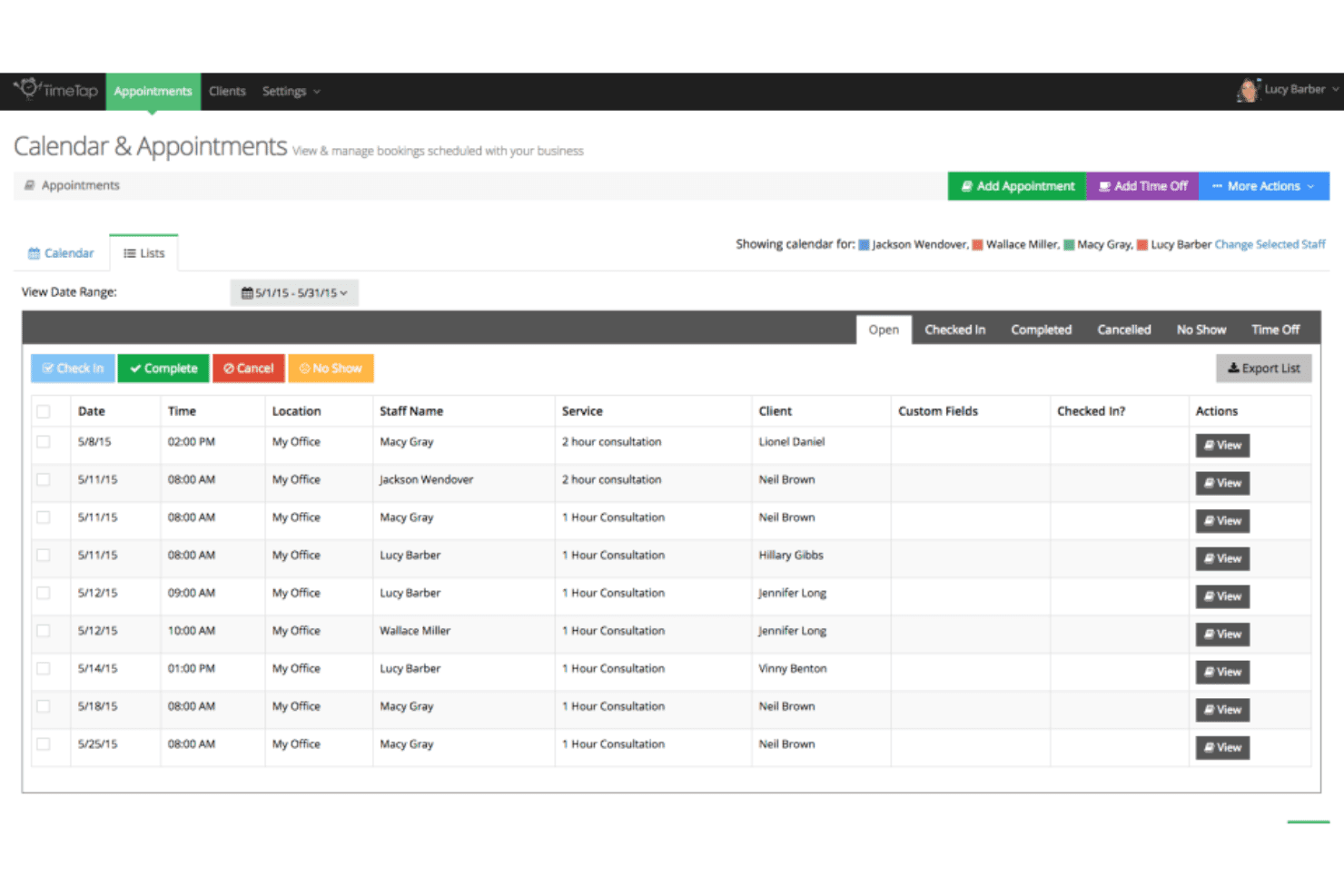
TimeTap’s calendar & appointments dashboard displays scheduled bookings, staff assignments, client details, service types, and appointment statuses. TimeTap is an appointment scheduling platform built for multi-provider, multi-location operations, offering self-booking portals, automated reminders, waitlist management, intake forms, and two-way calendar sync.
Who Is TimeTap Best For?
TimeTap suits healthcare practices, clinics, and service businesses that manage appointments across multiple providers, staff members, or locations.
Why I Picked TimeTap
I picked TimeTap as one of the best because its automated waitlist management removes a task that most scheduling tools leave entirely to staff. When a slot opens, TimeTap automatically sends a booking invite to the next person on the waitlist, with no manual follow-up needed. I also like that the Business plan includes a dedicated text number, so waitlist notifications and reminders go out from a consistent number that patients actually recognize.
TimeTap Key Features
- Custom booking forms: Build tailored intake forms to collect patient information and appointment details at the time of booking.
- Two-way calendar sync: Connects seamlessly with Google, Outlook, and Office 365 calendars to automatically reflect up-to-date provider availability.
- Travel time calculator: Uses Google Maps integration to adjust appointment slots based on staff travel times between locations.
- HIPAA-compliant data management: Offers secure client records, audits, and signed BAA options for healthcare privacy compliance.
TimeTap Integrations
TimeTap offers native integrations with Google Calendar, Microsoft Outlook, Office 365, iCal, Square, Stripe, PayPal, and Salesforce. An open API is available for custom integrations.
Pros and Cons
Pros:
- Detailed intake forms for custom information capture
- Booking portal supports multi-provider and multi-location needs
- Automated waitlist instantly fills canceled slots
Cons:
- Lacks built-in patient self check-in kiosk
- No native EHR or EMR system integration
Learn more about TimeTap: Best for integrated appointment scheduling
- Free demo available
- From $99/month
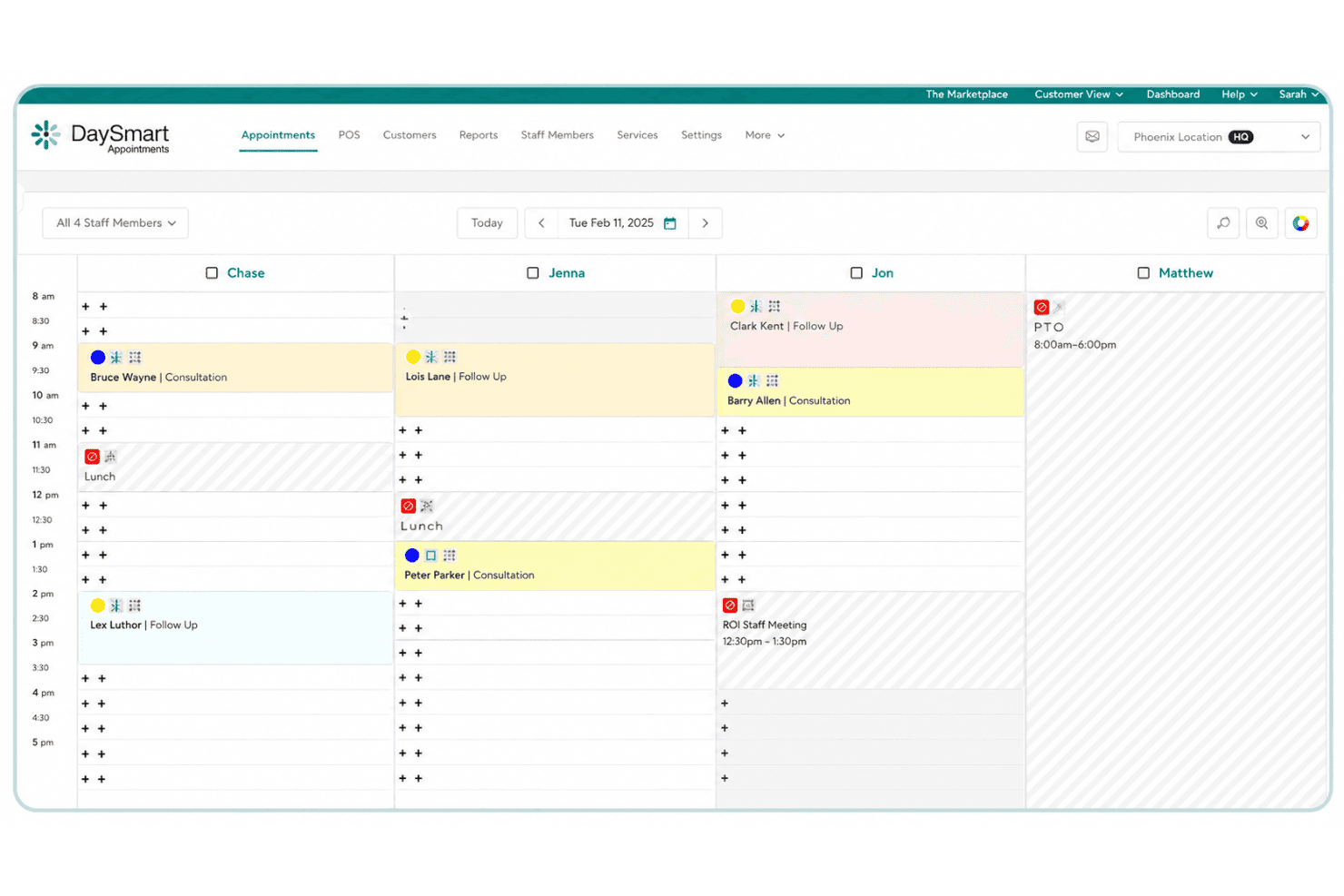
DaySmart Appointments displays staff schedules, client bookings, consultations, meetings, lunch breaks, and time off in a daily calendar view. DaySmart Appointments is an appointment scheduling platform built around a customizable booking engine, multi-location calendar management, automated reminders, and an open API for integrating scheduling into existing business systems.
Who Is DaySmart Appointments Best For?
It's a strong fit for multi-location healthcare and service businesses that need HIPAA-compliant scheduling with the flexibility to connect booking into existing tech systems via API.
Why I Picked DaySmart Appointments
I've included DaySmart Appointments in my top picks because its API-first approach to scheduling integration genuinely sets it apart. The platform exposes location and staff availability through a single API and uses webhooks to push appointment updates in real time to connected systems. That means a multi-site clinic can embed booking directly into an existing patient portal without rebuilding workflows from scratch.
DaySmart Appointments Key Features
- HIPAA-compliant scheduling: Protects patient data with HIPAA, ADA, and SOC 2 Type 2 security protocols.
- Automated appointment reminders: Sends SMS and email reminders to help reduce patient no-shows.
- Multi-location calendar management: Allows real-time scheduling across several locations, providers, and resources.
- Customizable scheduling templates: Offers tailored appointment types, extra fields, and custom rules for different services.
DaySmart Appointments Integrations
DaySmart Appointments offers native integrations with Google Calendar, Microsoft Outlook, Birdeye, LeadsBridge, Hatch, and iContact. An API is available for custom integrations.
Pros and Cons
Pros:
- Patient self-scheduling with automated reminders
- Multi-location clinic calendar management
- HIPAA and SOC 2 certified for security
Cons:
- Intake forms limited to custom fields only
- No native EHR or EMR integrations
Learn more about DaySmart Appointments:
Altri software di gestione appuntamenti
Qui sotto trovi un elenco di altri software per la gestione degli appuntamenti che ho selezionato, ma che non sono rientrati tra i primi 10. Vale sicuramente la pena darci un’occhiata.
- 11Hallmark Health Care SolutionsBest for large-scale workforce management
- 12CCD HealthBest for managing healthcare call center operations
- 13WebPTGood for physical therapy practices requiring dedicated scheduling tools
- 14PracticeSuiteGood for managing revenue cycle with integrated practice management
- 15JaneGood for clinics seeking a versatile appointment scheduling system
- 16CentralReachGood for behavioral health practices needing a comprehensive solution
- 17CareCloudGood for modernizing practices with cloud-based management tools
- 18Centricity Practice SolutionsGood for large practices requiring robust healthcare IT solutions
- 19RaintreeGood for specialized practices requiring a customizable solution
- 20PatientPopGood for practices seeking growth through improved online visibility
- 21AdvanceMDGood for independent practices aiming to streamline operations
- 22IntelichartGood for practices aiming to enhance patient engagement
- 23profiGood for professionals aiming to manage all client interactions in one place
- 24DocMeInGood for practices needing a free online appointment scheduling
- 25Doctors PartnerGood for practices seeking a partner to transition into electronic medical records
Recensioni correlate di software di gestione appuntamenti
Criteri di selezione del software di gestione appuntamenti
Quando ho selezionato i migliori software di gestione appuntamenti da inserire in questa lista, ho tenuto conto delle esigenze comuni degli acquirenti e dei problemi più frequenti come la flessibilità nella pianificazione e la riduzione delle assenze. Ho usato anche il seguente schema per valutare in modo strutturato ed equo:
Funzionalità principali (25% del punteggio totale)
Per essere considerata in questa lista, ogni soluzione doveva coprire questi casi d'uso comuni:
- Prenotazione degli appuntamenti
- Invio di promemoria
- Gestione delle cancellazioni
- Monitoraggio della storia del cliente
- Sincronizzazione con i calendari
Funzionalità distintive aggiuntive (25% del punteggio totale)
Per restringere ulteriormente la scelta, ho cercato anche funzionalità uniche come:
- Pagine di prenotazione personalizzabili
- Integrazione con piattaforme di telemedicina
- Follow-up automatici
- Gestione multi-sede
- Analytics e reportistica
Usabilità (10% del punteggio totale)
Per capire l'usabilità di ciascun sistema, ho considerato i seguenti aspetti:
- Interfaccia intuitiva
- Navigazione semplice
- Curva di apprendimento ridotta
- Design responsivo
- Istruzioni chiare
Onboarding (10% del punteggio totale)
Per valutare l'esperienza di onboarding su ciascuna piattaforma, ho considerato i seguenti fattori:
- Disponibilità di video formativi
- Tour interattivi del prodotto
- Template completi
- Accesso a webinar
- Chatbot di supporto
Assistenza clienti (10% del punteggio totale)
Per valutare i servizi di assistenza clienti di ciascun fornitore di software, ho considerato quanto segue:
- Disponibilità 24/7
- Canali di supporto multipli
- Tempi di risposta rapidi
- Personale competente
- Risorse utili
Rapporto qualità-prezzo (10% del punteggio totale)
Per valutare il rapporto qualità-prezzo di ciascuna piattaforma, ho tenuto conto dei seguenti aspetti:
- Prezzi competitivi
- Piani flessibili
- Tariffe trasparenti
- Nessun costo nascosto
- Sconti per la fatturazione annuale
Recensioni dei clienti (10% del punteggio totale)
Per avere un'idea della soddisfazione complessiva dei clienti, ho preso in considerazione i seguenti elementi durante la lettura delle recensioni dei clienti:
- Feedback positivo sulle funzionalità
- Valutazioni di soddisfazione elevate
- Prestazioni costanti
- Aggiornamenti affidabili
- Raccomandazioni degli utenti
Come scegliere un software di gestione appuntamenti
È facile perdersi in lunghe liste di funzionalità e strutture di prezzo complesse. Per aiutarti a restare concentrato nel tuo percorso di selezione, ecco una checklist di fattori da tenere a mente:
| Fattore | Cosa considerare |
|---|---|
| FattoreScalabilità | Cosa considerareIl software crescerà insieme al tuo studio? Valuta se supporta più utenti, sedi o funzionalità man mano che le tue esigenze evolvono. |
| FattoreIntegrazioni | Cosa considerareSi collega ai tuoi strumenti attuali? Verifica la compatibilità con i tuoi calendari, CRM e piattaforme di comunicazione. |
| FattorePersonalizzazione | Cosa considerarePuoi adattare il software ai tuoi flussi di lavoro? Controlla se permette campi personalizzati, branding e ruoli utente. |
| FattoreFacilità d'uso | Cosa considerareL'interfaccia è intuitiva per il tuo team? Assicurati che sia semplice da navigare per tutti gli utenti senza assistenza continua. |
| FattoreImplementazione e onboarding | Cosa considerareQuanto tempo serve per iniziare a usarlo? Valuta tempi di configurazione, formazione disponibile e supporto durante la transizione. |
| FattoreCosto | Cosa considerareSi adatta al tuo budget? Confronta i modelli di prezzo, attenzionando costi nascosti, e considera il costo totale di proprietà nel tempo. |
| FattoreTutela della sicurezza | Cosa considerareI tuoi dati e le informazioni dei pazienti sono protetti? Verifica la presenza di crittografia, rispetto di normative come HIPAA e aggiornamenti di sicurezza regolari. |
| FattoreDisponibilità del supporto | Cosa considerareChe tipo di supporto puoi aspettarti? Controlla se il fornitore offre assistenza 24/7, diversi canali di supporto e quanto sono reattivi alle richieste. |
Cos'è un software di gestione appuntamenti?
Un software di gestione appuntamenti è uno strumento che aiuta a pianificare, gestire e monitorare appuntamenti in modo efficiente. Professionisti come medici, consulenti e fornitori di servizi utilizzano questi strumenti per ridurre le mancate presenze e migliorare la comunicazione con i clienti. Promemoria automatici, sincronizzazione dei calendari e tracciamento della cronologia dei clienti agevolano la flessibilità nella pianificazione e una gestione efficiente degli appuntamenti. In generale, questi strumenti fanno risparmiare tempo e migliorano la qualità del servizio per gli utenti.
Funzionalità
Quando scegli un software di gestione appuntamenti, tieni d'occhio le seguenti funzionalità chiave:
- Promemoria automatizzati: Invia notifiche ai clienti per ridurre le assenze e mantenere la programmazione in ordine.
- Sincronizzazione del calendario: Si integra con le applicazioni di calendario più diffuse per garantire che tutti gli appuntamenti siano aggiornati e ridurre al minimo i conflitti.
- Tracciamento della cronologia clienti: Mantiene registri dettagliati degli appuntamenti e delle interazioni passate per migliorare il servizio personalizzato.
- Pagine di prenotazione personalizzabili: Consente di adattare le interfacce di prenotazione all’identità del tuo marchio e alle esigenze specifiche.
- Gestione multi-sede: Supporta la programmazione e le operazioni su più filiali o sedi attraverso una singola piattaforma.
- Analisi e reportistica: Fornisce informazioni sulle tendenze degli appuntamenti e i comportamenti dei clienti per aiutare a ottimizzare le pratiche di prenotazione.
- Integrazione telemedicina: Si collega a piattaforme di telemedicina per facilitare appuntamenti e consulenze virtuali.
- Campi personalizzati: Offre flessibilità per raccogliere informazioni specifiche rilevanti per i tuoi servizi o la tua attività.
- Tour interattivi del prodotto: Guida gli utenti attraverso le funzionalità del software per facilitare l’onboarding e migliorare l’esperienza d’uso.
- Tutele di sicurezza: Garantisce la protezione dei dati dei clienti tramite crittografia e conformità a normative come HIPAA.
Vantaggi
L’implementazione di un software di gestione appuntamenti apporta numerosi benefici per il tuo team e il tuo business. Ecco alcuni vantaggi di cui potrai godere:
- Riduzione delle assenze: I promemoria automatizzati aiutano i clienti a ricordare gli appuntamenti, riducendo cancellazioni e mancate presenze.
- Maggiore efficienza: La sincronizzazione dei calendari e gli aggiornamenti in tempo reale permettono a tutti di restare aggiornati, risparmiando tempo e riducendo gli errori.
- Esperienza cliente migliorata: Le pagine di prenotazione personalizzabili e i promemoria dedicati assicurano un’interazione più su misura e professionale per i clienti.
- Migliore gestione dei dati: Il tracciamento della cronologia clienti e i campi personalizzati consentono una raccolta ordinata e immediatamente accessibile delle informazioni, favorendo decisioni più informate.
- Flessibilità aumentata: La gestione multi-sede e l’integrazione telemedicina permettono al tuo studio di adattarsi alle diverse esigenze e preferenze dei clienti.
- Informazioni preziose: Le analisi e i report offrono dati utili sull’andamento della programmazione, aiutando a migliorare le strategie e le operazioni.
- Sicurezza rafforzata: Le tutele di sicurezza proteggono le informazioni sensibili dei clienti e garantiscono il rispetto delle normative di settore come HIPAA.
Costi e prezzi
La selezione di un software di gestione appuntamenti richiede la comprensione dei diversi modelli di prezzo e dei piani disponibili. I costi variano in base alle funzionalità, alla dimensione del team, agli add-on e altro ancora. La tabella seguente riassume i piani più comuni, i prezzi medi e le caratteristiche tipiche incluse nelle soluzioni di gestione appuntamenti:
Tabella comparativa dei piani per software di gestione appuntamenti
| Tipo di piano | Prezzo medio | Funzionalità comuni |
|---|---|---|
| Tipo di pianoPiano gratuito | Prezzo medio$0/user/month | Funzionalità comuniPianificazione di base, promemoria limitati e sincronizzazione calendario. |
| Tipo di pianoPiano personale | Prezzo medio$5-$25/user/month | Funzionalità comuniPianificazione avanzata, promemoria automatizzati, tracciamento cronologia clienti e reportistica di base. |
| Tipo di pianoPiano business | Prezzo medio$30-$60/user/month | Funzionalità comuniGestione multi-sede, pagine di prenotazione personalizzabili, integrazione telemedicina e analisi. |
| Tipo di pianoPiano enterprise | Prezzo medio$70-$150/user/month | Funzionalità comuniCampi personalizzati, tutele avanzate di sicurezza, assistenza dedicata e integrazione completa delle funzionalità. |
Domande frequenti sul software di gestione appuntamenti
Ecco alcune risposte alle domande più comuni sul software di gestione appuntamenti:
In che modo il software di gestione appuntamenti aiuta a ridurre le assenze agli appuntamenti?
Il software di gestione appuntamenti aiuta a ridurre le assenze inviando ai clienti promemoria automatici prima delle loro prenotazioni. Questo assicura che i clienti siano a conoscenza degli appuntamenti imminenti e possano organizzarsi di conseguenza. È possibile personalizzare le impostazioni dei promemoria in base alle esigenze del tuo studio, contribuendo a mantenere un’agenda coerente.
Il software di gestione appuntamenti può gestire più sedi?
Sì, molte soluzioni di gestione appuntamenti permettono di gestire più sedi. Questa funzionalità consente di avere sotto controllo la pianificazione e le risorse delle diverse filiali da un’unica piattaforma. Aiuta a mantenere coerenza e coordinamento, semplificando per il tuo team la gestione degli appuntamenti in diversi luoghi.
Cosa bisogna considerare quando si integra il software di gestione appuntamenti con altri strumenti?
Quando si integra un software di gestione appuntamenti, occorre verificare che sia compatibile con i calendari esistenti, con il CRM e le piattaforme di comunicazione. Controlla compatibilità e semplicità dell’integrazione per garantire un flusso di lavoro senza interruzioni. Scegli soluzioni con integrazioni native che non richiedano configurazioni tecniche complesse o costi aggiuntivi.
La sicurezza dei dati è un problema con il software di gestione appuntamenti?
La sicurezza dei dati è fondamentale, soprattutto nella gestione di informazioni sensibili dei clienti. Verifica che il software sia conforme alle normative del settore come HIPAA, offra crittografia e aggiornamenti di sicurezza regolari. Controlla le politiche sulla privacy del fornitore e le modalità di trattamento dei dati per proteggere le informazioni dei tuoi clienti.
Quanto sono personalizzabili le pagine di prenotazione nel software di gestione appuntamenti?
Le pagine di prenotazione nei software di gestione appuntamenti sono spesso altamente personalizzabili. Puoi adattarle per riflettere il tuo marchio, aggiungere campi personalizzati e impostare regole specifiche di prenotazione. Questa flessibilità ti consente di creare un’esperienza di prenotazione che si adatta alle necessità uniche della tua attività e alle preferenze dei clienti.
Cosa succede ora:
Se stai valutando un software di gestione appuntamenti, collegati con un consulente SoftwareSelect per ricevere gratuitamente consigli mirati.
Compila un modulo e fai una breve chiacchierata in cui approfondiranno le tue esigenze. Poi riceverai una lista ristretta di software da valutare. Ti seguiranno anche durante tutto il processo di acquisto, incluse le trattative sul prezzo.