

Open-source healthcare project management software gives you full access to source code and customizable tools designed to plan, track, and coordinate healthcare projects. If you’re looking for flexible, secure, and cost-effective options to manage clinic workflows, patient initiatives, or compliance-driven projects, this list is for you. I’ll show you which platforms put you in control, help you meet healthcare standards, and provide the transparency your team needs to deliver better care.
Why Trust Our Software Recommendations
6,700+
Reviews
20
Industry experts
16+
Evaluation factors
14
Years
Our team has been testing and reviewing software since 2012. As medical practice leaders ourselves, we know how difficult—and important—it is to choose the right software.
For this guide, we evaluated tools using hands-on testing and independent research, scoring tools using our selection criteria.
Our reviews reflect our human editorial judgment, not a sales pitch.
Open-Source Healthcare Project Management Comparison Table
This comparison table outlines pricing for my top open-source healthcare project management software picks:
| Tool | Best For | Trial Info | Price | ||
|---|---|---|---|---|---|
| 1 | Best for visual task management | Free plan available | From €50/year (billed annually) | Website | |
| 2 | Best for modern issue management | Free plan available | Pricing upon request | Website | |
| 3 | Best for open-source healthcare ERP | Free plan available; 14-day free trial | From $5/month | Website | |
| 4 | Best for simple Kanban workflows | Free plan available | Free forever plan | Website | |
| 5 | Best for lightweight team planning | Free plan available | From €4/month | Website | |
| 6 | Best for secure project collaboration | Free plan available; 14-day free trial available for Enterprise Cloud and on-premises | From €5.95/user/month (billed annually) | Website | |
| 7 | Best for healthcare DevOps workflows | Free plan available; 30-day free trial | From $29/user/month (billed annually) | Website | |
| 8 | Best for regulated software projects | Free demo available | Pricing upon request | Website | |
| 9 | Best for agile healthcare teams | Free plan available | From 5€/month | Website | |
| 10 | Best for flexible issue tracking | Free plan + demo available | Pricing upon request | Website |


Best Open-Source Healthcare Project Management Software Reviews
Below are my detailed summaries of the best open-source healthcare project management software that made it onto my shortlist. My reviews offer a detailed look at the features, best use cases, and integrations of each platform to help you find the best one for you.
 Best for visual task management
- Free plan available
- From €50/year (billed annually)
Visit WebsiteCustomer Rating:4.8/5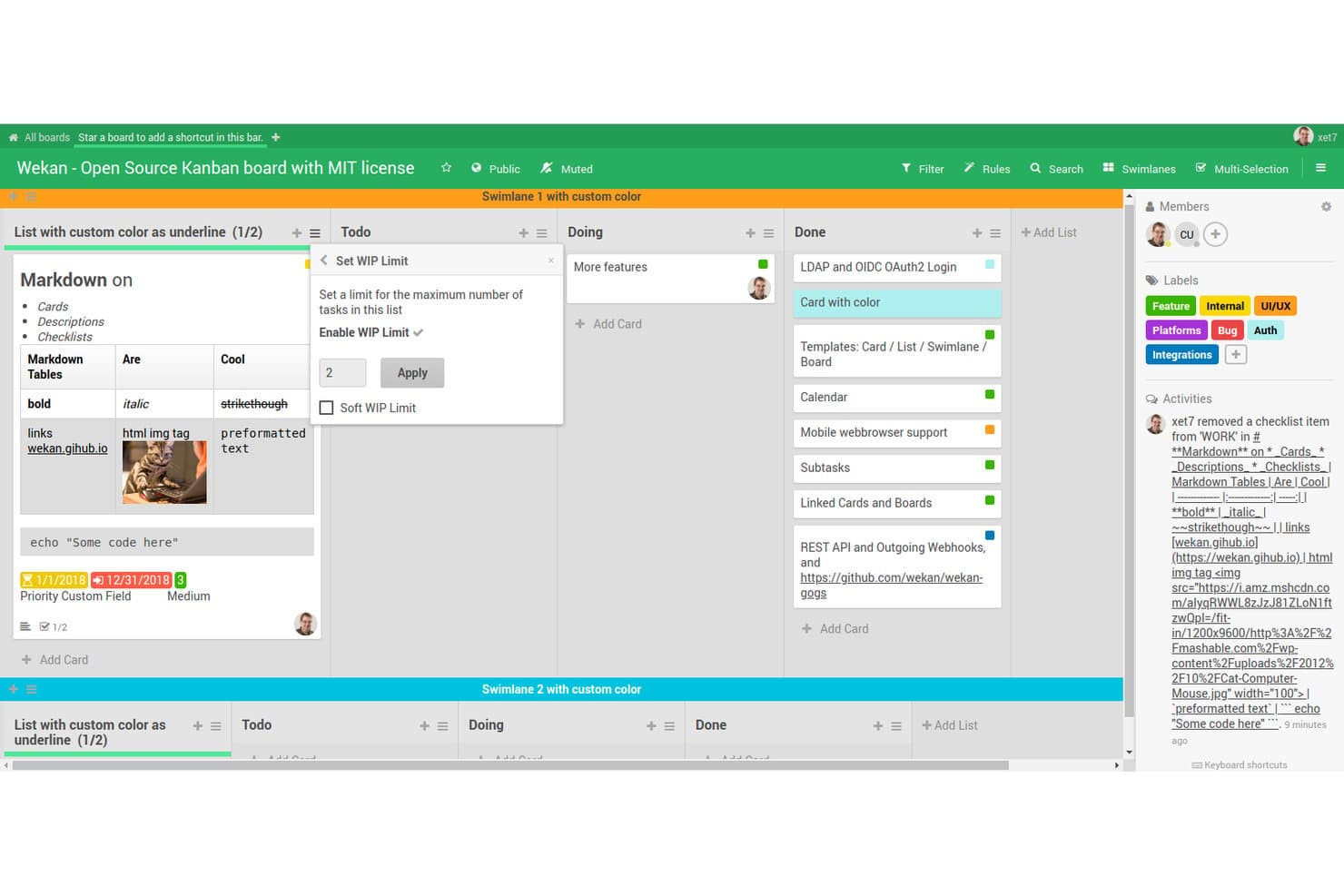
Wekan offers a Kanban board with WIP limit controls, swimlanes, markdown support, color-coded labels, and card management features suited for team project tracking. Wekan is a self-hostable, MIT-licensed kanban board built on open-source code, offering boards, swimlanes, card assignments, checklists, labels, and a built-in rules engine for team task coordination.
Who Is Wekan Best For?
Wekan is a strong fit for clinic IT directors and small healthcare teams that need a no-cost, self-hosted task board with full control over where their data lives.
Why I Picked Wekan
I picked Wekan as one of the best because its visual task management goes further than a basic kanban board. Swimlanes let my team separate concurrent workstreams, like clinical onboarding and compliance tracking, on a single board without losing context. The built-in rules engine adds real depth, automatically moving cards or updating labels when specific triggers fire.
Wekan Key Features
- Open-source MIT license: Wekan is distributed under a fully OSI-approved MIT license with public source code on GitHub.
- Self-host deployment options: Choose from Docker, Kubernetes, Snap, or bare-metal bundles for on-premises or private cloud installations.
- Board-level user permissions: Assign user roles at the board level to manage access among multidisciplinary healthcare teams.
- REST API and webhook automation: Integrate Wekan with other systems or automate board actions using its API and built-in webhooks.
Wekan Integrations
Native integrations include Trello import and LDAP for user management. Wekan also offers a REST API and webhook automation for custom integrations with other systems.
Pros and Cons
Pros:
- Zero licensing cost for unlimited users
- Self-hosting keeps PHI within your infrastructure
- MIT-licensed with full public source code
Cons:
- No Gantt charts or milestone tracking
- No built-in audit logs for compliance
Learn more about WeKan: Best for modern issue management
- Free plan available
- Pricing upon request
Visit WebsiteCustomer Rating:4.6/5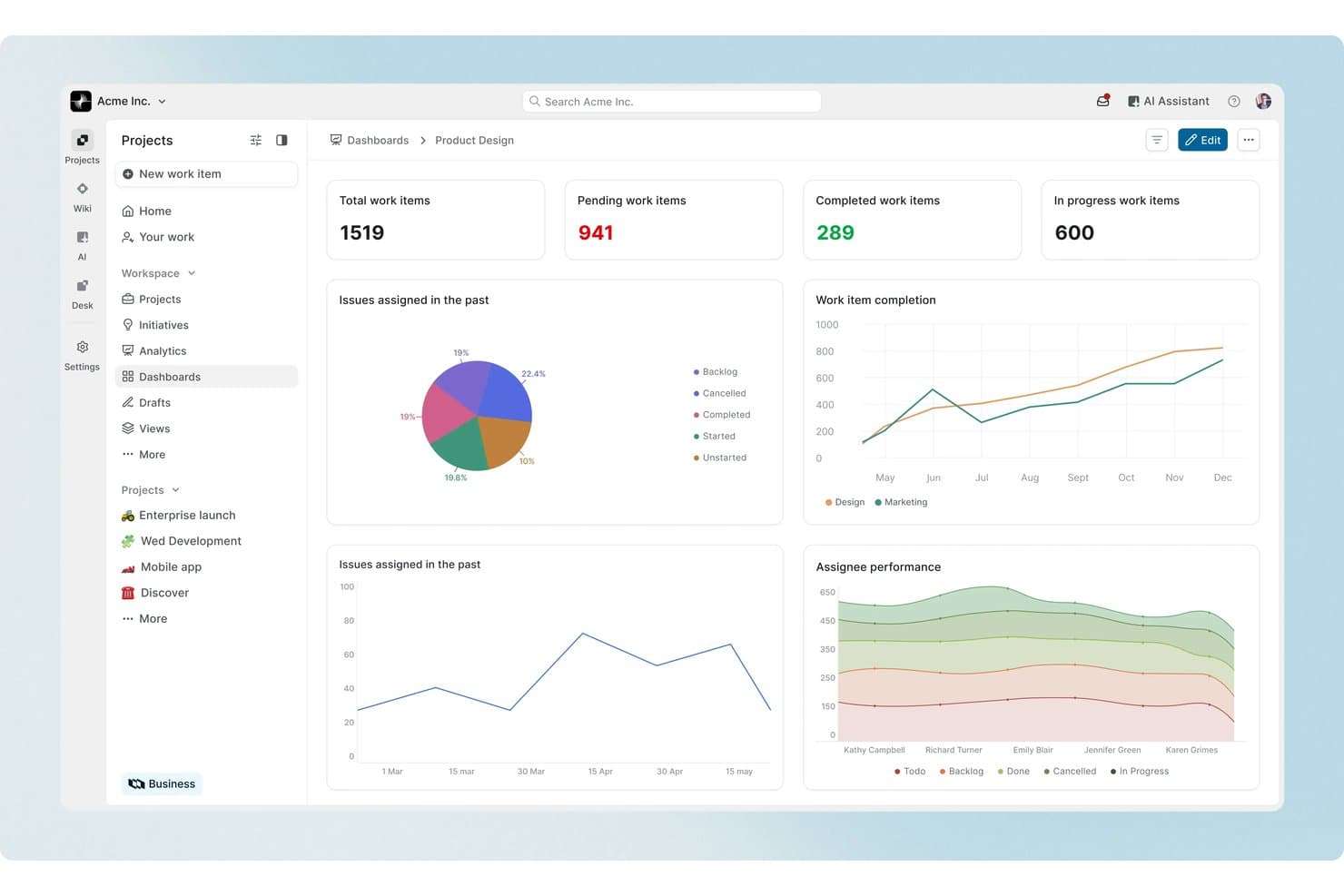
Plane offers a comprehensive project management dashboard with work item tracking, issue assignment charts, completion trends, and assignee performance analytics for healthcare or any team. Plane is an open-source project management platform built around issue tracking, sprint cycles, and AI-assisted workflows, with self-hosted and air-gapped deployment options designed for healthcare compliance environments.
Who Is Plane Best For?
Plane is a strong fit for clinic IT directors and health system project leads who need self-hosted, compliance-ready project management with developer-friendly extensibility.
Why I Picked Plane
I picked Plane as one of the best because its issue management goes well beyond basic task tracking. Work item types with custom properties let my team model clinical-specific issues, from patient safety events to CAPAs, with structured data fields rather than freeform notes. Plane's AI agents can triage incoming issues, assign them to the right team members, and summarize progress across active cycles without requiring manual status updates.
Plane Key Features
- Audit logs and access controls: Built-in immutable logs and granular permissions help meet audit and regulatory requirements.
- Self-hosted Docker and Kubernetes deployment: Supports fully on-premise and private cloud hosting, including air-gapped networks for sensitive environments.
- Custom project templates: Lets you model healthcare-specific workflows, forms, and recurring initiatives with reusable project blueprints.
- REST API and OAuth 2.0 support: Enables integration with clinical systems, scheduling tools, and staff directories through standard APIs and authentication.
Plane Integrations
Plane offers native integrations with GitHub, GitHub Enterprise, GitLab, GitLab Enterprise, Slack, Sentry, and Draw.io, with importers for Jira, Linear, Asana, ClickUp, Confluence, Notion, and CSV. An API is available for custom integrations.
Pros and Cons
Pros:
- Open-source with self-hosting support
- Flexible workflows for complex projects
- Strong task and milestone tracking
Cons:
- Healthcare integrations are limited
- Steeper setup than simpler PM tools
Learn more about Plane: Best for open-source healthcare ERP
- Free plan available; 14-day free trial
- From $5/month
Visit WebsiteCustomer Rating:4.2/5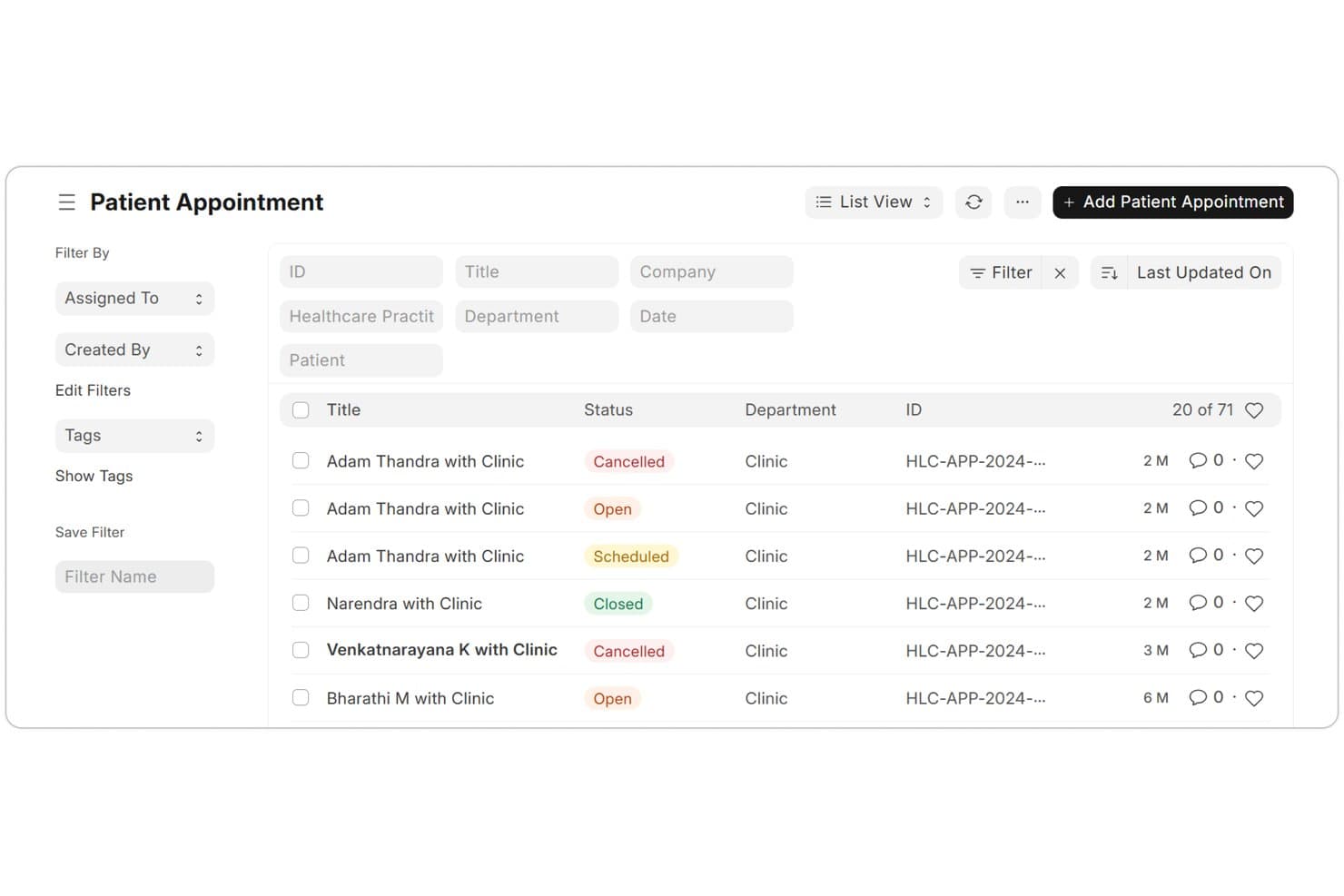
ERPNext offers a Patient Appointment management list view with status tracking, department filters, and appointment IDs for healthcare workflows. ERPNext is an open-source ERP platform with dedicated healthcare and project management modules, covering patient workflows, clinical operations, task tracking, and integrated financial management in a single system.
Who Is ERPNext Best For?
It's a strong fit for mid-sized healthcare organizations with in-house IT capacity that need a self-hosted, customizable platform spanning clinical operations and project coordination.
Why I Picked ERPNext
ERPNext earns its spot on my shortlist because it's one of the only open-source platforms that natively combines a full healthcare module with project management in a single system. I like that the Healthcare Service Units feature tracks bed occupancy, transfers, and cleaning schedules in real time, while the Projects module lets my team manage tasks, timesheets, and milestones alongside those operations. Being AGPL-3.0 licensed, I can self-host it and keep full control over patient data without a licensing fee.
ERPNext Key Features
- Role-based access control: Set granular user roles and permissions for both clinical and administrative staff.
- REST API and plugin ecosystem: Connect ERPNext with other healthcare systems or build custom extensions using open APIs and plugins.
- Clinical inventory management: Track pharmacy and medical supply inventory with batch, expiry, and category controls.
- Audit logs for compliance: Maintain detailed records of user actions for regulatory and internal compliance reviews.
ERPNext Integrations
ERPNext offers native integrations with Shopify, WooCommerce, Amazon SP-API, Razorpay, PayPal, Stripe, Braintree, GoCardless, Paytm, M-Pesa, Google Calendar, Google Contacts, Google Maps, and Exotel, and provides an API for custom integrations.
Pros and Cons
Pros:
- Supports self-hosted deployment
- Highly customizable workflows and permissions
- Built-in healthcare and ERP modules
Cons:
- Limited native healthcare interoperability tools
- Setup can require technical expertise
Learn more about ERPNext: Best for simple Kanban workflows
- Free plan available
- Free forever plan
Visit WebsiteCustomer Rating:3.7/5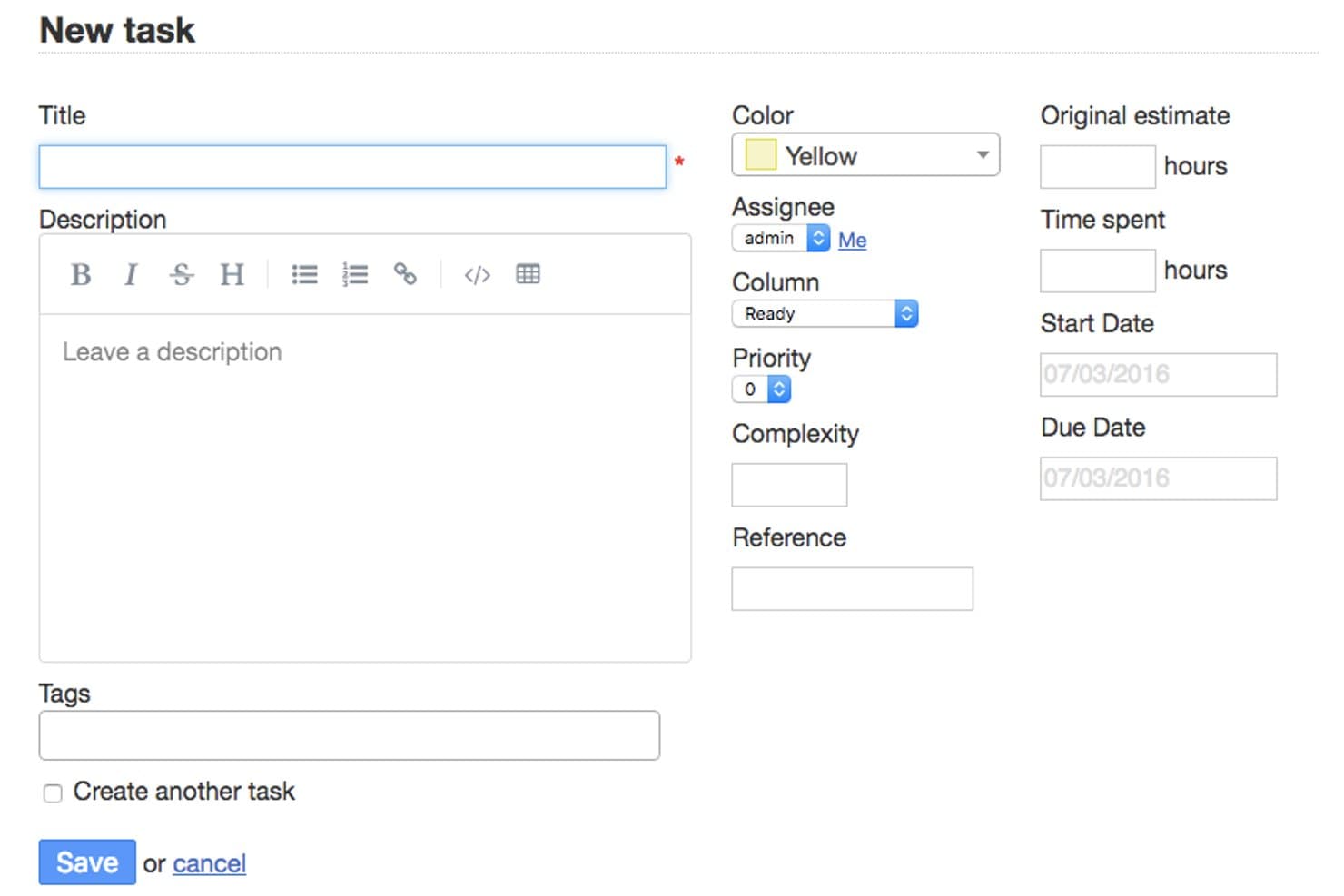
Kanboard offers a detailed task creation form with fields for title, description, assignee, priority, complexity, time tracking, and due dates to manage healthcare project workflows. Kanboard is a self-hosted, open-source Kanban project management tool with task assignment, WIP limits, automatic workflow actions, role-based access control, and a plugin ecosystem for extending functionality.
Who Is Kanboard Best For?
Kanboard is a strong fit for clinic IT directors and small technical teams that need a no-cost, self-hosted project management tool with full control over their data.
Why I Picked Kanboard
I picked Kanboard as one of the best because its WIP limits and automatic actions keep workflows moving without complex configuration. When a column hits capacity, Kanboard flags it visually, which is genuinely useful when coordinating tasks across clinical and administrative teams. I also like that automatic actions can trigger reassignments or category changes based on task events, so recurring workflows like equipment requests don't need manual oversight each time.
Kanboard Key Features
- Role-based access control: Define permissions for users and groups to manage sensitive project information.
- LDAP and OAuth2 authentication: Connects with enterprise identity providers for secure user management in clinical environments.
- Plugin ecosystem: Extend Kanboard with plugins for Slack, GitHub, file storage, analytics, and more.
- REST API: Integrate Kanboard with EHRs or other healthcare apps via a documented API.
Kanboard Integrations
Kanboard offers native integrations with Slack, GitHub, GitLab, Bitbucket, Mattermost, Rocket.Chat, Jenkins, Amazon S3, and LDAP/Active Directory, and provides an API for custom integrations.
Pros and Cons
Pros:
- Lightweight and easy to customize
- Supports self-hosted deployment
- Simple Kanban boards for task tracking
Cons:
- No healthcare-specific integrations
- Limited reporting and portfolio features
Learn more about Kanboard:
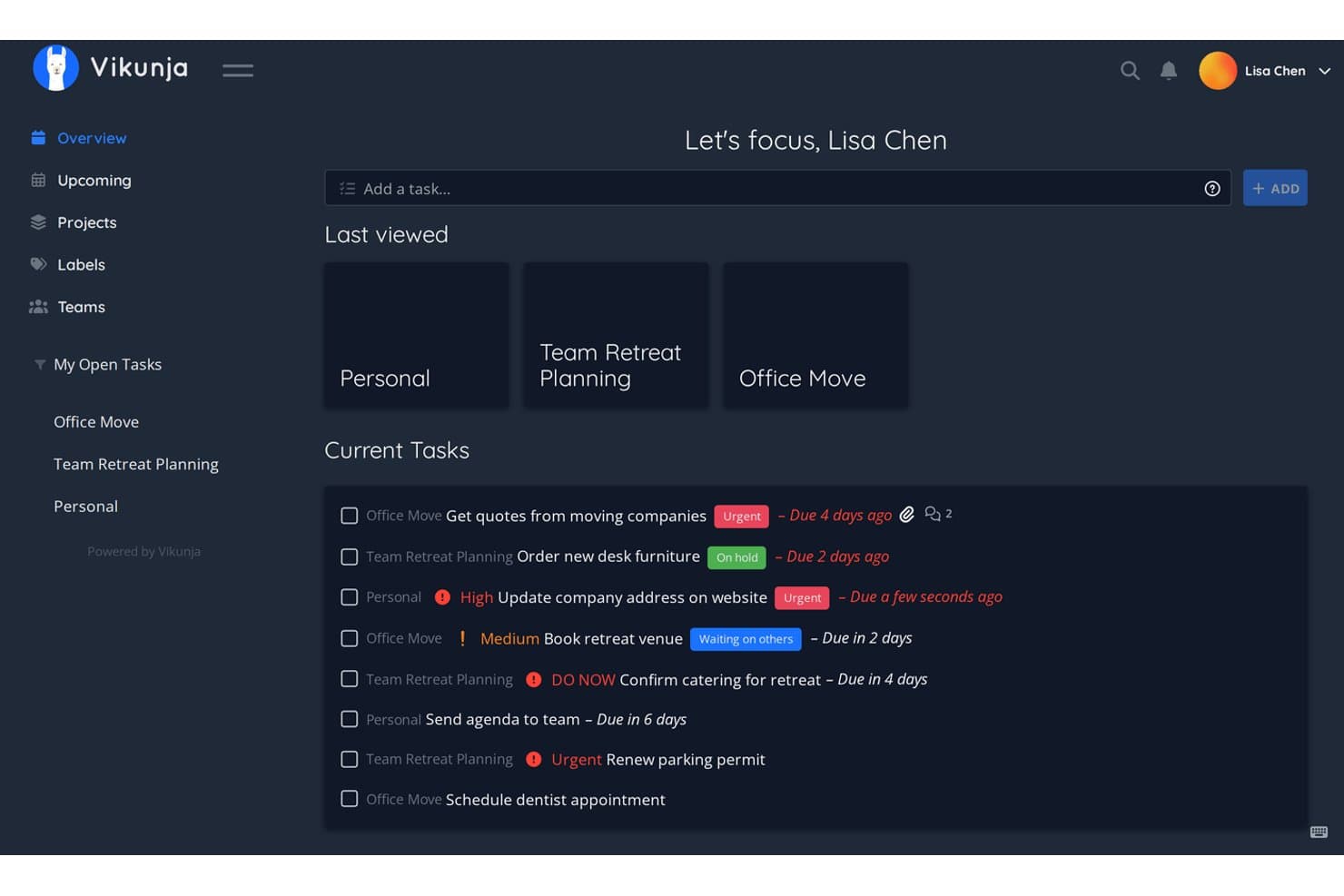
Vikunja offers a dark-mode task overview dashboard where healthcare project managers can track urgent, on-hold, and upcoming tasks across multiple projects simultaneously. Vikunja is an AGPLv3-licensed, self-hostable task and project manager that gives healthcare teams List, Kanban, Gantt, and Table views alongside team-based access controls, API extensibility, and LDAP/OIDC SSO.
Who Is Vikunja Best For?
Vikunja is a strong fit for clinic IT directors and small healthcare operations teams who need a self-hosted task manager without complex enterprise setup.
Why I Picked Vikunja
I picked Vikunja as one of the best because it runs as a single binary my IT team can spin up on modest hardware in under an hour. Quick Add Magic lets me create a task, set its due date, assign it, and add a label all in one typed line, which keeps planning sessions moving fast. The same project then renders in List, Kanban, or Gantt view without any extra configuration, letting a department head track milestones on the timeline while the coordinator manages daily tasks on the board.
Vikunja Key Features
- Role-based team sharing: Assign access and edit rights to specific users or groups for each project.
- CalDAV integration: Sync tasks with external calendar platforms to keep due dates in sync.
- HMAC-signed webhook support: Secure task update notifications and integrations using verifiable signatures.
- OpenID Connect and LDAP support: Enable single sign-on and directory-based authentication for healthcare IT environments.
Vikunja Integrations
Native integrations include CalDAV for calendar sync and OpenID Connect and LDAP for authentication. Vikunja supports n8n for workflow automation, HMAC-signed webhooks, and provides a REST API for custom integrations.
Pros and Cons
Pros:
- Strong recurring task and scheduling tools
- Supports self-hosted deployment
- Multiple views for flexible task tracking
Cons:
- Lacks healthcare-specific integrations
- Advanced features require more setup
Learn more about Vikunja: Best for secure project collaboration
- Free plan available; 14-day free trial available for Enterprise Cloud and on-premises
- From €5.95/user/month (billed annually)
Visit WebsiteCustomer Rating:4.5/5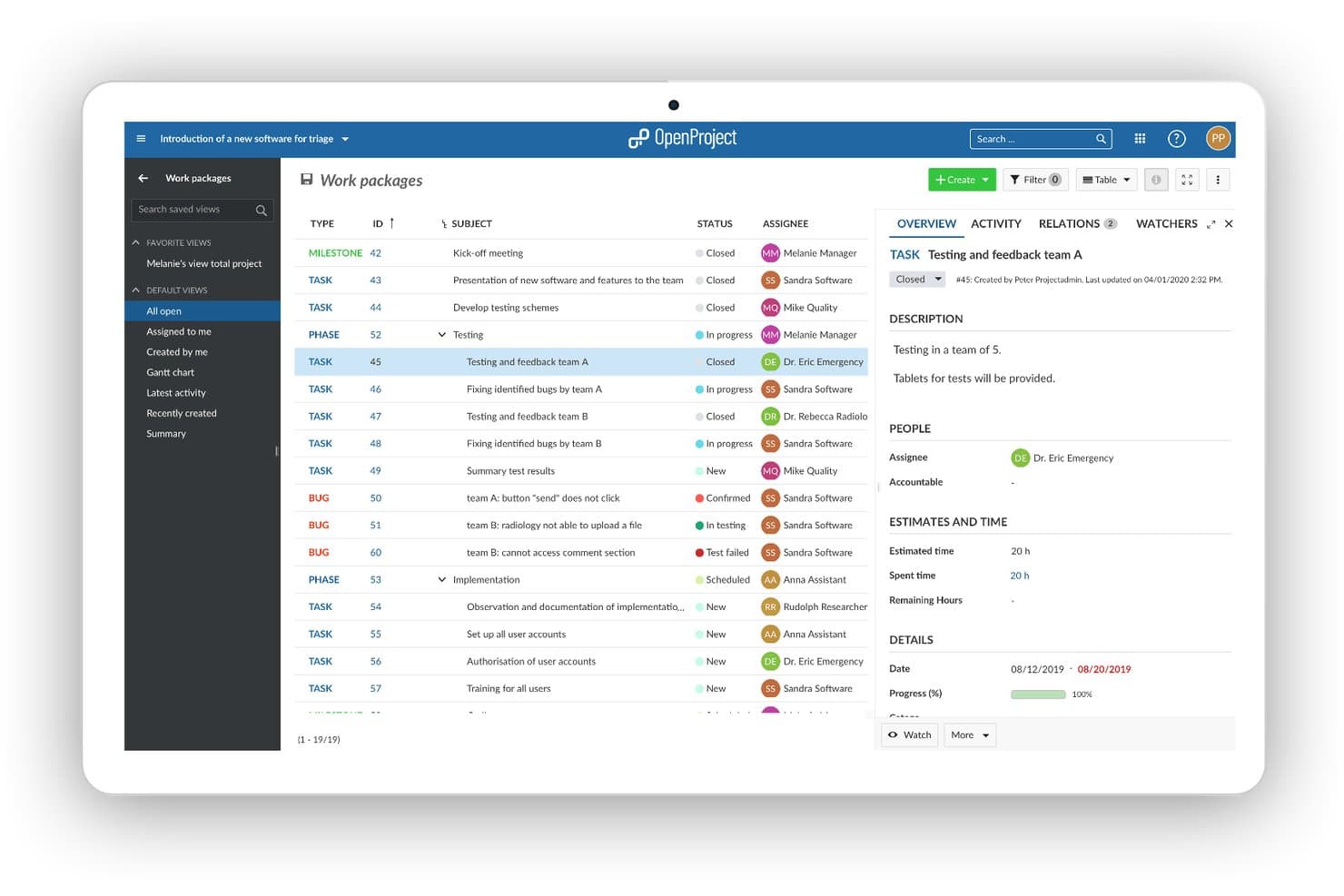
OpenProject offers a work packages view tailored for healthcare projects, enabling teams to track tasks, bugs, and phases like testing and implementation with assignees and progress details. OpenProject is a GPL v3-licensed, self-hostable project management platform with Gantt charts, Kanban boards, time tracking, custom workflows, and built-in access controls designed for teams that need full data sovereignty.
Who Is OpenProject Best For?
OpenProject is a strong fit for clinic IT directors and healthcare operations teams that need to self-host their project management tools within their own secure infrastructure.
Why I Picked OpenProject
I picked OpenProject as one of the best because its on-premises deployment lets healthcare IT teams host the entire platform inside their own infrastructure, keeping PHI off third-party servers entirely. I particularly like its SSO support via SAML, OIDC, and Kerberos alongside LDAP group sync, which integrates directly with a hospital's existing identity management systems. AES-256 encryption at rest and ClamAV antivirus scanning round out a security stack you can fully audit and control.
OpenProject Key Features
- Agile boards: Visualize project tasks with customizable Scrum and Kanban boards.
- Gantt chart scheduling: Create and manage detailed project timelines with interactive Gantt charts.
- Wiki and documentation module: Collaborate on project knowledge, policies, and SOPs in a structured wiki environment.
- Time and cost tracking: Track work hours and project costs directly within each task or project.
OpenProject Integrations
OpenProject offers native integrations with Nextcloud, GitHub, GitLab, OneDrive, SharePoint, XWiki, openDesk, and Jira Migrator. An API is available for custom integrations.
Pros and Cons
Pros:
- Supports secure self-hosted deployment
- Flexible role-based access controls
- Strong project planning and timeline tools
Cons:
- Limited healthcare-specific integrations
- Setup can require technical expertise
Learn more about OpenProject: Best for healthcare DevOps workflows
- Free plan available; 30-day free trial
- From $29/user/month (billed annually)
Visit WebsiteCustomer Rating:4.5/5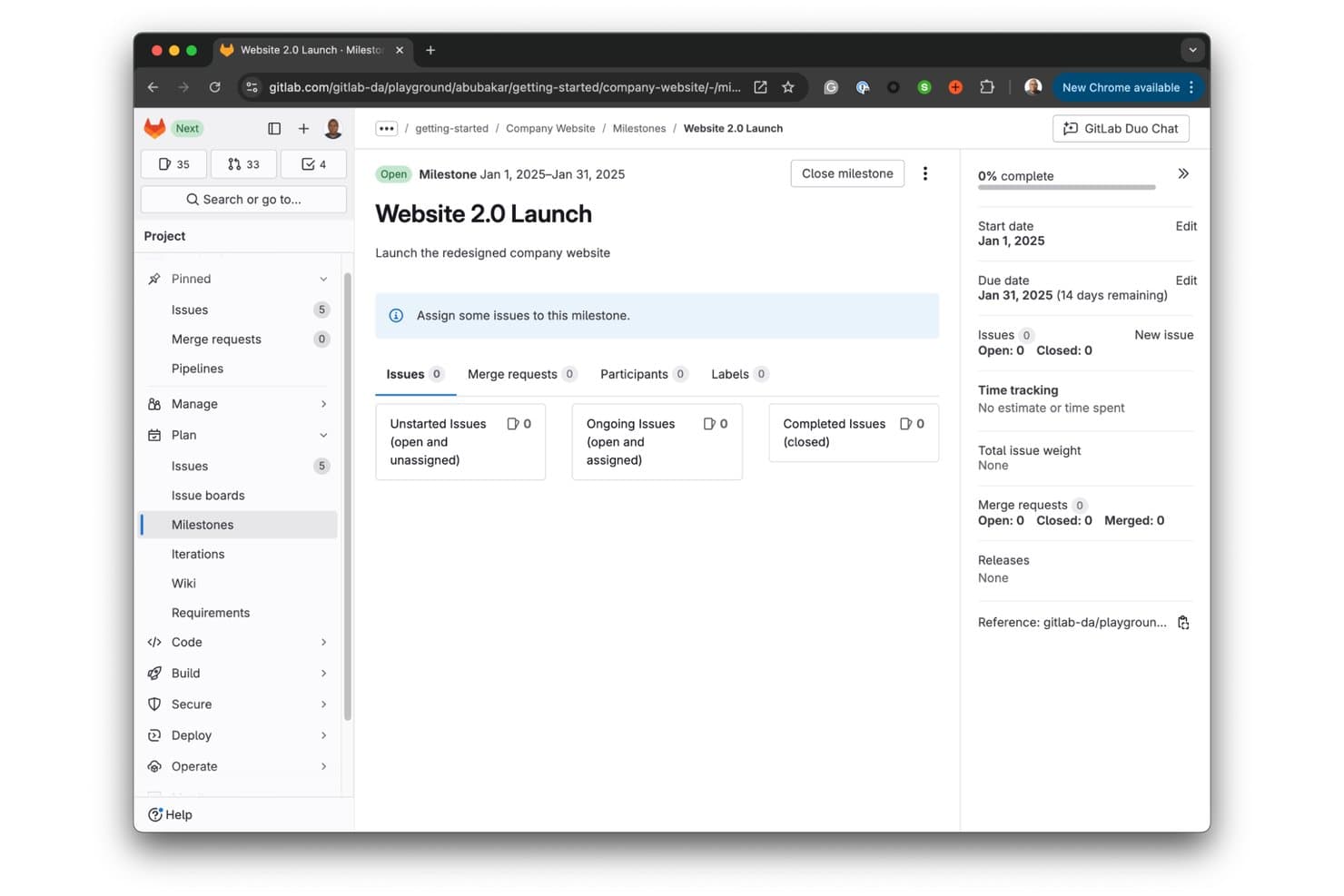
GitLab offers milestone tracking with start/due dates, issue progress, and merge request visibility for managing project launches. GitLab is an open-core DevSecOps platform that combines source code management, CI/CD pipelines, issue tracking, and built-in security scanning in a single self-hostable application.
Who Is GitLab Best For?
GitLab suits clinic IT directors and health system engineering teams that build, maintain, or integrate custom healthcare software on self-managed infrastructure.
Why I Picked GitLab
I picked GitLab as one of the best because it's the only open-source platform that ties SAST and DAST security scanning directly into the project delivery workflow. Every merge request my team pushes automatically triggers those scans, which matters when the code in question touches PHI. GitLab's built-in compliance frameworks and audit event logs also let me enforce approval rules and trace every action across the pipeline without a separate compliance tool.
GitLab Key Features
- Granular role-based access control: Assign detailed permissions for different teams, projects, or users within healthcare organizations.
- Self-hosted deployment options: Run GitLab securely on-premise or in private cloud environments to support data residency needs.
- Custom issue and project templates: Build reusable templates for complex healthcare workflows, standardizing project management and documentation.
- Extensive REST and GraphQL APIs: Integrate with EHRs, clinical systems, or scheduling platforms for custom workflow automation.
GitLab Integrations
GitLab offers native integrations with Jira, Slack, Jenkins, Microsoft Teams, GitHub, Prometheus, and Kubernetes, and provides a REST and GraphQL API for custom integrations.
Pros and Cons
Pros:
- Supports self-managed deployment
- Strong role-based access controls
- Built-in issue and project tracking
Cons:
- Advanced planning features can be costly
- Not built for clinical workflows
Learn more about GitLab: Best for regulated software projects
- Free demo available
- Pricing upon request
Visit WebsiteCustomer Rating:4.4/5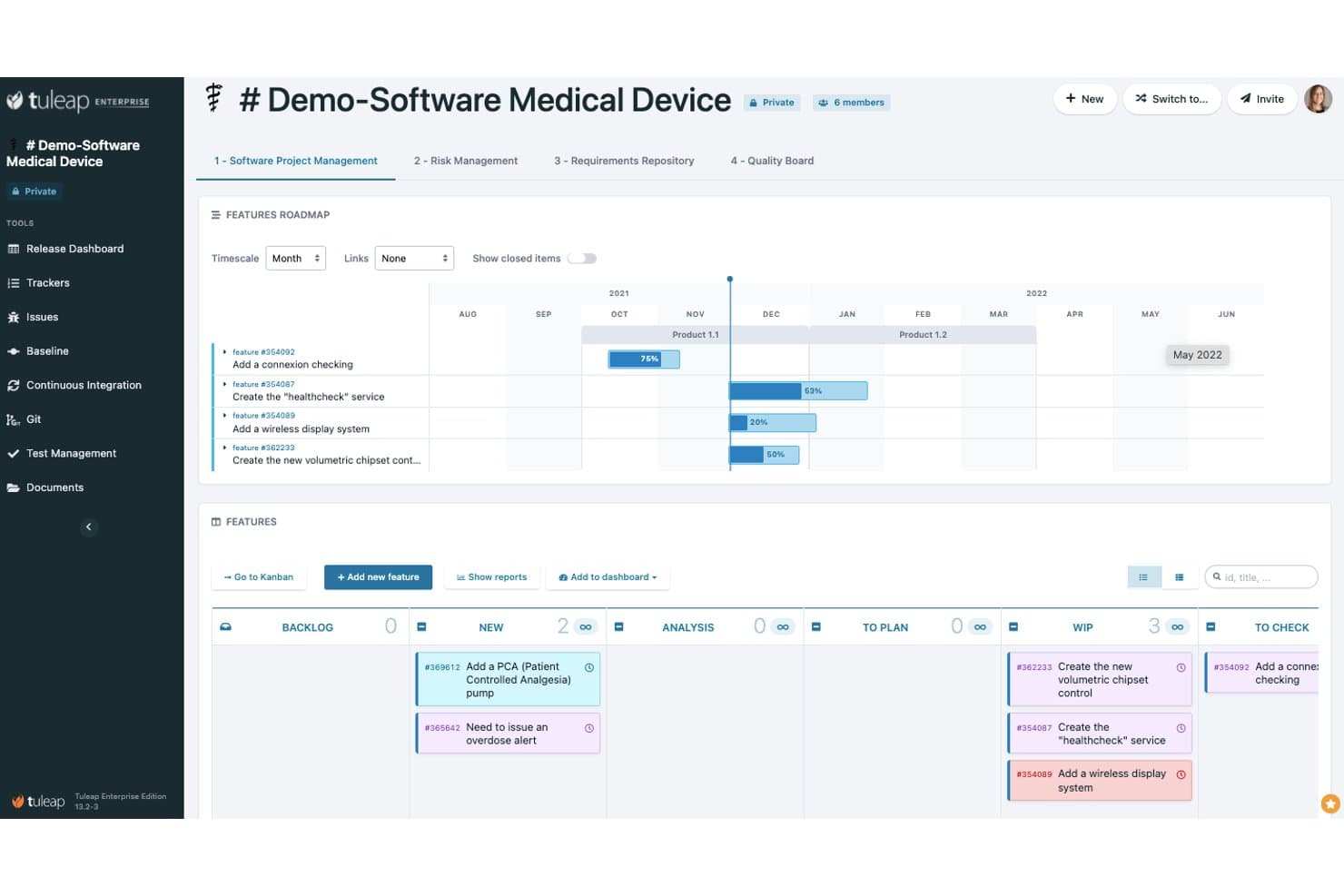
Tuleap offers a dedicated medical device software project management template with a features roadmap, Kanban board, and task tracking tailored for healthcare teams. Tuleap is an open-source application lifecycle management platform that combines agile project management, requirements traceability, test management, and source code control in a single self-hosted environment.
Who Is Tuleap Best For?
Tuleap is a strong fit for MedTech software engineering teams that need to manage development projects under regulated standards like ISO 13485 or IEC 62304.
Why I Picked Tuleap
I picked Tuleap as one of the best because its built-in requirements traceability links every task, commit, and test result to a specific regulatory requirement. When my team is running a project under IEC 62304, I can generate audit-ready compliance reports directly from Tuleap without manually assembling evidence. The baseline management feature is particularly useful for locking a verified state of requirements before a design review.
Tuleap Key Features
- Kanban and Gantt views: Easily switch between agile boards and traditional timelines for tracking team progress.
- Custom tracker workflows: Create and configure workflows for issues, tasks, or defects to fit complex healthcare projects.
- Granular role-based access control: Assign detailed permissions by role, team, or project to protect sensitive project data.
- REST API and plugin framework: Connect Tuleap with external tools and extend its capabilities via integrations and custom plugins.
Tuleap Integrations
Tuleap offers native integrations with Jenkins, GitLab, Gerrit, and Mattermost, with an API available for custom integrations.
Pros and Cons
Pros:
- Combines Agile boards with Gantt planning
- Supports self-hosted deployment
- Strong audit trails for regulated projects
Cons:
- Lacks healthcare-specific compliance tools
- Setup can require dedicated IT support
Learn more about Tuleap:
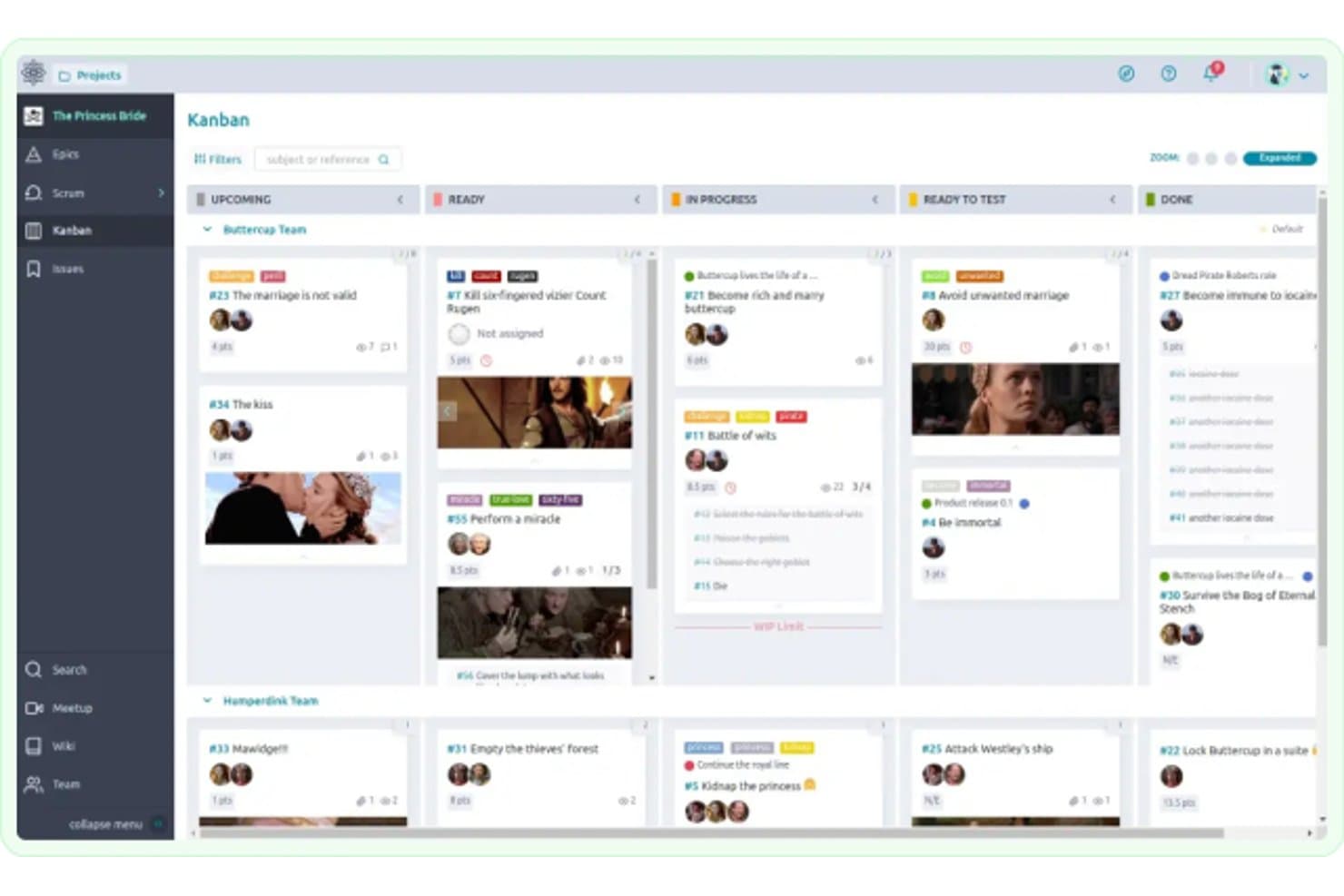
Taiga offers a Kanban board view with customizable columns, team swimlanes, and card-based task tracking for project management. Taiga is an open-source project management platform built around Scrum and Kanban workflows, offering sprint planning, backlog management, issue tracking, and custom role-based permissions across self-hosted or cloud deployments.
Who Is Taiga Best For?
Taiga is a good fit for healthcare IT and operations teams that run implementation or process improvement projects using Scrum or Kanban workflows.
Why I Picked Taiga
Taiga earns its spot as one of the best on my shortlist because of how well its agile tooling maps to healthcare IT project cycles. I particularly like the sprint-level burn-down charts combined with swim lane Kanban boards, which let my team track clinical implementation work across parallel workstreams. The AGPL-3.0 license and on-premise deployment option mean I can host it behind a firewall, keeping PHI off third-party servers.
Taiga Key Features
- Custom issue types and priorities: Define and organize issues with tailored categories, priorities, and severities for each healthcare project.
- Project timeline audit: Track and review changes or updates made to projects over time for greater accountability.
- Personal dashboards: Give users a consolidated view of assigned tasks, project status, and upcoming deadlines.
- Extensive API and webhook support: Connect Taiga to external healthcare tools or systems with API and webhook options.
Taiga Integrations
Taiga offers native integrations with Slack, HipChat, GitHub, GitLab, and Mattermost, and connects with Zapier. An API is available for custom integrations.
Pros and Cons
Pros:
- Supports self-hosted deployment
- Highly customizable open-source platform
- Strong Scrum and Kanban project tracking
Cons:
- No healthcare-specific integrations
- Limited reporting for complex projects
Learn more about Taiga: 10Best for flexible issue tracking
Redmine
- Free plan + demo available
- Pricing upon request
Visit WebsiteCustomer Rating:4/5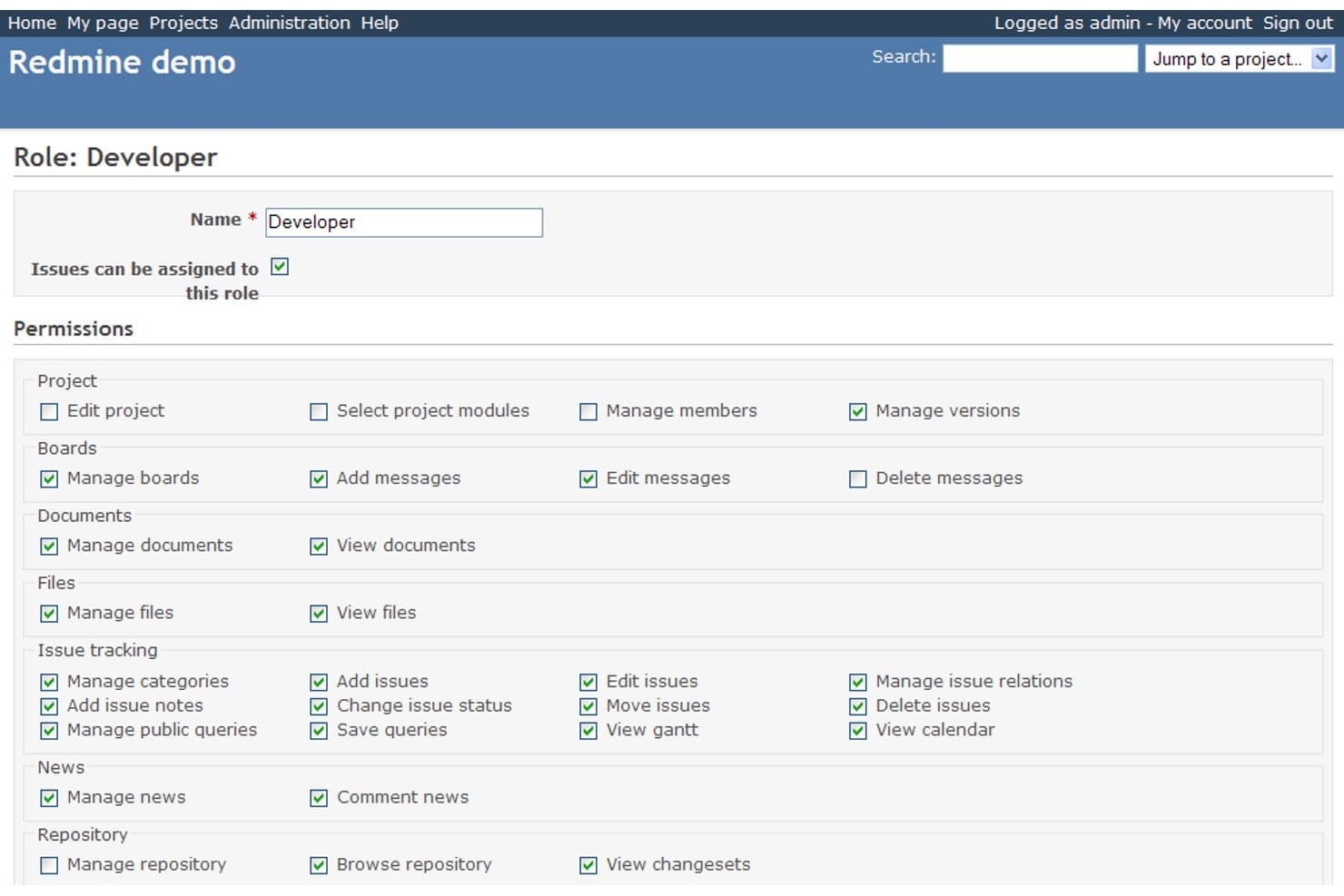
Redmine offers granular role-based permission settings, allowing administrators to control access for roles like Developer across project, issue tracking, and document modules. Redmine is a self-hosted, open-source project management platform built on Ruby on Rails that combines flexible issue tracking, Gantt charts, role-based access control, time tracking, and a plugin-based extensibility system.
Who Is Redmine Best For?
Redmine suits IT-mature healthcare organizations where a clinic IT director or technical project lead can own the deployment and configuration.
Why I Picked Redmine
I picked Redmine as one of the best because its issue tracking system is genuinely flexible in ways that matter for healthcare workflows. You can define custom issue types, statuses, and workflow transitions per role, so a clinical implementation team and an IT support team operate under completely different tracking rules within the same instance. I also like that custom fields attach directly to issue forms, letting you capture structured data like regulatory checkpoints or department codes without any workarounds.
Redmine Key Features
- Role-based access control: Define custom user roles and permissions across multiple projects and departments.
- Multi-project management: Organize and manage numerous concurrent clinical or administrative projects from a single dashboard.
- Custom fields: Capture healthcare-specific data by adding custom fields to issues, projects, or time entries.
- Audit logs: Track every user action for traceability and compliance monitoring within regulated environments.
Redmine Integrations
Redmine offers native integrations with Git, Subversion, Mercurial, CVS, and Bazaar for source control. It also supports LDAP authentication and has an API for custom integrations. A wide range of marketplace plugins are available for extending core functionality.
Pros and Cons
Pros:
- Supports fully self-hosted deployment
- Large plugin ecosystem for customization
- Flexible issue and project tracking
Cons:
- Setup and maintenance can require IT support
- Interface feels dated compared with newer tools
Learn more about Redmine:
Other Open-Source Healthcare Project Management Software
Here are some additional open-source healthcare project management software options that didn’t make it onto my shortlist, but are still worth checking out:
- 11LeantimeBest for lean project planning
- 12FocalboardBest for collaborative project boards
- 13MantisBTBest for open-source bug tracking
- 14KaneoBest for self-hosted project management
- 15OdooBest for project cost management
Related Reviews
How I Evaluate Open-Source Healthcare Project Management Software
I look at these platforms across two layers: core functionality needed to manage EHR rollouts and HIPAA workflows, and the differentiators that set the best options apart.
Core Functionality (Table Stakes for This List)
When I'm selecting tools for my list, I rank each one on a scale from 0 (does not offer the functionality) to 5 (excels in this area) for each core functionality listed below. Then, I calculate the tool's total score into a percentage. Each tool needs to achieve a minimum total score of 55% to be considered for inclusion.
- Open-source licensing: I check that the platform uses a recognized OSI-approved license like GPL, MIT, or Apache, so your IT team can audit the codebase before deploying it in a clinical environment.
- Self-hosting capability: The tool should support on-premise or private cloud deployment with clear documentation, giving your organization full control over where PHI-adjacent project data lives.
- Project and task management: I evaluate whether the platform covers task assignment, milestones, timelines, and progress tracking suited to initiatives like EHR rollouts or accreditation prep.
- Healthcare compliance support: Configurable audit logs, encryption, and access controls matter here. I look for features that let your compliance team set up HIPAA-aligned workflows without heavy custom development.
- Role-based access control: Granular permissions are key when clinicians, IT staff, and external consultants all share the same platform. I look for custom roles that restrict visibility at the project or field level.
- Integration and extensibility: Open APIs, webhooks, and plugin support determine how well the tool connects with your existing stack, whether that's an EHR system, scheduling platform, or identity provider like Okta.
Once I have a list of tools that meet the criteria, I consider what sets each platform apart.
Differentiating Factors (What Sets Vendors Apart)
Here's how I compare and contrast different vendors:
Standout Features
HIPAA-ready configurations are a big differentiator. I look for platforms that include pre-built audit logs, access controls, and templates so your compliance team doesn't have to build everything from scratch. Gantt and Kanban hybrid views also matter when your organization runs long-cycle projects like facility builds alongside agile clinical sprints. I evaluate whether the tool lets you switch between these views without losing context. Clinical workflow templates for initiatives like accreditation prep or quality improvement projects save real setup time and show the vendor understands healthcare.
Beyond Features
Deployment flexibility matters a lot. I check whether a platform supports Docker or Kubernetes so your IT team can roll it out without manual server configuration. Total cost of ownership is another factor I weigh carefully—some "open-core" tools lock key features behind paid tiers, which changes the math fast. Community health tells you a lot too; an active developer community with responsive issue tracking on GitHub means faster patches when security vulnerabilities surface in your healthcare environment.
How to Choose Open-Source Healthcare Project Management Software
It’s easy to get bogged down in long feature lists and complex pricing structures. To help you stay focused as you work through your unique software selection process, here’s a checklist of factors to keep in mind:
| Factor | What to Consider |
| Scalability | Will the platform keep up as your facility or health system grows, including multi-site or department expansion? |
| Integrations | Does the software connect with your EHR, scheduling, or communication tools via open APIs or plugins? |
| Customizability | How easily can you tailor workflows, permissions, and project templates to your clinical or admin needs? |
| Ease of use | Can both clinicians and admin staff learn it quickly, or will onboarding slow down adoption? |
| Implementation and onboarding | How much in-house IT effort will setup require? Are Docker or cloud options available to simplify deployment? |
| Cost | What are your true costs if you self-host, factor in premium modules, and consider future support needs? |
| Security safeguards | Are encryption, audit logs, and user access controls enough for PHI-adjacent project data? |
| Compliance requirements | Does the system provide audit trails, BAA support, or features to help meet HIPAA or GDPR obligations? |
What Is Open-Source Healthcare Project Management Software?
Open-source healthcare project management software are platforms with publicly accessible code, designed for planning, tracking, and managing healthcare projects. These tools let you customize workflows, maintain control over data, and support tasks like EHR implementation, compliance initiatives, or clinic expansions—all while meeting strict security and privacy standards in medical settings.
Features of Open-Source Healthcare Project Management Software
When selecting open-source healthcare project management software, keep an eye out for the following key features:
- Self-hosting options: Lets your organization deploy the software on your own infrastructure to maintain direct control over sensitive project data and system access.
- Role-based access control: Assigns specific permissions by role, so clinicians, administrators, and IT staff see only what’s relevant to their responsibilities.
- Custom workflow templates: Offers pre-built and customizable project templates for common healthcare initiatives, like EHR launches or quality improvement programs.
- Audit logs and tracking: Captures detailed records of all user activity to support internal audits, compliance reviews, and incident response investigations.
- Encryption and data security: Protects project data both at rest and in transit, helping you safeguard patient-adjacent information and comply with privacy regulations.
- Integration capabilities: Connects with EHRs, scheduling platforms, lab systems, or other healthcare software via open APIs or plugin support, enabling unified clinical operations.
- Task assignment and tracking: Lets project leads assign responsibilities, monitor completion, set deadlines, and keep teams accountable throughout the project lifecycle.
- Multi-project management: Supports organization of simultaneous healthcare projects with dashboards, prioritization tools, and drill-down visibility for operational oversight.
- Gantt and Kanban views: Enables switching between timeline and board views for managing both long-term strategic projects and agile clinical process improvements.
- Healthcare compliance configurations: Includes features and settings designed to help teams meet HIPAA or similar data privacy requirements with minimal IT intervention.
Benefits of Open-Source Healthcare Project Management Software
Implementing open-source healthcare project management software provides several benefits for your team and your business. Here are a few you can look forward to:
- Greater data control: Self-hosting options let you keep sensitive project information within your own infrastructure, supporting privacy and regulatory needs.
- Improved team collaboration: Role-based permissions, shared workspaces, and task tracking make it easier to coordinate care initiatives and cross-functional healthcare projects.
- Enhanced compliance readiness: Features like audit logs, encryption, and HIPAA-friendly configurations help your team meet data protection standards with less manual effort.
- Reduced vendor lock-in: Open-source licensing means you can modify, extend, or switch systems without being tied to proprietary vendors or unpredictable fees.
- Custom-fit workflows: Customizable templates and workflow settings help you match your project management approach to each clinic, department, or health system’s unique needs.
- Lower total cost: Eliminating recurring license fees and leveraging community-driven support can help you keep your project management costs under control.
- Broader system integration: Open APIs and plugin support let you connect with EHRs, scheduling tools, or clinical systems to centralize operational workflows.
Costs and Pricing of Open-Source Healthcare Project Management Software
Selecting open-source healthcare project management software requires an understanding of the various pricing models and plans available. Costs vary based on features, team size, add-ons, and more. The table below summarizes common plans, their average prices, and typical features included in open-source healthcare project management software solutions:
Plan Comparison Table for Open-Source Healthcare Project Management Software
| Plan Type | Average Price | Common Features |
| Free Plan | $0 | Core task management, open-source codebase access, basic integrations, and community support. |
| Personal Plan | $5-$10/user/month | All free features, personal project boards, simple role permissions, and basic workflow templates. |
| Business Plan | $10-$25/user/month | Team permissions, audit logs, pre-built healthcare project templates, expanded integrations, and API access. |
| Enterprise Plan | $25-$50/user/month | Advanced RBAC, HIPAA-ready configurations, priority support, on-premise or private cloud hosting, and custom integrations. |
Open-Source Healthcare Project Management Software FAQs
Here are some answers to common questions about open-source healthcare project management software:
Can I use open-source project management software for HIPAA-compliant projects?
Yes, many open-source tools offer configurable permissions, audit logs, and security settings that support HIPAA-friendly use cases, but you’ll need to validate and document your own compliance before using them with PHI.
What technical expertise is needed to deploy these tools?
Self-hosted open-source platforms often require IT skills for setup and maintenance, especially when hosting on your own servers or using Docker or Kubernetes.
How do updates and security patches work with open-source tools?
You’re responsible for monitoring project repositories, testing updates, and applying security patches, though active communities and documentation can help streamline the process.
Can open-source platforms integrate with EHR or clinical systems?
Yes, many offer open APIs or plugins, but you’ll need IT resources to build and maintain connections to EHRs, scheduling tools, or other healthcare platforms.
What support options are available?
Support varies by project and vendor—some offer only community support, while others provide optional paid support, consulting, or implementation services for healthcare teams.