

Healthcare quality management software helps your clinic monitor patient safety, manage compliance, track incidents, and drive continuous improvements across care delivery. If you’re searching for a solution that can reduce administrative headaches, keep your team on top of regulatory changes, and strengthen both clinical and operational oversight, you’re in the right place. This guide walks you through what defines the top options, what to consider as a medical practice owner, and how these tools can support seamless, safe, and effective operations.
Why Trust Our Software Recommendations
6,700+
Reviews
20
Industry experts
16+
Evaluation factors
14
Years
Our team has been testing and reviewing software since 2012. As medical practice leaders ourselves, we know how difficult—and important—it is to choose the right software.
For this guide, we evaluated tools using hands-on testing and independent research, scoring tools using our selection criteria.
Our reviews reflect our human editorial judgment, not a sales pitch.
Comparison Table: Healthcare Quality Management Software
Compare pricing and specs side by side for the healthcare management software that made it onto my shortlist.
| Tool | Best For | Trial Info | Price | ||
|---|---|---|---|---|---|
| 1 | Best for healthcare compliance and audits | Free demo available | Pricing upon request | Website | |
| 2 | Best for workforce quality and compliance | Free demo available | Pricing upon request | Website | |
| 3 | Best for compliance and credentialing workflows | Free demo available | Pricing upon request | Website | |
| 4 | Best for data-driven quality improvement | Free demo available | Pricing upon request | Website | |
| 5 | Best for patient safety and experience | Free demo available | Pricing upon request | Website | |
| 6 | Best for healthcare risk and safety workflows | Free demo available | Pricing upon request | Website | |
| 7 | Best for patient safety and incident management | Free demo available | Pricing upon request | Website | |
| 8 | Best for quality and compliance oversight | Free demo available | Pricing upon request | Website | |
| 9 | Best for enterprise healthcare risk management | Free demo available | Pricing upon request | Website | |
| 10 | Best for hospital quality improvement | Free demo available | Pricing upon request | Website |


Healthcare Quality Management Software Reviews
Below are my detailed summaries of the best healthcare quality management software that made it onto my shortlist. My reviews offer a detailed look at the features, best use cases, and capabilities of each platform to help you find the best one for you.
 Best for healthcare compliance and audits
- Free demo available
- Pricing upon request
Visit WebsiteCustomer Rating:4.7/5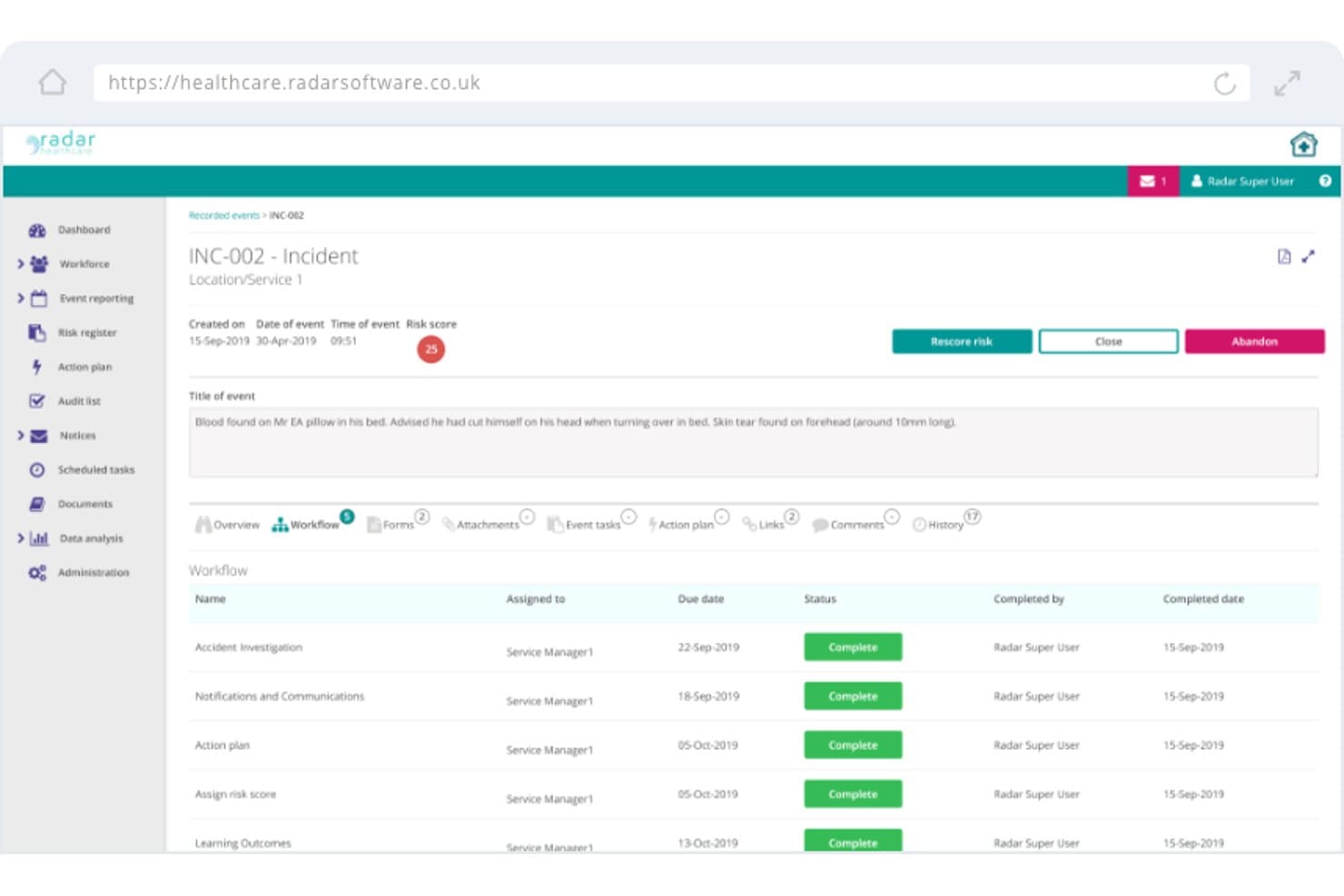
Radar Healthcare offers an incident management workflow view that tracks task assignments, due dates, and completion statuses for recorded events. Radar Healthcare is a governance, risk, and compliance platform built for health and social care providers, combining incident management, audit management, CAPA tracking, risk management, and real-time quality analytics in one modular system.
Who Is Radar Healthcare Best For?
It's a strong fit for quality and governance teams at multi-site care providers, NHS Trusts, and large health and social care organisations managing complex regulatory requirements.
Why I Picked Radar Healthcare
I picked Radar Healthcare as one of the best because its audit and compliance modules are genuinely built around how regulated health and social care organisations get inspected. The Audit Management module lets teams schedule audits, execute checklists, track findings, and link them directly to action plans within one system. I also like the CQC Dashboards, which give inspection-ready views of compliance evidence so there's no scrambling when a regulator visit is scheduled.
Radar Healthcare Key Features
- Incident management workflows: Teams can capture, categorize, and investigate events, complaints, and near misses in one structured module.
- Action and improvement plans: Assign, monitor, and update corrective or preventive actions linked to incidents or audit findings.
- Analytics dashboards: Real-time visualizations help users track compliance KPIs, spot trends, and analyze root causes across locations.
- Document management: Centralizes policies, protocols, and evidence for streamlined compliance and audit readiness.
Radar Healthcare Integrations
Native integrations are not clearly documented. An API is available for custom integrations, and there are references to integrations with Nourish and QR code-based external reporting.
Pros and Cons
Pros:
- Incident and CAPA workflows are tightly linked
- CQC-ready dashboards simplify inspection preparation
- Audit scheduling and findings tracking in one place
Cons:
- Reporting customization options are limited out of the box
- Primarily built for UK care settings, not global frameworks
Learn more about Radar Healthcare: Best for workforce quality and compliance
- Free demo available
- Pricing upon request
Visit WebsiteCustomer Rating:4.3/5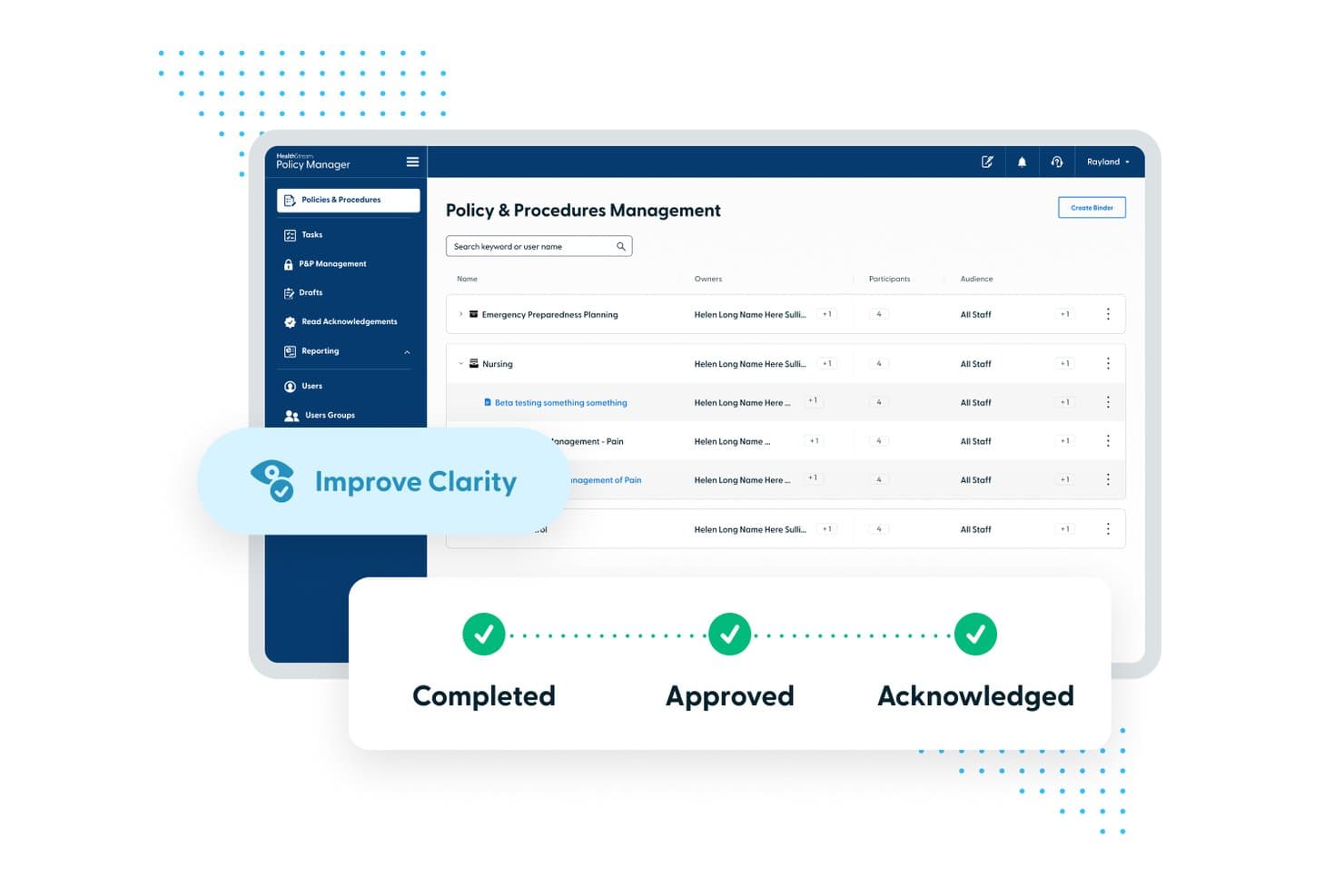
HealthStream offers centralized policy and procedures management with automated workflows showing completed, approved, and acknowledged statuses. HealthStream is a cloud-based workforce development platform built specifically for healthcare organizations, combining compliance training, policy management, competency assessment, and accreditation readiness tools.
Who Is HealthStream Best For?
HealthStream is a strong fit for mid-to-large acute-care hospitals and health systems with dedicated compliance and workforce development teams.
Why I Picked HealthStream
I've included HealthStream in my top picks because its ComplyQ/SafetyQ module pairs AI-driven regulatory tracking with role-specific training plans, keeping staff audit-ready without manual oversight. I also like the Policy Manager's automated attestation workflows, which replace the tedious process of tracking who has acknowledged updated policies. The Checklist Library, including The Joint Commission's Big Book of Checklists, makes survey preparation far more structured and consistent.
HealthStream Key Features
- Learning management system (LMS): Centralizes delivery, tracking, and documentation of training and competency requirements for healthcare staff.
- HealthStream Checklist: Lets organizations create and assign digital checklists for standardized workforce skills validation and assessments.
- CredentialStream integration: Connects credentialing and privileging processes with learning and compliance records across the organization.
- Policy and procedure management: Houses policies in a cloud-based system with revision tracking, user attestation, and automated distribution.
HealthStream Integrations
Native integrations are not clearly documented. HealthStream offers an API for custom integrations.
Pros and Cons
Pros:
- Pre-loaded Joint Commission checklist library included
- Built-in OPPE and FPPE peer review workflows
- Deep compliance training tied to accreditation standards
Cons:
- Weak on clinical quality measure tracking
- Reporting customization requires significant configuration time
Learn more about HealthStream: Best for compliance and credentialing workflows
- Free demo available
- Pricing upon request
Visit WebsiteCustomer Rating:4.3/5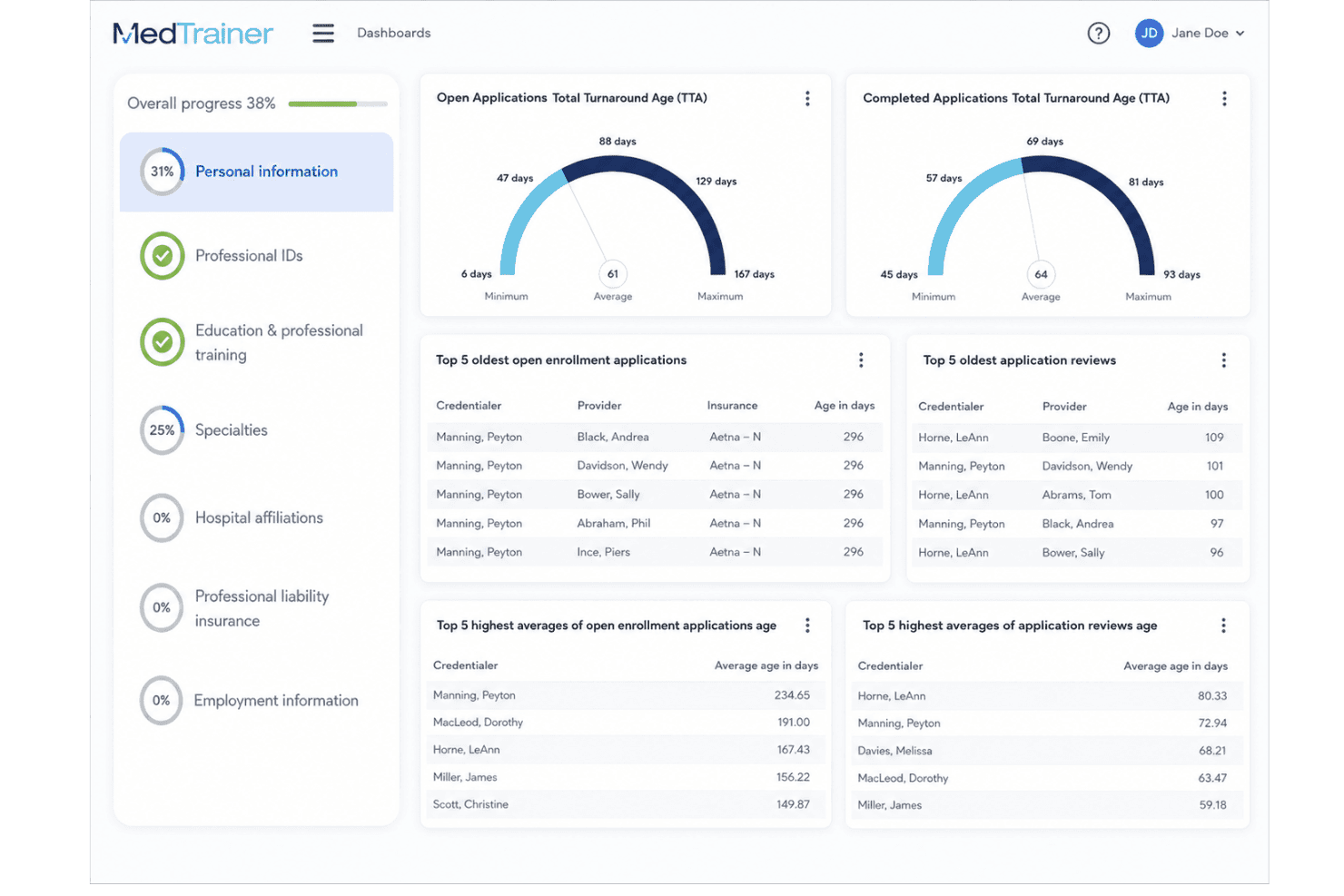
MedTrainer centralizes staff training, credentialing, policies, and compliance. MedTrainer is a healthcare compliance platform that combines learning management, policy administration, credentialing workflows, and accreditation readiness tools in a single system built for clinical and administrative teams.
Who Is MedTrainer Best For?
It's a strong fit for compliance officers and administrators at ambulatory care centers, physician practices, and multi-site healthcare organizations managing accreditation readiness.
Why I Picked MedTrainer
I picked MedTrainer as one of the best because its accreditation-ready credentialing workflows are genuinely difficult to replicate in a single platform. Provider DEA validations, state license tracking, and OIG/SAM exclusions monitoring all run automatically. When surveyors arrive, my team is able to pull customizable compliance reports on demand, with every policy attestation and credential already organized for review.
MedTrainer Key Features
- Centralized policy management: Store, distribute, and track acknowledgments for policies from a single platform.
- Automated exclusion monitoring: Continuously check OIG, SAM, and state databases for excluded providers.
- Accreditation-focused eLearning library: Access over 1,200 healthcare compliance courses and 3,000+ policy templates.
- AI-driven policy review tools: Use AI Policy Guardian to flag outdated documents and suggest updates in real time.
MedTrainer Integrations
Native integrations are not clearly documented. An API is available for custom integrations.
Pros and Cons
Pros:
- Accreditation readiness documentation is pre-organized
- Automated exclusion checks across OIG and SAM
- Combines credentialing, compliance, and LMS in one
Cons:
- No clearly documented quality measure tracking for MIPS or HEDIS
- Reporting customization is limited compared to competitors
Learn more about MedTrainer: Best for data-driven quality improvement
- Free demo available
- Pricing upon request
Visit WebsiteCustomer Rating:5/5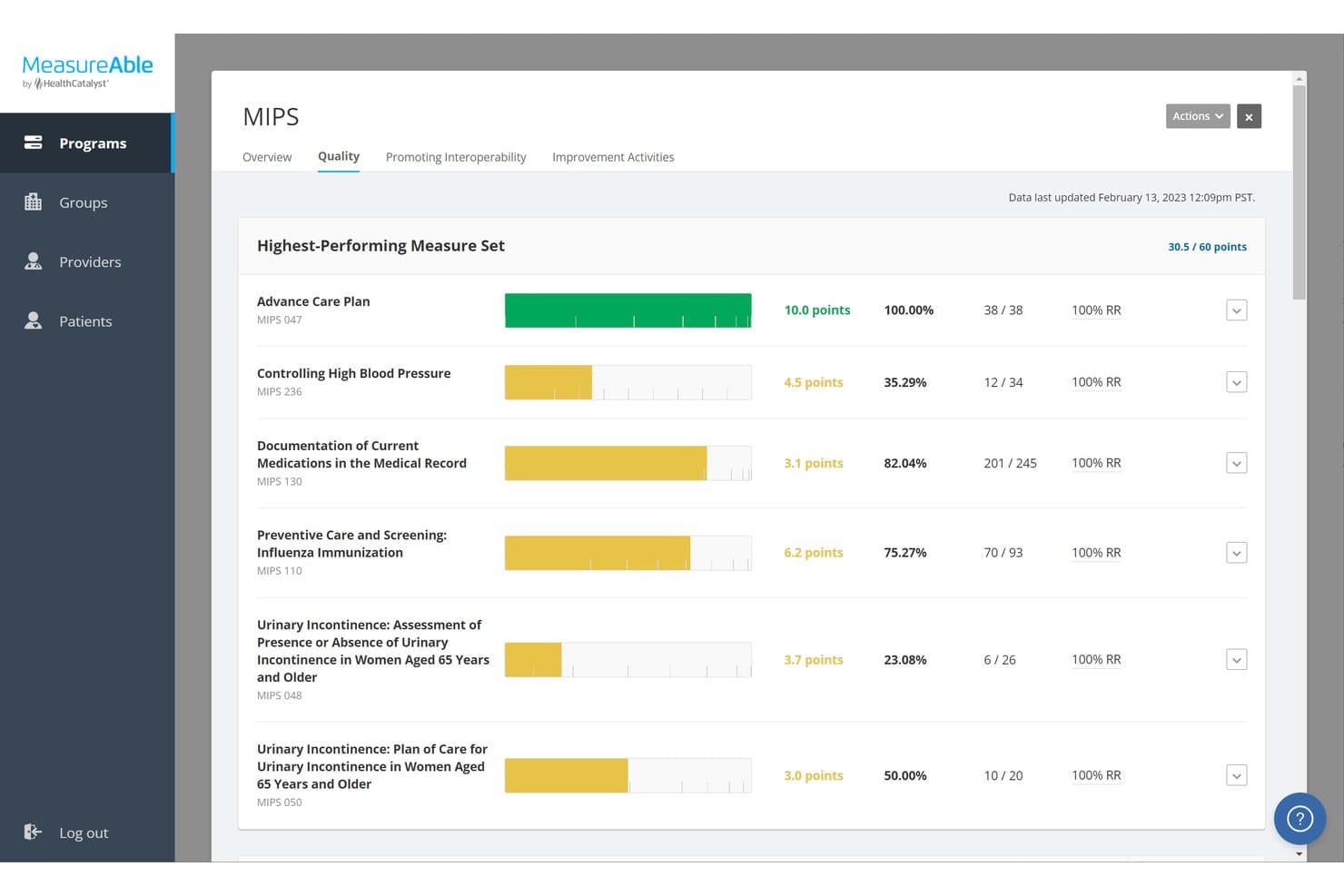
Health Catalyst offers a MIPS Quality dashboard in MeasureAble that tracks highest-performing measure sets with points, performance rates, and reporting ratios. Health Catalyst is a healthcare data analytics platform that unifies clinical, financial, and operational data to support quality measure tracking, performance benchmarking, and AI-guided improvement across health systems.
Who Is Health Catalyst Best For?
Health Catalyst is best suited to quality directors and clinical leaders at large health systems managing performance across multiple departments or care sites.
Why I Picked Health Catalyst
I picked Health Catalyst because its Ignite platform does something most quality tools don't: it pulls clinical, financial, and operational data into a single analytics layer and refreshes it on a 24-hour cadence. That means I can spot care gaps and performance drifts in near real-time. The AI-assisted benchmarking also surfaces the highest-impact improvement opportunities, so my team isn't guessing where to focus quality initiatives.
Health Catalyst Key Features
- Self-service analytics tools: Users can explore quality data and build custom views without relying on IT.
- Role-based dashboards: Customizable dashboards display relevant performance indicators for different clinical and administrative stakeholders.
- Automated benchmarking: Built-in comparisons help teams see how their metrics stack up against peers and national standards.
- Data integration across sources: Aggregates information from EHRs, claims, registries, and operations for unified analytics.
Health Catalyst Integrations
Health Catalyst offers native integrations with electronic health records like Epic and Cerner, and supports connecting to claims, registry, and operational data sources. An API is available for custom integrations.
Pros and Cons
Pros:
- Tracks MIPS, HEDIS, and CMS measures natively
- AI-driven benchmarking against national quality measures
- Real-time analytics across clinical and operational data
Cons:
- Not suited for smaller single-practice settings
- Complex implementation requiring dedicated clinical informatics support
Learn more about Health Catalyst: Best for patient safety and experience
- Free demo available
- Pricing upon request
Visit WebsiteCustomer Rating:4/5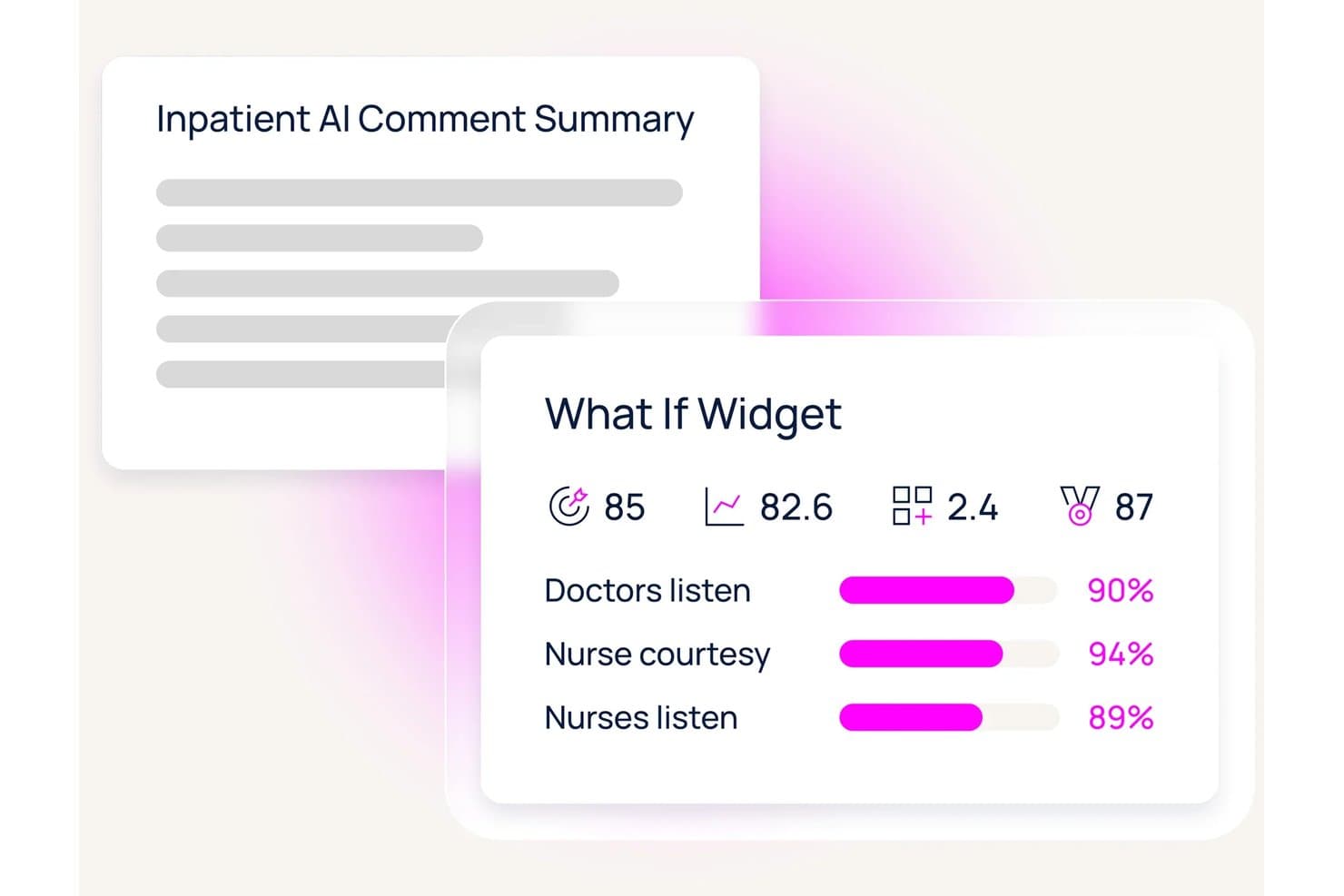
Press Ganey offers an inpatient AI comment summary and a 'What If Widget' dashboard displaying key patient experience metrics including doctor and nurse performance scores. Press Ganey is a healthcare safety and quality platform that combines safety event reporting, root cause analysis tools, NDNQI nursing quality benchmarking, and AI-powered analytics across patient, workforce, and clinical data.
Who Is Press Ganey Best For?
Press Ganey is a strong fit for enterprise hospitals, integrated health systems, and large medical group practices with dedicated safety and quality teams.
Why I Picked Press Ganey
I picked Press Ganey as one of the best because its High Reliability Platform (HRP) is built around HPI methodology, moving reported events through structured triage, root cause analysis, and system-level review. I also like the SMART Reporter App, embedded directly in Epic patient charts, so frontline staff can flag safety events without leaving their workflow. The AHRQ-listed Patient Safety Organization (PSO) adds a legally protected channel for cross-system benchmarking.
Press Ganey Key Features
- Patient Safety Organization (PSO) integration: Submit patient safety event data directly to an AHRQ-listed PSO for industry benchmarking.
- NDNQI nursing quality benchmarking: Track nursing-sensitive indicators and compare performance against the national NDNQI database.
- AI-powered quality dashboards: Visualize real-time safety trends, benchmarks, and KPIs for different roles and leadership levels.
- Role-based reporting tools: Deliver tailored views and drill-down analytics for executives, unit managers, and frontline staff.
Press Ganey Integrations
Press Ganey offers native integrations with Epic, Cerner, Meditech, and Athenahealth for direct data exchange, and provides an API for custom integrations.
Pros and Cons
Pros:
- AI-driven risk detection across patient safety events
- NDNQI benchmarking against national nursing standards
- PSO legal protections for safety event data
Cons:
- Reporting configuration requires significant vendor support
- Implementation is complex for smaller practices
Learn more about Press Ganey: Best for healthcare risk and safety workflows
- Free demo available
- Pricing upon request
Visit WebsiteCustomer Rating:4.5/5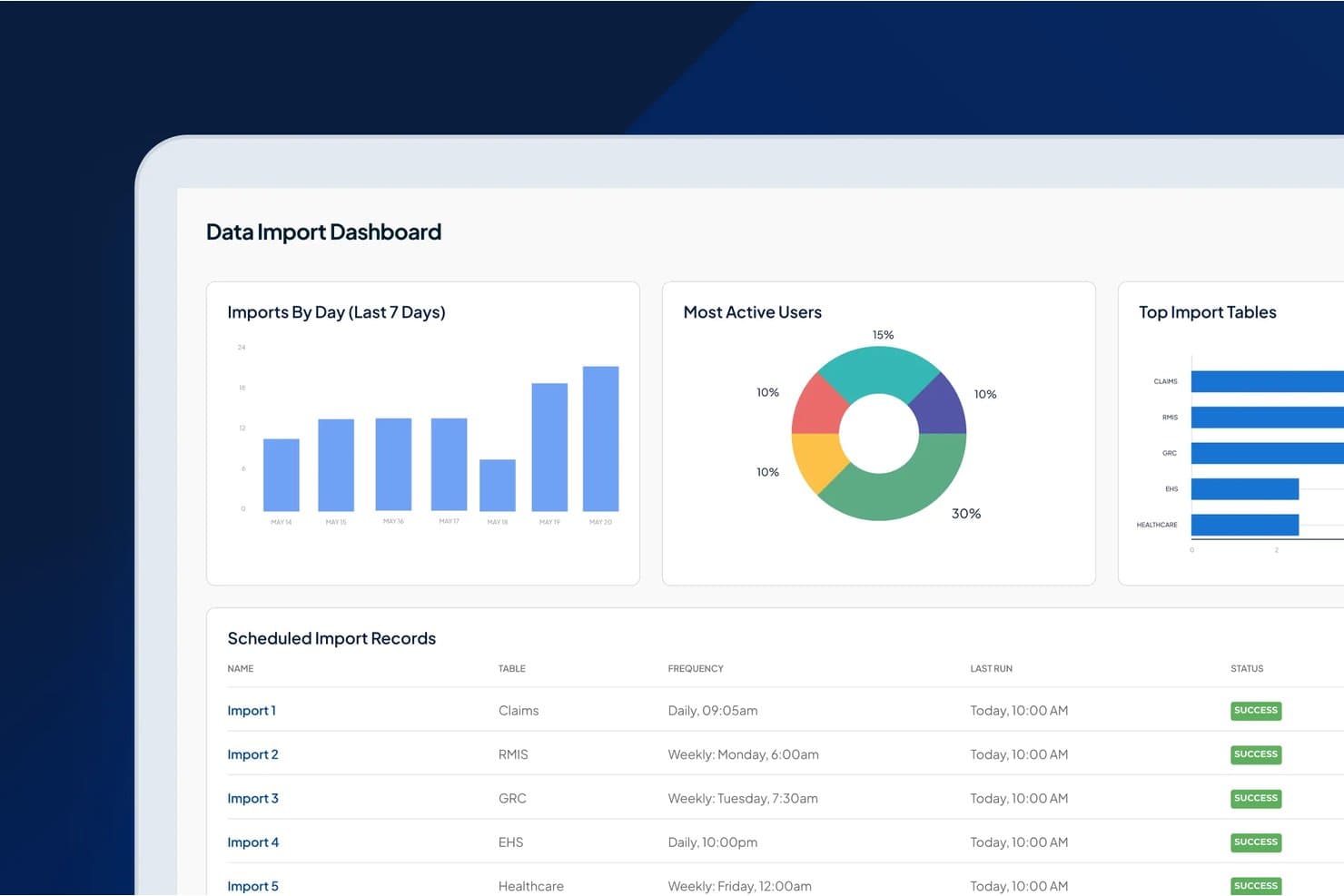
Origami Risk offers a Data Import Dashboard with scheduled import records, daily/weekly frequency tracking, and success status indicators across healthcare-related tables like Claims, RMIS, GRC, EHS, and Healthcare. Origami Risk is a cloud-native risk and safety management platform that unifies patient safety event reporting, peer review, provider performance tracking, and employee health workflows for healthcare organizations.
Who Is Origami Risk Best For?
It's a strong fit for quality and risk teams at hospitals and large health systems managing complex patient safety, provider performance, and regulatory workflows.
Why I Picked Origami Risk
I've included Origami Risk in my top picks because its risk and safety workflows are genuinely built for healthcare. I particularly like the anonymous incident reporting with automated triage and PSO reporting pathways, which helps surface events that might otherwise go unreported. The peer review module handles FPPE/OPPE processes and Joint Commission-mandated reviews in one structured, trackable workflow.
Origami Risk Key Features
- Role-based access controls: Assign permissions and workflows tailored to different clinical, quality, and administrative roles.
- Configurable audit templates: Build custom audit checklists for regulatory and accreditation readiness across multiple departments.
- Mobile data capture: Log incidents and safety observations from smartphones or tablets wherever care is delivered.
- Multi-source data integration: Consolidate information from EHRs, HR systems, and third-party applications into one reporting and analytics suite.
Origami Risk Integrations
Origami Risk offers native integrations with Epic, Cerner, Meditech, and Athenahealth. An API is available for custom integrations.
Pros and Cons
Pros:
- Pre-loaded Joint Commission and DNV standards
- Peer review tracks FPPE and OPPE
- PSO-protected incident reporting built in
Cons:
- Configuration complexity slows initial deployment
- Implementation requires significant IT involvement
Learn more about Origami Risk: Best for patient safety and incident management
- Free demo available
- Pricing upon request
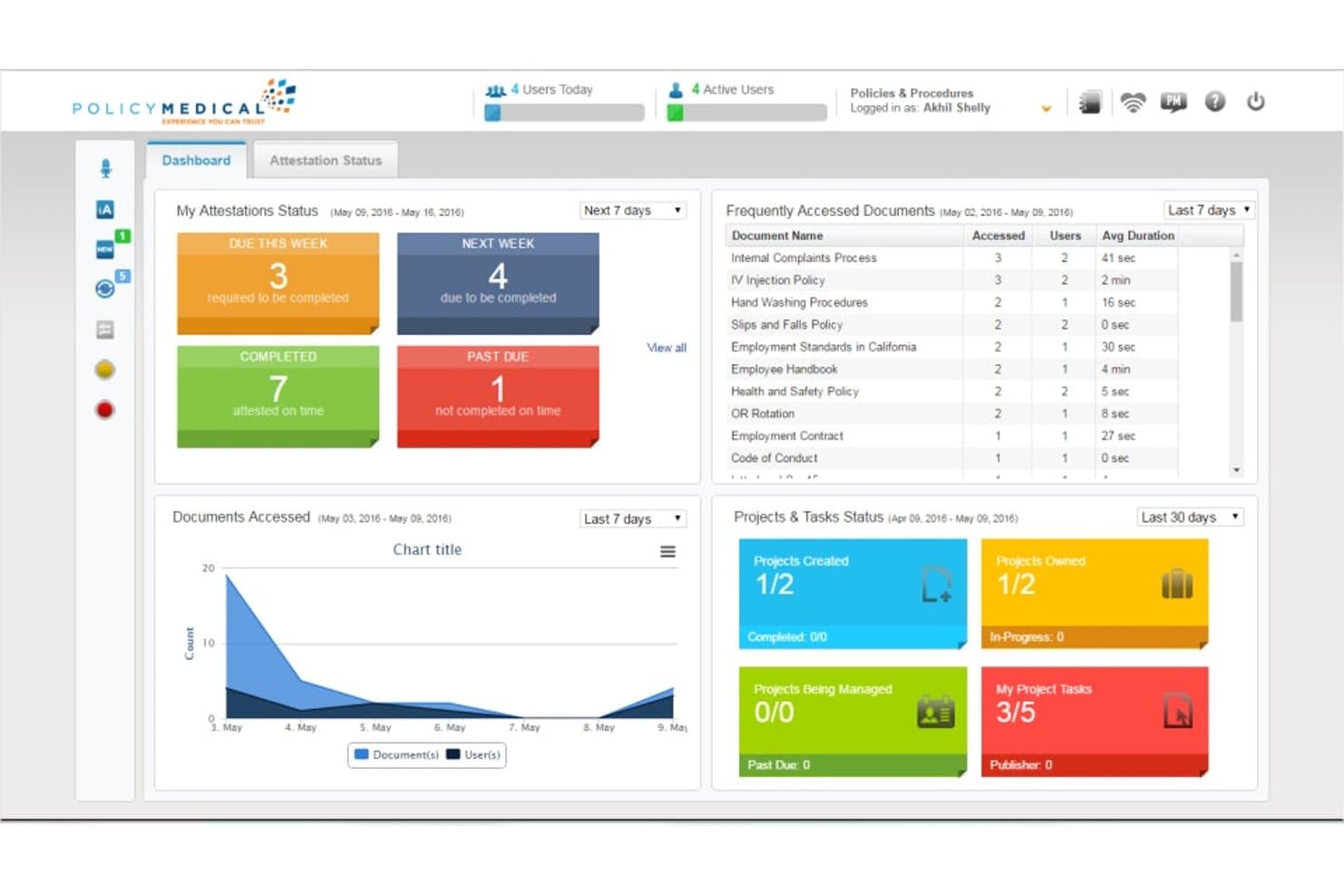
RLDatix offers a dashboard view displaying attestation status, frequently accessed policy documents, documents accessed over time, and project and task status for healthcare compliance management. RLDatix is a healthcare governance, risk, and compliance platform that connects event reporting, root cause analysis, risk registers, claims management, and audit workflows within a single patient-safety-focused system.
Who Is RLDatix Best For?
RLDatix is a strong fit for enterprise hospitals, health systems, and integrated delivery networks with dedicated quality and patient safety teams.
Why I Picked RLDatix
RLDatix earns its spot on my shortlist because of how seriously it treats incident reporting at the workflow level. The Event Reporting module automatically routes alerts to the right teams the moment a safety event is logged, so response starts before harm compounds. I also like that every report feeds directly into root cause analysis and trend detection, giving quality teams a clear picture of where systemic issues are forming.
RLDatix Key Features
- Audit scheduling and tracking: Plan and monitor internal and external audits, linking findings to improvement actions.
- Multi-framework compliance management: Manage regulatory standards like HIPAA, Joint Commission, and CMS in a unified platform.
- Policy management with digital attestations: Centralize policy documents and capture staff signatures or acknowledgments digitally.
- Customizable BI dashboards: Build tailored visualizations to track quality KPIs, benchmarks, and trends across your organization.
RLDatix Integrations
Native integrations are not clearly documented. RLDatix provides an API for custom integrations.
Pros and Cons
Pros:
- Pre-loaded accreditation standards for Joint Commission
- Built-in RCA tools for safety events
- Anonymous incident reporting across mobile devices
Cons:
- Report customization can be time-consuming
- Configuration requires significant IT implementation support
Learn more about RLDatix: Best for quality and compliance oversight
- Free demo available
- Pricing upon request
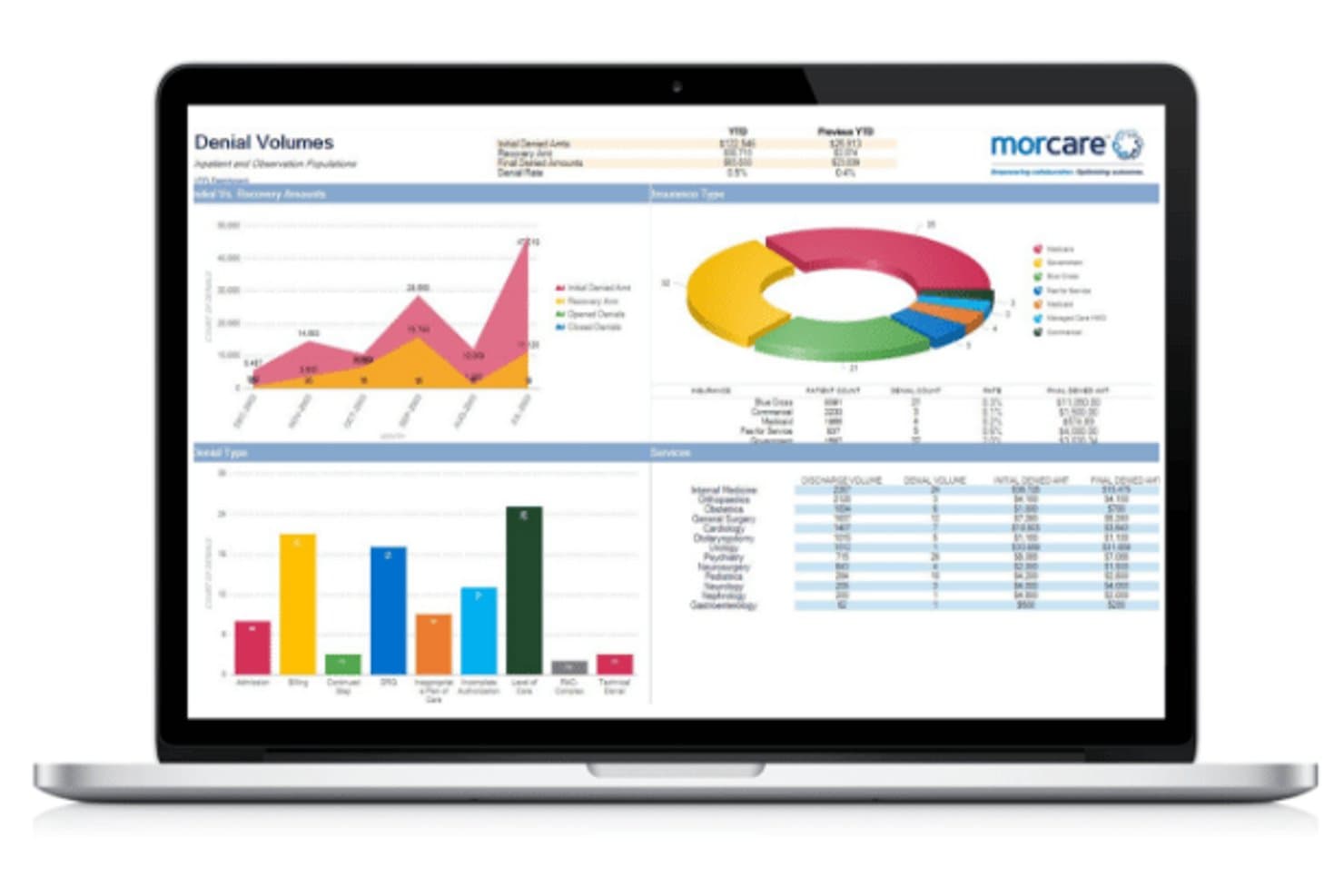
Morcare offers a Denial Volumes dashboard displaying healthcare denial trends, insurance type breakdowns, payer comparisons, and service-level data in a multi-chart analytics view. MorCare is a healthcare quality and risk management platform built for hospitals and health systems, covering quality measure tracking, incident and event reporting, peer case review, and care management workflows.
Who Is Morcare Best For?
Morcare is a strong fit for quality and compliance teams at hospitals and health systems, from large regional networks down to small rural and critical access hospitals.
Why I Picked Morcare
I picked Morcare as one of the best because its quality and compliance tools are built around how hospital review workflows actually run. I like that the system auto-schedules reviews for readmissions, mortalities, and surgical complications based on configurable rules my team sets. The peer case review module auto-generates meeting agendas and worksheets, which keeps committee review cycles on track without manual coordination overhead.
Morcare Key Features
- Quality data collection tool: Staff can quickly document quality indicators from anywhere in the organization.
- User-configured rules engine: Teams set custom criteria to automatically trigger reviews and schedule audits.
- Integrated incident management: Capture, track, and manage incidents with structured intake and automated notifications.
- Data analytics dashboards: Access interactive dashboards for KPIs, standard, and ad-hoc reporting across quality and safety domains.
Morcare Integrations
Native integrations are not clearly documented. An API is available for custom integrations.
Pros and Cons
Pros:
- Configurable rules engine triggers reviews automatically
- Peer case review with auto-generated committee agendas
- Covers quality, safety, and care management together
Cons:
- Niche vendor with a smaller user community than larger platforms
- Limited publicly documented third-party integrations
Learn more about Morcare: Best for enterprise healthcare risk management
- Free demo available
- Pricing upon request
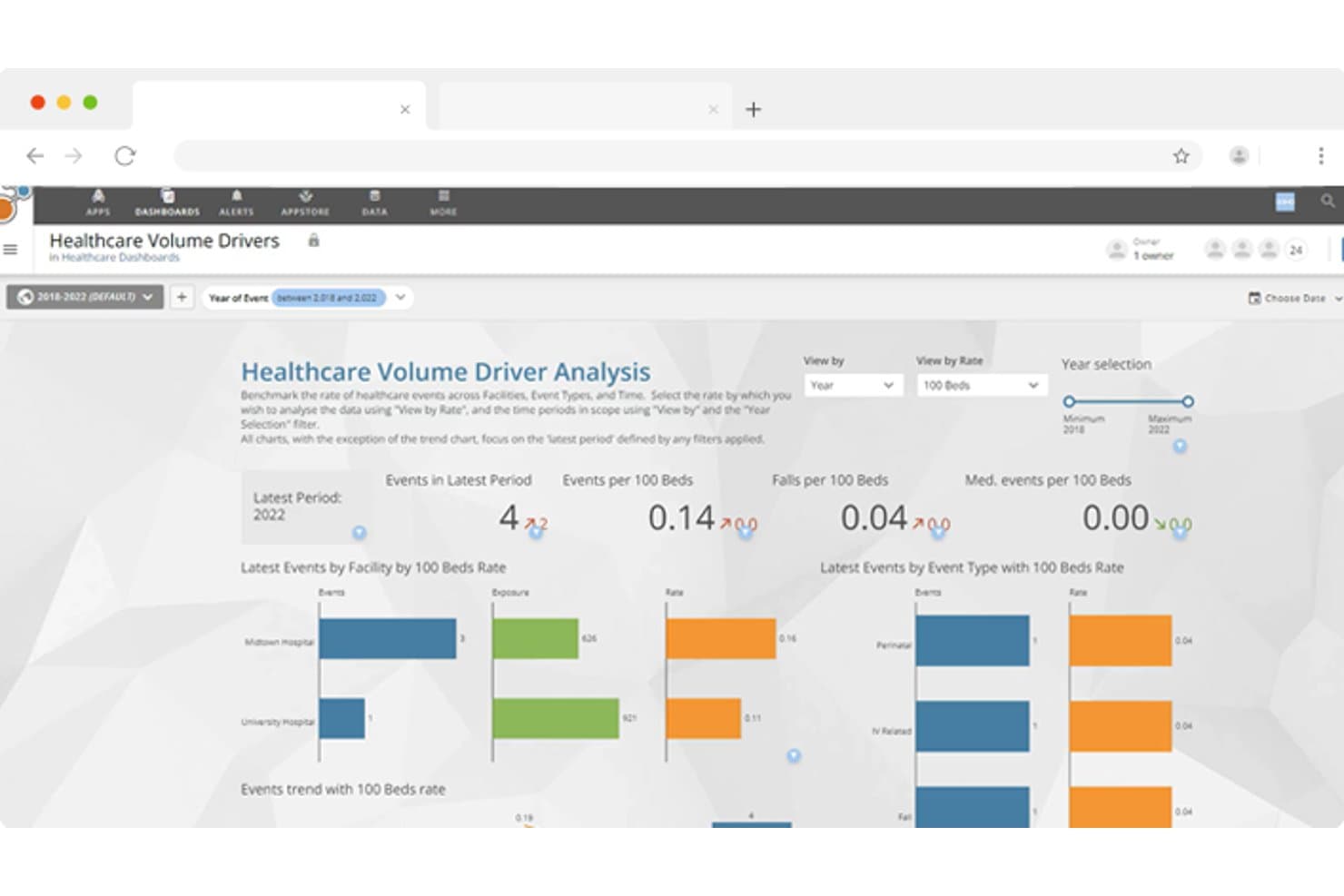
Riskonnect Healthcare offers a Healthcare Volume Driver Analysis dashboard that benchmarks event rates across facilities and event types with interactive filters and visual charts. Riskonnect Healthcare is an enterprise risk and patient safety platform that combines incident reporting, provider quality management, compliance tracking, and CAPA workflows in a single connected system.
Who Is Riskonnect Healthcare Best For?
It's a strong fit for large health systems and hospital networks that need a unified platform across risk, patient safety, and compliance teams.
Why I Picked Riskonnect Healthcare
Riskonnect Healthcare earns its spot on my shortlist because no other platform connects patient safety event reporting to corrective action workflows as tightly at enterprise scale. I particularly like the CANDOR integration, which lets my team initiate a full communication and resolution workflow directly from a patient event record. The AI-powered Event Severity Prediction forecasts incident severity at intake, making triage faster and more consistent across multi-site organizations.
Riskonnect Healthcare Key Features
- Provider quality management: Track and manage peer review, OPPE/FPPE, and privileging workflows for clinicians.
- Customizable risk analytics dashboards: Design dashboards with configurable widgets to monitor quality KPIs and compliance trends.
- Compliance and policy management: Centralize healthcare policies, procedures, and regulatory requirements with audit-ready records.
- Third-party risk management: Manage vendor agreements, contracts, and coverage credentials within a single system.
Riskonnect Healthcare Integrations
Riskonnect Healthcare offers native integrations with major EHRs such as Epic, Cerner, Meditech, and Athenahealth, and provides an API for custom integrations.
Pros and Cons
Pros:
- Built-in peer review and OPPE/FPPE tools
- AI-driven incident severity prediction at intake
- Strong enterprise-scale patient safety event workflows
Cons:
- Reporting customization requires significant admin effort
- Complex configuration for smaller healthcare organizations
Learn more about Riskonnect Healthcare: Best for hospital quality improvement
- Free demo available
- Pricing upon request
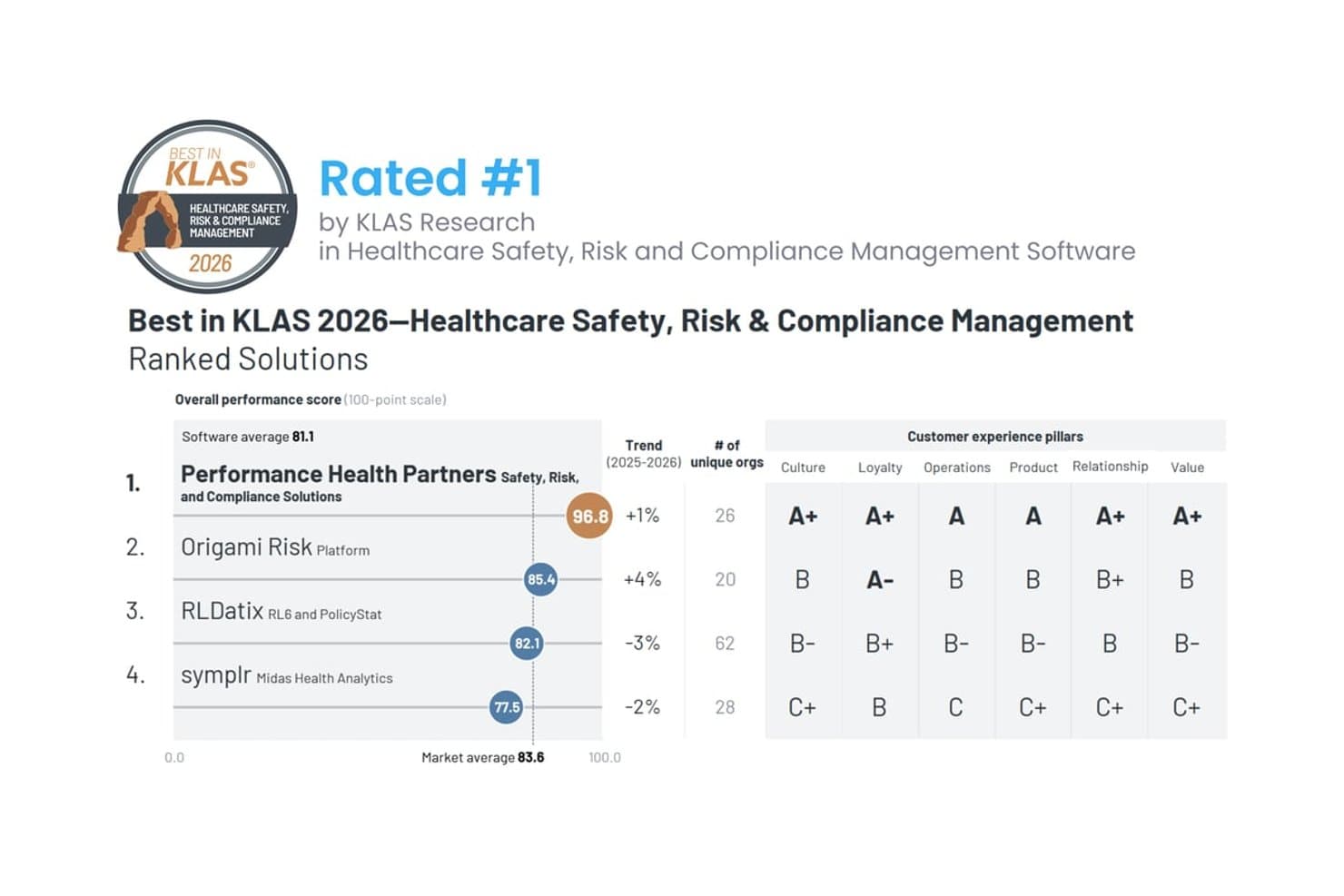
Performance Health Partners has been rated #1 by KLAS Research in Healthcare Safety, Risk and Compliance Management Software for 2026, achieving a top overall performance score of 96.8 out of 100. Performance Health Partners is a healthcare safety, risk, and compliance platform built for hospitals and clinical settings, offering incident reporting, digital rounding, compliance audits, CAPA management, and real-time quality dashboards.
Who Is Performance Health Partners Best For?
It's a strong fit for quality and safety teams in hospitals, health systems, senior care, and behavioral health organizations.
Why I Picked Performance Health Partners
Performance Health Partners earns its spot on my shortlist because of how tightly its rounding and incident reporting tools connect to quality improvement workflows. I particularly like the digital rounding module, which lets teams build branching-logic templates and automatically assigns follow-up based on role or unit. Pairing that with built-in root cause analysis on incident reports means quality issues get investigated and acted on, not just logged.
Performance Health Partners Key Features
- Compliance and audit module: Manage chart audits, peer reviews, and risk assessments with real-time dashboards and customizable reports.
- Mobile-friendly incident intake: Capture safety events and complaints from any device, ensuring rapid submission and data completeness.
- Role-based dashboards: Visualize organization-wide quality trends with filtering and drill-down analytics based on individual roles.
- SMART on FHIR integration: Connect seamlessly to Oracle Cerner PowerChart with patient context to auto-populate incident reports.
Performance Health Partners Integrations
Performance Health Partners offers native integration with Oracle Cerner PowerChart using SMART on FHIR for direct incident reporting with patient context. An API is available for custom integrations.
Pros and Cons
Pros:
- Peer review and OPPE/FPPE workflow support
- Configurable digital rounding with branching logic
- Built-in RCA tools for safety events
Cons:
- Implementation requires significant configuration upfront
- Limited EHR connectivity beyond Oracle Cerner
Learn more about Performance Health Partners:
Other Healthcare Quality Management Software
Here are some additional healthcare quality management software options that didn’t make it onto my shortlist, but are still worth checking out:
- 11InovalonBest for healthcare quality analytics
- 12MedisolvBest for clinical quality reporting
- 13IdeagenBest for enterprise quality and compliance
- 14Pascal MetricsBest for patient safety analytics
- 15QualityzeBest for healthcare quality management systems
Related Reviews
How I Evaluate Healthcare Quality Management Software
I split my evaluation between the baseline functionality every tool must cover—think incident reporting, CAPA management, and measure tracking—and the differentiators that push one platform ahead.
Core Functionality (Table Stakes for This List)
When I'm selecting tools for my list, I rank each one on a scale from 0 (does not offer the functionality) to 5 (excels in this area) for each core functionality listed below. I then calculate the tool's total score into a percentage, using 65% as a benchmark to help assess its overall fit for the list.
- Quality Measure Tracking: I check whether a platform tracks regulated measure sets like MIPS, HEDIS, and CMS core measures with automated scoring and submission-ready reports.
- Incident & Event Reporting: Structured intake matters here—I evaluate how each tool handles adverse events, near-misses, and patient complaints through triage workflows and root cause analysis.
- CAPA Management: I look for full lifecycle tracking of corrective and preventive actions, including the ability to link CAPAs back to specific incidents and verify effectiveness.
- Regulatory Compliance Management: Multi-framework coverage is what I'm after, spanning HIPAA, Joint Commission, and CMS standards with audit trails and evidence documentation built in.
- Audit & Inspection Management: Each tool should support schedulable audits, configurable checklists, and findings tracking that ties directly into accreditation readiness reporting.
- Quality Dashboards & Analytics: I evaluate whether dashboards offer real-time drill-downs into quality KPIs, trend analysis, and benchmarking rather than just static exports.
Once I have a list of tools that meet the criteria, I consider what sets each platform apart.
Differentiating Factors (What Sets Vendors Apart)
Here's how I compare and contrast different vendors:
Standout Features
Accreditation readiness tools save real prep time—I look for pre-loaded standards libraries with gap analysis and mock survey features so your team isn't scrambling before a Joint Commission or NCQA visit. Predictive risk scoring is another differentiator, since AI-driven flags for readmission or adverse event risk let you act before problems escalate. Built-in peer review workflows with OPPE/FPPE tools that maintain confidentiality make clinician evaluations far less cumbersome than managing them outside the platform.
Beyond Features
EHR interoperability is a big one—I check whether a platform supports bi-directional connections via HL7 or FHIR with systems like Epic, Cerner, or Athenahealth, since manual data abstraction kills productivity. HIPAA compliance and data security also weigh heavily; I look for HITRUST certification, SOC 2 Type II attestation, and BAA availability. Implementation support matters too, especially dedicated clinical informatics consultants who understand CMS reporting deadlines and accreditation survey prep.
How to Choose a Healthcare Quality Management Software
What does it take to pick healthcare quality management software that actually fits your clinic’s regulatory needs, day-to-day realities, and team workflows?
| If your priority is... | Look for... |
| Tracking clinical quality measures | Native MIPS, HEDIS, and CMS measure libraries with auto-calculation |
| Accreditation and survey readiness | Preloaded standards libraries and real-time mock survey tools |
| Fast, structured event capture | Mobile-friendly incident forms with anonymous reporting |
| Linking actions to root causes | Full CAPA lifecycle tied to incident logs and analysis |
| EHR integration and automation | Bi-directional HL7 or FHIR data pulls from your main EHR system |
How to Vet Your Shortlist
- Request recent audit readiness documentation: Ask for a mock survey tool demo or proof of Joint Commission readiness.
- Test clinical measure reporting: Run a real MIPS or HEDIS report using your data—or a vendor sandbox—within the trial period.
- Submit an anonymous safety event: File a patient safety incident from a mobile device to evaluate true intake and workflow speed.
- Ask for integration mapping documentation: Get an HL7 or FHIR interface map showing exactly what data syncs with your EHR.
- Decide based on flexibility vs. out-of-the-box standards: Balance configurability for custom workflows against instant compliance with major frameworks.
What Is Healthcare Quality Management Software?
Healthcare quality management software is a specialized platform that helps clinics and health organizations monitor patient safety, manage incidents, track regulatory compliance, and report on clinical quality measures. You can use these software tools to organize corrective actions, automate audit activities, and view dashboards that highlight trends and key quality benchmarks across your practice. This supports consistent, evidence-based care and helps maintain accreditation standards.
Features of Healthcare Quality Management Software
When selecting healthcare quality management software, keep an eye out for the following key features:
- Quality measure tracking: Monitors and reports on clinical performance indicators like MIPS, HEDIS, and CMS core measures to support regulatory and payer requirements.
- Incident and event reporting: Captures adverse events, near-misses, and patient complaints with structured intake forms, triage, and notification workflows.
- Corrective and preventive action management: Assigns, tracks, and verifies CAPA plans linked to specific quality issues, supporting continuous improvement and accountability.
- Regulatory compliance management: Organizes and documents adherence to healthcare regulations, accreditation frameworks, and standards with policy management and audit trails.
- Audit and inspection management: Schedules internal and external audits, executes checklist-based inspections, and tracks findings for survey readiness.
- Role-based dashboards and analytics: Offers real-time visualizations and reporting on quality KPIs, benchmark data, and trends for leaders and staff.
- Peer review and credentialing workflows: Streamlines clinician performance reviews and credentialing processes within the system, supporting OPPE/FPPE and quality assurance.
- Patient safety event tracking: Allows confidential or anonymous reporting on safety concerns and tracks follow-up efforts to address risks.
- Integration with EHRs and clinical systems: Syncs with major electronic health records and other healthcare platforms to automate data collection and reduce manual entry.
- Document and evidence repository: Stores policies, procedures, training materials, and accreditation evidence in a secure, searchable hub for audit readiness.
Common Healthcare Quality Management Software AI Features
Beyond the standard healthcare quality management software features listed above, many of these solutions are incorporating AI with features like:
- Predictive risk scoring: Uses AI algorithms to analyze patient and process data, flagging individuals or workflows at higher risk for adverse events, readmissions, or infections before issues arise.
- Automated root cause analysis: Applies machine learning to incident reports and event data, identifying patterns and suggesting likely root causes to speed up investigations and corrective actions.
- Anomaly detection in quality metrics: Continuously monitors quality data streams to spot unusual trends or outliers, alerting teams to potential compliance gaps or emerging safety concerns.
- Natural language processing for documentation audits: Leverages AI to review clinical notes and free-text entries, surfacing documentation errors, missing elements, or compliance risks automatically.
- AI-driven benchmarking: Compares your organization’s quality performance against anonymized industry data, highlighting areas for improvement and surfacing best practices based on real-world outcomes.
Benefits of Healthcare Quality Management Software
Implementing healthcare quality management software provides several benefits for your team and your business. Here are a few you can look forward to:
- Improved regulatory compliance: Automated tracking and documentation features help your organization stay aligned with healthcare standards and accreditation bodies.
- Faster incident response: Real-time incident reporting and CAPA workflows let teams act quickly to resolve safety concerns and adverse events.
- Better clinical outcomes: Quality measure tracking and predictive analytics support evidence-based improvements in patient care and clinical processes.
- Increased survey readiness: Audit scheduling, standards libraries, and evidence repositories ensure your practice is always prepared for accreditation visits.
- Unified data for leaders: Dashboards provide an at-a-glance view of KPIs and trends, helping decision-makers prioritize meaningful improvements.
- Streamlined clinician evaluations: Built-in peer review and performance tracking tools reduce the administrative burden of OPPE/FPPE and credentialing.
- Reduced manual labor: Integrations with EHRs and automated data pulls eliminate duplicate entries and simplify quality reporting across the board.
Costs and Pricing of Healthcare Quality Management Software
Selecting healthcare quality management software requires an understanding of the various pricing models and plans available. Costs vary based on features, team size, add-ons, and more. The table below summarizes common plans, their average prices, and typical features included in healthcare quality management software solutions:
Plan Comparison Table for Healthcare Quality Management Software
| Plan Type | Average Price | Common Features |
| Free Plan | $0 | Offers basic incident reporting, limited user access, simple dashboards, and email notifications. |
| Personal Plan | $30–$75/month | Adds individual quality tracking, basic regulatory templates, limited CAPA management, and simple analytics. |
| Business Plan | $100–$300/month | Includes multi-user support, standard compliance tools, advanced reporting, and integration with EHRs and audits. |
| Enterprise Plan | $500–$2000/month | Delivers role-based access, full regulatory frameworks, predictive risk scoring, system-wide analytics, dedicated support, and custom integrations. |
Healthcare Quality Management Software FAQs
Here are some answers to common questions about healthcare quality management software:
How does healthcare quality management software support accreditation and compliance?
Healthcare quality management software organizes regulatory standards, tracks audit readiness, and provides automated reminders and evidence repositories so you can respond quickly to surveyor requests and accreditation changes.
Can healthcare quality management software integrate with our EHR and other systems?
Yes, most platforms offer integrations using HL7, FHIR, or APIs, letting you exchange clinical data, automate quality reporting, and reduce duplicated manual entry across your EHR and practice management systems.
What should we consider for data security and HIPAA compliance?
You should confirm the vendor offers HITRUST or SOC 2 Type II certification, provides business associate agreements, uses end-to-end encryption, and supports audit trails and role-based access to patient health information.
Does healthcare quality management software offer tools for event reporting and analysis?
Yes, many systems include anonymous incident intake forms, automated triage, root cause analysis tools, and CAPA tracking to help manage safety concerns from initial reporting through resolution.
How do most solutions handle multiple facilities or large health systems?
Many platforms are built for scalability, supporting multi-site setups, configurable workflows for different care settings, and roll-up dashboard reporting so leaders get a full system-wide view.