

I understand the challenges that come with managing a busy healthcare practice. One of the biggest pain points? Making sure your staff has the latest knowledge they need to deliver exceptional care, all while staying compliant with ever-changing regulations. That's where a robust Learning Management System (LMS) for healthcare comes in - it's a cloud-based platform that delivers eLearning, tracks training progress, and ensures you're always in step with the latest practices.
An LMS software doesn't just equip your team with the knowledge they need, it's also a powerful tool to enhance patient care. So, why wait? It's time to explore these LMS and embrace the future of healthcare education.
Why Trust Our Software Recommendations
6,700+
Reviews
20
Industry experts
16+
Evaluation factors
14
Years
Our team has been testing and reviewing software since 2012. As medical practice leaders ourselves, we know how difficult—and important—it is to choose the right software.
For this guide, we evaluated tools using hands-on testing and independent research, scoring tools using our selection criteria.
Our reviews reflect our human editorial judgment, not a sales pitch.
Comparison Table: Healthcare LMS Platforms
This comparison table summarizes pricing details for my top healthcare LMS selections.
| Tool | Best For | Trial Info | Price | ||
|---|---|---|---|---|---|
| 1 | Best for training certifications | 14-day free trial | Pricing upon request | Website | |
| 2 | Best for AI-assisted content creation | Free demo available | Pricing upon request | Website | |
| 3 | Best for role-based healthcare training | Free plan + free demo available | From $119/month (billed annually) | Website | |
| 4 | Best for managing clinical competencies at scale | Free trial available | From $6.91/user/month (billed annually) | Website | |
| 5 | Best for automated onboarding and course assignments | Free demo available | Pricing upon request | Website | |
| 6 | Best with broad third-party content integrations | Free demo available | From $6,000/year | Website | |
| 7 | Best for intuitive, self-paced learning in healthcare | Free demo available | Pricing upon request | Website | |
| 8 | Best for fast deployment and scaling healthcare training | Free demo available | Pricing upon request | Website | |
| 9 | Best for interactive and engaging online medical courses | Free demo available | Pricing upon request | Website | |
| 10 | Best for AI-powered personalized learning experiences | Free demo available | Pricing upon request | Website |


Best Healthcare LMS Platforms Reviews
Below are my detailed summaries of the best healthcare LMS that made it onto my shortlist. My reviews offer a detailed look at the key features, pros & cons, integrations, and ideal use cases of each tool to help you find the best one for you.
 Best for training certifications
- 14-day free trial
- Pricing upon request
Visit WebsiteCustomer Rating:4.7/5
SkyPrep’s Management Overview dashboard highlights training progress, pending tasks, and key admin shortcuts. SkyPrep is a learning management system designed for businesses and organizations seeking to efficiently deliver training and educational content. It allows users to create, manage, and track online courses, assessments, and learning paths tailored to their specific needs.
Why I Picked SkyPrep: It supports certification training by allowing you to award certificates with e-signatures upon course completion, ensuring your team meets the necessary qualifications. Additionally, SkyPrep facilitates HIPAA and policy compliance training, helping your organization adhere to essential regulations through detailed reporting.
Standout Features & Integrations:
Other features include mobile accessibility, allowing your team to access training materials anytime, anywhere, which is vital for healthcare professionals who may work irregular hours. The platform also offers compliance reporting, providing real-time tracking of user progress to ensure all training requirements are met.
Integrations include ADP, Workday, SAP SuccessFactors, BambooHR, UKG Ready, UKG Pro, Oracle HCM, Paycom, HubSpot, Salesforce, Zoom, and Microsoft Teams.
Pros and Cons
Pros:
- Provides useful insights and reporting features
- Accommodates various content types and learning paths
- Effective course creation tools
Cons:
- Mobile app lacks certain functionalities
- Initial setup can be complex
Learn more about SkyPrep: Best for AI-assisted content creation
- Free demo available
- Pricing upon request

Use AI to instantly generate course modules and interactive activities with EducateMe. EducateMe LMS is designed to meet the unique needs of healthcare organizations by providing a centralized platform for training and development. It appeals to healthcare administrators and training managers seeking a solution that enhances employee training, onboarding, and compliance processes. With its AI-driven content creation tools and performance analytics, EducateMe LMS addresses the challenges of maintaining regulatory compliance and improving learner engagement, making it a valuable asset for healthcare teams.
Why I Picked EducateMe LMS
I picked EducateMe LMS because of its powerful AI-driven approach to content creation, which is a major time-saver for busy medical practices and healthtech teams. Unlike legacy systems that require manual input for every module, EducateMe uses AI to draft roleplay simulations and knowledge checks that reflect real-world clinical scenarios. As a result, it is an excellent choice for scaling healthcare organizations that need to push out high-quality training materials without a dedicated team of instructional designers.
EducateMe LMS Key Features
In addition to the AI-driven roleplay coach and performance analytics, I also found:
- Smart Cohort Management: Automates the process of grouping learners by department or hire date, ensuring the right practitioners receive the correct training paths automatically.
- White-Label Branding: This feature allows you to customize the platform to reflect your organization's branding, ensuring a consistent learning experience.
- Collaborative Learning Support: Facilitates teamwork and knowledge sharing among healthcare professionals, fostering a collaborative learning environment.
- SCORM File Support: This compatibility ensures that your existing e-learning content can be easily integrated into the platform, maximizing resource utilization.
EducateMe LMS Integrations
Integrations include Google Workspace, Slack, Zoom, Salesforce, Figma, Calendly, and various other tools through its API.
Pros and Cons
Pros:
- Regular updates maintain an innovative platform
- Offers centralized content creation
- Provides learner engagement insights
Cons:
- Lacks advanced gamification features
- Minimum user requirement for pricing
Learn more about EducateMe LMS: Best for role-based healthcare training
- Free plan + free demo available
- From $119/month (billed annually)
Visit WebsiteCustomer Rating:4.6/5
TalentLMS’ compliance course dashboard shows training content, learner progress, and AI-powered course creation tools in one view. You’re likely looking for a healthcare LMS that helps your clinical and non-clinical teams stay compliant, trained, and prepared for the demands of a regulated environment, and TalentLMS meets those needs with a setup that gets you delivering training quickly. Whether you’re onboarding new staff, standardizing patient-care procedures, or keeping up with mandatory certifications, it gives you a flexible way to build or upload content and guide learners through structured paths.
Why I Picked TalentLMS
I picked TalentLMS because its support for branches, user roles, and learning paths gives healthcare organizations a clear way to deliver department-specific and role-specific training without creating separate systems. You can upload your own policies, SOPs, and clinical training materials or use built-in tools like the AI course generator and assessments to create content tailored to your protocols. I also like that automations manage recurring compliance tasks—such as re-certification reminders or enrolment rules—so you don’t have to track them manually. And its reporting suite provides visibility into completion status across teams, which matters when audits and regulatory checks require proof of ongoing training.
TalentLMS Key Features
In addition to its strong user-assignment and compliance-focused controls, TalentLMS offers several features that support training needs common in healthcare environments:
- Skills-based learning: AI-driven skill mapping helps you identify competency gaps and connect staff to targeted training.
- Blended learning tools: Lets you combine online modules with in-person sessions for clinical check-offs or hands-on practice.
- Learning paths: Provides structured sequences so staff know exactly which courses to take for their role or certification track.
- Gamification: Uses points, badges, and leaderboards to help keep learners engaged in required training.
TalentLMS Integrations
TalentLMS offers native integrations with popular tools such as Zoom, Salesforce, Shopify, WordPress, BambooHR, GoToMeeting, LinkedIn Learning, Microsoft Teams, Slack, and Google Workspace. An API is also available for custom integrations, providing flexibility to tailor the platform to your organization's specific needs.
Pros and Cons
Pros:
- AI course tools help staff develop training from existing materials quickly.
- Automation rules reduce manual oversight of recurring certifications.
- Clear learning paths support structured clinical and nonclinical training.
Cons:
- Reporting customization may fall short for complex regulatory needs.
- Editor offers limited flexibility for highly specialized medical modules.
Learn more about TalentLMS: Best for managing clinical competencies at scale
- Free trial available
- From $6.91/user/month (billed annually)
Visit WebsiteCustomer Rating:4.6/5
iSpring LMS provides a centralized LMS to train healthcare workers on everything from compliance to new practices. iSpring LMS offers features designed to power the entire cycle of healthcare training. With iSpring LMS, healthcare organizations can onboard new hires, manage compliance training, and train staff on products and customer service processes. It offers secure data management, which is crucial to maintaining confidentiality and meeting regulations such as HIPAA.
Why I Picked iSpring LMS: The platform ensures that healthcare staff stay up to date with current regulations through cheat-proof assessments and practical training with dialogue simulations. The advanced reporting and analytics provide detailed insights into employees' performance, helping organizations maintain high standards and reduce the risk of non-compliance penalties. iSpring LMS also stands out for its automated training and recertification capabilities, which help you manage clinical competencies at scale and enhance the training process by automatically assigning required courses and tracking their completion. This is especially important for ongoing compliance.
Standout Features and Integrations:
Features include a built-in course-building tool that allows you to quickly create interactive, scrollable courses right in the LMS. For more complex content with training videos, role-plays, and branching scenarios, you can use the bundled iSpring Suite authoring tool. Employees can access the content on their mobile devices through the app, even when offline, which ensures continuous training even outside the office or medical center.
Integrations include human resources information systems like BambooHR, PeopleWeek, and OrangeHRM. The platform also integrates with proctoring and analytics software, like ProctorEdu and Power BI. Other integrations include Zoom, Microsoft Teams, Zapier, Microsoft Outlook, Udemy Business, Oracle PeopleSoft, and LinkedIn Learning.
Pros and Cons
Pros:
- Advanced reporting and analytics
- Automated training and (re)certification at scale
- Robust mobile access to training material
Cons:
- Limited customization options
- Could have better feedback mechanisms within the platform
Learn more about iSpring LMS: Best for automated onboarding and course assignments
- Free demo available
- Pricing upon request
Visit WebsiteCustomer Rating:4.4/5
Mitratech Perform facilitates the creation of educational programs and training paths for onboarding and employee development. Mitratech Perform is a comprehensive performance management software with an LMS that enhances training and development for healthcare professionals through its user-friendly interface and robust features.
Why I Picked Mitratech Perform: It offers automated onboarding, which simplifies the integration of new healthcare hires by automatically assigning relevant courses and assessments. Additionally, the auto-enrollment feature simplifies the training process by automatically enrolling employees in courses based on their roles, departments, or tenure, ensuring that all staff members receive the appropriate training without administrative overhead.
Standout Features & Integrations:
Features include course content creation, multimedia content, gamification, upskilling program creation, online course libraries, interactive quizzes and assessments, and training reports. It also offers performance management tools.
Integrations include ADP Workforce Now, Paylocity, BambooHR, Namely, Ramco, UKG Pro, Syntrio, SFTP, Azure, Okta, Salesforce, Zoom, GoToWebinar, and Docusign.
Pros and Cons
Pros:
- Robust reporting and analytics
- Good performance management features
- User-friendly interface
Cons:
- May not integrate with some specialized third-party healthcare apps
- Customization options can be overwhelming
Learn more about Mitratech Perform: Best with broad third-party content integrations
- Free demo available
- From $6,000/year
Visit WebsiteCustomer Rating:3.8/5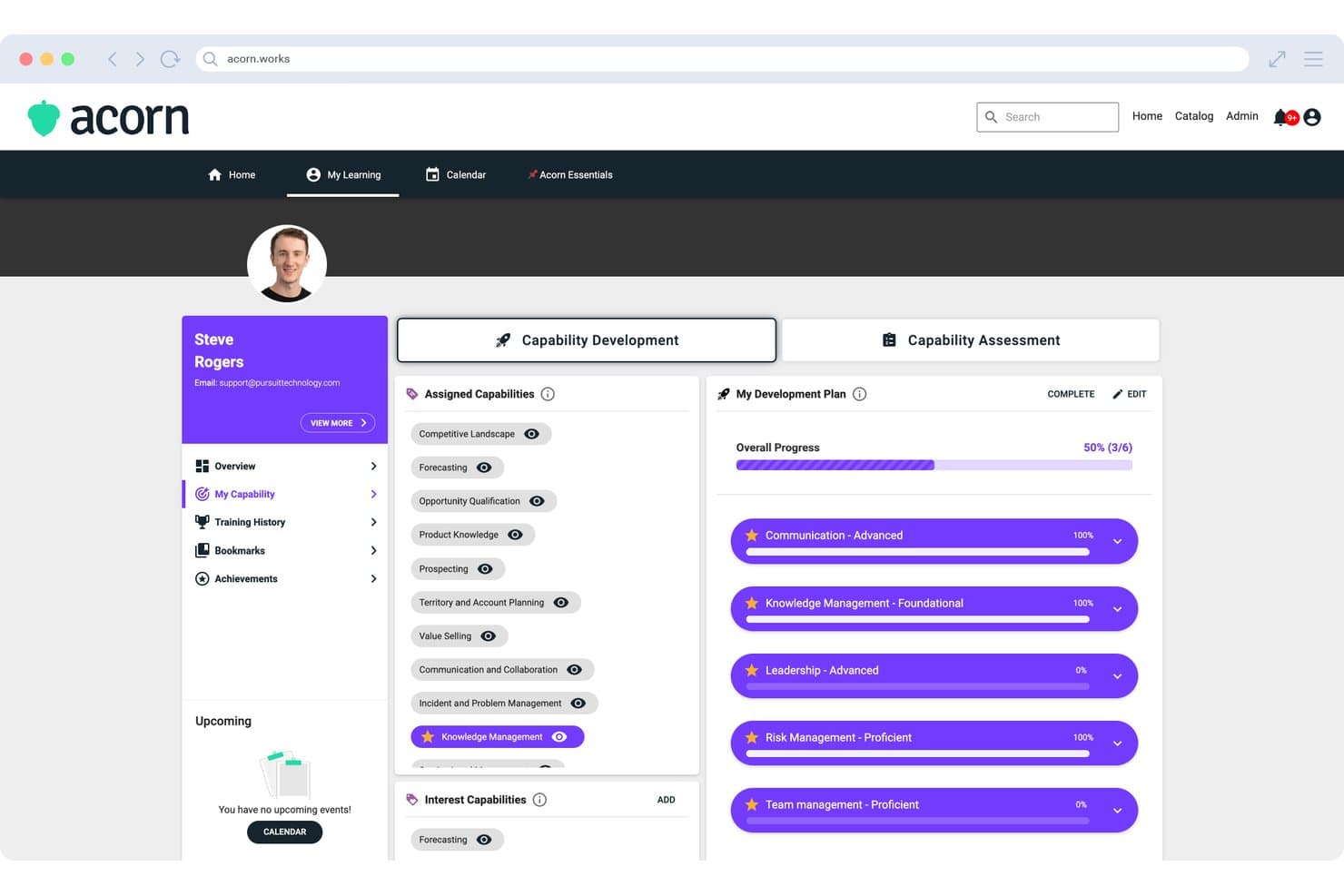
Acorn displays a Capability Development Plan with assigned capabilities, development progress tracking, and starred priority skills for individual learners. Acorn is a performance-focused LMS that combines learning delivery, CE credit tracking, capability management, and onboarding workflows in a single platform for midsize and enterprise healthcare organizations.
Who Is Acorn Best For?
Acorn is built for midsize-to-enterprise healthcare organizations and associations that manage CE delivery across large, distributed provider networks.
Why I Picked Acorn
Acorn earns its spot on my shortlist because of how it pulls compliance content from across the market into one platform. I like that it connects natively to OpenSesame, Go1, LinkedIn Learning, and Skillsoft, and its Universal Adapter auto-syncs external completions back into Acorn so nothing falls through the cracks. I've seen this matter most when sourcing HIPAA, OSHA, and CE content from different vendors — everything lands in one consolidated audit trail.
Acorn Key Features
- CE credit consolidation: Tracks and auto-updates continuing education credits and certificates for clinical staff across multiple content sources.
- Role and capability frameworks: Configures training assignments based on clinical roles, credential requirements, and capability assessments.
- Multi-tenancy management: Supports separate learner portals, shared content, and central administration across distributed healthcare networks.
- Mobile learning app: Provides native Android and iOS applications for on-the-go access to assigned training and certification records.
Acorn Integrations
Acorn offers native integrations with OpenSesame, Go1, LinkedIn Learning, and Skillsoft, plus an API for custom integrations.
Pros and Cons
Pros:
- Capability frameworks built for clinical role mapping
- Multi-tenant structure suits distributed healthcare networks
- Automated CE credit tracking across providers
Cons:
- Reporting customization limited for complex org structures
- No proprietary healthcare compliance content library
Learn more about Acorn: Best for intuitive, self-paced learning in healthcare
- Free demo available
- Pricing upon request
Visit WebsiteCustomer Rating:4.6/5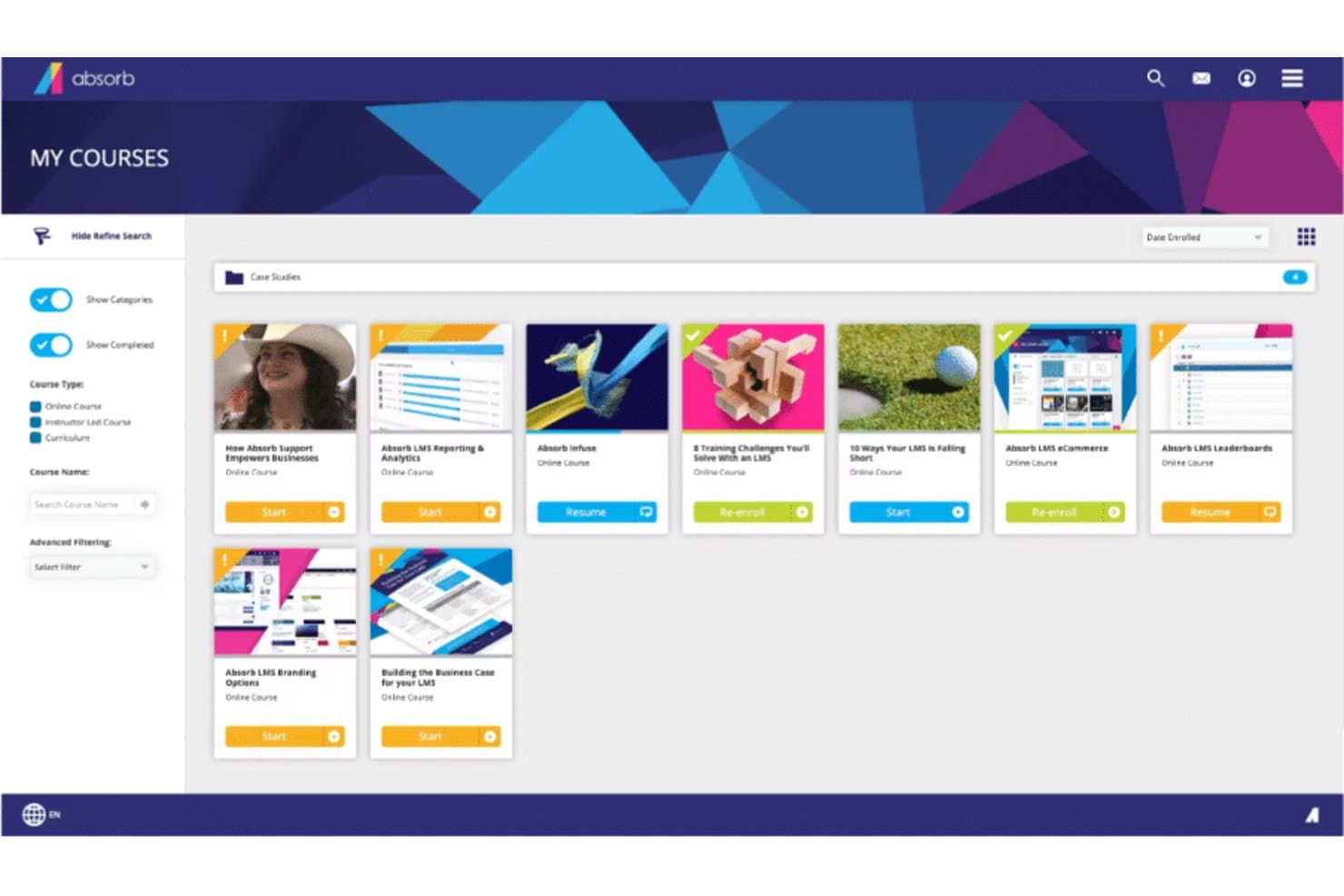
Here's Absorb's courses overview Absorb is a learning management system offering an intuitive, modern interface that is easy to navigate, even for those with limited technical skills. It offers an array of features including course creation, assessment tools, and analytics, which makes it a great choice for organizations seeking a user-friendly LMS.
Why I Picked Absorb: Absorb captured my attention with its intuitive design and user-friendly interface, distinguishing itself from other more complex LMS platforms. Ease of use is a critical factor for any LMS, and in this regard, Absorb shines. This led me to select it as the best LMS for a user-friendly interface.
Standout Features & Integrations:
Key features of Absorb include course creation, assessment tools, learner portals, and analytics. In addition, it provides social learning opportunities through its bulletin board feature. As for integrations, Absorb can be integrated with several software systems such as HRIS, CRM, and e-commerce platforms, adding convenience for its users.
Pros and Cons
Pros:
- Offers integration with various software systems
- Extensive features for course management and learner engagement
- User-friendly interface
Cons:
- User interface may be too simplistic for users seeking a high level of customization
- May lack advanced features compared to some other LMS platforms
- Pricing information is not readily available
Learn more about Absorb: Best for fast deployment and scaling healthcare training
- Free demo available
- Pricing upon request
Visit WebsiteCustomer Rating:4.6/5
A view in LearnUpon dashboard LearnUpon is a learning management system built to accommodate growth. It offers a scalable LMS platform that helps businesses manage, track, and achieve their diverse learning goals. It's designed to expand in line with your business needs, which is why I tagged it as 'best for' scalability.
Why I Picked LearnUpon: I selected LearnUpon for its capability to effectively grow with an organization's learning needs. Its scalable architecture ensures it remains efficient even as a business expands, making it different from other LMSs that may struggle with increased loads.
Based on my judgment, LearnUpon stands as the optimal choice for businesses planning significant growth and expansion.
Standout Features & Integrations:
LearnUpon's standout features include its easy-to-use interface, detailed analytics, eCommerce capabilities, and multi-portal architecture, which allows businesses to create separate learning environments for different audiences.
For integrations, it connects with a wide array of tools including Salesforce, Webex, and Zoom, making it flexible and adaptable to diverse workflows.
Pros and Cons
Pros:
- Excellent customer support
- Wide range of integrations
- Robust and scalable infrastructure
Cons:
- Limited customization options for course appearance
- More advanced features may require a learning curve
- Starting price is higher compared to some other LMS platforms
Learn more about LearnUpon: Best for interactive and engaging online medical courses
- Free demo available
- Pricing upon request
Visit WebsiteCustomer Rating:4.7/5
Here's a Tovuti all devices dashboard sample screenshot. Tovuti is a comprehensive learning management system designed to support an engaging and interactive learning environment. It provides a suite of tools and features that make it an excellent platform for developing and delivering immersive online medical courses.
Why I Picked Tovuti: When I was selecting an LMS that could truly revolutionize online medical education, Tovuti immediately stood out. It brings unique interactivity and engagement to the online learning experience, making it truly dynamic.
Its course authoring tools allow for the creation of rich, engaging content, setting it apart as the best choice for those who prioritize interactive learning in their course delivery.
Standout Features & Integrations:
Tovuti offers an interactive course authoring tool that enables the creation of compelling, multimedia-rich courses. Its interactive lessons include elements like gamification and quizzes, enhancing the learning experience.
Additionally, Tovuti offers a wide range of integrations, including with popular systems like Salesforce, Zoom, and WordPress, allowing for seamless data sharing and functionality enhancement across your organization's tool stack.
Pros and Cons
Pros:
- Gamification enhances learner engagement
- Wide range of integrations
- Interactive course authoring tool
Cons:
- Customization can be challenging for non-technical users
- Might be overwhelming for first-time users
- No disclosed pricing information
Learn more about Tovuti: 10Best for AI-powered personalized learning experiences
Docebo
- Free demo available
- Pricing upon request
Visit WebsiteCustomer Rating:4.4/5
Here's Docebo's activity overview screenshot Docebo is an AI-powered learning management system that is designed to facilitate learning experiences in large-scale operations. Tailored specifically for expansive organizations, Docebo aligns perfectly with my 'best for' criteria of large healthcare organizations.
Why I Picked Docebo: Docebo stood out to me for its scalability and AI-driven approach to learning. The blend of intelligent technology with robust features suitable for large-scale organizations caught my attention. This makes it the ideal tool for expansive healthcare organizations seeking to streamline their learning processes.
Standout Features & Integrations:
Docebo boasts an impressive array of features including its Coach and Share module for informal learning and its AI-powered Discover, Coach, and Share functionality. Furthermore, it integrates well with popular tools like Slack, Google Suite, and LinkedIn Learning, creating a cohesive ecosystem for users.
Pros and Cons
Pros:
- Excellent integration capabilities
- Robust features suitable for large-scale operations
- AI-driven learning platform
Cons:
- Customer support may not meet expectations
- The user interface can be complex for beginners
- Expensive for small and medium-sized organizations
Learn more about Docebo:
Other Healthcare LMS Platforms
Below is a list of additional healthcare LMS tools that I shortlisted but did not make it to the top 10. Definitely worth checking them out.
- 11eFrontBest for customization and security in medical training
- 12HealthStreamBest for compliance and regulatory training in healthcare
- 13MedTrainerBest for healthcare-specific courses
- 14MedTrainerBest for healthcare workflow automation and training
- 15Litmos LMSBest for mobile-friendly, flexible learning paths
- 16CornerstoneBest for robust healthcare skill development
- 17ReliasBest for reducing risk and ensuring high-quality patient care
- 18MedBridgeBest for clinical performance and patient engagement enhancement
- 19ParadisoBest for multi-language and blended learning experiences
- 20Deel HRBest for a drag-and-drop LMS interface
- 21ContinuBest for healthcare compliance training
- 22ConnecteamBest for a HIPAA compliant mobile app LMS for frontline workers
- 23Synergy LearningBest for bespoke learning management systems
- 24AcademyOceanGood for businesses looking to create educational marketing funnels
- 25Blackboard LearnGood for educational institutions seeking comprehensive digital learning features
- 26CareAcademyGood for home care agencies needing caregiver training
- 27KallidusGood for businesses seeking extensive employee development features
How I Evaluate Healthcare LMS
I split my evaluation into two layers: the baseline requirements every platform must meet—like HIPAA-compliant hosting and a real compliance library—and the factors that set top picks apart.
Core Functionality (Table Stakes For This List)
When I'm selecting tools for my list, I rank each one on a scale from 0 (does not offer the functionality) to 5 (excels in this area) for each core functionality listed below. Then, I calculate the tool's total score into a percentage. Each tool needs to achieve a minimum total score of 65% to be considered for inclusion.
- Healthcare Compliance Content Library: I check whether the platform ships with up-to-date HIPAA, OSHA, and Bloodborne Pathogen courses rather than requiring you to build all compliance training from scratch.
- CE/CME Credit Tracking: Tracking credit hours, license types, and expiration dates matters—especially when your RNs, MAs, and providers each carry different renewal timelines.
- Audit-Ready Reporting: I look for pre-built reports that map to Joint Commission or CMS survey requirements so your compliance team can pull records on demand during an audit.
- Role-Based Learning Paths: The platform should let you assign different course tracks by job role, like separating front-desk HIPAA awareness training from clinical staff safety modules.
- Automated Recertification Workflows: I evaluate how the system handles recurring annual training—automated reassignment, escalation alerts, and manager notifications reduce the manual follow-up burden.
- HIPAA-Compliant Infrastructure: A signed BAA, encryption standards, and role-based access controls are baseline expectations for any platform handling training data adjacent to PHI.
Once I have a list of tools that meet the criteria, I consider what sets each platform apart.
Differentiating Factors (What Sets Vendors Apart)
Here's how I compare and contrast different vendors:
Standout Features
Mobile access is a real differentiator—I look for native apps that let clinical staff finish a module between patients without being tied to a workstation. Skills checklists and competency assessments also separate platforms, especially when preceptors can sign off on observed clinical skills directly in the system. For multi-site practices or DSOs, I evaluate how well the platform handles location-based reporting and hierarchical org structures across facilities.
Beyond Features
I check whether a vendor's compliance courses carry actual ACCME or ANCC accreditation, since platforms that can issue valid CE/CME credits save your team from managing a separate accreditation workflow. Integration with your existing EHR and HRIS matters too—automated user provisioning through systems like ADP or BambooHR prevents orphaned accounts when staff turn over. Pricing structure is worth evaluating closely, particularly whether the content library is bundled or sold à la carte, which can significantly shift total cost for growing practices.
How to Choose Healthcare LMS
It’s easy to get bogged down in long feature lists and complex pricing structures. To help you stay focused as you work through your unique software selection process, here’s a checklist of factors to keep in mind:
| Factor | What to Consider |
|---|---|
| FactorScalability | What to ConsiderHow well does the LMS grow with your practice? Consider the number of users it supports and if it can handle increased data as your needs expand. |
| FactorIntegrations | What to ConsiderDoes the LMS integrate with your existing systems? Look for compatibility with your EMR, HR, and other tools to avoid data silos and streamline workflows. |
| FactorCustomizability | What to ConsiderCan you tailor the LMS to fit your practice's needs? Check if it allows you to customize learning paths, dashboards, and reports to match your unique processes. |
| FactorEase of use | What to ConsiderIs the LMS user-friendly for all staff levels? A simple interface reduces training time and helps staff quickly adopt the system. |
| FactorImplementation and onboarding | What to ConsiderHow long does it take to get started? Evaluate the setup process and available resources like training videos or product tours to ensure a smooth transition. |
| FactorCost | What to ConsiderDoes the pricing fit your budget? Compare the cost of different plans and consider any hidden fees. Look for solutions that offer a good balance of features and affordability. |
| FactorSecurity safeguards | What to ConsiderHow secure is the LMS? Ensure it complies with data protection regulations and offers features like encryption and access controls to protect sensitive information. |
| FactorCompliance requirements | What to ConsiderDoes the LMS support your industry's compliance needs? Check if it offers tools to track certifications, manage audits, and stay updated with regulatory changes. |
What Is Healthcare LMS?
Healthcare LMS is a learning management system designed for the healthcare industry to facilitate training and compliance management. These tools are generally used by healthcare professionals, including administrators, educators, and clinical staff, to enhance training efficiency and ensure regulatory compliance.
Features like online training modules, progress tracking, and certification management help with delivering consistent education and maintaining compliance with industry standards. Overall, these tools provide significant value by improving staff skills and ensuring adherence to healthcare regulations.
Features of Healthcare LMS
When selecting a healthcare LMS, keep an eye out for the following key features:
- Compliance tracking: Helps you easily monitor and document employee training, certifications, and regulatory requirements, ensuring everyone stays up to date with industry standards and legal expectations.
- Course management: Lets you create, organize, and update training modules for different departments or roles, making it simple to roll out new policies and keep everyone informed.
- Assessment tools: Offers quizzes, tests, and surveys so you can gauge understanding, identify knowledge gaps, and see where extra support may be needed.
- Reporting and analytics: Provides detailed insights on course completion rates, learner progress, and training effectiveness, so you can quickly spot trends and make data-driven decisions.
- Mobile accessibility: Allows learners to access courses, resources, and assessments from smartphones or tablets—learning can happen anywhere, not just at a desk.
- User management: Lets you assign roles, manage learner groups, and handle permissions with ease, keeping your training process organized and secure.
- Integration capabilities: Connects with other HR or medical systems you already use, streamlining communication and reducing manual work for your team.
- Content library: Offers a built-in selection of relevant, up-to-date medical courses and resources, saving you time on content creation while covering key training needs.
- Customizable learning paths: Enables you to tailor training journeys for different individuals or teams, ensuring each learner gets the right information at the right time.
Common Healthcare LMS AI Features
Beyond the standard healthcare LMS features listed above, many of these solutions are incorporating AI with features like:
- Personalized learning recommendations: Uses AI to suggest courses and resources based on an individual’s role, history, and interests, making training both efficient and engaging.
- Automated skills gap analysis: AI examines learner performance and automatically identifies areas where more training or support is needed, so you can proactively address weaknesses.
- Natural language chatbots: Provides instant, AI-powered support and answers to training-related questions, helping learners find information quickly and independently.
- Predictive analytics: AI forecasts future training needs and potential compliance risks by analyzing participation data, helping you stay several steps ahead.
- Adaptive assessments: Dynamically adjusts the difficulty and type of questions based on real-time learner responses, ensuring assessments accurately reflect each person’s skill level.
Benefits
Implementing healthcare LMS provides several benefits for your team and your business. Here are a few you can look forward to:
- Improved compliance: Easily track certifications and regulatory requirements, ensuring your team stays compliant with industry standards.
- Enhanced training efficiency: Deliver consistent online training modules, reducing the time and resources spent on in-person training sessions.
- Increased accessibility: Mobile access allows staff to learn on-the-go, providing flexibility and accommodating different learning styles.
- Better performance insights: Advanced analytics provide valuable data on staff training progress, helping you make informed decisions.
- Customized learning experiences: Customizable learning paths cater to the unique needs of different roles, enhancing relevance and engagement.
- Streamlined onboarding: Interactive product tours and training resources make it easier for new staff to get up to speed quickly.
- Integration with other systems: Seamless integration with existing tools reduces manual data entry and enhances workflow efficiency.
Costs & Pricing
Selecting healthcare LMS requires an understanding of the various pricing models and plans available. Costs vary based on features, team size, add-ons, and more. The table below summarizes common plans, their average prices, and typical features included in healthcare LMS solutions:
Plan Comparison Table for Healthcare LMS
| Plan Type | Average Price | Common Features |
|---|---|---|
| Plan TypeFree Plan | Average Price$0 | Common FeaturesBasic training modules, progress tracking, and limited user support. |
| Plan TypePersonal Plan | Average Price$5-$25/user/month | Common FeaturesCustomizable learning paths, mobile access, and certification management. |
| Plan TypeBusiness Plan | Average Price$30-$60/user/month | Common FeaturesAdvanced analytics, integrations with existing systems, and enhanced support. |
| Plan TypeEnterprise Plan | Average Price$70-$100/user/month | Common FeaturesFull customization, dedicated account manager, and compliance tracking tools. |
Healthcare LMS FAQs
Here are some answers to common questions about healthcare LMS:
How can healthcare LMS improve compliance?
Healthcare LMS helps track and manage compliance training, ensuring your team meets regulatory requirements. It provides automated reminders and reports, so you can easily monitor who has completed necessary courses. This reduces the risk of non-compliance and potential penalties.
What are the security considerations for healthcare LMS?
Security is crucial in healthcare LMS to protect sensitive data. Look for features like data encryption, user authentication, and compliance with regulations like HIPAA. Assess the vendor’s security protocols to ensure patient and organizational data remain secure.
What challenges typically arise when implementing an LMS in a healthcare context?
Common issues include resistance from busy clinical staff, aligning training with shift-work schedules, and managing multiple user roles (nurses, physicians, support staff). You’ll need a plan for onboarding, training admin users, and maintaining content to keep it relevant. Also plan for change management and ensure your senior leadership supports the rollout.
What should we consider about scalability and ongoing maintenance of the LMS?
If your organization grows (new departments, locations, remote staff), your LMS must scale without major performance drop-offs. Also consider how often vendors update the system, how easy it is to upload and maintain content, and how administrative effort grows as you expand. Failure to plan scalability can lead to higher costs or replacement sooner than expected.