ABA billing is one of the most documentation-heavy and payer-sensitive billing environments in healthcare. Choosing the right medical billing software for your practice means knowing which features actually move the needle—not just which ones look good on a spec sheet.
From claim scrubbing that catches errors before they reach a payer to denial and rejection management that keeps your revenue cycle moving, the right tool makes a measurable difference in your reimbursement rates and administrative load. This guide breaks down every feature worth having—and explains what to look for in each one.
12 Essential Features of ABA Medical Billing Software
Here’s what you need to know about each feature—how it works in practice, what it actually does for your team, and why it matters:
1. Insurance Eligibility Verification
Insurance eligibility verification lets you confirm a patient's active coverage, plan details, and benefits before a session even starts. Most platforms pull this data directly from payers in real time, so you're not manually calling insurance companies or guessing at coverage limits.
From my experience, catching eligibility issues upfront is one of the fastest ways to reduce claim denials. If coverage has lapsed or a service isn't covered under a patient's plan, you know before billing—not weeks later when a denial lands in your queue.
Watch for these eligibility checks when evaluating your options:
- Real-time payer queries: Pulls live coverage data directly from insurers before appointments.
- Batch verification: Checks eligibility for multiple patients at once—I find this especially useful ahead of high-volume days.
- Benefit breakdowns: Surfaces deductibles, copays, and authorization requirements alongside coverage status.
- Automated alerts: Flags coverage gaps or inactive plans before billing begins.
- EHR sync: Tools like Kareo and Tebra push eligibility results directly into patient records, eliminating duplicate data entry.
2. Claim Scrubbing
Claim scrubbing is the automated process of reviewing claims for errors, missing data, and coding inconsistencies before submission. The software checks each claim against payer-specific rules and coding standards, flagging anything that's likely to trigger a rejection or denial — a core function of most clearinghouse billing software platforms, including tools like CollaborateMD and AdvancedMD.
In my experience, this feature alone can dramatically shift your first-pass acceptance rate. ABA billing involves a high volume of session-based claims, and even small errors—like a mismatched diagnosis code or missing modifier—can stall reimbursement for weeks. Catching those issues at the source keeps your revenue cycle moving.
Use this comparison to see how claim scrubbing changes your billing outcomes:
| Without Claim Scrubbing | With Claim Scrubbing | |
|---|---|---|
| Error detection | Without Claim ScrubbingCaught post-denial | With Claim ScrubbingCaught pre-submission |
| First-pass rate | Without Claim ScrubbingLower acceptance rates | With Claim ScrubbingHigher acceptance rates |
| Rework time | Without Claim ScrubbingManual review after rejection | With Claim ScrubbingAutomated flagging before submission |
| Coding accuracy | Without Claim ScrubbingInconsistent modifier use | With Claim ScrubbingPayer-specific rule validation |
| Vendor example | Without Claim Scrubbing— | With Claim ScrubbingTools like CollaborateMD and AdvancedMD include built-in scrubbing engines |

3. Electronic Claim Submission
Electronic claim submission replaces paper-based filing with direct digital transmission to payers through a clearinghouse or direct payer connection. Your billing software formats each claim to meet payer requirements and submits it automatically, often within hours of a completed session.
I think this is one of the most foundational features in any ABA billing workflow. The speed difference alone is significant—electronic claims typically process in days, not weeks. For practices billing high session volumes daily, that faster turnaround has a direct impact on cash flow and reduces the administrative time spent tracking down paper submissions.
Keep these key functions in mind when evaluating electronic claim submission:
- Clearinghouse integration: Routes claims through healthcare EDI software like Change Healthcare or Availity to reach hundreds of payers from one platform.
- Auto-formatting: Converts session data into ANSI X12 837P format automatically, without manual claim building.
- Submission tracking: Logs timestamps and confirmation numbers for every submitted claim.
- Real-time status updates: Surfaces payer acknowledgments and rejections as they come in.
- Batch submission: Sends multiple claims simultaneously—I find this essential for ABA practices running high daily session volumes.
- Vendor example: Luminare Health and Waystar both offer direct payer connections that cut out clearinghouse fees entirely.
4. Denial and Rejection Management
Denial and rejection management gives your billing team a structured workflow for identifying, tracking, and resolving claims that don't make it through to payment. The software categorizes each denial or rejection by reason code, routes it to the right team member, and tracks resolution status from start to finish.
What I find most valuable here is the pattern recognition. When you can see that a specific payer is consistently denying claims for the same reason, you can fix the root cause—not just resubmit and hope. For ABA practices, where authorization-related denials are especially common, that visibility is indispensable.
Here's how a denial and rejection management workflow typically moves from identification to resolution:
- Identify the denial: Software captures the payer's reason code and categorizes it automatically.
- Route to the right person: Assigns the denial to the appropriate biller based on type—coding errors go to coders, authorization issues go to the auth team.
- Investigate the root cause: Review session notes, modifiers, and payer rules to pinpoint the error.
- Correct and resubmit: Amend the claim and resubmit directly from the denial queue—tools like Waystar make this a single workflow.
- Track resolution: Monitor resubmission status and log outcomes for trend reporting.
5. Automated Payment Posting
Automated payment posting pulls remittance data directly from payers—via electronic remittance advice (ERA) files—and applies payments to the correct claims without manual entry. The software matches each payment to its corresponding claim, posts adjustments, and flags any discrepancies for review.
Manually posting payments is one of the most time-consuming tasks in a billing office, and it's surprisingly error-prone. I think ERA automation is where practices running high claim volumes see the biggest time savings. It also gives you a cleaner accounts receivable picture, because payments are posted faster and discrepancies surface immediately rather than during a month-end audit.
Watch for these core functions when evaluating automated payment posting:
- ERA enrollment: Connects directly to payers to receive electronic remittance advice files automatically.
- Auto-matching: Maps each payment line to the correct claim using claim number, date of service, and procedure code.
- Adjustment posting: Applies contractual adjustments and write-offs without manual input.
- Discrepancy flagging: Isolates underpayments, overpayments, and unmatched payments for biller review.
- Patient balance generation: Calculates remaining patient responsibility after insurance payment and pushes it to the patient ledger.
- Vendor example: Kareo and Tebra both handle ERA auto-posting well, including secondary insurance balances—something I find particularly useful in ABA billing.
6. Accounts Receivable Tracking
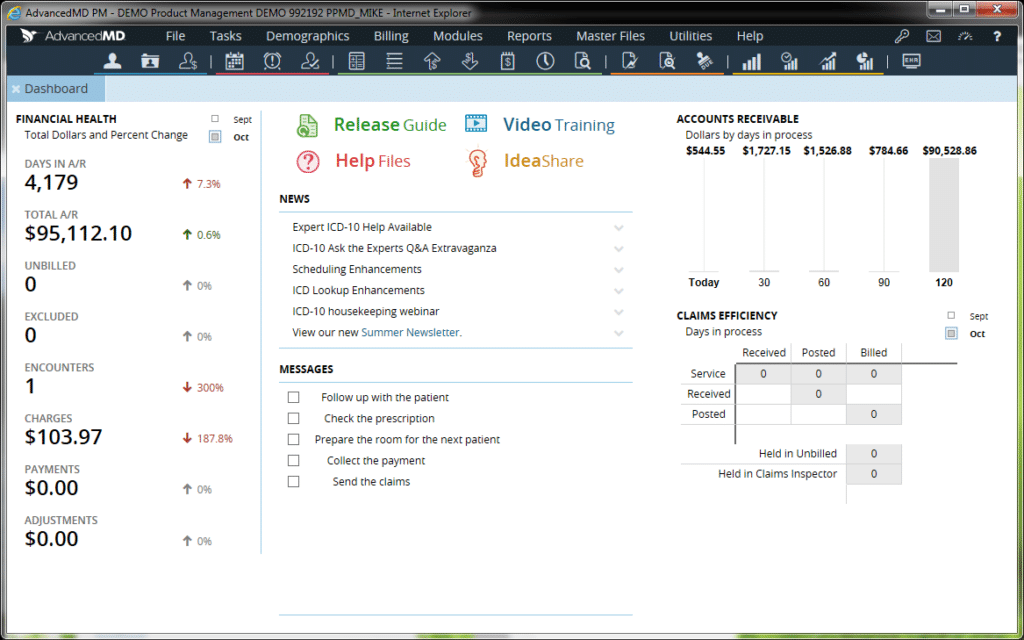
Accounts receivable (AR) tracking gives you a real-time view of every outstanding balance across your practice—organized by payer, aging bucket, provider, or service date. The software continuously updates AR balances as claims move through the billing cycle, so your team always knows what's owed and how long it's been outstanding.
From my experience, AR tracking is where billing performance becomes measurable. You can spot which payers are consistently slow, which claim types age out most often, and where your team needs to focus collection efforts. Without it, high-volume ABA practices risk letting older claims fall through the cracks entirely.
Use this breakdown to compare what AR tracking looks like before and after using dedicated medical billing software:
| Without AR Tracking Software | With AR Tracking Software | |
|---|---|---|
| Aging visibility | Without AR Tracking SoftwareManual spreadsheet updates | With AR Tracking SoftwareReal-time aging buckets (30/60/90/120+ days) |
| Payer performance | Without AR Tracking SoftwareInconsistent, hard to compare | With AR Tracking SoftwareSortable by payer, provider, or claim type |
| Follow-up workflow | Without AR Tracking SoftwareAd hoc, easy to miss | With AR Tracking SoftwareAutomated follow-up queues by aging threshold |
| Write-off decisions | Without AR Tracking SoftwareGuesswork | With AR Tracking SoftwareData-driven thresholds based on payer history |
| Vendor example | Without AR Tracking Software— | With AR Tracking SoftwareAdvancedMD and Kareo both offer AR dashboards with drill-down claim-level detail |
7. Reporting and Financial Analytics
Reporting and financial analytics aggregate your billing data into structured reports—covering collections, claim volumes, denial rates, payer performance, and revenue trends. This overlaps closely with healthcare analytics software, and most platforms let you schedule reports automatically or build custom dashboards filtered by provider, location, or date range.
What separates good billing software from great billing software, in my experience, is how actionable the reporting actually is. Raw numbers aren't useful unless the software surfaces the right ones at the right time. For ABA practices managing multiple funding sources and high session volumes, real-time financial visibility isn't a nice-to-have—it's what keeps leadership and billing teams aligned on practice health.
Watch for these report types when evaluating a billing platform's analytics capabilities:
- Collections report: Tracks payments received against charges submitted—I use this to benchmark monthly revenue against expected reimbursement rates.
- Denial rate report: Breaks down denials by reason code, payer, and provider to surface recurring billing issues.
- Aging AR report: Segments outstanding balances by time bucket so follow-up efforts stay prioritized.
- Payer mix report: Shows revenue distribution across insurance types, useful for identifying over-reliance on a single payer.
- Clean claim rate report: Measures first-pass claim acceptance—a key performance indicator for any ABA billing operation.
- Vendor example: AdvancedMD offers customizable dashboard widgets that surface these metrics without needing to run reports manually.
8. ICD and CPT Code Lookup
ICD and CPT code lookup gives billers and clinicians a searchable, up-to-date code library directly inside the billing platform. Instead of cross-referencing external resources, your team can search by keyword, code number, or description and pull the correct diagnosis or procedure code without leaving the workflow.
This sounds minor, but the time savings add up fast in high-volume practices. More importantly, built-in lookup reduces the risk of using outdated or incorrect codes—which is a direct path to denials. For ABA billing specifically, where CPT codes like 97153 and 97155 carry strict documentation requirements, having payer-specific guidance alongside the code itself is genuinely useful.
These are the functions that make ICD and CPT code lookup genuinely useful in day-to-day billing:
- Keyword search: Find codes by clinical term rather than memorizing code numbers—helpful for less common diagnoses.
- Code validation: Flags invalid or outdated codes before claim submission, preventing avoidable denials.
- Modifier guidance: Surfaces applicable modifiers alongside the base code, which is critical for ABA codes like 97153 and 97155.
- Payer-specific rules: Some platforms display payer coverage policies tied to specific codes at the point of entry.
- Annual code updates: Automatically refreshes the code library each January when ICD and CPT updates take effect.
- Vendor example: Kareo's code lookup includes bundling alerts, which I find helpful for catching CCI edits before submission.
9. Patient Portal for Online Payments
A patient portal for online payments gives patients a self-service interface to view their balances, review explanation of benefits (EOB) summaries, and submit payments without calling the office. Payments made through the portal post directly to the patient ledger inside your billing software, reducing manual reconciliation work for your team.
From my experience, practices that activate patient-facing payment portals collect patient balances faster and with fewer follow-up touchpoints. It also reduces front desk call volume significantly. For ABA practices billing families for copays and session balances, a clean, mobile-friendly portal removes friction at the moment patients are most likely to pay.
Watch for these portal features when evaluating patient payment functionality in medical billing software:
- Balance visibility: Patients can view itemized charges and insurance adjustments—reducing confusion and inbound billing calls.
- Saved payment methods: Supports stored cards or bank accounts for faster repeat payments, useful for families making recurring ABA copayments.
- Payment plans: Lets patients set up installment schedules directly, reducing the need for staff-managed payment arrangements.
- Automated statements: Triggers balance notifications via email or SMS when a new patient responsibility posts.
- HIPAA-compliant access: Secure login with identity verification protects sensitive billing and clinical information.
- Vendor example: Tebra's patient portal includes integrated payment processing with automatic ledger posting, which I find cuts manual reconciliation time noticeably.
10. EHR and EMR Integration
EHR and EMR integration connects your clinical documentation system directly to your billing platform, so patient records, session notes, and treatment data flow into the billing workflow without manual re-entry. Charges are generated from completed clinical encounters, and diagnosis codes pull from the patient's active problem list automatically.
This connection is where billing accuracy lives or dies. When billing and clinical systems operate separately, your team spends time manually transferring data—and that's where coding errors and missing charges happen. For ABA practices, tight EHR integration ensures session-level data like units, supervising provider, and place of service reaches the claim correctly every time.
Use this comparison to see how EHR integration changes the billing workflow in practice:
| Without EHR Integration | With EHR Integration | |
|---|---|---|
| Charge capture | Without EHR IntegrationManual entry from session notes | With EHR IntegrationAuto-generated from completed encounters |
| Diagnosis codes | Without EHR IntegrationRe-entered per claim | With EHR IntegrationPulled from active problem list |
| Provider details | Without EHR IntegrationManually verified per claim | With EHR IntegrationPopulated from credentialing records |
| Missing charges | Without EHR IntegrationCommon without a reconciliation step | With EHR IntegrationFlagged automatically against scheduled sessions |
| Billing lag | Without EHR IntegrationDays after session completion | With EHR IntegrationSame-day or next-day claim generation |
| Vendor example | Without EHR Integration— | With EHR IntegrationCentral Reach combines EHR and billing natively for ABA, eliminating the integration gap entirely |
11. Patient Statement Generation
Patient statement generation automates the creation and delivery of billing statements sent to patients after insurance has processed a claim. The software calculates the remaining patient responsibility, formats it into a readable statement, and delivers it via mail, email, or patient portal—depending on the patient's communication preference on file.
What I appreciate about this feature in modern billing platforms is the reduction in manual statement preparation. Older workflows required staff to manually calculate balances and print statements in batches. Automated statement generation triggers on ERA posting, so patients receive accurate, timely statements without your billing team managing each one individually.
These are the statement generation capabilities worth checking for when evaluating medical billing software:
- Customizable templates: Adjust statement layout, branding, and messaging to match your practice's communication style.
- Multi-delivery options: Send statements via print, email, or patient portal based on individual patient preferences.
- Automated triggers: Statements generate automatically after ERA posting—no manual batching required.
- Itemized charge detail: Breaks down each service date, charge, insurance payment, and adjustment so patients understand their balance.
- Dunning sequences: Escalates follow-up statements automatically for unpaid balances over time.
- Vendor example: Waystar's statement tools include configurable dunning workflows, which I find reduces the manual follow-up burden on billing staff meaningfully.
More Articles
12. Secondary Insurance Billing
Secondary insurance billing handles claims submitted to a patient's second payer after the primary insurance has processed and paid. The software automatically carries over the primary payer's explanation of benefits (EOB) data—including payments, adjustments, and denial codes—and generates a correctly formatted secondary claim without your team rebuilding it from scratch.
This is one of those features that looks simple but breaks down fast without proper automation. Coordination of benefits (COB) errors are a leading cause of secondary claim denials. For pediatric ABA practices, where Medicaid frequently sits as secondary behind commercial insurance, getting this handoff right directly impacts how much patient balance remains uncollected.
Follow these steps to understand how secondary billing flows through medical billing software after primary adjudication:
- Primary claim adjudication: Primary payer processes the claim and returns an ERA with payment, adjustment, and denial details.
- COB data transfer: Software automatically populates the secondary claim with primary payer's EOB data in the correct claim fields.
- Secondary claim generation: A new claim generates with updated billing amounts reflecting the primary payer's responsibility.
- Payer-specific formatting: Software applies secondary payer rules—some Medicaid plans require specific COB codes and field population.
- Submission and tracking: Secondary claim submits electronically and enters the same AR follow-up workflow as primary claims.
- Vendor example: Availity's claim tools support automated COB workflows, which I find particularly useful when Medicaid is the secondary payer.
Top 10 Medical ABA Billing Software
Here are our top picks for the best ABA billing software to help you in your search:
Find the Right Billing Software for Your ABA Practice
Once you know which features matter most, the next step is finding a platform that actually delivers them—browse our picks for the best ABA billing software to compare top options side by side.