

Sistemele EHR pentru medicina de familie centralizează datele pacienților și automatizează sarcinile de documentare, ceea ce permite echipei să personalizeze îngrijirea și să îmbunătățească rezultatele. Gestionarea datelor fragmentate poate fi dificilă, însă asistența potrivită poate simplifica redactarea fișelor medicale și îmbunătăți comunicarea între echipe.
În acest articol, compar și evaluez cele mai bune sisteme EHR pentru a vă ajuta să luați decizia de cumpărare.
Why Trust Our Software Recommendations
6,700+
Reviews
20
Industry experts
16+
Evaluation factors
14
Years
Our team has been testing and reviewing software since 2012. As medical practice leaders ourselves, we know how difficult—and important—it is to choose the right software.
For this guide, we evaluated tools using hands-on testing and independent research, scoring tools using our selection criteria.
Our reviews reflect our human editorial judgment, not a sales pitch.
Tabel comparativ al sistemelor EHR pentru medicina de familie
Tabelul de mai jos compară detaliile privind prețurile pentru principalele mele selecții de sisteme EHR pentru cabinetele de medicină de familie.
Sorted by: Default
| Tool | Starting Price | Website | |
|---|---|---|---|
Best for customizable family practice charting | 4.8 out of 5 | $99/month 15-day free trial | Website |
Best for behavioral health practices | 4.3 out of 5 | Pricing upon request Free demo available | Website |
Best for customizable family practice workflows | 5.0 out of 5 | Pricing upon request Free demo available | Website |
Best for solo and multi-provider practice growth | 3.9 out of 5 | Pricing upon request Free demo available | Website |
Best for cloud-based accessibility and ease of use | 3.8 out of 5 | $199/user/month 14-day free trial + free demo available | Website |
Best with AI-enabled ambient documentation tools | 3.6 out of 5 | $429/user/month Free demo available | Website |
Good for small practices with its intuitive and easy-to-learn interface | 3.6 out of 5 | $229/month 7-day free trial | Website |
Best for unified billing and practice management | Not rated | Pricing upon request Free demo available | Website |
Best for its highly customizable interface | Not rated | Pricing upon request Free demo available | Website |
Best for integrated AI-powered clinical workflows | Not rated | $280/user/month Free demo available | Website |


Recenzii ale celor mai bune sisteme EHR pentru medicina de familie
Mai jos sunt prezentate rezumatele mele detaliate ale celor mai bune sisteme EHR pentru medicina de familie care au ajuns pe lista scurtă. Recenziile mele oferă o perspectivă detaliată asupra funcționalităților principale, avantajelor & dezavantajelor, integrărilor și cazurilor ideale de utilizare pentru fiecare instrument, astfel încât să îl găsiți pe cel mai potrivit pentru dumneavoastră.
 Best for customizable family practice charting
- 15-day free trial
- From $99/month
Visit WebsiteCustomer Rating:4.8/5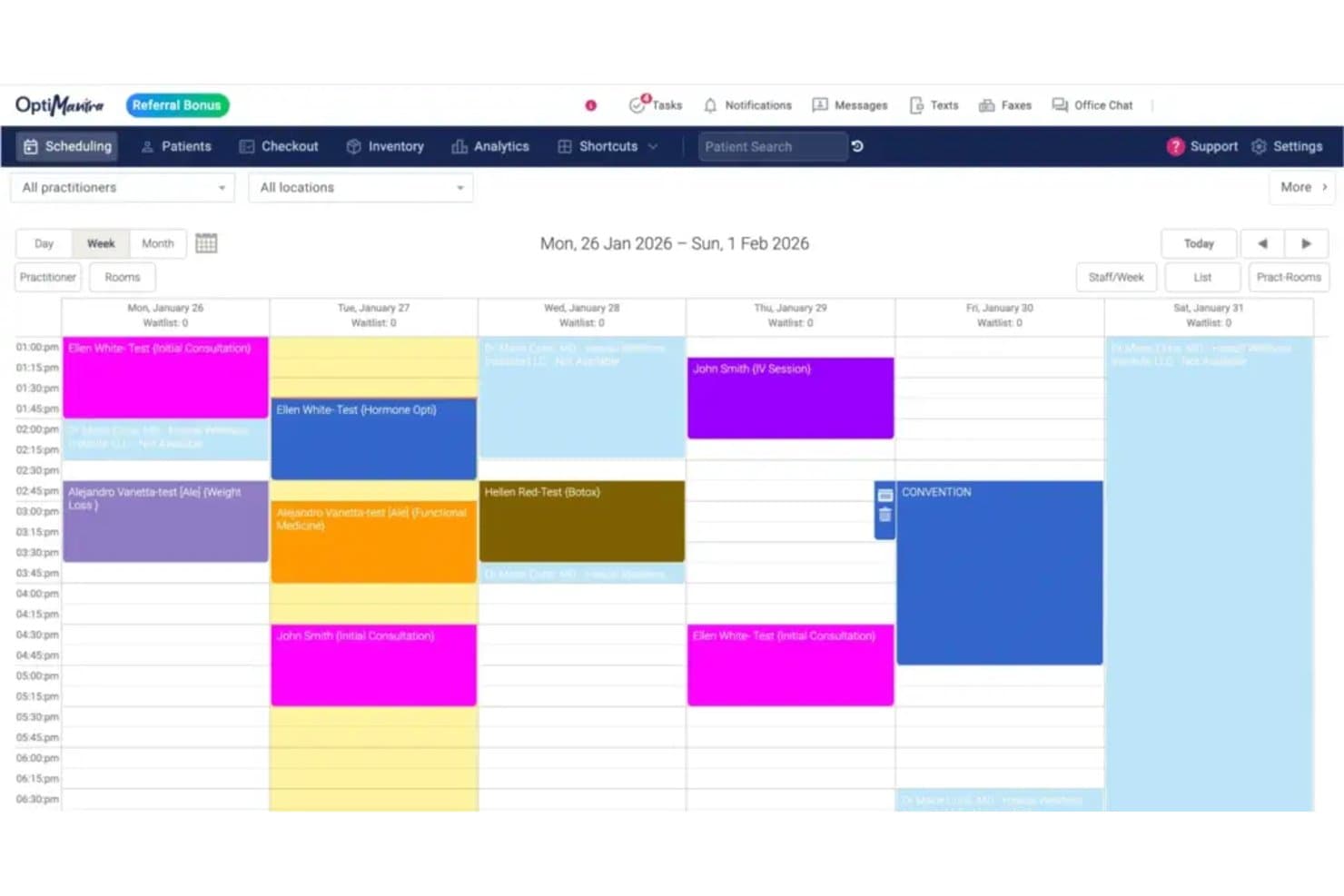
OptiMantra offers a color-coded weekly scheduling calendar view that displays patient appointments, session types, and practitioner availability across multiple days. OptiMantra is an EHR and practice management platform built for integrative and holistic providers, combining customizable charting, scheduling, e-prescribing, telehealth, lab integrations, and insurance billing in a single system.
Who Is OptiMantra Best For?
OptiMantra is a strong fit for solo practitioners and small multi-provider clinics in integrative, functional, or primary care medicine.
Why I Picked OptiMantra
OptiMantra earns its spot as one of the best on my shortlist because of how deeply it lets you customize charting at the individual practitioner level. Every provider in a practice can build their own initial and follow-up intake forms, and the SOAP template library covers all four note sections with clickable and copy-paste options. I also like the "Existing Chart Follow-up" import feature, which pulls prior chart content directly into a new visit note without starting from scratch.
OptiMantra Key Features
- Integrated telehealth: Secure video visits built into the platform with HIPAA compliance and synced charting workflows.
- E-prescribing with EPCS: Electronic prescribing for all medication classes, including controlled substances, with Surescripts connectivity.
- Bidirectional lab and imaging orders: Direct integration for ordering and receiving results from LabCorp, Quest, Rupa Health, and leading imaging centers.
- Patient portal and two-way messaging: Online patient access for appointment scheduling, forms, and secure HIPAA-compliant communication.
OptiMantra Integrations
OptiMantra offers native integrations with LabCorp, Quest Diagnostics, Fullscript, Surescripts (via MDToolbox), Stripe, Authorize.net, SimonMed, and Rupa Health. An API is available for custom integrations.
Pros and Cons
Pros:
- Built-in telehealth and e-prescribing capabilities
- Robust multi-specialty and multi-location support
- Customizable chart templates for each provider
Cons:
- No direct PDMP integration for controlled substances
- ONC certification status is not confirmed
Learn more about OptiMantra: Best for behavioral health practices
- Free demo available
- Pricing upon request
Visit WebsiteCustomer Rating:4.3/5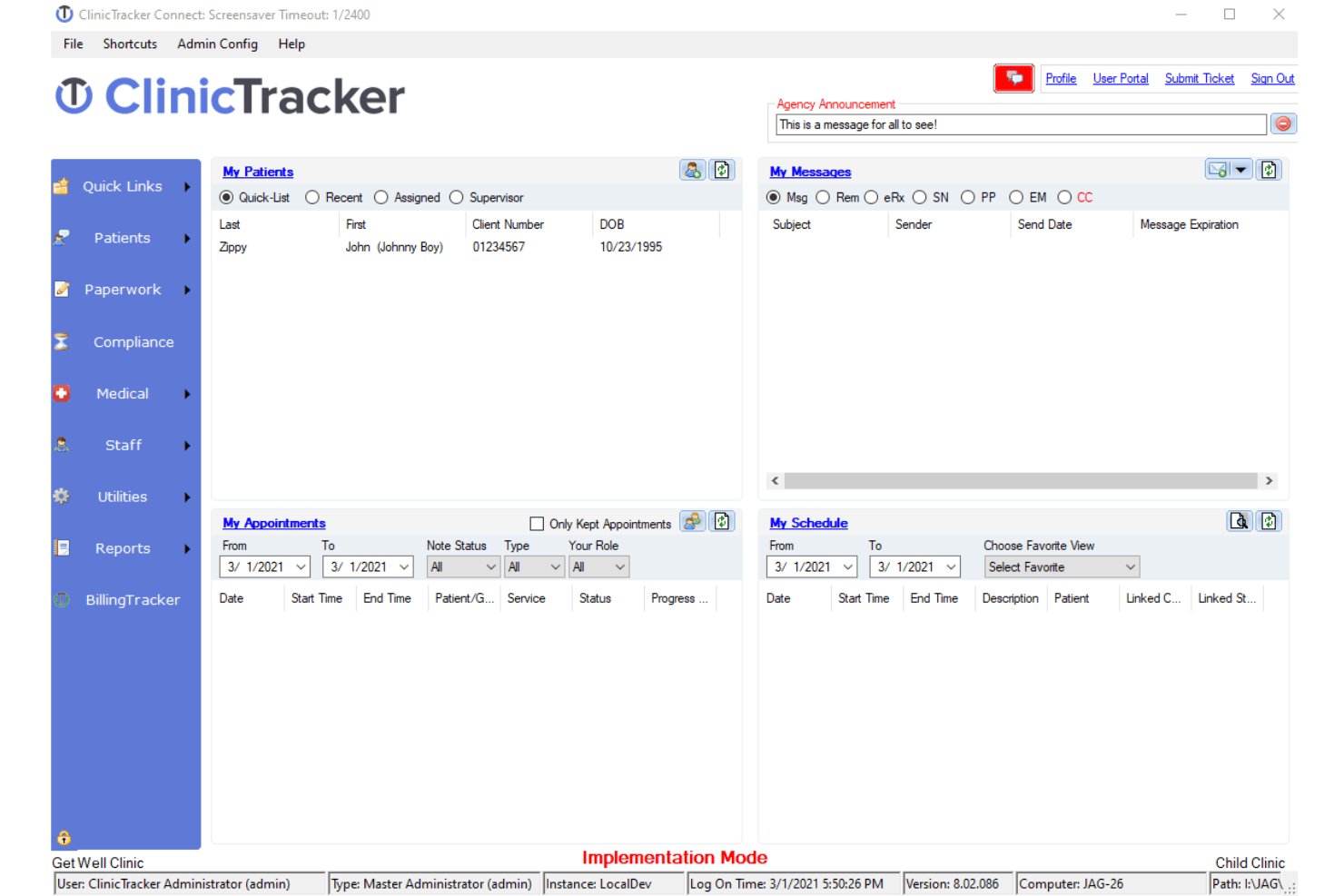
ClinicTracker offers a comprehensive dashboard for managing clinical workflows. ClinicTracker is a behavioral health EHR that combines clinical documentation, practice management, scheduling, e-prescribing, and integrated billing into a single platform built specifically for mental health, substance use, and ABA therapy providers.
Who Is ClinicTracker Best For?
ClinicTracker is a strong fit for outpatient behavioral health organizations — including mental health clinics, substance use treatment centers, and PHP/IOP programs — that need specialty-specific workflows.
Why I Picked ClinicTracker
ClinicTracker earns its spot on my list because no other EHR on my shortlist is built as specifically for behavioral health as this one. I picked it for its specialty-specific documentation tools: configurable treatment plans, crisis plans, and behavioral health SOAP notes that fit real mental health workflows. I also like that EPCS-enabled e-prescribing is built in for MAT programs, so providers aren't juggling separate tools to manage prescriptions alongside clinical records.
ClinicTracker Key Features
- Custom form builder: Lets you design tailored forms to capture and track unique clinical and administrative data points.
- Executive dashboard: Offers real-time financial, clinical, and operational reporting for management oversight.
- Cloud fax and secure direct messaging: Enables HIPAA-compliant secure exchange of clinical documents with other providers.
- Patient portal integration: Gives patients secure access to records, appointment scheduling, and bill payment tools.
ClinicTracker Integrations
ClinicTracker offers native integrations with TransFirst, its clearinghouse partner, lab orders and results systems, and credit card processing providers. It also provides an API for custom integrations.
Pros and Cons
Pros:
- Custom form builder for unique documentation needs
- Built-in e-prescribing with controlled substance support
- Specialty templates for behavioral health encounters
Cons:
- Limited pediatric and preventive care charting
- Not designed for general family practice workflows
Learn more about ClinicTracker: Best for customizable family practice workflows
- Free demo available
- Pricing upon request
Visit WebsiteCustomer Rating:5/5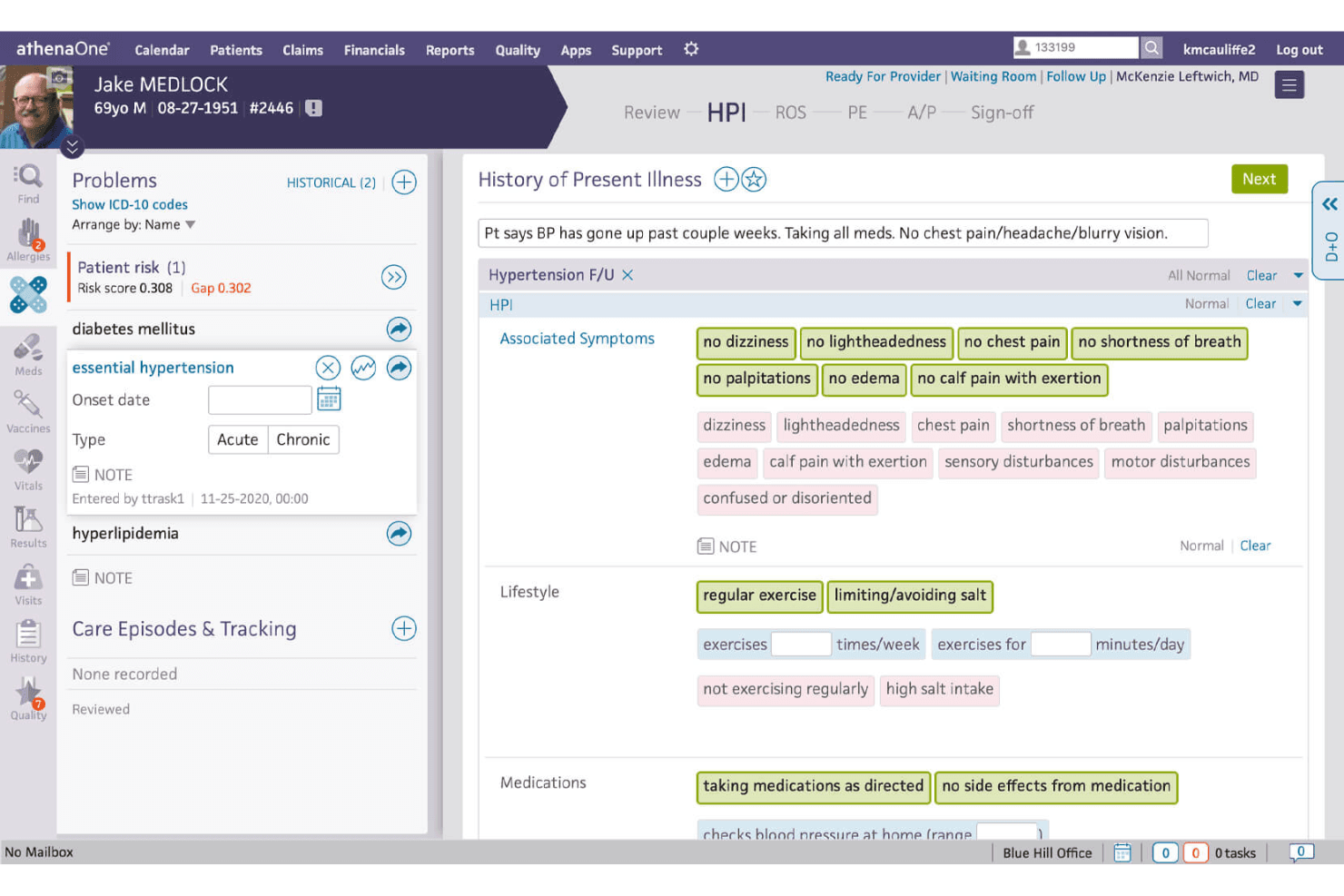
The patient history management feature in Athenahealth allows family doctors and practitioners to view and manage patient records efficiently. Athenahealth is a cloud-native EHR platform that combines clinical charting, revenue cycle management, practice management, and patient engagement tools in a single ambulatory-focused solution.
Who Is Athenahealth Best For?
Athenahealth fits ambulatory practices from solo physicians to mid-sized multi-specialty groups who need a single platform to handle clinical, billing, and front-office workflows.
Why I Picked Athenahealth
Athenahealth earns its spot on my shortlist because of how genuinely adaptable its charting environment is for family practice. The widget-based chart design lets physicians rearrange their workspace around the care patterns they see daily, from pediatric well visits to geriatric chronic disease management. I also like the ambient note feature, which captures encounter documentation in the background so charting doesn't eat into patient time.
Athenahealth Key Features
- Integrated telehealth: Schedule and conduct video visits directly in the EHR workflow for virtual care.
- Immunization registry integration: Sync bidirectionally with state vaccine registries for up-to-date immunization records.
- Population health management: Track patient cohorts and care gaps with built-in registries and preventive care tools.
- MIPS/MACRA quality dashboards: Monitor performance measures and participation in CMS incentive programs from within the platform.
Athenahealth Integrations
Athenahealth offers over 500 native and marketplace integrations, including LabCorp, Quest Diagnostics, Surescripts, Boostlingo, Teledoc, Philips, and BioReference. An API is available for custom integrations.
Pros and Cons
Pros:
- Integrated bidirectional lab and imaging orders
- Comprehensive ambulatory-specific workflows and tools
- Highly customizable family practice chart templates
Cons:
- Percentage-of-collections pricing model can be costly
- Steep transition process for legacy data
Learn more about Athenahealth: Best for solo and multi-provider practice growth
- Free demo available
- Pricing upon request
Visit WebsiteCustomer Rating:3.9/5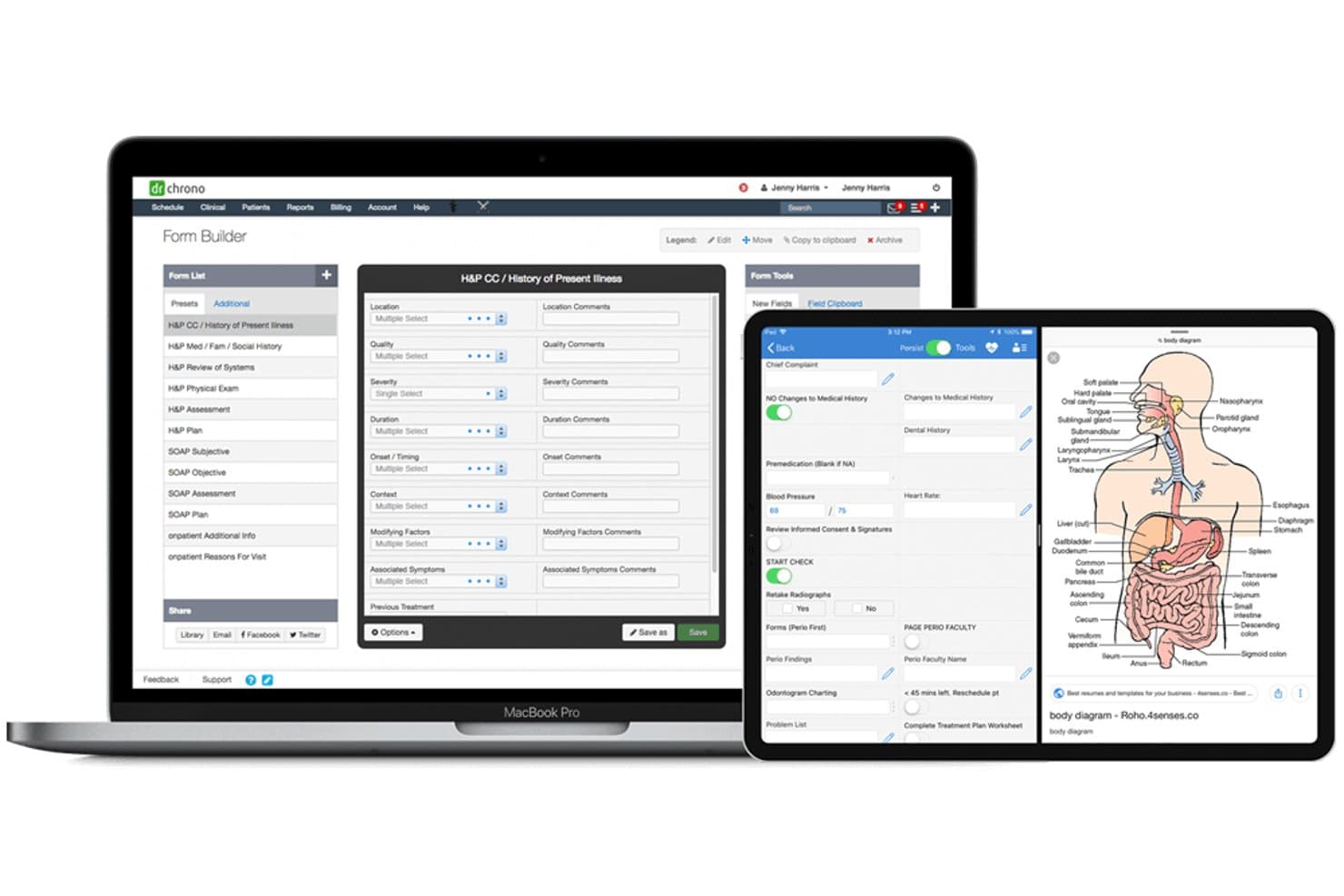
DrChrono EHR offers a customizable Form Builder with H&P templates, mobile charting, and anatomical body diagrams across desktop and tablet devices. DrChrono EHR is a cloud-based, mobile-first EHR platform that combines clinical charting, practice management, e-prescribing, lab integration, and integrated medical billing into a single system built for independent practices.
Who Is DrChrono EHR Best For?
DrChrono suits solo physicians and small-to-mid-sized independent practices that want a single platform to manage both clinical and administrative workflows as they grow.
Why I Picked DrChrono EHR
DrChrono EHR earns its spot on my shortlist because of how well it scales with a practice without requiring a platform switch. I particularly like the tiered plan structure (Foundation, Growth, Premium) that lets a solo physician start lean and unlock advanced RCM, AI ambient documentation via EverHealth Scribe, and extended lab connectivity as their patient volume grows. The No-Show Predictor and iOS-native charting are features I think solo providers will genuinely use every single day.
DrChrono EHR Key Features
- Integrated telehealth: Provides secure, built-in video visits that sync with clinical charting and scheduling workflows.
- Bidirectional lab and imaging integrations: Connects with Quest, LabCorp, and over 40,000 lab and imaging providers for sending orders and receiving results.
- OnPatient portal and mobile app: Lets patients message providers, view their health records, and complete forms online or through a dedicated app.
- Immunization registry connectivity: Supports electronic vaccine tracking and state immunization reporting for both pediatric and adult encounters.
DrChrono EHR Integrations
DrChrono EHR offers native integrations with Quest Diagnostics, LabCorp, Surescripts, CoverMyMeds, and Iron Bridge for lab, pharmacy, and immunization registry connections. An open API and integration marketplace are available for custom and third-party integrations.
Pros and Cons
Pros:
- Tiered plans support growing practice needs
- Integrated medical billing and RCM tools
- Mobile-first iOS app for clinical charting
Cons:
- Reported long response times from support
- Dated user interface on desktop
Learn more about DrChrono EHR: Best for cloud-based accessibility and ease of use
- 14-day free trial + free demo available
- From $199/user/month (billed annually)
Visit WebsiteCustomer Rating:3.8/5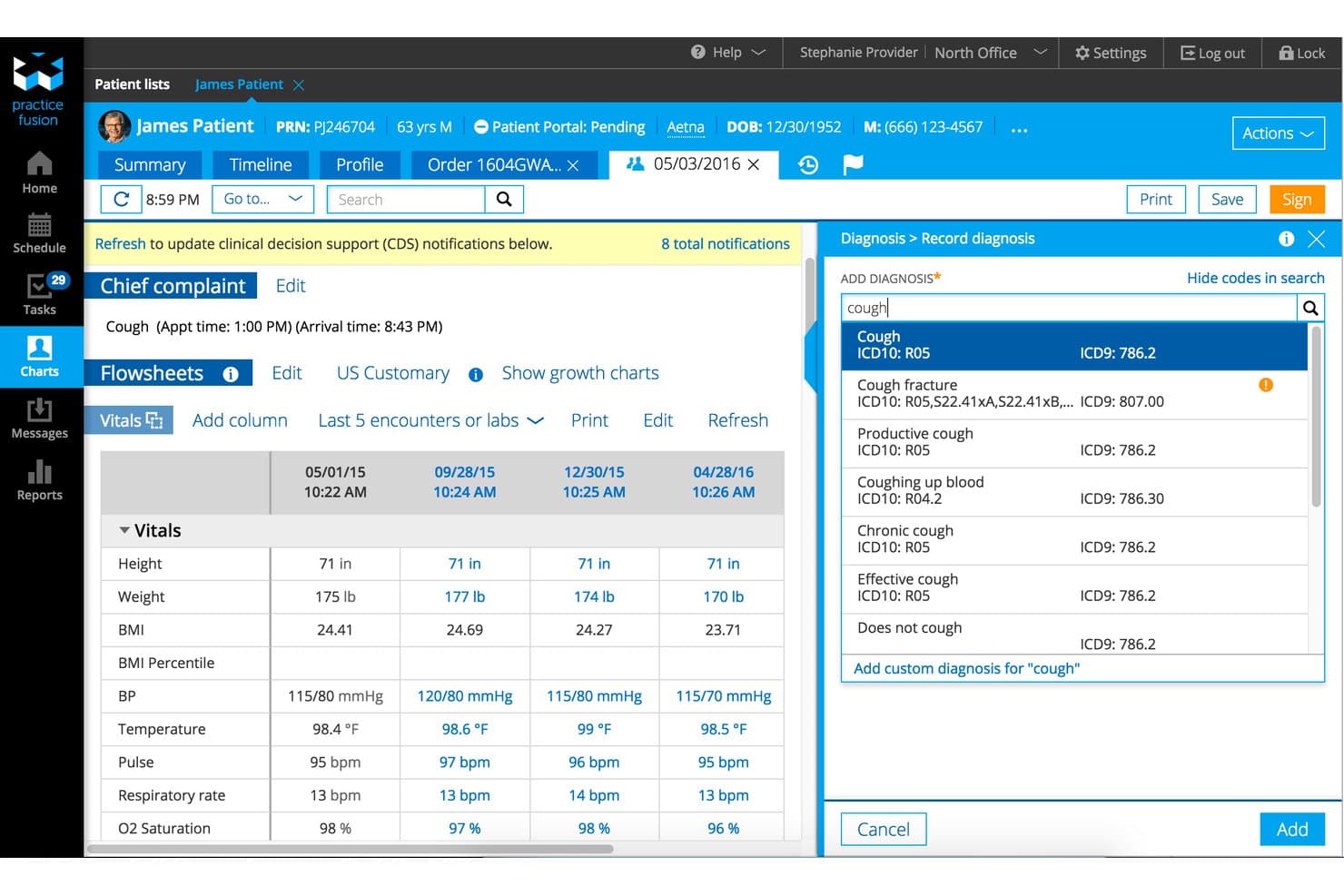
Practice Fusion EHR offers an integrated patient chart view combining vitals flowsheets and real-time diagnosis coding search in a single screen. Practice Fusion EHR is a cloud-based electronic health record system built for independent practices, combining clinical charting, e-prescribing, lab and imaging integrations, a free patient portal, and practice management tools.
Who Is Practice Fusion EHR Best For?
Practice Fusion is a strong fit for independent and small outpatient practices that need an accessible, no-hardware EHR without a steep implementation curve.
Why I Picked Practice Fusion EHR
Practice Fusion EHR earns its spot on my shortlist because it's one of the few EHRs where you can pull up a full patient chart from a tablet at the bedside, a laptop at the front desk, or a phone between appointments, with no software to install. I love that automatic updates run in the background, so there's no IT downtime or version mismatch across your team. The customizable SOAP note templates, validated in pediatric workflows, mean you can complete and sign clinical notes quickly from wherever you're working.
Practice Fusion EHR Key Features
- Integrated lab and imaging connections: Connects with hundreds of diagnostic providers for electronic orders and real-time results.
- HIPAA-compliant patient portal: Lets patients view records, communicate with providers, and request appointments securely.
- Quality and MIPS dashboards: Built-in dashboards track eCQM, Meaningful Use, and MIPS reporting requirements.
- Onshore support and training: Includes live phone, email, and chat support plus one-on-one implementation sessions.
Practice Fusion EHR Integrations
Practice Fusion EHR offers native integrations with Updox, AdvancedMD, Kareo, NueMD, and hundreds of lab and imaging centers. An API is available for custom integrations.
Pros and Cons
Pros:
- Free included patient portal with secure messaging
- Customizable chart templates for primary care
- Cloud access from any internet-connected device
Cons:
- Reports of delayed customer support response
- Telehealth requires a separate paid add-on
Learn more about Practice Fusion EHR: Best with AI-enabled ambient documentation tools
- Free demo available
- From $429/user/month
Visit WebsiteCustomer Rating:3.6/5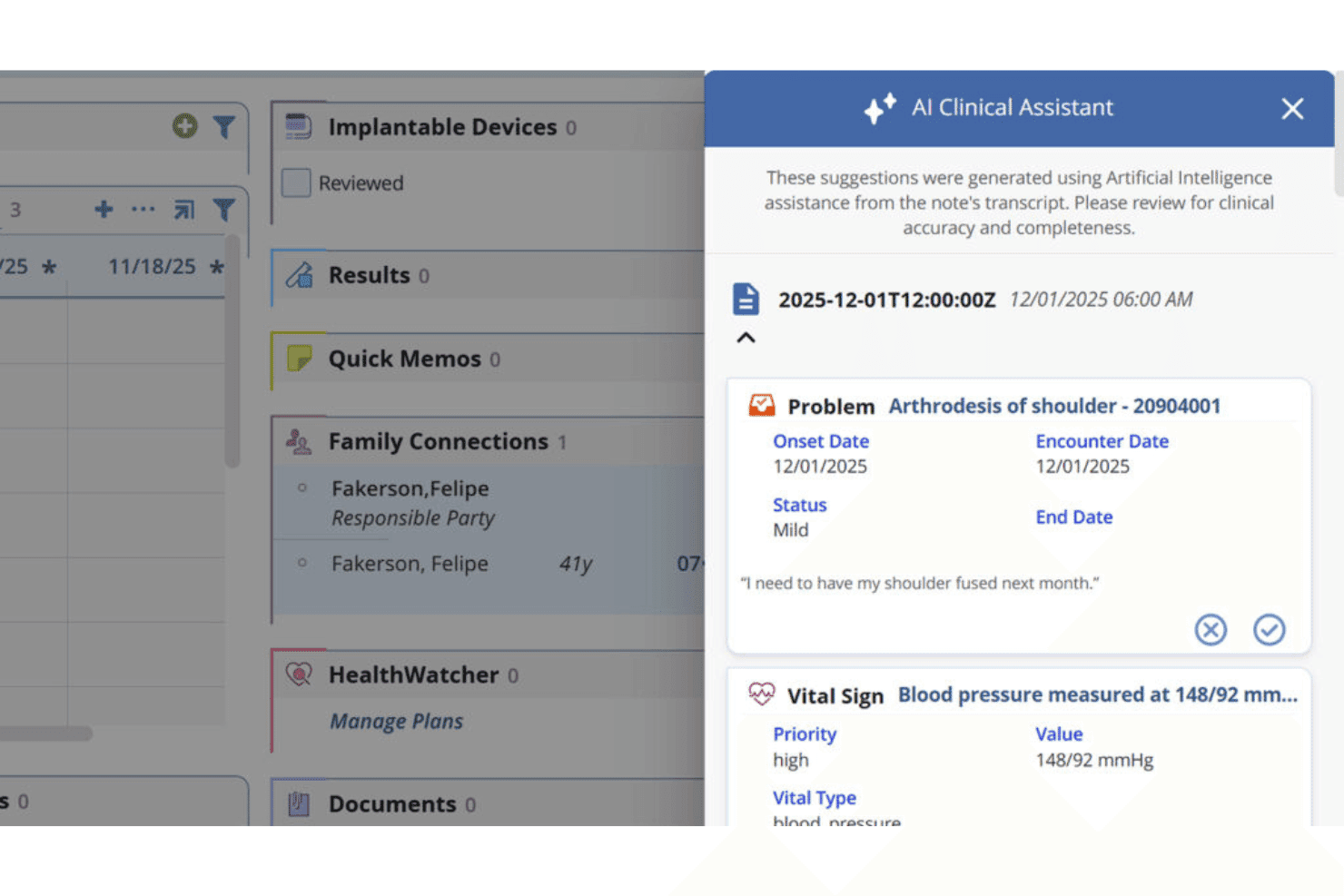
AdvancedMD’s AI Clinical Assistant creates SOAP notes and pre-visit summaries. AdvancedMD EMR is a cloud-based EHR platform that unifies clinical charting, practice management, patient engagement, and revenue cycle management for independent and group medical practices across specialties.
Who Is AdvancedMD EMR Best For?
It's a strong fit for practice managers and billing coordinators at independent and small-to-midsize group practices who need clinical and financial operations under one roof.
Why I Picked AdvancedMD EMR
AdvancedMD EMR earns its spot on my shortlist because its ambient documentation suite goes further than most competitors. I love that the AI Clinical Assistant captures natural conversation during a visit, then generates a structured SOAP note automatically, so physicians aren't transcribing after the appointment ends. The AI Pre-visit Summary also pulls together medications, labs, allergies, and risk factors before the patient even walks in.
AdvancedMD EMR Key Features
- Integrated telehealth module: Schedule and conduct remote video visits directly from the EHR platform.
- Bidirectional lab integration: Order labs and receive results electronically with major lab partners.
- Customizable family practice templates: Adapt visit note templates to suit pediatric, adult, and geriatric workflows.
- Automated MIPS/MACRA reporting: Track quality measures and generate CMS-compliant reports inside the platform.
AdvancedMD EMR Integrations
AdvancedMD EMR offers native integrations with Waystar, Zoom, and state and regional Health Information Exchanges. An API and FHIR APIs are available for custom integrations and data exchange with third-party systems.
Pros and Cons
Pros:
- Seamless telehealth visits integrated in workflows
- Ambulatory care templates support multiple specialties
- AI-powered SOAP note generation saves time
Cons:
- Custom template setup can be complex
- Limited pediatric-specific tools for growth tracking
Learn more about AdvancedMD EMR: Good for small practices with its intuitive and easy-to-learn interface
- 7-day free trial
- From $229/month
Visit WebsiteCustomer Rating:3.6/5
The scheduling feature in Amazing Charts has an intuitive interface. Amazing Charts, as an EHR, is known for its intuitive and user-friendly interface, emphasizing easy-to-use charting and note-taking functions. This EHR is designed for healthcare providers who prioritize simplicity in documenting patient interactions.
Why I Picked Amazing Charts:
When I was comparing various EHR tools, Amazing Charts caught my attention with its user-centric design. I selected this tool because it truly simplifies note-taking and charting for physicians, which is vital in a busy healthcare setting. It stands out for its clear, intuitive user interface that can help reduce the learning curve for new users. The tool is indeed "best for" user-friendly charting and note-taking as it allows doctors to focus more on patient care and less on data entry.
Standout features and integrations:
Some of the important features include the easy-to-use patient chart system, integrated patient portal, and efficient e-prescribing. The charting function stands out with its simplicity and quick data entry. As for integrations, Amazing Charts can sync with a variety of billing systems and labs to streamline workflows, in addition to being compatible with numerous practice management tools.
Pros and Cons
Pros:
- Affordability for smaller practices
- Compatibility with a variety of systems
- Simple, intuitive interface for efficient note-taking
Cons:
- Annual billing cycle may not appeal to all practices
- Fewer features compared to some competitors
- Limited customization options
Learn more about Amazing Charts: Best for unified billing and practice management
- Free demo available
- Pricing upon request
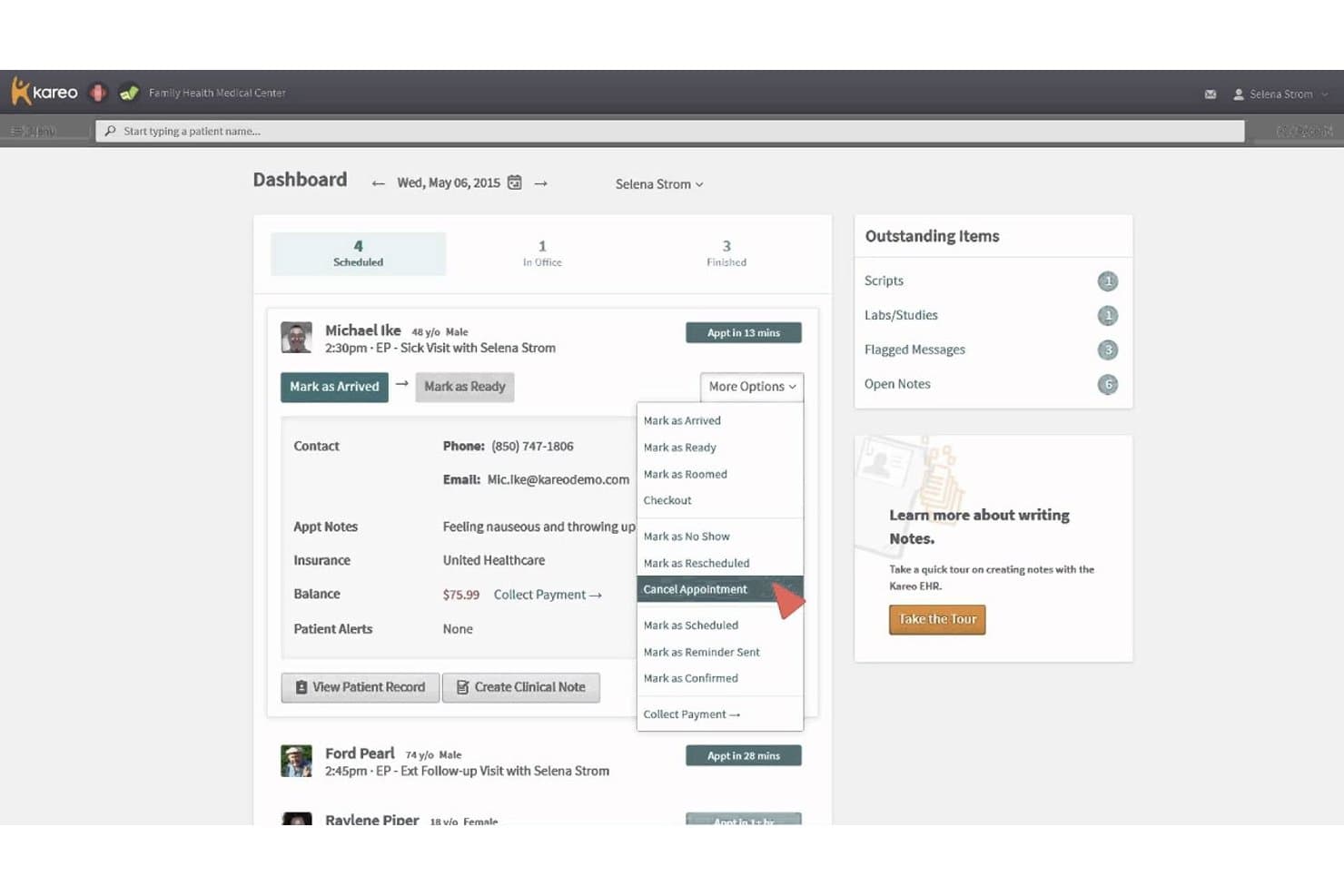
Kareo Clinical EHR offers a dashboard with appointment management options, including cancellation, rescheduling, and patient status updates via a dropdown menu. Kareo Clinical EHR is a cloud-based EHR platform built for independent practices that combines clinical charting, e-prescribing, lab ordering, telehealth, and integrated billing in a single system.
Who Is Kareo Clinical EHR Best For?
It's a strong fit for small to mid-sized independent practices that want clinical documentation and revenue cycle management in one connected platform.
Why I Picked Kareo Clinical EHR
Kareo Clinical EHR earns its spot on my shortlist because of how tightly it connects clinical documentation to revenue cycle management. I like that a completed SOAP note flows directly into claim creation, with real-time eligibility checks and claim scrubbing built in, so billing doesn't lag behind care delivery. The AI Note Assist feature also helps me close notes faster, which means fewer incomplete encounters holding up the billing queue.
Kareo Clinical EHR Key Features
- Integrated telehealth: Built-in HIPAA-compliant video visits connect directly with clinical charting and scheduling.
- E-prescribing with EPCS and PDMP: Allows controlled substance prescribing and real-time prescription drug monitoring.
- Patient portal with forms and messaging: Patients can access records, complete intake forms, and securely message the practice.
- Bidirectional lab and imaging integration: Supports two-way ordering and result retrieval with major labs and imaging centers.
Kareo Clinical EHR Integrations
Kareo Clinical EHR offers native integrations with LabCorp, Quest Diagnostics, Surescripts, Appriss Health, Dragon Medical One, and multiple medical billing partners. An API is available for custom integrations.
Pros and Cons
Pros:
- Real-time prescription monitoring for controlled substances
- SOAP notes sync directly to billing workflow
- Automated claim scrubbing and denial tracking
Cons:
- Data migration can be challenging for new users
- Reports of slow customer support response
Learn more about Kareo Clinical EHR: Best for its highly customizable interface
- Free demo available
- Pricing upon request
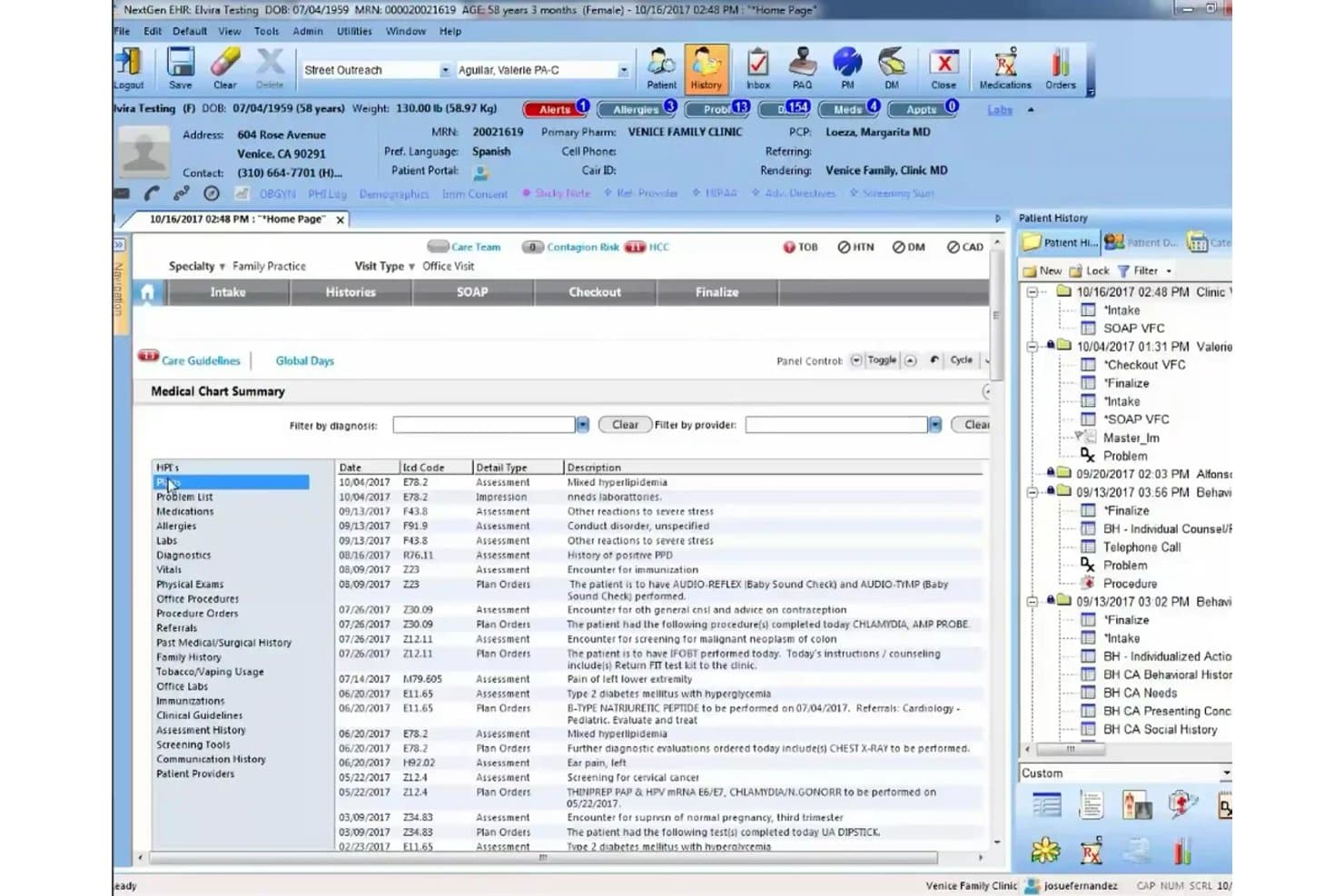
NextGen EHR offers a comprehensive Medical Chart Summary view that consolidates patient diagnoses, ICD codes, assessment types, and visit history in a single streamlined interface. NextGen EHR is an ambulatory-focused electronic health record platform that combines specialty-specific clinical charting, integrated practice management, e-prescribing, billing, and patient engagement tools for independent and enterprise-level practices.
Who Is NextGen EHR Best For?
NextGen EHR is a strong fit for mid-size to large ambulatory practices with 10 or more providers that operate across multiple specialties or locations.
Why I Picked NextGen EHR
I've included NextGen EHR in my top picks because its depth of customization goes well beyond surface-level template editing. I love that clinical teams can configure specialty-specific SOAP note templates, preventive care workflows, and chronic disease management forms to match how their practice actually operates. The ability to build custom quality management reports, tailored to specific compliance programs like MIPS, is something I find genuinely hard to replicate in less configurable platforms.
NextGen EHR Key Features
- Integrated telehealth: Provides built-in video visit functionality with seamless charting integration for virtual appointments.
- MIPS/MACRA reporting dashboards: Tracks and displays quality measures and compliance data for federal incentive programs.
- Population health management tools: Features registries and care gap tracking to support proactive, preventive family medicine workflows.
- Immunization registry connectivity: Offers bidirectional integration with state immunization registries for up-to-date vaccine tracking.
NextGen EHR Integrations
NextGen EHR offers native integrations with LabCorp, Quest Diagnostics, Doctible, Solutionreach, Clearwave, InstaMed, and Kno2. It includes the Mirth Connect interoperability engine, provides access to 725+ labs via NextGen Share, and has an API and marketplace for custom integrations.
Pros and Cons
Pros:
- Real-time reporting for regulatory compliance programs
- Strong specialty-specific templates for family practice
- Deeply customizable charting and workflows
Cons:
- Initial configuration can be resource intensive
- System speed issues reported during peak times
Learn more about NextGen EHR: Best for integrated AI-powered clinical workflows
- Free demo available
- From $280/user/month
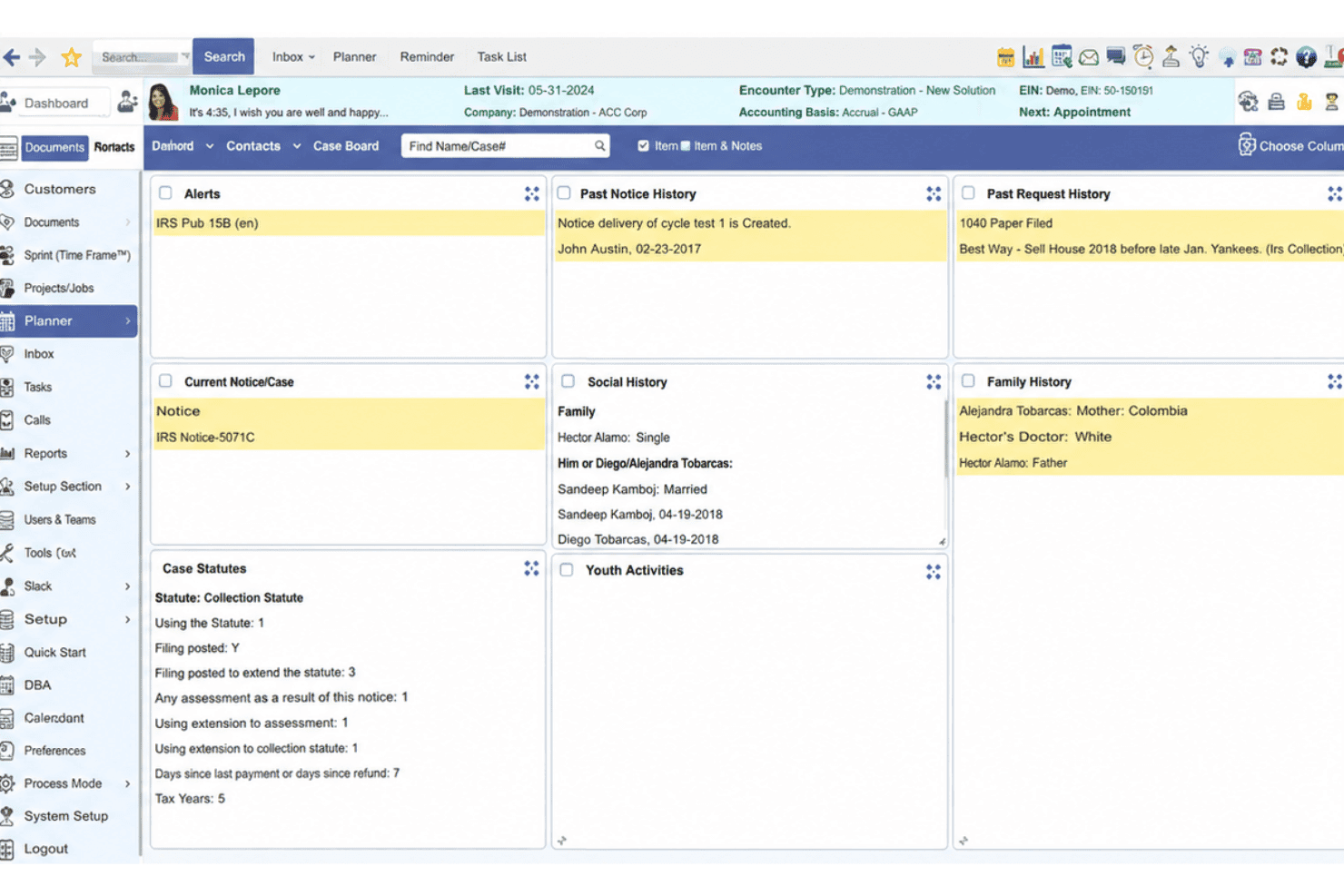
PrognoCIS EHR blends charting, billing, e-prescribing, telehealth, and AI. PrognoCIS EHR is a cloud-based ambulatory EHR platform combining clinical documentation, practice management, integrated billing, e-prescribing, telemedicine, and native AI-powered charting tools across 25+ specialties.
Who Is prognoCIS EHR Best For?
PrognoCIS EHR is a strong fit for independent and mid-size ambulatory practices that need specialty-specific workflows and an all-in-one clinical and billing platform.
Why I Picked prognoCIS EHR
PrognoCIS EHR earns its spot as one of the best on my shortlist because of how deeply its AI layer, PrognoAI, is woven into everyday charting. I particularly like the ambient AI scribe, which generates real-time visit summaries without pulling the provider's attention away from the patient. Unlike tools that bolt on AI as an afterthought, PrognoCIS builds it directly into the documentation workflow, so there's no toggling between systems to get a clean, complete note.
prognoCIS EHR Key Features
- Specialty templates: Customizable charting templates for primary care, pediatrics, and chronic disease management.
- Bidirectional lab integration: Seamless interface for sending orders and receiving results from major diagnostic labs.
- Integrated patient portal: Secure online access for messaging, record requests, appointment scheduling, and billing.
- Quality measure dashboards: Built-in MIPS and MACRA reporting tools for regulatory compliance and incentive tracking.
prognoCIS EHR Integrations
prognoCIS EHR offers native integrations with LabCorp, Quest Diagnostics, Surescripts, and state immunization registries. An API is available for custom integrations, and the platform supports HL7, FHIR, and CDA connectivity for interoperability.
Pros and Cons
Pros:
- Flexible patient portal for online engagement
- Robust specialty templates for ambulatory practices
- AI charting assistant reduces documentation workload
Cons:
- Occasional delays with customer support response
- Pediatric growth charts require manual setup
Learn more about prognoCIS EHR:
Alte sisteme EHR pentru medicina de familie
Mai jos este o listă cu alte sisteme EHR pentru medicina de familie pe care le-am inclus pe lista scurtă, dar care nu au ajuns în primele 10. Merită cu siguranță să le verificați.
- 11IntergyBest for large practices needing robust analytics
- 12Modernizing MedicineBest for practices needing specialty-specific features
- 13Office Ally EHRBest for practices wanting free functionality for basic needs
- 14SevocityGood for practices seeking personalized customization at no extra charge
- 15EHR Your WayGood for its dictation feature that allows note creation in under a minute
- 16ICANotesGood for behavioral health professionals needing specialized templates
- 17Office PracticumGood for pediatric practices with pediatric-specific workflows
- 18RXNTGood for its affordability and straightforward pricing
- 19eClinicalWorksGood for the incorporation of telehealth and virtual assistance
- 20Oracle Health MillenniumGood for its wide integration capabilities across different healthcare services
How I Evaluate EHR for Family Practice
I split my evaluation into baseline criteria—like family-practice-specific charting and eRx—and the differentiators that separate a good fit from the right fit for your practice.
Core Functionality (Table Stakes For This List)
When I'm selecting tools for my list, I rank each one on a scale from 0 (does not offer the functionality) to 5 (excels in this area) for each core functionality listed below. Then, I calculate the tool's total score into a percentage. Each tool needs to achieve a minimum total score of 65% to be considered for inclusion.
- Family Practice Charting: I look for specialty-specific templates that cover the full age spectrum—well-child visits, annual physicals, and chronic disease management—rather than generic SOAP notes.
- E-Prescribing (eRx): A solid eRx module should include EPCS support, drug interaction alerts, and formulary checking so prescribers can send scripts directly from the encounter.
- Integrated Practice Management: I evaluate whether scheduling, patient registration, and check-in workflows live inside the EHR rather than requiring a separate PM platform to coordinate.
- Medical Billing & Coding: Coding assistance matters here—I check for ICD-10/CPT suggestions tied to encounter data, claim scrubbing, and clearinghouse connectivity for faster reimbursement cycles.
- Lab & Imaging Integration: Bidirectional connectivity with reference labs and imaging centers is what I look for, so orders go out and results flow back into the patient chart automatically.
- Patient Portal & HIPAA Compliance: The portal should let patients message their care team, view records, and request appointments, all within a platform that holds current ONC certification.
Once I have a list of tools that meet this criteria, I consider what sets each platform apart.
Differentiating Factors (What Sets Vendors Apart)
Here's how I compare and contrast different vendors:
Standout Features
AI-powered clinical documentation is a big differentiator—I look for ambient listening or AI scribe tools that draft notes during the visit so physicians aren't charting after hours. Population health tools also matter, especially care gap alerts that flag overdue screenings or vaccines across your patient panel. For practices participating in CMS incentive programs, built-in MIPS/MACRA dashboards that track quality measures in real time can save hours of manual reporting each quarter.
Beyond Features
Interoperability is a key factor I evaluate—HL7/FHIR support and HIE connectivity determine how well a platform exchanges data with hospitals, specialists, and pharmacies your practice works with. I also consider implementation support, particularly data migration from a legacy system and family-practice-specific onboarding. Pricing transparency matters too. Some vendors bundle PM, billing, and portal access into one subscription, while others charge per add-on, which can dramatically shift total cost of ownership for a growing practice.
Cum să alegi cel mai bun sistem EHR pentru medicina de familie
Este ușor să vă pierdeți în liste lungi de funcționalități și structuri complexe de prețuri. Pentru a vă ajuta să rămâneți concentrați în timp ce parcurgeți procesul unic de selectare a software-ului, iată o listă de factori de care trebuie să țineți cont:
| Factor | Ce trebuie luat în considerare |
|---|---|
| FactorScalabilitate | Ce trebuie luat în considerarePoate software-ul să se dezvolte odată cu cabinetul dumneavoastră? Verificați dacă acceptă un număr tot mai mare de pacienți și membri ai personalului fără scăderea performanței. Căutați instrumente care oferă planuri de prețuri flexibile pe măsură ce vă extindeți. |
| FactorIntegrări | Ce trebuie luat în considerareSe integrează cu sistemele existente? Verificați compatibilitatea cu sistemele de facturare, portalurile pentru pacienți și serviciile de laborator. Lipsa integrării poate duce la silozuri de date și ineficiență. |
| FactorPosibilitate de personalizare | Ce trebuie luat în considerarePuteți adapta software-ul la nevoile cabinetului dumneavoastră? Asigurați-vă că instrumentul permite fluxuri de lucru, șabloane și rapoarte personalizate. Lipsa posibilității de personalizare poate duce la un sistem rigid, care nu îndeplinește cerințele specifice. |
| FactorUșurință în utilizare | Ce trebuie luat în considerareEste sistemul intuitiv pentru echipa dumneavoastră? Evaluați interfața și navigarea. Un sistem excesiv de complex poate încetini operațiunile zilnice și poate frustra personalul. |
| FactorImplementare și integrare inițială | Ce trebuie luat în considerareCât timp va dura până când sistemul va fi operațional? Luați în considerare resursele de instruire disponibile și asistența oferită în timpul configurării. Un proces de integrare inițială bine organizat poate reduce la minimum perioadele de nefuncționare și poate accelera adoptarea. |
| FactorCost | Ce trebuie luat în considerareSe încadrează prețul în bugetul dumneavoastră? Analizați ce este inclus în fiecare nivel de preț și identificați eventualele taxe ascunse. Luați în considerare costul total de deținere, inclusiv instruirea și asistența. |
| FactorMăsuri de securitate | Ce trebuie luat în considerareSunt protejate datele și confidențialitatea pacienților? Căutați conformitatea cu HIPAA și cu alte reglementări relevante. Asigurați-vă că software-ul oferă criptare, actualizări regulate și controale de acces pentru protejarea informațiilor sensibile. |
| FactorDisponibilitatea asistenței | Ce trebuie luat în considerareEste ajutorul disponibil rapid atunci când aveți nevoie de el? Verificați dacă furnizorul oferă asistență 24/7 și mai multe metode de contact. Asistența promptă poate preveni întreruperile operațiunilor cabinetului. |
Ce sunt sistemele EHR pentru medicina de familie?
Sistemele EHR pentru medicina de familie sunt platforme digitale care gestionează dosarele pacienților de toate vârstele. Utilizate de medicii de familie, aceste instrumente EHR pentru asistența medicală primară ajută la documentarea îngrijirii, de la cea pediatrică până la cea geriatrică, abordând probleme precum redactarea cronofagă a fișelor medicale, coordonarea îngrijirii și planificarea personalizată a tratamentului.
Funcționalități
Când selectați cel mai bun sistem EHR pentru medicina de familie, urmăriți următoarele funcționalități esențiale ale software-ului EHR:
- Gestionarea dosarelor pacienților: Organizează și stochează în siguranță informațiile despre pacienți, facilitând accesarea și actualizarea dosarelor de către medici.
- Programarea consultațiilor: Permite personalului să programeze, reprogrameze și gestioneze eficient consultațiile pacienților, reducând numărul absențelor și îmbunătățind fluxul pacienților.
- Facturarea și emiterea facturilor: Automatizează procesele de facturare, generează facturi și urmărește plățile, ajutând cabinetele să își gestioneze eficient finanțele.
- Șabloane personalizabile: Oferă posibilitatea de a adapta formularele și documentele la nevoile specifice ale cabinetului, sporind eficiența fluxului de lucru.
- Funcții de telemedicină: Permite consultații virtuale, oferind medicilor posibilitatea de a acorda îngrijiri la distanță și de a-și extinde accesul la pacienți.
- Portal integrat pentru pacienți: Oferă pacienților acces online la informațiile despre sănătatea lor și la programarea consultațiilor, îmbunătățind implicarea acestora.
- Instrumente de sprijin pentru luarea deciziilor: Sprijină furnizorii de servicii medicale în luarea deciziilor clinice prin recomandări bazate pe dovezi.
- Măsuri de securitate a datelor: Asigură protejarea datelor pacienților prin criptare și respectarea unor reglementări precum HIPAA.
- Acces mobil: Permite medicilor să acceseze sistemul EHR de pe dispozitive mobile, sporind flexibilitatea îngrijirii pacienților.
- Rapoarte și analize: Generează rapoarte și informații despre performanța cabinetului, contribuind la luarea unor decizii de afaceri bine fundamentate.
Beneficii
Implementarea software-ului pentru dosare medicale electronice într-un cabinet de medicină de familie oferă mai multe beneficii pentru echipa și afacerea dumneavoastră. Iată câteva dintre acestea:
- Îngrijire îmbunătățită a pacienților: Accesul la dosare complete ale pacienților permite luarea unor decizii clinice mai bine fundamentate și oferirea unei îngrijiri personalizate.
- Eficiență sporită: Programarea și facturarea automatizate reduc volumul de muncă administrativă, permițând personalului să se concentreze mai mult asupra interacțiunilor cu pacienții.
- Implicare sporită a pacienților: Portalurile pentru pacienți le oferă acestora acces facil la informațiile despre sănătatea lor, îmbunătățind comunicarea și implicarea în propria îngrijire.
- Reducerea costurilor: Procesele de facturare simplificate și reducerea documentelor pe suport de hârtie scad costurile operaționale și îmbunătățesc gestionarea financiară.
- Conformitate îmbunătățită: Măsurile de securitate a datelor și funcțiile de conformitate cu reglementările contribuie la protejarea informațiilor pacienților și la respectarea standardelor legale.
- Posibilități de îngrijire la distanță: Funcțiile de telemedicină permit cabinetelor să extindă serviciile dincolo de sediul fizic, deservind mai mulți pacienți și sporind accesibilitatea.
- Informații bazate pe date: Rapoartele și analizele oferă informații valoroase despre performanța cabinetului, sprijinind planificarea strategică și luarea deciziilor.
Costuri și prețuri
Selectarea celui mai bun EHR pentru un cabinet de medicină de familie necesită compararea modelelor de prețuri pentru EHR și a planurilor disponibile. Costurile variază în funcție de funcții, dimensiunea echipei, modulele suplimentare și alți factori. Tabelul de mai jos prezintă planurile obișnuite, prețurile medii ale acestora și funcțiile incluse de regulă în soluțiile EHR pentru cabinete de medicină de familie:
Tabel comparativ al planurilor pentru cel mai bun EHR pentru cabinete de medicină de familie
| Tipul planului | Preț mediu | Funcții obișnuite |
|---|---|---|
| Tipul planuluiPlan gratuit | Preț mediu$0/user/month | Funcții obișnuiteGestionarea de bază a dosarelor pacienților, programarea consultațiilor și asistență limitată pentru clienți. |
| Tipul planuluiPlan personal | Preț mediu$20-$50/user/month | Funcții obișnuiteProgramare avansată, facturare și emitere de facturi de bază și asistență prin e-mail. |
| Tipul planuluiPlan pentru companii | Preț mediu$50-$100/user/month | Funcții obișnuiteȘabloane personalizabile, funcții de telemedicină, portal integrat pentru pacienți și raportare standard. |
| Tipul planuluiPlan pentru întreprinderi | Preț mediu$100-$200/user/month | Funcții obișnuiteAnalize complete, suită completă de integrări, asistență prioritară și măsuri îmbunătățite de securitate a datelor. |
Întrebări frecvente despre EHR pentru cabinetele de medicină de familie
Iată câteva răspunsuri la întrebările frecvente despre EHR pentru cabinetele de medicină de familie:
Se pot integra sistemele EHR cu software-ul existent de gestionare a cabinetului?
Da, multe sisteme EHR oferă integrări cu software-ul de gestionare a cabinetului. Verificați dacă EHR-ul este compatibil cu instrumentele pe care le utilizați în prezent pentru a asigura un flux de date fără întreruperi. Întrebați furnizorii despre compatibilitate și opțiunile de integrare înainte de a lua o decizie.
Care sunt măsurile de securitate ale sistemelor EHR pentru cabinetele de medicină de familie?
Sistemele EHR includ de obicei criptare, controale de acces și piste de audit pentru a proteja datele pacienților. Asigurați-vă că sistemul respectă reglementările HIPAA și solicitați informații despre funcțiile de securitate suplimentare pentru a proteja informațiile sensibile.
Cum îmbunătățește EHR îngrijirea pacienților în cabinetele de medicină de familie?
Sistemele EHR îmbunătățesc îngrijirea pacienților oferind acces facil la dosare medicale complete și sprijinind luarea unor decizii informate. Funcții precum prescrierea electronică și portalurile pentru pacienți îmbunătățesc comunicarea și simplifică procesele de îngrijire.
Ce instruire și asistență oferă furnizorii de sisteme EHR?
Furnizorii de sisteme EHR oferă adesea materiale de instruire, seminare online și asistență pentru clienți pentru a sprijini integrarea inițială. Căutați furnizori care oferă asistență și resurse continue pentru a vă ajuta echipa să utilizeze eficient sistemul.
Sistemele EHR acceptă telemedicina pentru cabinetele de medicină de familie?
Multe sisteme EHR includ funcții de telemedicină, permițând consultații la distanță. Confirmați că sistemul ales acceptă consultații video și se integrează cu fluxul de lucru al cabinetului dumneavoastră, îmbunătățind accesul pacienților la îngrijire.