

Software-ul de facturare medicală en-gros ajută companiile de facturare să gestioneze la scară largă cererile de decontare, plățile și procesele ciclului veniturilor pentru mai mulți clienți din domeniul sănătății. Multe platforme oferă, de asemenea, suport pentru gestionarea farmaciilor, urmărirea tarifelor de achiziție, procesarea comenzilor pentru distribuitori, software de facturare pentru farmacii, controlul stocurilor, gestionarea termenelor de expirare, facturarea GST și alertele privind expirarea.
Dacă sunteți în căutarea platformei potrivite, probabil că aveți nevoie de instrumente care să gestioneze volume mari de cereri de decontare, să îmbunătățească acuratețea, să simplifice fluxurile de lucru pentru farmacii și distribuție și să reducă munca manuală, chiar și atunci când regulile plătitorilor se modifică, iar clienții au propriile cerințe. Acest ghid prezintă alegerile mele principale pentru 2026 și vă explică software-ul conceput pentru a susține operațiuni de facturare în creștere, nevoi pentru mai multe specialități, fluxuri de lucru pentru farmacii și distribuitori și standarde stricte de conformitate, astfel încât să găsiți exact soluția potrivită pentru afacerea dumneavoastră.
Why Trust Our Software Recommendations
6,700+
Reviews
20
Industry experts
16+
Evaluation factors
14
Years
Our team has been testing and reviewing software since 2012. As medical practice leaders ourselves, we know how difficult—and important—it is to choose the right software.
For this guide, we evaluated tools using hands-on testing and independent research, scoring tools using our selection criteria.
Our reviews reflect our human editorial judgment, not a sales pitch.
Tabel comparativ pentru software-ul de facturare medicală en-gros
Tabelul de mai jos compară detaliile privind prețurile pentru selecțiile mele de top de software de facturare medicală en-gros.
Sorted by: Default
| Tool | Starting Price | Website | |
|---|---|---|---|
Best for claims, denials, and payment automation | 4.4 out of 5 | Pricing upon request Free demo available | Website |
Best for straightforward claims | 4.5 out of 5 | $199/user/month Free demo available | Website |
Best for small-practice billing automation | 3.7 out of 5 | Pricing upon request Not available | Website |
Best for EHR and revenue cycle management | 3.4 out of 5 | $499/user/month Free demo available | Website |
Best for specialty medical billing management | Not rated | Pricing upon request Free demo available | Website |
Best for affordable integrated medical billing | 4.3 out of 5 | $335/month Free demo available | Book Demo |
Best for cloud-based medical billing | 4.1 out of 5 | Pricing upon request Free demo available | Website |
Best for multi-specialty practices | 4.1 out of 5 | Pricing upon request Free demo available | Website |
Best for automated billing and claims management | 3.6 out of 5 | $130/user/month 30-day free trial + free demo available | Website |
Best for independent practice billing | 3.9 out of 5 | Pricing upon request Free demo available | Website |


Recenzii despre cel mai bun software de facturare medicală en-gros
Mai jos se află rezumatele mele detaliate ale celui mai bun software de facturare medicală en-gros inclus în lista mea scurtă. Recenziile mele oferă o analiză detaliată a funcțiilor, prețurilor și celor mai potrivite cazuri de utilizare pentru fiecare software, pentru a vă ajuta să îl găsiți pe cel mai bun pentru dumneavoastră.
 Best for claims, denials, and payment automation
- Free demo available
- Pricing upon request
Visit WebsiteCustomer Rating:4.4/5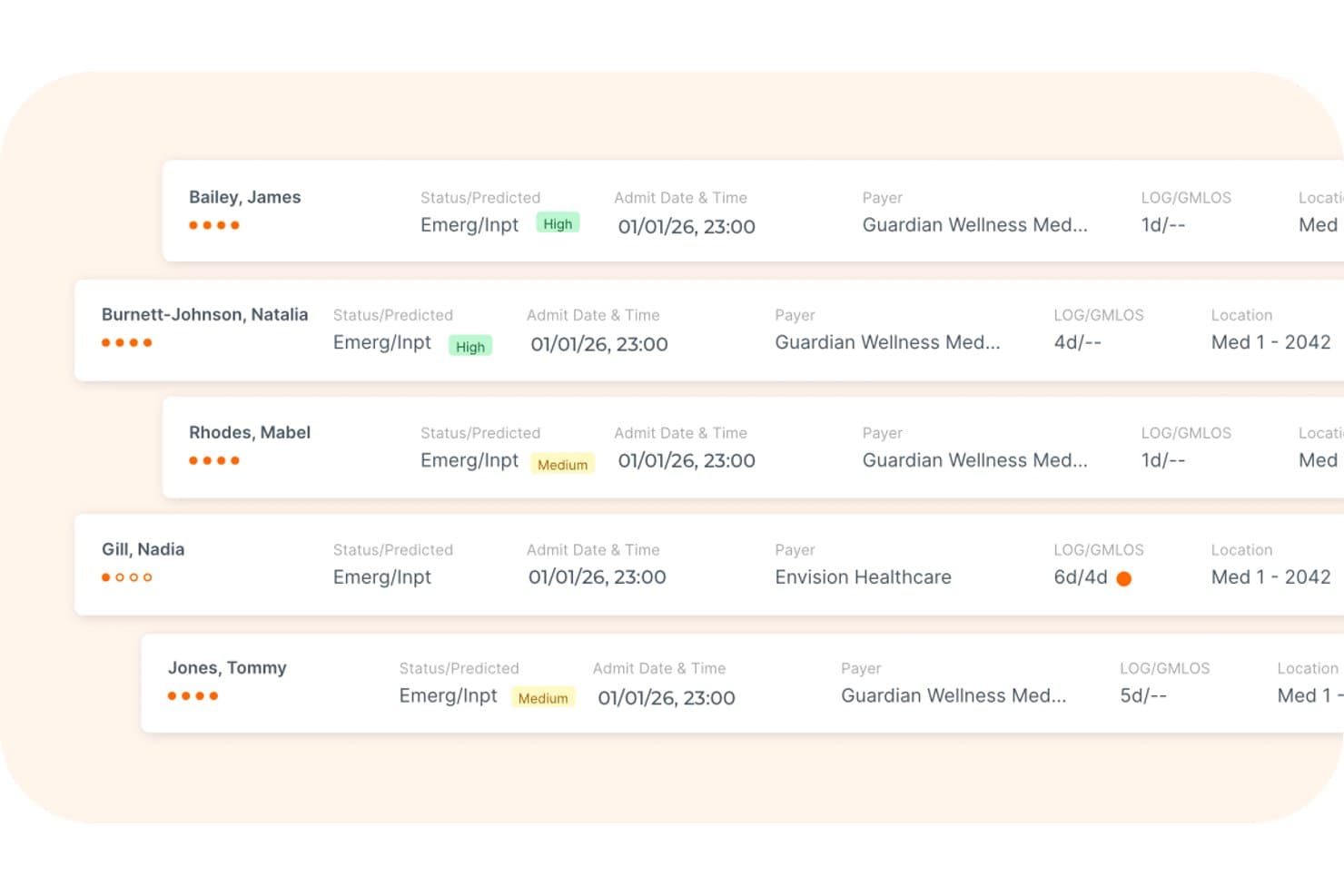
Waystar offers a patient list view displaying emergency inpatient statuses, admit dates, payer information, and length-of-stay metrics for medical billing workflows. Waystar is a cloud-based revenue cycle management platform designed for third-party billing companies and healthcare organizations, combining clearinghouse, denial management, payment automation, and eligibility verification in a single system.
Who Is Waystar Best For?
Waystar is a strong fit for third-party billing companies that manage high claim volumes across multiple client practices and need a dedicated clearinghouse built for that scale.
Why I Picked Waystar
Waystar earns its spot on my shortlist because of how far its claims and payment automation actually goes. I'm particularly impressed by AltitudeAI, which uses predictive analytics to determine the best times to status and appeal claims, and the batch appeals tool lets my team submit up to 100 similar appeals at once with 900+ payer-specific forms attached. On the payment side, automated posting reconciles, splits, and posts 95%+ of payer payments across client accounts without manual intervention.
Waystar Key Features
- Role-based client access: Assign permissions and data visibility for staff working across multiple provider clients.
- Custom workgroup configuration: Set up workgroups and staff assignments for each client within the platform.
- Automated bank reconciliation: Match electronic payments and bank deposits across different client accounts.
- Integrated payer connectivity: Access 600+ real-time payer connections for eligibility and benefit verification.
Waystar Integrations
Waystar offers native integrations with 530+ health information systems and practice management systems, supports 600+ real-time payer connections for eligibility, and provides an API for custom integrations.
Pros and Cons
Pros:
- Supports batch appeals for denials at scale
- Automated posting splits payments by client
- Advanced AI-driven claims scrubbing tools
Cons:
- Contract cancellation can be difficult
- Reporting lacks patient-level denial details
Learn more about Waystar: Best for straightforward claims
- Free demo available
- From $199/user/month
Visit WebsiteCustomer Rating:4.5/5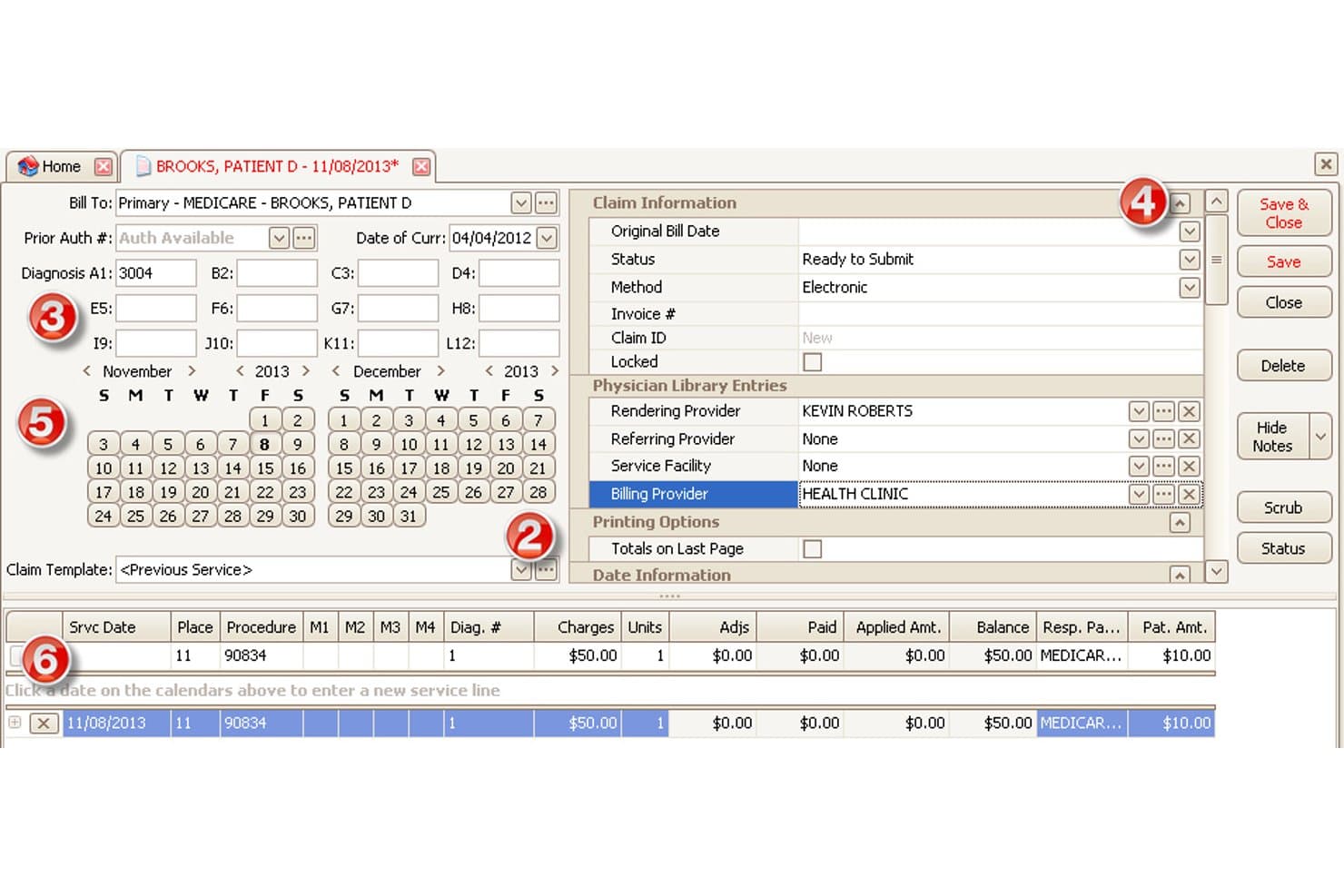
EZClaim offers a detailed claim entry screen with billing provider fields, diagnosis codes, service line entries, and calendar-based date selection for medical billing workflows. EZClaim is a medical billing and scheduling software built for outsourced billing companies and RCM firms, offering multi-client claim management, electronic claim submission, ERA posting, and eligibility verification across multiple provider practices.
Who Is EZClaim Best For?
EZClaim is a good fit for small to mid-sized outsourced billing firms that handle straightforward claims across multiple provider clients.
Why I Picked EZClaim
EZClaim earns its spot on my shortlist because of how cleanly it handles the core mechanics of outsourced claim management. I picked it specifically for its per-client claim templates, which let my team build out CPT code libraries for each provider practice without commingling data across clients. Single-click ANSI 837 5010 submission paired with built-in claim scrubbing means errors get flagged before they ever reach the clearinghouse, keeping first-pass rates high on standard claim types.
EZClaim Key Features
- Customizable patient statements: Generate unique billing statements for each client with branded headers and tailored payment instructions.
- Integrated ERA payment posting: Auto-post ERA payments and adjustments received from payers directly into client accounts for streamlined reconciliation.
- Multi-payer eligibility checks: Verify patient insurance coverage in real time for Medicare, Medicaid, Tricare, commercial, and workers' comp payers.
- EHR system integrations: Sync with EHR platforms including Practice Fusion, Amazing Charts, and WebPT for importing charges and patient data.
EZClaim Integrations
EZClaim offers native integrations with Practice Fusion, Amazing Charts, WebPT, QuickEMR, BillFlash, and ReminderCall. An API is available for custom integrations.
Pros and Cons
Pros:
- Real-time eligibility checks for multiple payers
- Customizable patient statements for each provider
- Supports separate company files per billing client
Cons:
- Limited customization of built-in reporting
- No automated denial workqueue tools
Learn more about EZClaim: Best for small-practice billing automation
- Not available
- Pricing upon request
Visit WebsiteCustomer Rating:3.7/5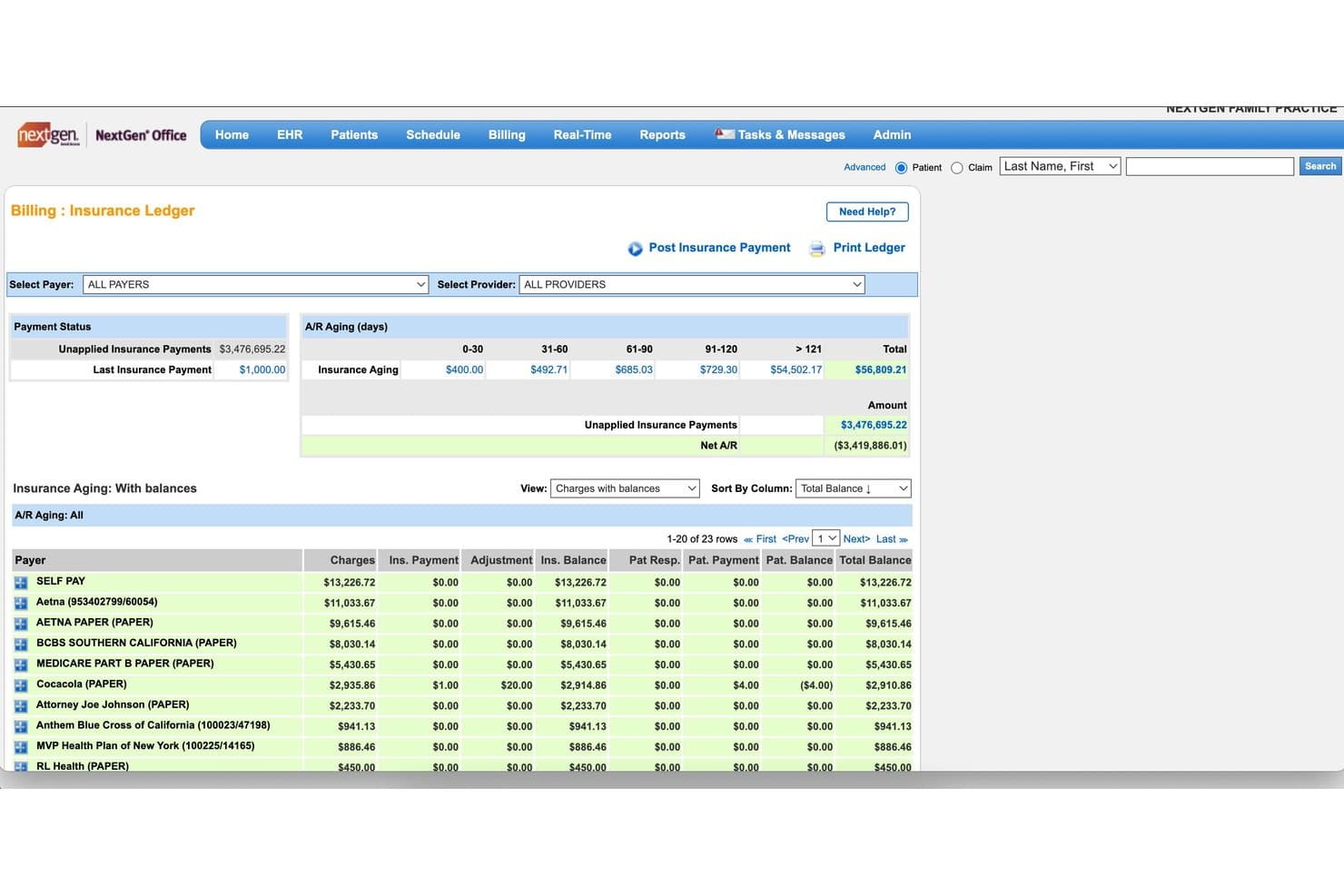
NextGen Office offers an Insurance Ledger with A/R aging breakdowns, unapplied payment tracking, and payer-level balance views for medical billing management. NextGen Office is a cloud-based EHR and practice management platform built for medical billing companies, combining multi-practice claims scrubbing, integrated clearinghouse submission, ERA auto-posting, denial tracking, and A/R management across client practices.
Who Is NextGen Office Best For?
NextGen Office is a strong fit for third-party billing companies managing claims across multiple small-to-mid-size physician practices.
Why I Picked NextGen Office
I picked NextGen Office as one of the best because its Background Business Processor handles automated claims generation, eligibility checks, and statement runs across multiple small practices simultaneously. I like that the integrated clearinghouse comes bundled at no extra cost, so my team isn't paying per-transaction fees when processing high claim volumes. The built-in scrubbing consistently hits first-pass acceptance rates of 95% or higher, which cuts down resubmission time significantly.
NextGen Office Key Features
- Multi-practice management: Lets you manage billing operations for separate provider entities and tax IDs within one platform.
- Automated real-time eligibility checks: Confirms patient benefits and coverage across payers for all client accounts.
- Role-based access controls: Assigns permissions for billing staff and managers by client practice and function.
- Integrated analytics dashboards: Displays KPIs and billing metrics by client for easy performance monitoring.
NextGen Office Integrations
Native integrations include Clearwave, Doctible, Solutionreach, InstaMed, Waystar, Mirth Connect, and OnBase. An API marketplace is available for connecting with third-party applications and building custom integrations.
Pros and Cons
Pros:
- Automated payment posting with ERA support
- Role-based access for multi-client setups
- Multi-practice claim scheduling and automation
Cons:
- System slowdowns during peak submission times
- No branded client-facing billing portal
Learn more about NextGen Office: Best for EHR and revenue cycle management
- Free demo available
- From $499/user/month
Visit WebsiteCustomer Rating:3.4/5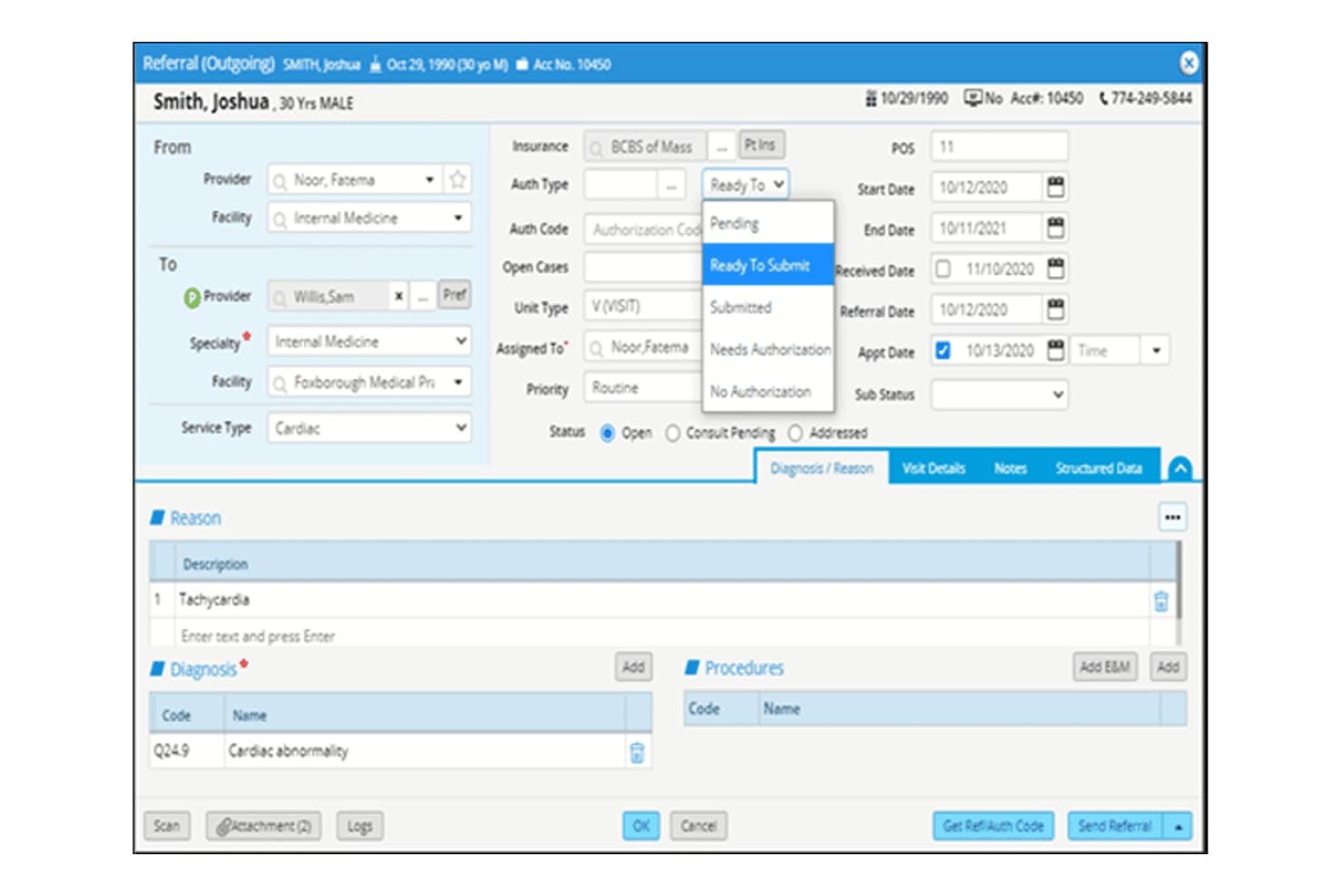
eClinicalWorks offers a detailed outgoing referral form with authorization tracking, diagnosis codes, and submission status options for streamlined medical billing workflows. eClinicalWorks is a cloud-based EHR and RCM platform with Central Billing Office technology built for billing organizations managing claims, denial workflows, and financial operations across multiple client practices from a single system.
Who Is eClinicalWorks Best For?
It's a strong fit for enterprise-scale billing organizations and management services organizations (MSOs) operating Central Billing Offices across multiple client practices.
Why I Picked eClinicalWorks
eClinicalWorks earns its spot on my shortlist because its Central Billing Office (CBO) technology is purpose-built for multi-practice billing operations. I particularly like the Agentic AI for RCM, which generates complete appeal packets, including payer-specific forms and cover letters, in a single click. The RCM Band Dashboard also gives me practice-level financial visibility across every client account without toggling between separate logins or systems.
eClinicalWorks Key Features
- Central Billing Office interface: Lets you onboard and manage billing for multiple client practices within a single environment.
- Practice-level RCM dashboards: Gives users access to real-time financial data, claim statuses, and collection metrics by provider or practice.
- Batch eligibility verification: Allows you to check insurance eligibility for batches of patients across unlimited payers simultaneously.
- Automated EOB to ERA conversion: Converts paper or pdf explanations of benefits into electronic remittance advice for faster payment posting.
eClinicalWorks Integrations
eClinicalWorks offers native integrations with the Sunoh.ai AI medical scribe, healow patient engagement suite, and connects to nationwide health data exchange networks CommonWell and Carequality. An API is available for custom integrations.
Pros and Cons
Pros:
- Practice-level dashboards for client account monitoring
- AI-driven denial management and claim review
- Central Billing Office supports multi-client workflows
Cons:
- Occasional slow response times during updates
- No white-labeled client portal option
Learn more about eClinicalWorks:
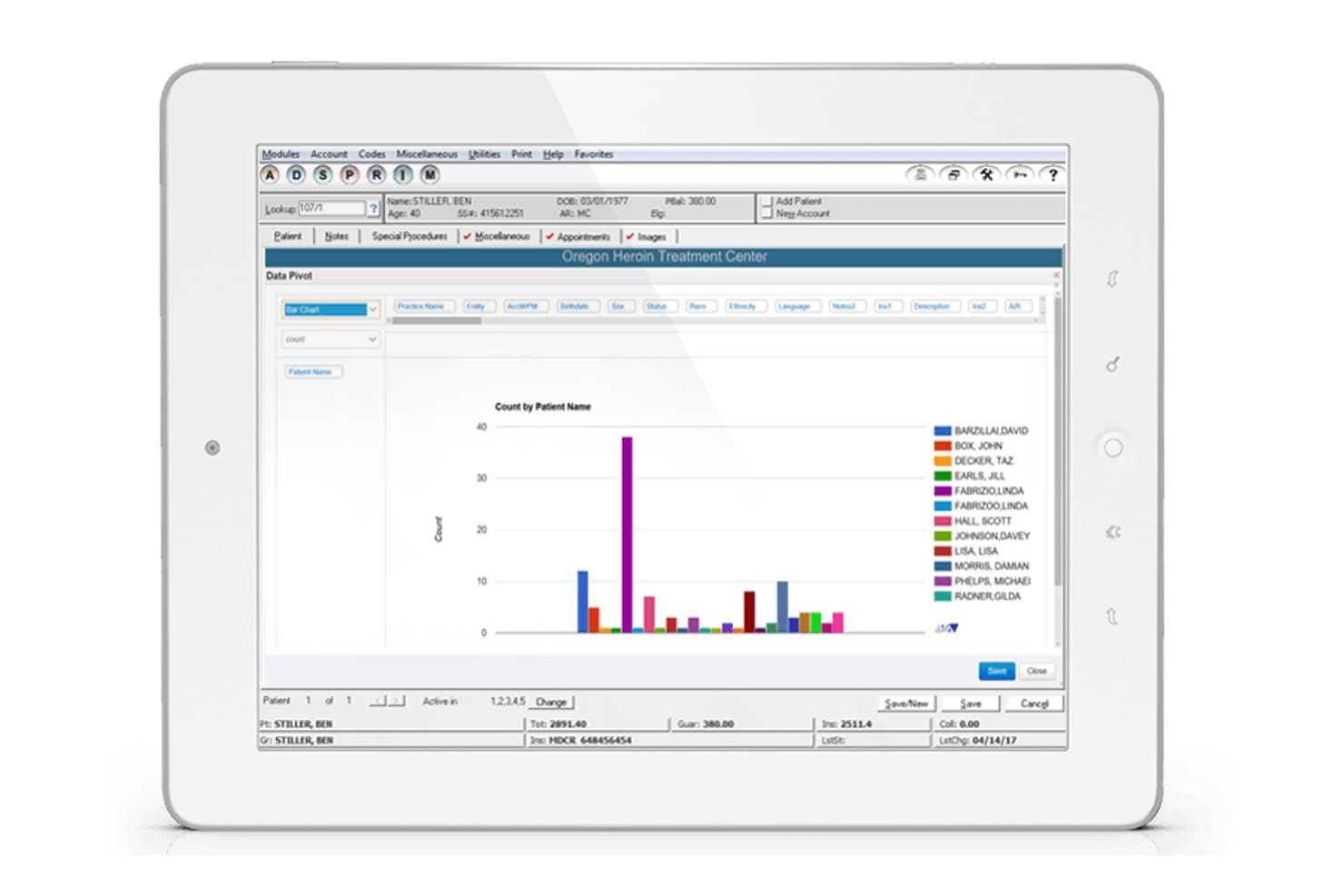
ADSC offers a Data Pivot bar chart report view within its practice management module, displaying patient count analytics for a treatment center. ADSC is a medical billing and RCM platform built for specialty-focused billing companies, combining AI-driven claim scrubbing, multi-specialty workflow management, and outsourced billing services across dermatology, labs, urology, and behavioral health.
Who Is ADSC Best For?
ADSC is a strong fit for third-party billing companies managing high claim volumes across multiple medical specialties from a single platform.
Why I Picked ADSC
I picked ADSC as one of the best because its specialty depth is genuinely hard to find in a wholesale billing platform. MedicsPremier ships with specialty-specific billing templates, including MOHS surgery workflows, cosmetic service scheduling, and retail inventory tracking for dermatology practices, so billing companies don't need to build those configurations from scratch. I also like the AI Rules Engine, which consistently drives clean claim rates to 99% on first pass across multiple specialties.
ADSC Key Features
- Automated eligibility verification: Instantly checks patient insurance across multiple payers to reduce rejected claims.
- Role-based multi-client management: Supports multiple practices with separate NPIs and tax IDs under distinct user permissions.
- Real-time claim tracking: Lets billing teams monitor claim statuses and clearinghouse acknowledgments centrally.
- Integrated telemedicine billing: Includes tools for processing virtual visits and remote patient monitoring in addition to standard claims.
ADSC Integrations
ADSC offers native integrations with ChangeHealthcare for clearinghouse services and supports HL7 and FHIR-based connectivity to third-party EHR systems. An API is available for custom integrations.
Pros and Cons
Pros:
- High-volume claim and ERA automation
- AI-driven claim scrubbing and denial alerts
- Specialty workflows for dermatology and labs
Cons:
- No branded client portals for billing clients
- Client reporting tools can feel outdated
Learn more about ADSC: 6Best for affordable integrated medical billing
RXNT
- Free demo available
- From $335/month(billed annually)
Visit WebsiteCustomer Rating:4.3/5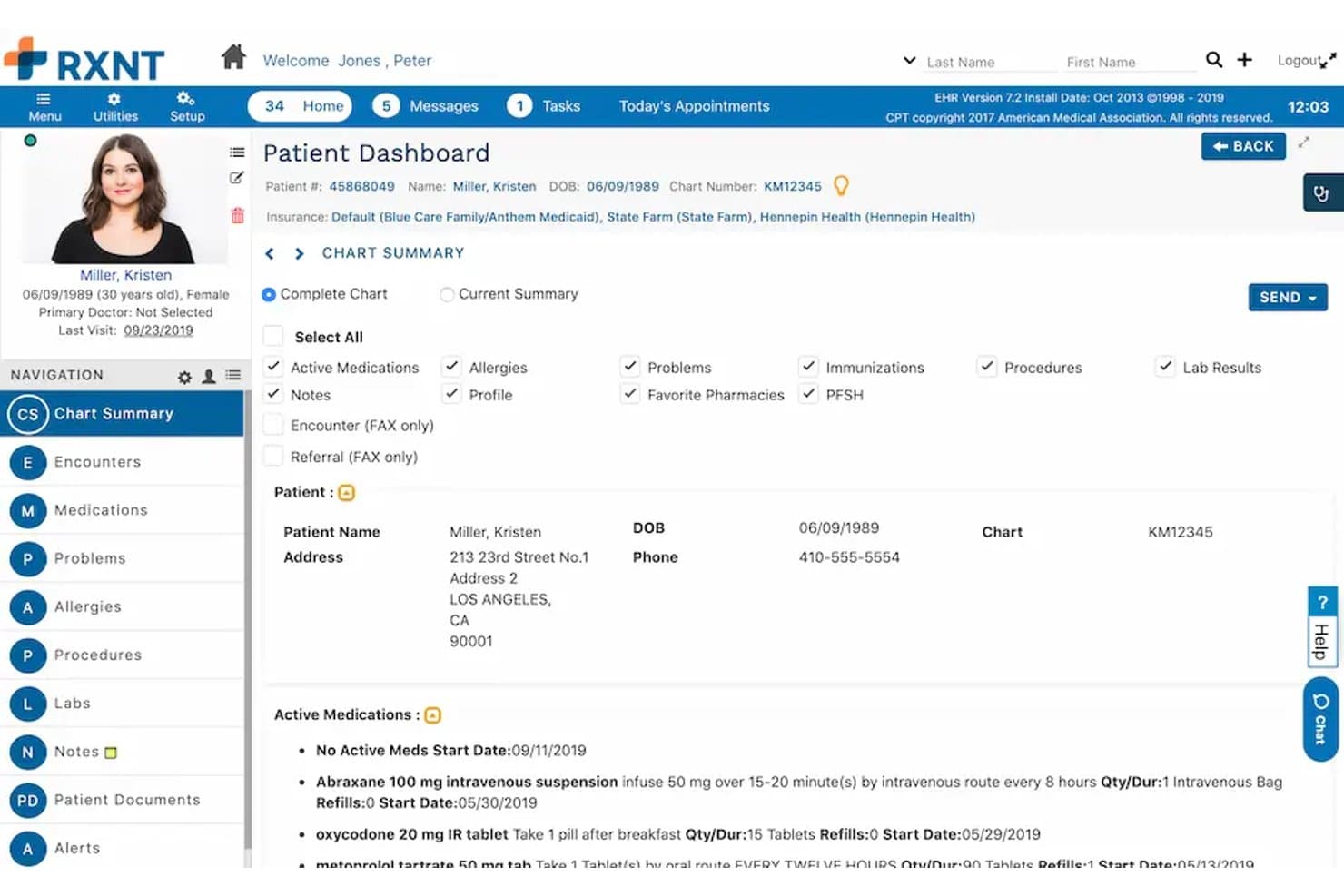
RXNT offers a detailed Patient Dashboard with active medications, insurance info, chart summary, and patient demographics in its EHR portal. RXNT is a cloud-based medical billing platform built for third-party billing companies, offering centralized billing office management, integrated clearinghouse claim submission, denial management, and multi-provider charge capture.
Who Is RXNT Best For?
RXNT is a strong fit for small to mid-sized third-party billing companies that need an affordable, all-in-one platform to manage multiple provider clients without separate clearinghouse costs.
Why I Picked RXNT
I've included RXNT in my top picks because it's one of the few billing platforms that explicitly builds for third-party billing companies rather than treating them as an afterthought. The built-in clearinghouse means my team doesn't pay for a separate service to submit claims or download remittances across multiple client practices. The Centralized Billing Office reporting, included at no extra cost, lets me benchmark client productivity and pull per-practice revenue reports without additional licensing.
RXNT Key Features
- Bulk charge uploader: Import and process unbilled charges in bulk to support high-volume claim generation for multiple clients.
- Centralized Billing Office (CBO) reporting: Access productivity and revenue benchmarking tools across all managed client practices.
- Integrated mobile charge capture: Use iOS and Android apps to capture procedure, diagnosis, and modifier codes while on the go.
- Field-level customizable reporting: Configure reports on any billing data field without affecting others for tailored analytics.
RXNT Integrations
RXNT offers native integration across its own suite, including practice management, EHR, e-prescribing, and patient portal modules, and has a built-in clearinghouse for claim submission and remittance. An API is available for custom integrations.
Pros and Cons
Pros:
- Centralized reporting for all managed clients
- Built-in clearinghouse with automated ERA posting
- Unlimited claims for multiple client practices
Cons:
- Batch actions limited compared to competitors
- No white-labeled client portal for practices
Learn more about RXNT: Best for cloud-based medical billing
- Free demo available
- Pricing upon request
Visit WebsiteCustomer Rating:4.1/5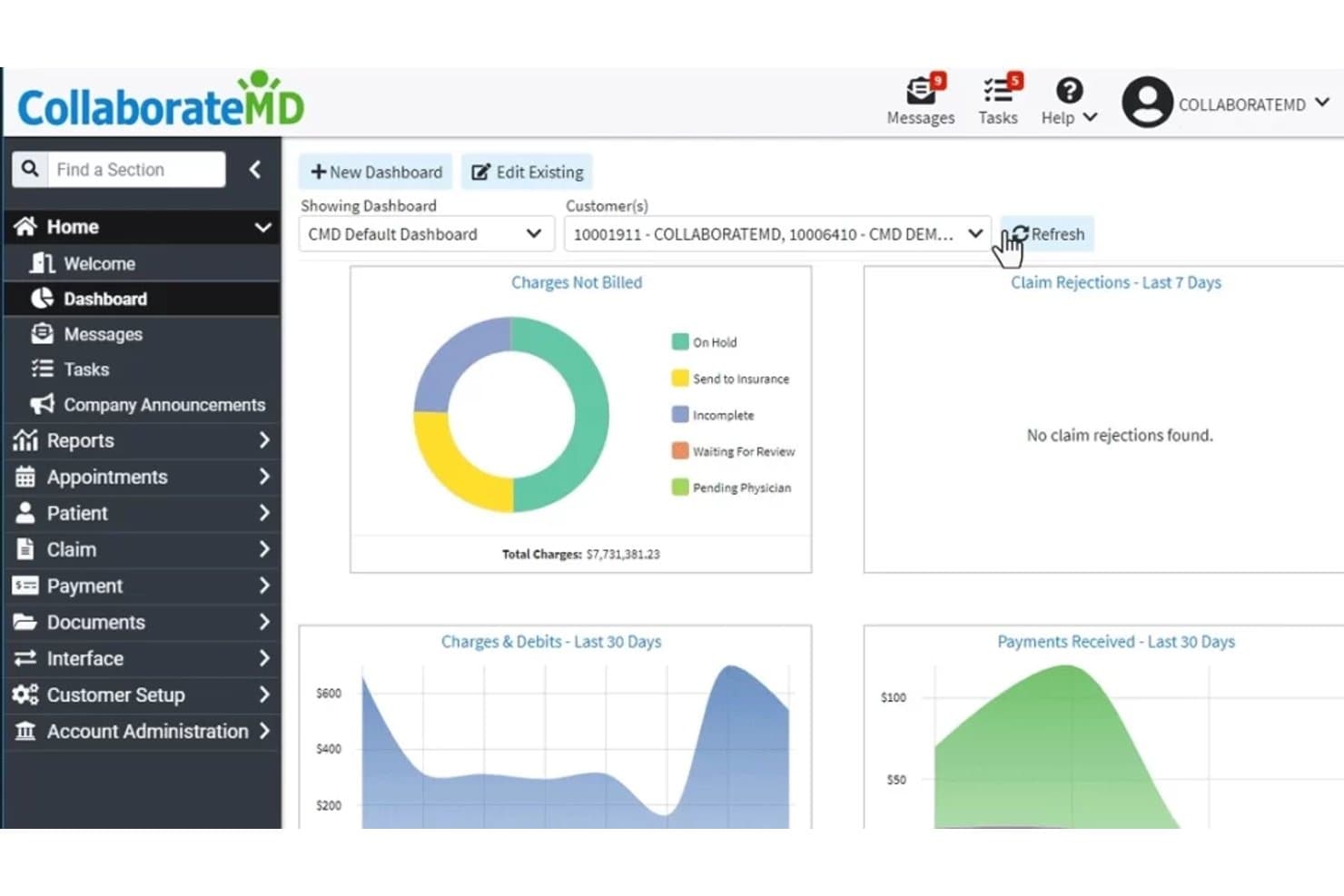
CollaborateMD offers a centralized billing dashboard displaying charges not billed, claim rejections, charges & debits, and payments received over customizable time periods. CollaborateMD is a cloud-based medical billing and practice management platform built for third-party billing services and independent practices, offering multi-client claim submission, ERA auto-posting, denial management, and real-time eligibility verification.
Who Is CollaborateMD Best For?
CollaborateMD is a strong fit for small to midsize third-party billing companies managing multiple provider clients across a range of specialties.
Why I Picked CollaborateMD
CollaborateMD earns its spot on my shortlist because it's one of the few platforms with a dedicated billing-service SKU built specifically for third-party companies managing multiple clients. I particularly like the built-in clearinghouse with Level 2 claim edits running in real time, which means my team catches errors before claims go out. The AI-powered Intelligent Claim Rejection Support translates payer rejection codes into plain-language next steps, cutting the back-and-forth on denials across client accounts.
CollaborateMD Key Features
- Multi-tax ID management: Supports adding unlimited tax IDs for separate client practices in a single account.
- Customizable analytics and reporting: Offers 125+ report templates with drag-and-drop customization for client-specific financial tracking.
- Batch eligibility verification: Delivers real-time insurance eligibility checks across multiple payers for all managed clients.
- Unlimited user licensing: Allows growing billing teams to add as many staff accounts as needed without extra per-user fees.
CollaborateMD Integrations
CollaborateMD offers native integrations with Practice Fusion, Elation, Amazing Charts, Hello Health, Kipu, Medical Mime, Praxis EMR, PrognoCIS, Ritten, Sevocity, WebPT, and Alleva. An API is available for custom integrations.
Pros and Cons
Pros:
- Unlimited users for large billing teams
- Multi-tax ID handling for client practices
- Real-time claim editing and submission
Cons:
- No predictive denial analytics
- No provider-branded client portal
Learn more about CollaborateMD: Best for multi-specialty practices
- Free demo available
- Pricing upon request
Visit WebsiteCustomer Rating:4.1/5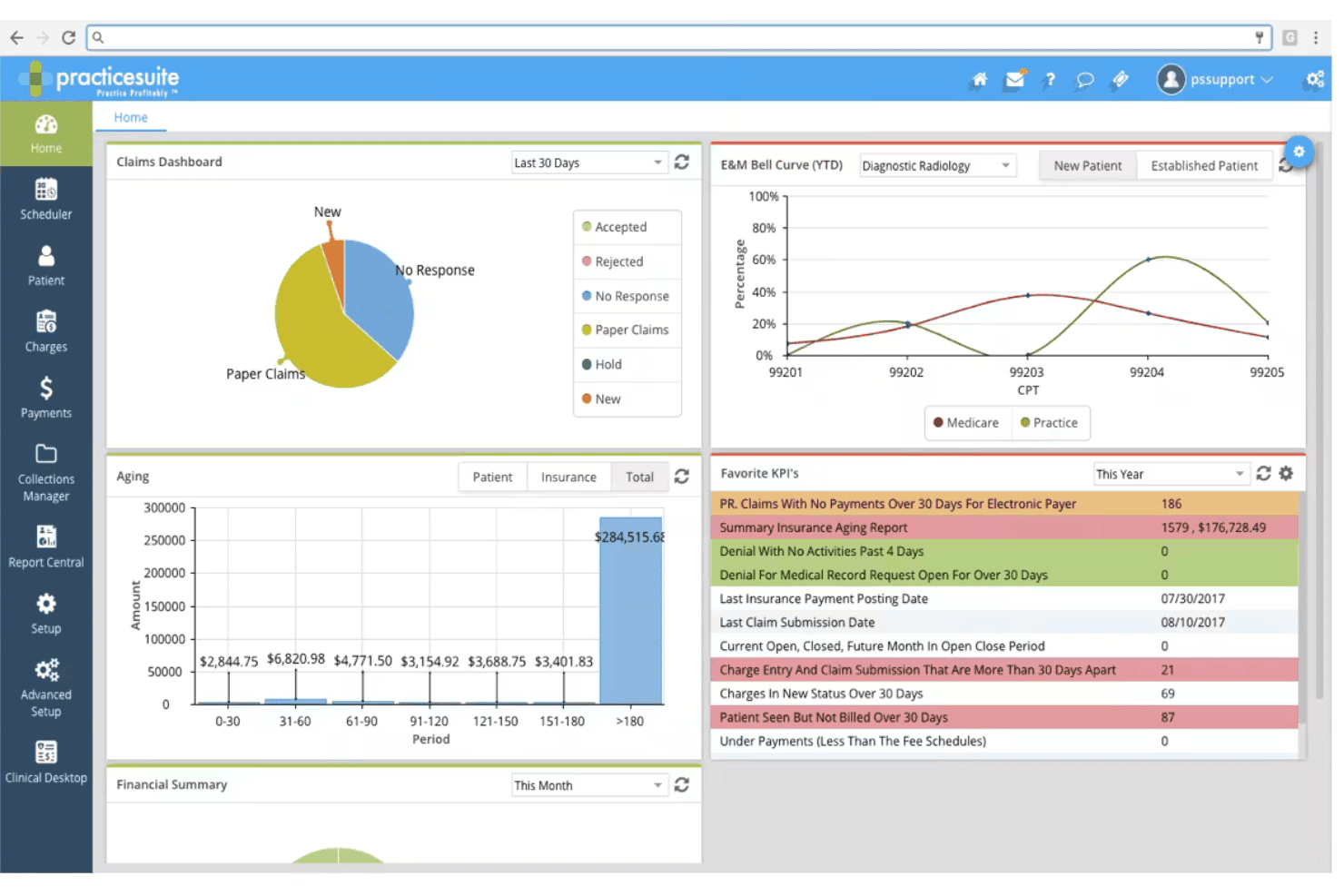
PracticeSuite spans claims, denials, ERA posting, eligibility, and billing. PracticeSuite is a cloud-based medical billing platform built for third-party billing companies, with multi-client claim management, denial tracking, ERA processing, and RCM tools spanning 150+ specialties.
Who Is PracticeSuite Best For?
PracticeSuite suits third-party billing companies managing diverse client rosters across multiple medical specialties from a single platform.
Why I Picked PracticeSuite
PracticeSuite earns its spot on my shortlist because of how well it handles specialty diversity across a client roster. I've worked with billing companies that serve everything from behavioral health to orthopedics, and PracticeSuite's support for 150+ specialties, including UB04 and Workers' Comp, means I'm not patching together separate tools per client. I also like the AI-driven pre-submission denial review, which catches claim issues before they reach the clearinghouse.
PracticeSuite Key Features
- Multi-client dashboard: Lets billers switch between client accounts and manage high claim volumes from a single login.
- Batch eligibility verification: Runs insurance checks on patients across multiple practices at once.
- Role-based access controls: Segregates access for staff, ensuring only authorized users see specific client data.
- Integrated ERA auto-posting: Reconciles payments automatically across client accounts with tools for exception handling.
PracticeSuite Integrations
PracticeSuite offers native integrations with Practice Fusion, Opus EHR, Elation, MicroMD, and Hello Health. An API is available for custom integrations, and the platform supports FHIR and Meaningful Use APIs for interoperability.
Pros and Cons
Pros:
- Robust denial tracking and resolution workflows
- Handles billing for 150+ medical specialties
- Dedicated third-party billing company dashboard
Cons:
- Custom report design can require vendor input
- Client-facing white-label portals are limited
Learn more about PracticeSuite: Best for automated billing and claims management
- 30-day free trial + free demo available
- From $130/user/month
Visit WebsiteCustomer Rating:3.6/5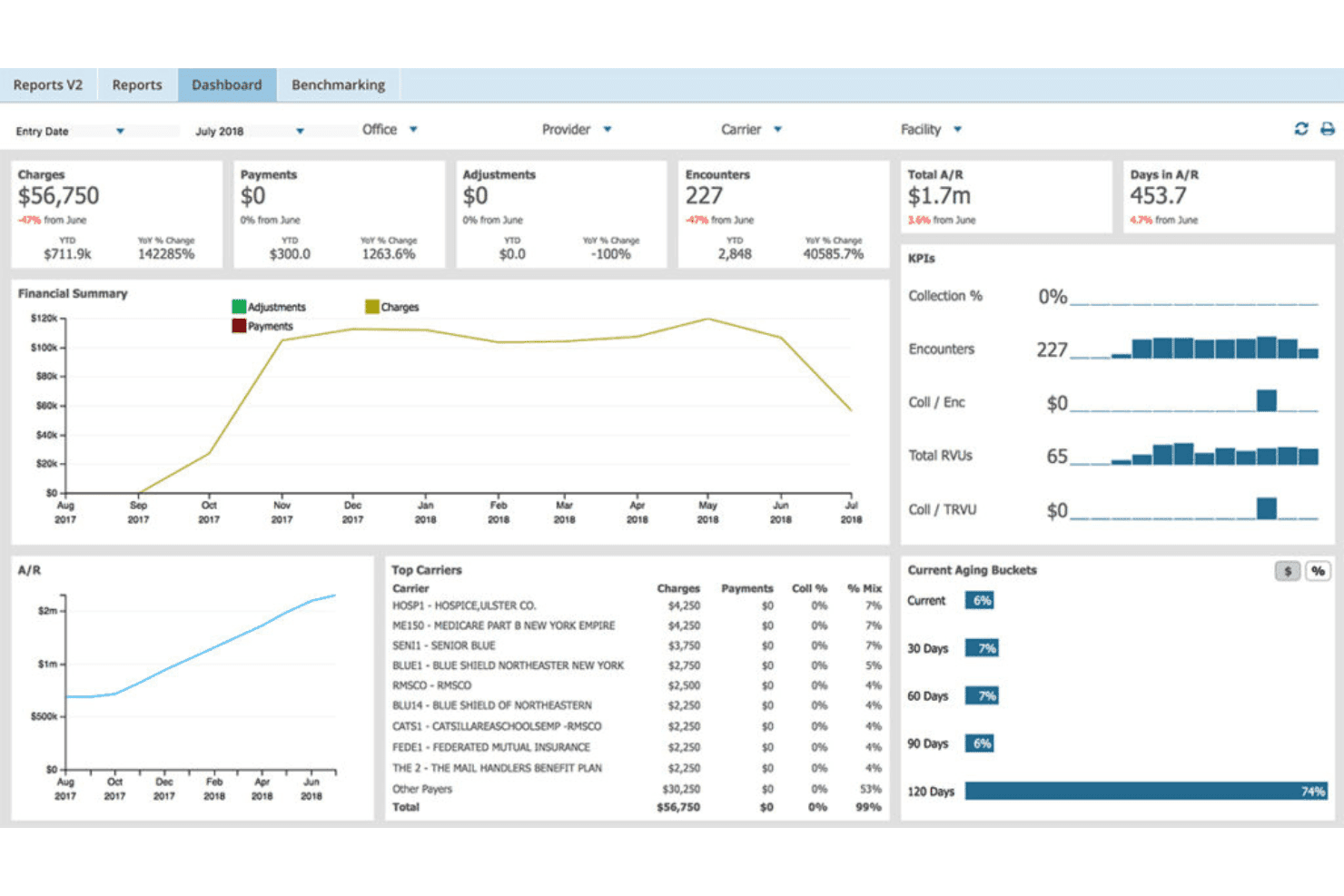
AdvancedMD unites EMR, documentation, billing, claims, eligibility, and RCM. AdvancedMD is a cloud-based medical billing platform built for third-party billing companies, offering multi-client management, automated claims scrubbing, ERA auto-posting, denial tracking, and client-facing KPI reporting from a centralized system.
Who Is AdvancedMD Best For?
AdvancedMD is a strong fit for independent billing companies and RCM firms managing high claim volumes across a growing roster of physician clients.
Why I Picked AdvancedMD
I picked AdvancedMD as one of the best because its proprietary Claim Inspector scrubs each claim against CCI, HIPAA, LCD, and carrier-specific rules before submission, which is what drives its 95% first-pass acceptance rate. In practice, that means my team is catching errors before they ever reach the clearinghouse. The auto-generated collection worklists in the Claims Center also keep denial follow-up moving across every client account without manual triage.
AdvancedMD Key Features
- Centralized billing office (CBO): Manage multiple provider clients from one login with role-based access for each client account.
- Drag-and-drop KPI dashboards: Build tailored reporting views for A/R, reimbursement, and collections by client or provider.
- Built-in clearinghouse connectivity: Access more than 1,800 payors with integrated ERA, EFT, and eligibility verification tools.
- AdvancedBiller Marketplace listing: List your billing company to attract physician clients looking for outsourced RCM partners.
AdvancedMD Integrations
AdvancedMD offers native integrations with 1,800+ payors through its built-in clearinghouse, Amazon Web Services (AWS) for cloud hosting, and supports custom integrations via API.
Pros and Cons
Pros:
- Automated claim scrubbing against payer-specific rules
- Customizable reporting for each client account
- Centralized billing office supports unlimited clients
Cons:
- No true white-label client portal experience
- Payment posting workflow is sometimes cumbersome
 Best for independent practice billing
- Free demo available
- Pricing upon request
Visit WebsiteCustomer Rating:3.9/5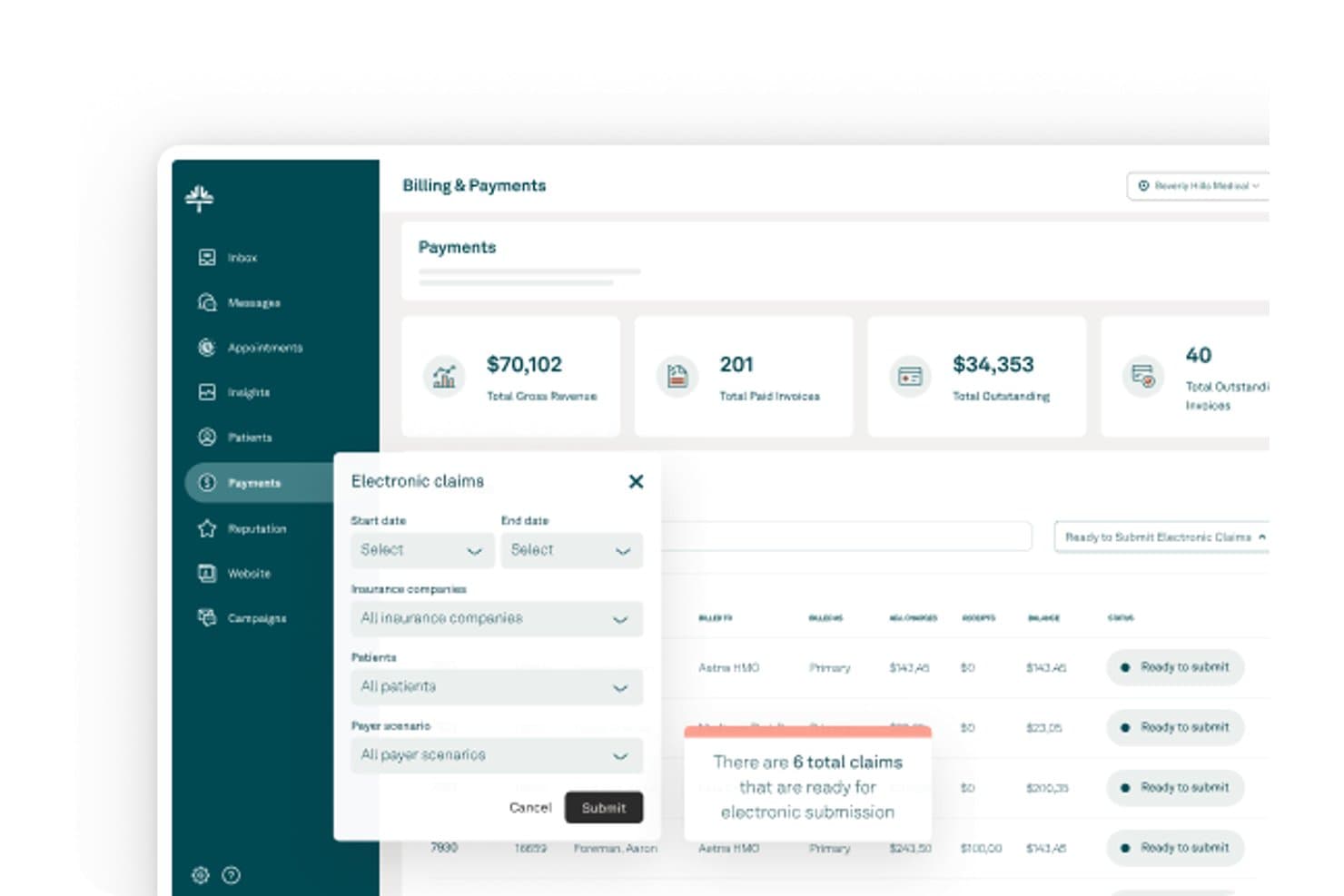
Kareo (Tebra) offers an Electronic Claims submission interface within its Billing & Payments dashboard, displaying revenue totals, invoice counts, and claim filtering options. Kareo (Tebra) is a medical billing platform built for independent practices and third-party billing companies, offering multi-client claim submission, ERA auto-posting, eligibility verification, and denial management across multiple provider accounts.
Who Is Kareo (Tebra) Best For?
Kareo (Tebra) is a strong fit for third-party billing companies that manage billing operations across multiple independent physician practices from a single platform.
Why I Picked Kareo (Tebra)
I picked Kareo (Tebra) as one of the best because its dedicated billing company track is purpose-built for managing multiple independent practices from a single account. I particularly like the multi-client dashboard, which surfaces per-office action items across all your accounts the moment you log in. The payer-specific rule engine covers 2,700+ payers, and RPA auto-posts ERAs and unapplied payments using configurable business rules per client.
Kareo (Tebra) Key Features
- Multi-payer eligibility verification: Instantly checks insurance coverage with real-time and batch eligibility tools spanning 2,700+ payers.
- Customizable reporting tools: Lets billing teams analyze financials, A/R, and claim status by individual client or across the entire book of business.
- Integrated patient payments: Accepts online, in-office, and card-on-file payments with automated billing statements linked directly to payment options.
- Provider-specific fee schedules: Supports unique charge structures and fee schedules for each provider or client in a multi-entity billing environment.
Kareo (Tebra) Integrations
Kareo (Tebra) offers native integrations with third-party EHRs via HL7 and FHIR, supports direct claim submission to 2,700+ payers, and connects with Appriss Health for PDMP compliance. An API is available for custom integrations.
Pros and Cons
Pros:
- Robust payer rules engine reduces submission errors
- Multi-client claim batching and tracking tools
- Purpose-built dashboard for billing companies
Cons:
- No branded client-facing portals
- Limited custom reporting for billing clients
Learn more about Kareo (Tebra):
Alte soluții de software de facturare medicală en-gros
Iată câteva opțiuni suplimentare de software de facturare medicală en-gros care nu au intrat în lista mea scurtă, dar care merită totuși analizate:
- 11Cognizant TriZetto Provider SolutionsBest for enterprise revenue cycle workflows
- 12AthenahealthBest for network-enabled billing and collections
- 13DrChronoBest for mobile EHR and medical billing workflows
- 14CareCloudBest for outsourced billing and revenue services
- 15MEDISOFTBest for established medical billing offices
- 16AllegianceMDBest for automated claims and payment posting
- 17MicroMDBest for integrated practice management
- 18LytecBest for practice billing and claims processing
How I Evaluate Wholesale Medical Billing Software
I split my evaluation into baseline requirements—like multi-client data segregation and batch claims scrubbing—and differentiators like denial workflows and white-label client portals.
Core Functionality (Table Stakes for This List)
When I'm selecting tools for my list, I rank each one on a scale from 0 (does not offer the functionality) to 5 (excels in this area) for each core functionality listed below. Then, I calculate the tool's total score into a percentage. Each tool needs to achieve a minimum total score of 65% to be considered for inclusion.
- Multi-Client Management: I check whether you can manage separate NPIs, tax IDs, and fee schedules per client practice without data bleeding between accounts.
- Claims Scrubbing & Submission: I look for rule-based scrubbing and batch submission across multiple clearinghouses—key when your clients span different payer mixes.
- ERA/EOB Processing: Auto-posting remittances across dozens of client accounts with reconciliation matters more here than in single-practice billing setups.
- Denial & A/R Management: I evaluate denial workqueues, aging filters, and follow-up tools that let billing teams prioritize high-dollar claims across a full client book.
- Client Reporting & Portals: Providers expect visibility into their own collections and KPIs, so I look for client-facing dashboards and customizable report templates.
- Multi-Payer Eligibility Verification: Real-time and batch eligibility checks across commercial, Medicare, and Medicaid payers help catch coverage issues before claims go out.
Once I have a list of tools that meet the criteria, I consider what sets each platform apart.
Differentiating Factors (What Sets Vendors Apart)
Here's how I compare and contrast different vendors:
Standout Features
White-label client portals let you offer branded dashboards to each provider, giving them real-time claims status and A/R aging without calling your team. I also look for configurable productivity tracking—staff-level metrics like touches per claim and collection rates tied to specific client accounts help you measure profitability per practice. Denial management workflows with root-cause analytics and appeal templates make a real difference when your team is working hundreds of denials across a diverse client book.
Beyond Features
Pricing structure matters a lot here—I look for per-claim or per-provider models that mirror how billing companies charge their own clients, so margins stay predictable as volume grows. Clearinghouse connectivity is another big factor, especially the ability to work with multiple clearinghouses when onboarding clients who have existing payer relationships. I also evaluate EHR/PM integration breadth, since your client practices likely run different systems and you need HL7, FHIR, or API-based connections to avoid manual charge entry.
Cum să alegeți software-ul de facturare medicală en-gros
Este ușor să vă pierdeți în liste lungi de funcții și structuri complexe de prețuri. Pentru a vă ajuta să rămâneți concentrat în timp ce parcurgeți procesul unic de selectare a software-ului, iată o listă de verificare a factorilor de care trebuie să țineți cont:
| Factor | Ce trebuie luat în considerare |
| Scalabilitate | Poate platforma să susțină dezvoltarea dumneavoastră către zeci sau sute de cabinete client fără probleme majore de migrare? |
| Integrări | Se va conecta software-ul fără probleme la sistemele EHR/PM pe care clienții dumneavoastră le folosesc deja și poate accepta cu ușurință sisteme noi? |
| Posibilități de personalizare | Puteți adapta fluxurile de lucru, rolurile utilizatorilor și elementele de branding pentru a reflecta modelul dumneavoastră de afaceri și nevoile de diferențiere ale clienților? |
| Ușurință în utilizare | Vor avea nevoie noii operatori de facturare sau noile persoane de contact ale clienților de instruire extinsă sau interfața de zi cu zi este clară și intuitivă? |
| Implementare și integrare inițială | Cât durează configurarea, inclusiv migrarea datelor, înscrierea la casa de clearing și lansarea pentru clienți? Este disponibil ajutor din partea experților? |
| Cost | Sunt nivelurile de preț transparente și aliniate la modul în care facturați clienții — per cerere de decontare, per furnizor sau ca procent din suma încasată? |
| Măsuri de securitate | Furnizorul asigură conformitatea cu HIPAA, oferă jurnale de audit și permite controale stricte ale utilizatorilor pentru toate datele clienților? |
| Disponibilitatea asistenței | Ce canale — telefon, chat, e-mail — sunt oferite și este disponibilă asistență promptă în perioadele în care echipa dumneavoastră are cea mai mare nevoie de ea? |
Ce este software-ul de facturare medicală en-gros?
Software-ul de facturare medicală en-gros este o platformă specializată creată pentru companiile de facturare care gestionează simultan cereri de decontare, plăți și rapoarte pentru mai mulți clienți din domeniul sănătății. Aceste sisteme vă permit să administrați conturi separate pentru clienți, să automatizați verificarea și transmiterea cererilor de decontare și să furnizați rapoarte destinate clienților, totul dintr-o singură autentificare — ideal pentru operațiuni de facturare medicală scalabile și cu volum mare.
Funcții
Atunci când alegeți software de facturare medicală en-gros, urmăriți următoarele funcții esențiale:
- Gestionarea mai multor clienți: Gestionați conturi separate ale furnizorilor, NPI-uri și date pentru fiecare client, ceea ce vă permite să deserviți mai multe cabinete dintr-un singur tablou de bord.
- Verificarea automată a revendicărilor: Prevalidați revendicările în raport cu regulile plătitorilor pentru a identifica erorile și a reduce respingerile înainte de trimiterea revendicărilor.
- Trimiterea revendicărilor în loturi: Trimiteți revendicări în bloc pentru clienți și plătitori diferiți, economisind timp și minimizând sarcinile repetitive.
- Înregistrarea automată a ERA/EOB: Primiți, înregistrați și reconciliați automat plățile electronice pentru toate conturile clienților, cu mai puțini pași manuali.
- Urmărirea respingerilor și fluxuri de lucru: Urmăriți respingerile revendicărilor, clasificați-le după motiv și declanșați sarcini de urmărire sau contestații pentru o soluționare mai rapidă.
- Rapoarte personalizate pentru clienți: Creați și distribuiți rapoarte financiare, de colectare și de creanțe A/R cu marca clientului, adaptate nevoilor specifice ale acestuia.
- Portaluri pentru clienți: Oferiți clienților acces la cerere la starea în timp real a revendicărilor, indicatorii financiari-cheie și rapoarte prin intermediul unui portal online securizat.
- Instrumente de verificare a eligibilității: Verificați în timp real eligibilitatea pacienților pentru asigurare la mai mulți plătitori și pentru mai mulți clienți, îmbunătățind acuratețea revendicărilor.
- Permisiuni bazate pe roluri: Controlați nivelurile de acces și separarea datelor clienților prin setări de securitate granulare, bazate pe utilizatori.
- Conectivitate integrată la casa de compensare: Conectați-vă la o gamă largă de plătitori pentru trimiterea revendicărilor, actualizări ale stării și preluarea ERA, fără a părăsi platforma.
Beneficii
Implementarea unui software de facturare medicală angro oferă mai multe beneficii pentru echipa și compania dumneavoastră. Iată câteva dintre acestea:
- Gestionarea centralizată a clienților: Gestionați cu ușurință mai multe cabinete ale clienților, fiecare cu fluxuri de lucru și date distincte, de pe o singură platformă securizată.
- Acuratețe mai mare a revendicărilor: Verificarea automată și verificările în timp real ale eligibilității reduc erorile și cresc rata de aprobare a revendicărilor de la prima trimitere.
- Plăți mai rapide: Înregistrarea automată a ERA/EOB și urmărirea simplificată a respingerilor vă ajută să accelerați colectarea și ciclurile de plată pentru toți clienții.
- Experiențe personalizate pentru clienți: Portalurile și tablourile de bord pentru rapoarte personalizate oferă clienților acces instantaneu, la cerere, la informații despre performanță și situația financiară.
- Scalabilitate pe măsură ce vă dezvoltați: Procesarea în loturi, arhitectura cu mai mulți locatari și permisiunile bazate pe utilizatori vă permit să adăugați mai multe conturi de clienți fără a crește volumul muncii manuale.
- Urmărirea mai eficientă a productivității: Indicatorii configurabili vă permit să monitorizați performanța personalului și să optimizați procesele de facturare pentru fiecare client sau membru al echipei.
- Conformitate îmbunătățită: Securitatea bazată pe roluri, jurnalele de audit și infrastructura pregătită pentru HIPAA, integrate în sistem, contribuie la protejarea datelor sensibile ale tuturor clienților furnizori.
Costuri și prețuri
Selectarea unui software de facturare medicală angro necesită înțelegerea diferitelor modele și planuri de preț disponibile. Costurile variază în funcție de funcții, dimensiunea echipei, suplimente și alți factori. Tabelul de mai jos prezintă planurile comune, prețurile medii ale acestora și funcțiile incluse de obicei în soluțiile software de facturare medicală angro:
Tabel comparativ al planurilor pentru software de facturare medicală angro
| Tipul planului | Preț mediu | Funcții comune |
| Plan gratuit | $0 | Urmărirea de bază a revendicărilor, suport limitat pentru mai mulți clienți, raportare standard și asistență prin e-mail. |
| Plan individual | $40–$100/utilizator/lună | Gestionarea mai multor clienți, instrumente de verificare a revendicărilor, conectivitate standard la casa de compensare și raportare limitată pentru clienți. |
| Plan pentru companii | $120–$250/utilizator/lună | Trimiteri în loturi, înregistrarea automată a ERA/EOB, portaluri pentru clienți cu marca proprie, fluxuri de lucru de bază pentru respingeri și integrări. |
| Plan pentru întreprinderi | $300–$600+/utilizator/lună | Configurare completă pentru mai mulți locatari, fluxuri de lucru personalizate, securitate avansată, urmărirea productivității, acces API și asistență pentru integrare. |
Întrebări frecvente despre software-ul de facturare medicală en-gros
Iată câteva răspunsuri la întrebările frecvente despre software-ul de facturare medicală en-gros:
Prin ce diferă software-ul de facturare medicală en-gros de software-ul pentru cabinete individuale?
Software-ul de facturare medicală en-gros este conceput pentru companiile care gestionează facturarea pentru mai mulți clienți, inclusiv furnizori de servicii medicale, distribuitori și operațiuni de farmacie. Acesta include funcții pentru separarea datelor între mai mulți clienți, procesarea loturilor de cereri, raportare specifică fiecărui client, fluxuri de lucru pentru software-ul de facturare pentru farmacii și controlul stocurilor, toate de pe o singură platformă — capabilități care nu se regăsesc de obicei în instrumentele pentru cabinete individuale.
Puteți migra datele clienților dintr-un alt sistem de facturare?
Da, majoritatea soluțiilor oferă servicii sau instrumente de migrare pentru a importa datele demografice ale pacienților, creanțele A/R deschise, cererile istorice, datele distribuitorilor, înregistrările din software-ul de facturare pentru farmacii, informațiile despre controlul stocurilor și datele privind gestionarea expirării din platformele anterioare. Asigurați-vă că verificați formatele de date acceptate și consultați serviciul de asistență al furnizorului pentru migrări complexe sau de volum mare.
Ce integrări ar trebui să caut într-un software de facturare medicală en-gros?
Concentrați-vă pe integrările cu sistemele EHR și de gestionare a cabinetelor, utilizând HL7, FHIR sau API-uri, precum și pe conectivitatea cu centrele de compensare și plătitorii. Amploarea integrărilor este importantă dacă clienții dumneavoastră utilizează o gamă variată de sisteme medicale specializate sau generale.
Este posibilă personalizarea portalurilor și rapoartelor clienților sub marca proprie?
Da, platformele de top de software de facturare en-gros oferă opțiuni de personalizare sub marca proprie, permițându-vă să aplicați portalurilor și rapoartelor identitatea companiei dumneavoastră. Multe dintre acestea acceptă, de asemenea, distribuitori, software de facturare pentru farmacii, controlul stocurilor, gestionarea expirării, facturarea GST și alerte privind expirarea. Acest lucru contribuie la consolidarea relațiilor cu clienții, adăugând în același timp valoare operațională serviciului dumneavoastră.
Toate planurile includ funcții de securitate și de conformitate HIPAA?
Nu, deși majoritatea furnizorilor abordează securitatea HIPAA, funcțiile avansate, precum jurnalele de audit, permisiunile bazate pe roluri și BAA-urile semnate, sunt adesea rezervate planurilor de nivel superior. Pentru companiile care gestionează fluxuri de lucru pentru comenzi online, software de facturare farmaceutică sau activități de distribuție angro și cu amănuntul a produselor farmaceutice, este, de asemenea, important să analizați modul în care fiecare plan protejează datele privind tranzacțiile, stocurile, facturarea și clienții înainte de a face o alegere.