

O software EHR gratuito dá acesso à sua clínica a funcionalidades essenciais de registos clínicos eletrónicos sem qualquer custo — através de planos gratuitos ilimitados ou de períodos de teste gratuitos com acesso total. Se procura plataformas fiáveis para gerir o registo clínico dos pacientes, o agendamento, a faturação e a telemedicina sem um preço elevado, não está sozinho. A escolha certa ajuda-o a gerir o trabalho clínico e administrativo diário, mantendo os custos tão baixos quanto possível. Esta lista destaca opções de EHR gratuitas que apoiam pequenas clínicas, profissionais individuais e equipas maiores que pretendem explorar ferramentas de software modernas sem risco financeiro. Eis o que precisa de saber sobre as suas principais opções de EHR gratuitas este ano.
Why Trust Our Software Recommendations
6,700+
Reviews
20
Industry experts
16+
Evaluation factors
14
Years
Our team has been testing and reviewing software since 2012. As medical practice leaders ourselves, we know how difficult—and important—it is to choose the right software.
For this guide, we evaluated tools using hands-on testing and independent research, scoring tools using our selection criteria.
Our reviews reflect our human editorial judgment, not a sales pitch.
Tabela comparativa de software EHR gratuito
Esta tabela comparativa resume os detalhes de preços das minhas principais escolhas de EHR gratuito:
| Tool | Best For | Trial Info | Price | ||
|---|---|---|---|---|---|
| 1 | Best for integrated electronic prescribing tools | Free demo + free expert consultation available | Pricing upon request | Website | |
| 2 | Best for integrative and medspa care management | 15-day free trial | From $99/month | Website | |
| 3 | Best for allied health scheduling and AI notes | 14-day free trial | From $29/month | Website | |
| 4 | Best for customizable behavioral health workflows | Free demo available | Pricing upon request | Website | |
| 5 | Best for ambulatory care settings | Free demo available | Pricing upon request | Website | |
| 6 | Best for end-to-end network-enabled services | Free demo available | Pricing upon request | Website | |
| 7 | Best for patient self-service access | Free demo available | Pricing upon request | Website | |
| 8 | Best for telemedicine integration enhancing care | Free demo available | From $100/user/month (billed annually) | Website | |
| 9 | Best for behavioral health practices | Free demo available | Pricing upon request | Website | |
| 10 | Best for comprehensive practice management | Free demo available | Pricing upon request | Website |


Avaliações de software EHR gratuito
\u003cspan style=\u0022font-weight: 400;\u0022\u003eApresento abaixo os meus resumos detalhados dos softwares EHR gratuitos que entraram na minha lista restrita. As minhas avaliações analisam detalhadamente as funcionalidades, os melhores casos de utilização e os preços de cada plataforma, para o ajudar a encontrar a melhor opção para si.\u003c/span\u003e
 1Best for integrated electronic prescribing tools
RXNT
- Free demo + free expert consultation available
- Pricing upon request
Visit WebsiteCustomer Rating:4.3/5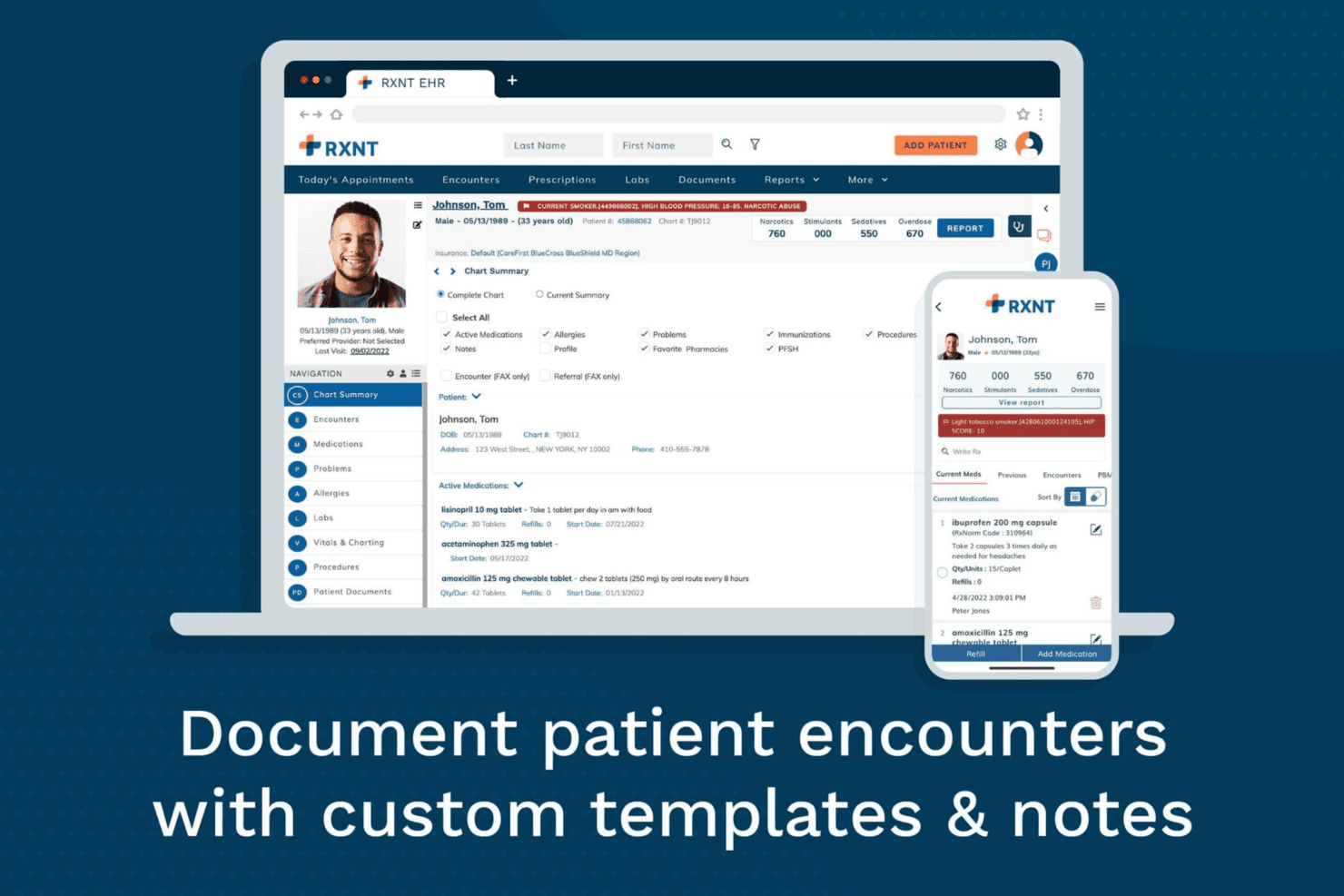
RXNT enables healthcare providers to document patient encounters using customizable charting templates, integrated clinical records, and mobile access. RXNT is a cloud-based EHR platform that combines clinical documentation, electronic prescribing, practice management, medical billing, scheduling, and patient engagement tools for ambulatory practices.
Who Is RXNT Best For?
RXNT works well for small to mid-sized ambulatory practices, independent physicians, and multi-specialty groups that need integrated clinical, prescribing, and billing workflows.
Why I Picked RXNT
I picked RXNT because its electronic prescribing capabilities are built directly into the EHR rather than offered as a separate tool. Its EPCS functionality allows authorized prescribers to manage Schedule II–V controlled substance prescriptions from the same platform used for clinical documentation. RXNT also supports direct access to state Prescription Drug Monitoring Programs through Bamboo Health, helping providers review controlled substance histories without leaving their usual workflow.
RXNT Key Features
- Customizable clinical templates: Create and reuse specialty-specific SOAP note templates that match the practice’s documentation requirements.
- Integrated lab and radiology ordering: Send electronic orders to connected facilities and receive results within the patient chart.
- Claims scrubbing and medical billing: Check claims for errors before submission, track their status, and manage billing activity through a centralized dashboard.
- Patient portal: Let patients view visit summaries, request appointments, send messages, and pay outstanding balances online.
RXNT Integrations
RXNT connects with Surescripts for electronic prescribing, Bamboo Health and state PDMP databases for controlled substance history, Change Healthcare and Relay Exchange for clearinghouse services, and Kno2 for TEFCA and QHIN connectivity. It also supports HL7 laboratory interfaces, certified registries, and API-based custom integrations.
Pros and Cons
Pros:
- Comprehensive suite covers scheduling, documentation, and billing
- Free setup, training, and data migration
- EPCS-certified e-prescribing built into the EHR
Cons:
- Billing reporting options are limited
- Users report system lag during peak usage
Learn more about RXNT: Best for integrative and medspa care management
- 15-day free trial
- From $99/month
Visit WebsiteCustomer Rating:4.8/5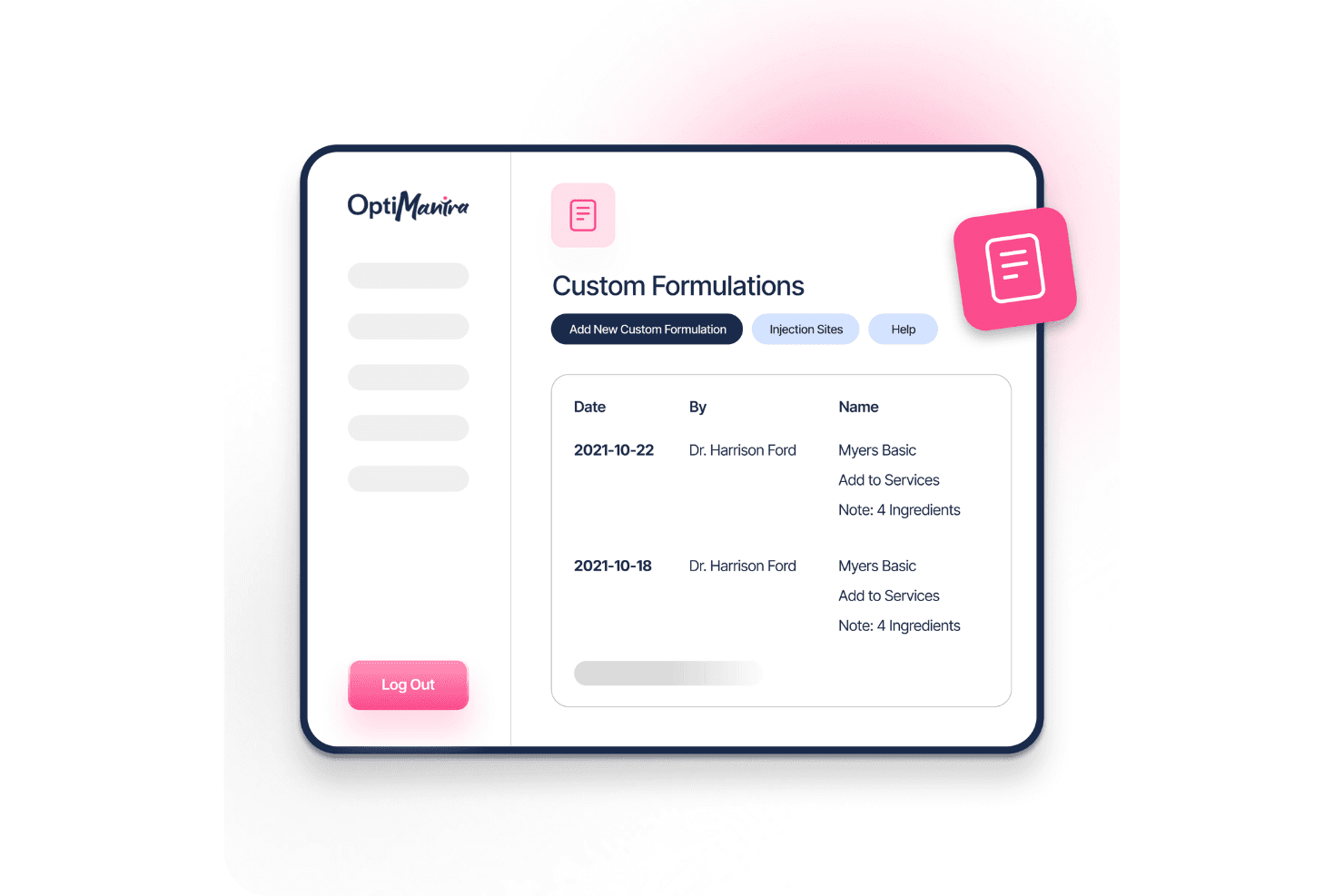
OptiMantra’s medspa dashboard displays appointments, client data, and key metrics for streamlined care management. OptiMantra is an EMR and practice management platform designed for integrative, functional, and multidisciplinary clinics. It combines clinical documentation, scheduling, billing, telehealth, inventory management, and patient engagement tools in one system.
Who Is OptiMantra Best For?
OptiMantra works well for naturopathic, chiropractic, acupuncture, functional medicine, and holistic health practices that need workflows tailored to integrative care.
Why I Picked OptiMantra
I picked OptiMantra because it is purpose-built for integrative and multidisciplinary clinics rather than adapted from a conventional medical EHR. Its modality-specific SOAP templates support naturopathic, chiropractic, acupuncture, and functional medicine workflows, while custom intake questionnaires can flow directly into patient charts. Built-in IV therapy and e-prescribing tools also make it a strong option for practices managing complex treatment protocols.
OptiMantra Key Features
- Online booking and automated reminders: Let patients self-schedule appointments and receive SMS or email reminders to help reduce no-shows.
- Secure patient portal: Give patients access to records, documents, forms, and two-way messaging through a HIPAA-compliant portal.
- Inventory and purchase order management: Track supplements and products, manage purchase orders, and connect sales with patient checkout workflows.
- Insurance billing and claims filing: Submit electronic claims, manage EOBs, and post payments without leaving the platform.
OptiMantra Integrations
OptiMantra connects with Surescripts, Quest Diagnostics, Labcorp, Rupa Health, Fullscript, Change Healthcare, Stripe, Fiserv, Office Ally, and Google services. It also supports webhooks and API-based custom integrations for additional clinical, billing, and CRM workflows.
Pros and Cons
Pros:
- Direct integration with major labs
- Built-in telehealth and e-prescribing
- Customizable forms for specialized care
Cons:
- Occasional interface slowdowns
- Learning curve for new users
Learn more about OptiMantra: Best for allied health scheduling and AI notes
- 14-day free trial
- From $29/month
Visit WebsiteCustomer Rating:4.7/5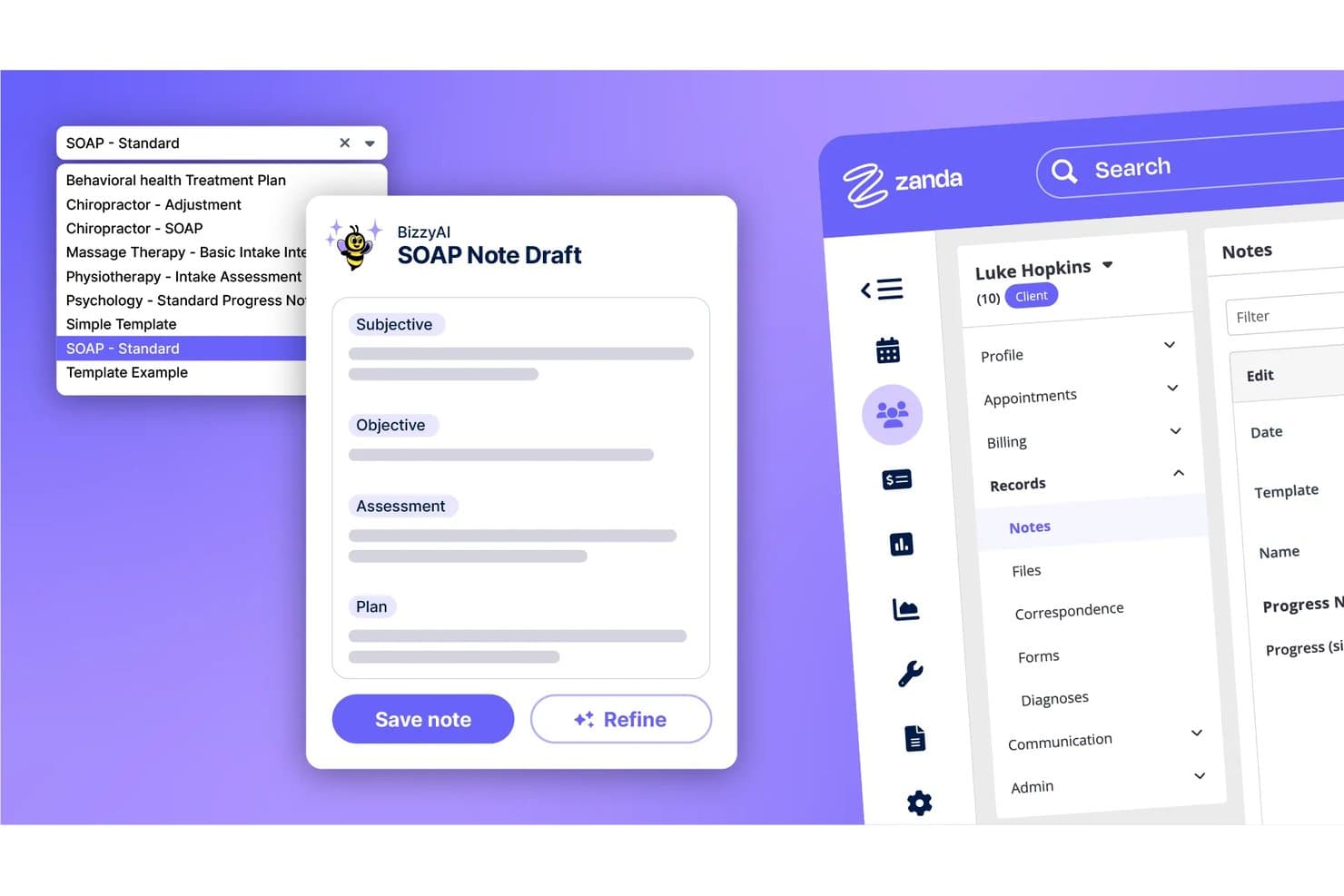
Zanda auto-generates SOAP notes using AI across multiple clinical templates. Zanda is a practice management platform built for allied health and mental health clinicians that combines appointment scheduling, clinical notes, AI-assisted documentation, invoicing, telehealth, and a client booking portal.
Who Is Zanda Best For?
Zanda is a strong fit for allied health and mental health clinicians—think psychologists, physiotherapists, and occupational therapists—who need scheduling and AI-assisted notes in one place.
Why I Picked Zanda
I've included Zanda in my top picks because it's purpose-built for allied health and mental health clinicians who need scheduling and AI-assisted notes working together. BizzyAI Scribe transcribes live sessions and auto-fills your note template, saving around 56 minutes per day based on beta user data. The multi-provider calendar also handles waitlists, automated reminders, and 24/7 client self-booking in one place.
Zanda Key Features
- BizzyAI Refine and Write: AI tools that rewrite draft notes on instruction and generate letters or emails directly from client session data.
- Scored assessment forms: Online forms that calculate scores automatically and feed into progress reports to track client outcomes over time.
- Built-in telehealth: HIPAA-compliant video sessions hosted in Zanda, with group calls supporting up to 20 participants and no app download required for clients.
- Role-based access controls: Permissions restrict which practitioners can view or edit notes and client records based on their assigned role.
Zanda Integrations
Documented integrations include Stripe, Xero, Zoom, Google Calendar, Outlook, Apple Calendar, Physitrack, Parchment, and Ensora.
Pros and Cons
Pros:
- Outcome scoring supports progress tracking
- Automated reminders help reduce missed appointments
- AI scribe reduces daily documentation time
Cons:
- No lab ordering or care coordination
- Missing structured problem lists and medication reconciliation
Learn more about Zanda: Best for customizable behavioral health workflows
- Free demo available
- Pricing upon request
Visit WebsiteCustomer Rating:4.3/5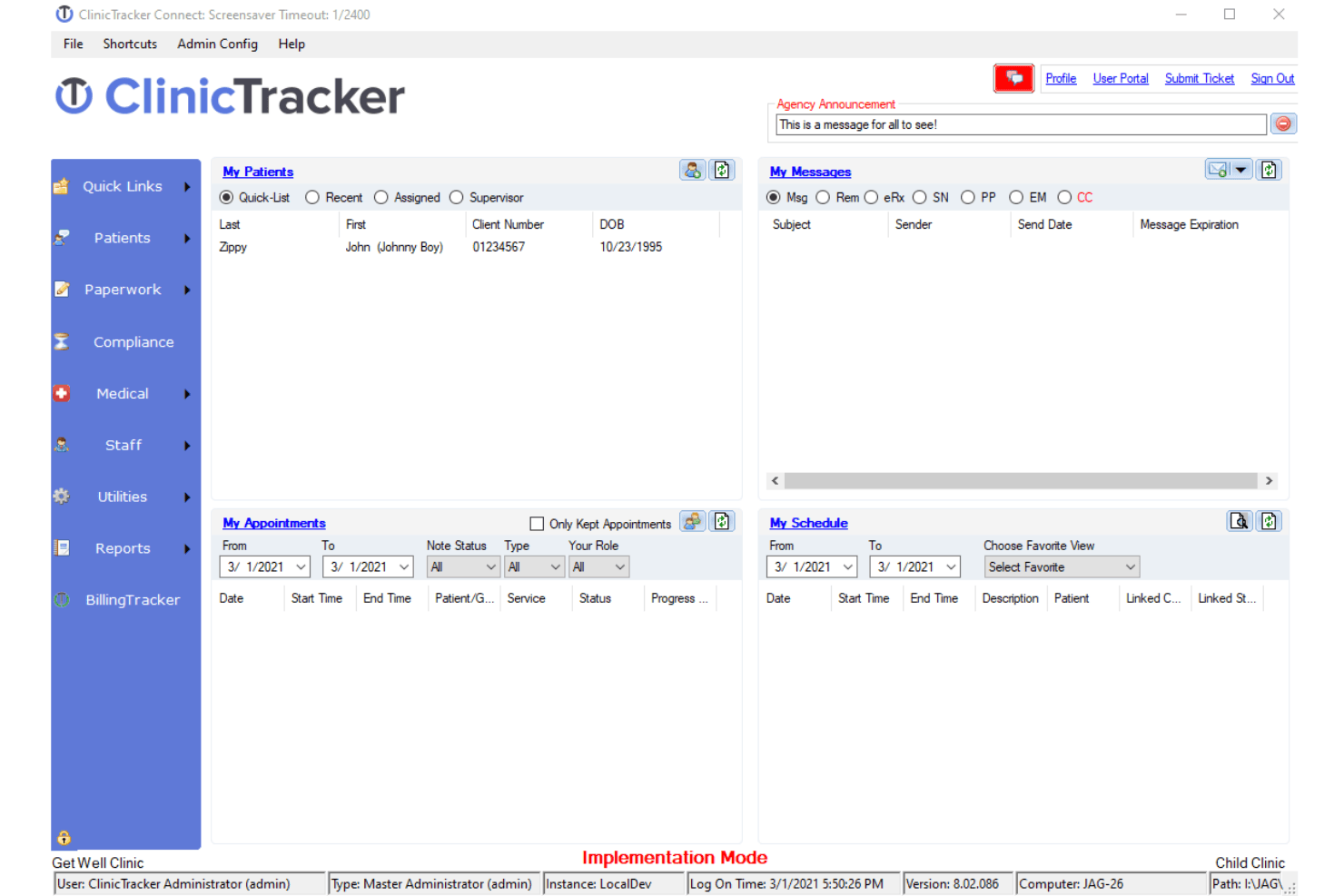
ClinicTracker offers a comprehensive dashboard for managing clinical workflows. ClinicTracker is an integrated EHR, billing, and practice management platform designed for behavioral health, mental health, substance use treatment, and community-based care organizations.
Who Is ClinicTracker Best For?
ClinicTracker works well for therapy practices, addiction treatment centers, social service organizations, and community health programs that need clinical, financial, and compliance workflows in one system.
Why I Picked ClinicTracker
I picked ClinicTracker because it combines EHR, scheduling, billing, and practice management within a platform built around behavioral health workflows. Its integrated approach helps reduce duplicate data entry between appointments, clinical records, and claims processing. I also like its customizable forms and workflow tools, which allow organizations to adapt documentation and administrative processes to the needs of mental health and substance use treatment programs.
ClinicTracker Key Features
- Patient portal: Give patients secure access to medical records, appointment schedules, billing information, and practice communication.
- Telehealth connector: Support virtual consultations and remote care through integrated telehealth functionality.
- Clinical decision support: Use alerts and reminders to support preventive care, safety monitoring, and clinical decision-making.
- Secure messaging: Enable confidential communication between providers, staff, and patients while supporting privacy requirements.
ClinicTracker Integrations
ClinicTracker supports integrations with Azure, Clinicom, AMBIR, Microsoft, Topaz, Soft Trac, and Zoom. These connections can extend hosting, communication, document capture, payment, and telehealth workflows.
Pros and Cons
Pros:
- Offers customizable forms, workflows, and compliance features
- Combines EHR, billing, scheduling, and practice management tools
- Built specifically for behavioral health and substance use treatment
Cons:
- May be too specialized for general medical practices
- Setup and customization may require training and implementation support
Learn more about ClinicTracker: Best for ambulatory care settings
- Free demo available
- Pricing upon request
Visit WebsiteCustomer Rating:5/5
Nextech EHR Software Interface NextGEN Healthcare is an EHR and practice management platform for ambulatory care that combines clinical documentation, scheduling, revenue cycle management, population health, telehealth, and patient engagement tools.
Who Is NextGEN Healthcare Best For?
NextGEN Healthcare works well for independent and multi-specialty ambulatory practices that need specialty-specific clinical workflows within one connected platform.
Why I Picked NextGEN Healthcare
I picked NextGEN Healthcare because of the depth of its specialty-specific customization. The platform supports more than 40 ambulatory specialties with tailored templates and workflows, helping different types of practices avoid using the same generic documentation structure. I also like that NextGEN Office and NextGEN Enterprise serve practices at different stages of growth, while ambient documentation tools help reduce charting time across both environments.
NextGEN Healthcare Key Features
- Patient portal: Let patients request appointments, review visit summaries, complete intake forms, and message their care teams.
- Revenue cycle management: Support claim scrubbing, denial tracking, payment posting, and other billing workflows alongside the clinical record.
- Population health dashboard: Identify care gaps and monitor chronic disease measures across patient populations.
- Telehealth module: Launch virtual visits directly from the EHR while keeping documentation connected to the patient chart.
NextGEN Healthcare Integrations
NextGEN Healthcare offers an API Marketplace with partners such as Labcorp, Commure, Birdeye, Clearwave, Weave, Innovaccer, Physiotec, Rectangle Health, SamaCare, and Unite Us. It also supports RESTful and FHIR APIs for custom integrations, while Mirth Connect helps connect the platform with external clinical and administrative systems.
Pros and Cons
Pros:
- Multi-location scheduling from one platform
- Native ambient AI documentation built in
- Specialty-specific clinical templates for 26+ specialties
Cons:
- Only one user can edit a SOAP note
- Interface feels dated compared to newer EHRs
Learn more about NextGEN: Best for end-to-end network-enabled services
- Free demo available
- Pricing upon request
Visit WebsiteCustomer Rating:5/5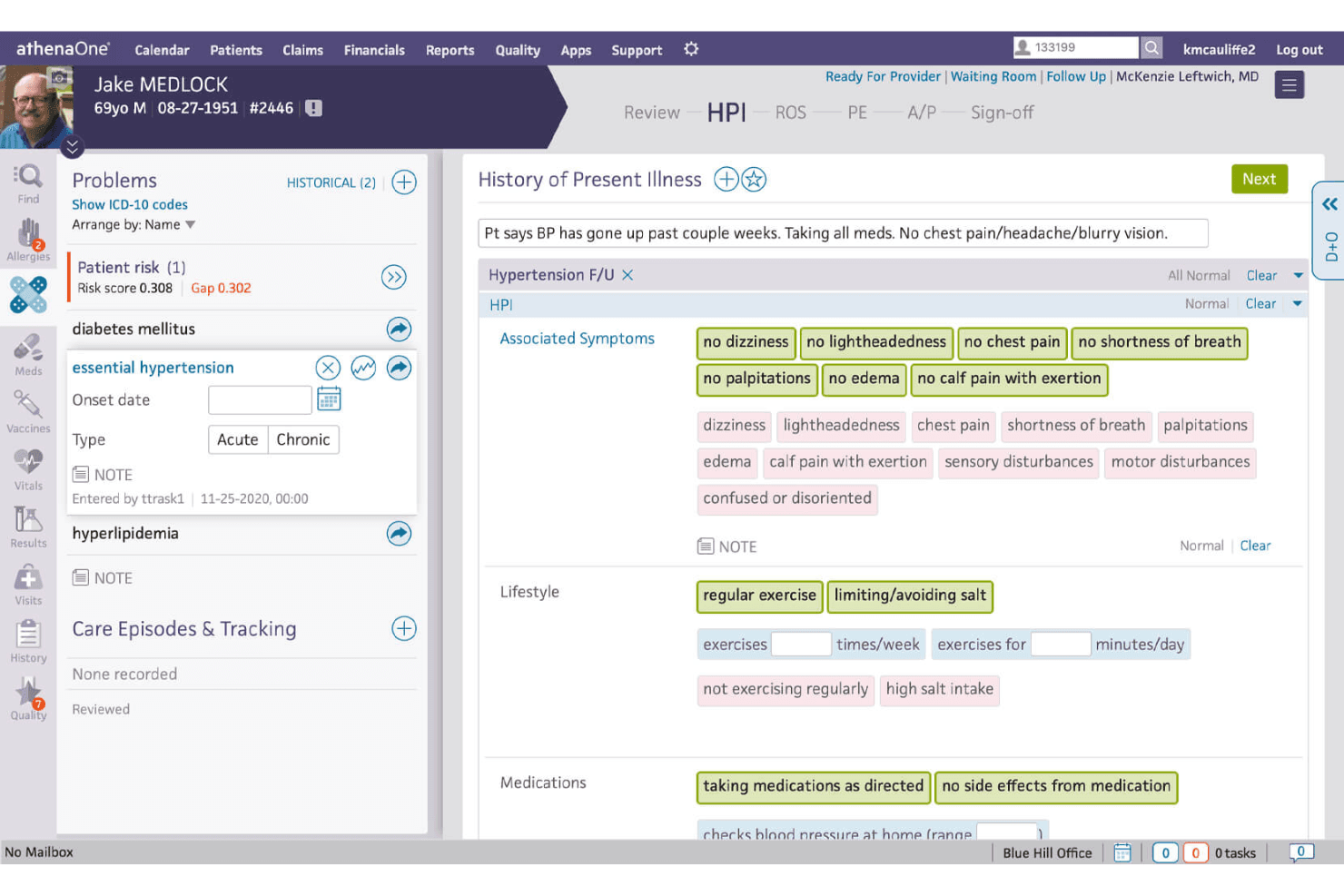
Athenahealth's platform provides a centralized place for patient data management, including for medical history and other records. Athenahealth is a cloud-based EHR and practice management platform that combines clinical documentation, medical billing, patient engagement, and interoperability tools for ambulatory practices.
Who Is Athenahealth Best For?
Athenahealthworks well for ambulatory practices of all sizes that want clinical and revenue cycle workflows managed within the same cloud-based platform.
Why I Picked Athenahealth
I picked Athenahealth because its billing workflows are closely connected to clinical documentation. When providers complete notes in athenaOne, relevant information can flow into claims workflows, helping reduce duplicate data entry and improve billing accuracy. Its large interoperability network also helps practices exchange information with laboratories, hospitals, pharmacies, payers, and other healthcare organizations. This makes Athenahealth a strong option for practices that prioritize integrated billing and broad data connectivity.
Athenahealth Key Features
- Patient portal: Let patients schedule appointments, complete intake forms, review information, and message their care teams online.
- Mobile access: Allow providers to review charts, check results, place orders, and manage selected clinical tasks from the athenaOne mobile app.
- Automated appointment reminders: Send text, email, and phone notifications to help reduce missed visits.
- Clinical and financial dashboards: Track quality measures, payer performance, operational trends, and practice-level financial metrics.
Athenahealth Integrations
Athenahealth supports integrations with applications such as Zoom, Qure4u, SOAP Health, Podium, Wellsheet, Upfront Healthcare, and Assort Health. It also provides API access and supports HL7, C-CDA, and other healthcare data standards for connecting with external clinical and administrative systems.
Pros and Cons
Pros:
- Cloud-based system for remote access
- Robust patient engagement tools
- Broad range of integrations with other healthcare systems and devices
Cons:
- Limited customization options for certain workflows
- Complexity of the system may result in a learning curve
Learn more about Athenahealth: Best for patient self-service access
- Free demo available
- Pricing upon request
Visit WebsiteCustomer Rating:4.7/5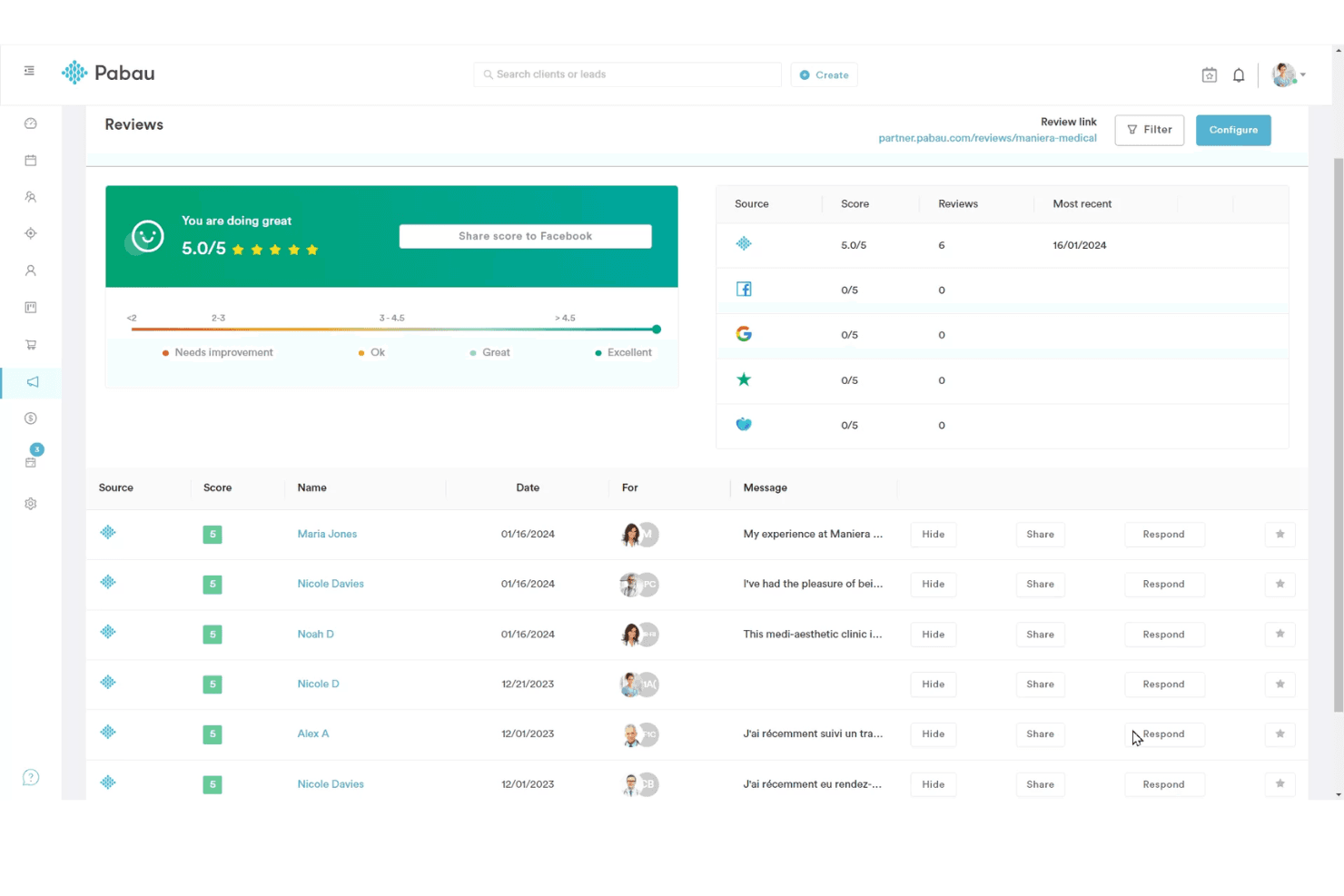
Pabau offers an organized and user-friendly homepage interface. Pabau is a cloud-based practice management and EHR platform for private practices and specialty clinics. It combines clinical documentation, patient records, online booking, digital forms, payments, and business management tools in one system.
Who Is Pabau Best For?
Pabau works well for clinic owners and practice managers who oversee both clinical and business operations, particularly in aesthetics, dermatology, wellness, and other private-pay specialties.
Why I Picked Pabau
I picked Pabau because it includes a branded client app that gives patients direct access to treatment history, upcoming appointments, and before-and-after photos. Its built-in membership management is another standout feature, allowing practices to run loyalty and recurring-revenue programs without relying on a separate platform. This makes Pabau a strong option for clinics that want to combine patient engagement with day-to-day practice management.
Pabau Key Features
- Digital consent forms: Send, collect, and store signed patient consent documents electronically before appointments.
- Automated appointment reminders: Schedule SMS and email notifications to help reduce no-shows.
- Staff rota management: Build practitioner schedules and manage availability, working hours, and clinic coverage.
- Financial reporting: Track revenue by treatment, practitioner, or location to monitor practice performance.
Pabau Integrations
Pabau integrates with Stripe, Xero, Klarna, Healthcode, Google Calendar, Outlook Calendar, Google Analytics, Google Tag Manager, Meta Pixel, Reserve with Google, and Linda AI. These connections extend payments, accounting, scheduling, marketing, insurance, and patient communication workflows.
Pros and Cons
Pros:
- Combines booking, payments, memberships, and patient records
- Includes a branded client app and digital consent tools
- Strong fit for aesthetics, dermatology, and wellness clinics
Cons:
- Advanced features may increase overall subscription costs
- May be too specialized for general medical practices
Learn more about Pabau: Best for telemedicine integration enhancing care
- Free demo available
- From $100/user/month (billed annually)
Visit WebsiteCustomer Rating:5/5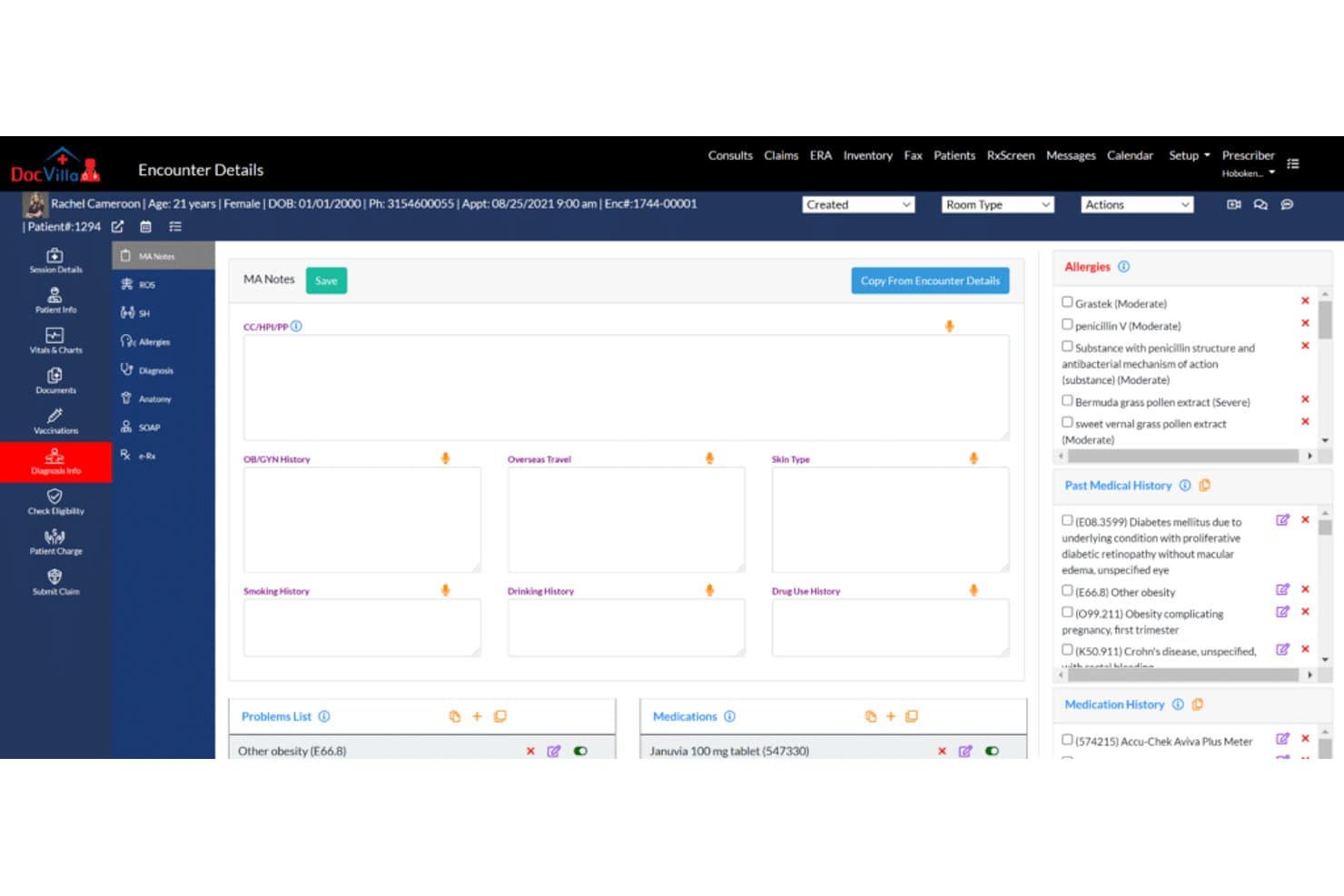
DocVilla EHR software Interface DocVilla is a cloud-based healthcare platform that combines electronic health records, telemedicine, patient engagement, scheduling, billing, and practice management tools.
Who Is DocVilla Best For?
DocVilla works well for healthcare practices that want to expand remote patient care while managing clinical and administrative workflows from one platform.
Why I Picked DocVilla
I picked DocVilla because its telemedicine capabilities are integrated with the broader patient record and practice workflow. Providers can conduct video consultations, communicate securely with patients, manage appointments, and access clinical information without switching between disconnected tools. This makes DocVilla a strong option for practices that want to improve access to care while keeping virtual visits connected to their existing operations.
DocVilla Key Features
- Real-time video consultations: Conduct remote appointments through integrated video visit tools.
- Patient portal: Give patients online access to appointments, records, documents, billing information, and practice communication.
- Secure messaging: Allow providers, staff, and patients to exchange protected healthcare information.
- Online appointment scheduling: Let patients request or book appointments through a digital scheduling interface.
DocVilla Integrations
DocVilla supports payment gateway connections for online patient payments and can connect with selected third-party scheduling and healthcare systems. Integration availability depends on the practice’s existing software and implementation requirements.
Pros and Cons
Pros:
- Affordable starting price
- Seamless third-party integrations
- Comprehensive telemedicine capabilities
Cons:
- Could have more advanced analytics
- Does not offer a free trial
Learn more about DocVilla: Best for behavioral health practices
- Free demo available
- Pricing upon request
Visit WebsiteCustomer Rating:4.1/5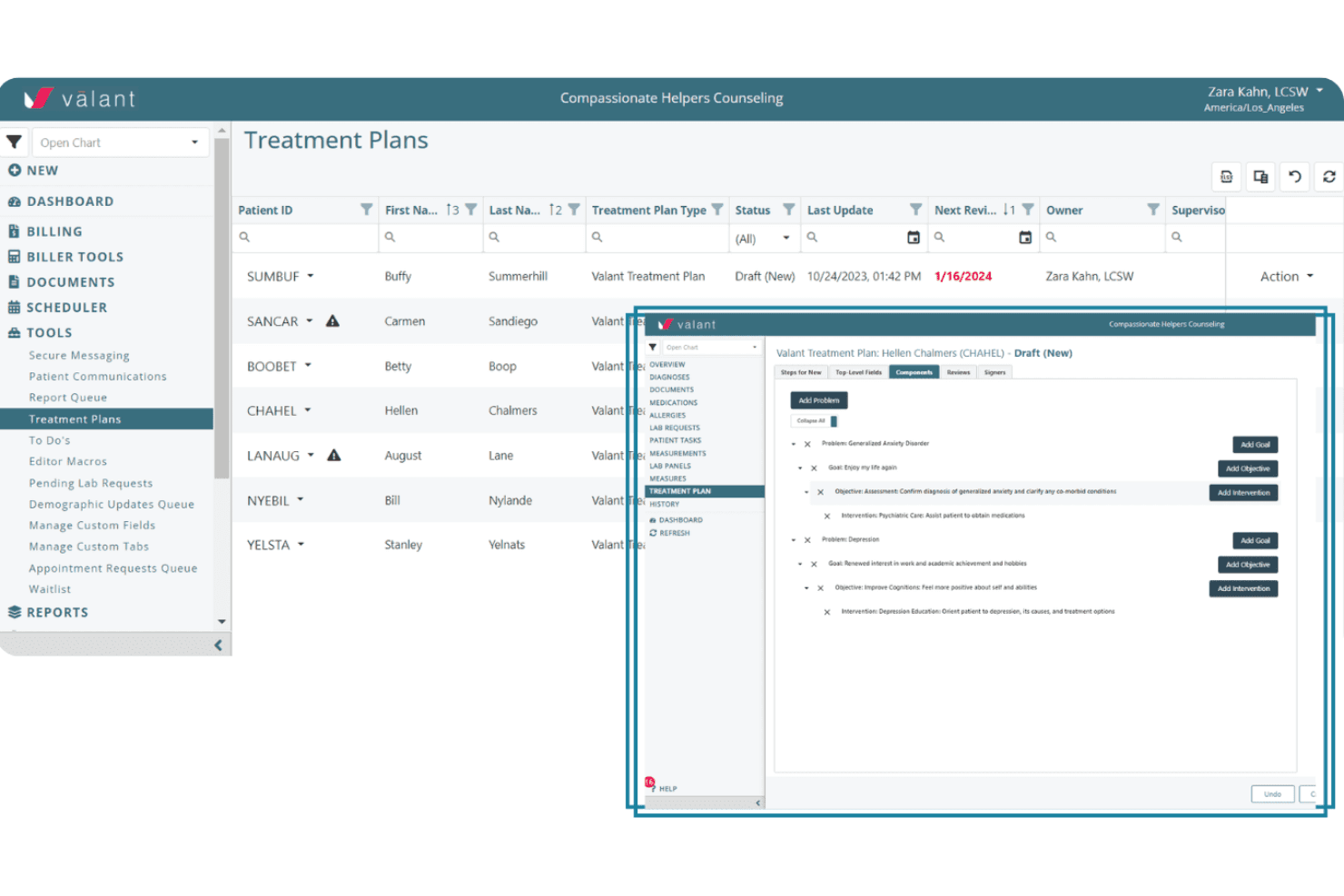
Valant has a treatment planning feature to support mental health practices. Valant is a behavioral health EHR and practice management platform that combines clinical documentation, outcome tracking, scheduling, telehealth, billing, and patient engagement tools.
Who Is Valant Best For?
Valant works well for outpatient behavioral health practices that want clinical and revenue cycle workflows managed within one specialty-specific system.
Why I Picked Valant
I picked Valant because its billing tools are designed specifically for behavioral health rather than adapted from a general medical platform. It supports claim scrubbing, electronic remittance posting, and specialty-specific coding within the same system used for clinical documentation. I also like that its treatment plan builder connects directly with progress notes, helping practices keep care planning and documentation aligned.
Valant Key Features
- Multi-provider scheduling: Manage appointments across multiple clinicians through a shared calendar with configurable availability and appointment types.
- Integrated telehealth: Launch HIPAA-compliant video sessions directly from the patient record without switching platforms.
- Automated appointment reminders: Send SMS and email notifications to help reduce missed sessions.
- Practice analytics dashboard: Track session volume, billing performance, clinician productivity, and other practice metrics.
Valant Integrations
Valant integrates with Waystar for clearinghouse, claims, and electronic remittance workflows, and Rcopia for electronic prescribing. It also provides an API management platform with behavioral health-focused endpoints for exchanging patient, appointment, and charge data with external systems.
Pros and Cons
Pros:
- Links treatment plans with progress notes and clinical workflows
- Combines documentation, billing, telehealth, and outcome tracking
- Built specifically for outpatient behavioral health practices
Cons:
- Pricing and advanced feature costs are not clearly listed publicly
- May require training to configure specialty workflows
Learn more about Valant: Best for comprehensive practice management
- Free demo available
- Pricing upon request
Visit WebsiteCustomer Rating:4/5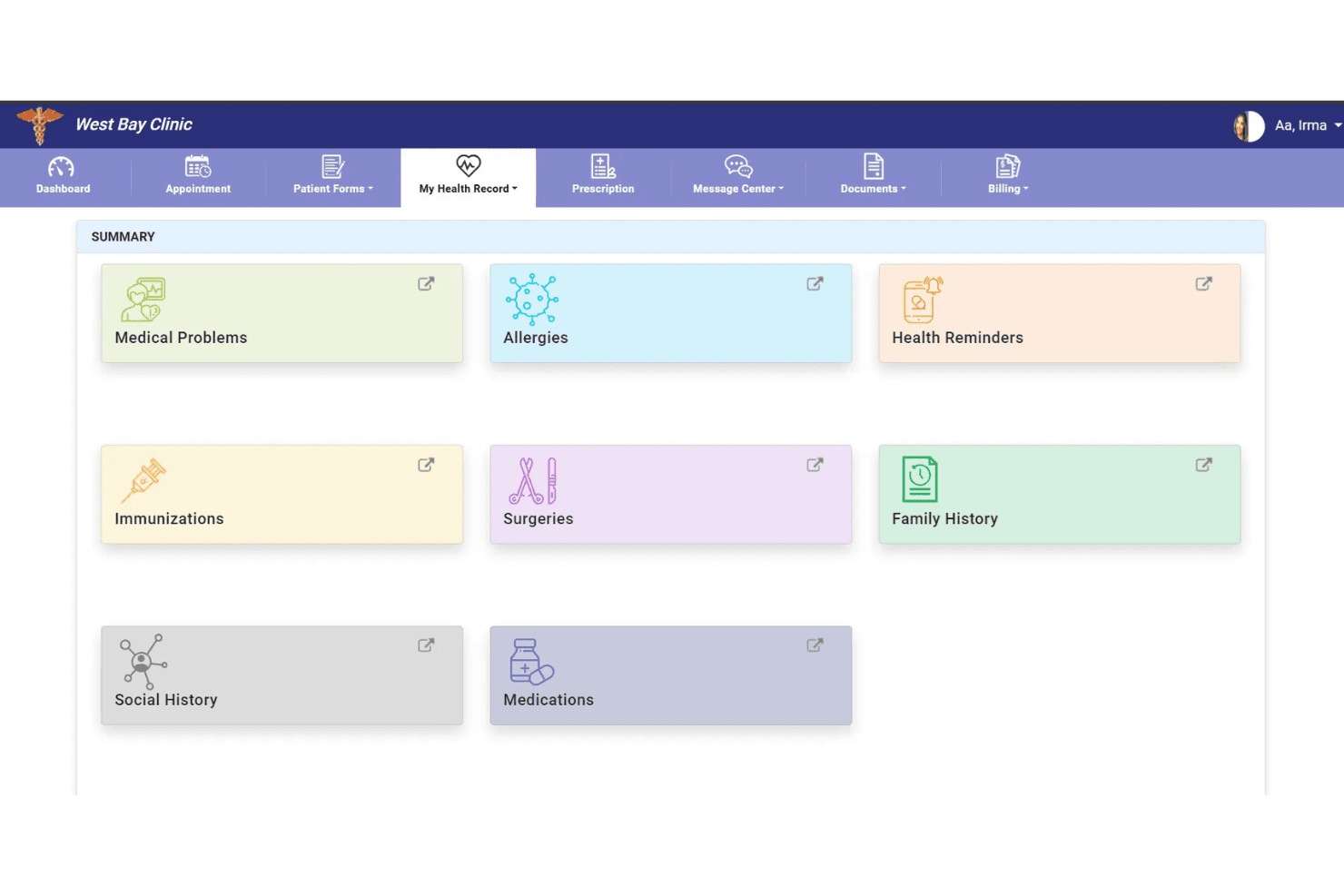
PrognoCIS provides a patient portal for accessing health summaries and managing appointments. PrognoCIS is a cloud-based EHR platform for ambulatory care that combines clinical documentation, telemedicine, e-prescribing, medical billing, scheduling, and patient engagement tools.
Who Is PrognoCIS Best For?
PrognoCIS works well for independent and group practices that manage high documentation volumes and need customizable, specialty-specific clinical workflows.
Why I Picked PrognoCIS
I picked PrognoCIS because its PrognoAI documentation tools can generate clinical notes directly within the patient chart. Its built-in specialty templates are also customizable, helping practices such as podiatry and OB-GYN adapt the system without building workflows from scratch. The preauthorization tracking tool is another useful feature, as it can create authorization requests when orders are placed and connect payer responses to the original request.
PrognoCIS Key Features
- Telemedicine: Conduct video visits through a built-in tool that keeps virtual encounter documentation connected to the patient chart.
- Electronic prescribing: Send prescriptions electronically, including controlled substances through EPCS and prior authorization requests through EPA workflows.
- Patient portal: Let patients complete intake forms, schedule appointments, review information, and send secure messages.
- Appointment scheduling: Book, reschedule, and manage patient visits through the platform’s calendar.
PrognoCIS Integrations
PrognoCIS supports connections with laboratories, radiology providers, pharmacies, health information exchanges, payment processors, transcription services, and state immunization registries. It also supports HL7 and FHIR standards and offers API access for custom integrations.
Pros and Cons
Pros:
- Supports HL7, FHIR, APIs, and broad healthcare integrations
- Includes AI-assisted documentation and specialty-specific templates
- Combines EHR, telemedicine, billing, and e-prescribing tools
Cons:
- The platform can feel complex for very small practices
- Advanced configuration may require implementation support
Learn more about PrognoCIS Psychiatry EHR:
Outras ferramentas de software EHR gratuitas
Eis algumas opções adicionais de software EHR gratuito que não entraram na minha lista restrita, mas que ainda vale a pena consultar:
- 11Azalea HealthBest for rural practices and outpatient clinics
- 12Practice FusionBest for cloud-based integrated solutions for patient-centered care
- 13AdvancedMDBest for customizable EHR templates
- 14EpicBest for comprehensive patient data management
- 15eClinicalWorksBest for comprehensive telehealth solutions
- 16CernerBest for advanced analytics and population health management
- 17MEDITECH ExpanseBest for a comprehensive suite offering from the emergency department to home health
- 18Kareo ClinicalBest for independent medical practices seeking streamlined workflows
- 19CampDocBest for medication administration
- 20ElationBest for clinical-first EHR emphasizing provider-patient relationship
How I Evaluate EHR Software
I split my evaluation into two layers: the baseline clinical and billing capabilities a platform must cover, and the differentiators that separate one vendor from another.
Core Functionality (Table Stakes For This List)
When I'm selecting tools for my list, I rank each one on a scale from 0 (does not offer the functionality) to 5 (excels in this area) for each core functionality listed below. I then calculate the tool's total score into a percentage, using 65% as a benchmark to help assess its overall fit for the list.
- Electronic Charting: I check whether the platform offers structured clinical notes, problem lists, and medication histories rather than just free-text fields. A provider documenting a follow-up visit should be able to pull up a SOAP note template tied to that patient's chart.
- Practice Scheduling: Scheduling should connect directly to the patient record so front-desk staff can book, confirm, and check in patients without toggling between systems. I look for provider calendars with automated reminders at a minimum.
- Medical Billing & Claims: I evaluate whether encounter-level coding and claims generation are included or paywalled. At baseline, a practice should be able to attach CPT and ICD-10 codes to a visit and generate a claim from within the chart.
- E-Prescribing & Orders: The ability to transmit prescriptions electronically matters, especially for routine medications. I look for at least basic e-prescribing tied to the patient record, along with any support for lab or imaging order workflows.
- HIPAA Compliance & Security: Every platform I consider needs to demonstrate HIPAA-compliant data handling. That means audit logs, role-based access controls, and encrypted storage—so a medical assistant and a billing lead aren't seeing the same data by default.
- Patient Portal & Interoperability: Patients should be able to view records, request appointments, or message their provider through a portal. I also evaluate whether the platform supports standards like HL7 or FHIR for exchanging records with labs and pharmacies.
Once I have a list of tools that meet the criteria, I consider what sets each platform apart.
Differentiating Factors (What Sets Vendors Apart)
Here's how I compare and contrast different vendors:
Standout Features
Telehealth integration is a major differentiator. When a platform embeds HIPAA-compliant video visits directly into the patient chart, a provider can launch a session from the scheduling screen without switching to a separate tool. I also look at specialty-specific templates. A pediatrician and a behavioral health counselor have very different documentation needs, so I check whether the platform includes configurable note templates beyond a generic SOAP format.
Beyond Features
Deployment model matters a lot with free EHR platforms. Some are cloud-based SaaS with zero setup, while others like OpenEMR and GNU Health are self-hosted and require your own server infrastructure and IT resources. I evaluate whether a platform's integration ecosystem connects to lab networks, pharmacies, and clearinghouses—a free EHR that can't transmit a prescription or receive lab results creates manual workarounds your team doesn't need. Practice size fit is another factor I check, since some free tiers limit the number of providers or locations you can support.
Como escolher software EHR gratuito
É fácil ficar perdido entre listas extensas de funcionalidades e estruturas de preços complexas. Para o ajudar a manter o foco enquanto percorre o seu processo específico de seleção de software, apresentamos uma lista de verificação com os fatores a ter em conta:
| Fator | O que considerar |
| Escalabilidade | A plataforma consegue acompanhar o crescimento futuro da sua clínica — novos profissionais, localizações ou especialidades — sem o obrigar a fazer posteriormente uma atualização ou migração dispendiosa? |
| Integrações | Precisa de ligações a redes de laboratórios, farmácias, sistemas de faturação ou outras plataformas, e o EHR consegue suportar uma troca de dados segura e baseada em normas? |
| Personalização | Pode adaptar os modelos, os fluxos de trabalho e as ferramentas de elaboração de relatórios do EHR às necessidades da sua especialidade ou clínica, ou a experiência é rígida e igual para todos? |
| Facilidade de utilização | Os funcionários e os profissionais de saúde conseguirão aprender rapidamente a utilizar o sistema? Procure fluxos de trabalho intuitivos, documentação clara e necessidades mínimas de formação. |
| Implementação e integração inicial | Quanto tempo, conhecimento técnico ou apoio são necessários para começar a utilizar o sistema? As ferramentas baseadas na nuvem são normalmente mais rápidas, enquanto as opções alojadas localmente exigem mais configuração. |
| Custo | O plano gratuito cobre as suas necessidades ou terá de enfrentar atualizações inesperadamente dispendiosas para módulos essenciais, número de utilizadores ou armazenamento? Analise cuidadosamente todas as limitações. |
| Medidas de segurança | Que medidas de proteção de dados estão implementadas? Procure encriptação, controlos de acesso, registos de auditoria e provas de conformidade com a HIPAA ou com as normas relevantes do setor da saúde. |
| Disponibilidade do apoio | Que nível de apoio — recursos do centro de ajuda, chat em direto ou sistema de pedidos — está disponível sem atualização, especialmente se tenciona depender do plano gratuito a longo prazo? |
O que é software EHR gratuito?
O software EHR gratuito refere-se a sistemas de registos clínicos eletrónicos que disponibilizam ferramentas clínicas e administrativas essenciais sem qualquer custo, através de um plano gratuito ilimitado ou de um período de teste gratuito com duração limitada. Pode contar com funções essenciais como o registo clínico dos pacientes, o agendamento e a faturação da sua clínica. Estas opções facilitam a digitalização dos registos por clínicas e profissionais independentes, melhorando o fluxo de trabalho sem um compromisso financeiro inicial.
Funcionalidades do software EHR gratuito
Vamos analisar as funcionalidades habitualmente encontradas no software EHR e quais são normalmente incluídas nos planos gratuitos e nos planos pagos.
Funcionalidades habitualmente incluídas no software EHR gratuito
- Registo clínico básico: Modelos digitais estruturados para os atendimentos dos pacientes, permitindo documentar e consultar facilmente notas clínicas, diagnósticos e planos de tratamento.
- Agendamento de consultas: Ferramentas de calendário simples para marcar, consultar e gerir as consultas dos pacientes, por vezes com lembretes automáticos ou vistas específicas por profissional.
- Base de dados de pacientes: Armazenamento centralizado de dados demográficos básicos, históricos e informações de contacto, ajudando os consultórios a manter os registos organizados e pesquisáveis.
- Gestão de prescrições: Possibilidade de registar e imprimir prescrições para os pacientes, mantendo o histórico da medicação para consulta durante visitas futuras.
- Controlo de acesso baseado em funções: Ferramentas para dar aos membros certos da equipa acesso às informações adequadas, reforçando a privacidade e reduzindo os erros em ambientes movimentados.
- Análise básica: Funcionalidades simples de elaboração de relatórios para gerar listas de pacientes por diagnóstico ou procedimento, acompanhar consultas ou visualizar o volume de marcações ao longo de determinados períodos.
- Ferramentas de faturação manual: Criação e impressão de faturas básicas ou faturas detalhadas associadas a cada atendimento, apoiando o acompanhamento direto das receitas em consultórios mais pequenos.
- Carregamento de documentos: Opção de anexar formulários digitalizados, resultados de análises ou documentos de seguros ao processo do paciente, permitindo uma gestão unificada dos ficheiros.
- Personalização de modelos: Possibilidade de ajustar modelos de consultas e notas para diferentes fluxos de trabalho clínicos ou preferências, embora normalmente com flexibilidade limitada.
Funcionalidades habitualmente incluídas no software EHR pago
- Prescrição eletrónica integrada: Ferramentas para enviar prescrições diretamente para as farmácias, incluindo substâncias controladas, muitas vezes com verificação em tempo real das interações medicamentosas e da comparticipação.
- Pedidos de comparticipação automatizados: Sistemas de codificação integrados e ligações a plataformas de processamento para a submissão eletrónica de pedidos, a gestão de recusas e o registo de pagamentos dentro do sistema.
- Acesso ao portal do paciente: Área online segura onde os pacientes podem consultar registos, solicitar consultas, preencher formulários e enviar mensagens ao seu profissional de saúde, melhorando o envolvimento e a comunicação.
- Consultas de telessaúde: Consultas por vídeo integradas e em conformidade com a HIPAA, com início através de um clique a partir da agenda ou do processo clínico, além de tomada de notas integrada durante as consultas virtuais.
- Interoperabilidade avançada: Suporte para a troca de dados de saúde com laboratórios externos, centros de imagiologia, HIE ou profissionais responsáveis por referenciações, utilizando as normas FHIR, HL7 ou CCD/CCDA.
- Relatórios de qualidade: Geração automatizada de relatórios para o MIPS/MACRA ou outros programas regulamentares, com painéis de acompanhamento para monitorizar a conformidade e as tendências de desempenho.
- Análise do ciclo de receitas: Painéis visuais para analisar cobranças, recusas, composição dos pagadores e valores a receber em atraso, promovendo melhores decisões financeiras.
- Automatização personalizada de fluxos de trabalho: Ferramentas avançadas para criar fluxos de trabalho baseados em regras para o registo na receção, a autorização prévia e o acompanhamento de referenciações.
- Suporte dedicado à implementação: Ajuda prática na configuração, recursos de formação e canais de suporte prioritário, para além do que está disponível para os utilizadores dos planos gratuitos.
Benefícios do software EHR gratuito
A implementação de software EHR gratuito proporciona vários benefícios à sua equipa e à sua empresa. Eis alguns dos que pode esperar:
- Custos operacionais mais baixos: Digitalize e gira os registos dos pacientes, as marcações e a faturação sem aumentar as suas despesas mensais.
- Digitalização mais rápida da prática clínica: Comece a trabalhar rapidamente com as principais funcionalidades de um EHR — sem ter de esperar por aprovações orçamentais ou longos ciclos de aquisição.
- Fluxos de trabalho dos pacientes simplificados: Aceda a ferramentas integradas de agendamento, elaboração de processos clínicos e documentação que reduzem o trabalho manual e melhoram a eficiência diária.
- Facilidade de acesso e colaboração: Os registos centralizados dos pacientes permitem uma melhor coordenação entre médicos, funcionários administrativos e equipas de faturação.
- Avaliação flexível da plataforma: Experimente as funcionalidades essenciais de um EHR sem riscos, permitindo-lhe avaliar a facilidade de utilização e a adequação à sua prática antes de fazer a atualização.
- Suporte à conformidade: Conte com salvaguardas HIPAA integradas, como controlos de acesso e registos de auditoria, que ajudam a proteger os dados dos pacientes desde o primeiro dia.
- Histórico de cuidados documentado: Simplifique o acompanhamento dos cuidados e as auditorias com registos digitais consistentemente organizados, legíveis e fáceis de consultar.
Custos e preços do software EHR
Compreendo que veio a este artigo à procura das melhores opções de software EHR disponíveis gratuitamente. No entanto, uma vez que os planos gratuitos oferecem apenas funcionalidades limitadas, existe uma boa probabilidade de precisar de atualizar o seu plano no futuro.
A tabela abaixo resume os planos mais comuns, os seus preços médios e as funcionalidades normalmente incluídas no software EHR:
Tabela de comparação de planos de software EHR
| Tipo de plano | Preço médio | Funcionalidades comuns |
| Plano gratuito | $0 | Elaboração básica de processos clínicos, agendamento de consultas, base de dados de pacientes, gestão de receitas e capacidades de faturação limitadas. |
| Plano pessoal | $20-$75/utilizador/mês | Prescrição eletrónica integrada, submissão básica de pedidos de indemnização, acesso ao portal do paciente, análise de dados e personalização de modelos. |
| Plano empresarial | $75-$200/utilizador/mês | Pedidos de indemnização de seguros automatizados, consultas de telessaúde, relatórios de qualidade, automatização de fluxos de trabalho e interoperabilidade avançada. |
| Plano empresarial de grande escala | $200+/utilizador/mês | Integrações personalizadas, análise de dados avançada, apoio à integração, suporte prioritário e gestão de várias localizações. |
Perguntas frequentes sobre software EHR gratuito
Eis algumas respostas a perguntas comuns sobre software EHR gratuito:
O software EHR gratuito é realmente seguro e está em conformidade com a HIPAA?
Sim, muitas plataformas EHR gratuitas seguem normas rigorosas de segurança dos dados e disponibilizam funcionalidades em conformidade com a HIPAA, como encriptação, registos de auditoria e controlos de utilizadores baseados em funções. Consulte sempre a documentação de segurança de cada fornecedor para confirmar a conformidade antes de introduzir informações reais de pacientes.
Posso migrar os meus dados se ultrapassar os limites de um plano EHR gratuito?
Sim, a maioria das soluções EHR gratuitas de fornecedores conceituados disponibiliza ferramentas de exportação ou migração de dados, mas a complexidade do processo pode variar. Verifique se a plataforma disponibiliza formatos normalizados, como CSV ou CCD, para exportar registos clínicos quando precisar de atualizar ou mudar de sistema.
Quais são as limitações comuns do software EHR gratuito?
Os planos gratuitos restringem frequentemente funcionalidades como a submissão automática de pedidos de reembolso, a prescrição eletrónica, a telemedicina ou as integrações personalizadas. Também poderá encontrar limites relativamente ao número de utilizadores, localizações ou capacidade de armazenamento. Consulte a matriz de funcionalidades do fornecedor para garantir que o nível gratuito abrange as necessidades essenciais do seu fluxo de trabalho.
Uma clínica pequena com vários prestadores pode utilizar software EHR gratuito a longo prazo?
Sim, algumas soluções EHR gratuitas permitem a utilização por mais do que um prestador e em várias localizações, mas deve verificar cuidadosamente os limites de utilizadores ou as restrições de funcionalidades. Se a sua clínica crescer, é importante confirmar atempadamente as opções de atualização e os custos associados.
Que tipo de apoio ao cliente está disponível com o software EHR gratuito?
Os planos EHR gratuitos incluem normalmente artigos da central de ajuda, fóruns da comunidade ou apoio por correio eletrónico. O chat e o apoio telefónico em tempo real estão geralmente reservados para os planos pagos, pelo que deve considerar o seu grau de conforto com recursos de autoatendimento antes de escolher um fornecedor.