

EMR de fisioterapia acompanha a evolução da terapia e os planos de exercícios, permitindo que a sua equipa se concentre na motivação dos pacientes e na personalização dos programas. Gerir a conformidade e a faturação pode ser um desafio, mas o apoio adequado pode reduzir a papelada e melhorar o acompanhamento dos resultados.
Neste artigo, comparo e analiso as melhores ferramentas de EMR de fisioterapia para apoiar a sua decisão de compra.
Why Trust Our Software Recommendations
6,700+
Reviews
20
Industry experts
16+
Evaluation factors
14
Years
Our team has been testing and reviewing software since 2012. As medical practice leaders ourselves, we know how difficult—and important—it is to choose the right software.
For this guide, we evaluated tools using hands-on testing and independent research, scoring tools using our selection criteria.
Our reviews reflect our human editorial judgment, not a sales pitch.
Tabela comparativa de EMR de fisioterapia
Esta tabela comparativa resume os detalhes de preços das minhas principais escolhas de EMR de fisioterapia:
| Tool | Best For | Trial Info | Price | ||
|---|---|---|---|---|---|
| 1 | Best for integrated e-prescribing workflows | Free demo + free expert consultation available | Pricing upon request | Website | |
| 2 | Best for multi-modality charting flexibility | 15-day free trial | From $99/month | Website | |
| 3 | Best for customizable documentation templates | Free demo available | Pricing upon request | Website | |
| 4 | Best for AI-driven PT documentation and RCM | Free demo available | Pricing upon request | Website | |
| 5 | Best for outpatient rehab billing and compliance | Free demo available | Pricing upon request | Website | |
| 6 | Best for PT, OT, and SLP in one chart | Free demo available | Pricing upon request | Website | |
| 7 | Best for multi-disciplinary AI-driven RCM | Free demo available | Pricing upon request | Website | |
| 8 | Best for multi-discipline pediatric therapy EMR | Free demo available | From $25/month | Website | |
| 9 | Best for its collaborative care coordination features | Free demo available | Pricing upon request | Website | |
| 10 | Best for marketing automation in PT clinics | Free demo available | From $149/user/month | Website |


Análises dos melhores EMR de fisioterapia
Apresentamos abaixo os meus resumos detalhados dos melhores EMR de fisioterapia que chegaram à minha lista final. As minhas análises oferecem uma visão detalhada das principais funcionalidades, vantagens e desvantagens, integrações e casos de utilização ideais de cada ferramenta, para o ajudar a encontrar a melhor opção para si.
 1Best for integrated e-prescribing workflows
RXNT
- Free demo + free expert consultation available
- Pricing upon request
Visit WebsiteCustomer Rating:4.3/5
RXNT provides physical therapy EMR tools for documenting patient visits, tracking treatment progress, and managing care records efficiently. RXNT is a cloud-based EHR and practice management platform built for specialty practices, combining electronic health records, e-prescribing, medical billing, scheduling, and an AI-powered ambient documentation tool in a single integrated system.
Who Is RXNT Best For?
RXNT is a good fit for independent and small-to-midsize specialty practices that need a unified clinical and billing platform without managing multiple disconnected systems.
Why I Picked RXNT
RXNT earns its spot on my shortlist because of how tightly its e-prescribing is woven into the broader clinical workflow. I like that prescribers get direct access to state Prescription Drug Monitoring Programs (PDMPs) through Bamboo Health without leaving the platform, which matters in a PT setting where co-management with physicians can involve controlled substances. The built-in drug interaction and allergy checks run automatically at the point of prescribing, and EPCS certification covers Schedule II–V medications.
RXNT Key Features
- AI ambient documentation: An AI scribe captures clinical conversations and auto-generates structured SOAP notes in real time.
- Specialty scheduling: The scheduling module supports resource allocation across treatment rooms, equipment, and staff in a single calendar view.
- Patient portal: Patients can request appointments, submit intake forms, view records, and pay bills directly through the portal.
- Integrated claims management: Built-in claim scrubbing checks for errors before submission to reduce denials and resubmissions.
RXNT Integrations
RXNT connects to Surescripts for certified electronic prescribing and Kno2 for TEFCA-based health information exchange. It also supports HL7 interfaces with clinical laboratories and radiology facilities. An API is also available for accessing patient clinical data.
Pros and Cons
Pros:
- Mobile apps support charge capture anywhere
- EPCS-certified and PDMP-integrated e-prescribing
- Smart Forms templates standardize PT charting
Cons:
- Limited customization for highly specialized PT workflows
- Occasional glitches and duplicate patient records
Learn more about RXNT: Best for multi-modality charting flexibility
- 15-day free trial
- From $99/month
Visit WebsiteCustomer Rating:4.8/5
OptiMantra lets providers document patient visits with customizable SOAP templates, questionnaires, and clinical notes in one place. OptiMantra lands on my list because it's uncommon to find a platform so well-suited to practices that blend different therapeutic methods. I suggest OptiMantra when teams need to support everything from traditional manual therapy and modalities to acupuncture and integrative medicine.
What stands out to me in using the tool is the template flexibility and how treatments across modalities are charted on one record. I appreciate how physical therapists can tailor templates, so you’re not boxed in by generic documentation.
OptiMantra’s Best For
- Practices combining physical therapy with other medical modalities
- Teams needing customizable, multi-modality charting templates
OptiMantra’s Not Great For
- Single-modality clinics with very basic charting needs
- Practices requiring highly specialized physical therapy workflows only
What Sets OptiMantra Apart
OptiMantra works differently from most EMRs because it expects clinics to handle a mix of physical therapy and integrative medicine day-to-day. Instead of confining everyone to one type of chart, it’s designed so you can build and use templates across specialties in a single patient record. This makes it stand apart from tools like WebPT that focus strictly on physical therapy documentation.
Tradeoffs with OptiMantra
OptiMantra optimizes for flexibility across modalities, but that comes at the cost of having fewer physical therapy-specific workflows out of the box. If you need deep PT automation and built-in protocols, you do extra setup to match what a PT-only system gives you.
Pros and Cons
Pros:
- Integrated payment and billing tools
- HIPAA-compliant telehealth included
- Customizable charting with SOAP templates
Cons:
- Caters mostly to US-based practices
- Limited advanced analytics for large networks
Learn more about OptiMantra: Best for customizable documentation templates
- Free demo available
- Pricing upon request
Visit WebsiteCustomer Rating:5/5
Athenahealth helps healthcare providers track and monitor patient vitals, health history, and symptoms. Athenahealth earns its spot thanks to its standout approach to customizing clinical documentation for physical therapy. I see this used most by organizations that want to tailor their note templates to unique therapy workflows and compliance rules.
What I like is how you can adapt fields, layouts, and forms in response to payer changes or specialty rehab processes, all without IT support. That flexibility makes it great for practices with evolving documentation needs.
Athenahealth’s Best For
- Physical therapy practices needing customizable documentation templates
- Clinics adapting therapy notes to specific payer or specialty requirements
Athenahealth’s Not Great For
- Solo providers seeking a lightweight, entry-level EMR
- Teams who want out-of-the-box, rigid documentation formats
What sets Athenahealth apart
Athenahealth focuses on letting clinics adapt their documentation processes to specific therapy, payer, and compliance needs. Instead of offering a one-size-fits-all approach like Practice Fusion, Athenahealth encourages you to customize templates and workflows to your organization. This works well when clinics have evolving protocol requirements or niche clinical specialties.
You get more flexibility to respond to insurance or regulatory changes than with most out-of-the-box EMRs.
Tradeoffs with Athenahealth
Athenahealth optimizes for customization and adaptability, but you give up fast onboarding and standardized note structures. In practice, teams that want rigid templates or plug-and-play use can find the flexibility adds extra setup time.
Pros and Cons
Pros:
- Customizable templates for various medical specialties
- Cloud-based system for remote access
- Wide range of features, including billing, practice management, and patient engagement tools
Cons:
- Limited customization options for certain workflows
- Due to its extensive features, new users may experience a learning curve
Learn more about Athenahealth: 4Best for AI-driven PT documentation and RCM
SPRY
- Free demo available
- Pricing upon request
Visit WebsiteCustomer Rating:4.8/5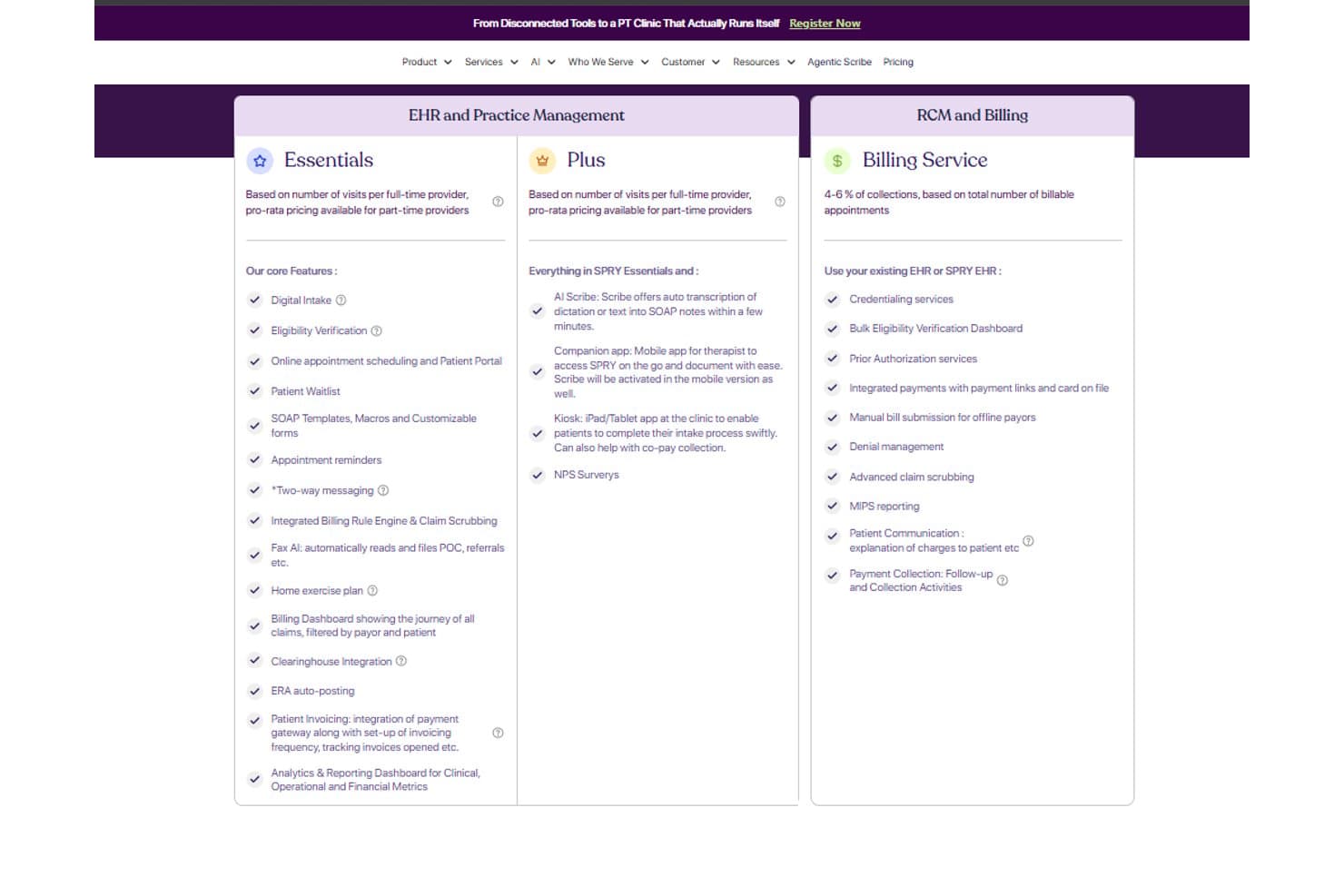
SPRY offers tiered pricing plans covering EHR, billing, and RCM features. SPRY is a physical therapy EMR platform that combines AI-driven documentation, scheduling, billing, RCM, prior authorization, and patient engagement tools built specifically for outpatient rehab clinics.
Who Is SPRY Best For?
SPRY fits outpatient rehab clinics that want AI-assisted documentation and billing tools built around the physical therapy workflow.
Why I Picked SPRY
I picked SPRY as one of the best because its AI-driven documentation and RCM tools are built specifically around the PT workflow, not retrofitted from a general EMR. The Agentic Scribe turns dictation into a complete SOAP note in under two minutes, and the billing rule engine checks CPT codes against documentation before a claim ever leaves the clinic, catching mismatches at the source rather than after a denial.
SPRY Key Features
- AI Scheduling Agent: Automatically books plan-of-care visits based on frequency, visit count, therapist availability, and authorization rules, and fills cancellations from the waitlist.
- Medicare compliance engine: Applies the 8-minute rule, tracks supervised percentage, manages the KX modifier, and prompts staff at the 10th visit.
- Home exercise program library: Assigns exercises from a 4,500+ library via patient mobile app, with AI form-check through the patient's camera and adherence tracking.
- Multi-location analytics dashboard: Covers therapist productivity, payer mix, denial trends, and cancellation rates across locations, queryable in plain language.
SPRY Integrations
SPRY integrations include Athena, Cerner, ModMed, Claim.MD, Wibbi, Google Calendar, Zocdoc, Emitrr, Healthmonix, and Patient360, plus HL7 FHIR and REST APIs for custom connections and Zapier.
Pros and Cons
Pros:
- Medicare rules support compliant therapy billing
- Billing checks catch coding mismatches early
- AI scribe speeds physical therapy documentation
Cons:
- Claim follow-up workflows remain limited
- AI notes can misidentify speakers
Learn more about SPRY: Best for outpatient rehab billing and compliance
- Free demo available
- Pricing upon request
Visit WebsiteCustomer Rating:4.4/5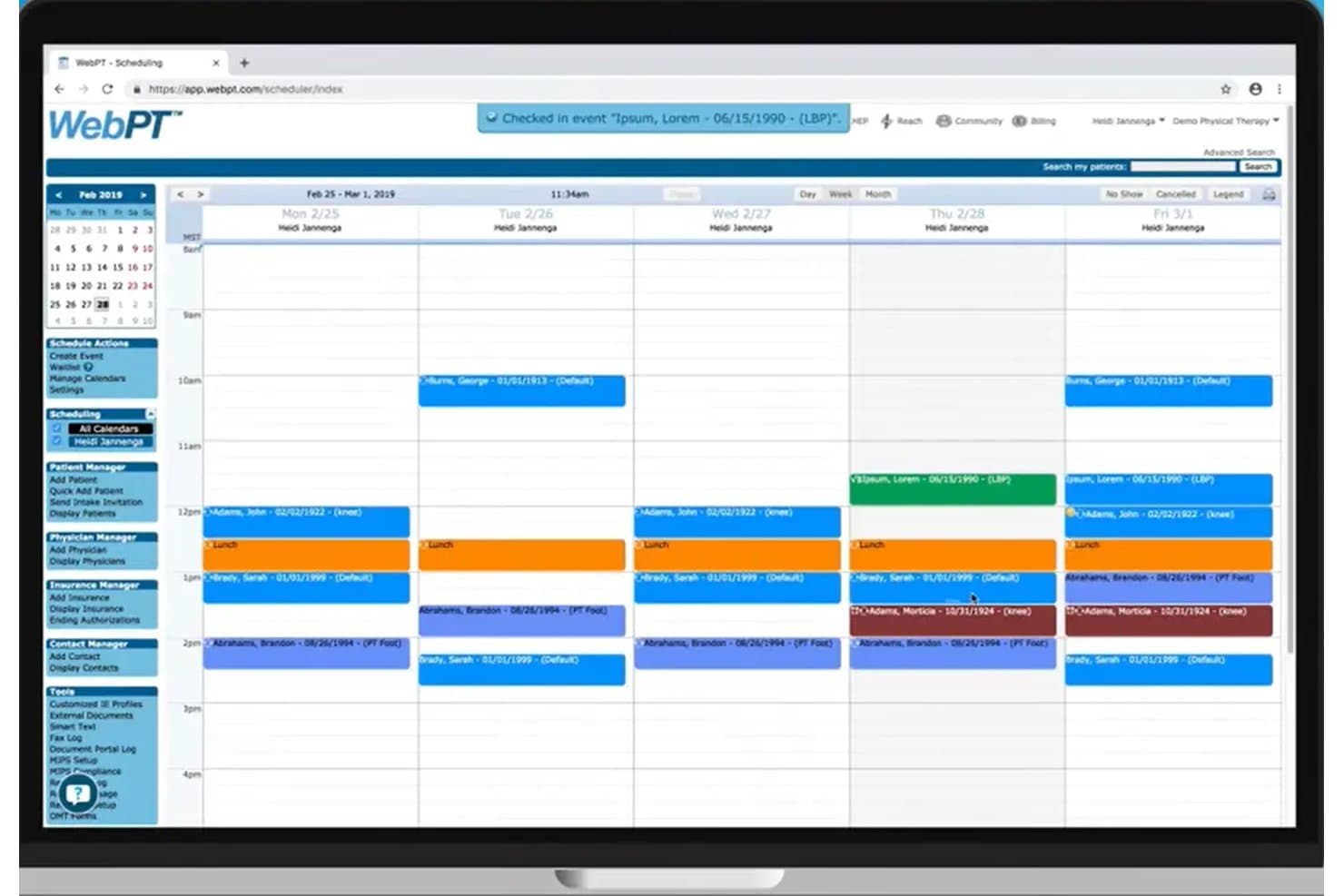
WebPT's scheduling calendar organizes weekly patient appointments by provider. WebPT is a rehab therapy-specific EMR that covers clinical documentation, scheduling, billing, home exercise programs, outcomes tracking, and telehealth for PT, OT, and speech therapy practices.
Who Is WebPT Best For?
WebPT fits outpatient rehab clinics that need airtight Medicare compliance and billing built directly into their documentation workflow.
Why I Picked WebPT
WebPT earns its spot on my shortlist because no other PT EMR I've reviewed embeds Medicare compliance so deeply into the billing workflow itself. I'm particularly impressed by the KX modifier threshold tracking and NCCI edit checks, which flag issues before a claim ever leaves the system. The AI-powered real-time note feedback also tells you whether your documentation actually justifies the billed units, catching underbilling mid-note rather than after a denial.
WebPT Key Features
- Specialty-specific templates: Twenty pre-built, customizable rehab templates cover PT, OT, speech therapy, and specialties like pelvic health, vestibular, and pediatrics.
- Outsourced RCM service: WebPT staff handle credentialing, claims, denials, appeals, and patient collections, with real-time KPI dashboards for visibility.
- Home exercise program library: A library of 5,500+ exercises with photos and video lets you build branded, phased programs patients access through the StriveHub app.
- MIPS registry integration: WebPT works exclusively with Patient360 to automate survey delivery and display a real-time estimated MIPS score on your dashboard.
WebPT Integrations
WebPT documents 60+ vendor integrations, including Therabill, PatientPay, Comprehend Health, Zoom for Healthcare, and Patient360. It also supports standard HL7 interfaces and custom integrations on request, though no public API documentation is listed.
Pros and Cons
Pros:
- StriveHub tracks home exercise adherence
- Therapy templates speed compliant daily documentation
- Medicare billing safeguards reduce preventable claim errors
Cons:
- Browser-based charting lacks native clinician app
- Reviewers report recurring note freezes
Learn more about WebPT: Best for PT, OT, and SLP in one chart
- Free demo available
- Pricing upon request
Visit WebsiteCustomer Rating:4.9/5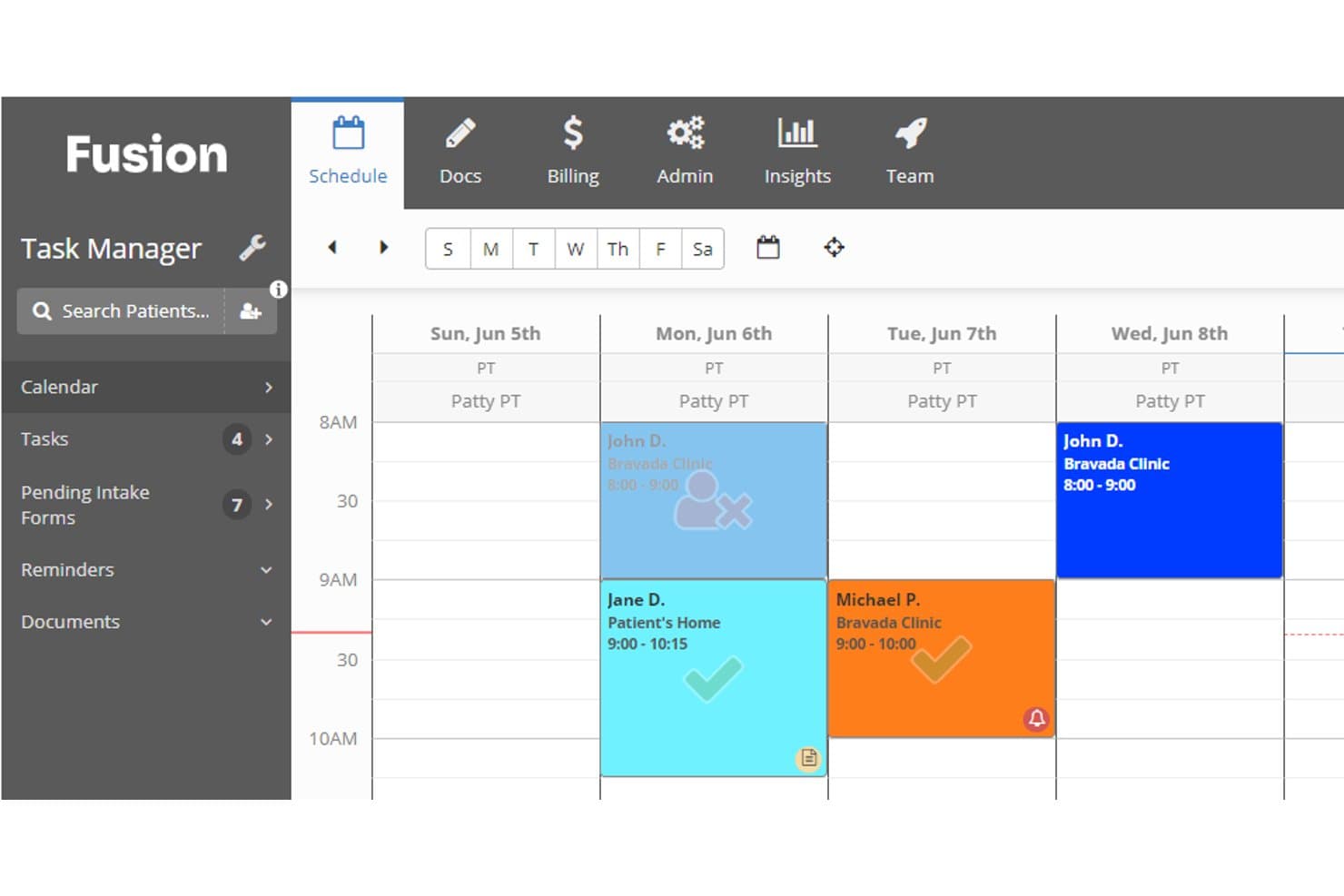
Fusion's weekly schedule view helps therapists manage patient appointments. Fusion is a multi-discipline physical therapy EMR by Ensora Health that covers PT, OT, and SLP documentation, billing, scheduling, and home exercise programs in a single platform.
Who Is Fusion Best For?
Fusion is a strong fit for multi-discipline outpatient therapy practices that treat PT, OT, and SLP patients and want one chart for all three.
Why I Picked Fusion
Fusion earns its spot on my shortlist because no other PT EMR I've reviewed keeps PT, OT, and SLP documentation in a single patient chart as cleanly. I love that flow sheets auto-fill CPT codes and CMS CO/CQ modifiers across disciplines, cutting the coding burden when a patient sees both a PT and an SLP in the same week. The built-in goal bank and 80+ discipline-specific templates mean clinicians aren't building documentation from scratch every time a new patient walks through the door.
Fusion Key Features
- Built-in telehealth: HIPAA-compliant video visits run directly in the platform, with no third-party app required.
- Client portal: Patients can book appointments, complete intake forms, make payments, and send secure messages 24/7.
- MIPS reporting: Captures Medicare quality data within the clinical workflow and flags missing measures before reporting deadlines.
- Ensai AI session assistant: Drafts notes from ambient listening or dictation, with clinician review required before finalizing.
Fusion Integrations
Fusion offers integrations with Wibbi for HEP and RTM, Ensora Clearinghouse for claims and remittance, and Ensora Payments for card processing. A public API, HL7, or FHIR connectivity isn’t documented.
Pros and Cons
Pros:
- Pediatric templates support faster evaluations
- Adult flow sheets reduce coding work
- PT, OT, and SLP share one chart
Cons:
- Owners report clunky operational reporting
- Adult PT features have limited track record
Learn more about Fusion: Best for multi-disciplinary AI-driven RCM
- Free demo available
- Pricing upon request
Visit WebsiteCustomer Rating:4.3/5
Here's the website screenshot of Raintree. Raintree is an AI-native EMR built for enterprise rehab therapy organizations that combines specialty-specific documentation, scheduling, billing, and RCM across PT, OT, SLP, pediatric, and ABA disciplines in a single platform.
Who Is Raintree Best For?
Raintree is built for enterprise rehab therapy organizations running PT, OT, SLP, pediatric, or ABA services across multiple locations.
Why I Picked Raintree
Raintree earns its spot on my shortlist because it's the only platform I've seen that runs PT, OT, SLP, pediatric, and ABA billing through one AI-native RCM engine. I'm particularly impressed by Agentic RCM, where an AI agent called Lucy handles eligibility verification by navigating payer phone menus and portals autonomously, cutting hands-on verification time by 91%. Pair that with ScribeIQ generating coded, payer-specific notes in under 90 seconds, and your billing team is working from cleaner documentation before a claim even enters the queue.
Raintree Key Features
- Multi-discipline specialty templates: Therapy-specific exam and note templates span PT, OT, SLP, pediatric, and ABA disciplines within a single patient record.
- SchedulerIQ™: An AI scheduling tool that books a full multi-appointment plan of care in roughly one minute, cutting front-desk clicks by around 10x.
- Business Intelligence dashboards: More than 10 role-based dashboards covering clinical performance, referral tracking, payer trends, and compliance alerts across multiple locations.
- Pathways™ referral management: Secure direct messaging that pulls hospital and health-system referrals directly into the EMR, with automated status updates sent back to the referring provider.
Raintree Integrations
Raintree integrates with Limber Health, Availity, Jopari, OccuPro, Zocdoc, and Rethink Behavioral Health. Its Gateways API platform and marketplace support custom connections, while Pathways supports referrals from hospitals and health systems.
Pros and Cons
Pros:
- Deep claim and denial controls
- AI scribes reduce after-hours documentation
- Multi-discipline records support complex organizations
Cons:
- Enterprise workflows overwhelm smaller practices
- Interface navigation frustrates some clinicians
Learn more about Raintree: Best for multi-discipline pediatric therapy EMR
- Free demo available
- From $25/month
Visit WebsiteCustomer Rating:3.1/5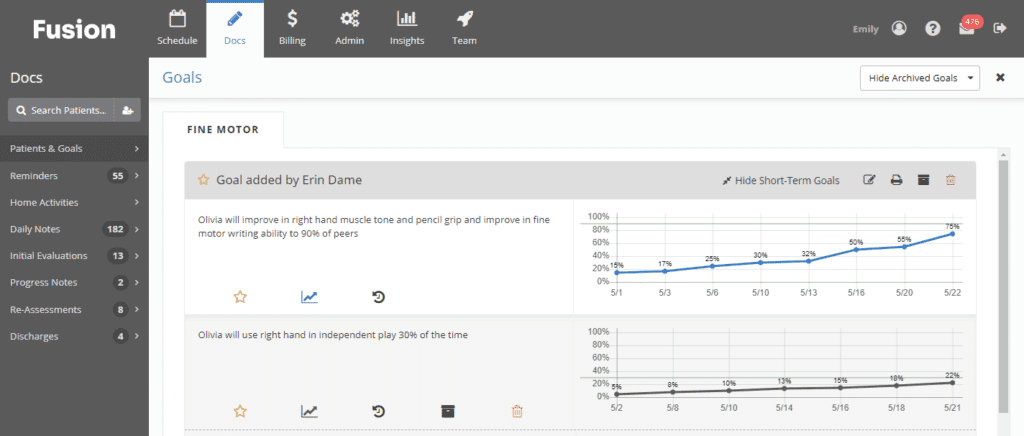
Here's the documentation feature in Fusion Web Clinic, which has goal-tracking capability. Fusion Web Clinic is a cloud-based physical therapy EMR and practice management system built for PT, OT, and SLP disciplines, offering therapy-specific documentation templates, automated billing and claims, scheduling, and home exercise program tools.
Who Is Fusion Web Clinic Best For?
Fusion Web Clinic is a strong fit for pediatric therapy clinics running PT, OT, and SLP under one roof.
Why I Picked Fusion Web Clinic
Fusion Web Clinic earns its spot on my list because of how deeply it's built around pediatric therapy, with over 80 pediatric evaluation templates, a built-in goal bank with mastery criteria, and automatic progress graphs that track milestone development over time. I picked it specifically for PT, OT, and SLP clinics treating pediatric patients under one roof, where having discipline-specific documentation that shares a single patient record genuinely changes how care is coordinated.
Fusion Web Clinic Key Features
- Automated claims generation: Claims are created automatically when a note is completed, with CPT codes, modifiers, and units applied based on each payer's rules.
- Authorization tracking: Staff can enter payer authorizations with visit limits and date ranges, and the system sends alerts before an authorization expires.
- Flow sheets with CQ/CO modifier support: Time-based documentation auto-fills CPT codes and flags CMS CQ/CO assistant modifiers for clinician review.
- MIPS reporting: Built-in Medicare quality reporting identifies incomplete measures before reporting deadlines.
Fusion Web Clinic Integrations
Fusion Web Clinic has native integrations with Wibbi and Ensora Clearinghouse (APEX EDI), plus connections to Ensora RCM, eRx, and Ensai. A public API, HL7, and FHIR support aren’t documented.
Pros and Cons
Pros:
- Claims generate directly from completed notes
- Shared records support PT, OT, and SLP
- Deep pediatric evaluation and goal-tracking tools
Cons:
- Exercise adherence requires a separate add-on
- Scheduling screens feel cluttered to reviewers
Learn more about Fusion Web Clinic: Best for its collaborative care coordination features
- Free demo available
- Pricing upon request
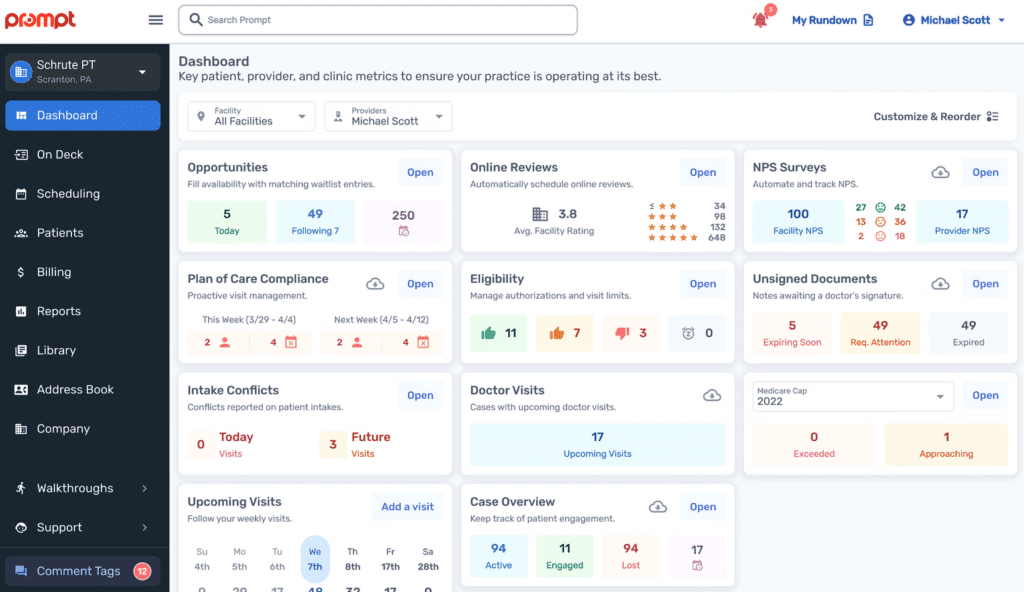
Here's Prompt EMR's dashboard screenshot. Prompt EMR is a cloud-based physical therapy EMR and practice management platform that combines AI-driven documentation, scheduling, billing, care coordination, and home exercise program tools for rehab therapy clinics of all sizes.
Who Is Prompt EMR Best For?
Prompt EMR is a strong fit for multi-location rehab therapy groups that need their clinical, front-office, and billing teams working in sync across sites.
Why I Picked Prompt EMR
I picked Prompt EMR as one of the best because its care coordination tools genuinely connect every role in a clinic. Patient-linked chat lets front desk staff, billers, and clinicians @-tag each other directly within a patient's record, cutting out the back-and-forth emails. I also like how physician signature tracking keeps referring provider workflows visible, so nothing gets lost after a note is faxed out.
Prompt EMR Key Features
- AI ambient documentation: AI listens during sessions and drafts SOAP notes, then suggests CPT codes for clinician review before submission.
- Claim scrubbing and denial tracker: Claims are scrubbed by AI before submission, and a denial tracker surfaces patterns with recommended fixes.
- Smart waitlist automation: An AI visit filler backfills cancellations from the waitlist, keeping schedules full with clinician approval.
- Kiosk check-in: Patients confirm insurance, pay copays, complete intake, and book future visits from a browser-based kiosk or their own phone.
Prompt EMR Integrations
Prompt EMR integrates with Weave, Go Card Connect, third-party HIPAA-compliant fax providers, and Exxat One. Enterprise customers can export data to their BI tools in real time, but no public API or HL7/FHIR documentation is available.
Pros and Cons
Pros:
- Billing tools catch denial risks early
- AI notes reduce same-day documentation burden
- Patient-linked chat keeps teams aligned
Cons:
- Useful workflows require separate add-ons
- Frequent updates can disrupt clinic access
Learn more about Prompt EMR: 10Best for marketing automation in PT clinics
Heno
- Free demo available
- From $149/user/month
Visit WebsiteCustomer Rating:2.3/5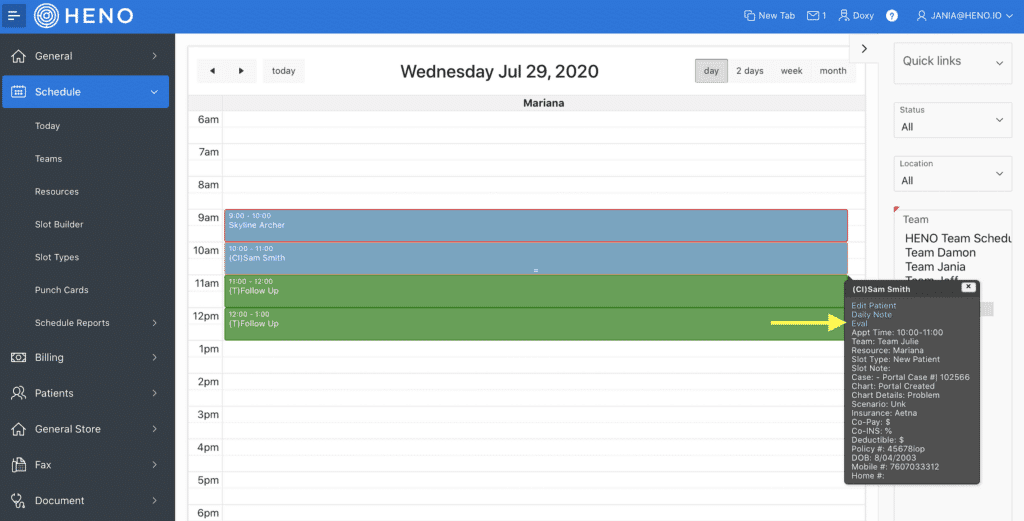
Here is Heno's physical therapy EMR interface Heno is a cloud-based physical therapy EMR that combines documentation, billing, scheduling, home exercise programs, and built-in marketing automation tools for PT, OT, and SLP clinics.
Who Is Heno Best For?
Heno is a strong fit for PT clinic owners running multi-location practices who want built-in marketing automation alongside their EMR and billing tools.
Why I Picked Heno
I've included Heno in my top picks because no other PT EMR on this list bundles marketing automation this deeply into the clinical workflow. I love that when a patient discharges, Heno can automatically trigger a re-engagement email or text sequence from your own domain, with return-on-marketing-spend tracking by channel built right in. The physician fax blast tool and referral revenue reports by doctor round out a feature set that helps PT clinic owners actually grow their patient pipeline, not just manage it.
Heno Key Features
- AI Scribe: Records and transcribes patient conversations in real time, turning them into structured SOAP notes for evaluations, daily notes, and discharge summaries.
- Built-in clearinghouse: Submits e-claims directly to government, commercial, workers' comp, and auto payers with automated modifier rules for KX, 59, CO, and CQ codes.
- RTM adherence tracking: Patients log exercise reps and sets through their HEP account, and therapists monitor adherence data with secure two-way messaging built in.
- Front-desk kiosk: An iPad-based check-in tool that lets patients pay copays, scan insurance cards, and book upcoming appointments based on their active plan of care.
Heno Integrations
Heno integrates with Doxy.me and FOTO, plus a built-in clearinghouse, ERA posting, and credit card processing. No public API or HL7/FHIR connectivity is documented.
Pros and Cons
Pros:
- Multi-location visibility suits expanding practices
- AI Scribe reduces daily documentation burden
- Marketing automation supports referral growth
Cons:
- Reviewers report clunky billing workflows
- Scheduling lacks confirmed room management
Learn more about Heno:
Outros EMR de fisioterapia
Abaixo encontra uma lista de EMR de fisioterapia adicionais que selecionámos, mas que não chegaram aos 10 primeiros. Vale definitivamente a pena consultá-los.
- 11ClinicientBest for in-house or outsourced therapy billing
- 12StrataPTBest for its strong emphasis on compliance and auditing
- 13PtEverywhereBest for cash-pay and hybrid PT clinic billing
How I Evaluate Physical Therapy EMR
I split my evaluation into three parts, giving the most weight to core functions: chart evaluations and plans of care, and submit claims with correct therapy units and modifiers. Next, I look for standout features such as digital home exercise programs patients can follow at home. Finally, I consider support, onboarding, and pricing value beyond the feature set.
Core Functionality (Table Stakes For This List)
When I'm selecting tools for my list, I score each one on a scale from 0 (does not offer the functionality) to 5 (excels in this area) for each core functionality listed below. I then convert the total into a percentage to help assess each tool's overall fit, with extra weight on any functionalities I’ve deemed essential.
- Therapy Documentation (Essential): I look for templates for evaluations, SOAP notes, plans of care, and discharge summaries that fit therapy workflows.
- Billing and Claims (Essential): I check whether charge capture and claims support therapy units and modifiers, and help teams track reimbursement.
- Scheduling and Patient Flow: I assess recurring visits, multi-provider calendars, and room or equipment scheduling for coordinated clinic flow.
- Compliance and Progress: I look for tools to track plans of care, authorizations, visit limits, and outcome measures as treatment progresses.
- Home Exercise Programs: I consider whether therapists can customize and share exercise plans, and whether patients can access instructions and report adherence.
Once I have a list of tools that meet the criteria, I consider what sets each platform apart.
Differentiating Factors (What Sets Vendors Apart)
Here's how I compare and contrast different vendors:
Standout Features
I look for built-in telehealth so therapists can review home programs or check progress without bolting on a separate video platform. Multi-disciplinary template support matters just as much—a clinic adding OT or speech services shouldn't need a new EMR. I also evaluate patient engagement portals, checking whether self-scheduling, digital intake, and secure messaging actually reduce front-desk phone volume.
Beyond Features
I evaluate how each platform handles payer and regulatory updates—Medicare threshold changes and modifier rules should flow into the system automatically, not wait on manual patches. Onboarding support matters just as much: a vendor that offers role-based training for billers, therapists, and front-desk staff cuts months off adoption. I also check whether licensing scales from a single clinic to multi-location groups without forcing a re-platforming conversation every time you add a site.
Como escolher um EMR de fisioterapia
É fácil ficar preso a listas longas de funcionalidades e estruturas de preços complexas. Para o ajudar a manter o foco enquanto percorre o seu processo único de seleção de software, apresentamos uma lista de verificação dos fatores a ter em conta:
| Fator | O que deve considerar |
|---|---|
| FatorEscalabilidade | O que deve considerarO software consegue acompanhar o crescimento da sua clínica? Verifique se suporta um número crescente de utilizadores e pacientes sem problemas. Procure ferramentas com opções de expansão flexíveis. |
| FatorIntegrações | O que deve considerarConecta-se aos seus sistemas atuais? Certifique-se de que se integra com o seu software de faturação, agendamento e gestão de pacientes para evitar interrupções nos fluxos de trabalho. |
| FatorPersonalização | O que deve considerarPode adaptá-lo às suas necessidades? Verifique se a ferramenta permite personalizar modelos e relatórios de acordo com os requisitos específicos da sua clínica. |
| FatorFacilidade de utilização | O que deve considerarA sua equipa considerá-lo-á fácil de aprender? Procure interfaces intuitivas e uma navegação simples para reduzir o tempo de formação e aumentar as taxas de adoção. |
| FatorImplementação e integração inicial | O que deve considerarQuão simples é a transição? Avalie o apoio do fornecedor durante a configuração, incluindo os recursos de formação e a assistência na integração inicial, para garantir um início sem complicações. |
| FatorCusto | O que deve considerarEstá dentro do seu orçamento? Compare os planos de preços, incluindo taxas ocultas ou custos adicionais para funcionalidades extra, para garantir que estão de acordo com as suas limitações financeiras. |
| FatorMedidas de segurança | O que deve considerarOs dados e a privacidade dos pacientes estão protegidos? Verifique a conformidade com a HIPAA e outros regulamentos para garantir a implementação de medidas de segurança robustas. |
| FatorRequisitos de conformidade | O que deve considerarCumpre as normas do setor? Certifique-se de que o software cumpre os regulamentos e as normas de saúde para evitar problemas legais e garantir a segurança dos pacientes. |
O que é um EMR de fisioterapia?
O EMR de fisioterapia é um software que gere notas clínicas, planos de exercícios e o acompanhamento da evolução dos pacientes para fisioterapeutas. Ajuda a simplificar a documentação dos tratamentos e apoia cuidados baseados em resultados.
Funcionalidades
Ao selecionar um EMR de fisioterapia, esteja atento às seguintes funcionalidades principais:
- Gestão de pacientes: Centraliza os registos e o historial dos pacientes, facilitando o acesso e a atualização rápida das informações pelos fisioterapeutas.
- Agendamento: Simplifica a marcação de consultas e a gestão do calendário, ajudando a reduzir as faltas e a otimizar a disponibilidade dos fisioterapeutas.
- Faturação e emissão de faturas: Automatiza os processos de faturação e gera faturas, garantindo pagamentos exatos e atempados.
- Acompanhamento da conformidade: Garante o cumprimento de regulamentações de saúde como a HIPAA, protegendo a privacidade dos pacientes e a segurança dos dados.
- Modelos personalizáveis: Permite aos fisioterapeutas criar planos de tratamento e documentação adaptados, melhorando a personalização e a precisão dos tratamentos.
- Relatórios e análises: Fornece informações sobre o desempenho da clínica e os resultados dos pacientes, apoiando a tomada de decisões baseada em dados.
- Integração de telemedicina: Disponibiliza sessões de terapia à distância, alargando o acesso aos cuidados para pacientes que não possam deslocar-se à clínica.
- Acesso móvel: Permite aos fisioterapeutas atualizar registos e gerir horários em qualquer lugar, aumentando a flexibilidade e a eficiência.
- Ferramentas de envolvimento dos pacientes: Incentiva a participação dos pacientes através de portais e funcionalidades de comunicação, melhorando a adesão ao tratamento.
- Medidas de segurança: Protege informações sensíveis através de encriptação e controlos de acesso, garantindo a integridade e a confidencialidade dos dados.
Vantagens
A implementação de um EMR de fisioterapia proporciona várias vantagens para a sua equipa e para o seu negócio. Eis algumas das que pode esperar:
- Maior eficiência: Automatiza tarefas como o agendamento e a faturação, libertando tempo para que os fisioterapeutas se concentrem nos cuidados prestados aos pacientes.
- Melhoria dos cuidados aos pacientes: Centraliza os registos dos pacientes e os planos de tratamento, permitindo cuidados mais personalizados e precisos.
- Maior conformidade: Acompanha os requisitos regulamentares, garantindo que a sua clínica cumpre as normas de saúde e protege os dados dos pacientes.
- Aumento das receitas: Reduz os erros na faturação e na emissão de faturas, resultando em pagamentos mais exatos e rápidos.
- Maior acessibilidade: Disponibiliza opções de telemedicina e acesso móvel, facilitando a ligação entre pacientes e fisioterapeutas.
- Decisões baseadas em dados: Fornece relatórios e análises, ajudando-o a tomar decisões informadas sobre a gestão da clínica e os resultados dos pacientes.
- Envolvimento dos pacientes: Incentiva a participação ativa no tratamento através de ferramentas de envolvimento, melhorando a adesão e a satisfação.
Custos & Preços
A seleção de um EMR de fisioterapia exige uma compreensão dos vários modelos e planos de preços disponíveis. Os custos variam consoante as funcionalidades, a dimensão da equipa, os complementos e outros fatores. A tabela abaixo resume os planos comuns, os respetivos preços médios e as funcionalidades normalmente incluídas nas soluções de EMR de fisioterapia:
Tabela de comparação de planos de EMR de fisioterapia
| Tipo de plano | Preço médio | Funcionalidades comuns |
|---|---|---|
| Tipo de planoPlano gratuito | Preço médio$0 | Funcionalidades comunsAgendamento básico, registos limitados de pacientes e ferramentas básicas de documentação. |
| Tipo de planoPlano pessoal | Preço médio$10-$30/utilizador/mês | Funcionalidades comunsAgendamento avançado, gestão de registos de pacientes e funcionalidades básicas de faturação. |
| Tipo de planoPlano empresarial | Preço médio$40-$70/utilizador/mês | Funcionalidades comunsRegistos completos de pacientes, faturação e emissão de faturas, e modelos personalizáveis. |
| Tipo de planoPlano empresarial de grande dimensão | Preço médio$80-$150/utilizador/mês | Funcionalidades comunsAcesso a todas as funcionalidades, relatórios e análises avançados, e suporte dedicado. |
Perguntas frequentes sobre sistemas EMR de fisioterapia
Eis algumas respostas a perguntas comuns sobre sistemas EMR de fisioterapia:
Posso mudar de sistema EMR sem interrupções?
Sim, muitos fornecedores de sistemas EMR oferecem soluções para mudar de sistema sem perturbar o funcionamento da sua clínica. Procure fornecedores que disponibilizem serviços de migração de dados e certifique-se de que têm um plano definido para gerir a transição sem problemas. É importante perguntar sobre o processo e quaisquer riscos potenciais envolvidos.
Como é que um sistema EMR simplifica os cuidados prestados aos pacientes?
Os sistemas EMR simplificam os cuidados prestados aos pacientes ao digitalizarem os registos e automatizarem as tarefas de rotina. Isto permite à sua equipa aceder rapidamente às informações dos pacientes, reduzindo os erros e melhorando a eficiência. Com formulários digitais e processos automatizados, pode concentrar-se mais na interação com os pacientes e menos na papelada.
Quão seguros estão os dados dos pacientes nos sistemas EMR?
A segurança dos dados dos pacientes é crucial. Certifique-se de que o sistema EMR utiliza encriptação e cumpre regulamentos como a HIPAA. Pergunte aos fornecedores sobre as respetivas medidas de segurança, tais como controlos de acesso e auditorias regulares, para proteger informações sensíveis.
Que opções de suporte estão disponíveis para os utilizadores de sistemas EMR?
As opções de suporte variam, mas a maioria dos fornecedores disponibiliza vários canais, como telefone, e-mail e chat. Verifique se oferecem suporte 24 horas por dia, 7 dias por semana, e pergunte sobre os tempos de resposta. Alguns sistemas também disponibilizam muitos recursos online, incluindo tutoriais e perguntas frequentes, para ajudar os utilizadores.
Existem opções de personalização disponíveis nos sistemas EMR?
Sim, muitos sistemas EMR oferecem opções de personalização para se adaptarem às necessidades específicas da sua clínica. Procure sistemas que lhe permitam adaptar modelos, fluxos de trabalho e relatórios. A personalização pode melhorar a eficiência e garantir que o sistema está alinhado com os seus processos específicos.