

Sistemas EHR para medicina familiar centralizam os dados dos doentes e automatizam as tarefas de documentação, libertando a sua equipa para personalizar a prestação de cuidados e melhorar os resultados. Lidar com dados fragmentados pode ser um desafio, mas o apoio adequado pode simplificar o registo clínico e melhorar a comunicação entre equipas.
Neste artigo, comparo e analiso os melhores sistemas EHR para apoiar a sua decisão de compra.
Why Trust Our Software Recommendations
6,700+
Reviews
20
Industry experts
16+
Evaluation factors
14
Years
Our team has been testing and reviewing software since 2012. As medical practice leaders ourselves, we know how difficult—and important—it is to choose the right software.
For this guide, we evaluated tools using hands-on testing and independent research, scoring tools using our selection criteria.
Our reviews reflect our human editorial judgment, not a sales pitch.
Tabela comparativa de EHR para medicina familiar
\u003cp data-pm-slice=\u00221 1 []\u0022\u003eA tabela abaixo compara os detalhes de preços das minhas principais escolhas de EHR para medicina familiar.\u003c/p\u003e
| Tool | Best For | Trial Info | Price | ||
|---|---|---|---|---|---|
| 1 | Best for customizable family practice charting | 15-day free trial | From $99/month | Website | |
| 2 | Best for behavioral health practices | Free demo available | Pricing upon request | Website | |
| 3 | Best for customizable family practice workflows | Free demo available | Pricing upon request | Website | |
| 4 | Best for solo and multi-provider practice growth | Free demo available | Pricing upon request | Website | |
| 5 | Best for cloud-based accessibility and ease of use | 14-day free trial + free demo available | From $199/user/month (billed annually) | Website | |
| 6 | Best with AI-enabled ambient documentation tools | Free demo available | From $429/user/month | Website | |
| 7 | Good for small practices with its intuitive and easy-to-learn interface | 7-day free trial | From $229/month | Website | |
| 8 | Best for unified billing and practice management | Free demo available | Pricing upon request | Website | |
| 9 | Best for its highly customizable interface | Free demo available | Pricing upon request | Website | |
| 10 | Best for integrated AI-powered clinical workflows | Free demo available | From $280/user/month | Website |


Análises dos melhores EHR para medicina familiar
Abaixo encontram-se os meus resumos detalhados dos melhores sistemas EHR para medicina familiar que entraram na minha lista restrita. As minhas análises apresentam uma visão detalhada das principais funcionalidades, vantagens e desvantagens, integrações e casos de utilização ideais de cada ferramenta, para o ajudar a encontrar a melhor opção para si.
 Best for customizable family practice charting
- 15-day free trial
- From $99/month
Visit WebsiteCustomer Rating:4.8/5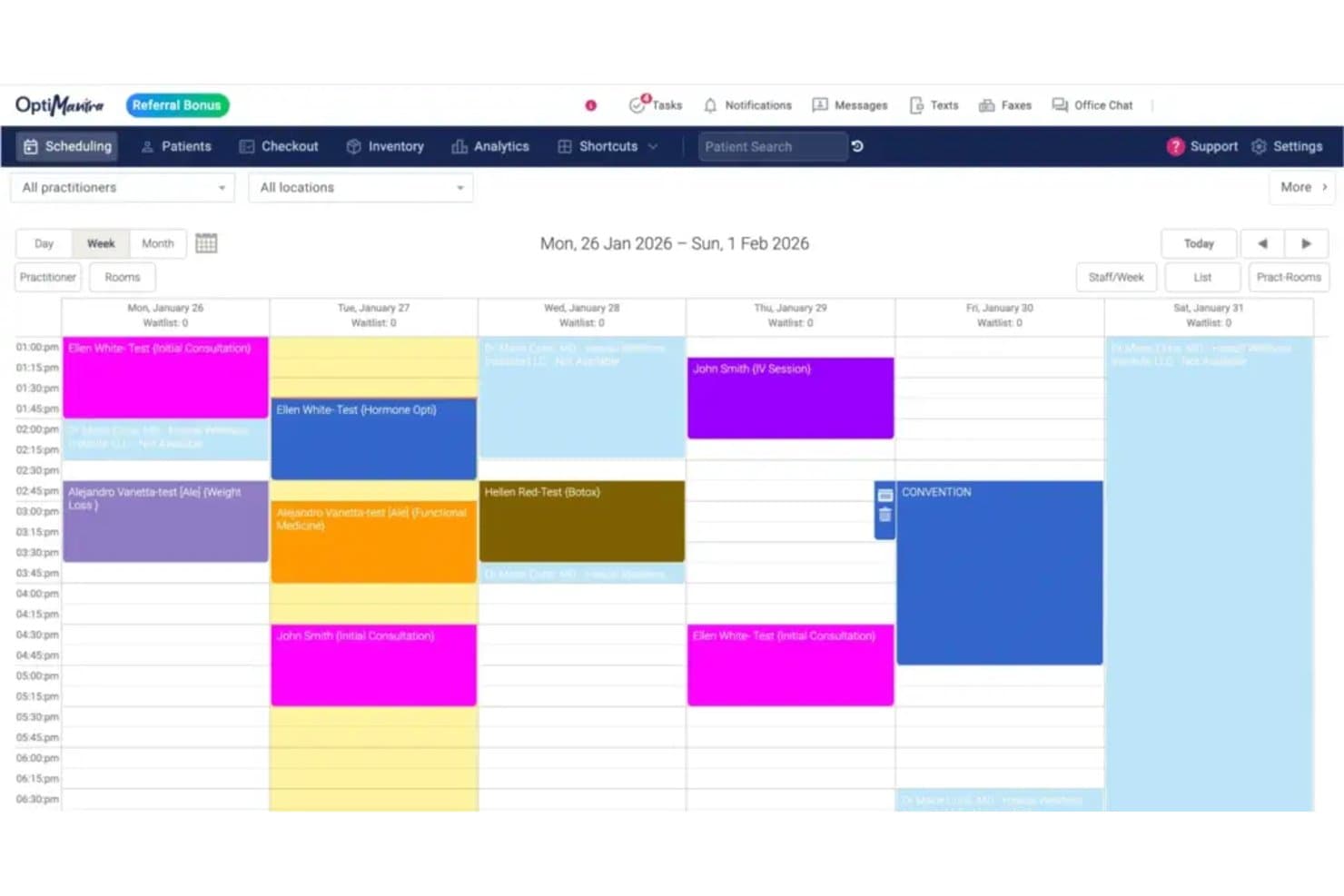
OptiMantra offers a color-coded weekly scheduling calendar view that displays patient appointments, session types, and practitioner availability across multiple days. OptiMantra is an EHR and practice management platform built for integrative and holistic providers, combining customizable charting, scheduling, e-prescribing, telehealth, lab integrations, and insurance billing in a single system.
Who Is OptiMantra Best For?
OptiMantra is a strong fit for solo practitioners and small multi-provider clinics in integrative, functional, or primary care medicine.
Why I Picked OptiMantra
OptiMantra earns its spot as one of the best on my shortlist because of how deeply it lets you customize charting at the individual practitioner level. Every provider in a practice can build their own initial and follow-up intake forms, and the SOAP template library covers all four note sections with clickable and copy-paste options. I also like the "Existing Chart Follow-up" import feature, which pulls prior chart content directly into a new visit note without starting from scratch.
OptiMantra Key Features
- Integrated telehealth: Secure video visits built into the platform with HIPAA compliance and synced charting workflows.
- E-prescribing with EPCS: Electronic prescribing for all medication classes, including controlled substances, with Surescripts connectivity.
- Bidirectional lab and imaging orders: Direct integration for ordering and receiving results from LabCorp, Quest, Rupa Health, and leading imaging centers.
- Patient portal and two-way messaging: Online patient access for appointment scheduling, forms, and secure HIPAA-compliant communication.
OptiMantra Integrations
OptiMantra offers native integrations with LabCorp, Quest Diagnostics, Fullscript, Surescripts (via MDToolbox), Stripe, Authorize.net, SimonMed, and Rupa Health. An API is available for custom integrations.
Pros and Cons
Pros:
- Built-in telehealth and e-prescribing capabilities
- Robust multi-specialty and multi-location support
- Customizable chart templates for each provider
Cons:
- No direct PDMP integration for controlled substances
- ONC certification status is not confirmed
Learn more about OptiMantra: Best for behavioral health practices
- Free demo available
- Pricing upon request
Visit WebsiteCustomer Rating:4.3/5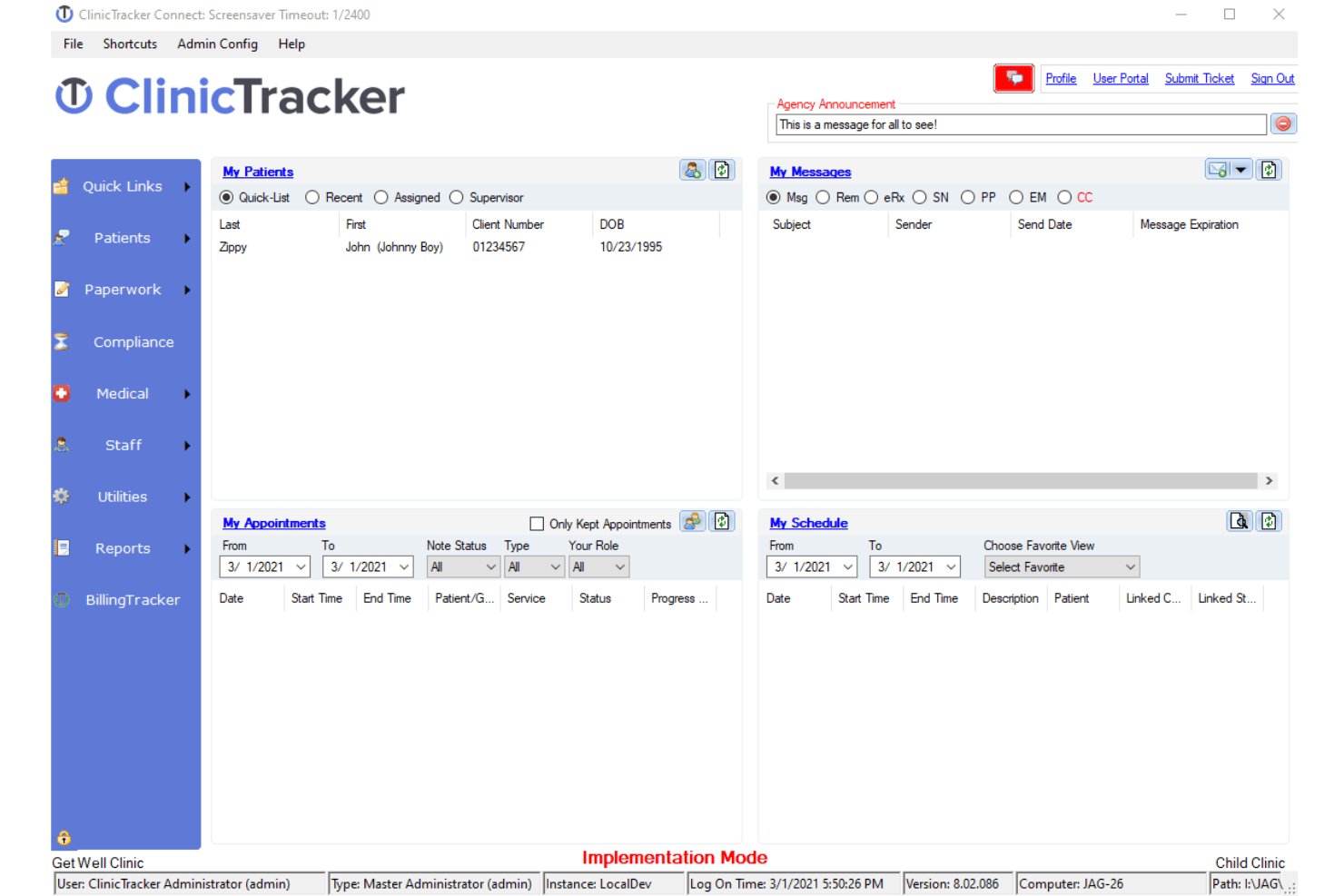
ClinicTracker offers a comprehensive dashboard for managing clinical workflows. ClinicTracker is a behavioral health EHR that combines clinical documentation, practice management, scheduling, e-prescribing, and integrated billing into a single platform built specifically for mental health, substance use, and ABA therapy providers.
Who Is ClinicTracker Best For?
ClinicTracker is a strong fit for outpatient behavioral health organizations — including mental health clinics, substance use treatment centers, and PHP/IOP programs — that need specialty-specific workflows.
Why I Picked ClinicTracker
ClinicTracker earns its spot on my list because no other EHR on my shortlist is built as specifically for behavioral health as this one. I picked it for its specialty-specific documentation tools: configurable treatment plans, crisis plans, and behavioral health SOAP notes that fit real mental health workflows. I also like that EPCS-enabled e-prescribing is built in for MAT programs, so providers aren't juggling separate tools to manage prescriptions alongside clinical records.
ClinicTracker Key Features
- Custom form builder: Lets you design tailored forms to capture and track unique clinical and administrative data points.
- Executive dashboard: Offers real-time financial, clinical, and operational reporting for management oversight.
- Cloud fax and secure direct messaging: Enables HIPAA-compliant secure exchange of clinical documents with other providers.
- Patient portal integration: Gives patients secure access to records, appointment scheduling, and bill payment tools.
ClinicTracker Integrations
ClinicTracker offers native integrations with TransFirst, its clearinghouse partner, lab orders and results systems, and credit card processing providers. It also provides an API for custom integrations.
Pros and Cons
Pros:
- Custom form builder for unique documentation needs
- Built-in e-prescribing with controlled substance support
- Specialty templates for behavioral health encounters
Cons:
- Limited pediatric and preventive care charting
- Not designed for general family practice workflows
Learn more about ClinicTracker: Best for customizable family practice workflows
- Free demo available
- Pricing upon request
Visit WebsiteCustomer Rating:5/5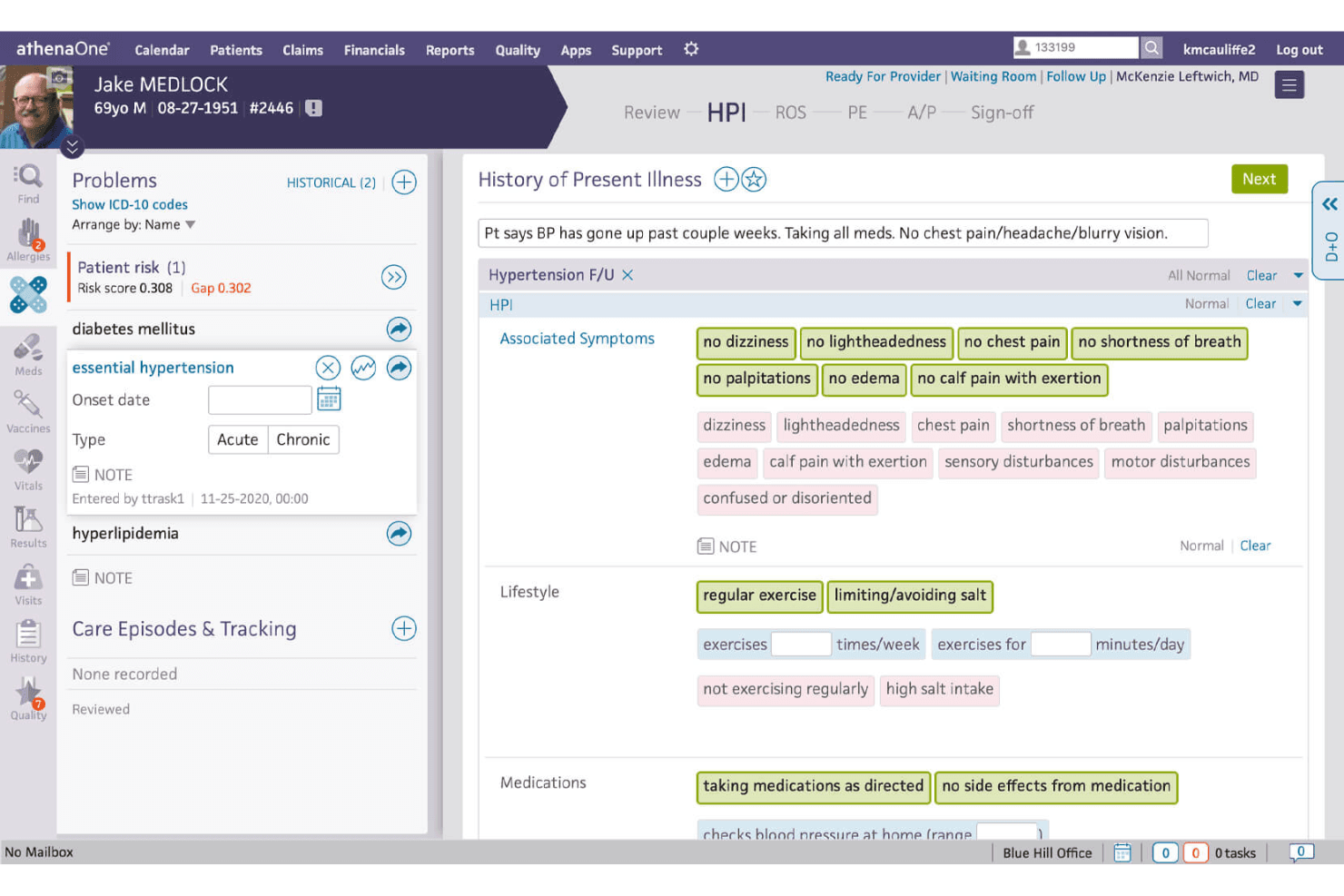
The patient history management feature in Athenahealth allows family doctors and practitioners to view and manage patient records efficiently. Athenahealth is a cloud-native EHR platform that combines clinical charting, revenue cycle management, practice management, and patient engagement tools in a single ambulatory-focused solution.
Who Is Athenahealth Best For?
Athenahealth fits ambulatory practices from solo physicians to mid-sized multi-specialty groups who need a single platform to handle clinical, billing, and front-office workflows.
Why I Picked Athenahealth
Athenahealth earns its spot on my shortlist because of how genuinely adaptable its charting environment is for family practice. The widget-based chart design lets physicians rearrange their workspace around the care patterns they see daily, from pediatric well visits to geriatric chronic disease management. I also like the ambient note feature, which captures encounter documentation in the background so charting doesn't eat into patient time.
Athenahealth Key Features
- Integrated telehealth: Schedule and conduct video visits directly in the EHR workflow for virtual care.
- Immunization registry integration: Sync bidirectionally with state vaccine registries for up-to-date immunization records.
- Population health management: Track patient cohorts and care gaps with built-in registries and preventive care tools.
- MIPS/MACRA quality dashboards: Monitor performance measures and participation in CMS incentive programs from within the platform.
Athenahealth Integrations
Athenahealth offers over 500 native and marketplace integrations, including LabCorp, Quest Diagnostics, Surescripts, Boostlingo, Teledoc, Philips, and BioReference. An API is available for custom integrations.
Pros and Cons
Pros:
- Integrated bidirectional lab and imaging orders
- Comprehensive ambulatory-specific workflows and tools
- Highly customizable family practice chart templates
Cons:
- Percentage-of-collections pricing model can be costly
- Steep transition process for legacy data
Learn more about Athenahealth: Best for solo and multi-provider practice growth
- Free demo available
- Pricing upon request
Visit WebsiteCustomer Rating:3.9/5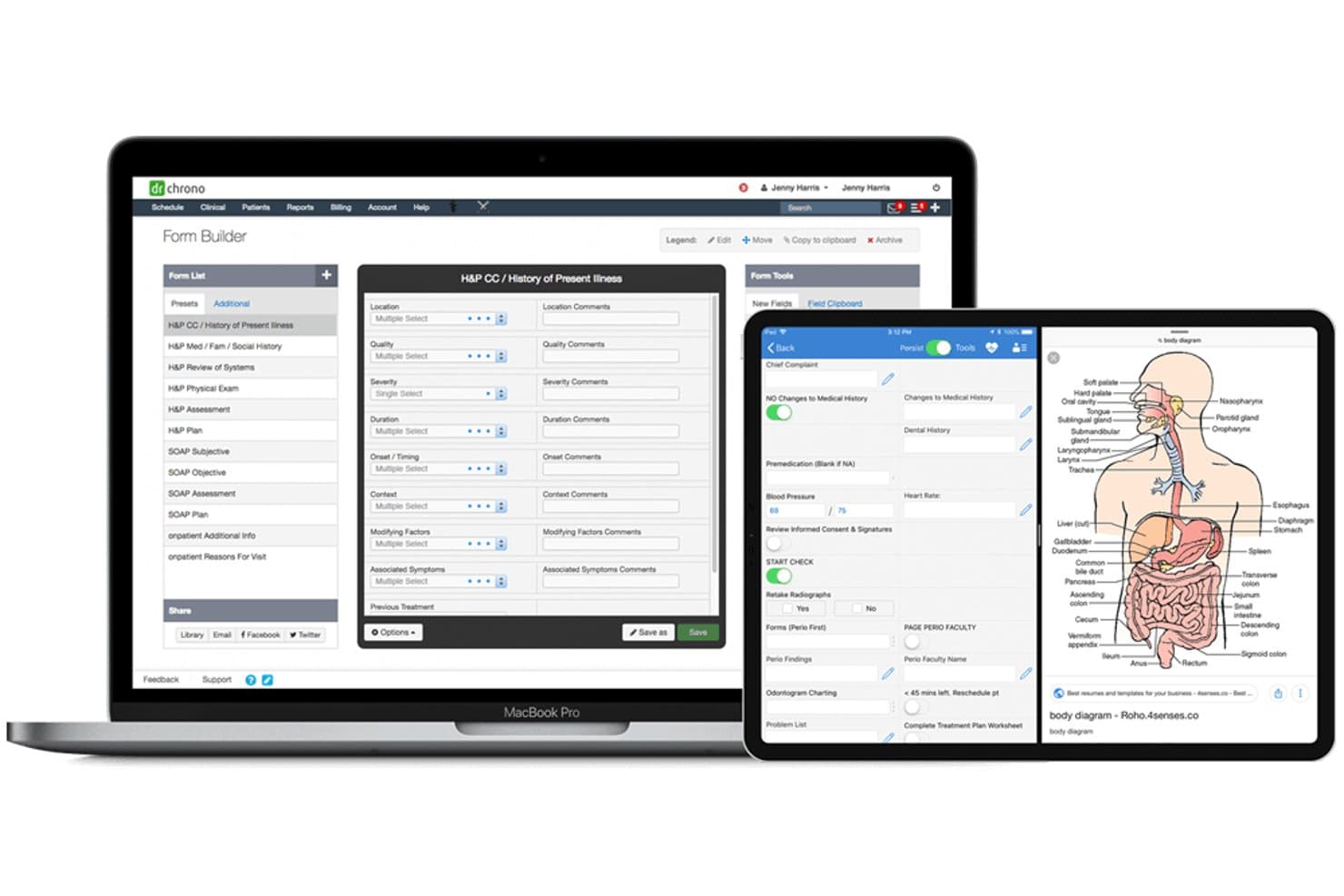
DrChrono EHR offers a customizable Form Builder with H&P templates, mobile charting, and anatomical body diagrams across desktop and tablet devices. DrChrono EHR is a cloud-based, mobile-first EHR platform that combines clinical charting, practice management, e-prescribing, lab integration, and integrated medical billing into a single system built for independent practices.
Who Is DrChrono EHR Best For?
DrChrono suits solo physicians and small-to-mid-sized independent practices that want a single platform to manage both clinical and administrative workflows as they grow.
Why I Picked DrChrono EHR
DrChrono EHR earns its spot on my shortlist because of how well it scales with a practice without requiring a platform switch. I particularly like the tiered plan structure (Foundation, Growth, Premium) that lets a solo physician start lean and unlock advanced RCM, AI ambient documentation via EverHealth Scribe, and extended lab connectivity as their patient volume grows. The No-Show Predictor and iOS-native charting are features I think solo providers will genuinely use every single day.
DrChrono EHR Key Features
- Integrated telehealth: Provides secure, built-in video visits that sync with clinical charting and scheduling workflows.
- Bidirectional lab and imaging integrations: Connects with Quest, LabCorp, and over 40,000 lab and imaging providers for sending orders and receiving results.
- OnPatient portal and mobile app: Lets patients message providers, view their health records, and complete forms online or through a dedicated app.
- Immunization registry connectivity: Supports electronic vaccine tracking and state immunization reporting for both pediatric and adult encounters.
DrChrono EHR Integrations
DrChrono EHR offers native integrations with Quest Diagnostics, LabCorp, Surescripts, CoverMyMeds, and Iron Bridge for lab, pharmacy, and immunization registry connections. An open API and integration marketplace are available for custom and third-party integrations.
Pros and Cons
Pros:
- Tiered plans support growing practice needs
- Integrated medical billing and RCM tools
- Mobile-first iOS app for clinical charting
Cons:
- Reported long response times from support
- Dated user interface on desktop
Learn more about DrChrono EHR: Best for cloud-based accessibility and ease of use
- 14-day free trial + free demo available
- From $199/user/month (billed annually)
Visit WebsiteCustomer Rating:3.8/5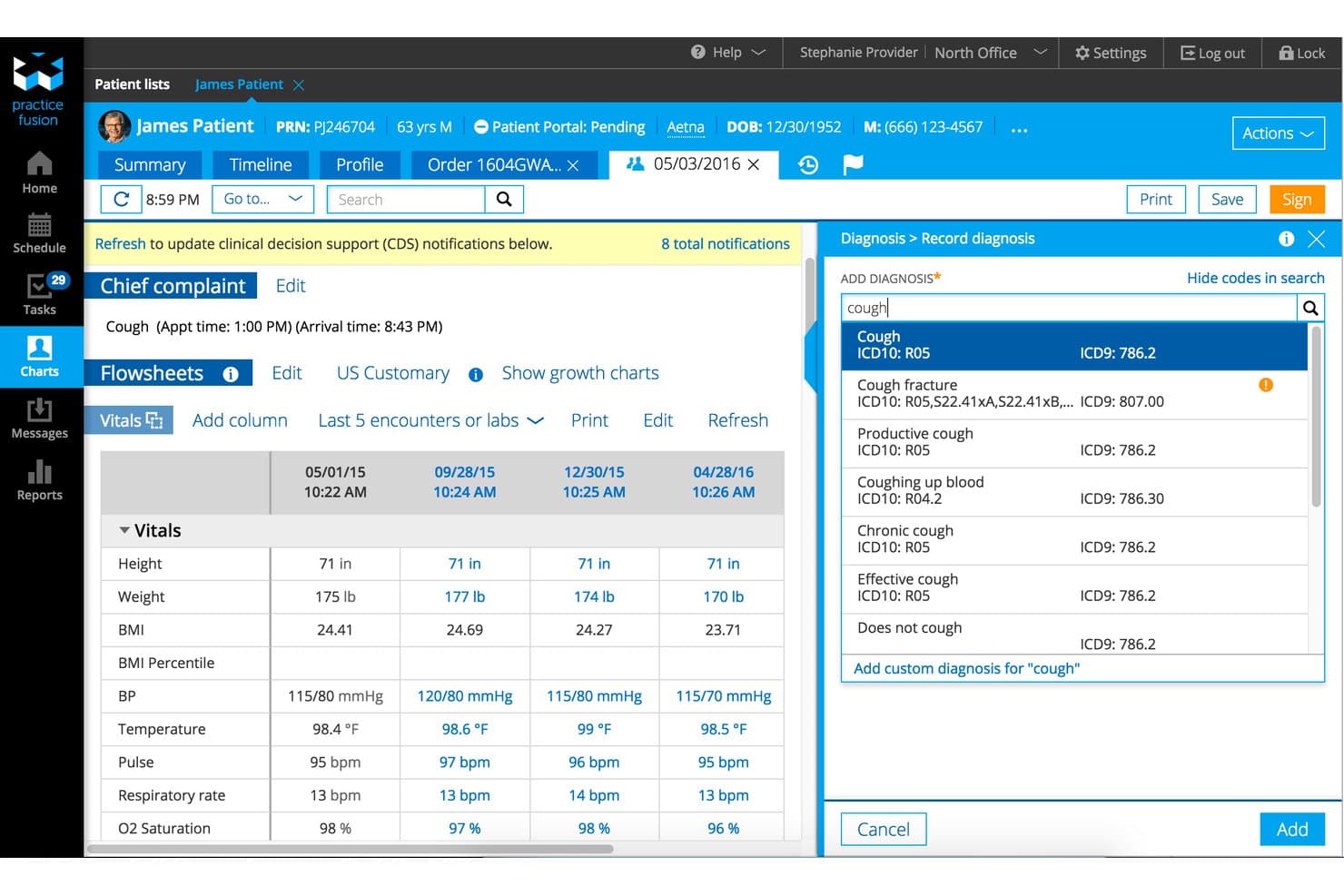
Practice Fusion EHR offers an integrated patient chart view combining vitals flowsheets and real-time diagnosis coding search in a single screen. Practice Fusion EHR is a cloud-based electronic health record system built for independent practices, combining clinical charting, e-prescribing, lab and imaging integrations, a free patient portal, and practice management tools.
Who Is Practice Fusion EHR Best For?
Practice Fusion is a strong fit for independent and small outpatient practices that need an accessible, no-hardware EHR without a steep implementation curve.
Why I Picked Practice Fusion EHR
Practice Fusion EHR earns its spot on my shortlist because it's one of the few EHRs where you can pull up a full patient chart from a tablet at the bedside, a laptop at the front desk, or a phone between appointments, with no software to install. I love that automatic updates run in the background, so there's no IT downtime or version mismatch across your team. The customizable SOAP note templates, validated in pediatric workflows, mean you can complete and sign clinical notes quickly from wherever you're working.
Practice Fusion EHR Key Features
- Integrated lab and imaging connections: Connects with hundreds of diagnostic providers for electronic orders and real-time results.
- HIPAA-compliant patient portal: Lets patients view records, communicate with providers, and request appointments securely.
- Quality and MIPS dashboards: Built-in dashboards track eCQM, Meaningful Use, and MIPS reporting requirements.
- Onshore support and training: Includes live phone, email, and chat support plus one-on-one implementation sessions.
Practice Fusion EHR Integrations
Practice Fusion EHR offers native integrations with Updox, AdvancedMD, Kareo, NueMD, and hundreds of lab and imaging centers. An API is available for custom integrations.
Pros and Cons
Pros:
- Free included patient portal with secure messaging
- Customizable chart templates for primary care
- Cloud access from any internet-connected device
Cons:
- Reports of delayed customer support response
- Telehealth requires a separate paid add-on
Learn more about Practice Fusion EHR: Best with AI-enabled ambient documentation tools
- Free demo available
- From $429/user/month
Visit WebsiteCustomer Rating:3.6/5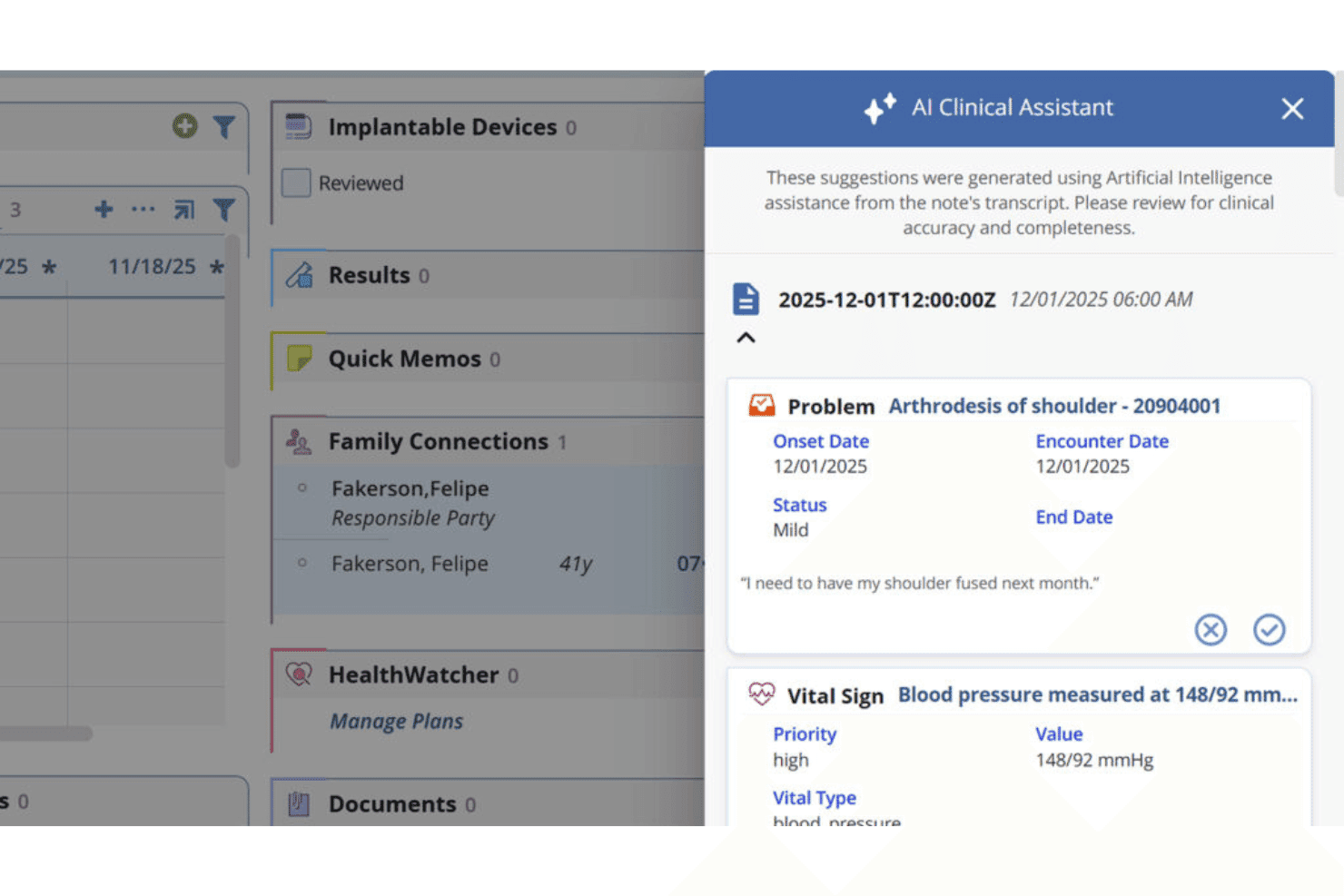
AdvancedMD’s AI Clinical Assistant creates SOAP notes and pre-visit summaries. AdvancedMD EMR is a cloud-based EHR platform that unifies clinical charting, practice management, patient engagement, and revenue cycle management for independent and group medical practices across specialties.
Who Is AdvancedMD EMR Best For?
It's a strong fit for practice managers and billing coordinators at independent and small-to-midsize group practices who need clinical and financial operations under one roof.
Why I Picked AdvancedMD EMR
AdvancedMD EMR earns its spot on my shortlist because its ambient documentation suite goes further than most competitors. I love that the AI Clinical Assistant captures natural conversation during a visit, then generates a structured SOAP note automatically, so physicians aren't transcribing after the appointment ends. The AI Pre-visit Summary also pulls together medications, labs, allergies, and risk factors before the patient even walks in.
AdvancedMD EMR Key Features
- Integrated telehealth module: Schedule and conduct remote video visits directly from the EHR platform.
- Bidirectional lab integration: Order labs and receive results electronically with major lab partners.
- Customizable family practice templates: Adapt visit note templates to suit pediatric, adult, and geriatric workflows.
- Automated MIPS/MACRA reporting: Track quality measures and generate CMS-compliant reports inside the platform.
AdvancedMD EMR Integrations
AdvancedMD EMR offers native integrations with Waystar, Zoom, and state and regional Health Information Exchanges. An API and FHIR APIs are available for custom integrations and data exchange with third-party systems.
Pros and Cons
Pros:
- Seamless telehealth visits integrated in workflows
- Ambulatory care templates support multiple specialties
- AI-powered SOAP note generation saves time
Cons:
- Custom template setup can be complex
- Limited pediatric-specific tools for growth tracking
Learn more about AdvancedMD EMR: Good for small practices with its intuitive and easy-to-learn interface
- 7-day free trial
- From $229/month
Visit WebsiteCustomer Rating:3.6/5
The scheduling feature in Amazing Charts has an intuitive interface. Amazing Charts, as an EHR, is known for its intuitive and user-friendly interface, emphasizing easy-to-use charting and note-taking functions. This EHR is designed for healthcare providers who prioritize simplicity in documenting patient interactions.
Why I Picked Amazing Charts:
When I was comparing various EHR tools, Amazing Charts caught my attention with its user-centric design. I selected this tool because it truly simplifies note-taking and charting for physicians, which is vital in a busy healthcare setting. It stands out for its clear, intuitive user interface that can help reduce the learning curve for new users. The tool is indeed "best for" user-friendly charting and note-taking as it allows doctors to focus more on patient care and less on data entry.
Standout features and integrations:
Some of the important features include the easy-to-use patient chart system, integrated patient portal, and efficient e-prescribing. The charting function stands out with its simplicity and quick data entry. As for integrations, Amazing Charts can sync with a variety of billing systems and labs to streamline workflows, in addition to being compatible with numerous practice management tools.
Pros and Cons
Pros:
- Affordability for smaller practices
- Compatibility with a variety of systems
- Simple, intuitive interface for efficient note-taking
Cons:
- Annual billing cycle may not appeal to all practices
- Fewer features compared to some competitors
- Limited customization options
Learn more about Amazing Charts: Best for unified billing and practice management
- Free demo available
- Pricing upon request
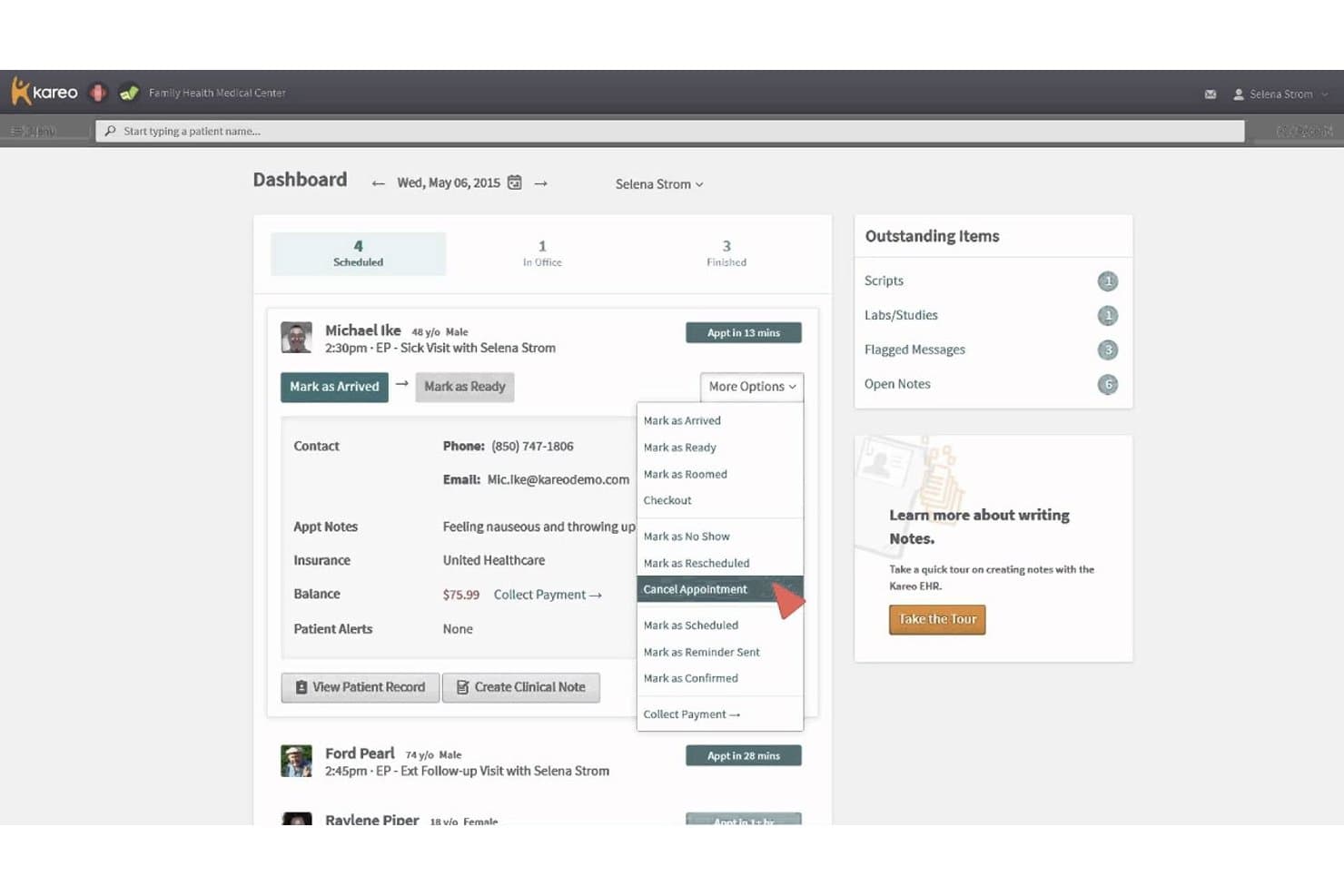
Kareo Clinical EHR offers a dashboard with appointment management options, including cancellation, rescheduling, and patient status updates via a dropdown menu. Kareo Clinical EHR is a cloud-based EHR platform built for independent practices that combines clinical charting, e-prescribing, lab ordering, telehealth, and integrated billing in a single system.
Who Is Kareo Clinical EHR Best For?
It's a strong fit for small to mid-sized independent practices that want clinical documentation and revenue cycle management in one connected platform.
Why I Picked Kareo Clinical EHR
Kareo Clinical EHR earns its spot on my shortlist because of how tightly it connects clinical documentation to revenue cycle management. I like that a completed SOAP note flows directly into claim creation, with real-time eligibility checks and claim scrubbing built in, so billing doesn't lag behind care delivery. The AI Note Assist feature also helps me close notes faster, which means fewer incomplete encounters holding up the billing queue.
Kareo Clinical EHR Key Features
- Integrated telehealth: Built-in HIPAA-compliant video visits connect directly with clinical charting and scheduling.
- E-prescribing with EPCS and PDMP: Allows controlled substance prescribing and real-time prescription drug monitoring.
- Patient portal with forms and messaging: Patients can access records, complete intake forms, and securely message the practice.
- Bidirectional lab and imaging integration: Supports two-way ordering and result retrieval with major labs and imaging centers.
Kareo Clinical EHR Integrations
Kareo Clinical EHR offers native integrations with LabCorp, Quest Diagnostics, Surescripts, Appriss Health, Dragon Medical One, and multiple medical billing partners. An API is available for custom integrations.
Pros and Cons
Pros:
- Real-time prescription monitoring for controlled substances
- SOAP notes sync directly to billing workflow
- Automated claim scrubbing and denial tracking
Cons:
- Data migration can be challenging for new users
- Reports of slow customer support response
Learn more about Kareo Clinical EHR: Best for its highly customizable interface
- Free demo available
- Pricing upon request
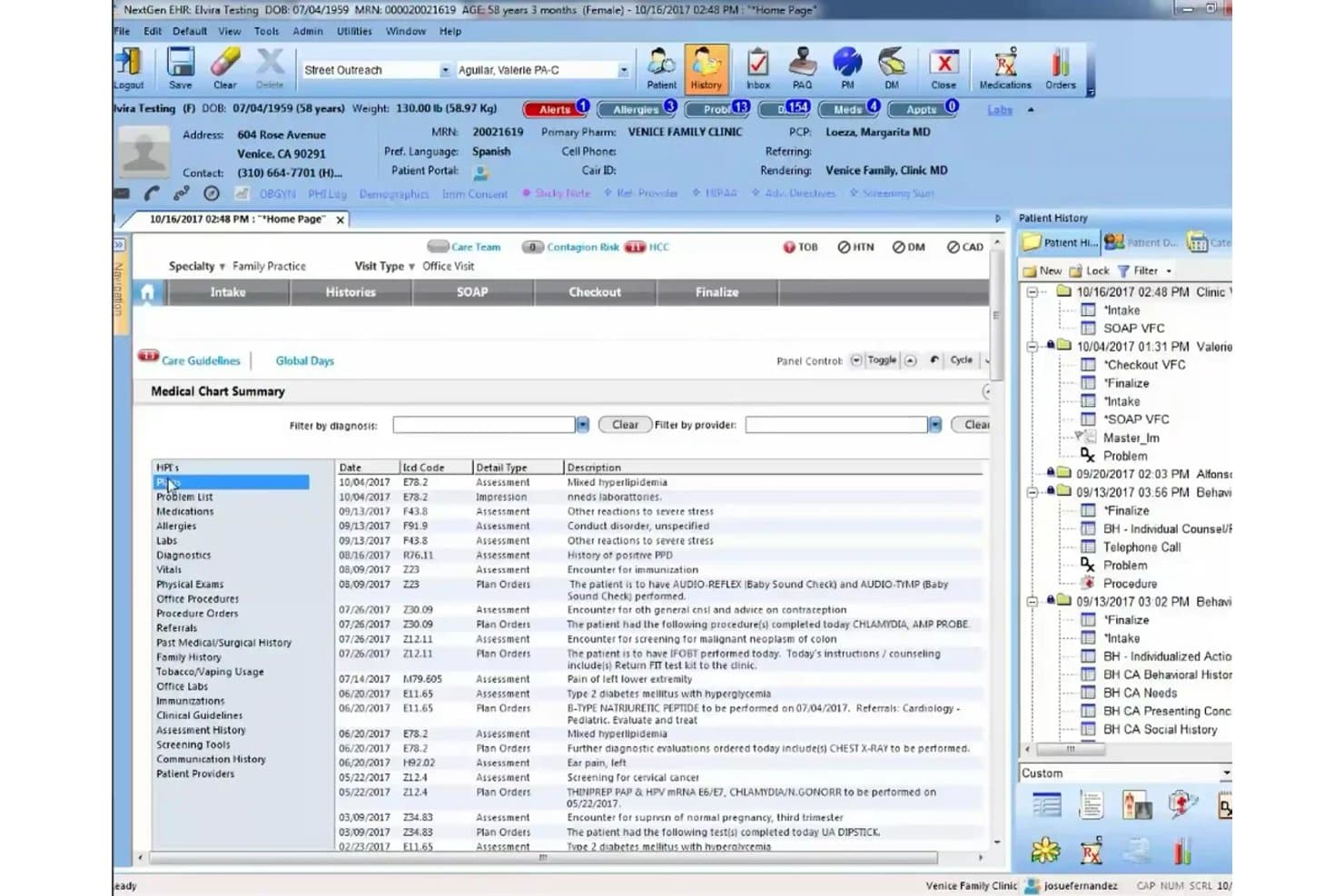
NextGen EHR offers a comprehensive Medical Chart Summary view that consolidates patient diagnoses, ICD codes, assessment types, and visit history in a single streamlined interface. NextGen EHR is an ambulatory-focused electronic health record platform that combines specialty-specific clinical charting, integrated practice management, e-prescribing, billing, and patient engagement tools for independent and enterprise-level practices.
Who Is NextGen EHR Best For?
NextGen EHR is a strong fit for mid-size to large ambulatory practices with 10 or more providers that operate across multiple specialties or locations.
Why I Picked NextGen EHR
I've included NextGen EHR in my top picks because its depth of customization goes well beyond surface-level template editing. I love that clinical teams can configure specialty-specific SOAP note templates, preventive care workflows, and chronic disease management forms to match how their practice actually operates. The ability to build custom quality management reports, tailored to specific compliance programs like MIPS, is something I find genuinely hard to replicate in less configurable platforms.
NextGen EHR Key Features
- Integrated telehealth: Provides built-in video visit functionality with seamless charting integration for virtual appointments.
- MIPS/MACRA reporting dashboards: Tracks and displays quality measures and compliance data for federal incentive programs.
- Population health management tools: Features registries and care gap tracking to support proactive, preventive family medicine workflows.
- Immunization registry connectivity: Offers bidirectional integration with state immunization registries for up-to-date vaccine tracking.
NextGen EHR Integrations
NextGen EHR offers native integrations with LabCorp, Quest Diagnostics, Doctible, Solutionreach, Clearwave, InstaMed, and Kno2. It includes the Mirth Connect interoperability engine, provides access to 725+ labs via NextGen Share, and has an API and marketplace for custom integrations.
Pros and Cons
Pros:
- Real-time reporting for regulatory compliance programs
- Strong specialty-specific templates for family practice
- Deeply customizable charting and workflows
Cons:
- Initial configuration can be resource intensive
- System speed issues reported during peak times
Learn more about NextGen EHR: Best for integrated AI-powered clinical workflows
- Free demo available
- From $280/user/month
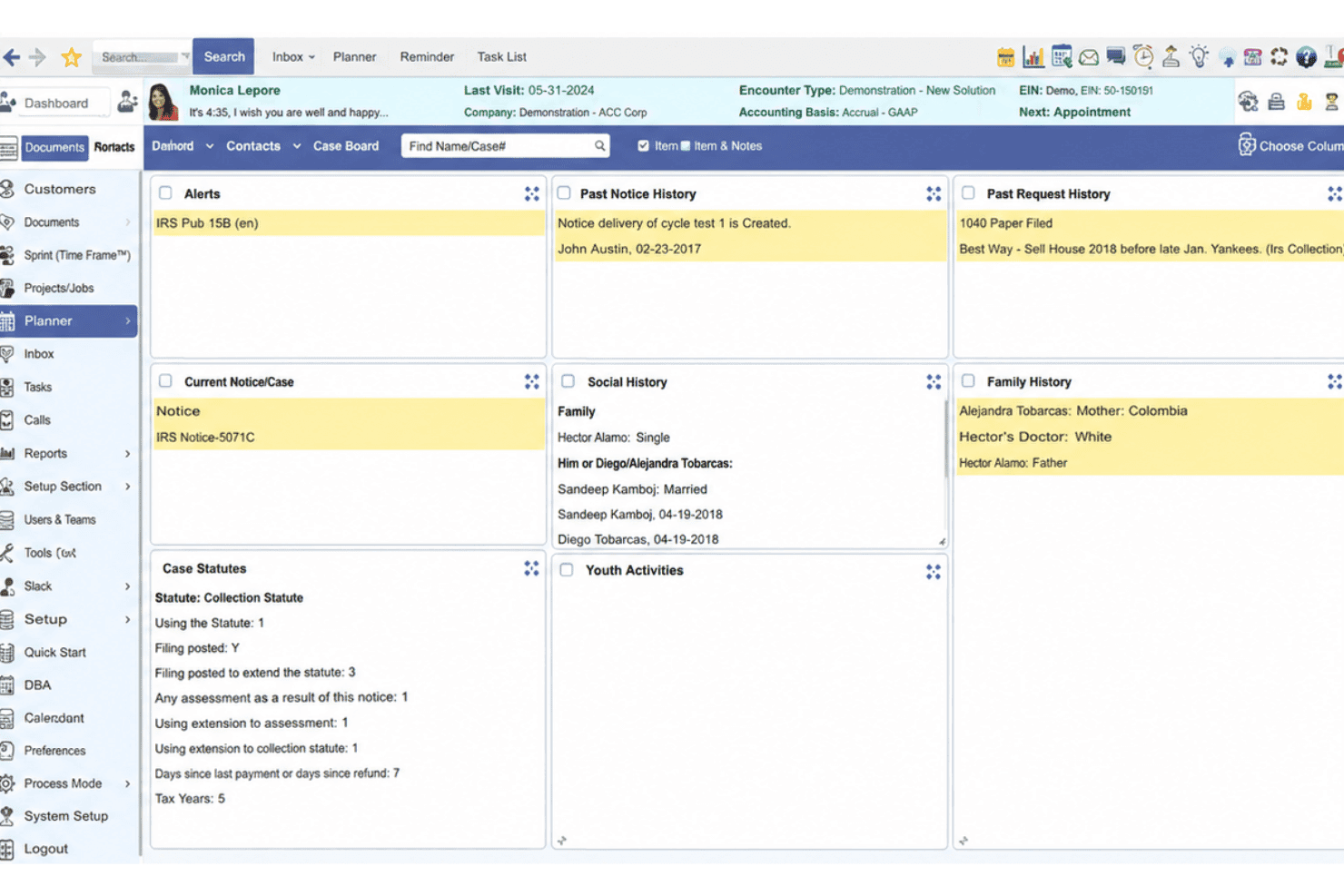
PrognoCIS EHR blends charting, billing, e-prescribing, telehealth, and AI. PrognoCIS EHR is a cloud-based ambulatory EHR platform combining clinical documentation, practice management, integrated billing, e-prescribing, telemedicine, and native AI-powered charting tools across 25+ specialties.
Who Is prognoCIS EHR Best For?
PrognoCIS EHR is a strong fit for independent and mid-size ambulatory practices that need specialty-specific workflows and an all-in-one clinical and billing platform.
Why I Picked prognoCIS EHR
PrognoCIS EHR earns its spot as one of the best on my shortlist because of how deeply its AI layer, PrognoAI, is woven into everyday charting. I particularly like the ambient AI scribe, which generates real-time visit summaries without pulling the provider's attention away from the patient. Unlike tools that bolt on AI as an afterthought, PrognoCIS builds it directly into the documentation workflow, so there's no toggling between systems to get a clean, complete note.
prognoCIS EHR Key Features
- Specialty templates: Customizable charting templates for primary care, pediatrics, and chronic disease management.
- Bidirectional lab integration: Seamless interface for sending orders and receiving results from major diagnostic labs.
- Integrated patient portal: Secure online access for messaging, record requests, appointment scheduling, and billing.
- Quality measure dashboards: Built-in MIPS and MACRA reporting tools for regulatory compliance and incentive tracking.
prognoCIS EHR Integrations
prognoCIS EHR offers native integrations with LabCorp, Quest Diagnostics, Surescripts, and state immunization registries. An API is available for custom integrations, and the platform supports HL7, FHIR, and CDA connectivity for interoperability.
Pros and Cons
Pros:
- Flexible patient portal for online engagement
- Robust specialty templates for ambulatory practices
- AI charting assistant reduces documentation workload
Cons:
- Occasional delays with customer support response
- Pediatric growth charts require manual setup
Learn more about prognoCIS EHR:
Outros EHR para medicina familiar
Abaixo encontra-se uma lista de sistemas EHR adicionais para medicina familiar que incluí na minha lista restrita, mas que não chegaram aos 10 primeiros lugares. Vale definitivamente a pena consultá-los.
- 11IntergyBest for large practices needing robust analytics
- 12Modernizing MedicineBest for practices needing specialty-specific features
- 13Office Ally EHRBest for practices wanting free functionality for basic needs
- 14SevocityGood for practices seeking personalized customization at no extra charge
- 15EHR Your WayGood for its dictation feature that allows note creation in under a minute
- 16ICANotesGood for behavioral health professionals needing specialized templates
- 17Office PracticumGood for pediatric practices with pediatric-specific workflows
- 18RXNTGood for its affordability and straightforward pricing
- 19eClinicalWorksGood for the incorporation of telehealth and virtual assistance
- 20Cerner MilleniumGood for its wide integration capabilities across different healthcare services
How I Evaluate EHR for Family Practice
I split my evaluation into baseline criteria—like family-practice-specific charting and eRx—and the differentiators that separate a good fit from the right fit for your practice.
Core Functionality (Table Stakes For This List)
When I'm selecting tools for my list, I rank each one on a scale from 0 (does not offer the functionality) to 5 (excels in this area) for each core functionality listed below. Then, I calculate the tool's total score into a percentage. Each tool needs to achieve a minimum total score of 65% to be considered for inclusion.
- Family Practice Charting: I look for specialty-specific templates that cover the full age spectrum—well-child visits, annual physicals, and chronic disease management—rather than generic SOAP notes.
- E-Prescribing (eRx): A solid eRx module should include EPCS support, drug interaction alerts, and formulary checking so prescribers can send scripts directly from the encounter.
- Integrated Practice Management: I evaluate whether scheduling, patient registration, and check-in workflows live inside the EHR rather than requiring a separate PM platform to coordinate.
- Medical Billing & Coding: Coding assistance matters here—I check for ICD-10/CPT suggestions tied to encounter data, claim scrubbing, and clearinghouse connectivity for faster reimbursement cycles.
- Lab & Imaging Integration: Bidirectional connectivity with reference labs and imaging centers is what I look for, so orders go out and results flow back into the patient chart automatically.
- Patient Portal & HIPAA Compliance: The portal should let patients message their care team, view records, and request appointments, all within a platform that holds current ONC certification.
Once I have a list of tools that meet this criteria, I consider what sets each platform apart.
Differentiating Factors (What Sets Vendors Apart)
Here's how I compare and contrast different vendors:
Standout Features
AI-powered clinical documentation is a big differentiator—I look for ambient listening or AI scribe tools that draft notes during the visit so physicians aren't charting after hours. Population health tools also matter, especially care gap alerts that flag overdue screenings or vaccines across your patient panel. For practices participating in CMS incentive programs, built-in MIPS/MACRA dashboards that track quality measures in real time can save hours of manual reporting each quarter.
Beyond Features
Interoperability is a key factor I evaluate—HL7/FHIR support and HIE connectivity determine how well a platform exchanges data with hospitals, specialists, and pharmacies your practice works with. I also consider implementation support, particularly data migration from a legacy system and family-practice-specific onboarding. Pricing transparency matters too. Some vendors bundle PM, billing, and portal access into one subscription, while others charge per add-on, which can dramatically shift total cost of ownership for a growing practice.
Como escolher o melhor EHR para medicina familiar
É fácil perder-se em listas extensas de funcionalidades e estruturas de preços complexas. Para o ajudar a manter o foco enquanto percorre o seu processo único de seleção de software, apresentamos uma lista de verificação dos fatores a ter em conta:
| Fator | O que considerar |
|---|---|
| FatorEscalabilidade | O que considerarO software consegue acompanhar o crescimento da sua clínica? Verifique se suporta um número crescente de doentes e colaboradores sem perda de desempenho. Procure ferramentas que ofereçam planos de preços flexíveis à medida que cresce. |
| FatorIntegrações | O que considerarIntegra-se com os seus sistemas atuais? Verifique a compatibilidade com sistemas de faturação, portais de doentes e serviços laboratoriais. A falta de integração pode originar silos de dados e ineficiências. |
| FatorPersonalização | O que considerarPode adaptar o software às necessidades da sua clínica? Certifique-se de que a ferramenta permite fluxos de trabalho, modelos e relatórios personalizados. A falta de capacidade de personalização pode resultar num sistema rígido que não satisfaz os seus requisitos específicos. |
| FatorFacilidade de utilização | O que considerarO sistema é intuitivo para a sua equipa? Avalie a interface do utilizador e a navegação. Um sistema demasiado complexo pode tornar mais lentas as operações diárias e frustrar os colaboradores. |
| FatorImplementação e integração inicial | O que considerarQuanto tempo será necessário para começar a utilizar o sistema? Considere os recursos de formação disponíveis e o apoio oferecido durante a configuração. Um processo de integração inicial simples pode minimizar o tempo de inatividade e acelerar a adoção. |
| FatorCusto | O que considerarO preço enquadra-se no seu orçamento? Analise o que está incluído em cada nível de preços e verifique se existem custos ocultos. Considere o custo total de propriedade, incluindo formação e apoio. |
| FatorMedidas de segurança | O que considerarOs dados e a privacidade dos doentes estão protegidos? Procure conformidade com a HIPAA e outros regulamentos relevantes. Certifique-se de que o software oferece encriptação, atualizações regulares e controlos de acesso para proteger informações sensíveis. |
| FatorDisponibilidade do apoio | O que considerarTem ajuda disponível quando dela necessita? Verifique se o fornecedor oferece apoio 24 horas por dia, 7 dias por semana, e vários métodos de contacto. Um apoio atempado pode evitar interrupções nas operações da clínica. |
O que são sistemas EHR para medicina familiar?
Os sistemas EHR para medicina familiar são plataformas digitais que gerem os registos dos doentes de todas as idades. Utilizadas por médicos de medicina familiar, estas ferramentas EHR de cuidados de saúde primários ajudam a documentar tudo, desde os cuidados pediátricos aos geriátricos, abordando questões como o registo clínico moroso, a coordenação dos cuidados e o planeamento de tratamentos personalizados.
Funcionalidades
Ao selecionar o melhor EHR para medicina familiar, procure as seguintes principais funcionalidades do software EHR:
- Gestão dos registos dos doentes: Organiza e armazena de forma segura as informações dos doentes, facilitando o acesso e a atualização dos registos pelos profissionais de saúde.
- Agendamento de consultas: Permite ao pessoal agendar, reagendar e gerir eficazmente as consultas dos doentes, reduzindo as faltas e melhorando o fluxo de atendimento.
- Faturação e emissão de faturas: Automatiza os processos de faturação, gera faturas e acompanha os pagamentos, ajudando as clínicas a gerir as finanças de forma eficaz.
- Modelos personalizáveis: Permite adaptar formulários e documentos às necessidades específicas da clínica, aumentando a eficiência do fluxo de trabalho.
- Funcionalidades de telemedicina: Permite realizar consultas virtuais, possibilitando aos profissionais prestar cuidados à distância e alargar o seu alcance aos doentes.
- Portal do doente integrado: Proporciona aos doentes acesso online às suas informações de saúde e ao agendamento de consultas, melhorando o seu envolvimento.
- Ferramentas de apoio à decisão: Ajudam os prestadores de cuidados de saúde na tomada de decisões clínicas, disponibilizando recomendações baseadas em evidência.
- Medidas de segurança dos dados: Garantem a proteção dos dados dos doentes através de encriptação e do cumprimento de regulamentos como a HIPAA.
- Acesso através de dispositivos móveis: Permite aos profissionais aceder ao sistema EHR a partir de dispositivos móveis, aumentando a flexibilidade na prestação de cuidados.
- Relatórios e análises: Gera relatórios e informações sobre o desempenho da clínica, ajudando a tomar decisões empresariais fundamentadas.
Benefícios
A implementação de software de registos clínicos eletrónicos numa clínica de medicina familiar proporciona vários benefícios à sua equipa e à sua atividade. Eis alguns dos benefícios que pode esperar:
- Melhoria dos cuidados prestados aos doentes: O acesso a registos completos dos doentes permite tomar decisões clínicas mais bem fundamentadas e prestar cuidados personalizados.
- Maior eficiência: O agendamento e a faturação automatizados reduzem a carga de trabalho administrativo, permitindo ao pessoal concentrar-se mais na interação com os doentes.
- Maior envolvimento dos doentes: Os portais dos doentes proporcionam um acesso fácil às suas informações de saúde, melhorando a comunicação e a participação nos seus cuidados.
- Redução de custos: Os processos de faturação simplificados e a redução da documentação em papel diminuem os custos operacionais e melhoram a gestão financeira.
- Melhor conformidade: As medidas de segurança dos dados e as funcionalidades de conformidade regulamentar ajudam a garantir a proteção das informações dos doentes e o cumprimento das normas legais.
- Capacidades de prestação de cuidados à distância: As funcionalidades de telemedicina permitem às clínicas alargar os serviços para além das instalações físicas, atender mais doentes e aumentar a acessibilidade.
- Informações baseadas em dados: Os relatórios e as análises fornecem informações valiosas sobre o desempenho da clínica, contribuindo para o planeamento estratégico e a tomada de decisões.
Custos e preços
A seleção do melhor EHR para medicina familiar exige a comparação dos modelos de preços dos EHR e dos planos disponíveis. Os custos variam consoante as funcionalidades, a dimensão da equipa, os complementos e outros fatores. A tabela abaixo resume os planos mais comuns, os respetivos preços médios e as funcionalidades normalmente incluídas nas soluções de melhor EHR para medicina familiar:
Tabela de comparação de planos para o melhor EHR para medicina familiar
| Tipo de plano | Preço médio | Funcionalidades comuns |
|---|---|---|
| Tipo de planoPlano gratuito | Preço médio$0/utilizador/mês | Funcionalidades comunsGestão básica de registos de pacientes, agendamento de consultas e apoio ao cliente limitado. |
| Tipo de planoPlano pessoal | Preço médio$20-$50/utilizador/mês | Funcionalidades comunsAgendamento avançado, faturação e emissão de faturas básicas e apoio por e-mail. |
| Tipo de planoPlano empresarial | Preço médio$50-$100/utilizador/mês | Funcionalidades comunsModelos personalizáveis, capacidades de telemedicina, portal de pacientes integrado e relatórios padrão. |
| Tipo de planoPlano empresarial de grande dimensão | Preço médio$100-$200/utilizador/mês | Funcionalidades comunsAnálises abrangentes, conjunto completo de integrações, apoio prioritário e medidas reforçadas de segurança dos dados. |
Perguntas frequentes sobre EHR para medicina familiar
Aqui estão algumas respostas a perguntas comuns sobre EHR para medicina familiar:
Os sistemas EHR podem integrar-se com o software de gestão de consultórios existente?
Sim, muitos sistemas EHR disponibilizam integrações com software de gestão de consultórios. Verifique se o EHR é compatível com as ferramentas que utiliza atualmente para garantir um fluxo de dados contínuo. Pergunte aos fornecedores sobre a compatibilidade e as opções de integração antes de tomar uma decisão.
Quais são as medidas de segurança dos sistemas EHR para medicina familiar?
Os sistemas EHR incluem normalmente encriptação, controlos de acesso e registos de auditoria para proteger os dados dos pacientes. Certifique-se de que o sistema cumpre os regulamentos HIPAA e informe-se sobre funcionalidades de segurança adicionais para proteger informações sensíveis.
Como é que o EHR melhora os cuidados prestados aos pacientes nas consultas de medicina familiar?
Os sistemas EHR melhoram os cuidados prestados aos pacientes ao proporcionarem um acesso fácil a registos médicos completos, apoiando a tomada de decisões informadas. Funcionalidades como a prescrição eletrónica e os portais de pacientes melhoram a comunicação e simplificam os processos de prestação de cuidados.
Que formação e apoio oferecem os fornecedores de EHR?
Os fornecedores de EHR disponibilizam frequentemente materiais de formação, seminários online e apoio ao cliente para ajudar na integração. Procure fornecedores que ofereçam apoio contínuo e recursos para ajudar a sua equipa a utilizar o sistema de forma eficaz.
Os sistemas EHR permitem a telemedicina para medicina familiar?
Muitos sistemas EHR incluem capacidades de telemedicina, permitindo consultas à distância. Confirme se o sistema escolhido suporta consultas por vídeo e se integra com o fluxo de trabalho do seu consultório, melhorando o acesso dos pacientes aos cuidados de saúde.