

O software EHR de dermatologia (registo eletrónico de saúde) foi concebido para apoiar as necessidades clínicas, administrativas e de faturação dos consultórios de dermatologia num único sistema. Se está a comparar as melhores opções de EHR de dermatologia, é provável que esteja à procura de ferramentas que se adaptem aos seus fluxos de trabalho específicos, respondam às exigências de documentação e tornem a coordenação dos cuidados mais simples para a sua equipa.
Com tantos sistemas disponíveis no mercado, determinar quais foram realmente concebidos para a dermatologia pode parecer avassalador. Este guia oferece-lhe uma perspetiva especializada sobre as principais opções, os seus pontos fortes e a forma como respondem atualmente às necessidades reais dos consultórios de dermatologia.
Why Trust Our Software Recommendations
6,700+
Reviews
20
Industry experts
16+
Evaluation factors
14
Years
Our team has been testing and reviewing software since 2012. As medical practice leaders ourselves, we know how difficult—and important—it is to choose the right software.
For this guide, we evaluated tools using hands-on testing and independent research, scoring tools using our selection criteria.
Our reviews reflect our human editorial judgment, not a sales pitch.
Tabela comparativa de EHR de dermatologia
Esta tabela comparativa resume os detalhes de preços das minhas principais escolhas de EHR de dermatologia:
Score legend (out of 5)
- Excellent4.5–5
- Good4–4.4
- Average3–3.9
- Below average2–2.9
- Poor1–1.9
Sorted by: Default
| Tool | Starting Price | Website | |||||||
|---|---|---|---|---|---|---|---|---|---|
Best for dermatology booking and records | 3.0 out of 5 | 4 | 3 | 3 | 2 | 5 | 1 | Pricing upon request Free demo available | Website |
Best for mobile dermatology charting | 3.0 out of 5 | 4 | 3 | 1 | 3 | 5 | 2 | Pricing upon request Free demo available | Website |
Best for specialty dermatology workflows | 3.2 out of 5 | 1 | 2 | 4 | 4 | 5 | 3 | Pricing upon request Free demo available | Website |
Best for body maps linked to billing codes | 3.8 out of 5 | 4 | 3 | 3 | 4 | 5 | 4 | Pricing upon request Free demo available | Website |
Best for connected dermatology care | 2.8 out of 5 | 3 | 3 | 2 | 3 | 4 | 2 | $499/user/month Free demo available | Website |
Best for adaptive dermatology charting | Not rated | 4 | Not rated | 3 | 4 | 4 | 4 | Pricing upon request Free demo available | Website |
Best for visual dermatology workflows | 3.7 out of 5 | 3 | 4 | 3 | 4 | 4 | 4 | Pricing upon request Free demo available | Website |
Best for dermatology EHR and imaging | 3.5 out of 5 | 4 | 4 | 3 | 4 | 4 | 2 | Pricing upon request Free demo available | Website |
Best for all-in-one dermatology management | 3.2 out of 5 | 3 | 3 | 1 | 4 | 5 | 3 | Pricing upon request Free demo available | Website |
Best for customizable dermatology EHR | 3.0 out of 5 | 3 | 4 | 1 | 3 | 4 | 3 | $229/user/month Free demo available | Website |


Avaliações dos melhores EHR de dermatologia
\u003cspan style=\u0022font-weight: 400;\u0022\u003eApresentamos abaixo os meus resumos detalhados dos melhores EHR de dermatologia que entraram na minha lista restrita. As minhas avaliações oferecem uma análise detalhada das funcionalidades, integrações e melhores casos de utilização de cada sistema, para o ajudar a encontrar a melhor opção para si.\u003c/span\u003e
 Best for dermatology booking and records
- Free demo available
- Pricing upon request
Visit WebsiteCustomer Rating:4.7/5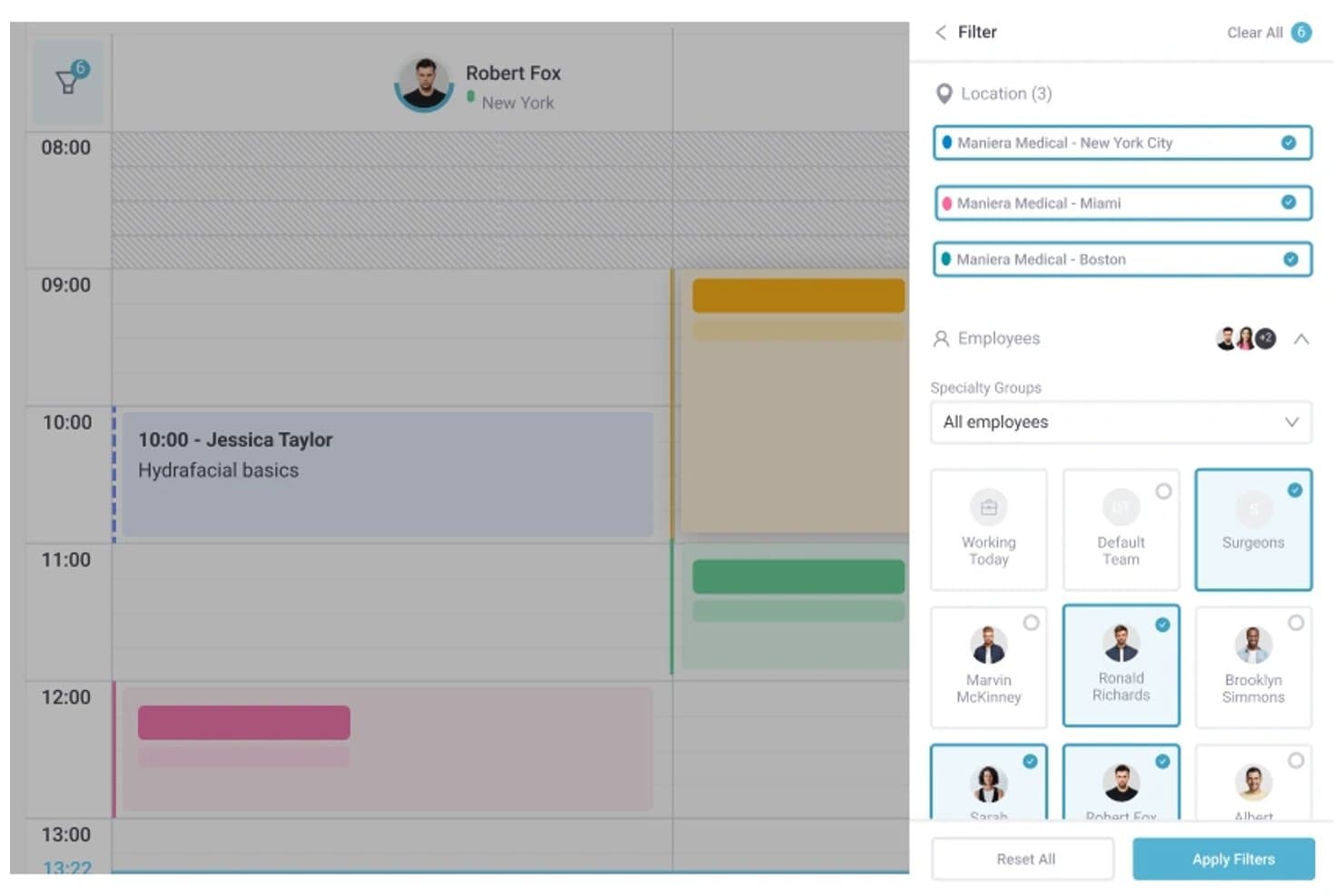
Pabau offers multi-location filtering and employee group selection within its scheduling calendar view. Pabau is an all-in-one practice management and EHR platform combining appointment scheduling, digital patient records, clinical photo documentation, consent management, and billing tools for cosmetic and hybrid dermatology practices.
Who Is Pabau Best For?
Pabau suits small to mid-sized cosmetic and hybrid dermatology clinics that need integrated booking, records, and patient communications in one platform.
Why I Picked Pabau
I've included Pabau in my top picks because it connects booking and clinical records in a way that fits dermatology workflows. When a patient books, digital intake forms and consent documents go out automatically before they arrive. During the visit, I document treatment areas on anatomical body diagrams and attach before/after photos directly to the chart. The AI Medical Scribe then captures notes with ICD/SNOMED codes in real time.
Pabau Key Features
- Digital patient intake forms: Patients submit medical history and consents electronically before their visit.
- Integrated billing and claims tools: Manage invoicing, insurance claims, and remittance in one system.
- Clinical photo documentation: Store and organize before-and-after photos within patient charts.
- AI-powered medical scribe: Automatically capture visit notes and standardized clinical codes during encounters.
Pabau Integrations
Pabau offers native integrations with Stripe, Xero, Klarna, The Doctors Laboratory, Reserve with Google, Google Calendar, Outlook Calendar, and Google Analytics. An API is available for custom integrations.
Pros and Cons
Pros:
- AI scribe captures clinical notes automatically
- Before/after photo documentation built in
- Automated patient booking and intake forms
Cons:
- Lacks Mohs surgery workflow support
- No ONC certification for US practices
Learn more about Pabau: Best for mobile dermatology charting
- Free demo available
- Pricing upon request
Visit WebsiteCustomer Rating:3.9/5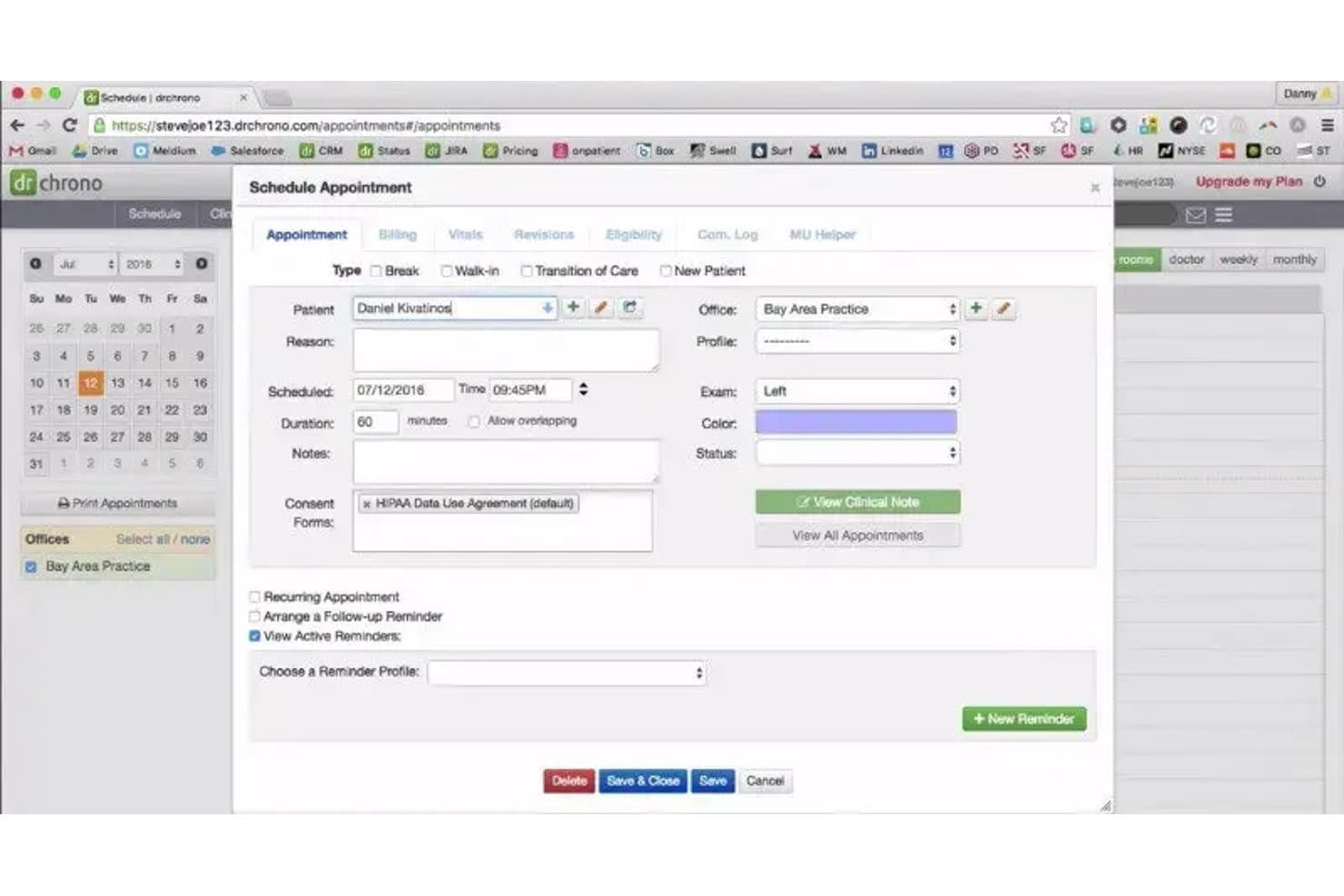
DrChrono offers a detailed Schedule Appointment modal with fields for patient info, exam side, consent forms, and reminders, relevant to dermatology visit scheduling. DrChrono is a cloud-based, iPad-native EHR that combines clinical charting, practice management, medical billing, and revenue cycle tools for small to mid-sized medical practices, including dermatology.
Who Is DrChrono Best For?
DrChrono suits solo and small-group dermatology practices that want a mobile-first, iPad-native EHR with integrated billing.
Why I Picked DrChrono
I picked DrChrono as one of the best because of its iPad-native charting architecture. The platform's integrated photo and drawing tools let me capture and annotate lesion images directly within the patient chart. In a dermatology exam room, that means I'm not switching devices or managing a separate camera between documenting and treating a patient.
DrChrono Key Features
- Customizable dermatology templates: Create and modify specialty charting templates to fit medical dermatology workflows.
- Bidirectional lab integration: Connects with major labs like Quest and LabCorp for dermatopathology result delivery and specimen tracking.
- ONC certification and e-prescribing: Supports electronic prescriptions, EPCS, and compliance with HIPAA and MIPS reporting requirements.
- Integrated patient portal: Lets patients access records, upload information, and communicate directly with your office.
DrChrono Integrations
DrChrono offers native integrations with Quest Diagnostics, LabCorp, Surescripts, CoverMyMeds, Iron Bridge, Square, Collectly, Holly, Box, and Ambra. An open API is available for custom integrations.
Pros and Cons
Pros:
- ONC-certified with EPCS and MIPS support
- In-chart photo and annotation tools included
- iPad-native charting for point-of-care use
Cons:
- Few prebuilt dermatology-specific charting templates
- No Mohs mapping or staging module
Learn more about DrChrono: Best for specialty dermatology workflows
- Free demo available
- Pricing upon request
Visit WebsiteCustomer Rating:3.7/5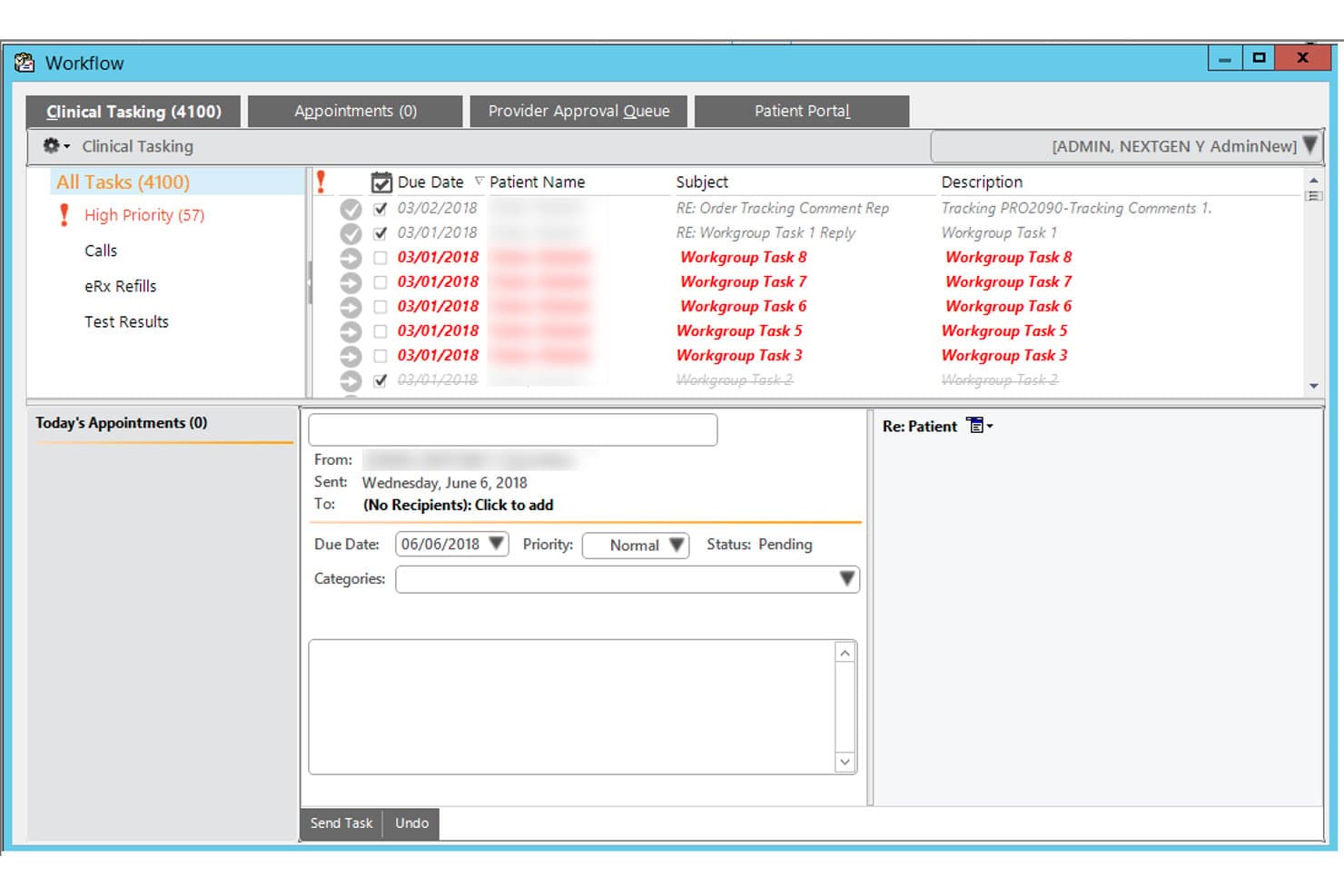
NextGen Healthcare offers a Clinical Tasking workflow interface that allows providers to manage and prioritize patient-related tasks, appointments, and messages in one view. NextGen Healthcare is an ambulatory EHR and practice management platform built for specialty practices, offering dermatology-specific templates, clinical image integration, AI-assisted documentation, lab connectivity, and integrated RCM.
Who Is NextGen Healthcare Best For?
NextGen Healthcare is a strong fit for multi-location dermatology groups with 10 or more providers that need enterprise-grade practice management alongside specialty clinical workflows.
Why I Picked NextGen Healthcare
I picked NextGen Healthcare as one of the best because its dermatology content is built specifically for the specialty, covering biopsy logs, skin cancer staging, and direct image integration into the patient chart. I like that the two-click documentation defaults let providers move through high-volume derm visits without rebuilding templates from scratch. The Ambient Assist AI also captures patient-provider conversations and generates structured SOAP notes automatically.
NextGen Healthcare Key Features
- Integrated patient portal: Lets patients access lab results, upload documents, and communicate with providers securely.
- Mobile-enabled documentation: Allows clinicians to capture notes, images, and patient data directly from smartphones or tablets.
- Bidirectional lab interfaces: Connects with dermatopathology labs to send orders and receive results directly into patient charts.
- Mirth Connect interoperability engine: Facilitates data exchange with external systems and national networks for full care coordination.
NextGen Healthcare Integrations
NextGen Healthcare offers native integrations with Clearwave, Doctible, Solutionreach, Luma, and InstaMed, supports lab connectivity with over 725 labs through NextGen Share, and provides an API and Mirth Connect for custom integrations.
Pros and Cons
Pros:
- Skin cancer staging with direct image chart integration
- Ambient AI captures and structures clinical notes automatically
- Dermatology-built templates reduce charting time significantly
Cons:
- Implementation complexity frustrates smaller derm practices
- No dedicated Mohs mapping module documented
Learn more about NextGen Healthcare: Best for body maps linked to billing codes
- Free demo available
- Pricing upon request
Visit WebsiteCustomer Rating:3.5/5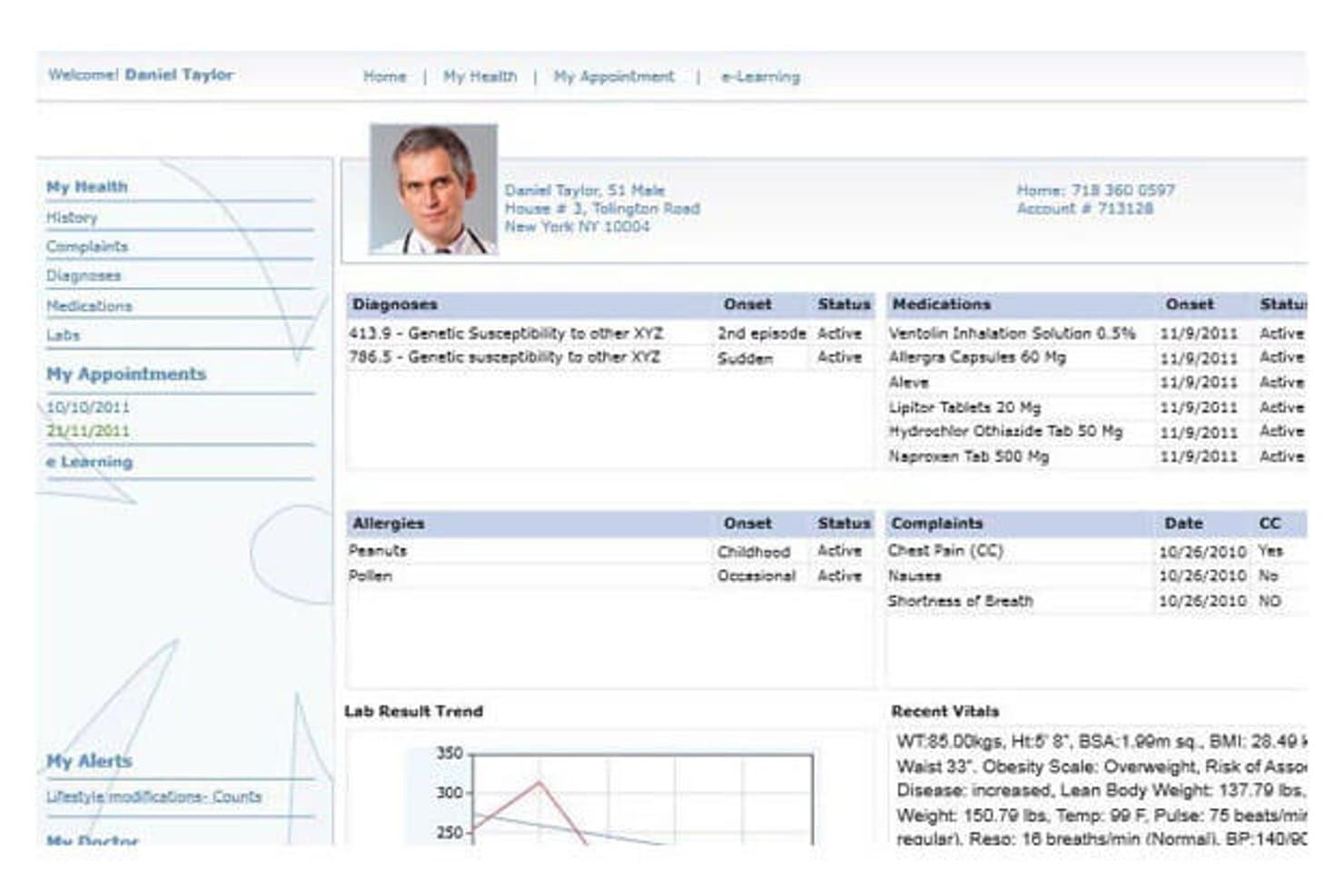
CureMD's patient portal displays health records and vitals. CureMD is an AI-native dermatology EHR platform that combines specialty-specific charting, body mapping, lesion tracking, clinical imaging, e-prescribing, and integrated practice management and billing.
Who Is CureMD Best For?
CureMD is a strong fit for dermatology practices that want body mapping, lesion tracking, and billing codes managed in one connected platform.
Why I Picked CureMD
I picked CureMD as one of the best because its body mapping tools do something most dermatology EHRs don't: they tie precise lesion locations directly to billing codes, so documentation and coding happen in the same step. I also like that the AI coder surfaces real-time ICD-10 and CPT suggestions as you chart, which keeps claims accurate without a separate review pass. The claim-rules engine then validates everything against payer rules before submission, catching modifier mismatches and medical-necessity gaps upfront.
CureMD Key Features
- Dermatology procedure templates: Pre-built templates cover Botox, fillers, laser surgery, and cosmetic procedures like blepharoplasty and face lifts.
- AI medical scribe: Ambient listening tool transcribes patient encounters in real time and generates clinical notes and orders automatically.
- E-prescribing with formulary checks: Providers can send prescriptions electronically with built-in formulary, eligibility, and controlled-substance support across 40,000+ pharmacies.
- Multi-location inventory management: Tracks medications, vaccines, and durable medical equipment across locations with barcode scanning, reorder alerts, and point-of-sale support.
CureMD Integrations
CureMD reports 400+ third-party connectors, including Quest, LabCorp, Surescripts, CommonWell, and Carequality. It also offers a FHIR API for custom integrations.
Pros and Cons
Pros:
- Scheduling and claims share patient workflows
- Clinical images and lesions stay in records
- Lesion maps connect locations to billing codes
Cons:
- Support and onboarding experiences vary
- Reported lag can interrupt charting
Learn more about CureMD: Best for connected dermatology care
- Free demo available
- From $499/user/month
Visit WebsiteCustomer Rating:3.4/5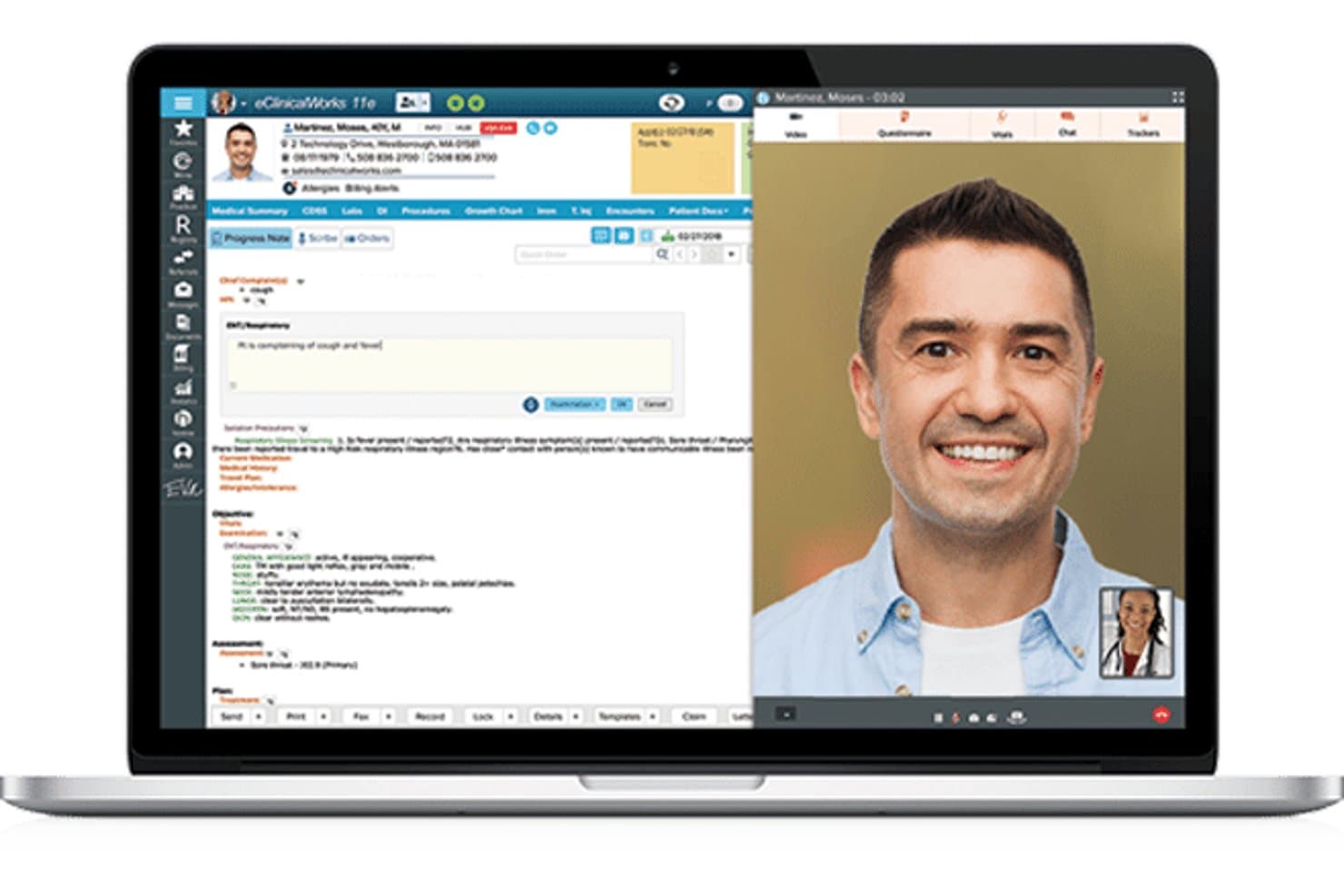
eClinicalWorks offers a telehealth interface with a progress note panel alongside a live video consultation view. eClinicalWorks is a cloud-based EHR and practice management platform with a dedicated dermatology module that combines AI-assisted clinical documentation, image capture, integrated billing, and patient engagement tools.
Who Is eClinicalWorks Best For?
It's a strong fit for mid-to-large dermatology practices that need an integrated EHR, billing, and patient engagement system under one platform.
Why I Picked eClinicalWorks
I picked eClinicalWorks because its connected care story is genuinely differentiated. PRISMA, the platform's AI-powered health information search engine, pulls external patient records from nationwide interoperability networks directly into the clinical note at the point of care. Paired with Sunoh.ai, a dermatology-tuned AI scribe that captures skin condition details like location, size, and color, dermatologists can document faster without sacrificing clinical detail.
eClinicalWorks Key Features
- Dermatology charting templates: Prebuilt templates for acne, eczema, psoriasis, skin cancer screenings, biopsies, and excisions.
- Integrated lab ordering: Connects directly to major labs for ordering and receiving pathology results within patient charts.
- Role-based access controls: Customizable user permissions help practices manage clinical and billing workflows securely.
- Patient portal with telehealth: Patients can view results, communicate with care teams, and join telehealth visits online.
eClinicalWorks Integrations
eClinicalWorks offers native integrations with Sunoh.ai, healow (including TeleVisits, Open Access, Genie contact center), and supports bidirectional lab interfaces for dermatopathology labs. APIs are available for custom integrations.
Pros and Cons
Pros:
- Bundled ICD-10, CPT, and E/M coder
- PRISMA aggregates records from nationwide networks
- Sunoh.ai captures lesion location and size
Cons:
- Image tools lack dermatoscopy support
- No Mohs mapping or staging tools
Learn more about eClinicalWorks: Best for adaptive dermatology charting
- Free demo available
- Pricing upon request
Visit WebsiteCustomer Rating:4.5/5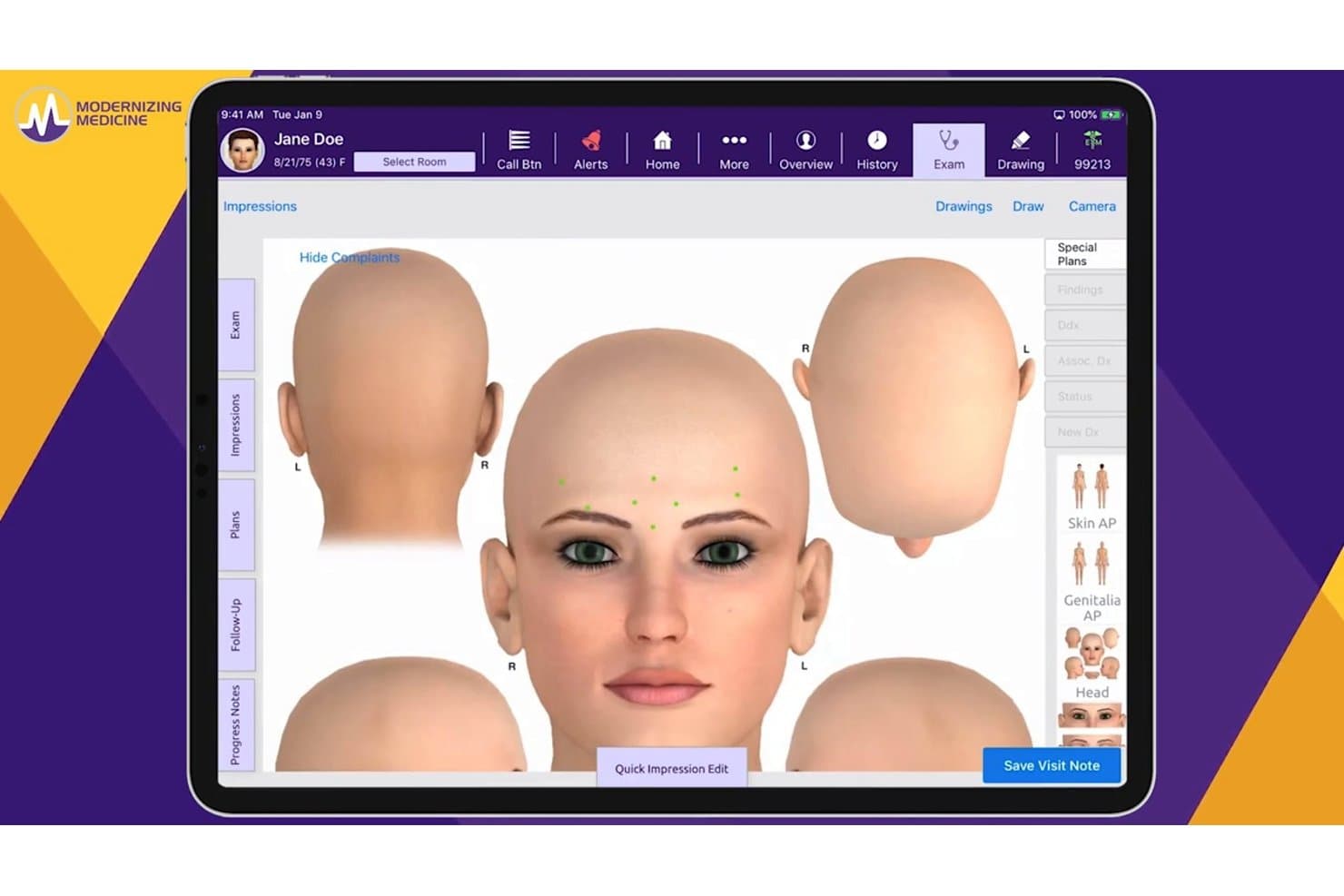
ModMed offers a 3D anatomical body diagram tool within its EHR platform, allowing providers to visually map patient complaints directly on a rendered head model during the exam. ModMed is a dermatology-specific EHR built around its EMA® platform, combining specialty charting, clinical image management, in-house pathology, AI-assisted documentation, and integrated practice management and billing tools.
Who Is ModMed Best For?
ModMed suits dermatology practices of all sizes that want a single platform covering clinical, billing, and patient engagement workflows.
Why I Picked ModMed
ModMed earns its spot on my shortlist because of how EMA's charting adapts to the way a dermatologist actually works. Customizable master visits let you build tap-and-go templates for your most common visit types, and ModMed Scribe 2.0 converts real patient dialogue into suggested chart notes and billing codes without extra documentation steps.
ModMed Key Features
- Integrated in-house pathology module: Enables specimen tracking and direct result integration within the patient chart.
- Interactive body mapping: Lets you draw, annotate, and attach clinical images to specific body locations.
- Patient engagement tools: Built-in messaging, appointment reminders, and intake forms help manage patient communication end to end.
- Revenue cycle management services: Provides dermatology-aware coding support and in-house billing expertise for claim optimization.
ModMed Integrations
ModMed offers native integrations with pathology labs such as Aurora Diagnostics and Bako, as well as interfaces for HL7 connections, FHIR APIs, hospital systems, and its Klara patient engagement platform. An API is available for custom integrations.
Pros and Cons
Pros:
- iPad-native design speeds clinical workflows
- Native in-house pathology module included
- AI-assisted charting trained on derm encounters
Cons:
- Implementation timeline can be lengthy
- Limited to Apple devices for charting
Learn more about ModMed: Best for visual dermatology workflows
- Free demo available
- Pricing upon request
Visit WebsiteCustomer Rating:5/5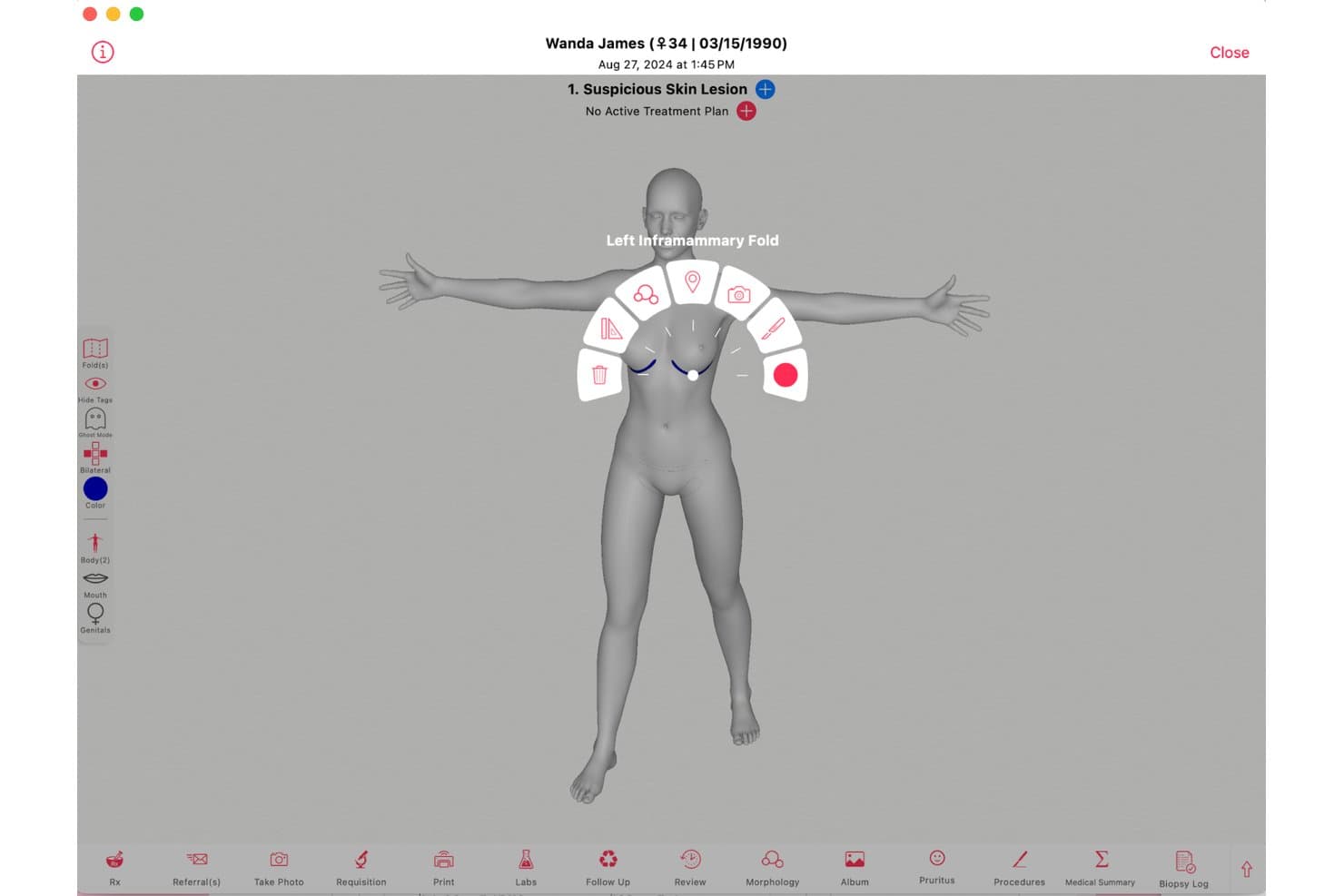
Ezderm offers an interactive 3D body mapping tool that allows dermatologists to tag and document suspicious skin lesions by precise anatomical location. EzDerm is a dermatology-only EHR built by a practicing dermatologist, combining a 3D anatomical body map, Mohs surgery documentation, biopsy tracking, automated coding, and integrated practice management in a single platform.
Who Is EzDerm Best For?
EzDerm is a strong fit for medical and surgical dermatology practices in the U.S. that need a dedicated platform for Mohs, biopsies, and procedure-heavy workflows.
Why I Picked EzDerm
EzDerm earns its spot on my shortlist because the 3D Anatomical Body Map is genuinely unlike anything else in dermatology EHR. I like that tapping a location on the map auto-populates morphology, assessment, plan, and CPT codes in one step. The Mohs module layers on top of that with multi-stage digital mapping and specimen tracking tied directly to the same chart.
EzDerm Key Features
- Pre-built dermatology templates: Choose from more than 1,100 customizable treatment plans for common conditions and procedures.
- Integrated biopsy and malignancy log: Track biopsies, pathology results, and malignancy histories across encounters.
- Automated coding engine: ICD-10, CPT, and SNOMED codes are auto-populated based on chart entries and lesion location.
- Isotretinoin management module: Handle iPLEDGE documentation, automated dose calculations, and lab result monitoring within the EHR.
EzDerm Integrations
EzDerm offers native integrations with Surescripts, Healthmonix for MIPS reporting, Square for payments, and Nuance for speech recognition. Lab and pathology integrations are supported for digital results delivery, and an API is available for custom integrations.
Pros and Cons
Pros:
- Fast implementation for small and solo practices
- Dermatology-specific support team praised by users
- 3D body map links visual charting to CPT coding
Cons:
- ICD code depth falls short for complex cosmetic coding
- Pathology result tracking requires more manual follow-up
Learn more about Ezderm: Best for dermatology EHR and imaging
- Free demo available
- Pricing upon request
Visit WebsiteCustomer Rating:4.3/5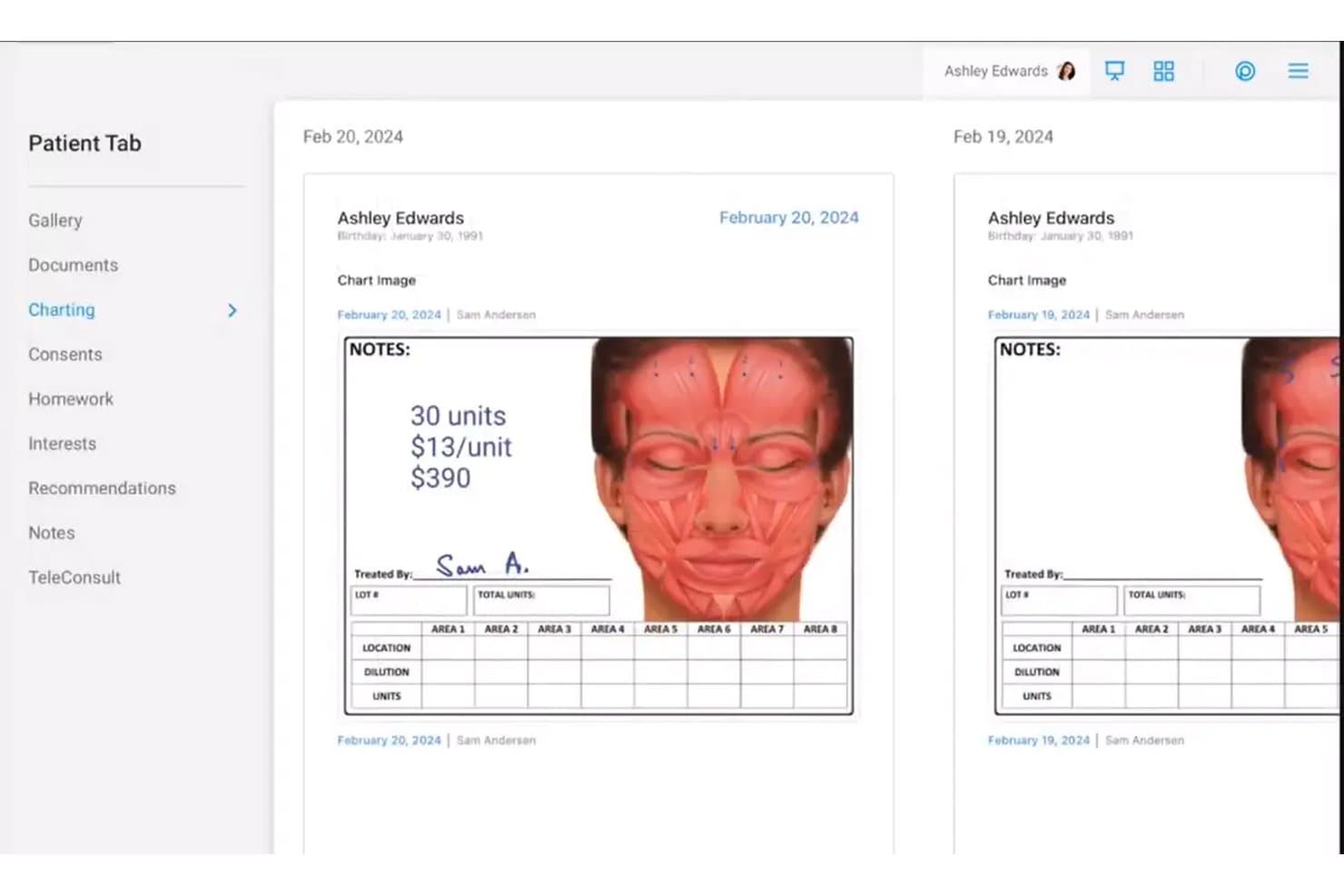
Nextech dermatology EHR showing facial treatment charting, clinical notes, and patient image documentation Nextech is a cloud-based EHR and practice management platform built exclusively for dermatology, covering specialty charting templates, clinical image management, Mohs workflow documentation, e-prescribing, and integrated billing.
Who Is Nextech Best For?
Nextech is a strong fit for medical and surgical dermatology practices of all sizes that need specialty-specific documentation, Mohs surgery workflows, and clinical image management in one platform.
Why I Picked Nextech
Nextech earns its spot on my shortlist because of how deeply the imaging tools are woven into the clinical workflow. I can attach annotated photos directly to a patient chart, pull up side-by-side lesion comparisons at the point of care, and use smart-stamping on anatomical diagrams without leaving the encounter. The SkinIO integration adds AI-powered full-body imaging for mole tracking, which I haven't seen built this tightly into another derm EHR.
Nextech Key Features
- Dermatology-specific charting templates: Access customizable templates for acne, biopsies, excisions, psoriasis, and cosmetic visits.
- Mohs surgery workflow module: Document mapping, staging, and pathology for complex Mohs procedures directly in patient charts.
- Dermatopathology lab interface: Send specimens to external labs and receive results attached to the patient record automatically.
- Automated CPT and ICD-10 coding: Use built-in lesion-based and procedure-aware code suggestions designed for dermatology billing.
Nextech Integrations
Nextech offers 10+ native integrations, including TouchMD, SkinIO, Weave, Solutionreach, Demandforce, Podium, FlexOptical, Harmony, MedEvolve, and Abyde. An API is available for custom integrations.
Pros and Cons
Pros:
- Built-in DataDerm registry auto-submission available
- AI scribe reduces derm charting time
- Mohs documentation goes deeper than competitors
Cons:
- Recent user reports flag reliability issues
- Body diagram stampers require manual configuration
Learn more about Nextech: Best for all-in-one dermatology management
- Free demo available
- Pricing upon request
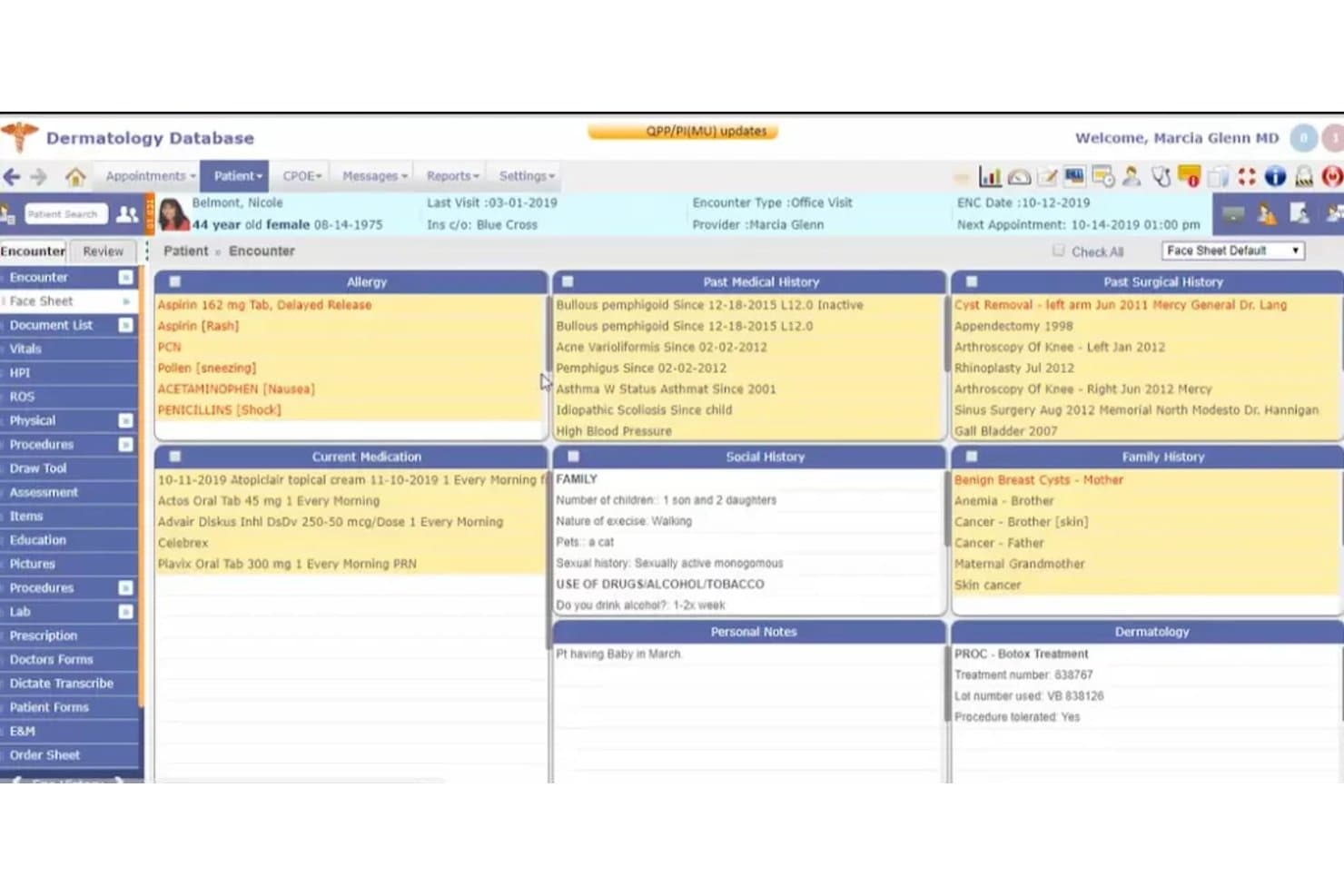
Compulink Dermatology Advantage offers a comprehensive face sheet view displaying patient allergies, medical history, current medications, social history, family history, and dermatology procedure notes in a single dashboard. Compulink Dermatology Advantage is a specialty-specific EHR and practice management platform built for dermatology practices, combining clinical documentation, Mohs surgery workflows, image capture, dermatopathology integration, and automated billing in one system.
Who Is Compulink Dermatology Advantage Best For?
It's a strong fit for dermatology practices that handle a mix of medical, cosmetic, and Mohs surgery cases and want a single platform covering clinical and billing workflows.
Why I Picked Compulink Dermatology Advantage
I've included Compulink Dermatology Advantage in my top picks because it's one of the few dermatology EHRs that covers medical, cosmetic, and Mohs surgery workflows in one platform. I particularly like how the Pathology Management module ties specimen tracking directly to patient charts, keeping dermatopathology results alongside clinical documentation. The AI Ambient Virtual Scribe with SMART Orders also cuts charting time by handling documentation automatically as providers move through encounters.
Compulink Dermatology Advantage Key Features
- Integrated body mapping: Lets you capture, annotate, and track lesion locations directly on patient body diagrams.
- Dermatology E/M and CPT coding: Handles automatic coding suggestions with built-in dermatology-specific CPT and ICD-10 libraries.
- Bidirectional dermatopathology lab integration: Sends specimen orders and receives results tied to patient records in real time.
- Cosmetic and retail management: Supports inventory tracking, product sales, and membership program management for aesthetic service workflows.
Compulink Dermatology Advantage Integrations
Compulink Dermatology Advantage offers native integrations with SureScripts for e-prescribing, as well as laboratory and dermatopathology systems for sending and receiving specimen orders and results. An API is available for custom integrations.
Pros and Cons
Pros:
- AI scribe captures documentation during live encounters
- Single platform for medical, cosmetic, and surgical
- Dedicated Mohs mapping and staging within charts
Cons:
- Initial setup complexity requires significant time investment
- System performance can feel slow at times
Learn more about Compulink Dermatology Advantage: Best for customizable dermatology EHR
- Free demo available
- From $229/user/month
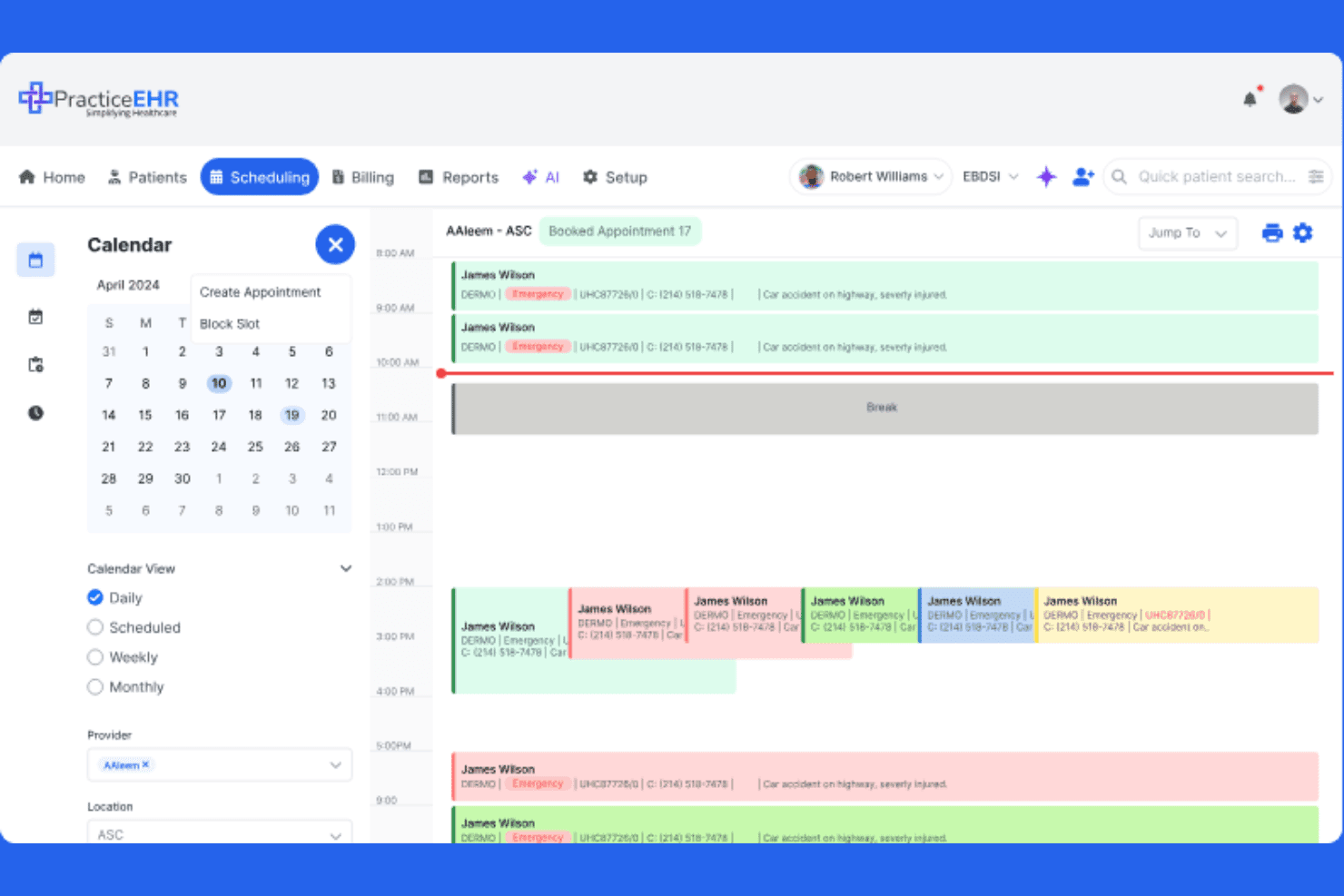
Practice EHR simplifies clinical scheduling by managing daily provider appointments and time slots. PracticeEHR is a dermatology EHR platform that combines customizable clinical documentation templates, skin image capture and lesion tracking, AI-assisted coding and charting, and integrated practice management tools including scheduling, billing, and claims.
Who Is PracticeEHR Best For?
PracticeEHR is a good fit for multi-location dermatology groups that need a single platform to handle clinical documentation, skin image tracking, scheduling, and billing.
Why I Picked PracticeEHR
I've included PracticeEHR in my top picks because its customizable dermatology templates genuinely stand out for practices that need documentation built around their actual workflows. I like that you can configure templates for skin exams, Mohs visits, and surgical procedures, while the platform also captures and compares high-resolution skin images directly in the patient chart for longitudinal lesion tracking. The AI Scribe layer drafts SOAP notes and suggests ICD/CPT codes from the visit conversation, cutting the post-visit documentation burden significantly.
PracticeEHR Key Features
- AI Scribe: Listens to visit conversations, transcribes in 20+ languages, and drafts SOAP notes with ICD/CPT code suggestions for provider review.
- Cosmetic inventory tracking: Monitors injectables and retail products directly within the platform alongside standard clinical workflows.
- Multi-location scheduling: Supports scheduling across multiple practice locations with role-based access controls for staff.
- AI Claim Editor: Reviews claim lines before submission, flags rejection risks with probability scores, and surfaces suggested fixes.
PracticeEHR Integrations
PracticeEHR has native integrations with LabCorp, Quest Diagnostics, Surescripts, Kno2, Carequality, and TEFCA. Its FHIR R4-based open API supports custom integrations.
Pros and Cons
Pros:
- Reviewers praise scheduling and chart access
- High-resolution images track changing lesions
- Customizable templates support dermatology documentation
Cons:
- Dedicated biopsy tracking isn’t confirmed
- Template changes can require support
Learn more about Practice EHR:
How I Evaluate Dermatology EHR
I split my evaluation into three parts, giving the most weight to core tasks: document skin exams and link clinical photos to patient records. Next, I look for differentiators such as Mohs surgery tracking. Finally, I consider support, onboarding, and pricing value beyond the feature set.
Core Functionality (Table Stakes For This List)
When I'm selecting tools for my list, I score each one on a scale from 0 (does not offer the functionality) to 5 (excels in this area) for each core functionality listed below. I then convert the total into a percentage to help assess each tool’s overall fit, with extra weight on any functionalities I’ve deemed essential.
- Dermatology Charting (Essential): I look for adaptable templates and structured fields for skin exams, lesion details, and procedure notes across routine and surgical visits.
- Clinical Image Management (Essential): I assess how photos connect to encounters and lesions, including body mapping and comparisons that help track changes over time.
- Pathology & Biopsy Tracking: I check whether teams can record biopsy orders, track status, and link results to the relevant lesion or encounter.
- Dermatology Coding & Billing: I look for procedure-aware coding workflows for services such as excisions and cosmetic add-ons, alongside billing functions.
- E-Prescribing: I consider whether clinicians can prescribe topical and systemic treatments and manage refills within the patient’s record.
- Practice Management Integration: I evaluate how clinical records connect with scheduling, registration, and billing, including whether staff must enter the same information twice.
Once I have a list of tools that meet the criteria, I consider what sets each platform apart.
Differentiating Factors (What Sets Vendors Apart)
Here's how I compare and contrast different vendors:
Standout Features
Mohs surgery tracking is a major separator. I check whether a platform supports stage-by-stage margin documentation and repair notes, since practices without this end up in spreadsheets. I also look at mobile photo capture apps that let providers shoot and attach images chairside. A cosmetic and aesthetic module matters for mixed practices—I evaluate consent-form workflows and before/after image pairing for injectables or laser work.
Beyond Features
I check whether a vendor treats dermatology as its core market or a bolt-on vertical. Purpose-built platforms tend to ship updates informed by practicing dermatologists, while generic EHRs lag on things like body-mapping improvements. Interoperability matters just as much—I evaluate lab and clearinghouse connections, since a missing pathology interface means staff re-key biopsy results manually. I also look at onboarding depth: vendors that offer template customization support specific to dermatology workflows cut adoption time considerably compared to generic training programs.
Como escolher um EHR de dermatologia
É fácil perder-se em listas extensas de funcionalidades e estruturas de preços complexas. Para o ajudar a manter o foco enquanto trabalha no seu processo específico de seleção de software, eis uma lista de fatores a ter em conta:
| Fator | O que deve considerar |
| Escalabilidade | O sistema suportará prestadores ou localizações adicionais? Considere os seus planos de crescimento e evite ultrapassar a capacidade da plataforma. |
| Integrações | O EHR estabelece ligação aos laboratórios, à faturação, à imagiologia e aos sistemas PMS ou CRM existentes dos quais o seu consultório depende? Teste a profundidade das integrações. |
| Possibilidade de personalização | Pode adaptar modelos, relatórios e fluxos de pacientes ao modelo específico do seu consultório ou à sua subespecialidade — sem custos elevados de consultoria? |
| Facilidade de utilização | A plataforma é intuitiva para médicos, assistentes médicos e funcionários da receção? Faça uma demonstração com vários tipos de utilizadores e informe-se sobre a curva de aprendizagem. |
| Implementação e integração inicial | Informe-se sobre os prazos de entrada em funcionamento, o apoio à migração de dados e se o fornecedor disponibiliza formadores com experiência em dermatologia para a integração inicial. |
| Custo | Além da subscrição base, verifique os custos associados ao armazenamento de imagens, aos portais de pacientes, às taxas da câmara de compensação ou aos níveis de suporte premium. |
| Medidas de segurança | Como gere o fornecedor os riscos relacionados com a HIPAA e as ePHI? Informe-se sobre a encriptação de dados, os registos de auditoria e as certificações de segurança para além dos requisitos básicos. |
| Requisitos de conformidade | O sistema está alinhado com os requisitos de prescrição eletrónica, certificação da ONC, MIPS/MACRA e alterações regulamentares locais? |
O que são os EHR de dermatologia?
Os EHR de dermatologia são sistemas de registo eletrónico de saúde concebidos especificamente para consultórios de dermatologia, com suporte para registos clínicos especializados, gestão de imagens clínicas, fluxos de trabalho de procedimentos de Mohs, integração com anatomia patológica e faturação de cuidados baseados em lesões. Estas plataformas ajudam a simplificar a documentação e a prestação de cuidados em ambientes dermatológicos de elevado volume e com utilização intensiva de imagens, permitindo que a sua equipa se concentre mais nos cuidados aos pacientes e menos na introdução manual de dados.
Funcionalidades dos EHR de dermatologia
Ao selecionar um EHR de dermatologia, procure as seguintes funcionalidades essenciais:
- Modelos específicos para dermatologia: Modelos de notas pré-criados para acne, avaliação de sinais, biópsias, excisões e procedimentos dermatológicos comuns, ajudando os profissionais a documentar de forma eficiente e consistente.
- Gestão de imagens clínicas: Ferramentas para captar, carregar, anotar e comparar fotografias dos doentes ou imagens de dermatoscopia juntamente com diagramas corporais no processo clínico.
- Mapeamento corporal integrado: Diagramas interativos que permitem assinalar a localização das lesões, acompanhar visualmente as alterações e anexar fotografias clínicas para um acompanhamento longitudinal preciso.
- Fluxo de trabalho para cirurgia de Mohs: Módulos para mapear as fases do tumor, acompanhar as margens cirúrgicas e documentar cada camada de Mohs durante o procedimento — essenciais para as práticas cirúrgicas.
- Integração com laboratórios de anatomia patológica: Conectividade bidirecional para enviar biópsias, receber resultados de dermatopatologia e associar diretamente os dados laboratoriais às consultas dos doentes.
- Codificação e faturação automatizadas: Ferramentas de codificação CPT/ICD-10 baseadas nas lesões, com lógica de modificadores e suporte para a faturação específica de dermatologia e a gestão de pedidos de reembolso.
- Prescrição eletrónica (EPCS): Ferramentas seguras e conformes para o envio de receitas — incluindo de substâncias controladas — diretamente para as farmácias a partir do EHR.
- Portal do doente: Proporciona aos doentes acesso seguro às notas das consultas, aos resultados laboratoriais e ao envio direto de mensagens, ajudando a simplificar a comunicação e a reduzir as chamadas telefónicas administrativas.
- Conformidade com a HIPAA: Medidas de segurança, como controlos de acesso, encriptação e registos de auditoria, para proteger as informações de saúde eletrónicas protegidas (ePHI).
- Relatórios personalizáveis: Painéis de análise e relatórios integrados, adaptados às práticas de dermatologia, para medir o volume, os resultados e apoiar a conformidade com os requisitos de comunicação de qualidade.
Benefícios de um EHR de Dermatologia
A implementação de um EHR de dermatologia proporciona vários benefícios à sua equipa e à sua atividade. Eis alguns dos benefícios que pode esperar:
- Registo clínico simplificado: Os modelos especializados, o mapeamento corporal integrado e as ferramentas de imagem clínica permitem documentar muito mais rapidamente do que com um software EHR genérico.
- Maior precisão no diagnóstico: O acompanhamento visual das lesões e a comparação de imagens ao longo do tempo apoiam a deteção precoce de alterações cutâneas e reduzem a probabilidade de não identificar determinados achados.
- Fluxos de trabalho simplificados para a cirurgia de Mohs e outros procedimentos: Os módulos concebidos especificamente para este fim ajudam os cirurgiões a mapear, classificar e documentar cada etapa, mantendo os dados clínicos organizados para cada doente.
- Menos erros de faturação: A codificação CPT automatizada, a lógica de modificadores e as ferramentas de faturação específicas para dermatologia minimizam o retrabalho e reduzem as recusas das seguradoras.
- Melhor coordenação dos cuidados: A integração laboratorial bidirecional e a interoperabilidade garantem que os resultados da anatomia patológica, as notas clínicas e as receitas estão disponíveis num único local.
- Maior conformidade e segurança: As salvaguardas da HIPAA, os registos de auditoria e a certificação da ONC ajudam a manter os dados dos doentes seguros e a sua prática alinhada com os requisitos regulamentares.
- Maior envolvimento dos doentes: Os portais dos doentes, a prescrição eletrónica e as ferramentas de mensagens permitem aos doentes aceder às informações e manter o contacto com a sua equipa de cuidados.
Custos e preços de um EHR de Dermatologia
A seleção de um EHR de dermatologia exige uma compreensão dos vários modelos e planos de preços de EHR disponíveis. Os custos variam consoante as funcionalidades, a dimensão da equipa, os complementos e outros fatores. A tabela abaixo resume os planos comuns, os respetivos preços médios e as funcionalidades normalmente incluídas nas soluções EHR de dermatologia:
Tabela de comparação de planos para EHR de Dermatologia
| Tipo de plano | Preço médio | Funcionalidades comuns |
| Plano gratuito | $0 | Modelos básicos de notas, armazenamento limitado de imagens clínicas e segurança HIPAA padrão. |
| Plano pessoal | $50-$150/utilizador/mês | Modelos de dermatologia, carregamento e anotação de imagens, prescrição eletrónica e relatórios básicos. |
| Plano empresarial | $150-$300/utilizador/mês | Gestão avançada de imagens, mapeamento corporal integrado, conectividade com laboratórios e anatomia patológica, faturação personalizável e portal do doente. |
| Plano empresarial de grande escala | $300+/utilizador/mês | Suporte para vários locais, assistência na implementação, opções de RCM interno, análises avançadas, integrações de API e ferramentas robustas de conformidade. |
Perguntas frequentes sobre registos de saúde eletrónicos em dermatologia
Eis algumas respostas a perguntas frequentes sobre os registos de saúde eletrónicos em dermatologia:
Em que difere um registo de saúde eletrónico de dermatologia de um registo de saúde eletrónico geral?
Um registo de saúde eletrónico de dermatologia inclui ferramentas especializadas, como a gestão de imagens clínicas, o mapeamento corporal e modelos específicos para lesões, que respondem às necessidades únicas de documentação e fluxo de trabalho das consultas de dermatologia.
Os sistemas de registos de saúde eletrónicos de dermatologia conseguem gerir fluxos de trabalho médicos e estéticos?
Sim, muitas plataformas permitem documentar e faturar tanto consultas médicas como serviços estéticos, disponibilizando funcionalidades como o controlo de inventário, a gestão de produtos para venda a retalho e processos de faturação separados.
O que deve uma consulta de dermatologia procurar ao avaliar o apoio à implementação de um registo de saúde eletrónico?
Deve procurar fornecedores que disponibilizem especialistas em implementação com formação em dermatologia, um forte apoio à migração de dados de sistemas antigos e formação adaptada ao fluxo de trabalho e às necessidades de registo da sua equipa.
É possível integrar um registo de saúde eletrónico de dermatologia com laboratórios de dermatopatologia?
Sim, os sistemas líderes disponibilizam interfaces laboratoriais bidirecionais, permitindo enviar amostras, receber resultados de anatomia patológica e reconciliar relatórios diretamente no processo clínico do doente.
Os registos de saúde eletrónicos de dermatologia garantem a conformidade com os requisitos das seguradoras e regulamentares?
Sim, a maioria dos registos de saúde eletrónicos especializados inclui ferramentas para a conformidade com a HIPAA, a certificação da ONC, a elaboração de relatórios MIPS/MACRA e a prescrição eletrónica segura — incluindo de substâncias controladas.