

Faktureringsprogramvare for flere spesialiteter er utviklet for å håndtere fakturering, koding og oppgaver knyttet til inntektssyklusen for praksiser som betjener ulike kliniske spesialiteter i ett og samme system. Hvis du ser etter måter å redusere faktureringsproblemer, koordinere komplekse krav og holde betalingene i gang på tvers av flere spesialiteter, har du kommet til rett sted.
Nedenfor finner du det som skiller de beste løsningene fra hverandre – slik at du kan sammenligne funksjoner, unngå kostbare feil og velge riktig faktureringsplattform for dine unike behov.
Hvorfor du kan stole på våre programvareanbefalinger
6,700+
Reviews
20
Industry experts
16+
Evaluation factors
14
Years
Teamet vårt har testet og anmeldt programvare siden 2012. Vi leder selv legekontorer, så vi vet hvor vanskelig og hvor viktig det er å velge riktig programvare.
I denne guiden har vi vurdert verktøyene gjennom praktisk testing og uavhengig research og gitt dem poeng ut fra våre utvelgelseskriterier.
Anmeldelsene våre bygger på vår egen redaksjonelle vurdering. De er ikke et salgsargument.
Sammenligningstabell for faktureringsprogramvare for flere spesialiteter
Denne sammenligningstabellen oppsummerer prisdetaljer for faktureringsprogramvare for flere spesialiteter.
| Tool | Best For | Trial Info | Price | ||
|---|---|---|---|---|---|
| 1 | Best for advanced eligibility verification | Free demo available | Pricing upon request | Website | |
| 2 | Best for real-time claim status updates | Free demo available | Pricing upon request | Website | |
| 3 | Best for integrated claim submission workflow | Free demo available | Pricing upon request | Website | |
| 4 | Best for user-defined billing workflows | Free demo available | Pricing upon request | Website | |
| 5 | Best for integrated all-in-one EHR and billing | Free demo available | Pricing upon request | Website | |
| 6 | Best for contract management precision | Free demo available | Pricing upon request | Website | |
| 7 | Best for specialty-specific financial analytics | Free demo available | Pricing upon request | Website | |
| 8 | Best for coding automation across specialties | Free demo available | Pricing upon request | Website | |
| 9 | Best for detailed denial tracking tools | Free demo available | Pricing upon request | Website | |
| 10 | Best for tailored specialty reporting dashboards | Free demo available | Pricing upon request | Website |


Anmeldelser av den beste faktureringsprogramvaren for flere spesialiteter
Nedenfor finner du mine detaljerte sammendrag av den beste faktureringsprogramvaren for flere spesialiteter som kom med på kortlisten min. Anmeldelsene mine gir et detaljert innblikk i funksjonene, de beste bruksområdene og integrasjonene for hver plattform, slik at du kan finne den beste løsningen for deg.
 Best for advanced eligibility verification
- Free demo available
- Pricing upon request
Visit WebsiteCustomer Rating:4.4/5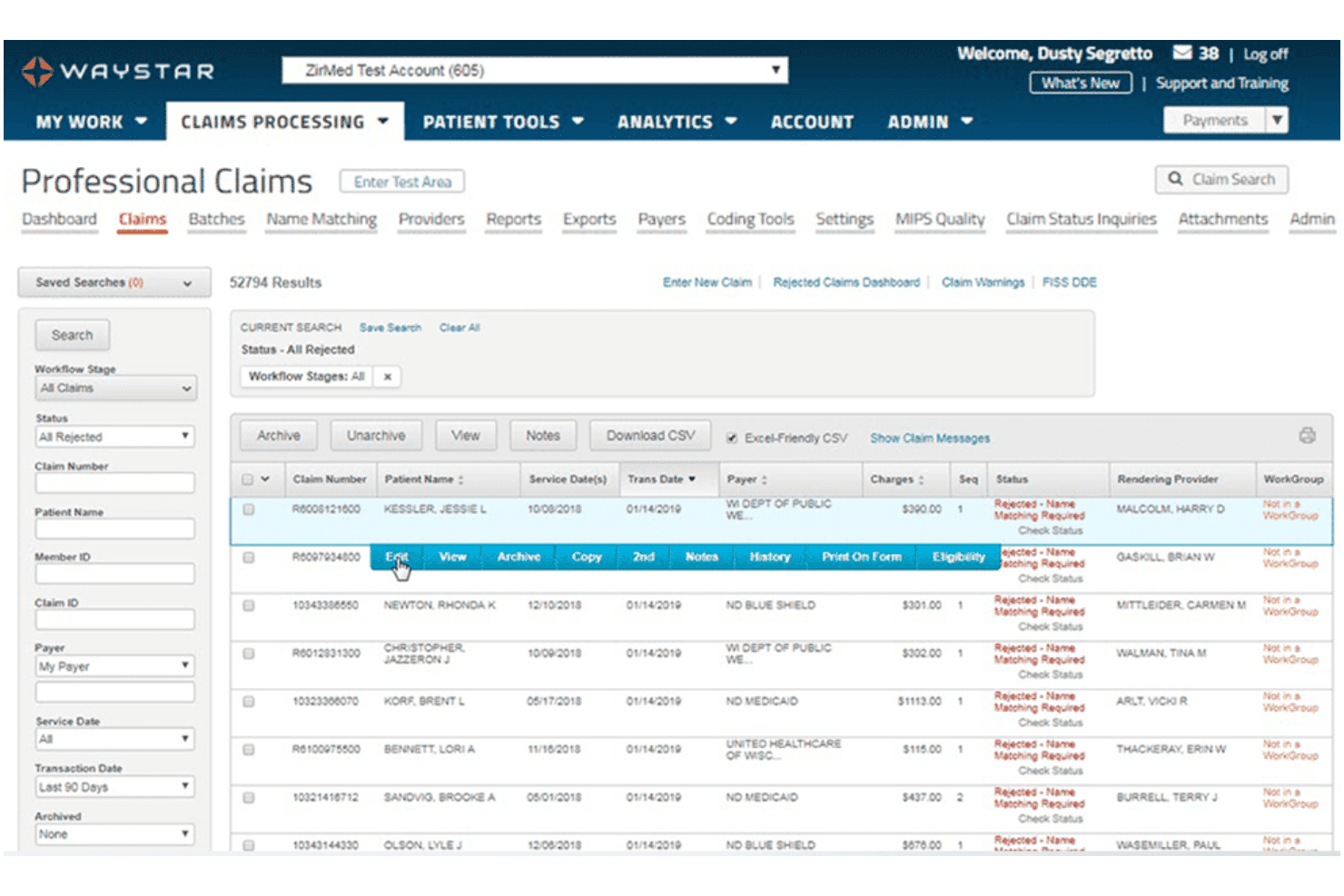
Waystar offers a Professional Claims dashboard that displays rejected claims with filtering options, claim status, and charges. Waystar is a cloud-native revenue cycle management platform that covers claims scrubbing, eligibility verification, prior authorization, denial management, and remittance processing across multi-specialty and multi-location provider organizations.
Who Is Waystar Best For?
Waystar is a strong fit for mid-to-large health systems, hospital-affiliated groups, and multi-specialty organizations with dedicated revenue cycle or billing teams managing high claim volumes.
Why I Picked Waystar
Waystar earns its spot on my shortlist because of how far its eligibility verification goes beyond a basic payer lookup. Coverage Detection automatically identifies secondary and tertiary coverage, which I find especially useful in multi-specialty settings where patients often carry layered plans. Auth Accelerate speeds up prior authorization workflows across payer types, and real-time alerts flag out-of-network risks and missing patient data before a claim is ever submitted.
Waystar Key Features
- Automated claim scrubbing and payer edits: Continuously updated rule engine checks claims for specialty-specific requirements before submission.
- Multi-specialty segmented dashboards: Customizable analytics display revenue, denial rates, and payer mix by specialty, provider, and location.
- Denial and appeals worklists: Structured worklists organize denials by reason code and specialty, supporting targeted team follow-up.
- Integrated remit management: Electronic remittance advice (ERA) and EOB conversion tools automate matching, reconciliation, and payment posting across payers.
Waystar Integrations
Waystar offers native integrations with Epic, MEDITECH, Cerner (Oracle Health), Allscripts, and eClinicalWorks, and provides an API for custom integrations.
Pros and Cons
Pros:
- RCM tools work across existing clinical systems
- Extensive payer connectivity supports varied billing requirements
- One claim engine handles multiple claim formats
Cons:
- Advanced claims capabilities vary by package
- It is not a full practice-management replacement
Learn more about Waystar: Best for real-time claim status updates
- Free demo available
- Pricing upon request
Visit WebsiteCustomer Rating:4.1/5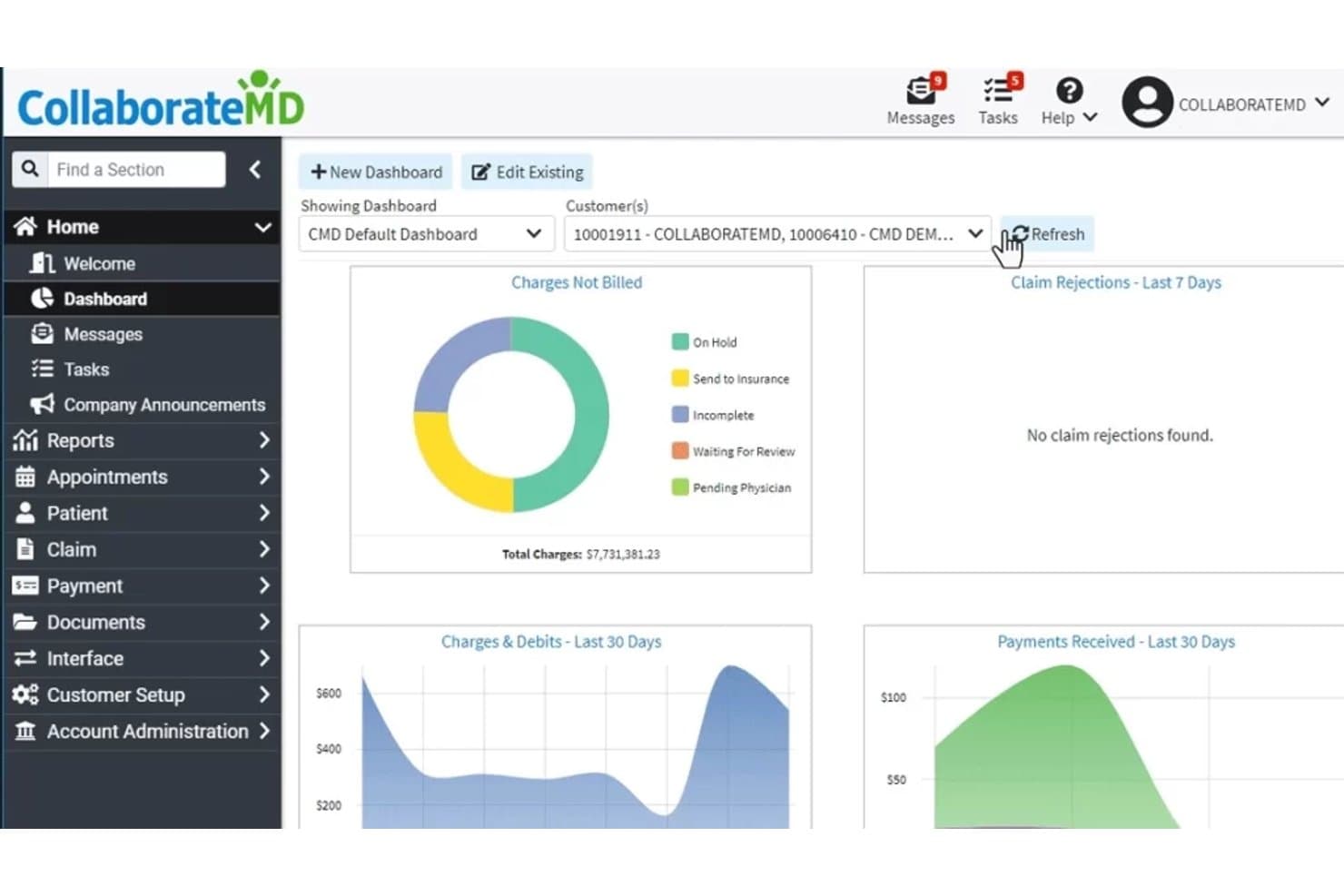
CollaborateMD offers a multi-specialty billing dashboard displaying charges not billed, claim rejections, charges and debits, and payments received over customizable time periods. CollaborateMD is a cloud-based medical billing and practice management platform that handles multi-specialty claims submission, real-time eligibility verification, denial management, and revenue cycle reporting across multi-provider and multi-location practices.
Who Is CollaborateMD Best For?
It's a strong fit for medical billing companies and multi-specialty group practices managing billing across multiple providers and locations from a single platform.
Why I Picked CollaborateMD
I picked CollaborateMD as one of the best because its real-time claim submission and built-in clearinghouse give my team immediate visibility into claim status the moment a claim goes out. I also like the AI-powered rejection support, which translates payer rejection codes into plain language so billing staff can respond immediately. The built-in Level 2 Claim Edits, including CCI and NCD/LCD checks, apply across 100+ specialties before claims ever reach the payer.
CollaborateMD Key Features
- Specialty-specific coding libraries: Access continually updated code sets for over 100 medical specialties in one centralized platform.
- Customizable reporting dashboards: Build and share dashboards that segment KPIs by specialty, provider, location, and payer.
- Integrated patient payment portal: Offer patients a branded portal with payment plans, consolidated statements, and online payment options.
- API-first architecture: Connect CollaborateMD with EHRs, labs, and payment processors using open API integrations.
CollaborateMD Integrations
CollaborateMD offers native integrations with Practice Fusion, Nexus Clinical, Alleva, Quest Diagnostics, LabCorp, and LabDAQ, and provides an API for custom integrations.
Pros and Cons
Pros:
- Extensive financial reporting supports cross-provider analysis
- Multi-client tools suit billing organizations
- Built-in clearinghouse removes a separate claims vendor
Cons:
- Several advanced patient-billing tools require the top tier
- Advanced claim scrubbing is gated to higher plans
Learn more about CollaborateMD: Best for integrated claim submission workflow
- Free demo available
- Pricing upon request
Visit WebsiteCustomer Rating:3.9/5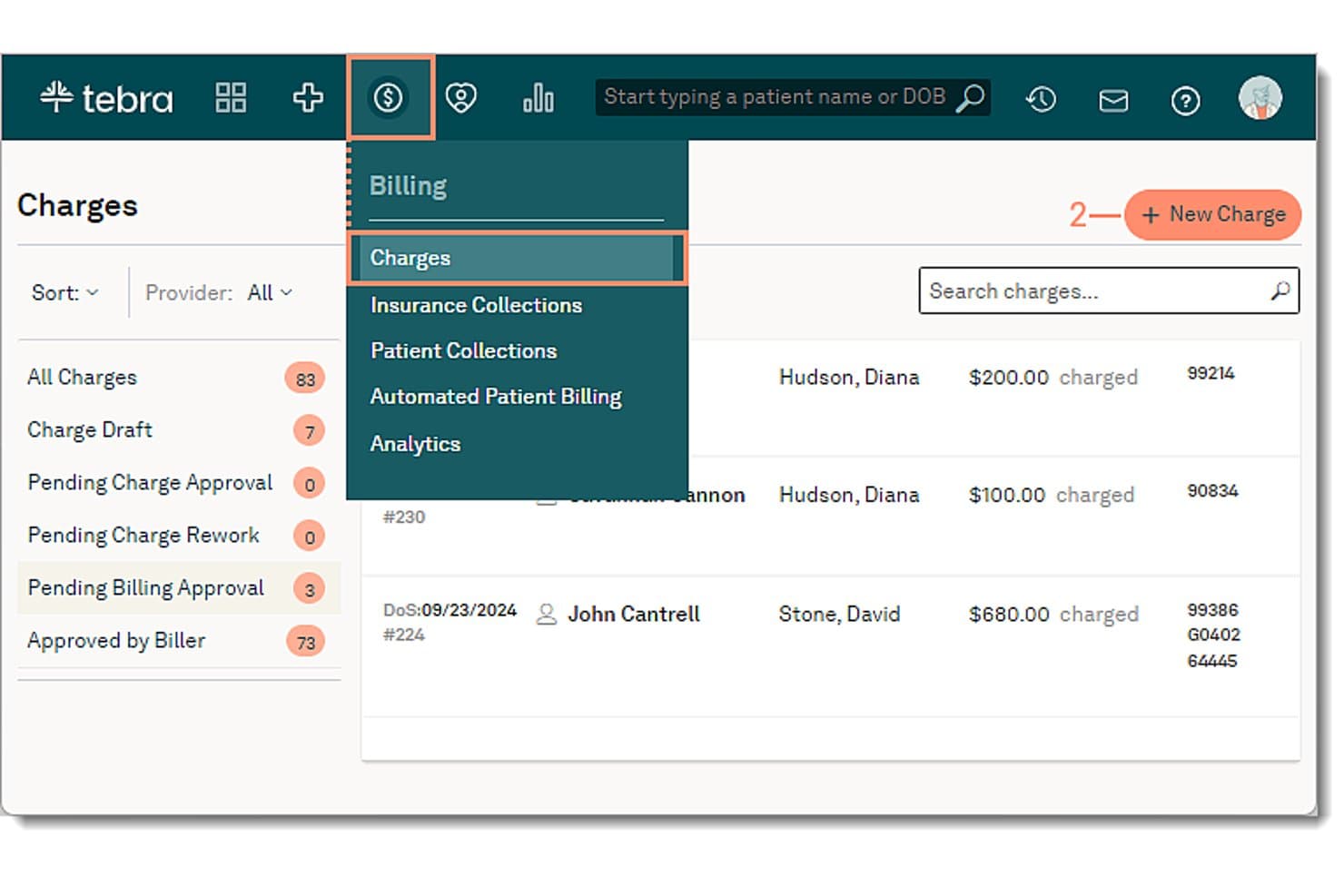
Tebra offers a Charges billing dashboard with options for new charge entry, charge drafts, and billing approval workflows for multi-specialty practices. Tebra is an integrated EHR and medical billing platform built for independent practices, combining claim submission, eligibility verification, denial management, charge capture, and patient payments in a single cloud-native system.
Who Is Tebra Best For?
Tebra is a strong fit for independent medical practices and specialty clinics that handle billing in-house and need a unified platform to manage claims across multiple providers.
Why I Picked Tebra
Tebra earns its spot on my shortlist because of how tightly the claim submission workflow is woven into the broader billing platform. I like that claims move from charge capture through TriZetto-powered scrubbing, applying payer-specific rules before submission, all within a single system. The Track Claims Status tool then lets me catch rejections and denials early, before they age into A/R problems across multiple specialty departments.
Tebra Key Features
- Specialty template library: Offers customizable documentation and billing templates for a wide range of medical specialties.
- Automated eligibility verification: Instantly checks patient coverage and plan details across over 2,700 payers.
- Role-based access control: Provides tailored permissions and data visibility for billing teams, providers, and administrative staff.
- Patient payment portal: Enables self-service online bill pay, payment plans, and statement access for patients.
Tebra Integrations
Tebra offers native integrations with TriZetto and Surescripts for clearinghouse and e-prescribing, and provides an API for custom integrations.
Pros and Cons
Pros:
- Built-in EHR reduces duplicate data entry
- Real-time eligibility checks across thousands of payers
- End-to-end claim submission within one platform
Cons:
- Support response times reported as inconsistent by users
- Reporting lacks depth for multi-specialty segmentation
Learn more about Tebra: Best for user-defined billing workflows
- Free demo available
- Pricing upon request
Visit WebsiteCustomer Rating:4.1/5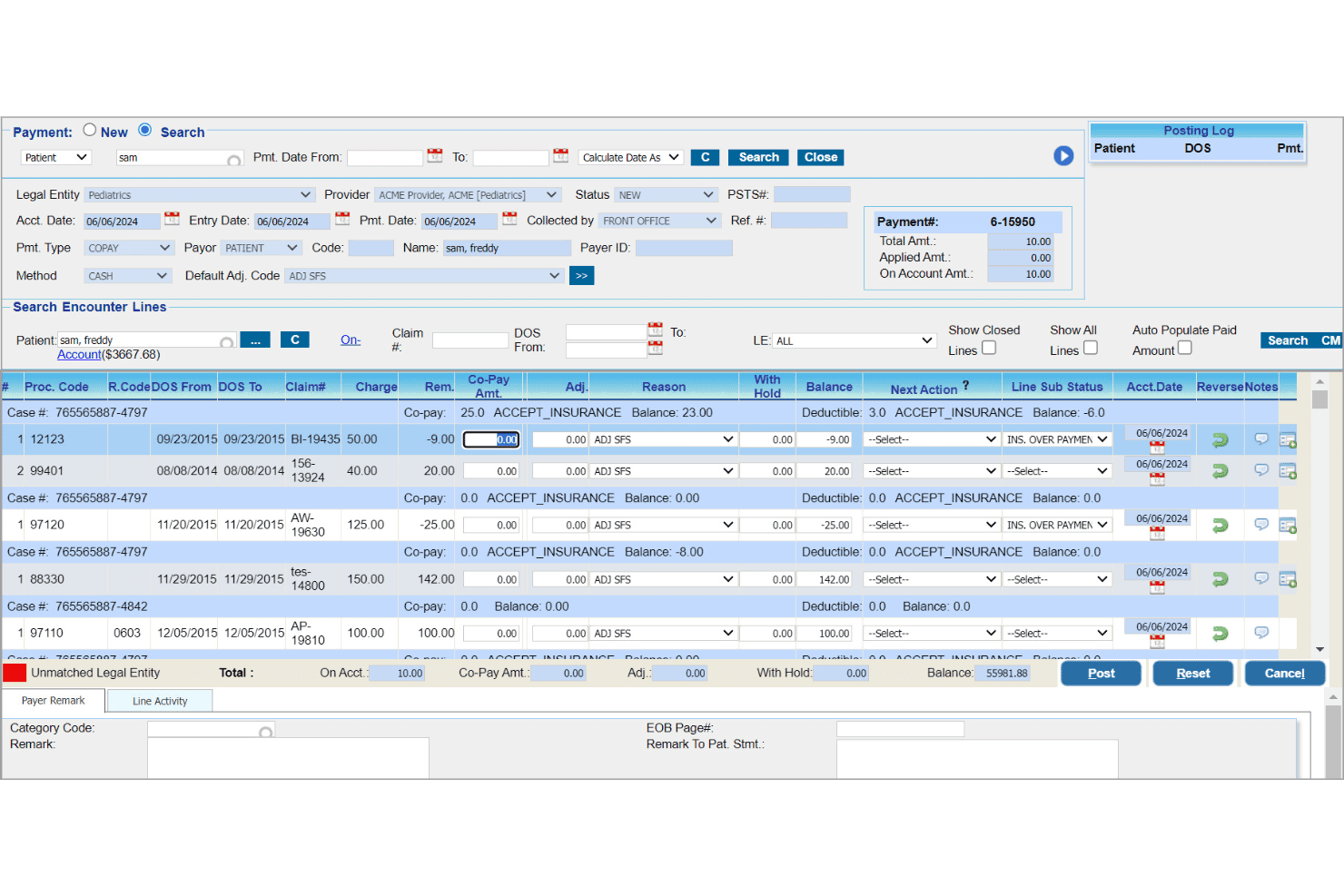
PracticeSuite oversees client claims, denials, payments, and financial reports. PracticeSuite is a cloud-based medical billing and RCM platform supporting 150+ specialties, with claims scrubbing, denial management, eligibility verification, and a Central Billing Office for managing multiple practices and providers in one system.
Who Is PracticeSuite Best For?
PracticeSuite is a strong fit for third-party medical billing companies and multi-provider group practices managing RCM across several specialties simultaneously.
Why I Picked PracticeSuite
PracticeSuite earns its spot on my shortlist because of how granularly you can configure billing workflows by user role. I like the AI-driven RCM workflow tool, which lets me assign billing tasks to each team member based on their role, so a denial specialist only sees rejection queues while a scheduler handles eligibility. On top of that, the Central Billing Office lets me monitor claim status and assign tasks across multiple client practices from a single login.
PracticeSuite Key Features
- Specialty-specific code libraries: Supports CPT, HCPCS, and ICD-10 codes for over 150 specialties.
- Enterprise claims management dashboard: Lets teams review, correct, and batch submit claims across multiple practices.
- Automated eligibility verification: Checks patient insurance status in real time before appointments.
- Specialty-segmented reporting: Offers dashboards with drill-down analytics by specialty, provider, location, and payer.
PracticeSuite Integrations
PracticeSuite offers native integrations with Practice Fusion, Relay Health, and clearinghouses for claims submission. It also provides nationwide connectivity to labs, pharmacies, and HIE networks, and has an API for custom integrations.
Pros and Cons
Pros:
- Mass claim corrections suit high-volume billing operations
- Central Billing Office manages multiple accounts from one login
- Supports more than 150 billing specialties
Cons:
- EHR integrations cover fewer specialties than billing
- Feature availability depends on a customized package
Learn more about PracticeSuite: Best for integrated all-in-one EHR and billing
- Free demo available
- Pricing upon request
Visit WebsiteCustomer Rating:4.3/5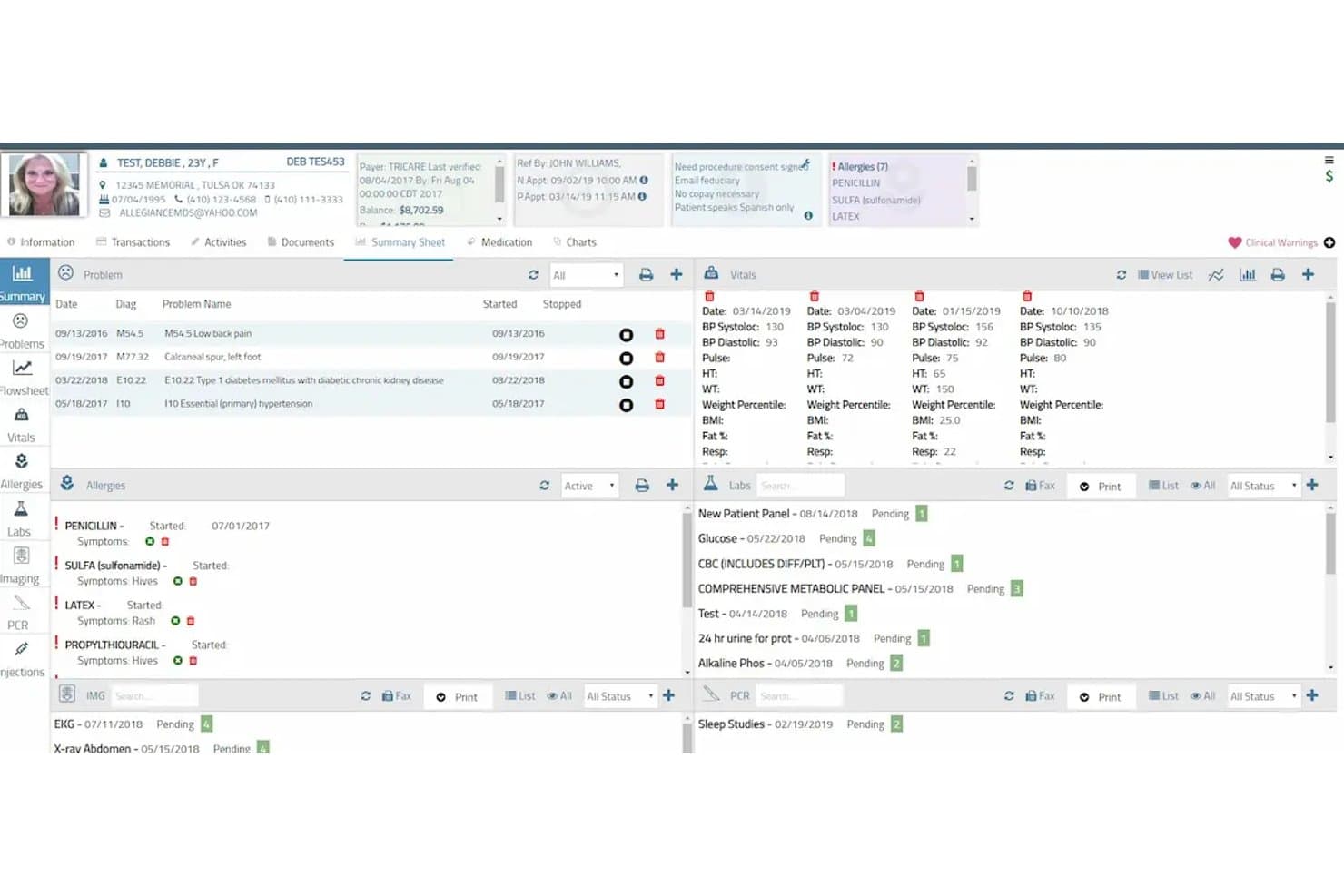
AllegianceMD offers a multi-specialty patient summary dashboard displaying vitals, allergies, problems, labs, and billing balance in a single view. AllegianceMD is a cloud-based, all-in-one medical billing and EHR platform that combines practice management, multi-specialty claim scrubbing, denial tracking, electronic eligibility verification, and integrated clearinghouse submission across 45+ clinical specialties.
Who Is AllegianceMD Best For?
AllegianceMD suits small to midsize multi-specialty practices and ambulatory surgery centers that want billing and EHR managed in a single platform.
Why I Picked AllegianceMD
AllegianceMD earns its spot on my shortlist because the billing layer lives inside the same system as the EHR, so charge capture flows directly from the clinical encounter without any re-keying. I like that claim scrubbing is AI-driven and the integrated clearinghouse auto-generates secondary claims straight from EOB posting. The dedicated denial follow-up module pairs with daily rejection tracking reports, giving billing teams a clear view of where revenue is stalling across each specialty.
AllegianceMD Key Features
- Specialty-specific template library: Includes over 45 pre-built templates tailored for unique billing codes across multiple specialties.
- Electronic eligibility verification: Checks patient insurance eligibility in real time before claims are submitted.
- Integrated patient portal: Provides secure online access where patients can view balances, make payments, and manage communications.
- Automated electronic statements: Sends billing statements electronically with options for patients to pay online.
AllegianceMD Integrations
AllegianceMD does not list any third-party integrations.
Pros and Cons
Pros:
- Claims can be resubmitted directly from patient accounts
- Claim follow-up can be assigned directly to staff
- Insurance cases separate different billing scenarios
Cons:
- Advanced billing analytics are not well documented publicly
- No dedicated third-party billing integration directory is published
Learn more about AllegianceMD: Best for contract management precision
- Free demo available
- Pricing upon request
Visit WebsiteCustomer Rating:3.7/5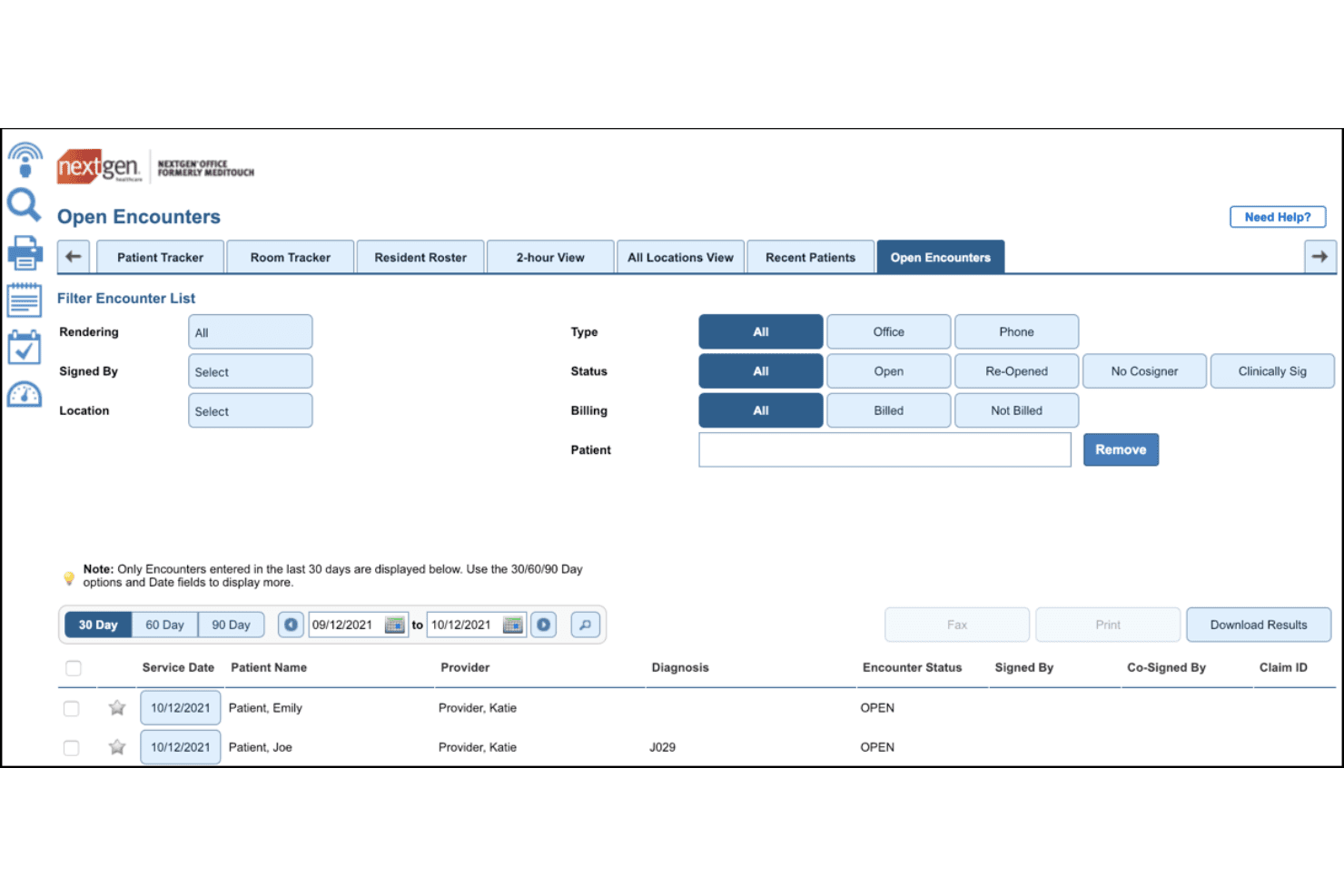
NextGen Healthcare offers an Open Encounters module that allows multi-specialty practices to filter, track, and manage billing statuses across patient encounters. NextGen Healthcare is an RCM and practice management platform built for multi-specialty and enterprise ambulatory practices, covering claims scrubbing, denial management, coding, eligibility verification, and specialty-segmented financial reporting.
Who Is NextGen Healthcare Best For?
It's a strong fit for mid-to-large multi-specialty group practices and enterprise ambulatory networks with 10 or more providers.
Why I Picked NextGen Healthcare
I've included NextGen Healthcare in my top picks because its contract management capabilities go deeper than most multi-specialty billing platforms. The Enterprise PM tracks payer-specific contracted rates and applies automated claim edits that flag underpayments before they slip through. I particularly like that each RCM client gets a dedicated specialty-expert client manager, so contract rules are applied correctly across Cardiology, Orthopedics, GI, and other specialties simultaneously.
NextGen Healthcare Key Features
- AI-powered claims scrubbing: Applies custom and specialty-specific edits to claims before submission to help avoid delays.
- Integrated clearinghouse connectivity: Submits claims electronically and manages responses within a single platform.
- Specialty-segmented revenue dashboards: Delivers financial analytics with filters for provider, specialty, location, and payer.
- Dedicated client manager: Assigns a specialty-trained expert to assist with process optimization and billing workflow questions.
NextGen Healthcare Integrations
NextGen Healthcare offers native integrations with NextGen Enterprise EHR, NextGen PxP Portal, NextGen Optical Management, and NextGen Document Management. It also provides native interoperability through Mirth Connect and Mirth Health Data Hub, and has an API for custom integrations.
Pros and Cons
Pros:
- Clinical and billing configurations cover diverse practice types
- Claim edits combine standard and custom rules
- Dedicated RCM managers bring specialty knowledge
Cons:
- Full A/R management relies on an outsourced service team
- Small and larger practices use different product tracks
Learn more about NextGen Healthcare: Best for specialty-specific financial analytics
- Free demo available
- Pricing upon request
Visit WebsiteCustomer Rating:3.6/5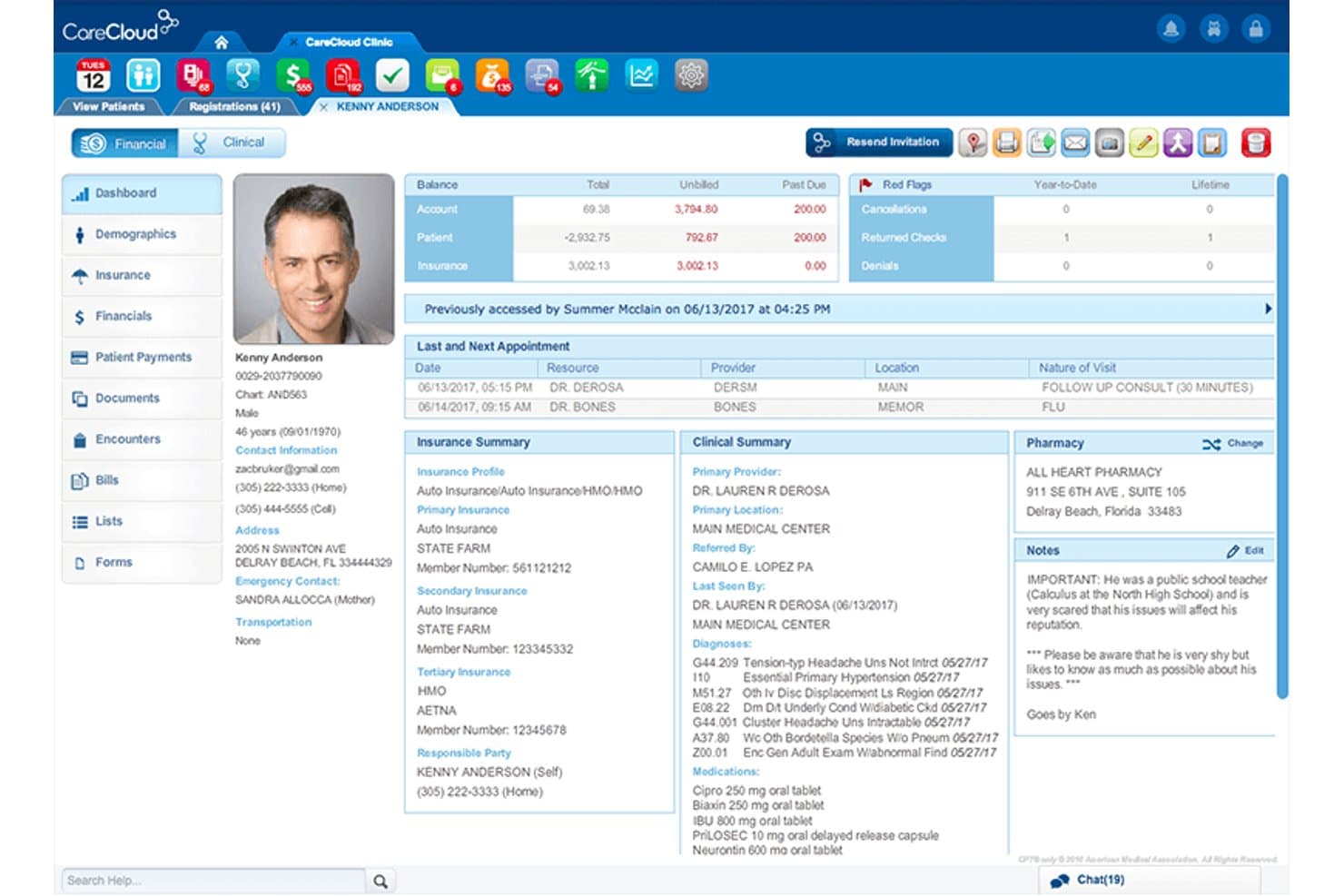
CareCloud offers a detailed patient profile dashboard displaying billing balances, insurance summaries, clinical notes, and appointment history in one unified view. CareCloud is a cloud-based medical billing and revenue cycle management platform built to handle claims processing, coding, eligibility verification, denial management, and financial reporting across 70+ medical specialties.
Who Is CareCloud Best For?
CareCloud suits multi-specialty group practices and revenue cycle teams managing billing across multiple providers, locations, and payer contracts from a single platform.
Why I Picked CareCloud
CareCloud earns its spot on my shortlist because of how well its reporting adapts to specialty-level performance data. I love that dashboards can be segmented by specialty, provider, location, and payer all in one view, which makes it easy to pinpoint where revenue is leaking across a multi-specialty group. The CollectiveIQ rules engine also embeds specialty-specific coding edits directly into the claims workflow, catching errors before submission rather than after.
CareCloud Key Features
- Real-time eligibility verification: Check patient insurance coverage instantly for multiple specialties before each appointment.
- Integrated clearinghouse: Submit claims electronically to payers from within the platform across a network of connected payers.
- Denial worklist automation: Track and organize denied claims with automated routing and specialty-specific categorization.
- Multi-location scheduling: Manage appointments and resources for providers across multiple locations within a single system.
CareCloud Integrations
CareCloud offers native integrations with CareCloud Central, Charts, Breeze, cirrusAI, Zocdoc, CodoniX EHR, EHRYourWay, ICANotes, MD Logic, Optivate, Praxis EMR, Sevocity, TeleVox, and Vital Interaction. An API is available for custom integrations.
Pros and Cons
Pros:
- Billing queues remain visible even with outsourced services
- Payer-aware rules identify errors before submission
- Billing services accommodate more than 70 specialties
Cons:
- Pricing lacks a single standardized structure
- Deeper RCM functions depend on the service level
Learn more about CareCloud: Best for coding automation across specialties
- Free demo available
- Pricing upon request
Visit WebsiteCustomer Rating:3.6/5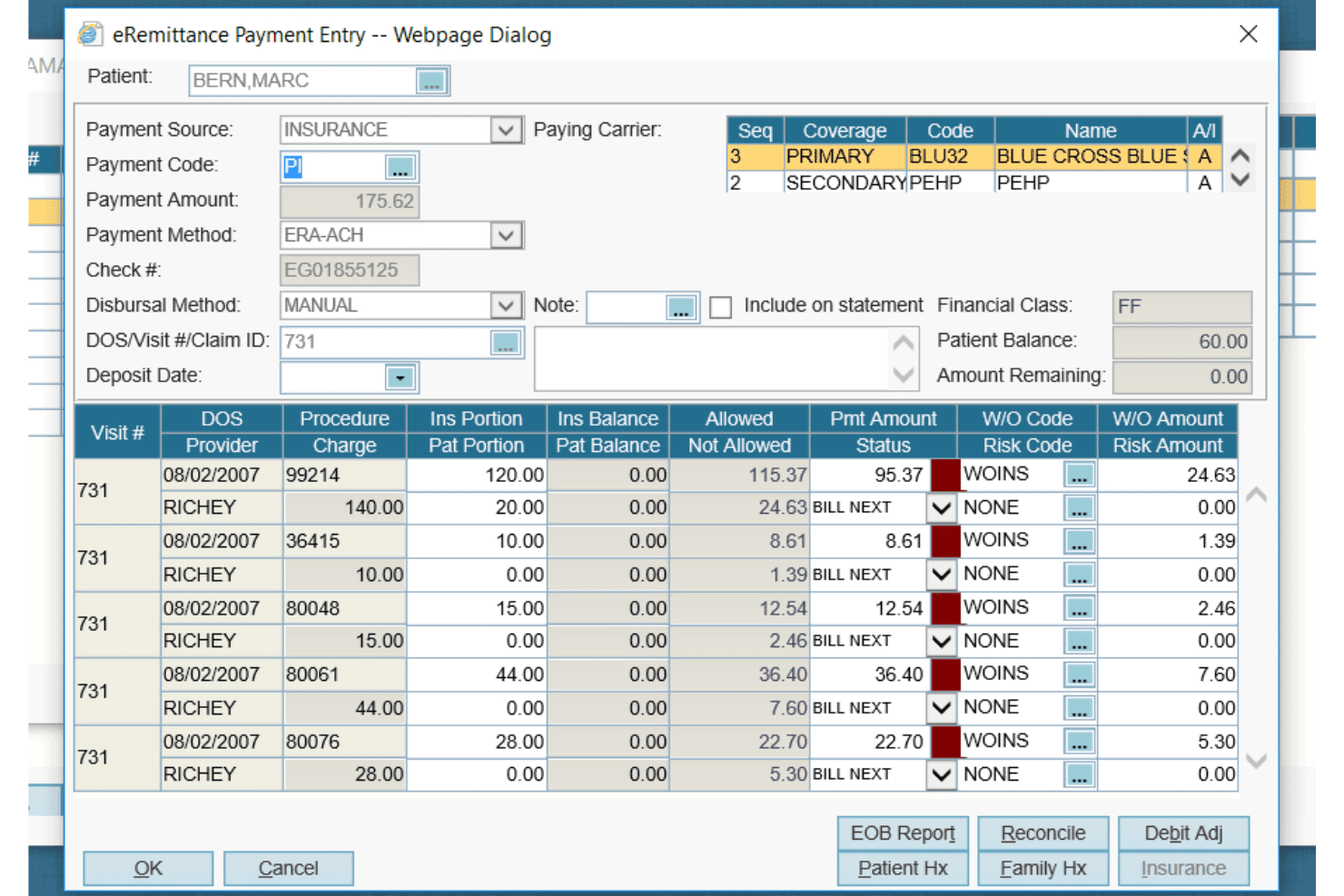
AdvancedMD offers a detailed eRemittance Payment Entry dialog for managing insurance billing, claim payments, and write-off codes per procedure. AdvancedMD is a cloud-based medical billing and practice management platform with an integrated clearinghouse, automated claims scrubbing, coding tools, denial management, and eligibility verification across multiple medical specialties.
Who Is AdvancedMD Best For?
It's a strong fit for mid-to-large multi-specialty group practices and billing companies managing multiple providers, locations, or specialty departments under one billing operation.
Why I Picked AdvancedMD
AdvancedMD earns its spot on my shortlist because ClaimInspector scrubs claims against CCI, HIPAA, and LCD rules automatically, catching specialty-specific coding errors before they reach the payer. I rely on the Central Billing Office to manage multiple providers and specialty departments under one login, keeping coding workflows organized across a multi-specialty group. The specialty-configurable templates mean coding setups for cardiology and physical medicine stay completely separate.
AdvancedMD Key Features
- Central billing office: Manage billing for multiple providers and locations from a single login and database.
- Customizable reporting dashboards: Create specialty-segmented analytics tracking KPIs by provider, location, and payer.
- Integrated clearinghouse: Submit, track, and receive electronic claims and remittances within the same platform.
- Batch eligibility verification: Check insurance eligibility for entire patient schedules across multiple specialties in one workflow.
AdvancedMD Integrations
AdvancedMD offers native integrations with ChartRequest, DeepScribe, Doctorsoft, InstaMed, LeadSquared, and NextPatient. An Integration Marketplace and open API are available for custom integrations with EHRs, CRMs, and HIE platforms.
Pros and Cons
Pros:
- Specialty editions cover a wide range of clinical disciplines
- ClaimInspector checks multiple coding rule sets before submission
- Centralized billing spans providers and locations
Cons:
- Full-service RCM uses percentage-based pricing
- Historical financial transactions are excluded from migration tiers
 Best for detailed denial tracking tools
- Free demo available
- Pricing upon request
Visit WebsiteCustomer Rating:3.4/5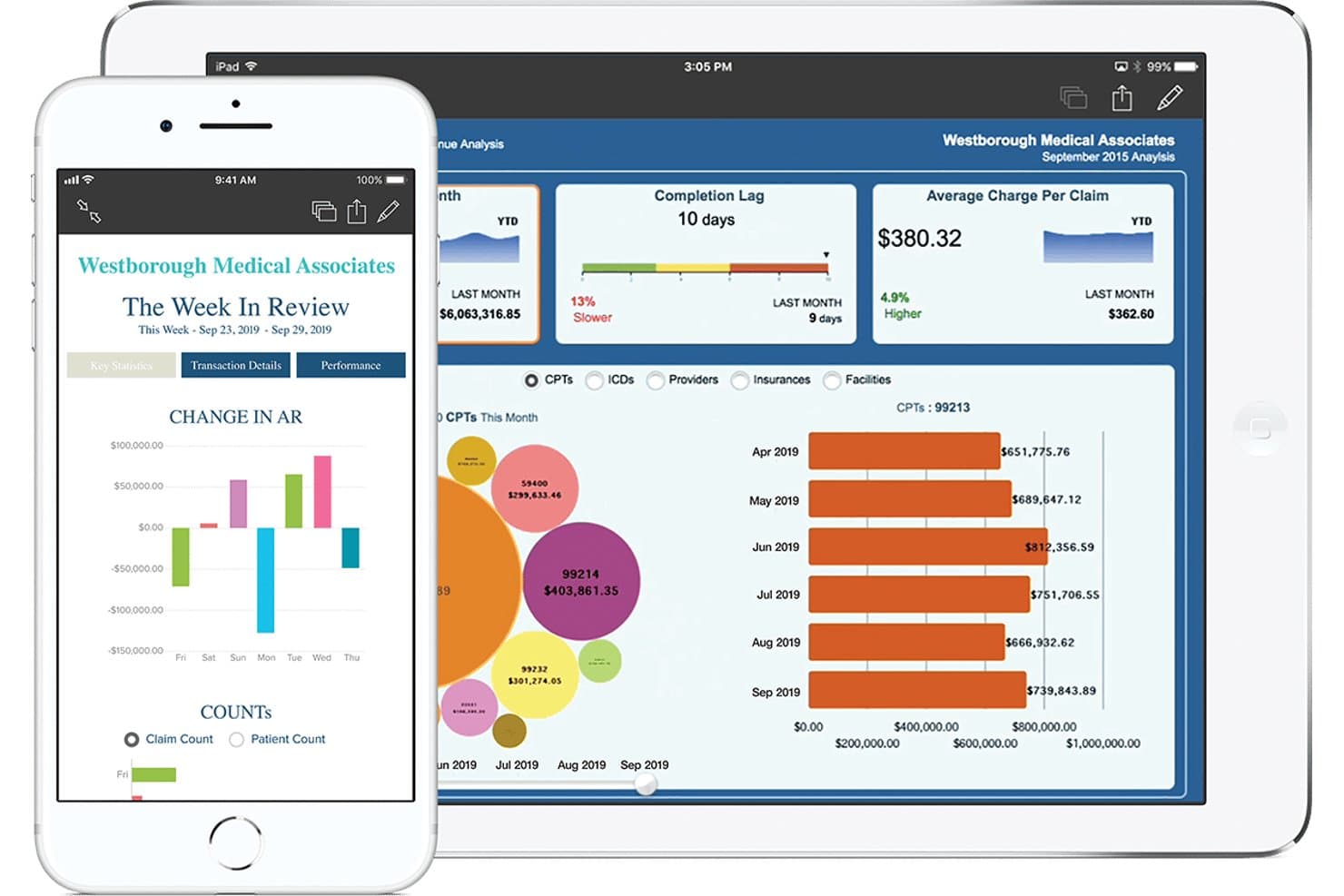
eClinicalWorks offers a revenue cycle management dashboard displaying charge analysis, completion lag, average charge per claim, and CPT code breakdowns across a tablet and smartphone interface. eClinicalWorks is a cloud-based RCM platform that handles medical billing, claims scrubbing, denial management, eligibility verification, and revenue cycle reporting across 40+ medical specialties.
Who Is eClinicalWorks Best For?
It's a strong fit for mid-to-large multi-provider group practices and CBOs managing billing across multiple locations and specialties.
Why I Picked eClinicalWorks
I picked eClinicalWorks as one of the best because of how its Agentic AI handles denials end-to-end. The Appeals agent generates payer-specific appeal packets with a single click, which cuts the time my team spends rebuilding appeals from scratch for each payer. The Learning Engine analyzes rejection patterns and automatically adjusts claim edit rules before submission, so fewer denials reach the queue in the first place.
eClinicalWorks Key Features
- Multi-specialty coding libraries: Includes CPT, ICD-10, HCPCS, and specialty modifiers for 40+ disciplines.
- CBO OpenConnect architecture: Supports centralized billing for multi-location or multi-specialty organizations.
- Real-time eligibility verification: Checks insurance coverage across payers before services are rendered.
- Specialty-segmented reporting dashboards: Provides analytics by specialty, provider, location, and payer in a unified view.
eClinicalWorks Integrations
eClinicalWorks offers native integrations with CHADIS, Sunoh.ai, and the healow patient engagement suite, and provides an API and HL7/FHIR interfaces for custom integrations with labs, imaging, and clinical systems.
Pros and Cons
Pros:
- Managed RCM covers appeals through every level
- Practices can choose self-service or outsourced billing
- Centralized RCM supports multiple EHR environments
Cons:
- Core EHR and practice-management pricing scales per provider
- Managed RCM fees scale with collections
Learn more about eClinicalWorks: 10Best for tailored specialty reporting dashboards
DrChrono
- Free demo available
- Pricing upon request
Visit WebsiteCustomer Rating:3.9/5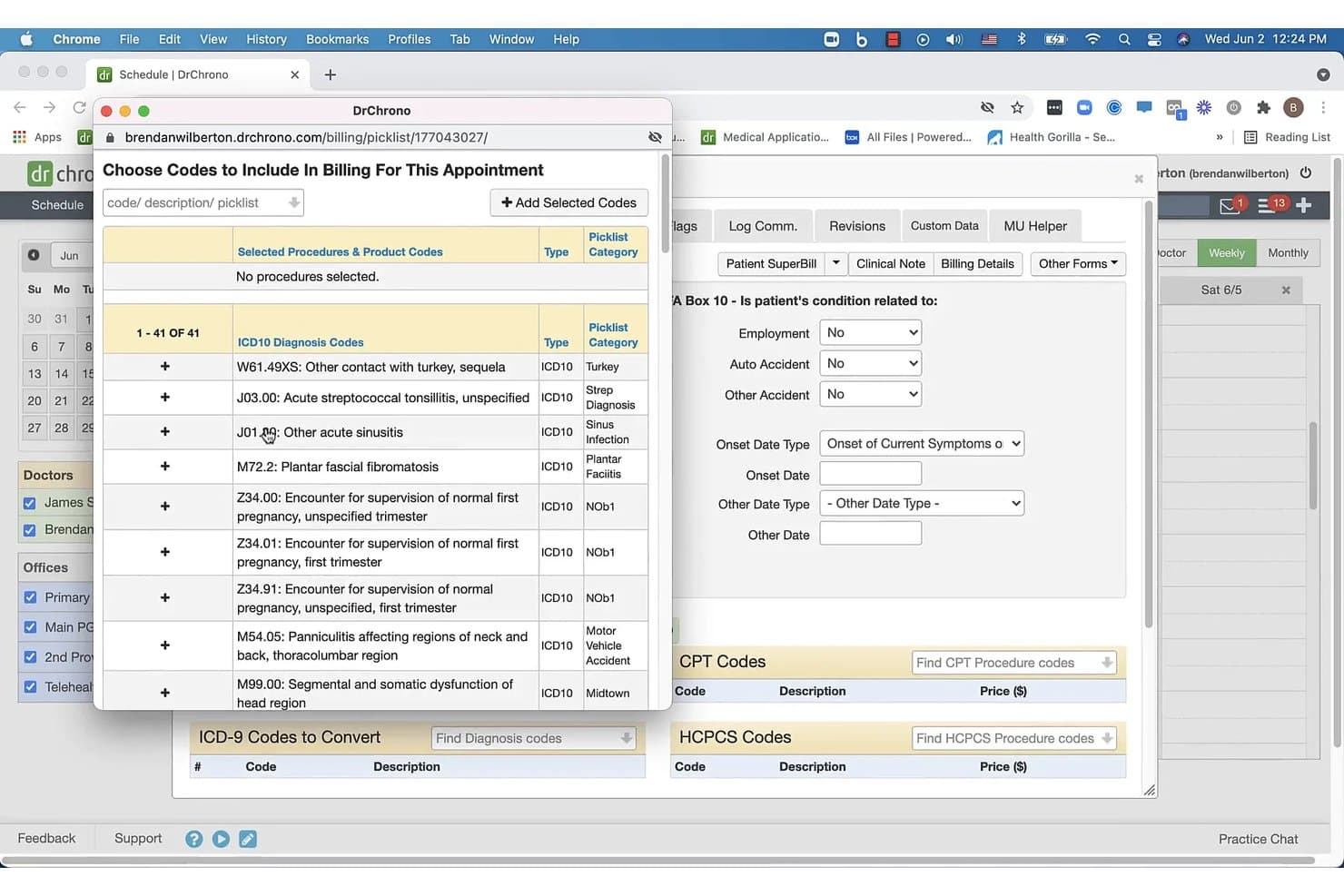
DrChrono offers a multi-specialty ICD-10 diagnosis code picklist to simplify billing for conditions such as sinusitis, plantar fasciitis, and pregnancy supervision. DrChrono is a cloud-based EHR and medical billing platform that combines claims management, multi-specialty coding, denial tracking, eligibility verification, and revenue cycle reporting across clinical and administrative workflows.
Who Is Dr Chrono Best For?
DrChrono is a strong fit for independent and small-to-mid-sized multi-specialty practices that want EHR and billing managed in one platform.
Why I Picked Dr Chrono
DrChrono earns its spot on my shortlist because of how it handles specialty-segmented revenue reporting. I like that the real-time billing dashboard tracks claim status, denial trends, and reimbursement performance broken down by specialty, provider, and payer in a single view. The customizable reporting templates let me configure dashboards around the specific code sets and workflows each specialty uses, rather than applying a generic layout across the board.
Dr Chrono Key Features
- Customizable coding library: Customize CPT, ICD-10, and DSM-5 code sets for each specialty within your organization.
- Real-time eligibility verification: Instantly check patient insurance status before every appointment from a unified dashboard.
- Integrated e-prescribing: Send electronic prescriptions directly to the patient’s preferred pharmacy from within patient records.
- Embedded telehealth module: Launch HIPAA-compliant video visits with screen sharing and document upload, all accessible from any device.
Dr Chrono Integrations
DrChrono offers over 20 native integrations, including Box, Ambra, Square, Collectly, Curogram, DeepScribe, Demandforce, Quest Diagnostics, and LabCorp. An API is available for custom integrations.
Pros and Cons
Pros:
- Billing can remain in-house or shift to managed RCM
- Location-specific billing supports complex practice structures
- Specialty-specific billing profiles reduce repetitive coding
Cons:
- Some useful billing capabilities remain add-ons
- Entry-level billing carries transaction-based charges
Learn more about DrChrono:
Annen faktureringsprogramvare for flere spesialiteter
Her er noen flere alternativer for faktureringsprogramvare for flere spesialiteter som ikke kom med på kortlisten min, men som likevel er verdt å se nærmere på:
- 11athenahealthBest for payer and clearinghouse connectivity
- 12RXNTBest for fast setup and onboarding for practices
- 13PrognoCISBest for customizable specialty templates
- 14Azalea HealthBest for rural health and specialty clinic support
- 15NueMDNueMD - Best for configurable billing workflows
- 16CureMDBest for specialty-specific AR management tools
- 17IntergyBest for centralized billing across practices
- 18MeditabBest with automated immunotherapy billing tools
- 19MicroMDBest for configurable reporting by specialty
- 20ClaimocityBest for mobile charge capture for providers
How I Evaluate Multi-Specialty Billing Software
I split my evaluation into baseline criteria—like multi-specialty coding support and denial workflows—and the differentiators that separate vendors for complex, multi-site billing operations.
Core Functionality (Table Stakes For This List)
When I'm selecting tools for my list, I rank each one on a scale from 0 (does not offer the functionality) to 5 (excels in this area) for each core functionality listed below. Then, I calculate the tool's total score into a percentage. Each tool needs to achieve a minimum total score of 65% to be considered for inclusion.
- Multi-Specialty Coding Support: I check whether the platform carries specialty-specific CPT, ICD-10, HCPCS, and modifier libraries—like behavioral health codes alongside orthopedic modifiers—without manual setup.
- Claims Scrubbing & Submission: Each tool should scrub claims against payer-specific rules per specialty and submit electronically through integrated clearinghouse connections.
- Fee Schedule Management: I evaluate how well the platform handles multiple contracted rates and reimbursement rules, especially when one practice bills cardiology and primary care under different payer terms.
- Denial Management & Appeals: Tracking and categorizing denials matters, but I also look for specialty-aware routing so a denied oncology claim follows a different correction path than a dermatology one.
- Eligibility & Prior Authorization: Real-time insurance verification and prior auth workflows should adapt to each specialty's requirements, since a surgical referral has different authorization needs than a routine visit.
- Specialty-Segmented Reporting: The platform should deliver revenue cycle analytics broken down by specialty, provider, location, and payer within a single dashboard so you aren't pulling separate reports per department.
Once I have a list of tools that meet the criteria, I consider what sets each platform apart.
Differentiating Factors (What Sets Vendors Apart)
Here's how I compare and contrast different vendors:
Standout Features
Specialty-specific rule engines matter because they determine whether your billers spend time building custom coding logic or can rely on pre-loaded edits for each discipline. I also evaluate AI-driven denial management—platforms that predict rejection likelihood before submission save your team from chasing preventable denials. Cross-specialty reporting dashboards round out my comparison. Segmenting A/R aging and clean claim rates by specialty, provider, and payer in one view gives revenue cycle directors real visibility.
Beyond Features
EHR integration depth is one of the first things I check, especially when different specialties in the same group run different clinical systems. Bidirectional data flow and pre-built clearinghouse connections prevent duplicate entry and claim delays. Specialty coverage breadth also matters—I look for vendors that maintain updated code libraries annually and show proven experience with multi-specialty groups, not just single-discipline practices. Deployment model is worth weighing too, since the choice between SaaS, outsourced RCM, or a hybrid approach shapes your team's daily workload and long-term costs.
Slik velger du faktureringsprogramvare for flere spesialiteter
Det er lett å gå seg vill i lange funksjonslister og komplekse prisstrukturer. For å hjelpe deg med å holde fokus mens du går gjennom din unike prosess for valg av programvare, er her en sjekkliste over faktorer du bør ha i tankene:
| Faktor | Hva du bør vurdere |
|---|---|
| FaktorSkalerbarhet | Hva du bør vurdereVil systemet håndtere et økende antall spesialitetsområder, lokasjoner og brukere over tid uten større avbrudd? |
| FaktorIntegrasjoner | Hva du bør vurdereIntegreres plattformen problemfritt med EHR-systemene, oppgjørssentralene og analyseverktøyene dine – både nå og etter hvert som du vokser? |
| FaktorBrukervennlighet | Hva du bør vurdereKan resepsjons-, fakturerings- og klinikkteamene dine lære arbeidsflytene raskt, eller vil løpende opplæring forsinke deg? |
| FaktorImplementering og oppstart | Hva du bør vurdereHvor lang tid vil utrullingen ta for en gruppe med flere spesialiteter, og har du ressurser til en trinnvis utrulling? |
| FaktorTilpasningsmuligheter | Hva du bør vurdereHvor godt kan du tilpasse kontraktsregler, rapporter og arbeidsflyter til særegenhetene ved spesialitetene og betalerne dine? |
| FaktorKostnad | Hva du bør vurdereHva er den reelle totalkostnaden – inkludert skjulte integrasjonsgebyrer, opplæring og transaksjonskostnader i stor skala? |
| FaktorSikkerhetstiltak | Hva du bør vurdereSamsvarer sikkerhetssertifiseringer og revisjonsspor med kravene til samsvar og lokale forventninger til databeskyttelse? |
| FaktorTilgjengelig kundestøtte | Hva du bør vurdereEr kundestøtte med spesialitetsopplæring og avtaler om responstid (SLA) inkludert for feilsøking, særlig utenom åpningstidene? |
Hva er faktureringsprogramvare for flere spesialiteter?
Faktureringsprogramvare for flere spesialiteter er en plattform utviklet for å håndtere fakturering, krav og inntektsrelaterte operasjoner for helsetjenestepraksiser som betjener flere spesialiteter. Den støtter spesialitetsspesifikk koding, regler for betalere og gebyrplaner i ett system, slik at praksiser med ulike avdelinger kan håndtere faktureringen mer effektivt og redusere feil.
Denne typen programvare tilbyr samlede arbeidsflyter, rapportering segmentert etter spesialitet og automatisert håndtering av avviste krav, tilpasset praksiser med flere grupper, behandlere eller lokasjoner.
Funksjoner i faktureringsprogramvare for flere spesialiteter
Ved valg av faktureringsprogramvare for flere spesialiteter bør du se etter følgende viktige funksjoner:
- Kodebiblioteker for flere spesialiteter: Få tilgang til CPT-, HCPCS- og ICD-10-kodesett for et bredt spekter av spesialiteter uten manuelle oppdateringer eller importer.
- Automatisk kontroll av krav: Gjennomgå og korriger krav automatisk før innsending basert på regler som gjelder for betaler og spesialitet, slik at feil oppdages tidlig.
- Verifisering av rettigheter i sanntid: Kontroller pasientens forsikringsdekning og ytelser umiddelbart hos flere betalere for alle planlagte besøk.
- Arbeidsflyter for forhåndsgodkjenning: Administrer og følg opp forhåndsgodkjenninger for spesialiserte prosedyrer og besøk direkte fra plattformen.
- Administrasjon av kontrakter og honorarsatser: Lagre, oppdater og håndhev flere honorarsatser og avtalte priser for ulike spesialiteter og betalere.
- Oppfølging av avvisninger og klager: Kategoriser avviste krav automatisk, marker de grunnleggende årsakene og forenkle arbeidsflytene for korrigering eller ny innsending.
- Rapportering fordelt på spesialitet: Generer økonomiske og operative analyser fordelt på spesialitet, behandler, lokasjon og betaler for å få innsikt som kan omsettes til handling.
- Betalingsportal for pasienter: Tilby betaling av regninger på nett, betalingsplaner og samlede kontoutskrifter for pasienter som besøker flere spesialiteter i virksomheten.
- Integrerte forbindelser til oppgjørssentraler: Send inn krav elektronisk til flere betalere og motta betalingsoppgjør direkte i faktureringssystemet.
- Rollebasert tilgangskontroll: Tildel tillatelser etter rolle eller spesialitet for å sikre at ansatte bare får tilgang til dataene og arbeidsflytene som er relevante for ansvarsområdene deres.
Fordeler med faktureringsprogramvare for flere spesialiteter
Implementering av faktureringsprogramvare for flere spesialiteter gir flere fordeler for teamet og virksomheten din. Her er noen av fordelene du kan se frem til:
- Samlet faktureringsdrift: Administrer krav, koding og avvisninger for alle spesialiteter i ett system, slik at manuelt arbeid og dobbeltregistrering reduseres.
- Bedre inntektsresultater: Rapportering fordelt på spesialitet og avanserte arbeidsflyter for avvisninger hjelper deg med å følge nøkkeltall og fremskynde refusjoner på tvers av avdelinger.
- Færre feil i kravene: Automatisert kontroll og berettigelsessjekker i sanntid oppdager kode- eller forsikringsproblemer før de fører til avvisninger.
- Bedre pasientopplevelse: En samlet betalingsportal og digitale kontoutskrifter gjør det enkelt for pasienter å forstå og betale for tjenester på tvers av spesialiteter.
- Tilpassbare arbeidsflyter: Støtt de unike kravene i hver avdeling – for eksempel forhåndsgodkjenning eller håndheving av kontrakter – med verktøy som er tilpasset virksomheter med flere spesialiteter.
- Skalerbar vekst: Programvaren tilpasses nye spesialiteter, behandlere og lokasjoner uten at du må bygge om hele faktureringsinfrastrukturen.
- Bedre samsvar og revisjonsberedskap: Rollebasert tilgangskontroll, integrerte revisjonsspor og spesialitetsspesifikke kodeoppdateringer holder faktureringen i samsvar med kravene og sikker.
Kostnader og priser for faktureringsprogramvare for flere spesialiteter
Valg av faktureringsprogramvare for flere spesialiteter krever en forståelse av de ulike prismodellene og abonnementene som er tilgjengelige. Kostnadene varierer basert på funksjoner, teamstørrelse, tillegg og mer. Tabellen nedenfor oppsummerer vanlige abonnementer, gjennomsnittsprisene deres og typiske funksjoner som er inkludert i faktureringsløsninger for flere spesialiteter:
Sammenligningstabell for faktureringsprogramvare for flere spesialiteter
| Abonnementstype | Gjennomsnittspris | Vanlige funksjoner |
|---|---|---|
| AbonnementstypeGratisabonnement | Gjennomsnittspris$0 | Vanlige funksjonerGrunnleggende registrering av krav, enkel kodestøtte, begrenset brukertilgang og viktige berettigelsessjekker. |
| AbonnementstypePersonlig abonnement | Gjennomsnittspris$50-$150/bruker/måned | Vanlige funksjonerKodebiblioteker for spesialiteter, elektronisk innsending av krav, administrasjon av betalere og grunnleggende oppfølging av avvisninger. |
| AbonnementstypeBedriftsabonnement | Gjennomsnittspris$200-$500/bruker/måned | Vanlige funksjonerStøtte for flere spesialiteter, automatisk kontroll av krav, verktøy for forhåndsgodkjenning, rapportering og betalingsportal. |
| AbonnementstypeAbonnement for store virksomheter | Gjennomsnittspris$800-$2000+/måned | Vanlige funksjonerAvansert KI-basert håndtering av avvisninger, tilpassede integrasjoner, forbedret sikkerhet, rollebaserte tillatelser og dedikert kundestøtte. |
Vanlige spørsmål om faktureringsprogramvare for flere spesialiteter
Her er noen svar på vanlige spørsmål om faktureringsprogramvare for flere spesialiteter:
Hvordan håndterer faktureringsprogramvare for flere spesialiteter spesialitetsspesifikke kodeoppdateringer?
Programvaren opprettholder oppdaterte biblioteker for CPT-, ICD-10- og HCPCS-koder per spesialitet, slik at teamet deres ikke må oppdatere kodeverkene manuelt hvert år eller ved hver endring hos en betaler.
Kan denne typen programvare integreres med ulike EHR-systemer på tvers av spesialiteter?
Ja, mange faktureringsløsninger for flere spesialiteter tilbyr toveisintegrasjoner med ulike EHR-plattformer og støtter praksiser som bruker forskjellige kliniske systemer for hver spesialitet.
Hva skjer hvis et krav avvises for én spesialitet, men ikke for andre?
Programvaren videresender avviste krav basert på spesialitet, slik at dere kan bruke ankeprosesser eller korrigeringsprotokoller som er tilpasset kravene i hver avdeling.
Tilbys det opplæring for nye spesialiteter som legges til senere?
De fleste leverandører tilbyr spesialitetsspesifikk opplæring og støtte når dere legger til nye avdelinger, noe som gjør overgangen enklere for kodere og faktureringsteam.
Hvilke vanlige kostnader kommer i tillegg til abonnementsavgiften?
Vanlige tilleggskostnader kan omfatte EHR-integrasjon, datamigrering, avansert rapportering, ekstra støttenivåer og transaksjonsgebyrer ved store kravvolumer.