

EMR-systemer for fysioterapi sporer fremgang i behandlingen og treningsplaner, noe som frigjør tid for teamet ditt til å fokusere på pasientmotivasjon og tilpasning av programmer. Det kan være utfordrende å håndtere etterlevelse og fakturering, men riktig støtte kan redusere papirarbeidet og forbedre oversikten over resultater.
I denne artikkelen sammenligner og vurderer jeg de beste EMR-verktøyene for fysioterapi for å hjelpe deg med kjøpsbeslutningen.
Hvorfor du kan stole på våre programvareanbefalinger
6,700+
Reviews
20
Industry experts
16+
Evaluation factors
14
Years
Teamet vårt har testet og anmeldt programvare siden 2012. Vi leder selv legekontorer, så vi vet hvor vanskelig og hvor viktig det er å velge riktig programvare.
I denne guiden har vi vurdert verktøyene gjennom praktisk testing og uavhengig research og gitt dem poeng ut fra våre utvelgelseskriterier.
Anmeldelsene våre bygger på vår egen redaksjonelle vurdering. De er ikke et salgsargument.
Sammenligningstabell for EMR-systemer for fysioterapi
Denne sammenligningstabellen oppsummerer prisdetaljene for mine beste utvalg av EMR-systemer for fysioterapi:
| Tool | Best For | Trial Info | Price | ||
|---|---|---|---|---|---|
| 1 | Best for multi-modality charting flexibility | 15-day free trial | From $99/month | Website | |
| 2 | Best for customizable documentation templates | Free demo available | Pricing upon request | Website | |
| 3 | Best for AI-driven PT documentation and RCM | Free demo available | Pricing upon request | Website | |
| 4 | Best for outpatient rehab billing and compliance | Free demo available | Pricing upon request | Website | |
| 5 | Best for PT, OT, and SLP in one chart | 21-day free trial | From $25/month | Website | |
| 6 | Best for multi-discipline pediatric therapy EMR | Free demo available | From $25/month | Website | |
| 7 | Best for its collaborative care coordination features | Free demo available | Pricing upon request | Website | |
| 8 | Best for multi-disciplinary AI-driven RCM | Free demo available | Pricing upon request | Website | |
| 9 | Best for in-house or outsourced therapy billing | Free demo available | Pricing upon request | Website | |
| 10 | Best for marketing automation in PT clinics | Free demo available | From $149/user/month (billed annually) | Website |


Vurderinger av de beste EMR-systemene for fysioterapi
Nedenfor finner du mine detaljerte sammendrag av de beste EMR-systemene for fysioterapi som kom med på kortlisten min. Vurderingene mine gir et detaljert innblikk i de viktigste funksjonene, fordelene og ulempene, integrasjonene og de ideelle bruksområdene for hvert verktøy, slik at du kan finne det som passer best for deg.
 Best for multi-modality charting flexibility
- 15-day free trial
- From $99/month
Visit WebsiteCustomer Rating:4.8/5
OptiMantra lets providers document patient visits with customizable SOAP templates, questionnaires, and clinical notes in one place. OptiMantra lands on my list because it's uncommon to find a platform so well-suited to practices that blend different therapeutic methods. I suggest OptiMantra when teams need to support everything from traditional manual therapy and modalities to acupuncture and integrative medicine.
What stands out to me in using the tool is the template flexibility and how treatments across modalities are charted on one record. I appreciate how physical therapists can tailor templates, so you’re not boxed in by generic documentation.
OptiMantra’s Best For
- Practices combining physical therapy with other medical modalities
- Teams needing customizable, multi-modality charting templates
OptiMantra’s Not Great For
- Single-modality clinics with very basic charting needs
- Practices requiring highly specialized physical therapy workflows only
What Sets OptiMantra Apart
OptiMantra works differently from most EMRs because it expects clinics to handle a mix of physical therapy and integrative medicine day-to-day. Instead of confining everyone to one type of chart, it’s designed so you can build and use templates across specialties in a single patient record. This makes it stand apart from tools like WebPT that focus strictly on physical therapy documentation.
Tradeoffs with OptiMantra
OptiMantra optimizes for flexibility across modalities, but that comes at the cost of having fewer physical therapy-specific workflows out of the box. If you need deep PT automation and built-in protocols, you do extra setup to match what a PT-only system gives you.
Pros and Cons
Pros:
- Integrated payment and billing tools
- HIPAA-compliant telehealth included
- Customizable charting with SOAP templates
Cons:
- Caters mostly to US-based practices
- Limited advanced analytics for large networks
Learn more about OptiMantra: Best for customizable documentation templates
- Free demo available
- Pricing upon request
Visit WebsiteCustomer Rating:5/5
Athenahealth helps healthcare providers track and monitor patient vitals, health history, and symptoms. Athenahealth earns its spot thanks to its standout approach to customizing clinical documentation for physical therapy. I see this used most by organizations that want to tailor their note templates to unique therapy workflows and compliance rules.
What I like is how you can adapt fields, layouts, and forms in response to payer changes or specialty rehab processes, all without IT support. That flexibility makes it great for practices with evolving documentation needs.
Athenahealth’s Best For
- Physical therapy practices needing customizable documentation templates
- Clinics adapting therapy notes to specific payer or specialty requirements
Athenahealth’s Not Great For
- Solo providers seeking a lightweight, entry-level EMR
- Teams who want out-of-the-box, rigid documentation formats
What sets Athenahealth apart
Athenahealth focuses on letting clinics adapt their documentation processes to specific therapy, payer, and compliance needs. Instead of offering a one-size-fits-all approach like Practice Fusion, Athenahealth encourages you to customize templates and workflows to your organization. This works well when clinics have evolving protocol requirements or niche clinical specialties.
You get more flexibility to respond to insurance or regulatory changes than with most out-of-the-box EMRs.
Tradeoffs with Athenahealth
Athenahealth optimizes for customization and adaptability, but you give up fast onboarding and standardized note structures. In practice, teams that want rigid templates or plug-and-play use can find the flexibility adds extra setup time.
Pros and Cons
Pros:
- Customizable templates for various medical specialties
- Cloud-based system for remote access
- Wide range of features, including billing, practice management, and patient engagement tools
Cons:
- Limited customization options for certain workflows
- Due to its extensive features, new users may experience a learning curve
Learn more about Athenahealth: 3Best for AI-driven PT documentation and RCM
SPRY
- Free demo available
- Pricing upon request
Visit WebsiteCustomer Rating:4.8/5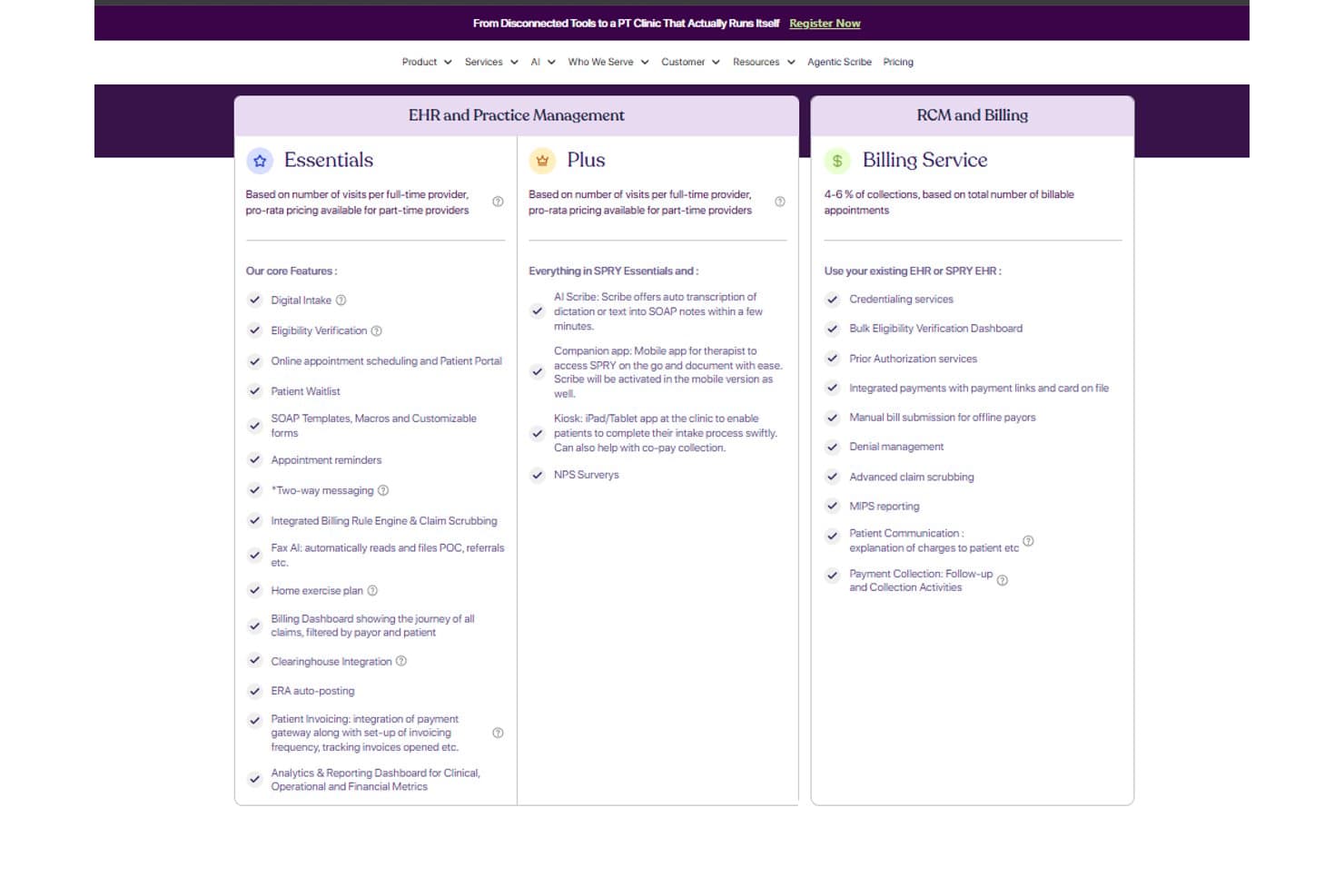
SPRY offers tiered pricing plans covering EHR, billing, and RCM features. SPRY is a physical therapy EMR platform that combines AI-driven documentation, scheduling, billing, RCM, prior authorization, and patient engagement tools built specifically for outpatient rehab clinics.
Who Is SPRY Best For?
SPRY fits outpatient rehab clinics that want AI-assisted documentation and billing tools built around the physical therapy workflow.
Why I Picked SPRY
I picked SPRY as one of the best because its AI-driven documentation and RCM tools are built specifically around the PT workflow, not retrofitted from a general EMR. The Agentic Scribe turns dictation into a complete SOAP note in under two minutes, and the billing rule engine checks CPT codes against documentation before a claim ever leaves the clinic, catching mismatches at the source rather than after a denial.
SPRY Key Features
- AI Scheduling Agent: Automatically books plan-of-care visits based on frequency, visit count, therapist availability, and authorization rules, and fills cancellations from the waitlist.
- Medicare compliance engine: Applies the 8-minute rule, tracks supervised percentage, manages the KX modifier, and prompts staff at the 10th visit.
- Home exercise program library: Assigns exercises from a 4,500+ library via patient mobile app, with AI form-check through the patient's camera and adherence tracking.
- Multi-location analytics dashboard: Covers therapist productivity, payer mix, denial trends, and cancellation rates across locations, queryable in plain language.
SPRY Integrations
SPRY integrations include Athena, Cerner, ModMed, Claim.MD, Wibbi, Google Calendar, Zocdoc, Emitrr, Healthmonix, and Patient360, plus HL7 FHIR and REST APIs for custom connections and Zapier.
Pros and Cons
Pros:
- Medicare rules support compliant therapy billing
- Billing checks catch coding mismatches early
- AI scribe speeds physical therapy documentation
Cons:
- Claim follow-up workflows remain limited
- AI notes can misidentify speakers
Learn more about SPRY: Best for outpatient rehab billing and compliance
- Free demo available
- Pricing upon request
Visit WebsiteCustomer Rating:4.4/5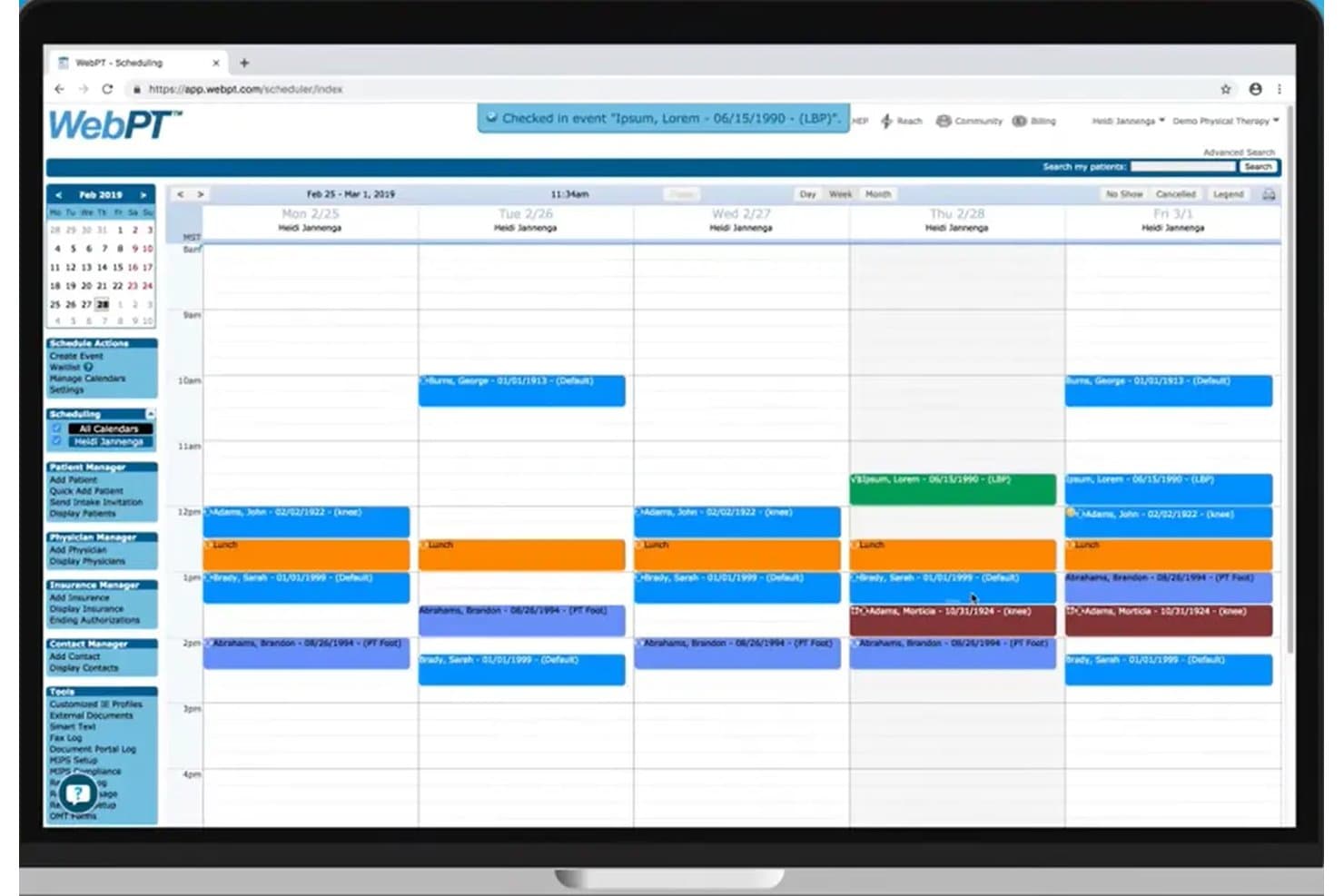
WebPT's scheduling calendar organizes weekly patient appointments by provider. WebPT is a rehab therapy-specific EMR that covers clinical documentation, scheduling, billing, home exercise programs, outcomes tracking, and telehealth for PT, OT, and speech therapy practices.
Who Is WebPT Best For?
WebPT fits outpatient rehab clinics that need airtight Medicare compliance and billing built directly into their documentation workflow.
Why I Picked WebPT
WebPT earns its spot on my shortlist because no other PT EMR I've reviewed embeds Medicare compliance so deeply into the billing workflow itself. I'm particularly impressed by the KX modifier threshold tracking and NCCI edit checks, which flag issues before a claim ever leaves the system. The AI-powered real-time note feedback also tells you whether your documentation actually justifies the billed units, catching underbilling mid-note rather than after a denial.
WebPT Key Features
- Specialty-specific templates: Twenty pre-built, customizable rehab templates cover PT, OT, speech therapy, and specialties like pelvic health, vestibular, and pediatrics.
- Outsourced RCM service: WebPT staff handle credentialing, claims, denials, appeals, and patient collections, with real-time KPI dashboards for visibility.
- Home exercise program library: A library of 5,500+ exercises with photos and video lets you build branded, phased programs patients access through the StriveHub app.
- MIPS registry integration: WebPT works exclusively with Patient360 to automate survey delivery and display a real-time estimated MIPS score on your dashboard.
WebPT Integrations
WebPT documents 60+ vendor integrations, including Therabill, PatientPay, Comprehend Health, Zoom for Healthcare, and Patient360. It also supports standard HL7 interfaces and custom integrations on request, though no public API documentation is listed.
Pros and Cons
Pros:
- StriveHub tracks home exercise adherence
- Therapy templates speed compliant daily documentation
- Medicare billing safeguards reduce preventable claim errors
Cons:
- Browser-based charting lacks native clinician app
- Reviewers report recurring note freezes
Learn more about WebPT: Best for PT, OT, and SLP in one chart
- 21-day free trial
- From $25/month
Visit WebsiteCustomer Rating:4.9/5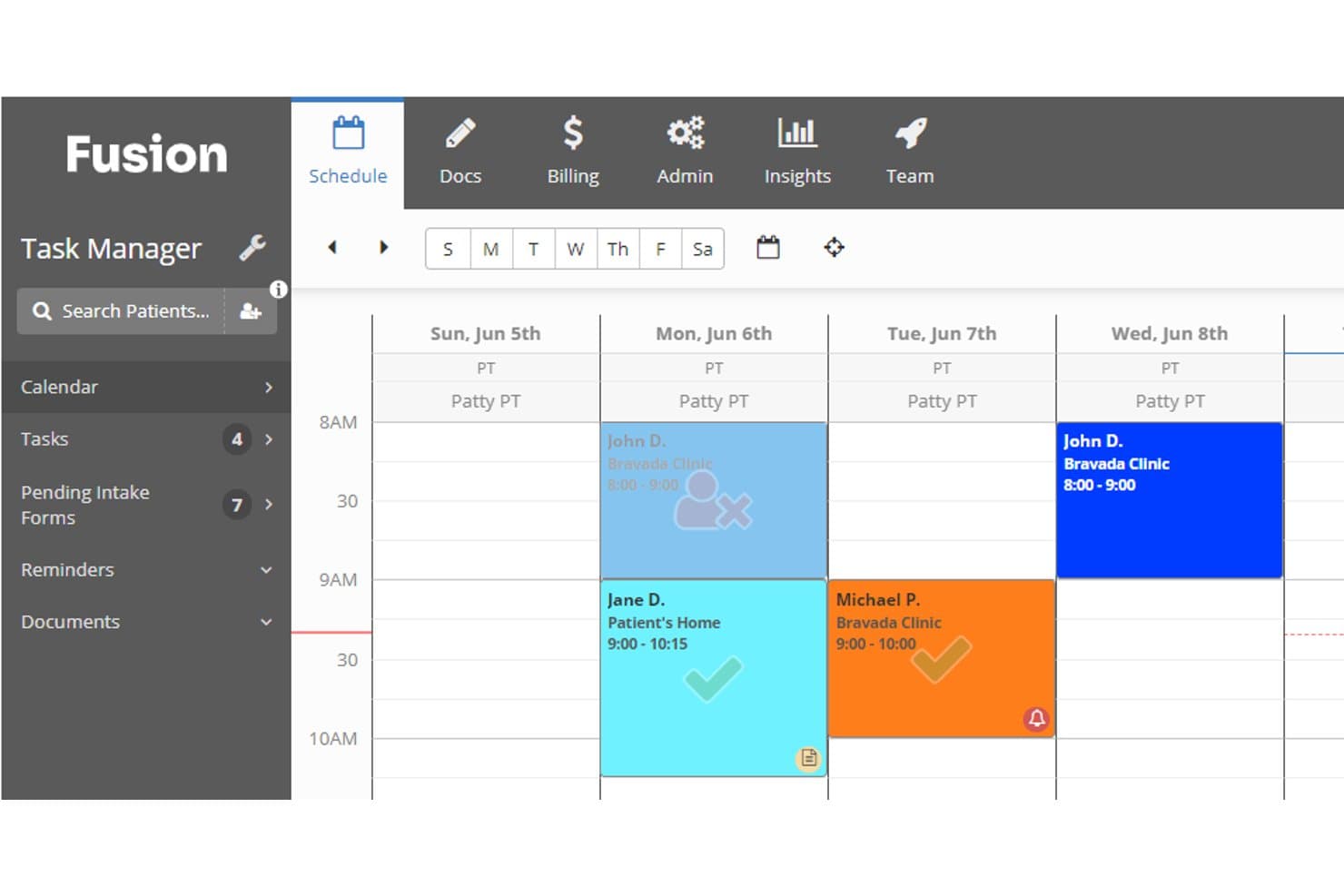
Fusion's weekly schedule view helps therapists manage patient appointments. Fusion is a multi-discipline physical therapy EMR by Ensora Health that covers PT, OT, and SLP documentation, billing, scheduling, and home exercise programs in a single platform.
Who Is Fusion Best For?
Fusion is a strong fit for multi-discipline outpatient therapy practices that treat PT, OT, and SLP patients and want one chart for all three.
Why I Picked Fusion
Fusion earns its spot on my shortlist because no other PT EMR I've reviewed keeps PT, OT, and SLP documentation in a single patient chart as cleanly. I love that flow sheets auto-fill CPT codes and CMS CO/CQ modifiers across disciplines, cutting the coding burden when a patient sees both a PT and an SLP in the same week. The built-in goal bank and 80+ discipline-specific templates mean clinicians aren't building documentation from scratch every time a new patient walks through the door.
Fusion Key Features
- Built-in telehealth: HIPAA-compliant video visits run directly in the platform, with no third-party app required.
- Client portal: Patients can book appointments, complete intake forms, make payments, and send secure messages 24/7.
- MIPS reporting: Captures Medicare quality data within the clinical workflow and flags missing measures before reporting deadlines.
- Ensai AI session assistant: Drafts notes from ambient listening or dictation, with clinician review required before finalizing.
Fusion Integrations
Fusion offers integrations with Wibbi for HEP and RTM, Ensora Clearinghouse for claims and remittance, and Ensora Payments for card processing. A public API, HL7, or FHIR connectivity isn’t documented.
Pros and Cons
Pros:
- Pediatric templates support faster evaluations
- Adult flow sheets reduce coding work
- PT, OT, and SLP share one chart
Cons:
- Owners report clunky operational reporting
- Adult PT features have limited track record
Learn more about Fusion: Best for multi-discipline pediatric therapy EMR
- Free demo available
- From $25/month
Visit WebsiteCustomer Rating:3.1/5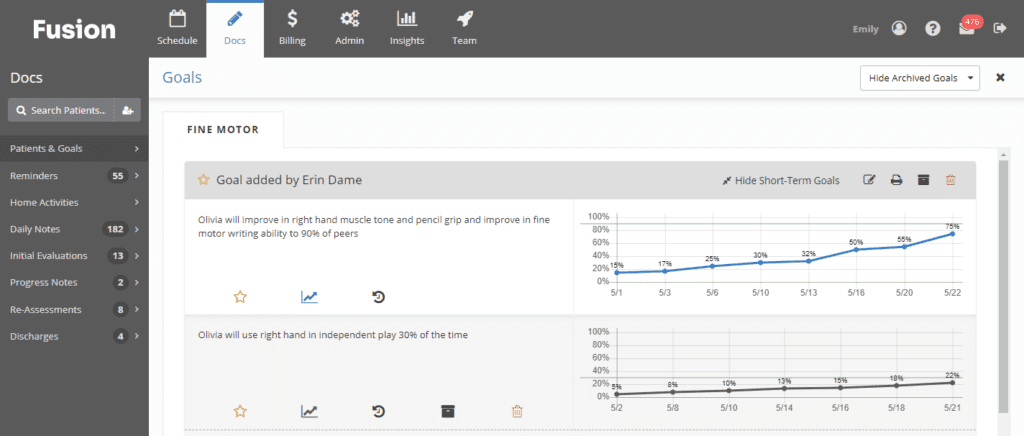
Here's the documentation feature in Fusion Web Clinic, which has goal-tracking capability. Fusion Web Clinic is a cloud-based physical therapy EMR and practice management system built for PT, OT, and SLP disciplines, offering therapy-specific documentation templates, automated billing and claims, scheduling, and home exercise program tools.
Who Is Fusion Web Clinic Best For?
Fusion Web Clinic is a strong fit for pediatric therapy clinics running PT, OT, and SLP under one roof.
Why I Picked Fusion Web Clinic
Fusion Web Clinic earns its spot on my list because of how deeply it's built around pediatric therapy, with over 80 pediatric evaluation templates, a built-in goal bank with mastery criteria, and automatic progress graphs that track milestone development over time. I picked it specifically for PT, OT, and SLP clinics treating pediatric patients under one roof, where having discipline-specific documentation that shares a single patient record genuinely changes how care is coordinated.
Fusion Web Clinic Key Features
- Automated claims generation: Claims are created automatically when a note is completed, with CPT codes, modifiers, and units applied based on each payer's rules.
- Authorization tracking: Staff can enter payer authorizations with visit limits and date ranges, and the system sends alerts before an authorization expires.
- Flow sheets with CQ/CO modifier support: Time-based documentation auto-fills CPT codes and flags CMS CQ/CO assistant modifiers for clinician review.
- MIPS reporting: Built-in Medicare quality reporting identifies incomplete measures before reporting deadlines.
Fusion Web Clinic Integrations
Fusion Web Clinic has native integrations with Wibbi and Ensora Clearinghouse (APEX EDI), plus connections to Ensora RCM, eRx, and Ensai. A public API, HL7, and FHIR support aren’t documented.
Pros and Cons
Pros:
- Claims generate directly from completed notes
- Shared records support PT, OT, and SLP
- Deep pediatric evaluation and goal-tracking tools
Cons:
- Exercise adherence requires a separate add-on
- Scheduling screens feel cluttered to reviewers
Learn more about Fusion Web Clinic: Best for its collaborative care coordination features
- Free demo available
- Pricing upon request
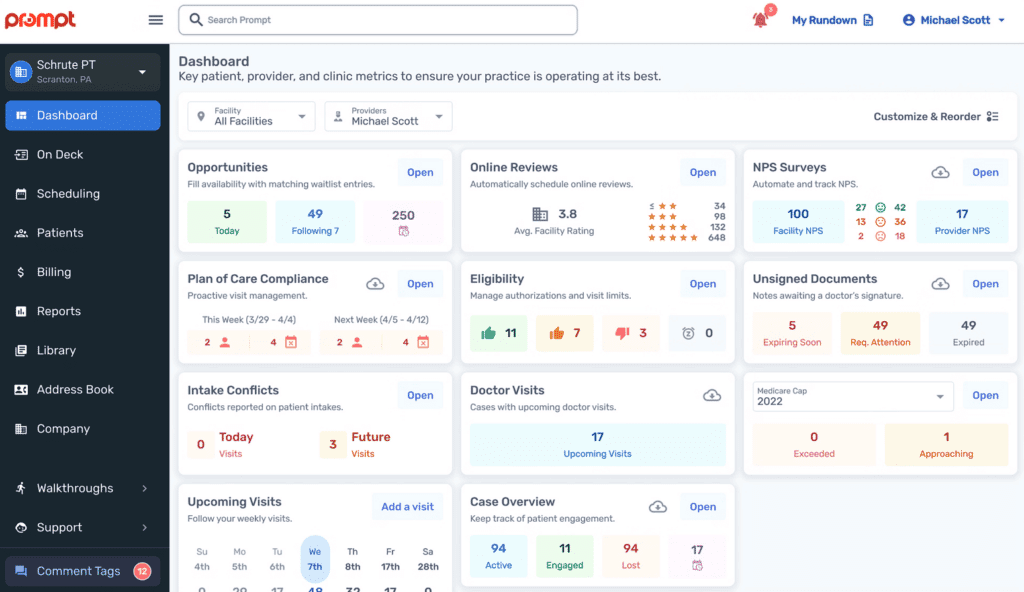
Here's Prompt EMR's dashboard screenshot. Prompt EMR is a cloud-based physical therapy EMR and practice management platform that combines AI-driven documentation, scheduling, billing, care coordination, and home exercise program tools for rehab therapy clinics of all sizes.
Who Is Prompt EMR Best For?
Prompt EMR is a strong fit for multi-location rehab therapy groups that need their clinical, front-office, and billing teams working in sync across sites.
Why I Picked Prompt EMR
I picked Prompt EMR as one of the best because its care coordination tools genuinely connect every role in a clinic. Patient-linked chat lets front desk staff, billers, and clinicians @-tag each other directly within a patient's record, cutting out the back-and-forth emails. I also like how physician signature tracking keeps referring provider workflows visible, so nothing gets lost after a note is faxed out.
Prompt EMR Key Features
- AI ambient documentation: AI listens during sessions and drafts SOAP notes, then suggests CPT codes for clinician review before submission.
- Claim scrubbing and denial tracker: Claims are scrubbed by AI before submission, and a denial tracker surfaces patterns with recommended fixes.
- Smart waitlist automation: An AI visit filler backfills cancellations from the waitlist, keeping schedules full with clinician approval.
- Kiosk check-in: Patients confirm insurance, pay copays, complete intake, and book future visits from a browser-based kiosk or their own phone.
Prompt EMR Integrations
Prompt EMR integrates with Weave, Go Card Connect, third-party HIPAA-compliant fax providers, and Exxat One. Enterprise customers can export data to their BI tools in real time, but no public API or HL7/FHIR documentation is available.
Pros and Cons
Pros:
- Billing tools catch denial risks early
- AI notes reduce same-day documentation burden
- Patient-linked chat keeps teams aligned
Cons:
- Useful workflows require separate add-ons
- Frequent updates can disrupt clinic access
Learn more about Prompt EMR: Best for multi-disciplinary AI-driven RCM
- Free demo available
- Pricing upon request
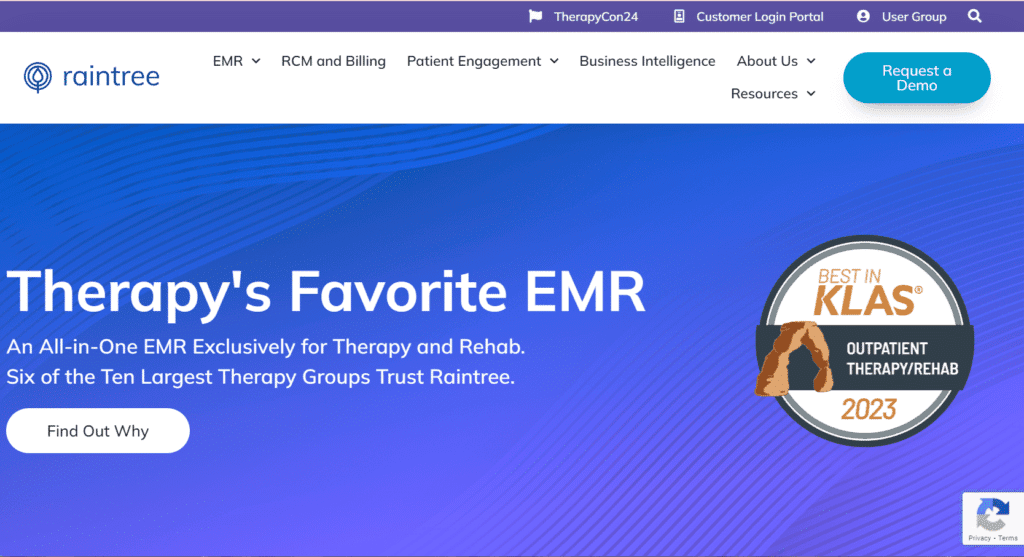
Here's the website screenshot of Raintree. Raintree is an AI-native EMR built for enterprise rehab therapy organizations that combines specialty-specific documentation, scheduling, billing, and RCM across PT, OT, SLP, pediatric, and ABA disciplines in a single platform.
Who Is Raintree Best For?
Raintree is built for enterprise rehab therapy organizations running PT, OT, SLP, pediatric, or ABA services across multiple locations.
Why I Picked Raintree
Raintree earns its spot on my shortlist because it's the only platform I've seen that runs PT, OT, SLP, pediatric, and ABA billing through one AI-native RCM engine. I'm particularly impressed by Agentic RCM, where an AI agent called Lucy handles eligibility verification by navigating payer phone menus and portals autonomously, cutting hands-on verification time by 91%. Pair that with ScribeIQ generating coded, payer-specific notes in under 90 seconds, and your billing team is working from cleaner documentation before a claim even enters the queue.
Raintree Key Features
- Multi-discipline specialty templates: Therapy-specific exam and note templates span PT, OT, SLP, pediatric, and ABA disciplines within a single patient record.
- SchedulerIQ™: An AI scheduling tool that books a full multi-appointment plan of care in roughly one minute, cutting front-desk clicks by around 10x.
- Business Intelligence dashboards: More than 10 role-based dashboards covering clinical performance, referral tracking, payer trends, and compliance alerts across multiple locations.
- Pathways™ referral management: Secure direct messaging that pulls hospital and health-system referrals directly into the EMR, with automated status updates sent back to the referring provider.
Raintree Integrations
Raintree integrates with Limber Health, Availity, Jopari, OccuPro, Zocdoc, and Rethink Behavioral Health. Its Gateways API platform and marketplace support custom connections, while Pathways supports referrals from hospitals and health systems.
Pros and Cons
Pros:
- Deep claim and denial controls
- AI scribes reduce after-hours documentation
- Multi-discipline records support complex organizations
Cons:
- Enterprise workflows overwhelm smaller practices
- Interface navigation frustrates some clinicians
Learn more about Raintree: Best for in-house or outsourced therapy billing
- Free demo available
- Pricing upon request
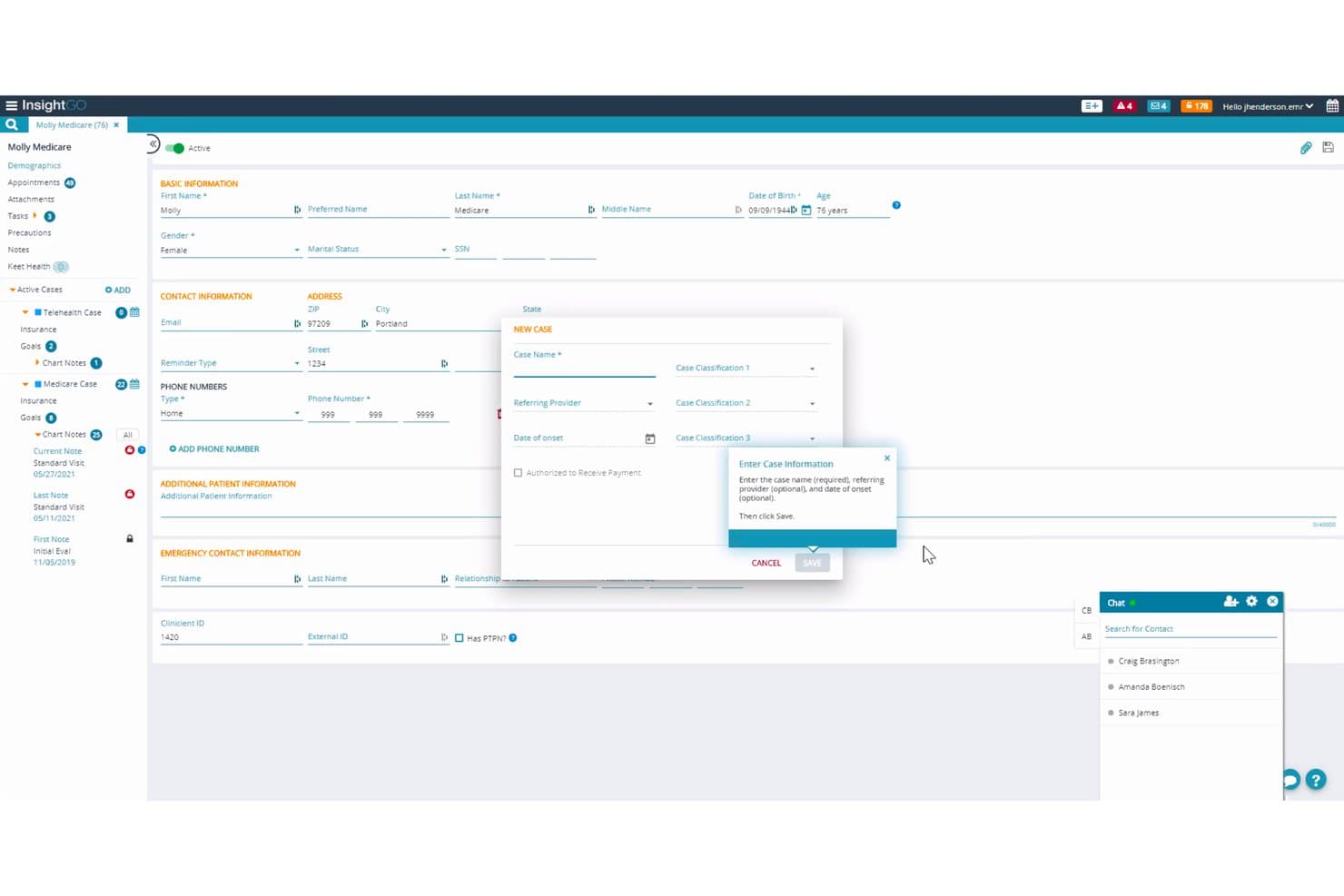
Clinicient lets users create and manage patient cases with guided prompts. Clinicient is a physical therapy EMR platform built for outpatient PT, OT, and SLP practices, combining therapy-specific documentation, charge capture, scheduling, home exercise programs, and both in-house and fully managed billing in one system.
Who Is Clinicient Best For?
Clinicient is a strong fit for outpatient PT, OT, and SLP clinics that want one system handling both clinical documentation and billing—whether your team manages claims in-house or you'd rather hand that work off entirely.
Why I Picked Clinicient
I've included Clinicient in my top picks because it's one of the few PT EMR platforms that gives outpatient therapy practices a real choice in how they handle billing. Clinicient's Charge Intelligence automatically generates payer-specific codes directly from clinical documentation, and its fully managed Insight RCM pairs that with a dedicated revenue cycle manager who maintains billing rules by carrier and state. That means whether your team bills in-house or hands it off entirely, the revenue cycle is covered.
Clinicient Key Features
- Smart Copy-Forward: Goals, procedures, and treatment plans carry over automatically from one visit to the next, reducing repetitive data entry.
- Keet Health HEP app: Patients access a mobile app with 8,500+ exercise videos, secure messaging, and automated content delivery based on their clinical pathway.
- Multi-tier analytics: Three analytics levels—standard reporting, visual dashboards, and a SQL-accessible data store—give clinic leaders visibility into productivity, revenue, and denials.
- Pre-visit worklists: Flags demographic, authorization, and referral issues before the appointment so front desk staff can resolve problems before they affect billing.
Clinicient Integrations
Clinicient documents integrations with Epic EMR, Keet Health, WebPT tools, clearinghouses, and HL7 interfaces supporting ADT, MDM, ORU, SIU, DFT, and ORM messages. No public FHIR API or integration marketplace is documented.
Pros and Cons
Pros:
- Multi-site analytics support operational comparisons
- Automated therapy modifier and threshold checks
- In-house or outsourced billing options
Cons:
- Evaluations require excessive clicks and scrolling
- Updates can trigger glitches and slowdowns
Learn more about Clinicient: 10Best for marketing automation in PT clinics
Heno
- Free demo available
- From $149/user/month (billed annually)
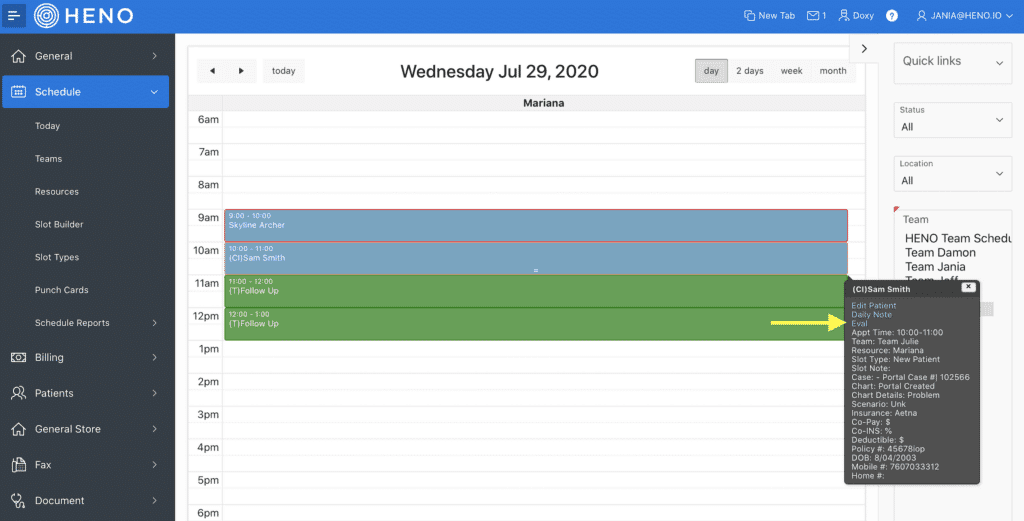
Here is Heno's physical therapy EMR interface Heno is a cloud-based physical therapy EMR that combines documentation, billing, scheduling, home exercise programs, and built-in marketing automation tools for PT, OT, and SLP clinics.
Who Is Heno Best For?
Heno is a strong fit for PT clinic owners running multi-location practices who want built-in marketing automation alongside their EMR and billing tools.
Why I Picked Heno
I've included Heno in my top picks because no other PT EMR on this list bundles marketing automation this deeply into the clinical workflow. I love that when a patient discharges, Heno can automatically trigger a re-engagement email or text sequence from your own domain, with return-on-marketing-spend tracking by channel built right in. The physician fax blast tool and referral revenue reports by doctor round out a feature set that helps PT clinic owners actually grow their patient pipeline, not just manage it.
Heno Key Features
- AI Scribe: Records and transcribes patient conversations in real time, turning them into structured SOAP notes for evaluations, daily notes, and discharge summaries.
- Built-in clearinghouse: Submits e-claims directly to government, commercial, workers' comp, and auto payers with automated modifier rules for KX, 59, CO, and CQ codes.
- RTM adherence tracking: Patients log exercise reps and sets through their HEP account, and therapists monitor adherence data with secure two-way messaging built in.
- Front-desk kiosk: An iPad-based check-in tool that lets patients pay copays, scan insurance cards, and book upcoming appointments based on their active plan of care.
Heno Integrations
Heno integrates with Doxy.me and FOTO, plus a built-in clearinghouse, ERA posting, and credit card processing. No public API or HL7/FHIR connectivity is documented.
Pros and Cons
Pros:
- Multi-location visibility suits expanding practices
- AI Scribe reduces daily documentation burden
- Marketing automation supports referral growth
Cons:
- Reviewers report clunky billing workflows
- Scheduling lacks confirmed room management
Learn more about Heno:
Andre EMR-systemer for fysioterapi
Nedenfor finner du en liste over flere EMR-systemer for fysioterapi som vi satte på kortlisten, men som ikke kom med blant de ti beste. Det er absolutt verdt å se nærmere på dem.
- 11StrataPTBest for its strong emphasis on compliance and auditing
- 12RXNTBest for integrated e-prescribing workflows
- 13PtEverywhereBest for cash-pay and hybrid PT clinic billing
How I Evaluate Physical Therapy EMR
I split my evaluation into three parts, giving the most weight to core functions: chart evaluations and plans of care, and submit claims with correct therapy units and modifiers. Next, I look for standout features such as digital home exercise programs patients can follow at home. Finally, I consider support, onboarding, and pricing value beyond the feature set.
Core Functionality (Table Stakes For This List)
When I'm selecting tools for my list, I score each one on a scale from 0 (does not offer the functionality) to 5 (excels in this area) for each core functionality listed below. I then convert the total into a percentage to help assess each tool's overall fit, with extra weight on any functionalities I’ve deemed essential.
- Therapy Documentation (Essential): I look for templates for evaluations, SOAP notes, plans of care, and discharge summaries that fit therapy workflows.
- Billing and Claims (Essential): I check whether charge capture and claims support therapy units and modifiers, and help teams track reimbursement.
- Scheduling and Patient Flow: I assess recurring visits, multi-provider calendars, and room or equipment scheduling for coordinated clinic flow.
- Compliance and Progress: I look for tools to track plans of care, authorizations, visit limits, and outcome measures as treatment progresses.
- Home Exercise Programs: I consider whether therapists can customize and share exercise plans, and whether patients can access instructions and report adherence.
Once I have a list of tools that meet the criteria, I consider what sets each platform apart.
Differentiating Factors (What Sets Vendors Apart)
Here's how I compare and contrast different vendors:
Standout Features
I look for built-in telehealth so therapists can review home programs or check progress without bolting on a separate video platform. Multi-disciplinary template support matters just as much—a clinic adding OT or speech services shouldn't need a new EMR. I also evaluate patient engagement portals, checking whether self-scheduling, digital intake, and secure messaging actually reduce front-desk phone volume.
Beyond Features
I evaluate how each platform handles payer and regulatory updates—Medicare threshold changes and modifier rules should flow into the system automatically, not wait on manual patches. Onboarding support matters just as much: a vendor that offers role-based training for billers, therapists, and front-desk staff cuts months off adoption. I also check whether licensing scales from a single clinic to multi-location groups without forcing a re-platforming conversation every time you add a site.
Slik velger du et EMR-system for fysioterapi
Det er lett å gå seg vill i lange funksjonslister og komplekse prisstrukturer. For å hjelpe deg med å holde fokus mens du går gjennom den unike prosessen med å velge programvare, får du her en sjekkliste over faktorer du bør ha i tankene:
| Faktor | Hva du bør vurdere |
|---|---|
| FaktorSkalerbarhet | Hva du bør vurdereKan programvaren vokse sammen med praksisen din? Vurder om den støtter et økende antall brukere og pasienter uten problemer. Se etter verktøy med fleksible skaleringsalternativer. |
| FaktorIntegrasjoner | Hva du bør vurdereKan den kobles til de eksisterende systemene dine? Sørg for at den integreres med programvaren for fakturering, timeplanlegging og pasientadministrasjon for å unngå avbrudd i arbeidsflyten. |
| FaktorTilpasningsmuligheter | Hva du bør vurdereKan du tilpasse den til behovene dine? Sjekk om verktøyet lar deg tilpasse maler og rapporter slik at de passer til praksisens spesifikke krav. |
| FaktorBrukervennlighet | Hva du bør vurdereVil teamet ditt synes det er enkelt å lære? Se etter intuitive grensesnitt og enkel navigering for å redusere opplæringstiden og øke adopsjonsraten. |
| FaktorImplementering og oppstart | Hva du bør vurdereHvor smidig er overgangen? Vurder leverandørens støtte under oppsettet, inkludert opplæringsressurser og hjelp med oppstart, for å sikre en problemfri start. |
| FaktorKostnad | Hva du bør vurdereEr den innenfor budsjettet ditt? Sammenlign prisplaner, inkludert skjulte gebyrer eller ekstrakostnader for flere funksjoner, for å sikre at løsningen passer med de økonomiske rammene dine. |
| FaktorSikkerhetstiltak | Hva du bør vurdereEr pasientdata og personvern beskyttet? Kontroller at løsningen overholder HIPAA og andre forskrifter for å sikre at robuste sikkerhetstiltak er på plass. |
| FaktorKrav til etterlevelse | Hva du bør vurdereOppfyller den bransjestandardene? Sørg for at programvaren overholder forskrifter og standarder for helsesektoren for å unngå juridiske problemer og ivareta pasientsikkerheten. |
Hva er et EMR-system for fysioterapi?
EMR for fysioterapi er programvare som håndterer kliniske notater, treningsplaner og sporing av pasientens fremgang for fysioterapeuter. Det bidrar til å effektivisere behandlingsdokumentasjonen og støtter resultatbasert behandling.
Funksjoner
Når du velger EMR for fysioterapi, bør du se etter følgende viktige funksjoner:
- Pasientadministrasjon: Samler pasientjournaler og historikk på ett sted, slik at det blir enklere for terapeuter å få rask tilgang til og oppdatere informasjon.
- Timeplanlegging: Forenkler timebestilling og kalenderadministrasjon, noe som bidrar til å redusere uteblivelser og optimalisere terapeutenes tilgjengelighet.
- Fakturering og fakturaer: Automatiserer faktureringsprosesser og oppretter fakturaer, slik at betalingene blir korrekte og kommer til rett tid.
- Samsvarssporing: Sikrer overholdelse av helseregelverk som HIPAA og beskytter pasientenes personvern og datasikkerhet.
- Tilpassbare maler: Gjør det mulig for terapeuter å opprette skreddersydde behandlingsplaner og dokumentasjon, noe som forbedrer tilpasningen og behandlingsnøyaktigheten.
- Rapportering og analyse: Gir innsikt i klinikkens resultater og pasientutfall, og støtter datadrevne beslutninger.
- Integrasjon med telehelse: Tilbyr fjernbehandling og utvider tilgangen til behandling for pasienter som ikke kan besøke klinikken.
- Mobil tilgang: Gjør det mulig for terapeuter å oppdatere journaler og administrere timeplaner mens de er på farten, noe som øker fleksibiliteten og effektiviteten.
- Verktøy for pasientengasjement: Oppmuntrer pasientene til å delta gjennom portaler og kommunikasjonsfunksjoner, noe som forbedrer etterlevelsen av behandlingen.
- Sikkerhetstiltak: Beskytter sensitiv informasjon med kryptering og tilgangskontroller, slik at dataintegritet og konfidensialitet ivaretas.
Fordeler
Implementering av EMR for fysioterapi gir flere fordeler for teamet og virksomheten din. Her er noen av fordelene du kan se frem til:
- Forbedret effektivitet: Automatiserer oppgaver som timeplanlegging og fakturering, slik at terapeutene får mer tid til å fokusere på pasientbehandling.
- Bedre pasientbehandling: Samler pasientjournaler og behandlingsplaner på ett sted, slik at behandlingen kan bli mer personlig og nøyaktig.
- Bedre samsvar: Følger opp regulatoriske krav, slik at praksisen oppfyller helsestandarder og beskytter pasientdata.
- Økte inntekter: Reduserer feil i fakturering og fakturaer, noe som fører til mer korrekte og raskere betalinger.
- Bedre tilgjengelighet: Tilbyr telehelsealternativer og mobil tilgang, slik at det blir enklere for pasienter og terapeuter å komme i kontakt.
- Datadrevne beslutninger: Gir rapportering og analyse, slik at du kan ta informerte beslutninger om praksisadministrasjon og pasientutfall.
- Pasientengasjement: Oppmuntrer til aktiv deltakelse i behandlingen gjennom engasjementsverktøy, noe som forbedrer etterlevelse og tilfredshet.
Kostnader & priser
Ved valg av EMR for fysioterapi er det nødvendig å forstå de ulike prismodellene og abonnementene som er tilgjengelige. Kostnadene varierer ut fra funksjoner, teamstørrelse, tilleggstjenester og mer. Tabellen nedenfor oppsummerer vanlige abonnementer, gjennomsnittsprisene deres og typiske funksjoner som er inkludert i EMR-løsninger for fysioterapi:
Sammenligningstabell for abonnementer for EMR for fysioterapi
| Abonnementstype | Gjennomsnittspris | Vanlige funksjoner |
|---|---|---|
| AbonnementstypeGratisabonnement | Gjennomsnittspris$0 | Vanlige funksjonerGrunnleggende timeplanlegging, begrensede pasientjournaler og grunnleggende dokumentasjonsverktøy. |
| AbonnementstypePersonlig abonnement | Gjennomsnittspris$10-$30/bruker/måned | Vanlige funksjonerAvansert timeplanlegging, administrasjon av pasientjournaler og grunnleggende faktureringsfunksjoner. |
| AbonnementstypeVirksomhetsabonnement | Gjennomsnittspris$40-$70/bruker/måned | Vanlige funksjonerOmfattende pasientjournaler, fakturering og fakturaer samt tilpassbare maler. |
| AbonnementstypeVirksomhetsabonnement for store organisasjoner | Gjennomsnittspris$80-$150/bruker/måned | Vanlige funksjonerFull tilgang til funksjoner, avansert rapportering og analyse samt dedikert brukerstøtte. |
Vanlige spørsmål om EMR for fysioterapi
Her er noen svar på vanlige spørsmål om EMR for fysioterapi:
Kan jeg bytte EMR uten driftsstans?
Ja, mange EMR-leverandører tilbyr løsninger for å bytte system uten å forstyrre praksisen din. Se etter leverandører som tilbyr datamigreringstjenester, og sørg for at de har en plan for å håndtere overgangen på en smidig måte. Det er viktig å spørre om prosessen deres og eventuelle risikoer som kan være involvert.
Hvordan effektiviserer EMR pasientbehandlingen?
EMR effektiviserer pasientbehandlingen ved å digitalisere journaler og automatisere rutineoppgaver. Dette gjør det mulig for teamet ditt å få rask tilgang til pasientinformasjon, noe som reduserer feil og forbedrer effektiviteten. Med digitale skjemaer og automatiserte prosesser kan du fokusere mer på pasientkontakt og mindre på papirarbeid.
Hvor sikre er pasientdata i EMR-systemer?
Sikkerheten til pasientdata er avgjørende. Sørg for at EMR-systemet bruker kryptering og overholder forskrifter som HIPAA. Spør leverandørene om sikkerhetstiltakene deres, for eksempel tilgangskontroller og regelmessige revisjoner, for å beskytte sensitiv informasjon.
Hvilke supportalternativer er tilgjengelige for EMR-brukere?
Supportalternativene varierer, men de fleste leverandører tilbyr flere kanaler, for eksempel telefon, e-post og chat. Sjekk om de tilbyr support døgnet rundt, og spør om svartidene. Noen systemer tilbyr også omfattende nettressurser, inkludert veiledninger og vanlige spørsmål, for å hjelpe brukerne.
Finnes det tilpasningsmuligheter i EMR-systemer?
Ja, mange EMR-systemer tilbyr tilpasningsmuligheter for å dekke praksisens unike behov. Se etter systemer som lar deg tilpasse maler, arbeidsflyter og rapporter. Tilpasning kan øke effektiviteten og sørge for at systemet samsvarer med de spesifikke prosessene dine.