

EHR-programvare for dermatologi (elektronisk pasientjournal) er utviklet for å støtte de kliniske, administrative og faktureringsmessige behovene til dermatologipraksiser i ett og samme system. Hvis du sammenligner de beste EHR-alternativene for dermatologi, ser du sannsynligvis etter verktøy som passer til de unike arbeidsflytene dine, oppfyller kravene til dokumentasjon og gjør koordineringen av behandlingen enklere for teamet ditt.
Med så mange systemer på markedet kan det føles overveldende å finne ut hvilke som faktisk er utviklet for dermatologi. Denne veiledningen gir deg ekspertinnsikt i de beste alternativene, hva de er best på, og hvordan de fungerer for dermatologipraksiser i dag.
Hvorfor du kan stole på våre programvareanbefalinger
6,700+
Reviews
20
Industry experts
16+
Evaluation factors
14
Years
Teamet vårt har testet og anmeldt programvare siden 2012. Vi leder selv legekontorer, så vi vet hvor vanskelig og hvor viktig det er å velge riktig programvare.
I denne guiden har vi vurdert verktøyene gjennom praktisk testing og uavhengig research og gitt dem poeng ut fra våre utvelgelseskriterier.
Anmeldelsene våre bygger på vår egen redaksjonelle vurdering. De er ikke et salgsargument.
Sammenligningstabell for EHR-systemer for dermatologi
Denne sammenligningstabellen oppsummerer prisdetaljene for mine beste utvalgte EHR-systemer for dermatologi:
Score legend (out of 5)
- Excellent4.5–5
- Good4–4.4
- Average3–3.9
- Below average2–2.9
- Poor1–1.9
Sorted by: Default
| Tool | Starting Price | Website | |||||||
|---|---|---|---|---|---|---|---|---|---|
Best for dermatology booking and records | 3.0 out of 5 | 4 | 3 | 3 | 2 | 5 | 1 | Pricing upon request Free demo available | Website |
Best for mobile dermatology charting | 3.0 out of 5 | 4 | 3 | 1 | 3 | 5 | 2 | Pricing upon request Free demo available | Website |
Best for specialty dermatology workflows | 3.2 out of 5 | 1 | 2 | 4 | 4 | 5 | 3 | Pricing upon request Free demo available | Website |
Best for body maps linked to billing codes | 3.8 out of 5 | 4 | 3 | 3 | 4 | 5 | 4 | Pricing upon request Free demo available | Website |
Best for connected dermatology care | 2.8 out of 5 | 3 | 3 | 2 | 3 | 4 | 2 | $499/user/month Free demo available | Website |
Best for adaptive dermatology charting | Not rated | 4 | Not rated | 3 | 4 | 4 | 4 | Pricing upon request Free demo available | Website |
Best for visual dermatology workflows | 3.7 out of 5 | 3 | 4 | 3 | 4 | 4 | 4 | Pricing upon request Free demo available | Website |
Best for dermatology EHR and imaging | 3.5 out of 5 | 4 | 4 | 3 | 4 | 4 | 2 | Pricing upon request Free demo available | Website |
Best for all-in-one dermatology management | 3.2 out of 5 | 3 | 3 | 1 | 4 | 5 | 3 | Pricing upon request Free demo available | Website |
Best for customizable dermatology EHR | 3.0 out of 5 | 3 | 4 | 1 | 3 | 4 | 3 | $229/user/month Free demo available | Website |


Anmeldelser av de beste EHR-systemene for dermatologi
Nedenfor finner du mine detaljerte sammendrag av de beste EHR-systemene for dermatologi som kom med på kortlisten min. Anmeldelsene mine gir en detaljert gjennomgang av funksjonene, integrasjonene og de beste bruksområdene for hvert system, slik at du kan finne det som passer best for deg.
 Best for dermatology booking and records
- Free demo available
- Pricing upon request
Visit WebsiteCustomer Rating:4.7/5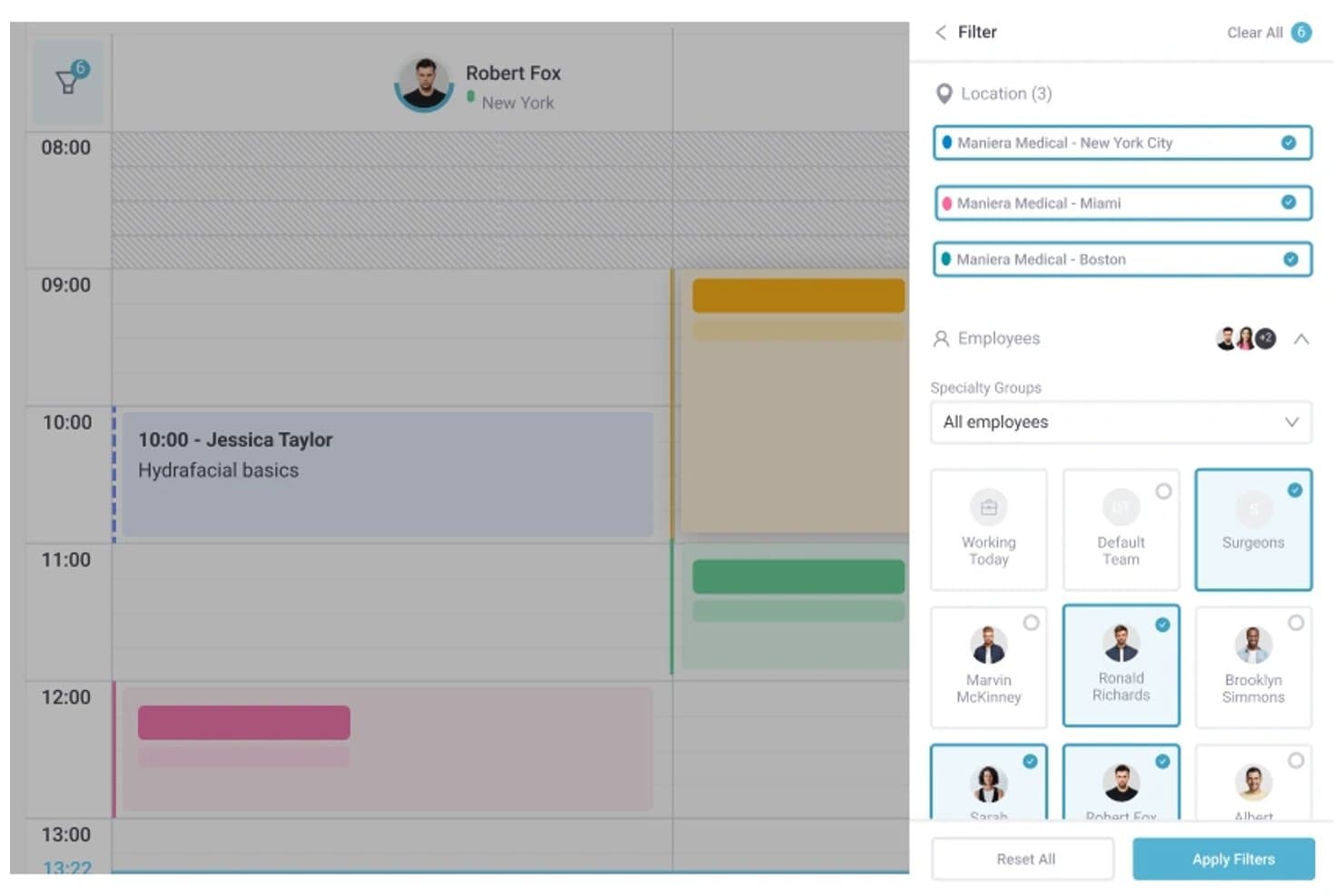
Pabau offers multi-location filtering and employee group selection within its scheduling calendar view. Pabau is an all-in-one practice management and EHR platform combining appointment scheduling, digital patient records, clinical photo documentation, consent management, and billing tools for cosmetic and hybrid dermatology practices.
Who Is Pabau Best For?
Pabau suits small to mid-sized cosmetic and hybrid dermatology clinics that need integrated booking, records, and patient communications in one platform.
Why I Picked Pabau
I've included Pabau in my top picks because it connects booking and clinical records in a way that fits dermatology workflows. When a patient books, digital intake forms and consent documents go out automatically before they arrive. During the visit, I document treatment areas on anatomical body diagrams and attach before/after photos directly to the chart. The AI Medical Scribe then captures notes with ICD/SNOMED codes in real time.
Pabau Key Features
- Digital patient intake forms: Patients submit medical history and consents electronically before their visit.
- Integrated billing and claims tools: Manage invoicing, insurance claims, and remittance in one system.
- Clinical photo documentation: Store and organize before-and-after photos within patient charts.
- AI-powered medical scribe: Automatically capture visit notes and standardized clinical codes during encounters.
Pabau Integrations
Pabau offers native integrations with Stripe, Xero, Klarna, The Doctors Laboratory, Reserve with Google, Google Calendar, Outlook Calendar, and Google Analytics. An API is available for custom integrations.
Pros and Cons
Pros:
- AI scribe captures clinical notes automatically
- Before/after photo documentation built in
- Automated patient booking and intake forms
Cons:
- Lacks Mohs surgery workflow support
- No ONC certification for US practices
Learn more about Pabau: Best for mobile dermatology charting
- Free demo available
- Pricing upon request
Visit WebsiteCustomer Rating:3.9/5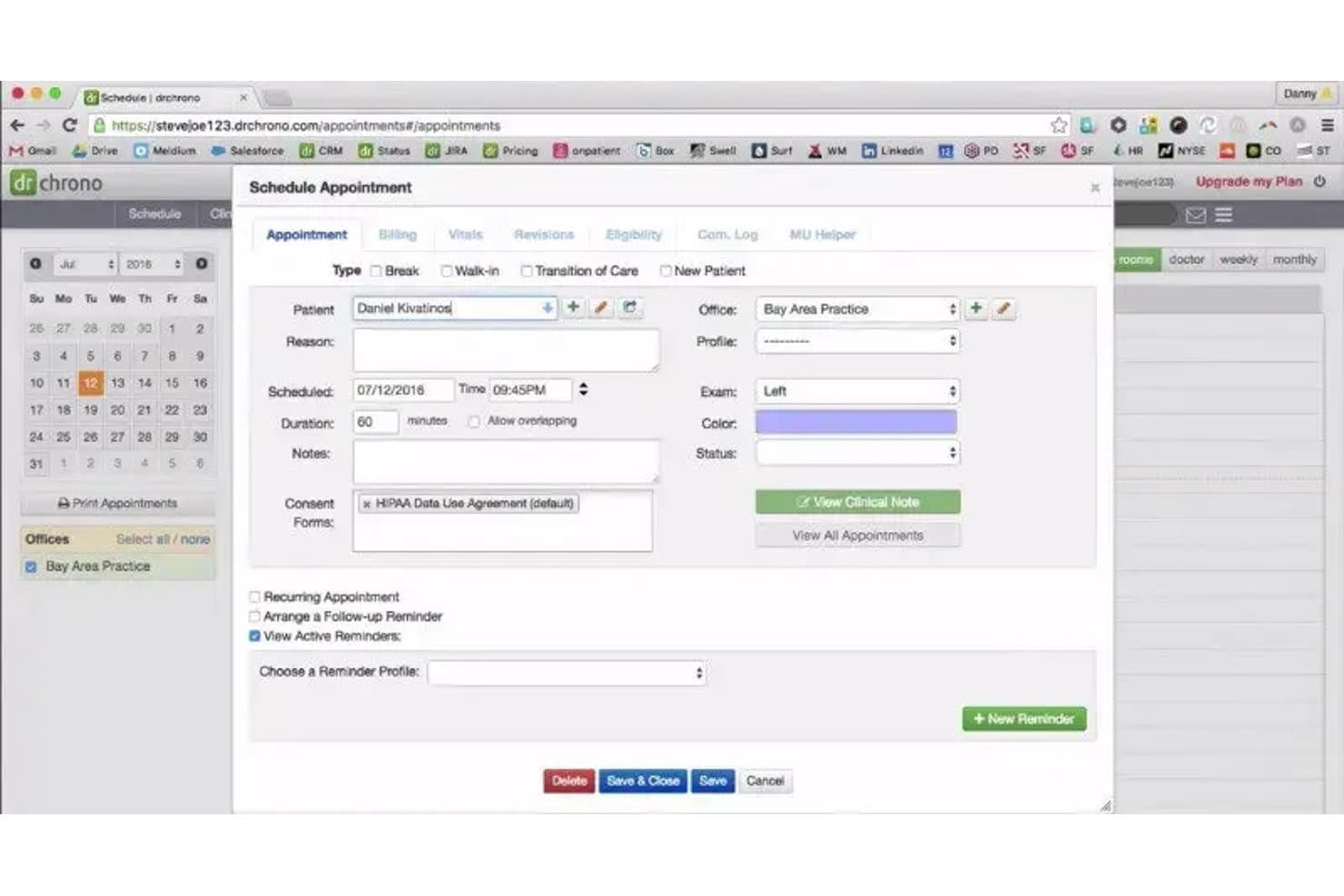
DrChrono offers a detailed Schedule Appointment modal with fields for patient info, exam side, consent forms, and reminders, relevant to dermatology visit scheduling. DrChrono is a cloud-based, iPad-native EHR that combines clinical charting, practice management, medical billing, and revenue cycle tools for small to mid-sized medical practices, including dermatology.
Who Is DrChrono Best For?
DrChrono suits solo and small-group dermatology practices that want a mobile-first, iPad-native EHR with integrated billing.
Why I Picked DrChrono
I picked DrChrono as one of the best because of its iPad-native charting architecture. The platform's integrated photo and drawing tools let me capture and annotate lesion images directly within the patient chart. In a dermatology exam room, that means I'm not switching devices or managing a separate camera between documenting and treating a patient.
DrChrono Key Features
- Customizable dermatology templates: Create and modify specialty charting templates to fit medical dermatology workflows.
- Bidirectional lab integration: Connects with major labs like Quest and LabCorp for dermatopathology result delivery and specimen tracking.
- ONC certification and e-prescribing: Supports electronic prescriptions, EPCS, and compliance with HIPAA and MIPS reporting requirements.
- Integrated patient portal: Lets patients access records, upload information, and communicate directly with your office.
DrChrono Integrations
DrChrono offers native integrations with Quest Diagnostics, LabCorp, Surescripts, CoverMyMeds, Iron Bridge, Square, Collectly, Holly, Box, and Ambra. An open API is available for custom integrations.
Pros and Cons
Pros:
- ONC-certified with EPCS and MIPS support
- In-chart photo and annotation tools included
- iPad-native charting for point-of-care use
Cons:
- Few prebuilt dermatology-specific charting templates
- No Mohs mapping or staging module
Learn more about DrChrono: Best for specialty dermatology workflows
- Free demo available
- Pricing upon request
Visit WebsiteCustomer Rating:3.7/5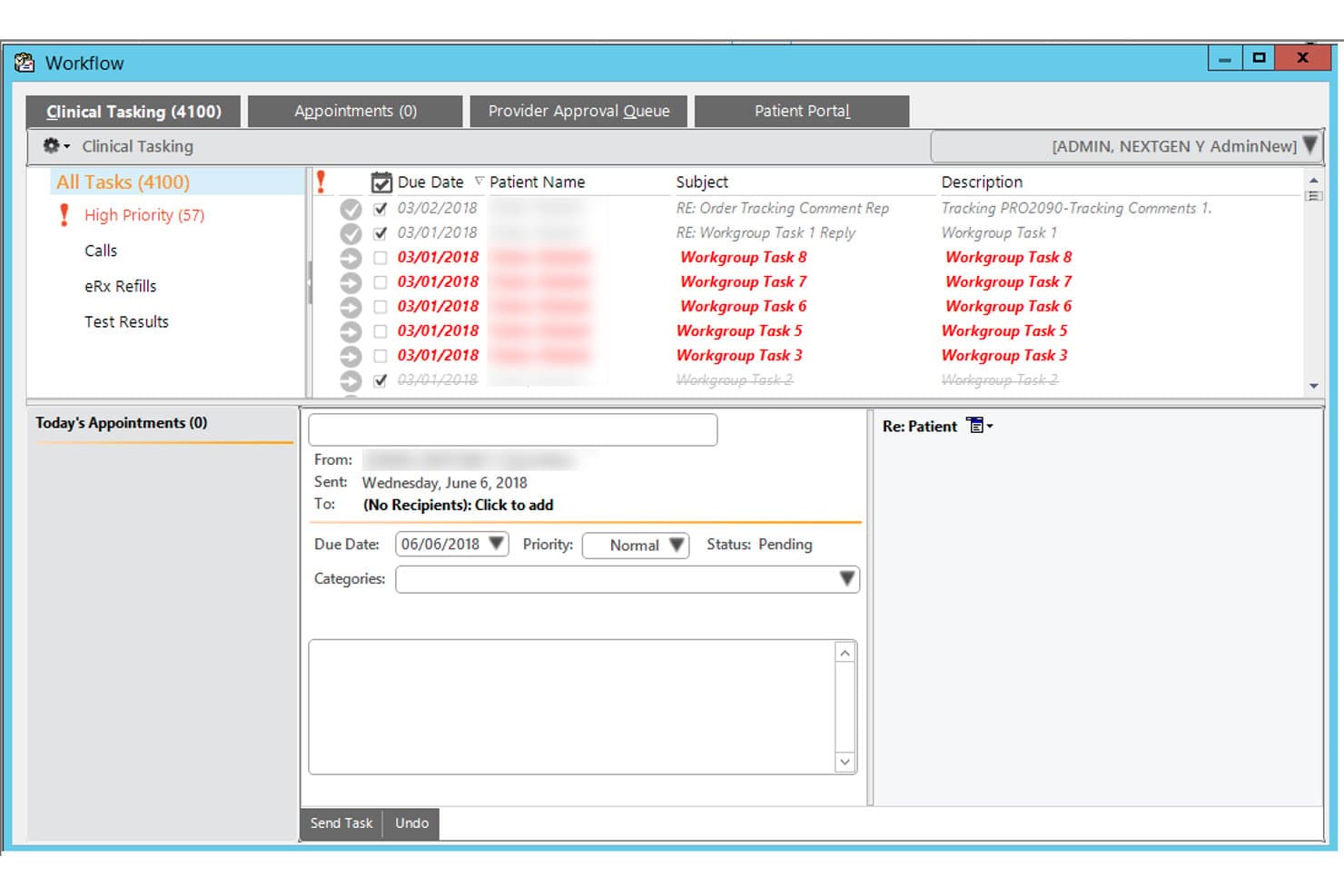
NextGen Healthcare offers a Clinical Tasking workflow interface that allows providers to manage and prioritize patient-related tasks, appointments, and messages in one view. NextGen Healthcare is an ambulatory EHR and practice management platform built for specialty practices, offering dermatology-specific templates, clinical image integration, AI-assisted documentation, lab connectivity, and integrated RCM.
Who Is NextGen Healthcare Best For?
NextGen Healthcare is a strong fit for multi-location dermatology groups with 10 or more providers that need enterprise-grade practice management alongside specialty clinical workflows.
Why I Picked NextGen Healthcare
I picked NextGen Healthcare as one of the best because its dermatology content is built specifically for the specialty, covering biopsy logs, skin cancer staging, and direct image integration into the patient chart. I like that the two-click documentation defaults let providers move through high-volume derm visits without rebuilding templates from scratch. The Ambient Assist AI also captures patient-provider conversations and generates structured SOAP notes automatically.
NextGen Healthcare Key Features
- Integrated patient portal: Lets patients access lab results, upload documents, and communicate with providers securely.
- Mobile-enabled documentation: Allows clinicians to capture notes, images, and patient data directly from smartphones or tablets.
- Bidirectional lab interfaces: Connects with dermatopathology labs to send orders and receive results directly into patient charts.
- Mirth Connect interoperability engine: Facilitates data exchange with external systems and national networks for full care coordination.
NextGen Healthcare Integrations
NextGen Healthcare offers native integrations with Clearwave, Doctible, Solutionreach, Luma, and InstaMed, supports lab connectivity with over 725 labs through NextGen Share, and provides an API and Mirth Connect for custom integrations.
Pros and Cons
Pros:
- Skin cancer staging with direct image chart integration
- Ambient AI captures and structures clinical notes automatically
- Dermatology-built templates reduce charting time significantly
Cons:
- Implementation complexity frustrates smaller derm practices
- No dedicated Mohs mapping module documented
Learn more about NextGen Healthcare: Best for body maps linked to billing codes
- Free demo available
- Pricing upon request
Visit WebsiteCustomer Rating:3.5/5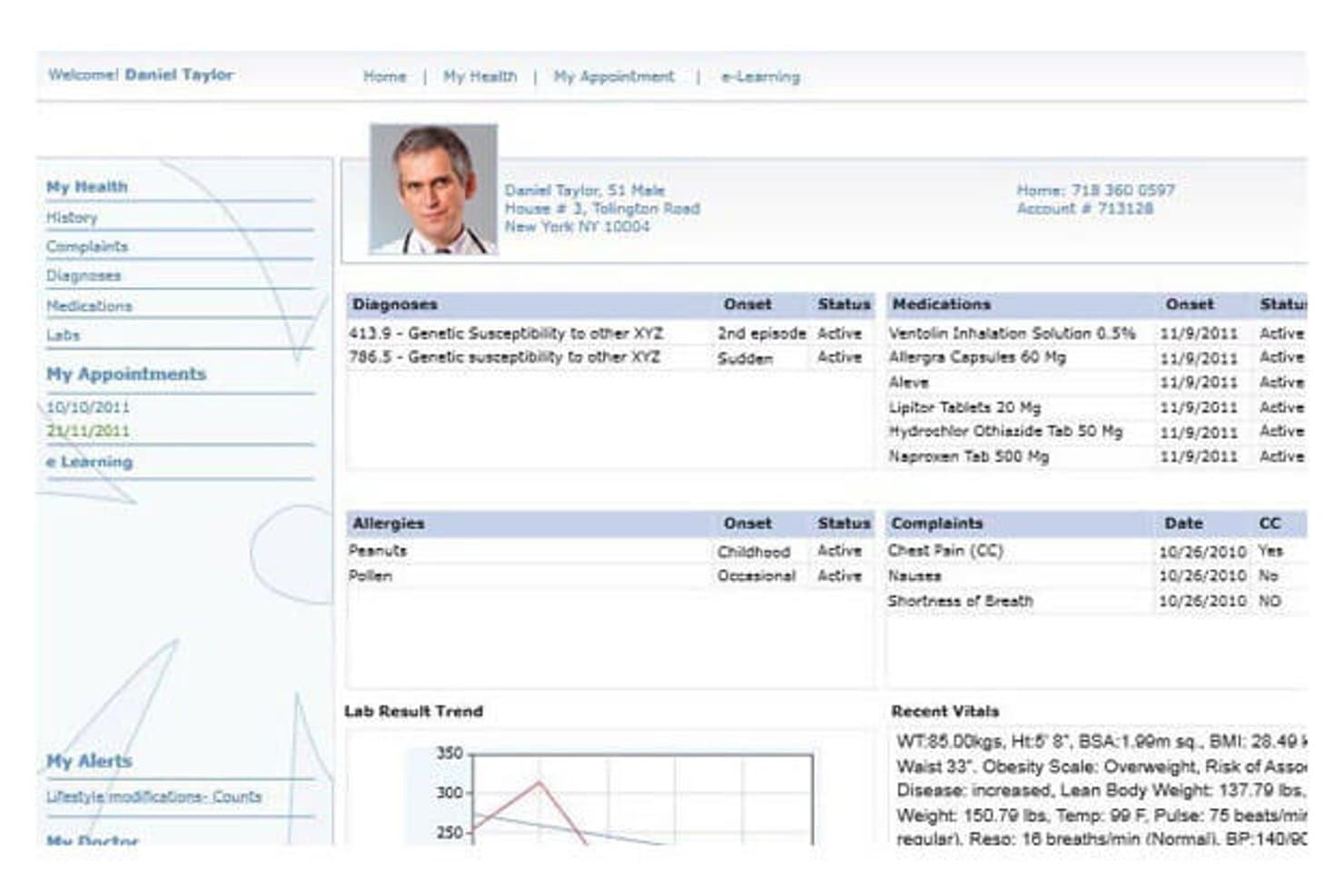
CureMD's patient portal displays health records and vitals. CureMD is an AI-native dermatology EHR platform that combines specialty-specific charting, body mapping, lesion tracking, clinical imaging, e-prescribing, and integrated practice management and billing.
Who Is CureMD Best For?
CureMD is a strong fit for dermatology practices that want body mapping, lesion tracking, and billing codes managed in one connected platform.
Why I Picked CureMD
I picked CureMD as one of the best because its body mapping tools do something most dermatology EHRs don't: they tie precise lesion locations directly to billing codes, so documentation and coding happen in the same step. I also like that the AI coder surfaces real-time ICD-10 and CPT suggestions as you chart, which keeps claims accurate without a separate review pass. The claim-rules engine then validates everything against payer rules before submission, catching modifier mismatches and medical-necessity gaps upfront.
CureMD Key Features
- Dermatology procedure templates: Pre-built templates cover Botox, fillers, laser surgery, and cosmetic procedures like blepharoplasty and face lifts.
- AI medical scribe: Ambient listening tool transcribes patient encounters in real time and generates clinical notes and orders automatically.
- E-prescribing with formulary checks: Providers can send prescriptions electronically with built-in formulary, eligibility, and controlled-substance support across 40,000+ pharmacies.
- Multi-location inventory management: Tracks medications, vaccines, and durable medical equipment across locations with barcode scanning, reorder alerts, and point-of-sale support.
CureMD Integrations
CureMD reports 400+ third-party connectors, including Quest, LabCorp, Surescripts, CommonWell, and Carequality. It also offers a FHIR API for custom integrations.
Pros and Cons
Pros:
- Scheduling and claims share patient workflows
- Clinical images and lesions stay in records
- Lesion maps connect locations to billing codes
Cons:
- Support and onboarding experiences vary
- Reported lag can interrupt charting
Learn more about CureMD: Best for connected dermatology care
- Free demo available
- From $499/user/month
Visit WebsiteCustomer Rating:3.4/5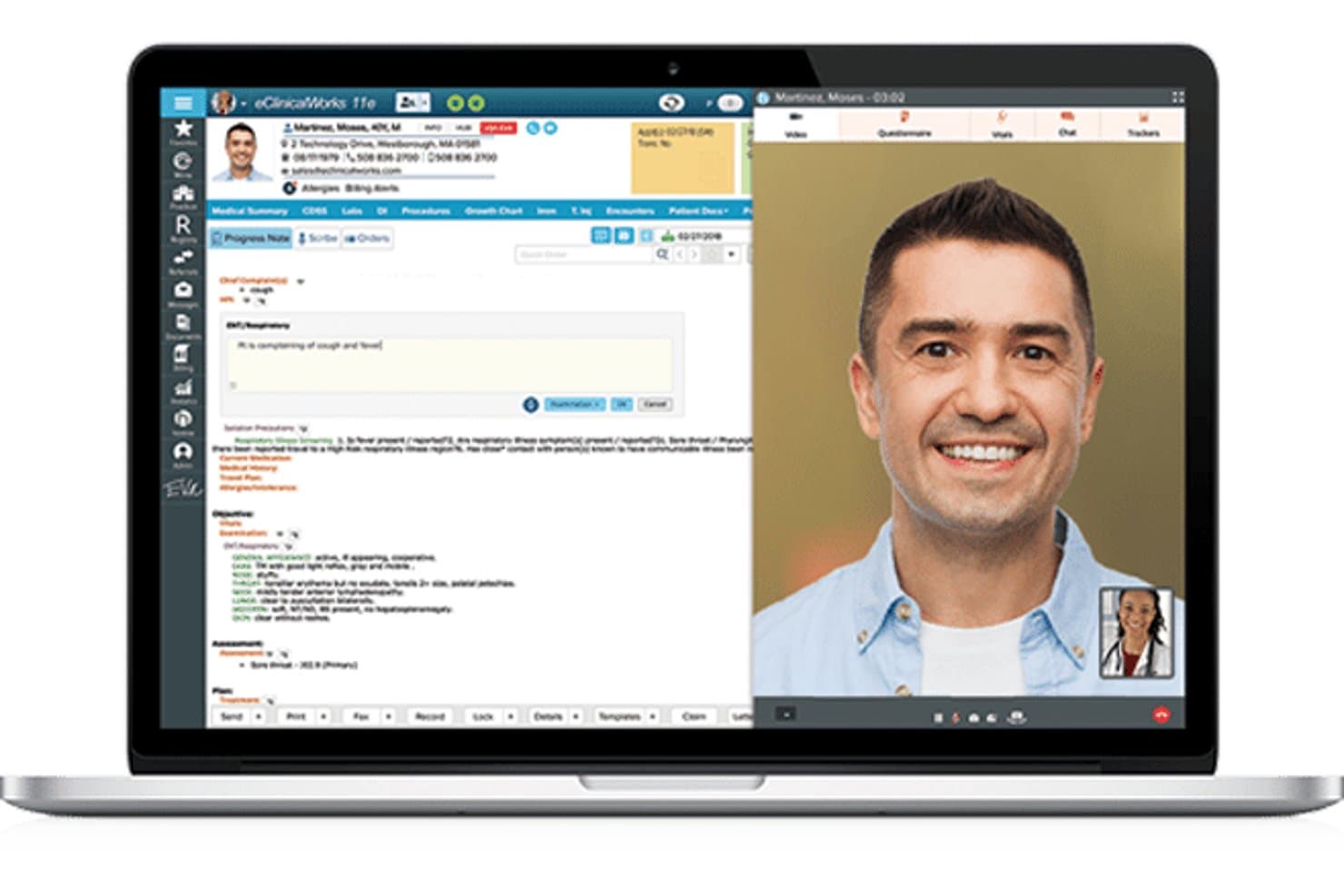
eClinicalWorks offers a telehealth interface with a progress note panel alongside a live video consultation view. eClinicalWorks is a cloud-based EHR and practice management platform with a dedicated dermatology module that combines AI-assisted clinical documentation, image capture, integrated billing, and patient engagement tools.
Who Is eClinicalWorks Best For?
It's a strong fit for mid-to-large dermatology practices that need an integrated EHR, billing, and patient engagement system under one platform.
Why I Picked eClinicalWorks
I picked eClinicalWorks because its connected care story is genuinely differentiated. PRISMA, the platform's AI-powered health information search engine, pulls external patient records from nationwide interoperability networks directly into the clinical note at the point of care. Paired with Sunoh.ai, a dermatology-tuned AI scribe that captures skin condition details like location, size, and color, dermatologists can document faster without sacrificing clinical detail.
eClinicalWorks Key Features
- Dermatology charting templates: Prebuilt templates for acne, eczema, psoriasis, skin cancer screenings, biopsies, and excisions.
- Integrated lab ordering: Connects directly to major labs for ordering and receiving pathology results within patient charts.
- Role-based access controls: Customizable user permissions help practices manage clinical and billing workflows securely.
- Patient portal with telehealth: Patients can view results, communicate with care teams, and join telehealth visits online.
eClinicalWorks Integrations
eClinicalWorks offers native integrations with Sunoh.ai, healow (including TeleVisits, Open Access, Genie contact center), and supports bidirectional lab interfaces for dermatopathology labs. APIs are available for custom integrations.
Pros and Cons
Pros:
- Bundled ICD-10, CPT, and E/M coder
- PRISMA aggregates records from nationwide networks
- Sunoh.ai captures lesion location and size
Cons:
- Image tools lack dermatoscopy support
- No Mohs mapping or staging tools
Learn more about eClinicalWorks: Best for adaptive dermatology charting
- Free demo available
- Pricing upon request
Visit WebsiteCustomer Rating:4.5/5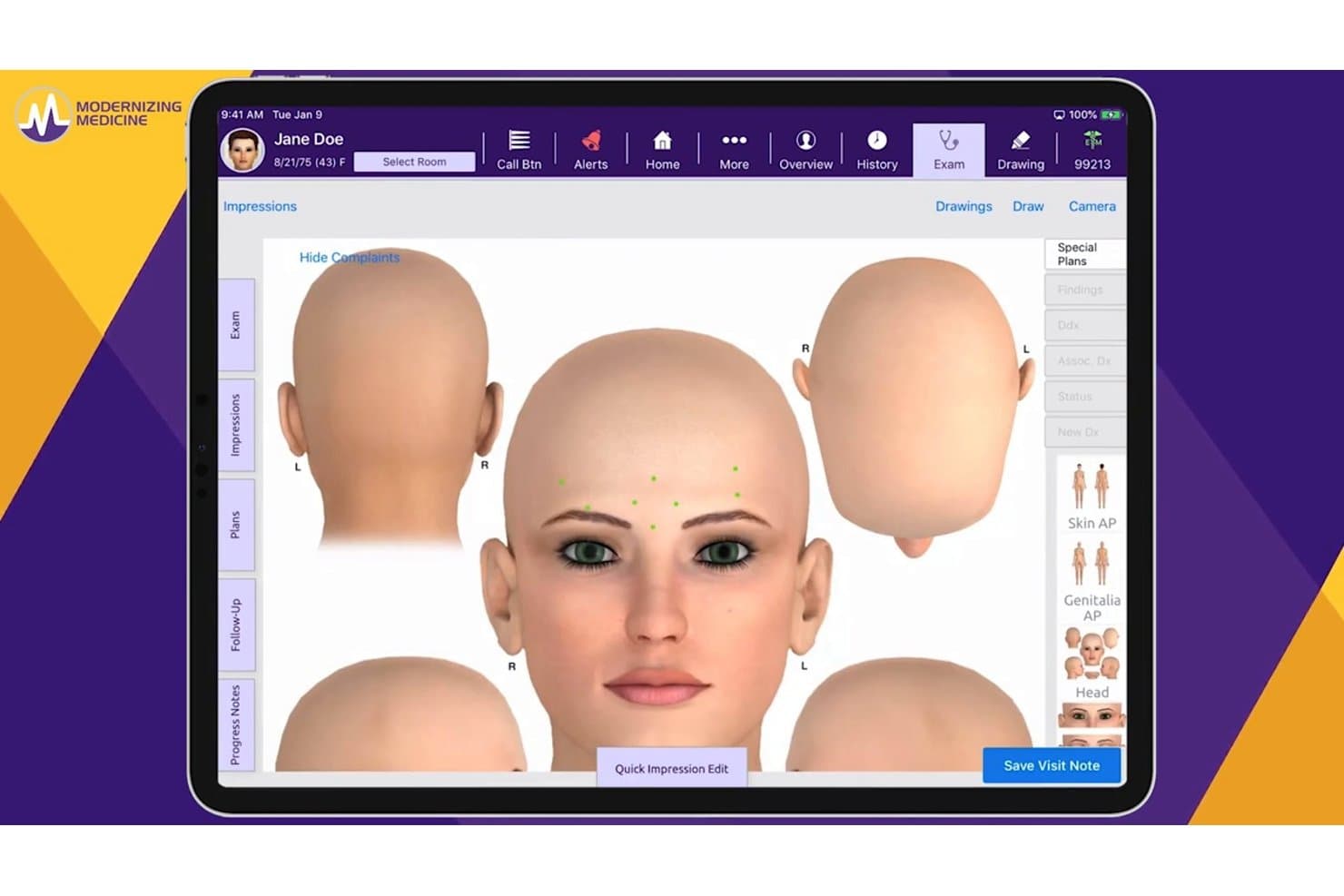
ModMed offers a 3D anatomical body diagram tool within its EHR platform, allowing providers to visually map patient complaints directly on a rendered head model during the exam. ModMed is a dermatology-specific EHR built around its EMA® platform, combining specialty charting, clinical image management, in-house pathology, AI-assisted documentation, and integrated practice management and billing tools.
Who Is ModMed Best For?
ModMed suits dermatology practices of all sizes that want a single platform covering clinical, billing, and patient engagement workflows.
Why I Picked ModMed
ModMed earns its spot on my shortlist because of how EMA's charting adapts to the way a dermatologist actually works. Customizable master visits let you build tap-and-go templates for your most common visit types, and ModMed Scribe 2.0 converts real patient dialogue into suggested chart notes and billing codes without extra documentation steps.
ModMed Key Features
- Integrated in-house pathology module: Enables specimen tracking and direct result integration within the patient chart.
- Interactive body mapping: Lets you draw, annotate, and attach clinical images to specific body locations.
- Patient engagement tools: Built-in messaging, appointment reminders, and intake forms help manage patient communication end to end.
- Revenue cycle management services: Provides dermatology-aware coding support and in-house billing expertise for claim optimization.
ModMed Integrations
ModMed offers native integrations with pathology labs such as Aurora Diagnostics and Bako, as well as interfaces for HL7 connections, FHIR APIs, hospital systems, and its Klara patient engagement platform. An API is available for custom integrations.
Pros and Cons
Pros:
- iPad-native design speeds clinical workflows
- Native in-house pathology module included
- AI-assisted charting trained on derm encounters
Cons:
- Implementation timeline can be lengthy
- Limited to Apple devices for charting
Learn more about ModMed: Best for visual dermatology workflows
- Free demo available
- Pricing upon request
Visit WebsiteCustomer Rating:5/5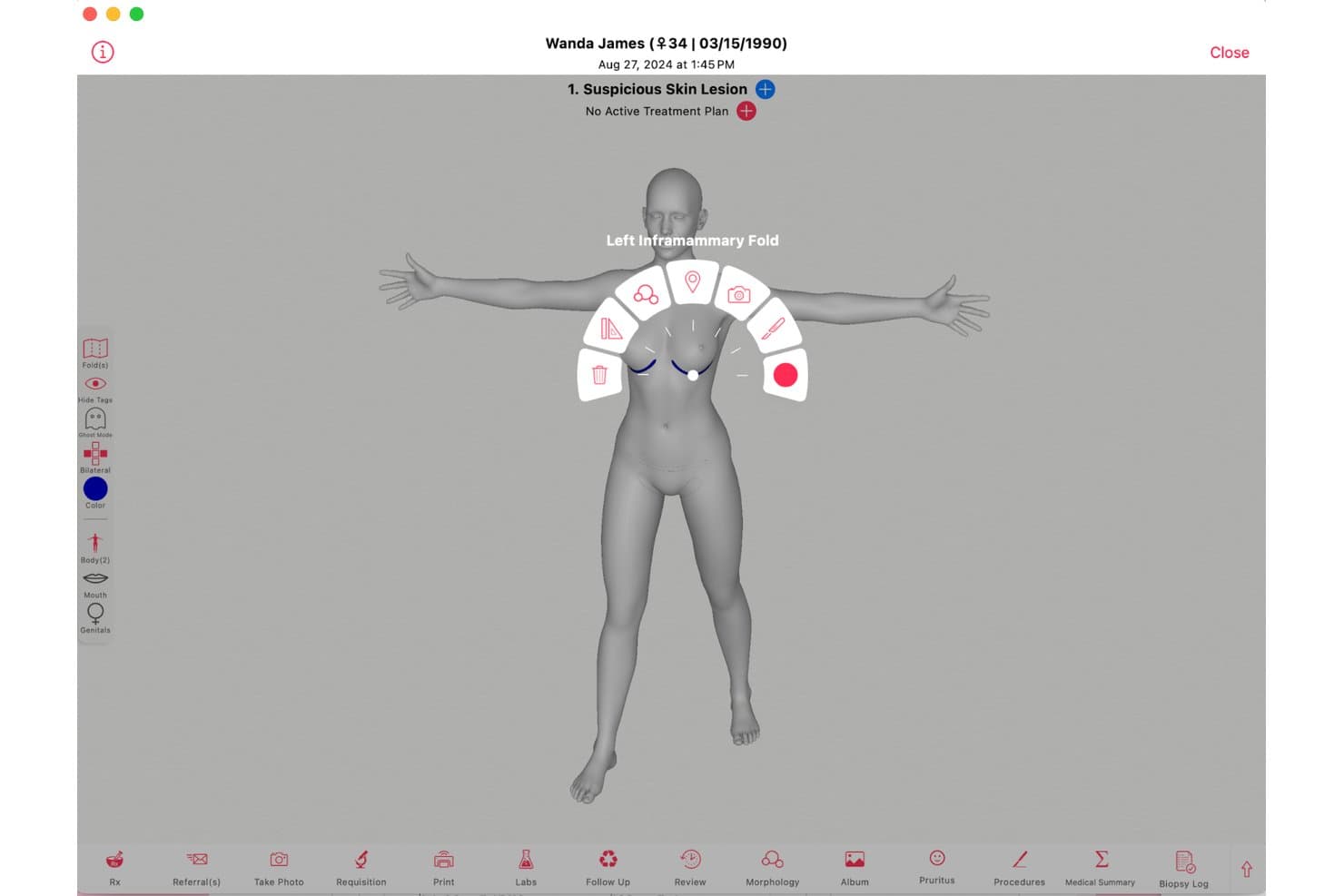
Ezderm offers an interactive 3D body mapping tool that allows dermatologists to tag and document suspicious skin lesions by precise anatomical location. EzDerm is a dermatology-only EHR built by a practicing dermatologist, combining a 3D anatomical body map, Mohs surgery documentation, biopsy tracking, automated coding, and integrated practice management in a single platform.
Who Is EzDerm Best For?
EzDerm is a strong fit for medical and surgical dermatology practices in the U.S. that need a dedicated platform for Mohs, biopsies, and procedure-heavy workflows.
Why I Picked EzDerm
EzDerm earns its spot on my shortlist because the 3D Anatomical Body Map is genuinely unlike anything else in dermatology EHR. I like that tapping a location on the map auto-populates morphology, assessment, plan, and CPT codes in one step. The Mohs module layers on top of that with multi-stage digital mapping and specimen tracking tied directly to the same chart.
EzDerm Key Features
- Pre-built dermatology templates: Choose from more than 1,100 customizable treatment plans for common conditions and procedures.
- Integrated biopsy and malignancy log: Track biopsies, pathology results, and malignancy histories across encounters.
- Automated coding engine: ICD-10, CPT, and SNOMED codes are auto-populated based on chart entries and lesion location.
- Isotretinoin management module: Handle iPLEDGE documentation, automated dose calculations, and lab result monitoring within the EHR.
EzDerm Integrations
EzDerm offers native integrations with Surescripts, Healthmonix for MIPS reporting, Square for payments, and Nuance for speech recognition. Lab and pathology integrations are supported for digital results delivery, and an API is available for custom integrations.
Pros and Cons
Pros:
- Fast implementation for small and solo practices
- Dermatology-specific support team praised by users
- 3D body map links visual charting to CPT coding
Cons:
- ICD code depth falls short for complex cosmetic coding
- Pathology result tracking requires more manual follow-up
Learn more about Ezderm: Best for dermatology EHR and imaging
- Free demo available
- Pricing upon request
Visit WebsiteCustomer Rating:4.3/5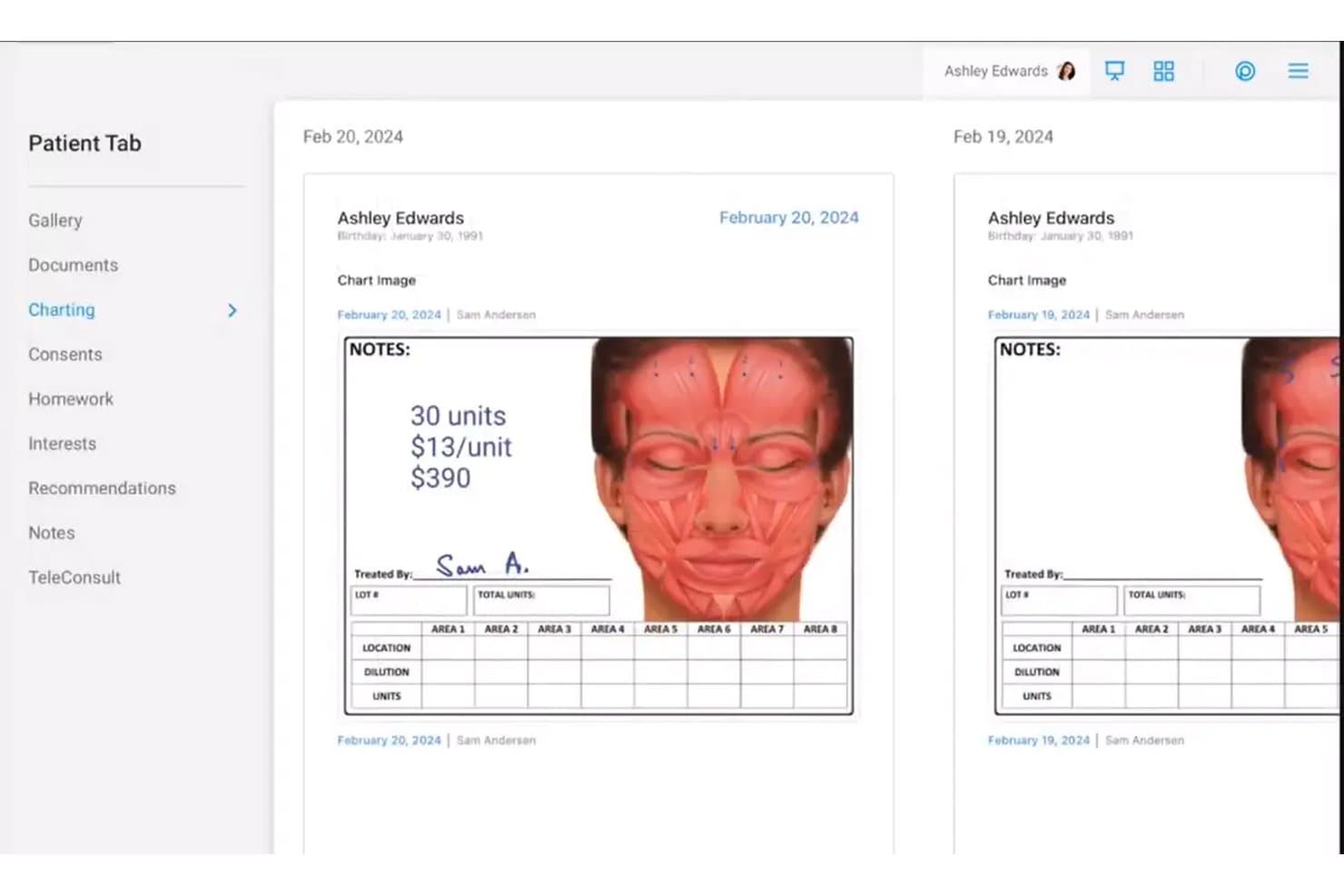
Nextech dermatology EHR showing facial treatment charting, clinical notes, and patient image documentation Nextech is a cloud-based EHR and practice management platform built exclusively for dermatology, covering specialty charting templates, clinical image management, Mohs workflow documentation, e-prescribing, and integrated billing.
Who Is Nextech Best For?
Nextech is a strong fit for medical and surgical dermatology practices of all sizes that need specialty-specific documentation, Mohs surgery workflows, and clinical image management in one platform.
Why I Picked Nextech
Nextech earns its spot on my shortlist because of how deeply the imaging tools are woven into the clinical workflow. I can attach annotated photos directly to a patient chart, pull up side-by-side lesion comparisons at the point of care, and use smart-stamping on anatomical diagrams without leaving the encounter. The SkinIO integration adds AI-powered full-body imaging for mole tracking, which I haven't seen built this tightly into another derm EHR.
Nextech Key Features
- Dermatology-specific charting templates: Access customizable templates for acne, biopsies, excisions, psoriasis, and cosmetic visits.
- Mohs surgery workflow module: Document mapping, staging, and pathology for complex Mohs procedures directly in patient charts.
- Dermatopathology lab interface: Send specimens to external labs and receive results attached to the patient record automatically.
- Automated CPT and ICD-10 coding: Use built-in lesion-based and procedure-aware code suggestions designed for dermatology billing.
Nextech Integrations
Nextech offers 10+ native integrations, including TouchMD, SkinIO, Weave, Solutionreach, Demandforce, Podium, FlexOptical, Harmony, MedEvolve, and Abyde. An API is available for custom integrations.
Pros and Cons
Pros:
- Built-in DataDerm registry auto-submission available
- AI scribe reduces derm charting time
- Mohs documentation goes deeper than competitors
Cons:
- Recent user reports flag reliability issues
- Body diagram stampers require manual configuration
Learn more about Nextech: Best for all-in-one dermatology management
- Free demo available
- Pricing upon request
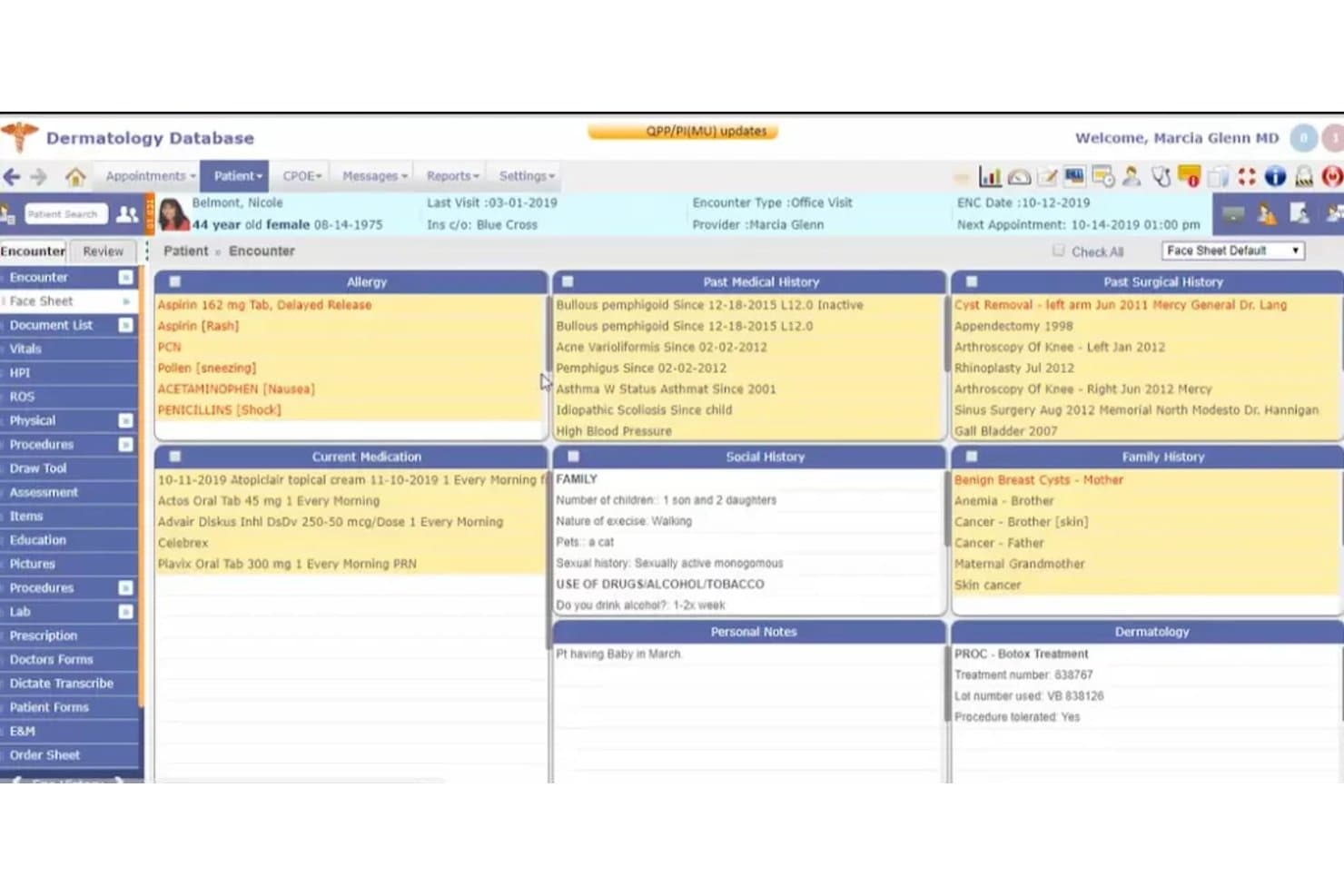
Compulink Dermatology Advantage offers a comprehensive face sheet view displaying patient allergies, medical history, current medications, social history, family history, and dermatology procedure notes in a single dashboard. Compulink Dermatology Advantage is a specialty-specific EHR and practice management platform built for dermatology practices, combining clinical documentation, Mohs surgery workflows, image capture, dermatopathology integration, and automated billing in one system.
Who Is Compulink Dermatology Advantage Best For?
It's a strong fit for dermatology practices that handle a mix of medical, cosmetic, and Mohs surgery cases and want a single platform covering clinical and billing workflows.
Why I Picked Compulink Dermatology Advantage
I've included Compulink Dermatology Advantage in my top picks because it's one of the few dermatology EHRs that covers medical, cosmetic, and Mohs surgery workflows in one platform. I particularly like how the Pathology Management module ties specimen tracking directly to patient charts, keeping dermatopathology results alongside clinical documentation. The AI Ambient Virtual Scribe with SMART Orders also cuts charting time by handling documentation automatically as providers move through encounters.
Compulink Dermatology Advantage Key Features
- Integrated body mapping: Lets you capture, annotate, and track lesion locations directly on patient body diagrams.
- Dermatology E/M and CPT coding: Handles automatic coding suggestions with built-in dermatology-specific CPT and ICD-10 libraries.
- Bidirectional dermatopathology lab integration: Sends specimen orders and receives results tied to patient records in real time.
- Cosmetic and retail management: Supports inventory tracking, product sales, and membership program management for aesthetic service workflows.
Compulink Dermatology Advantage Integrations
Compulink Dermatology Advantage offers native integrations with SureScripts for e-prescribing, as well as laboratory and dermatopathology systems for sending and receiving specimen orders and results. An API is available for custom integrations.
Pros and Cons
Pros:
- AI scribe captures documentation during live encounters
- Single platform for medical, cosmetic, and surgical
- Dedicated Mohs mapping and staging within charts
Cons:
- Initial setup complexity requires significant time investment
- System performance can feel slow at times
Learn more about Compulink Dermatology Advantage: Best for customizable dermatology EHR
- Free demo available
- From $229/user/month
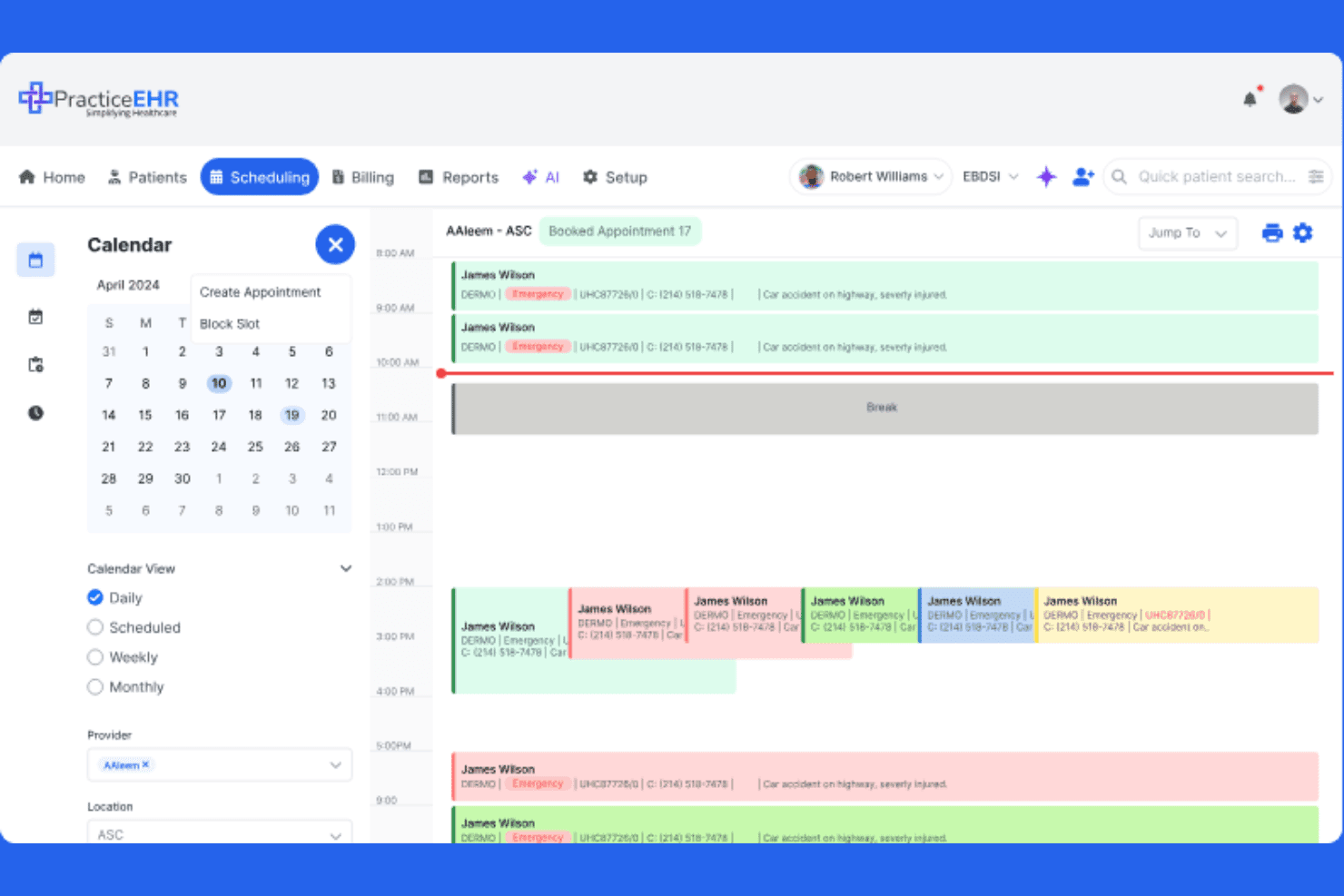
Practice EHR simplifies clinical scheduling by managing daily provider appointments and time slots. PracticeEHR is a dermatology EHR platform that combines customizable clinical documentation templates, skin image capture and lesion tracking, AI-assisted coding and charting, and integrated practice management tools including scheduling, billing, and claims.
Who Is PracticeEHR Best For?
PracticeEHR is a good fit for multi-location dermatology groups that need a single platform to handle clinical documentation, skin image tracking, scheduling, and billing.
Why I Picked PracticeEHR
I've included PracticeEHR in my top picks because its customizable dermatology templates genuinely stand out for practices that need documentation built around their actual workflows. I like that you can configure templates for skin exams, Mohs visits, and surgical procedures, while the platform also captures and compares high-resolution skin images directly in the patient chart for longitudinal lesion tracking. The AI Scribe layer drafts SOAP notes and suggests ICD/CPT codes from the visit conversation, cutting the post-visit documentation burden significantly.
PracticeEHR Key Features
- AI Scribe: Listens to visit conversations, transcribes in 20+ languages, and drafts SOAP notes with ICD/CPT code suggestions for provider review.
- Cosmetic inventory tracking: Monitors injectables and retail products directly within the platform alongside standard clinical workflows.
- Multi-location scheduling: Supports scheduling across multiple practice locations with role-based access controls for staff.
- AI Claim Editor: Reviews claim lines before submission, flags rejection risks with probability scores, and surfaces suggested fixes.
PracticeEHR Integrations
PracticeEHR has native integrations with LabCorp, Quest Diagnostics, Surescripts, Kno2, Carequality, and TEFCA. Its FHIR R4-based open API supports custom integrations.
Pros and Cons
Pros:
- Reviewers praise scheduling and chart access
- High-resolution images track changing lesions
- Customizable templates support dermatology documentation
Cons:
- Dedicated biopsy tracking isn’t confirmed
- Template changes can require support
Learn more about Practice EHR:
How I Evaluate Dermatology EHR
I split my evaluation into three parts, giving the most weight to core tasks: document skin exams and link clinical photos to patient records. Next, I look for differentiators such as Mohs surgery tracking. Finally, I consider support, onboarding, and pricing value beyond the feature set.
Core Functionality (Table Stakes For This List)
When I'm selecting tools for my list, I score each one on a scale from 0 (does not offer the functionality) to 5 (excels in this area) for each core functionality listed below. I then convert the total into a percentage to help assess each tool’s overall fit, with extra weight on any functionalities I’ve deemed essential.
- Dermatology Charting (Essential): I look for adaptable templates and structured fields for skin exams, lesion details, and procedure notes across routine and surgical visits.
- Clinical Image Management (Essential): I assess how photos connect to encounters and lesions, including body mapping and comparisons that help track changes over time.
- Pathology & Biopsy Tracking: I check whether teams can record biopsy orders, track status, and link results to the relevant lesion or encounter.
- Dermatology Coding & Billing: I look for procedure-aware coding workflows for services such as excisions and cosmetic add-ons, alongside billing functions.
- E-Prescribing: I consider whether clinicians can prescribe topical and systemic treatments and manage refills within the patient’s record.
- Practice Management Integration: I evaluate how clinical records connect with scheduling, registration, and billing, including whether staff must enter the same information twice.
Once I have a list of tools that meet the criteria, I consider what sets each platform apart.
Differentiating Factors (What Sets Vendors Apart)
Here's how I compare and contrast different vendors:
Standout Features
Mohs surgery tracking is a major separator. I check whether a platform supports stage-by-stage margin documentation and repair notes, since practices without this end up in spreadsheets. I also look at mobile photo capture apps that let providers shoot and attach images chairside. A cosmetic and aesthetic module matters for mixed practices—I evaluate consent-form workflows and before/after image pairing for injectables or laser work.
Beyond Features
I check whether a vendor treats dermatology as its core market or a bolt-on vertical. Purpose-built platforms tend to ship updates informed by practicing dermatologists, while generic EHRs lag on things like body-mapping improvements. Interoperability matters just as much—I evaluate lab and clearinghouse connections, since a missing pathology interface means staff re-key biopsy results manually. I also look at onboarding depth: vendors that offer template customization support specific to dermatology workflows cut adoption time considerably compared to generic training programs.
Slik velger du et EHR-system for dermatologi
Det er lett å gå seg vill i lange funksjonslister og komplekse prismodeller. For å holde fokus mens du arbeider deg gjennom den unike prosessen med å velge programvare, får du her en sjekkliste over faktorer du bør ha i tankene:
| Faktor | Hva du bør vurdere |
| Skalerbarhet | Vil systemet håndtere flere behandlere eller lokasjoner? Ta hensyn til vekstplanene dine, og unngå å vokse fra plattformen. |
| Integrasjoner | Kan EHR-systemet kobles til laboratorier, fakturering, bildediagnostikk og eksisterende PMS- eller CRM-systemer som praksisen din er avhengig av? Test hvor omfattende integrasjonene er. |
| Tilpasningsmuligheter | Kan du tilpasse maler, rapporter og pasientforløp til den spesifikke praksismodellen eller subspesialiteten din – uten høye konsulentkostnader? |
| Brukervennlighet | Er plattformen intuitiv for leger, medisinske assistenter og resepsjonspersonell? Gjennomfør en demonstrasjon med flere brukergrupper, og spør om hvor lang tid det tar å lære systemet. |
| Implementering og opplæring | Spør om tidsplanen for oppstart, støtte ved datamigrering og om leverandøren tilbyr opplærere med dermatologikompetanse i forbindelse med innføringen. |
| Kostnad | Se utover grunnabonnementet, og undersøk kostnader knyttet til bildelagring, pasientportaler, gebyrer til oppgjørssentraler eller nivåer for premium brukerstøtte. |
| Sikkerhetstiltak | Hvordan håndterer leverandøren risiko knyttet til HIPAA og ePHI? Spør om datakryptering, revisjonslogger og sikkerhetssertifiseringer utover det grunnleggende. |
| Etterlevelseskrav | Er systemet i tråd med kravene til elektronisk forskrivning, ONC-sertifisering, MIPS/MACRA og lokale endringer i regelverket? |
Hva er EHR-systemer for dermatologi?
EHR-systemer for dermatologi er elektroniske pasientjournalsystemer som er utviklet spesielt for dermatologipraksiser. De støtter spesialisert journalføring, håndtering av kliniske bilder, arbeidsflyter for Mohs-prosedyrer, integrasjon med patologi og fakturering for behandling av lesjoner. Disse plattformene bidrar til å effektivisere dokumentasjon og behandling i dermatologiske miljøer med høyt pasientvolum og omfattende bruk av bilder, slik at teamet ditt kan bruke mer tid på pasientbehandling og mindre tid på manuell dataregistrering.
Funksjoner i EHR-systemer for dermatologi
Ved valg av dermatologisk EHR bør du se etter følgende nøkkelfunksjoner:
- Dermatologispesifikke maler: Ferdiglagde journalmaler for akne, føflekksjekk, biopsier, eksisjoner og vanlige dermatologiske prosedyrer, som hjelper behandlere med å dokumentere effektivt og konsekvent.
- Håndtering av kliniske bilder: Verktøy for å ta, laste opp, annotere og sammenligne pasientbilder eller dermoskopibilder sammen med kroppskart i journalen.
- Integrert kroppskartlegging: Interaktive diagrammer som lar deg markere hvor lesjoner befinner seg, følge endringer visuelt og knytte kliniske bilder til nøyaktig oppfølging over tid.
- Arbeidsflyt for Mohs-kirurgi: Moduler for kartlegging av tumorstadier, sporing av kirurgiske marginer og dokumentasjon av hvert Mohs-lag under inngrepet – noe som er avgjørende for kirurgiske praksiser.
- Integrasjon med patologilaboratorium: Toveiskobling for å sende biopsier, motta dermatopatologiske resultater og knytte laboratoriedata direkte til pasientbesøk.
- Automatisert koding og fakturering: CPT/ICD-10-kodingsverktøy basert på lesjoner, med logikk for modifikatorer og støtte for dermatologispesifikk fakturering og kravhåndtering.
- Elektronisk forskrivning (EPCS): Sikre og kompatible verktøy for å sende resepter – inkludert kontrollerte legemidler – direkte til apotek fra EHR-systemet.
- Pasientportal: Gir pasienter sikker tilgang til notater fra konsultasjoner, laboratorieresultater og direktemeldinger, noe som bidrar til å effektivisere kommunikasjonen og redusere administrative telefonsamtaler.
- HIPAA-samsvar: Sikkerhetstiltak som tilgangskontroller, kryptering og revisjonslogging for å beskytte elektronisk beskyttet helseinformasjon (ePHI).
- Tilpassbar rapportering: Innebygde analyse- og rapporteringsdashbord tilpasset dermatologiske praksiser for å måle aktivitetsvolum og resultater, samt støtte samsvar med krav til kvalitetsrapportering.
Fordeler med dermatologisk EHR
Implementering av dermatologisk EHR gir flere fordeler for teamet og virksomheten din. Her er noen av fordelene du kan se frem til:
- Mer effektiv journalføring: Spesialiserte maler, integrert kroppskartlegging og verktøy for kliniske bilder lar deg dokumentere mye raskere enn med generisk EHR-programvare.
- Bedre diagnostisk nøyaktighet: Visuell sporing av lesjoner og bildesammenligning over tid støtter tidligere oppdagelse av hudforandringer og reduserer risikoen for at funn overses.
- Forenklede Mohs- og prosedyrearbeidsflyter: Formålsbygde moduler hjelper kirurger med å kartlegge, stadieinndele og dokumentere hvert trinn, slik at kliniske data holdes organisert for hver pasient.
- Færre faktureringsfeil: Automatisert CPT-koding, logikk for modifikatorer og dermatologispesifikke faktureringsverktøy minimerer omarbeid og reduserer antallet avviste forsikringskrav.
- Bedre koordinering av behandlingen: Toveisintegrasjon med laboratorier og interoperabilitet sikrer at patologisvar, kliniske notater og resepter er tilgjengelige på ett sted.
- Bedre samsvar og sikkerhet: HIPAA-sikkerhetstiltak, revisjonslogging og ONC-sertifisering bidrar til å holde pasientdata sikre og praksisen i tråd med regulatoriske krav.
- Større pasientengasjement: Pasientportaler, elektronisk forskrivning og meldingsverktøy gjør det enklere for pasienter å få tilgang til informasjon og holde kontakten med behandlingsteamet.
Kostnader og priser for dermatologisk EHR
Ved valg av dermatologisk EHR er det nødvendig å forstå de ulike pris- og abonnementsmodellene for EHR som er tilgjengelige. Kostnadene varierer basert på funksjoner, teamstørrelse, tillegg og mer. Tabellen nedenfor oppsummerer vanlige abonnementer, gjennomsnittsprisene deres og typiske funksjoner som er inkludert i dermatologiske EHR-løsninger:
Sammenligningstabell for abonnementer for dermatologisk EHR
| Abonnementstype | Gjennomsnittspris | Vanlige funksjoner |
| Gratisabonnement | $0 | Grunnleggende journalmaler, begrenset lagring av kliniske bilder og standard HIPAA-sikkerhet. |
| Personlig abonnement | $50-$150 per bruker per måned | Dermatologimaler, opplasting og annotering av bilder, elektronisk forskrivning og grunnleggende rapportering. |
| Forretningsabonnement | $150-$300 per bruker per måned | Avansert bildehåndtering, integrert kroppskartlegging, laboratorie- og patologikobling, tilpassbar fakturering og pasientportal. |
| Virksomhetsabonnement | $300+ per bruker per måned | Støtte for flere lokasjoner, implementeringsassistanse, interne RCM-alternativer, avansert analyse, API-integrasjoner og omfattende samsvarsverktøy. |
Vanlige spørsmål om dermatologisk EHR
Her er noen svar på vanlige spørsmål om dermatologisk EHR:
Hvordan skiller et dermatologisk EHR-system seg fra et generelt EHR-system?
Et dermatologisk EHR-system omfatter spesialverktøy som håndtering av kliniske bilder, kroppskartlegging og lesjonsspesifikke maler, som støtter de unike dokumentasjons- og arbeidsflytbehovene i dermatologisk praksis.
Kan dermatologiske EHR-systemer håndtere både medisinske og kosmetiske arbeidsflyter?
Ja, mange plattformer lar deg dokumentere og fakturere for både medisinske konsultasjoner og kosmetiske tjenester, med funksjoner som lagerstyring, håndtering av detaljhandelsprodukter og separate faktureringsprosesser.
Hva bør en dermatologisk praksis se etter når den vurderer støtte til implementering av EHR?
Du bør se etter leverandører som tilbyr implementeringsspesialister med opplæring innen dermatologi, god støtte for datamigrering fra eldre systemer og opplæring tilpasset teamets arbeidsflyt og behov for journalføring.
Er det mulig å integrere dermatologiske EHR-systemer med dermatopatologiske laboratorier?
Ja, ledende systemer tilbyr toveis laboratoriegrensesnitt, slik at du kan sende prøver, motta patologisvar og avstemme rapporter direkte i pasientjournalen.
Støtter dermatologiske EHR-systemer samsvar med forsikrings- og myndighetskrav?
Ja, de fleste spesialiserte EHR-systemer leveres med verktøy for HIPAA-samsvar, ONC-sertifisering, MIPS/MACRA-rapportering og sikker elektronisk forskrivning – også for kontrollerte stoffer.