


RXNT vs. Tebra: Comprehensive Comparison and Reviews for 2026
RXNT and Tebra both combine EMR and practice management tools, but they suit different types of ambulatory organizations. This comparison examines their features, strengths, limitations, and ideal use cases to help you choose the better fit.

We review tools independently, and commissions help fund our testing. See our transparency policy, our methodology, or suggest a tool.
Choosing EMR software is rarely just a clinical decision. Pick the wrong platform, and the friction shows up everywhere, from scheduling and billing to patient communication and staff workload.
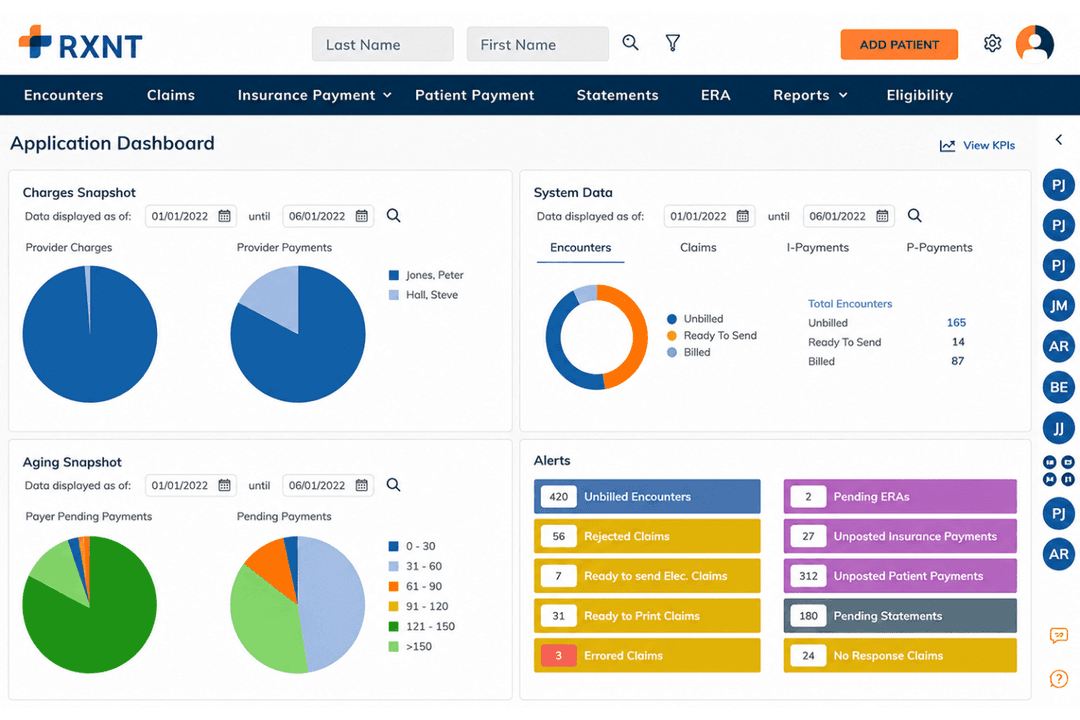
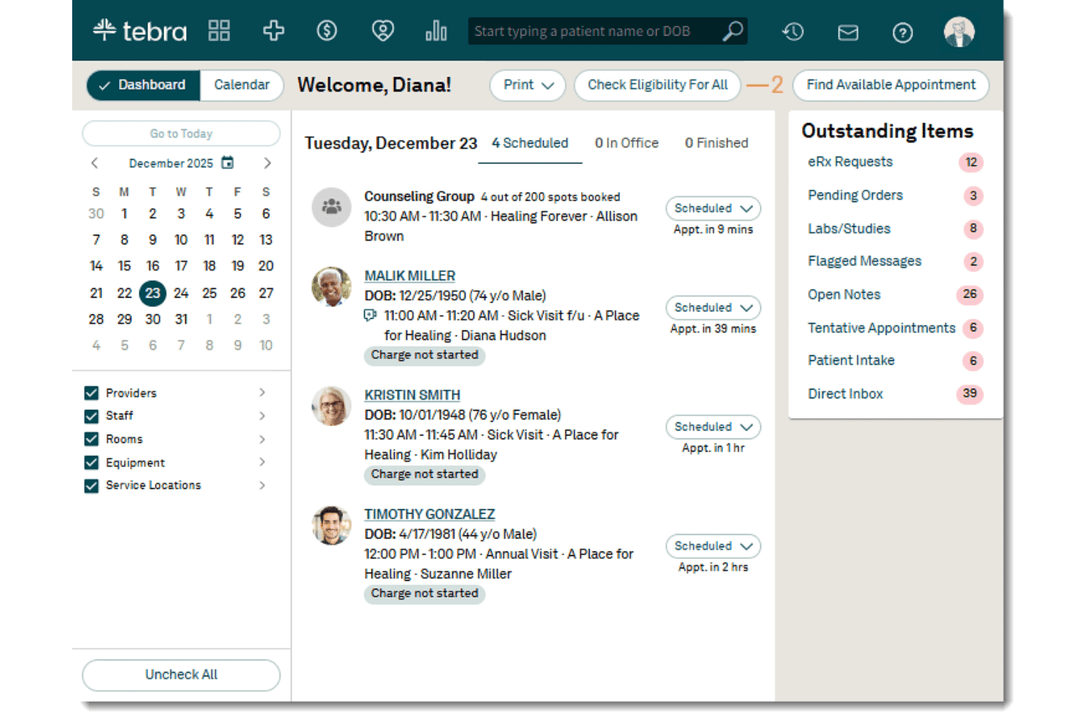
RXNT and Tebra are both EMR software platforms that combine clinical and practice management tools, but they take different approaches. RXNT leans into connected clinical and financial workflows for ambulatory organizations, while Tebra pairs EHR and practice management with patient experience and practice growth tools for private practices.
In this comparison, I’ll break down their features, pricing, usability, security, strengths, limitations, and ideal use cases to help you decide which one makes more sense for the way your organization actually operates.
RXNT
4.3/5
- Free demo + free expert consultation available
- Pricing upon request
Tebra
3.9/5
- Free demo available
- Pricing upon request
Why Trust Our Software Recommendations
6,700+
Reviews
20
Industry experts
16+
Evaluation factors
14
Years
Our team has been testing and reviewing software since 2012. As medical practice leaders ourselves, we know how difficult—and important—it is to choose the right software.
For this guide, we evaluated tools using hands-on testing and independent research, scoring tools using our selection criteria.
Our reviews reflect our human editorial judgment, not a sales pitch.
| RXNT | Tebra | |
|---|---|---|
| Free Trial | Free demo + free expert consultation available | Free demo available |
| Pricing | Pricing upon request | Pricing upon request |
RXNT vs. Tebra Pricing & Hidden Costs
RXNT is easier to price at a glance because it publishes per-provider rates for its core products and bundles. Onboarding, data migration, support, cloud access, and regular upgrades are included, making the upfront cost fairly predictable. However, most plans require an annual contract, and add-ons such as EPCS, lab interfaces, patient reminders, electronic faxing, and printed claims or statements can raise the final bill.
Tebra, by contrast, uses custom pricing based on provider count, selected features, implementation needs, specialty workflows, and claim volume. That flexibility can be useful, but it also makes the total cost harder to estimate before speaking with sales. For either platform, I would ask for a full breakdown of add-ons, usage-based fees, implementation costs, support coverage, and contract terms. RXNT gives you more visibility upfront, while Tebra may require more digging to understand the true long-term cost.
| RXNT | Tebra | |
|---|---|---|
| API | Yes | Yes |
| Appointment Scheduling | Yes | Yes |
| Athlete Management | No | No |
| Audit Management | Yes | No |
| Calendar Management | Yes | Yes |
| Compliance Tracking | Yes | Yes |
| Customer Management | No | No |
| Dashboard | Yes | Yes |
| Data Export | Yes | Yes |
| Data Import | Yes | Yes |
| Data Visualization | No | Yes |
| Electronic Prescribing | Yes | Yes |
| External Integrations | Yes | Yes |
| File Sharing | Yes | Yes |
| File Transfer | Yes | Yes |
| Health Management | Yes | Yes |
| HIPAA Compliance | Yes | Yes |
| Inventory Tracking | No | No |
| Multi-User | Yes | Yes |
| Notifications | Yes | Yes |
| Organization Management | Yes | Yes |
| Patient Management | Yes | Yes |
| Project Management | No | No |
| Regulatory Alerts | Yes | No |
| Risk Assessment | Yes | No |
| Scheduling | Yes | Yes |
| Supplier Management | No | No |
| Integration | RXNT | Tebra |
|---|---|---|
| IntegrationQuest Diagnostics | RXNT✅ | Tebra✅ |
| IntegrationLabCorp | RXNT✅ | Tebra✅ |
| IntegrationSurescripts | RXNT✅ | Tebra✅ |
| IntegrationChange Healthcare | RXNT✅ | Tebra✅ |
| IntegrationAbbott Toxicology | RXNT✅ | Tebra❌¹ |
| IntegrationHealth e Link | RXNT✅ | Tebra❌¹ |
| IntegrationHealthCollab | RXNT✅ | Tebra❌¹ |
| IntegrationZoom for Healthcare | RXNT✅² | Tebra❌¹ |
| IntegrationFullscript | RXNT❌¹ | Tebra✅ |
| IntegrationIronBridge | RXNT❌¹ | Tebra✅ |
| IntegrationAPI | RXNT✅ | Tebra✅ |
¹ Not publicly listed
² Through VideoBridge
Both RXNT and Tebra support the core integrations needed for prescribing, laboratory workflows, claims processing, and data exchange. RXNT, however, publishes a broader range of healthcare-specific connections across labs, health information exchanges, telehealth, and APIs, which gives medical leaders more visibility when planning how the platform will fit into an existing technology stack. Tebra takes a more focused approach, covering the essentials for private practice operations while relying on fewer publicly documented connections. Overall, RXNT is better suited to organizations that want a wider, more clearly defined integration ecosystem, while Tebra keeps its scope closer to everyday independent practice workflows.
| Factor | RXNT | Tebra |
|---|---|---|
| FactorCompliance and Certifications | RXNTHIPAA compliant, with SOC 2 Type II-certified data centers, ONC-certified health IT, Surescripts- and EPCS-certified prescribing software, and support for MACRA, MIPS, and MVPs. | TebraHIPAA compliant, HITRUST and ONC certified, and PCI DSS Level 1 compliant, with a Business Associate Agreement included in customer contracts. |
| FactorData Protection and Threat Detection | RXNTProtects PHI through encryption, access controls, vulnerability management, regular security assessments, and Azure Cloud Defender for active threat detection and response. | TebraEncrypts patient data at rest and in transit and uses risk assessments, secure cloud hosting, and monitoring aligned with established security frameworks. |
| FactorAccess and Audit Controls | RXNTCombines unique user authentication, multi-factor authentication, automatic timeouts, and tamper-resistant audit reporting for tracking access and activity involving electronic health information. | TebraUses individual accounts, two-factor authentication, role-based permissions, and audit logs that record who accessed or changed patient information. |
| FactorControlled-Substance prescribing | RXNTUses identity proofing, administrator-approved EPCS access, and two-factor or biometric authentication to secure controlled-substance prescribing across browser and mobile workflows. | TebraSupports controlled-substance prescribing with identity verification and two-factor authentication, though fewer prescribing-specific controls are detailed publicly. |
| FactorReliability and Maintenance | RXNTProvides 24/7 cloud access, automatic system updates and security patches, and critical system coverage for availability issues. | TebraUses enterprise-grade cloud infrastructure, performs regular backups, and maintains a public status page for incidents and scheduled maintenance. |
Both platforms offer strong healthcare security, but RXNT’s safeguards are particularly relevant to organizations managing sensitive clinical and prescribing workflows. Its SOC 2 Type II-certified data centers, Azure Cloud Defender, multi-factor authentication, tamper-resistant audit records, and prescribing-specific EPCS controls go beyond basic HIPAA compliance. Tebra provides strong platform-wide protections and more public visibility into system availability, while RXNT makes the stronger case for prescribing governance and traceable EHR activity.
| Factor | RXNT | Tebra |
|---|---|---|
| FactorUser Interface | RXNTUses a single login across its integrated clinical and practice management products, with customizable templates and reports, though structured documentation and billing workflows may require some adjustment. | TebraBrings charting, scheduling, billing, and patient communication into a connected interface designed primarily around independent private practice workflows. |
| FactorOnboarding | RXNTIncludes a kickoff process, dedicated onboarding support, free data migration, custom template development, and weekly coordination, with implementation length depending on the products and data involved. | TebraAssigns a dedicated onboarding manager and guides teams through configuration, patient workflows, clinical adoption, and billing, with most customers beginning to use the platform within 45 days. |
| FactorLearning Curve | RXNTOffers interactive in-app guides, Help Center documentation, and self-paced video courses, but teams with established documentation, reporting, or billing processes may need time to adapt. | TebraUses a staged adoption process and provides live and on-demand training through Tebra University, helping teams learn patient, clinical, and billing workflows in sequence. |
| FactorCustomer Support | RXNTProvides free, in-house US-based assistance by phone and email, with separate clinical and practice management teams plus 24/7 coverage for critical system issues. | TebraProvides in-app and phone support, Help Center resources, and a Customer Care Portal where users can submit requests, upload files, and track case progress. |
| FactorMobile Access | RXNTIncludes free iOS and Android apps for e-prescribing, charge capture, scheduling, and patient check-in, with facial or fingerprint sign-in available on supported devices. | TebraSupports cloud access through desktop, tablet, and mobile devices, including mobile charting for completing clinical notes away from a workstation. |
RXNT is not a zero-learning-curve system, especially for organizations bringing over highly established workflows. However, its hands-on implementation, included data migration, custom templates, and specialized mobile apps help ease the transition. Tebra, meanwhile, offers a more structured learning experience centered on independent practice. Overall, Tebra may be easier to adopt gradually, while RXNT provides more direct support for teams managing broader clinical and financial workflows.
RXNT
- Connects EMR, e-prescribing, scheduling, billing, and patient engagement workflows
- Includes hands-on onboarding, free data migration, and custom template setup
- Supports more than 45 specialties and ambulatory organizations of all sizes
- Limited customization may restrict established documentation and billing processes
- New releases may occasionally introduce bugs or temporary instability
- Not designed for hospitals, inpatient facilities, dental offices, or some urgent care settings
Tebra
- Patient self-scheduling tools help reduce missed appointments.
- Automated billing workflows handle claims and denials efficiently.
- Telehealth features work directly from the main dashboard.
- Detailed custom reporting options are limited for advanced users.
- Occasional system lags during high-volume usage windows.
- Batch payment posting lacks some advanced filtering options.
RXNT
- Healthcare ProfessionalsIndividual providers can use RXNT to manage documentation, prescribing, scheduling, patient communication, and billing without relying on a separate product for each task.
- Ambulatory Care OrganizationsThe platform is built around outpatient workflows, including patient records, appointments, prescriptions, claims, and everyday practice operations.
- Primary Care ProvidersPrimary care organizations can use RXNT for charting, medication management, preventive care documentation, patient engagement, and billing across a broad range of routine encounters.
- Mental and Behavioral Health ProvidersPsychiatry, mental health, and behavioral health organizations can manage documentation, prescribing, scheduling, patient communication, and reimbursement workflows within the system.
- Multi-Specialty and Multi-Location OrganizationsConnected patient records, scheduling, billing, and administrative tools can help larger ambulatory groups coordinate care across different specialties and locations.
- Medical Billing CompaniesBilling companies and central billing offices can use RXNT to manage claims, payments, accounts receivable, reporting, and revenue cycle workflows for multiple healthcare clients.
Tebra
- Independent ClinicsTebra simplifies billing and appointment management for clinics with smaller administrative teams.
- Multi-Specialty GroupsCentralized dashboards and flexible scheduling work well for practices with multiple types of providers sharing resources.
- Behavioral HealthTebra’s video visit features and digital intake forms are ideal for mental health professionals delivering remote care.
- Billing DepartmentsAutomated claims and eligibility verification help billing staff process insurance tasks faster without manual back-and-forth.
- Office ManagersAppointment reminders and patient portals cut down phone time and help streamline front-desk tasks.
- New PracticesGuided onboarding and accessible support help new offices set up quickly with minimal hassle.
Who Should Use RXNT, and Who Should Use Tebra?
RXNT is best suited to ambulatory organizations that want clinical, prescribing, billing, scheduling, and patient engagement tools from one provider. In particular, it can support solo practitioners, specialty groups, multi-location organizations, and medical billing companies, making it the stronger choice when you need broad functionality, flexible product bundles, advanced e-prescribing, and closer coordination between clinical and financial workflows.
Tebra, meanwhile, is a better fit for independent private practices that want scheduling, billing, telehealth, digital intake, and patient engagement tools built around everyday office operations. Small and midsized clinics, behavioral health providers, office managers, billing teams, and new practices may find its private-practice focus especially appealing. Overall, RXNT offers more flexibility for varied ambulatory workflows, while Tebra keeps its attention firmly on helping independent practices run and grow.
| RXNT | Tebra | |
|---|---|---|
| Customization | RXNT Offers specialty-specific Smart Forms, configurable workflows, and custom templates built during onboarding, although some documentation, reporting, and billing processes remain more structured. | Tebra Includes more than 200 editable system templates, charting shortcuts, customizable intake forms, and optional paid professional services for more complex template creation. |
| Onboarding Approach | RXNT Includes a kickoff meeting, dedicated implementation support, free data migration, custom template setup, and training, with the timeline shaped by the products and data being transferred. | Tebra Assigns a dedicated onboarding manager, configures the system around the practice’s workflows, and provides live and on-demand training, with most customers beginning use within 45 days. |
| Patient Engagement | RXNT Provides self-scheduling, reminders, secure messaging, digital forms, medical records, lab results, and online payments through its patient portal and engagement tools. | Tebra Extends beyond routine portal functions with digital intake, automated communications, patient surveys, reputation management, online profiles, and practice marketing tools. |
| Product Packaging | RXNT Lets organizations purchase EHR, e-prescribing, or practice management separately or choose the Full Suite, with published per-provider pricing and onboarding, migration, support, and upgrades included. | Tebra Uses personalized bundle pricing based on provider count, selected features, implementation requirements, specialty workflows, and claim volume, with volume incentives available for some practices. |
| Telehealth Approach | RXNT Uses VideoBridge to connect appointments with the practice’s preferred HIPAA-compliant video platform, allowing providers to document the encounter alongside the external video session. | Tebra Provides native telehealth with integrated video visits, group appointments, provider URLs, virtual waiting rooms, patient communications, scheduling, and clinical notes. |
| Billing Automation | Both connect clinical and practice management workflows with eligibility verification, electronic claims, payment management, accounts receivable tracking, and billing reports. |
|---|---|
| Charting Tools | Both provide structured clinical documentation, patient histories, SOAP-style charting, and customizable templates that can be adjusted for specialty workflows. |
| E-Prescribing | Both connect with Surescripts, support EPCS, and automatically check new prescriptions for drug interactions and allergy risks before they are sent. |
| HIPAA Compliance | Both are HIPAA-compliant and protect patient information through encryption, controlled user access, cloud security measures, and ongoing monitoring or assessments. |
| Reporting & Analytics | Both provide operational and financial reporting for monitoring billing, collections, scheduling, and practice performance, with expanded customization available through advanced reporting tools. |