

Urology EMR software streamlines uroflow, imaging, and surgical scheduling data, which frees up your team to focus on improving long-term patient engagement. Managing procedure-heavy schedules can be challenging, but the proper support can reduce delays and ensure seamless documentation.
In this article, I compare and review the best urology EMR software tools to support your buying decision.
Why Trust Our Software Recommendations
6,700+
Reviews
20
Industry experts
16+
Evaluation factors
14
Years
Our team has been testing and reviewing software since 2012. As medical practice leaders ourselves, we know how difficult—and important—it is to choose the right software.
For this guide, we evaluated tools using hands-on testing and independent research, scoring tools using our selection criteria.
Our reviews reflect our human editorial judgment, not a sales pitch.
Urology EMR Software Comparison Table
This comparison table summarizes pricing details for my top urology EMR software selections:
| Tool | Best For | Trial Info | Price | ||
|---|---|---|---|---|---|
| 1 | Best for customizable urology templates | Free trial available | From $99/month | Website | |
| 2 | Best for customizable urology workflows | Free demo available | Pricing upon request | Website | |
| 3 | Good for peer-reviewed and specialty-specific content | Free demo available | Pricing upon request | Website | |
| 4 | Best for chronic urology care tracking | Free demo available, 7-day free trial for the standalone AI scribe | From $249/user/month | Website | |
| 5 | Best for in-office urology procedure billing | Free demo available | Pricing upon request | Website | |
| 6 | Best for mobile EHR access for on-the-go providers | Free demo available | Pricing upon request | Website | |
| 7 | Best for built-in medical billing and telehealth | Free demo available | From $429/user/month | Website | |
| 8 | Best for large urology group data consolidation | Free demo available | Pricing upon request | Website | |
| 9 | Best for urology-specific workflow optimization | Free demo available | Pricing upon request | Website | |
| 10 | Best for customizing templates to your practice needs | Free demo available | Pricing upon request | Website |


Best Urology EMR Software Reviews
Below are my detailed summaries of the best urology EMR software that made it onto my shortlist. My reviews offer a detailed look at the key features, pros & cons, integrations, and ideal use cases of each tool to help you find the best one for you.
 Best for customizable urology templates
- Free trial available
- From $99/month
Visit WebsiteCustomer Rating:4.8/5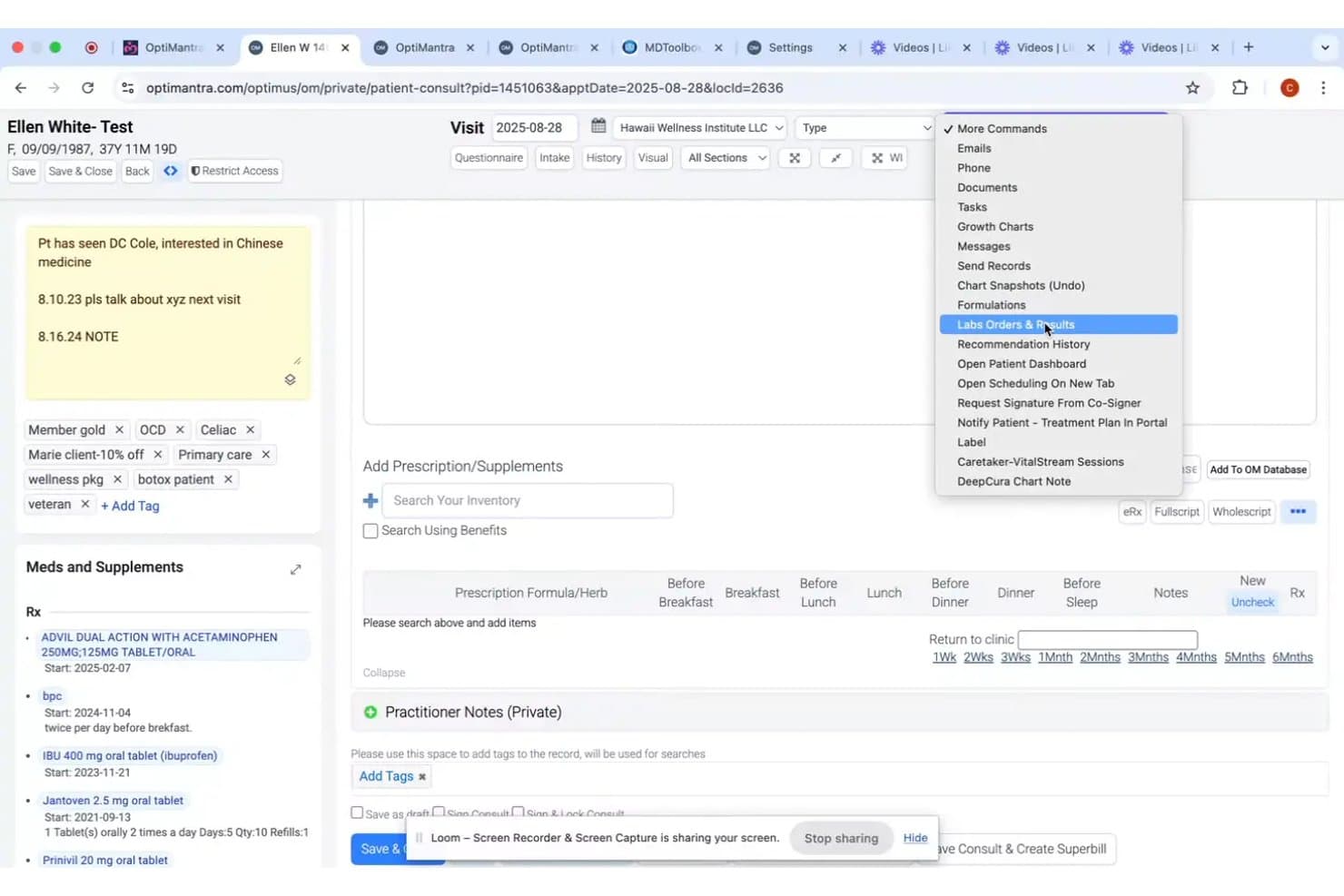
OptiMantra offers a Labs Orders & Results option accessible through a dropdown command menu within the patient consult screen. OptiMantra is a customizable EMR and practice management platform that combines clinical charting, e-prescribing, lab ordering, telehealth, scheduling, and integrated insurance billing for specialty practices.
Who Is OptiMantra Best For?
It's a strong fit for solo practitioners and small specialty practices that need a flexible, affordable EMR they can tailor to their own clinical workflows.
Why I Picked OptiMantra
I picked OptiMantra because its template builder gives urology practices genuine control over how they document encounters. I can build condition-specific SOAP notes for BPH, kidney stones, or incontinence from scratch, and follow-up charts can pull forward content from previous visits automatically. Custom questionnaires can also be pushed to patients through the portal before appointments, so intake is already mapped to the chart by the time a urologist walks in.
OptiMantra Key Features
- Integrated e-prescribing: Send electronic prescriptions, including controlled substances, to most US pharmacies.
- Insurance billing module: Manage claims, superbills, EOB auto-posting, and insurance payments within the EMR.
- HIPAA-compliant telehealth: Provide secure video visits directly through the platform at no additional cost.
- Lab and imaging connectivity: Place orders and receive results from major labs and imaging centers inside the EMR.
OptiMantra Integrations
OptiMantra offers native integrations with LabCorp, Quest Diagnostics, Access Medical Labs, Rupa Health, SimonMed, Surescripts (via MDToolbox), Stripe, Fiserv (Clover Connect), Box.com, Google Calendar, and SFax. An API is available for custom integrations.
Pros and Cons
Pros:
- Built-in patient portal and telehealth tools
- Embedded e-prescribing with controlled substance support
- Highly configurable chart templates for urology specialties
Cons:
- ONC certification and MIPS reporting not available
- No prebuilt urology-specific chart content
Learn more about OptiMantra: Best for customizable urology workflows
- Free demo available
- Pricing upon request
Visit WebsiteCustomer Rating:5/5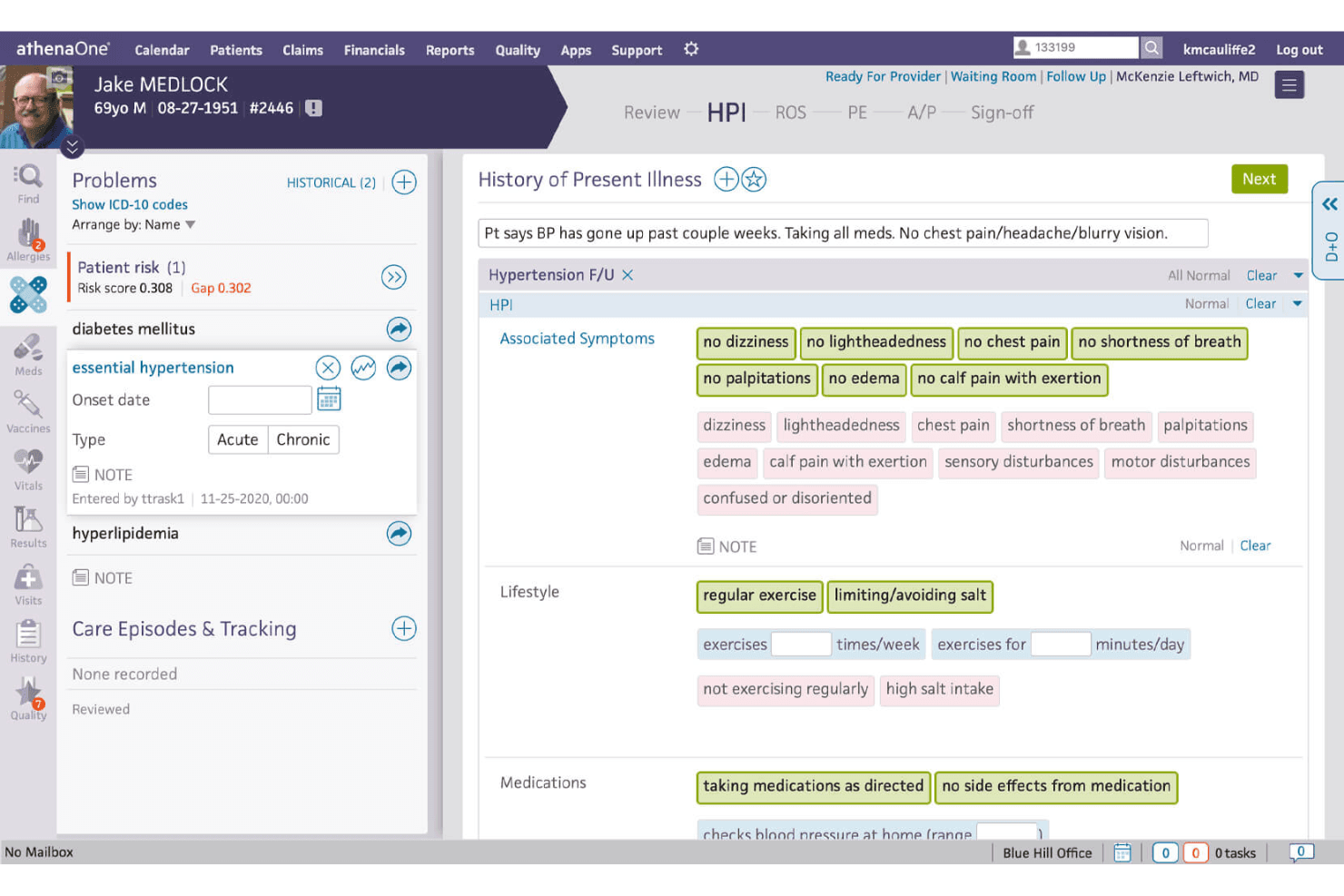
Athenahealth's platform offers a patient history interface, which simplifies documentation of the patient's medical background and previous treatments. Athenahealth is a cloud-based EHR and practice management platform that combines clinical documentation, revenue cycle management, scheduling, and patient engagement within a single, specialty-configurable system.
Who Is Athenahealth Best For?
Athenahealth suits mid-to-large urology practices and multi-specialty groups that prioritize integrated billing performance and configurable clinical workflows over out-of-the-box urology templates.
Why I Picked Athenahealth
I picked Athenahealth because its workflow customization goes deeper than most EMRs I've evaluated. Urologists can build personal templates, macros, and order sets that surface the right questions and results for each encounter type, whether that's a BPH follow-up or a kidney stone workup. I also like its Ambient Notes feature, which listens during encounters and auto-generates documentation, cutting post-visit charting time significantly.
Athenahealth Key Features
- AI-native rules engine: Automates billing workflows using over 30,000 prebuilt rules to help minimize claim errors.
- Integrated patient engagement portal: Lets patients schedule, message providers, pay bills, and access records through a single platform.
- Mobile EHR access: Enables charting, order management, and schedule review from any mobile device.
- Network-informed care gap insights: Surfaces real-time clinical insights and gaps in care during patient encounters.
Athenahealth Integrations
Athenahealth offers more than 300 marketplace integrations, including Fullscript, Epion, DeepScribe, TimeDoc Health, LucidAct, and Clearwave. An API is available for custom integrations.
Pros and Cons
Pros:
- Integrated RCM with automated claim scrubbing
- Strong reporting and analytics dashboard options
- Customizable encounter templates for urology subspecialties
Cons:
- No native AUA Quality Registry submission
- Urology device integrations require partner solutions
Learn more about Athenahealth: Good for peer-reviewed and specialty-specific content
- Free demo available
- Pricing upon request
Visit WebsiteCustomer Rating:4.4/5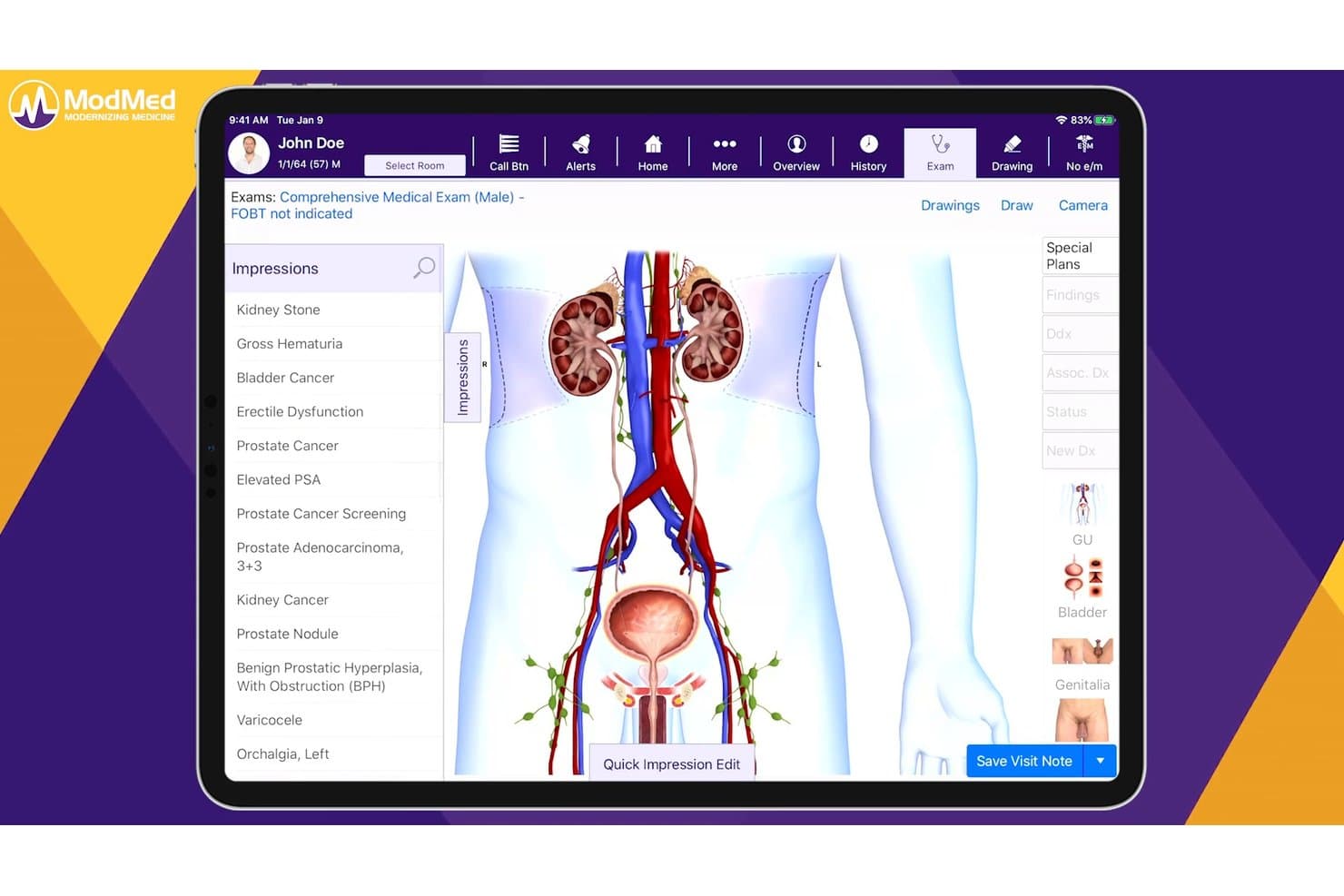
ModMed lets urologists document impressions with visual anatomy tools. ModMed EMA is a urology-focused EHR platform built specifically for urology practices, offering specialty-specific documentation workflows, integrated practice management, AI-assisted charting, billing and coding support, and patient engagement tools.
Who Is ModMed Best For?
ModMed EMA is a strong fit for urology physicians and practice administrators who want a single platform built specifically around urology clinical workflows, documentation, and revenue cycle management.
Why I Picked ModMed
I picked ModMed as one of the best because its EMA platform is built specifically by urologists for urologists, and that depth shows in how it handles peer-reviewed, specialty-specific content. Its prebuilt protocols for BPH, incontinence, and prostate cancer apply documentation, prescriptions, and MIPS items in a single click, and AI Scribe 2.0 was trained on over 750 million de-identified encounters to suggest notes and billing codes directly from the patient conversation. The AQUA registry integration also keeps practices aligned with urology-specific quality reporting without manual data entry.
ModMed Key Features
- AQUA registry integration: Automatically submits urology-specific quality data to the AQUA registry without manual data entry.
- Automated patient recalls: Sends reminders for PSA draws, cystoscopy follow-ups, medication injections, and critical lab results.
- ModMed BOOST revenue cycle service: Connects practices with certified coders who manage claims, track A/R, and report on net collection rates.
- APPatient mobile app: Lets patients view lab results, message the practice, request refills, pay bills, and schedule appointments from their phone.
ModMed Integrations
Documented integrations include Surescripts, Appriss Health, AQUA, PACS, urodynamic devices, and ultrasound systems. ModMed also supports FHIR APIs, HL7 connections, ModMed Records Exchange, and the synapSYS partner marketplace.
Pros and Cons
Pros:
- Revenue cycle tools support coding accuracy
- Urology protocols reduce repetitive charting steps
- Peer-reviewed content supports urology-specific decisions
Cons:
- AI Scribe suggestions need provider review
- Support responses can take too long
Learn more about ModMed: Best for chronic urology care tracking
- Free demo available, 7-day free trial for the standalone AI scribe
- From $249/user/month
Visit WebsiteCustomer Rating:4.4/5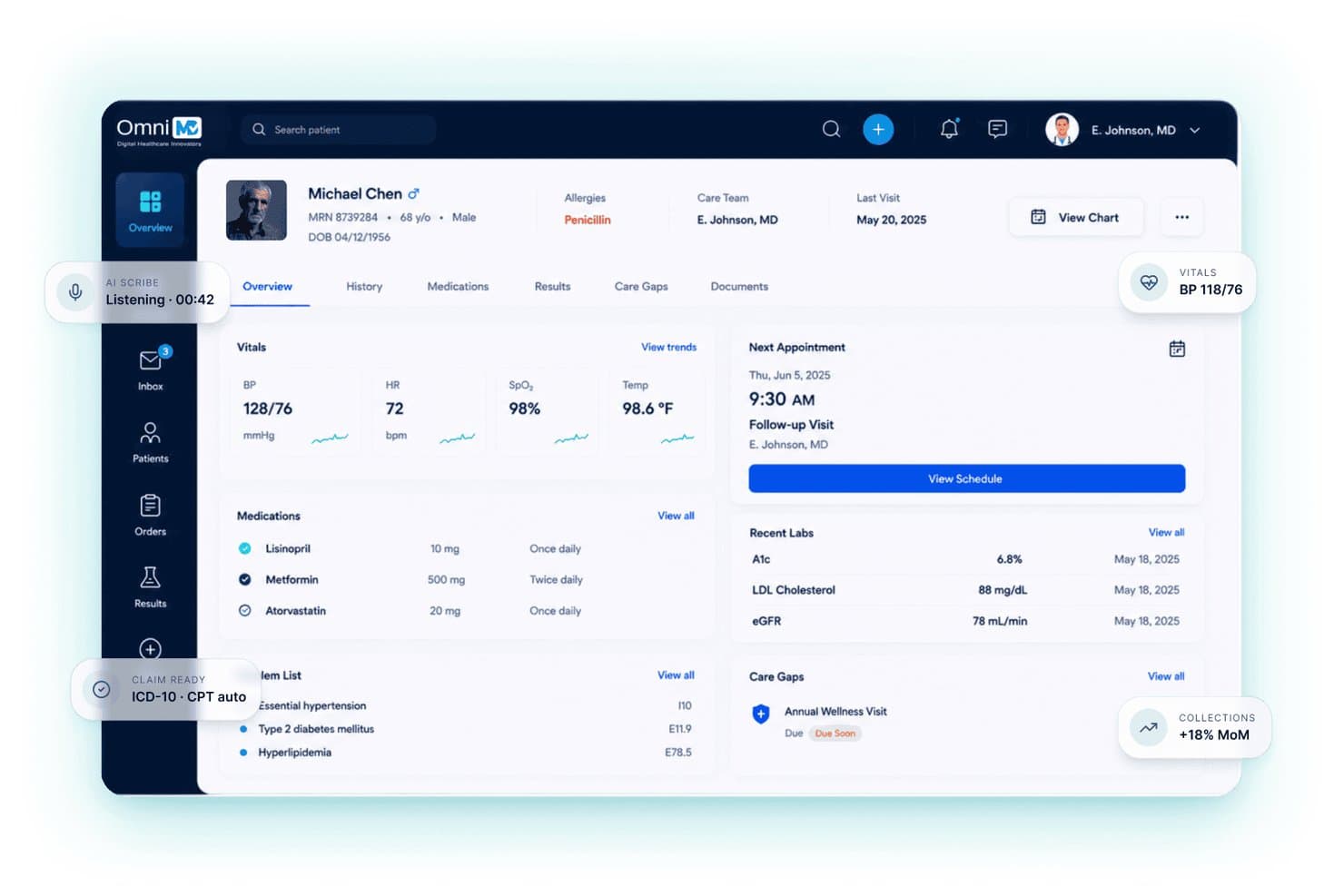
OmniMD centralizes patient vitals, meds, and labs in one EHR view. OmniMD is a multi-specialty EHR platform with urology-specific functionality, covering chronic care tracking, AI-assisted documentation, e-prescribing, billing, and lab integration in a single system.
Who Is OmniMD Best For?
OmniMD fits urology practices that need to manage long-term patient conditions like BPH, prostate cancer survivorship, and recurring kidney stones alongside day-to-day billing and documentation.
Why I Picked OmniMD
I picked OmniMD because its Chronic Care Engine is purpose-built for the long-term conditions urology practices deal with most: BPH, overactive bladder, recurring kidney stones, and prostate cancer survivorship. I like that PSA trends, biopsy results, and urine cytology all feed into a single patient timeline, with automatic alerts when pathology flags malignancy. The AI scribe also understands urology-specific terminology like AUA symptom scores and Gleason grading, which cuts documentation time without sacrificing clinical precision.
OmniMD Key Features
- AI medical scribe: Captures visit notes using ambient listening and understands urology-specific terminology like LUTS, AUA symptom scores, and Gleason grading.
- E-prescribing with EPCS: Sends controlled and non-controlled prescriptions directly to the pharmacy, with built-in allergy and drug interaction checks.
- OmniXchange lab integration: Uses HL7 to send orders to LabCorp, Quest, and regional labs, returning structured results with abnormal values flagged automatically.
- AI medical coder: Assigns procedure and diagnosis codes immediately after each visit, flagging undercoding and compliance gaps for kidney stone procedures and prostate workups.
OmniMD Integrations
OmniMD supports HL7/FHIR integrations with LabCorp, Quest, regional labs, hospital systems, pathology groups, and EHRs including Epic, Cerner, athenahealth, eClinicalWorks, and Allscripts. SMART-on-FHIR, APIs, and remote patient monitoring connectors support custom connectivity.
Pros and Cons
Pros:
- Combines charting, billing, and portal workflows
- Support teams resolve issues quickly
- Tracks PSA and chronic urology conditions
Cons:
- Users report bugs and duplicate data entry
- Urology templates lack publicly verified depth
Learn more about OmniMD: Best for in-office urology procedure billing
- Free demo available
- Pricing upon request
Visit WebsiteCustomer Rating:4.1/5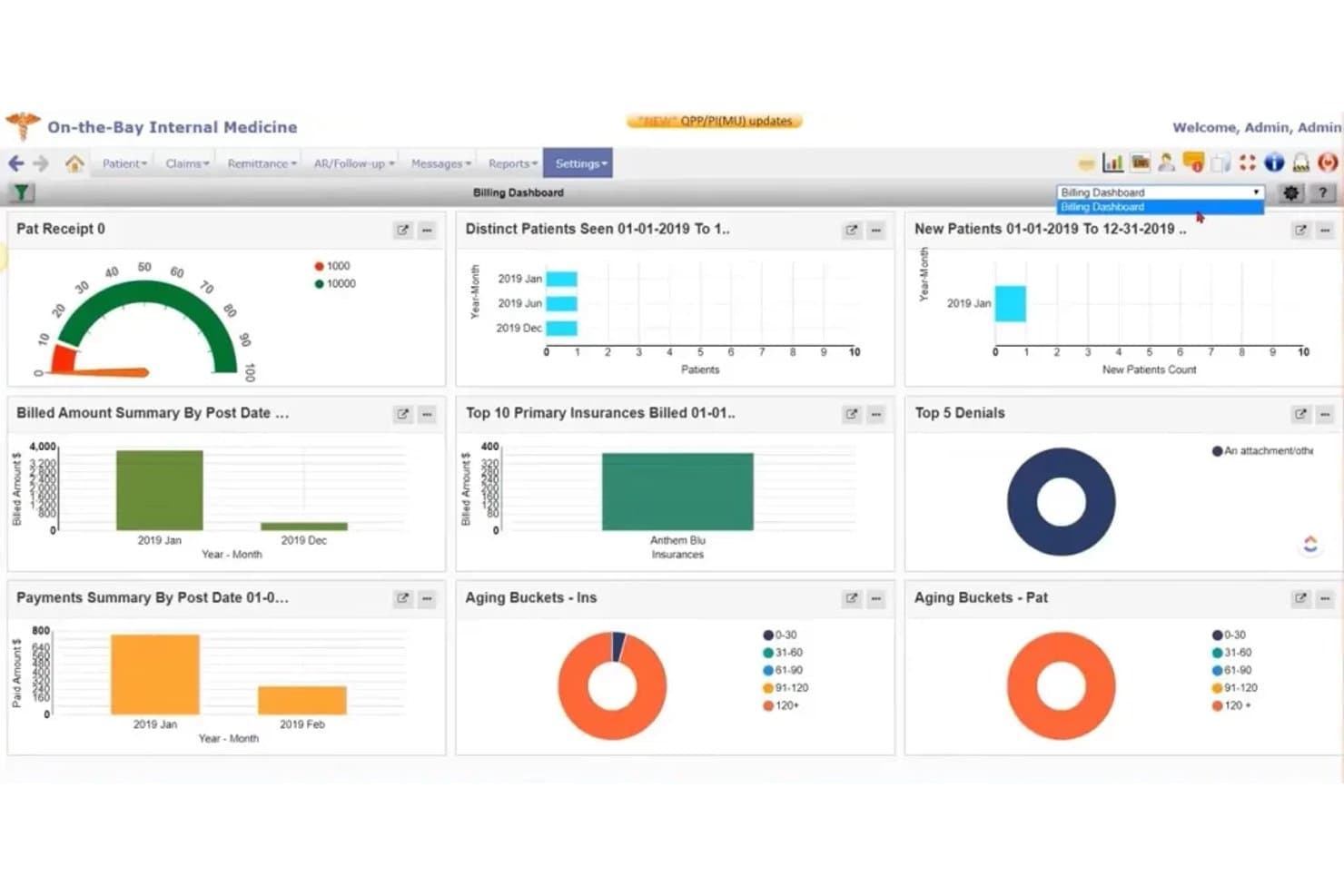
PrognoCIS billing dashboard showing payments, denials, insurance claims, and aging reports PrognoCIS is a multi-specialty urology EMR that combines specialty-specific procedure templates, e-prescribing, billing automation, and practice management tools in a single platform.
Who Is PrognoCIS Best For?
PrognoCIS is a strong fit for urology practices that do high volumes of in-office procedures and need billing automation built directly into their clinical workflow.
Why I Picked PrognoCIS
I picked PrognoCIS as one of the best because its procedure-level billing tools are built directly into its clinical templates. When a urologist completes a cystoscopy or vasectomy note, charge capture happens automatically, with urology-specific CPT/ICD codes, CCI edits, and claim scrubbing applied before the claim leaves the practice. I also like that it flags E&M coding during documentation, which cuts the back-and-forth between clinical and billing staff on procedure-heavy days.
PrognoCIS Key Features
- Urology procedure templates: Pre-built templates for cystoscopy, vasectomy, TURP, prostate biopsy, and radical prostatectomy are available out of the box.
- AI Scribe: Records and drafts HPI, exam, history, and medication sections in real time, with support for 54 languages.
- ASC surgical scheduling module: Coordinates pre-op scheduling, anesthesia charting, inventory tracking, and post-op tracking across clinic and OR.
- EPCS with PDMP integration: Supports controlled substance prescribing with two-factor authentication and state prescription-monitoring checks built in.
PrognoCIS Integrations
PrognoCIS integrations include Bostwick Labs, LabCorp, Surescripts, First Databank, IdenTrust, Zoom, ProMeet, and Nuance Dragon Medical. It supports HL7, FHIR, PACS/DICOM, Direct messaging, HIEs, and custom APIs.
Pros and Cons
Pros:
- Supports multi-site administrative reporting and RCM
- Reviewers praise one-click chart-to-billing workflows
- Procedure notes connect directly to charge capture
Cons:
- Urology analytics lack documented PSA trend tools
- Billing workflows can feel difficult to navigate
Learn more about PrognoCIS: Best for mobile EHR access for on-the-go providers
- Free demo available
- Pricing upon request
Visit WebsiteCustomer Rating:3.7/5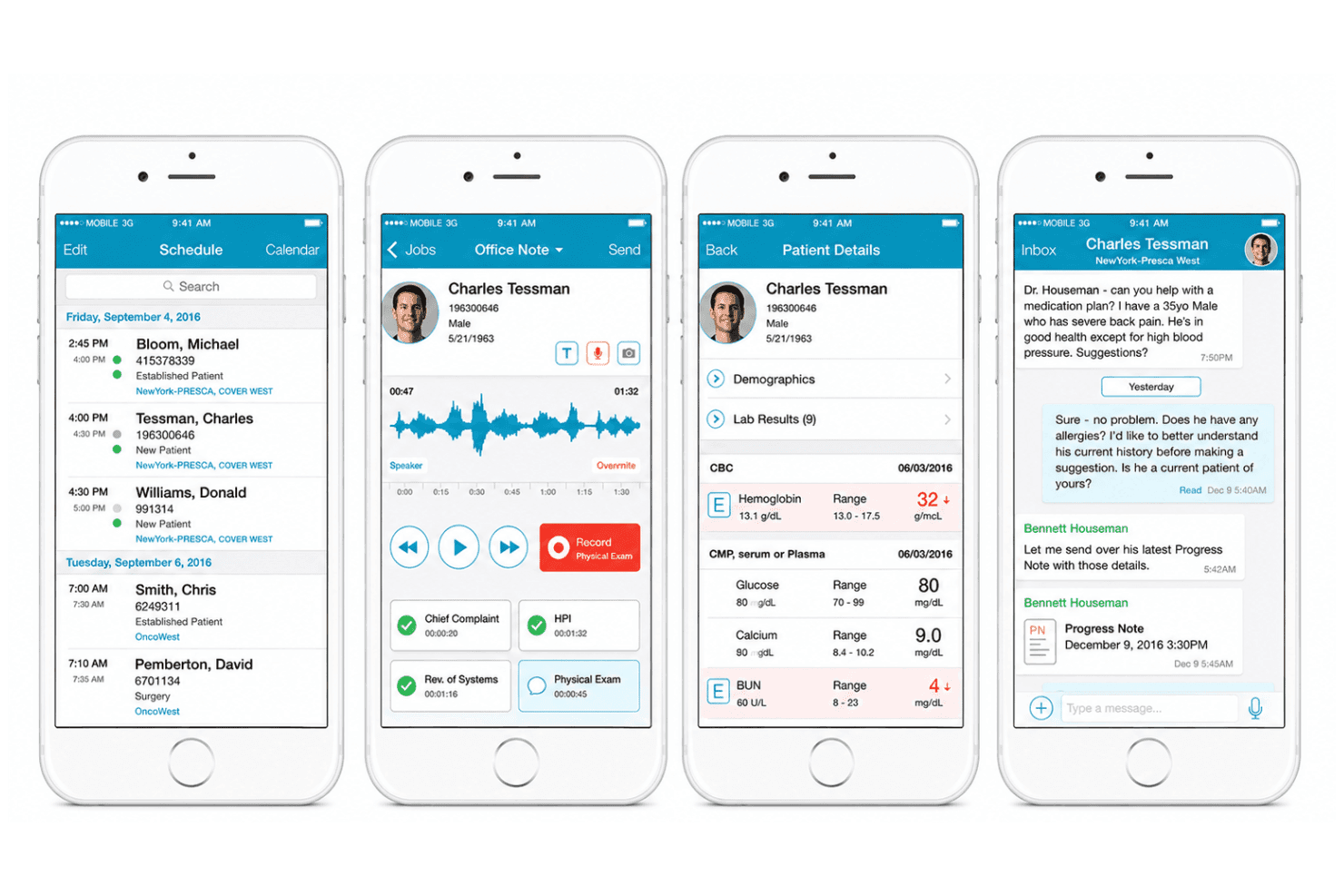
NextGen Healthcare’s mobile app displays appointment schedules, clinical notes, patient records, lab results, and secure provider messaging. NextGen Healthcare is a specialty-focused ambulatory EHR and practice management platform built for urology practices, offering urology-specific clinical templates, integrated billing and RCM, device and PACS integration, and native mobile EHR with AI-powered documentation.
Who Is NextGen Healthcare Best For?
NextGen Healthcare suits mid-to-large urology practices with multiple providers that need deep specialty workflows, integrated RCM, and mobile chart access across clinic, hospital, and surgical settings.
Why I Picked NextGen Healthcare
I picked NextGen Healthcare as one of the best because its mobile EHR goes well beyond basic chart access. I love how Ambient Assist listens to patient-provider conversations and auto-generates structured SOAP notes directly into the urology chart. Mobile e-prescribing and same-visit charge capture keep billing and prescribing accurate even when a urologist is moving between hospital rounds and clinic.
NextGen Healthcare Key Features
- Urology-specific clinical templates: Offers dedicated charting workflows for cystoscopy, BCG-advanced catheter, prostate cancer, and urine culture management.
- Integrated PACS and lab connectivity: Connects directly to imaging and lab systems for seamless data import into patient charts.
- Automated insurance eligibility checks: Runs real-time insurance validation at scheduling and check-in to prevent billing issues.
- Horizontal patient timeline: Provides a unified view of a patient’s urology history, orders, and follow-ups across the care continuum.
NextGen Healthcare Integrations
NextGen Healthcare offers native integrations with PACS, Labcorp, Doctible, Solutionreach, Clearwave, InstaMed, and Surescripts. Its Marketplace includes integrations with HST Price Transparency, Inbox Health, LinkMD AI, Commure, ActX, Surgimate, and TimeDoc. An API is available for custom integrations.
Pros and Cons
Pros:
- Prostate cancer tracking in patient timeline
- Dedicated urology templates speed documentation
- Mobile charting works well across locations
Cons:
- Reporting customizations can be time-consuming
- Specialty content setup requires vendor assistance
Learn more about NextGen Healthcare: Best for built-in medical billing and telehealth
- Free demo available
- From $429/user/month
Visit WebsiteCustomer Rating:3.6/5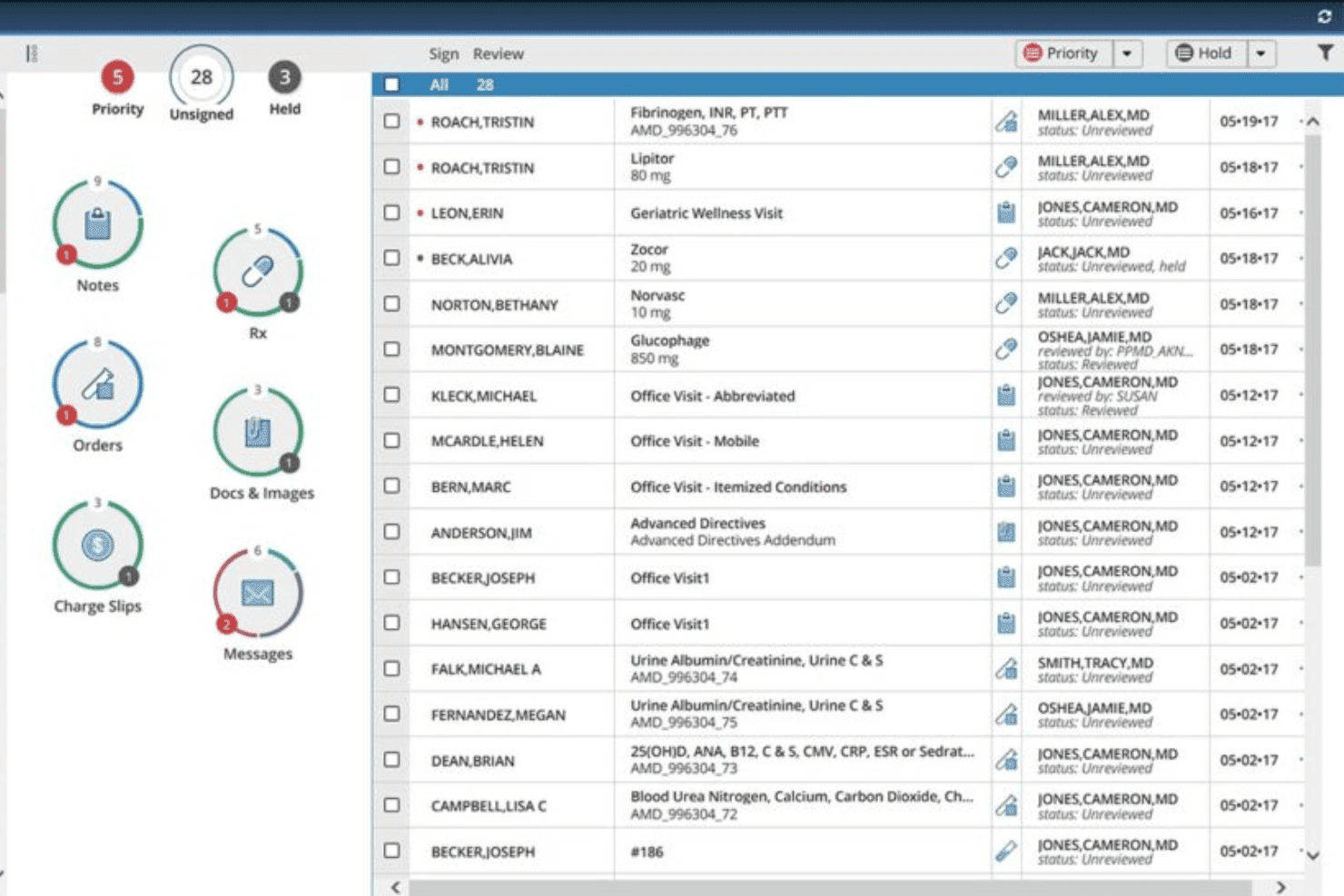
AdvancedMD dashboard for reviewing patient notes, prescriptions, orders, documents, and messages AdvancedMD EMR is a cloud-based urology EMR that combines clinical charting, practice management, medical billing, e-prescribing, and built-in telehealth in a single platform.
Who Is AdvancedMD EMR Best For?
AdvancedMD EMR is a strong fit for independent urology practices and small-to-medium groups that want billing, scheduling, and clinical charting in one system.
Why I Picked AdvancedMD EMR
I picked AdvancedMD EMR because its billing and telehealth tools are built directly into the same platform as its EHR, which matters in urology where billing complexity is high. ClaimInspector scrubs claims for CCI and LCD errors before submission, and urology-specific code shortlists filter out irrelevant CPT codes so billers aren't wading through noise. On the telehealth side, screenshot uploads save automatically to the patient chart, and session links stay active for 60 days, which makes follow-up visits for post-procedure patients genuinely easier to manage.
AdvancedMD EMR Key Features
- Pre-built urology templates: Includes condition- and procedure-specific templates for BPH, elevated PSA, UTI, cystoscopy, and catheterization that clinicians can customize.
- AI pre-visit summary: Automatically pulls together recent notes, labs, medications, allergies, and risk factors before each appointment.
- EPCS with PDMP integration: Lets clinicians prescribe Schedule II–IV controlled substances with DEA-required two-factor authentication and automatic audit trails, with a direct connection to the state prescription drug monitoring database.
- HealthWatcher alerts: Flags patients due for preventive screenings based on their individual medical and family history.
AdvancedMD EMR Integrations
AdvancedMD EMR offers marketplace integrations with StratusDX, plus documented connections to QuickBooks, Zoho, LeadSquared, SuiteCRM, Salesforce via custom build, and Microsoft Entra ID. Its open API supports labs, HIEs, CCD/CCA exchange, and SMART on FHIR apps.
Pros and Cons
Pros:
- Telehealth supports chart-linked follow-up visits
- Urology templates cover core procedures
- Unified clinical and billing workflows
Cons:
- Onboarding and support receive mixed reviews
- Generalist workflows limit specialty depth
Learn more about AdvancedMD EMR: Best for large urology group data consolidation
- Free demo available
- Pricing upon request
Visit WebsiteCustomer Rating:3.4/5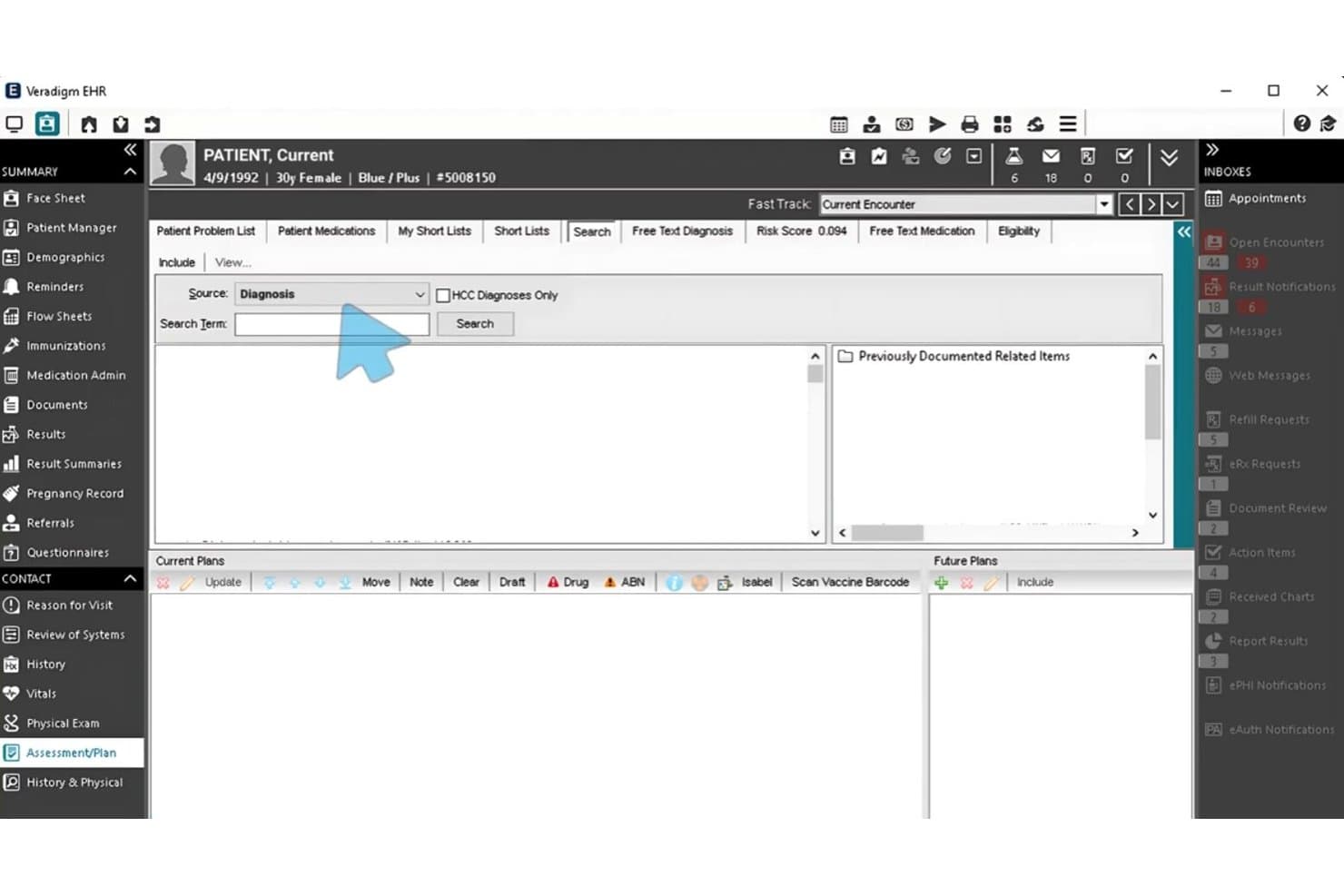
Veradigm EHR lets users search and document diagnoses in the Assessment/Plan section. Veradigm EHR is a multi-specialty ambulatory EHR with urology-specific templates, flowsheets, e-prescribing, lab and imaging integration, and a patient portal designed for physician-led, multi-site practices.
Who Is Veradigm EHR Best For?
Veradigm EHR is a strong fit for large, multi-site urology groups that need to consolidate patient data and clinical workflows across many locations under one system.
Why I Picked Veradigm EHR
Veradigm EHR earns its spot on my list because of how well it handles data consolidation across large, multi-site urology groups. I'm particularly impressed by the Chesapeake Urology case study, where 111 physicians across 28 locations unified onto one system. Urology-specific flowsheets, prostate cancer timelines, and AQUA Registry connectivity give clinical teams a single source of truth across every location.
Veradigm EHR Key Features
- Ambient Scribe: An AI documentation tool embedded in the EHR that captures visit conversations and generates structured notes with ICD-10 code suggestions.
- AQUA Registry integration: Pre-configured one-step connectivity to the AUA Quality Registry for CMS quality reporting and specialty benchmarking.
- FollowMyHealth patient portal: A mobile-first portal where patients can view results, message providers, book appointments, pay bills, and access telehealth visits.
- Electronic prior authorization: Built-in eAUTH handles prior authorization requests directly within the prescribing workflow, alongside real-time benefit checks and drug pricing.
Veradigm EHR Integrations
Veradigm EHR integrates with Veradigm Practice Management, Payerpath, FollowMyHealth, and the AQUA Registry, plus 300+ labs and imaging centers and about 5,000 hospitals. Veradigm Connect APIs and the App Expo marketplace support custom and partner integrations.
Pros and Cons
Pros:
- Multi-site chart consolidation suits growing groups
- E-prescribing handles controlled-substance safeguards
- Urology flowsheets support prostate cancer tracking
Cons:
- Setup demands substantial IT support
- Reviewers report slow loading and crashes
Learn more about Veradigm EHR: Best for urology-specific workflow optimization
- Free demo available
- Pricing upon request
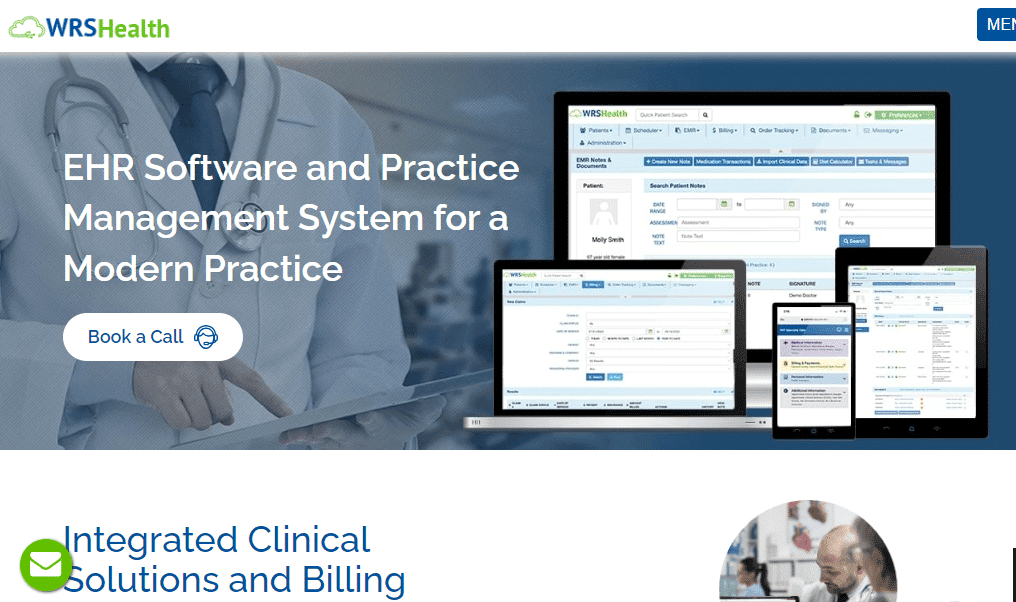
A screenshot of the website for the tool Urology-Cloud. Urology-Cloud is a urology-specific EMR and practice management platform that combines specialty templates, patient charting, e-prescribing, integrated billing, and a patient portal in one web-based system.
Who Is Urology-Cloud Best For?
Urology-Cloud is a strong fit for urology practices that want scheduling, charting, billing, and e-prescribing built around specialty-specific workflows rather than adapted from a general-purpose platform.
Why I Picked Urology-Cloud
Urology-Cloud earns its spot on my shortlist because every workflow, from PSA surveillance tracking to post-op documentation for prostatectomy recovery, is built around urology from the ground up rather than adapted from a general template library. I particularly like the automatic recall flags that trigger reminders for PSA rechecks and stent removals, which closes follow-up gaps without any manual effort. The real-time AI-driven E/M coding checks tied directly to CMS rules also make a meaningful difference when billing for procedures like cystoscopy or ureteroscopy.
Urology-Cloud Key Features
- Specialty-specific template library: Customizable templates cover new patient consults, procedure notes, chronic conditions, oncology monitoring, and pediatric urology across the full range of urology visit types.
- Patient portal with automated education delivery: Patients can complete intake forms, view results, and receive diagnosis-specific education materials sent automatically based on their chart.
- AI-assisted chart preparation: An AI scribe handles pre-visit chart prep, medication reconciliation, and CCDA record summaries before the patient encounter begins.
- Outsourced revenue cycle management: An optional full-service billing team handles claims, denial management, and A/R reviews, with fees starting at 2.9%.
Urology-Cloud Integrations
Urology-Cloud integrates with the Surescripts network and Dragon Medical dictation. Its FHIR API supports custom connections with labs, imaging centers, referring providers, and health information exchanges.
Pros and Cons
Pros:
- Embedded AI supports chart preparation and coding
- Automatic recalls flag PSA and stent follow-ups
- Urology-specific templates span procedures and oncology
Cons:
- No independent Urology-Cloud user reviews exist
- Parent-company reviews report freezes and delayed support
Learn more about Urology-Cloud: 10Best for customizing templates to your practice needs
PronoCIS
- Free demo available
- Pricing upon request

A photo for the interface of the tool PronoCIS. PrognoCIS is a multi-specialty urology EMR that combines customizable procedure templates, integrated billing and coding, e-prescribing, patient charting, and a self-service patient portal into a single platform.
Who Is PrognoCIS Best For?
PrognoCIS is a strong fit for urology physicians and practice administrators who want to build and own their own documentation templates without relying on a vendor to do it for them.
Why I Picked PrognoCIS
PrognoCIS earns its spot on my shortlist because it lets urology practices build and own their documentation from the ground up. I particularly like that you can create custom templates for procedures like cystoscopy, TURP, and prostate biopsy, then tie each template directly to automatic charge capture. That connection between clinical documentation and billing coding means a completed vasectomy note doesn't require a separate coding step.
PrognoCIS Key Features
- AI Scribe: Automatically generates structured clinical notes—including HPI, ROS, exam findings, and assessment/plan—from provider-patient encounters.
- E-prescribing with EPCS: Sends electronic prescriptions, including controlled substances, through Surescripts with IdenTrust two-factor authentication and state PMP connectivity.
- Patient portal: Gives patients self-service access to records, appointment booking, secure messaging, refill requests, e-forms, and online bill pay.
- Real-time eligibility and claim scrubbing: Checks patient insurance eligibility and scrubs claims before submission to reduce denials and catch errors early.
PrognoCIS Integrations
PrognoCIS integrates with Labcorp, Pathology Inc., TriCore, Bostwick Labs, PACS/DICOM systems, Surescripts, Secure Connect, TriZetto, Waystar, and Jopari. It also supports HL7, FHIR, medical device integration, and custom APIs.
Pros and Cons
Pros:
- Integrated billing supports urology-specific coding
- Charge capture connects procedures with documentation
- Customizable templates cover major urology procedures
Cons:
- Billing workflows may complicate claim adjustments
- Template configuration can require substantial setup
Learn more about PronoCIS:
How I Evaluate Urology EMR Software
I split my evaluation into three parts, with core functionality carrying the most weight: document cystoscopies, track PSA trends, and prescribe safely. Next, I look for urology analytics, such as procedure-volume dashboards. Finally, I consider onboarding, support, and pricing value.
Core Functionality (Table Stakes For This List)
When I'm selecting tools for my list, I score each one on a scale from 0 (does not offer the functionality) to 5 (excels in this area) for each core functionality listed below. I then convert the total into a percentage to help assess each tool's overall fit, with extra weight on any functionalities I’ve deemed essential.
- Specialty Templates (Essential): I look for structured templates covering cystoscopies, vasectomies, prostate biopsies, catheter care, and other routine visits.
- Patient Charting (Essential): I assess longitudinal records for PSA, urinalysis, treatment history, procedure findings, and other urology-specific data.
- E-Prescribing: I check medication history, allergy and interaction alerts, and controlled-substance prescribing within common urology workflows.
- Billing And Coding: I evaluate CPT and ICD-10 support for procedures such as biopsies, cystoscopies, catheter services, and follow-up visits.
- Lab And Imaging Integration: I look for direct access to urinalysis, PSA results, ultrasound findings, biopsy reports, and other diagnostic data.
- Patient Portal: I assess secure messaging plus patient access to records, results, appointments, and care instructions.
Once I have a list of tools that meet the criteria, I consider what sets each platform apart.
Differentiating Factors (What Sets Vendors Apart)
Here's how I compare and contrast different vendors:
Standout Features
I look for in-office procedure coding that handles high-volume urology work like vasectomies and cystoscopies, since accurate code mapping directly affects reimbursement. Mobile rounding and dictation tools matter just as much. Urologists move between clinics, hospitals, and ASCs throughout the day, so I check whether charting and voice input work well on a phone between cases. I also evaluate ASC scheduling integration, because coordinating procedures like lithotripsy across sites without double-booking or data gaps is a constant operational challenge.
Beyond Features
I evaluate whether a vendor specializes in urology or simply bolts it onto a generic EMR, since specialty-focused platforms tend to ship deeper clinical content built with practicing urologists. Scalability matters too—many urology groups run multiple clinics and ASCs, so I check that scheduling, billing, and reporting stay centralized as new sites come online. I also look at revenue cycle outcomes, specifically evidence of reduced claim denials tied to urology-specific coding accuracy.
How to Choose Urology EMR Software
It’s easy to get bogged down in long feature lists and complex pricing structures. To help you stay focused as you work through your unique software selection process, here’s a checklist of factors to keep in mind:
| Factor | What to Consider |
|---|---|
| FactorScalability | What to ConsiderCan the software grow with your practice? Consider future expansion and ensure the tool can handle increased patient volume without a hitch. |
| FactorIntegrations | What to ConsiderDoes it connect with your existing systems? Look for compatibility with lab systems, billing platforms, and patient portals to streamline your workflows. |
| FactorCustomizability | What to ConsiderCan you tailor the software to fit your practice's needs? Check if you can modify templates and reports to match your specific workflows. |
| FactorEase of use | What to ConsiderIs the interface intuitive for your team? Avoid tools with steep learning curves that might slow down daily operations. |
| FactorImplementation and onboarding | What to ConsiderHow long will it take to get up and running? Look for quick onboarding processes with available training resources to minimize downtime. |
| FactorCost | What to ConsiderDoes it fit your budget? Compare pricing plans, consider any hidden fees, and evaluate the value offered relative to the price. |
| FactorSecurity safeguards | What to ConsiderAre patient data and records secure? Ensure the software complies with industry standards like HIPAA to protect sensitive information. |
| FactorCompliance requirements | What to ConsiderDoes the software meet regulatory needs? Confirm it supports necessary documentation and reporting to stay compliant with healthcare regulations. |
What Is Urology EMR software?
Urology EMR software supports urologists with specialized templates, imaging tools, and procedure tracking. It addresses complex diagnostics like prostate exams and bladder scans, helping streamline urological care and patient documentation.
Features
When selecting urology EMR software, keep an eye out for the following key features:
- Patient records management: Organizes and stores patient information for easy access and updates.
- Appointment scheduling: Simplifies booking and managing patient appointments to optimize time management.
- Billing and insurance processing: Automates billing and claims to reduce errors and speed up reimbursements.
- Data security: Protects sensitive patient data with compliance to industry standards like HIPAA.
- Customizable templates: Allows personalization of forms and reports to match specific practice needs.
- Lab integration: Connects with laboratory systems for seamless test result management.
- Telemedicine capabilities: Enables virtual consultations to expand patient access and convenience.
- Analytics tools: Provides insights into practice performance and patient outcomes for informed decision-making.
- Patient portal access: Offers patients a secure way to view their records and communicate with healthcare providers.
- Compliance support: Ensures all documentation and reporting meet regulatory requirements.
Benefits
Implementing urology EMR software provides several benefits for your team and your business. Here are a few you can look forward to:
- Improved efficiency: Automates routine tasks like scheduling and billing, freeing up time for patient care.
- Enhanced data security: Protects patient information with compliance to regulations like HIPAA, reducing the risk of data breaches.
- Better patient management: Centralizes patient records and histories, making it easier to track treatment progress and outcomes.
- Increased accuracy: Reduces errors in billing and insurance claims, ensuring quicker reimbursements and fewer disputes.
- Informed decision-making: Offers analytics tools that provide insights into practice performance and patient trends.
- Greater accessibility: Telemedicine features allow for virtual consultations, expanding patient reach and convenience.
- Personalized care: Customizable templates and patient portals enable tailored communication and documentation for each patient.
Costs & Pricing
Selecting urology EMR software requires an understanding of the various pricing models and plans available. Costs vary based on features, team size, add-ons, and more. The table below summarizes common plans, their average prices, and typical features included in urology EMR software solutions:
Plan Comparison Table for Urology EMR Software
| Plan Type | Average Price | Common Features |
|---|---|---|
| Plan TypeFree Plan | Average Price$0 | Common FeaturesBasic patient records management, appointment scheduling, and limited customer support. |
| Plan TypePersonal Plan | Average Price$20-$50/user/month | Common FeaturesEnhanced billing features, data security compliance, and customizable templates. |
| Plan TypeBusiness Plan | Average Price$50-$100/user/month | Common FeaturesAdvanced analytics tools, integrated lab results, telemedicine capabilities, and patient portals. |
| Plan TypeEnterprise Plan | Average Price$100-$200/user/month | Common FeaturesComprehensive support, full integration options, dedicated account management, and scalability. |
Urology EMR Software FAQs
Here are some answers to common questions about urology EMR software:
How can EMR software improve patient care?
EMR software improves patient care by providing quick access to comprehensive patient records, reducing errors, and facilitating better communication between providers and patients. Features like patient portals and telemedicine also enhance patient engagement and convenience.
What are common challenges with EMR implementation?
Common challenges with EMR implementation include data migration, staff training, and workflow disruption. Ensure you have a solid plan for onboarding and training your team. Choose a vendor that offers robust support during the transition to minimize disruptions.
Can EMR software integrate with other systems?
Yes, most EMR software can integrate with other systems like billing, lab, and imaging services. Check the EMR’s compatibility with your existing systems to ensure smooth data exchange and avoid workflow interruptions.
How secure is patient data in EMR systems?
Patient data in EMR systems is generally secure, with encryption and access controls in place. However, it’s crucial to verify that the EMR complies with healthcare data protection regulations like HIPAA. Regular updates and security audits can help maintain data integrity.