

Navigating the world of substance abuse treatment can be challenging, especially when it comes to managing patient records and compliance. You need a reliable EMR software that keeps everything organized and accessible. In my experience, the right software can make a significant difference in your daily operations.
I’ve tested and reviewed various substance abuse EMR solutions to help you find the best fit for your team. My goal is to provide you with an unbiased, well-researched list of top picks, focusing on what truly matters to you.
In this article, you’ll discover software that can help alleviate common pain points, improve patient care, and ensure compliance. Let’s dive into the best options available today.
Why Trust Our Software Recommendations
6,700+
Reviews
20
Industry experts
16+
Evaluation factors
14
Years
Our team has been testing and reviewing software since 2012. As medical practice leaders ourselves, we know how difficult—and important—it is to choose the right software.
For this guide, we evaluated tools using hands-on testing and independent research, scoring tools using our selection criteria.
Our reviews reflect our human editorial judgment, not a sales pitch.
Substance Abuse EMR Software Comparison Table
| Tool | Best For | Trial Info | Price | ||
|---|---|---|---|---|---|
| 1 | Best for mental and behavioral health charting | Free demo + free expert consultation available | Pricing upon request | Website | |
| 2 | Best for detailed charting | 15-day free trial | From $99/month | Website | |
| 3 | Best for outcome tracking tools | Free demo available | Pricing upon request | Website | |
| 4 | Best for AI-powered note generation | Free demo available | Pricing upon request | Website | |
| 5 | Best for simplified documentation | Free demo available | Pricing upon request | Website | |
| 6 | Best for MAT workflows and addiction care ops | Free demo available | Pricing upon request | Website | |
| 7 | Best for menu-driven SUD note templates | 30-day free trial | From $55/month | Website | |
| 8 | Best for unified admissions, care, and billing | Free demo available | Pricing upon request | Website | |
| 9 | Best for post-discharge alumni engagement tools | Free demo available | Pricing upon request | Website | |
| 10 | Best for user-friendly and intuitive interface | Not available | Pricing upon request | Website |


Best Substance Abuse EMR Software Reviews
 1Best for mental and behavioral health charting
RXNT
- Free demo + free expert consultation available
- Pricing upon request
Visit WebsiteCustomer Rating:4.3/5
A screenshot of the RXNT substance abuse EMR software interface RXNT provides an electronic health record (EHR) system that's designed with a strong emphasis on mental and behavioral health functionality. RXNT is cloud-based, ONC-certified medical software. It includes a comprehensive set of features and tools that cater specifically to the unique needs of mental and behavioral health providers.
Why I Picked RXNT: I selected RXNT for its unique focus on mental and behavioral health functions within its EHR software. It sets itself apart by prioritizing the specific needs of this sector, with specialized tools like customizable behavioral health templates and integrated patient assessment tools. This distinct emphasis makes RXNT the best choice for robust mental and behavioral health functionality.
Standout Features & Integrations:
RXNT’s feature suite is robust, with capabilities like patient reminders, telehealth support, customizable mental health templates, e-prescribing, and client portal access. It offers integrations with popular software platforms, including QuickBooks for accounting and various laboratory management systems for smooth data transition.
Pros and Cons
Pros:
- Reliable integration with popular software platforms
- Robust feature suite including telehealth and customizable templates
- Tailored to the specific needs of mental and behavioral health providers
Cons:
- The interface may take some time to navigate effectively
- Might be expensive for smaller practices
- No free version is available, only a free demo
Learn more about RXNT:

OptiMantra lets providers document patient visits with customizable SOAP templates, questionnaires, and clinical notes in one place. OptiMantra is an electronic medical records (EMR) and practice management platform designed for a variety of healthcare specialties. It helps clinics and providers organize patient information, manage clinical workflows, and support operational needs from one system. With its specialty-specific tools, it adapts to practices that focus on substance abuse and related behavioral care.
Why I Picked OptiMantra: I picked OptiMantra because of its detailed charting and customizable consult templates that support behavioral and psychiatric treatment. These tools let you capture patient history, track progress, and document care plans in a structured way that matches the needs of substance abuse treatment. The software also allows pre-appointment questionnaires and intake forms that help you gather critical information about patients’ health, lifestyle, and treatment history before they even walk in, which saves time and improves accuracy in assessments.
Standout Features & Integrations:
OptiMantra also offers an integrated telehealth feature, which lets you meet patients remotely through HIPAA- and PHIPA-compliant video sessions. For substance abuse care, where patients may face stigma or accessibility issues, having secure virtual visits ensures continuity of care and better patient engagement. Integrations include Surescripts, LabCorp, Mercy Diagnostics, Quest Diagnostics, Access Medical Lab, Clinical Labs of Hawaii, Rupa Health, SimonMed, Boston Heart Diagnostics, Fullscript, Zoom, and Stripe.
Pros and Cons
Pros:
- Telehealth built in and HIPAA compliance
- Pre-appointment intakes save time for providers
- Customizable templates fit different treatment needs
Cons:
- Mostly caters to US-based practices
- Some features feel complex for small practices
Learn more about OptiMantra: Best for outcome tracking tools
- Free demo available
- Pricing upon request
Visit WebsiteCustomer Rating:4.3/5
ClinicTracker offers a comprehensive dashboard for managing clinical workflows. ClinicTracker delivers a tailored electronic medical record system built specifically for behavioural-health and substance-abuse treatment providers, offering an all-in-one EHR, billing, and practice-management platform. If your clinic runs addiction treatment, mental-health counseling, or substance-use programs, this is software that speaks directly to the unique workflows and compliance needs you face.
Why I Picked ClinicTracker
I picked ClinicTracker for its ability to cater specifically to substance abuse treatment centers with features like outcome tracking tools and collaboration options. The outcome tracking tools allow your team to monitor patient progress effectively, which is crucial in addiction treatment. I also appreciate the collaboration tools, such as secure messaging and telehealth options, which enhance patient engagement and facilitate better communication within your team.
ClinicTracker Key Features
In addition to its specialized tools for substance abuse treatment, I also like that it offers:
- Custom Form Builder: Allows your team to create and modify forms tailored to specific clinical and administrative needs.
- Automated Appointment Reminders: Helps reduce no-show rates by sending reminders to patients via email or text.
- ePrescribing: Streamlines the prescription process by allowing clinicians to send prescriptions electronically directly to pharmacies.
- Patient Portal: Provides patients with access to their health information, appointment scheduling, and direct communication with providers.
ClinicTracker Integrations
Integrations include Azure, Clinicom, AMBIR, Microsoft, Topaz, Soft Trac, and Zoom.
Pros and Cons
Pros:
- Telehealth integration expands access to remote care.
- Strong revenue cycle management streamlines billing processes.
- It supports a wide range of behavioral-health workflows (mental health, substance abuse, social services).
Cons:
- The initial setup and onboarding process can demand significant time and effort, particularly for customizing workflows.
- Limited native integration options compared to competitors.
Learn more about ClinicTracker: Best for AI-powered note generation
- Free demo available
- Pricing upon request
Visit WebsiteCustomer Rating:5/5
NextGen Healthcare dashboard displaying recent activity summaries and financial reporting tools. NextGen is a cloud-based electronic health record and practice management system that supports addiction treatment programs with a robust suite of clinical and operational tools. It combines AI-driven documentation, flexible specialty-specific templates, and patient engagement tools to help practices enhance both care delivery and financial outcomes.
Why I Picked NextGen: I picked NextGen for its ambient AI capabilities that can auto-generate SOAP notes from conversations—cutting down on documentation time by hours each day. What also stood out is its wide-ranging support for behavioral health, including features tailored for addiction care and an integration marketplace with tools like Medsender, Relaymed, Klara, and CallMyDoc. These make NextGen a smart pick for clinics that need flexibility, compliance, and automation all in one platform.
Standout Features & Integrations:
Key features include mobile-friendly AI note capture, rules-based RCM automation, self-scheduling, population health tracking, and specialty-specific templates. Integrations cover a wide ecosystem, including Relaymed, Medsender, Klara, Surgimate, Transform9, CallMyDoc, rater8, Arcadia, and more.
Pros and Cons
Pros:
- Customizable templates and workflows for various medical practices
- Wide-ranging integrations and API marketplace
- Ambient AI for hands-free SOAP note generation
Cons:
- Feature set may be excessive for small practices
- Learning curve with more advanced capabilities
Learn more about NextGEN: Best for simplified documentation
- Free demo available
- Pricing upon request
Visit WebsiteCustomer Rating:5/5
Athenahealth's platform has a patient history section, which simplifies documentation of the patient's medical background and previous treatments. Athenahealth offers a comprehensive cloud-based healthcare platform known as athenaOne, which integrates a variety of software and services aimed at enhancing clinical effectiveness, patient experience, and financial performance for healthcare providers.
Why I Picked Athenahealth: I liked its simplified documentation process, which reduces the time and distractions associated with patient encounters. This is particularly beneficial in substance abuse treatment settings where detailed and accurate documentation is crucial for tracking patient progress and ensuring compliance with treatment protocols. The software also offers customizable workflows with best-practice templates, macros, and tools that can be tailored to the specific needs of substance abuse treatment.
Standout Features & Integrations:
Another notable feature of athenaOne is its mobile documentation capability, which allows healthcare providers to document patient encounters on the go using the athenaOne app. This feature is particularly useful for substance abuse treatment providers who may need to access and update patient records in various settings, including outpatient clinics and community-based programs. Integrations include NextPatient, DocResponse, Yosi Health, Secondwave, Recovery Plus, TSI, VaxCare, Fullscript, QueueDr, and CallMyDoc.
Pros and Cons
Pros:
- Customizable templates for various medical specialties
- Cloud-based system for remote access
- Wide range of features for healthcare management
Cons:
- Limited customization options for certain workflows
- Due to its extensive features, new users may experience a learning curve
Learn more about Athenahealth: 6Best for MAT workflows and addiction care ops
Kipu
- Free demo available
- Pricing upon request
Visit WebsiteCustomer Rating:4.7/5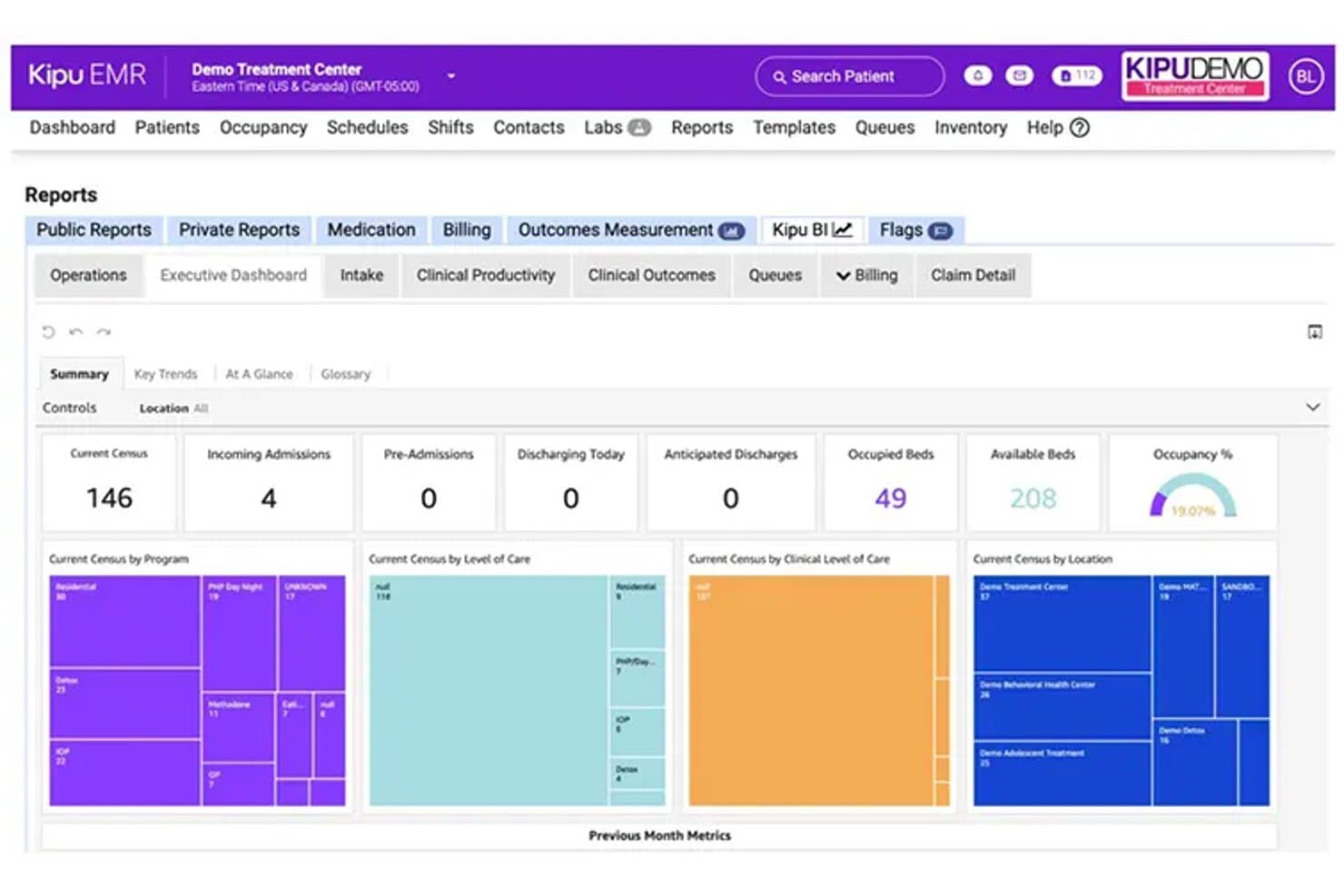
Kipu tracks census, admissions, and occupancy in one executive dashboard. Kipu is a behavioral health EMR built for addiction treatment and substance use disorder programs, covering clinical documentation, medication management, MAT workflows, scheduling, outcome assessments, and revenue cycle management.
Who Is Kipu Best For?
Kipu is a strong fit for addiction treatment centers and substance use disorder programs that need purpose-built MAT workflows, integrated medication management, and clinical documentation in a single platform.
Why I Picked Kipu
I picked Kipu as one of the best because its MAT workflows are genuinely built for how addiction treatment programs operate—not bolted on. I particularly like the diversion control and call-back workflows for Suboxone, Methadone, and Sublocade, paired with DrFirst e-prescribing and PDMP access, which keeps your controlled-substance documentation tight. The AI-powered Chart Snapshot also adds real clinical value by generating ASAM and LOCUS level-of-care recommendations directly from patient documentation.
Kipu Key Features
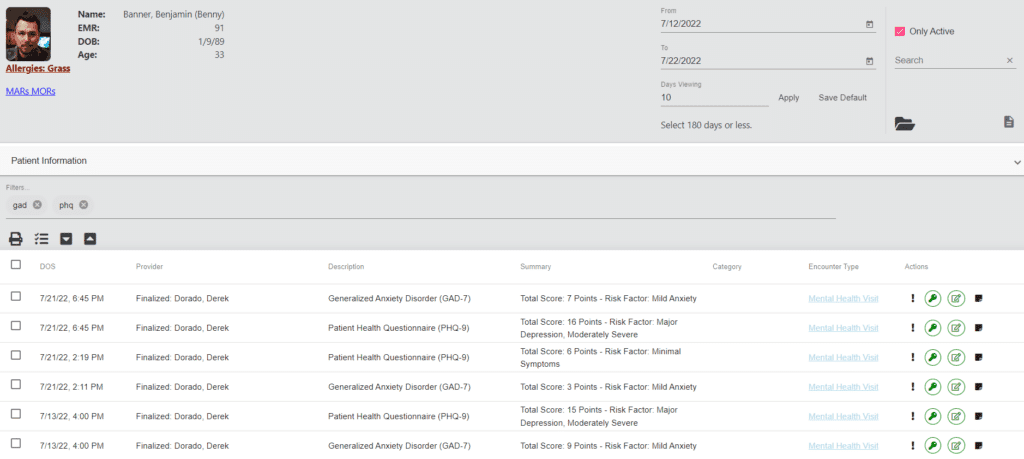
- Outcome assessment library: Access a built-in library of SUD-relevant assessments, including BAM, GAD-7, PHQ-9, DASS-21, and RAS, configurable by location.
- AI-powered note assistant: Transcribes provider-patient conversations and generates structured notes in SOAP, DAP, or progress-note formats with suggested diagnosis codes.
- Occupancy and bed management: View real-time room and bed availability by location, including upcoming openings tied to scheduled discharges.
- Compliance management system: Automate recurring compliance tasks, store permission-based compliance documents, and generate audit-ready reports for Joint Commission, CARF, and state requirements.
Kipu Integrations
Kipu lists integrations with DrFirst for e-prescribing and PDMP access, plus SciLog and Ivek dispensing pumps. It also lists Google Analytics, Gmail, and Outlook, and offers 41 APIs for custom connectivity.
Pros and Cons
Pros:
- Bed management helps coordinate residential capacity
- MAT diversion workflows support medication accountability
- Reviewers praise behavioral-health charting and customizable forms
Cons:
- Users report lag and occasional chart freezes
- Treatment planning can feel difficult to navigate
Learn more about Kipu: Best for menu-driven SUD note templates
- 30-day free trial
- From $55/month
Visit WebsiteCustomer Rating:4.1/5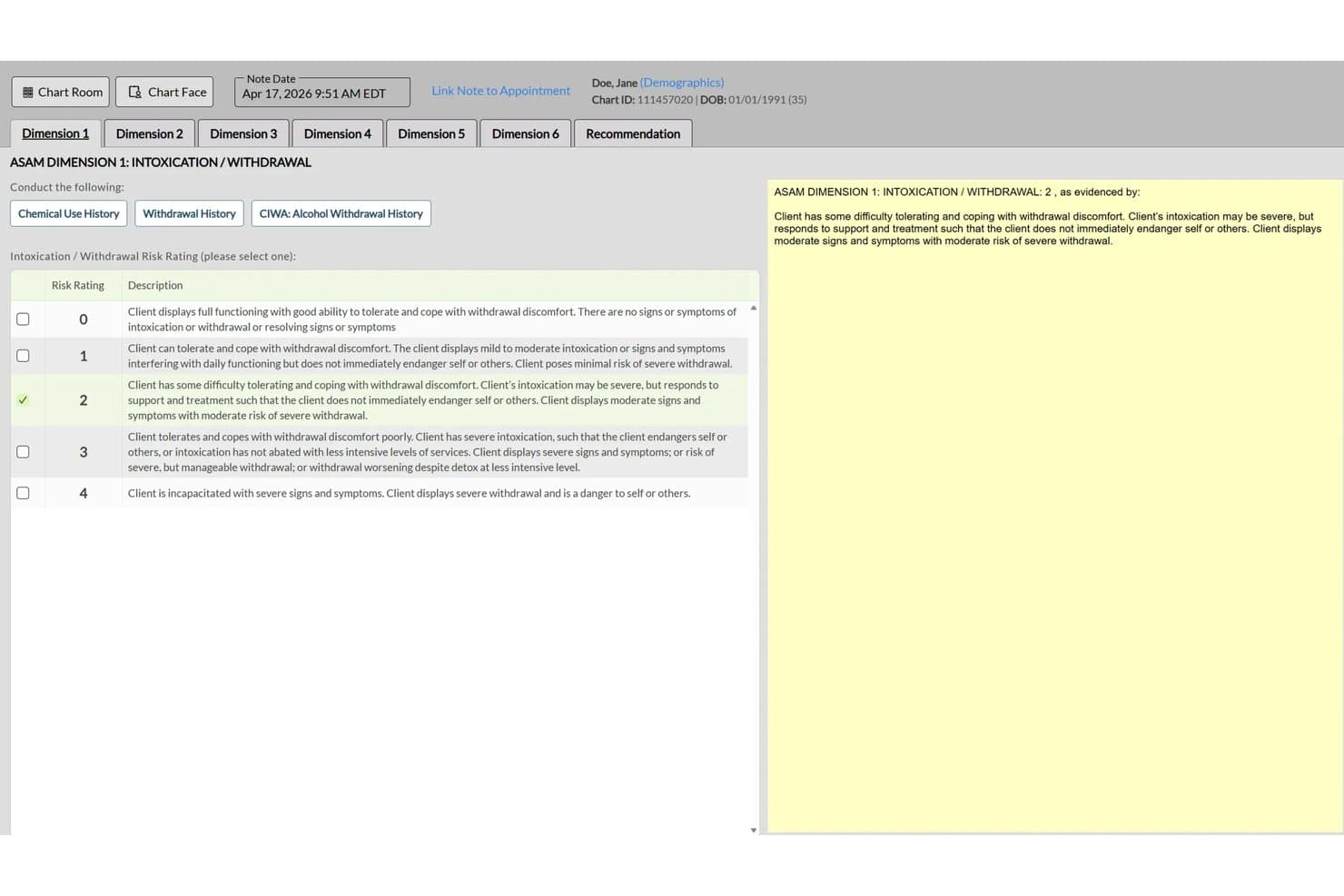
ICANotes structures ASAM criteria documentation for addiction treatment notes. ICANotes is a behavioral health EHR built exclusively for mental health and substance use practices, combining menu-driven SUD clinical documentation, treatment planning, group therapy workflows, scheduling, and integrated billing tools.
Who Is ICANotes Best For?
ICANotes suits addiction counselors and substance use practices that need structured, menu-driven note generation without spending hours on documentation.
Why I Picked ICANotes
ICANotes earns its spot on my shortlist because its menu-driven SUD documentation genuinely cuts the time counselors spend writing notes. I like that progress notes come pre-structured with SUD-specific content areas like cravings, relapse risk, stage of change, and treatment response, so clinicians are selecting relevant clinical details rather than writing from scratch. Group therapy workflows are also well thought out, letting you capture individualized participant notes, attendance, and session remarks all in one pass.
ICANotes Key Features
- 42 CFR Part 2 compliance support: Role-based permissions and segmented documentation restrict access to sensitive SUD records based on user role.
- 100+ electronic assessment tools: Validated substance-use rating scales and assessment tools support intake, treatment planning, and outcome tracking.
- Inpatient and residential documentation: Shift-based records, eMAR, UB-04 billing, and treatment-team coordination tools support residential program workflows.
- Integrated telehealth: Clinicians can schedule, launch, and document individual or group video sessions directly from the EHR.
ICANotes Integrations
ICANotes integrates with Cordant Health, Ammon, Stratus, Select, US Medical, HealthInfoNet, THA, and Health Information Network for lab and HIE connectivity. Its partner-facing FHIR R4 API supports custom patient, provider, location, and appointment integrations.
Pros and Cons
Pros:
- Group workflows support attendance and individual notes
- Notes capture cravings, relapse risk, and treatment response
- Menu-driven SUD notes reduce documentation time
Cons:
- Clinicians can’t chart from phones or tablets
- Reviewers report billing and claims friction
Learn more about ICANotes: Best for unified admissions, care, and billing
- Free demo available
- Pricing upon request
Visit WebsiteCustomer Rating:4.4/5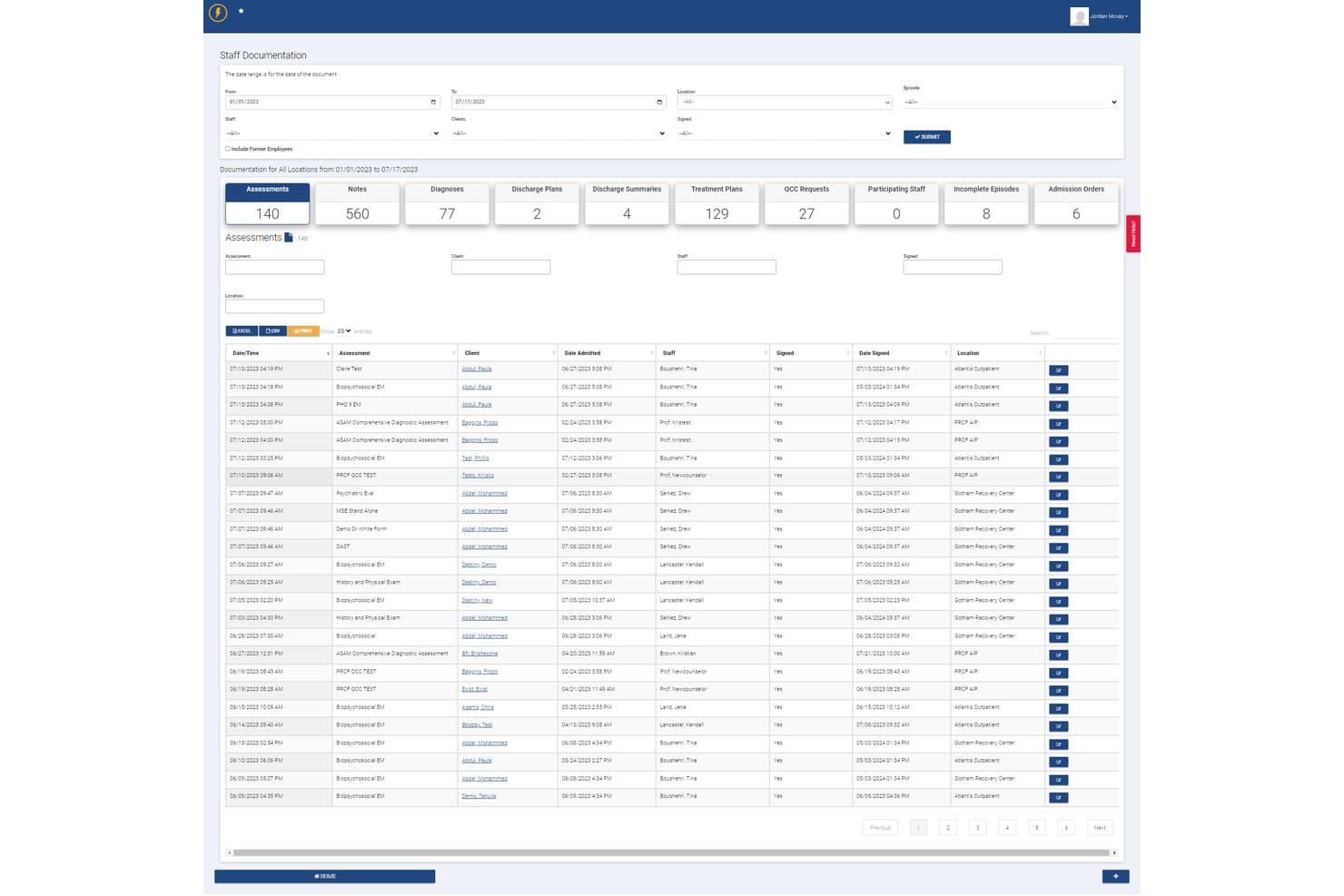
Lightning Step centralizes staff documentation and assessments for addiction programs. Lightning Step is a behavioral health EMR platform that unifies admissions, clinical documentation, and revenue cycle management—covering CRM, scheduling, treatment planning, medication management, and integrated billing in a single system built for addiction treatment programs.
Who Is Lightning Step Best For?
Lightning Step is a strong fit for multi-location addiction treatment centers that need admissions, clinical documentation, and billing managed in one system.
Why I Picked Lightning Step
I picked Lightning Step as one of the best because it's the only platform on my list where admissions, clinical documentation, and billing genuinely live in one system rather than being loosely connected. I like how the bed management and VOB dashboards feed directly into the clinical record, so a counselor's treatment plan and the billing team's claims pull from the same patient file. The AI assistant (LIA) drafting progress notes from voice dictation is a real time-saver for clinicians carrying large caseloads across multiple locations.
Lightning Step Key Features
- Medication-assisted treatment (MAT) support: The medication module manages MAT prescriptions, controlled substances, and protocol-based orders within the patient record.
- LIA AI assistant: LIA drafts individual and group progress notes and patient summaries directly from voice dictation.
- 42 CFR Part 2 consent management: The platform tracks disclosure permissions, restricts access by department or program, and generates real-time audit trails.
- Verification of benefits (VOB) dashboard: Staff can check insurance eligibility and benefits directly from the admissions workflow before a patient is admitted.
Lightning Step Integrations
Lightning Step has documented integrations with Salesforce and Updox for referral management, secure messaging, and electronic faxing. It also supports an open/custom API framework with HL7 and FHIR connectors for additional healthcare integrations.
Pros and Cons
Pros:
- Integrated e-prescribing cuts prescription time
- Supervisors can flag overdue treatment plans
- Unified admissions, care, and billing workflows
Cons:
- Client invoicing burdens larger treatment centers
- Mobile charting remains limited for clinicians
Learn more about Lightning Step: Best for post-discharge alumni engagement tools
- Free demo available
- Pricing upon request
Visit WebsiteCustomer Rating:5/5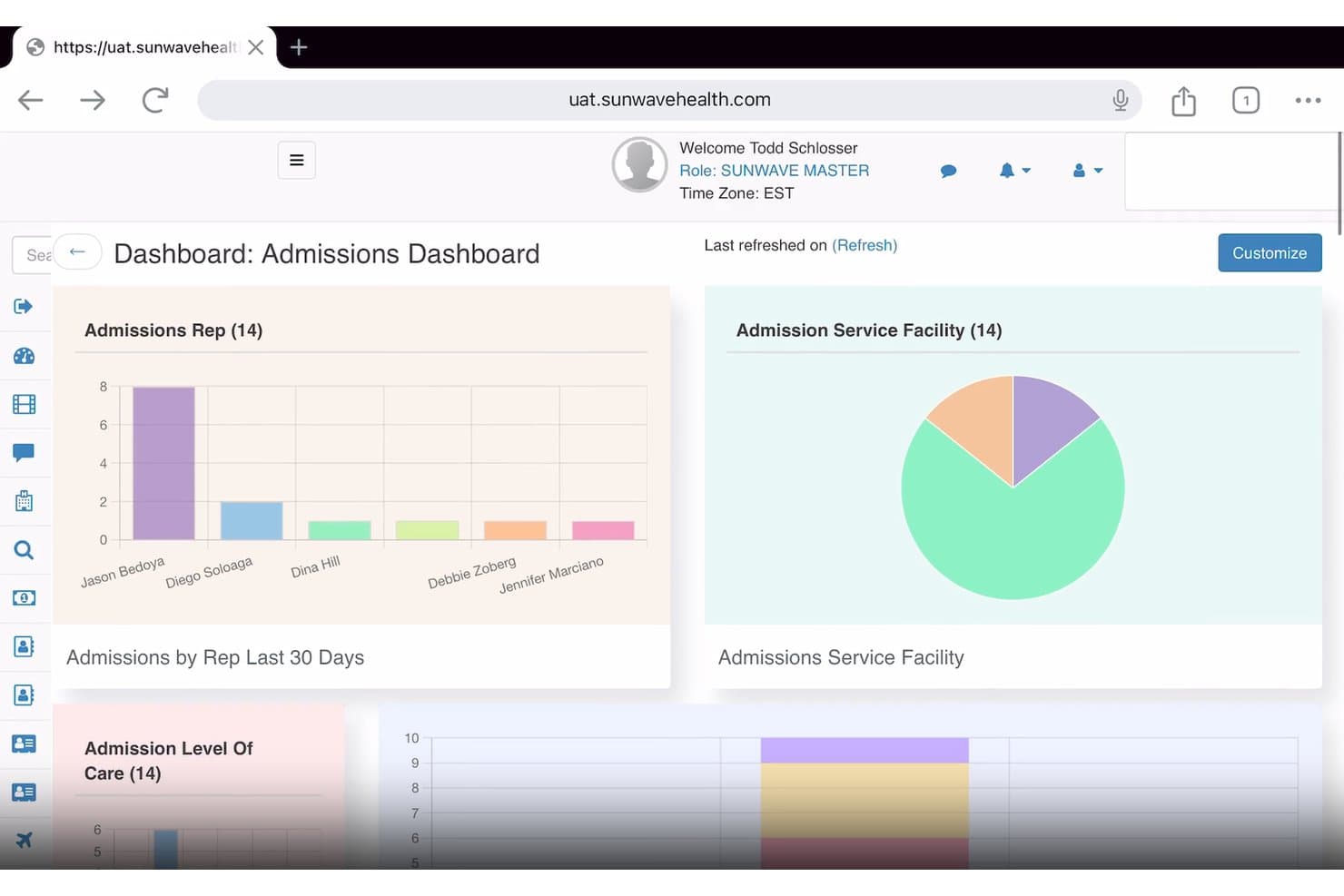
Sunwave tracks admissions data by rep, facility, and care level. Sunwave is a behavioral health EMR built for substance use disorder treatment programs, combining clinical documentation, CRM, revenue cycle management, and AI-assisted charting tools in a single platform.
Who Is Sunwave Best For?
Sunwave is a strong fit for substance use disorder treatment centers that want clinical, billing, and post-discharge alumni engagement managed in one connected platform.
Why I Picked Sunwave
I've included Sunwave in my top picks because its alumni management tools are genuinely built for what happens after discharge, not treated as an afterthought. Staff can log check-in calls, track texts and messages, and get flags when an alumni's engagement pattern suggests they may need follow-up, all from the same platform used for clinical and billing workflows. I also like that SIA generates BPS assessments and progress notes for clinician review, cutting documentation time significantly.
Sunwave Key Features
- Custom template builder: Lets your team create and configure clinical documentation templates tailored to your program's specific workflows and requirements.
- Medication management: Supports prescriptions, protocol-based orders, contraindication flags, MAT, and controlled and psychotropic substance tracking within the patient record.
- Telehealth with unlimited group participants: Hosts individual therapy, group sessions, and psychiatry appointments directly in the platform, with automated reminders and linked visit documentation.
- Revenue cycle management dashboards: Provides financial KPI, VOB, charges and claims, and utilization review dashboards to give administrators real-time visibility into billing performance.
Sunwave Integrations
Sunwave lists integrations with Salesforce, CHESS Health, Twilio, PaySimple, DoseSpot, CTM, Waystar, and Revolv3. API availability and integration types are not stated.
Pros and Cons
Pros:
- Alumni tools track outreach and flag follow-up needs
- Group and individual therapy scheduling in one calendar
- Reviewers value connected clinical and billing workflows
Cons:
- Payer and code coverage needs validation before adoption
- Initial setup can take substantial staff effort
Learn more about Sunwave:
Example photo for Azzly's dashboard Ease (formerly AZZLY Rize) is a behavioral health EMR platform purpose-built for addiction treatment programs, combining CRM, clinical documentation, scheduling, and revenue cycle management in one unified system.
Who Is Azzly Best For?
Azzly is a strong fit for addiction treatment centers that want clinical, administrative, and billing workflows in one place without juggling multiple point solutions.
Why I Picked Azzly
I've included Azzly in my top picks because its interface genuinely reduces the friction that slows clinical teams down in busy addiction treatment settings. I like how the unified CRM, EHR, and RCM layout means a clinician can move from reviewing a patient's biopsychosocial evaluation to checking group session attendance to confirming an authorization, all without leaving the same chart. The shared group-documentation workflow, where you capture the session theme once and then add individual participant notes, is a practical time-saver for IOP and PHP programs running multiple groups daily.
Azzly Key Features
- AI-assisted clinical documentation: A real-time AI scribe generates and auto-fills clinical notes, reducing manual charting time for clinicians.
- E-prescribing with EPCS: Supports controlled-substance e-prescribing with PDMP integration, including medication tracking for buprenorphine and naltrexone across care levels.
- 42 CFR Part 2 record segmentation: Applies field-level, consent-based segmentation of SUD records with per-provider consent tracking and re-disclosure notices.
- Integrated RCM engine: Handles claim creation, scrubbing, submission, denial management, and ERA parsing with AI-driven validation and denial-risk flagging.
Azzly Integrations
Azzly offers native integrations with Google Calendar and Power BI. Its addiction-treatment materials also identify integrations with LabCorp, Quest, DrFirst, Availity, and Waystar, while an API supports custom integrations.
Pros and Cons
Pros:
- Reviewers praise quick chart access
- Group notes link attendance to billing
- Unified intake, clinical, and billing workflows
Cons:
- Reporting accuracy and print workflows frustrate users
- Some reviewers report slow chart loading
Learn more about Azzly:
Other Substance Abuse EMR Software Options
Below is a list of additional substance abuse software that I shortlisted, but did not make it to the top 10. Definitely worth checking them out.
- 11RittenBest for multi-level-of-care SUD documentation
How I Evaluate Substance Abuse EMR Software
I split my evaluation into three parts, giving the most weight to core functionality: manage Part 2 consent and disclosure controls, and document diagnoses, assessments, and treatment plans. Next, I look for differentiators such as ASAM level-of-care tools. Finally, I consider onboarding, configuration support, and pricing as programs grow.
Core Functionality (Table Stakes For This List)
When I'm selecting tools for my list, I score each one on a scale from 0 (does not offer the functionality) to 5 (excels in this area) for each core functionality listed below. I then convert the total into a percentage to help assess each tool's overall fit, with extra weight on any functionalities I’ve deemed essential.
- Part 2 Privacy Controls (Essential): I look for consent management, disclosure tracking, and safeguards that help staff handle protected records and prevent unauthorized redisclosure.
- Clinical Documentation (Essential): I assess structured templates for SUD assessments, diagnoses, and progress notes that clinicians can use across individual and group care.
- Treatment Plan Tracking: I check whether clinicians can update goals and monitor progress as patients move between detox, residential, IOP, and outpatient care.
- Group & Individual Scheduling: I look for scheduling that connects group rosters and one-on-one appointments with attendance and session documentation.
- EHR & Practice Integration: I evaluate how charting, scheduling, patient records, and billing connect, including whether staff must reconcile information across modules.
- Behavioral Health Billing: I check for support with behavioral health claims, coding, and payer workflows, including eligibility checks where available.
Once I have a list of tools that meet the criteria, I consider what sets each platform apart.
Differentiating Factors (What Sets Vendors Apart)
Here's how I compare and contrast different vendors:
Standout Features
I look for built-in ASAM level-of-care tools that guide placement and continued-stay decisions right inside the chart. Without these, clinicians end up referencing external criteria documents mid-assessment, which slows intake. E-prescribing for MAT is equally important—I check whether the system supports controlled substance workflows so providers can manage buprenorphine or naltrexone prescriptions without switching platforms. I also evaluate outcome measurement tools, specifically whether standardized instruments like the PHQ-9 score automatically and display trends over time, since tracking progress across treatment episodes is how programs demonstrate results.
Beyond Features
I check whether a platform scales across multiple levels of care—detox, residential, IOP, and outpatient—under one system, since adding a new program line shouldn't require a major overhaul. Interoperability matters just as much: I look for HL7/FHIR support and referral management tools that let you exchange data with hospitals and recovery partners while honoring Part 2 restrictions. I also evaluate onboarding quality, specifically whether the vendor configures SUD-specific templates and consent rules during setup rather than handing you a generic rollout plan.
How to Choose Substance Abuse EMR Software
It’s easy to get bogged down in long feature lists and complex pricing structures. To help you stay focused as you work through your unique software selection process, here’s a checklist of factors to keep in mind:
| Factor | What to Consider |
|---|---|
| FactorScalability | What to ConsiderCan the software grow with your practice? Consider future expansion and whether the tool can handle larger patient volumes. |
| FactorIntegrations | What to ConsiderDoes it connect with existing tools? Ensure compatibility with billing systems, telehealth platforms, and other essential software. |
| FactorCustomizability | What to ConsiderCan you tailor it to your needs? Look for options to modify templates and workflows to fit your practice's specific requirements. |
| FactorEase of use | What to ConsiderIs the software intuitive? Evaluate the interface and navigation to ensure it's user-friendly for your team. |
| FactorImplementation and onboarding | What to ConsiderHow quickly can you get started? Consider the resources needed for training and the support available during the transition. |
| FactorCost | What to ConsiderDoes it fit your budget? Compare pricing plans and watch for hidden fees or long-term contracts that could affect your finances. |
| FactorSecurity safeguards | What to ConsiderHow does it protect patient data? Ensure the software complies with HIPAA regulations and offers robust data encryption. |
| FactorCompliance requirements | What to ConsiderDoes it meet industry standards? Verify that the software adheres to all necessary legal and regulatory requirements for substance abuse treatment. |
What Is Substance Abuse EMR Software?
Substance abuse EMR software is a digital tool designed to manage patient records and treatment plans for substance abuse programs. It's commonly used by healthcare professionals such as counselors, therapists, and administrative staff to improve patient care and ensure compliance with regulations. Scheduling, patient management, and reporting features help with efficient operations and data organization. Overall, these tools provide a structured way to handle patient information, enhancing the quality of care and administrative efficiency.
Features
When selecting substance abuse EMR software, keep an eye out for the following key features:
- Patient management: Organizes patient records and treatment plans to ensure easy access and efficient care.
- Scheduling: Helps with booking and managing appointments, reducing no-shows and optimizing time.
- Compliance tracking: Ensures your practice meets all legal and regulatory standards, providing peace of mind.
- Reporting: Generates detailed reports for patient outcomes and operational efficiency, aiding in data-driven decisions.
- Telehealth integration: Facilitates remote consultations, expanding access to care and improving flexibility.
- Customizable templates: Allows you to tailor forms and workflows to match your practice's specific needs.
- Secure data storage: Protects sensitive patient information through encryption and other security measures.
- Billing integration: Streamlines financial transactions, ensuring accurate and timely billing processes.
- User-friendly interface: Simplifies navigation and use, reducing training time and enhancing user satisfaction.
- Automated reminders: Sends alerts for appointments and medication schedules, improving adherence and follow-up care.
Benefits
Implementing substance abuse EMR software provides several benefits for your team and your business. Here are a few you can look forward to:
- Improved patient care: Access to organized records and treatment plans helps your team deliver better care.
- Enhanced compliance: Built-in compliance tracking ensures your practice meets all necessary regulations.
- Time savings: Scheduling and automated reminders reduce administrative tasks, giving you more time for patients.
- Data-driven decisions: Reporting features provide insights that guide treatment strategies and business operations.
- Increased access to care: Telehealth integration allows remote consultations, broadening your reach to patients.
- Financial accuracy: Billing integration ensures precise and timely financial transactions, reducing errors.
- User satisfaction: A user-friendly interface makes the software easy to navigate, improving the daily experience for your team.
Costs & Pricing
Selecting substance abuse EMR software requires an understanding of the various pricing models and plans available. Costs vary based on features, team size, add-ons, and more. The table below summarizes common plans, their average prices, and typical features included in substance abuse EMR software solutions:
Plan Comparison Table for Substance Abuse EMR Software
| Plan Type | Average Price | Common Features |
|---|---|---|
| Plan TypeFree Plan | Average Price$0 | Common FeaturesBasic patient management, limited scheduling, and basic reporting. |
| Plan TypePersonal Plan | Average Price$10-$30/user/month | Common FeaturesPatient management, scheduling, compliance tracking, and basic reporting. |
| Plan TypeBusiness Plan | Average Price$40-$70/user/month | Common FeaturesAdvanced reporting, billing integration, customizable templates, and telehealth. |
| Plan TypeEnterprise Plan | Average Price$80-$120/user/month | Common FeaturesAll features including premium support, advanced security, and full integrations. |
People Also Ask (FAQs)
How does substance abuse EMR software differ from general EMR systems?
Substance abuse EMR software is tailored for addiction treatment centers, focusing on features like medication management, specialized assessments, and compliance with specific regulations like 42 CFR Part 2. This specialization helps your team manage patient care more effectively than general EMR systems.
Can substance abuse EMR software integrate with other systems?
Yes, most substance abuse EMR software can integrate with billing, telehealth, and lab systems. This integration improves workflow efficiency by allowing data sharing across platforms, helping your team maintain consistent and accurate records.
Is training available for new users of substance abuse EMR software?
Most providers offer training resources such as webinars, tutorials, and support guides. These resources help your team get up to speed quickly, ensuring they can effectively use the software from day one.
How does substance abuse EMR software handle patient engagement?
Many systems offer features like patient portals, telehealth, and secure messaging. These tools improve communication between patients and providers, making it easier for your team to manage care and for patients to stay informed and engaged.