

Occupational EMR software is a digital system designed to help you manage clinical records, track employee health, and support compliance in occupational medicine settings. If you’re looking for a way to keep your practice organized, cut down on paperwork, and coordinate care across your team, you’re in the right place.
This list reviews the best occupational EMR platforms that help you document exposures, track workplace injuries, and navigate evolving regulatory needs—so you can make a confident decision for your clinic, health service, or employer health program.
Why Trust Our Software Recommendations
6,700+
Reviews
20
Industry experts
16+
Evaluation factors
14
Years
Our team has been testing and reviewing software since 2012. As medical practice leaders ourselves, we know how difficult—and important—it is to choose the right software.
For this guide, we evaluated tools using hands-on testing and independent research, scoring tools using our selection criteria.
Our reviews reflect our human editorial judgment, not a sales pitch.
Occupational EMR Comparison Table
This comparison table outlines pricing for my top occupational EMR software picks:
| Tool | Best For | Trial Info | Price | ||
|---|---|---|---|---|---|
| 1 | Best for medicine documentation | Free demo available | Pricing upon request | Website | |
| 2 | Best for scheduling and clinical workflows | Free demo available | Pricing upon request | Website | |
| 3 | Best for configurable health EHR workflows | Free demo available | Pricing upon request | Website | |
| 4 | Best for managing injuries and employee records | Free demo available | Pricing upon request | Website | |
| 5 | Best for workforce risk management | Free demo available | Pricing upon request | Website | |
| 6 | Best for combining occupational health | Free demo available | From $30/user/month (billed annually, min 5 seats) | Website | |
| 7 | Best for integrated EHR and management workflows | Free demo available | Pricing upon request | Website | |
| 8 | Best for managing occupational medicines | Free demo available | Pricing upon request | Website | |
| 9 | Best for urgent care clinic operations | Not available | Pricing upon request | Website | |
| 10 | Best for enterprise-wide occupational health | Free demo available | Pricing upon request | Website |


Best Occupational EMR Software Reviews
Below are my detailed summaries of the best occupational EMR software that made it onto my shortlist. My reviews offer a detailed look at the features, best use cases, and integrations of each software to help you find the best one for you.
 Best for medicine documentation
- Free demo available
- Pricing upon request
Visit WebsiteCustomer Rating:4.1/5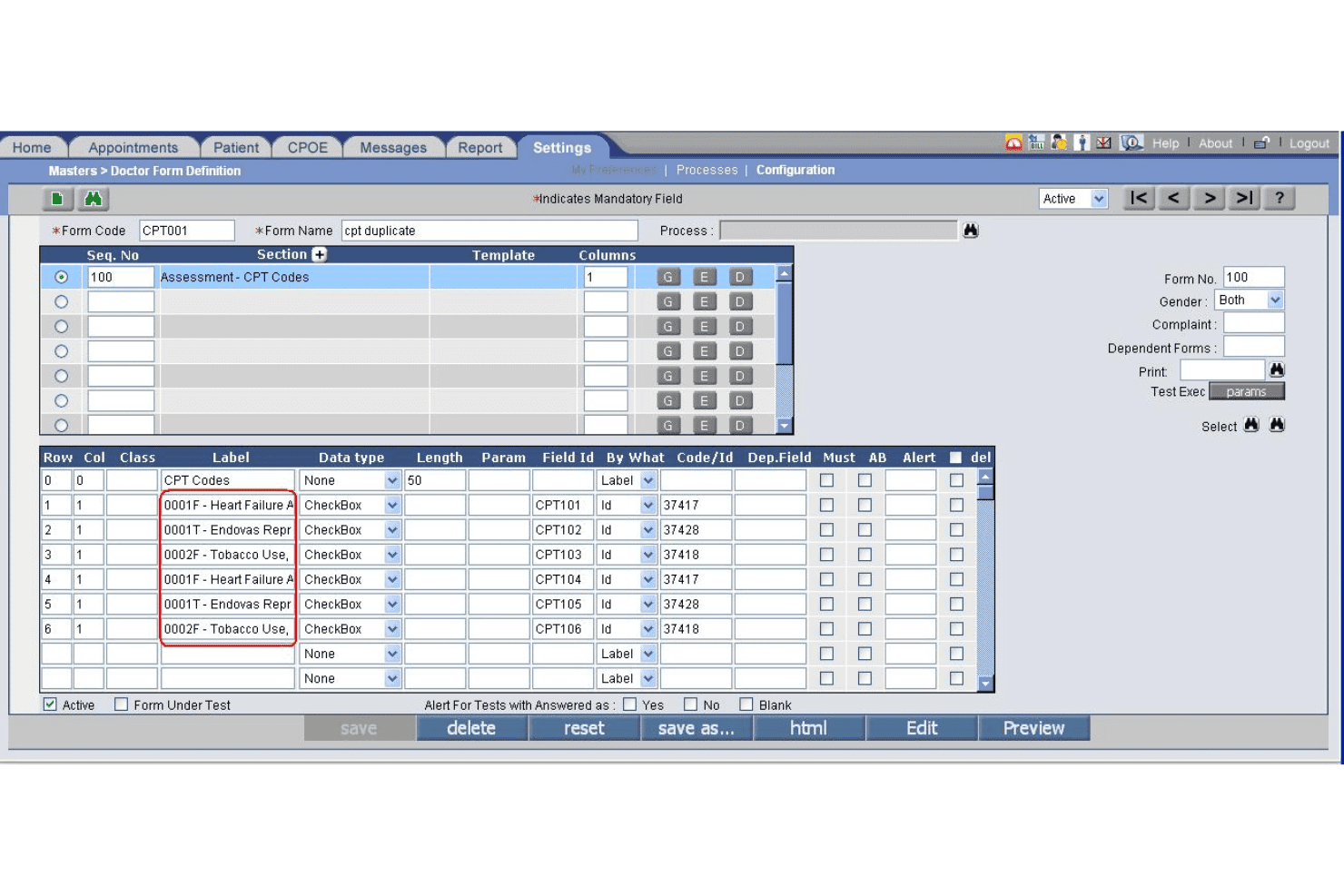
PrognoCIS specialty form builder supports custom reporting by clinical discipline. PrognoCIS is a cloud-based occupational medicine EHR that combines employer-specific documentation, DOT/FMCSA compliance workflows, drug and alcohol testing management, workers' compensation case tracking, and integrated practice management.
Who Is PrognoCIS Best For?
PrognoCIS is a strong fit for occupational medicine clinics and employer health programs that manage multi-employer accounts, DOT compliance exams, and workers' compensation cases.
Why I Picked PrognoCIS
PrognoCIS earns its spot on my shortlist because of how purpose-built its documentation is for occupational medicine specifically. I love that it auto-uploads DOT medical examiner forms directly to FMCSA, removing a manual step that creates compliance risk in a lot of occ med practices. The employer-specific template system also lets me tie custom protocols and charge codes directly to individual employer accounts, so documentation stays consistent across every encounter type.
PrognoCIS Key Features
- Employer portal access: Employers can securely submit authorizations, view results, and access invoices in real time.
- OSHA recordkeeping automation: Automatically creates OSHA 300, 300A, and 301 logs from clinical documentation.
- Protocol-driven workflows: Applies exam protocols for DOT exams, drug screens, respirator fit tests, and audiograms based on job role.
- Integrated drug and alcohol testing: Supports native chain-of-custody workflows and integrates with labs for result management.
PrognoCIS Integrations
PrognoCIS offers native integrations with Surescripts for e-prescribing, Medsender for electronic fax intake, FMCSA for DOT medical examiner form uploads, and supports lab and radiology interfaces. An API is available for custom integrations.
Pros and Cons
Pros:
- Built-in chain-of-custody drug test workflows
- Automated OSHA and DOT compliance reporting
- Employer-specific templates for multiple contract accounts
Cons:
- Interface can require multiple clicks for tasks
- Return-to-work tracking lacks automation
Learn more about PrognoCIS: Best for scheduling and clinical workflows
- Free demo available
- Pricing upon request
Visit WebsiteCustomer Rating:3.6/5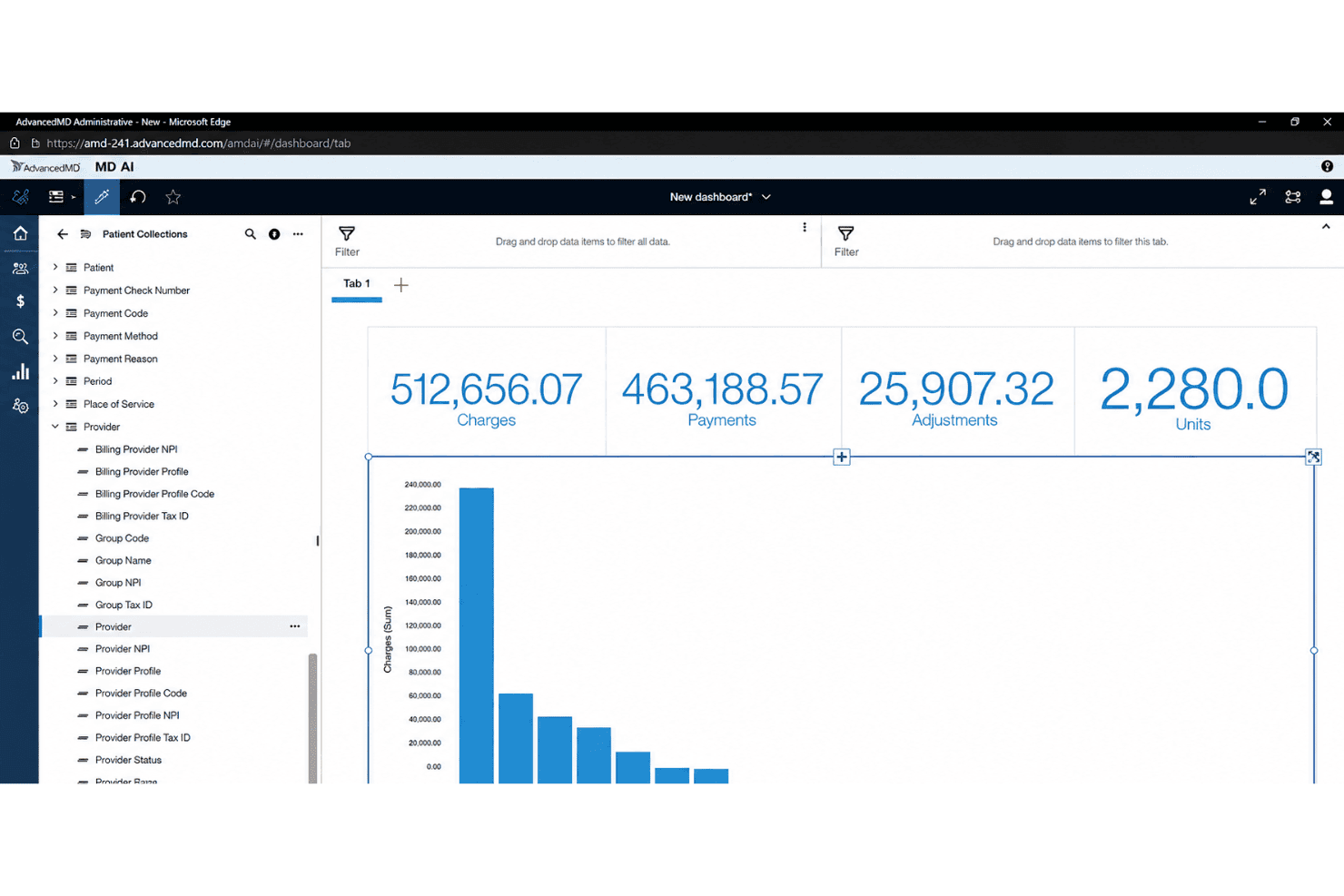
AdvancedMD centralizes EHR, billing, claims, eligibility, and patient payments. AdvancedMD is a cloud-based EHR and practice management platform that combines clinical documentation, appointment scheduling, billing, and patient engagement tools for independent ambulatory practices.
Who Is AdvancedMD Best For?
AdvancedMD is a strong fit for independent, small-to-mid-size medical practices that need a unified platform covering scheduling, charting, and billing in one system.
Why I Picked AdvancedMD
I picked AdvancedMD as one of the best because its scheduling and clinical workflow tools are genuinely well-built for high-volume, appointment-driven practices. The customizable template library lets providers tailor documentation to specific encounter types, which matters when you're moving through a mix of injury visits, follow-ups, and physicals in a single day. I also like the AI-enabled ambient documentation, which reduces charting time during back-to-back visits, and the waitlist and recall management tools that keep appointment slots filled when cancellations happen.
AdvancedMD Key Features
- Customizable charting templates: Build and modify encounter notes to match your clinical and regulatory needs.
- Integrated patient portal: Enable patients to complete intake forms, view documents, and message your practice securely.
- Insurance eligibility verification: Check patient coverage and benefits directly in the platform before visits.
- Electronic prescribing (eRx): Send prescriptions, including controlled substances, to pharmacies with built-in compliance tools.
AdvancedMD Integrations
AdvancedMD offers native integrations with Quest Diagnostics, LabCorp, Appriss Health, DrFirst, Surescripts, and Amazon Web Services, and provides an API for custom integrations.
Pros and Cons
Pros:
- Electronic prescription tools for controlled substances
- Custom chart templates for encounter documentation
- Appointment workflows support high-volume scheduling needs
Cons:
- Lacks employer and occupational health protocol tools
- No workers’ compensation documentation workflows
 Best for configurable health EHR workflows
- Free demo available
- Pricing upon request
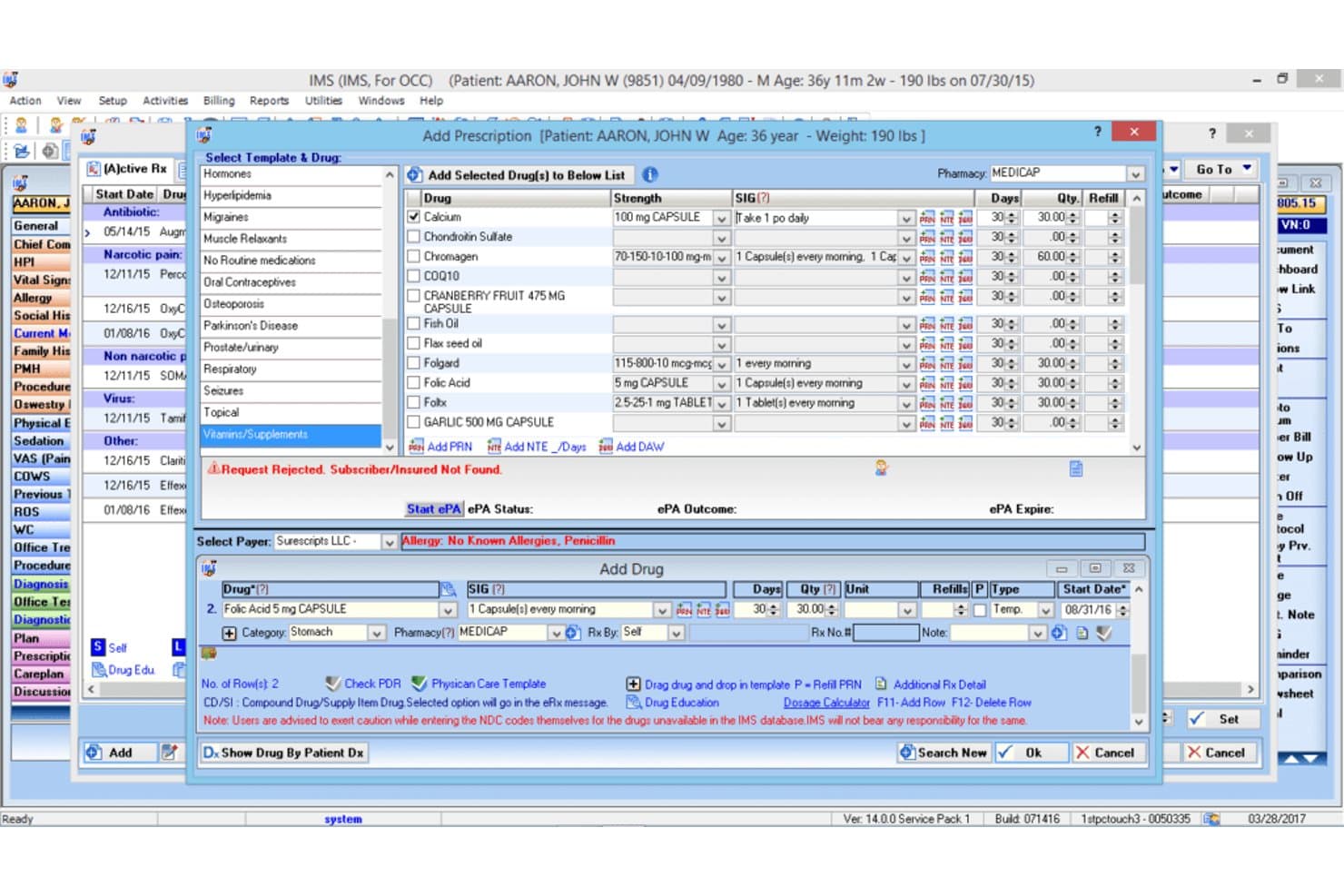
1st Providers Choice IMS offers an e-prescribing module with drug templates, prescription fields, and allergy alerts for occupational therapy EMR workflows. 1st Providers Choice IMS is a cloud-based occupational medicine EMR that combines configurable clinical workflows, employer portal management, DOT and OSHA compliance documentation, return-to-work planning, and integrated billing into a single platform.
Who Is 1st Providers Choice IMS Best For?
It's a strong fit for small to mid-size occupational medicine clinics that need a fully configurable, all-in-one EHR, billing, and practice management platform.
Why I Picked 1st Providers Choice IMS
1st Providers Choice IMS earns its spot on my shortlist because the level of workflow configurability it offers is genuinely rare in occupational medicine EMRs. I particularly like how return-to-work care plans are built around injury type and job role rather than generic templates. The built-in state and federal forms library, covering DOT, OSHA, and Workers' Comp documentation, means I'm not piecing together compliance workflows from separate tools.
1st Providers Choice IMS Key Features
- Employer portal access: Lets employers view employee records, submit authorizations, and access invoices through a secure web portal.
- OSHA recordkeeping automation: Automatically compiles required OSHA 300, 300A, and 301 logs from clinical encounter data.
- Protocol-driven workflows: Applies specific DOT, drug testing, and surveillance protocols based on employer and job classification.
- Integrated drug and alcohol testing: Provides native chain-of-custody documentation with digital orders and lab integrations.
1st Providers Choice IMS Integrations
Native integrations include Dragon Dictation, Availity, Optum Insight, Office Ally, Gateway EDI, Emdeon, and Realmed. An API is available for custom integrations.
Pros and Cons
Pros:
- Advanced workers’ comp case management workflows
- Employer portal with real-time authorization management
- OSHA and DOT regulatory reporting included
Cons:
- Few public user reviews or independent ratings
- Limited support for DOT chain-of-custody eCCF
Learn more about 1st Providers Choice IMS: Best for managing injuries and employee records
- Free demo available
- Pricing upon request
OccuCare offers a comprehensive OPD Dashboard with employee type, visit purpose, disease system, participant type, user, and nationality-based reporting panels. OccuCare is an occupational health EMR built for industrial and on-site clinics, combining employee health records, injury tracking, medical surveillance, drug and alcohol testing workflows, and OSHA and DOT compliance reporting.
Who Is OccuCare Best For?
OccuCare is a strong fit for mid-to-large industrial enterprises that run on-site occupational health clinics and need centralized health and safety management at scale.
Why I Picked OccuCare
I picked OccuCare as one of the best because of how it handles injury and employee record management within a single, structured system. I like that workplace injuries move through a complete documentation trail, from initial incident capture through treatment plans and follow-up, all tied directly to the employee's health record. The medical surveillance module also tracks recurring exams like audiometry and spirometry with exposure-based cohorts, so employee records stay current without manual chasing.
OccuCare Key Features
- Compliance reporting modules: Generate OSHA and DOT compliance reports directly from employee health data with built-in regulatory templates.
- Employer account management: Maintain separate employer profiles, each with designated protocols and access controls for multi-client setups.
- Occupational health protocol library: Access templates for physicals, drug testing, audiograms, spirometry, and respiratory exams configured for regulatory tracking.
- Automated appointment scheduling: Book, manage, and remind employees of physicals, screenings, and follow-up visits with calendar integration.
OccuCare Integrations
OccuCare supports integrations with HRIS, payroll, EHS, and billing systems, and offers an API for custom integrations. Native integrations are not clearly documented.
Pros and Cons
Pros:
- Centralized employee recordkeeping with roles-based access
- Injury documentation workflows tailored to industry
- Strong surveillance protocol management tools
Cons:
- Lacks DOT chain-of-custody lab integrations
- No US workers' compensation claim templates
Learn more about OccuCare:
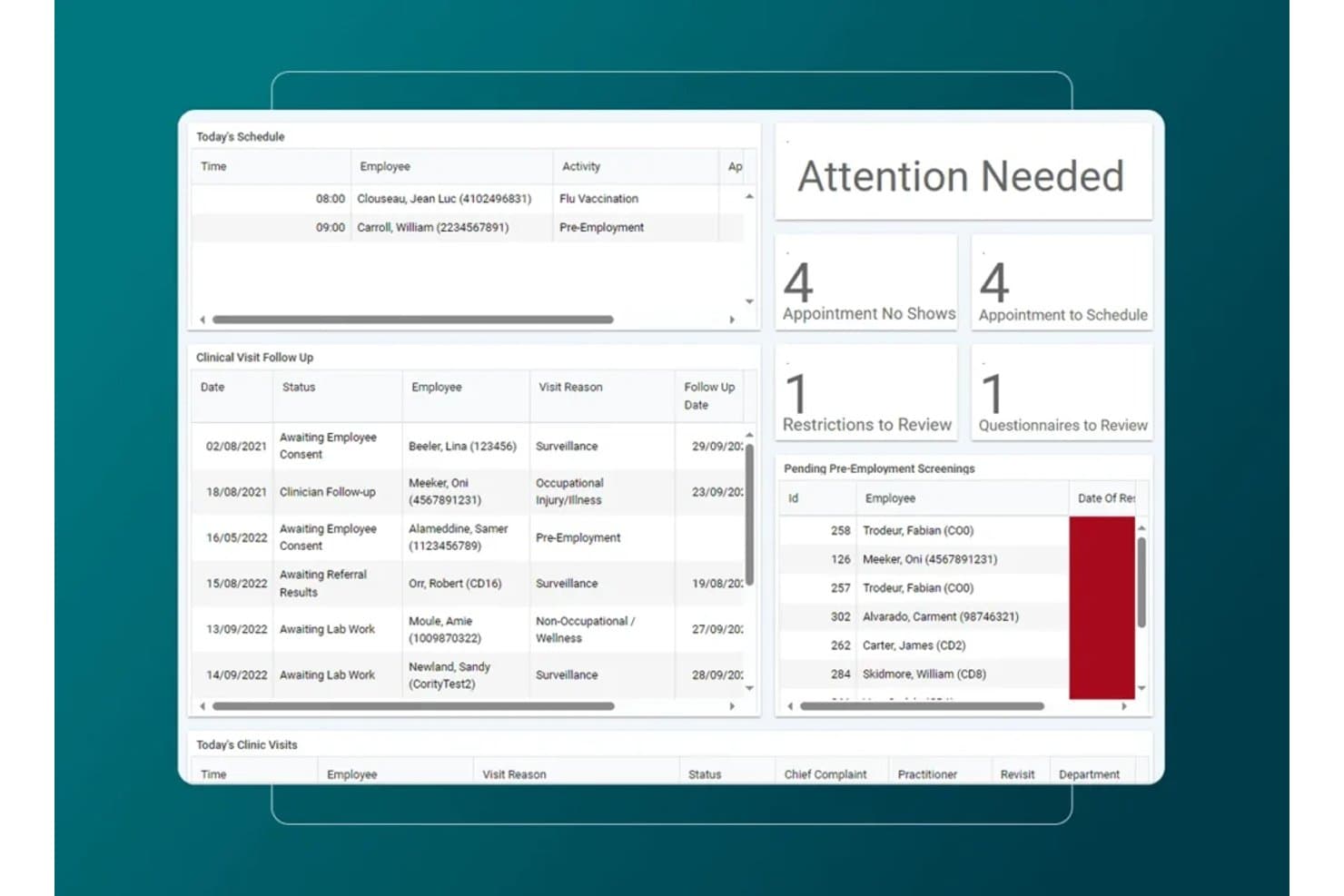
Medgate offers an occupational health dashboard with today's schedule, clinical visit follow-ups, attention alerts, and pending pre-employment screenings. Medgate is an enterprise occupational medicine EMR that combines clinic management, medical surveillance, employer protocol configuration, workers' compensation case tracking, and multi-payer billing for employer-based health programs.
Who Is Medgate Best For?
Medgate fits large enterprises in pharmaceuticals, healthcare, and regulated manufacturing that run dedicated occupational health clinics or employee health programs.
Why I Picked Medgate
I picked Medgate as one of the best because its Employer Protocols module lets you configure workflows, authorized services, and billing rules per employer, which is core to workforce risk management at scale. I also like how the medical surveillance module ties test results, immunizations, and case histories to individual employee profiles, and the disability case management module links directly to incident management so my team can track a work injury from first report through return-to-work.
Medgate Key Features
- OSHA reporting automation: Instantly generates required OSHA 300, 300A, and 301 logs from clinical encounters.
- Employer portal access: Lets employer clients securely authorize services, view statuses, and retrieve invoices.
- Protocol-driven workflows: Applies employer-specific and DOT exam protocols to visits based on job classification.
- Integrated drug and alcohol testing: Connects with leading occupational labs and MRO workflows for compliant testing.
Medgate Integrations
Medgate offers native integrations with SAP, Microsoft SharePoint, and 3E's safety data sheet library. The platform provides a RESTful API for custom integrations with ERP and HRIS systems.
Pros and Cons
Pros:
- Deep support for multi-site clinic environments
- Automated OSHA and incident compliance reporting
- Employer-specific protocols and billing management
Cons:
- Slow report generation for large client databases
- Limited ready-to-use DOT exam templates
Learn more about Medgate: Best for combining occupational health
- Free demo available
- From $30/user/month (billed annually, min 5 seats)
Visit WebsiteCustomer Rating:4.2/5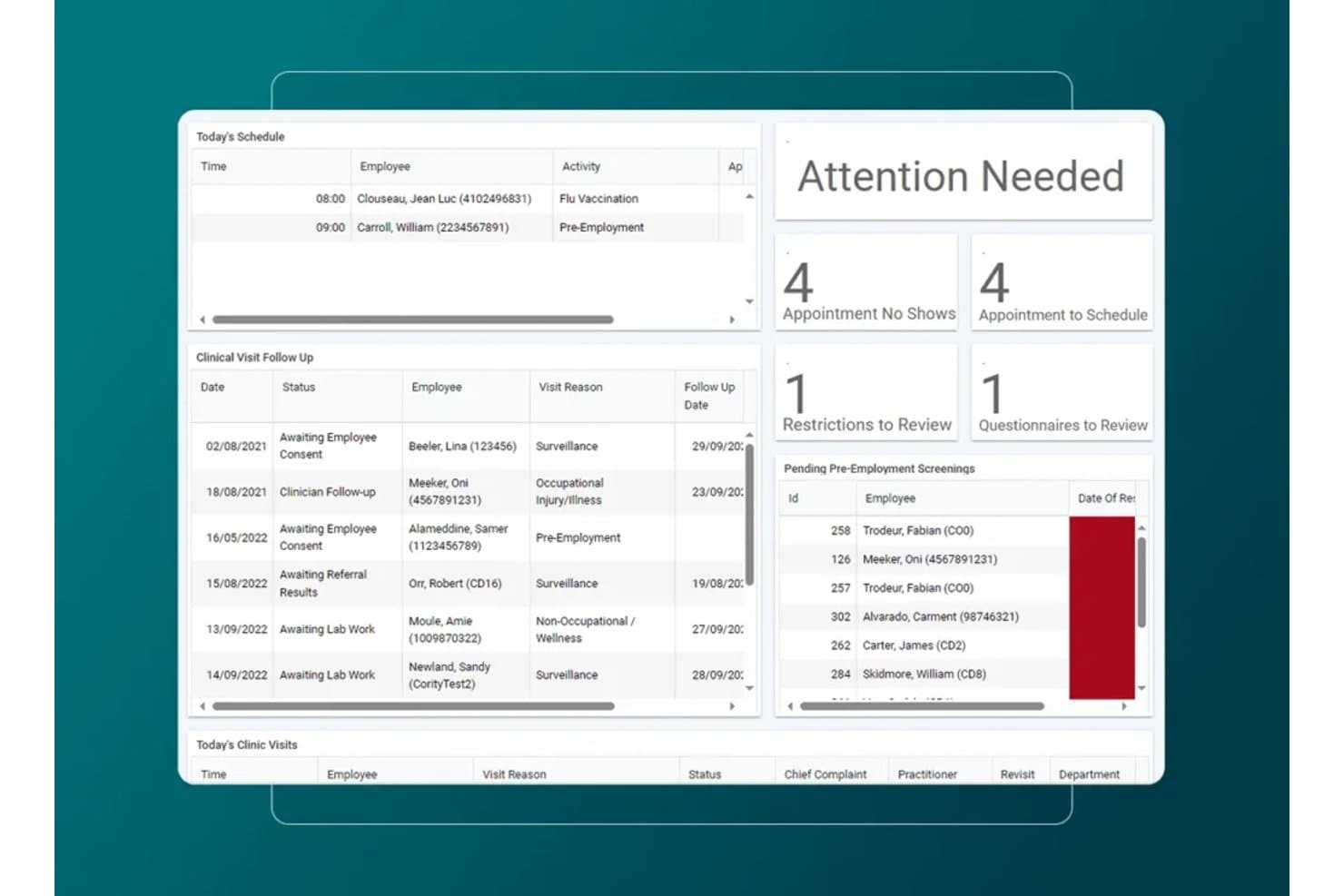
Cority offers an occupational health dashboard with today's schedule, clinical visit follow-ups, attention alerts, and pending pre-employment screenings. Cority is an enterprise occupational health EMR that covers medical surveillance, case management, and return-to-work tracking alongside industrial hygiene, safety, quality, and sustainability modules on a single platform.
Who Is Cority Best For?
Cority suits large enterprises in healthcare, manufacturing, chemicals, and energy that manage occupational health programs alongside complex EHS and compliance operations.
Why I Picked Cority
I picked Cority as one of the best because no other occupational EMR I've used ties clinical records so tightly to industrial hygiene and safety data. When managing a respiratory protection program, I can link audiometric surveillance results directly to exposure monitoring from the industrial hygiene module, all in one platform. The case management tool also lets me document RTW restrictions and modified duties alongside the original medical surveillance record.
Cority Key Features
- Automated OSHA recordkeeping: Generates OSHA 300, 300A, and 301 logs directly from clinical data.
- Employer portal access: Lets employer clients submit authorizations, check results, and review invoices online.
- Protocol-driven workflows: Applies employer-specific and regulatory protocols to exams based on job requirements.
- Integrated drug and alcohol testing: Provides native chain-of-custody, eCCF, and support for lab and MRO workflows.
Cority Integrations
Cority offers native integrations with SAP, IBM Maximo, Oracle, Infor, 3E SDS library, Protex AI, and supports occupational medicine workflows with Meddbase. An API is available for custom integrations.
Pros and Cons
Pros:
- Includes employer portal for client access
- Strong return-to-work and case management tools
- Deep protocol-driven occupational health library
Cons:
- Limited native support for eCCF lab workflows
- Overly complex for small clinics
Learn more about Cority: Best for integrated EHR and management workflows
- Free demo available
- Pricing upon request
Visit WebsiteCustomer Rating:3.7/5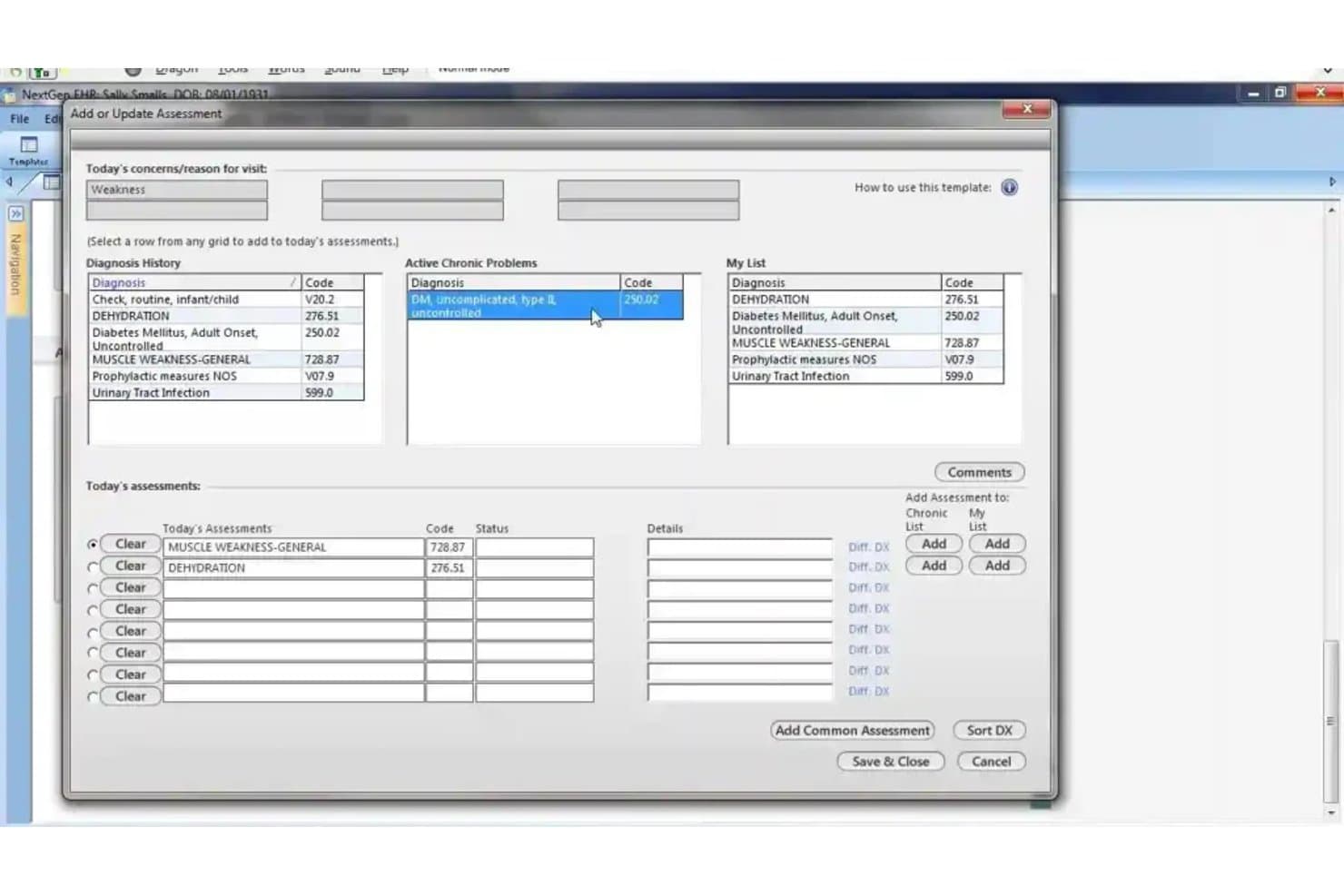
NextGen Healthcare offers an 'Add or Update Assessment' dialog that allows clinicians to manage patient diagnoses, chronic problems, and today's assessments in one streamlined view. NextGen Healthcare is an ambulatory EHR and practice management platform with configurable clinical templates, integrated revenue cycle management, and AI-assisted documentation tools across 26+ supported specialties, including occupational medicine.
Who Is NextGen Healthcare Best For?
NextGen Healthcare suits mid-sized to large ambulatory practices running multiple providers who need EHR, practice management, and billing under one connected system.
Why I Picked NextGen Healthcare
I picked NextGen Healthcare because of how tightly its EHR, practice management, and revenue cycle tools connect within a single system. When documenting an occupational medicine encounter, the clinical note, charge creation, and claims scrubbing all move through one workflow without manual handoffs. I also like Ambient Assist, which converts provider-patient conversations into structured SOAP notes in real time, cutting documentation time during busy injury visit days.
NextGen Healthcare Key Features
- Specialty content templates: Offers 26+ configurable clinical templates across numerous medical specialties, including occupational medicine options.
- Integrated lab ordering: Connects with over 700 labs for electronic ordering and results delivery directly in the EHR.
- Multi-payer claims processing: Provides rules-based claims creation and scrubbing for insurance, workers' comp, and third-party billing.
- API marketplace connectivity: Features an API marketplace to add third-party apps and integrations specific to your workflow needs.
NextGen Healthcare Integrations
NextGen Healthcare offers native integrations with Quest Diagnostics, LabCorp, the AWS ecosystem, Apple Health, and hundreds of labs through NextGen Share Diagnostic Hub. An API marketplace is available for adding third-party apps and custom integrations.
Pros and Cons
Pros:
- Connects directly to major diagnostic labs
- Supports custom specialty documentation templates
- Built-in RCM and claims management tools
Cons:
- Lacks employer contract and portal management
- No native workflows for workers’ compensation
Learn more about NextGen Healthcare: Best for managing occupational medicines
- Free demo available
- Pricing upon request
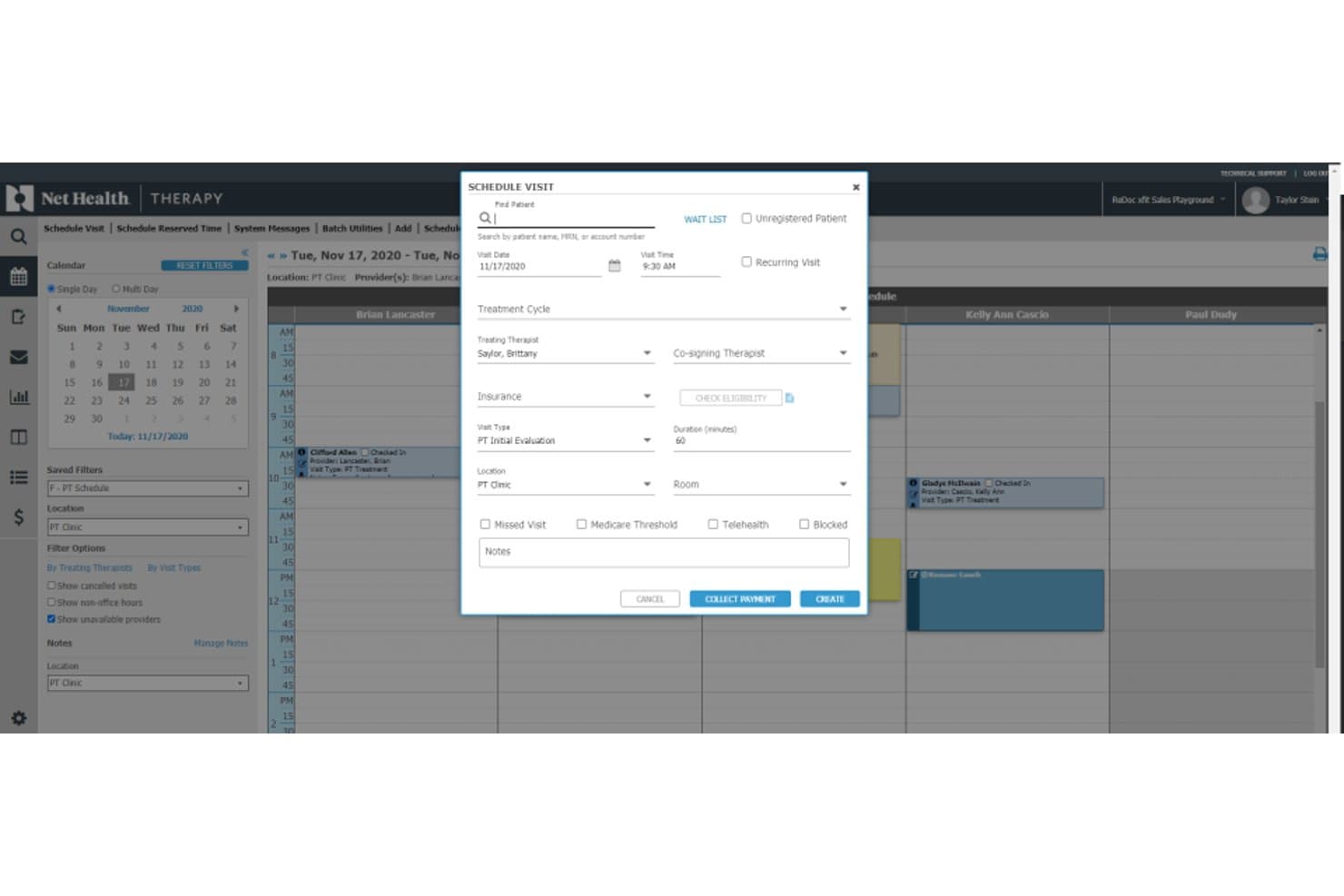
Net Health scheduling dashboard for managing patient visits, providers, insurance, and payments Net Health is an occupational medicine EMR built around employer account management, workers' comp documentation, split billing workflows, mobile immunization tracking, and OSHA compliance reporting.
Who Is Net Health Best For?
It's a strong fit for hospital-based occupational medicine departments and urgent care clinics managing employer accounts alongside workers' comp caseloads.
Why I Picked Net Health
Net Health earns its spot on my shortlist because of how it handles the billing complexity unique to occupational medicine. I particularly like the split billing engine, which separates workers' comp charges from employer-direct services and auto-generates invoices for each, all tied to employer-specific fee schedules. The built-in KPI dashboard tracks OM-specific metrics like new injury ratios, visit type breakdowns, and time from initial visit to case resolution.
Net Health Key Features
- OSHA recordkeeping automation: Automatically generates OSHA 300, 300A, and 301 logs from encounter data within the platform.
- Employer portal access: Offers secure, real-time portals for employer clients to view authorizations, results, and invoices.
- Protocol-driven exam workflows: Auto-applies DOT and employer-specific protocols for regulatory exams and screenings.
- Integrated drug and alcohol testing: Supports native chain-of-custody workflows and electronic lab integrations for drug and alcohol test management.
Net Health Integrations
Net Health offers native integrations with state immunization registries and automatically generates OSHA 300 logs. Native HR demographic software interfaces are supported. An API is available for custom integrations.
Pros and Cons
Pros:
- Protocol-driven workflows for DOT and drug tests
- OSHA reporting is automated from encounter data
- Employer account and billing management is built in
Cons:
- No built-in telemedicine for occ-med encounters
- Workers’ comp claims data import is limited
Learn more about Net Health: Best for urgent care clinic operations
- Not available
- Pricing upon request
Visit WebsiteCustomer Rating:2.7/5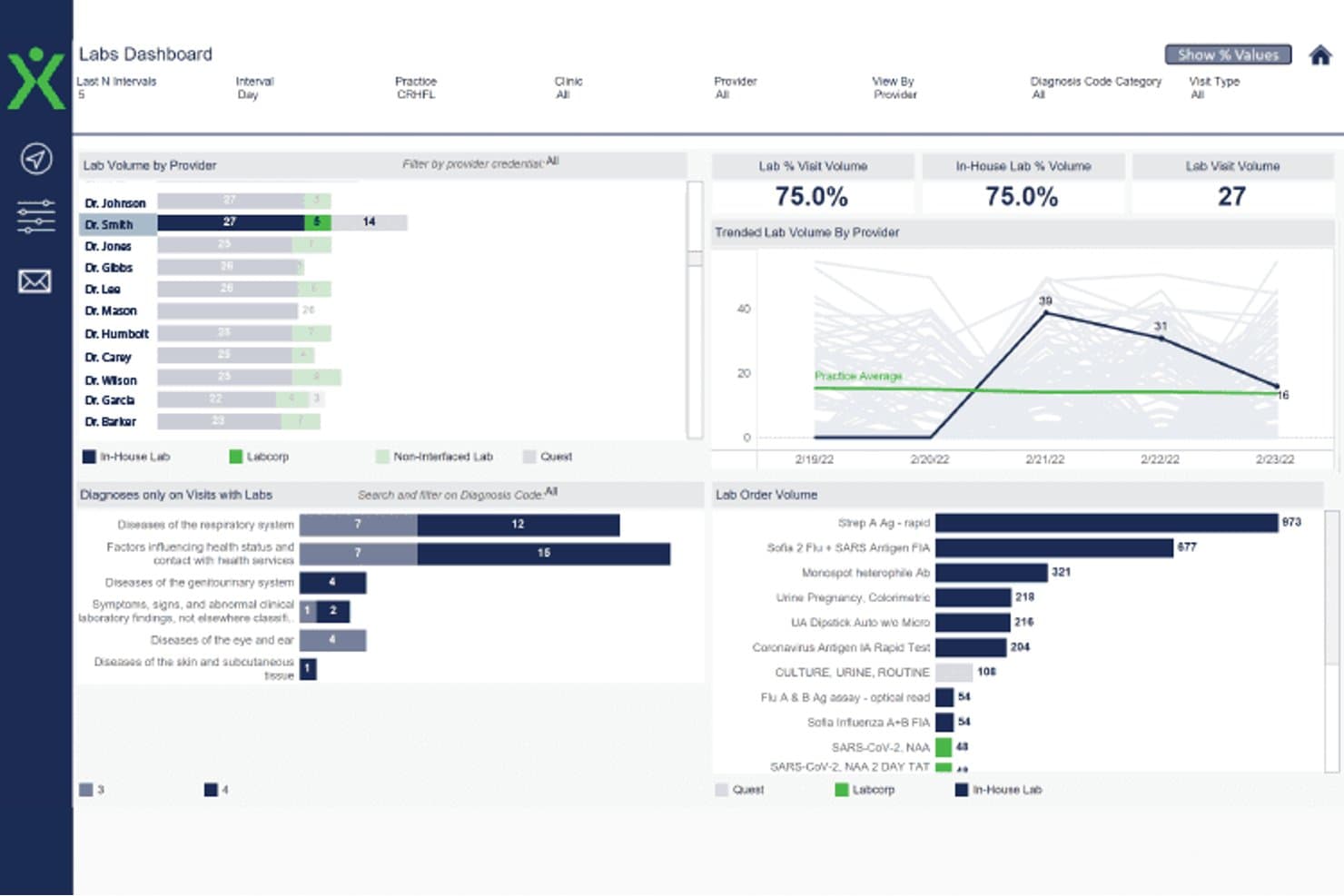
Experity labs dashboard showing provider lab volume, visit trends, diagnoses, and test orders Experity is an EMR and practice management platform built for urgent care and occupational medicine clinics, combining employer portal access, visit-specific OccMed workflows, and multi-payer billing for work-related encounters.
Who Is Experity Best For?
Experity is a strong fit for urgent care clinics that operate occupational medicine as a combined service line alongside standard urgent care visits.
Why I Picked Experity
I picked Experity as one of the best because it's the only platform I've used that handles urgent care and occupational medicine visits within a single, unified workflow. The configurable corporate protocols let my team set client-specific procedures and split billing rules without manual workarounds. The employer portal gives clients direct, secure access to visit data, work restrictions, and test results, so my staff spends less time fielding phone calls and printing records.
Experity Key Features
- Standardized OccMed exam templates: Pre-built templates for DOT physicals, drug testing, and regulatory compliance exams.
- Employer account management: Maintain unique employer profiles with protocols, authorized services, and billing settings.
- Automated OSHA recordkeeping: System auto-generates OSHA 300, 300A, and 301 logs from recorded encounter data.
- Integrated lab ordering: Support for chain-of-custody workflows and direct electronic orders to connected occupational health labs.
Experity Integrations
Experity offers native integrations with Waystar for clearinghouse services, its own OnePACS radiology system, electronic prescribing solutions, connected labs, and Experity Patient Engagement. An API is available for custom integrations.
Pros and Cons
Pros:
- Built-in OSHA recordkeeping feature
- Handles urgent care and OccMed in one system
- Employer portal for real-time visit updates
Cons:
- Lacks automated regulatory form generation
- Complex workflows for split OccMed billing
Learn more about Experity: Best for enterprise-wide occupational health
- Free demo available
- Pricing upon request
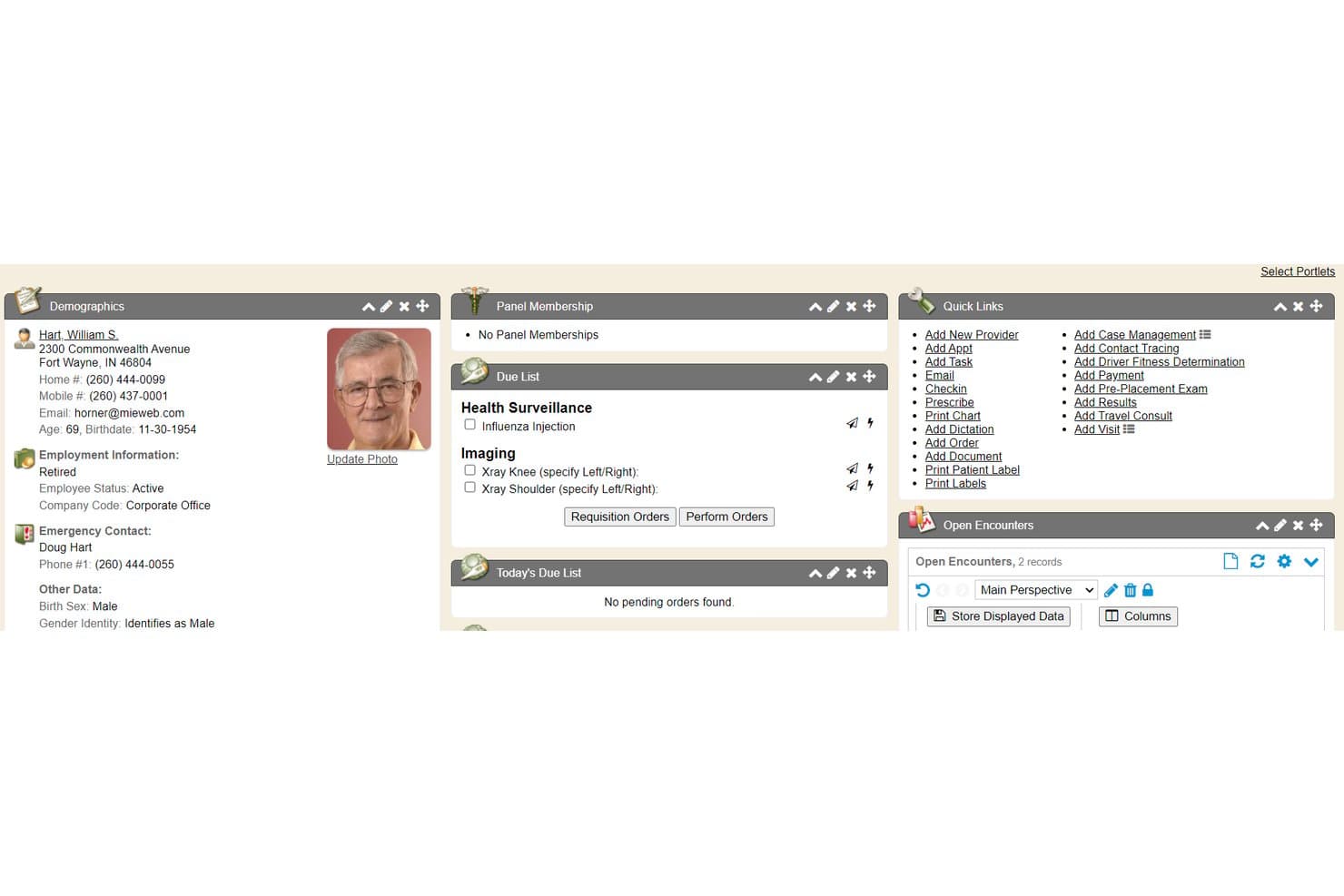
Enterprise Health offers a comprehensive patient summary chart tab featuring demographics, due lists, panel membership, quick links, and open encounters for occupational health management. Enterprise Health is an ONC-certified occupational health EMR built on a clinical EHR foundation, combining medical surveillance, workers' comp documentation, injury management, and compliance reporting in a single platform.
Who Is Enterprise Health Best For?
Enterprise Health is a strong fit for large employers and health systems running multi-site onsite clinics that need enterprise-scale occupational health management.
Why I Picked Enterprise Health
Enterprise Health earns its spot on my shortlist because it's the only occupational EMR built on an ONC-certified EHR foundation, which matters when you're running clinics across dozens of worksites. I particularly like the medical surveillance module, which tracks audiometry, pulmonary function, and respirator fit exams across the entire workforce and automates OSHA 300A electronic submission. The Ozwell AI assistant also speeds up encounter documentation directly within the platform.
Enterprise Health Key Features
- Employer portal access: Offers secure, role-based web access for employer clients to submit authorizations and view employee test results.
- Configurable protocol libraries: Enables users to apply DOT and employer-based protocols tailored for specific job roles or contracts.
- Lab and device integration: Connects with third-party labs and medical devices, supporting bi-directional data flow and automated result import.
- Automated OSHA form generation: Creates OSHA 300, 300A, and 301 forms directly from clinical documentation.
Enterprise Health Integrations
Enterprise Health offers native integrations with LabCorp, Quest Diagnostics, HR systems, billing and practice management systems, state immunization registries, audiometers, spirometers, DICOM/PACS, health information exchanges, and supports SAML 2.0 SSO. An API is available for custom integrations.
Pros and Cons
Pros:
- Employer portal for real-time communication
- Native medical surveillance and protocol libraries
- OSHA automation for large employer populations
Cons:
- Very limited support for urgent care workflows
- Implementation typically takes several months
Learn more about Enterprise Health:
Other Occupational EMR Software
Here are some additional occupational EMR software options that didn’t make it onto my shortlist, but are still worth checking out:
- 11WebChart MDBest for streamlined occupational health charting
- 12SynchromedicsBest for occupational medicine documentation
- 13eClinicalWorksBest for connecting occupational health records
- 14Mercury MedicalBest for managing occupational medicine clinics
- 15WorkCareBest for employer-based occupational programs
- 16BlueHiveBest for coordinating employer health services
How I Evaluate Occupational EMR Software
I split my evaluation into baseline requirements—like workers' comp documentation and DOT protocol support—and differentiators that separate one platform from another.
Core Functionality (Table Stakes For This List)
When I'm selecting tools for my list, I rank each one on a scale from 0 (does not offer the functionality) to 5 (excels in this area) for each core functionality listed below. Then, I calculate the tool's total score into a percentage. Each tool needs to achieve a minimum total score of 65% to be considered for inclusion.
- Workers' Comp Documentation: I look for purpose-built templates that tie injury encounters and first reports of injury directly to employer accounts and claim numbers.
- Employer & Payer Management: Each tool should let you maintain separate employer profiles with unique protocols, authorized services, and multi-payer billing rules.
- Occupational Health Protocols: I evaluate whether the platform includes pre-configured protocols for DOT physicals, drug screens, audiograms, and respirator clearance exams.
- Return-to-Work Tracking: Structured fields for work status, physical restrictions, and duty modifications matter more than free-text notes buried in a chart.
- Compliance Reporting: I check for automated generation of OSHA 300 logs, DOT forms, and state-specific regulatory reports rather than manual data exports.
- Drug Screen & Lab Integration: The platform should support chain-of-custody workflows and connect to occupational lab networks like Quest or LabCorp for specimen tracking.
Once I have a list of tools that meet the criteria, I consider what sets each platform apart.
Differentiating Factors (What Sets Vendors Apart)
Here's how I compare and contrast different vendors:
Standout Features
Employer portal access is a big differentiator. I look for platforms that let employer clients submit authorizations, view test results, and pull invoices without calling your front desk. Protocol-driven workflows also matter—the best tools auto-apply the correct exam bundle based on job classification, so your staff doesn't manually build each visit. I evaluate how well a platform handles OSHA recordkeeping automation, since auto-generating 300 and 301 logs from encounter data saves hours of manual compilation at year-end. Integrated drug and alcohol testing with native chain-of-custody and eCCF support rounds out what I consider most valuable.
Beyond Features
Billing flexibility is a major consideration. I look for dual billing that handles employer direct-bill invoicing and workers' comp claims in the same workflow, since most clinics juggle both daily. Compliance and regulatory fit also carry weight—proper segregation of PHI from employer-facing data and adherence to 42 CFR Part 2 for substance testing records are details I check closely. Integration with devices like audiometric booths, spirometers, and vision testers matters too, because manual data entry from those exams slows your clinic down.
How to Choose Occupational EMR Software
It’s easy to get bogged down in long feature lists and complex pricing structures. To help you stay focused as you work through your unique software selection process, here’s a checklist of factors to keep in mind:
| Factor | What to Consider |
| Scalability | Will the system grow with your clinic as you add locations or employer clients? Ask vendors about caps, capacity, and expansion options. |
| Integrations | Can the EMR connect to labs, billing systems, and devices you already use? Map out your current systems to avoid duplicate data entry. |
| Customizability | Are you able to tailor templates, employer protocols, or reporting formats without expensive development work or vendor involvement? |
| Ease of use | Is the platform intuitive for your team? Consider hands-on demos, ask about onboarding time, and check for frequent workflow bottlenecks. |
| Implementation and onboarding | What’s the timeline and resource commitment for go-live? Beware of hidden configuration work, data migration hurdles, or needed IT support. |
| Cost | Does pricing fit your typical claim volume, staff size, and number of employer accounts? Watch for add-on costs linked to specialty modules. |
| Security safeguards | Does the platform keep patient and employer data segregated, enforce user access rules, and support HIPAA plus external compliance needs? |
| Compliance requirements | Can the system accommodate DOT, OSHA, and state regulators? Look for built-in regulatory updates and support for evolving requirements. |
What Are Occupational EMR Software?
Occupational EMR software are digital platforms designed to manage clinical records, employer protocols, and regulatory documentation for occupational health services. These systems help clinics track work-related injuries, automate compliance reporting, coordinate care between providers and employer clients, and support telehealth visits. With occupational EMR software, you can streamline workers’ compensation workflows, support DOT exams, and keep employer billing and reporting organized, all within a unified, secure environment.
Features of Occupational EMR Software
When selecting occupational EMR software, keep an eye out for the following key features:
- Workers’ comp documentation: Purpose-built templates and workflows for capturing work injury details, tracking cases, and linking every encounter to the specific employer and claim.
- Employer account management: Maintain detailed employer profiles with custom service protocols, contract rules, and unique billing arrangements for each client.
- DOT and regulatory exam support: Built-in templates and protocols for exams like DOT physicals, respirator clearances, and audiograms, plus tools to track expiration dates and follow-up needs.
- Return-to-work management: Document physical restrictions, duty modifications, and communicate work status changes directly to employers and payers.
- Multi-payer billing workflows: Manage direct employer invoicing, split-billing with insurance, and workers’ comp claims—all within a single system.
- Compliance and OSHA reporting: Automate the generation of OSHA 300, 300A, and 301 logs, DOT reports, and support state and federal reporting requirements.
- Drug and alcohol testing integration: Connect with lab networks for drug screens, chain-of-custody workflows, and electronic custody and control forms.
- Employer portal access: Provide secure online access for employers to submit authorizations, view test results, and monitor employee statuses in real time.
- Data migration tools: Tools for bringing over records and templates from legacy occupational medicine systems without major manual entry.
- Audit and access controls: Role-based permissions and detailed logging to ensure privacy, compliance, and data security across employer and medical records.
Common Occupational EMR Software AI Features
Beyond the standard occupational EMR software features listed above, many of these solutions are incorporating AI with features like:
- Predictive injury risk analysis: Uses AI to analyze historical data and flag employees or job roles at higher risk for workplace injuries, helping clinics and employers target prevention efforts.
- Automated documentation assistance: AI-powered tools suggest relevant clinical phrases, auto-complete encounter notes, and flag missing information to speed up charting and reduce errors.
- Intelligent compliance monitoring: Continuously scans records for regulatory gaps or overdue requirements, alerting staff to missing OSHA, DOT, or employer-mandated documentation.
- Smart appointment scheduling: AI analyzes visit patterns, provider availability, and employer needs to optimize scheduling, reduce bottlenecks, and minimize patient wait times.
- Natural language query search: Lets users search clinical records, employer protocols, or compliance logs using plain language, surfacing relevant information quickly without complex filters.
Benefits of Occupational EMR Software
Implementing occupational EMR software provides several benefits for your team and your business. Here are a few you can look forward to:
- Simplified workers’ comp management: Centralizes documentation, claim linking, and reporting to speed up injury case handling and minimize errors.
- Streamlined employer collaboration: Employer portals and role-based access let you exchange authorizations, test results, and invoices without endless back-and-forth.
- Faster compliance and reporting: Automates OSHA, DOT, and regulatory report generation so you stay ahead of audit and recordkeeping deadlines.
- Integrated billing workflows: Supports direct employer invoicing, insurance billing, and workers’ comp claims within one platform, reducing administrative friction.
- Improved return-to-work coordination: Tools for tracking restrictions and communicating work status to employers enhance safety and help employees get back to work smoothly.
- Enhanced data security: Segregates sensitive PHI from employer-facing data and enforces strict access controls to support compliance requirements.
Costs and Pricing of Occupational EMR Software
Selecting occupational EMR software requires an understanding of the various pricing models and plans available. Costs vary based on features, team size, add-ons, and more. The table below summarizes common plans, their average prices, and typical features included in occupational EMR software solutions:
Plan Comparison Table for Occupational EMR Software
| Plan Type | Average Price | Common Features |
| Free Plan | $0 | Basic injury documentation, limited employer management, standard reporting, and minimal support. |
| Personal Plan | $30-$75/user/month | Individual provider access, standard clinical templates, basic compliance tools, and email support. |
| Business Plan | $100-$200/user/month | Multi-user support, employer portals, protocol-driven workflows, OSHA/DOT reporting, and integrations. |
| Enterprise Plan | $250-$400/user/month | Advanced billing, custom integrations, data migration, premium security, dedicated support, and APIs. |
Occupational EMR Software FAQs
Here are some answers to common questions about occupational emr software:
How does occupational EMR software support regulatory compliance?
Occupational EMR software automates OSHA, DOT, and other regulatory documentation, generates reports, and tracks expirations and required follow-ups. This helps your clinic meet compliance requirements without relying on manual tracking or risking missed deadlines.
Can occupational EMR software integrate with our existing lab and device workflows?
Yes, most occupational EMR platforms offer integrations with reference labs, audiometric booths, spirometers, billing systems, and electronic medical records. This eliminates double entry and supports unified workflows for both employers and providers.
What should I consider when migrating data from an older occupational health EHR?
Data migration tools and vendor support are important. Check if the software offers structured import capabilities for previous encounter records, employer contracts, and billing history to ensure a smooth transition.
Is there a way to provide employer clients with secure access to employee records?
Yes, many occupational EMR systems include employer portals that use role-based permissions, allowing your clients to view test results, submit new requests, and download invoices while keeping medical records secure.
How does occupational EMR software handle both employer and insurance billing?
Most occupational EMR solutions support dual billing workflows so you can invoice employers directly, submit claims to insurance, and manage workers’ comp cases without re-entering data. This saves time and reduces payment errors.