

EHR for urgent care refers to electronic health record systems designed to manage patient information, streamline documentation, and support clinical workflows unique to urgent care settings. If you’re searching for the best EHR for urgent care, you’re probably balancing fast-paced care delivery, strict compliance, and high visit volumes without sacrificing accuracy.
The right EHR means less time on paperwork, quicker access to charts, and better coordination between staff—so you can keep your focus on patients. This guide will help you compare top urgent care EHR options, highlight the strengths of each, and point out what you should look for based on your clinic’s needs.
Why Trust Our Software Recommendations
6,700+
Reviews
20
Industry experts
16+
Evaluation factors
14
Years
Our team has been testing and reviewing software since 2012. As medical practice leaders ourselves, we know how difficult—and important—it is to choose the right software.
For this guide, we evaluated tools using hands-on testing and independent research, scoring tools using our selection criteria.
Our reviews reflect our human editorial judgment, not a sales pitch.
EHR for Urgent Care Comparison Table
| Tool | Best For | Trial Info | Price | ||
|---|---|---|---|---|---|
| 1 | Best for affordable urgent care EHR | Free demo available, 7-day free trial for the standalone AI scribe | From $249/user/month | Website | |
| 2 | Best for urgent care billing and EHR | 30-day free trial + free demo available | From $130/month | Website | |
| 3 | Best for integrated urgent care workflows | Free demo available | Pricing upon request | Website | |
| 4 | Best for connected urgent care | Free demo available | Pricing upon request | Website | |
| 5 | Best for simple urgent care charting | 7-day free trial | From $229/month | Website | |
| 6 | Best for customizable urgent care EHR | Free demo available | Pricing upon request | Website | |
| 7 | Best for independent urgent care clinics | 14-day free trial; Free demo available | Pricing upon request | Website | |
| 8 | Best for specialty urgent care | Free demo available | Pricing upon request | Website | |
| 9 | Best for cloud urgent care workflows | Free demo available | Pricing upon request | Website | |
| 10 | Best for high-volume urgent care | Not available | Pricing upon request | Website |


Best EHR for Urgent Care Reviews
Below are my detailed summaries of the best EHR for urgent care that made it onto my shortlist. My reviews offer a detailed look at the features, integrations, and best use cases of each system to help you find the best one for you.
 Best for affordable urgent care EHR
- Free demo available, 7-day free trial for the standalone AI scribe
- From $249/user/month
Visit WebsiteCustomer Rating:4.4/5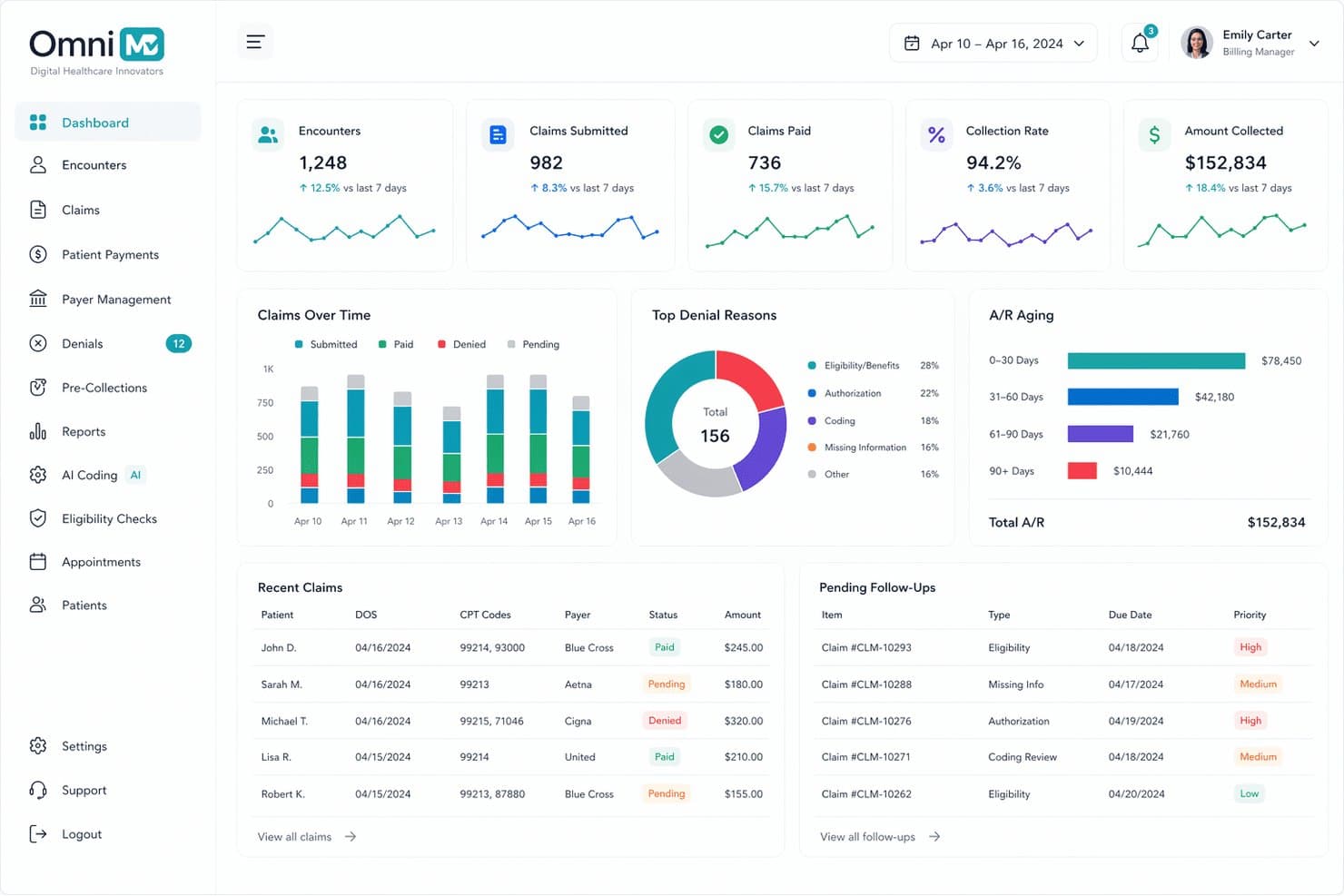
OmniMD offers a comprehensive medical billing dashboard with real-time claims tracking, A/R aging, denial reasons, and pending follow-ups for urgent care billing management. OmniMD is an ONC-certified, AI-powered EHR platform for urgent care clinics that combines walk-in workflow management, complaint-driven charting templates, integrated practice management, and built-in RCM in a single system.
Who Is OmniMD Best For?
OmniMD suits independent and small multi-location urgent care clinics that want a bundled EHR, practice management, and billing solution without managing separate systems.
Why I Picked OmniMD
I've included OmniMD in my top picks because it combines EHR, practice management, and AI RCM in a single database, which keeps per-provider costs lower than stitching together separate systems. The 60-second registration-to-provider-ready workflow is genuinely fast, pushing patients into a pre-built chief complaint template with vitals already loaded. The AI Medical Scribe then captures the encounter in the background, cutting documentation time without adding to the per-visit cost.
OmniMD Key Features
- Integrated discharge and employer documents: Generate condition-specific discharge instructions and return-to-work letters with digital signatures.
- Real-time insurance eligibility verification: Confirm coverage at registration with high-deductible and out-of-network alerts.
- HL7 FHIR data exchange: Connect with hospital EHRs and bidirectional lab systems for seamless data sharing.
- Multi-location reporting and administration: Centralize scheduling, patient records, and analytics across multiple urgent care sites.
OmniMD Integrations
OmniMD offers native integrations with LabCorp, Quest Diagnostics, eClinicalWorks, and DrFirst, and provides an API for custom integrations.
Pros and Cons
Pros:
- AI scribe reduces per-encounter documentation time
- Occupational health workflows included at no add-on
- Pre-built complaint templates speed up charting
Cons:
- Customer support response times are inconsistent
- Reporting customization options are limited
Learn more about OmniMD: Best for urgent care billing and EHR
- 30-day free trial + free demo available
- From $130/month
Visit WebsiteCustomer Rating:3.6/5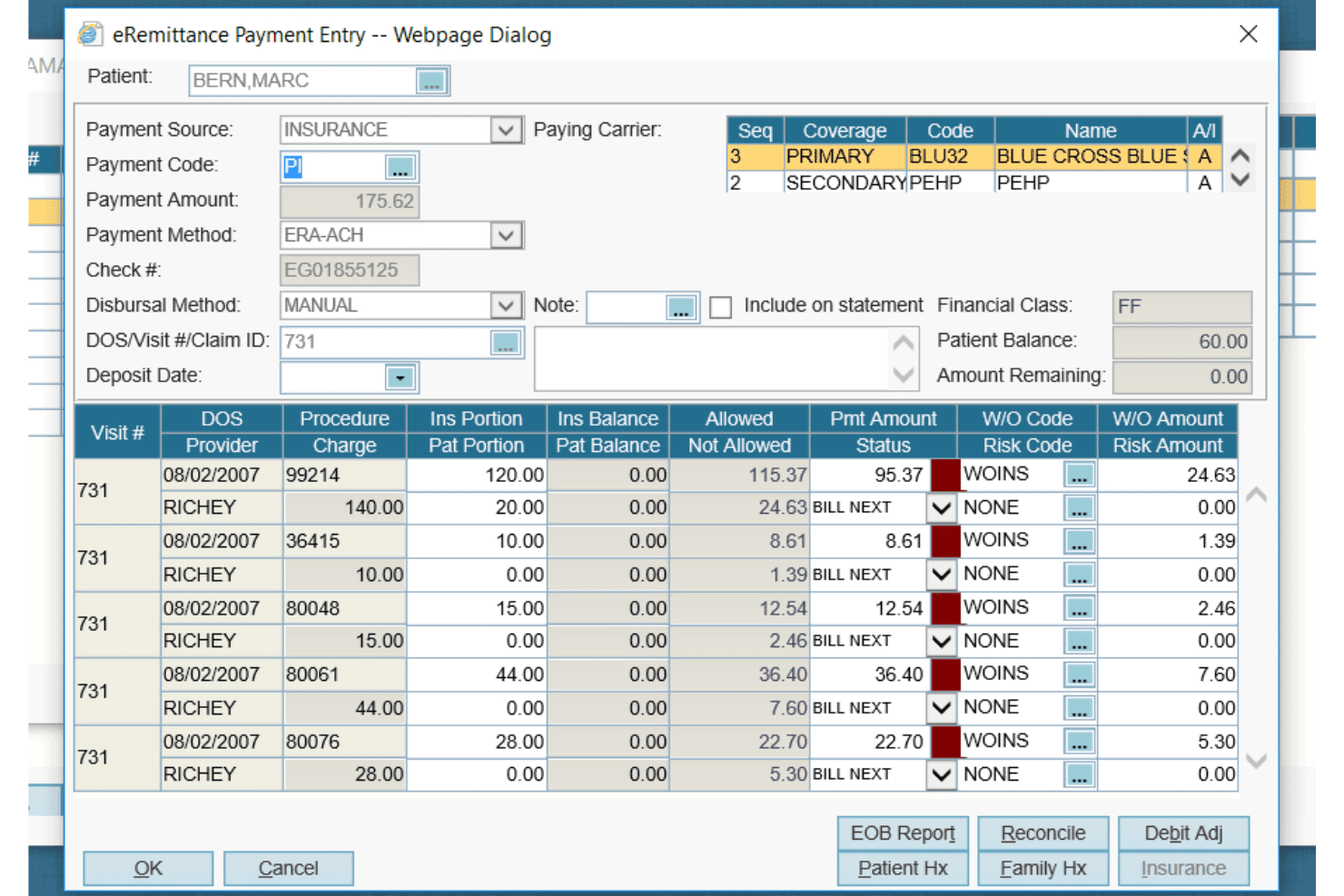
AdvancedMD offers a detailed eRemittance Payment Entry dialog for managing insurance billing, claim payments, and write-off codes per procedure. AdvancedMD is a cloud-based EHR and practice management platform that combines walk-in queue management, patient rooming, integrated billing, e-prescribing, and multi-site administration tools built for urgent care settings.
Who Is AdvancedMD Best For?
AdvancedMD is a strong fit for independent urgent care groups operating across multiple locations who need centralized billing and RCM under one platform.
Why I Picked AdvancedMD
I picked AdvancedMD because its billing depth is genuinely hard to match in urgent care. The native clearinghouse connects to over 1,800 payers, with built-in claim scrubbing, denial management, and ERA posting all running inside one platform. I also like that the walk-in queue management and patient rooming tools track each patient from arrival through discharge, so staff aren't toggling between a separate tracking system and the EHR to keep up with a busy shift.
AdvancedMD Key Features
- Customizable urgent care templates: Edit and create visit note templates for common walk-in complaints like lacerations or respiratory infections.
- Real-time patient tracking board: View and update patient status as they move through triage, exam, and discharge.
- Integrated e-prescribing with EPCS: Send electronic prescriptions, including controlled substances, from within the patient chart.
- Centralized multi-location administration: Manage users, scheduling, and reporting for all sites under one cloud-based platform.
AdvancedMD Integrations
AdvancedMD offers native integrations with LabCorp, Quest Diagnostics, and Surescripts for e-prescribing and lab results, plus provides an API for custom integrations.
Pros and Cons
Pros:
- Real-time patient tracking board across all rooms
- Occ-med module supports DOT physicals and workers' comp
- Built-in denial management and claim scrubbing
Cons:
- Reporting customization requires significant setup time
- Implementation can take longer than urgent care timelines allow
 Best for integrated urgent care workflows
- Free demo available
- Pricing upon request
Visit WebsiteCustomer Rating:3.5/5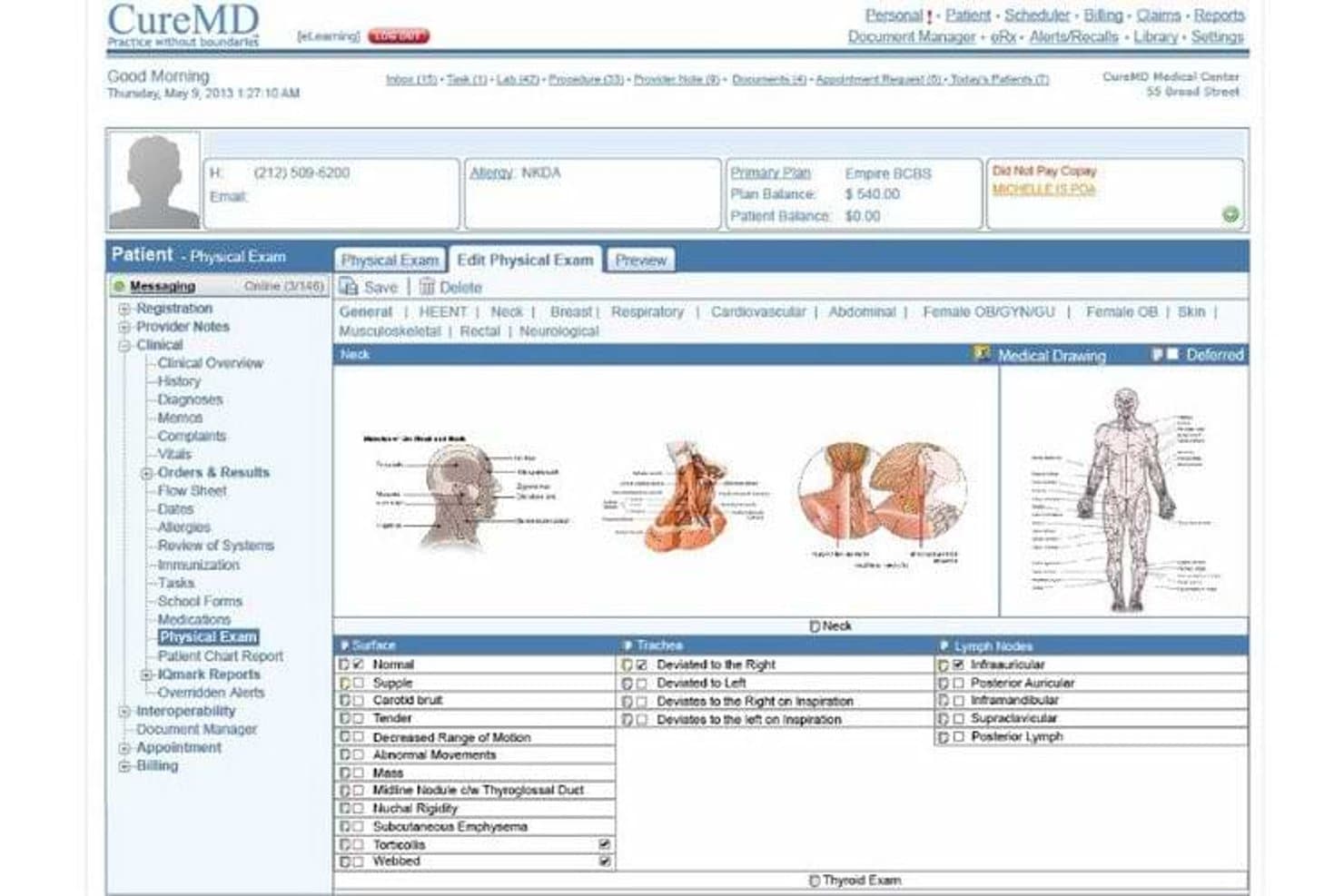
CureMD offers a detailed Physical Exam module with anatomical drawings and structured neck examination fields, supporting clinical documentation in urgent care settings. CureMD is a cloud-based EHR platform that combines urgent care-specific clinical documentation, practice management, and integrated revenue cycle management in a single system.
Who Is CureMD Best For?
CureMD is a strong fit for urgent care clinics and multi-site practices that need clinical documentation, billing, and practice management in one platform.
Why I Picked CureMD
I picked CureMD as one of the best because its triage and exam room assignment logic is built directly into the charting workflow, so front-desk staff and clinicians move in sync from the moment a walk-in arrives. I also like that the AI Scribe embeds ICD-10 and CPT auto-coding into the note itself, which means documentation and billing are built simultaneously. Native claim scrubbing and denial management keep that loop closed without a third-party billing hand-off.
CureMD Key Features
- Electronic labs integration: Send orders and receive results electronically from national and regional labs.
- Interoperability tools: Connects with HIEs, hospitals, pharmacies, and radiology systems for coordinated care.
- Mobile iPad EHR app: Access charts, schedule, and manage documentation from any location with the Avalon iPad app.
- Telehealth module: Conduct virtual visits and manage documentation within the same platform.
CureMD Integrations
CureMD offers native integrations with Surescripts, LabCorp, Quest Diagnostics, and state PDMP databases, and provides an API for custom integrations.
Pros and Cons
Pros:
- Discharge instructions printable directly from the chart
- Real-time visual patient queue and room tracking
- Native occupational health and workers' comp workflows
Cons:
- Custom report creation requires vendor support
- Implementation timelines can run longer than expected
Learn more about CureMD: Best for connected urgent care
- Free demo available
- Pricing upon request
Visit WebsiteCustomer Rating:3.4/5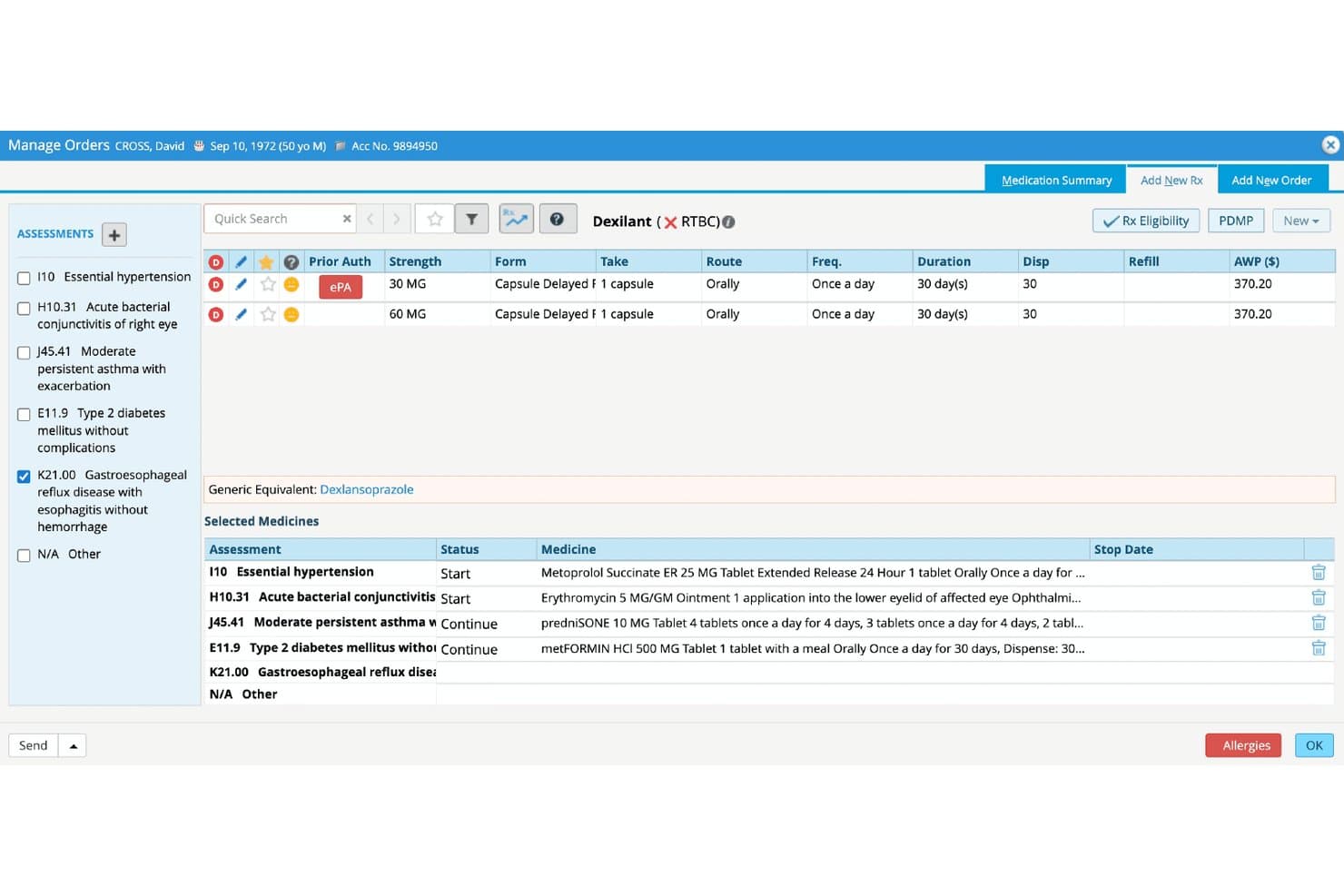
eClinicalWorks offers an integrated Manage Orders screen with ePA (electronic Prior Authorization), medication selection, and multi-diagnosis management for urgent care workflows. eClinicalWorks is a cloud-based EHR built for ambulatory and urgent care settings, combining AI-powered documentation, real-time patient tracking, integrated practice management, and nationwide health record connectivity.
Who Is eClinicalWorks Best For?
It's a strong fit for urgent care clinics and multi-site ambulatory practices that need a unified EHR, billing, and patient intake system built around high-volume, walk-in workflows.
Why I Picked eClinicalWorks
eClinicalWorks earns its spot on my shortlist because of PRISMA, a built-in health record search engine that pulls patient records from outside EHRs into a single, searchable timeline. In urgent care, where most patients are walk-ins with no prior chart history, that connectivity matters. I also rely on the real-time Tracking Board, which flags out-of-range vitals and current wait times so clinical and front desk staff are always working from the same live view.
eClinicalWorks Key Features
- AI-powered ambient scribing: Sunoh.ai automatically drafts visit notes from real-time conversation in exam rooms.
- Patient self check-in tools: Patients can check in via kiosk, mobile device, or website, triggering real-time status updates.
- Digital medication administration record (eMAR): Document and bill administered medications directly within urgent care workflows.
- Real-time insurance eligibility checks: Instantly verify and display patient insurance eligibility at registration for faster intake.
eClinicalWorks Integrations
eClinicalWorks offers native integrations with LabCorp, Quest Diagnostics, Surescripts, CommonWell Health Alliance, Carequality, Athenahealth, and DrFirst. The platform also provides an API for custom integrations.
Pros and Cons
Pros:
- Real-time tracking board shows wait times
- Pre-built urgent care charting templates included
- PRISMA pulls outside patient records instantly
Cons:
- Implementation support quality varies by region
- Reported billing module glitches frustrate staff
Learn more about eClinicalWorks: Best for simple urgent care charting
- 7-day free trial
- From $229/month
Visit WebsiteCustomer Rating:3.6/5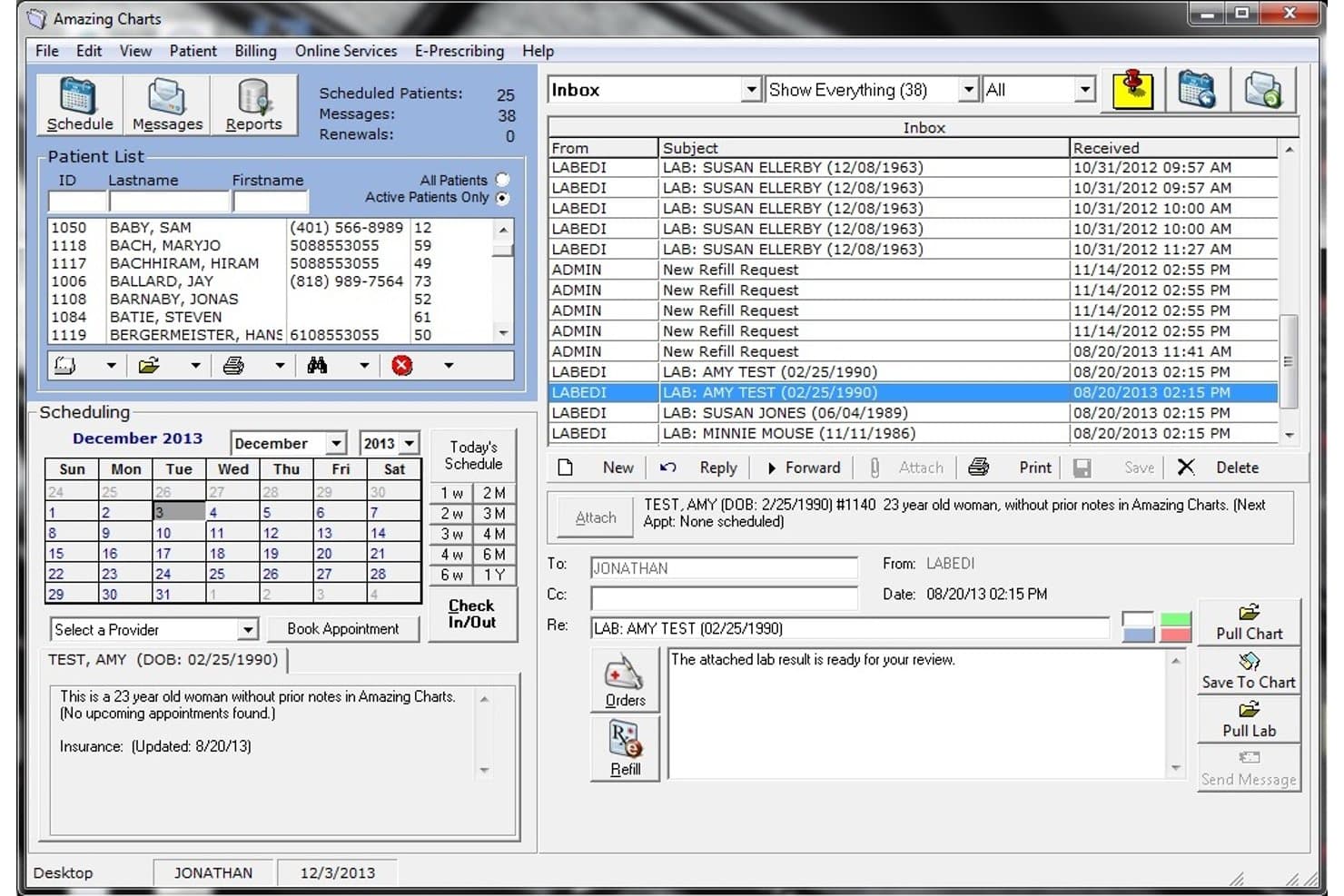
Amazing Charts offers an integrated inbox, patient scheduling, and lab result messaging system within its EHR interface. Amazing Charts is a physician-designed EHR for independent urgent care clinics that combines customizable visit templates, e-prescribing, and bundled practice management in a cloud-hosted platform.
Who Is Amazing Charts Best For?
Amazing Charts fits small, single-site urgent care practices where the owner-physician or practice administrator needs a straightforward, affordable EHR without enterprise complexity.
Why I Picked Amazing Charts
I've included Amazing Charts in my top picks because its physician-designed charting keeps documentation minimal without sacrificing clinical accuracy. In practice, that means I can pull up a customizable urgent care template, document the visit, and have a superbill auto-generated the moment I sign the note. I also like the one-screen access to lab results, chart summaries, and referral information during a visit, which cuts down on tab-switching mid-encounter.
Amazing Charts Key Features
- Digital patient intake: Lets patients complete registration and medical history forms electronically before their visit.
- Cloud-hosted access: Allows providers and staff to use the EHR from any location or device with an internet connection.
- Integrated patient portal: Gives patients access to medical records, test results, and appointment scheduling in one web interface.
- Lab and radiology connectivity: Supports ordering and receiving results from labs and imaging centers directly within the platform.
Amazing Charts Integrations
Native integrations include LabCorp, Quest Diagnostics, and NewCrop for e-prescribing. An API is available for custom integrations.
Pros and Cons
Pros:
- Designed by physicians for clinical clarity
- Superbill auto-generates at note sign-off
- Pre-built urgent care complaint templates included
Cons:
- Reporting tools lack depth for high-volume clinics
- Limited multi-site management for growing groups
Learn more about Amazing Charts: Best for customizable urgent care EHR
- Free demo available
- Pricing upon request
Visit WebsiteCustomer Rating:4.1/5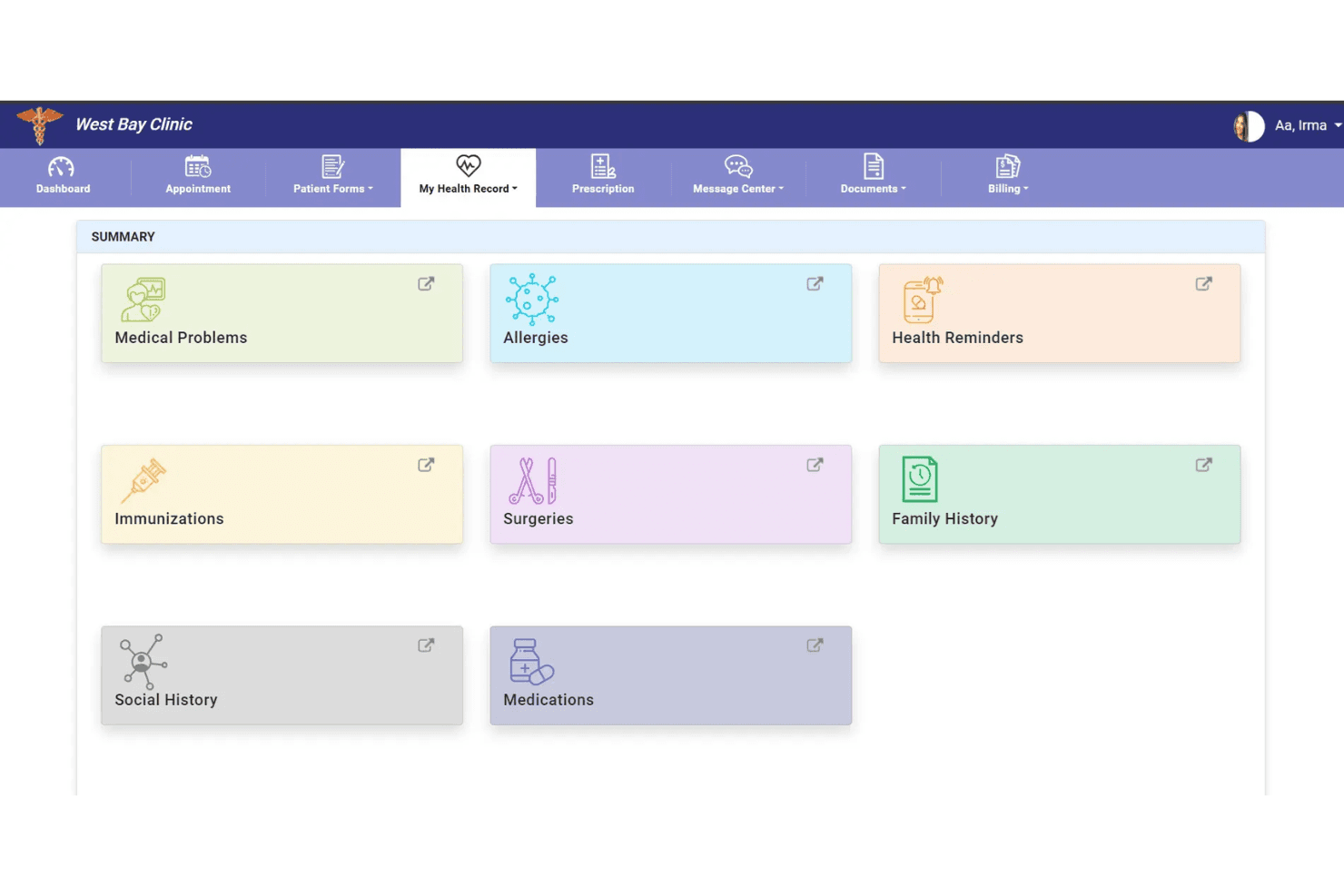
PrognoCIS provides a patient portal for accessing health summaries and managing appointments. PrognoCIS is a cloud-based EHR built for urgent care clinics, combining customizable charting templates, walk-in patient queue management, integrated e-prescribing with EPCS, and a native billing module with occupational medicine support.
Who Is PrognoCIS Best For?
PrognoCIS is a strong fit for small to mid-sized urgent care clinics that also run occupational medicine services and need a single platform to handle both.
Why I Picked PrognoCIS
I picked PrognoCIS as one of the best because the depth of template customization is genuinely suited to urgent care's episodic, high-volume nature. My team can build procedure-specific macros and voice dictation shortcuts for common complaints like lacerations or URIs, cutting per-visit documentation time. The Priority Status queue keeps patients moving through triage in the right order, without needing a separate tracking tool layered on top.
PrognoCIS Key Features
- ProCheckIn self-service intake: Lets patients check in and complete forms digitally at arrival.
- Integrated telemedicine module: Enables remote urgent care visits directly from the EHR interface.
- Occupational medicine workflows: Supports workers’ comp cases, DOT physicals, and employer invoicing.
- Cloud-based multi-location access: Provides persistent patient records and reporting across all clinic sites.
PrognoCIS Integrations
PrognoCIS offers native integrations with LabCorp, Quest Diagnostics, Surescripts, First Databank, and DrFirst, and provides an API for custom integrations.
Pros and Cons
Pros:
- EPCS-enabled e-prescribing with PDMP lookups
- Customizable templates for high-volume visit types
- Built-in workers' comp and DOT workflows
Cons:
- Mobile app lags behind desktop functionality
- Reporting tools lack granular multi-site filtering
Learn more about PrognoCIS Psychiatry EHR: Best for independent urgent care clinics
- 14-day free trial; Free demo available
- Pricing upon request
Visit WebsiteCustomer Rating:3.9/5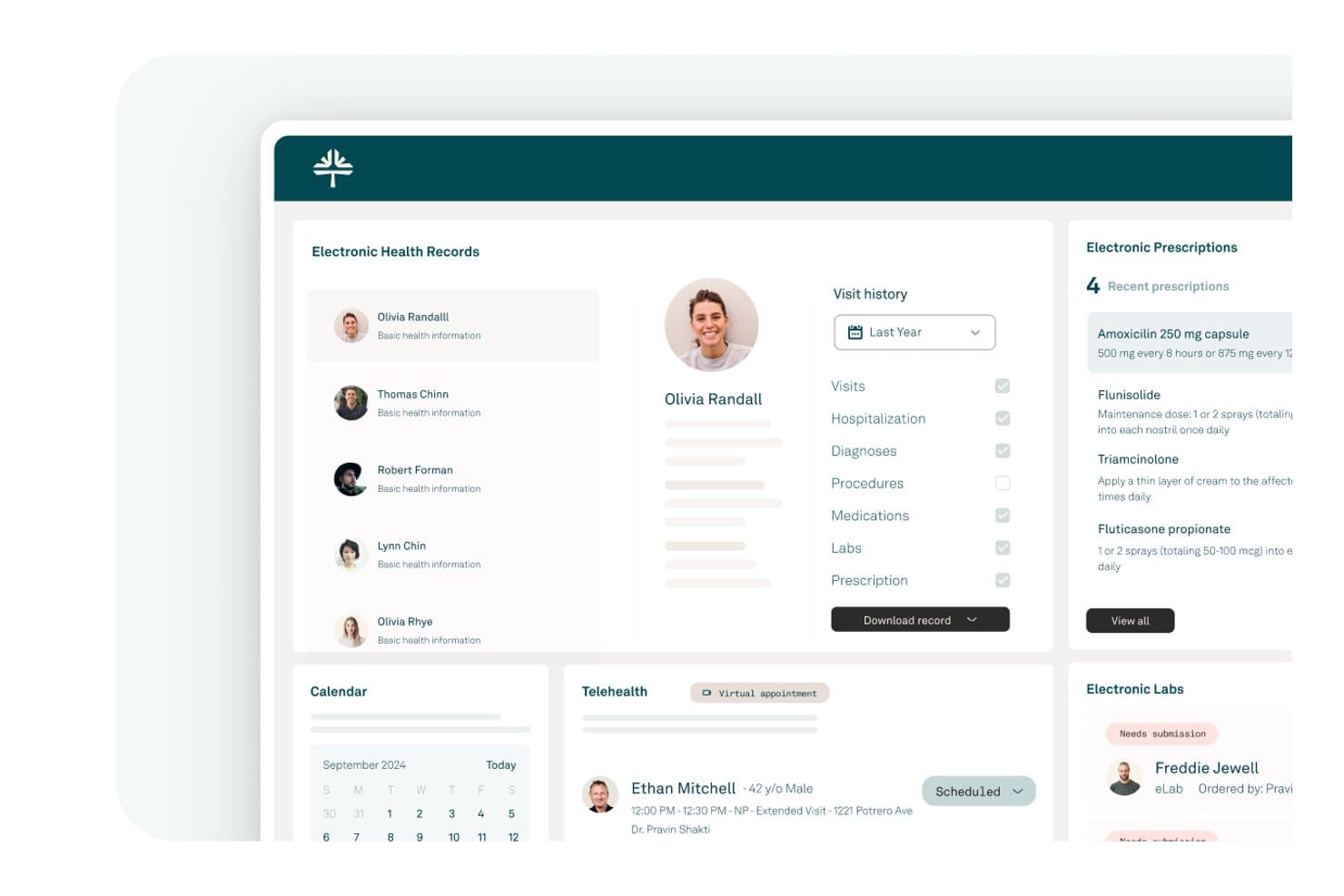
Tebra offers a comprehensive EHR dashboard featuring electronic health records, prescriptions, telehealth scheduling, and lab management for clinical workflows. Tebra is a cloud-based EHR platform for independent practices that combines clinical charting, e-prescribing, practice management, billing, and patient engagement tools in a single system.
Who Is Tebra Best For?
Tebra is a strong fit for small, independent urgent care clinics that need a single platform covering charting, billing, and patient intake without managing multiple systems.
Why I Picked Tebra
I picked Tebra as one of the best because its AI Note Assist, combined with SOAP templates and SALT (pull-forward from prior visits), lets independent urgent care providers move through episodic visit documentation without rebuilding notes from scratch each time. I also like that e-prescribing with EPCS and PDMP integration is built directly into the chart, so controlled substance prescribing doesn't require a separate tool. The native billing layer runs real-time eligibility checks at the point of registration, which matters when most of your patients walk in unscheduled.
Tebra Key Features
- Electronic lab ordering and results: Order and view lab tests from multiple labs directly within the EHR chart.
- Integrated telehealth visits: Launch HIPAA-compliant video visits with patients from the platform, linked to scheduling and documentation.
- Claims and denial management dashboard: Monitor, edit, and track insurance claims and denials in real time from a central hub.
- Patient self-scheduling and intake: Enable patients to complete registration and schedule appointments online, reducing front desk workload.
Tebra Integrations
Tebra offers native integrations with LabCorp, Quest Diagnostics, Change Healthcare, Surescripts, and Stripe. An API is available for custom integrations.
Pros and Cons
Pros:
- Occupational health and workers' comp workflows included
- Digital patient tracking board across exam rooms
- Pre-built templates for common urgent care visits
Cons:
- Multi-site reporting less detailed than larger platforms
- Customer support response times frustrate busy clinics
Learn more about Tebra: Best for specialty urgent care
- Free demo available
- Pricing upon request
Visit WebsiteCustomer Rating:3.7/5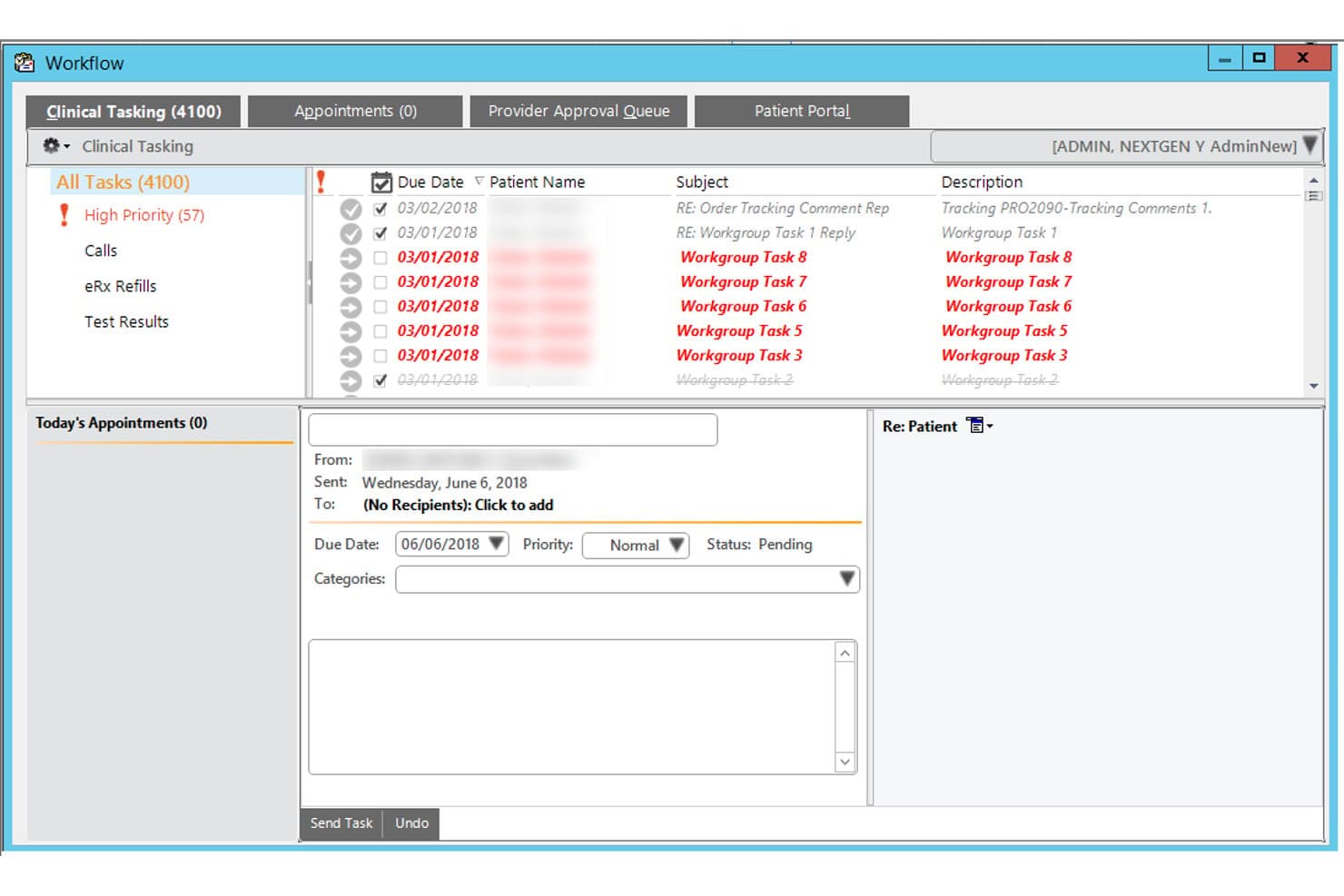
NextGen Healthcare offers a Clinical Tasking workflow module that allows urgent care staff to manage and prioritize patient tasks, appointments, and refill requests from a single interface. NextGen Healthcare is a cloud-based EHR and practice management platform with specialty-specific templates, AI-powered ambient documentation, integrated e-prescribing, and built-in RCM tools tailored to urgent care workflows.
Who Is NextGen Healthcare Best For?
NextGen Healthcare fits urgent care groups of all sizes, from solo providers on NextGen Office to multi-site enterprises needing centralized administration and reporting.
Why I Picked NextGen Healthcare
NextGen Healthcare earns its spot on my shortlist because its urgent care blueprints go well beyond generic templates, covering common complaints with charting patterns built specifically for episodic, walk-in visits. I especially like Ambient Assist, which converts provider-patient conversations into structured SOAP notes placed directly into the chart for review. That alone cuts the post-visit documentation burden I've seen accumulate fast during high-volume urgent care shifts.
NextGen Healthcare Key Features
- Integrated revenue cycle management: Automates claims, denial management, and billing workflows to support urgent care’s payer mix.
- Digital patient intake forms: Lets patients complete and upload intake documents before arrival using any device.
- Centralized multi-site administration: Allows organizations to manage users, reporting, and fee schedules across multiple urgent care locations.
- Real-time eligibility verification: Instantly checks insurance eligibility before visits to speed up patient intake.
NextGen Healthcare Integrations
NextGen Healthcare offers native integrations with LabCorp, Quest Diagnostics, and SureScripts for e-prescribing and lab connectivity, as well as HL7/FHIR interfaces for interoperability with hospital systems and HIEs. An API is available for custom integrations.
Pros and Cons
Pros:
- Built-in occupational medicine and workers' comp workflows
- Ambient Assist converts conversations into SOAP notes
- Pre-built urgent care complaint templates included
Cons:
- Reporting dashboards require heavy configuration to customize
- Implementation timelines can run longer than expected
Learn more about NextGen Healthcare: Best for cloud urgent care workflows
- Free demo available
- Pricing upon request
Visit WebsiteCustomer Rating:5/5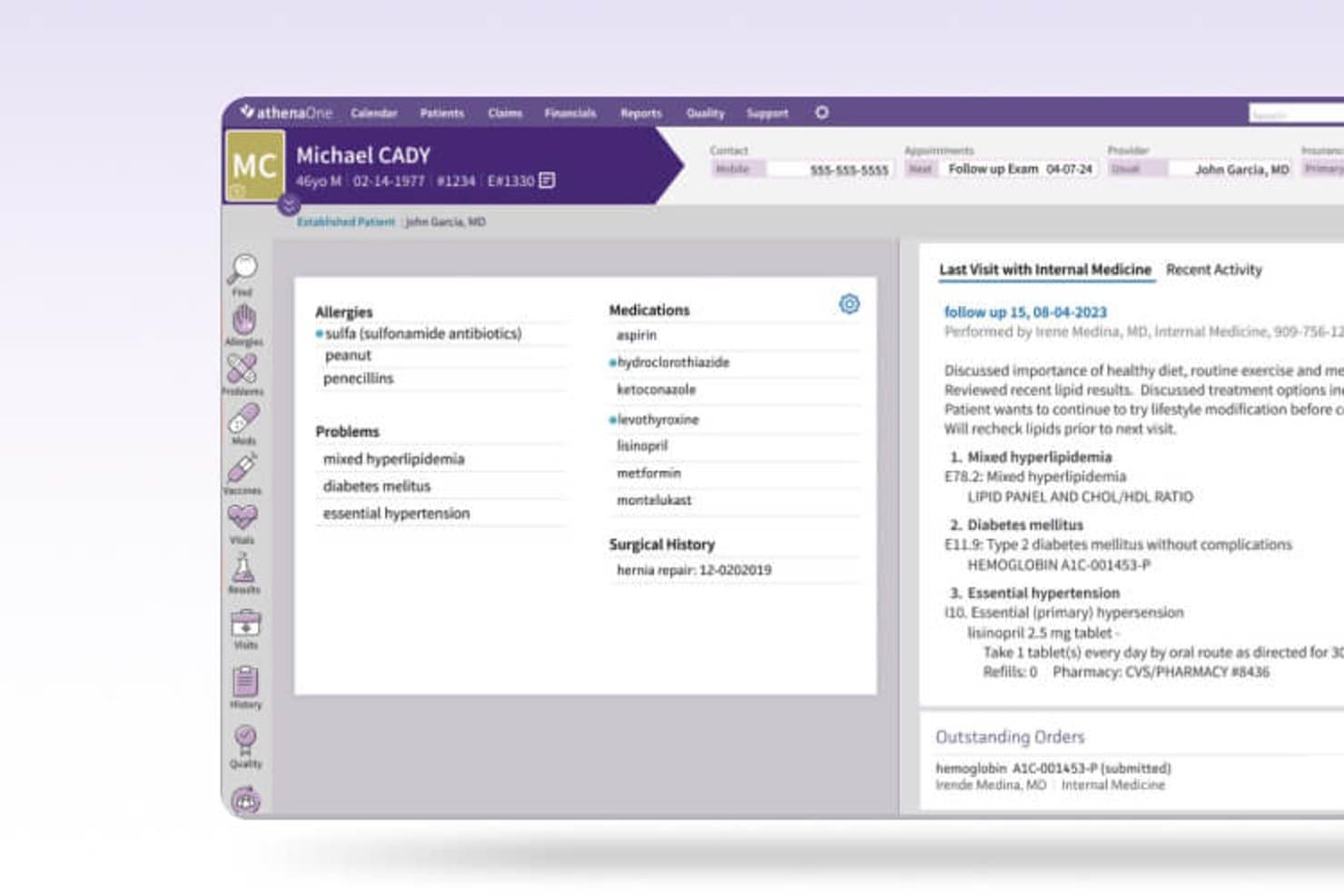
Athenahealth offers a comprehensive patient chart view displaying allergies, medications, problems, and visit history within its EHR platform. athenaOne is a cloud-native EHR platform that combines urgent care-specific charting workflows, integrated practice management, revenue cycle management, and patient engagement in a single system.
Who Is Athenahealth Best For?
athenaOne is a strong fit for growing urgent care groups managing multiple clinic locations who need centralized records, unified reporting, and consistent workflows across sites.
Why I Picked Athenahealth
athenaOne earns its spot on my shortlist because its condition-driven encounter plans and documentation accelerators, including macros and templates, are purpose-built for the rapid, episodic visits urgent care sees daily. I also like the native athenaAmbient scribe, which cuts charting time without requiring a third-party add-on. Because it's cloud-native, updates roll out automatically across every location without any IT overhead on your end.
Athenahealth Key Features
- Integrated e-prescribing: Send prescriptions, including controlled substances, directly to pharmacies with EPCS support and drug interaction checks.
- Centralized multi-location management: Administer users, reporting, and patient records across all clinic sites from one unified dashboard.
- Automated claims scrubbing: Clean claims using built-in billing rules and urgent care-specific coding before submission to payers.
- Interoperability network: Access real-time patient data and records from other connected providers and health systems within the athenahealth network.
Athenahealth Integrations
athenaOne offers native integrations with LabCorp, Quest Diagnostics, Surescripts, CommonWell Health Alliance, and Carequality, and provides an API for custom integrations.
Pros and Cons
Pros:
- Built-in RCM with denial management
- Automatic cloud updates across all locations
- Pre-built urgent care charting templates included
Cons:
- Custom report building is notably limited
- Implementation timelines can run unexpectedly long
Learn more about Athenahealth: 10Best for high-volume urgent care
Experity
- Not available
- Pricing upon request
Visit WebsiteCustomer Rating:2.7/5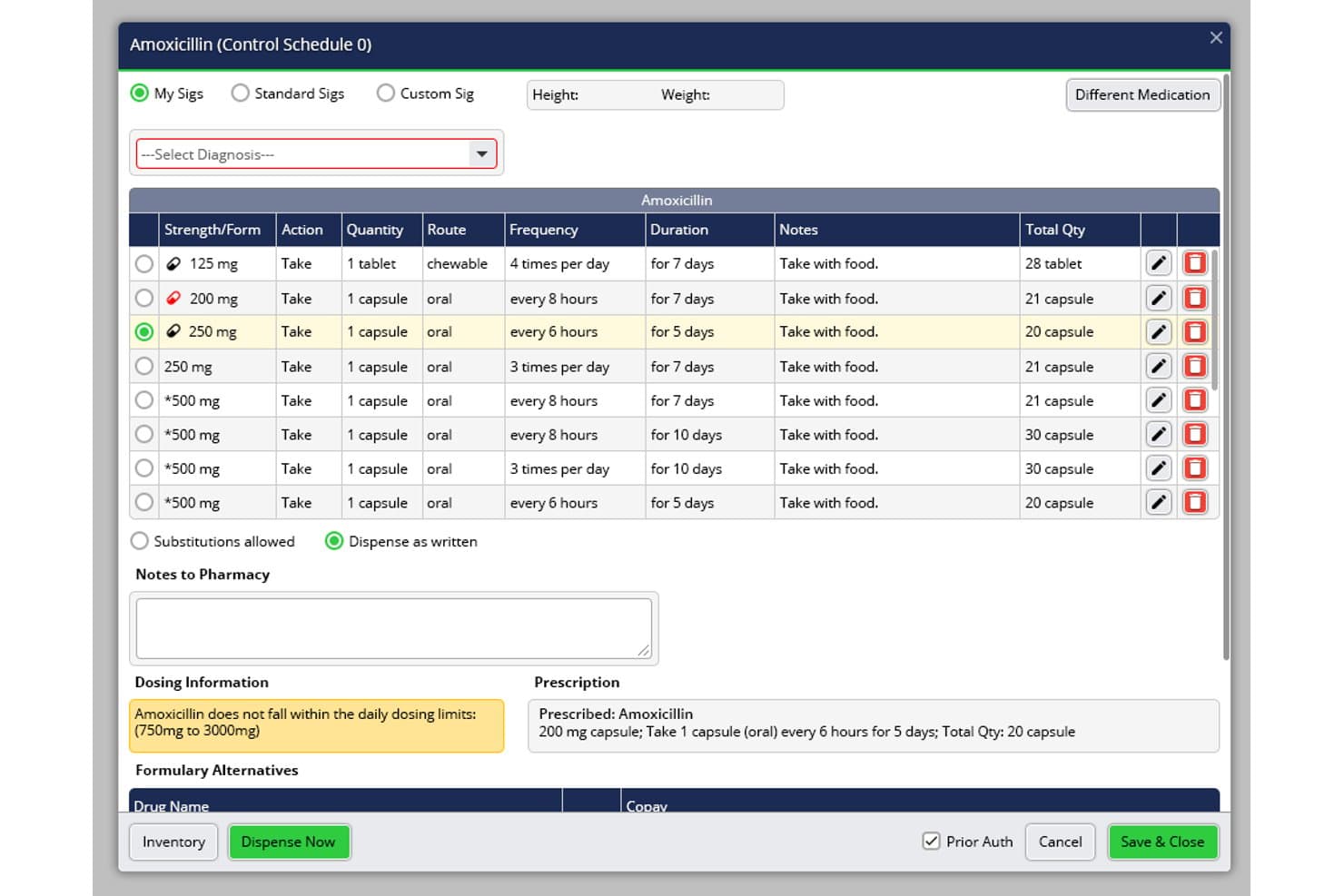
Experity offers a detailed medication prescribing interface with dosing validation, sig selection, and pharmacy notes within its urgent care EHR workflow. Experity is an EHR and practice management platform built exclusively for urgent care, combining complaint-driven charting, integrated billing, patient tracking, e-prescribing, and occupational medicine workflows in a single system.
Who Is Experity Best For?
Experity suits urgent care operators running high patient volumes, from single-site clinics to multi-location organizations that need centralized workflows across every site.
Why I Picked Experity
Experity earns its spot on my shortlist because its complaint-driven charting logic lets providers document over 80% of common urgent care visits in under 60 seconds. I especially like the real-time patient tracking board, which gives the full care team a live view of every patient's status from check-in through discharge. When volume spikes, I can spot bottlenecks before they affect wait times and reassign rooms on the fly.
Experity Key Features
- Integrated discharge instructions: Print or text patient-friendly, condition-specific discharge summaries and work/school notes before the patient leaves.
- Occupational medicine module: Manage workflows for employer visits, drug screens, DOT physicals, and provide employer access via a reporting portal.
- E-prescribing with EPCS: Prescribe controlled substances directly within the system, with state PDMP lookups built into the prescribing workflow.
- Enterprise-level multi-site management: Centrally manage templates, users, and reporting with cross-location record access for recurring patients.
Experity Integrations
Experity offers native integrations with Quest Diagnostics, LabCorp, and ELLKAY, and provides built-in connections for billing clearinghouses and PACS imaging systems. An API is available for custom integrations.
Pros and Cons
Pros:
- Real-time queue visibility across all sites
- Occ-med and employer workflows built in
- Urgent care-specific charting out of the box
Cons:
- Implementation timelines can run longer than expected
- Reporting customization options are limited
Learn more about Experity:
Other EHR for Urgent Care
Here are some additional EHR for urgent care options that didn’t make it onto my shortlist, but are still worth checking out:
- 11Praxis EMRBest for template-free urgent care
- 12NethealthBest for urgent and occupational care
- 13DrChronoBest for mobile urgent care charting
- 14Azalea HealthBest for community urgent care
- 15CareCloudBest for cloud urgent care management
- 16ChartLogicBest for voice-enabled charting
- 17OttehrBest for AI-assisted clinical notes
How I Evaluate EHR for Urgent Care
I split my evaluation into must-have capabilities—like walk-in workflows and EPCS e-prescribing—and the differentiators that separate good urgent care EHRs from great ones.
Core Functionality (Table Stakes For This List)
When I'm selecting tools for my list, I rank each one on a scale from 0 (does not offer the functionality) to 5 (excels in this area) for each core functionality listed below. Then, I calculate the tool's total score into a percentage. Each tool needs to achieve a minimum total score of 65% to be considered for inclusion.
- Urgent Care Templates: I check for pre-built charting templates covering common complaints like lacerations, sprains, and URIs that cut documentation time per visit.
- Walk-In Patient Workflow: The system should track unscheduled patients from registration through triage, exam, and discharge with a visual queue board.
- Integrated E-Prescribing: I look for built-in e-prescribing with EPCS support and PDMP lookups, since urgent care providers frequently prescribe controlled substances.
- Billing & Coding Integration: Native practice management with urgent care CPT/ICD coding, S-codes, and claims scrubbing matters more here than third-party workarounds.
- Occupational Health Support: Clinics handling employer visits need workers' comp workflows, DOT physicals, drug screen tracking, and employer-level billing.
- Multi-Location Management: I evaluate whether the platform offers centralized admin, cross-site patient records, and unified reporting for operators running multiple clinics.
Once I have a list of tools that meet the criteria, I consider what sets each platform apart.
Differentiating Factors (What Sets Vendors Apart)
Here's how I compare and contrast different vendors:
Standout Features
Integrated discharge instructions are a major differentiator. Clinics that can print or text condition-specific summaries and work/school notes before a patient leaves the room save front desk staff real time. I also evaluate real-time queue management boards that display patient status by room, provider workload, and average wait times across the clinic. For sites handling employer-sponsored visits, a dedicated occupational medicine module with drug screen chain-of-custody tracking and workers' comp billing adds clear value.
Beyond Features
Deployment speed matters a lot in urgent care. I look for vendors that can get a new site live within weeks and provide dedicated implementation managers who understand high-turnover clinical settings. Interoperability is another key factor—bidirectional lab interfaces with providers like LabCorp and Quest, plus HL7/FHIR connections to local hospitals and HIEs, help ensure patient records follow the visit. I also evaluate RCM transparency, especially how vendors handle mixed-payer claim scrubbing across commercial, self-pay, and workers' comp.
How to Choose EHR for Urgent Care
It’s easy to get bogged down in long feature lists and complex pricing structures. To help you stay focused as you work through your unique software selection process, here’s a checklist of factors to keep in mind:
| Factor | What to Consider |
| Scalability | Will the system handle growth? Assess how it manages additional patient volume, multiple clinic locations, and more users as your clinic expands. |
| Integrations | Does it connect with labs, imaging centers, or existing billing solutions? Check HL7/FHIR support and experience with local healthcare partners or HIEs. |
| Customizability | Can you tailor forms, templates, and reports to your actual workflows? Avoid platforms that force inflexible pre-set processes on your clinical staff. |
| Ease of use | Will staff, from front desk to providers, pick it up quickly? Ask about click counts for charting, and request demos that follow real urgent care visit scenarios. |
| Implementation and onboarding | How long does setup really take, and who helps? Look for dedicated trainers, live support, migration assistance, and resources for high staff turnover environments. |
| Cost | Ask for transparent pricing, including setup, per-user fees, integrations, support, and optional RCM. Watch for unexpected contract auto-renewals or volume minimums. |
| Security safeguards | Ensure HIPAA compliance and ask about audit logs, EPCS certification, cloud security, and disaster recovery protocols that fit urgent care’s extended hours and risks. |
| Support availability | When does support actually respond? Choose vendors offering 24/7 live support—urgent care clinics need coverage at nights, weekends, and holidays. |
What Is EHR for Urgent Care?
EHR for urgent care is electronic health record software tailored to support high-volume, episodic care settings like urgent care clinics. These systems enable fast walk-in registration, rapid charting with urgent care templates, integrated e-prescribing, and efficient visit-to-billing workflows. They are built to help teams manage unscheduled visits, occupational health needs, and multi-location operations with a focus on patient throughput and compliance.
Features of EHR for Urgent Care
When selecting EHR for urgent care, keep an eye out for the following key EHR features:
- Urgent care templates: Pre-built note templates for common complaints let clinicians document lacerations, injuries, and acute illnesses quickly and accurately.
- Walk-in patient workflow: Tools for rapid patient intake, registration, and digital queue tracking allow teams to efficiently manage high volumes of unscheduled visits.
- Integrated e-prescribing: E-prescribing—especially with EPCS and PDMP access—lets providers quickly and safely manage prescriptions for both routine and controlled medications.
- Billing and coding integration: Native practice management ensures urgent care–specific CPT/ICD coding, S-codes, and immediate claims creation for faster reimbursement.
- Occupational medicine support: Support for workers’ comp, employer visits, drug screens, and DOT exams streamlines employer billing and reporting for clinics with occupational health.
- Real-time wait time tracking: Digital dashboards display room status, patient wait times, and provider workload to keep everyone on the same page and speed up throughput.
- Centralized multi-location management: Unified admin, reporting, and patient access across several clinics aids operators with multiple urgent care sites.
- Discharge summary generator: Condition-specific discharge summaries help staff provide patients with actionable aftercare instructions and return-to-work or school notes.
- Secure messaging and referrals: Built-in provider messaging and referral tracking tools facilitate care continuity with PCPs and specialists after the urgent visit.
- Data security and compliance: End-to-end encryption, HIPAA compliance, audit trails, and EPCS certification protect sensitive data and support regulatory readiness.
Benefits of EHR for Urgent Care
Implementing EHR for urgent care provides several benefits for your team and your business. Here are a few you can look forward to:
- Faster patient throughput: Streamlined walk-in workflows and pre-built urgent care templates help your team document, triage, and discharge patients more quickly.
- Improved care accuracy: Integrated e-prescribing and charting tools reduce errors when documenting visits or prescribing controlled substances.
- Simplified billing and reimbursement: Built-in urgent care billing, coding, and claims tools ensure accurate charges and faster payments from all payer types.
- Easier compliance and risk management: Certification, audit trails, and automated alerts keep your operations in line with HIPAA, state, and payer requirements.
- Stronger occupational health support: Specialized modules for workers’ comp, employer billing, and drug screens simplify employer visits and reporting.
- Better multi-site visibility: Central administration and cross-clinic reporting let you monitor high volumes and recurring patients across locations.
- Enhanced patient communication: Auto-generated discharge instructions and secure messaging tools improve follow-up, referrals, and patient satisfaction.
Costs and Pricing of EHR for Urgent Care
Selecting EHR for urgent care requires an understanding of the various pricing models and plans available. Costs vary based on features, team size, add-ons, and more. The table below summarizes common plans, their average prices, and typical features included in EHR for urgent care solutions:
Plan Comparison Table for EHR for Urgent Care
| Plan Type | Average Price | Common Features |
| Free Plan | $0 | Limited patient records, basic charting, and entry-level security. |
| Personal Plan | $50-$150/user/month | Individual provider access, urgent care templates, basic e-prescribing, and limited billing features. |
| Business Plan | $250-$500/user/month | Team scheduling, integrated billing, real-time tracking, full e-prescribing, and occupational health features. |
| Enterprise Plan | $600-$1,200/user/month | Multi-location support, custom workflows, advanced analytics, enterprise security, and dedicated support. |
EHR for Urgent Care FAQs
Here are some answers to common questions about EHR for urgent care:
How do urgent care EHR systems handle high patient volumes?
These EHRs include digital queue management, rapid charting templates, and fast registration tools designed to move walk-in patients through intake, triage, and discharge efficiently—even during peak hours.
Can urgent care EHRs manage occupational health and workers’ comp cases?
Yes, most urgent care EHRs offer modules for employer visits, DOT exams, drug screens, and workers’ comp billing so you can handle both clinical care and employer reporting in one system.
What integrations are most important for urgent care clinics?
Labs, pharmacies, imaging, and HL7/FHIR health information exchanges are key. These ensure lab test orders, X-ray results, and discharge summaries flow smoothly between your clinic and other providers.
How long does it take to implement a new EHR system in an urgent care setting?
Most vendors aim for a rapid rollout—often within a few weeks—especially for operators opening new locations. The timeline depends on training needs, data migration, and onsite support availability.
Are urgent care EHRs compliant with data security and privacy regulations?
Yes, reputable solutions offer HIPAA compliance, SOC 2 certification, EPCS for controlled substances, and audit logging to help protect patient information and meet legal standards.