

Running a dental practice is no small feat. You've got patient records to manage, appointments to keep track of, and compliance to worry about. It can feel overwhelming, but that's where dental EMR solutions come in.
These tools help simplify your daily operations, making it easier to focus on what truly matters—providing excellent patient care. In my experience, choosing the right EMR can save you time, reduce errors, and improve your team's efficiency.
In this article, I'll share my top picks for dental EMR software, based on thorough testing and research. You'll find unbiased reviews and insights to help you make an informed decision for your practice.
Why Trust Our Software Recommendations
6,700+
Reviews
20
Industry experts
16+
Evaluation factors
14
Years
Our team has been testing and reviewing software since 2012. As medical practice leaders ourselves, we know how difficult—and important—it is to choose the right software.
For this guide, we evaluated tools using hands-on testing and independent research, scoring tools using our selection criteria.
Our reviews reflect our human editorial judgment, not a sales pitch.
Dental EMRs Comparison Table
| Tool | Best For | Trial Info | Price | ||
|---|---|---|---|---|---|
| 1 | Best for AI-driven dental records | Free demo available | Pricing upon request | Website | |
| 2 | Best for simplified documentation processes | Free demo available | Pricing upon request | Website | |
| 3 | Best for multi-location DSO rollout and charting | Free demo available | From $829/month | Website | |
| 4 | Best for cloud-native dental charting with ambient AI | Free demo available | Price upon request | Website | |
| 5 | Best for scaling DSOs with multi-location record access | Free demo available | Price upon request | Website | |
| 6 | Best for open-source pricing with full EMR control | Free trial available | $199/month | Website | |
| 7 | Best for practices wanting AI-assisted note drafting | Not available | Pricing upon request | Website | |
| 8 | Best for Canadian practices with data privacy needs | Free demo available | Pricing upon request | Website | |
| 9 | Best for new practice launch with built-in benchmarking | Free demo available | Pricing upon request | Website | |
| 10 | Best for AI voice charting in a solo practice | 14-day free trial | $125/month | Website |


Best Dental EMRs Reviews
 Best for AI-driven dental records
- Free demo available
- Pricing upon request
Visit WebsiteCustomer Rating:5/5
NextGen Healthcare dashboard displaying recent activity summaries and financial reporting tools. NextGen is a dental electronic health record and practice management platform designed to reduce documentation time and enhance operational performance through automation and AI. It supports both small dental clinics and large multi-specialty practices.
Why I Picked NextGen: I picked NextGen because of its ambient AI features that auto-generate SOAP notes from conversations, significantly reducing time spent charting. I was also drawn to its robust practice management tools, like billing, collections, and scheduling, all designed to minimize administrative workload. Its flexibility for both general and specialty dental workflows makes it a good fit for a wide range of clinics.
Standout Features and Integrations:
Features include customizable dental templates, real-time analytics, population health tools, and a mobile EHR app. The system also provides pre-built clinical content, ICD/CPT code support, and AI-guided charge capture.
Notable integrations include Relaymed, Surgimate, rater8, CallMyDoc, Medsender, Arcadia, and over 40 others for imaging, billing, referrals, and care coordination.
Pros and Cons
Pros:
- Strong dental charting and treatment planning tools
- Mobile access to charts and scheduling
- Reduces documentation time with ambient AI
Cons:
- Feature set may be excessive for small practices
- Some mobile features limited to iOS
Learn more about NextGEN: Best for simplified documentation processes
- Free demo available
- Pricing upon request
Visit WebsiteCustomer Rating:5/5
The patient history management feature in Athenahealth allows dental practitioners to view and manage patient records efficiently. AthenaOne, developed by Athenahealth, is a comprehensive cloud-based healthcare software solution designed to enhance clinical effectiveness, patient experience, and financial performance for healthcare providers.
Why I Picked Athenahealth: I picked Athenahealth for its simplified documentation process, which includes best-practice templates, macros, and accelerators. These tools help reduce the time spent on documentation, allowing dental professionals to focus more on patient care. The platform also offers specialty-specific workflows and mobile documentation capabilities, enabling clinicians to access and update patient records in real time, even on mobile devices.
What do you get for free?
While Athenahealth doesn't offer a free tier or free trial, you can access a free demo.
Standout features & integrations:
Key features include revenue cycle management, communication and care tools for patient engagement, an easy-to-read summary of patient records, a patient portal, automated reminders, telehealth capabilities, and mobile accessibility. Integrations include NextPatient, DocResponse, Yosi Health, Secondwave, Recovery Plus, TSI, VaxCare, Fullscript, QueueDr, and CallMyDoc.
Pros and Cons
Pros:
- Broad range of integrations with other healthcare systems and devices
- Cloud-based system for remote access
- Comprehensive patient engagement features
Cons:
- Data migration can be time-consuming
- The platform might be complex for less tech-savvy users
Learn more about Athenahealth: Best for multi-location DSO rollout and charting
- Free demo available
- From $829/month
Visit WebsiteCustomer Rating:4.8/5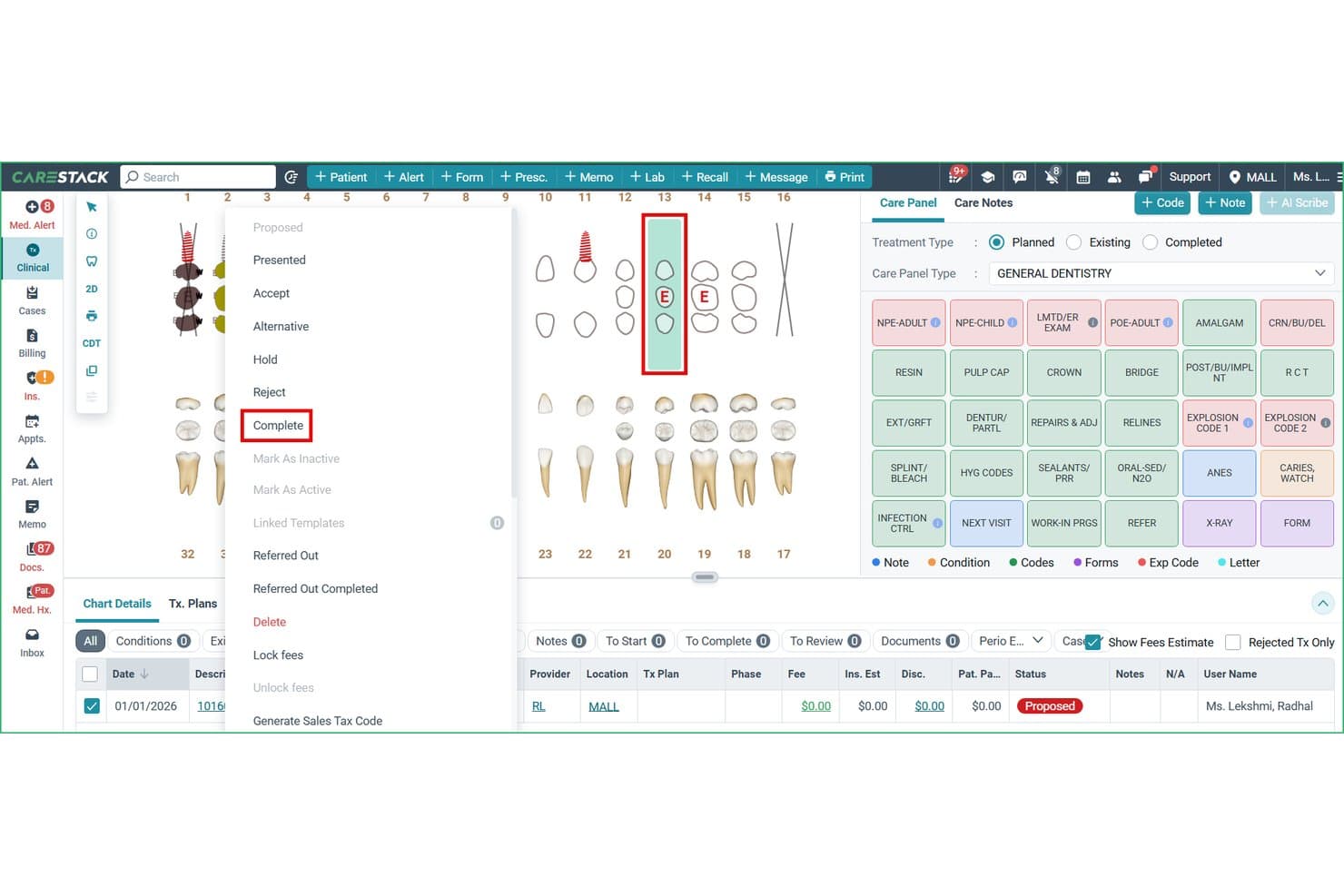
CareStack lets users update treatment statuses directly from the dental chart. CareStack is a cloud-based dental practice management platform that combines clinical charting, treatment planning, scheduling, billing, imaging integration, and revenue cycle management in a single system.
Who Is CareStack Best For?
CareStack is a strong fit for dental service organizations managing or planning to scale across multiple locations.
Why I Picked CareStack
I picked CareStack as one of the best because it's purpose-built for the complexity of running care across multiple locations. The phased DSO rollout model is what stands out to me: CareStack can convert 8–10 locations in parallel per day, with a dedicated Implementation Lead, sandbox validation, and location-level scorecards baked in. I also like that voice periodontal charting and AI-powered X-ray analysis via Overjet are available natively, so clinical teams aren't stitching together separate tools to get AI-assisted diagnostics at the chair.
CareStack Key Features
- Multi-phase treatment planning: Organize proposed treatments into phases with assigned timeframes, a treatment coordinator, and case-acceptance tracking.
- Electronic claims management: Submit, scrub, and track claims through their full lifecycle, with ERA auto-posting and denial and rejection workflows built in.
- Customizable clinical note templates: Build provider- or procedure-specific note templates with clickable buttons, fill-in fields, and CDT code linkage.
- Location-level scorecards and goal tracking: Set and monitor production goals at the provider and location level with trend analysis and operational reporting dashboards.
CareStack Integrations
CareStack lists 71 native integrations, including Dexis, Carestream, Sidexis, Romexis, Overjet, DentalXChange, Rectangle Health, RingCentral, VoiceStack, and DoseSpot. Its Open API Program supports REST APIs, webhooks, and scheduled data extracts for custom integrations.
Pros and Cons
Pros:
- Periodontal charting captures detailed measurements
- Phased DSO rollout includes sandbox validation
- Integrated workflows reduce switching between systems
Cons:
- Insurance posting and ledgers can confuse teams
- Clinical tasks can require redundant clicks
Learn more about CareStack: Best for cloud-native dental charting with ambient AI
- Free demo available
- Price upon request
Visit WebsiteCustomer Rating:4.6/5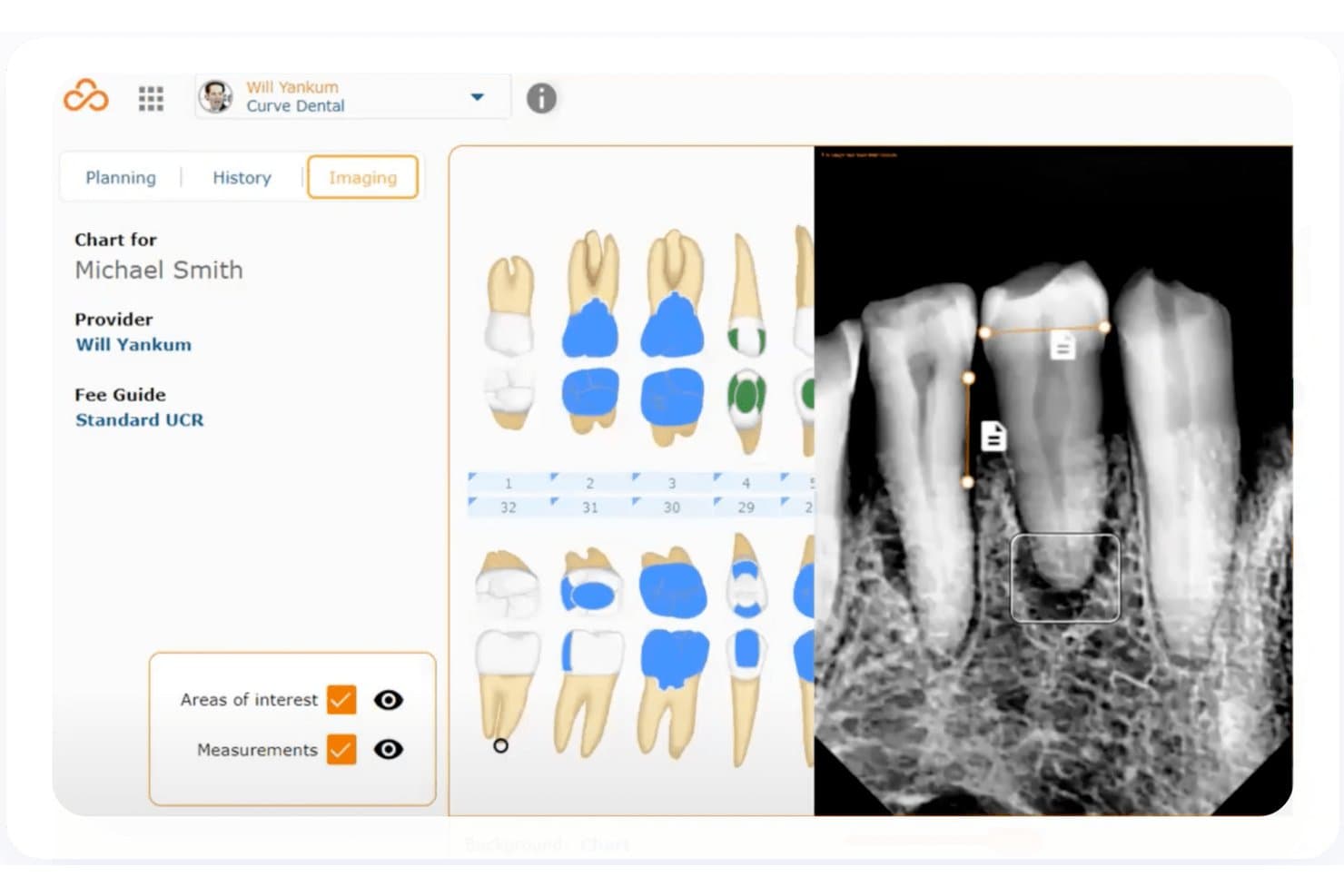
Curve Dental integrates dental imaging with patient charting side by side. Curve Dental is a cloud-based dental practice management platform that unifies clinical charting, periodontal charting, treatment planning, native digital imaging, scheduling, insurance billing, patient billing, and patient engagement in one system.
Who Is Curve Dental Best For?
Curve Dental is a strong fit for dental practices—from single-location startups to multi-site DSOs—that want clinical charting, imaging, billing, and AI-assisted documentation in one cloud-native system.
Why I Picked Curve Dental
Curve Dental earns its spot on my shortlist because its Curve Care+ suite brings ambient AI directly into the clinical workflow in a way I find genuinely useful. Notes+ listens to chairside conversations and drafts SOAP notes automatically, while Charting+ and Perio+ capture spoken conditions and pocket depths in real time, populating the odontogram without manual entry. I also like that everything—charting, imaging, billing, and scheduling—lives in one cloud-native system, so there's no toggling between applications mid-appointment.
Curve Dental Key Features
- Multi-location toggling: Switch between practice locations on one screen, with shared patient data and payments accessible across all offices.
- Curve GRO® patient engagement: Send automated appointment reminders by text and email, and manage two-way patient messaging through built-in campaign and workflow tools.
- Eligibility+ insurance verification: Check real-time, code-level coverage data from payer portals and automatically flag differences with SmartSync.
- Curve Business Analytics: Access operational and huddle dashboards plus detailed reporting by individual site or across the entire practice.
Curve Dental Integrations
Curve Dental offers marketplace integrations with DentalXChange, Stripe, CareCredit, Weave, and Zocdoc. An API is available for custom integrations, but the total integration count and API specifications aren’t stated.
Pros and Cons
Pros:
- Cloud imaging saves captures directly to charts
- Reviewers value remote access across locations
- Ambient AI drafts SOAP notes chairside
Cons:
- Image layouts and loading frustrate some reviewers
- Specialty charting can feel basic or awkward
Learn more about Curve Dental: Best for scaling DSOs with multi-location record access
- Free demo available
- Price upon request
Visit WebsiteCustomer Rating:4.5/5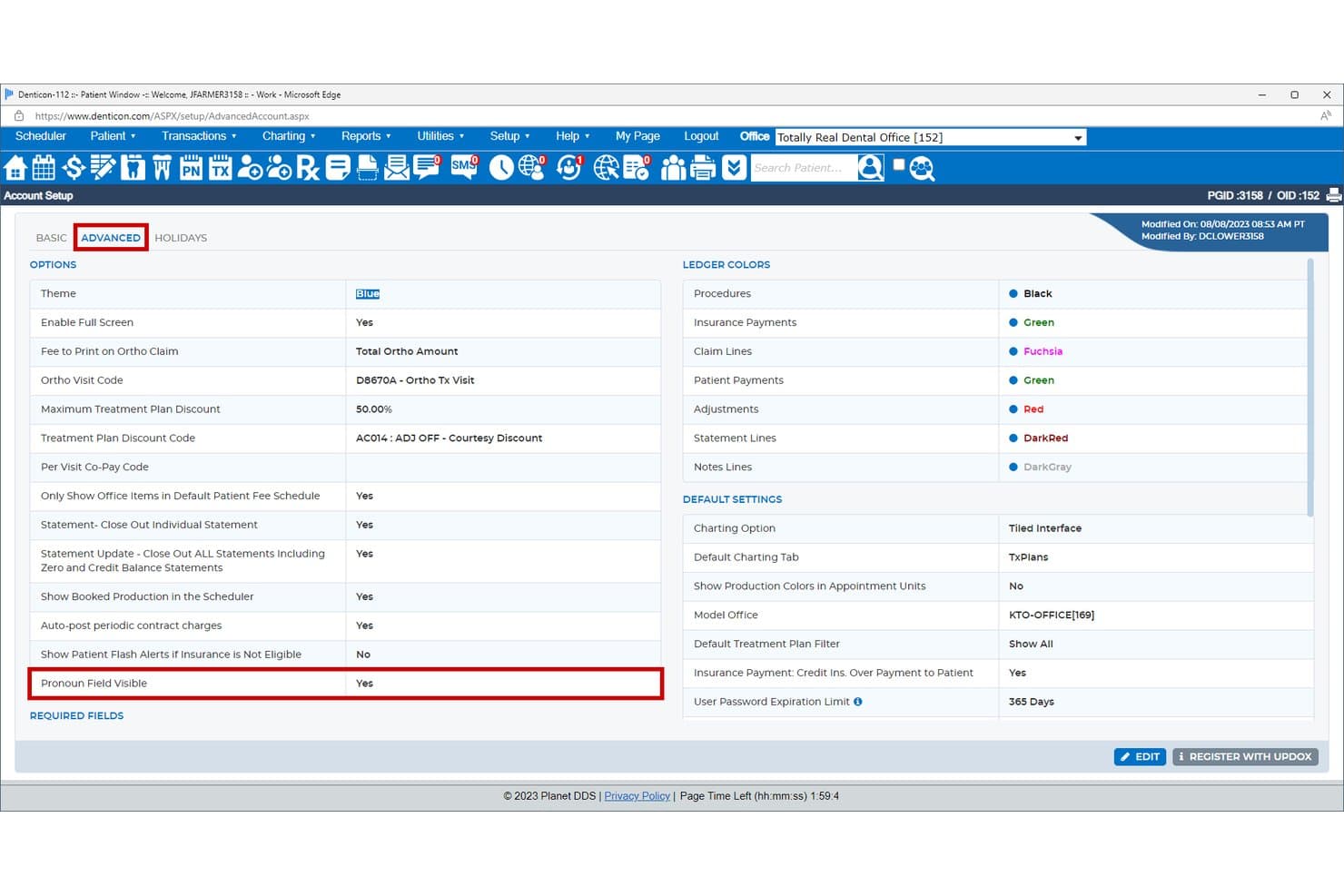
Denticon lets users configure pronoun visibility and ledger display colors. Denticon is a cloud-based dental practice management system from Planet DDS that covers clinical charting, treatment planning, imaging integration, patient communication, billing, and multi-location analytics.
Who Is Denticon Best For?
Denticon is built for dental service organizations managing multiple locations that need centralized patient records, cross-location analytics, and a scalable platform that grows with the organization.
Why I Picked Denticon
Denticon earns its spot on my shortlist because it's purpose-built for dental service organizations that need patient records to travel with the patient, not stay locked to a single location. I particularly like the Practice Analytics Dashboard Bundle, which gives DSO administrators cross-location production, collections, and treatment plan data in one view, without needing external tools. The Enterprise plan's Data Share feature takes that further by letting organizations pull Denticon data into their own reporting systems, which I think is genuinely useful when you're coordinating care across 20 or more locations.
Denticon Key Features
- AI voice charting: Denticon supports hands-free periodontal and restorative charting by voice, producing claim-ready documentation without manual input.
- Multi-specialty charting: The Dental Chart accommodates orthodontic, periodontal, and restorative workflows with customizable overlays and coding in a single chart.
- Automated patient communication: Built-in messaging sends appointment confirmations, reminders, balance-due notices, and new-patient welcome messages by text or email.
- SOC 2 Type II and HIPAA compliance: Denticon maintains independently audited security certifications alongside MFA, role-based access control, and 24×365 security operations monitoring.
Denticon Integrations
Denticon lists over 25 integrations, including Apteryx, Pearl, Overjet, VideaHealth, Podium, Weave, NexHealth, and Zocdoc. Its API supports REST, webhooks, and batch data extracts for custom integrations.
Pros and Cons
Pros:
- Reviewers praise appointment workflows and previsit forms
- Dashboards give DSOs organization-wide performance visibility
- Shared records support cross-location care
Cons:
- Reviewers report saved notes may need correction
- Reviewers find imaging access click-heavy
Learn more about Denticon: Best for open-source pricing with full EMR control
- Free trial available
- $199/month
Visit WebsiteCustomer Rating:4.5/5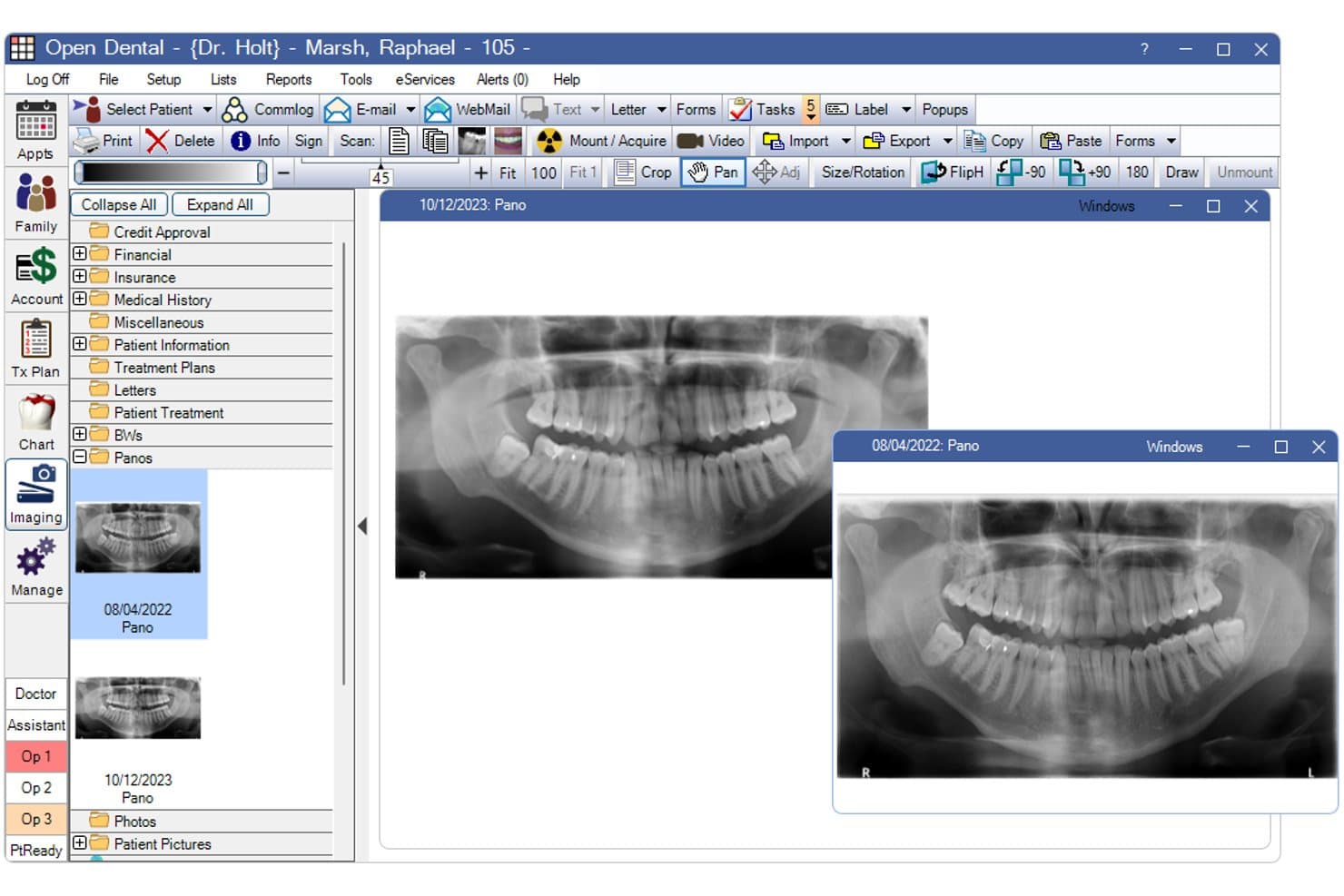
Open Dental lets users compare multiple panoramic X-rays side by side. Open Dental is an open-source dental practice management and EMR system that covers clinical charting, periodontal and restorative documentation, treatment planning, imaging, scheduling, and billing across single and multi-location practices.
Who Is Open Dental Best For?
Open Dental is a strong fit for independent dental practices and growing DSOs that want full control over their EMR without paying per-user or per-feature premiums.
Why I Picked Open Dental
I picked Open Dental as one of the best because it gives independent practices and growing DSOs full ownership of their EMR without locking them into per-user or per-module fees. The location-based pricing model means a four-provider office pays the same monthly rate as a solo practitioner at that location. I also like that the Graphical Tooth Chart and Perio Chart are built directly into the platform, so restorative and periodontal documentation live alongside treatment plans, imaging, and scheduling in one system.
Open Dental Key Features
- ODTouch tablet access: A tablet-optimized app that lets clinical staff chart, schedule, view images, and dictate notes directly at chairside.
- AI image analysis integration: Connects with Pearl and BetterDiagnostics to flag pathology in radiographs directly within the Imaging Module.
- eClipboard patient check-in: Lets patients complete forms, sign documents, and submit a photo on a mobile device before or during their visit.
- Voice Perio Charting: Records periodontal exam data hands-free using spoken voice commands, eliminating the need for a second staff member during perio exams.
Open Dental Integrations
Open Dental has 15 documented native integrations, including Pearl, BetterDiagnostics, Bola AI, DoseSpot, Ensora eRx, Global Payments, PayConnect, PaySimple, CareCredit, and DentalXChange. It also supports 100s of program bridges, 20+ clearinghouses, and RESTful and FHIR APIs for custom integrations.
Pros and Cons
Pros:
- Reviewers praise organized scheduling and records
- Custom reports surface practice-specific patient data
- Treatment planning connects charts and appointments
Cons:
- Dated screens and configuration take adjustment
- Some reviewers report freezes and sluggish performance
Learn more about Open Dental: Best for practices wanting AI-assisted note drafting
- Not available
- Pricing upon request
Visit WebsiteCustomer Rating:4.7/5
Image 10: ABELdent dental EMR interface ABELDent is a cloud-based dental practice management system that covers scheduling, clinical charting, periodontal records, imaging capture, treatment planning, billing, and AI-assisted clinical note drafting through its built-in Scribe tool.
Who Is ABELDent Best For?
ABELDent is a strong fit for independent dental practices that want AI-assisted note drafting built directly into their practice management workflow.
Why I Picked ABELDent
I've included ABELDent in my top picks because it's one of the few dental practice management systems with AI-assisted note drafting built directly into the platform. ABELDent Scribe listens during patient interactions and generates structured clinical note suggestions that providers can review, edit, and approve, without any third-party software. I also like that the Diagnocat integration brings 2D and 3D radiograph analysis into the same workflow, flagging potential conditions alongside treatment insights.
ABELDent Key Features
- Voice-controlled periodontal charting: Clinicians can dictate periodontal data hands-free, with entries captured directly into the periodontal chart.
- Short-notice appointment filling: The system automatically messages opted-in patients about last-minute openings and books the first patient to confirm.
- Phased treatment planning: Teams can organize planned treatment into phases and appointments, with expected insurance and patient portions visible alongside each phase.
- Receivables Manager: Staff can filter outstanding balances by patient or carrier, send statements, and prompt patients to pay remotely from the same screen.
ABELDent Integrations
ABELDent offers native integrations with Diagnocat and Google, plus an ITRANS integration for electronic claims and attachments. It also provides API access for custom integrations, subject to practice approval.
Pros and Cons
Pros:
- Users praise migration and upgrade support
- Reminders help confirm visits and fill cancellations
- Reviewers value digital charting and clinical records
Cons:
- Reviewers report insurance allocation and billing-screen issues
- Some users report dated, cluttered navigation
Learn more about ABELDent: Best for Canadian practices with data privacy needs
- Free demo available
- Pricing upon request
Visit WebsiteCustomer Rating:4.5/5
Image 4: ClearDent dental EMR interface ClearDent is a robust dental EMR software focused on maintaining the highest standards in data security and compliance. This makes it the go-to choice for practices that put a premium on these areas.
Why I Picked ClearDent: I chose ClearDent for its standout commitment to data security and compliance. In today's world, data security is paramount, and ClearDent's prioritization of this aspect sets it apart. Its capabilities make it "best for those prioritizing data security and compliance," helping practices adhere to regulations (HIPAA compliant) and protect patient information.
Standout features & integrations:
Key features of ClearDent include appointment management, charting, electronic treatment planning, and its top-notch security features. These, coupled with its compliance-centric capabilities, make it a powerful tool for modern dental practices. ClearDent integrates well with popular office productivity software and medical billing systems, allowing for smooth workflow management.
Pros and Cons
Pros:
- Good integrations with office productivity software
- Wide range of integrated features
- Strong focus on data security and compliance
Cons:
- Can be complex for new users to navigate
- Higher starting price than some other options
- No free tier available
Learn more about ClearDent: Best for new practice launch with built-in benchmarking
- Free demo available
- Pricing upon request
Visit WebsiteCustomer Rating:4.3/5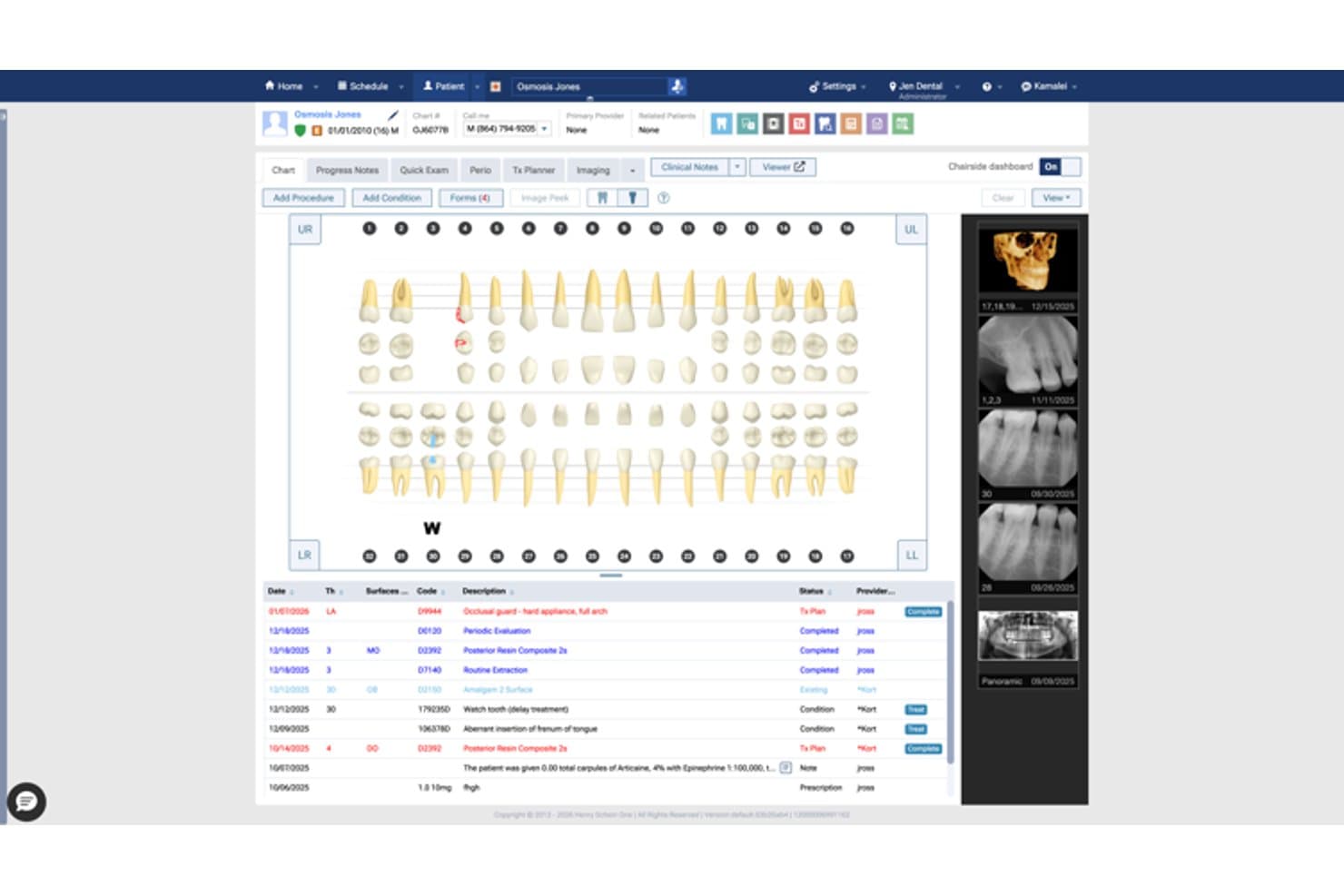
Dentrix Ascend displays a full patient chart with tooth diagrams and treatment history. Dentrix Ascend is a cloud-based dental practice management system that brings scheduling, clinical charting, imaging, billing, patient communication, and analytics together in one platform.
Who Is Dentrix Ascend Best For?
Dentrix Ascend is a strong fit for new dental practices and growing group practices that want scheduling, charting, billing, and patient communication in one cloud-based system from day one.
Why I Picked Dentrix Ascend
I picked Dentrix Ascend as one of the best because it's the only system I've seen purpose-built for new practice launches, with monthly benchmarking baked directly into the Ascend Starter plan alongside a dedicated startup consultant. From day one, you get pre-configured settings, clinical charting, and revenue cycle management without piecing together separate tools. I also like that the built-in Profitability Insights dashboards let you track collections and scheduling performance across locations as your practice grows.
Dentrix Ascend Key Features
- AI caries detection: Real-time AI analysis scans dental images and flags areas of potential decay directly within the platform.
- Voice Notes dictation: Clinicians can dictate, review, and save SOAP-format clinical notes using voice commands in the browser.
- Multi-location patient search: Advanced search returns matching patient records across all practice locations using name and birthdate.
- Role-based access control: Administrators define user roles and assign granular rights to view, edit, or delete patient and configuration data.
Dentrix Ascend Integrations
Dentrix Ascend offers documented integrations with Reserve with Google, Veradigm, Worldpay, iRay Pluto, GxPicture, 3DIEMME RealGUIDE, and the DEXIS Software Bridge. Its API Exchange supports partner and custom integrations with permission-based data sharing.
Pros and Cons
Pros:
- Shared records support multiple locations
- Automated reminders reduce staff calling
- Charting and treatment planning work together
Cons:
- Reports can be difficult to build
- Ledger and insurance workflows frustrate users
Learn more about Dentrix Ascend: 10Best for AI voice charting in a solo practice
tab32
- 14-day free trial
- $125/month
Visit WebsiteCustomer Rating:4.3/5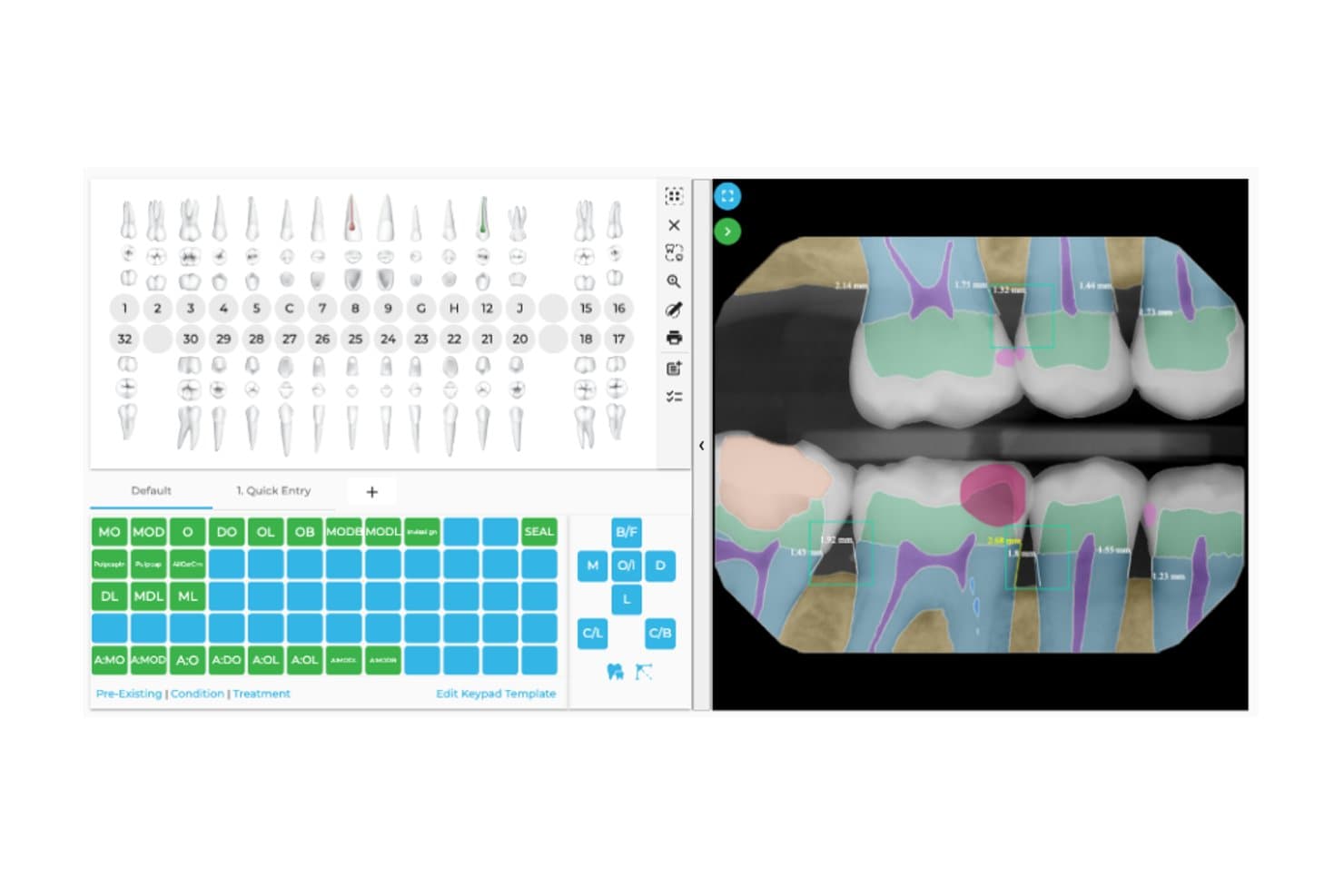
tab32’s charting screen lets dentists record findings and plan treatment. Alpine by tab32 is a cloud-based dental EMR and practice management system that combines clinical charting, digital imaging, AI voice documentation, scheduling, and billing in a single platform designed for solo and small-group practices.
Who Is tab32 Best For?
tab32 is a strong fit for solo practitioners and small dental offices looking to replace legacy software with a cloud-native system that handles charting, imaging, billing, and AI voice documentation in one place.
Why I Picked tab32
I picked tab32 as one of the best because its AI voice documentation genuinely changes how solo practitioners handle chairside charting. Instead of stepping away to type notes, you speak through the exam and the system generates a structured SOAP note for your review before it enters the permanent record. Voice-perio charting works the same way, capturing probing depths and bleeding points hands-free as you call them out.
tab32 Key Features
- Electronic claims submission: Submit claims electronically, attach supporting documentation, and track claim status directly within the patient record.
- Pearl AI radiology overlay: Integrated AI analyzes radiographs and displays detected conditions as color-coded overlays inside the imaging viewer.
- ASAP list and waitlist management: Track patients waiting for earlier appointments and fill last-minute openings from a built-in waitlist.
- Multi-phase treatment planning: Build treatment plans with multiple phases, track patient acceptance, and present options alongside supporting X-rays.
tab32 Integrations
Alpine includes native integrations with Stripe, Pearl AI, DentalXChange, Vyne Dental, AutoRemind, and DashCare. Established Practice also supports SSO with Google and Azure Active Directory; Alpine-specific API availability isn’t documented.
Pros and Cons
Pros:
- Scheduling, claims, and charting share workflows
- Radiographs sit alongside patient charts
- Voice charting captures perio findings hands-free
Cons:
- Reports and ledger workflows require extra steps
- Support replies can arrive slowly
Learn more about tab32:
Other Dental EMRs
- 11DovetailBest for DSO-scale AI charting and imaging
- 12Oryx DentalBest for AI-assisted perio and exam charting
How I Evaluate Dental EMR
I split my evaluation into three parts, giving the most weight to core functions: chart teeth and treatment plans, and protect patient records. Then I consider standout features such as automated appointment reminders. Finally, I weigh factors beyond features, including onboarding, support, and pricing as practices grow.
Core Functionality (Table Stakes For This List)
When I'm selecting tools for my list, I score each one on a scale from 0 (does not offer the functionality) to 5 (excels in this area) for each core functionality listed below. I then convert the total into a percentage to help assess each tool's overall fit, with extra weight on any functionalities I’ve deemed essential.
- Dental Charting (Essential): I look for visual tooth and periodontal charts that support restorative entries and connect findings to treatment plans.
- Patient Data Security (Essential): I check for documented HIPAA safeguards, including access controls, encryption, and audit logs for patient record activity.
- Imaging Integration: I assess whether staff can capture or import X-rays and view them in the patient record during an appointment.
- Treatment Planning: I look for multi-step plans linked to charts, with clear progress and status updates as care proceeds.
- Clinical Documentation: I evaluate structured notes, diagnoses, and procedure-code support for recording visits and maintaining clinical history.
- Multi-Location Records: For practices with several sites, I check whether teams can access synchronized patient records across locations.
Once I have a list of tools that meet the criteria, I consider what sets each platform apart.
Differentiating Factors (What Sets Vendors Apart)
Here's how I compare and contrast different vendors:
Standout Features
I evaluate AI-assisted diagnostics closely because automated caries or bone-loss detection on X-rays can catch findings a busy clinician might miss mid-schedule. Voice-to-chart dictation matters just as much—dentists who can narrate findings while working chairside keep notes accurate without pausing a procedure. I also check for built-in patient communication tools, since automated reminders and two-way texting directly reduce no-show rates and free front-desk staff for higher-value tasks.
Beyond Features
I look at how each vendor handles data migration, since moving years of chart history from a legacy system can stall a rollout for weeks if the provider lacks dedicated import tools. Onboarding support matters just as much—a platform like Dentrix may offer on-site training, while cloud-first options like Curve Dental lean on remote sessions, and the right fit depends on your team's comfort level. I also evaluate total cost of ownership, checking whether imaging modules, storage, or premium support tiers carry separate fees that inflate the sticker price over time.
How to Choose Dental EMR
It’s easy to get bogged down in long feature lists and complex pricing structures. To help you stay focused as you work through your unique software selection process, here’s a checklist of factors to keep in mind:
| Factor | What to Consider |
|---|---|
| FactorScalability | What to ConsiderWill the software grow with your practice? Consider if it supports more users, locations, or patient records without compromising performance. |
| FactorIntegrations | What to ConsiderDoes it connect with your existing tools? Check for compatibility with billing systems, imaging devices, and other essential software. |
| FactorCustomizability | What to ConsiderCan you tailor it to fit your workflows? Look for options to customize templates, fields, and reports to match your practice needs. |
| FactorEase of use | What to ConsiderIs the interface intuitive for your team? A simple layout can shorten training time and reduce errors. Test usability with a free trial if offered. |
| FactorImplementation and onboarding | What to ConsiderHow long will it take to get up and running? Evaluate the setup process, available support, and training resources to ensure a smooth transition. |
| FactorCost | What to ConsiderDoes the pricing fit your budget? Compare upfront costs, subscription fees, and any hidden charges. Look for flexible plans or discounts. |
| FactorSecurity safeguards | What to ConsiderAre patient data protected? Verify compliance with HIPAA and other regulations. Check for encryption and access controls. |
| FactorSupport availability | What to ConsiderWhen can you reach support? Ensure there's adequate support during your working hours, with multiple contact methods like phone, chat, or email. |
What Is Dental EMR?
Dental EMR is software that manages electronic medical records for dental practices. Dentists, hygienists, and office staff generally use these tools to improve patient care and practice efficiency. Scheduling, billing, and charting features help with organizing patient information, managing appointments, and streamlining administrative tasks. These tools save time and reduce errors in dental practices.
Features
When selecting dental EMR, keep an eye out for the following key features:
- Patient record management: Organizes and stores patient information securely, making it easily accessible for dental professionals.
- Appointment scheduling: Allows for efficient management of patient appointments, reducing no-shows and optimizing the practice's calendar.
- Billing and invoicing: Automates financial transactions, streamlining billing processes and minimizing errors.
- Clinical charting: Provides digital tools for recording patient treatments and dental history, aiding in accurate diagnosis and treatment planning.
- Reporting and analytics: Offers insights into practice performance through data analysis, helping identify areas for improvement.
- Integration capabilities: Connects with other essential systems like imaging devices and billing software, ensuring smooth workflow.
- Customizable templates: Enables personalization of forms and documents to fit specific practice needs, enhancing efficiency.
- Mobile access: Provides flexibility for dental professionals to access patient data and manage tasks on-the-go.
- Security and compliance: Protects patient data through encryption and access controls, ensuring adherence to regulations like HIPAA.
- Patient communication tools: Facilitates communication between the practice and patients through reminders and follow-up messages.
Benefits
Implementing dental EMR provides several benefits for your team and your business. Here are a few you can look forward to:
- Improved efficiency: Automates routine tasks like scheduling and billing, freeing up time for patient care.
- Enhanced accuracy: Reduces errors in patient records and financial transactions through digital record-keeping.
- Better patient care: Provides quick access to comprehensive patient data, aiding in more informed treatment decisions.
- Cost savings: Minimizes administrative costs by reducing paperwork and manual processes.
- Increased security: Protects sensitive patient information with encryption and compliance with data regulations.
- Stronger patient relationships: Facilitates communication with patients through reminders and follow-ups, improving engagement.
- Data-driven insights: Offers analytics that help identify trends and areas for improvement in practice operations.
Costs & Pricing
Selecting dental EMR requires an understanding of the various pricing models and plans available. Costs vary based on features, team size, add-ons, and more. The table below summarizes common plans, their average prices, and typical features included in dental EMR solutions:
Plan Comparison Table for Dental EMR
| Plan Type | Average Price | Common Features |
|---|---|---|
| Plan TypeFree Plan | Average Price$0 | Common FeaturesBasic patient record management, limited scheduling, and basic reporting. |
| Plan TypePersonal Plan | Average Price$20-$50/user/month | Common FeaturesPatient records, appointment scheduling, basic billing, and email support. |
| Plan TypeBusiness Plan | Average Price$50-$100/user/month | Common FeaturesAdvanced billing, integration capabilities, customizable templates, and analytics. |
| Plan TypeEnterprise Plan | Average Price$100-$200/user/month | Common FeaturesFull feature set, dedicated support, multi-location support, and enhanced security. |
Dental EMR Systems FAQs
Here are some questions people also ask me about dental EMR systems, or dental electronic medical record-keeping more generally.
How often should a dental medical history be updated?
You should update a dental medical history every two years. This ensures that any recent changes in a patient’s health status are recorded. Keeping up-to-date records helps in tailoring treatments and avoiding potential health risks.
Can dental EMR integrate with other systems?
Yes, most dental EMR systems can integrate with other software like billing and imaging systems. This integration helps streamline operations and ensures that all patient data is centralized, making it easier for your team to access and manage.
What training is needed to use dental EMR?
Training typically involves learning the interface and key functions of the EMR system. Many providers offer training sessions, videos, and support to help your team become proficient. It’s important to ensure all staff are comfortable with the system to maximize its benefits.
How secure is patient data in dental EMR?
Dental EMR systems use encryption and access controls to protect patient data. Compliance with regulations like HIPAA is crucial, so make sure the EMR system you choose meets these standards. Regular audits and updates can further enhance data security.