

Software-ul EMR pentru optometrie este o platformă digitală care le permite profesioniștilor din domeniul îngrijirii ochilor să gestioneze într-un singur sistem securizat fișele pacienților, consultațiile, rețetele și facturarea. Dacă sunteți în căutarea celui mai bun software EMR pentru optometrie, aveți nevoie de instrumente care să se potrivească fluxului unic al cabinetului dumneavoastră, să respecte reglementările din domeniu și să contribuie la menținerea îngrijirii pacienților în centrul activității — fără să vă încetinească ziua cu clicuri inutile sau confuzie.
Această listă vă va ajuta să comparați soluțiile de top, astfel încât să găsiți opțiunea potrivită pentru a susține documentarea eficientă, integrările inteligente și conformitatea de încredere pentru echipa dumneavoastră în 2026.
Why Trust Our Software Recommendations
6,700+
Reviews
20
Industry experts
16+
Evaluation factors
14
Years
Our team has been testing and reviewing software since 2012. As medical practice leaders ourselves, we know how difficult—and important—it is to choose the right software.
For this guide, we evaluated tools using hands-on testing and independent research, scoring tools using our selection criteria.
Our reviews reflect our human editorial judgment, not a sales pitch.
Tabel comparativ al software-urilor EMR pentru optometrie
Acest tabel comparativ rezumă detaliile de preț pentru software-ul meu EMR pentru optometrie.
Score legend (out of 5)
- Excellent4.5–5
- Good4–4.4
- Average3–3.9
- Below average2–2.9
- Poor1–1.9
Sorted by: Default
| Tool | Starting Price | Website | |||||||
|---|---|---|---|---|---|---|---|---|---|
Best for integrated exam and optical workflows | 3.7 out of 5 | 4 | 3 | 4 | 4 | 4 | 3 | $319/month Free demo available | Website |
Best customizable templates for complex cases | 3.8 out of 5 | 4 | 3 | 4 | 4 | 4 | 4 | Pricing upon request Free demo available | Website |
Best for cloud scheduling and patient reminders | 4.0 out of 5 | 4 | 4 | 4 | 4 | 4 | 4 | Pricing upon request Free demo available | Website |
Best for 40-year optometry-focused EHR depth | 3.8 out of 5 | 4 | 3 | 4 | 4 | 4 | 4 | Pricing upon request Free demo available | Website |
Best for direct vision plan claim integration | 3.7 out of 5 | 4 | 4 | 4 | 4 | 3 | 3 | Pricing upon request Free demo available | Website |
Best for integrated exam and practice management | 3.5 out of 5 | 4 | 3 | 3 | 3 | 4 | 4 | Pricing upon request Free demo available | Website |
Best for ophthalmic device connectivity | 3.5 out of 5 | 4 | 3 | 4 | 4 | 3 | 3 | Pricing upon request Free demo available | Website |
Best for integrated insurance billing tools | 3.5 out of 5 | 4 | 3 | 4 | 4 | 3 | 3 | $166/month Not available | Website |
Best for ophthalmic image management | 3.7 out of 5 | 4 | 4 | 4 | 4 | 3 | 3 | Pricing upon request Free demo available | Website |
Best for rapid implementation and onboarding | 4.0 out of 5 | 4 | 4 | 4 | 4 | 4 | 4 | Pricing upon request Free trial available | Website |


Recenzii ale celor mai bune software-uri EMR pentru optometrie
Mai jos sunt prezentate rezumatele mele detaliate ale celor mai bune software-uri EMR pentru optometrie care au ajuns pe lista mea scurtă. Recenziile mele oferă o privire detaliată asupra funcțiilor, integrărilor și celor mai potrivite cazuri de utilizare pentru fiecare software, pentru a vă ajuta să îl găsiți pe cel mai potrivit pentru dumneavoastră.
 Best for integrated exam and optical workflows
- Free demo available
- From $319/month
Visit WebsiteCustomer Rating:4.5/5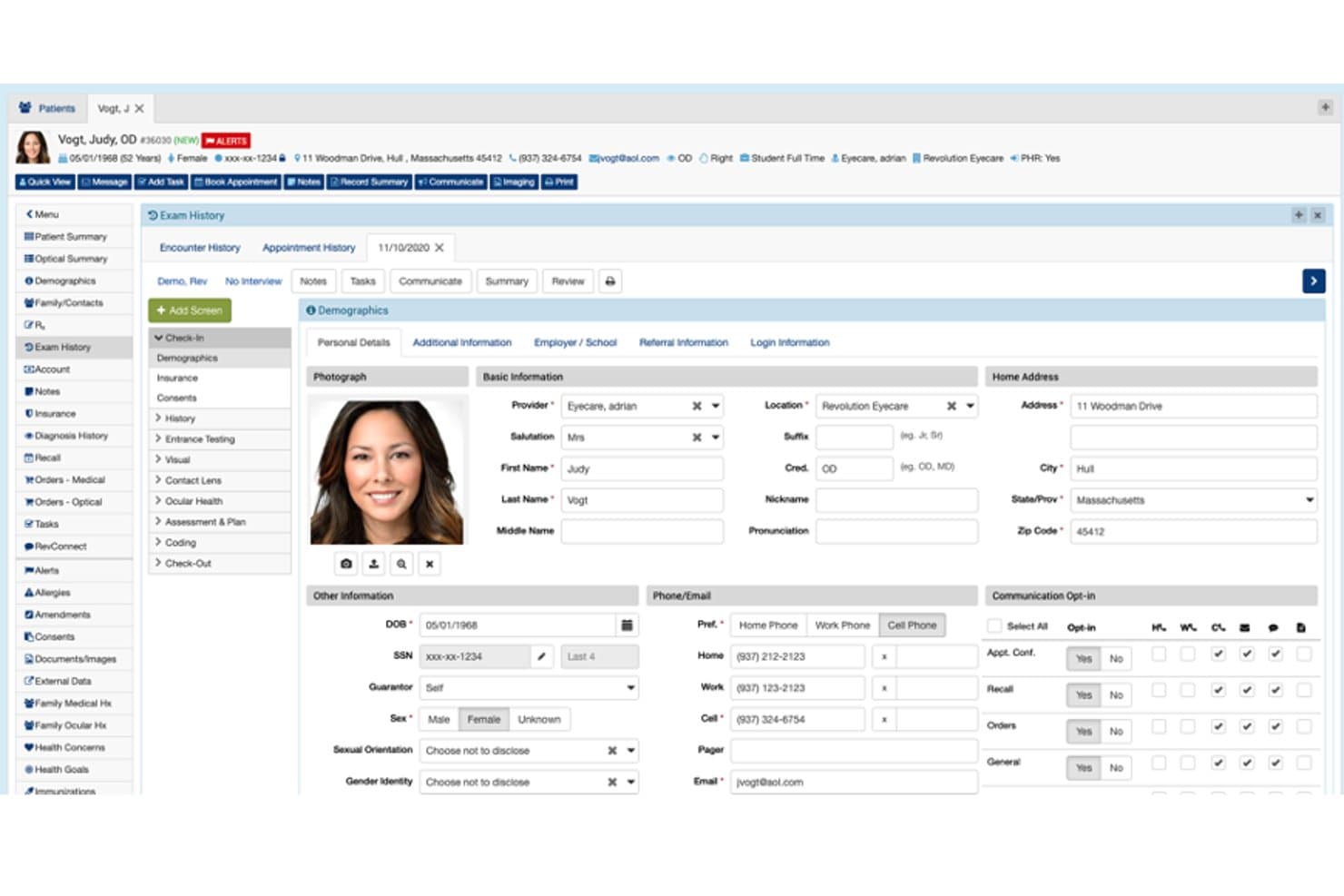
RevolutionEHR offers a detailed patient demographics dashboard displaying personal details, contact information, communication preferences, and appointment history in one view. RevolutionEHR is a cloud-based EHR and practice management platform built exclusively for optometry, covering exam documentation, optical dispensary management, vision and medical billing, scheduling, and diagnostic device integration.
Who Is RevolutionEHR Best For?
RevolutionEHR is a strong fit for independent optometry practices and small multi-location optical groups that need a single platform for both clinical and dispensary workflows.
Why I Picked RevolutionEHR
RevolutionEHR earns its spot on my shortlist because it's the only platform where the exam record and the optical dispensary genuinely operate as one. I particularly like how diagnostic equipment from Zeiss, TopCon, Optos, and 10+ other manufacturers pushes measurements directly into the chart, cutting out manual data entry mid-exam. Contact lens and frame orders tie back to the same patient record, so my team can track inventory, lab orders, and Rx history without switching systems.
RevolutionEHR Key Features
- AI-powered exam documentation: Chart using built-in AI Scribe to reduce manual entry during eye exams.
- Patient engagement suite: Send automated appointment reminders, recall messages, and surveys across phone, text, and email.
- RevPay integrated payments: Accept in-office and online payments directly within the EHR using card, ACH, or digital wallet.
- HIPAA-compliant provider messaging: Communicate securely with referring providers via integrated Direct Messaging.
RevolutionEHR Integrations
RevolutionEHR offers native integrations with optical lab and equipment systems including Zeiss, TopCon, Optos, Optovue, Marco, ABB Optical, VisionWeb, HOYA, FramesData, MARLO, and Dr. Contact Lens. An API is available for custom integrations.
Pros and Cons
Pros:
- Direct data import from diagnostic instruments
- Exam charting tailored for eye care specialties
- Built-in optical inventory and POS workflows
Cons:
- Occasional delays with ophthalmic equipment updates
- Limited customization of encounter templates
Learn more about RevolutionEHR: Best customizable templates for complex cases
- Free demo available
- Pricing upon request
Visit WebsiteCustomer Rating:3.9/5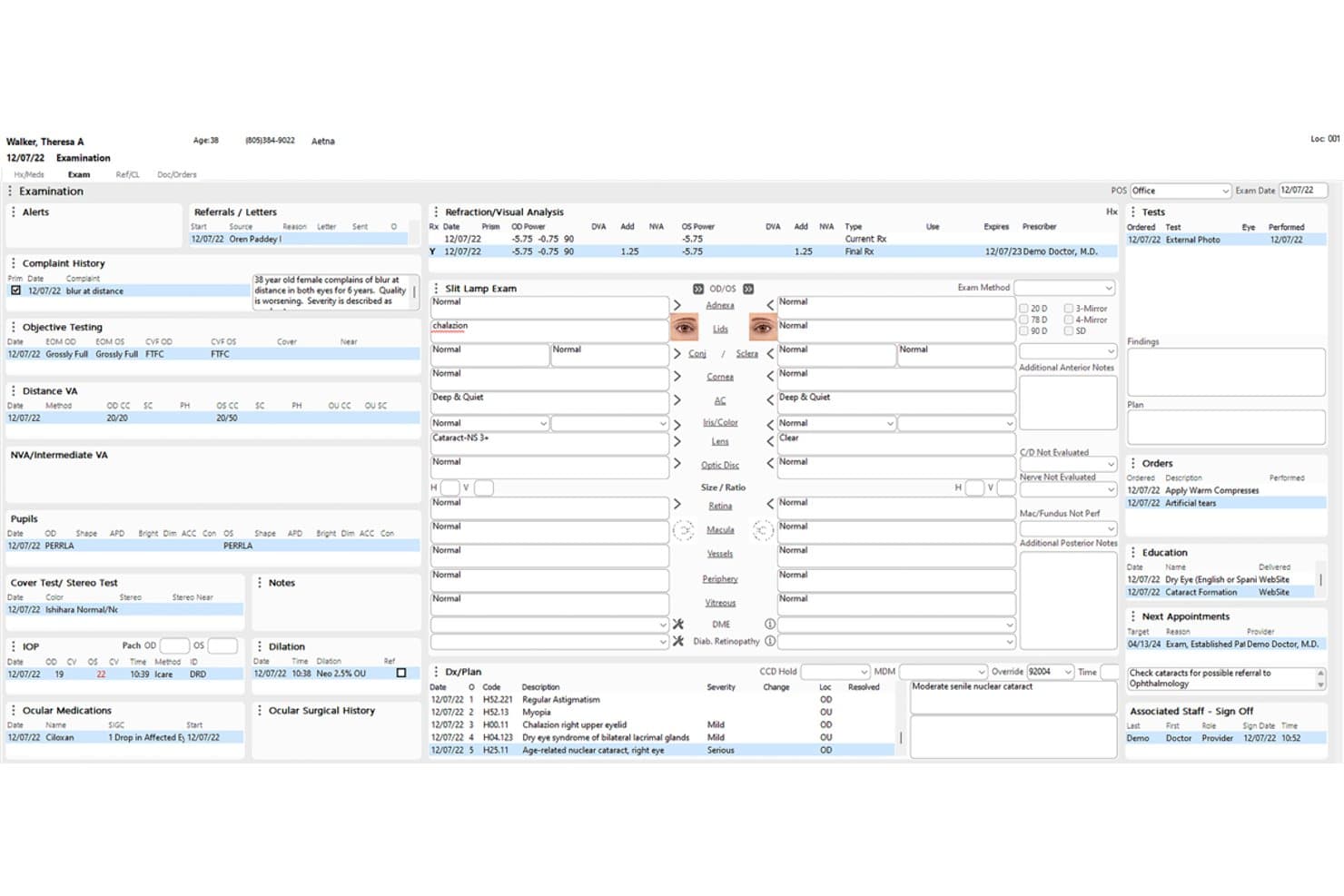
Compulink Advantage (Eyecare Advantage) offers a comprehensive patient examination screen displaying refraction, slit lamp findings, diagnoses, orders, and scheduling in a single unified optometry EMR interface. Compulink Advantage is a specialty-built optometry EMR and practice management platform covering clinical charting, optical POS, diagnostic device integration, vision and medical billing, and patient engagement in a single system.
Who Is Compulink Advantage Best For?
It's a strong fit for independent optometry practices and multi-location optical groups that need clinical, dispensary, and billing workflows managed in one platform.
Why I Picked Compulink Advantage
I picked Compulink Advantage because its customizable EHR templates are genuinely built for optometric complexity. The OneTab layout lets me document a full exam, including refraction, slit lamp, dilation, and IOP, from one screen without toggling between modules. The Standard of Care engine then prompts clinically relevant next steps based on what's documented, which matters most when managing complex cases like glaucoma suspects or diabetic eye disease.
Compulink Advantage Key Features
- Patient engagement tools: Enable online scheduling, paperless web registration, two-way texting, and integrated patient reminders.
- Integrated diagnostic imaging: Import data from auto-refractors, OCT, and fundus cameras directly into the patient chart.
- Optical POS and inventory management: Track frames, lenses, and contact lens inventory alongside dispensary sales workflows.
- VSP and vision plan claims management: Handle eligibility checks, authorizations, and claims for major vision insurers within the platform.
Compulink Advantage Integrations
Compulink Advantage offers native integrations with diagnostic devices such as auto-refractors, OCT, fundus cameras, and supports e-prescribing and lab interfaces. An API is available for custom integrations.
Pros and Cons
Pros:
- Direct device data import to patient chart
- Robust optical inventory and POS workflows
- Customizable templates for advanced eye conditions
Cons:
- System updates can disrupt daily operations
- Some workflows require multiple screen clicks
Learn more about Compulink Advantage (Eyecare Advantage): Best for cloud scheduling and patient reminders
- Free demo available
- Pricing upon request
Visit WebsiteCustomer Rating:4.3/5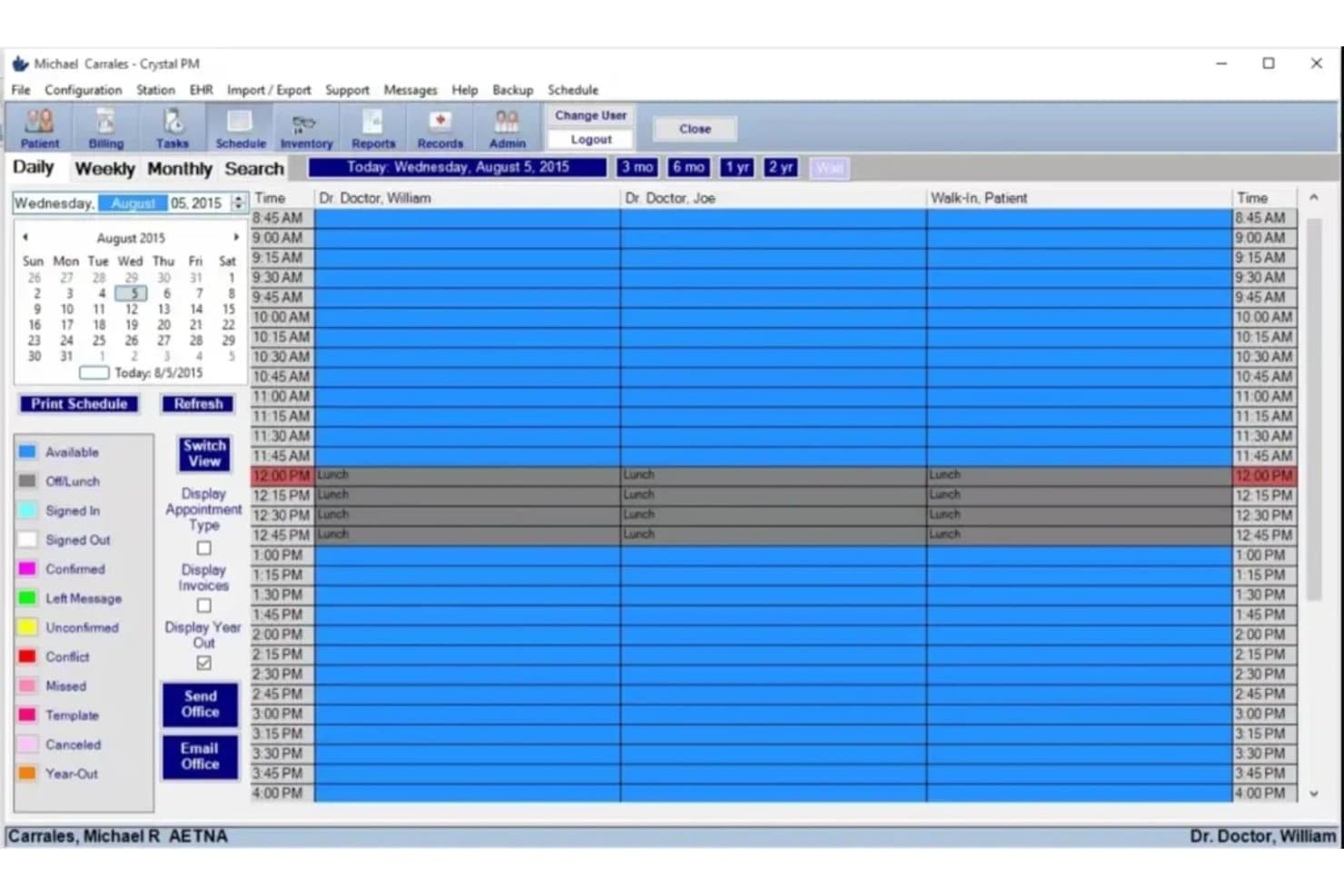
Crystal Practice Management offers a daily scheduling view with multi-provider columns, lunch blocks, and color-coded appointment status indicators. Crystal Practice Management is an optometry-specific EHR and practice management platform with customizable exam templates, optical inventory, diagnostic device integrations, and dual vision and medical billing.
Who Is Crystal Practice Management Best For?
Crystal Practice Management is a strong fit for independent optometry practices and small optical groups that need a purpose-built platform covering both clinical and dispensary workflows.
Why I Picked Crystal Practice Management
Crystal Practice Management earns its spot on my shortlist because its cloud-based scheduling and automated patient reminders are built around the annual exam recall cadences that optometry practices actually run on. I love that the AI-enabled online scheduling connects directly to patient records, and the two-way texting on the PRO plan supports up to 15,000 messages per month. Front desk staff can handle appointment confirmations and recall outreach without toggling between a separate communication tool and the EHR.
Crystal Practice Management Key Features
- Customizable eye exam templates: Choose from hundreds of pre-built, optometry-focused templates for documentation including refraction, dilation, and IOP.
- Integrated diagnostic device connectivity: Directly import test results from auto-refractors, OCT, fundus cameras, and visual field machines into patient charts.
- Optical point-of-sale and inventory: Manage frame boards, lens inventory, and prescription dispensing in tandem with clinical workflows.
- Vision and medical claims processing: Process insurance claims for both medical and vision plans using optometry-specific CPT/ICD-10 codes.
Crystal Practice Management Integrations
Crystal Practice Management offers over 55 native integrations, including VSP, Adit, RIF, Optify, and diagnostic devices like OCT and fundus cameras. An API is available for custom integrations.
Pros and Cons
Pros:
- Supports automated exam recall and reminders
- Built-in optical POS and inventory tools
- Easily customizable optometry exam templates
Cons:
- No native mobile app for providers
- Outdated user interface compared to competitors
Learn more about Crystal Practice Management: Best for 40-year optometry-focused EHR depth
- Free demo available
- Pricing upon request
Visit WebsiteCustomer Rating:3.9/5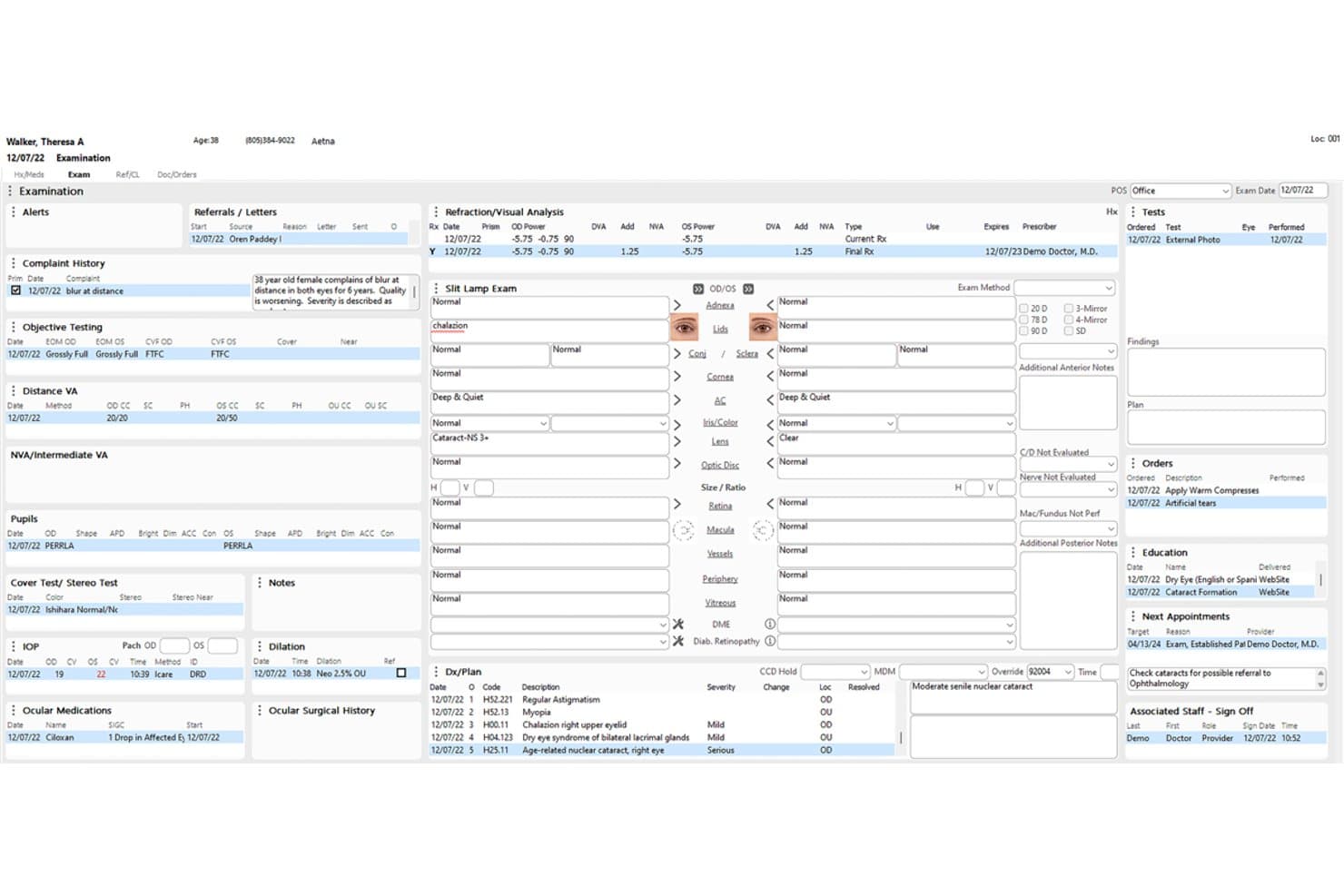
Compulink centralizes patient exam data, diagnoses, and orders in one view. Eyecare Advantage by Compulink is an optometry-focused EHR that combines clinical exam documentation, optical POS and inventory management, practice management, and integrated revenue cycle tools in one platform.
Who Is Compulink Best For?
Compulink's Eyecare Advantage is a strong fit for optometry practices that want a single platform covering clinical documentation, optical retail, and billing—without stitching together separate systems.
Why I Picked Compulink
I picked Compulink as one of the best because no other optometry EHR on this list carries 40 years of specialty-specific development behind it. That history shows up in concrete ways: the OneTab interface lets providers document a full eye exam from a single screen using voice, touchscreen, or iPad input, and the Standards of Care Engine builds a pre-visit worklist tied directly to appointment type and patient history, so nothing gets missed before sign-off.
Compulink Key Features
- Quantum AI Ambient Scribe: Listens during patient encounters and converts conversations into structured EHR documentation, with real-time translation across 18 languages.
- PracticeWatch automation: Configurable business-rule engine that triggers appointment confirmations, recall notices, and order-ready alerts automatically.
- Optical inventory management: Tracks frame and contact-lens stock across multiple locations using barcode scanning, with automatic lab order transmission from entry through dispensing.
- AdvantageRCM billing service: An expert-managed revenue cycle service that handles claims submission, payer follow-up, payment posting, and patient billing on the practice's behalf.
Compulink Integrations
Eyecare Advantage documents native integrations with ABB Optical Group and VisionWeb, plus an EdgePro API connection. It also supports over 400 eye-care device interfaces and provides a read-only RESTful HL7 FHIR R4 API for custom integrations.
Pros and Cons
Pros:
- Reviewers praise responsive support
- Optical and clinical workflows share patient records
- One-screen exam charting
Cons:
- Multi-location switching can require logging out
- Reviewers report glitches after updates
Learn more about Compulink: Best for direct vision plan claim integration
- Free demo available
- Pricing upon request
Visit WebsiteCustomer Rating:3.7/5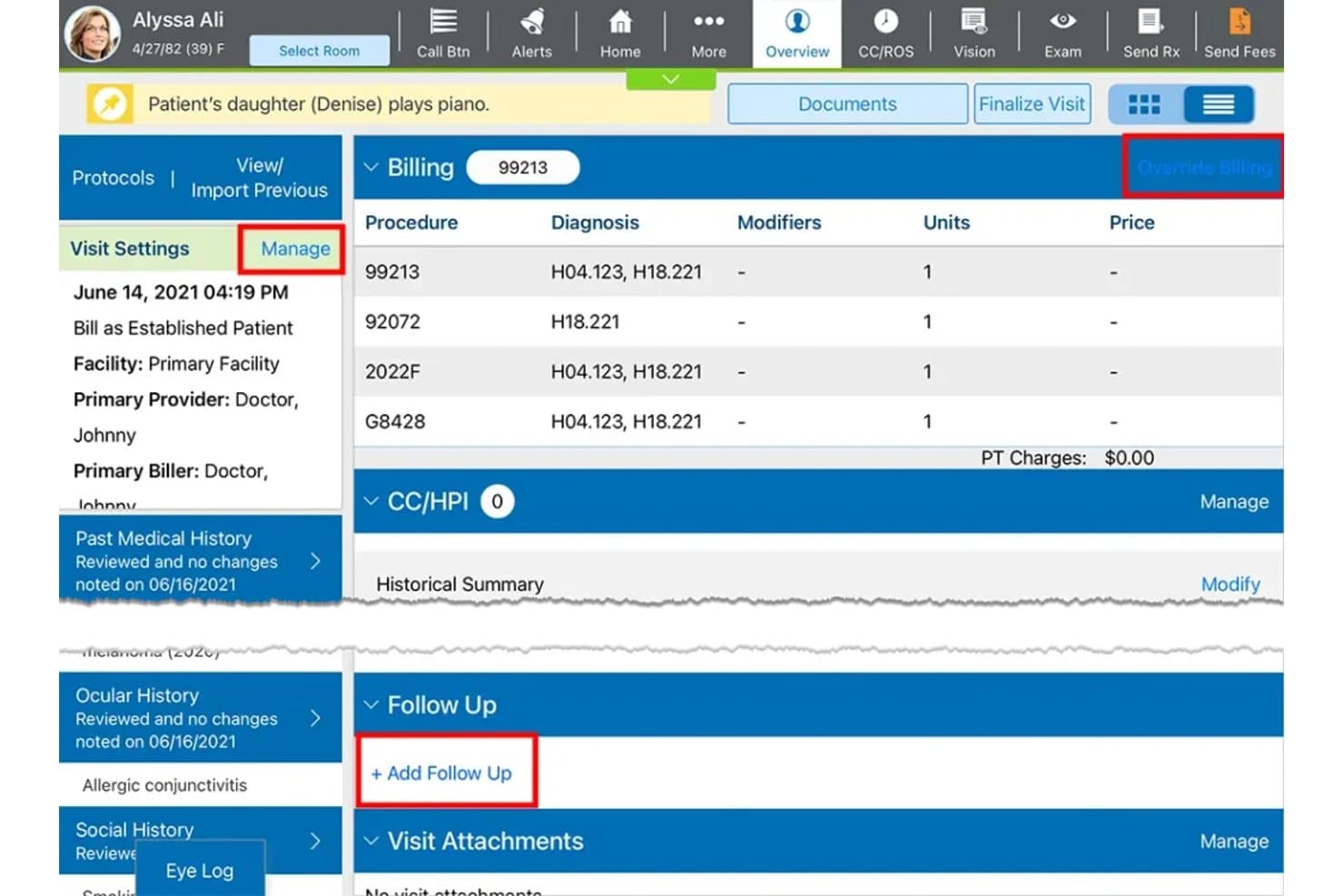
Eyefinity EHR offers a patient overview screen displaying billing codes, diagnosis, follow-up scheduling, and visit settings for optometry practices. Eyefinity EHR is a cloud-based optometry EMR built for independent eye care practices, combining ocular-specific charting, diagnostic device integration, optical and contact lens ordering, and vision plan billing in a single platform.
Who Is Eyefinity EHR Best For?
It's a strong fit for independent optometry practices that process a high volume of VSP vision plan claims alongside standard medical billing.
Why I Picked Eyefinity EHR
Eyefinity EHR earns its spot on my shortlist because of how tightly it connects to VSP vision plan billing. I love that you can pull eligibility in bulk up to seven days before appointments and submit VSP claims automatically without leaving the system. The built-in out-of-pocket calculator is something I find genuinely useful at checkout, showing patients their exact coverage before they pay.
Eyefinity EHR Key Features
- Ocular-specific charting templates: Includes pre-built templates for refraction, slit lamp, and dilation exams.
- Diagnostic device integration: Imports measurements from auto-refractors, fundus cameras, and OCT devices directly into patient records.
- Optical dispensary management: Tracks inventory for frames, lenses, and contacts with Rx transmission tied to clinical charts.
- Automated patient notifications: Sends appointment reminders, recall messages, and eyewear-ready alerts to patients via voice or text.
Eyefinity EHR Integrations
Eyefinity EHR offers native integrations with VSP Vision, TriZetto, EyeScape, Optos, Zeiss FORUM, ZEISS, Topcon, DigitalOptometrics, and Worldpay, along with API access for custom integrations.
Pros and Cons
Pros:
- Automated patient notifications for recalls and eyewear
- Imports diagnostic data from major eye care devices
- Native VSP eligibility and claims workflows
Cons:
- Patient self-scheduling not natively included
- Optical POS features are less advanced
Learn more about Eyefinity EHR: Best for integrated exam and practice management
- Free demo available
- Pricing upon request
Visit WebsiteCustomer Rating:3.3/5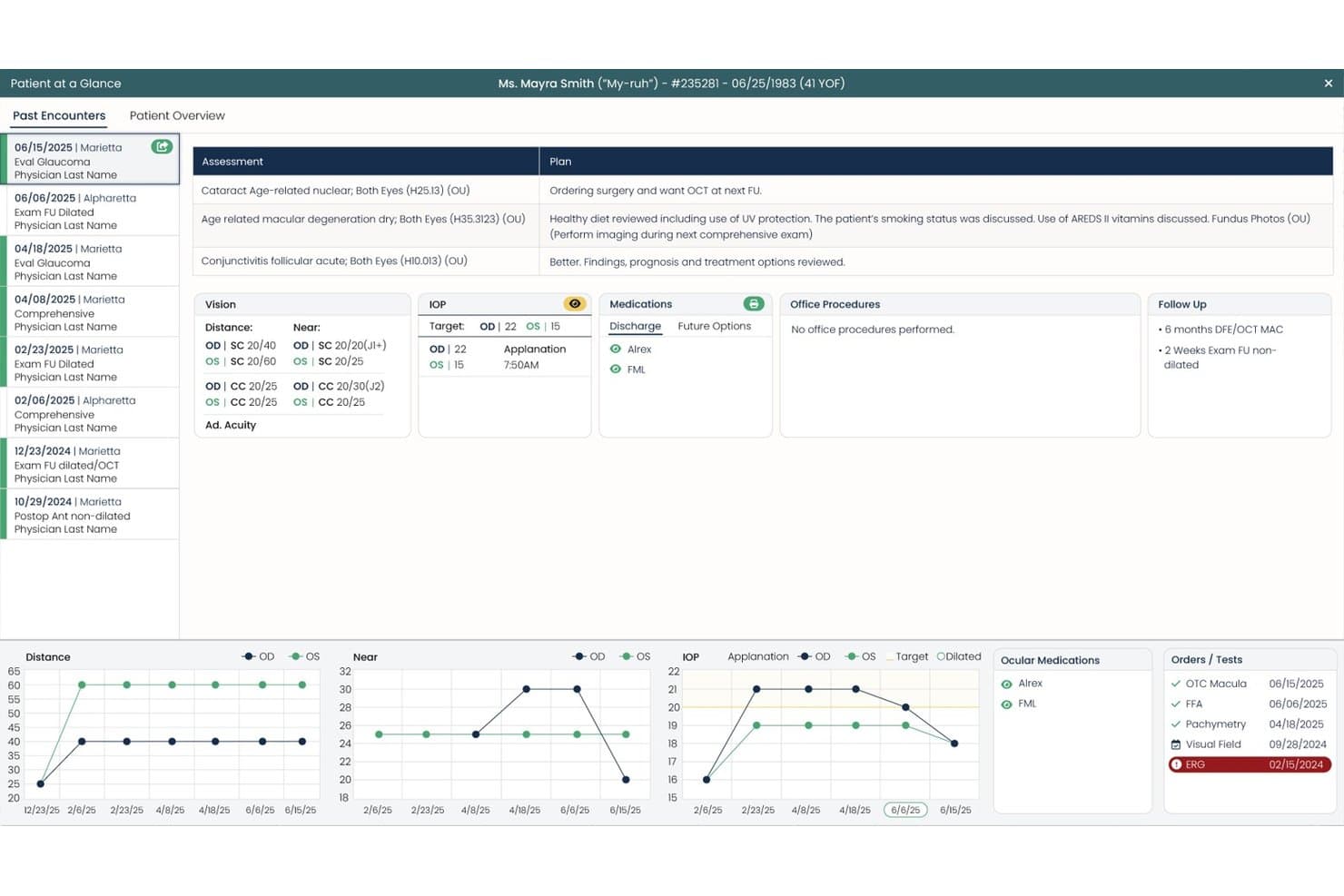
Sightview offers a Patient at a Glance panel displaying past encounters, assessments, IOP trends, medications, and follow-up details in one unified view. Sightview is an eye care EHR and practice management platform that combines optometry-specific charting, diagnostic device integration, optical dispensary management, vision and medical billing, and patient scheduling in one system.
Who Is Sightview Best For?
Sightview is a strong fit for growing optometry practices and multi-location optical groups that need clinical, dispensary, and billing workflows managed in a single platform.
Why I Picked Sightview
I picked Sightview as one of the best because it's one of the few platforms where the exam and practice truly operate as one. When a provider completes a refraction, that Rx flows directly into the optical dispensary without any re-entry, which keeps clinical and retail workflows tightly connected. I also like the integrated Image Viewer, which lets my team pull OCT and fundus camera images into the patient chart mid-exam rather than switching between systems.
Sightview Key Features
- Automated patient recall: System-driven reminders prompt annual eye exams and contact lens reorders based on patient history.
- Optical frames and lens inventory management: Manages searchable frame catalogs and lens stock for real-time dispensary operations.
- VSP and vision plan billing integration: Supports claim filing and eligibility checks for major vision insurance providers directly within the platform.
- Anatomical drawing tools: Includes touchscreen-friendly eye diagrams for documenting exam findings or treatment plans.
Sightview Integrations
Sightview offers native integrations with Heidelberg Engineering, NIDEK, Optos, ZEISS, EyeMed, VSP, Global Payments, TriZetto, Ocuco, VisionWeb, and DrFirst. An API is available for custom integrations.
Pros and Cons
Pros:
- Automated recall and patient messaging tools included
- Supports direct imaging device data import
- Optical and clinical workflows are tightly connected
Cons:
- Some users report slow support response times
- Interface updates require frequent browser refreshes
Learn more about Sightview: Best for ophthalmic device connectivity
- Free demo available
- Pricing upon request
Visit WebsiteCustomer Rating:4.1/5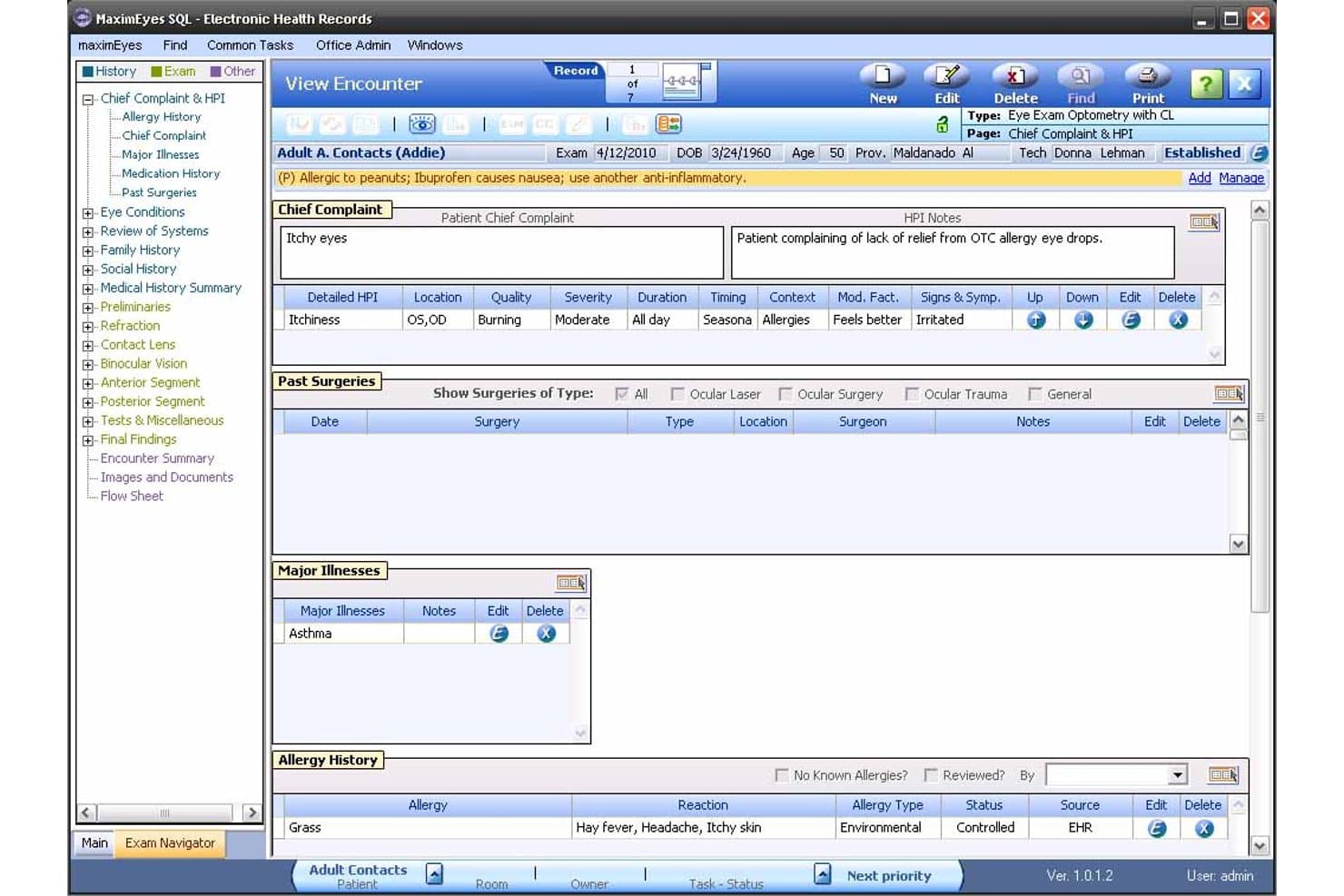
MaximEyes offers a detailed patient encounter view with chief complaint, HPI, allergy history, major illnesses, and past surgeries all visible in one screen. MaximEyes is a cloud-based EHR and practice management platform built exclusively for optometry and ophthalmology, combining clinical charting, optical dispensary management, diagnostic device integration, and vision and medical billing in one system.
Who Is MaximEyes Best For?
MaximEyes is a strong fit for independent optometry practices and small-to-mid-size optometry groups that need deep diagnostic equipment integration alongside full clinical and dispensary workflows.
Why I Picked MaximEyes
MaximEyes earns its spot on my shortlist because of how it handles ophthalmic device connectivity. Readings from automated phoropters, lensometers, and autorefractors import directly into the patient's EHR encounter with just a few clicks, which means I'm not manually re-entering refraction data between instruments and the chart. On top of that, MaximEyes pulls real-time diagnostic imaging reports directly into the patient record, so visual field and OCT findings are already there when I'm documenting.
MaximEyes Key Features
- Customizable charting templates: Build and modify eye exam templates specific to your workflow and specialty needs.
- Optical point-of-sale system: Process retail optical sales with integrated frame and lens inventory, order tracking, and patient linking.
- Dual vision and medical insurance billing: Submit claims to both optometric and medical carriers with code suggestions and claim management tools.
- AOA MORE and IRIS registry integration: Submit clinical quality measures directly from MaximEyes for regulatory program compliance and reporting.
MaximEyes Integrations
MaximEyes offers native integrations with VSP, Weave, VisionWeb, Frames Data, CLX System, Mango Voice, EDGEPro, and Fast Pay Health. It also integrates natively with a wide range of ophthalmic diagnostic devices and provides an API for custom integrations.
Pros and Cons
Pros:
- Built-in optical POS and inventory tracking
- Customizable templates for all eye exam types
- Imports data from most ophthalmic devices
Cons:
- Reporting options can be difficult to customize
- Limited integration with visual field machines
Learn more about MaximEyes:
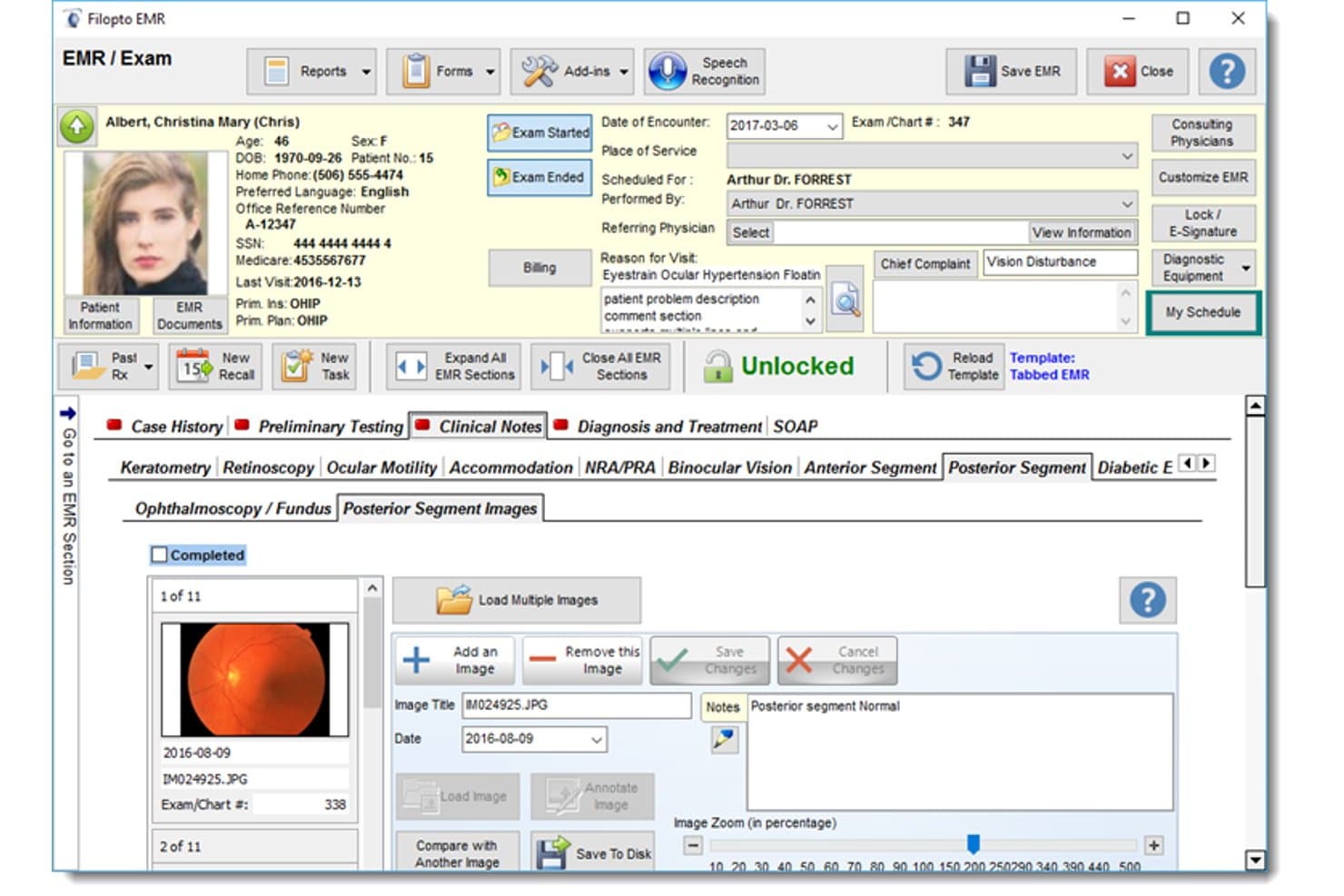
Filopto lets users view and manage posterior segment eye images. Filopto is an eye care practice management system that combines EMR, scheduling, patient records, optical inventory, lab order tracking, and insurance claims processing in a single platform built specifically for optometry and ophthalmology practices.
Who Is Filopto Best For?
Filopto suits optometry and ophthalmology practices that need U.S. or Canadian insurance claims processing built directly into their practice management workflow.
Why I Picked Filopto
I picked Filopto as one of the best because its insurance billing tools are built directly into the clinical workflow rather than bolted on after the fact. I like that exam and invoice data flow straight into claims preparation, and the Apex EDI connector handles U.S. claim scrubbing and automatic payment posting without requiring a separate billing platform. The Canadian provincial connectors for OHIP, MSI, Alberta, Manitoba, and British Columbia make it one of the few optometry EMR systems I've seen that serves both sides of the border natively.
Filopto Key Features
- Custom exam templates: Build and configure eye-exam templates with preloaded data, touch, dictation, or pen entry, and direct links to diagnostic equipment data.
- Eye on Your Business dashboard: View real-time financial indicators, optical capture rates, and multi-office metrics from a single centralized dashboard.
- WebScheduler: Let patients book appointments directly through the practice website using the live schedule from any internet-connected device.
- Marketing Manager: Create targeted patient campaigns filtered by age, spending habits, last appointment, or prescription, delivered by mail, email, or SMS.
Filopto Integrations
Filopto lists integrations with Apex EDI, RevSpring Talksoft, Intuit QuickBooks, ZEISS, Topcon, MARCO, NIDEK, Heidelberg Engineering, and Optos. It also connects with Canadian claims systems, including Ontario OHIP, Alberta Health, and Manitoba Health.
Pros and Cons
Pros:
- Claims draw on exam and invoice records
- Refraction history supports detailed eye-exam charting
- Reviewer praised scheduling and auto-recall tools
Cons:
- No documented audit trails or compliance certification
- Extensive reports can require practice-specific edits
Learn more about Filopto:
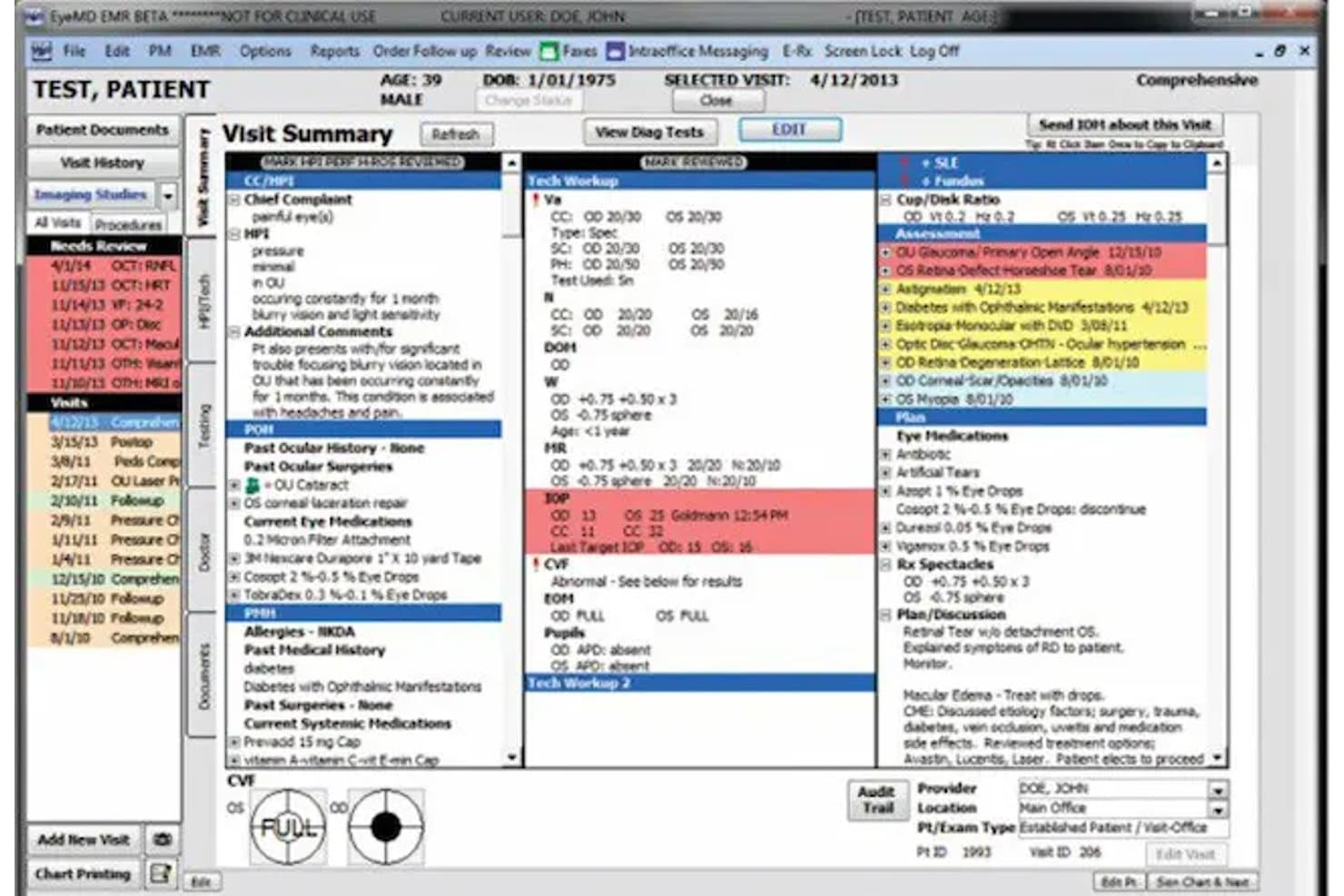
EyeMD EMR centralizes patient visit summaries with clinical and diagnostic data. EyeMD EMR (now Optivate) is an ophthalmology-focused EMR and practice management platform that combines specialty-specific charting, diagnostic image management, scheduling, optical inventory, and revenue cycle tools in one system.
Who Is EyeMD EMR Best For?
EyeMD EMR (now Optivate) suits ophthalmology practices that need deep imaging integration across modalities like OCT, fundus, and HRT from brands like Zeiss, Topcon, and Heidelberg.
Why I Picked EyeMD EMR
I picked EyeMD EMR (now Optivate) as one of the best because its imaging infrastructure is genuinely built for how ophthalmology practices work. It connects DICOM and legacy systems from Zeiss, Topcon, Heidelberg, and Oculus, covering modalities like OCT, fundus, HRT, and B-scan ultrasound, all viewable inside the patient chart with side-by-side historical comparisons for tracking disease progression. I also like that image access works across locations without VPNs or remote desktops, which matters when providers split time between sites.
EyeMD EMR Key Features
- Subspecialty exam workflows: Dedicated templates cover glaucoma, retina, cataract, cornea, oculoplastics, and post-operative follow-up documentation.
- Technician pre-population: Auto-refraction, IOP, visual acuity, and chief complaint data entered by technicians flow into physician charts without re-entry.
- AI ambient documentation: An optional ambient encounter capture tool listens to the visit and drafts a structured note for provider review before it enters the chart.
- Optical point of sale: Integrated lab-order management, barcoding, receipt printing, and real-time frame and lens inventory tracking connect directly to EHR and practice management.
EyeMD EMR Integrations
EyeMD EMR connects with Verana Health, the IRIS Registry, and imaging equipment from Zeiss, Heidelberg, Topcon, Oculus, iCare, and iTrace. It supports HL7 FHIR and SMART on FHIR application registration for custom integrations.
Pros and Cons
Pros:
- Reviewers praise support and chart customization
- Historical image comparisons help track disease progression
- Specialty templates cover glaucoma, retina, and cataract
Cons:
- Contact lens workflows aren't documented
- Optometry reviews report extra refraction-entry steps
Learn more about EyeMD EMR:
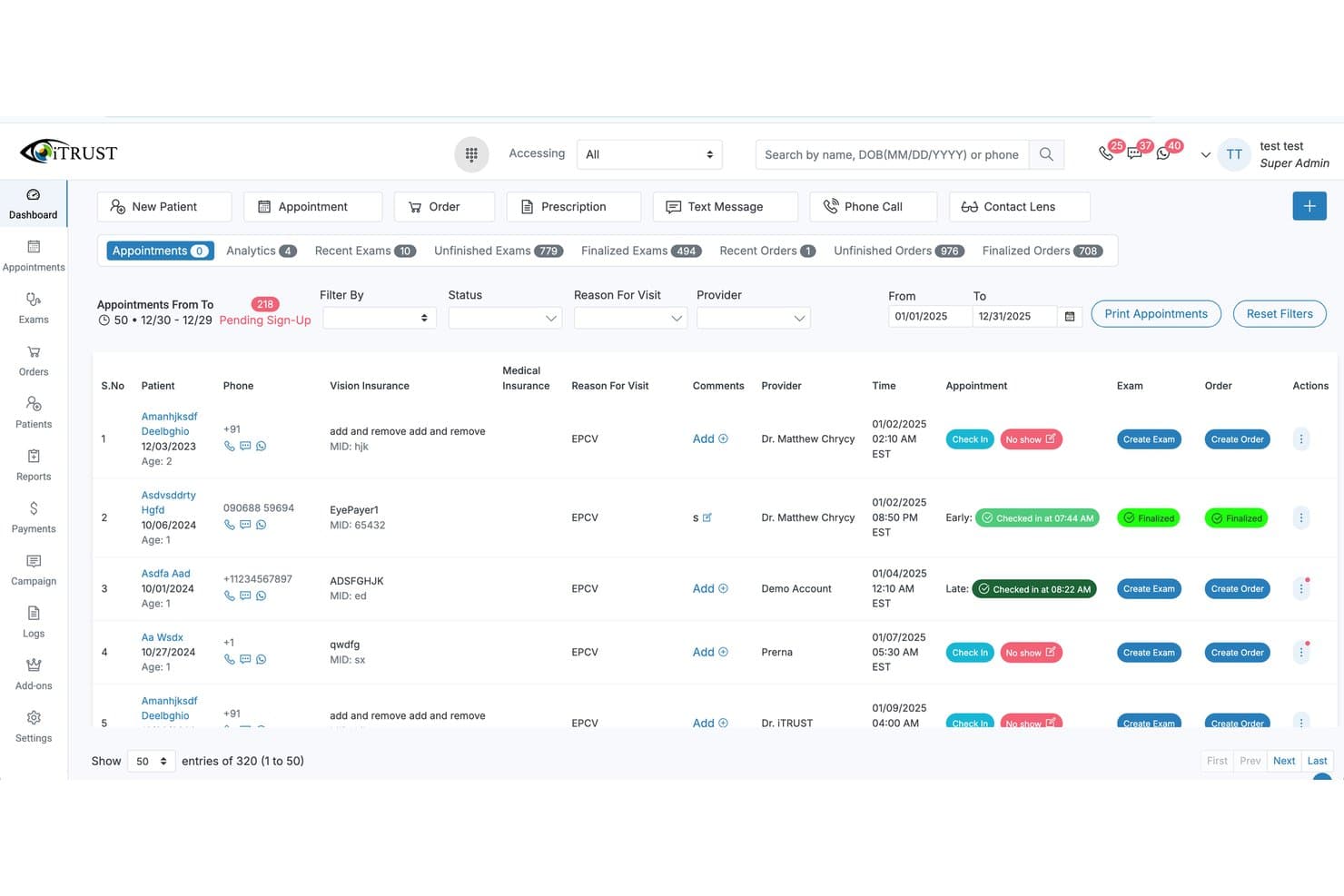
iTrust offers a comprehensive appointment dashboard displaying patient scheduling, check-in status, exam creation, and order management for optometry practices. iTRUST is a cloud-based EHR and practice management platform built specifically for optometry, combining eye exam charting, optical POS, vision insurance billing, and AI-assisted front desk tools in a single system.
Who Is iTRUST Best For?
iTRUST is a strong fit for independent optometry practices and multi-location optical groups that need a purpose-built, all-in-one EHR without juggling separate vendors.
Why I Picked iTRUST
I've included iTRUST in my top picks because the average implementation time sits at around one month, which is genuinely fast for a specialty EHR. Free legacy data migration is a big part of why that timeline holds: iTRUST's IT team handles the transfer of patient records from your old system, so you're not rebuilding charts from scratch. On day one, you also get a library of doctor-built optometry templates covering refraction, slit lamp, and IOP, so clinical staff can start documenting real patient exams without a lengthy configuration phase.
iTRUST Key Features
- Optical POS and inventory management: Track frames, lenses, and contacts with real-time inventory linked to patient records and sales.
- AI-powered front desk tools: Use an AI receptionist, two-way texting, WhatsApp, and VoIP phone integration for appointment scheduling and follow-ups.
- EDI clearinghouse for vision claims: File and manage claims for EyeMed, VSP, Spectera, and Davis directly from within the platform.
- Multi-location management: Centralize operations, reporting, and scheduling across multiple sites with role-based access and permissions.
iTRUST Integrations
iTRUST offers native integrations for vision claim filing with EyeMed, VSP, Spectera, and Davis, and supports e-prescribing with all valid e-Rx pharmacies and labs. An API is available for custom integrations.
Pros and Cons
Pros:
- End-to-end optical inventory and POS workflow
- AI-powered front desk and patient messaging tools
- Fast onboarding with custom optometry template library
Cons:
- Limited specialty support for low vision and pediatrics
- Diagnostic device compatibility details not public
Learn more about iTrust:
How I Evaluate Optometry EMR Software
I split my evaluation into three parts, with core functionality carrying the most weight: document refraction, visual acuity, and ocular findings, and securely manage patient records. Next, I look for differentiators such as ophthalmic device integration. Finally, I consider support, onboarding, and pricing value beyond the feature set.
Core Functionality (Table Stakes For This List)
When I'm selecting tools for my list, I score each one on a scale from 0 (does not offer the functionality) to 5 (excels in this area) for each core functionality listed below. I then convert the total into a percentage to help assess each tool's overall fit, with extra weight on any functionalities I’ve deemed essential.
- Eye Exam Documentation (Essential): I look for structured fields for refraction, visual acuity, and ocular findings, plus templates that support routine and condition-specific exams.
- Health Data Security (Essential): I assess safeguards such as role-based access, encryption, and audit trails for protecting patient records and supporting applicable privacy requirements.
- Medical & Vision Billing: I check how the system handles both medical and vision claims, including workflows for submitting claims and tracking their status.
- Diagnostic Device Integration: I look for connections that import and store data from ophthalmic devices, such as imaging equipment used during exams.
- Scheduling & Recall: I assess whether teams can book routine and follow-up visits and set automated reminders based on patients’ care needs.
- Optical Order Management: I check whether eyewear and contact lens orders link to patient records and show useful details such as order status.
Once I have a list of tools that meet the criteria, I consider what sets each platform apart.
Differentiating Factors (What Sets Vendors Apart)
Here's how I compare and contrast different vendors:
Standout Features
I look for a patient engagement portal that handles online scheduling, digital intake forms, and secure messaging—features that directly reduce front-desk phone volume during peak hours. Contact lens management tools also matter: I check whether trial lens tracking and reorder workflows connect to manufacturer catalogs, since contact lenses drive a significant share of practice revenue. Multi-location support rounds out my evaluation, where I want centralized patient records and reporting across sites without duplicating data entry.
Beyond Features
I check whether a vendor offers structured onboarding with data migration from legacy systems, since a botched cutover can stall billing for weeks. Interoperability matters just as much—I look for clearinghouse connections and Health Information Exchange compatibility so referrals and claims don't hit dead ends. I also evaluate total cost of ownership beyond the subscription price, asking vendors to clarify fees for device integrations, training, and additional provider licenses before committing.
Cum să alegeți software-ul EMR pentru optometrie
Este ușor să vă pierdeți în liste lungi de funcții și structuri complexe de prețuri. Pentru a vă ajuta să rămâneți concentrați în timp ce parcurgeți procesul unic de selectare a software-ului, iată o listă de factori de care trebuie să țineți cont:
| Factor | Aspecte de luat în considerare |
|---|---|
| FactorScalabilitate | Aspecte de luat în considerareCât de bine se va adapta software-ul dacă adăugați mai multe locații, furnizori sau servicii clinice noi în următorii ani? Întrebați despre funcțiile pentru mai multe locații. |
| FactorIntegrări | Aspecte de luat în considerareSe conectează sistemul la dispozitivele dumneavoastră de diagnosticare, platformele de comandare a analizelor de laborator și casa de clearing pentru facturare? Lacunele de aici duc adesea la soluții manuale. |
| FactorPosibilitate de personalizare | Aspecte de luat în considerareȘabloanele pentru consultații, formularele de preluare a datelor și tablourile de bord pentru rapoarte sunt adaptate fluxurilor dumneavoastră specifice și planurilor de asigurare pentru vedere? Luați în considerare cât de mult puteți configura. |
| FactorUșurință în utilizare | Aspecte de luat în considerareÎl pot învăța rapid angajații sau va avea nevoie toată lumea de instruire intensivă? O interfață complicată poate afecta productivitatea și experiența pacienților. |
| FactorImplementare și integrare inițială | Aspecte de luat în considerareCare este durata medie până la lansare și cât sprijin veți primi pentru migrarea datelor și instruire? Căutați asistență dedicată pentru implementare. |
| FactorCost | Aspecte de luat în considerareCorespunde prețul volumului și serviciilor dumneavoastră? Fiți atenți la taxele ascunse — utilizatorii suplimentari, integrările sau migrările de date se pot aduna. |
| FactorMăsuri de securitate | Aspecte de luat în considerareCe protocoale sunt implementate pentru conformitatea HIPAA, criptare și acces bazat pe roluri? Întrebați despre jurnalele de audit și opțiunile de recuperare în caz de dezastru. |
| FactorDisponibilitatea asistenței | Aspecte de luat în considerareCât de repede puteți lua legătura cu personalul serviciului de asistență care înțelege fluxurile de lucru specifice optometriei? Luați în considerare timpii de răspuns și asistența în afara programului, dacă programul dumneavoastră o impune. |
Ce este software-ul EMR pentru optometrie?
Software-ul EMR pentru optometrie este un sistem digital de evidență conceput special pentru cabinetele de îngrijire a ochilor, destinat gestionării fișelor pacienților, consultațiilor, diagnosticelor, rețetelor și facturării. Acesta permite echipei dumneavoastră să documenteze constatările oculare, să integreze imaginile de diagnosticare, să proceseze cererile de despăgubire pentru asigurarea de vedere și să gestioneze un serviciu de optică în cadrul unui singur sistem — respectând în același timp reglementările din domeniu și susținând fluxuri de lucru eficiente.
Funcțiile software-ului EMR pentru optometrie
Atunci când selectați un software EMR pentru optometrie, urmăriți următoarele funcții esențiale:
- Documentare specifică optometriei: Include șabloane pentru examinări oftalmologice, refracții, constatări la biomicroscop și rezultate ale testării câmpului vizual, permițând documentarea oculară detaliată, adaptată nevoilor optometriștilor.
- Integrarea dispozitivelor de diagnostic: Importă direct datele și imaginile de la examinare de la instrumente precum OCT, camerele pentru fund de ochi și autorefractometrele, reducând introducerea manuală a datelor și erorile.
- Planuri de asigurare pentru vedere și facturare medicală: Permite trimiterea solicitărilor de despăgubire atât către asigurătorii pentru servicii oftalmologice, cât și către cei medicali, oferind asistență pentru codificarea CPT, ICD-10 și cerințele planurilor pentru vedere într-un singur flux de lucru.
- Gestionarea stocurilor de produse optice: Urmărește stocurile de rame, lentile și lentile de contact, asociază comenzile cu dosarele pacienților și gestionează reaprovizionarea printr-un modul de distribuție încorporat.
- Prescriere electronică (inclusiv substanțe controlate): Permite transmiterea electronică a prescripțiilor direct către farmacii, inclusiv măsuri de siguranță pentru medicamentele reglementate.
- Programarea pacienților și rechemarea acestora: Gestionează intervalele pentru programări, notificările anuale pentru examinări oftalmologice și mesajele de rechemare, contribuind la menținerea unui program complet și la respectarea de către pacienți a planului de îngrijire.
- Instrumente de desen și adnotare: Permit clinicienilor să marcheze diagrame anatomice ale ochiului sau să adauge schițe în dosarele pacienților, reproducând fluxul de lucru tradițional bazat pe desene realizate manual.
- Portal pentru pacienți: Oferă pacienților acces securizat pentru a-și consulta dosarele, a confirma programările și a comunica online cu cabinetul.
- Raportare și analiză: Oferă instrumente pentru urmărirea indicatorilor clinici, financiari și operaționali, inclusiv a producției, structurii asigurătorilor și ratelor de rechemare.
- Securitate și conformitate: Include funcții pentru protejarea datelor pacienților — precum criptarea, pistele de audit și gestionarea rolurilor utilizatorilor — respectând standardele HIPAA și ONC.
Funcții AI comune ale software-ului EMR pentru optometrie
Pe lângă funcțiile standard ale software-ului EMR pentru optometrie enumerate mai sus, multe dintre aceste soluții integrează AI prin funcții precum:
- Analiza automatizată a imaginilor: Utilizează AI pentru a detecta anomalii retiniene sau indicatori ai glaucomului în imaginile de diagnostic, semnalând posibilele probleme pentru examinarea clinicianului.
- Programarea predictivă a consultațiilor: Analizează istoricul pacientului și tiparele vizitelor pentru a sugera date optime de rechemare și a reduce absențele de la programări.
- Asistență inteligentă pentru codificare: Sugerează cele mai precise coduri CPT și ICD-10 pe baza notițelor din dosar și a constatărilor examinării, contribuind la reducerea respingerilor solicitărilor de despăgubire.
- Procesarea limbajului natural (NLP) pentru documentare: Convertește notițele rostite sau introduse în scris în înregistrări structurate în dosar, accelerând documentarea și reducând introducerea manuală a datelor.
- Triajul pacienților asistat de AI: Evaluează simptomele și răspunsurile de la preluarea informațiilor pentru a prioritiza cazurile urgente și a recomanda pașii următori înainte ca pacientul să consulte furnizorul de servicii medicale.
Beneficiile software-ului EMR pentru optometrie
Implementarea software-ului EMR pentru optometrie oferă mai multe beneficii echipei și activității dumneavoastră. Iată câteva dintre acestea:
- Documentare simplificată: Documentarea specifică optometriei și integrarea dispozitivelor reduc introducerea manuală a datelor, făcând examinările mai rapide și mai precise.
- Eficiență îmbunătățită a facturării: Facturarea duală pentru servicii oftalmologice și medicale vă permite să gestionați solicitările printr-un singur sistem, contribuind la reducerea respingerilor și a problemelor administrative.
- Îngrijire îmbunătățită a pacienților: Automatizarea încorporată a rechemărilor și portalurile pentru pacienți înseamnă că aceștia primesc notificări la timp și au acces facil la informațiile lor medicale.
- Fluxuri de lucru clinice și comerciale unificate: Stocurile de produse optice integrate, punctul de vânzare și gestionarea ramelor se conectează la dosarele pacienților, simplificând operațiunile zilnice.
- Conformitate mai bună cu reglementările: Certificarea ONC, accesul securizat bazat pe roluri și prescrierea electronică vă asigură alinierea la reglementările din domeniul medical.
- Luarea deciziilor pe baza datelor: Modulele de raportare și analiză vă permit să urmăriți tendințele, să monitorizați productivitatea și să identificați oportunități de dezvoltare în cabinetul dumneavoastră.
- Accesibilitate și asistență sporite: Implementarea în cloud și accesul mobil permit personalului să lucreze în siguranță de oriunde, beneficiind de asistență promptă pentru rezolvarea întrebărilor legate de fluxul de lucru.
Costurile și prețurile software-ului EMR pentru optometrie
Selectarea software-ului EMR pentru optometrie necesită înțelegerea diferitelor modele și planuri de preț disponibile. Costurile variază în funcție de funcții, dimensiunea echipei, suplimente și alți factori. Tabelul de mai jos prezintă pe scurt planurile comune, prețurile medii ale acestora și funcțiile incluse de obicei în soluțiile software EMR pentru optometrie:
Tabel comparativ al planurilor pentru software EMR de optometrie
| Tipul planului | Preț mediu | Funcții comune |
|---|---|---|
| Tipul planuluiPlan gratuit | Preț mediu$0 | Funcții comuneDocumentare limitată, programare de bază a consultațiilor, spațiu de stocare minim și asistență exclusiv prin e-mail. |
| Tipul planuluiPlan personal | Preț mediu$80–$150/utilizator/lună | Funcții comuneDocumentare specifică optometriei, integrarea dispozitivelor, programarea pacienților și instrumente individuale de raportare. |
| Tipul planuluiPlan pentru companii | Preț mediu$200–$400/utilizator/lună | Funcții comuneModule complete de facturare, stocuri de produse optice, automatizarea rechemărilor, șabloane personalizabile și portaluri pentru pacienți. |
| Tipul planuluiPlan pentru întreprinderi | Preț mediu$500+/utilizator/lună | Funcții comuneGestionarea mai multor locații, interoperabilitate avansată, acces API, asistență dedicată și integrare și instruire personalizate. |
Întrebări frecvente despre software-ul EMR pentru optometrie
Iată câteva răspunsuri la întrebările frecvente despre software-ul EMR pentru optometrie:
Ce diferențiază software-ul EMR pentru optometrie de sistemele EHR medicale generale?
Software-ul EMR pentru optometrie include șabloane specializate, facturarea planurilor de servicii oftalmologice, gestionarea stocurilor de produse optice și integrări cu echipamente de diagnosticare adaptate fluxurilor de lucru din îngrijirea oftalmologică, funcții pe care majoritatea sistemelor EHR medicale generale nu le acceptă.
Se poate integra software-ul EMR pentru optometrie cu dispozitivele optice și platformele de laborator?
Da, majoritatea sistemelor EMR pentru optometrie oferă integrări cu dispozitive de diagnosticare precum OCT, camere pentru fundul de ochi și autorefractometre, precum și cu platforme de comandă ale laboratoarelor pentru rame, lentile și lentile de contact.
Cât timp durează implementarea software-ului EMR pentru optometrie?
Durata implementării variază, însă majoritatea cabinetelor pot începe utilizarea sistemului în 4–12 săptămâni, în funcție de migrarea datelor, instruirea personalului și necesitatea personalizării șabloanelor pentru fluxul dumneavoastră clinic.
Este implementarea unui sistem EMR bazat pe cloud suficient de sigură pentru datele pacienților?
Da, soluțiile cloud de încredere folosesc stocarea criptată a datelor, măsuri de protecție conforme cu HIPAA și acces bazat pe roluri pentru a menține în siguranță informațiile medicale ale pacienților și a permite accesul doar utilizatorilor autorizați.
Voi putea trimite atât cereri de despăgubire pentru servicii oftalmologice, cât și cereri către asigurările medicale printr-un singur sistem?
Da, un avantaj esențial al software-ului EMR pentru optometrie este eficientizarea facturării atât pentru planurile de servicii oftalmologice, cât și pentru asigurătorii medicali, permițându-vă să gestionați într-un flux de lucru unificat verificările eligibilității, autorizările și cererile de despăgubire.