

Gestionarea unui cabinet stomatologic nu este deloc o sarcină ușoară. Trebuie să administrați dosarele pacienților, să țineți evidența programărilor și să vă preocupați de respectarea reglementărilor. Poate părea copleșitor, însă aici intervin soluțiile EMR dentare.
Aceste instrumente contribuie la simplificarea operațiunilor zilnice, facilitând concentrarea asupra a ceea ce contează cu adevărat — oferirea unor îngrijiri excelente pacienților. Din experiența mea, alegerea sistemului EMR potrivit vă poate economisi timp, reduce erorile și îmbunătăți eficiența echipei.
În acest articol, vă voi prezenta principalele mele recomandări de sisteme EMR dentare, pe baza unor testări și cercetări amănunțite. Veți găsi recenzii și informații imparțiale care vă vor ajuta să luați o decizie în cunoștință de cauză pentru cabinetul dumneavoastră.
Why Trust Our Software Recommendations
6,700+
Reviews
20
Industry experts
16+
Evaluation factors
14
Years
Our team has been testing and reviewing software since 2012. As medical practice leaders ourselves, we know how difficult—and important—it is to choose the right software.
For this guide, we evaluated tools using hands-on testing and independent research, scoring tools using our selection criteria.
Our reviews reflect our human editorial judgment, not a sales pitch.
Tabel comparativ al sistemelor EMR dentare
Score legend (out of 5)
- Excellent4.5–5
- Good4–4.4
- Average3–3.9
- Below average2–2.9
- Poor1–1.9
Sorted by: Default
| Tool | Starting Price | Website | |||||||
|---|---|---|---|---|---|---|---|---|---|
Best for AI-driven dental records | Not rated | 2 | 3 | 3 | 2 | Not rated | 2 | Pricing upon request Free demo available | Website |
Best for simplified documentation processes | Not rated | 2 | Not rated | 3 | 2 | 2 | 4 | Pricing upon request Free demo available | Website |
Best for multi-location DSO rollout and charting | 4.5 out of 5 | 4 | 5 | 4 | 5 | 4 | 5 | $829/month Free demo available | Website |
Best for scaling DSOs with multi-location record access | 4.0 out of 5 | 4 | 4 | 3 | 4 | 4 | 5 | Price upon request Free demo available | Website |
Best for cloud-native dental charting with ambient AI | 3.8 out of 5 | 4 | 4 | 3 | 4 | 4 | 4 | Price upon request Free demo available | Website |
Best for open-source pricing with full EMR control | 3.7 out of 5 | 4 | 4 | 3 | 4 | 4 | 3 | $199/month Free trial available | Website |
Best for practices wanting AI-assisted note drafting | 3.3 out of 5 | 3 | 4 | 3 | 4 | 2 | 4 | Pricing upon request Not available | Website |
Best for Canadian practices with data privacy needs | 3.7 out of 5 | 4 | 4 | 4 | 3 | 4 | 3 | Pricing upon request Free demo available | Website |
Best for new practice launch with built-in benchmarking | 3.8 out of 5 | 4 | 4 | 3 | 4 | 4 | 4 | Pricing upon request Free demo available | Website |
Best for AI voice charting in a solo practice | 3.5 out of 5 | 4 | 4 | 4 | 4 | 1 | 4 | $125/month 14-day free trial | Website |


Recenzii ale celor mai bune sisteme EMR dentare
 Best for AI-driven dental records
- Free demo available
- Pricing upon request
Visit WebsiteCustomer Rating:5/5
NextGen Healthcare dashboard displaying recent activity summaries and financial reporting tools. NextGen is a dental electronic health record and practice management platform designed to reduce documentation time and enhance operational performance through automation and AI. It supports both small dental clinics and large multi-specialty practices.
Why I Picked NextGen: I picked NextGen because of its ambient AI features that auto-generate SOAP notes from conversations, significantly reducing time spent charting. I was also drawn to its robust practice management tools, like billing, collections, and scheduling, all designed to minimize administrative workload. Its flexibility for both general and specialty dental workflows makes it a good fit for a wide range of clinics.
Standout Features and Integrations:
Features include customizable dental templates, real-time analytics, population health tools, and a mobile EHR app. The system also provides pre-built clinical content, ICD/CPT code support, and AI-guided charge capture.
Notable integrations include Relaymed, Surgimate, rater8, CallMyDoc, Medsender, Arcadia, and over 40 others for imaging, billing, referrals, and care coordination.
Pros and Cons
Pros:
- Strong dental charting and treatment planning tools
- Mobile access to charts and scheduling
- Reduces documentation time with ambient AI
Cons:
- Feature set may be excessive for small practices
- Some mobile features limited to iOS
Learn more about NextGEN: Best for simplified documentation processes
- Free demo available
- Pricing upon request
Visit WebsiteCustomer Rating:5/5
The patient history management feature in Athenahealth allows dental practitioners to view and manage patient records efficiently. AthenaOne, developed by Athenahealth, is a comprehensive cloud-based healthcare software solution designed to enhance clinical effectiveness, patient experience, and financial performance for healthcare providers.
Why I Picked Athenahealth: I picked Athenahealth for its simplified documentation process, which includes best-practice templates, macros, and accelerators. These tools help reduce the time spent on documentation, allowing dental professionals to focus more on patient care. The platform also offers specialty-specific workflows and mobile documentation capabilities, enabling clinicians to access and update patient records in real time, even on mobile devices.
What do you get for free?
While Athenahealth doesn't offer a free tier or free trial, you can access a free demo.
Standout features & integrations:
Key features include revenue cycle management, communication and care tools for patient engagement, an easy-to-read summary of patient records, a patient portal, automated reminders, telehealth capabilities, and mobile accessibility. Integrations include NextPatient, DocResponse, Yosi Health, Secondwave, Recovery Plus, TSI, VaxCare, Fullscript, QueueDr, and CallMyDoc.
Pros and Cons
Pros:
- Broad range of integrations with other healthcare systems and devices
- Cloud-based system for remote access
- Comprehensive patient engagement features
Cons:
- Data migration can be time-consuming
- The platform might be complex for less tech-savvy users
Learn more about Athenahealth: Best for multi-location DSO rollout and charting
- Free demo available
- From $829/month
Visit WebsiteCustomer Rating:4.8/5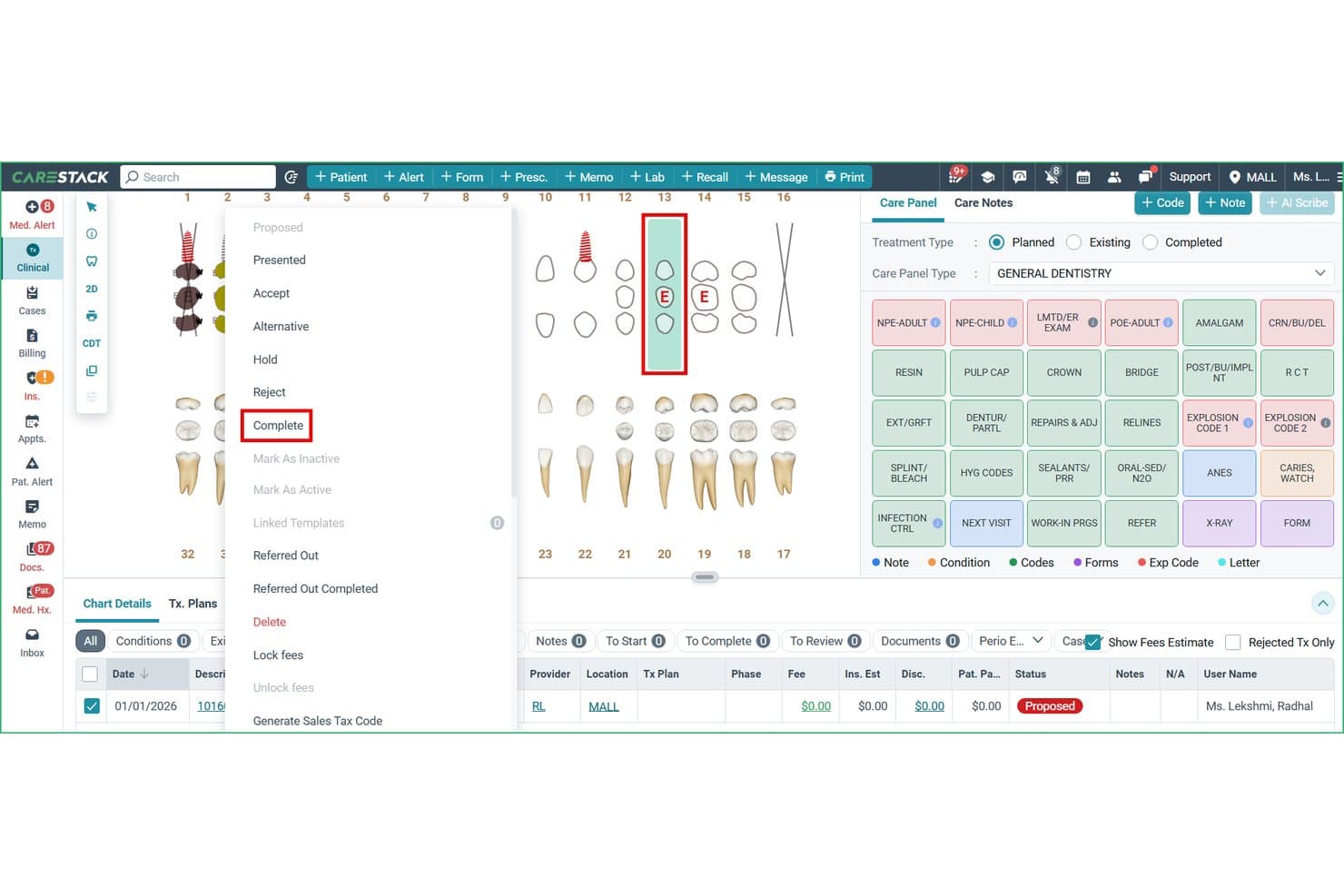
CareStack lets users update treatment statuses directly from the dental chart. CareStack is a cloud-based dental practice management platform that combines clinical charting, treatment planning, scheduling, billing, imaging integration, and revenue cycle management in a single system.
Who Is CareStack Best For?
CareStack is a strong fit for dental service organizations managing or planning to scale across multiple locations.
Why I Picked CareStack
I picked CareStack as one of the best because it's purpose-built for the complexity of running care across multiple locations. The phased DSO rollout model is what stands out to me: CareStack can convert 8–10 locations in parallel per day, with a dedicated Implementation Lead, sandbox validation, and location-level scorecards baked in. I also like that voice periodontal charting and AI-powered X-ray analysis via Overjet are available natively, so clinical teams aren't stitching together separate tools to get AI-assisted diagnostics at the chair.
CareStack Key Features
- Multi-phase treatment planning: Organize proposed treatments into phases with assigned timeframes, a treatment coordinator, and case-acceptance tracking.
- Electronic claims management: Submit, scrub, and track claims through their full lifecycle, with ERA auto-posting and denial and rejection workflows built in.
- Customizable clinical note templates: Build provider- or procedure-specific note templates with clickable buttons, fill-in fields, and CDT code linkage.
- Location-level scorecards and goal tracking: Set and monitor production goals at the provider and location level with trend analysis and operational reporting dashboards.
CareStack Integrations
CareStack lists 71 native integrations, including Dexis, Carestream, Sidexis, Romexis, Overjet, DentalXChange, Rectangle Health, RingCentral, VoiceStack, and DoseSpot. Its Open API Program supports REST APIs, webhooks, and scheduled data extracts for custom integrations.
Pros and Cons
Pros:
- Periodontal charting captures detailed measurements
- Phased DSO rollout includes sandbox validation
- Integrated workflows reduce switching between systems
Cons:
- Insurance posting and ledgers can confuse teams
- Clinical tasks can require redundant clicks
Learn more about CareStack: Best for scaling DSOs with multi-location record access
- Free demo available
- Price upon request
Visit WebsiteCustomer Rating:4.5/5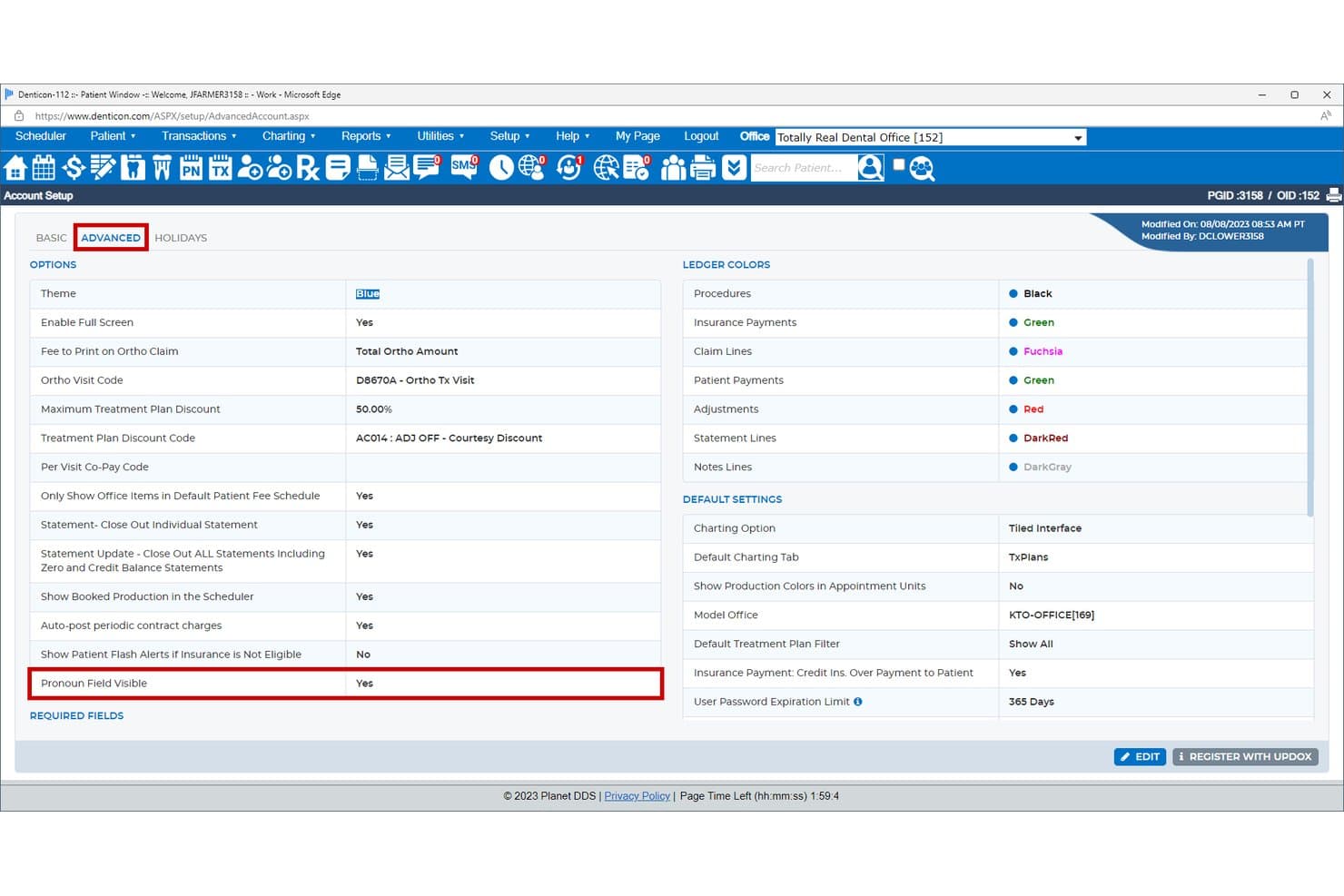
Denticon lets users configure pronoun visibility and ledger display colors. Denticon is a cloud-based dental practice management system from Planet DDS that covers clinical charting, treatment planning, imaging integration, patient communication, billing, and multi-location analytics.
Who Is Denticon Best For?
Denticon is built for dental service organizations managing multiple locations that need centralized patient records, cross-location analytics, and a scalable platform that grows with the organization.
Why I Picked Denticon
Denticon earns its spot on my shortlist because it's purpose-built for dental service organizations that need patient records to travel with the patient, not stay locked to a single location. I particularly like the Practice Analytics Dashboard Bundle, which gives DSO administrators cross-location production, collections, and treatment plan data in one view, without needing external tools. The Enterprise plan's Data Share feature takes that further by letting organizations pull Denticon data into their own reporting systems, which I think is genuinely useful when you're coordinating care across 20 or more locations.
Denticon Key Features
- AI voice charting: Denticon supports hands-free periodontal and restorative charting by voice, producing claim-ready documentation without manual input.
- Multi-specialty charting: The Dental Chart accommodates orthodontic, periodontal, and restorative workflows with customizable overlays and coding in a single chart.
- Automated patient communication: Built-in messaging sends appointment confirmations, reminders, balance-due notices, and new-patient welcome messages by text or email.
- SOC 2 Type II and HIPAA compliance: Denticon maintains independently audited security certifications alongside MFA, role-based access control, and 24×365 security operations monitoring.
Denticon Integrations
Denticon lists over 25 integrations, including Apteryx, Pearl, Overjet, VideaHealth, Podium, Weave, NexHealth, and Zocdoc. Its API supports REST, webhooks, and batch data extracts for custom integrations.
Pros and Cons
Pros:
- Reviewers praise appointment workflows and previsit forms
- Dashboards give DSOs organization-wide performance visibility
- Shared records support cross-location care
Cons:
- Reviewers report saved notes may need correction
- Reviewers find imaging access click-heavy
Learn more about Denticon: Best for cloud-native dental charting with ambient AI
- Free demo available
- Price upon request
Visit WebsiteCustomer Rating:4.5/5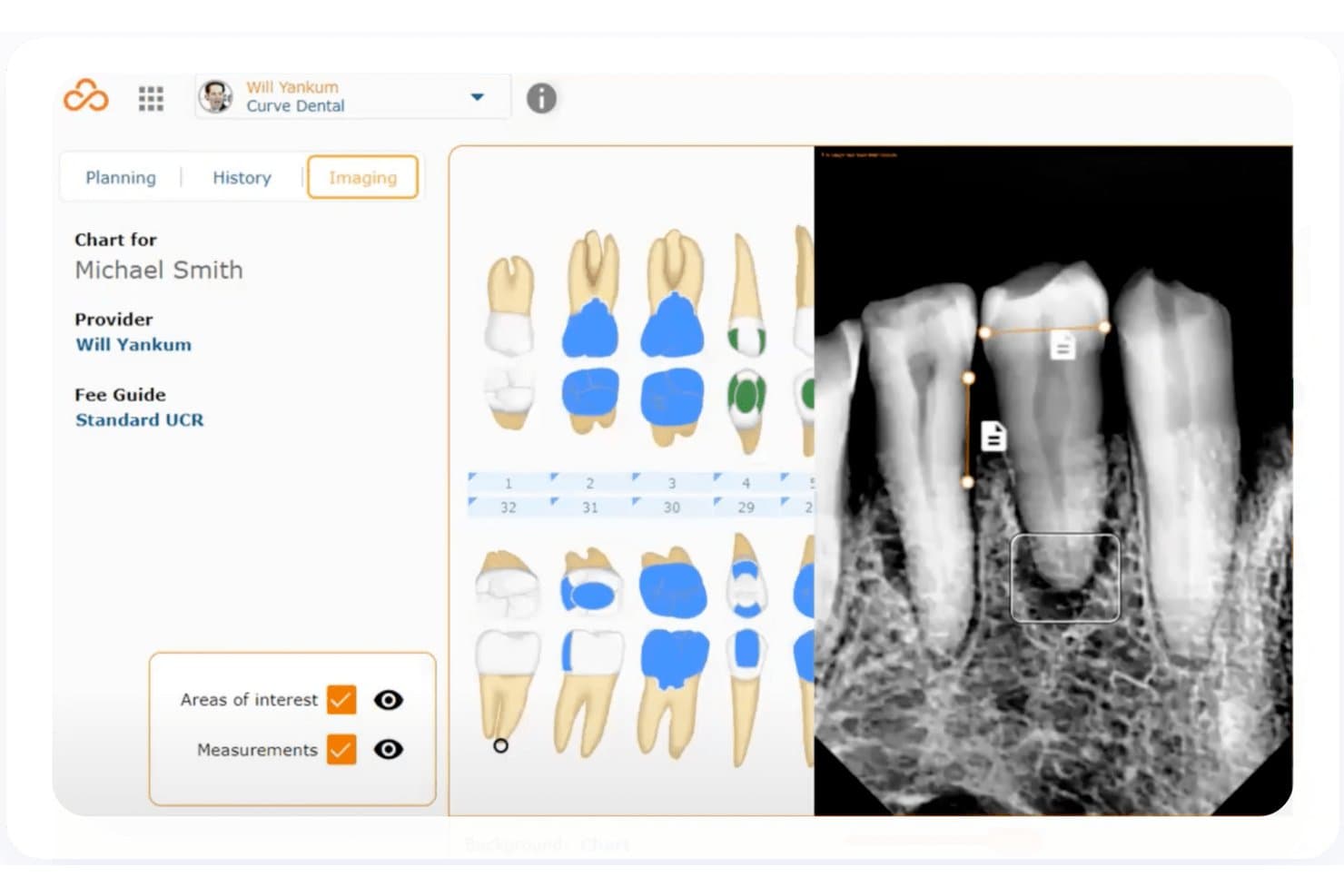
Curve Dental integrates dental imaging with patient charting side by side. Curve Dental is a cloud-based dental practice management platform that unifies clinical charting, periodontal charting, treatment planning, native digital imaging, scheduling, insurance billing, patient billing, and patient engagement in one system.
Who Is Curve Dental Best For?
Curve Dental is a strong fit for dental practices—from single-location startups to multi-site DSOs—that want clinical charting, imaging, billing, and AI-assisted documentation in one cloud-native system.
Why I Picked Curve Dental
Curve Dental earns its spot on my shortlist because its Curve Care+ suite brings ambient AI directly into the clinical workflow in a way I find genuinely useful. Notes+ listens to chairside conversations and drafts SOAP notes automatically, while Charting+ and Perio+ capture spoken conditions and pocket depths in real time, populating the odontogram without manual entry. I also like that everything—charting, imaging, billing, and scheduling—lives in one cloud-native system, so there's no toggling between applications mid-appointment.
Curve Dental Key Features
- Multi-location toggling: Switch between practice locations on one screen, with shared patient data and payments accessible across all offices.
- Curve GRO® patient engagement: Send automated appointment reminders by text and email, and manage two-way patient messaging through built-in campaign and workflow tools.
- Eligibility+ insurance verification: Check real-time, code-level coverage data from payer portals and automatically flag differences with SmartSync.
- Curve Business Analytics: Access operational and huddle dashboards plus detailed reporting by individual site or across the entire practice.
Curve Dental Integrations
Curve Dental offers marketplace integrations with DentalXChange, Stripe, CareCredit, Weave, and Zocdoc. An API is available for custom integrations, but the total integration count and API specifications aren’t stated.
Pros and Cons
Pros:
- Cloud imaging saves captures directly to charts
- Reviewers value remote access across locations
- Ambient AI drafts SOAP notes chairside
Cons:
- Image layouts and loading frustrate some reviewers
- Specialty charting can feel basic or awkward
Learn more about Curve Dental: Best for open-source pricing with full EMR control
- Free trial available
- $199/month
Visit WebsiteCustomer Rating:4.5/5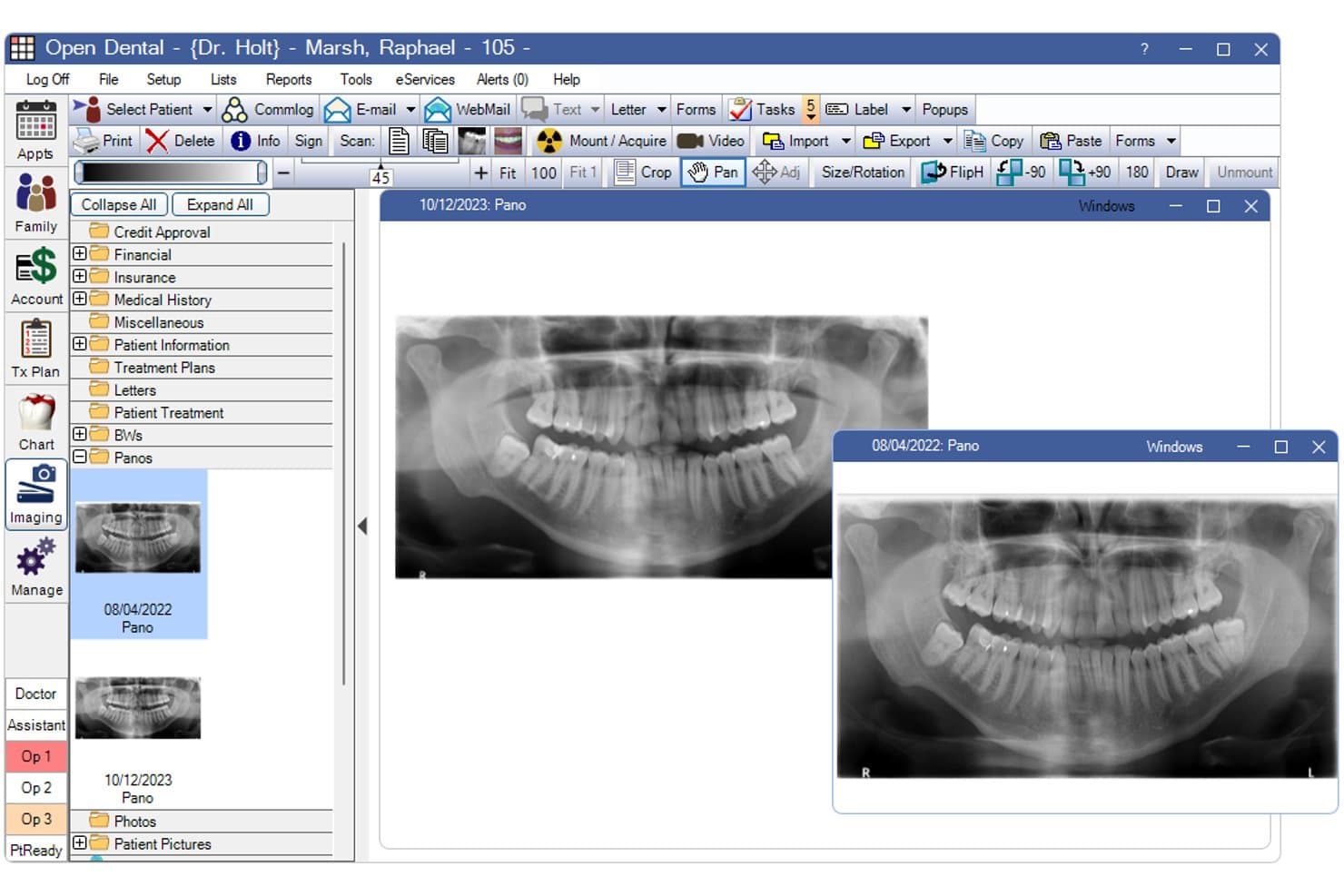
Open Dental lets users compare multiple panoramic X-rays side by side. Open Dental is an open-source dental practice management and EMR system that covers clinical charting, periodontal and restorative documentation, treatment planning, imaging, scheduling, and billing across single and multi-location practices.
Who Is Open Dental Best For?
Open Dental is a strong fit for independent dental practices and growing DSOs that want full control over their EMR without paying per-user or per-feature premiums.
Why I Picked Open Dental
I picked Open Dental as one of the best because it gives independent practices and growing DSOs full ownership of their EMR without locking them into per-user or per-module fees. The location-based pricing model means a four-provider office pays the same monthly rate as a solo practitioner at that location. I also like that the Graphical Tooth Chart and Perio Chart are built directly into the platform, so restorative and periodontal documentation live alongside treatment plans, imaging, and scheduling in one system.
Open Dental Key Features
- ODTouch tablet access: A tablet-optimized app that lets clinical staff chart, schedule, view images, and dictate notes directly at chairside.
- AI image analysis integration: Connects with Pearl and BetterDiagnostics to flag pathology in radiographs directly within the Imaging Module.
- eClipboard patient check-in: Lets patients complete forms, sign documents, and submit a photo on a mobile device before or during their visit.
- Voice Perio Charting: Records periodontal exam data hands-free using spoken voice commands, eliminating the need for a second staff member during perio exams.
Open Dental Integrations
Open Dental has 15 documented native integrations, including Pearl, BetterDiagnostics, Bola AI, DoseSpot, Ensora eRx, Global Payments, PayConnect, PaySimple, CareCredit, and DentalXChange. It also supports 100s of program bridges, 20+ clearinghouses, and RESTful and FHIR APIs for custom integrations.
Pros and Cons
Pros:
- Reviewers praise organized scheduling and records
- Custom reports surface practice-specific patient data
- Treatment planning connects charts and appointments
Cons:
- Dated screens and configuration take adjustment
- Some reviewers report freezes and sluggish performance
Learn more about Open Dental: Best for practices wanting AI-assisted note drafting
- Not available
- Pricing upon request
Visit WebsiteCustomer Rating:4.7/5
Image 10: ABELdent dental EMR interface ABELDent is a cloud-based dental practice management system that covers scheduling, clinical charting, periodontal records, imaging capture, treatment planning, billing, and AI-assisted clinical note drafting through its built-in Scribe tool.
Who Is ABELDent Best For?
ABELDent is a strong fit for independent dental practices that want AI-assisted note drafting built directly into their practice management workflow.
Why I Picked ABELDent
I've included ABELDent in my top picks because it's one of the few dental practice management systems with AI-assisted note drafting built directly into the platform. ABELDent Scribe listens during patient interactions and generates structured clinical note suggestions that providers can review, edit, and approve, without any third-party software. I also like that the Diagnocat integration brings 2D and 3D radiograph analysis into the same workflow, flagging potential conditions alongside treatment insights.
ABELDent Key Features
- Voice-controlled periodontal charting: Clinicians can dictate periodontal data hands-free, with entries captured directly into the periodontal chart.
- Short-notice appointment filling: The system automatically messages opted-in patients about last-minute openings and books the first patient to confirm.
- Phased treatment planning: Teams can organize planned treatment into phases and appointments, with expected insurance and patient portions visible alongside each phase.
- Receivables Manager: Staff can filter outstanding balances by patient or carrier, send statements, and prompt patients to pay remotely from the same screen.
ABELDent Integrations
ABELDent offers native integrations with Diagnocat and Google, plus an ITRANS integration for electronic claims and attachments. It also provides API access for custom integrations, subject to practice approval.
Pros and Cons
Pros:
- Users praise migration and upgrade support
- Reminders help confirm visits and fill cancellations
- Reviewers value digital charting and clinical records
Cons:
- Reviewers report insurance allocation and billing-screen issues
- Some users report dated, cluttered navigation
Learn more about ABELDent: Best for Canadian practices with data privacy needs
- Free demo available
- Pricing upon request
Visit WebsiteCustomer Rating:4.5/5
Image 4: ClearDent dental EMR interface ClearDent is a robust dental EMR software focused on maintaining the highest standards in data security and compliance. This makes it the go-to choice for practices that put a premium on these areas.
Why I Picked ClearDent: I chose ClearDent for its standout commitment to data security and compliance. In today's world, data security is paramount, and ClearDent's prioritization of this aspect sets it apart. Its capabilities make it "best for those prioritizing data security and compliance," helping practices adhere to regulations (HIPAA compliant) and protect patient information.
Standout features & integrations:
Key features of ClearDent include appointment management, charting, electronic treatment planning, and its top-notch security features. These, coupled with its compliance-centric capabilities, make it a powerful tool for modern dental practices. ClearDent integrates well with popular office productivity software and medical billing systems, allowing for smooth workflow management.
Pros and Cons
Pros:
- Good integrations with office productivity software
- Wide range of integrated features
- Strong focus on data security and compliance
Cons:
- Can be complex for new users to navigate
- Higher starting price than some other options
- No free tier available
Learn more about ClearDent: Best for new practice launch with built-in benchmarking
- Free demo available
- Pricing upon request
Visit WebsiteCustomer Rating:4.3/5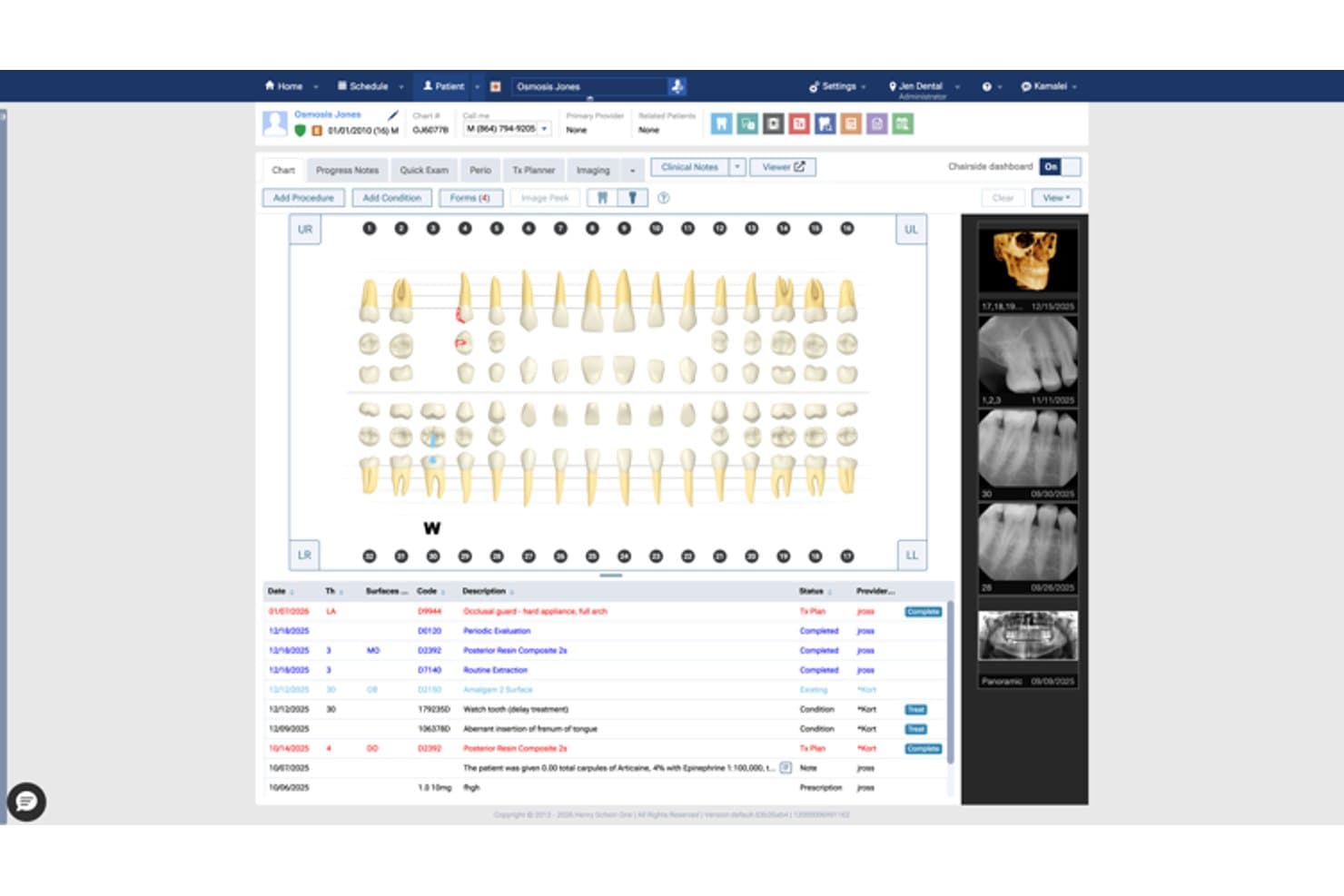
Dentrix Ascend displays a full patient chart with tooth diagrams and treatment history. Dentrix Ascend is a cloud-based dental practice management system that brings scheduling, clinical charting, imaging, billing, patient communication, and analytics together in one platform.
Who Is Dentrix Ascend Best For?
Dentrix Ascend is a strong fit for new dental practices and growing group practices that want scheduling, charting, billing, and patient communication in one cloud-based system from day one.
Why I Picked Dentrix Ascend
I picked Dentrix Ascend as one of the best because it's the only system I've seen purpose-built for new practice launches, with monthly benchmarking baked directly into the Ascend Starter plan alongside a dedicated startup consultant. From day one, you get pre-configured settings, clinical charting, and revenue cycle management without piecing together separate tools. I also like that the built-in Profitability Insights dashboards let you track collections and scheduling performance across locations as your practice grows.
Dentrix Ascend Key Features
- AI caries detection: Real-time AI analysis scans dental images and flags areas of potential decay directly within the platform.
- Voice Notes dictation: Clinicians can dictate, review, and save SOAP-format clinical notes using voice commands in the browser.
- Multi-location patient search: Advanced search returns matching patient records across all practice locations using name and birthdate.
- Role-based access control: Administrators define user roles and assign granular rights to view, edit, or delete patient and configuration data.
Dentrix Ascend Integrations
Dentrix Ascend offers documented integrations with Reserve with Google, Veradigm, Worldpay, iRay Pluto, GxPicture, 3DIEMME RealGUIDE, and the DEXIS Software Bridge. Its API Exchange supports partner and custom integrations with permission-based data sharing.
Pros and Cons
Pros:
- Shared records support multiple locations
- Automated reminders reduce staff calling
- Charting and treatment planning work together
Cons:
- Reports can be difficult to build
- Ledger and insurance workflows frustrate users
Learn more about Dentrix Ascend: 10Best for AI voice charting in a solo practice
tab32
- 14-day free trial
- $125/month
Visit WebsiteCustomer Rating:4.3/5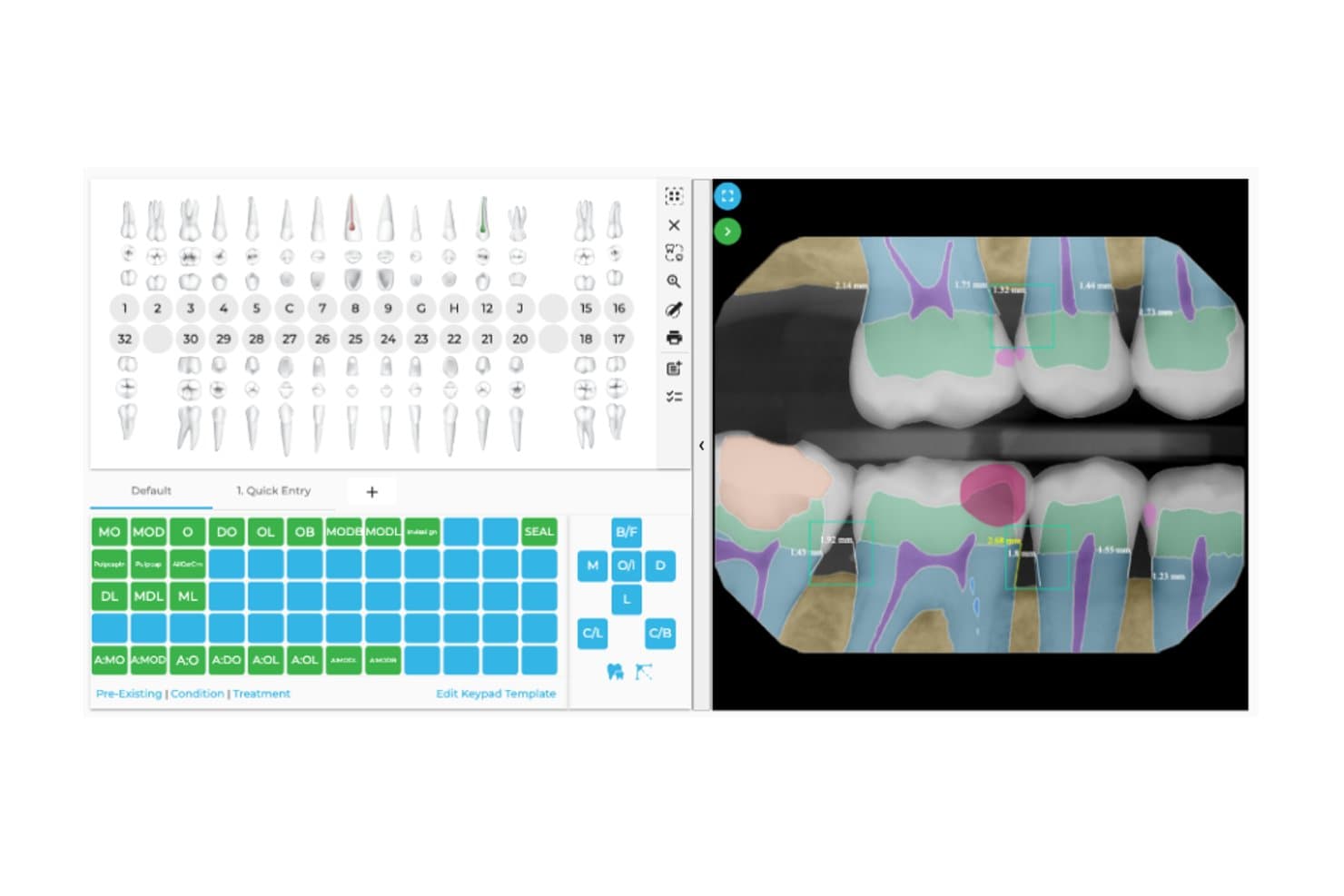
tab32’s charting screen lets dentists record findings and plan treatment. Alpine by tab32 is a cloud-based dental EMR and practice management system that combines clinical charting, digital imaging, AI voice documentation, scheduling, and billing in a single platform designed for solo and small-group practices.
Who Is tab32 Best For?
tab32 is a strong fit for solo practitioners and small dental offices looking to replace legacy software with a cloud-native system that handles charting, imaging, billing, and AI voice documentation in one place.
Why I Picked tab32
I picked tab32 as one of the best because its AI voice documentation genuinely changes how solo practitioners handle chairside charting. Instead of stepping away to type notes, you speak through the exam and the system generates a structured SOAP note for your review before it enters the permanent record. Voice-perio charting works the same way, capturing probing depths and bleeding points hands-free as you call them out.
tab32 Key Features
- Electronic claims submission: Submit claims electronically, attach supporting documentation, and track claim status directly within the patient record.
- Pearl AI radiology overlay: Integrated AI analyzes radiographs and displays detected conditions as color-coded overlays inside the imaging viewer.
- ASAP list and waitlist management: Track patients waiting for earlier appointments and fill last-minute openings from a built-in waitlist.
- Multi-phase treatment planning: Build treatment plans with multiple phases, track patient acceptance, and present options alongside supporting X-rays.
tab32 Integrations
Alpine includes native integrations with Stripe, Pearl AI, DentalXChange, Vyne Dental, AutoRemind, and DashCare. Established Practice also supports SSO with Google and Azure Active Directory; Alpine-specific API availability isn’t documented.
Pros and Cons
Pros:
- Scheduling, claims, and charting share workflows
- Radiographs sit alongside patient charts
- Voice charting captures perio findings hands-free
Cons:
- Reports and ledger workflows require extra steps
- Support replies can arrive slowly
Learn more about tab32:
Alte sisteme EMR dentare
- 11DovetailBest for DSO-scale AI charting and imaging
- 12Oryx DentalBest for AI-assisted perio and exam charting
How I Evaluate Dental EMR
I split my evaluation into three parts, giving core functionality the most weight: chart teeth and periodontal findings, and safeguard patient data under HIPAA. Next, I consider standout features such as voice-to-chart dictation. Finally, I weigh onboarding, support, and pricing fit for solo practices and growing groups.
Core Functionality (Table Stakes For This List)
When I'm selecting tools for my list, I score each one on a scale from 0 (does not offer the functionality) to 5 (excels in this area) for each core functionality listed below. I then convert the total into a percentage to help assess each tool's overall fit, with extra weight on any functionalities I’ve deemed essential.
- Dental Charting (Essential): I look for visual tooth and perio charts that capture restorative findings and link planned work to the affected teeth.
- Patient Data Security (Essential): I check for documented HIPAA safeguards, including encryption, role-based access, and audit trails for records opened by clinical and admin staff.
- Imaging Integration: Can staff capture or import X-rays into patient records and review them alongside chart findings during treatment discussions?
- Treatment Planning: I assess whether teams can sequence procedures, update status, and connect each phase to chart entries and cost estimates.
- Clinical Documentation: I look for structured notes, diagnosis tracking, and procedure-code links that support consistent follow-up across clinicians.
- Multi-Site Records: For groups, I check whether clinicians can access current records across locations while managers control permissions by site.
Once I have a list of tools that meet the criteria, I consider what sets each platform apart.
Differentiating Factors (What Sets Vendors Apart)
Here's how I compare and contrast different vendors:
Standout Features
I evaluate voice-to-chart dictation closely because it lets clinicians narrate findings mid-procedure without touching a keyboard or mouse. I check whether the dictation maps to the correct tooth and procedure code automatically. AI-assisted diagnostics is another area I look at—tools like Overjet or Pearl overlay caries and bone-loss detection on X-rays, which helps standardize reads across associate dentists. I also consider mobile chairside access, since a native tablet app changes how treatment plans are presented and accepted at the chair.
Beyond Features
I evaluate how each vendor handles data migration, since moving from paper charts or a competing system can stall a rollout for weeks if the vendor lacks dedicated import tools. Hosting model matters too—cloud-based platforms like Curve Dental update automatically and sync across locations, while on-premise options suit practices with unreliable internet or strict local data-control policies. I also check whether licensing scales with your growth, looking at per-provider versus flat-rate plans and any add-on fees for imaging modules or storage that inflate costs over time.
Cum să alegeți un sistem EMR dentar
Este ușor să vă pierdeți în liste lungi de funcții și structuri complexe de prețuri. Pentru a vă ajuta să rămâneți concentrat în timp ce parcurgeți procesul unic de selecție a programului, iată o listă de factori de care trebuie să țineți cont:
| Factor | Aspecte de luat în considerare |
|---|---|
| FactorScalabilitate | Aspecte de luat în considerareVa evolua programul odată cu cabinetul dumneavoastră? Verificați dacă acceptă mai mulți utilizatori, mai multe locații sau mai multe dosare de pacienți fără a compromite performanța. |
| FactorIntegrări | Aspecte de luat în considerareSe conectează la instrumentele pe care le utilizați deja? Verificați compatibilitatea cu sistemele de facturare, dispozitivele de imagistică și alte programe esențiale. |
| FactorPosibilități de personalizare | Aspecte de luat în considerareÎl puteți adapta fluxurilor dumneavoastră de lucru? Căutați opțiuni pentru personalizarea șabloanelor, câmpurilor și rapoartelor, astfel încât să corespundă nevoilor cabinetului. |
| FactorUșurință în utilizare | Aspecte de luat în considerareEste interfața intuitivă pentru echipa dumneavoastră? Un aspect simplu poate scurta timpul de instruire și reduce erorile. Testați gradul de utilizare printr-o perioadă de probă gratuită, dacă este oferită. |
| FactorImplementare și integrare inițială | Aspecte de luat în considerareCât timp va dura până când sistemul va fi funcțional? Evaluați procesul de configurare, asistența disponibilă și resursele de instruire pentru a asigura o tranziție fără probleme. |
| FactorCost | Aspecte de luat în considerareSe încadrează prețul în bugetul dumneavoastră? Comparați costurile inițiale, taxele de abonament și eventualele costuri ascunse. Căutați planuri flexibile sau reduceri. |
| FactorMăsuri de securitate | Aspecte de luat în considerareSunt protejate datele pacienților? Verificați conformitatea cu HIPAA și cu alte reglementări. Verificați existența criptării și a controalelor de acces. |
| FactorDisponibilitatea asistenței | Aspecte de luat în considerareCând puteți contacta serviciul de asistență? Asigurați-vă că există asistență adecvată în timpul programului de lucru, prin mai multe metode de contact, precum telefon, chat sau e-mail. |
Ce este un sistem EMR dentar?
Un sistem EMR dentar este un program care administrează dosarele medicale electronice pentru cabinetele stomatologice. Stomatologii, igieniștii și personalul administrativ folosesc în general aceste instrumente pentru a îmbunătăți îngrijirea pacienților și eficiența cabinetului. Funcțiile de programare, facturare și gestionare a fișelor ajută la organizarea informațiilor despre pacienți, administrarea programărilor și eficientizarea sarcinilor administrative. Aceste instrumente economisesc timp și reduc erorile în cabinetele stomatologice.
Funcții
Când alegeți un sistem EMR dentar, urmăriți următoarele funcții esențiale:
- Gestionarea dosarelor pacienților: Organizează și stochează în siguranță informațiile despre pacienți, făcându-le ușor accesibile profesioniștilor din domeniul stomatologic.
- Programarea consultațiilor: Permite gestionarea eficientă a programărilor pacienților, reducând absențele și optimizând calendarul cabinetului.
- Facturarea și emiterea facturilor: Automatizează tranzacțiile financiare, simplificând procesele de facturare și minimizând erorile.
- Completarea fișelor clinice: Oferă instrumente digitale pentru înregistrarea tratamentelor și a istoricului stomatologic al pacienților, contribuind la diagnosticarea exactă și la planificarea tratamentului.
- Rapoarte și analize: Oferă informații despre performanța cabinetului prin analiza datelor, ajutând la identificarea domeniilor care necesită îmbunătățiri.
- Capacități de integrare: Se conectează cu alte sisteme esențiale, precum dispozitivele de imagistică și software-ul de facturare, asigurând un flux de lucru fluid.
- Șabloane personalizabile: Permite personalizarea formularelor și documentelor pentru a răspunde nevoilor specifice ale cabinetului, sporind eficiența.
- Acces mobil: Oferă flexibilitate profesioniștilor din domeniul stomatologic pentru a accesa datele pacienților și a gestiona sarcinile de oriunde.
- Securitate și conformitate: Protejează datele pacienților prin criptare și controale de acces, asigurând respectarea reglementărilor precum HIPAA.
- Instrumente de comunicare cu pacienții: Facilitează comunicarea dintre cabinet și pacienți prin mementouri și mesaje de urmărire.
Beneficii
Implementarea unui sistem EMR stomatologic oferă mai multe beneficii pentru echipa și afacerea dumneavoastră. Iată câteva dintre avantajele de care vă puteți bucura:
- Eficiență îmbunătățită: Automatizează sarcinile de rutină, precum programarea și facturarea, eliberând timp pentru îngrijirea pacienților.
- Precizie sporită: Reduce erorile din dosarele pacienților și din tranzacțiile financiare prin păstrarea digitală a evidențelor.
- Îngrijire mai bună a pacienților: Oferă acces rapid la date complete despre pacienți, contribuind la luarea unor decizii de tratament mai bine informate.
- Economii de costuri: Reduce costurile administrative prin diminuarea utilizării documentelor pe hârtie și a proceselor manuale.
- Securitate sporită: Protejează informațiile sensibile despre pacienți prin criptare și respectarea reglementărilor privind datele.
- Relații mai solide cu pacienții: Facilitează comunicarea cu pacienții prin mementouri și mesaje de urmărire, îmbunătățind implicarea acestora.
- Informații bazate pe date: Oferă analize care ajută la identificarea tendințelor și a domeniilor care necesită îmbunătățiri în operațiunile cabinetului.
Costuri și prețuri
Alegerea unui sistem EMR stomatologic necesită înțelegerea diferitelor modele de preț și planuri disponibile. Costurile variază în funcție de funcționalități, dimensiunea echipei, suplimente și alți factori. Tabelul de mai jos prezintă planurile obișnuite, prețurile lor medii și funcționalitățile incluse de regulă în soluțiile EMR stomatologice:
Tabel comparativ al planurilor pentru EMR stomatologic
| Tipul planului | Preț mediu | Funcționalități obișnuite |
|---|---|---|
| Tipul planuluiPlan gratuit | Preț mediu$0 | Funcționalități obișnuiteGestionarea de bază a dosarelor pacienților, programare limitată și rapoarte de bază. |
| Tipul planuluiPlan personal | Preț mediu$20-$50/utilizator/lună | Funcționalități obișnuiteDosare ale pacienților, programarea consultațiilor, facturare de bază și asistență prin e-mail. |
| Tipul planuluiPlan pentru companii | Preț mediu$50-$100/utilizator/lună | Funcționalități obișnuiteFacturare avansată, capacități de integrare, șabloane personalizabile și analize. |
| Tipul planuluiPlan pentru întreprinderi | Preț mediu$100-$200/utilizator/lună | Funcționalități obișnuiteSet complet de funcționalități, asistență dedicată, suport pentru mai multe locații și securitate îmbunătățită. |
Întrebări frecvente despre sistemele EMR stomatologice
Iată câteva întrebări pe care oamenii mi le adresează și despre sistemele EMR stomatologice sau, în general, despre păstrarea electronică a dosarelor medicale stomatologice.
Cât de des trebuie actualizat istoricul medical stomatologic?
Ar trebui să actualizați istoricul medical stomatologic o dată la doi ani. Astfel, orice modificări recente ale stării de sănătate a pacientului sunt înregistrate. Menținerea unor evidențe actualizate contribuie la adaptarea tratamentelor și la evitarea potențialelor riscuri pentru sănătate.
Se poate integra sistemul EMR stomatologic cu alte sisteme?
Da, majoritatea sistemelor EMR stomatologice se pot integra cu alte software-uri, precum sistemele de facturare și cele de imagistică. Această integrare contribuie la simplificarea operațiunilor și asigură centralizarea tuturor datelor pacienților, facilitând accesul și gestionarea acestora de către echipa dumneavoastră.
Ce instruire este necesară pentru utilizarea unui sistem EMR stomatologic?
Instruirea presupune de obicei învățarea interfeței și a funcțiilor principale ale sistemului EMR. Mulți furnizori oferă sesiuni de instruire, videoclipuri și asistență pentru a ajuta echipa să dobândească experiență. Este important ca întregul personal să se simtă confortabil cu sistemul, pentru a-i maximiza beneficiile.
Cât de sigure sunt datele pacienților într-un sistem EMR stomatologic?
Sistemele EMR stomatologice utilizează criptarea și controale de acces pentru a proteja datele pacienților. Respectarea reglementărilor precum HIPAA este esențială, așa că asigurați-vă că sistemul EMR ales îndeplinește aceste standarde. Auditurile și actualizările periodice pot spori și mai mult securitatea datelor.