

În calitate de profesionist cu experiență în domeniul gestionării cabinetelor medicale, știu cât de important este un sistem de facturare eficient pentru cabinetul dumneavoastră de fizioterapie. Aceste soluții de facturare pentru fizioterapie, selectate cu atenție și fiecare unică prin oferta sa, sunt concepute pentru a vă ajuta cabinetul să treacă la nivelul următor. Fiecare program oferă o platformă esențială pentru gestionarea facturilor pacienților, astfel încât să vă puteți concentra în continuare pe furnizarea unor servicii de îngrijire de cea mai bună calitate.
Odată integrate în activitatea cabinetului dumneavoastră, aceste instrumente aduc beneficii semnificative, precum reducerea sarcinilor administrative, procesarea mai eficientă a cererilor de despăgubire și îmbunătățirea fluxului de numerar. Ele vizează probleme frecvente, precum ineficiențele procesului de facturare, dificultățile în urmărirea cererilor, introducerea consumatoare de timp a datelor și lipsa sincronizării dintre sarcinile clinice și cele administrative.
Acordați-vă un moment pentru a explora aceste opțiuni software, selectate ținând cont de nevoile dumneavoastră, pentru a găsi soluția care vă va face cabinetul mai eficient și zilele de lucru mai satisfăcătoare. Aveți încredere în mine; vă veți mulțumi mai târziu.
Why Trust Our Software Recommendations
6,700+
Reviews
20
Industry experts
16+
Evaluation factors
14
Years
Our team has been testing and reviewing software since 2012. As medical practice leaders ourselves, we know how difficult—and important—it is to choose the right software.
For this guide, we evaluated tools using hands-on testing and independent research, scoring tools using our selection criteria.
Our reviews reflect our human editorial judgment, not a sales pitch.
Tabel comparativ: programe de facturare pentru fizioterapie
Acest tabel comparativ sintetizează detaliile privind prețurile pentru selecțiile mele de top de programe de facturare pentru fizioterapie.
Sorted by: Default
| Tool | Starting Price | Website | |
|---|---|---|---|
Best for US and Australian claims workflows | 4.7 out of 5 | $29/user/month Free demo + 14-day free trial available | Website |
Best for telehealth functionality | 4.4 out of 5 | $49.99/month Free demo + 14-day free trial available | Website |
Best for secure video conferencing needs | 4.4 out of 5 | $39/month 30-day free trial | Website |
Best for electronic documentation needs | 3.9 out of 5 | Pricing upon request Free demo available | Website |
Best for interoperability and network connectivity | 3.4 out of 5 | Pricing upon request Free demo available | Website |
Best for intuitive design and user experience | Not rated | Pricing upon request Free demo available | Website |
Best for claims management and tracking | Not rated | $150/user/month | Website |
Best for all-in-one practice solution | 2.3 out of 5 | $149/user/month Free demo available | Website |
Best for seamless EMR and billing integration | Not rated | $129/user/month | Website |
Best for comprehensive practice management | Not rated | Pricing upon request Free demo available | Website |


Recenzii ale celor mai bune programe de facturare pentru fizioterapie
 Best for US and Australian claims workflows
- Free demo + 14-day free trial available
- From $29/user/month
Visit WebsiteCustomer Rating:4.7/5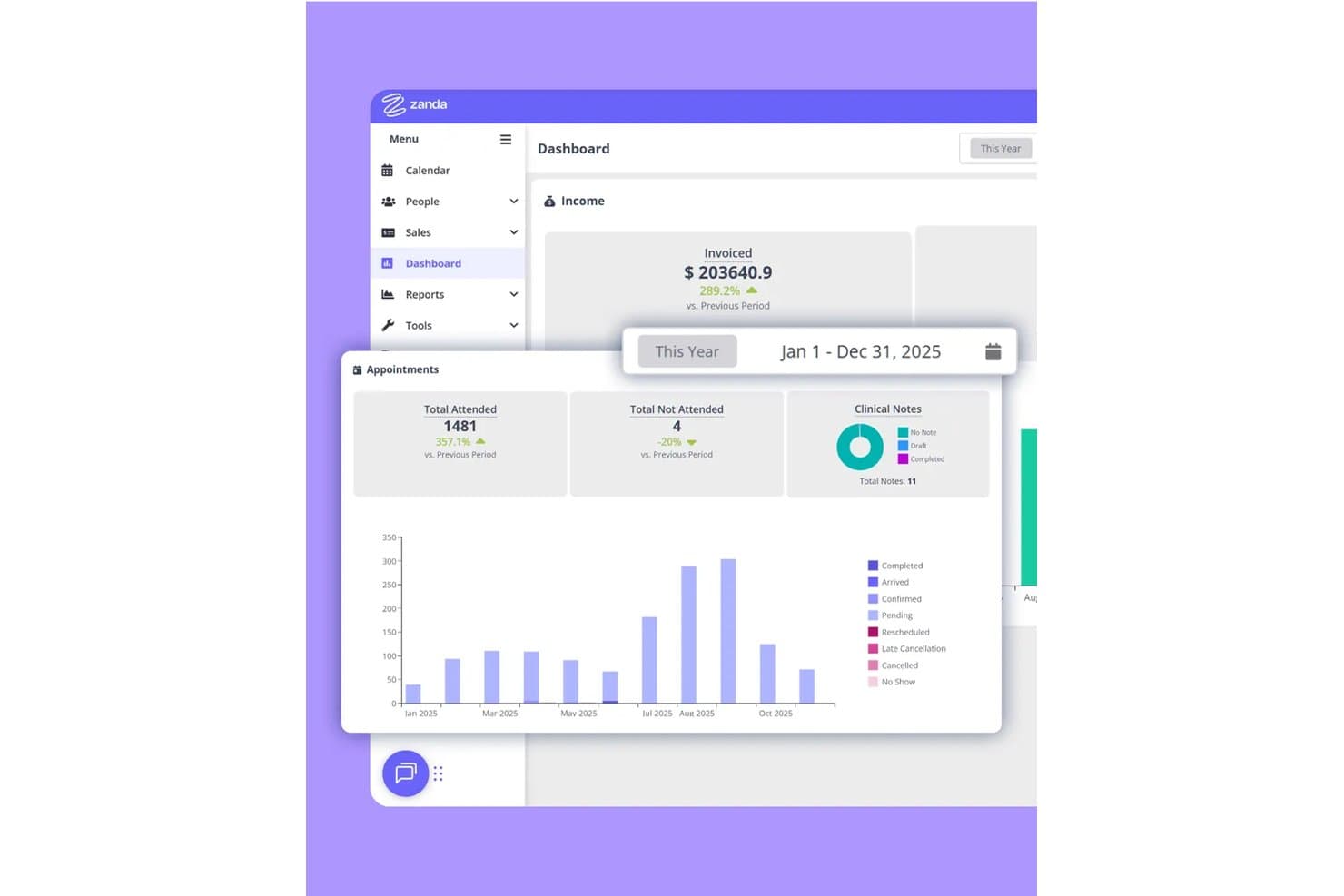
Here's where you can track invoiced income and attended appointments on the Zanda dashboard. Zanda is an all-in-one practice management platform for allied health clinics that covers scheduling, clinical notes, invoicing, and insurance claims, including CMS-1500 generation and electronic submission through the Ensora Clearinghouse for US practices.
Who Is Zanda Best For?
Zanda suits small allied health clinics in the US or Australia that want scheduling, notes, and insurance billing in one platform rather than a dedicated billing tool.
Why I Picked Zanda
I picked Zanda as one of the best because it handles both US and Australian insurance workflows from a single platform, which is rare at this price point. For US practices, it generates CMS-1500 claims directly from invoices, runs batch eligibility checks for upcoming appointments, and auto-applies ERA payments back to the associated invoice. Australian clinics get built-in Medicare, DVA, and NDIS claiming alongside private health-fund billing through HealthPoint.
Zanda Key Features
- CMS-1500 claim generation: Creates draft CMS-1500 forms directly from invoices, pulling CPT/HCPCS codes, modifiers, diagnosis codes, and units from linked invoice records.
- Batch eligibility checks: Runs US insurance eligibility checks for groups of clients with upcoming appointments scheduled today, tomorrow, or within the next seven days.
- Session-based authorization tracking: Records authorization details including session count and date range, then calculates remaining sessions automatically when the authorization is applied to an appointment or invoice.
- Superbill generation: Produces itemized superbills that clients can submit to their insurers for reimbursement.
Zanda Integrations
Zanda offers native integrations with Xero, Stripe, Physitrack, Ensora Clearinghouse, Zoom, Google Calendar, Apple Calendar, Outlook Calendar, Tyro, and Healthpoint. Its public API supports read-only custom integrations, but beta enrollment is currently closed.
Pros and Cons
Pros:
- Australian clinics get local claiming workflows
- Claim payments post against matching invoices
- Scheduling, notes, and billing share records
Cons:
- Denial follow-up and appeal work stays manual
- US claims setup still troubles some users
Learn more about Zanda: Best for telehealth functionality
- Free demo + 14-day free trial available
- From $49.99/month
Visit WebsiteCustomer Rating:4.4/5
Healthie's billing process feature is simple and easy to use. Healthie is a comprehensive practice management software that caters to healthcare professionals. It combines features such as scheduling, billing, telehealth, and electronic health records into a single platform. Its emphasis on telehealth capabilities makes it an excellent choice for those seeking virtual health services.
Why I Picked Healthie:
I chose Healthie for this list due to its comprehensive approach to wellness and telehealth capabilities that stand out among competitors. As many healthcare providers shift to virtual services, Healthie's robust telehealth features provide seamless video appointments and secure patient communication. I deem it the "Best for telehealth functionality" because of the efficiency and convenience it brings to remote healthcare.
Standout features and integrations:
Key features of Healthie include secure video appointments, patient progress tracking, electronic health records, online scheduling, and insurance reimbursement. The platform also offers integration with web, iPad, and mobile devices (Android, iOS), as well as popular software applications such as Google Calendar, Zoom, and Stripe, enabling a more coordinated approach to practice management.
Pros and Cons
Pros:
- Seamless integrations with other software
- User-friendly interface
- Comprehensive telehealth features
Cons:
- May have more features than a small practice requires
- Lack of a free tier
- Requires an annual commitment for the lowest price
Learn more about Healthie: Best for secure video conferencing needs
- 30-day free trial
- From $39/month
Visit WebsiteCustomer Rating:4.4/5
Here's TheraPlatform's billing solution feature. TheraPlatform is a versatile software solution designed to manage various aspects of a physical therapy practice, including patient scheduling, documentation, and most notably, secure video conferencing. With its focus on telehealth, TheraPlatform addresses a growing need in the current medical landscape for remote healthcare solutions.
Why I Picked TheraPlatform:
In assessing the various options, I chose TheraPlatform because of its remarkable emphasis on secure, HIPAA-compliant video conferencing, a feature not commonly offered with the same level of robustness in similar software systems. TheraPlatform's commitment to enabling remote patient care makes it stand out, and in my opinion, it's best for practices that require a secure and reliable telehealth component.
Standout features and integrations:
TheraPlatform boasts a variety of features, but its secure video conferencing tool, designed for teletherapy sessions, stands out. The software also includes a patient portal, documentation module, charting, and billing in its integrated suite. Furthermore, TheraPlatform seamlessly integrates with popular EHR software and accounting software, ensuring a comprehensive solution for your practice.
Pros and Cons
Pros:
- Comprehensive suite of features
- Seamless integration with EHR and accounting software
- Robust secure video conferencing feature
Cons:
- Pricing could be high for smaller practices
- No free version, only a limited free trial
- Steeper learning curve for new users
Learn more about TheraPlatform: Best for electronic documentation needs
- Free demo available
- Pricing upon request
Visit WebsiteCustomer Rating:3.9/5
ChartLogic's robust EHR and billing capability feature. ChartLogic is a suite of healthcare IT solutions, that combines electronic medical record (EMR), practice management, and medical billing services into one platform. The software excels in meeting electronic documentation needs, helping healthcare providers to digitize, organize, and easily access patient records.
Why I Picked ChartLogic:
I selected ChartLogic for this list primarily due to its robust EMR capabilities, which I found to be particularly well-designed for electronic documentation. The system's intuitive interface and comprehensive feature set differentiate it from many other EMR solutions on the market. Its strength in handling electronic documentation is why I believe it's the "Best for electronic documentation needs".
Standout features and integrations:
ChartLogic offers several standout features, including customizable templates for different specialties, dictation functionality for note-taking, and an advanced search function for patient records. As for integrations, ChartLogic has the capacity to connect with various laboratory and imaging systems and supports data exchange with other healthcare providers via the Direct Messaging protocol.
Pros and Cons
Pros:
- Supports seamless data exchange with other healthcare providers
- Customizable templates for various specialties
- Comprehensive electronic documentation capabilities
Cons:
- Could have a steep learning curve for less tech-savvy users
- Pricing information is not transparent
- No free tier or trial is offered
Learn more about ChartLogic: Best for interoperability and network connectivity
- Free demo available
- Pricing upon request
Visit WebsiteCustomer Rating:3.4/5
AthenaHealth's EHR management feature has a user friendly interface. AthenaHealth provides a wide range of medical practice management solutions with particular strength in interoperability and network connectivity. Its software platform, designed to bring providers and patients into a more accessible and connected healthcare ecosystem, stands out for its commitment to seamless data exchange.
Why I Picked AthenaHealth:
I chose AthenaHealth because of its unique focus on creating a connected healthcare environment. Its distinct ability to facilitate interoperability and provide robust network connectivity makes it stand apart from other platforms. I determined it as the "best for interoperability and network connectivity" due to its extensive and efficient networking features, providing a truly integrated healthcare experience.
Standout features and integrations:
AthenaHealth offers a comprehensive set of features including electronic health records (EHR), referral management, practice management system, and patient engagement tools. Its integration capabilities are extensive, encompassing many third-party apps and services, including lab systems, hospital systems, and medical billing systems like WebPT.
Pros and Cons
Pros:
- Extensive third-party integration capabilities
- Comprehensive set of features including EHR, practice management, and patient engagement tools
- Robust interoperability and network connectivity
Cons:
- Some users may find customer service less responsive than desired
- The platform might be more complex than others
- No free tier available
Learn more about athenahealth: Best for intuitive design and user experience
- Free demo available
- Pricing upon request

The billing software feature of Prompt EMR optimizes all billing-related workflows. Prompt EMR is a cloud-based software solution developed specifically for PT practices. It presents a unique user interface that merges simplicity with functionality, making it both easy to use and highly effective.
Why I Picked Prompt EMR:
I chose Prompt EMR for this list because it merges a great user interface with an impressive feature set. It distinguishes itself with an intuitive design that enhances user experience, reducing the learning curve often associated with complex software. In my view, it is the best for intuitive design and user experience.
Standout features and integrations:
Prompt EMR's standout features include patient scheduling, billing, documentation, and reporting; all managed through their user-friendly interface. Furthermore, it integrates well with popular billing and accounting platforms, enhancing operational efficiency and ensuring smooth data flow within your practice.
Pros and Cons
Pros:
- Strong integrations with other platforms
- Comprehensive feature set
- Easy-to-use intuitive design
Cons:
- Advanced features may require some time to master
- Might be cost-prohibitive for smaller practices
- Only a time-limited free trial
Learn more about Prompt EMR:

A look at the advanced billing solution feature of Imagine. Imagine offers an advanced medical billing solution that significantly simplifies the claims management process. It stands out in the market for its comprehensive tracking functionality, making it the ideal choice for effective claims management and tracking.
Why I Picked Imagine:
I selected Imagine for its superior claim management capabilities. Compared to other platforms, its claim-tracking functionality is extensive and robust. It's this feature that solidifies its place as the best tool for claims management and tracking in my opinion.
Standout features and integrations:
Imagine features a variety of capabilities, such as automated claim scrubbing, denial tracking, and advanced reporting. In terms of integrations, the software connects with several EHR systems, enhancing interoperability and ensuring seamless information flow.
Pros and Cons
Pros:
- Automated claim scrubbing feature
- Extensive integrations with EHR systems
- Advanced claims management and tracking capabilities
Cons:
- Some users might find the interface less intuitive than others
- The pricing might be high for smaller practices
- No free tier or trial offered
Learn more about Imagine: 8Best for all-in-one practice solution
Heno
- Free demo available
- From $149/user/month
Visit WebsiteCustomer Rating:2.3/5
The practice management feature in Heno is an excellent choice for an all-in-one practice solution. Heno is a physical therapy software that integrates electronic medical records (EMR), practice management, and billing functionality into a single comprehensive solution. Its integrated approach simplifies multiple practice operations (PTs, OTs, and SLPs), making it an excellent choice for an all-in-one practice solution.
Why I Picked Heno:
In deciding on Heno for this list, the software's cohesive, integrated platform stood out from other options. Its ability to streamline multiple practice operations into one system makes it a distinct selection. I am of the opinion that Heno is best for an all-in-one practice solution because of its ability to harmonize different functionalities effectively.
Standout features and integrations:
Heno offers a variety of features like online scheduling, treatment plan tracking, appointment reminders, insurance eligibility checks, detailed reporting, and physical therapy clinic. The software also integrates with credit card processors for easy payment processing and third-party calendar systems for better schedule management.
Pros and Cons
Pros:
- Provides third-party integrations for enhanced functionality
- Offers a variety of features to streamline practice operations
- Integrated platform for EMR, practice management, and billing
Cons:
- The system might require some training to fully utilize
- The pricing could be high for smaller practices
- Does not offer a free tier or trial
Learn more about Heno:

MW Therapy creates a smooth, efficient workflow. MW Therapy provides an integrated billing and EMR software solution specifically designed for physical therapy practices. The software's strength lies in its ability to create a smooth, efficient workflow between clinical documentation and billing processes.
Why I Picked MW Therapy:
In making my selection, I appreciated MW Therapy for its integrated approach to EMR and billing processes. The software efficiently connects these two crucial aspects, which sets it apart from many competitors. That's why I consider it to be the best for seamless integration of EMR and billing.
Standout features and integrations:
MW Therapy boasts an array of features including scheduling, documentation, billing, and reporting. The software's standout feature is the seamless integration of EMR and billing, enabling automatic claim generation based on your SOAP notes. Regarding integrations, MW Therapy can smoothly connect with a range of external platforms, such as accounting software, to simplify your workflow.
Pros and Cons
Pros:
- Compatibility with external platforms
- Feature-rich platform for various practice needs
- Smooth integration of EMR and billing
Cons:
- The starting price could be steep for smaller practices
- Might have a learning curve for beginners
- No free version available
Learn more about MW Therapy: Best for comprehensive practice management
- Free demo available
- Pricing upon request

Here's the billing feature in Practice Pro, which supports e-claim submission tracking for an efficient billing process Practice Pro is a versatile physical therapy billing software solution that offers a comprehensive suite of tools to manage all aspects of your practice, from scheduling to documentation and billing. Its holistic approach makes it the ideal choice for those seeking a one-stop solution for their physical therapy EMR and practice management needs.
Why I Picked Practice Pro:
In comparing various options, I found Practice Pro's comprehensive feature set particularly compelling. This software sets itself apart by offering all the necessary tools for effective practice management under one umbrella, from patient intake to claim submission. As such, I've determined that it's best for those in need of an all-inclusive solution for practice management.
Standout features and integrations:
Practice Pro's all-encompassing feature set includes scheduling, documentation, billing, and reporting tools, making it a comprehensive solution for your practice. Of note, its billing tool supports electronic claim submission and tracking for a smooth and efficient billing process. As for integrations, Practice Pro is compatible with several popular EHR systems, enhancing its functionality and simplifying data sharing.
Pros and Cons
Pros:
- Supports electronic claim submission and tracking
- Compatibility with several popular EHR systems
- Comprehensive toolset for practice management
Cons:
- Might be too complex for smaller practices or sole practitioners
- Higher starting price compared to some other options
- No free version, only a free demo
Learn more about Practice Pro:
Alte programe de facturare pentru fizioterapie
Mai jos se află o listă cu programe suplimentare de facturare pentru fizioterapie pe care le-am selectat, dar care nu au ajuns în primele 10. Cu siguranță merită să le verificați.
- 11StrataPTBest for streamlining claim submissions
- 12Billing DynamicsBest for data-driven decision making
- 13TebraBest for small practices and sole practitioners
- 14VagaroGood for integration with marketing and branding features
- 15PracticeSuiteGood for integrated EHR and medical billing for physical therapy
- 16EZClaimGood for dedicated therapy billing solutions
- 17AdvancedMDGood for a complete EHR and practice management suite
- 18ApolloGood for comprehensive practice management
- 19ClinicSenseGood for automation of administrative tasks
- 20RXTNGood for adaptable physical therapy and rehab practices
- 21ClinicSourceGood for therapy-specific templates and customization
- 22WRSHealthGood for EHR with physical therapy-specific features
- 23PracticePerfectGood for multi-disciplinary practices
- 24PtEverywhereGood for mobile practice management
- 25ClinicientGood for complete therapy business management
- 26FusionGood for pediatric physical therapy practices
- 27Ambiki EMRGood for flexible scheduling and management
- 28PatientStudioGood for efficient patient engagement and communication
- 29MedigraphGood for integrated electronic billing solutions
- 30SPRYGood for streamlined physical therapy billing
- 31InTouch EMRGood for compliance-centric practice management
Recenzie asociată a programelor de facturare medicală
How I Evaluate Physical Therapy Billing Software
I split my evaluation into two layers: the baseline every tool must have—like 8-minute rule enforcement and PT claim scrubbing—and the differentiators that set the best options apart.
Core Functionality (Table Stakes For This List)
When I'm selecting tools for my list, I rank each one on a scale from 0 (does not offer the functionality) to 5 (excels in this area) for each core functionality listed below. Then, I calculate the tool's total score into a percentage. Each tool needs to achieve a minimum total score of 55% to be considered for inclusion.
- PT-Specific Claims Billing: I check whether a tool can generate, scrub, and submit CMS-1500 claims pre-loaded with therapy CPT codes, ICD-10 sets, and PT modifiers like GP and 59.
- Eligibility & Authorization Tracking: Real-time insurance verification matters, but I also evaluate how the tool tracks visit authorizations and alerts staff before a patient's approved visits run out.
- PT Compliance Rule Engine: I look for built-in 8-minute rule calculations, automatic KX modifier application, and Medicare therapy threshold tracking to keep claims compliant.
- EMR & Documentation Integration: The billing tool should pull charges directly from SOAP notes and plans of care, whether through a native EMR or an integration with platforms like WebPT or Raintree.
- Payment Posting & Denials: I evaluate how each tool handles ERA/EOB auto-posting, flags underpayments against fee schedules, and routes therapy-specific denials into actionable worklists.
- Financial Reporting & A/R Analytics: Strong tools surface therapy-specific KPIs like reimbursement per visit, units billed per encounter, and days in A/R broken down by payer mix.
Once I have a list of tools that meet this criteria, I consider what sets each platform apart.
Differentiating Factors (What Sets Vendors Apart)
Here's how I compare and contrast different vendors:
Standout Features
For clinics juggling dozens of auth requests weekly, I look for tools that auto-initiate prior authorizations and alert front-desk staff before approved visits run out. A patient payment portal matters too—it lets patients view statements and set up payment plans online, which reduces collection calls for your billing team. Multi-location PT groups should check whether a platform supports consolidated billing and provider-level reporting across sites.
Beyond Features
Clearinghouse and payer connectivity is one of the first things I evaluate. A tool with pre-established connections to major payers and EDI 837/835 support saves weeks of setup. I also check whether a vendor offers outsourced RCM services as an add-on, which is a lifeline for smaller clinics without dedicated billing staff. Integration with your existing PT tech stack matters just as much—if your clinic runs on WebPT or Prompt, the billing tool needs to sync cleanly with that system and your accounting software.
Cum să alegeți un program de facturare pentru fizioterapie
Este ușor să vă pierdeți în liste lungi de funcții și structuri complexe de prețuri. Pentru a vă ajuta să rămâneți concentrat în timp ce parcurgeți procesul unic de selectare a programului, iată o listă de verificare cu factorii de care trebuie să țineți cont:
| Factor | Aspecte de luat în considerare |
|---|---|
| FactorPosibilitate de extindere | Aspecte de luat în considerareCât de bine se dezvoltă programul odată cu cabinetul dumneavoastră? Verificați dacă poate gestiona un număr mai mare de pacienți sau locații suplimentare fără a necesita o actualizare majoră. |
| FactorIntegrări | Aspecte de luat în considerareSe conectează la sistemele pe care le utilizați deja, cum ar fi dosarele electronice de sănătate sau programele de contabilitate? Căutați integrări native pentru a evita soluțiile personalizate costisitoare. |
| FactorPosibilitate de personalizare | Aspecte de luat în considerarePuteți adapta programul pentru a corespunde fluxurilor dumneavoastră de lucru? Evaluați cât de ușor pot fi configurate câmpurile, formularele și rapoartele pentru a răspunde nevoilor cabinetului dumneavoastră. |
| FactorUșurință în utilizare | Aspecte de luat în considerareÎl va considera echipa dumneavoastră intuitiv? Verificați existența unei interfețe ușor de utilizat, care reduce perioada de învățare și timpul necesar instruirii. |
| FactorImplementare și integrare inițială | Aspecte de luat în considerareCe presupune începerea utilizării? Evaluați timpul și resursele necesare pentru configurare, migrarea datelor și instruirea inițială. |
| FactorCost | Aspecte de luat în considerareCare este costul total de deținere? Comparați taxele de abonament, costurile de configurare și orice taxe suplimentare pentru asistență sau funcții extra. |
| FactorMăsuri de securitate | Aspecte de luat în considerareExistă protecții solide pentru datele pacienților? Verificați conformitatea cu HIPAA și căutați funcții precum criptarea și autentificarea multifactorială. |
Ce este un program de facturare pentru fizioterapie?
Programul de facturare pentru fizioterapie este un instrument conceput pentru gestionarea aspectelor financiare ale cabinetelor de fizioterapie. Fizioterapeuții, personalul administrativ și specialiștii în facturare utilizează, în general, aceste instrumente pentru a simplifica procesele de facturare și a reduce erorile. Funcțiile de programare a consultațiilor, gestionare a cererilor de despăgubire și urmărire a plăților contribuie la eficientizarea facturării și gestionării pacienților. În cele din urmă, aceste instrumente economisesc timp și îmbunătățesc sănătatea financiară a cabinetului.
Funcții
Atunci când selectați un program de facturare pentru fizioterapie, acordați atenție următoarelor funcții esențiale:
- Facturarea pacienților: Automatizează procesul de facturare pentru a asigura facturarea exactă și la timp, reducând erorile manuale.
- Gestionarea cererilor de rambursare: Simplifică trimiterea și urmărirea cererilor de rambursare de la asigurări, contribuind la accelerarea rambursărilor.
- Urmărirea plăților: Monitorizează plățile și soldurile restante, oferind o imagine financiară clară asupra cabinetului dumneavoastră.
- Programarea consultațiilor: Permite programarea cu ușurință a consultațiilor pacienților și trimite mementouri pentru a reduce absențele.
- Șabloane personalizabile: Oferă flexibilitate în crearea documentelor de facturare și a rapoartelor adaptate nevoilor cabinetului dumneavoastră.
- Analiză avansată: Oferă informații despre performanța financiară și eficiența operațională, sprijinind luarea deciziilor strategice.
- Asistență pentru mai multe locații: Facilitează gestionarea facturării în mai multe locații ale cabinetului de pe o singură platformă.
- Instrumente pentru conformitate: Asigură respectarea reglementărilor din domeniul sănătății, precum HIPAA, protejând informațiile pacienților.
- Interfață ușor de utilizat: Include un design intuitiv care reduce timpul de învățare și sporește productivitatea.
- Posibilități de integrare: Se conectează fără probleme cu alte sisteme, precum dosarele medicale electronice și software-ul de contabilitate, sporind eficiența fluxului de lucru.
Beneficii
Implementarea unui software de facturare pentru fizioterapie oferă mai multe beneficii echipei și afacerii dumneavoastră. Iată câteva dintre acestea:
- Reducerea erorilor: Automatizarea facturării și a cererilor de rambursare minimizează erorile manuale, ducând la evidențe financiare mai exacte.
- Economisirea timpului: Automatizarea sarcinilor de rutină, precum programarea și urmărirea plăților, eliberează timp pentru ca echipa dumneavoastră să se concentreze asupra îngrijirii pacienților.
- Flux de numerar îmbunătățit: Gestionarea eficientă a facturării și a cererilor asigură rambursări mai rapide și o situație financiară mai sănătoasă.
- Conformitate sporită: Instrumentele integrate pentru conformitate vă ajută să respectați reglementările din domeniul sănătății, protejând datele pacienților și evitând penalitățile.
- Experiență mai bună pentru pacienți: Funcții precum mementourile pentru consultații și facturarea simplă îmbunătățesc satisfacția pacienților și reduc rata absențelor.
- Scalabilitate: Asistența pentru mai multe locații și funcțiile personalizabile permit dezvoltarea software-ului odată cu cabinetul dumneavoastră, pentru a deservi mai mulți pacienți și mai multe locații.
- Analiză relevantă: Analiza avansată oferă informații valoroase despre performanța cabinetului dumneavoastră, sprijinind deciziile strategice și planificarea dezvoltării.
Costuri și prețuri
Alegerea unui software de facturare pentru fizioterapie necesită înțelegerea diferitelor modele și planuri de preț disponibile. Costurile variază în funcție de funcții, dimensiunea echipei, suplimente și multe altele. Tabelul de mai jos prezintă planurile obișnuite, prețurile medii ale acestora și funcțiile incluse de obicei în soluțiile software de facturare pentru fizioterapie:
Tabel comparativ al planurilor pentru software-ul de facturare pentru fizioterapie
| Tipul planului | Preț mediu | Funcții obișnuite |
|---|---|---|
| Tipul planuluiPlan gratuit | Preț mediu$0 | Funcții obișnuiteFacturare de bază, asistență limitată și raportare de nivel introductiv. |
| Tipul planuluiPlan personal | Preț mediu$15-$30/utilizator/lună | Funcții obișnuiteFacturare avansată, programare și analiză de bază. |
| Tipul planuluiPlan pentru companii | Preț mediu$50-$100/utilizator/lună | Funcții obișnuiteRaportare cuprinzătoare, asistență pentru mai multe locații și asistență îmbunătățită pentru clienți. |
| Tipul planuluiPlan pentru întreprinderi | Preț mediu$150-$300/utilizator/lună | Funcții obișnuiteIntegrări personalizate, manager de cont dedicat și funcții avansate de securitate. |
Întrebări frecvente despre software-ul de facturare pentru fizioterapie
Iată câteva răspunsuri la întrebările frecvente despre software-ul de facturare pentru fizioterapie:
Cum selectez software-ul de facturare potrivit pentru cabinetul meu?
Alegerea software-ului potrivit depinde de dimensiunea cabinetului, bugetul și nevoile specifice ale acestuia. Evaluați scalabilitatea software-ului, capacitățile de integrare și ușurința în utilizare. Verificați dacă îndeplinește cerințele de conformitate și dacă oferă funcții precum programarea consultațiilor și urmărirea plăților. Testați versiunile demonstrative pentru a vedea dacă se aliniază fluxului dumneavoastră de lucru.
Poate software-ul de facturare pentru fizioterapie să gestioneze cererile de rambursare către companiile de asigurări?
Da, majoritatea software-urilor de facturare pentru fizioterapie includ instrumente pentru gestionarea cererilor de rambursare către companiile de asigurări. Aceste funcții automatizează trimiterea cererilor, urmăresc starea acestora și accelerează rambursările. Asigurați-vă că software-ul este compatibil cu furnizorii de asigurări cu care colaborați și verificați eventualele limitări privind tipurile de cereri pe care le poate gestiona.
Care sunt măsurile de securitate ale software-ului de facturare?
Securitatea este esențială în software-ul de facturare pentru protejarea datelor pacienților. Căutați funcții precum criptarea, autentificarea multifactorială și conformitatea cu reglementări precum HIPAA. Verificați dacă furnizorul software-ului actualizează periodic protocoalele de securitate pentru a proteja împotriva breșelor de date.
Cum îmbunătățește software-ul de facturare fluxul de numerar?
Software-ul de facturare eficientizează emiterea facturilor și plățile, reducând erorile și accelerând ciclul de facturare. Mementourile automate contribuie la asigurarea plăților la timp, iar rapoartele financiare în timp real oferă informații despre fluxul de numerar. Acest lucru duce la rambursări mai rapide și la o situație financiară îmbunătățită pentru cabinetul dumneavoastră.
Este disponibilă instruirea pentru utilizatorii noi?
Majoritatea furnizorilor oferă resurse de instruire, precum seminare online, tutoriale video și ghiduri interactive. Unii pot oferi sesiuni personalizate de inițiere pentru a ajuta echipa să se familiarizeze rapid cu software-ul. Verificați dacă este disponibilă asistență continuă pentru a răspunde întrebărilor care apar după configurarea inițială.
Se poate integra software-ul cu sistemele mele existente?
Capacitățile de integrare diferă în funcție de software, însă multe soluții oferă conexiuni cu sistemele EHR, software-ul de contabilitate și platformele de telemedicină. Asigurați-vă că software-ul ales se poate integra fără probleme cu sistemele dumneavoastră actuale pentru a menține eficiența fluxului de lucru și a evita izolarea datelor.