

Gestionarea programelor personalului medical poate fi o adevărată bătaie de cap. Trebuie să coordonați schimburile de ture, modificările de ultim moment și respectarea cerințelor. Este copleșitor. Aici intervine software-ul pentru planificarea personalului medical. Acesta vă ajută să gestionați eficient timpul echipei, reducând stresul și erorile.
De ani de zile analizez tehnologia destinată cabinetelor medicale, testând și evaluând independent diverse programe software. Scopul meu este să vă ofer o perspectivă imparțială asupra celor mai bune instrumente de planificare, care pot face cu adevărat diferența pentru echipa dumneavoastră.
În acest articol, vă voi prezenta principalele mele recomandări, evidențiind funcțiile și avantajele acestora. Veți găsi informații practice care vă vor ajuta să alegeți soluția potrivită pentru nevoile dumneavoastră. Să simplificăm împreună planificarea.
Why Trust Our Software Recommendations
6,700+
Reviews
20
Industry experts
16+
Evaluation factors
14
Years
Our team has been testing and reviewing software since 2012. As medical practice leaders ourselves, we know how difficult—and important—it is to choose the right software.
For this guide, we evaluated tools using hands-on testing and independent research, scoring tools using our selection criteria.
Our reviews reflect our human editorial judgment, not a sales pitch.
Tabel comparativ al programelor de planificare a personalului medical
Score legend (out of 5)
- Excellent4.5–5
- Good4–4.4
- Average3–3.9
- Below average2–2.9
- Poor1–1.9
Sorted by: Default
| Tool | Starting Price | Website | |||||||
|---|---|---|---|---|---|---|---|---|---|
Best for improving team communication in healthcare settings | 3.5 out of 5 | 4 | 4 | 4 | 2 | 4 | 3 | Pricing upon request Free plan + 14-day free trial available | Website |
Best for integrated medical scheduling | Not rated | 1 | 1 | Not rated | Not rated | 1 | 1 | $99/month 15-day free trial | Website |
Good for scheduling shifts for healthcare workers | 4.2 out of 5 | 5 | 5 | 4 | 3 | 4 | 4 | $5/user/month Up to 31-day free trial + free demo available | Website |
Best for predicting staff absences | 3.7 out of 5 | 4 | 5 | 3 | 4 | 3 | 3 | Pricing upon request Free demo available | Website |
Best for credential-checked float pool coverage | 3.8 out of 5 | 4 | 2 | 5 | 4 | 4 | 4 | Pricing upon request Free demo available | Website |
Best for planning shifts around census demand | 3.7 out of 5 | 4 | 3 | 4 | 4 | 4 | 3 | Pricing upon request Free demo available | Website |
Best for senior care PBJ reporting | 3.7 out of 5 | 4 | 5 | 4 | 3 | 3 | 3 | Pricing upon request Free demo available | Website |
Good for comprehensive healthcare workforce management | 3.5 out of 5 | 5 | 5 | 4 | 1 | 3 | 3 | Pricing upon request Free demo available | Website |
Best for care-network shift escalation | 3.7 out of 5 | 4 | 4 | 4 | 2 | 5 | 3 | Pricing upon request Free trial + free demo available | Website |
Best for Canadian healthcare data residency | 3.7 out of 5 | 5 | 3 | 4 | 2 | 5 | 3 | Pricing upon request Not available | Website |


Recenzii ale celor mai bune programe de planificare a personalului medical
 Best for improving team communication in healthcare settings
- Free plan + 14-day free trial available
- Pricing upon request
Visit WebsiteCustomer Rating:4.6/5
Screenshot of Connecteam's staff scheduling time clock feature. Connecteam is an all-in-one employee management app designed to streamline internal communication, especially in healthcare settings. It caters to all types of team communication needs including messaging, updates, and feedback, which supports its fit for healthcare settings where clear and timely communication is crucial.
Why I Picked Connecteam:
I chose Connecteam for this list because of its strong focus on team communication. The tool offers a variety of features that are designed to facilitate internal communication, making it stand out from employee scheduling software.
I judged it as the best tool for improving team communication in healthcare settings because its features support instant, clear communication that can be critical in a healthcare environment.
What Do You Get for Free?
Connecteam offers a free tier that includes access to basic features like clock in/out, up to 200MB storage, and chat functions. However, many of the more advanced scheduling and communication features require a paid plan.
Standout Features and Integrations:
Connecteam's standout features are those that enhance team communication, such as real-time chat, in-app employee directory, employee time clock, and updates board. For integrations, it connects with leading payroll and HR systems, which can further streamline operations in a healthcare setting.
Pros and Cons
Pros:
- Cost-effective pricing model for larger teams
- Integrates with leading payroll and HR systems
- Strong focus on team communication
Cons:
- Might have more functionalities than smaller teams require
- Storage limit in the free plan
- Advanced features only available in paid plans
Learn more about Connecteam: Best for integrated medical scheduling
- 15-day free trial
- From $99/month
Visit WebsiteCustomer Rating:4.8/5
OptiMantra’s calendar view simplifies scheduling across multiple practitioners and locations. OptiMantra is a versatile platform that combines medical staff scheduling with full-spectrum practice management. It helps healthcare providers manage appointments across multiple practitioners and locations while maintaining HIPAA compliance and smooth coordination between staff and patients. The system supports both in-office and telehealth scheduling, ensuring flexibility for diverse healthcare environments.
Why I Picked OptiMantra:
I chose OptiMantra for its ability to handle complex scheduling needs while also simplifying administrative tasks like billing and patient communication. If you manage a multi-provider or multi-location practice, you’ll appreciate how easily you can organize schedules, send reminders, and minimize no-shows. I also liked that it integrates directly with diagnostic labs, payment processors, and e-prescription networks, reducing the need for multiple disconnected systems.
Standout Features and Integrations:
OptiMantra includes a robust scheduling engine with automated reminders and multi-location support, as well as built-in telehealth for HIPAA-compliant video consultations. The platform’s diagnostics and e-prescription features let you order tests, receive results, and send prescriptions directly from the same interface. Integrations include Surescripts, LabCorp, Quest Diagnostics, SimonMed, Fullscript, Zoom, Fiserv, Stripe, and Authorize.net.
Pros and Cons
Pros:
- HIPAA-compliant telehealth built in
- Integrates lab and e-prescribing tools
- Supports multi-provider scheduling
Cons:
- Setup may take time for teams
- Pricing only available upon request
Learn more about OptiMantra: Good for scheduling shifts for healthcare workers
- Up to 31-day free trial + free demo available
- From $5/user/month (billed annually)
Visit WebsiteCustomer Rating:4.6/5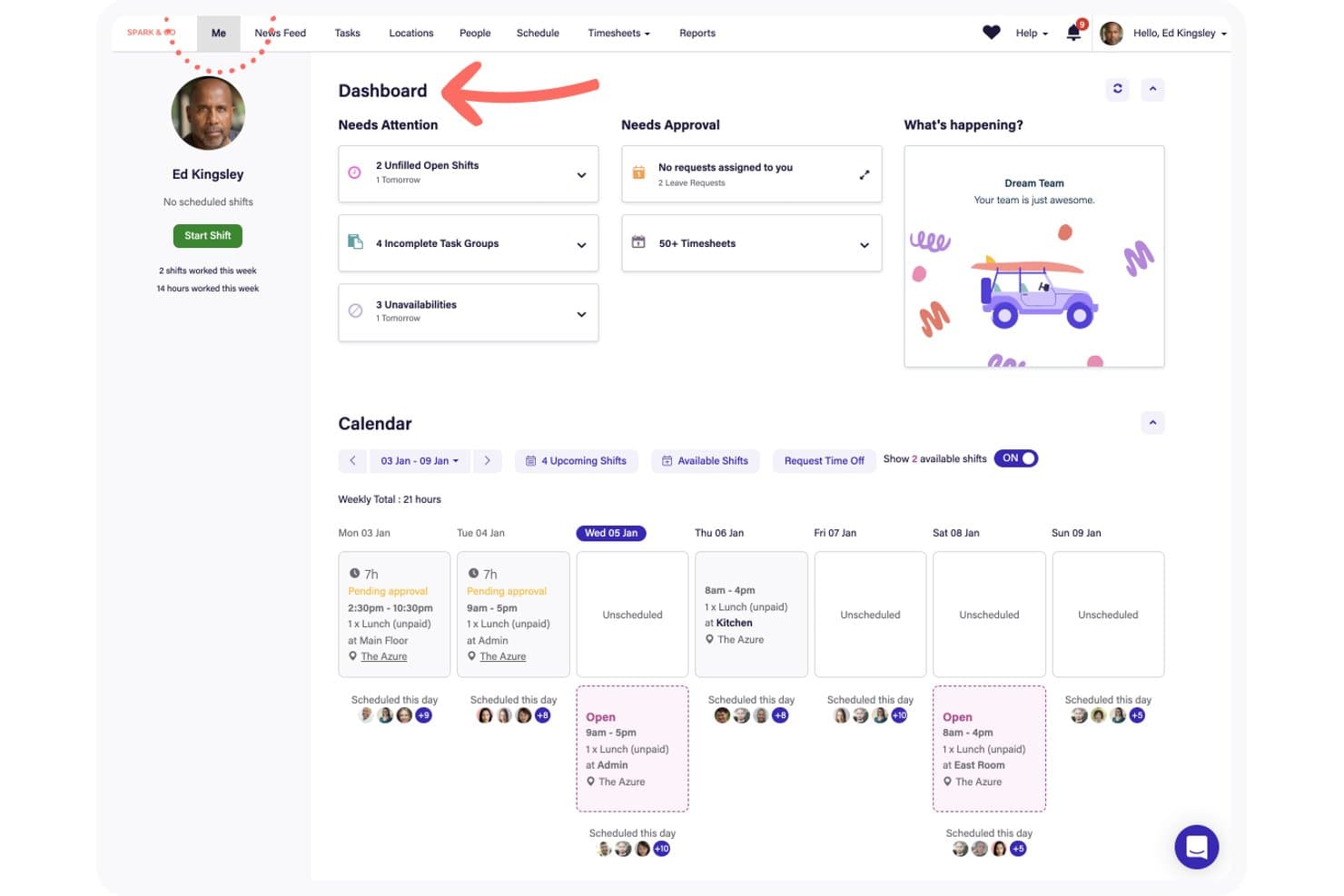
Deputy's dashboard gives managers a real-time scheduling overview. Deputy is a workforce management platform that combines shift-based scheduling, time and attendance tracking, compliance tools, and payroll integrations—with dedicated features for managing healthcare staff across departments, locations, and qualification requirements.
Who Is Deputy Best For?
Deputy is a strong fit for hospital and clinic administrators managing shift-based staff across multiple departments or locations.
Why I Picked Deputy
I picked Deputy as one of the best because its shift-based scheduling tools are built around the realities of healthcare staffing. I love how Training Tags let you flag staff by qualification—think CPR, Medication Administration, or Radiation Licence—so you're rostering the right people for the right areas. Micro-scheduling goes further, letting you divide a single shift across departments like Imaging or Home Visits, so coverage follows patient flow without requiring separate clock-ins.
Deputy Key Features
- Shift swap and open shift management: Employees can claim open shifts or swap shifts with colleagues, with manager approval required before changes go live.
- On-call shift tracking: Non-worked area types let you schedule on-call time separately from regular hours, keeping overtime calculations and cost reports accurate.
- Payroll integrations: Approved timesheets export directly to payroll systems like Xero, QuickBooks, and Paycor, reducing manual data entry after each pay period.
- Labor law compliance alerts: Deputy flags missed breaks, overtime risk, and Fair Workweek rule violations before they become payroll or compliance problems.
Deputy Integrations
Deputy lists marketplace integrations with Paycor, Xero, QuickBooks, ADP, BambooHR, and IDEXX Neo, plus Zapier. It also supports REST API, webhooks, Deputy Embed, and Workato for custom connectivity.
Pros and Cons
Pros:
- Training Tags flag staff qualifications by area
- Staff can claim open shifts for coverage
- Micro-scheduling tracks coverage across clinical areas
Cons:
- Lag can slow clock-ins and timesheet approvals
- Mobile app glitches complicate schedule changes
Learn more about Deputy: Best for predicting staff absences
- Free demo available
- Pricing upon request
Visit WebsiteCustomer Rating:4.2/5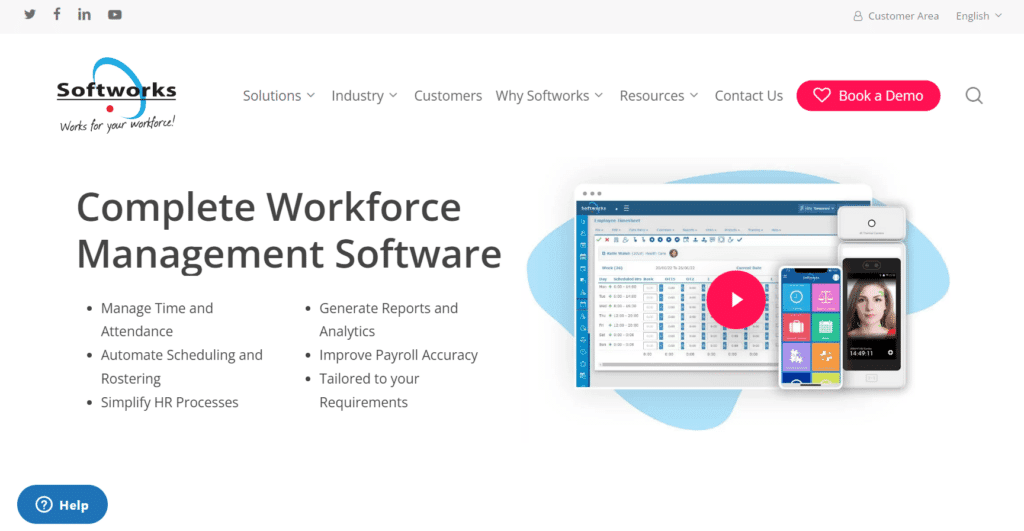
Here is a screenshot of the Softworks website. Softworks is a workforce management platform built for healthcare settings that covers staff scheduling and rostering, time and attendance tracking, absence management, and AI-powered absence prediction.
Who Is Softworks Best For?
Softworks is a strong fit for hospital and clinic administrators managing large, multi-department workforces who need scheduling, time tracking, and absence prediction in one platform.
Why I Picked Softworks
I picked Softworks as one of the best because its AI-powered absence predictor is something I genuinely haven't seen done as well elsewhere. It analyzes historical attendance and shift data to flag likely absences before they happen, giving managers time to adjust rosters rather than scramble for last-minute cover. Pair that with acuity-based staffing that matches available staff to patient dependency levels, and you get a scheduling tool built around the realities of clinical environments.
Softworks Key Features
- Skills-based scheduling: Matches employees to shifts based on tracked qualifications, certifications, and training records to support appropriate skill mix per roster.
- Biometric clocking with fever detection: Supports face recognition terminals with integrated fever detection, designed for infection-conscious healthcare environments.
- Certification expiry alerts: Sends automated notifications when employee credentials or training certifications are approaching their expiry date.
- Employee self-service portal: Lets staff view rosters, submit leave requests, check flexitime balances, and request shift swaps through desktop or mobile access.
Softworks Integrations
Softworks supports integrations with Workday, Oracle, SAP, Microsoft Dynamics, ADP, Ceridian, Sage, and SuccessFactors. The vendor doesn’t state an integration count or API availability.
Pros and Cons
Pros:
- Reviewers praise straightforward clocking and scheduling
- Acuity-based staffing reflects patient dependency needs
- Predicts likely absences from attendance data
Cons:
- Missed-punch corrections can complicate timecards
- Users report difficulty retrieving workforce reports
Learn more about Softworks: Best for credential-checked float pool coverage
- Free demo available
- Pricing upon request

Here is a screenshot of the Shiftboard medical staff scheduling software dashboard. Shiftboard is a comprehensive workforce management tool that focuses on optimizing operations for large-scale healthcare organizations. It provides an efficient way to manage shifts, track employee work hours, and ensure that staffing needs are always met.
Why I Picked Shiftboard:
I chose Shiftboard for its robust feature set and specific tailoring towards large-scale healthcare organizations. Its commitment to workforce optimization and efficient shift management, even in complex environments, really stood out to me. That's why it's the tool I determined to be best for large-scale healthcare organizations needing workforce optimization.
Standout Features and Integrations:
Shiftboard shines with its workforce optimization features such as shift swapping, overtime control, and advanced scheduling. It also integrates with major HR and payroll systems, supporting a more streamlined workflow.
Pros and Cons
Pros:
- Tailored for large-scale healthcare organizations
- Integrates with major HR and payroll systems
- Comprehensive workforce optimization features
Cons:
- May be too complex for smaller organizations or those with simpler needs
- Does not offer a free tier
- Higher starting price than some competitors
Learn more about Shiftboard: Best for planning shifts around census demand
- Free demo available
- Pricing upon request

ShiftWizard displays ICU nurse schedules across a monthly calendar view. ShiftWizard is a healthcare staff scheduling platform by HealthStream that covers shift-based scheduling, self-scheduling, credential and eligibility matching, predictive census forecasting, and multi-facility staffing visibility across departments.
Who Is ShiftWizard Best For?
ShiftWizard is a strong fit for nurse managers and hospital administrators who need to align staffing levels with shifting patient census across multiple units or facilities.
Why I Picked ShiftWizard
ShiftWizard earns its spot on my shortlist because of how it handles census-driven staffing, which is a problem most scheduling tools don't address directly. I love that its Predictive Census feature uses AI to forecast patient demand 7–120 days out, so nurse managers aren't scrambling to backfill shifts when volume spikes. Paired with real-time multi-facility dashboards, I can see staffing coverage across every unit and department and act before gaps become a problem.
ShiftWizard Key Features
- Self-scheduling and mobile shift swaps: Staff can view open shifts, set availability, and swap shifts directly from their phones.
- Shift eligibility and compliance matching: ShiftWizard checks credentials, regulatory ratios, and role permissions against each shift's requirements before assigning staff.
- Rules-based shift messaging: Managers can broadcast open shifts to only the staff who are eligible to fill them, with targeted alerts sent automatically.
- Workday integration: A certified, bidirectional sync keeps scheduling, time entry, attendance, and payroll data aligned between ShiftWizard and Workday.
ShiftWizard Integrations
ShiftWizard has a certified, bidirectional Workday integration for scheduling, time, attendance, employee, and payroll data. It also lists integrations with Epic, ADP, and Kronos, while HealthStream APIs support custom integrations.
Pros and Cons
Pros:
- Managers can view coverage across departments
- Staff can pick up and swap shifts
- Predictive census forecasts support demand-based staffing
Cons:
- Schedule-change alerts can be missed
- Mobile app omits some website functions
Learn more about ShiftWizard:
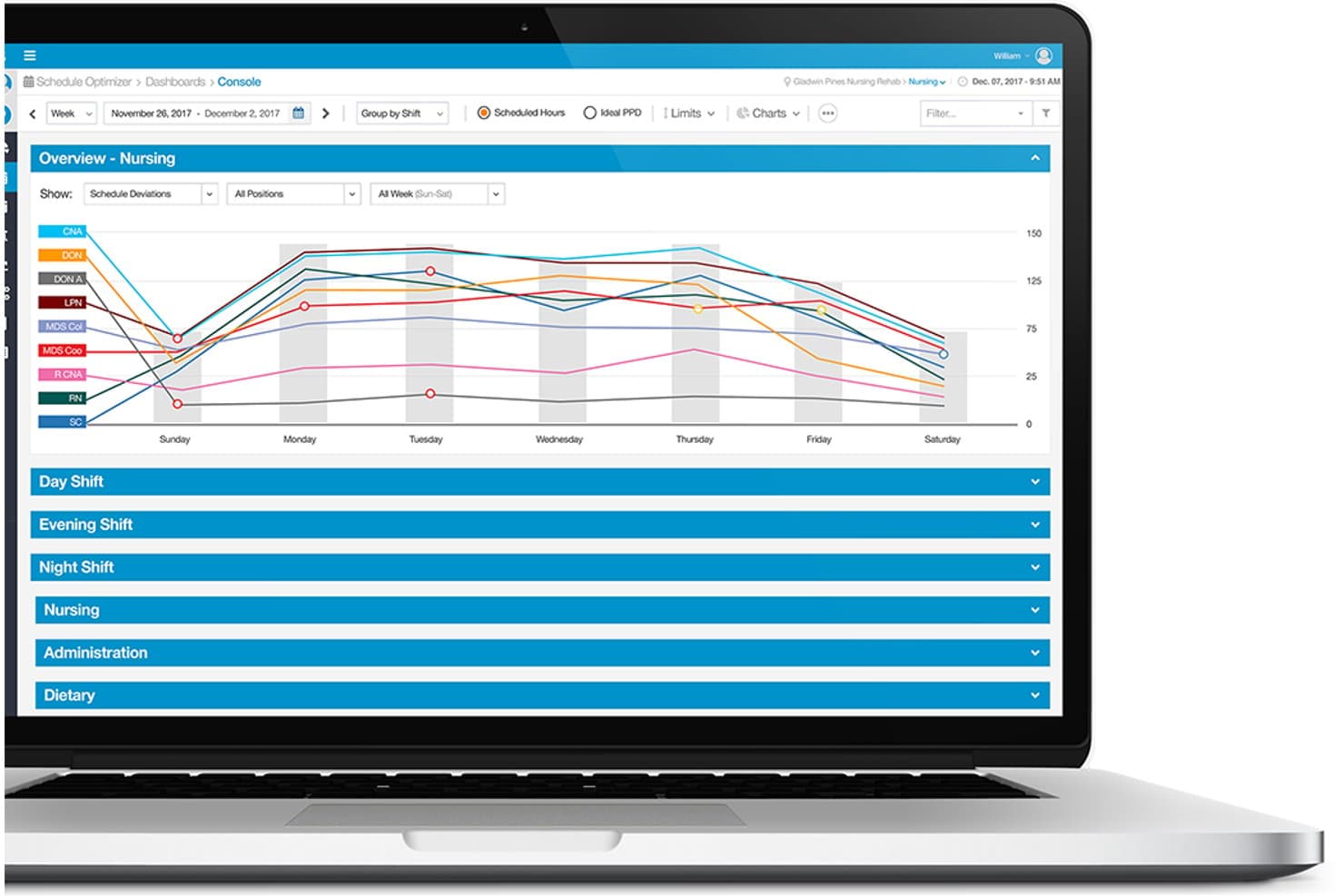
Smartlinx tracks nursing staff scheduled hours across shifts by role. Smartlinx is a workforce management platform built specifically for senior care organizations, covering staff scheduling, time and attendance, payroll, compliance reporting, and contingent staff management in one system.
Who Is Smartlinx Best For?
Smartlinx is purpose-built for senior care facility administrators and workforce coordinators who need to manage scheduling, compliance, and payroll in one connected system.
Why I Picked Smartlinx
I picked Smartlinx as one of the best because its automated Payroll Based Journal reporting is the most purpose-built CMS compliance tool I've seen in a staff scheduling platform. It handles PBJ submissions and audit-ready records without manual exports, which matters enormously during survey season. The CMS Five-Star Predictor also lets you see how today's scheduling decisions could affect your quality ratings before they do.
Smartlinx Key Features
- Smartlinx Go mobile app: Staff can view schedules, clock in or out, and pick up open shifts in real time from their phones.
- Contingent staff management: Sources, credentials, schedules, and processes payroll for temporary and agency staff within the same system.
- CMS Five-Star Predictor: Models how current staffing decisions may affect your organization's CMS quality star ratings before submissions are made.
- Workforce analytics dashboard: Displays scheduled versus worked hours, overtime trends, labor costs, and shift coverage data in one view.
Smartlinx Integrations
Smartlinx has a documented integration with Rain for earned wage access. It also offers an API for staffing marketplace and on-demand workforce integrations.
Pros and Cons
Pros:
- PBJ reporting supports senior-care compliance
- Mobile clock-ins and schedules aid coverage
- Scheduling, timekeeping, and payroll stay connected
Cons:
- Payroll policy setup has drawn complaints
- Ad-hoc reports can require spreadsheet cleanup
Learn more about Smartlinx : Good for comprehensive healthcare workforce management
- Free demo available
- Pricing upon request
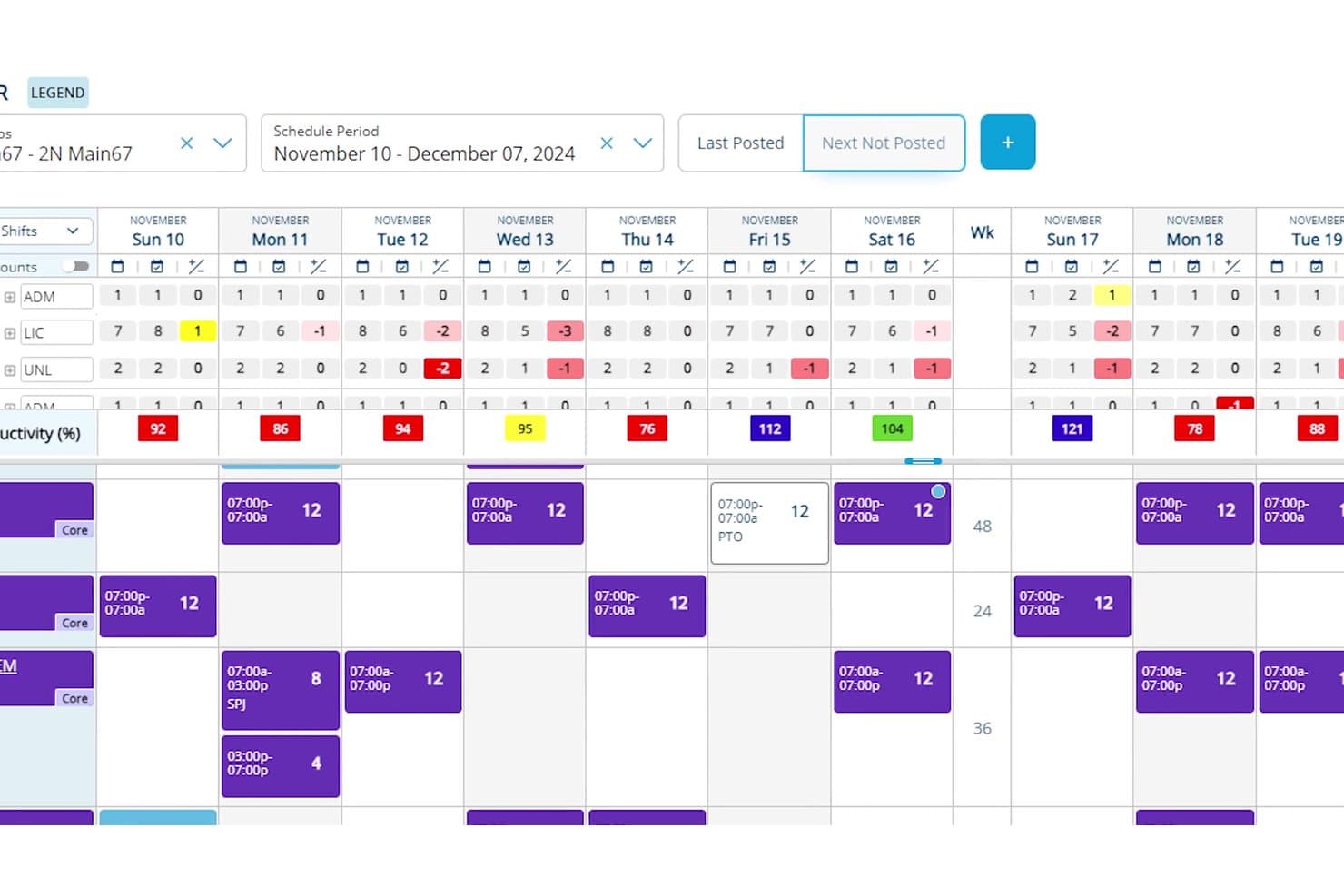
Symplr Workforce displays shift coverage and productivity metrics by day. symplr Time and Scheduling is a healthcare workforce management platform that combines AI-driven shift scheduling, open shift management, timekeeping, and automated pay rules into one system built for clinical and operational teams.
Who Is Symplr Workforce Best For?
Symplr Workforce is a strong fit for hospital administrators and nurse managers overseeing staffing across multiple units or facilities who need a single system for scheduling, timekeeping, and pay compliance.
Why I Picked Symplr Workforce
I've included symplr Workforce in my top picks because it's one of the few platforms built specifically to handle the complexity of healthcare workforce management from scheduling through payroll. I particularly like its predictive demand forecasting, which projects staffing needs up to 120 days out with up to 96% accuracy, so nurse managers aren't scrambling to fill gaps at the last minute. Its automated pay rules engine also handles union agreements, shift differentials, and meal attestation automatically, which cuts down significantly on manual reconciliation before payroll closes.
Symplr Workforce Key Features
- Incentive-based open shift management: Adjust incentives dynamically based on staffing demand to fill open shifts earlier and control spending.
- Meal attestation: Prompt staff during clock-out to confirm meal breaks and automatically generate an audit trail for compliance purposes.
- Workforce coverage view: Display real-time staffing levels across units and facilities so managers can spot gaps and overtime risks at a glance.
- Mobile time and schedule management: Let staff clock in and out, resolve missed clockings, and manage timecards directly from a mobile device.
Symplr Workforce Integrations
Native integrations are not clearly documented for Symplr Workforce, and the product’s API availability is not stated.
Pros and Cons
Pros:
- Healthcare pay rules flag overtime before payroll
- Staff can claim shifts and request swaps
- Forecasts staffing demand up to 120 days
Cons:
- Large schedules and reports can load slowly
- Configuring work rules can take considerable effort
Learn more about Symplr Workforce: Best for care-network shift escalation
- Free trial + free demo available
- Pricing upon request
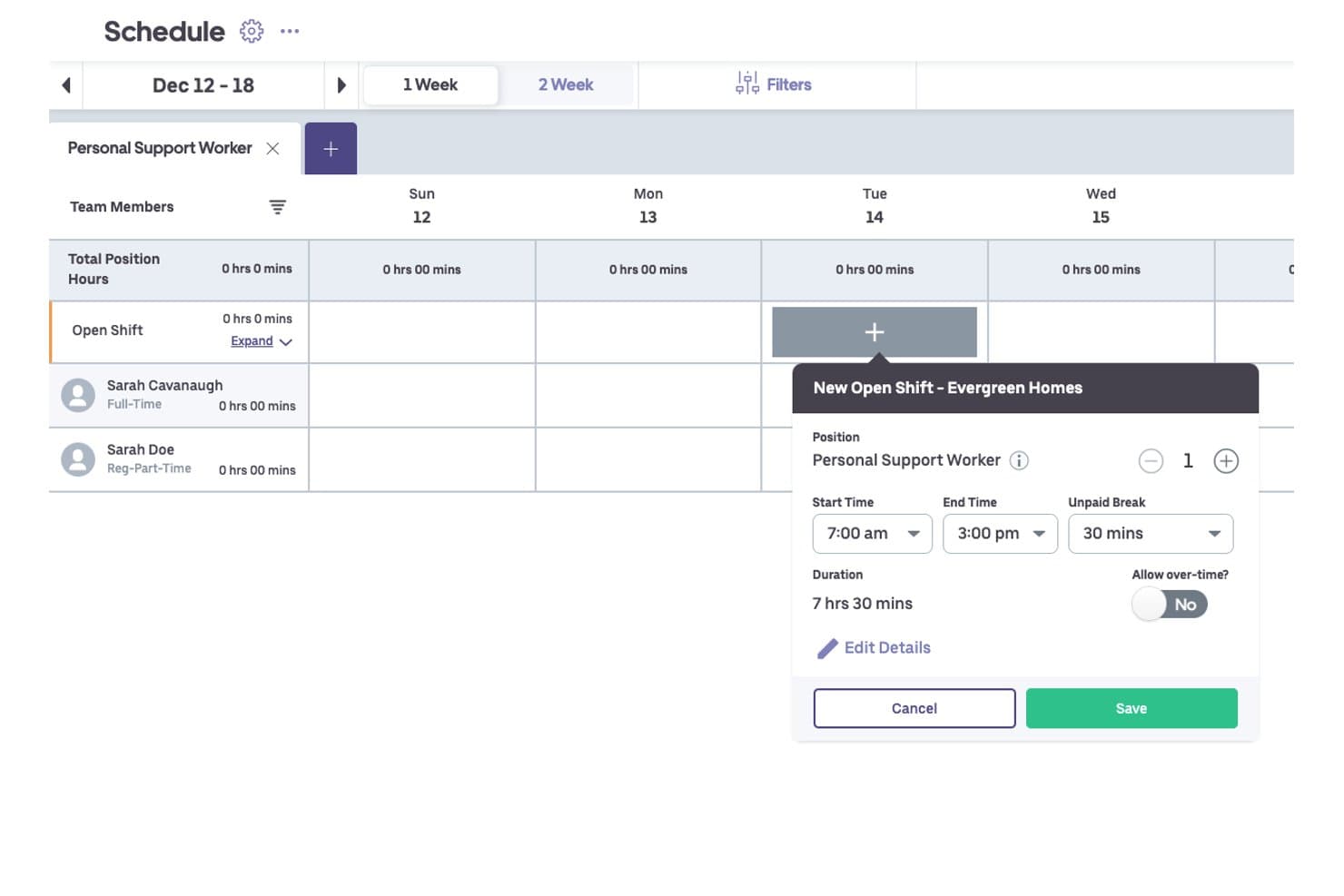
BookJane lets users create open shifts with custom times and breaks. BookJane is a healthcare workforce scheduling platform that combines shift scheduling, open-shift callout, staff communications, and time tracking for care organizations.
Who Is BookJane Best For?
BookJane is a strong fit for care organizations—hospitals, long-term care homes, and community health providers—that need to coordinate shift coverage across multiple facilities or staffing pools.
Why I Picked BookJane
I picked BookJane as one of the best because its cascading shift escalation logic is unlike anything else I've seen in care scheduling. When a shift goes unfilled, the platform automatically moves through internal staff, shared pools, and external agencies in sequence without manager intervention. I also like that the AI-powered callout on the Intelligence tier ranks and contacts the best-fit staff by qualification and role, so a long-term care home isn't just broadcasting to everyone and hoping for the best.
BookJane Key Features
- Constraint-based auto-scheduling: The Advanced tier automatically builds schedules using compliance rules and rotation patterns.
- Geofenced clock-in: Staff clock in and out within a defined location boundary, with hours captured for payroll export.
- Attendance alerts and trend reporting: The platform tracks late and absent patterns and generates compliance reports for managers.
- Group and direct messaging: Managers and staff can send direct messages or group conversations organized by site, department, or role.
BookJane Integrations
BookJane offers a native UKG integration, an ADP marketplace integration, and integrations with Dayforce, Ceridian, Workday, PeopleSoft, and QuickBooks. It also supports CSV exports and an API for custom integrations.
Pros and Cons
Pros:
- Flags double-bookings before schedules publish
- Filters callouts by role and qualification
- Escalates unfilled shifts across staffing pools
Cons:
- Facility filters have reportedly failed
- Shift alerts may not match availability
Learn more about BookJane: Best for Canadian healthcare data residency
- Not available
- Pricing upon request

Here is a screenshot of Petal Health's physician scheduling platform. Petal Health is a clinical workforce management platform for hospitals and health systems that covers automated staff scheduling, on-call directory management, shift swap coordination, and secure clinical communications across departments and sites.
Who Is Petal Health Best For?
Petal Health is a strong fit for Canadian hospitals and health systems that need clinical workforce scheduling and on-call coordination with guaranteed in-country data residency.
Why I Picked Petal Health
I've included Petal Health in my top picks because it's the only medical staff scheduling tool I've found that guarantees Canadian data residency by default, processing all personal data within Canada under PIPEDA and PHIPA compliance. Its automated scheduling engine builds equitable, rule-based schedules across multiple departments and sites, while real-time on-call directories with priority-based code alerts keep clinical teams reachable the moment coverage gaps emerge.
Petal Health Key Features
- Drag-and-drop schedule adjustments: Edit published schedules by dragging and dropping shifts, with real-time visibility into coverage gaps and available qualified staff.
- Automated absence callouts: Triggers automated outreach to available staff when an unplanned absence occurs, reducing the manual work of finding last-minute coverage.
- Priority-based code alerts: Sends alerts to defined clinical groups and escalates outreach sequentially until a staff member responds.
- Secure file sharing in clinical messaging: Lets care teams attach and share files or documents directly within encrypted messages for in-context collaboration.
Petal Health Integrations
Petal Health has no clearly documented native integrations with named vendors. Petal Workforce offers a FHIR API and is described as HL7-ready for custom connectivity.
Pros and Cons
Pros:
- Priority-based on-call alerts reach clinical teams
- Coverage dashboards flag gaps and qualified staff
- Automated equitable scheduling across hospital sites
Cons:
- Mobile app limits schedule changes and trades
- Complex shift trades can be cumbersome
Learn more about Petal Health:
Alte programe de planificare a personalului medical
Mai jos este o listă cu programe suplimentare de planificare a personalului medical pe care le-am inclus pe lista scurtă, dar care nu au ajuns în primele 10 poziții. Merită cu siguranță să le analizați.
- 115280 ClinicBest for billing and discharge task tracking
How I Evaluate Medical Staff Scheduling Software
I split my evaluation into three parts, giving the most weight to core functionality: publish nurse shifts across units and manage swaps and open-shift coverage. For standout features, I look for float-pool coordination. Beyond features, I consider onboarding, support, and pricing as teams add sites.
Core Functionality (Table Stakes For This List)
When I'm selecting tools for my list, I score each one on a scale from 0 (does not offer the functionality) to 5 (excels in this area) for each core functionality listed below. I then convert the total into a percentage to help assess each tool's overall fit, with extra weight on any functionalities I’ve deemed essential.
- Shift Scheduling (Essential): I look for recurring schedules across roles and departments, with templates managers can adjust when a call-out leaves a unit uncovered.
- Swaps & Coverage (Essential): Check whether staff can request time off, trade shifts, and claim open shifts with manager approval when an absence creates a gap.
- Credential Tracking: I assess whether licenses and certifications appear during shift assignment, so managers can spot expired qualifications before placing staff in clinical roles.
- Conflict Alerts: Look for alerts on double-booking, overtime, and rest periods before managers publish schedules across teams or locations.
- Staff Notifications: Check for automatic alerts when shifts change, open coverage appears, or a swap is approved, with delivery options for shift-based staff.
- Time & Attendance: I consider whether scheduled shifts connect with clock-in and clock-out records, helping managers reconcile hours for payroll and labor reporting.
Once I have a list of tools that meet the criteria, I consider what sets each platform apart.
Differentiating Factors (What Sets Vendors Apart)
Here's how I compare and contrast different vendors:
Standout Features
I look for fatigue and burnout risk scoring that flags nurses approaching unsafe consecutive hours—when a night-shift RN is on their fifth straight 12-hour block, the schedule should surface that before a manager approves a sixth. Float pool management matters just as much: I check whether a tool tracks cross-trained staff and surfaces their availability across units so a charge nurse isn't calling down a paper list at 5 a.m. I also evaluate self-scheduling marketplaces where qualified staff claim open shifts from a mobile app without waiting on a manager to manually assign coverage.
Beyond Features
I check whether a tool offers a native mobile app with push notifications, since shift-based staff rarely sit at a desktop. If a nurse finishing a night shift can't accept a swap from their phone, adoption stalls fast. I also evaluate how each platform handles payroll and EHR integrations—manual hour reconciliation between disconnected systems creates real headaches for finance teams at month-end. Finally, I look at onboarding support, especially schedule migration from spreadsheets, because rolling out new software to a large clinical team without dedicated training almost always leads to resistance.
Cum să alegeți un program de planificare a personalului medical
Este ușor să vă pierdeți în liste lungi de funcții și structuri complexe de prețuri. Pentru a vă ajuta să rămâneți concentrat în timp ce parcurgeți procesul unic de selectare a programului potrivit, iată o listă de verificare cu factorii de care trebuie să țineți cont:
| Factor | Aspecte de luat în considerare |
|---|---|
| FactorScalabilitate | Aspecte de luat în considerareVa evolua programul odată cu echipa dumneavoastră? Luați în considerare extinderea viitoare și dacă instrumentul poate gestiona un număr mai mare de angajați fără costuri sau complicații suplimentare. |
| FactorIntegrări | Aspecte de luat în considerareFuncționează cu sistemele pe care le utilizați deja? Verificați compatibilitatea cu programul de resurse umane, instrumentele de comunicare și alte platforme importante folosite deja de echipa dumneavoastră. |
| FactorPosibilități de personalizare | Aspecte de luat în considerareÎl puteți adapta fluxurilor dumneavoastră de lucru? Căutați opțiuni pentru ajustarea regulilor de planificare, a notificărilor și a rapoartelor, astfel încât să corespundă nevoilor specifice. |
| FactorUșurință în utilizare | Aspecte de luat în considerareEste intuitiv pentru toți utilizatorii? O interfață simplă reduce timpul de instruire și numărul de erori. Testați navigarea și experiența de utilizare a sistemului înainte de a lua o decizie. |
| FactorImplementare și integrare inițială | Aspecte de luat în considerareCât timp va dura configurarea? Evaluați timpul și resursele necesare pentru a începe utilizarea. Căutați instrumente care oferă tururi ghidate, resurse de instruire și asistență dedicată. |
| FactorCost | Aspecte de luat în considerareSe încadrează în bugetul dumneavoastră? Comparați planurile tarifare, inclusiv taxele ascunse sau costurile suplimentare pentru funcții extra, pentru a vă asigura că se aliniază limitărilor financiare. |
| FactorMăsuri de securitate | Aspecte de luat în considerareCum protejează datele? Asigurați-vă că programul respectă standardele din domeniu, precum HIPAA, și oferă funcții precum criptarea și audituri de securitate periodice. |
| FactorCerințe de conformitate | Aspecte de luat în considerareÎndeplinește standardele legale? Verificați dacă programul respectă legislația muncii și reglementările din domeniu relevante pentru locația și activitatea cabinetului dumneavoastră. |
Ce este programul de planificare a personalului medical?
Programul de planificare a personalului medical este un instrument care ajută unitățile medicale să organizeze și să gestioneze eficient programele angajaților. Aceste instrumente contribuie la coordonarea programării asistentelor medicale, a programelor medicilor și a acoperirii necesarului de personal administrativ, asigurând în același timp acoperirea corespunzătoare a turelor și respectarea legislației muncii. Funcțiile de planificare automată, notificare și raportare contribuie la reducerea erorilor, îmbunătățirea comunicării și economisirea timpului. În general, aceste instrumente oferă o valoare semnificativă prin creșterea eficienței operaționale și reducerea conflictelor de program.
Funcții
Atunci când selectați un software pentru programarea personalului medical, urmăriți următoarele funcții esențiale:
- Programare automatizată: Atribuie automat turele pe baza disponibilității și preferințelor personalului, reducând erorile manuale și timpul alocat programării.
- Schimbarea turelor: Permite personalului să schimbe cu ușurință turele cu colegii, asigurând flexibilitatea și menținând acoperirea necesară.
- Gestionarea zilelor libere: Gestionează solicitările și aprobările pentru concedii, contribuind la menținerea unui nivel adecvat de personal.
- Notificări: Trimite alerte și mementouri pentru turele viitoare, modificări sau aprobări, menținând personalul informat și reducând absențele neanunțate.
- Raportare și analiză: Oferă informații despre tiparele de personal și orele suplimentare, contribuind la luarea unor decizii mai bune și la alocarea resurselor.
- Acces mobil: Permite personalului să consulte și să gestioneze programele din mers, sporind accesibilitatea și comoditatea.
- Monitorizarea conformității: Asigură respectarea legislației muncii și a reglementărilor din domeniu, minimizând riscurile juridice.
- Capacități de integrare: Se conectează cu instrumentele existente de resurse umane și comunicare, eficientizând procesele și partajarea datelor.
- Șabloane personalizabile: Oferă posibilitatea de a adapta șabloanele de programare pentru a răspunde nevoilor și preferințelor specifice ale departamentelor.
- Funcții de securitate: Protejează informațiile sensibile despre personal prin criptare și controale de acces, asigurând confidențialitatea datelor.
Beneficii
Implementarea unui software pentru programarea personalului medical oferă mai multe beneficii echipei și afacerii dumneavoastră. Iată câteva dintre acestea:
- Eficiență îmbunătățită: Programarea automatizată reduce munca manuală și erorile, economisind timp și efort pentru personalul administrativ.
- Comunicare îmbunătățită: Notificările și alertele mențin pe toată lumea informată cu privire la programe, reducând neînțelegerile și absențele neanunțate.
- Flexibilitate sporită: Schimbarea turelor și gestionarea zilelor libere permit personalului să își gestioneze cu ușurință programele, răspunzând nevoilor personale și menținând în același timp acoperirea necesară.
- Conformitate mai bună: Monitorizarea conformității asigură respectarea legislației muncii, minimizând riscurile juridice și amenzile.
- Luarea unor decizii informate: Raportarea și analiza oferă informații despre tendințele de personal, contribuind la optimizarea alocării resurselor și la reducerea costurilor.
- Accesibilitate sporită: Accesul mobil permite personalului să consulte și să ajusteze programele din mers, ceea ce este convenabil într-un mediu medical aglomerat.
- Securitatea datelor: Funcțiile de securitate protejează informațiile sensibile, asigurând confidențialitatea și conformitatea cu reglementările privind protecția datelor.
Costuri și prețuri
Selectarea unui software pentru programarea personalului medical necesită înțelegerea diferitelor modele de tarifare și planuri disponibile. Costurile variază în funcție de funcții, dimensiunea echipei, suplimente și alți factori. Tabelul de mai jos rezumă planurile comune, prețurile medii ale acestora și funcțiile incluse de obicei în soluțiile software pentru programarea personalului medical:
Tabel comparativ al planurilor pentru software-ul de programare a personalului medical
| Tipul planului | Preț mediu | Funcții comune |
|---|---|---|
| Tipul planuluiPlan gratuit | Preț mediu$0 | Funcții comuneProgramare de bază, notificări limitate și asistență prin e-mail. |
| Tipul planuluiPlan personal | Preț mediu$5-$15/utilizator/lună | Funcții comuneProgramare automatizată, acces mobil și raportare de bază. |
| Tipul planuluiPlan de afaceri | Preț mediu$15-$30/utilizator/lună | Funcții comuneRaportare avansată, integrări cu instrumente de resurse umane și monitorizarea conformității. |
| Tipul planuluiPlan pentru întreprinderi | Preț mediu$30-$50/utilizator/lună | Funcții comuneȘabloane personalizabile, asistență premium și gestionarea mai multor locații. |
Cele mai frecvente întrebări referitoare la software-ul de programare a personalului medical (Întrebări frecvente)
Care este durata obișnuită de implementare a software-ului de programare a personalului medical?
Durata implementării variază, dar de obicei este de câteva săptămâni. Depinde de dimensiunea echipei dumneavoastră și de complexitatea sistemelor existente. Pentru a accelera procesul, asigurați-vă că aveți un plan clar și alocați resurse pentru instruire. Unii furnizori oferă asistență dedicată pentru a vă ajuta să începeți rapid.
Se poate integra software-ul de programare a personalului medical cu sistemele de resurse umane existente?
Da, multe soluții software de programare a personalului medical se integrează cu sistemele de resurse umane. Acest lucru asigură un flux de date neîntrerupt între programare și salarizare, reducând introducerea manuală a datelor. Înainte de achiziție, verificați dacă software-ul este compatibil cu instrumentele de resurse umane pe care le utilizați în prezent, pentru a evita problemele de compatibilitate.
Este disponibilă asistența tehnică în timpul procesului de configurare?
Da, majoritatea furnizorilor oferă asistență tehnică în timpul configurării. Aceasta poate include chat live, asistență telefonică sau specialiști dedicați pentru integrare. Este esențial să beneficiați de aceste servicii pentru a remedia prompt orice problemă și pentru a asigura o tranziție fără probleme pentru echipa dumneavoastră.
Există probleme legate de confidențialitatea datelor în cazul software-ului de programare a personalului medical?
Da, confidențialitatea datelor reprezintă o preocupare, în special în cazul informațiilor sensibile despre personal. Asigurați-vă că software-ul respectă legile privind protecția datelor, precum HIPAA. Căutați funcții precum criptarea și controalele de acces. Este recomandat să analizați politicile de confidențialitate și măsurile de securitate ale furnizorului înainte de a lua o decizie.