

O software gratuito de faturação médica dá à sua equipa acesso a funcionalidades de faturação, pedidos de reembolso e gestão do ciclo de receitas sem custos iniciais — através de um plano gratuito ou de um período experimental gratuito limitado. Se está à procura destas soluções, é provável que esteja a equilibrar orçamentos apertados, requisitos rigorosos de privacidade e elevadas expectativas de fiabilidade.
Escolher a ferramenta gratuita certa pode ajudá-lo a manter os seus fluxos de trabalho de faturação em ordem, reduzindo simultaneamente os custos operacionais, mas não se trata apenas do preço. Esta lista explica o que distingue cada opção, para que possa comparar funcionalidades, apoio e facilidade de utilização antes de tomar uma decisão.
Why Trust Our Software Recommendations
6,700+
Reviews
20
Industry experts
16+
Evaluation factors
14
Years
Our team has been testing and reviewing software since 2012. As medical practice leaders ourselves, we know how difficult—and important—it is to choose the right software.
For this guide, we evaluated tools using hands-on testing and independent research, scoring tools using our selection criteria.
Our reviews reflect our human editorial judgment, not a sales pitch.
Tabela comparativa de software gratuito de faturação médica
A tabela abaixo compara os detalhes de preços das minhas principais escolhas de software gratuito de faturação médica.
| Tool | Best For | Trial Info | Price | ||
|---|---|---|---|---|---|
| 1 | Best all-in-one platform for small practices | Free plan + 14-day free trial + free demo available | From $31/user/month | Website | |
| 2 | Best for unlimited electronic claims submissions | Free demo available | Pricing upon request | Website | |
| 3 | Best compliant e-claim submissions | Free demo available | From $349/month; RCM services from 2.49% of monthly collections. | Website | |
| 4 | Best for customizable billing workflows | Not available | Pricing upon request | Website | |
| 5 | Best for hospital accounting workflows | Not available | Pricing upon request | Website | |
| 6 | Best interface for multi-location practices | Free plan available | From $25/month | Website | |
| 7 | Best open-source customization options | Free demo available | Pricing upon request | Website | |
| 8 | Best for integrated patient scheduling tools | Free plan available | Free | Website | |
| 9 | Best for open-source remittance processing | Free demo available | Free | Website | |
| 10 | Best for straightforward claim management workflow | Free plan available | Pricing upon request | Website |


Avaliações de software gratuito de faturação médica
Seguem-se os meus resumos detalhados do software gratuito de faturação médica que integrou a minha seleção. As minhas avaliações apresentam uma análise detalhada das funcionalidades, dos melhores casos de utilização e dos preços de cada plataforma, para o ajudar a encontrar a melhor opção para si.
 Best all-in-one platform for small practices
- Free plan + 14-day free trial + free demo available
- From $31/user/month
Visit WebsiteCustomer Rating:4.4/5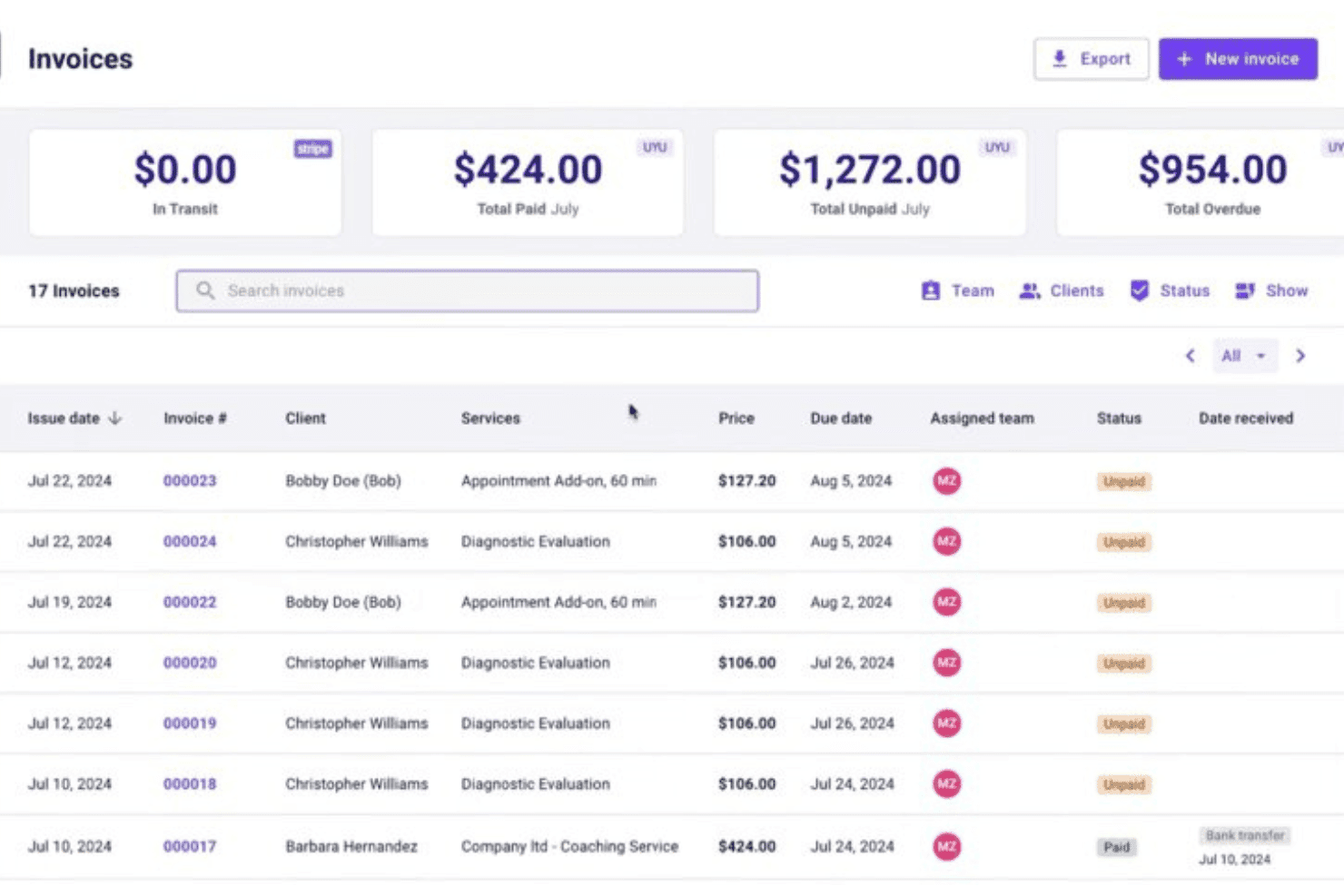
Carepatron combines billing, claims, scheduling, EHR, invoicing, and telehealth. Carepatron is a practice management platform that combines medical billing, invoicing, insurance claims (CMS-1500), payment posting, scheduling, EHR documentation, and telehealth in a single free-to-start system built for small healthcare practices.
Who Is Carepatron Best For?
Solo practitioners and small practice teams who want to manage scheduling, notes, and billing from one platform without paying for separate tools.
Why I Picked Carepatron
I picked Carepatron as one of the best because small practices rarely have the budget or bandwidth to run billing, scheduling, and clinical documentation in separate tools. I love that CMS-1500 forms auto-populate directly from appointment and client records, cutting manual entry before a claim is ever submitted. Superbills also pull CPT and ICD-10 codes automatically, keeping coding consistent across visits without a dedicated billing team.
Carepatron Key Features
- Integrated telehealth: Launch secure video calls with patients directly from appointment records.
- Payment processing via Stripe: Accept credit card and ACH payments with patient cards saved on file.
- Client portal: Patients can access bills, upload documents, and communicate securely with your practice.
- AI-powered medical scribe: Automatically generate visit notes and documentation using built-in AI tools.
Carepatron Integrations
Carepatron offers native integrations with Stripe, Zoom, Google Calendar, and Google Analytics. An API for custom integrations is listed as coming soon.
What's Free?
Carepatron's free plan is free forever and includes unlimited clients, telehealth, a client portal, automated online payments, and an AI medical scribe. Insurance claim submission (CMS-1500) and superbills are not included on the free plan and require a paid Plus subscription.
Pros and Cons
Pros:
- Client portal allows secure document sharing
- Unlimited patient records on the free plan
- Superbills generate with ICD-10 and CPT codes
Cons:
- No recurring billing for subscription services
- Insurance claim forms require a paid plan
Learn more about Carepatron: Best for unlimited electronic claims submissions
- Free demo available
- Pricing upon request
Visit WebsiteCustomer Rating:4.1/5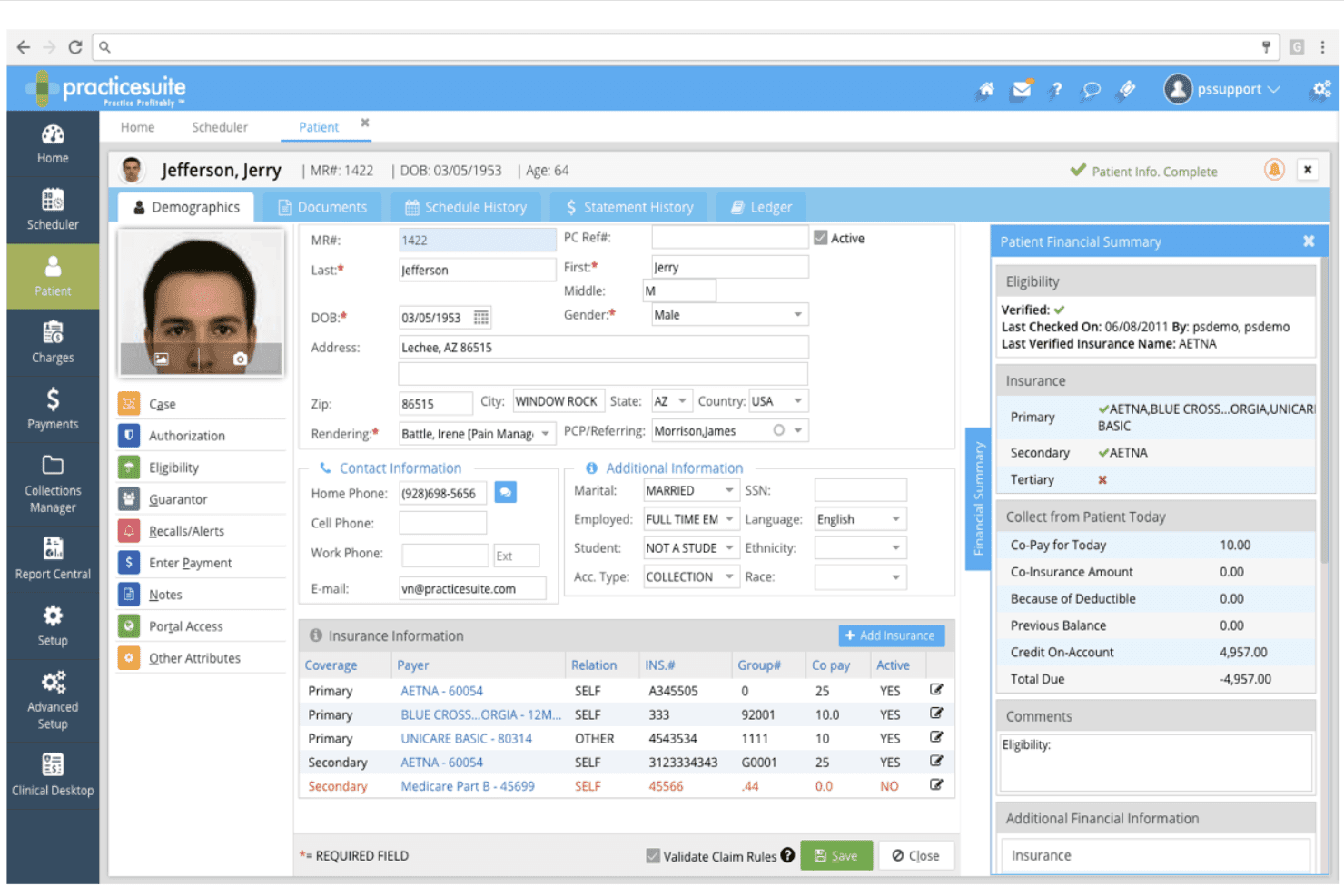
PracticeSuite supports claims, billing, payments, denials, eligibility, and ARs. PracticeSuite is a cloud-based medical billing platform that covers claims management, patient billing, payment posting, denial tracking, insurance eligibility verification, and AR reporting across 160+ billing specialties.
Who Is PracticeSuite Best For?
PracticeSuite is a solid fit for independent medical billing companies managing multiple provider accounts across a range of specialties.
Why I Picked PracticeSuite
PracticeSuite earns its spot on my shortlist because it doesn't cap the number of electronic claims your team can submit, which matters when you're running high-volume billing cycles. I particularly like its pre-submission denial intelligence, which flags problem claims before they reach a payer. The mass claim correction tool also lets my team fix and resubmit entire batches without touching each claim individually.
PracticeSuite Key Features
- Real-time eligibility verification: Check patient insurance coverage instantly before submitting claims.
- Integrated patient portal: Give patients direct access to view and download their billing statements online.
- Extensive coding libraries: Access ICD-10, CPT, and HCPCS code sets within the billing workflow.
- Multiple specialty support: Manage billing tasks for over 160 medical specialties in one unified system.
PracticeSuite Integrations
PracticeSuite offers native integrations with Elation and Practice Fusion EHR systems. An API is available for custom integrations.
What's Free?
PracticeSuite doesn't offer a free plan or free trial. You can request a free demo to see the platform before committing to a paid plan.
Pros and Cons
Pros:
- Supports over 160 medical billing specialties
- Advanced denial management and tracking tools
- Unlimited electronic claims submission with all plans
Cons:
- Feature set can be overwhelming for beginners
- Free plan not available for users
Learn more about PracticeSuite: Best compliant e-claim submissions
- Free demo available
- From $349/month; RCM services from 2.49% of monthly collections.
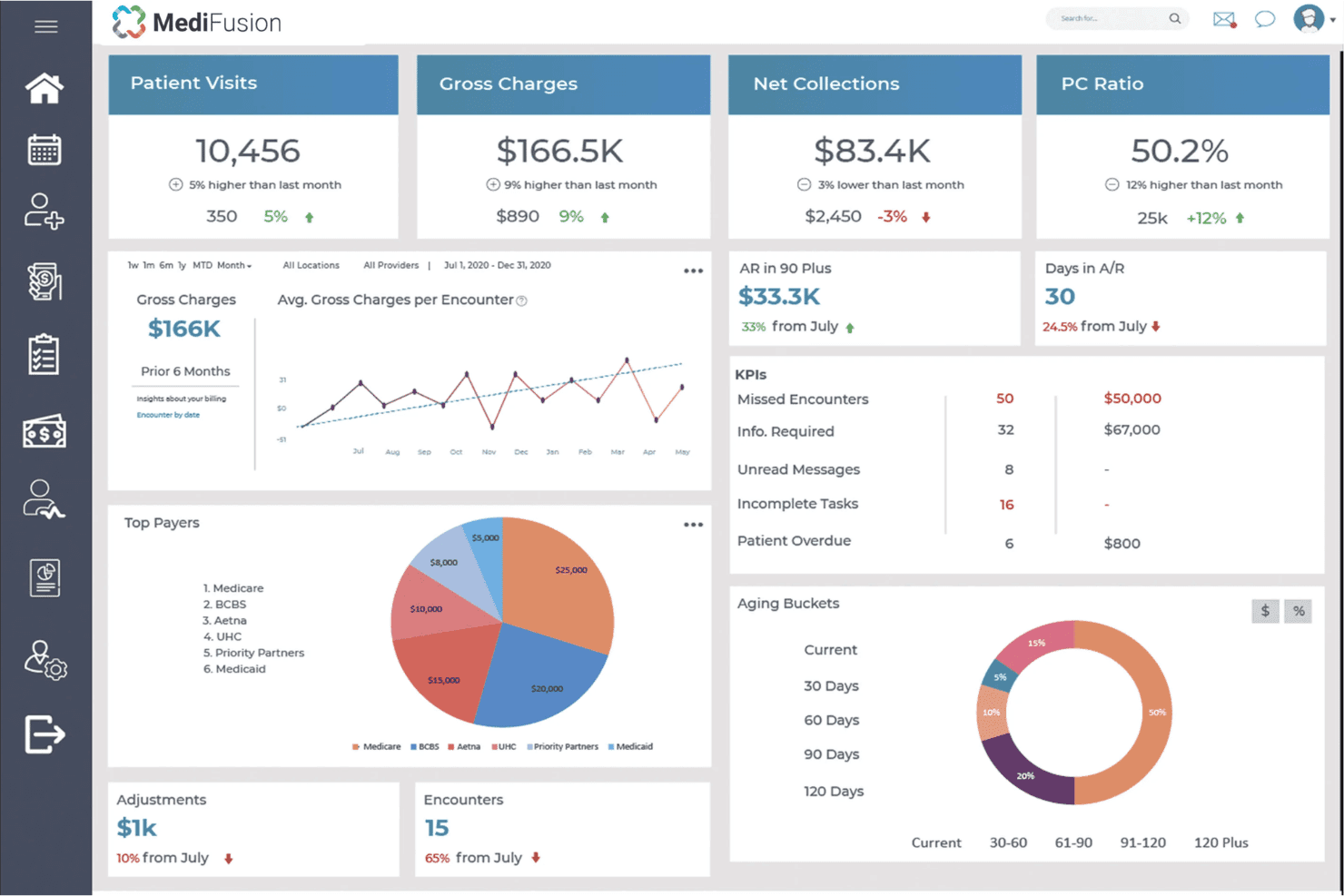
MediFusion handles claims, eligibility checks, payments, billing, and EHR tools. MediFusion is a free, cloud-based EHR and medical billing platform that covers electronic claim submission, insurance eligibility verification, payment posting, practice management, and patient billing for healthcare practices.
Who Is MediFusion Best For?
MediFusion is a good fit for US-based independent practices and small clinics that need a no-cost, all-in-one billing and EHR solution.
Why I Picked MediFusion
I picked MediFusion as one of the best because its FusionEDI clearinghouse handles e-claim submissions with a level of insurance optimization I rarely see in free tools. It automatically verifies secondary and tertiary insurance coverage and calculates the optimal billing order per each payer's rules before a claim goes out. That pre-submission logic directly cuts down on denials without requiring manual intervention from billing staff.
MediFusion Key Features
- PatientSense patient engagement tool: Lets you send appointment reminders, answer inquiries, and automate check-in communications.
- DocuHub document management: Securely stores, shares, and maintains patient EHR files for staff accessibility.
- Provider credentialing module: Verifies qualifications and licensure of healthcare providers within the system.
- Integrated patient portal: Allows patients to request appointments, send messages, and handle payments online.
MediFusion Integrations
Native integrations are not clearly documented. MediFusion includes internal modules for clearinghouse submissions, patient engagement, and document management. An API for custom integrations is not publicly mentioned.
What's Free?
MediFusion includes a free EHR and practice management system for practices using its revenue cycle management services.
Pros and Cons
Pros:
- Patient engagement tools for reminders
- Provider credentialing module included
- Compliant e-claim clearinghouse process
Cons:
- Practice support is only available by request
- Native integrations not clearly documented
Learn more about MediFusion: Best for customizable billing workflows
- Not available
- Pricing upon request
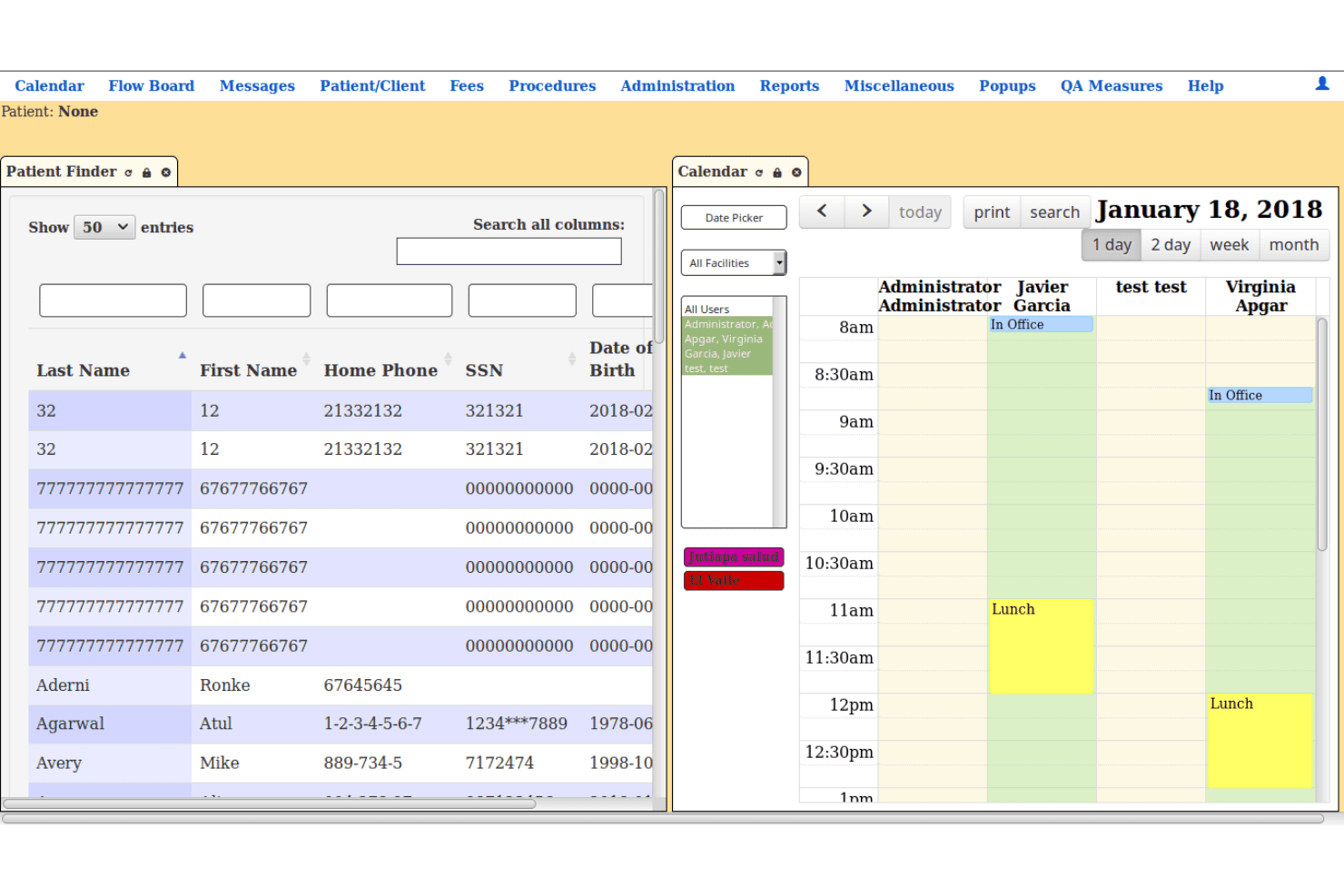
LibreHealth EHR brings records, scheduling, billing, payments, and reports. LibreHealth EHR is a free, open-source electronic health record and practice management system that covers clinical documentation, appointment scheduling, patient records, billing, insurance information, payment posting, statements, and reporting.
Who Is LibreHealth EHR Best For?
LibreHealth EHR is suitable for clinics, educational healthcare programs, developers, and technically experienced teams that need a customizable ambulatory EHR with billing and practice management functions.
Why I Picked LibreHealth EHR
I picked LibreHealth EHR for its configurable fee and billing workflows. The platform includes fee posting, patient statements, insurance information, billing reports, payment records, and paper insurance claim tracking.
Its open-source code allows organizations to adjust forms, workflows, reports, and database functions. However, teams should complete a detailed security and technical review before using it with real patient information.
LibreHealth EHR Key Features
- Fee posting: Records charges and payments associated with patient encounters.
- Patient statements: Produces statements for selected patients through the fees and posting area.
- Insurance claim records: Tracks claims and records when a claim is added to a file or printed on a paper insurance form.
- Billing reports: Displays billing activity using patient, provider, insurance, code, and service-date information.
- Customizable EHR: Supports clinical records, encounters, facilities, users, provider calendars, and configurable healthcare workflows.
LibreHealth EHR Integrations
LibreHealth does not publish a detailed list of ready-made third-party connections for its EHR. The wider LibreHealth project provides a separate Toolkit with a REST API and reusable web components, but the EHR’s direct connector coverage is not clearly documented.
What’s Free?
LibreHealth EHR’s source code can be downloaded and self-hosted without subscription or licensing fees. The free software includes its clinical, scheduling, practice management, fee posting, billing, statement, and reporting functions.
Pros and Cons
Pros:
- Supports detailed clinical and billing records
- No licensing fees or vendor lock-in
- Fully open-source and customizable platform
Cons:
- Requires technical expertise for implementation
- No built-in electronic claim submission
Learn more about LibreHealth EHR:
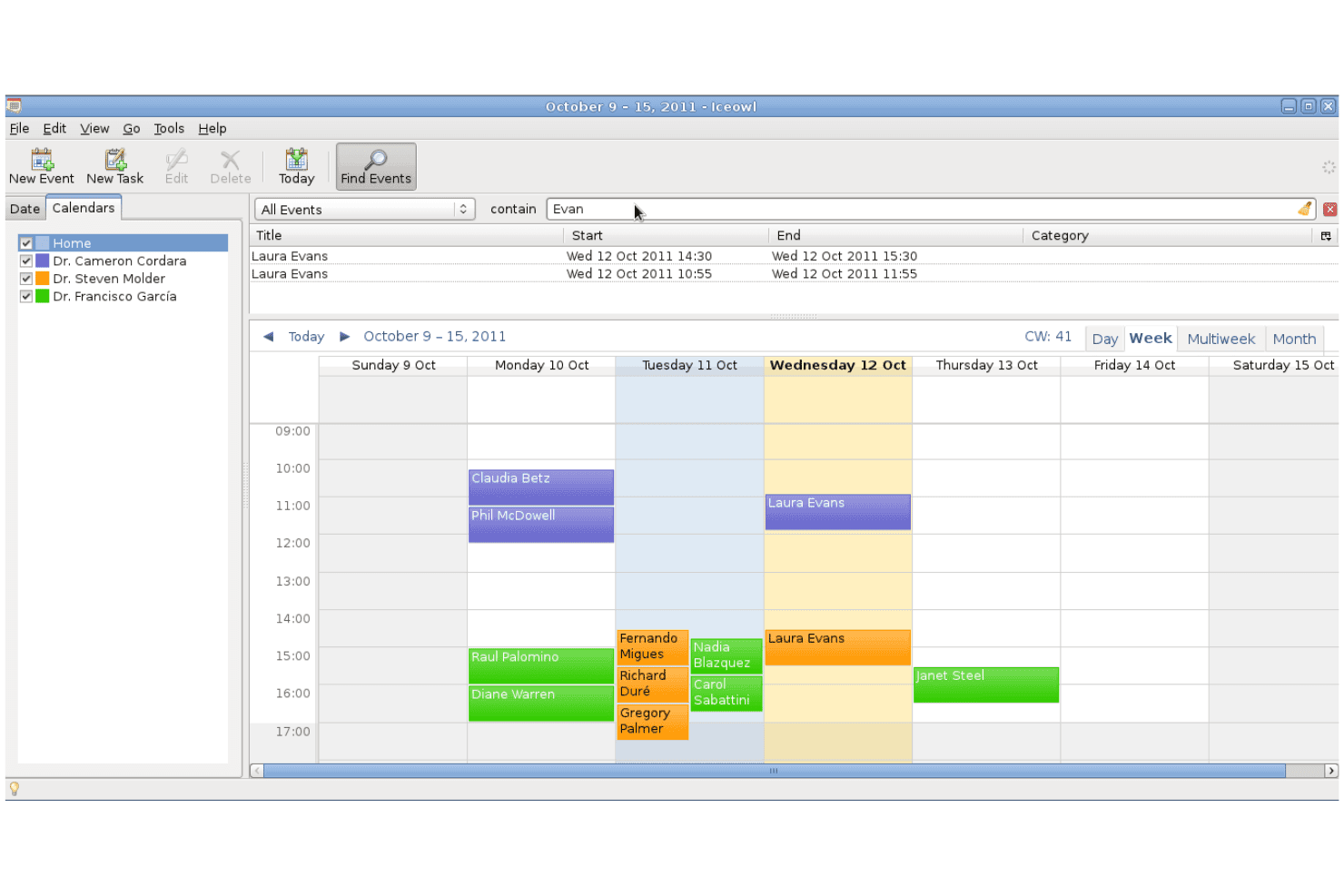
GNU Health centralizes records, billing, labs, pharmacy, accounting, and stock. GNU Health is a free, open-source hospital information system that combines patient records, health center administration, invoicing, financial accounting, laboratory management, pharmacy operations, and inventory tracking.
Who Is GNU Health Best For?
GNU Health is a good fit for hospitals, health centers, public health institutions, and nonprofit healthcare programs that need to connect clinical services with patient invoicing and accounting.
Why I Picked GNU Health
I picked GNU Health for its dedicated health accounting module. Unlike billing tools that focus mainly on insurance claims, GNU Health connects patient services with invoices, payment records, journals, a chart of accounts, and a general ledger.
Healthcare facilities can generate charges for hospitalizations, examinations, treatments, medications, supplies, laboratory tests, and imaging services. This makes it suitable for organizations that need to manage clinical billing and financial accounting within the same self-hosted environment.
GNU Health Key Features
- Patient service invoicing: Creates invoices for consultations, hospital stays, treatments, medications, supplies, laboratory tests, and other healthcare services.
- Financial accounting: Includes a chart of accounts, general ledger, journals, invoice management, and bookkeeping functions.
- Laboratory billing: Converts laboratory requests and completed tests into billable services and invoices.
- Pharmacy and inventory management: Tracks medications, vaccines, medical supplies, purchasing, and stock movements across healthcare facilities.
- Insurance plan records: Stores insurance plans as products that can be associated with patient and billing workflows.
GNU Health Integrations
GNU Health supports connections with Orthanc for medical imaging, CalDAV and WebDAV for calendars, and GNU Health Federation for distributed healthcare networks. Its modules are built on the Tryton application platform.
What’s Free?
GNU Health’s source code and core hospital information system are available without subscription or licensing fees. The free edition includes patient management, appointments, healthcare services, invoicing, accounting, pharmacy, laboratory, and inventory modules.
Pros and Cons
Pros:
- Supports hospital and laboratory billing
- Charges clinical services directly to invoices
- Full accounting and invoicing module
Cons:
- Requires self-hosting and technical administration
- Does not focus on US insurance claim submission
Learn more about GNU Health: Best interface for multi-location practices
- Free plan available
- From $25/month
Visit WebsiteCustomer Rating:4.2/5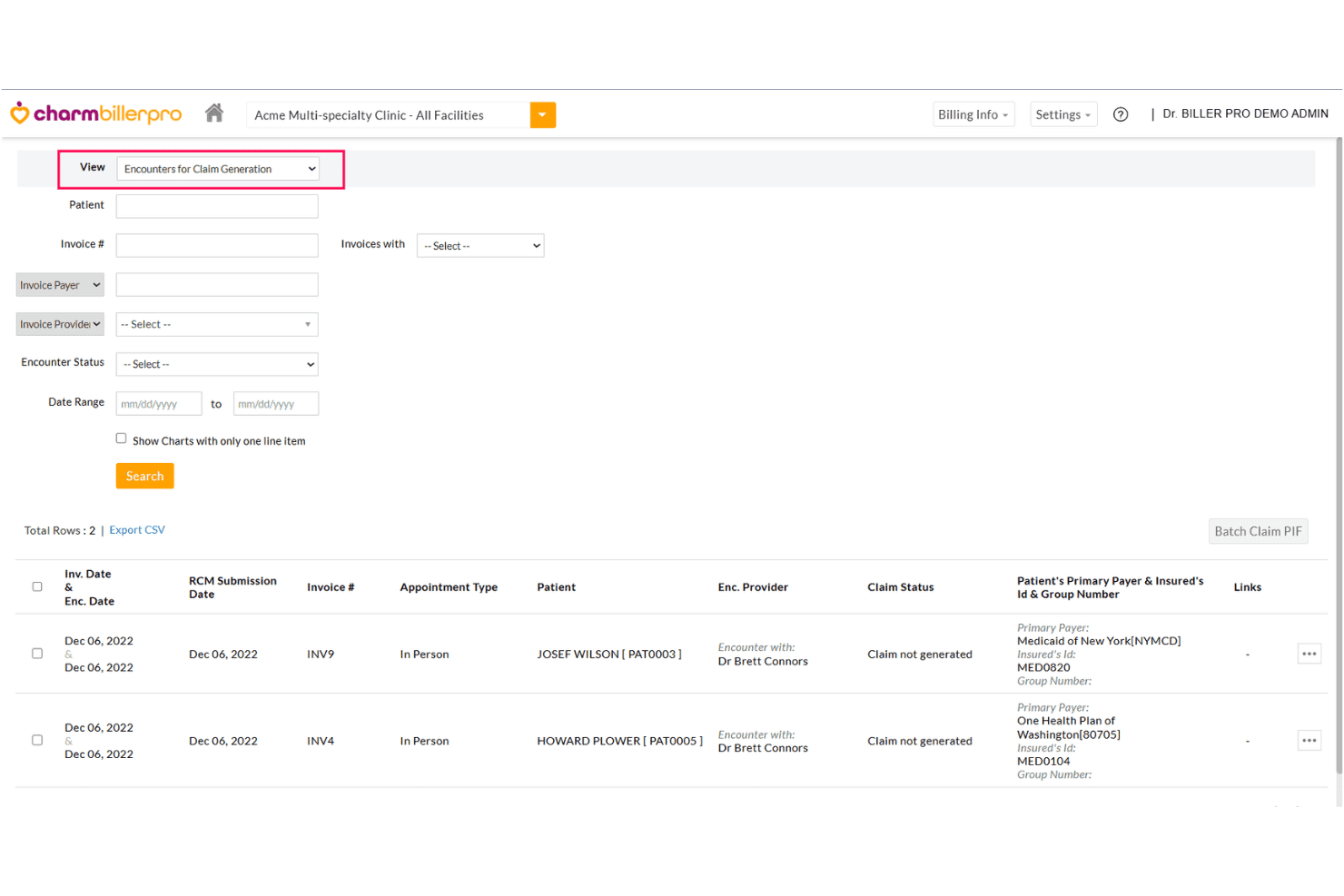
CharmHealth unifies EHR, claims, billing, coding, revenue cycle, and care tools. CharmHealth is a cloud-based EHR and medical billing platform that combines claims management, revenue cycle management, patient billing, coding support, and practice management tools in a single system.
Who Is CharmHealth Best For?
CharmHealth is a strong fit for independent physicians and small clinics that need a free, scalable billing solution without committing to per-provider subscription costs upfront.
Why I Picked CharmHealth
I picked CharmHealth as one of the best because its CharmBillerPro interface consolidates claims, payments, and performance reports across every practice location into a single dashboard, with no system hopping. I particularly like the custom rule engine, which flags claim errors before submission across all connected locations at once. ERA auto-posting means my team isn't manually reconciling payments site by site across multiple sites.
CharmHealth Key Features
- Integrated patient portal: Patients can access health records, view statements, and communicate securely.
- Automated encounter-based billing: Generate claims directly from clinical encounters with full support for ICD-10, CPT, and HCPCS codes.
- Revenue analytics dashboard: Monitor payment trends, outstanding AR, and claim status from a unified reporting center.
- Insurance eligibility verification: Check patient coverage and benefits before submitting claims to minimize denials.
CharmHealth Integrations
CharmHealth offers 10 native integrations, including Zoom Workplace, Fullscript, Twilio, QuickBooks Online Advanced, Zoho CRM, Sfax, Wellevate, DeepScribe, Change Healthcare, and Insight Health. An API is available for custom integrations.
What's Free?
CharmHealth's free plan is free forever, supporting 1 provider, up to 5 users, and 1,000 patient records, with 50 claims and 50 encounters per month. Paid add-ons are available to extend functionality while staying on the free tier.
Pros and Cons
Pros:
- Includes encounter-based billing and cloud EHR
- Interface supports multiple practice locations smoothly
- Handles complex insurance and payer rules
Cons:
- Claim and encounter limits on free tier
- Free plan limits patient record volume
Learn more about CharmHealth: Best open-source customization options
- Free demo available
- Pricing upon request
Visit WebsiteCustomer Rating:3.9/5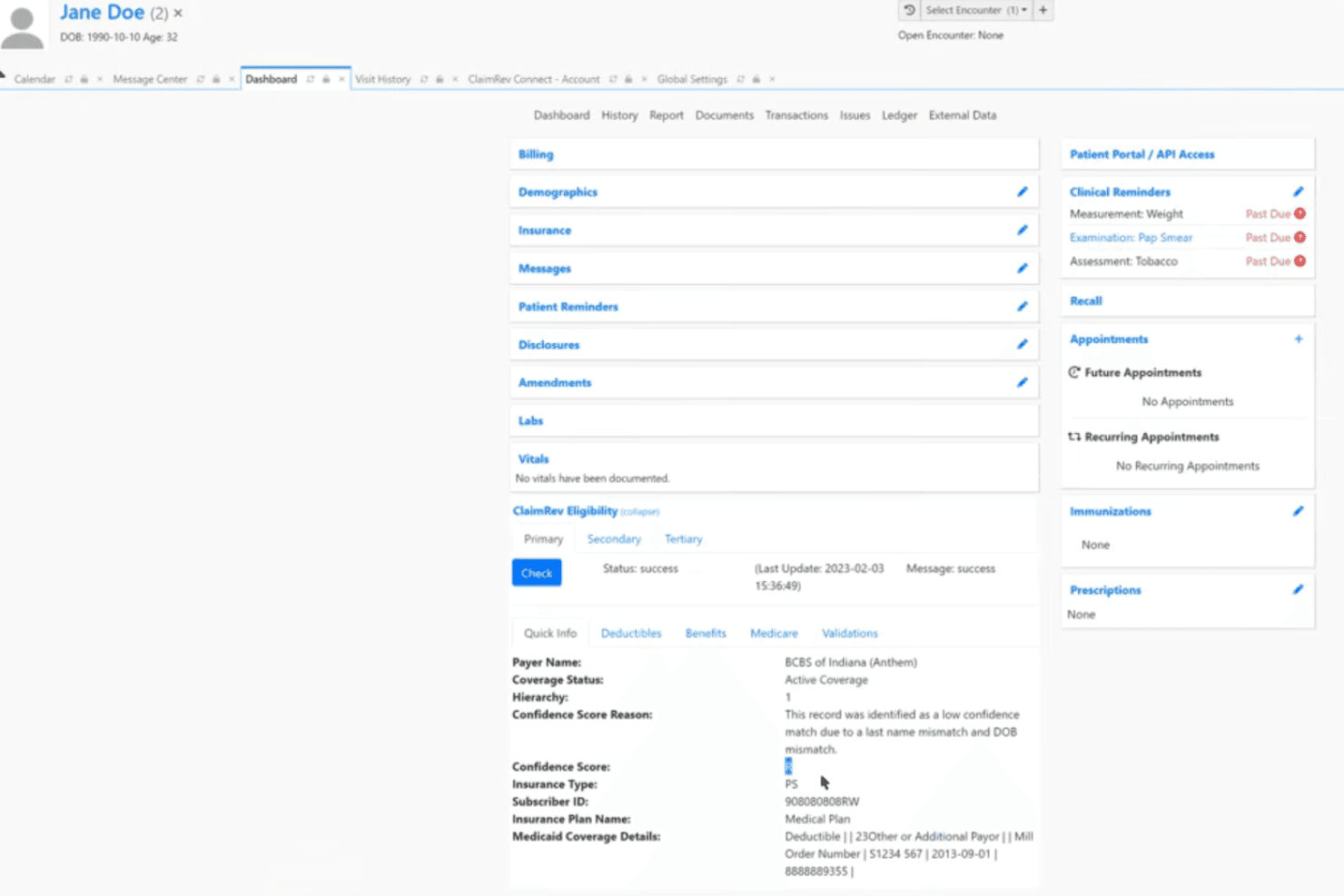
OpenEMR combines records, billing, claims, scheduling, e-prescribing and coding. OpenEMR is a free, open-source electronic health records and medical practice management system that includes integrated medical billing, insurance claim submission, patient scheduling, e-prescribing, and ICD-10/CPT/HCPCS coding support.
Who Is OpenEMR Best For?
OpenEMR is a strong fit for small clinics and independent practices with in-house IT support that need a fully free, customizable billing and practice management system.
Why I Picked OpenEMR
I've included OpenEMR in my top picks because its open-source architecture lets you modify the billing module at the code level to fit your practice's exact claim submission workflow. I like that practices can build entirely custom clinical forms and configure coding rules without any vendor approval or licensing cost. The modular design also supports multilingual configurations across 30+ languages, which makes it adaptable for clinics serving diverse patient populations.
OpenEMR Key Features
- Integrated e-prescribing: Send digital prescriptions directly to pharmacies from within the platform.
- HIPAA ASC X12 5010 claim support: Submit electronic insurance claims compliant with current regulatory standards.
- Lab integration: Manage lab orders and receive results automatically in patient charts.
- ERA/payment posting: Record and reconcile insurance payments using electronic remittance advice files.
OpenEMR Integrations
OpenEMR offers native integrations with ClaimRev, WENO Exchange, Comlink, Sphere Payment, and EMR Direct phiMail. An API is available for custom integrations.
What's Free?
OpenEMR is fully free and open-source with no licensing fees, no user limits, and no feature restrictions. You can self-host it at no cost, though third-party services like clearinghouse connections and professional support may carry separate fees.
Pros and Cons
Pros:
- Regular updates from an active community
- Unlimited users and patients supported
- Open-source code with full backend access
Cons:
- Lacks built-in clearinghouse service
- Requires self-hosting and technical setup
Learn more about OpenEMR: Best for integrated patient scheduling tools
- Free plan available
- Free
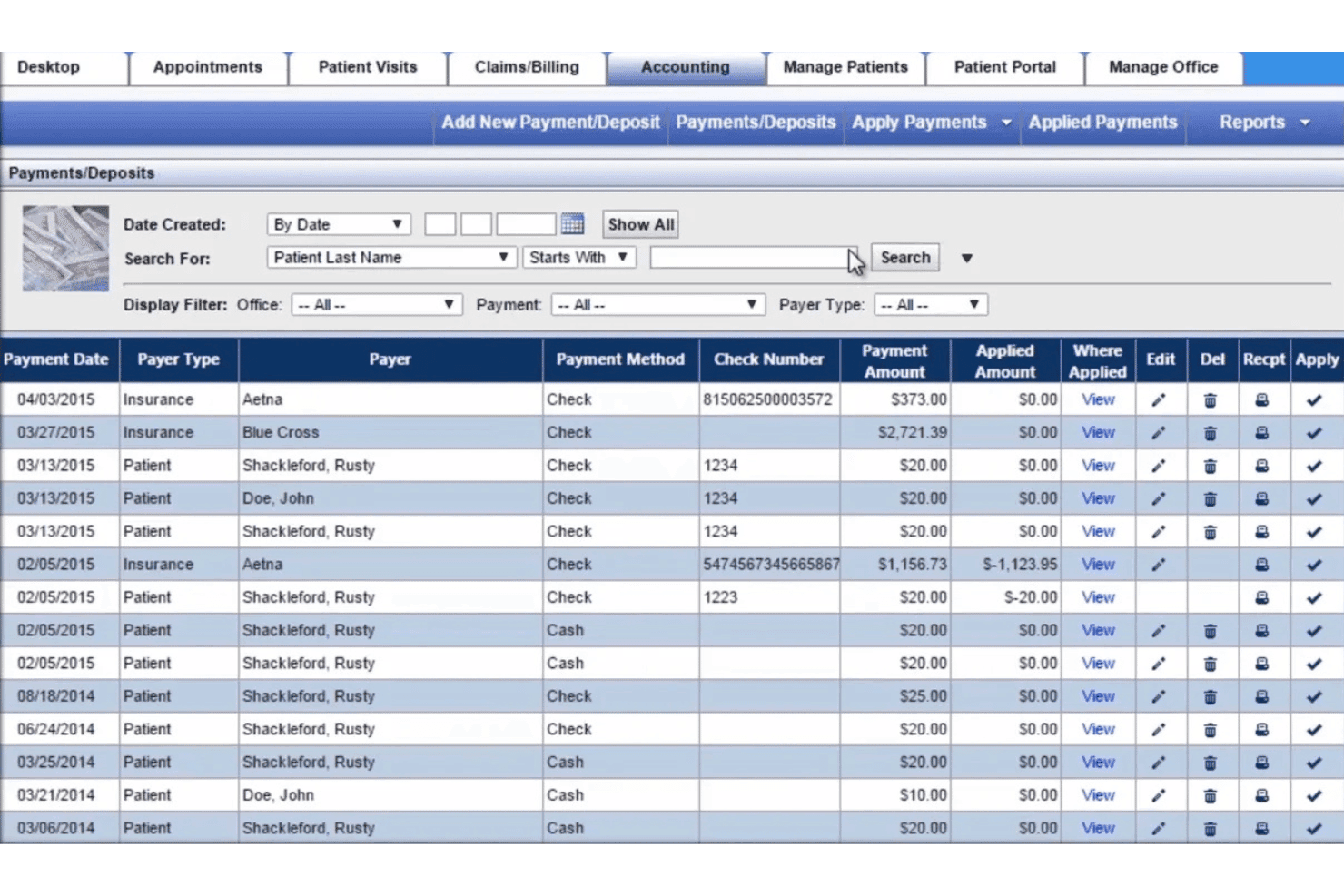
Practice Mate manages scheduling, claims, billing, eligibility, and receivables. Practice Mate by Office Ally is a free practice management and medical billing platform that handles appointment scheduling, claim submission via clearinghouse, patient billing, eligibility verification, and accounts receivable tracking.
Who Is Office Ally Practice Mate Best For?
Practice Mate is a strong fit for solo physicians and small clinic administrators who need a no-cost billing and scheduling solution without technical setup overhead.
Why I Picked Office Ally Practice Mate
Practice Mate earns its spot on my shortlist because the scheduling and billing workflows are genuinely connected, not just adjacent. When I book an appointment, I can run eligibility and benefits verification within that same scheduling flow, before the patient ever arrives. Reminder Mate then handles automated outreach across 16 languages, which keeps the appointment pipeline moving without manual follow-up from the front desk.
Office Ally Practice Mate Key Features
- Claim attachments: Upload supporting documents directly to electronic claims for payers that require additional records.
- Patient ledger: Track all patient charges, payments, and adjustments in an organized account history.
- Electronic remittance advice (ERA): Automatically receive payment details and reconciliation from insurance payers for posted claims.
- Configurable superbills: Create and customize digital superbills with ICD-10, CPT, and HCPCS codes to standardize billing documentation.
Office Ally Practice Mate Integrations
Native integrations include Office Ally EHR 24/7, Patient Ally, Stripe for payment processing, and Office Ally’s clearinghouse. An API is available for custom integrations.
What's Free?
Practice Mate's core plan is free forever, with no subscription or licensing fees, and includes appointment scheduling, patient billing, configurable superbills, patient ledger, and reporting. Some add-ons carry transactional fees, including eligibility verification (first 100 transactions at $10/month, then $0.10 each) and patient appointment reminders via Reminder Mate.
Pros and Cons
Pros:
- Claims clearinghouse is included with no licensing fees
- Supports patient ledger and accounts receivable tracking
- Includes appointment scheduling and billing at no cost
Cons:
- No built-in telehealth or e-prescribing
- Interface looks outdated compared to modern tools
Learn more about Office Ally Practice Mate:
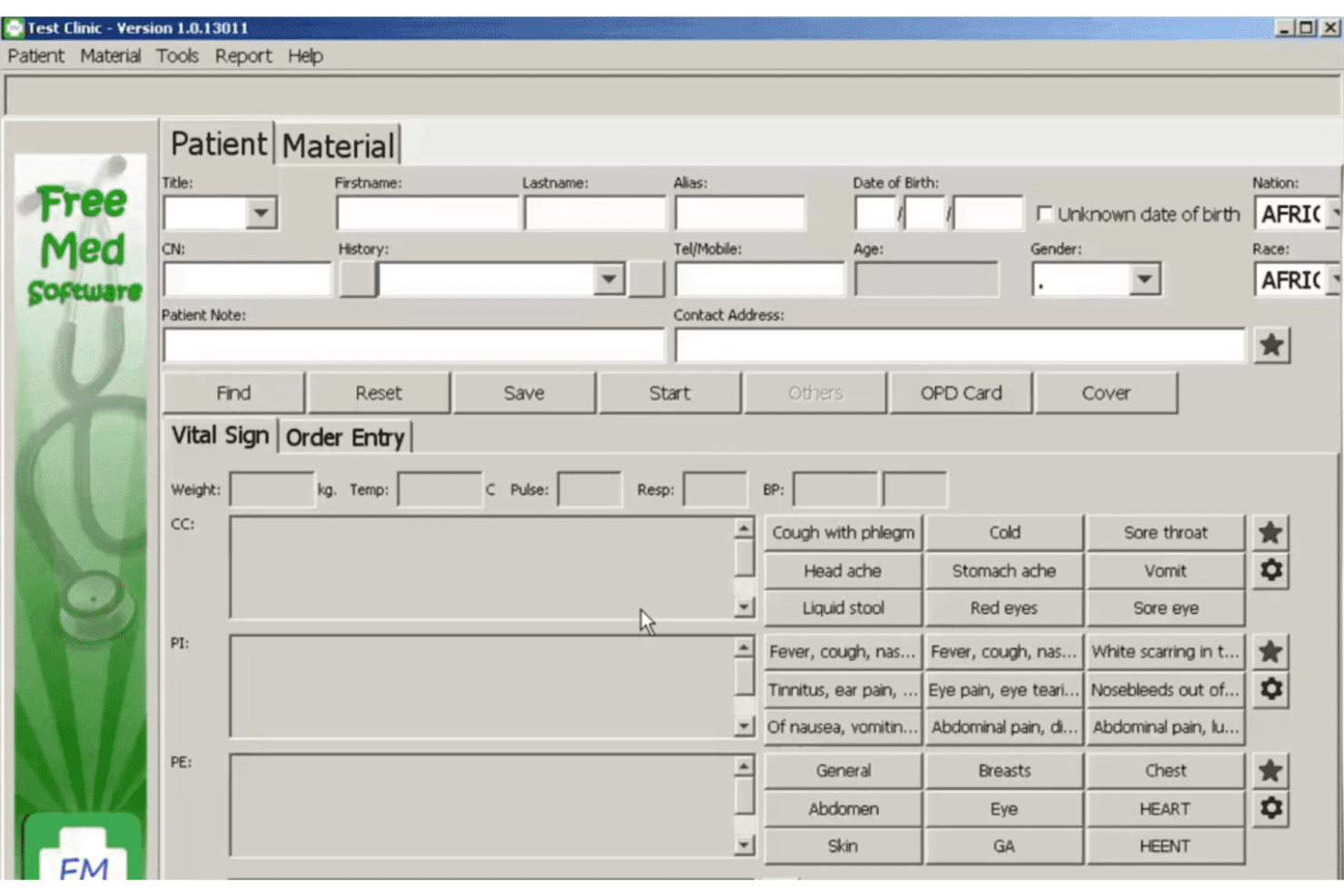
FreeMED connects clinical records, workflows, reporting, and medical billing. FreeMED is a free, open-source electronic medical record and practice management system that covers clinical records, administrative workflows, reporting, and medical billing connections for healthcare providers.
Who Is FreeMED Best For?
FreeMED is suited to independent practices, clinics, developers, and healthcare organizations with technical resources to install and maintain an open-source EMR and billing environment.
Why I Picked FreeMED
I picked FreeMED for its connection with REMITT, an open-source billing and remittance package developed by the FreeMED Software Foundation. REMITT translates medical billing documents between formats and transmits them for claim submission.
This approach gives technically experienced teams more control over how billing files are generated, converted, and sent. However, setup requires more configuration than a hosted billing platform with ready-made payer connections.
FreeMED Key Features
- Practice management: Manages administrative and clinical workflows through a browser-based system.
- Billing and remittance connection: Works with REMITT to translate and transmit medical billing and claim documents.
- Medical data exchange: Provides an XML-RPC backend and supports multiple import and export formats.
- Reporting tools: Generates administrative and clinical reports from data stored in the system.
- Open-source customization: Allows developers to modify the source code and configure the platform for specific workflows.
FreeMED Integrations
FreeMED connects with REMITT for billing and remittance processing. Its repository also contains an XML-RPC backend, a REMITT callback service, and documentation for a Quest Diagnostics HL7 interface. A current list of ready-made third-party connections is not published.
What’s Free?
FreeMED is distributed under the GNU General Public License and can be downloaded, modified, and self-hosted without subscription or licensing fees. Its official repository currently requires PHP 8.3 and uses Debian as the reference installation environment.
Pros and Cons
Pros:
- Can be modified for specific workflows
- Supports billing document translation
- Free and open-source codebase
Cons:
- Limited current user-facing documentation
- Requires technical installation and maintenance
Learn more about FreeMED:
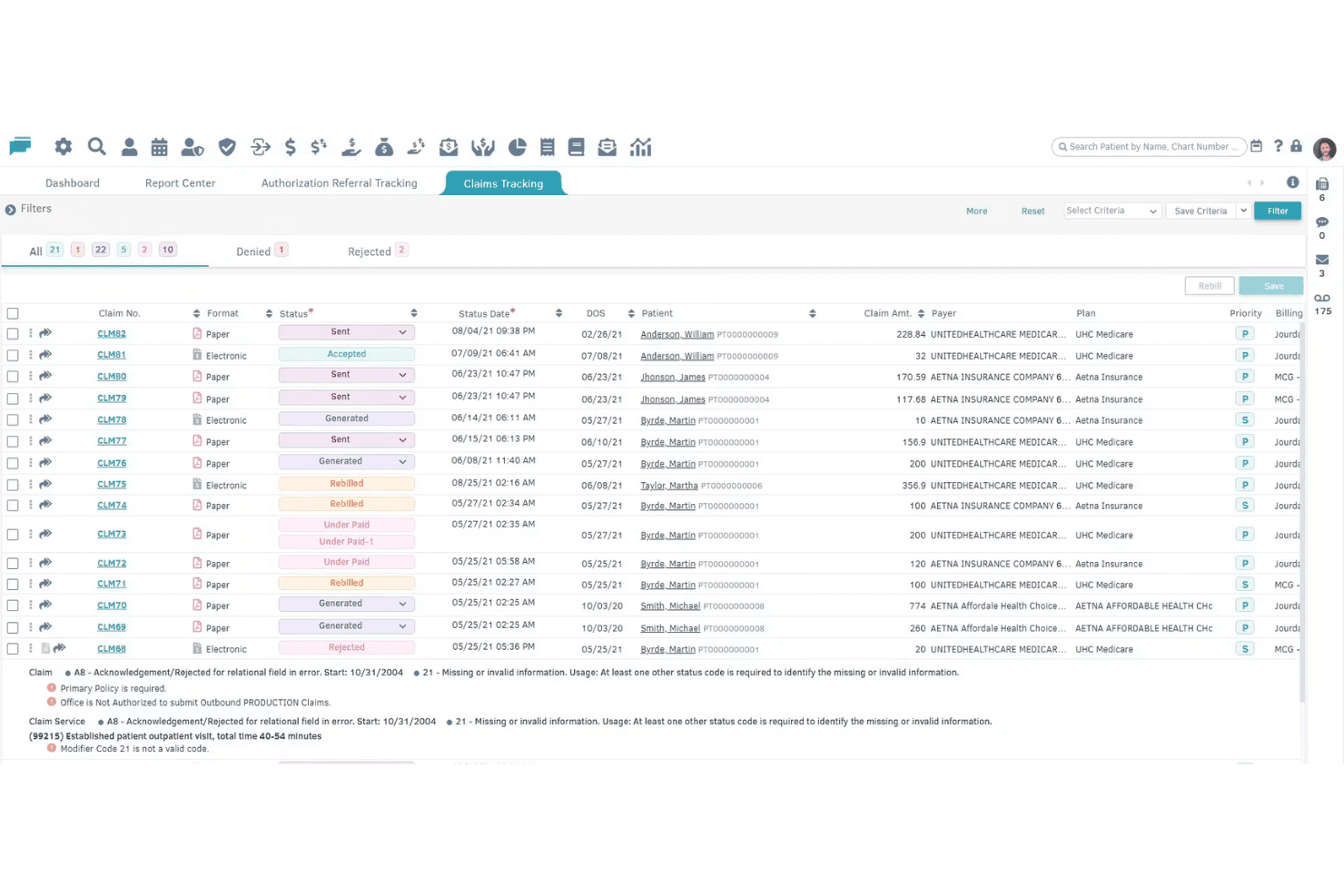
billrMD covers claims, payments, invoicing, eligibility checks, and AR tracking. billrMD is a cloud-based medical billing platform that covers electronic claims submission, payment posting, patient invoicing, insurance eligibility verification, and AR tracking—all within a single system that includes a permanently free entry-level plan.
Who Is billrMD Best For?
billrMD is a good fit for solo physicians, small practices, and independent medical billing companies that need a full-featured billing system without an upfront financial commitment.
Why I Picked billrMD
billrMD earns its spot on my shortlist because the claims workflow is genuinely end-to-end: electronic submission runs through an integrated clearinghouse, ERA auto-posting reconciles payer payments without manual entry, and real-time eligibility verification catches coverage gaps before a claim is ever submitted. I also like that CMS-1500 forms auto-fill from existing patient and billing data, which removes a meaningful amount of manual work from the claim creation step.
billrMD Key Features
- Built-in coding library: Access over 73,000 codes including ICD-10, CPT, and DSM5 for accurate claim preparation.
- Patient invoicing and balance statements: Generate branded statements and invoices for patient billing management.
- Appointment scheduling: Manage calendars and appointments with multiple views and drag-and-drop controls.
- User-based access controls: Set role-based permissions to maintain HIPAA compliance and control PHI access.
billrMD Integrations
billrMD offers native integrations with Dendi LIS, AltaPoint, HealthBiller, WebIMS, Availity, Global Pay, Professional Office Services, and Data Dimensions. An API is available for custom integrations.
What's Free?
billrMD's free plan is a permanent "Complimentary Introductory Plan," not a time-limited trial, and requires no credit card to sign up. Paid upgrades are available as your practice scales, but the free tier gives you access to core billing functionality from day one.
Pros and Cons
Pros:
- Real-time insurance eligibility verification
- Built-in coding and diagnosis library
- Claim creation auto-fills from existing records
Cons:
- No advanced reporting or analytics
- Support response times can be slow
Learn more about billrMD:
Outro software gratuito de faturação médica
Eis algumas opções adicionais de software gratuito de faturação médica que não integraram a minha seleção, mas que ainda vale a pena conhecer:
- 11Cortex EDI (Ebill Cloud)Best eligibility verification automation
- 12BahmniBest for resource-limited clinical environments
- 1375healthBest for cloud-based user access flexibility
- 14remedlyBest integrated appointment reminders
- 15Pro Health BillingBest for detailed patient billing histories
- 16Medica Billing SolutionsBest specialty-specific billing options
- 17AltuMED PracticeFitBest pre-authorization management features
- 18Service Center by Office AllyBest guided claims submission interface
- 19OpenPMBest robust patient statement management
- 20eMedicalPracticeBest workflow tools for solo providers
How I Evaluate Cloud Based Medical Billing Software
I split my evaluation into must-have billing fundamentals—like electronic claim submission and ERA posting—and the differentiators that separate a good platform from the right one for your practice.
Core Functionality (Table Stakes for This List)
When I'm selecting tools for my list, I rank each one on a scale from 0 (does not offer the functionality) to 5 (excels in this area) for each core functionality listed below. Then, I calculate the tool's total score into a percentage. Each tool needs to achieve a minimum total score of 65% to be considered for inclusion.
- Claims Management: I check whether the platform can generate CMS-1500 forms, submit them electronically through a clearinghouse, and track claim status without switching to a separate tool.
- Patient Billing & Invoicing: After insurance adjudication, your front desk still needs to collect patient balances. I look for automated statement generation and clear balance tracking.
- Payment Posting: Manually posting every ERA slows your team down. I evaluate how each tool handles insurance and patient payment reconciliation, including auto-posting capabilities.
- Eligibility Verification: A single missed coverage lapse can stall reimbursement for weeks. I look for real-time verification across multiple payers before claims go out the door.
- Medical Coding Support: Built-in ICD-10, CPT, and HCPCS code libraries with search and validation help reduce rejected claims. I evaluate how each platform supports accurate code selection.
- AR & Denial Tracking: Aging reports and denial reason codes tell you where revenue is stuck. I look for dashboards that categorize denials and support follow-up or resubmission workflows.
Once I have a list of tools that meet the criteria, I consider what sets each platform apart.
Differentiating Factors (What Sets Vendors Apart)
Here's how I compare and contrast different vendors:
Standout Features
A denial management dashboard is one of the first things I look for. When your billing team can see rejected claims organized by reason code with resubmission workflows built in, they recover revenue much faster than chasing denials through spreadsheets. I also evaluate patient portal access, since a self-service portal where patients view statements and pay balances online cuts down on phone calls and manual payment collection. Customizable superbill templates matter too—a mental health practice and a primary care clinic need very different charge capture forms, and the best platforms let you tailor those templates to your specialty.
Beyond Features
HIPAA compliance is where I start. I check whether the vendor provides a signed Business Associate Agreement on the free plan and confirm that encryption, role-based access, and audit logging are in place. Clearinghouse connectivity matters just as much—if the free tier doesn't include electronic claim submission to major payers, you're stuck printing and mailing CMS-1500 forms. I also evaluate EHR integrations, since a billing tool that doesn't connect to your clinical system means double data entry for every patient encounter.
Como escolher software gratuito de faturação médica
É fácil perder-se em listas extensas de funcionalidades e estruturas de preços complexas. Para o ajudar a manter-se concentrado enquanto desenvolve o seu processo específico de seleção de software, apresentamos uma lista de fatores a ter em conta:
| Fator | O que considerar |
|---|---|
| FatorEscalabilidade | O que considerarO plano acompanhará o crescimento do seu consultório? Verifique se existem limites quanto ao número de prestadores, ao volume de doentes ou aos pedidos de reembolso, que possam exigir uma migração mais cedo do que gostaria. |
| FatorIntegrações | O que considerarA ferramenta liga-se ao seu EHR, ao software de gestão do consultório ou ao software de contabilidade? Evite a introdução manual de dados sempre que possível, procurando ligações disponibilizadas pelo fornecedor. |
| FatorPersonalização | O que considerarPode adaptar os campos de faturação, as faturas detalhadas ou as opções de elaboração de relatórios à sua especialidade? Os modelos demasiado rígidos podem não se adequar a fluxos de trabalho de faturação ou necessidades específicas de uma especialidade. |
| FatorFacilidade de utilização | O que considerarA interface é intuitiva tanto para o pessoal de faturação como para os restantes funcionários? Procure painéis claros e acesso rápido aos fluxos de trabalho essenciais em vídeos de demonstração, e não apenas em capturas de ecrã. |
| FatorImplementação e integração inicial | O que considerarQuão exigente é a configuração? Avalie os tutoriais, as ferramentas de importação de dados e a disponibilidade do apoio ao cliente durante a entrada em funcionamento, para evitar perturbações para o seu pessoal. |
| FatorCusto | O que considerar“Gratuito” significa realmente que não existem requisitos ocultos de atualização nem taxas de transação? Procure custos adicionais associados ao envio de pedidos de reembolso, ao acesso a câmaras de compensação ou ao apoio. |
| FatorMedidas de segurança | O que considerarQue proteções de dados estão implementadas? Exija alojamento na nuvem em conformidade com a HIPAA, registos de auditoria e um Acordo de Associado Comercial — mesmo que não esteja a pagar pela plataforma. |
| FatorDisponibilidade do apoio | O que considerarQuando surge um problema de faturação, a quem recorre? Avalie se o apoio está disponível para além de uma base de conhecimento, sobretudo para questões urgentes relacionadas com pedidos de reembolso ou recusas. |
O que é o software gratuito de faturação médica?
O software gratuito de faturação médica é um sistema digital que permite aos consultórios gerir pedidos de reembolso de seguros, a faturação dos doentes e o registo de pagamentos sem pagar subscrições.
Estas plataformas disponibilizam fluxos de trabalho essenciais do ciclo de receitas sem custos contínuos, permitindo às equipas enviar pedidos de reembolso, gerar extratos para os doentes e acompanhar pagamentos enquanto avaliam a adequação do software para uma utilização a longo prazo.
Funcionalidades do software gratuito de faturação médica
Vamos analisar as funcionalidades normalmente encontradas no software de faturação médica e quais são geralmente incluídas nos planos gratuitos e nos planos pagos.
Funcionalidades normalmente incluídas no software gratuito de faturação médica
- Criação e acompanhamento de pedidos: Prepare pedidos de comparticipação, gere formulários CMS-1500 e acompanhe cada pedido desde a submissão até à resposta da entidade pagadora.
- Faturação básica de pacientes: Gere e envie faturas relativas aos valores a cargo do paciente após a apreciação pela entidade seguradora.
- Registo de pagamentos: Registe os pagamentos recebidos das seguradoras e dos pacientes, associando-os às faturas ou aos pedidos pendentes.
- Acompanhamento de contas a receber: Monitorize os valores pendentes de pacientes ou entidades pagadoras e assinale os montantes em atraso para acompanhamento.
- Verificação da elegibilidade: Confirme a cobertura do seguro do paciente antes de submeter os pedidos, ajudando a reduzir as rejeições.
- Relatórios básicos: Aceda a relatórios integrados que resumem o estado dos pedidos, os pagamentos e os valores a receber, para obter uma visão clara do desempenho da faturação.
- Pesquisa de códigos médicos: Pesquise e aplique códigos ICD-10 ou CPT comuns para ajudar a criar pedidos precisos.
- Gestão do acesso dos utilizadores: Configure funções e permissões básicas para proteger informações sensíveis de saúde e financeiras.
Funcionalidades normalmente incluídas no software pago de faturação médica
- Validação automática dos pedidos: Identifique erros ou campos em falta nos pedidos antes da submissão, para evitar rejeições e acelerar os reembolsos.
- Superfaturas personalizáveis: Crie e edite modelos de superfaturas adaptados à sua especialidade ou ao fluxo de trabalho da sua unidade.
- Pagamentos online dos pacientes: Disponibilize um portal online seguro onde os pacientes possam consultar extratos e pagar os valores em dívida eletronicamente.
- Verificação da elegibilidade em lote: Efetue verificações de elegibilidade para vários pacientes de uma só vez, em vez de os verificar individualmente.
- Registo automático integrado de ERA: Aplique automaticamente os dados do Aviso Eletrónico de Remessa das seguradoras para uma reconciliação de pagamentos mais rápida.
- Painéis de gestão de rejeições: Centralize os pedidos rejeitados, os códigos dos motivos e os fluxos de trabalho de nova submissão para recuperar receitas.
- Análise avançada e exportação: Analise mais detalhadamente as principais tendências de desempenho ou exporte dados financeiros abrangentes para análise.
- Integrações com câmaras de compensação: Ligue-se diretamente às câmaras de compensação para aumentar a compatibilidade com as entidades pagadoras e acelerar as atualizações do estado dos pedidos.
- Integrações com EHR e PMS: Sincronize dados entre a faturação, os registos clínicos eletrónicos e as ferramentas de gestão da unidade, reduzindo a introdução duplicada de dados.
- Auditoria HIPAA e registos de atividade: Acompanhe os acessos e as alterações para garantir a conformidade regulamentar, com relatórios detalhados em caso de auditoria.
Vantagens do software gratuito de faturação médica
A implementação de software gratuito de faturação médica proporciona várias vantagens à sua equipa e à sua empresa. Eis algumas das que pode esperar:
- Poupança de custos: Gira pedidos, faturação e pagamentos sem taxas de subscrição nem custos iniciais, permitindo-lhe reinvestir esse dinheiro noutras áreas.
- Menores barreiras à entrada: Experimente ferramentas essenciais de faturação sem risco financeiro antes de decidir se uma atualização paga ou funcionalidades adicionais são vantajosas para a sua unidade.
- Fluxos de trabalho simplificados: Centralize a faturação dos pacientes, o acompanhamento dos pedidos e o registo de pagamentos para reduzir o trabalho manual e evitar oportunidades de receita perdidas.
- Maior precisão na faturação: O suporte integrado à codificação e as verificações de elegibilidade ajudam a garantir que os pedidos são precisos e conformes, reduzindo rejeições e atrasos.
- Escalabilidade para unidades pequenas: Os planos gratuitos apoiam profissionais a trabalhar individualmente ou equipas reduzidas à medida que aumenta o volume de pacientes, fornecendo o essencial sem comprometer excessivamente os recursos.
- Avaliação transparente das funcionalidades: Compare diretamente as funcionalidades incluídas e pagas dos fornecedores, ajudando a identificar o software mais adequado a longo prazo para a sua equipa.
- Melhoria da experiência do paciente: Os extratos dos pacientes, o pagamento de faturas online e uma comunicação clara ajudam os pacientes a compreender e regular mais rapidamente os valores em dívida.
Custos e preços do software de faturação médica
Compreendo que chegou a este artigo à procura das melhores opções de software de faturação médica disponíveis gratuitamente. No entanto, uma vez que os planos gratuitos oferecem apenas funcionalidades limitadas, é bastante provável que precise de atualizar o seu plano no futuro.
A tabela abaixo resume os planos comuns, os respetivos preços médios e as funcionalidades normalmente incluídas no software de faturação médica:
Tabela de comparação de planos de software de faturação médica
| Tipo de plano | Preço médio | Funcionalidades comuns |
|---|---|---|
| Tipo de planoPlano gratuito | Preço médio$0 | Funcionalidades comunsEnviar e acompanhar pedidos básicos, gerar faturas simples para os pacientes, registar pagamentos manualmente e aceder a relatórios básicos. |
| Tipo de planoPlano pessoal | Preço médio$25-$50/utilizador/mês | Funcionalidades comunsAcesso a uma câmara de compensação eletrónica, bibliotecas de códigos integradas, verificações de elegibilidade em tempo real, apoio ao utilizador e personalização de extratos. |
| Tipo de planoPlano empresarial | Preço médio$60-$150/utilizador/mês | Funcionalidades comunsRegisto automático de ERA, pagamentos online dos pacientes, fluxos de trabalho para a gestão de recusas, análises, integração com EHR e pedidos em lote. |
| Tipo de planoPlano empresarial avançado | Preço médio$200+/utilizador/mês | Funcionalidades comunsIntegrações personalizadas, controlos de segurança avançados, suporte para várias localizações, automatização de fluxos de trabalho, apoio prioritário e relatórios de registo de auditoria. |
Perguntas frequentes sobre software gratuito de faturação médica
Eis algumas respostas a perguntas comuns sobre software gratuito de faturação médica:
Posso enviar pedidos eletrónicos a todos os pagadores num plano gratuito?
Não. A maioria dos planos gratuitos limita o envio de pedidos eletrónicos ou exige complementos pagos de câmara de compensação. Verifique se os seus principais pagadores, incluindo o Medicare e o Medicaid, são suportados sem custos adicionais.
O software gratuito de faturação médica é seguro e está em conformidade com a HIPAA?
Sim. As principais opções disponibilizam alojamento em conformidade com a HIPAA e proteção de dados. Confirme sempre se o fornecedor assina um Acordo de Associado Comercial e suporta encriptação, controlos de acesso e cópias de segurança regulares dos dados.
O que acontece se a minha clínica deixar de ter capacidade para o plano gratuito?
Terá de atualizar para um plano pago quando exceder os limites de utilizadores, pacientes ou pedidos mensais. Consulte estes limites antes da integração para antecipar quando poderá ser necessário aumentar a escala.
Posso personalizar modelos de faturação e relatórios num plano gratuito?
As opções de personalização são geralmente limitadas nos planos gratuitos. Algumas ferramentas permitem editar modelos básicos, mas as faturas detalhadas avançadas e os relatórios detalhados requerem normalmente uma atualização paga.
Como obtenho apoio se tiver problemas de faturação?
Os planos gratuitos restringem frequentemente o apoio em direto e dependem de bases de conhecimento ou fóruns da comunidade. Se prevê ter dúvidas frequentes sobre faturação, verifique se estão incluídos o apoio por e-mail ou o chat em direto.