

O software de sinalização digital para cuidados de saúde é uma ferramenta digital que permite à sua equipa criar, gerir e apresentar conteúdos visuais em ecrãs de clínicas, hospitais ou consultórios médicos. Se procura as melhores formas de partilhar atualizações importantes, dicas de saúde, horários ou avisos de emergência com funcionários e pacientes, está no sítio certo.
A solução certa pode ajudá-lo a reduzir a comunicação manual, reforçar as práticas de segurança e manter todos informados sem aumentar a sua carga de trabalho administrativo. Neste guia, encontrará as melhores opções de sinalização digital para cuidados de saúde em 2026, cada uma com funcionalidades e pontos fortes que podem ajudá-lo a responder às exigências atuais de cuidados e comunicação.
Why Trust Our Software Recommendations
6,700+
Reviews
20
Industry experts
16+
Evaluation factors
14
Years
Our team has been testing and reviewing software since 2012. As medical practice leaders ourselves, we know how difficult—and important—it is to choose the right software.
For this guide, we evaluated tools using hands-on testing and independent research, scoring tools using our selection criteria.
Our reviews reflect our human editorial judgment, not a sales pitch.
Tabela de comparação de software de sinalização digital para cuidados de saúde
A tabela abaixo compara os detalhes de preços das minhas principais escolhas de software de sinalização digital para cuidados de saúde.
Sorted by: Default
| Tool | Starting Price | Website | |
|---|---|---|---|
Best for interactive healthcare displays | 4.9 out of 5 | $14/screen/month Free demo + 30-day free trial available | Website |
Best for simple clinic signage | 4.4 out of 5 | $29/month Free demo available | Website |
Best for secure healthcare signage | 4.5 out of 5 | $16.50/display/month Free demo available | Website |
Best for enterprise signage management | 4.3 out of 5 | $14/player/month Free demo + 30-day free trial available | Website |
Best for customizable signage workflows | 5.0 out of 5 | $9/month 30-day free trial | Website |
Best for waiting room engagement | 4.6 out of 5 | Pricing upon request Free demo available | Website |
Best for healthcare content management | 4.6 out of 5 | $450 one-time Free demo available | Website |
Best for wayfinding and digital signage | 5.0 out of 5 | Pricing upon request Free demo available | Website |
Best for hospital communication displays | 2.7 out of 5 | Pricing upon request Free demo available | Website |
Best for patient education displays | Not rated | Pricing upon request Not available | Website |


Avaliações do melhor software de sinalização digital para cuidados de saúde
Abaixo encontram-se os meus resumos detalhados do melhor software de sinalização digital para cuidados de saúde que entrou na minha lista restrita. As minhas avaliações apresentam uma análise detalhada das funcionalidades, casos de utilização e integrações de cada software para ajudá-lo a encontrar a melhor opção para si.
 Best for interactive healthcare displays
- Free demo + 30-day free trial available
- From $14/screen/month (billed annually)
Visit WebsiteCustomer Rating:4.9/5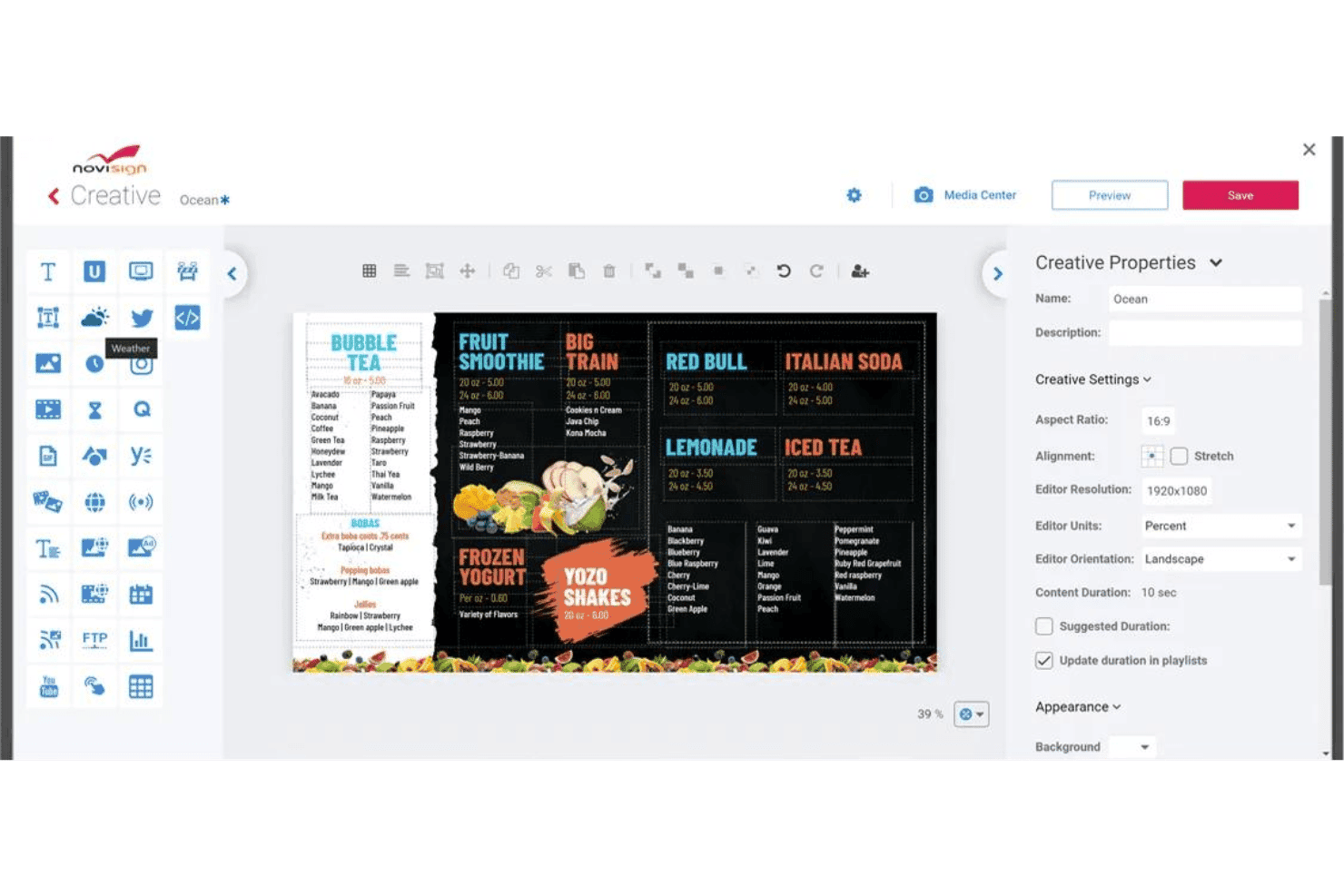
NoviSign offers a drag-and-drop digital signage creative editor with customizable menu board templates and content properties. NoviSign is a cloud-based digital signage platform for healthcare settings that supports interactive touchscreen displays, multi-zone screen layouts, real-time queue and wait time widgets, and remote content management across multiple locations and screens.
Who Is NoviSign Best For?
NoviSign suits clinic administrators and patient experience teams managing interactive waiting room displays across multiple healthcare locations.
Why I Picked NoviSign
NoviSign earns its spot on my shortlist because of how well its interactive touchscreen and kiosk capabilities translate to real waiting room scenarios. I love that you can build multi-zone layouts that simultaneously display a virtual queue widget, health education videos, and branded messaging on a single screen. The IoT and RFID event triggers also let my team configure touch-activated content zones that respond to patient interactions in real time.
NoviSign Key Features
- SOC 2 Type II certified security: Ensures secure content delivery and meets strict data protection requirements for healthcare organizations.
- Centralized cloud management: Lets your team update, schedule, and monitor screens at multiple clinic locations from a single dashboard.
- Multi-platform hardware support: Works with Windows, Android, Chrome OS, Samsung Tizen, LG webOS, BrightSign, and more.
- Proof-of-play and audit reporting: Tracks media playback, screen status, and user actions for compliance and operational visibility.
NoviSign Integrations
NoviSign offers native integrations with Toast POS, PowerBI, Tableau, Amadeus Delphi, SharePoint, Google Drive, Dropbox, Outlook, and Google Calendar, and connects with Zapier. An API is available for custom integrations.
Pros and Cons
Pros:
- Verified healthcare facility deployments across hospitals and clinics
- Remote content updates require no on-site hardware access
- Touchscreen kiosk setup runs in under an hour
Cons:
- Per-screen billing adds up quickly across large multi-screen deployments
- No documented native EHR or practice management integrations
Learn more about NoviSign:

truDigital Signage offers a lobby welcome directory display with room listings, time, and branding for corporate office environments. truDigital Signage is a cloud-based digital signage platform for healthcare settings that combines a healthcare-specific content library, multi-location screen management, and pre-built medical infotainment templates.
Who Is truDigital Signage Best For?
truDigital is a good fit for small to mid-sized clinics, dental offices, and medical practices that need ready-to-deploy signage without complex IT setup.
Why I Picked truDigital Signage
I've included truDigital Signage in my top picks because the pre-built healthcare content libraries genuinely reduce setup time for clinics. Rather than building slides from scratch, I can pull from dedicated Medical, Cardiology, and Dental Infotainment libraries, which is exactly what a front-desk or practice management team needs. The Sign Player also ships pre-configured and already assigned to your account, so getting a waiting room screen live takes minutes, not days.
truDigital Signage Key Features
- Campaigns tool: Schedule and publish digital signage content across multiple clinic locations from a single dashboard.
- Infotainment app library: Access 500+ pre-built apps, including specialized medical news, wellness tips, and animated health content.
- Multi-zone layout support: Combine video, text, weather, and news into segmented content zones on one screen.
- Proprietary sign player hardware: Plug-and-play device that connects to clinic screens with offline content caching and remote management.
truDigital Signage Integrations
truDigital Signage offers native integrations with Google Drive, Google Calendar, Google Sheets, Microsoft PowerPoint, Excel, Word, Power BI, Slack, Yammer, Domo, Klipfolio, and Vimeo. An API is available for custom integrations.
Pros and Cons
Pros:
- Multi-location scheduling from one dashboard
- Sign Player ships pre-configured and ready
- Pre-built dental and medical infotainment libraries
Cons:
- No documented BAA for HIPAA compliance
- No native EHR integration for wait times
Learn more about truDigital Signage: Best for secure healthcare signage
- Free demo available
- From $16.50/display/month
Visit WebsiteCustomer Rating:4.5/5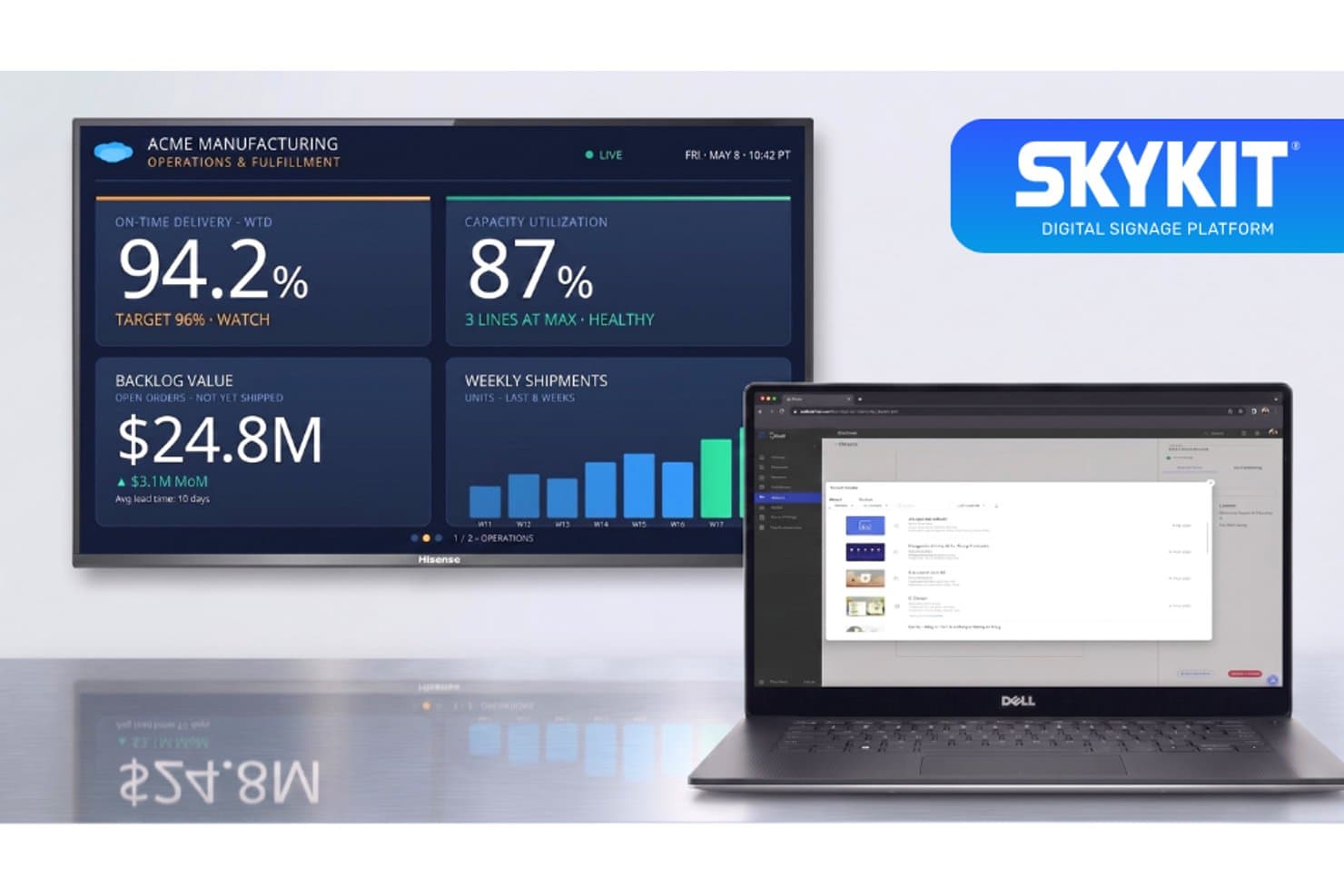
Skykit offers a digital signage platform that displays real-time operations dashboards on large screens, manageable remotely via a laptop interface. Skykit is a cloud-based digital signage platform built for healthcare environments, supporting multi-location content management, real-time BI dashboard display, emergency alerts, and secure device management across hospital and clinic networks.
Who Is Skykit Best For?
Skykit is a strong fit for IT administrators and operations teams managing digital signage across large, multi-site health systems and hospital networks.
Why I Picked Skykit
Skykit earns its spot on my shortlist because of its security posture, which is genuinely built for healthcare environments. I picked it specifically for its SOC 2 Type 2 certification, role-based access controls, and SAML-based SSO with Okta and Microsoft, which give IT teams verifiable control over who can push content to which screens. I also like that emergency alert overrides are built into the Pro plan, with Alertus integration available for instant, network-wide alerts across a facility.
Skykit Key Features
- Multi-location management: Centrally schedule, update, and manage content across all screens and facilities from a single cloud dashboard.
- Real-time dashboard display: Display live BI dashboards or operational queues using integrations with Power BI, Tableau, Grafana, and other tools.
- Flexible screen layouts: Configure multiple content zones per display to show videos, health tips, live data, and announcements at the same time.
- Emergency alert integration: Trigger instant override messages or critical alerts through native integrations with systems like Alertus and InformaCast.
Skykit Integrations
Skykit offers over 60 native integrations, including Power BI, Tableau, Grafana, Salesforce, Datadog, Alertus, InformaCast, Google Workspace, and Microsoft 365. An API is available for custom integrations.
Pros and Cons
Pros:
- Enterprise-grade RBAC and SAML SSO support
- Manages 65,000+ endpoints from one dashboard
- SOC 2 Type 2 certification built in natively
Cons:
- No native EHR or patient queue integration
- No pre-built healthcare content library included
Learn more about Skykit: Best for enterprise signage management
- Free demo + 30-day free trial available
- From $14/player/month (USD, Cloud Essential)
Visit WebsiteCustomer Rating:4.3/5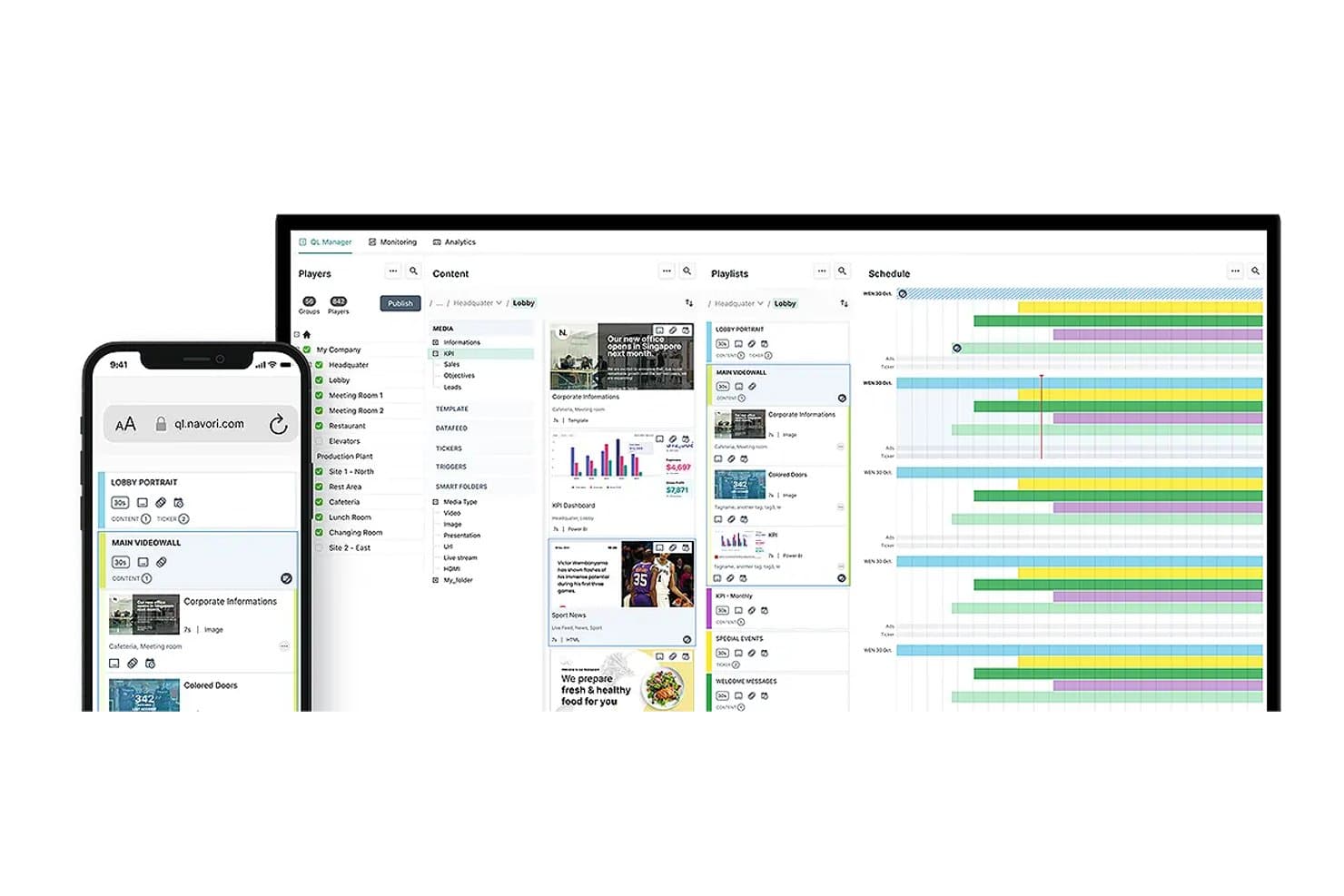
Navori offers a multi-panel CMS interface with content management, playlists, and scheduling tools visible across desktop and mobile views. Navori is an enterprise digital signage platform with a cloud and on-premise CMS, AI-driven content automation, real-time data integration, and healthcare-specific features like wait time displays, emergency alerts, and interactive wayfinding.
Who Is Navori Best For?
Navori suits large health systems and multi-site clinic networks where IT administrators need centralized control over content across dozens or hundreds of screens.
Why I Picked Navori
Navori earns its spot as one of the best on my shortlist because of how it handles enterprise-scale screen networks without losing granular control. I like that the role-based CMS lets a central team govern brand and compliance messaging while individual clinic locations still manage their own scheduling. In practice, that means a health system running 500 screens across 40 locations can push emergency alert overrides network-wide in seconds while a local coordinator updates waiting room content independently.
Navori Key Features
- Role-based content controls: Assign permissions by facility, clinic, or department for content editing and scheduling.
- Real-time data integrations: Connect patient queue feeds, appointment systems, and health data directly to display content.
- Emergency alert override rules: Instantly trigger alert messaging and override scheduled content from a central dashboard.
- Configurable multi-zone layouts: Display live wait times, videos, and branded messages in segmented sections on each screen.
Navori Integrations
Navori offers native integrations with Microsoft 365, Power BI, Tableau, Salesforce, SAP, Adobe Experience Manager, and social platforms like LinkedIn, Facebook, and Instagram. An API is available for custom integrations and real-time data feeds.
Pros and Cons
Pros:
- SOC 2 Type II security certification included
- Real-time EHR data feeds for queue displays
- Enterprise-scale multi-site screen network management
Cons:
- No pre-built licensed healthcare content library
- No explicitly documented HIPAA BAA available
Learn more about Navori: Best for customizable signage workflows
- 30-day free trial
- From $9/month
Visit WebsiteCustomer Rating:5/5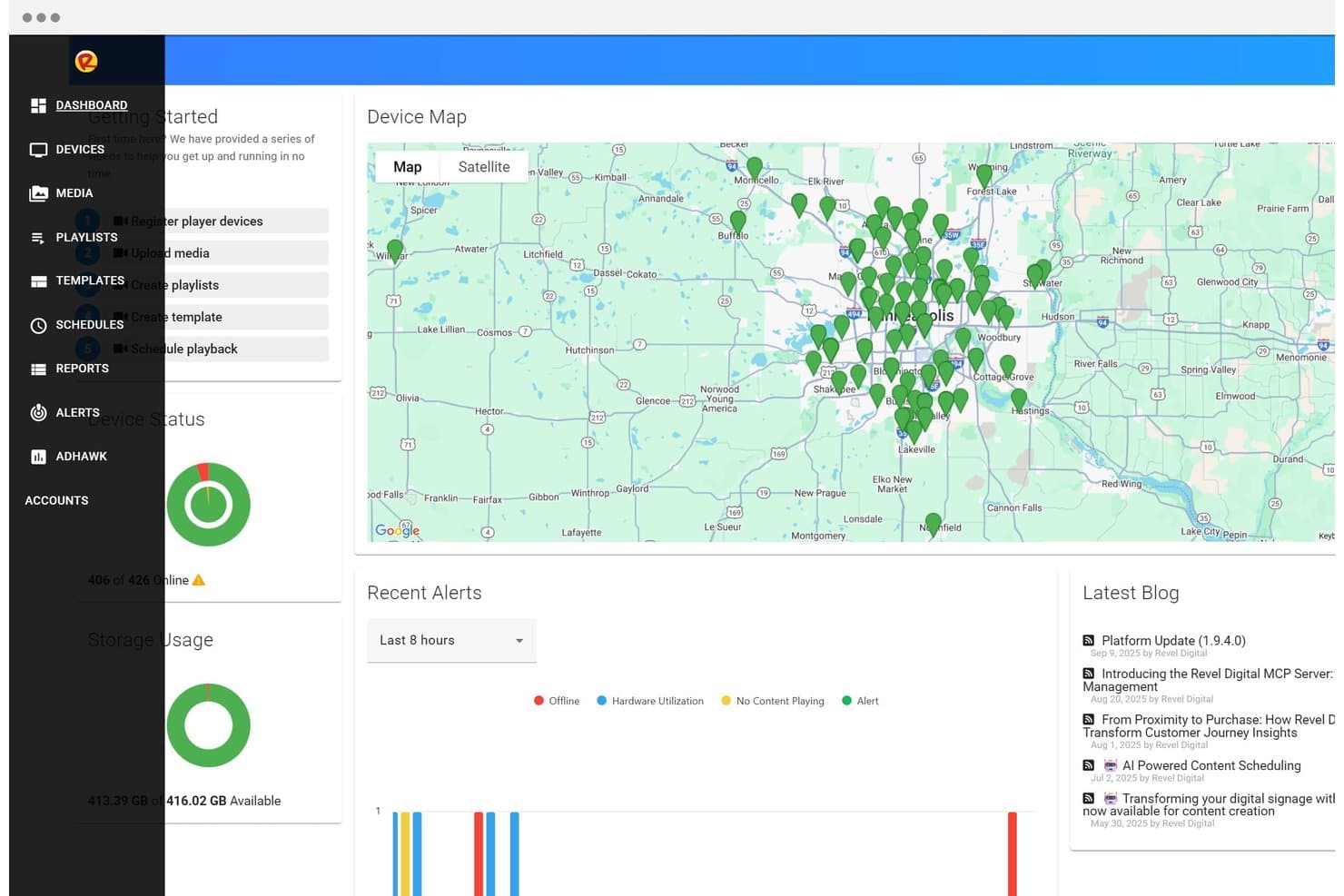
Revel Digital offers a centralized dashboard with a device map, real-time device status, storage usage, and recent alerts for managing digital signage deployments. Revel Digital is a cloud-based digital signage platform for healthcare facilities that covers wayfinding kiosks, patient queue displays, emergency alert overrides, and multi-location content management across hospital campuses and clinics.
Who Is Revel Digital Best For?
Revel Digital is a strong fit for clinic IT administrators and patient experience teams managing signage across multi-location hospital systems or large medical campuses.
Why I Picked Revel Digital
I picked Revel Digital as one of the best because its Smart Scheduling system builds trigger-based content rules driven by time, location, beacons, and motion sensors. In a hospital setting, that means a waiting room screen can automatically shift from health education content to queue updates when foot traffic spikes. I also like that Pro-tier layouts support unlimited screen zones, so a single display can simultaneously run branded messaging, live wait times, and a rotating health tip.
Revel Digital Key Features
- Emergency alert override: Instantly pushes urgent messages to all screens with one click for event or disaster notifications.
- EHR integration API: Connects with systems like Epic and Cerner to automate patient queue data for display.
- Multi-campus dashboard: Manages content scheduling and device monitoring across multiple clinics or hospital locations from one interface.
- Role-based permissions: Controls editing and publishing rights for different users and departments.
Revel Digital Integrations
Revel Digital offers native integrations with Epic, Cerner, Allscripts, Google Slides, Power BI, Slack, Instagram, Microsoft Teams, and social media feeds. An API is available for custom integrations.
Pros and Cons
Pros:
- Trigger-based scheduling adapts content by location
- Unlimited screen zones available on Pro tier
- One-click emergency override across all campus screens
Cons:
- Limited third-party reviews from verified healthcare users
- BAA availability not publicly documented
Learn more about Revel Digital : Best for waiting room engagement
- Free demo available
- Pricing upon request
Visit WebsiteCustomer Rating:4.6/5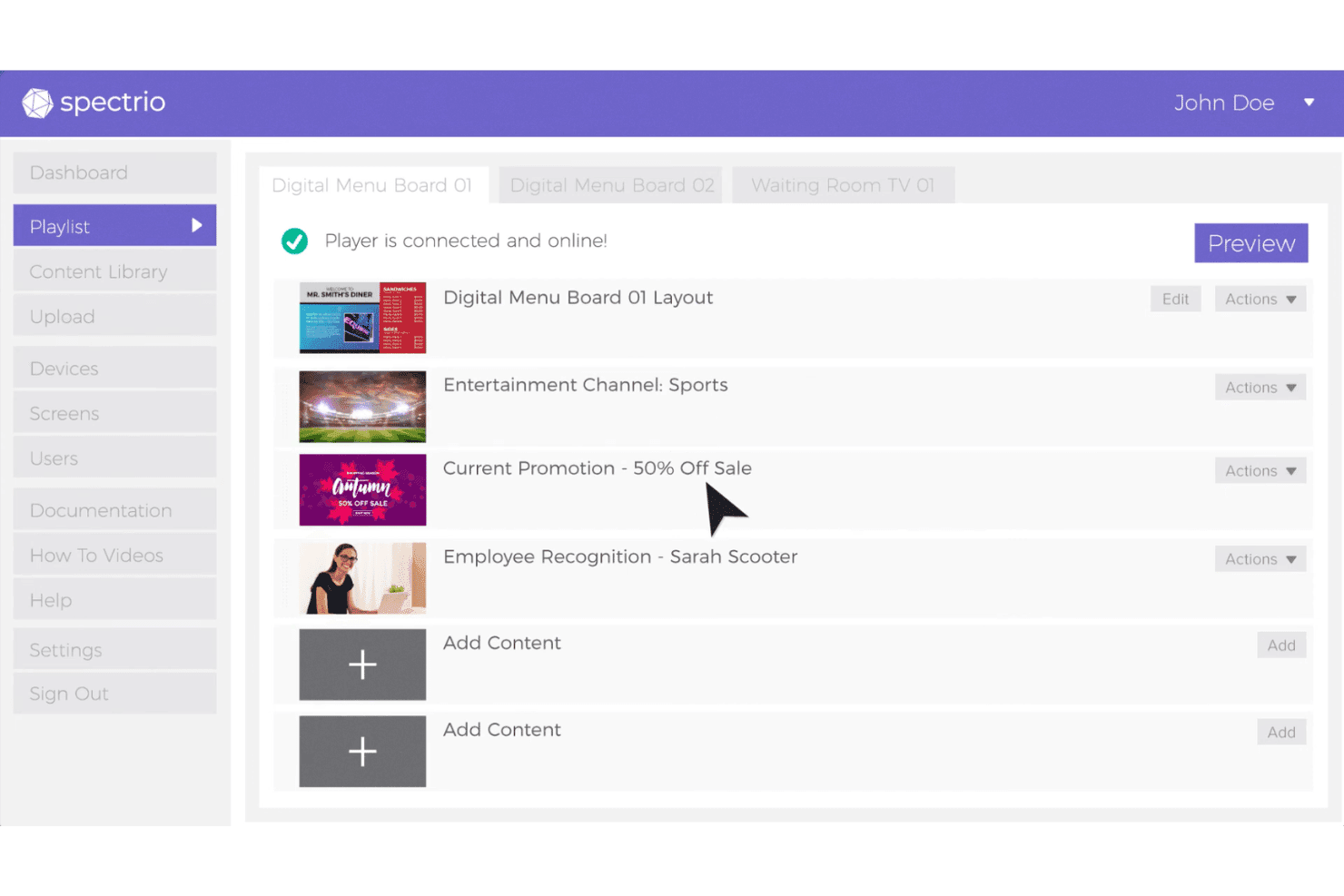
Spectrio includes a playlist management interface where users can organize digital signage content across multiple screen locations. Spectrio is a healthcare-focused digital signage platform that combines wait boards, a medical content library, wayfinding kiosks, and a cloud-based CMS for managing patient-facing displays across clinic locations.
Who Is Spectrio Best For?
Spectrio is a strong fit for hospitals, senior living communities, and multi-location healthcare practices that need turnkey, professionally managed patient-facing displays.
Why I Picked Spectrio
I picked Spectrio as one of the best because its Healthcare Content Library gives waiting room screens a constant rotation of patient education videos without requiring your team to build content from scratch. The Wait Board feature is purpose-built to reduce perceived wait times by pairing entertainment with health messaging, and every piece of content goes through a HIPAA-compliant approval workflow before it ever displays on screen.
Spectrio Key Features
- Zoned screen layouts: Configure multiple content zones to show videos, health tips, news, and branded messages on a single display.
- Interactive wayfinding kiosks: Guide visitors with touchscreen directions and downloadable facility maps for hospital navigation.
- Cloud-based content management: Control, schedule, and deploy updates to displays across multiple locations through a centralized dashboard.
- Live TV pass-thru with branding: Overlay practice branding and promotions alongside live television feeds in public areas.
Spectrio Integrations
Native integrations include Instagram, Twitter, Facebook, and support for RSS feeds and real-time data sources. An API is available for custom integrations.
Pros and Cons
Pros:
- Manages displays across 150,000+ locations centrally
- In-house creative team produces custom medical content
- Pre-built HIPAA-compliant healthcare content library
Cons:
- Hardware devices reported as occasionally defective
- No documented real-time EHR or queue integration
Learn more about Spectrio: 7Best for healthcare content management
Mvix
- Free demo available
- From $450 one-time
Visit WebsiteCustomer Rating:4.6/5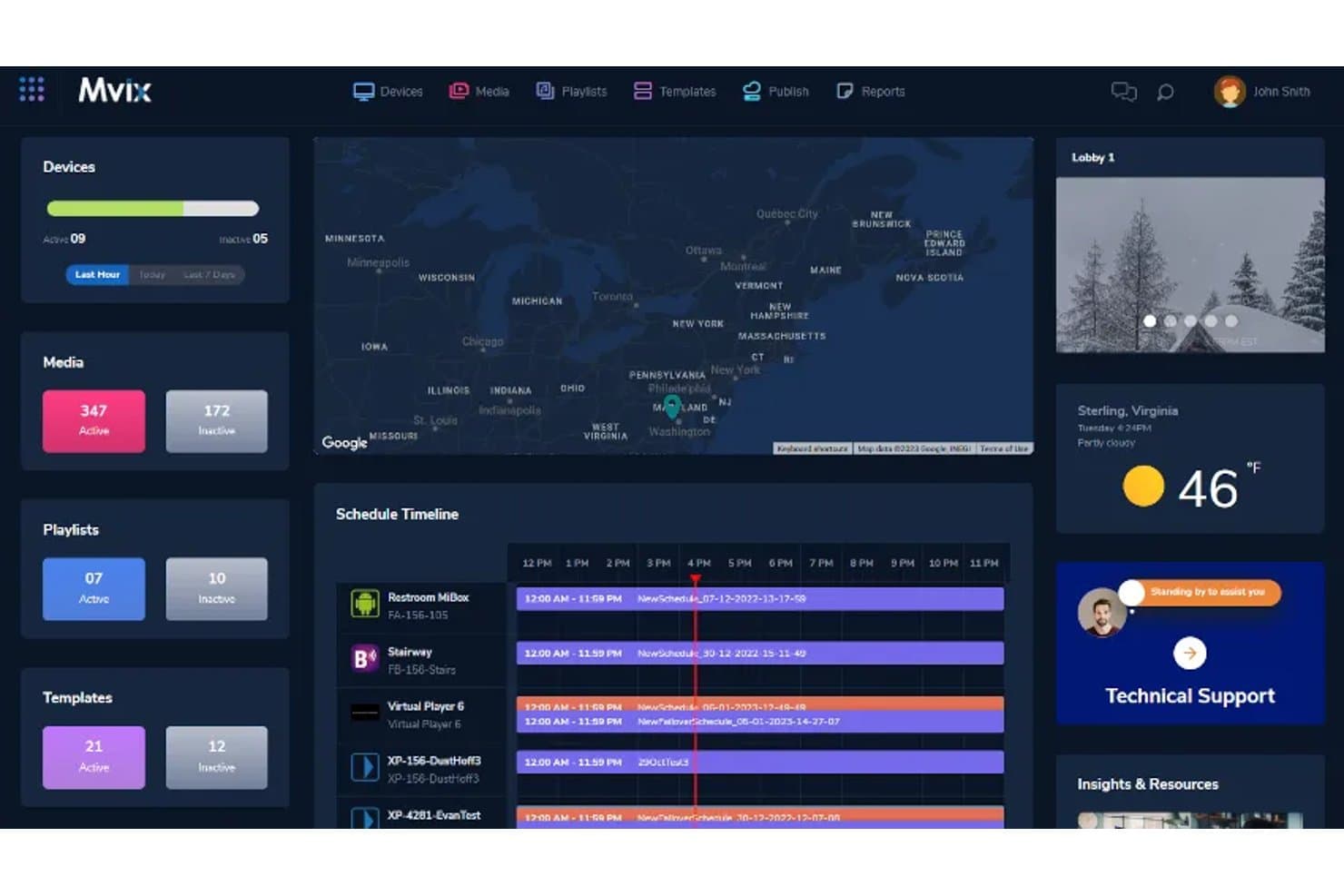
Mvix offers a centralized CMS dashboard with device management, schedule timelines, media tracking, and live weather widgets suited for multi-location healthcare facility deployments. Mvix is a cloud-based digital signage platform that combines a hardware media player with a free perpetual CMS license to manage waiting room displays, wayfinding, emergency alerts, and staff dashboards across multi-site healthcare facilities.
Who Is Mvix Best For?
Mvix suits IT administrators and operations teams managing digital signage across multi-location healthcare networks, hospitals, and outpatient clinics.
Why I Picked Mvix
I've included Mvix in my top picks because of how it handles healthcare content management at scale. The zone-based layouts (up to 10 on the Pro tier) let you run wait time displays, wellness tips, and branded messaging simultaneously on a single screen. I also like the content expiration and day-parting tools, which mean a seasonal flu campaign or visiting hours update won't linger on screens past its relevance.
Mvix Key Features
- Device health portal: Monitor device connectivity, temperature, WiFi status, and receive offline notifications from a centralized dashboard.
- Emergency/IPAWS/CAP alert integration: Trigger immediate alert messaging across displays with automated overrides for urgent or campus-wide situations.
- Role-based access controls: Assign user permissions for editing, publishing, and scheduling content across departments or clinic locations.
- Interactive touchscreen kiosk support: Deploy check-in, wayfinding, or visitor directories on touch-enabled displays.
Mvix Integrations
Mvix offers native integrations with Canva, Google Docs, Google Sheets, Google Slides, Microsoft Office 365, Microsoft Teams, Slack, Facebook, Instagram, Twitter (X), and YouTube. An API is available for custom integrations.
Pros and Cons
Pros:
- Multi-zone layouts display wait times and health content simultaneously
- CMS license included with hardware, no ongoing subscription fee
- IPAWS/CAP alert integration for instant campus-wide overrides
Cons:
- Hardware devices prone to connectivity drops and offline screens
- No documented HIPAA compliance or BAA availability
Learn more about Mvix: Best for wayfinding and digital signage
- Free demo available
- Pricing upon request
Visit WebsiteCustomer Rating:5/5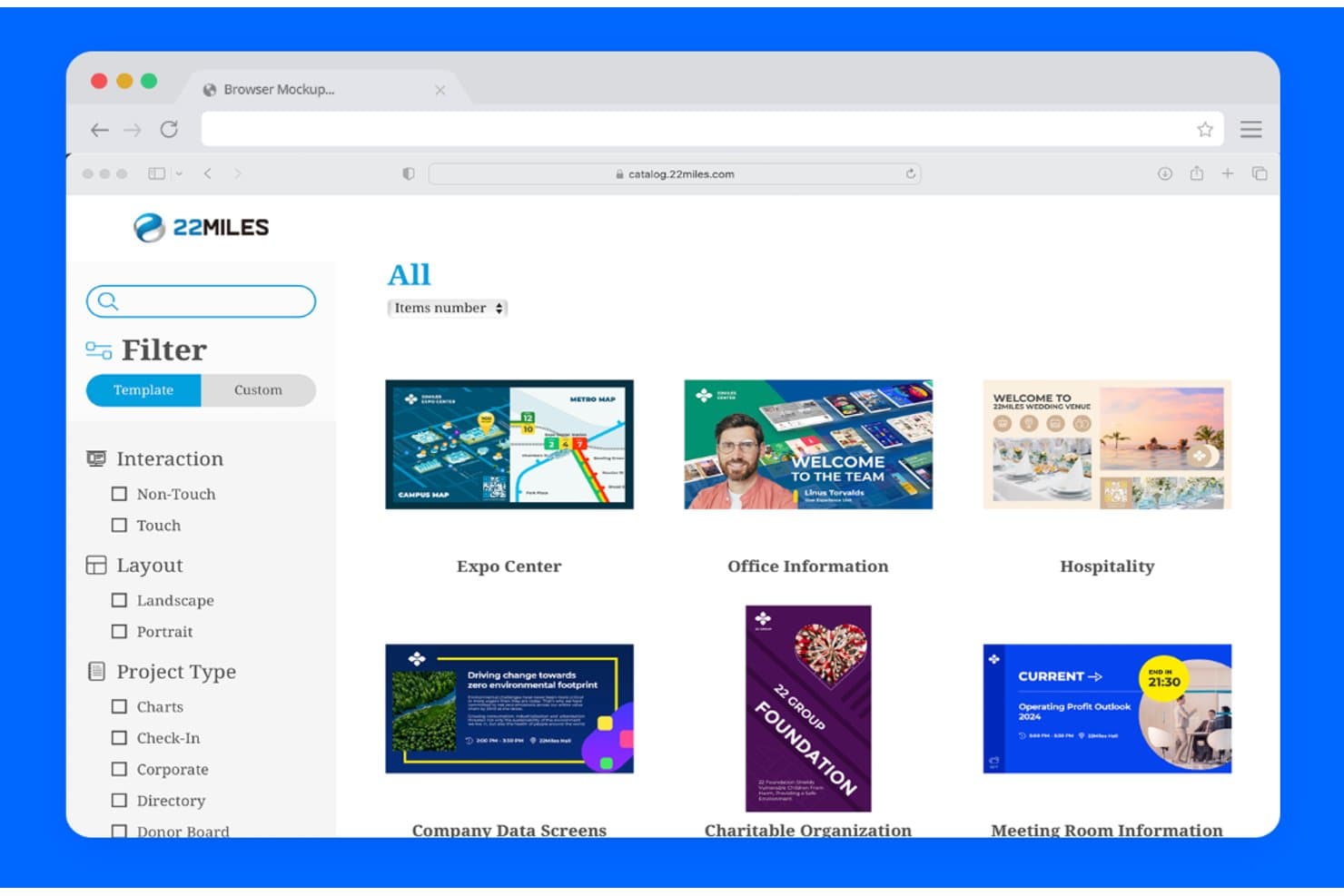
22Miles template library for digital signage, wayfinding, check-in, and information displays 22Miles is a digital signage and wayfinding platform built for healthcare environments, combining an AI-driven 3D interactive mapping engine with a cloud-based CMS for managing patient-facing content across multiple screens and locations.
Who Is 22Miles Best For?
22Miles is a strong fit for large hospital networks and multi-site health systems that need enterprise-grade signage and wayfinding across complex facilities.
Why I Picked 22Miles
22Miles earns its spot on my shortlist because no other platform combines AI-generated 3D wayfinding with a full digital signage CMS built specifically for hospital-scale deployments. I particularly like the Carry2Mobile feature, which lets patients scan a QR code to transfer their wayfinding route directly to their phone. The AI 3D Map Generation in V7.5 means my team can build accurate, interactive campus maps without needing a dedicated GIS team.
22Miles Key Features
- Unlimited multi-location management: Centrally control content and scheduling for hundreds of screens and locations from a single cloud dashboard.
- Emergency alert messaging: Instantly trigger campus-wide overrides to display emergency codes, alerts, or notifications across all signage displays.
- Drag-and-drop zone editor: Design fully customized multi-zone layouts combining dynamically updating videos, directories, and health tips on each screen.
- Healthcare content template library: Access a large collection of ready-to-use, healthcare-focused content templates and display assets for patient communication.
22Miles Integrations
Native integrations are not clearly documented. 22Miles provides an open API for custom integrations and supports MTR and Webex integrations for meeting room and collaboration solutions.
Pros and Cons
Pros:
- Instant emergency alert override across all screens
- Enterprise-grade multi-site content management built-in
- AI-generated 3D wayfinding for hospital campuses
Cons:
- Overkill for small single-location practices
- No clearly documented HIPAA compliance or BAA
Learn more about 22Miles: Best for hospital communication displays
- Free demo available
- Pricing upon request
Visit WebsiteCustomer Rating:2.7/5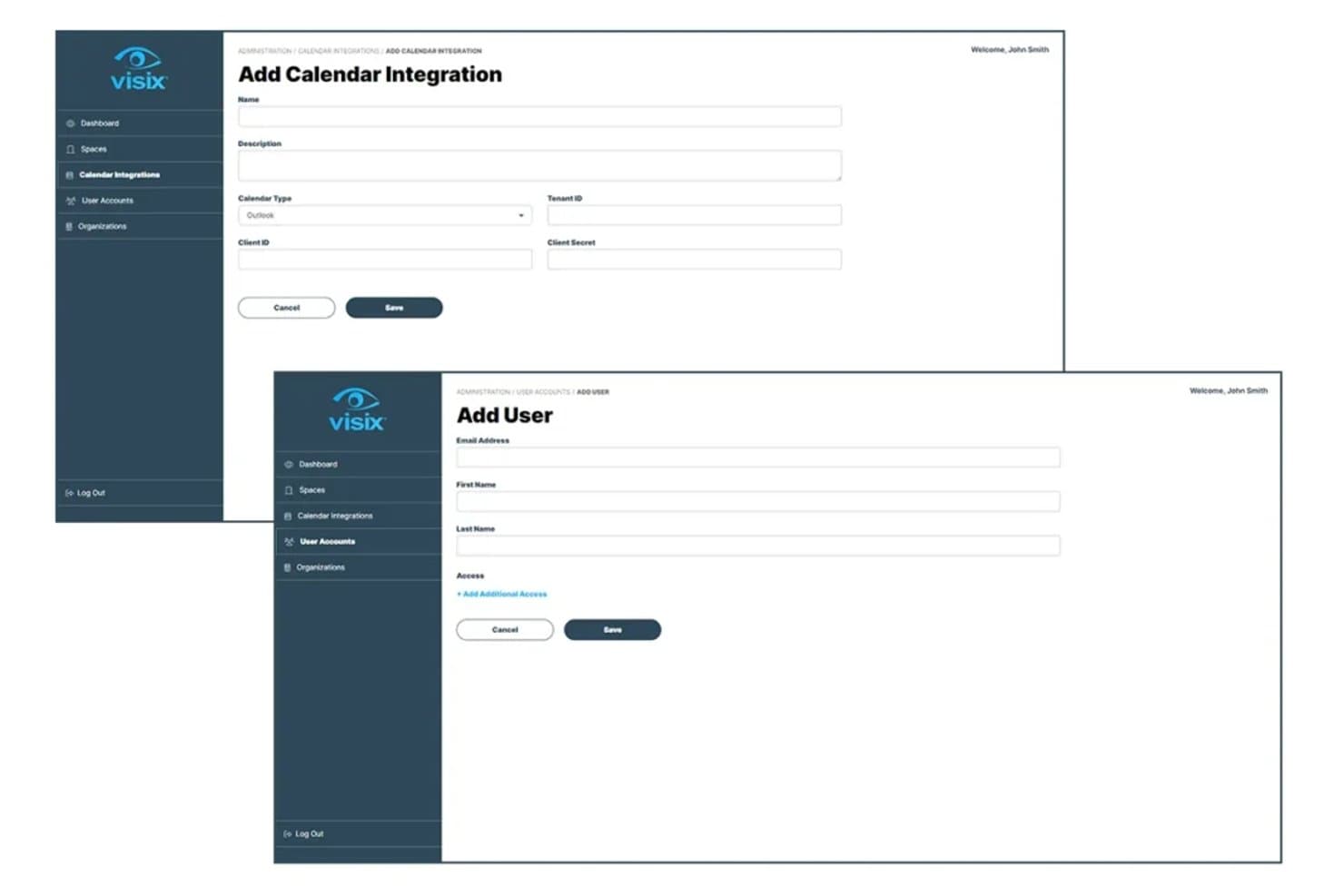
Visix dashboard for managing calendar integrations and digital signage user accounts Visix is a healthcare-focused enterprise digital signage platform with cloud and on-premise CMS options, built around wayfinding, emergency alert overrides, queue displays, and multi-site content management across hospital and clinic networks.
Who Is Visix Best For?
Visix is a strong fit for large hospital systems and multi-site health networks that need centralized control over displays across many locations and departments.
Why I Picked Visix
I picked Visix as one of the best because its Alert Management System is built on Common Alerting Protocol (CAP) standards and connects directly to platforms like Alertus and Everbridge for instant, facility-wide emergency broadcasts. I also like its interactive wayfinding for large hospital campuses, including voice user interface support for hands-free navigation. Multi-zone layouts let my team display queue data, health content, and branded messaging on a single screen simultaneously.
Visix Key Features
- Cloud or on-premise CMS options: Choose between scalable cloud management or on-premise deployment to meet organization security requirements.
- Active Directory SSO integration: Manage user authentication and permissions using existing AD environments for secure multi-user access.
- Healthcare content templates: Access fill-in-the-blank healthcare templates and messaging tools for fast updates and consistent branding.
- Room and event scheduling integrations: Sync calendars from Exchange, Office 365, Google, and EMS to automate meeting and room display updates.
Visix Integrations
Visix offers native integrations with Microsoft Exchange, Office 365, Google Calendar, EMS, Alertus, Everbridge, Rave Mobile Safety, and supports Active Directory SSO. An API is available for custom integrations.
Pros and Cons
Pros:
- Interactive wayfinding with voice and touch support
- Enterprise multi-site management with granular permissions
- Built-in CAP-based emergency alert overrides
Cons:
- Complex setup for smaller single-clinic practices
- No publicly documented HIPAA BAA or certification
Learn more about Visix:
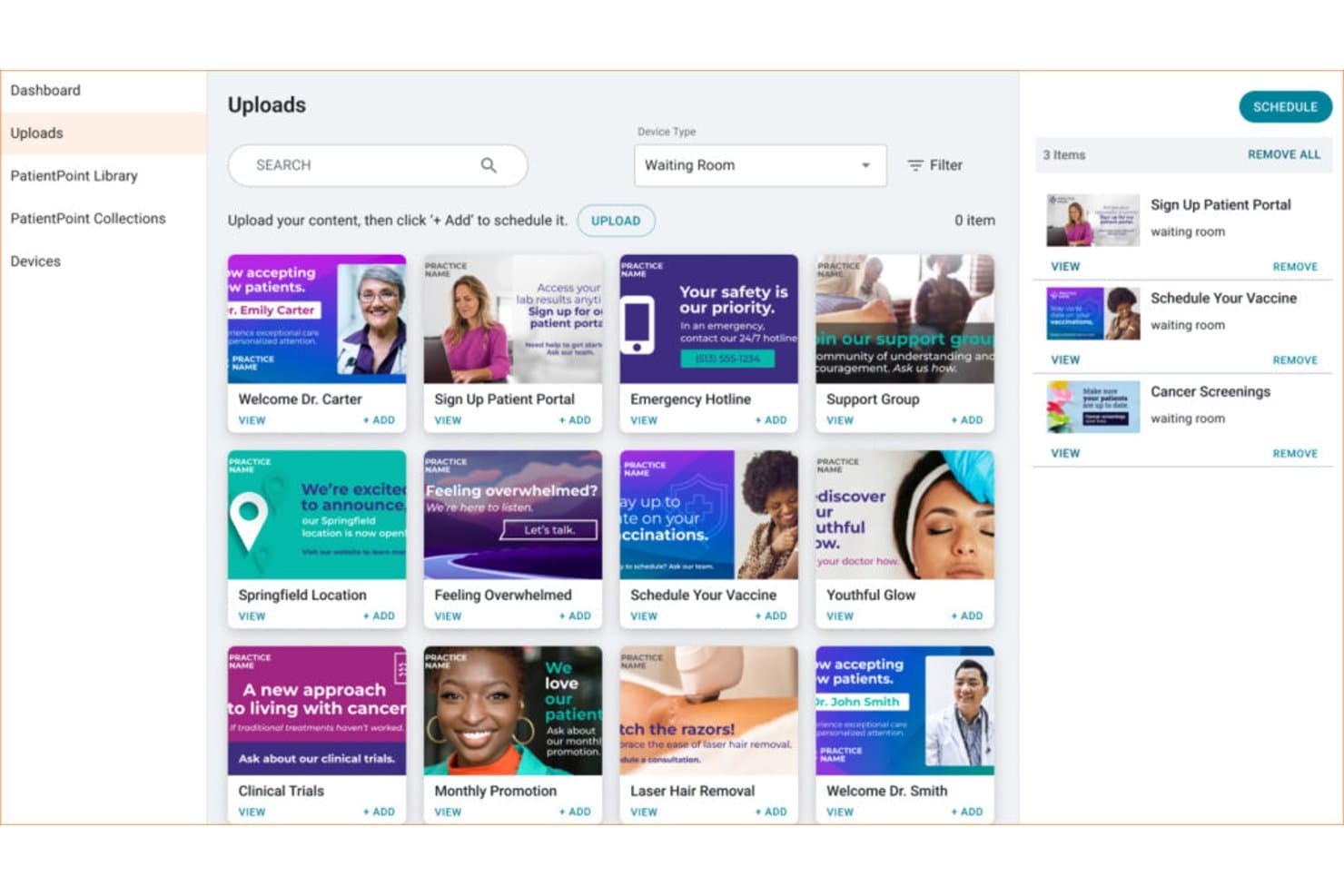
PatientPoint dashboard for uploading and scheduling healthcare content on waiting room displays PatientPoint is a managed point-of-care network that delivers specialty-specific patient education content across waiting room displays, exam room touchscreens, and staff meeting room screens in physician offices.
Who Is PatientPoint Best For?
It's a strong fit for independent physician practices and specialty clinics that want professionally managed patient education content without building or maintaining a content library in-house.
Why I Picked PatientPoint
PatientPoint earns its spot on my shortlist because the depth of its patient education content is genuinely hard to replicate with a general-purpose digital signage tool. I particularly like the exam room touchscreens, which display interactive 3D anatomicals and procedure videos tied to a patient's specific condition. The waiting room displays are also programmed with specialty-specific content across 14+ care areas, so a dermatology practice and an oncology clinic aren't showing the same generic health tips.
PatientPoint Key Features
- Waiting room displays: Deliver specialty-tailored educational programming to patients while they wait for their appointments.
- Staff meeting room screens: Share internal communications, specialty news, and practice management content with care teams.
- Pre-visit and post-visit content sharing: Push patient education or follow-up materials via email, SMS, or QR code links.
- Practice-specific customization: Update screens with unique messages, provider bios, and announcements tailored to each clinic’s needs.
PatientPoint Integrations
Native integrations are not clearly documented. PatientPoint distributes content by connecting with check-in, intake, and patient portal systems through partner networks and supports sharing via email, SMS, and QR code.
Pros and Cons
Pros:
- No content creation required from practice staff
- Medically vetted content updated regularly
- Specialty-specific content across 14+ care areas
Cons:
- No queue or wait time display features
- No self-serve content management dashboard for practices
Learn more about PatientPoint:
Outro software de sinalização digital para cuidados de saúde
Eis algumas opções adicionais de software de sinalização digital para cuidados de saúde que não entraram na minha lista restrita, mas que vale a pena consultar:
- 11Mood MediaBest for patient experience content
- 12Carousel Digital SignageBest for hospital-wide communications
- 13ScreenCloudBest for multi-location screen management
- 14YodeckBest for affordable cloud signage
- 15PickcelBest for scalable clinic signage
- 16OptiSignsBest for easy healthcare displays
- 17Rise VisionBest for waiting room information
- 18AppspaceBest for internal healthcare communications
Related Reviews
- Sistemas de registos médicos eletrónicos de fisioterapia
- Sistemas de RSE de Saúde Comportamental
- Sistemas de registos clínicos de optometria
- Sistemas de Registos Médicos Eletrónicos para Ortopedia
- Software de Registos Clínicos Eletrónicos
- Sistemas de registos de saúde eletrónicos para cuidados de saúde primários
How I Evaluate Digital Signage Software for Healthcare
I evaluate healthcare digital signage tools across two layers: the baseline features every solution needs—like HIPAA compliance and queue display—and the differentiators that separate good from great.
Core Functionality (Table Stakes for This List)
When I'm selecting tools for my list, I rank each one on a scale from 0 (does not offer the functionality) to 5 (excels in this area) for each core functionality listed below. Then, I calculate the tool's total score into a percentage. Each tool needs to achieve a minimum total score of 55% to be considered for inclusion.
- HIPAA Compliance: I check whether the vendor offers a BAA and supports access controls, so patient-facing displays showing queue names or room assignments stay protected.
- Queue & Wait Time Display: Real-time queue feeds pulled from your EHR or practice management system matter here—static text that staff update manually doesn't cut it.
- Healthcare Content Library: I look for pre-built templates and licensed patient education media you can load into waiting room screens without sourcing content from scratch.
- Multi-Location Management: For health systems running dozens of clinics, I evaluate whether the dashboard supports role-based permissions and location-specific scheduling from one login.
- Emergency & Alert Messaging: The ability to push an instant override across all screens—for code alerts, severe weather, or safety lockdowns—is something I look for in every tool I evaluate.
- Zoned Screen Layouts: I check whether you can split a single display into zones that show a welcome video, health tips, and live wait times all at once with flexible layout options.
Once I have a list of tools that meet the criteria, I consider what sets each platform apart.
Differentiating Factors (What Sets Vendors Apart)
Here's how I compare and contrast different vendors:
Standout Features
EMR/HIS integrations are a big differentiator. I look for direct data pipelines from systems like Epic, Cerner, or Meditech that auto-populate OR status boards and patient queues without manual input. Interactive wayfinding kiosks also stand out—especially for large hospital campuses where patients need turn-by-turn, ADA-compliant touchscreen navigation across multiple buildings. Emergency alert overrides matter too. I evaluate whether a platform can trigger an instant campus-wide screen takeover for Code Blue or severe weather events using pre-built templates and API connections to mass notification systems.
Beyond Features
Deployment model matters a lot in healthcare. I evaluate whether a vendor offers both cloud and on-premise options, since some facilities have strict network isolation policies. Hardware compatibility is another key factor—your IT team shouldn't need to replace existing BrightSign or Samsung Tizen players just to adopt new software. I also look at total cost of ownership, including whether content libraries come bundled or carry add-on fees, and whether per-screen licensing scales reasonably as you grow across locations.
Como escolher software de sinalização digital para cuidados de saúde
É fácil perder-se em listas extensas de funcionalidades e estruturas de preços complexas. Para o ajudar a manter o foco enquanto percorre o seu processo específico de seleção de software, eis uma lista de fatores a ter em conta:
| Fator | O que considerar |
| Escalabilidade | O software acompanhará o crescimento da sua unidade — entre departamentos, clínicas ou novas localizações à medida que as necessidades mudam? |
| Integrações | Estabelece ligação aos seus sistemas EHR, PM ou de instalações existentes, ou a sincronização de dados criará mais trabalho manual? |
| Personalização | Pode adaptar esquemas, fluxos de trabalho ou níveis de permissões para apoiar diferentes departamentos e contextos de cuidados? |
| Facilidade de utilização | Os funcionários e gestores sem conhecimentos técnicos conseguirão atualizar ecrãs, alterar conteúdos ou ativar alertas rapidamente? |
| Implementação e integração inicial | Que recursos de integração inicial e formação oferece o fornecedor? Existe orientação para implementações em vários locais ou cenários específicos de cuidados de saúde? |
| Custo | A estrutura de preços adequa-se ao seu caso de utilização — por ecrã, por utilizador ou com conteúdos incluídos? Todas as funcionalidades necessárias estão incluídas ou terá de pagar suplementos? |
| Medidas de segurança | Os controlos de acesso, os registos de auditoria e os acordos com o fornecedor (como um BAA) são claros desde o início e estão alinhados com os seus processos de conformidade? |
| Disponibilidade do suporte | Com que rapidez consegue contactar o suporte — especialmente se os seus ecrãs ficarem sem imagem ou necessitarem de atualizações urgentes durante o horário da clínica? |
O que é o software de sinalização digital para cuidados de saúde?
O software de sinalização digital para cuidados de saúde é uma plataforma que permite a clínicas, hospitais e consultórios médicos gerir e apresentar mensagens, horários, tempos de espera e conteúdos educativos em ecrãs nas suas instalações. Estas ferramentas ajudam a centralizar a comunicação, a suportar mensagens conformes com a HIPAA e a adaptar os conteúdos a salas de espera, áreas destinadas ao pessoal ou campus inteiros — tudo a partir de um único painel.
Funcionalidades
Ao escolher software de sinalização digital para cuidados de saúde, tenha em atenção as seguintes funcionalidades principais:
- Mensagens conformes com a HIPAA: Apresente informações dos pacientes, como filas de espera ou atribuições de salas, de forma segura, garantindo simultaneamente a privacidade e a conformidade regulamentar.
- Integração com EHR: Ligue diretamente os seus registos eletrónicos de saúde para fornecer atualizações em tempo real sobre o estado dos pacientes, consultas ou procedimentos.
- Biblioteca de conteúdos para cuidados de saúde: Aceda a uma biblioteca de modelos, vídeos e gráficos pré-criados, adaptados à educação dos pacientes e a mensagens de bem-estar.
- Gestão de várias localizações: Controle e agende conteúdos para ecrãs em várias clínicas ou departamentos a partir de um único painel na nuvem.
- Substituição por alertas de emergência: Transmita instantaneamente mensagens urgentes, alertas de segurança ou notificações de códigos que substituem o conteúdo normal dos ecrãs.
- Disposições de ecrã por zonas: Divida os ecrãs em várias zonas para apresentar simultaneamente diferentes tipos de conteúdo — como conselhos de saúde, tempos de espera e conteúdos multimédia da marca.
- Controlos de acesso baseados em funções: Atribua permissões a diferentes utilizadores, garantindo que apenas o pessoal autorizado pode atualizar ou gerir conteúdos em ecrãs específicos.
- Monitorização remota de dispositivos: Acompanhe o estado dos ecrãs e resolva problemas a partir de qualquer lugar, ajudando a sua equipa de TI a manter os monitores operacionais.
- Agendamento de conteúdos: Planeie e automatize quando determinadas mensagens, campanhas ou materiais sazonais aparecem em diferentes ecrãs.
- Suporte à orientação: Ajude os pacientes a orientarem-se em instalações de grandes dimensões através de indicações interativas ou estáticas apresentadas em mapas e diretórios no ecrã.
Benefícios
A implementação de software de sinalização digital para cuidados de saúde proporciona vários benefícios à sua equipa e à sua organização. Eis alguns dos benefícios que pode esperar:
- Melhoria da comunicação com os pacientes: Partilhe tempos de espera, atualizações de consultas e informações educativas em tempo real para manter os pacientes informados durante toda a sua visita.
- Maior eficiência operacional: Centralize as atualizações de conteúdos, a gestão dos ecrãs e os alertas de emergência em várias localizações para reduzir o trabalho manual do seu pessoal.
- Maior conformidade regulamentar: Proteja as informações dos pacientes utilizando mensagens conformes com a HIPAA e controlos de acesso adaptados a ambientes de cuidados de saúde.
- Distribuição flexível de conteúdos: Personalize facilmente as mensagens por departamento, público ou necessidades das instalações através de disposições multizonas e ferramentas de agendamento de conteúdos.
- Orientação simplificada: Ajude pacientes e visitantes a orientarem-se em instalações grandes ou complexas com mapas digitais integrados e ecrãs direcionais.
- Maior envolvimento dos pacientes: Utilize uma biblioteca de conteúdos específica para cuidados de saúde e ecrãs interativos para partilhar conteúdos de bem-estar, notícias ou conselhos de saúde que proporcionem uma experiência mais envolvente.
- Resposta rápida a emergências: Substitua instantaneamente os conteúdos regulares por alertas urgentes ou mensagens de segurança, garantindo uma comunicação clara em situações críticas.
Custos e preços
A seleção de software de sinalização digital para cuidados de saúde exige uma compreensão dos vários modelos de preços e planos disponíveis. Os custos variam consoante as funcionalidades, o tamanho da equipa, os complementos e outros fatores. A tabela abaixo resume os planos mais comuns, os seus preços médios e as funcionalidades normalmente incluídas nas soluções de software de sinalização digital para cuidados de saúde:
Tabela de comparação de planos de software de sinalização digital para cuidados de saúde
| Tipo de plano | Preço médio | Funcionalidades comuns |
| Plano gratuito | $0 | Número limitado de ecrãs, biblioteca de conteúdos básica, atualizações manuais e apoio da comunidade. |
| Plano pessoal | $10-$30/mês | Suporte para uma única localização, agendamento de conteúdos, modelos básicos e apoio por e-mail. |
| Plano empresarial | $40-$100/mês | Gestão de várias localizações, integrações com EHR, alertas de emergência, modelos para cuidados de saúde e monitorização remota de dispositivos. |
| Plano empresarial avançado | $150+/mês | Integrações personalizadas, implementação local ou na nuvem, segurança avançada, integração inicial dedicada e apoio 24 horas por dia, 7 dias por semana. |
Perguntas frequentes sobre software de sinalética digital para cuidados de saúde
Eis algumas respostas a perguntas frequentes sobre software de sinalética digital para cuidados de saúde:
Como é que o software de sinalética digital mantém seguras as informações dos doentes?
O software de sinalética digital para cuidados de saúde utiliza mensagens em conformidade com a HIPAA, controlos de acesso e registos de auditoria para impedir a divulgação não autorizada de informações dos doentes em ecrãs públicos ou monitores partilhados.
Posso utilizar os meus ecrãs e equipamentos atuais com software novo?
Sim, a maioria das plataformas de sinalética digital é compatível com uma grande variedade de equipamentos de visualização, incluindo PCs com Windows, leitores BrightSign e televisores inteligentes, pelo que, muitas vezes, pode utilizar os ecrãs que já possui.
Que tipo de conteúdos podemos apresentar num ambiente de cuidados de saúde?
Pode apresentar tempos de espera, anúncios da clínica, vídeos de educação para a saúde, mapas das instalações, alertas de emergência e até conteúdos multilingues ou específicos de cada departamento, adaptados a diferentes públicos de doentes.
É difícil gerir ecrãs em vários locais?
Não, a maioria dos fornecedores disponibiliza painéis de controlo centralizados para a gestão de conteúdos, permissões de utilizadores e monitorização, tornando prática a atualização e monitorização simultâneas de ecrãs em várias clínicas ou departamentos.
Com que rapidez podem ser apresentados os alertas de emergência?
Pode ativar alertas de emergência para substituir instantaneamente o conteúdo habitual — muitas vezes, com apenas alguns cliques — garantindo que todos veem a mensagem de imediato. Muitos sistemas são compatíveis com alertas automatizados provenientes de plataformas externas de segurança.