

HIPAA-kompatibel telemedisinprogramvare lar deg tilby virtuell pasientbehandling samtidig som du oppfyller strenge lovpålagte krav til personvern og datasikkerhet. Hvis du ser etter verktøy som beskytter sensitiv helseinformasjon og gjør fjernkonsultasjoner enkle for teamet og pasientene dine, har du kommet til rett sted. I denne veiledningen går jeg gjennom hva som skiller de beste løsningene fra hverandre, og hjelper deg med å finne en telemedisinplattform som passer arbeidsflyten, personvernforventningene og behovene til praksisen din.
Why Trust Our Software Recommendations
6,700+
Reviews
20
Industry experts
16+
Evaluation factors
14
Years
Our team has been testing and reviewing software since 2012. As medical practice leaders ourselves, we know how difficult—and important—it is to choose the right software.
For this guide, we evaluated tools using hands-on testing and independent research, scoring tools using our selection criteria.
Our reviews reflect our human editorial judgment, not a sales pitch.
Sammenligningstabell for HIPAA-kompatibel telemedisin
Denne sammenligningstabellen oppsummerer prisdetaljene for mine utvalgte HIPAA-kompatible telemedisinprogrammer:
| Tool | Best For | Trial Info | Price | ||
|---|---|---|---|---|---|
| 1 | Best for telehealth and client engagement | 14-day free trial | From $19.99/month | Website | |
| 2 | Best for behavioral health telehealth | 30-day free trial | From $69/month | Website | |
| 3 | Best for interactive teletherapy | 30-day free trial | From $39/month | Website | |
| 4 | Best for behavioral health teletherapy | 21-day free trial | From $29/user/month | Website | |
| 5 | Best for large-scale virtual care | Free demo available | From $89/visit | Website | |
| 6 | Best for browser-based telehealth | Free plan available | Pricing upon request | Website | |
| 7 | Best for scalable healthcare video visits | Free demo available | Pricing upon request | Website | |
| 8 | Best for therapy telehealth workflows | 30-day free trial | From $49/month | Website | |
| 9 | Best for configurable virtual care | Free plan available OR 14-day free trial | From $29/user/month | Website | |
| 10 | Best for independent practice telehealth | Free demo available | Pricing upon request | Website |


Anmeldelser av HIPAA-kompatibel telemedisinprogramvare
Nedenfor finner du mine detaljerte sammendrag av den beste HIPAA-kompatible telemedisinprogramvaren som kom med på kortlisten min. Anmeldelsene mine gir et detaljert innblikk i funksjonene, de beste bruksområdene og integrasjonene til hver plattform, slik at du kan finne den beste løsningen for deg.
 Best for telehealth and client engagement
- 14-day free trial
- From $19.99/month
Visit WebsiteCustomer Rating:4.4/5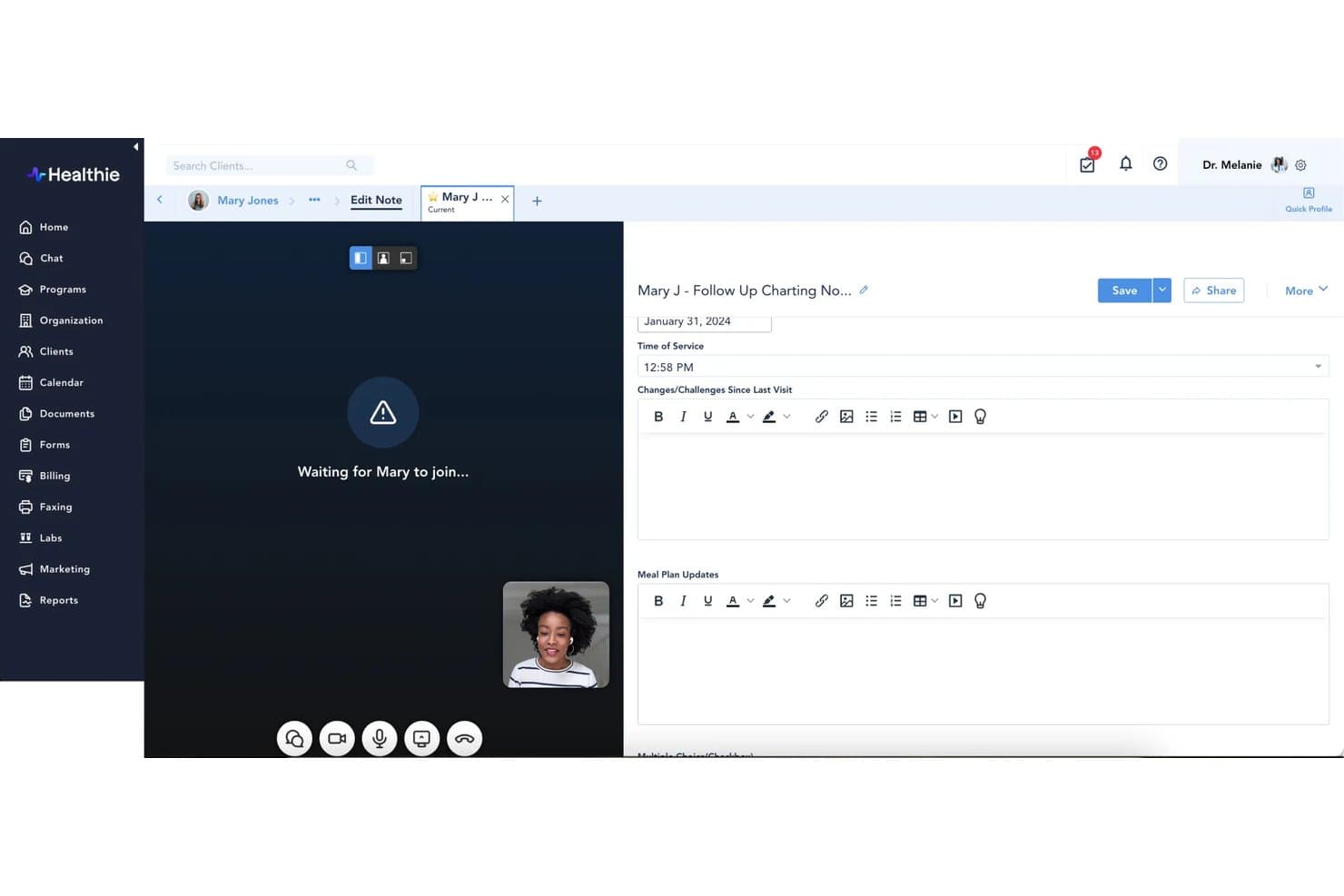
Healthie offers a split-screen telehealth interface that allows providers to conduct video visits and complete clinical charting notes simultaneously in real time. Healthie is a HIPAA-compliant EHR and practice management platform that combines built-in telehealth, client scheduling, intake forms, secure messaging, charting, and billing in one system.
Who Is Healthie Best For?
Healthie is a strong fit for independent and group practices in behavioral health, nutrition, and wellness specialties that need a full clinical and client management toolkit.
Why I Picked Healthie
Healthie earns its spot as one of the best on my shortlist because built-in telehealth is included on every plan, even the entry-level Core tier. I particularly like the white-labelable client mobile app, where patients can book appointments, join video sessions, complete intake forms, and message their provider, all under your practice's branding. The group telehealth and webinar functionality on the Plus plan also stands out for practices running wellness programs or group therapy sessions.
Healthie Key Features
- HIPAA-compliant audit logging: Tracks all user actions and access to patient records for full PHI security compliance.
- Customizable digital intake forms: Lets you collect patient consent, demographics, and insurance details before each session.
- Integrated telehealth billing workflows: Generates superbills and supports telemedicine CPT codes and claims submission directly from the platform.
- ePrescribing for controlled substances: Offers Surescripts-certified eRx and EPCS for sending prescriptions during a telehealth visit.
Healthie Integrations
Healthie offers native integrations with Stripe, Zoom, ClaimMD, Fullscript, Labcorp, Quest Diagnostics, BioReference, DoseSpot, IntakeQ, Google Calendar, and Apple Calendar. An open API is available for custom integrations.
Pros and Cons
Pros:
- EPCS-certified ePrescribing within telehealth encounters
- White-labeled client app included natively
- Built-in telehealth on every plan tier
Cons:
- Setup time needed for complex clinical workflows
- Reporting tools lack depth for analytics
Learn more about Healthie: Best for behavioral health telehealth
- 30-day free trial
- From $69/month
Visit WebsiteCustomer Rating:4.4/5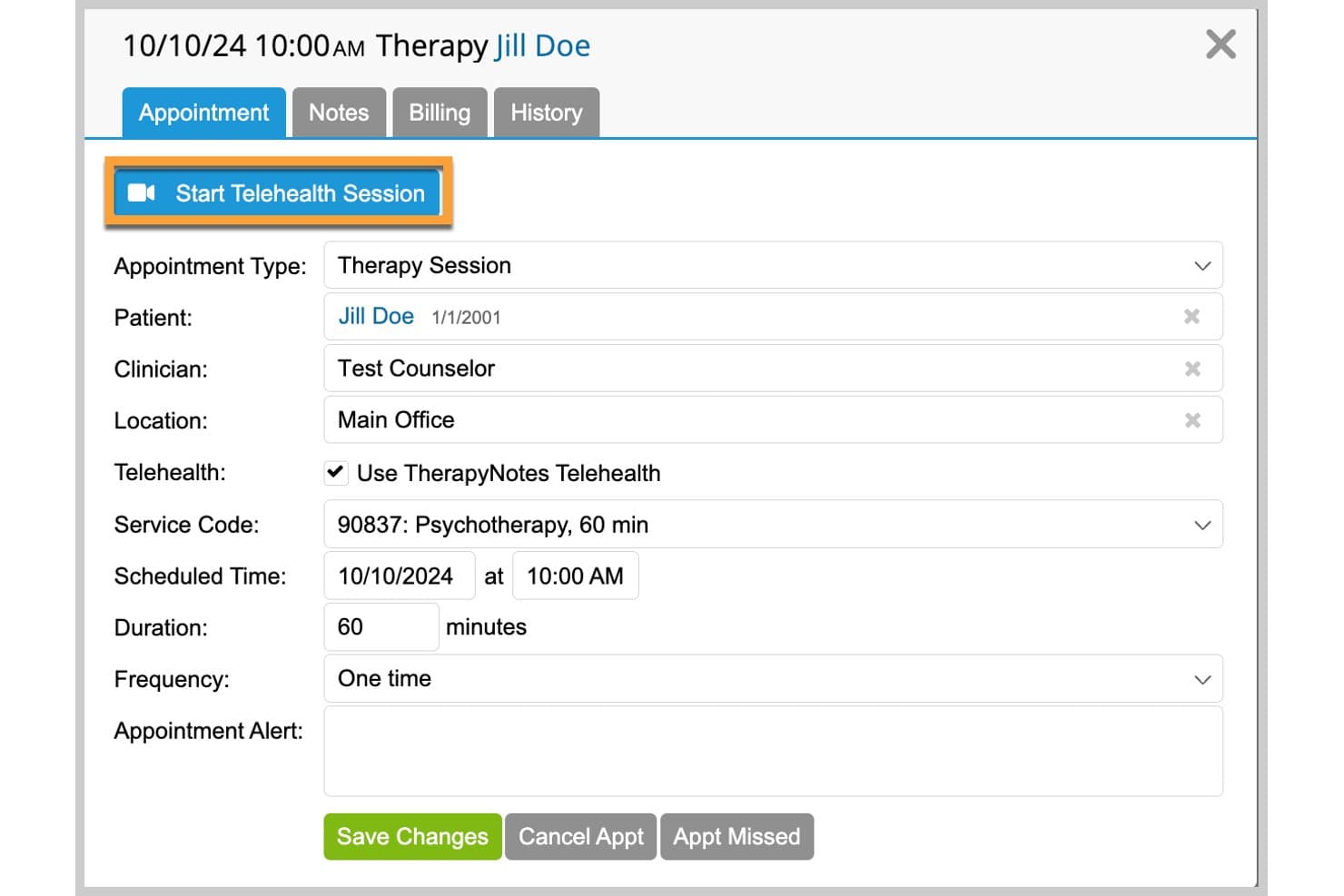
TherapyNotes offers a built-in telehealth session launcher within its appointment scheduling interface, supporting HIPAA-compliant video sessions. TherapyNotes is a behavioral health EHR that brings together HIPAA-compliant telehealth, clinical documentation, appointment scheduling, and integrated billing in a single platform built for mental health practices.
Who Is TherapyNotes Best For?
TherapyNotes is a strong fit for solo therapists, group therapy practices, and behavioral health clinics that need telehealth tightly integrated with clinical notes and insurance billing.
Why I Picked TherapyNotes
TherapyNotes earns its spot on my shortlist because behavioral health telehealth is built directly into the EHR, not layered on top. I love that Premium Telehealth supports group sessions with up to 16 participants, which is genuinely useful for running group therapy remotely. The Guest Access feature also lets patients join a waiting room without creating a portal account, removing a real barrier for clients who aren't comfortable navigating a patient portal before a session.
TherapyNotes Key Features
- HIPAA-compliant secure messaging: Providers and clients can exchange messages and documents within a secure, encrypted portal.
- Integrated e-prescribing: Clinicians can send prescriptions, including controlled substances, directly through the platform.
- Full audit logging: Every user action and change is logged for compliance, supervision, and accountability.
- Automated appointment reminders: TherapyNotes sends SMS, email, or phone reminders to reduce no-shows and keep schedules on track.
TherapyNotes Integrations
TherapyNotes offers native integrations with Google Calendar and Outlook Calendar. An API is available for custom integrations.
Pros and Cons
Pros:
- BAA included on all plans by default
- Group sessions support up to 16 participants
- Built specifically for behavioral health workflows
Cons:
- No native FHIR or HL7 data exchange
- Limited specialty support outside behavioral health
Learn more about TherapyNotes:
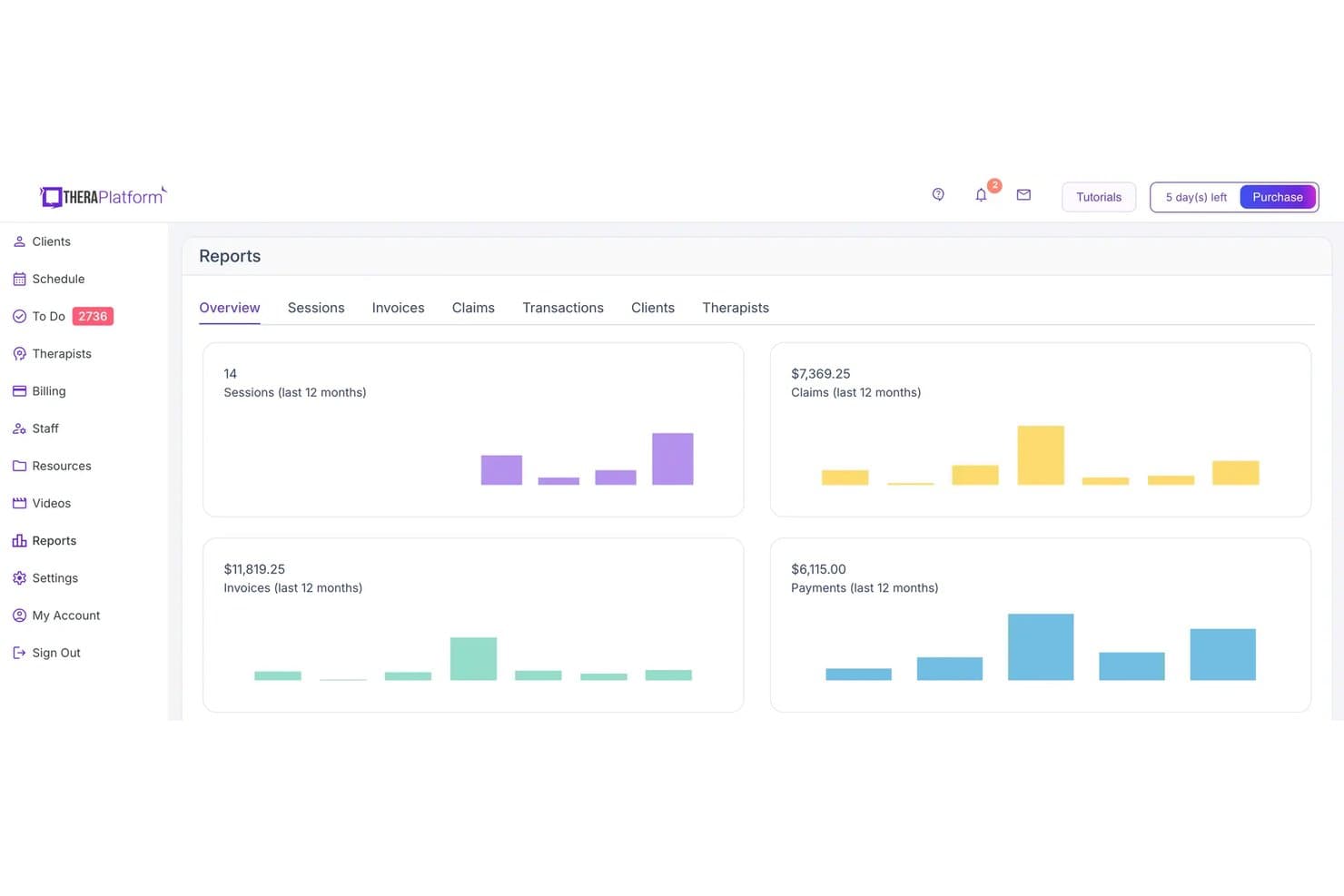
TheraPlatform displays a Reports overview dashboard with metrics for sessions, claims, invoices, and payments over the last 12 months. TheraPlatform is a HIPAA-compliant telehealth and practice management platform built specifically for mental health and therapy providers, combining secure video sessions, EHR documentation, scheduling, and billing in one system.
Who Is TheraPlatform Best For?
TheraPlatform is a strong fit for solo therapists and small behavioral health practices that deliver most of their care virtually.
Why I Picked TheraPlatform
I picked TheraPlatform as one of the best because of how much it puts inside the active video session itself. While a client is on-screen, I can pull up therapy games, display visual scenes, or open a shared whiteboard without ever switching windows. I also like that supervisors can join live sessions and send the clinician private in-session chat messages, then review HIPAA-compliant session recordings for follow-up coaching.
TheraPlatform Key Features
- HIPAA-compliant secure messaging: Exchange files and messages with clients using encrypted chat within the client portal.
- All-in-one practice management: Schedule appointments, manage billing, and handle documentation in a single platform.
- Digital intake and consent forms: Send and collect required forms and insurance information electronically before sessions.
- Electronic claims filing: Submit insurance claims directly through the platform and track payment status online.
TheraPlatform Integrations
TheraPlatform offers native integrations with Stripe for payment processing, Google Calendar for scheduling, and Wiley Treatment Planner for clinical content. An API is available for custom integrations.
Pros and Cons
Pros:
- BAA included across all plans
- Supervisor co-session and private messaging supported
- Built-in therapy tools usable during live sessions
Cons:
- Billing features less developed than standalone RCM tools
- Limited EHR integrations outside behavioral health
Learn more about TheraPlatform: Best for behavioral health teletherapy
- 21-day free trial
- From $29/user/month
Visit WebsiteCustomer Rating:4.5/5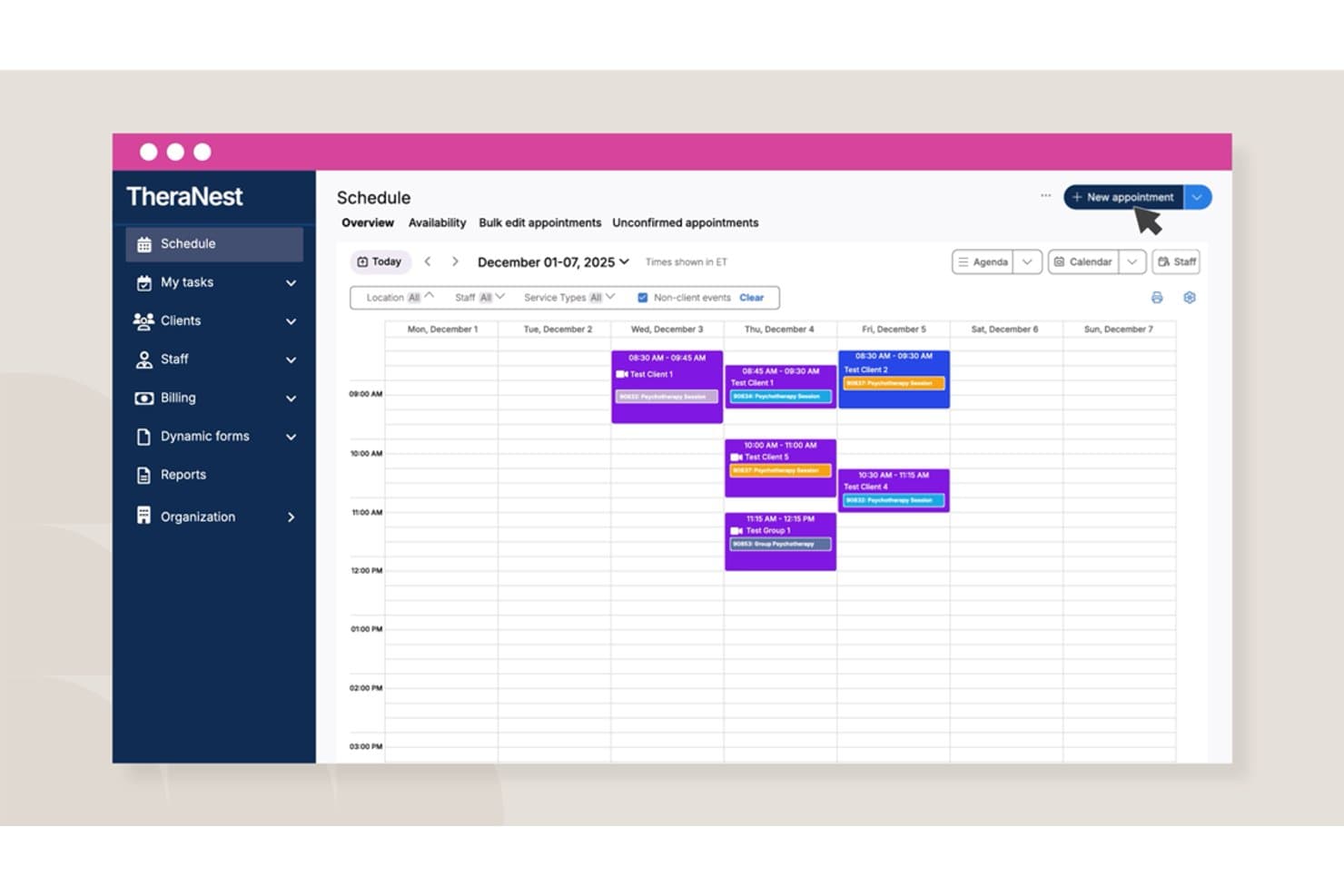
Ensora Health TheraNest offers a weekly calendar scheduling view with appointment management, staff filters, and a 'New appointment' button for organizing client sessions. TheraNest by Ensora Health is a behavioral health EHR and practice management platform with built-in HIPAA-compliant telehealth, clinical documentation, scheduling, billing, and secure client messaging.
Who Is TheraNest Best For?
TheraNest is a strong fit for solo therapists, group practices, and behavioral health clinics that need an all-in-one EHR with telehealth built in.
Why I Picked TheraNest
I picked TheraNest because it's built specifically around behavioral health teletherapy, not retrofitted for it. I like that it supports group telehealth sessions with up to six participants, which is genuinely useful for group and couples therapy workflows. The Ensai Session Assistant generates SOAP notes directly from telehealth sessions, picking up on clinical interventions and recurring client themes rather than producing generic summaries.
TheraNest Key Features
- HIPAA-compliant client portal: Clients can complete intake forms, schedule appointments, and join telehealth sessions securely online.
- Integrated e-prescribing: Allows clinicians to send prescriptions, including controlled substances, directly within the platform.
- Virtual waiting room: Lets staff manage patient check-ins and admissions, mirroring real-world clinical workflows.
- Automated insurance billing: Supports unlimited claims processing, eligibility checks, and ERA posting for telehealth visits.
TheraNest Integrations
TheraNest offers native integrations with NewCrop for e-prescribing, Beam Health for telehealth, Wiley Practice Planners for treatment planning, Google Calendar, and several insurance clearinghouses. An API is available for custom integrations.
Pros and Cons
Pros:
- AI-assisted SOAP notes from telehealth sessions
- Supports group telehealth sessions natively
- Built exclusively for behavioral health workflows
Cons:
- Mobile app has reported performance issues
- Not designed for non-behavioral health specialties
Learn more about Ensora Health TheraNest:
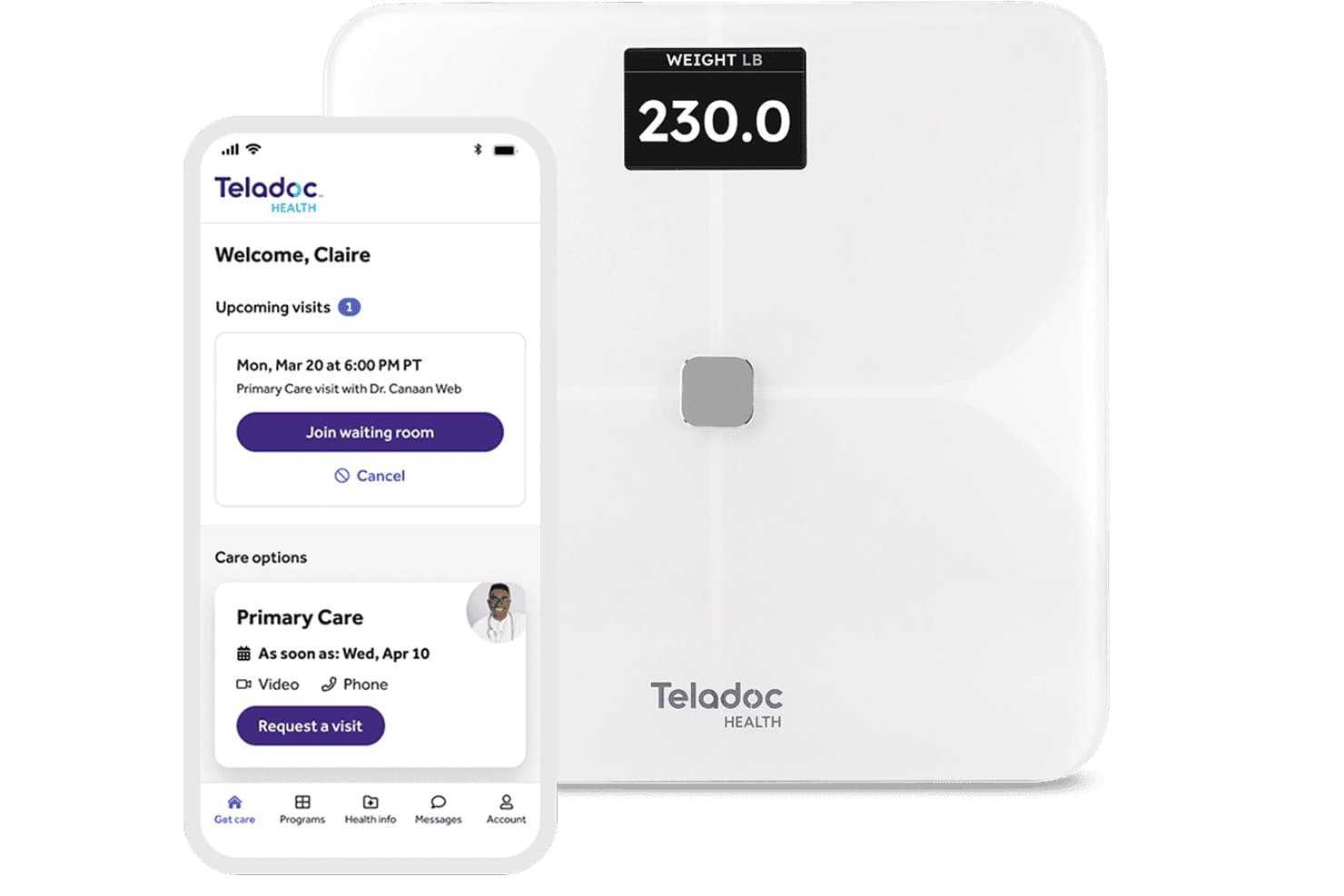
Teladoc Health offers a connected health experience combining a smart weight scale and a mobile app for scheduling and joining telehealth visits. Teladoc Health is an enterprise virtual care platform that combines HIPAA-compliant video visits, chronic condition management, mental health services, and EHR-integrated clinical workflows across inpatient, outpatient, and remote care settings.
Who Is Teladoc Health Best For?
Teladoc Health is a strong fit for large health systems, hospital networks, and enterprise employers that need a multi-specialty virtual care infrastructure at scale.
Why I Picked Teladoc Health
I picked Teladoc Health because no other platform in this space runs the sheer scope of virtual care it does under one HIPAA-compliant roof. The Solo platform is what sets it apart: it powers inpatient virtual nursing, AI-enabled patient sitting for fall risk monitoring, and emergency telestroke consults, all inside a single enterprise system. Its Epic integration means clinical documentation flows directly into the EHR without a separate charting step.
Teladoc Health Key Features
- HIPAA-compliant secure messaging: Enables asynchronous patient-provider communication and sharing of clinical files within the platform.
- Digital intake forms and patient queue: Lets patients check in, complete intake, and wait for their appointment online.
- Integrated multi-platform support: Works across desktop, mobile devices, and dedicated clinical hardware.
- EHR video embedding: Allows providers to launch secure video visits directly from Epic and other supported EHR workflows.
Teladoc Health Integrations
Teladoc Health offers native integrations with Epic and select other EHR platforms. An API is available for custom integrations.
Pros and Cons
Pros:
- Covers inpatient and outpatient care settings
- AI-enabled patient monitoring for fall risk
- Multi-specialty virtual care under one platform
Cons:
- Complex onboarding requires dedicated IT resources
- Not suited for small or solo practices
Learn more about Teladoc Health: Best for browser-based telehealth
- Free plan available
- Pricing upon request
Visit WebsiteCustomer Rating:4.6/5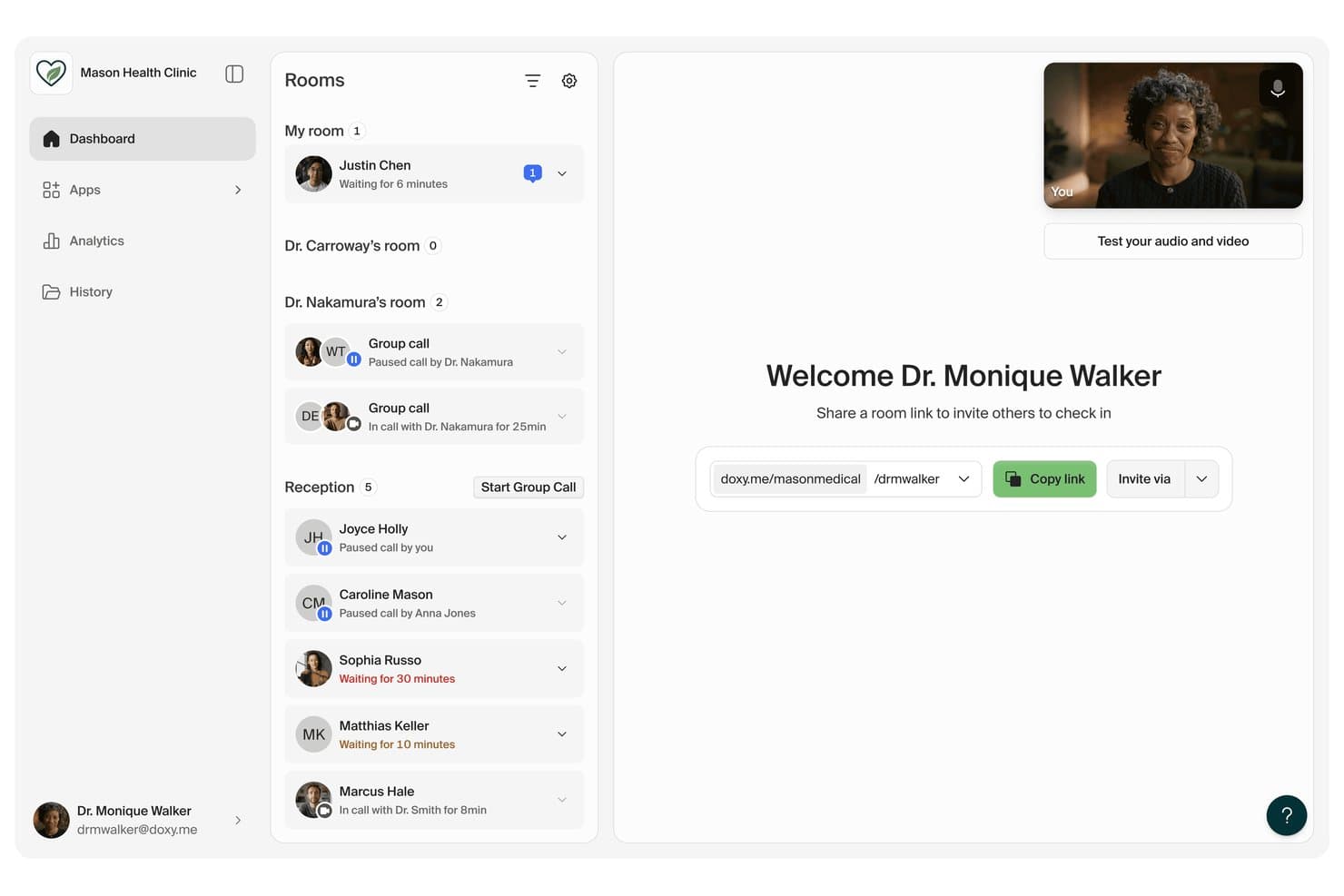
doxy.me offers a HIPAA-compliant telemedicine dashboard with patient waiting rooms, group calls, and video conferencing tools for clinic staff. Doxy.me is a browser-based telemedicine platform with HIPAA-compliant video visits, virtual waiting rooms, secure in-session chat, file transfer, and a suite of clinical add-on apps for patient care.
Who Is doxy.me Best For?
Doxy.me is a strong fit for solo clinicians and small behavioral health practices that need simple, HIPAA-compliant video visits without complex setup.
Why I Picked doxy.me
I picked doxy.me as one of the best because its fully browser-based setup means patients join a visit through a single link, with no app to download and no account to create. What I find genuinely useful are the built-in clinical apps, like Scribe for automated session notes and EMDR tools for behavioral health providers. HIPAA compliance with a signed BAA is included on paid plans, and sessions support up to 25 participants for group visits.
doxy.me Key Features
- Shared Rooms: Set up shared telehealth rooms to support team-based care and provider collaboration.
- Virtual waiting room: Move patients into a virtual queue where providers can admit them individually to sessions.
- Teleconsent: Collect electronic signatures on consent forms during a session through a built-in teleconsent workflow.
- Interpreter app: Bring a medical interpreter into live sessions to support care in over 240 languages.
doxy.me Integrations
doxy.me offers native integrations with Epic MyChart and Luminello. An API is available for custom integrations.
Pros and Cons
Pros:
- Built-in EMDR tools for behavioral health
- BAA included on all paid plans
- No patient app download required for visits
Cons:
- No built-in billing or claims submission
- Limited EHR integration options available
Learn more about doxy.me: Best for scalable healthcare video visits
- Free demo available
- Pricing upon request
Visit WebsiteCustomer Rating:4.5/5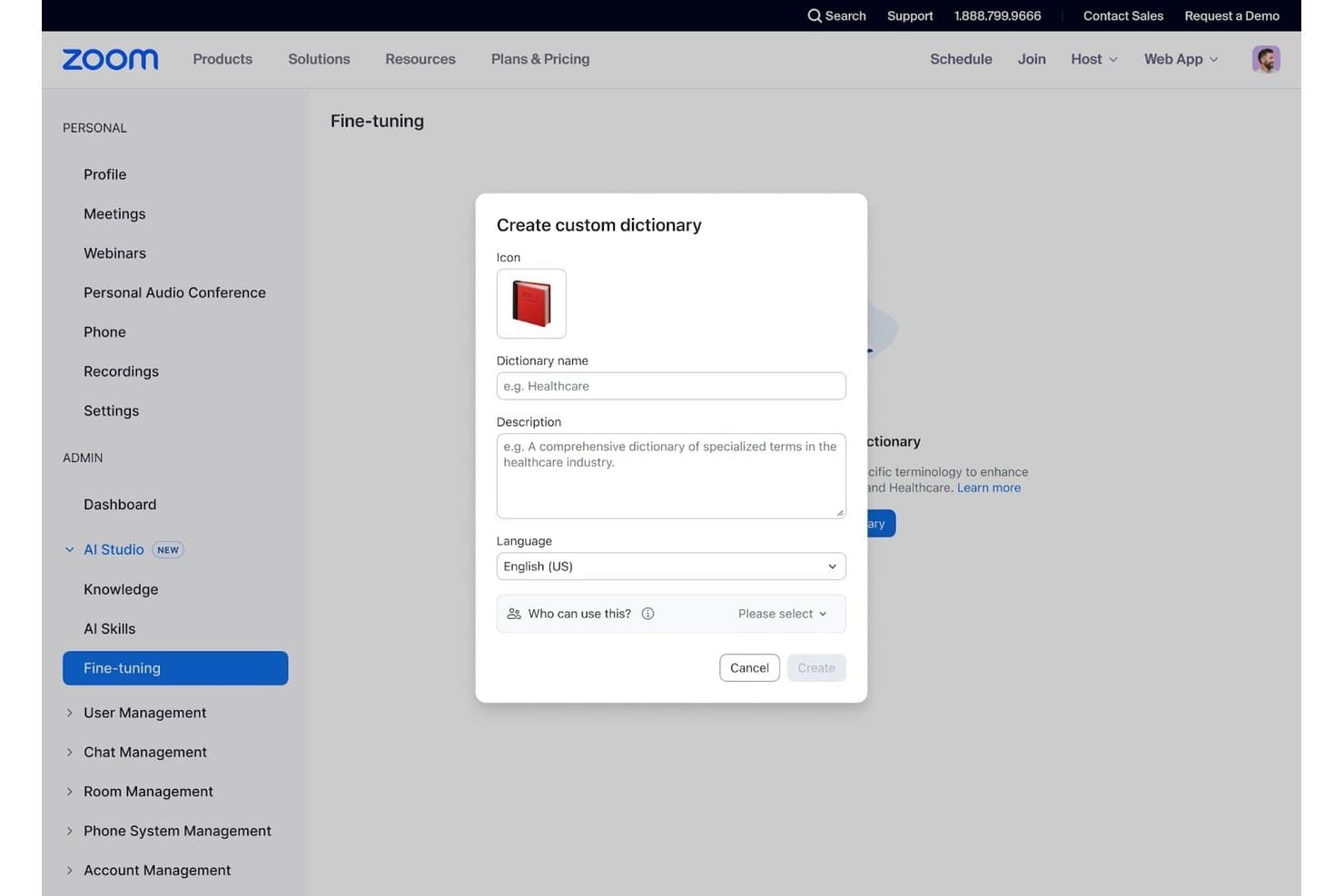
Zoom for Healthcare offers a custom dictionary creation feature within its AI Studio Fine-tuning section, allowing administrators to add specialized medical terminology. Zoom for Healthcare is a HIPAA-compliant unified communications platform that combines secure video visits, team messaging, phone, EHR integration, and AI-assisted clinical workflows for healthcare organizations.
Who Is Zoom for Healthcare Best For?
It's a strong fit for mid-to-large healthcare organizations and multi-location clinic networks that need a reliable, enterprise-grade video infrastructure layered on top of existing EHR and billing systems.
Why I Picked Zoom for Healthcare
I've included Zoom for Healthcare in my top picks because no other platform on this list handles concurrent video visits at scale the way Zoom does. Its virtual waiting room keeps patients queued without exposing PHI, and the 99.999% uptime SLA on Zoom Phone means providers across multiple locations stay connected even at peak hours. With a signed BAA covering meetings, phone, and rooms, the HIPAA compliance layer scales right alongside the visit volume.
Zoom for Healthcare Key Features
- Signed Business Associate Agreement: Provides a signed BAA to help meet HIPAA compliance requirements across video, phone, and chat.
- EHR integration: Offers native integrations with Epic, Athena, DrChrono, Elation, and supports telehealth scheduling and documentation workflows.
- AI-assisted meeting documentation: Includes AI Companion to generate meeting summaries and automate note-taking during clinical visits.
- Phreesia intake platform integration: Seamlessly integrates with Phreesia for digital patient intake, appointment scheduling, and unique telehealth meeting links.
Zoom for Healthcare Integrations
Native integrations include Epic, Cerner, Athena, DrChrono, Elation, Phreesia, Current Health, Microsoft 365, and telehealth hardware solutions from Capsa, Logitech, and Poly. An API is available for custom integrations.
Pros and Cons
Pros:
- No-download patient join links supported
- BAA included across all plan tiers
- Handles massive concurrent video visit volumes
Cons:
- Scheduling depends on third-party EHR tools
- Limited built-in telehealth billing features
Learn more about Zoom for Healthcare: Best for therapy telehealth workflows
- 30-day free trial
- From $49/month
Visit WebsiteCustomer Rating:4.6/5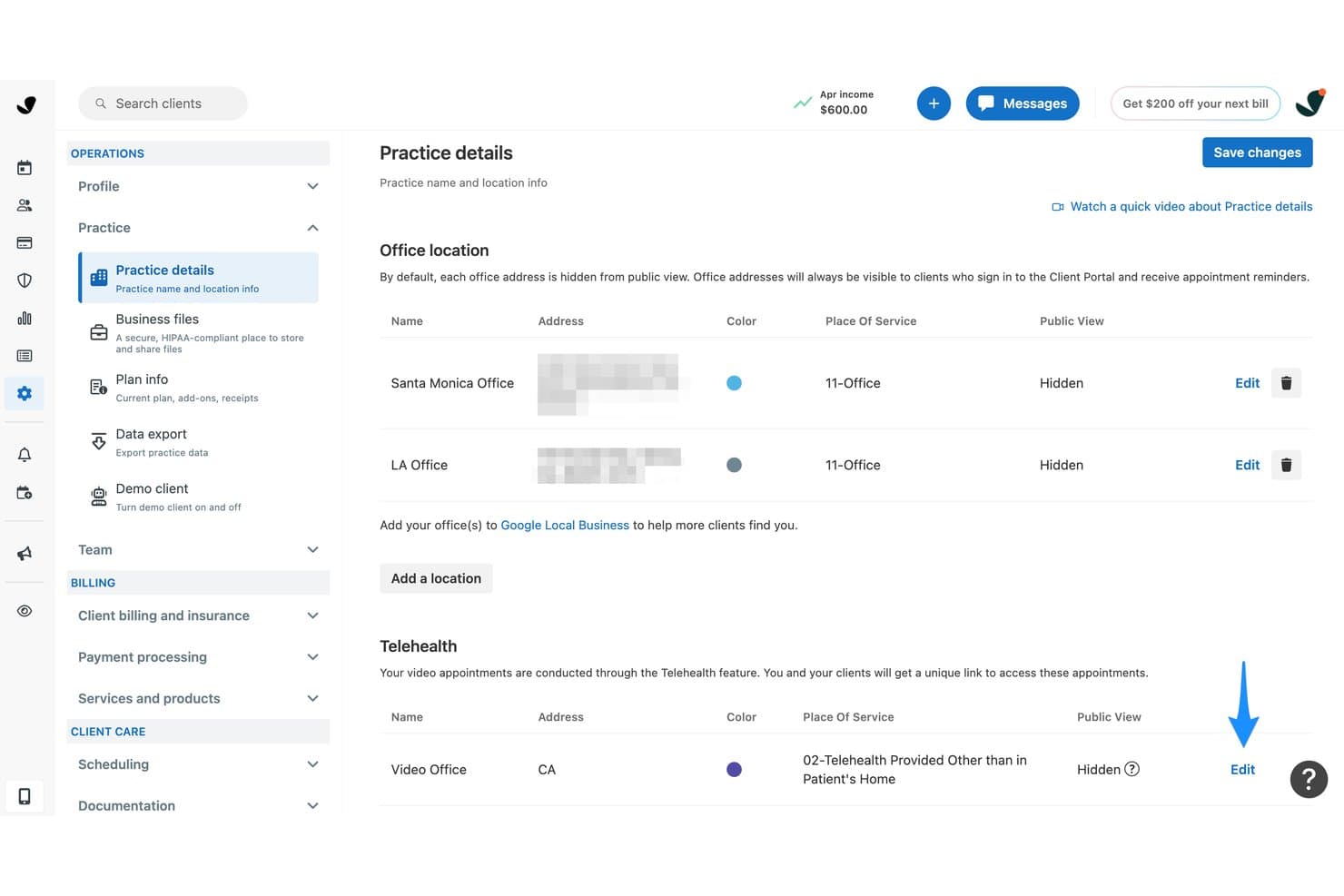
SimplePractice offers a Practice Details settings page where providers can manage office locations, telehealth video office configuration, and public visibility settings in a HIPAA-compliant platform. SimplePractice is an EHR and practice management platform for behavioral and mental health providers that combines HIPAA-compliant telehealth, clinical documentation, scheduling, secure messaging, and insurance billing in one system.
Who Is SimplePractice Best For?
It's a strong fit for solo therapists and small independent mental health practices that want to run their entire practice from one platform.
Why I Picked SimplePractice
I've included SimplePractice in my top picks because it's one of the few platforms where telehealth and clinical documentation are genuinely built as one workflow, not bolted together. I particularly like the in-session whiteboard and screen-share with sound, which are practical tools for therapy modalities like CBT exercises or psychoeducation. The AI Note Taker drafts session notes automatically after each telehealth call, cutting the post-session documentation load that most therapists deal with daily.
SimplePractice Key Features
- HIPAA-compliant secure messaging: Communicate asynchronously with patients through encrypted chat in the client portal.
- Digital intake forms: Collect consent, demographics, and insurance information online before appointments.
- ePrescribe integration: Prescribe medications directly within the platform with Surescripts certification.
- Insurance claim management: Submit telehealth claims and generate superbills electronically for insurance reimbursement.
SimplePractice Integrations
SimplePractice offers native integrations with Google Calendar and Stripe, and provides ePrescribe powered by DrFirst. An API for custom integrations is not available.
Pros and Cons
Pros:
- Therapy-specific templates built into clinical documentation
- AI note taker drafts post-session documentation
- Built-in telehealth needs no third-party app
Cons:
- Restricted to behavioral and mental health only
- Group practice admin controls are limited
Learn more about SimplePractice: 9Best for configurable virtual care
Vsee
- Free plan available OR 14-day free trial
- From $29/user/month
Visit WebsiteCustomer Rating:4.1/5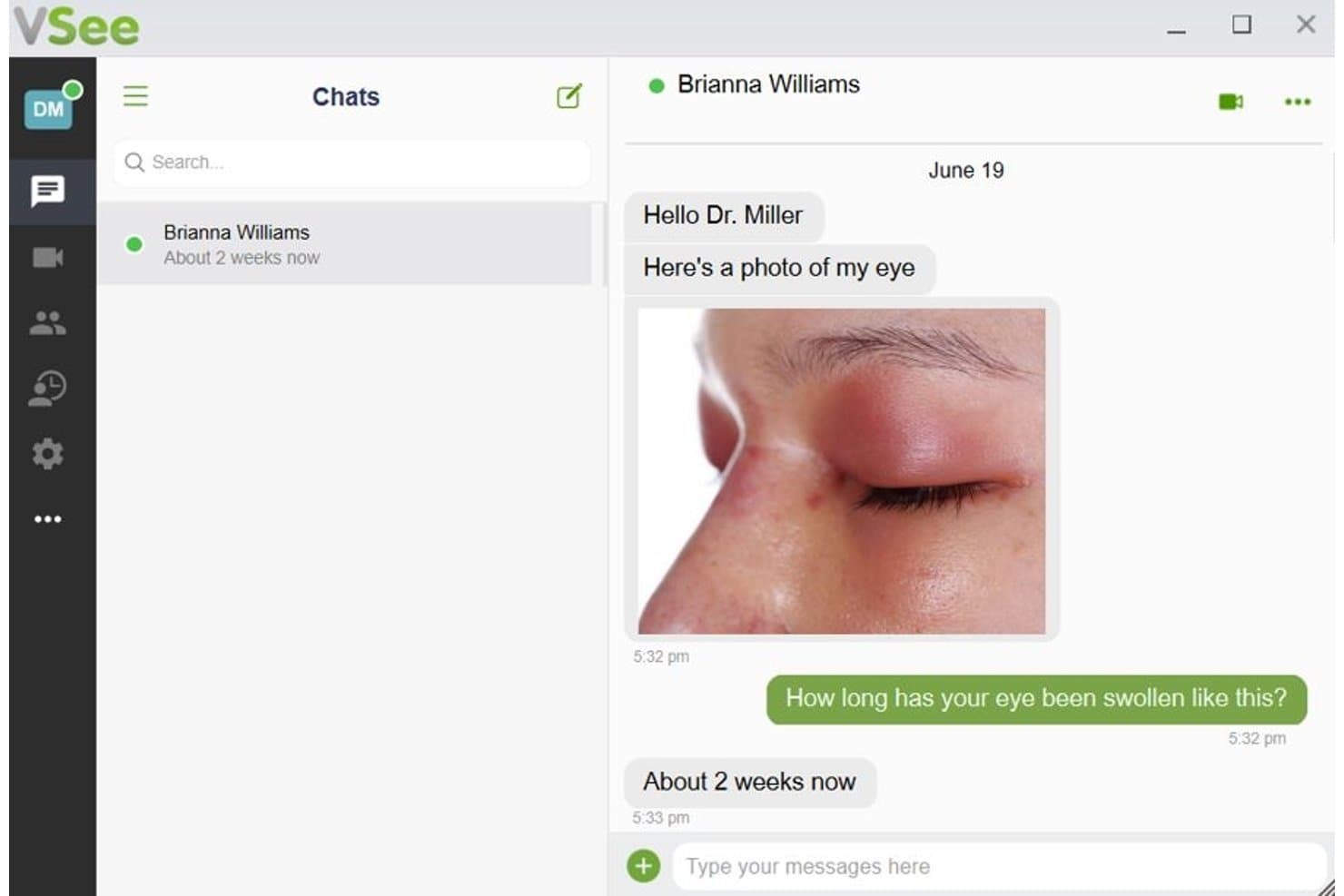
VSee offers a HIPAA-compliant secure messaging chat interface where patients can send photos and communicate directly with their doctor. VSee is a no-code telehealth platform that covers the full virtual care workflow, including HIPAA-compliant video visits, patient scheduling, digital intake forms, remote patient monitoring, and integrated telehealth billing.
Who Is VSee Best For?
VSee is a strong fit for healthcare organizations that need to configure virtual care workflows around specialized service lines like telepsychiatry, urgent care, or chronic care management.
Why I Picked VSee
I picked VSee as one of the best because its workflow configurability goes well beyond what most HIPAA compliant telehealth platforms offer. I love how you can build specialty-specific routing logic, so a telepsychiatry intake follows a completely different path than an urgent care walk-in. The Form Builder with branching logic, combined with shared waiting room management, lets me replicate complex care structures in a virtual setting without writing a single line of code.
VSee Key Features
- Signed Business Associate Agreement (BAA): Every plan comes with a signed BAA covering all video, chat, and stored data.
- Integrated remote patient monitoring: Supports Bluetooth and cellular devices for real-time data capture without manual pairing.
- Multi-party video visits: Schedule or host group or multi-provider sessions with configurable patient and provider routing.
- EHR and billing system integration: Offers API and native integrations with major EHRs like Epic and Cerner for syncing clinical data.
VSee Integrations
VSee offers native integrations with Epic, Cerner, NextGen, and Credible, and provides an API for custom integrations.
Pros and Cons
Pros:
- Supports low-bandwidth mode for rural providers
- BAA standard across all subscription tiers
- Includes EPCS for controlled substance prescribing
Cons:
- Setup timeline longer than self-serve competitors
- Patient app has documented connectivity issues
Learn more about Vsee: 10Best for independent practice telehealth
Tebra
- Free demo available
- Pricing upon request
Visit WebsiteCustomer Rating:3.9/5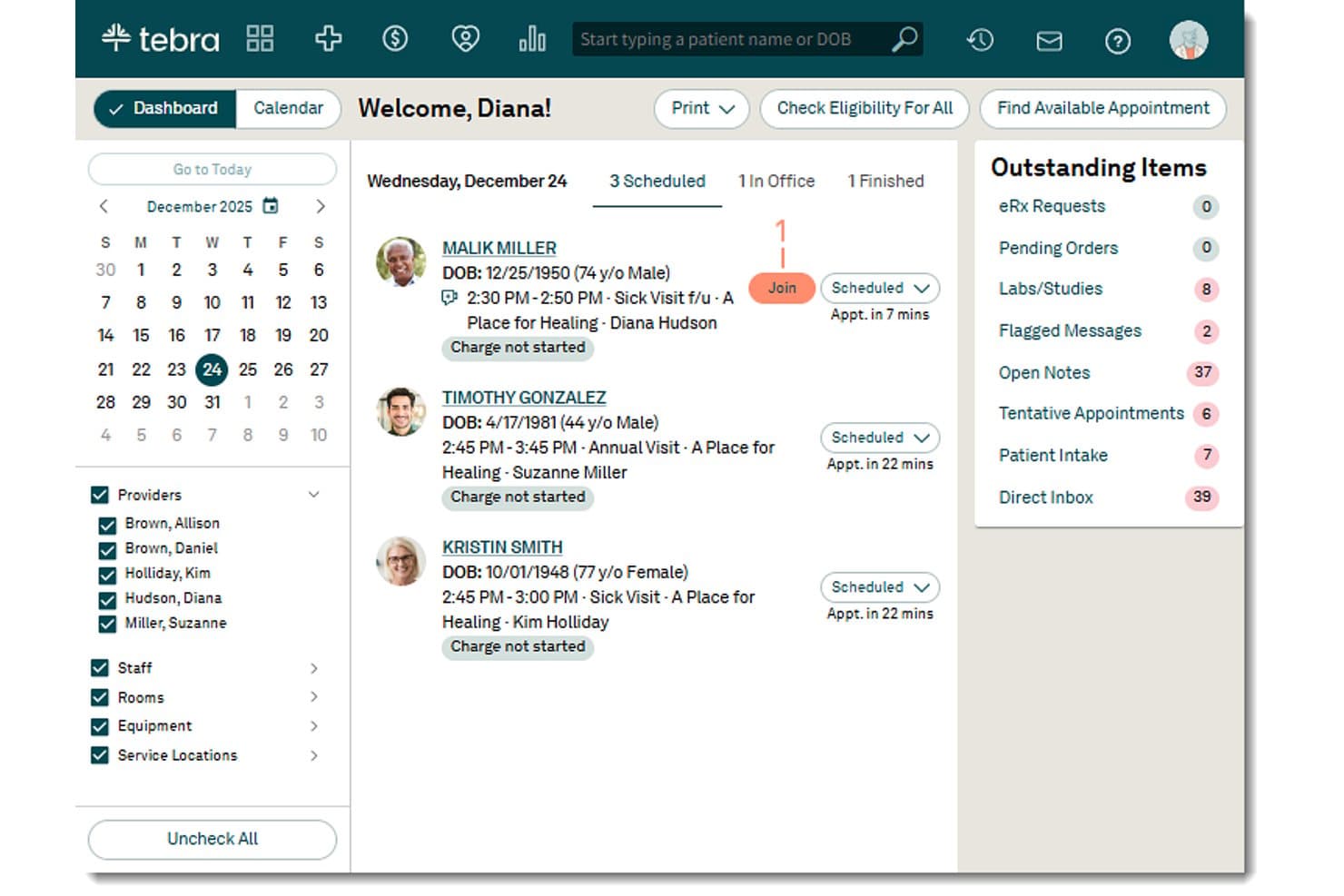
Tebra offers a telehealth dashboard with a 'Join' button for telemedicine appointments, enabling HIPAA-compliant virtual visits directly from the scheduling interface. Tebra is an EHR-native telehealth platform built for independent practices, combining HIPAA- and HITRUST-certified video visits, virtual waiting rooms, group appointments, and integrated billing within a single clinical system.
Who Is Tebra Best For?
Tebra is a strong fit for independent and small-group practices, particularly in primary care, behavioral health, and specialty care, that want telehealth built into their existing EHR rather than bolted on.
Why I Picked Tebra
I picked Tebra as one of the best because telehealth launches directly from the patient chart inside the EHR, with HIPAA- and HITRUST-certified video, so I never have to leave the clinical workflow. I especially like the dedicated provider URL feature, which lets patients join from any browser with a single click and no app download needed. The dual-screen charting option also means I can document the visit in real time while the video call runs in a separate tab.
Tebra Key Features
- Virtual waiting rooms: Staff can admit, message, and manage patients in a secure digital check-in queue.
- ePrescribing with EPCS: Providers can order medications, including controlled substances, directly within the telehealth visit.
- Integrated superbill generation: Automatically create superbills during encounters for faster billing workflows.
- Secure asynchronous messaging: Communicate with patients and share clinical documents using HIPAA-compliant chat.
Tebra Integrations
Tebra offers native integrations with DrChrono, Epic, LabCorp, Quest Diagnostics, Surescripts, and Office Ally. An API is available for custom integrations.
Pros and Cons
Pros:
- EPCS-enabled prescribing within the telehealth encounter
- HITRUST-certified video meets strict compliance standards
- Telehealth launches directly from the patient chart
Cons:
- Not suited for large health systems
- Customer support response times can be slow
Learn more about Tebra:
Annen HIPAA-kompatibel telemedisinprogramvare
Her er noen flere alternativer for HIPAA-kompatibel telemedisinprogramvare som ikke kom med på kortlisten min, men som likevel er verdt å undersøke:
- 11AmwellBest for enterprise virtual care
- 12MendBest for patient-focused virtual visits
- 13CarepatronBest for simple telehealth workflows
- 14JaneBest for multidisciplinary telehealth
- 15KlaraBest for patient communication and telehealth
- 16UpdoxBest for integrated practice telehealth
- 17eVisitBest for health system virtual care
- 18Practice BetterBest for wellness telehealth programs
How I Evaluate HIPAA Compliant Telemedicine Software
I evaluate these platforms in two layers: the compliance and clinical workflow baseline every tool must clear, and the differentiators that matter when providers and patients rely on them daily.
Core Functionality (Table Stakes For This List)
When I'm selecting tools for my list, I rank each one on a scale from 0 (does not offer the functionality) to 5 (excels in this area) for each core functionality listed below. I then calculate the tool's total score into a percentage, using 65% as a benchmark to help assess its overall fit for the list.
- HIPAA compliance: I check for a signed BAA, end-to-end encryption, audit logging, and access controls that cover every data touchpoint including video and chat.
- Video visits: Reliable HD video with a virtual waiting room matters—providers need screen sharing and multi-party support for family or group sessions.
- EHR/PMS integration: I look for bidirectional sync with major EHRs so patient demographics, appointments, and notes flow between systems without manual entry.
- Scheduling and intake: Digital intake forms, e-consent capture, and self-scheduling links should let patients prepare for visits before the provider joins.
- Secure messaging: The platform should support HIPAA-compliant threaded messaging and file sharing for follow-ups like sending lab results or wound photos.
- Telehealth billing: I evaluate whether superbill generation, telehealth-specific CPT codes, and claims workflows align with payer rules so visits translate into revenue.
Once I have a list of tools that meet the criteria, I consider what sets each platform apart.
Differentiating Factors (What Sets Vendors Apart)
Here's how I compare and contrast different vendors:
Standout Features
ePrescribing within a telehealth session is a real differentiator—providers can send prescriptions, including controlled substances via EPCS, without switching to a separate system mid-visit. Group and multi-party video support also matters, especially for behavioral health practices running family or group therapy where every participant needs HIPAA-grade protection. I look for asynchronous store-and-forward capabilities too, which let patients submit photos or messages for non-urgent follow-ups without scheduling a live visit.
Beyond Features
EHR integration depth is a big differentiator—I check whether a platform supports bidirectional sync with systems like Epic or athenahealth via FHIR/HL7 standards, since manual data entry between tools defeats the purpose. Pricing structure matters too: a solo therapist needs per-provider licensing, while a multi-location clinic benefits from enterprise plans with centralized admin controls. I also evaluate how quickly a practice can go live, including whether patients can join visits from a browser link with no app download required.
Slik velger du HIPAA-kompatibel telemedisinprogramvare
Det riktige valget handler om å tilpasse hver plattforms styrker til arbeidsflyten, sikkerheten og faktureringsbehovene i din virkelige telehelsehverdag:
| Hvis prioriteten din er … | Prioriter … |
| Maksimal PHI-sikkerhet og revisjonsspor | Signert BAA, full kryptering og eksporterbare logger |
| Sømløs integrasjon med EHR og praksisadministrasjon | Integrerte toveisintegrasjoner med EHR og praksisadministrasjon |
| Rask registrering og forberedelse av pasienter | Tilpassbart digitalt inntak og selvbestilling |
| Støtte for komplekse konsultasjoner (gruppe, familie og flere deltakere) | Fleksible video- og asynkrone alternativer |
| Enkel refusjon til behandlere | Telehelse-spesifikk koding og arbeidsflyt for krav |
Slik vurderer du kortlisten din
- Be om malen for den signerte BAA-en: Be alle leverandører om å sende sin standardavtale for forretningsforbindelser, slik at den kan gjennomgås juridisk før du ber om en demonstrasjon.
- Test EHR-synkronisering med testjournaler: Gjennomfør en prøve med syntetiske pasientdata for å bekrefte at integrasjonen fungerer i praksis – skjermbilder alene er ikke nok.
- Send og motta testmeldinger med kliniske filer: Send et eksempel på et konsultasjonssammendrag, et bilde eller et inntaksskjema for å bekrefte HIPAA-sikker meldingsutveksling.
- Gå gjennom et komplett eksempel på et detaljert regningsskjema: Be om et nylig detaljert regningsskjema for en telehelsekonsultasjon eller en kravmal som godtas av forsikringsbetalere.
- Bestem deg: Integrasjon med EHR i toppklasse eller mer fleksible arbeidsflyter? Plattformer som er sterke på samsvar og klinisk tilkobling, krever ofte mer konfigurering og høyere kostnader, mens andre kan prioritere brukervennlighet og hastighet for små team.
Hva er HIPAA-kompatibel telemedisinprogramvare?
HIPAA-kompatibel telemedisinprogramvare er en digital plattform som lar helsepersonell tilby virtuell pasientbehandling samtidig som strenge krav til personvern og sikkerhet for helsedata oppfylles. Disse plattformene inkluderer funksjoner som sikre videokonsultasjoner, digitale inntaksskjemaer og kryptert meldingsutveksling for å holde beskyttede helseopplysninger sikre og tilgjengelige under fjernkonsultasjoner. De er utviklet for klinikker og klinikere som på en pålitelig måte må beskytte pasientdata og opprettholde forskriftsmessig samsvar under hver telehelsekonsultasjon.
Funksjoner i HIPAA-kompatibel telemedisinprogramvare
Når du velger HIPAA-kompatibel telemedisinprogramvare, bør du se etter følgende viktige funksjoner:
- Sikre videokonsultasjoner: Videokonsultasjoner i sanntid med ende-til-ende-kryptering som holder samhandlingen mellom pasient og helsepersonell konfidensiell og i samsvar med regelverket.
- Digitale inntaksskjemaer: Nettbaserte skjemaer som lar pasienter dele demografiske opplysninger, samtykke og forsikringsinformasjon på en sikker måte før telehelsetimen.
- Signert BAA inkludert: Programvareleverandøren tilbyr en avtale med forretningsforbindelse (BAA) som dekker alle kontaktpunkter for data, slik at du kan være trygg på at kravene overholdes.
- EHR-integrasjon: Mulighet til å synkronisere med det elektroniske pasientjournalsystemet eller praksisadministrasjonssystemet ditt, slik at konsultasjonsnotater og avtaler overføres automatisk.
- Virtuelt venterom: Pasienter sjekker inn på nett, fyller ut nødvendige skjemaer og venter på å bli sluppet inn, akkurat som på en fysisk klinikk.
- HIPAA-sikker meldingsutveksling: Kryptert chat som lar helsepersonell og pasienter utveksle meldinger, bilder og dokumenter uten å bryte personvernreglene.
- e-resept: Verktøy på klinisk nivå for å sende nye resepter – inkludert resepter på kontrollerte legemidler – direkte til pasientens foretrukne apotek.
- Støtte for telehelsefakturering: Funksjoner som effektiviserer koding, oppretter spesifiserte regninger og gjør det enklere å sende forsikringskrav for virtuelle konsultasjoner.
- Tilgangskontroller for helsepersonell og pasienter: Omfattende tillatelsesinnstillinger for å administrere hvem som kan se, redigere eller dele sensitive helsedata på tvers av behandlingsteamet.
- Revisjonslogging: Automatisk registrering av tilgangs- og aktivitetshistorikk for å sikre ansvarlighet overfor regelverket og muliggjøre sporbarhet i etterkant av konsultasjoner.
Fordeler med HIPAA-kompatibel telemedisinprogramvare
Implementering av HIPAA-kompatibel telemedisinprogramvare gir flere fordeler for teamet og virksomheten din. Her er noen av fordelene du kan se frem til:
- Bedre datasikkerhet: Innebygd kryptering, tilgangskontroller og revisjonslogger bidrar til å beskytte sensitive helseopplysninger om pasienter i alle deler av behandlingen.
- Trygghet for at regelverket overholdes: Automatiske BAA-er, sikker meldingsutveksling og samsvarende arbeidsflyter sikrer at telehelsevirksomheten oppfyller HIPAA-kravene og unngår kostbare sanksjoner.
- Integrert virtuell arbeidsflyt: Digitalt inntak, EHR-integrasjon og sikre videokonsultasjoner lar team håndtere telehelsetimer sømløst parallelt med fysisk behandling.
- Raskere registrering av pasienter: Funksjoner som selvbestilling og digitale skjemaer reduserer administrativ friksjon og gjør pasientene klare for virtuelle konsultasjoner med mindre manuelt arbeid.
- Fleksibelt samarbeid mellom helsepersonell: Sikre gruppesesjoner, meldingsutveksling og fildeling støtter psykisk helsevern, familiesamtaler og teambaserte konsultasjoner.
- Effektivisert fakturering og refusjon: Faktureringsverktøy som er spesifikt utviklet for telehelse, gjør det enkelt for personalet å opprette spesifiserte regninger og sende inn samsvarende krav.
- Bedre pasientopplevelse: Virtuelle venterom, e-resepter og lenker for deltakelse uten nedlasting gjør det enkelt og komfortabelt for pasienter å koble seg til behandling.
Kostnader og priser for HIPAA-kompatibel telemedisinprogramvare
Valg av HIPAA-kompatibel telemedisinprogramvare krever en forståelse av de ulike prismodellene og abonnementene som er tilgjengelige. Kostnadene varierer basert på funksjoner, teamstørrelse, tillegg og mer. Tabellen nedenfor oppsummerer vanlige abonnementer, gjennomsnittsprisene deres og typiske funksjoner som er inkludert i HIPAA-kompatible telemedisinprogramvareløsninger:
Sammenligningstabell for abonnementer for HIPAA-kompatibel telemedisinprogramvare
| Plantype | Gjennomsnittlig pris | Vanlige funksjoner |
| Gratisabonnement | $0 | Grunnleggende videobesøk, begrenset meldingsutveksling og manuelle inntaksskjemaer. |
| Personlig abonnement | $30-$70/user/month | Sikre videobesøk, digitale inntaksskjemaer, timeplanlegging, HIPAA-kompatibel BAA og standard brukerstøtte. |
| Bedriftsabonnement | $80-$200/user/month | Gruppebesøk, elektronisk forskrivning, integrasjon med elektronisk pasientjournalsystem, teammeldinger, fakturering av telehelsetjenester og tilpassbare arbeidsflyter. |
| Foretaksabonnement | $200+/user/month | Støtte for flere lokasjoner, avansert analyse, SSO, tilpassede integrasjoner, dedikerte administratorkontroller og SLA-er. |
Vanlige spørsmål om HIPAA-kompatibel telemedisinprogramvare
\u003cspan style=\u0022font-weight: 400;\u0022\u003eHer er noen svar på vanlige spørsmål om HIPAA-kompatibel telemedisinprogramvare:\u003c/span\u003e
Hva gjør telemedisinprogramvare HIPAA-kompatibel?
\u003cspan style=\u0022font-weight: 400;\u0022\u003eHIPAA-kompatibel telemedisinprogramvare må implementere sikkerhetsfunksjoner som kryptering, tilgangskontroller og revisjonslogger, samt tilby en signert avtale med forretningsforbindelse (BAA) for å beskytte pasientenes helseopplysninger.\u003c/span\u003e
Kan selvstendig praktiserende bruke HIPAA-kompatibel telemedisinprogramvare til en overkommelig pris?
\u003cspan style=\u0022font-weight: 400;\u0022\u003eJa, de fleste leverandører tilbyr personlige abonnementer og abonnementer for små grupper som er utviklet for selvstendig praktiserende, med viktige telehelsefunksjoner, HIPAA-samsvar og lavere månedlige kostnader.\u003c/span\u003e
Hvordan kan virtuelle venterom være nyttige for den kliniske arbeidsflyten?
\u003cspan style=\u0022font-weight: 400;\u0022\u003eVirtuelle venterom lar pasienter sjekke inn, fylle ut skjemaer og vente på å bli sluppet inn. Dette hjelper personalet med å administrere avtaler, opprettholde orden og holde timeforløpet likt som ved fysiske konsultasjoner.\u003c/span\u003e
Støtter HIPAA-kompatibel telemedisinprogramvare elektronisk forskrivning?
\u003cspan style=\u0022font-weight: 400;\u0022\u003eJa, mange plattformer inkluderer integrert elektronisk forskrivning, ofte med støtte for kontrollerte stoffer og valg av apotek i sanntid under det virtuelle besøket.\u003c/span\u003e
Hvordan kan jeg bekrefte en leverandørs påstander om HIPAA-samsvar?
\u003cspan style=\u0022font-weight: 400;\u0022\u003eBe leverandørene om å fremlegge en kopi av BAA-en, detaljer om krypteringspraksisen og dokumentasjon om tilgangskontroller eller revisjonslogging før du tar det endelige leverandørvalget.\u003c/span\u003e