

Det kan være utfordrende å navigere i behandlingen av rusmiddelmisbruk, særlig når det gjelder håndtering av pasientjournaler og samsvar med regelverket. Du trenger en pålitelig EMR-programvare som holder alt organisert og tilgjengelig. Etter min erfaring kan riktig programvare utgjøre en betydelig forskjell i den daglige driften.
Jeg har testet og vurdert ulike EMR-løsninger for rusmiddelmisbruk for å hjelpe deg med å finne det beste alternativet for teamet ditt. Målet mitt er å gi deg en objektiv og grundig undersøkt liste over de beste alternativene, med fokus på det som virkelig betyr noe for deg.
I denne artikkelen finner du programvare som kan bidra til å redusere vanlige utfordringer, forbedre pasientbehandlingen og sikre samsvar med regelverket. La oss se nærmere på de beste tilgjengelige alternativene i dag.
Why Trust Our Software Recommendations
6,700+
Reviews
20
Industry experts
16+
Evaluation factors
14
Years
Our team has been testing and reviewing software since 2012. As medical practice leaders ourselves, we know how difficult—and important—it is to choose the right software.
For this guide, we evaluated tools using hands-on testing and independent research, scoring tools using our selection criteria.
Our reviews reflect our human editorial judgment, not a sales pitch.
Sammenligningstabell for EMR-programvare for rusmiddelmisbruk
| Tool | Best For | Trial Info | Price | ||
|---|---|---|---|---|---|
| 1 | Best for mental and behavioral health charting | Free demo + free expert consultation available | Pricing upon request | Website | |
| 2 | Best for detailed charting | 15-day free trial | From $99/month | Website | |
| 3 | Best for outcome tracking tools | Free demo available | Pricing upon request | Website | |
| 4 | Best for AI-powered note generation | Free demo available | Pricing upon request | Website | |
| 5 | Best for simplified documentation | Free demo available | Pricing upon request | Website | |
| 6 | Best for MAT workflows and addiction care ops | Free demo available | Pricing upon request | Website | |
| 7 | Best for menu-driven SUD note templates | 30-day free trial | From $55/month | Website | |
| 8 | Best for unified admissions, care, and billing | Free demo available | Pricing upon request | Website | |
| 9 | Best for post-discharge alumni engagement tools | Free demo available | Pricing upon request | Website | |
| 10 | Best for user-friendly and intuitive interface | Not available | Pricing upon request | Website |


Vurderinger av den beste EMR-programvaren for rusmiddelmisbruk
 1Best for mental and behavioral health charting
RXNT
- Free demo + free expert consultation available
- Pricing upon request
Visit WebsiteCustomer Rating:4.3/5
A screenshot of the RXNT substance abuse EMR software interface RXNT provides an electronic health record (EHR) system that's designed with a strong emphasis on mental and behavioral health functionality. RXNT is cloud-based, ONC-certified medical software. It includes a comprehensive set of features and tools that cater specifically to the unique needs of mental and behavioral health providers.
Why I Picked RXNT: I selected RXNT for its unique focus on mental and behavioral health functions within its EHR software. It sets itself apart by prioritizing the specific needs of this sector, with specialized tools like customizable behavioral health templates and integrated patient assessment tools. This distinct emphasis makes RXNT the best choice for robust mental and behavioral health functionality.
Standout Features & Integrations:
RXNT’s feature suite is robust, with capabilities like patient reminders, telehealth support, customizable mental health templates, e-prescribing, and client portal access. It offers integrations with popular software platforms, including QuickBooks for accounting and various laboratory management systems for smooth data transition.
Pros and Cons
Pros:
- Reliable integration with popular software platforms
- Robust feature suite including telehealth and customizable templates
- Tailored to the specific needs of mental and behavioral health providers
Cons:
- The interface may take some time to navigate effectively
- Might be expensive for smaller practices
- No free version is available, only a free demo
Learn more about RXNT:

OptiMantra lets providers document patient visits with customizable SOAP templates, questionnaires, and clinical notes in one place. OptiMantra is an electronic medical records (EMR) and practice management platform designed for a variety of healthcare specialties. It helps clinics and providers organize patient information, manage clinical workflows, and support operational needs from one system. With its specialty-specific tools, it adapts to practices that focus on substance abuse and related behavioral care.
Why I Picked OptiMantra: I picked OptiMantra because of its detailed charting and customizable consult templates that support behavioral and psychiatric treatment. These tools let you capture patient history, track progress, and document care plans in a structured way that matches the needs of substance abuse treatment. The software also allows pre-appointment questionnaires and intake forms that help you gather critical information about patients’ health, lifestyle, and treatment history before they even walk in, which saves time and improves accuracy in assessments.
Standout Features & Integrations:
OptiMantra also offers an integrated telehealth feature, which lets you meet patients remotely through HIPAA- and PHIPA-compliant video sessions. For substance abuse care, where patients may face stigma or accessibility issues, having secure virtual visits ensures continuity of care and better patient engagement. Integrations include Surescripts, LabCorp, Mercy Diagnostics, Quest Diagnostics, Access Medical Lab, Clinical Labs of Hawaii, Rupa Health, SimonMed, Boston Heart Diagnostics, Fullscript, Zoom, and Stripe.
Pros and Cons
Pros:
- Telehealth built in and HIPAA compliance
- Pre-appointment intakes save time for providers
- Customizable templates fit different treatment needs
Cons:
- Mostly caters to US-based practices
- Some features feel complex for small practices
Learn more about OptiMantra: Best for outcome tracking tools
- Free demo available
- Pricing upon request
Visit WebsiteCustomer Rating:4.3/5
ClinicTracker offers a comprehensive dashboard for managing clinical workflows. ClinicTracker delivers a tailored electronic medical record system built specifically for behavioural-health and substance-abuse treatment providers, offering an all-in-one EHR, billing, and practice-management platform. If your clinic runs addiction treatment, mental-health counseling, or substance-use programs, this is software that speaks directly to the unique workflows and compliance needs you face.
Why I Picked ClinicTracker
I picked ClinicTracker for its ability to cater specifically to substance abuse treatment centers with features like outcome tracking tools and collaboration options. The outcome tracking tools allow your team to monitor patient progress effectively, which is crucial in addiction treatment. I also appreciate the collaboration tools, such as secure messaging and telehealth options, which enhance patient engagement and facilitate better communication within your team.
ClinicTracker Key Features
In addition to its specialized tools for substance abuse treatment, I also like that it offers:
- Custom Form Builder: Allows your team to create and modify forms tailored to specific clinical and administrative needs.
- Automated Appointment Reminders: Helps reduce no-show rates by sending reminders to patients via email or text.
- ePrescribing: Streamlines the prescription process by allowing clinicians to send prescriptions electronically directly to pharmacies.
- Patient Portal: Provides patients with access to their health information, appointment scheduling, and direct communication with providers.
ClinicTracker Integrations
Integrations include Azure, Clinicom, AMBIR, Microsoft, Topaz, Soft Trac, and Zoom.
Pros and Cons
Pros:
- Telehealth integration expands access to remote care.
- Strong revenue cycle management streamlines billing processes.
- It supports a wide range of behavioral-health workflows (mental health, substance abuse, social services).
Cons:
- The initial setup and onboarding process can demand significant time and effort, particularly for customizing workflows.
- Limited native integration options compared to competitors.
Learn more about ClinicTracker: Best for AI-powered note generation
- Free demo available
- Pricing upon request
Visit WebsiteCustomer Rating:5/5
NextGen Healthcare dashboard displaying recent activity summaries and financial reporting tools. NextGen is a cloud-based electronic health record and practice management system that supports addiction treatment programs with a robust suite of clinical and operational tools. It combines AI-driven documentation, flexible specialty-specific templates, and patient engagement tools to help practices enhance both care delivery and financial outcomes.
Why I Picked NextGen: I picked NextGen for its ambient AI capabilities that can auto-generate SOAP notes from conversations—cutting down on documentation time by hours each day. What also stood out is its wide-ranging support for behavioral health, including features tailored for addiction care and an integration marketplace with tools like Medsender, Relaymed, Klara, and CallMyDoc. These make NextGen a smart pick for clinics that need flexibility, compliance, and automation all in one platform.
Standout Features & Integrations:
Key features include mobile-friendly AI note capture, rules-based RCM automation, self-scheduling, population health tracking, and specialty-specific templates. Integrations cover a wide ecosystem, including Relaymed, Medsender, Klara, Surgimate, Transform9, CallMyDoc, rater8, Arcadia, and more.
Pros and Cons
Pros:
- Customizable templates and workflows for various medical practices
- Wide-ranging integrations and API marketplace
- Ambient AI for hands-free SOAP note generation
Cons:
- Feature set may be excessive for small practices
- Learning curve with more advanced capabilities
Learn more about NextGEN: Best for simplified documentation
- Free demo available
- Pricing upon request
Visit WebsiteCustomer Rating:5/5
Athenahealth's platform has a patient history section, which simplifies documentation of the patient's medical background and previous treatments. Athenahealth offers a comprehensive cloud-based healthcare platform known as athenaOne, which integrates a variety of software and services aimed at enhancing clinical effectiveness, patient experience, and financial performance for healthcare providers.
Why I Picked Athenahealth: I liked its simplified documentation process, which reduces the time and distractions associated with patient encounters. This is particularly beneficial in substance abuse treatment settings where detailed and accurate documentation is crucial for tracking patient progress and ensuring compliance with treatment protocols. The software also offers customizable workflows with best-practice templates, macros, and tools that can be tailored to the specific needs of substance abuse treatment.
Standout Features & Integrations:
Another notable feature of athenaOne is its mobile documentation capability, which allows healthcare providers to document patient encounters on the go using the athenaOne app. This feature is particularly useful for substance abuse treatment providers who may need to access and update patient records in various settings, including outpatient clinics and community-based programs. Integrations include NextPatient, DocResponse, Yosi Health, Secondwave, Recovery Plus, TSI, VaxCare, Fullscript, QueueDr, and CallMyDoc.
Pros and Cons
Pros:
- Customizable templates for various medical specialties
- Cloud-based system for remote access
- Wide range of features for healthcare management
Cons:
- Limited customization options for certain workflows
- Due to its extensive features, new users may experience a learning curve
Learn more about Athenahealth: 6Best for MAT workflows and addiction care ops
Kipu
- Free demo available
- Pricing upon request
Visit WebsiteCustomer Rating:4.7/5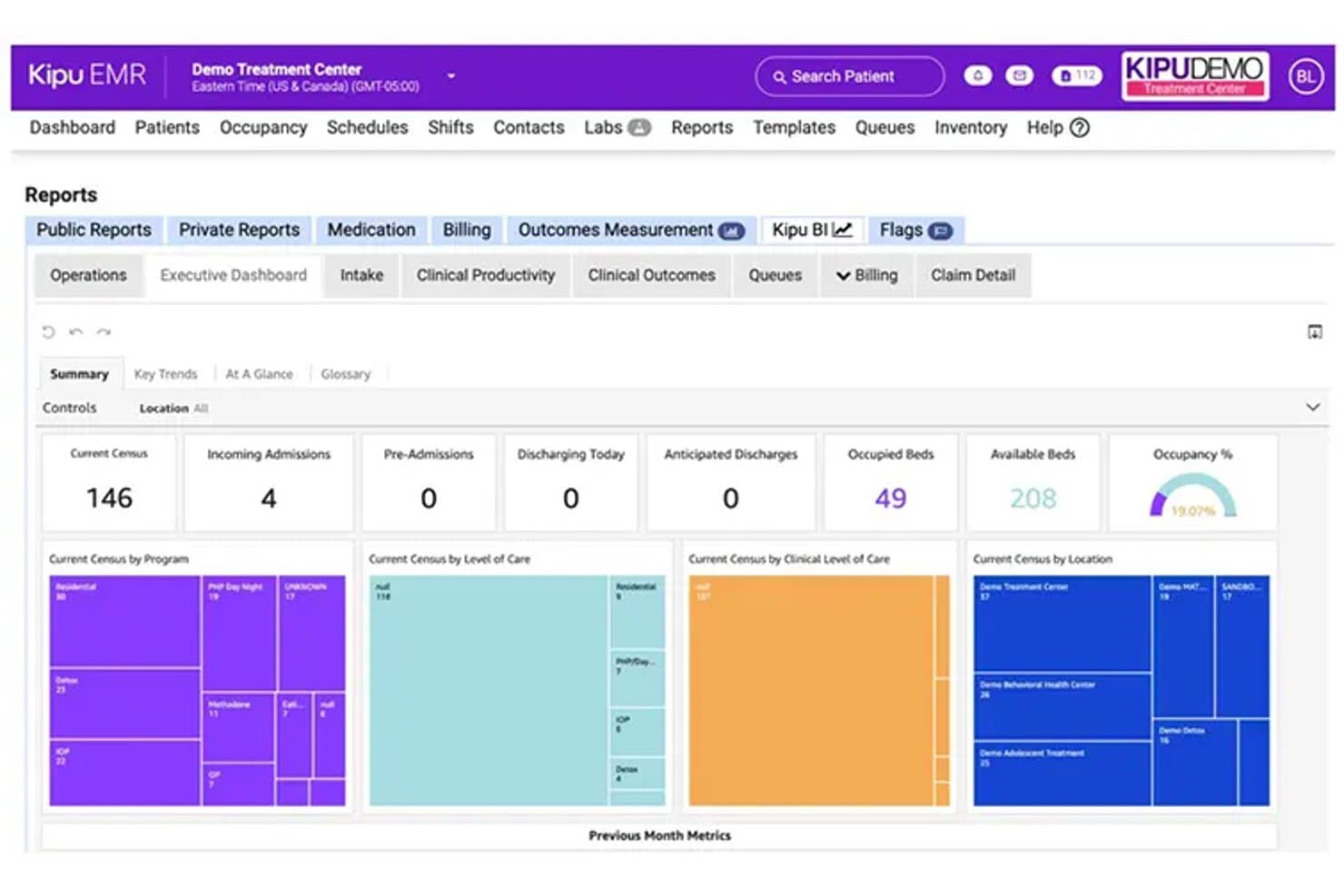
Kipu tracks census, admissions, and occupancy in one executive dashboard. Kipu is a behavioral health EMR built for addiction treatment and substance use disorder programs, covering clinical documentation, medication management, MAT workflows, scheduling, outcome assessments, and revenue cycle management.
Who Is Kipu Best For?
Kipu is a strong fit for addiction treatment centers and substance use disorder programs that need purpose-built MAT workflows, integrated medication management, and clinical documentation in a single platform.
Why I Picked Kipu
I picked Kipu as one of the best because its MAT workflows are genuinely built for how addiction treatment programs operate—not bolted on. I particularly like the diversion control and call-back workflows for Suboxone, Methadone, and Sublocade, paired with DrFirst e-prescribing and PDMP access, which keeps your controlled-substance documentation tight. The AI-powered Chart Snapshot also adds real clinical value by generating ASAM and LOCUS level-of-care recommendations directly from patient documentation.
Kipu Key Features
- Outcome assessment library: Access a built-in library of SUD-relevant assessments, including BAM, GAD-7, PHQ-9, DASS-21, and RAS, configurable by location.
- AI-powered note assistant: Transcribes provider-patient conversations and generates structured notes in SOAP, DAP, or progress-note formats with suggested diagnosis codes.
- Occupancy and bed management: View real-time room and bed availability by location, including upcoming openings tied to scheduled discharges.
- Compliance management system: Automate recurring compliance tasks, store permission-based compliance documents, and generate audit-ready reports for Joint Commission, CARF, and state requirements.
Kipu Integrations
Kipu lists integrations with DrFirst for e-prescribing and PDMP access, plus SciLog and Ivek dispensing pumps. It also lists Google Analytics, Gmail, and Outlook, and offers 41 APIs for custom connectivity.
Pros and Cons
Pros:
- Bed management helps coordinate residential capacity
- MAT diversion workflows support medication accountability
- Reviewers praise behavioral-health charting and customizable forms
Cons:
- Users report lag and occasional chart freezes
- Treatment planning can feel difficult to navigate
Learn more about Kipu: Best for menu-driven SUD note templates
- 30-day free trial
- From $55/month
Visit WebsiteCustomer Rating:4.1/5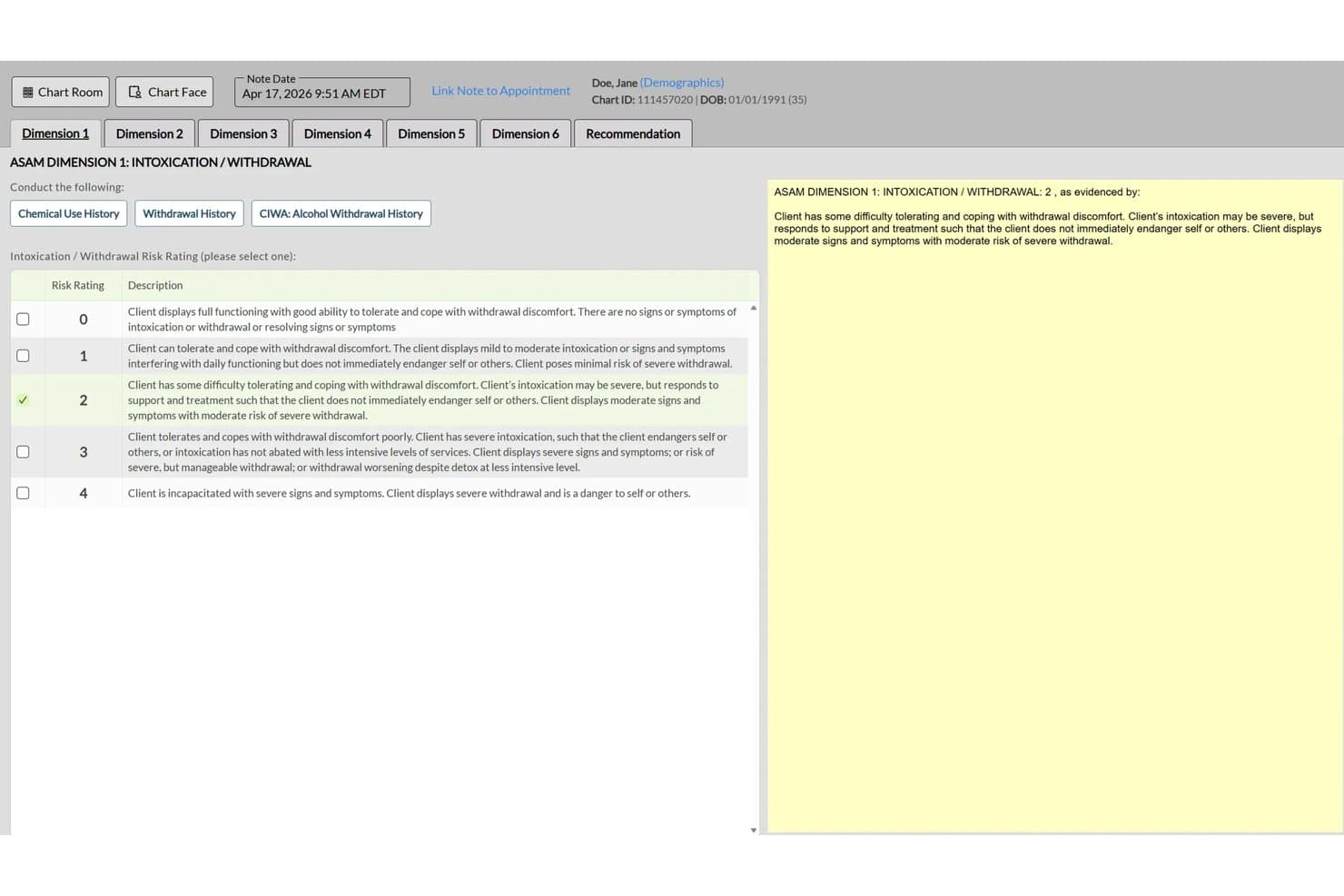
ICANotes structures ASAM criteria documentation for addiction treatment notes. ICANotes is a behavioral health EHR built exclusively for mental health and substance use practices, combining menu-driven SUD clinical documentation, treatment planning, group therapy workflows, scheduling, and integrated billing tools.
Who Is ICANotes Best For?
ICANotes suits addiction counselors and substance use practices that need structured, menu-driven note generation without spending hours on documentation.
Why I Picked ICANotes
ICANotes earns its spot on my shortlist because its menu-driven SUD documentation genuinely cuts the time counselors spend writing notes. I like that progress notes come pre-structured with SUD-specific content areas like cravings, relapse risk, stage of change, and treatment response, so clinicians are selecting relevant clinical details rather than writing from scratch. Group therapy workflows are also well thought out, letting you capture individualized participant notes, attendance, and session remarks all in one pass.
ICANotes Key Features
- 42 CFR Part 2 compliance support: Role-based permissions and segmented documentation restrict access to sensitive SUD records based on user role.
- 100+ electronic assessment tools: Validated substance-use rating scales and assessment tools support intake, treatment planning, and outcome tracking.
- Inpatient and residential documentation: Shift-based records, eMAR, UB-04 billing, and treatment-team coordination tools support residential program workflows.
- Integrated telehealth: Clinicians can schedule, launch, and document individual or group video sessions directly from the EHR.
ICANotes Integrations
ICANotes integrates with Cordant Health, Ammon, Stratus, Select, US Medical, HealthInfoNet, THA, and Health Information Network for lab and HIE connectivity. Its partner-facing FHIR R4 API supports custom patient, provider, location, and appointment integrations.
Pros and Cons
Pros:
- Group workflows support attendance and individual notes
- Notes capture cravings, relapse risk, and treatment response
- Menu-driven SUD notes reduce documentation time
Cons:
- Clinicians can’t chart from phones or tablets
- Reviewers report billing and claims friction
Learn more about ICANotes: Best for unified admissions, care, and billing
- Free demo available
- Pricing upon request
Visit WebsiteCustomer Rating:4.4/5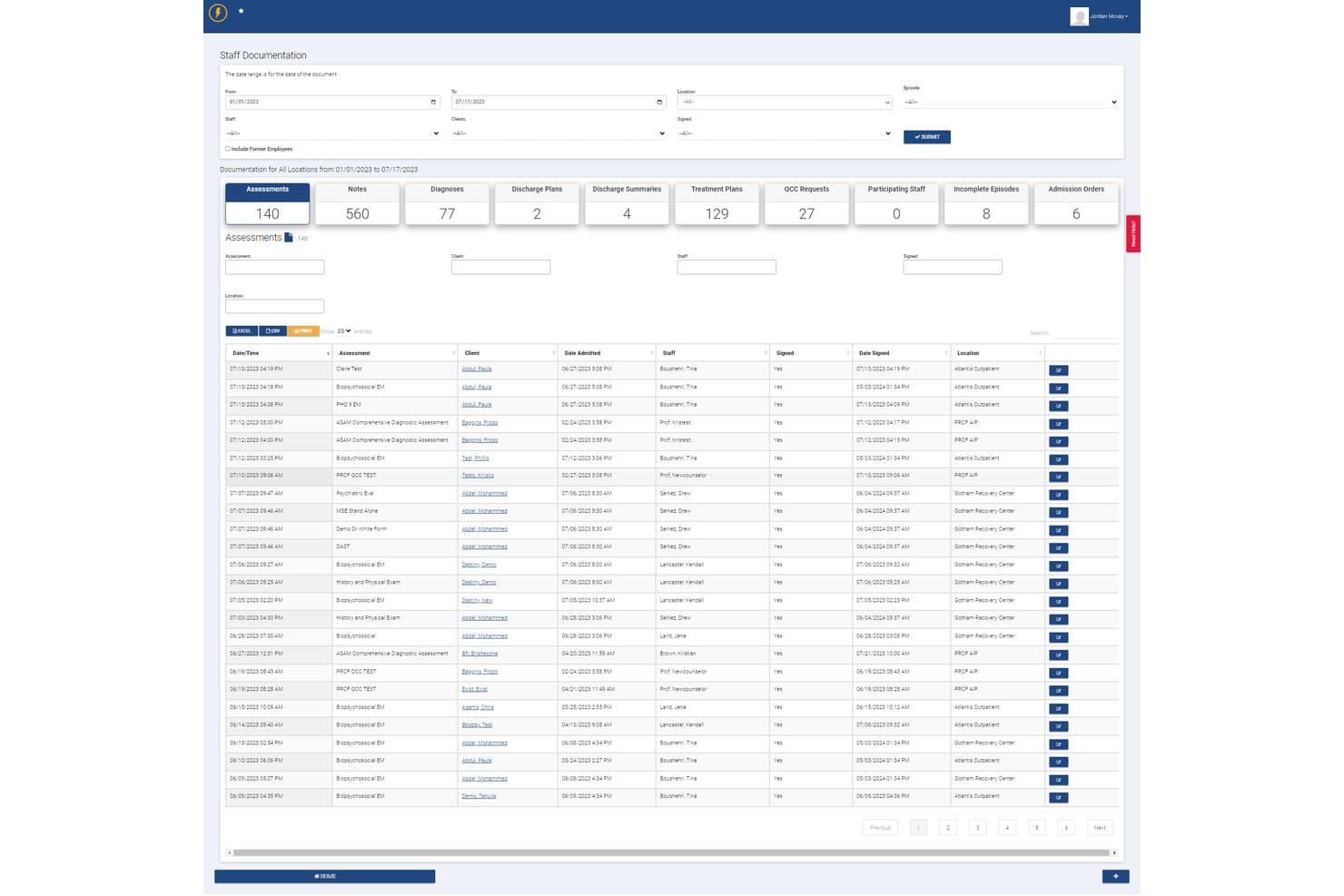
Lightning Step centralizes staff documentation and assessments for addiction programs. Lightning Step is a behavioral health EMR platform that unifies admissions, clinical documentation, and revenue cycle management—covering CRM, scheduling, treatment planning, medication management, and integrated billing in a single system built for addiction treatment programs.
Who Is Lightning Step Best For?
Lightning Step is a strong fit for multi-location addiction treatment centers that need admissions, clinical documentation, and billing managed in one system.
Why I Picked Lightning Step
I picked Lightning Step as one of the best because it's the only platform on my list where admissions, clinical documentation, and billing genuinely live in one system rather than being loosely connected. I like how the bed management and VOB dashboards feed directly into the clinical record, so a counselor's treatment plan and the billing team's claims pull from the same patient file. The AI assistant (LIA) drafting progress notes from voice dictation is a real time-saver for clinicians carrying large caseloads across multiple locations.
Lightning Step Key Features
- Medication-assisted treatment (MAT) support: The medication module manages MAT prescriptions, controlled substances, and protocol-based orders within the patient record.
- LIA AI assistant: LIA drafts individual and group progress notes and patient summaries directly from voice dictation.
- 42 CFR Part 2 consent management: The platform tracks disclosure permissions, restricts access by department or program, and generates real-time audit trails.
- Verification of benefits (VOB) dashboard: Staff can check insurance eligibility and benefits directly from the admissions workflow before a patient is admitted.
Lightning Step Integrations
Lightning Step has documented integrations with Salesforce and Updox for referral management, secure messaging, and electronic faxing. It also supports an open/custom API framework with HL7 and FHIR connectors for additional healthcare integrations.
Pros and Cons
Pros:
- Integrated e-prescribing cuts prescription time
- Supervisors can flag overdue treatment plans
- Unified admissions, care, and billing workflows
Cons:
- Client invoicing burdens larger treatment centers
- Mobile charting remains limited for clinicians
Learn more about Lightning Step: Best for post-discharge alumni engagement tools
- Free demo available
- Pricing upon request
Visit WebsiteCustomer Rating:5/5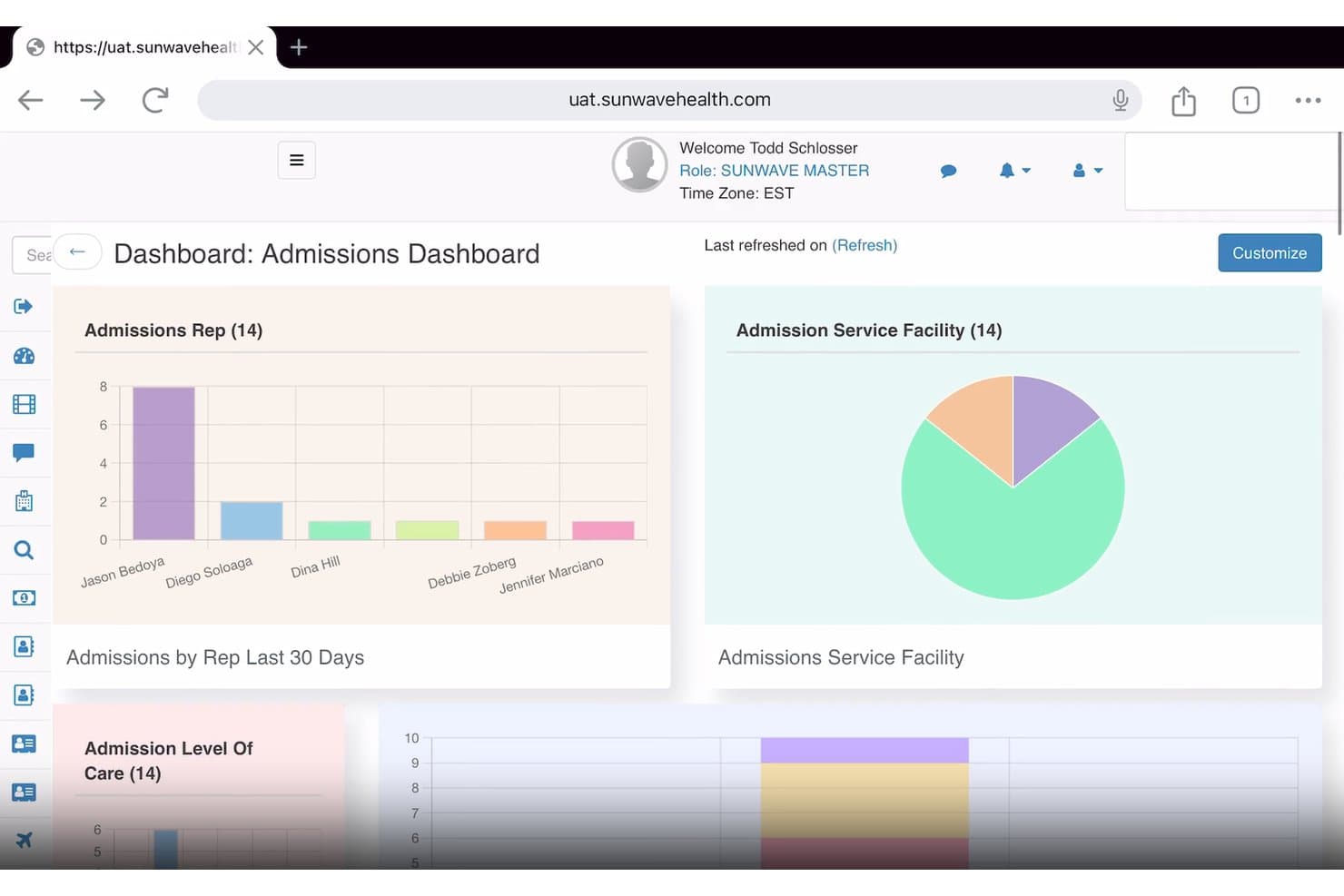
Sunwave tracks admissions data by rep, facility, and care level. Sunwave is a behavioral health EMR built for substance use disorder treatment programs, combining clinical documentation, CRM, revenue cycle management, and AI-assisted charting tools in a single platform.
Who Is Sunwave Best For?
Sunwave is a strong fit for substance use disorder treatment centers that want clinical, billing, and post-discharge alumni engagement managed in one connected platform.
Why I Picked Sunwave
I've included Sunwave in my top picks because its alumni management tools are genuinely built for what happens after discharge, not treated as an afterthought. Staff can log check-in calls, track texts and messages, and get flags when an alumni's engagement pattern suggests they may need follow-up, all from the same platform used for clinical and billing workflows. I also like that SIA generates BPS assessments and progress notes for clinician review, cutting documentation time significantly.
Sunwave Key Features
- Custom template builder: Lets your team create and configure clinical documentation templates tailored to your program's specific workflows and requirements.
- Medication management: Supports prescriptions, protocol-based orders, contraindication flags, MAT, and controlled and psychotropic substance tracking within the patient record.
- Telehealth with unlimited group participants: Hosts individual therapy, group sessions, and psychiatry appointments directly in the platform, with automated reminders and linked visit documentation.
- Revenue cycle management dashboards: Provides financial KPI, VOB, charges and claims, and utilization review dashboards to give administrators real-time visibility into billing performance.
Sunwave Integrations
Sunwave lists integrations with Salesforce, CHESS Health, Twilio, PaySimple, DoseSpot, CTM, Waystar, and Revolv3. API availability and integration types are not stated.
Pros and Cons
Pros:
- Alumni tools track outreach and flag follow-up needs
- Group and individual therapy scheduling in one calendar
- Reviewers value connected clinical and billing workflows
Cons:
- Payer and code coverage needs validation before adoption
- Initial setup can take substantial staff effort
Learn more about Sunwave:
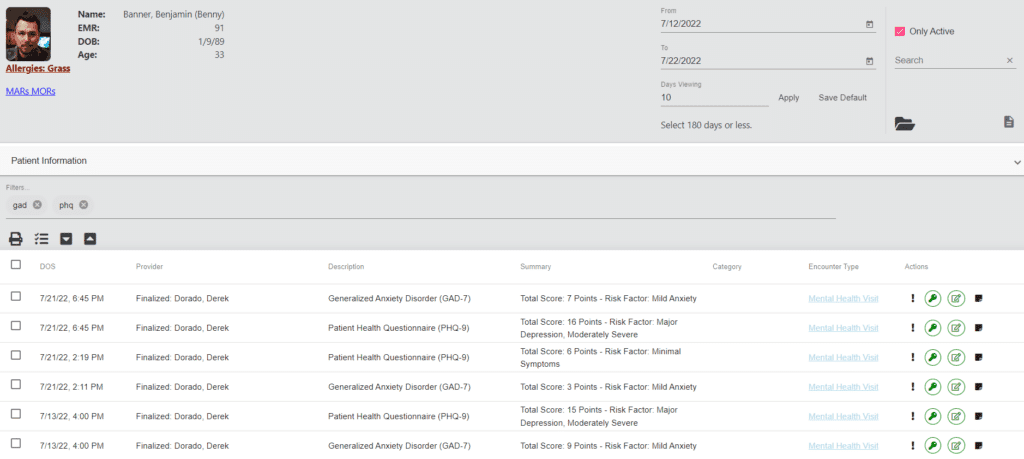
Example photo for Azzly's dashboard Ease (formerly AZZLY Rize) is a behavioral health EMR platform purpose-built for addiction treatment programs, combining CRM, clinical documentation, scheduling, and revenue cycle management in one unified system.
Who Is Azzly Best For?
Azzly is a strong fit for addiction treatment centers that want clinical, administrative, and billing workflows in one place without juggling multiple point solutions.
Why I Picked Azzly
I've included Azzly in my top picks because its interface genuinely reduces the friction that slows clinical teams down in busy addiction treatment settings. I like how the unified CRM, EHR, and RCM layout means a clinician can move from reviewing a patient's biopsychosocial evaluation to checking group session attendance to confirming an authorization, all without leaving the same chart. The shared group-documentation workflow, where you capture the session theme once and then add individual participant notes, is a practical time-saver for IOP and PHP programs running multiple groups daily.
Azzly Key Features
- AI-assisted clinical documentation: A real-time AI scribe generates and auto-fills clinical notes, reducing manual charting time for clinicians.
- E-prescribing with EPCS: Supports controlled-substance e-prescribing with PDMP integration, including medication tracking for buprenorphine and naltrexone across care levels.
- 42 CFR Part 2 record segmentation: Applies field-level, consent-based segmentation of SUD records with per-provider consent tracking and re-disclosure notices.
- Integrated RCM engine: Handles claim creation, scrubbing, submission, denial management, and ERA parsing with AI-driven validation and denial-risk flagging.
Azzly Integrations
Azzly offers native integrations with Google Calendar and Power BI. Its addiction-treatment materials also identify integrations with LabCorp, Quest, DrFirst, Availity, and Waystar, while an API supports custom integrations.
Pros and Cons
Pros:
- Reviewers praise quick chart access
- Group notes link attendance to billing
- Unified intake, clinical, and billing workflows
Cons:
- Reporting accuracy and print workflows frustrate users
- Some reviewers report slow chart loading
Learn more about Azzly:
Andre alternativer for EMR-programvare for rusmiddelmisbruk
Nedenfor finner du en liste over ytterligere programvare for rusmiddelmisbruk som jeg satte opp på kortlisten, men som ikke kom med blant de ti beste. Det er absolutt verdt å ta en titt på dem.
- 11RittenBest for multi-level-of-care SUD documentation
How I Evaluate Substance Abuse EMR Software
I split my evaluation into three parts, giving the most weight to core functionality: manage Part 2 consent and disclosure controls, and document diagnoses, assessments, and treatment plans. Next, I look for differentiators such as ASAM level-of-care tools. Finally, I consider onboarding, configuration support, and pricing as programs grow.
Core Functionality (Table Stakes For This List)
When I'm selecting tools for my list, I score each one on a scale from 0 (does not offer the functionality) to 5 (excels in this area) for each core functionality listed below. I then convert the total into a percentage to help assess each tool's overall fit, with extra weight on any functionalities I’ve deemed essential.
- Part 2 Privacy Controls (Essential): I look for consent management, disclosure tracking, and safeguards that help staff handle protected records and prevent unauthorized redisclosure.
- Clinical Documentation (Essential): I assess structured templates for SUD assessments, diagnoses, and progress notes that clinicians can use across individual and group care.
- Treatment Plan Tracking: I check whether clinicians can update goals and monitor progress as patients move between detox, residential, IOP, and outpatient care.
- Group & Individual Scheduling: I look for scheduling that connects group rosters and one-on-one appointments with attendance and session documentation.
- EHR & Practice Integration: I evaluate how charting, scheduling, patient records, and billing connect, including whether staff must reconcile information across modules.
- Behavioral Health Billing: I check for support with behavioral health claims, coding, and payer workflows, including eligibility checks where available.
Once I have a list of tools that meet the criteria, I consider what sets each platform apart.
Differentiating Factors (What Sets Vendors Apart)
Here's how I compare and contrast different vendors:
Standout Features
I look for built-in ASAM level-of-care tools that guide placement and continued-stay decisions right inside the chart. Without these, clinicians end up referencing external criteria documents mid-assessment, which slows intake. E-prescribing for MAT is equally important—I check whether the system supports controlled substance workflows so providers can manage buprenorphine or naltrexone prescriptions without switching platforms. I also evaluate outcome measurement tools, specifically whether standardized instruments like the PHQ-9 score automatically and display trends over time, since tracking progress across treatment episodes is how programs demonstrate results.
Beyond Features
I check whether a platform scales across multiple levels of care—detox, residential, IOP, and outpatient—under one system, since adding a new program line shouldn't require a major overhaul. Interoperability matters just as much: I look for HL7/FHIR support and referral management tools that let you exchange data with hospitals and recovery partners while honoring Part 2 restrictions. I also evaluate onboarding quality, specifically whether the vendor configures SUD-specific templates and consent rules during setup rather than handing you a generic rollout plan.
Slik velger du EMR-programvare for rusmiddelmisbruk
Det er lett å gå seg vill i lange lister over funksjoner og komplekse prismodeller. For å hjelpe deg med å holde fokus mens du arbeider deg gjennom den unike prosessen med å velge programvare, har vi laget en sjekkliste over faktorer du bør ha i bakhodet:
| Faktor | Hva du bør vurdere |
|---|---|
| FaktorSkalerbarhet | Hva du bør vurdereKan programvaren vokse sammen med praksisen din? Ta hensyn til fremtidig utvidelse og om verktøyet kan håndtere større pasientvolum. |
| FaktorIntegrasjoner | Hva du bør vurdereKan den kobles til eksisterende verktøy? Sørg for kompatibilitet med faktureringssystemer, plattformer for fjernbehandling og annen viktig programvare. |
| FaktorTilpasningsmuligheter | Hva du bør vurdereKan du tilpasse den til behovene dine? Se etter alternativer for å endre maler og arbeidsflyter slik at de passer til praksisens spesifikke krav. |
| FaktorBrukervennlighet | Hva du bør vurdereEr programvaren intuitiv? Vurder grensesnittet og navigasjonen for å sikre at den er brukervennlig for teamet ditt. |
| FaktorImplementering og opplæring | Hva du bør vurdereHvor raskt kan du komme i gang? Ta hensyn til ressursene som kreves for opplæring, og hvilken støtte som er tilgjengelig under overgangen. |
| FaktorKostnad | Hva du bør vurderePasser den inn i budsjettet ditt? Sammenlign prisplaner og vær oppmerksom på skjulte gebyrer eller langsiktige kontrakter som kan påvirke økonomien din. |
| FaktorSikkerhetstiltak | Hva du bør vurdereHvordan beskytter den pasientdata? Sørg for at programvaren overholder HIPAA-regelverket og tilbyr robust datakryptering. |
| FaktorKrav til samsvar | Hva du bør vurdereOppfyller den bransjestandardene? Kontroller at programvaren følger alle nødvendige juridiske og regulatoriske krav for behandling av rusmiddelmisbruk. |
Hva er EMR-programvare for rusmiddelmisbruk?
EMR-programvare for rusmiddelmisbruk er et digitalt verktøy utviklet for å administrere pasientjournaler og behandlingsplaner for programmer mot rusmiddelmisbruk. Den brukes vanligvis av helsepersonell som rådgivere, terapeuter og administrativt personale for å forbedre pasientbehandlingen og sikre samsvar med regelverket. Funksjoner for timeplanlegging, pasientadministrasjon og rapportering bidrar til effektiv drift og organisering av data. Alt i alt gir disse verktøyene en strukturert måte å håndtere pasientinformasjon på, noe som forbedrer kvaliteten på behandlingen og den administrative effektiviteten.
Funksjoner
Ved valg av EMR-programvare for rusmiddelmisbruk bør du se etter følgende viktige funksjoner:
- Pasientadministrasjon: Organiserer pasientjournaler og behandlingsplaner for å sikre enkel tilgang og effektiv behandling.
- Timeplanlegging: Bidrar til å bestille og administrere avtaler, redusere uteblivelser og optimalisere tiden.
- Overvåking av regelverksetterlevelse: Sikrer at virksomheten oppfyller alle juridiske og regulatoriske krav, slik at du kan føle deg trygg.
- Rapportering: Genererer detaljerte rapporter om pasientresultater og driftseffektivitet, noe som bidrar til datadrevne beslutninger.
- Integrasjon med telehelse: Tilrettelegger for konsultasjoner på avstand, utvider tilgangen til behandling og gir større fleksibilitet.
- Tilpassbare maler: Gjør det mulig å tilpasse skjemaer og arbeidsflyter til virksomhetens spesifikke behov.
- Sikker datalagring: Beskytter sensitiv pasientinformasjon gjennom kryptering og andre sikkerhetstiltak.
- Integrasjon med fakturering: Effektiviserer økonomiske transaksjoner og sikrer nøyaktige faktureringsprosesser til riktig tid.
- Brukervennlig grensesnitt: Forenkler navigering og bruk, reduserer opplæringstiden og øker brukertilfredsheten.
- Automatiske påminnelser: Sender varsler om avtaler og medisinplaner, noe som forbedrer etterlevelse og oppfølging.
Fordeler
Implementering av EMR-programvare for rusmiddelmisbruk gir flere fordeler for teamet og virksomheten din. Her er noen av fordelene du kan se frem til:
- Forbedret pasientbehandling: Tilgang til organiserte journaler og behandlingsplaner hjelper teamet med å gi bedre behandling.
- Bedre regelverksetterlevelse: Innebygd overvåking av regelverksetterlevelse sikrer at virksomheten oppfyller alle nødvendige krav.
- Tidsbesparelser: Timeplanlegging og automatiske påminnelser reduserer administrative oppgaver og gir mer tid til pasientene.
- Datadrevne beslutninger: Rapporteringsfunksjoner gir innsikt som veileder behandlingsstrategier og driften av virksomheten.
- Økt tilgang til behandling: Integrasjon med telehelse muliggjør konsultasjoner på avstand og gir tilgang til flere pasienter.
- Økonomisk nøyaktighet: Integrasjon med fakturering sikrer presise økonomiske transaksjoner til riktig tid og reduserer feil.
- Brukertilfredshet: Et brukervennlig grensesnitt gjør programvaren enkel å navigere i og forbedrer den daglige opplevelsen for teamet.
Kostnader og priser
Ved valg av EMR-programvare for rusmiddelmisbruk er det nødvendig å forstå de ulike prismodellene og planene som er tilgjengelige. Kostnadene varierer basert på funksjoner, teamstørrelse, tilleggstjenester og mer. Tabellen nedenfor oppsummerer vanlige planer, gjennomsnittsprisene deres og typiske funksjoner som er inkludert i EMR-programvareløsninger for rusmiddelmisbruk:
Sammenligningstabell for EMR-programvare for rusmiddelmisbruk
| Plantype | Gjennomsnittspris | Vanlige funksjoner |
|---|---|---|
| PlantypeGratisplan | Gjennomsnittspris$0 | Vanlige funksjonerGrunnleggende pasientadministrasjon, begrenset timeplanlegging og grunnleggende rapportering. |
| PlantypePersonlig plan | Gjennomsnittspris$10-$30 per bruker per måned | Vanlige funksjonerPasientadministrasjon, timeplanlegging, overvåking av regelverksetterlevelse og grunnleggende rapportering. |
| PlantypeForretningsplan | Gjennomsnittspris$40-$70 per bruker per måned | Vanlige funksjonerAvansert rapportering, integrasjon med fakturering, tilpassbare maler og telehelse. |
| PlantypePlan for større virksomheter | Gjennomsnittspris$80-$120 per bruker per måned | Vanlige funksjonerAlle funksjoner, inkludert premiumstøtte, avansert sikkerhet og fullstendige integrasjoner. |
Andre spør også (vanlige spørsmål)
Hvordan skiller EMR-programvare for rusmiddelbehandling seg fra generelle EMR-systemer?
EMR-programvare for rusmiddelbehandling er skreddersydd for behandlingssentre for avhengighet, med fokus på funksjoner som legemiddelhåndtering, spesialiserte vurderinger og overholdelse av spesifikke forskrifter som 42 CFR Part 2. Denne spesialiseringen hjelper teamet ditt med å håndtere pasientbehandlingen mer effektivt enn generelle EMR-systemer.
Kan EMR-programvare for rusmiddelbehandling integreres med andre systemer?
Ja, det meste av EMR-programvaren for rusmiddelbehandling kan integreres med systemer for fakturering, telehelse og laboratorietjenester. Denne integrasjonen forbedrer effektiviteten i arbeidsflyten ved å muliggjøre datadeling på tvers av plattformer, slik at teamet ditt kan opprettholde konsekvente og nøyaktige journaler.
Tilbys det opplæring for nye brukere av EMR-programvare for rusmiddelbehandling?
De fleste leverandører tilbyr opplæringsressurser som nettseminarer, veiledninger og brukerstøtte. Disse ressursene hjelper teamet ditt med å komme raskt i gang, slik at de kan bruke programvaren effektivt fra første dag.
Hvordan håndterer EMR-programvare for rusmiddelbehandling pasientinvolvering?
Mange systemer tilbyr funksjoner som pasientportaler, telehelse og sikker meldingsutveksling. Disse verktøyene forbedrer kommunikasjonen mellom pasienter og behandlere, noe som gjør det enklere for teamet ditt å håndtere behandlingen og for pasientene å holde seg informert og engasjert.