

Det følger med utfordringer å drive en vellykket legevakt. Håndtering av pasientflyt, sikring av nøyaktige journaler og rask service er bare noen av dem. Det er her EMR-systemer for legevakt kommer inn i bildet. De hjelper deg med å holde alt organisert og effektivt.
Jeg har brukt tid på å teste og vurdere disse systemene for å finne de beste alternativene for deg. Målet mitt er å gi deg en objektiv gjennomgang av de beste valgene som kan utgjøre en reell forskjell i praksisen din.
I denne artikkelen deler jeg mine beste anbefalinger for EMR-løsninger for legevakt, og fremhever hva som gjør hver av dem spesiell. Du får innsikt som hjelper teamet ditt med å velge riktig system for behovene deres.
Why Trust Our Software Recommendations
6,700+
Reviews
20
Industry experts
16+
Evaluation factors
14
Years
Our team has been testing and reviewing software since 2012. As medical practice leaders ourselves, we know how difficult—and important—it is to choose the right software.
For this guide, we evaluated tools using hands-on testing and independent research, scoring tools using our selection criteria.
Our reviews reflect our human editorial judgment, not a sales pitch.
Sammenligningstabell for EMR-systemer for legevakt
| Tool | Best For | Trial Info | Price | ||
|---|---|---|---|---|---|
| 1 | Best for e-prescribing safety checks in urgent care | Free demo + free expert consultation available | Pricing upon request | Website | |
| 2 | Best for customizable charting in urgent care | 15-day free trial | From $99/month | Website | |
| 3 | Best for data-driven multi-site performance tracking | Free demo available | Pricing upon request | Website | |
| 4 | Best for billing-integrated EHR in small practices | Not available | Pricing upon request | Website | |
| 5 | Best for all-in-one urgent care billing and EHR | Free demo available | Pricing upon request | Website | |
| 6 | Best for AI-driven note drafting in urgent care | Free demo available | Pricing upon request | Website | |
| 7 | Best for urgent care charting speed and OccMed visits | Not available | Pricing upon request | Website | |
| 8 | Best for kiosk check-in and walk-in registration | Free demo available | From $229/user/month | Website | |
| 9 | Best for health-system-connected urgent care visits | Not available | Pricing upon request | Website |


Anmeldelser av de beste EMR-systemene for legevakt
 1Best for e-prescribing safety checks in urgent care
RXNT
- Free demo + free expert consultation available
- Pricing upon request
Visit WebsiteCustomer Rating:4.3/5
RXNT Urgent Care EMR Interface RXNT is an integrated EHR and practice management solution that focuses on delivering a seamless healthcare experience. It stands out with its superior prescription management capabilities, which contribute significantly to enhancing patient safety.
Why I Picked RXNT: In my selection process, I judged RXNT to have a clear edge because of its efficient prescription management system. It integrates prescribing practices with patient records, ensuring that safety checks are in place. I determined that RXNT's commitment to patient safety through careful prescription management made it a standout choice.
Standout features & integrations:
RXNT features include a robust EHR, efficient practice management, and an advanced e-prescribing system. Its e-prescribing system is of particular note as it integrates with the national pharmacy database, ensuring up-to-date prescription information. Additionally, RXNT offers seamless integrations with labs, radiology centers, and pharmacies.
Pros and Cons
Pros:
- Robust EHR for comprehensive patient record management
- Integration with national pharmacy database for accurate prescription information
- Advanced e-prescribing system enhancing patient safety
Cons:
- Interface could benefit from a design update
- Customization options could be more extensive
- Setup process can be somewhat complex
Learn more about RXNT: Best for customizable charting in urgent care
- 15-day free trial
- From $99/month
Visit WebsiteCustomer Rating:4.8/5
OptiMantra’s customizable charting tools with annotatable images help medspas document treatments and engage patients effectively. OptiMantra is a versatile EMR platform that supports urgent care centers with tools for clinical documentation, patient engagement, billing, and inventory management. Designed with flexibility in mind, it lets you tailor charting templates and workflows to match the fast-paced and variable needs of urgent care practices.
Why I Picked OptiMantra: I picked OptiMantra because customizable charting is a major advantage in urgent care, where no two patient visits are alike. You can adapt templates to fit your clinical style and streamline record keeping without slowing down patient flow. The ability to pair charting with built-in e-prescriptions, lab integrations, and inventory alerts makes it especially practical if you need an all-in-one system that adapts to your workflow rather than forcing you into rigid documentation.
Standout features & integrations:
OptiMantra’s standout features include customizable charting and patient dashboards that track screenings, immunizations, and care history. It also offers HIPAA-compliant telehealth for remote consultations and inventory management that alerts you when supplies run low. On the financial side, it supports superbills, insurance claims, and integrated payment processing. Integrations include Surescripts, LabCorp, Quest Diagnostics, Clinical Pathology Laboratories (CPL), Fullscript, Rupa Health, and more, extending its utility across labs, pharmacies, and diagnostics partners.
Pros and Cons
Pros:
- Inventory tracking supports supply readiness
- Integrated labs and prescriptions included
- Flexible charting templates save time
Cons:
- Steep learning curve for new users
- Interface design is not very intuitive
Learn more about OptiMantra: Best for data-driven multi-site performance tracking
- Free demo available
- Pricing upon request
Visit WebsiteCustomer Rating:3.8/5
AthenaOne Urgent Care EMR Interface athenaOne is a comprehensive electronic health record (EHR) solution, offering integrated medical billing, patient engagement, and care coordination services. It's specifically designed to support data-driven decision making, providing healthcare practices with valuable analytics to enhance care and streamline operations.
Why I Picked athenaOne: I picked athenaOne because of its strong emphasis on data analytics. It delivers actionable insights that enable healthcare providers to make informed, data-driven decisions. These analytics capabilities make athenaOne stand out among other EHR solutions, and in my opinion, it's the best choice for healthcare practices seeking to leverage data for enhancing their services.
Standout features & integrations:
athenaOne comes with robust features such as automated medical billing, telehealth services, and a patient portal. But the standout feature is its powerful healthcare analytics capabilities. It integrates with popular software like MedLine Plus and Epocrates, making it easier for providers to access relevant medical information.
Pros and Cons
Pros:
- Easy integration with popular software like MedLine Plus and Epocrates
- Integrated medical billing, patient engagement, and care coordination
- Powerful healthcare analytics for data-driven decision making
Cons:
- Might be overkill for smaller practices or those not interested in advanced analytics
- The user interface may be complex for some users
- Pricing information is not readily available
Learn more about athenaOne: Best for billing-integrated EHR in small practices
- Not available
- Pricing upon request
Visit WebsiteCustomer Rating:3.7/5
Nextgen Office Urgent Care EMR Interface NextGen Office is a robust EMR solution designed to streamline medical practice operations. The software shines with its comprehensive billing solutions, which go a long way in optimizing revenue streams.
Why I Picked NextGen Office: NextGen Office made its way into my selection for its exceptional billing solutions. The software differentiates itself with its comprehensive billing module that ensures accurate invoicing and efficient revenue management. This makes it an ideal choice for medical practices looking to maximize their revenue, making it best for comprehensive billing solutions.
Standout features & integrations:
NextGen Office offers a suite of features, including electronic prescribing, patient scheduling, and a robust billing system. The tool's standout billing solution supports claim scrubbing, eligibility checking, and electronic remittance advice. NextGen Office integrates well with various healthcare systems like labs, pharmacies, and radiology departments, complementing its robust feature set.
Pros and Cons
Pros:
- Affordable pricing compared to other EMR solutions
- Offers a suite of features that streamline practice operations
- Comprehensive billing solutions for effective revenue management
Cons:
- Customization options might be limited for certain practice needs
- User interface could be more intuitive
- Might take time to fully understand the billing system
Learn more about NextGen Office: Best for all-in-one urgent care billing and EHR
- Free demo available
- Pricing upon request
Visit WebsiteCustomer Rating:3.5/5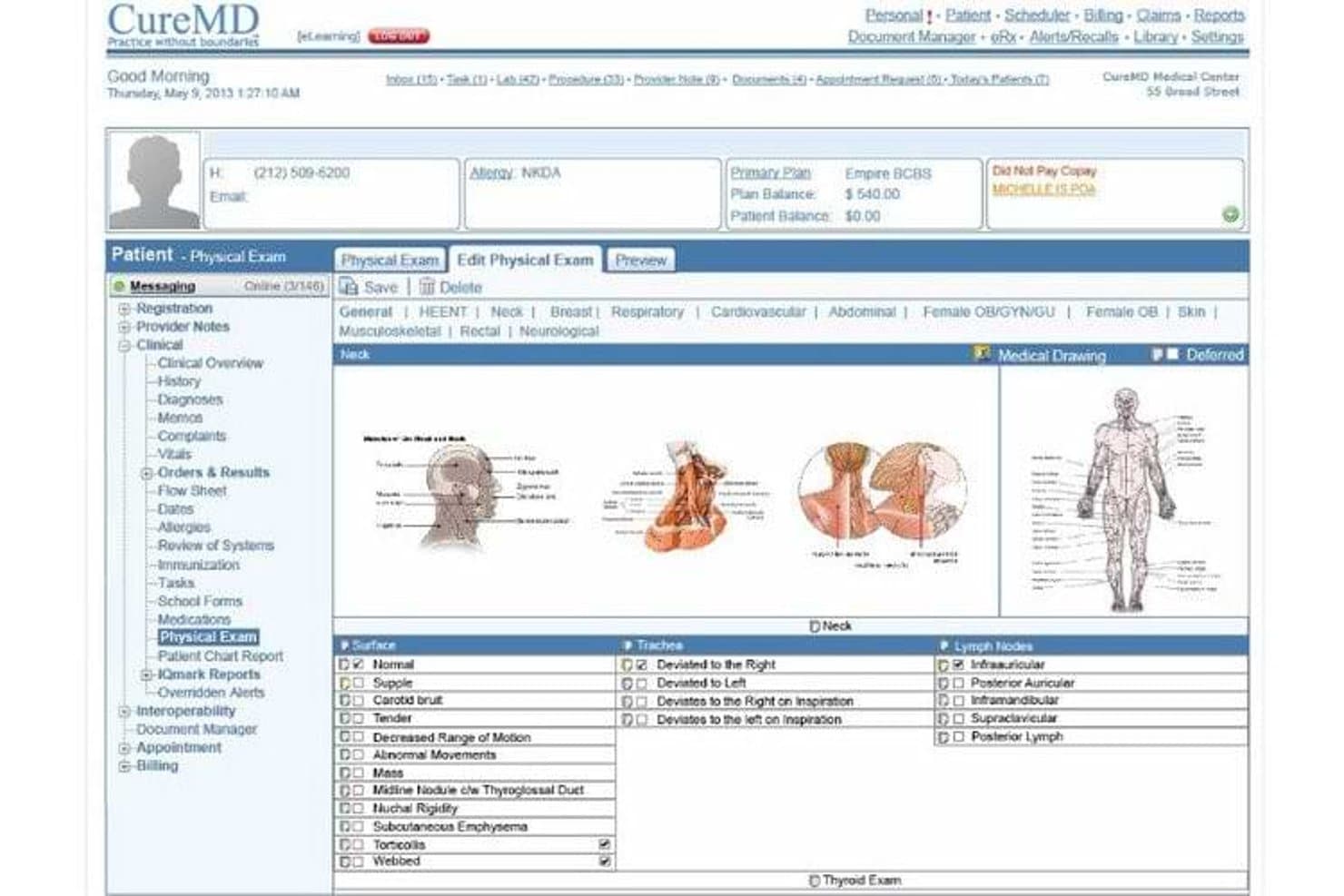
CureMD's physical exam module supports detailed neck assessments for urgent care. CureMD is a cloud-based urgent care EHR and billing platform that combines electronic medical records, practice management, and revenue cycle management into a single system with template-driven charting, triage workflows, and integrated coding support.
Who Is CureMD Best For?
CureMD suits urgent care practices that want to manage clinical documentation, scheduling, and billing from a single platform without juggling separate systems.
Why I Picked CureMD
CureMD earns its spot on my shortlist because it collapses EHR, practice management, and billing into one system purpose-built for urgent care. I particularly like its urgent-care-specific coding support, which handles walk-in CPT codes, modifiers -25 and -59, and extended-hours claims without requiring a separate billing platform. The e-superbill feature recommends E&M levels based on documented information and flags missing components before submission, which keeps claim quality tight across high-volume shifts.
CureMD Key Features
- AI medical scribe: Ambient listening captures clinical notes in real time and supports coding and order workflows without manual transcription.
- Digital check-in kiosk: Patients update demographics, verify insurance, and complete intake forms on arrival via kiosk or mobile app.
- Real-time eligibility verification: Insurance eligibility is checked automatically before the encounter, reducing claim rejections at the point of registration.
- FHIR R4 API: A standards-based API connects CureMD to external systems, labs, and health networks for structured data exchange.
CureMD Integrations
CureMD lists integrations with Quest Diagnostics, LabCorp, Orchard Software, Lenox Hill Radiology, Midmark, Welch Allyn, and GE. It also offers a FHIR R4 API for custom connectivity.
Pros and Cons
Pros:
- Reviewers report smoother billing and reimbursement
- EHR and billing share one workflow
- Urgent-care coding supports walk-in claims
Cons:
- Support experiences vary across reviewers
- Reviewers report charting lag and freezing
Learn more about CureMD: Best for AI-driven note drafting in urgent care
- Free demo available
- Pricing upon request
Visit WebsiteCustomer Rating:3.4/5
eClinicalWorks Urgent Care EMR Interface eClinicalWorks is a comprehensive EMR software that offers a suite of solutions designed to optimize healthcare delivery. With its robust cloud infrastructure, it supports efficient data management and access across multiple locations.
Why I Picked eClinicalWorks: I picked eClinicalWorks for this list due to its exceptional ability to support multi-location practices. Given the complexity of managing multiple facilities, a tool with robust cloud capabilities was an essential inclusion. eClinicalWorks stands out in this regard, providing seamless, unified access to records across different locations, making it the best for multi-location practices.
Standout features & integrations:
eClinicalWorks offers an array of features like customizable templates, patient portal, and telehealth capabilities. These features collectively aid in delivering superior patient care while streamlining administrative processes. The software integrates effectively with multiple healthcare systems, from labs and pharmacies to radiology departments and medical billing services, providing a holistic healthcare management solution.
Pros and Cons
Pros:
- Integrates with a range of healthcare systems
- Customizable templates aid in record keeping
- Robust cloud infrastructure for multi-location accessibility
Cons:
- Billed annually, which could impact budgeting for smaller practices
- The platform could have a learning curve for some users
- High starting price may be prohibitive for small practices
Learn more about eClinicalWorks: Best for urgent care charting speed and OccMed visits
- Not available
- Pricing upon request
Visit WebsiteCustomer Rating:2.7/5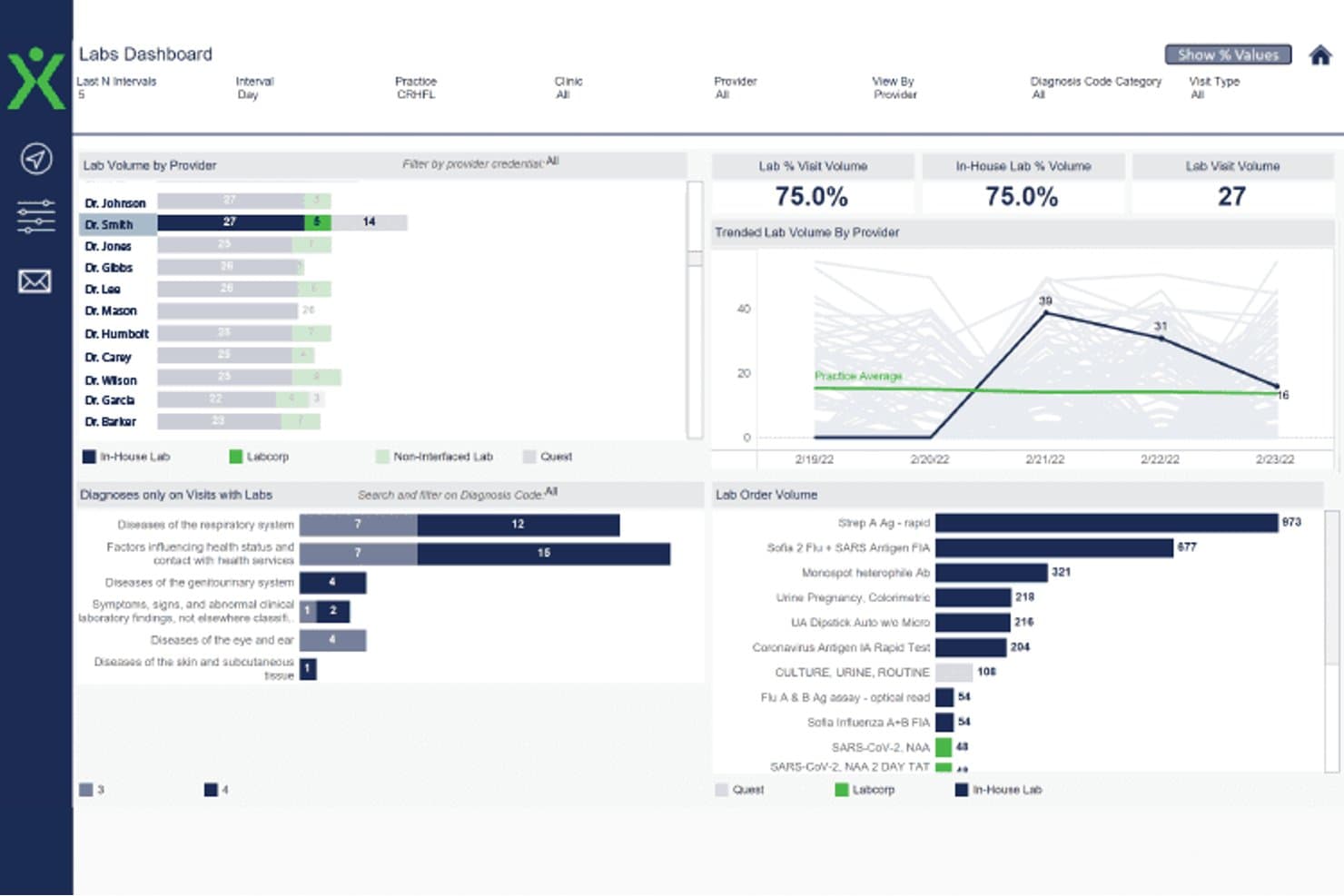
Experity labs dashboard showing provider lab volume, visit trends, diagnoses, and test orders Experity is a purpose-built urgent care EMR and practice management system that combines complaint-driven charting, walk-in patient registration, billing and coding, and occupational medicine workflows in one platform.
Who Is Experity Best For?
Experity is a strong fit for urgent care clinics that need to move patients from walk-in registration to discharge quickly, especially those running occupational medicine programs alongside standard urgent care visits.
Why I Picked Experity
I picked Experity as one of the best because its complaint-driven templates let providers chart 80% of common urgent care visits in under 60 seconds, which matters when your waiting room doesn't stop filling up. I also love how ExperityOccMed handles the split between standard walk-in visits and employer-based occupational medicine, including configurable split billing and a portal where employers can pull arrival times, work restrictions, and test results directly.
Experity Key Features
- AI Scribe: Listens to and transcribes patient encounters, then generates structured clinical notes with ICD, CPT, and E/M coding support.
- Carequality integration: Lets providers search, send, and retrieve patient health data from Carequality network partners directly within the EMR/PM.
- Experity Payments: Supports online bill pay, tap-to-pay devices, and transaction-to-reconciliation visibility through a self-service admin portal.
- Care Agent: Delivers a HIPAA-compliant, AI-powered patient assistant via secure text and web, handling pre-visit insurance verification and post-visit follow-ups without requiring an app.
Experity Integrations
Experity offers marketplace integrations via its partner ecosystem, including Relaymed, Aidoc, ChartSwap, Collectly, TeleCloud, and Zocdoc. It also provides limited API access for custom integrations, but the total integration count isn’t stated.
Pros and Cons
Pros:
- Employer protocols support occupational medicine visits
- Check-in and patient tracking suit busy shifts
- Complaint-driven templates speed routine charting
Cons:
- Lab and imaging orders feel cumbersome
- Billing tasks can require extra steps
Learn more about Experity: Best for kiosk check-in and walk-in registration
- Free demo available
- From $229/user/month
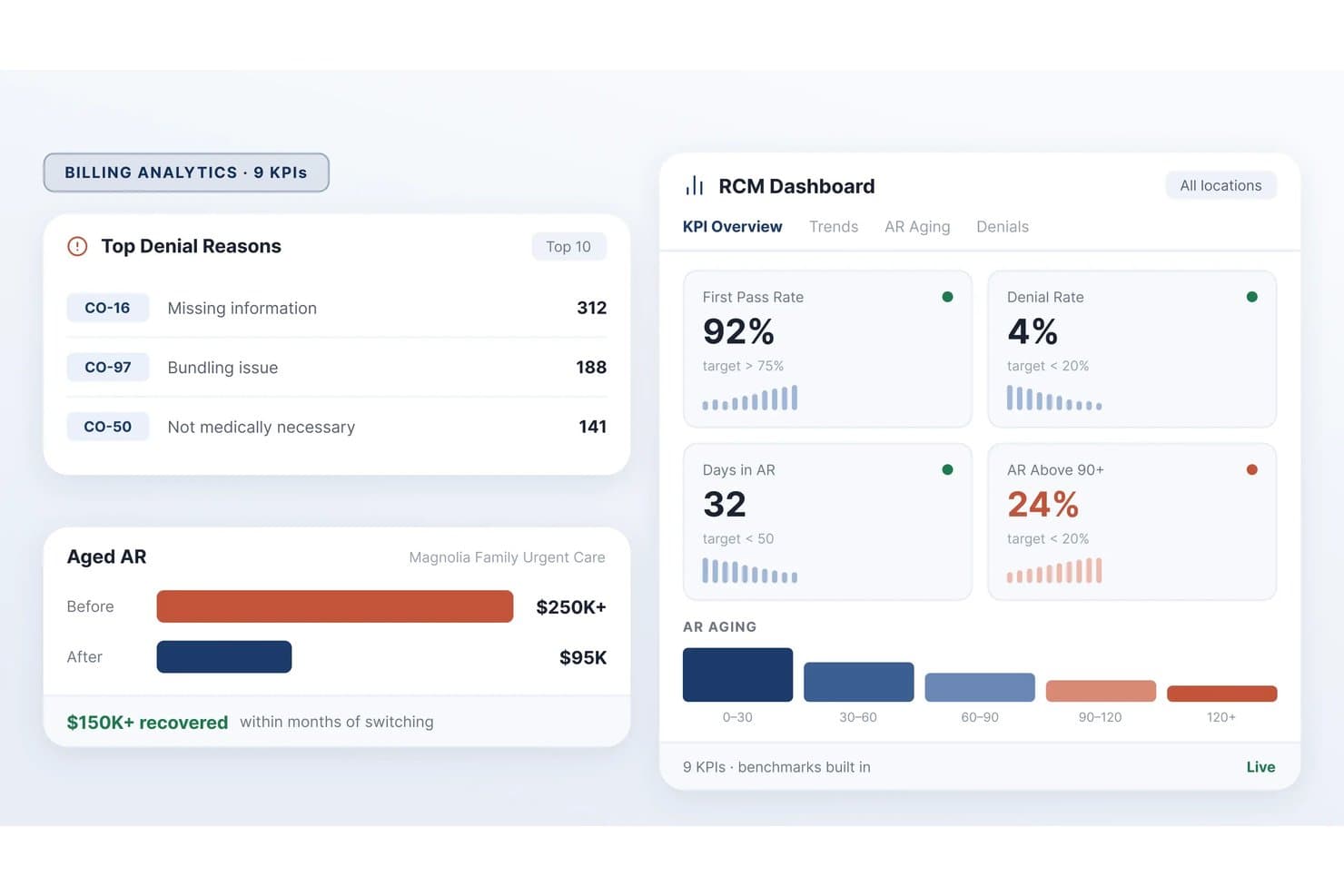
Practice EHR tracks billing KPIs and denial trends in real time. PracticeEHR is a cloud-based urgent care EHR that combines episodic visit charting, specialty-specific templates, point-of-care diagnostics integration, multi-site scheduling, and AI-assisted documentation tools.
Who Is PracticeEHR Best For?
PracticeEHR is a strong fit for urgent care clinics and multi-site walk-in practices that need specialty-specific charting, self-service kiosk registration, and location-level performance dashboards in one platform.
Why I Picked PracticeEHR
I picked PracticeEHR as one of the best because its self-service kiosk handles the full walk-in registration sequence in under three minutes, capturing government ID, insurance cards, demographics, and copay in one pass with real-time eligibility verification. I also like that the kiosk syncs directly into the clinical workflow, so by the time a provider opens the chart, registration is already complete. Urgent-care procedure templates with built-in CPT codes and modifiers round out the charting side for high-volume episodic visits.
PracticeEHR Key Features
- AI Scribe: Listens to patient visits, transcribes in 20+ languages, and drafts SOAP notes with suggested ICD/CPT codes for provider review.
- Multi-location dashboards: Displays KPIs like door-to-door time, AR days, and charge capture across all clinic sites from a single view.
- Telehealth (TeleVisit): Supports HD video visits with in-visit charting, billing in the same workflow, and automated reminders sent to patients.
- Lab and imaging integration: Sends LabCorp and Quest orders directly from the encounter and pulls rapid test results and on-site PACS images into the patient chart.
Practice EHR Integrations
PracticeEHR offers native integrations with LabCorp, Quest Diagnostics, BioReference, and Surescripts, plus outside-record access through Kno2, Carequality, and TEFCA. Its FHIR-based API supports custom integrations.
Pros and Cons
Pros:
- Reviewers praise manageable chart documentation
- Procedure templates include codes and consent
- Walk-in kiosk captures registration before charting
Cons:
- Patient queues lack documented live wait-time alerts
- Reviewers report kiosk and consent-form glitches
Learn more about Practice EHR: 9Best for health-system-connected urgent care visits
EPIC
- Not available
- Pricing upon request
Visit WebsiteCustomer Rating:4.5/5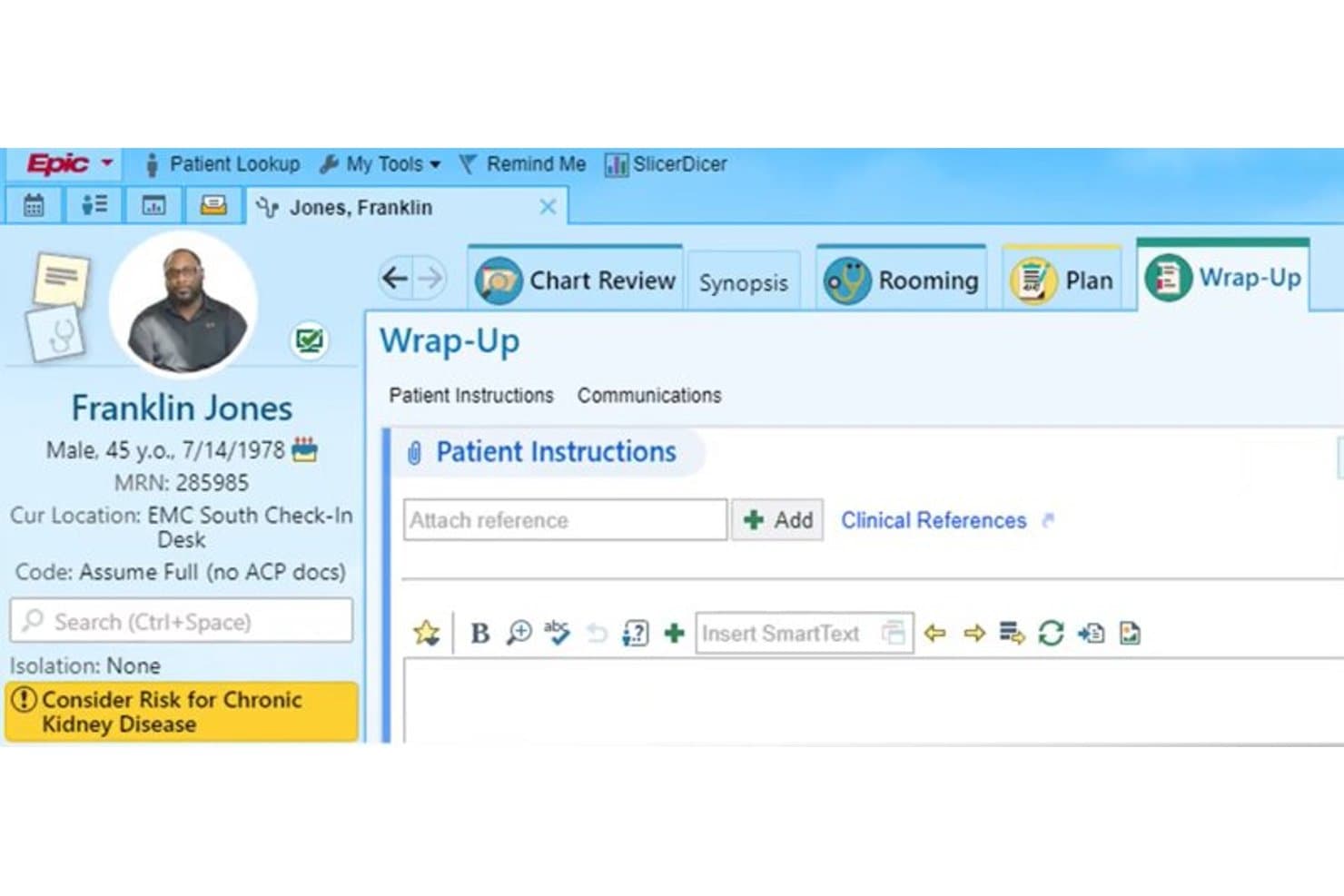
EPIC streamlines patient discharge with wrap-up instructions and communications. Epic is a healthcare EMR platform built for large health systems that includes an Emergency & Urgent Care specialty application (ASAP) with clinical decision support, occupational health workflows, lab and imaging order integration, and nationwide record exchange through its Care Everywhere network.
Who Is Epic Best For?
Epic is the strongest fit for urgent care departments operating within a larger health system already running Epic's EHR.
Why I Picked Epic
I've included Epic in my top picks because it's the only option here built from the ground up for health-system-scale clinical environments, making it the natural fit when urgent care runs as a department inside a larger Epic-using network. Its Emergency & Urgent Care (ASAP) application gives physicians active clinical decision support alongside a full longitudinal record, and Care Everywhere pulls in records from other participating organizations automatically. The occupational health module also handles pre-employment physicals, drug screens, and work-injury visits with employer-specific access controls built in.
Epic Key Features
- Care Everywhere network: Automatically pulls in patient records from other participating organizations during a visit.
- CDS hooks configuration: Customers configure when decision-support alerts fire and what actions or information they return.
- Self-arrival kiosk authentication: Supports patient identification and enrollment at check-in without front-desk intervention.
- RTLS patient and asset tracking: Tracks patients, staff, and medical devices within a facility using tags and a sensory network.
Epic Integrations
Epic’s interface directory lists connections with Surescripts, CoverMyMeds, DrFirst, Arrive Health, CenterX, Humana, HUS, and Polycon. Its API supports FHIR, HL7, DICOM, NCPDP, and ASC X12 for custom integrations.
Pros and Cons
Pros:
- Urgent-care charting includes active decision support
- Occupational health supports employer-specific visits
- Unified records surface notes, labs, and medications
Cons:
- Complex setup may burden standalone clinics
- Navigation-heavy tasks can slow visit documentation
Learn more about EPIC:
How I Evaluate Urgent Care EMR
I split my evaluation into three parts, giving the most weight to core functionality: chart walk-in visits quickly and return onsite test results during the visit. Next, I look for differentiators such as patient self-check-in. Finally, I consider implementation speed and responsive support beyond the feature set.
Core Functionality (Table Stakes For This List)
When I'm selecting tools for my list, I score each one on a scale from 0 (does not offer the functionality) to 5 (excels in this area) for each core functionality listed below. I then convert the total into a percentage to help assess each tool's overall fit, with extra weight on any functionalities I’ve deemed essential.
- Episodic Charting (Essential): I look for complaint-focused templates that help clinicians document a sore throat or minor injury without relying on long-form charting.
- Point-of-Care Diagnostics (Essential): I assess whether staff can order onsite rapid tests or imaging and return results to the chart during the same visit.
- Patient Flow Tracking: A live status view should show each walk-in’s progress from arrival and triage through testing, clinician review, and discharge.
- Urgent Care Billing: I check for encounter-level coding and fee-for-service claims support for short, unscheduled visits, with coding validation where available.
- Walk-In Registration: I look for quick intake without an appointment and a direct handoff from registration to the patient’s clinical chart.
- Occupational Health Workflows: I evaluate dedicated documentation for employer-sponsored drug screens, physicals, and workers’ compensation, plus employer billing or reporting.
Once I have a list of tools that meet the criteria, I consider what sets each platform apart.
Differentiating Factors (What Sets Vendors Apart)
Here's how I compare and contrast different vendors:
Standout Features
Patient self-service check-in is the first thing I evaluate. A kiosk or mobile option with live wait-time visibility keeps your front desk from becoming a bottleneck during a Monday morning surge. I also check for built-in telehealth with a virtual waiting room, which lets you triage low-acuity complaints like rashes or UTI symptoms without filling an in-person slot. For multi-site operators, I look at whether reporting dashboards let you compare volume and revenue across locations from one view.
Beyond Features
I look at how quickly a vendor can get a new site live, since urgent care clinics can't pause walk-ins for a lengthy rollout. Vendor support responsiveness matters just as much—when your EMR goes down mid-shift, a slow help desk means patients leave. I also check interoperability with labs, imaging centers, and health information exchanges to confirm visit records follow patients back to their primary care provider.
Slik velger du EMR-system for legevakt
Det er lett å gå seg vill i lange funksjonslister og komplekse prismodeller. For å hjelpe deg med å holde fokus mens du går gjennom den unike prosessen med å velge programvare, har vi laget en sjekkliste over faktorer du bør ha i bakhodet:
| Faktor | Hva du bør vurdere |
|---|---|
| FaktorSkalerbarhet | Hva du bør vurdereVil EMR-systemet vokse sammen med praksisen din? Vurder om verktøyet kan håndtere økt pasientvolum uten ytelsesproblemer eller kostbare oppgraderinger. |
| FaktorIntegrasjoner | Hva du bør vurdereFungerer det med de eksisterende systemene dine? Kontroller om EMR-systemet kan integreres med fakturerings-, timebestillings- og laboratoriesystemene du allerede bruker, slik at du unngår forstyrrelser i arbeidsflyten. |
| FaktorTilpasningsmuligheter | Hva du bør vurdereKan du tilpasse EMR-systemet til behovene dine? Se etter muligheter for å tilpasse maler og arbeidsflyter slik at de samsvarer med de unike prosessene i praksisen din. |
| FaktorBrukervennlighet | Hva du bør vurdereEr grensesnittet intuitivt? Sørg for at teamet ditt kan navigere i EMR-systemet uten omfattende opplæring. Det reduserer overgangstiden og minimerer feil. |
| FaktorImplementering og innføring | Hva du bør vurdereHvor lang tid tar det å komme i gang? Vurder hvor mye tid og hvilke ressurser som kreves til oppsett og opplæring, og ta hensyn til de ansattes tilgjengelighet og læringskurve. |
| FaktorKostnad | Hva du bør vurderePasser det inn i budsjettet ditt? Sammenlign totalkostnaden, inkludert lisenser, vedlikehold og eventuelle skjulte gebyrer, med den økonomiske planen din. |
| FaktorSikkerhetstiltak | Hva du bør vurdereEr pasientopplysningene beskyttet? Kontroller at EMR-systemet oppfyller bransjestandarder for datasikkerhet, for eksempel kryptering og tilgangskontroller, for å beskytte sensitiv informasjon. |
| FaktorEtterlevelseskrav | Hva du bør vurdereOppfyller det lovpålagte standarder? Sørg for at EMR-systemet overholder helsereguleringer som HIPAA for å unngå juridiske komplikasjoner og bøter. |
Hva er EMR for legevakt?
EMR for legevakt er programvare som håndterer pasientjournaler, avtaler og fakturering for legevaktsentre. Helsepersonell som leger og administrativt ansatte bruker disse verktøyene til å forbedre pasientbehandlingen og driftseffektiviteten. Funksjoner som pasientplanlegging, fakturahåndtering og datasikkerhet bidrar til å håndtere store pasientvolumer og sikre rask tilgang til informasjon. Samlet sett forbedrer disse verktøyene arbeidsflyten og organiseringen ved legevakter.
Funksjoner
Når du velger EMR for legevakt, bør du se etter følgende nøkkelfunksjoner:
- Pasientplanlegging: Gir effektiv håndtering av avtaler, reduserer ventetid og forbedrer pasienttilfredsheten.
- Fakturahåndtering: Effektiviserer faktureringsprosessen og sikrer nøyaktig fakturering og betalingssporing.
- Datasikkerhet: Beskytter sensitive pasientopplysninger med kryptering og tilgangskontroller i samsvar med lovpålagte standarder.
- Tilpassbare maler: Gjør det mulig å tilpasse dokumenter og arbeidsflyter etter behovene i praksisen din.
- Integrasjon med telemedisin: Tilbyr mulighet for fjernkonsultasjoner og utvider pasientenes tilgang til behandling.
- Sanntidsanalyse: Gir innsikt i praksisens resultater og bidrar til bedre beslutningstaking og effektivisering.
- Støtte for flere lokasjoner: Håndterer drift på tvers av flere steder og sikrer konsistens og koordinering.
- Interaktive produktvisninger: Bidrar til opplæringen ved å veilede nye brukere gjennom systemets funksjoner og muligheter.
- Kundestøtte døgnet rundt: Sikrer at hjelp er tilgjengelig når det trengs, minimerer avbrudd og løser problemer raskt.
Fordeler
Implementering av EMR for legevakt gir flere fordeler for teamet og virksomheten din. Her er noen av fordelene du kan se frem til:
- Bedre pasienthåndtering: Effektiv planlegging og journalføring forbedrer pasientopplevelsen og reduserer ventetiden.
- Økt driftseffektivitet: Automatisert fakturering og sanntidsanalyse bidrar til å effektivisere prosesser og forbedre beslutningstakingen.
- Forbedret datasikkerhet: Beskyttelse av pasientopplysninger med sterke sikkerhetstiltak sikrer samsvar med lovpålagte krav.
- Bedre ressursfordeling: Tilpassbare maler og støtte for flere lokasjoner muliggjør skreddersydde arbeidsflyter og koordinert drift.
- Utvidet tilgang til behandling: Integrasjon med telemedisin gir mulighet for fjernkonsultasjoner og når effektivt ut til flere pasienter.
- Rask opplæring: Interaktive produktvisninger og omfattende støtte gjør det enklere for ansatte å ta i bruk det nye systemet.
Kostnader og priser
Valg av EMR for legevakt krever en forståelse av de ulike prismodellene og abonnementene som er tilgjengelige. Kostnadene varierer basert på funksjoner, teamstørrelse, tillegg og mer. Tabellen nedenfor oppsummerer vanlige abonnementer, gjennomsnittsprisene deres og typiske funksjoner som er inkludert i EMR-løsninger for legevakt:
Sammenligningstabell for EMR for legevakt
| Abonnementstype | Gjennomsnittspris | Vanlige funksjoner |
|---|---|---|
| AbonnementstypeGratisabonnement | Gjennomsnittspris$0 | Vanlige funksjonerGrunnleggende planlegging, begrensede pasientjournaler og grunnleggende rapportering. |
| AbonnementstypePersonlig abonnement | Gjennomsnittspris$20-$50/bruker/måned | Vanlige funksjonerPasienthåndtering, timeplanlegging og standardfunksjoner for fakturering. |
| AbonnementstypeBedriftsabonnement | Gjennomsnittspris$50-$100/bruker/måned | Vanlige funksjonerAvansert analyse, tilpassbare maler og integrasjon med telemedisin. |
| AbonnementstypeVirksomhetsabonnement | Gjennomsnittspris$100+/bruker/måned | Vanlige funksjonerStøtte for flere lokasjoner, forbedrede sikkerhetsfunksjoner og dedikert kundestøtte. |
Vanlige spørsmål om EMR for akuttbehandling
Hvilket EMR-system bruker WellNow Urgent Care?
WellNow Urgent Care bruker EMR- og PM-systemet fra Experity. Dette systemet gir en enkel brukeropplevelse som de ansatte i resepsjonen raskt kunne tilpasse seg. Det er utviklet for å forbedre pasienttilfredsheten ved å tilby en intuitiv arbeidsflyt og effektiv service.
Hva bør jeg vurdere ved implementering av et EMR-system for akuttbehandling?
Ved implementering av et EMR-system for akuttbehandling bør du ta hensyn til faktorer som integrasjon med eksisterende systemer, opplæring av brukere og datamigrering. Sørg for at systemet samsvarer med behovene i praksisen din, og at teamet ditt er forberedt på overgangen.
Hvilken type timebestilling bruker akuttbehandlingssentre?
Akuttbehandlingssentre bruker vanligvis åpen timebestilling eller drop-in-bestilling. Denne tilnærmingen gjør det mulig for helsepersonell å håndtere umiddelbare behov og nødsituasjoner uten avtaler på forhånd, og tar høyde for pasientenes uforutsigbare ankomsttider.