

EHR-systemer for allmennpraksis sentraliserer pasientdata og automatiserer dokumentasjonsoppgaver, slik at teamet ditt får mer tid til å gi personlig tilpasset behandling og forbedre resultatene. Det kan være utfordrende å håndtere fragmenterte data, men riktig støtte kan effektivisere journalføringen og forbedre kommunikasjonen på tvers av team.
I denne artikkelen sammenligner og vurderer jeg de beste EHR-systemene for å hjelpe deg med kjøpsbeslutningen.
Why Trust Our Software Recommendations
6,700+
Reviews
20
Industry experts
16+
Evaluation factors
14
Years
Our team has been testing and reviewing software since 2012. As medical practice leaders ourselves, we know how difficult—and important—it is to choose the right software.
For this guide, we evaluated tools using hands-on testing and independent research, scoring tools using our selection criteria.
Our reviews reflect our human editorial judgment, not a sales pitch.
Sammenligningstabell for EHR for allmennpraksis
Tabellen nedenfor sammenligner prisdetaljer for mine beste EHR-utvalg for allmennpraksiser.
| Tool | Best For | Trial Info | Price | ||
|---|---|---|---|---|---|
| 1 | Best for customizable family practice charting | 15-day free trial | From $99/month | Website | |
| 2 | Best for behavioral health practices | Free demo available | Pricing upon request | Website | |
| 3 | Best for customizable family practice workflows | Free demo available | Pricing upon request | Website | |
| 4 | Best for solo and multi-provider practice growth | Free demo available | Pricing upon request | Website | |
| 5 | Best for cloud-based accessibility and ease of use | 14-day free trial + free demo available | From $199/user/month (billed annually) | Website | |
| 6 | Best with AI-enabled ambient documentation tools | Free demo available | From $429/user/month | Website | |
| 7 | Good for small practices with its intuitive and easy-to-learn interface | 7-day free trial | From $229/month | Website | |
| 8 | Best for unified billing and practice management | Free demo available | Pricing upon request | Website | |
| 9 | Best for its highly customizable interface | Free demo available | Pricing upon request | Website | |
| 10 | Best for integrated AI-powered clinical workflows | Free demo available | From $280/user/month | Website |


Anmeldelser av de beste EHR-systemene for allmennpraksis
Nedenfor finner du mine detaljerte sammendrag av de beste EHR-systemene for allmennpraksis som kom med på kortlisten min. Anmeldelsene mine gir en detaljert gjennomgang av de viktigste funksjonene, fordeler & ulemper, integrasjoner og ideelle bruksområder for hvert verktøy, slik at du kan finne det beste for deg.
 Best for customizable family practice charting
- 15-day free trial
- From $99/month
Visit WebsiteCustomer Rating:4.8/5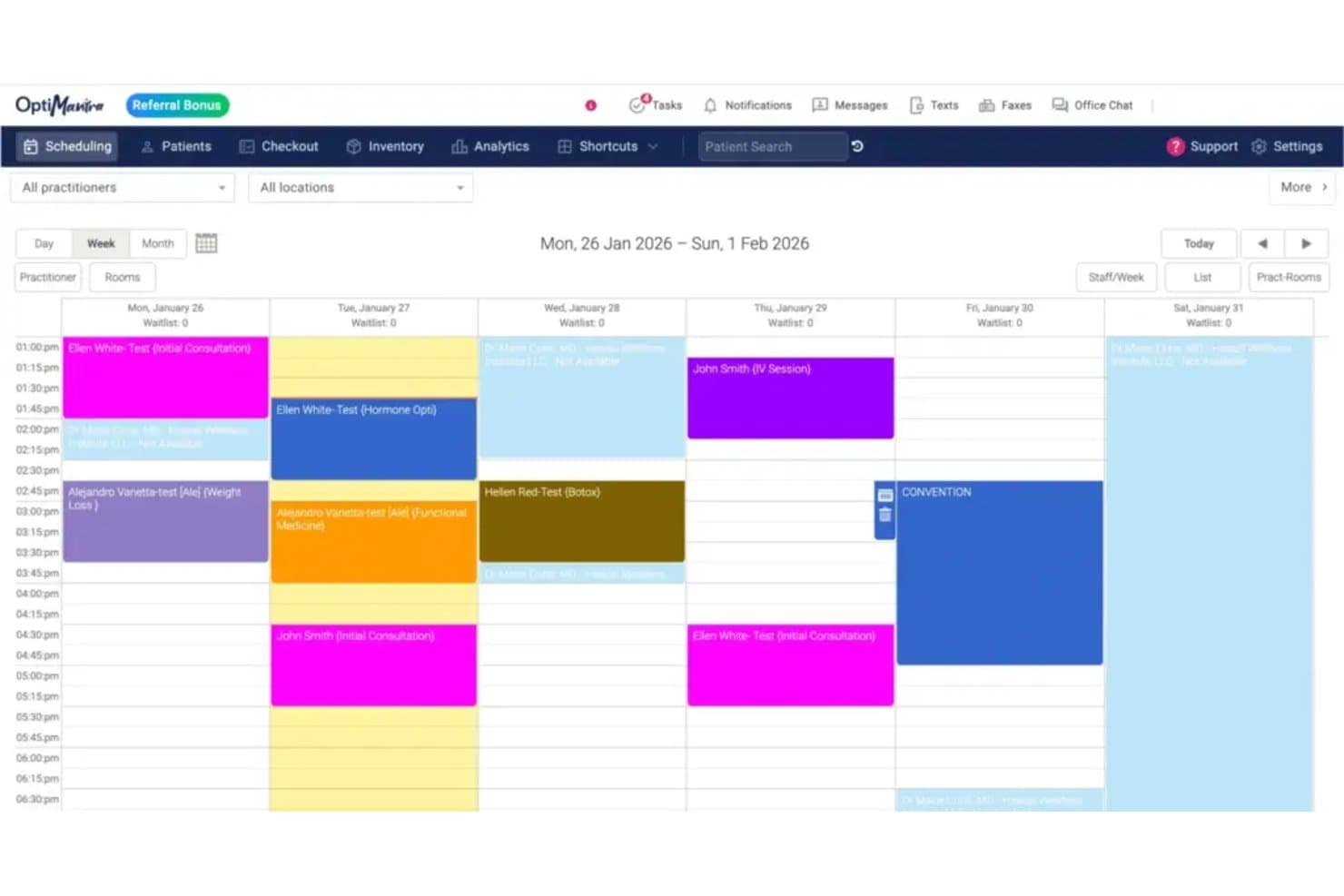
OptiMantra offers a color-coded weekly scheduling calendar view that displays patient appointments, session types, and practitioner availability across multiple days. OptiMantra is an EHR and practice management platform built for integrative and holistic providers, combining customizable charting, scheduling, e-prescribing, telehealth, lab integrations, and insurance billing in a single system.
Who Is OptiMantra Best For?
OptiMantra is a strong fit for solo practitioners and small multi-provider clinics in integrative, functional, or primary care medicine.
Why I Picked OptiMantra
OptiMantra earns its spot as one of the best on my shortlist because of how deeply it lets you customize charting at the individual practitioner level. Every provider in a practice can build their own initial and follow-up intake forms, and the SOAP template library covers all four note sections with clickable and copy-paste options. I also like the "Existing Chart Follow-up" import feature, which pulls prior chart content directly into a new visit note without starting from scratch.
OptiMantra Key Features
- Integrated telehealth: Secure video visits built into the platform with HIPAA compliance and synced charting workflows.
- E-prescribing with EPCS: Electronic prescribing for all medication classes, including controlled substances, with Surescripts connectivity.
- Bidirectional lab and imaging orders: Direct integration for ordering and receiving results from LabCorp, Quest, Rupa Health, and leading imaging centers.
- Patient portal and two-way messaging: Online patient access for appointment scheduling, forms, and secure HIPAA-compliant communication.
OptiMantra Integrations
OptiMantra offers native integrations with LabCorp, Quest Diagnostics, Fullscript, Surescripts (via MDToolbox), Stripe, Authorize.net, SimonMed, and Rupa Health. An API is available for custom integrations.
Pros and Cons
Pros:
- Built-in telehealth and e-prescribing capabilities
- Robust multi-specialty and multi-location support
- Customizable chart templates for each provider
Cons:
- No direct PDMP integration for controlled substances
- ONC certification status is not confirmed
Learn more about OptiMantra: Best for behavioral health practices
- Free demo available
- Pricing upon request
Visit WebsiteCustomer Rating:4.3/5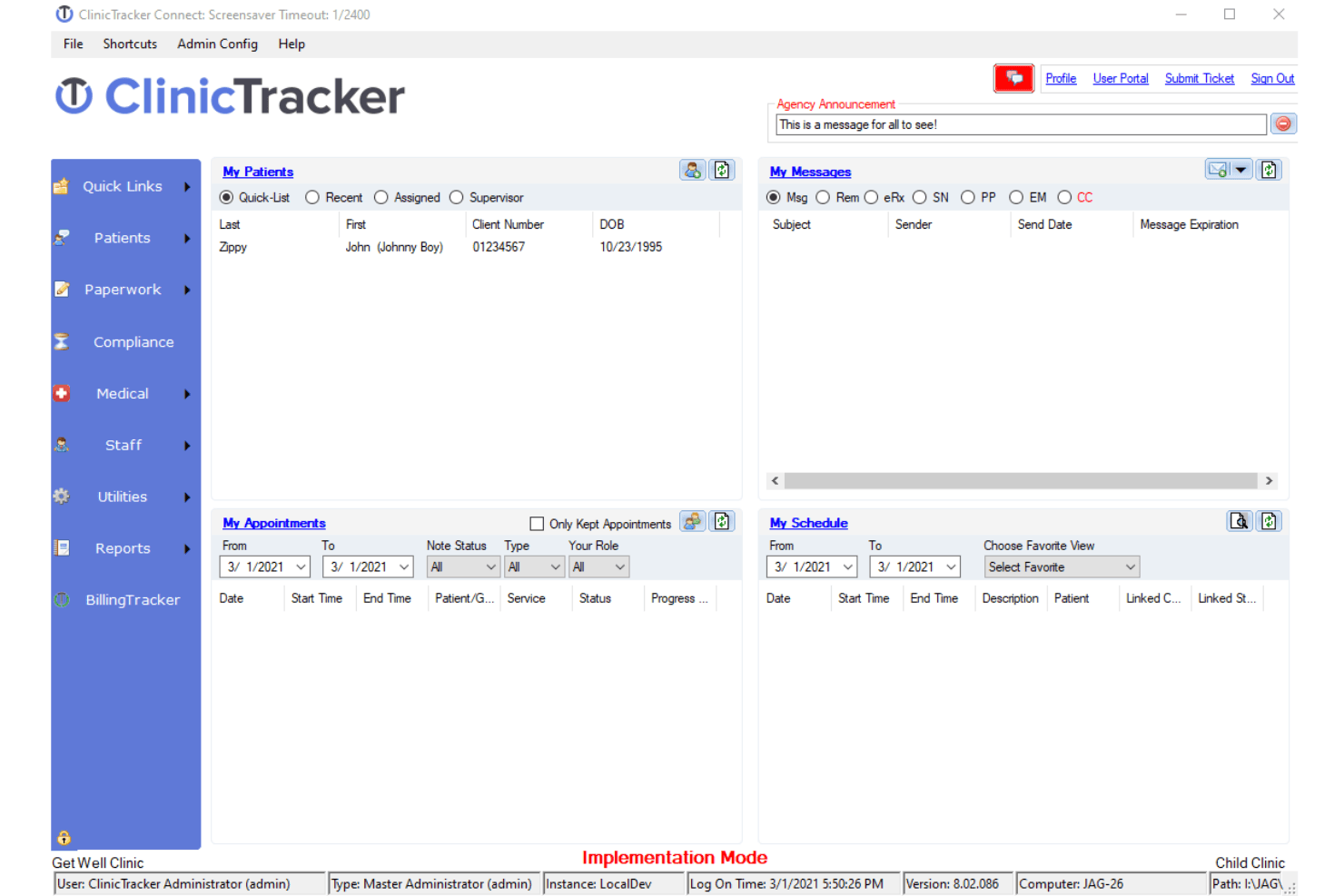
ClinicTracker offers a comprehensive dashboard for managing clinical workflows. ClinicTracker is a behavioral health EHR that combines clinical documentation, practice management, scheduling, e-prescribing, and integrated billing into a single platform built specifically for mental health, substance use, and ABA therapy providers.
Who Is ClinicTracker Best For?
ClinicTracker is a strong fit for outpatient behavioral health organizations — including mental health clinics, substance use treatment centers, and PHP/IOP programs — that need specialty-specific workflows.
Why I Picked ClinicTracker
ClinicTracker earns its spot on my list because no other EHR on my shortlist is built as specifically for behavioral health as this one. I picked it for its specialty-specific documentation tools: configurable treatment plans, crisis plans, and behavioral health SOAP notes that fit real mental health workflows. I also like that EPCS-enabled e-prescribing is built in for MAT programs, so providers aren't juggling separate tools to manage prescriptions alongside clinical records.
ClinicTracker Key Features
- Custom form builder: Lets you design tailored forms to capture and track unique clinical and administrative data points.
- Executive dashboard: Offers real-time financial, clinical, and operational reporting for management oversight.
- Cloud fax and secure direct messaging: Enables HIPAA-compliant secure exchange of clinical documents with other providers.
- Patient portal integration: Gives patients secure access to records, appointment scheduling, and bill payment tools.
ClinicTracker Integrations
ClinicTracker offers native integrations with TransFirst, its clearinghouse partner, lab orders and results systems, and credit card processing providers. It also provides an API for custom integrations.
Pros and Cons
Pros:
- Custom form builder for unique documentation needs
- Built-in e-prescribing with controlled substance support
- Specialty templates for behavioral health encounters
Cons:
- Limited pediatric and preventive care charting
- Not designed for general family practice workflows
Learn more about ClinicTracker: Best for customizable family practice workflows
- Free demo available
- Pricing upon request
Visit WebsiteCustomer Rating:5/5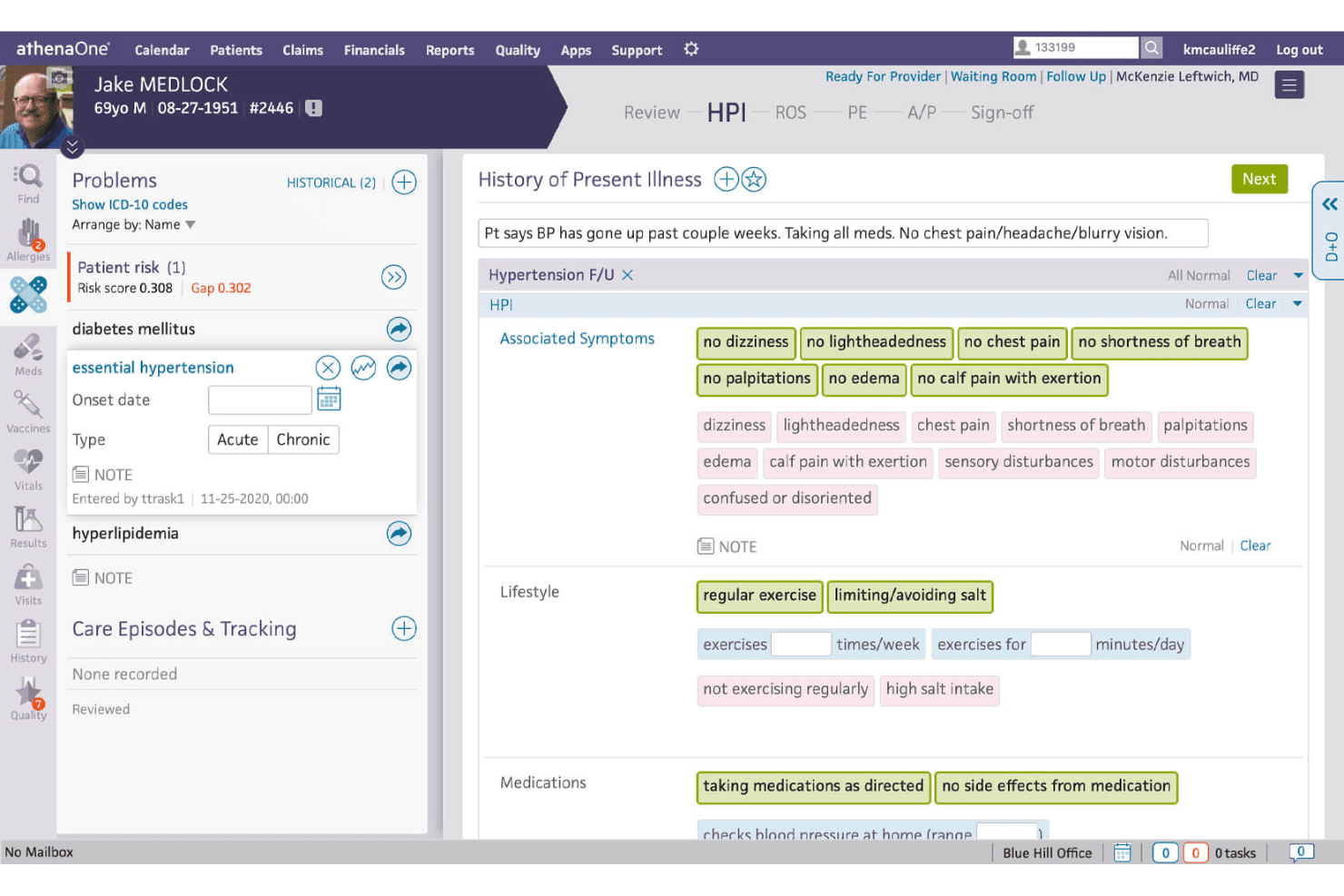
The patient history management feature in Athenahealth allows family doctors and practitioners to view and manage patient records efficiently. Athenahealth is a cloud-native EHR platform that combines clinical charting, revenue cycle management, practice management, and patient engagement tools in a single ambulatory-focused solution.
Who Is Athenahealth Best For?
Athenahealth fits ambulatory practices from solo physicians to mid-sized multi-specialty groups who need a single platform to handle clinical, billing, and front-office workflows.
Why I Picked Athenahealth
Athenahealth earns its spot on my shortlist because of how genuinely adaptable its charting environment is for family practice. The widget-based chart design lets physicians rearrange their workspace around the care patterns they see daily, from pediatric well visits to geriatric chronic disease management. I also like the ambient note feature, which captures encounter documentation in the background so charting doesn't eat into patient time.
Athenahealth Key Features
- Integrated telehealth: Schedule and conduct video visits directly in the EHR workflow for virtual care.
- Immunization registry integration: Sync bidirectionally with state vaccine registries for up-to-date immunization records.
- Population health management: Track patient cohorts and care gaps with built-in registries and preventive care tools.
- MIPS/MACRA quality dashboards: Monitor performance measures and participation in CMS incentive programs from within the platform.
Athenahealth Integrations
Athenahealth offers over 500 native and marketplace integrations, including LabCorp, Quest Diagnostics, Surescripts, Boostlingo, Teledoc, Philips, and BioReference. An API is available for custom integrations.
Pros and Cons
Pros:
- Integrated bidirectional lab and imaging orders
- Comprehensive ambulatory-specific workflows and tools
- Highly customizable family practice chart templates
Cons:
- Percentage-of-collections pricing model can be costly
- Steep transition process for legacy data
Learn more about Athenahealth: Best for solo and multi-provider practice growth
- Free demo available
- Pricing upon request
Visit WebsiteCustomer Rating:3.9/5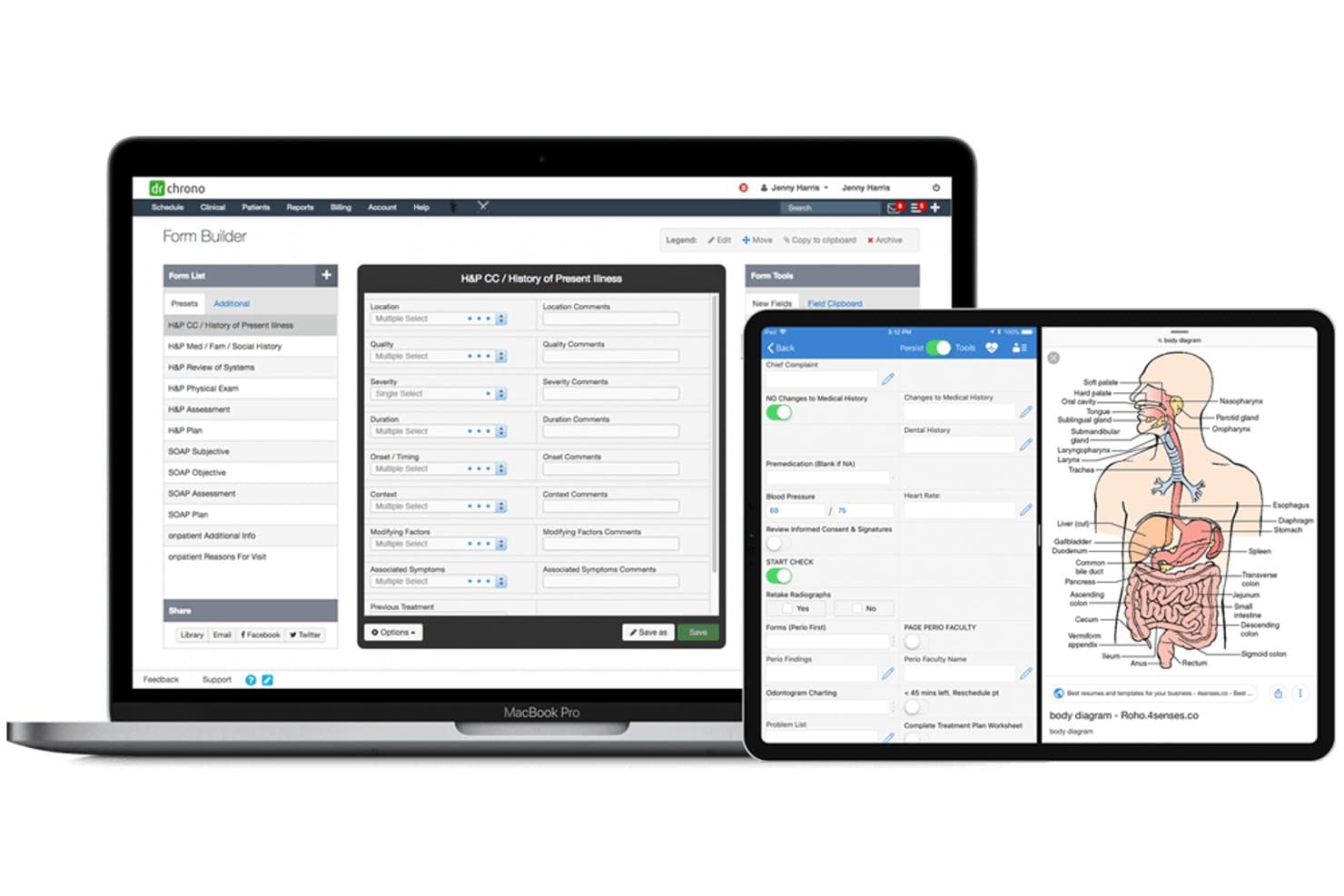
DrChrono EHR offers a customizable Form Builder with H&P templates, mobile charting, and anatomical body diagrams across desktop and tablet devices. DrChrono EHR is a cloud-based, mobile-first EHR platform that combines clinical charting, practice management, e-prescribing, lab integration, and integrated medical billing into a single system built for independent practices.
Who Is DrChrono EHR Best For?
DrChrono suits solo physicians and small-to-mid-sized independent practices that want a single platform to manage both clinical and administrative workflows as they grow.
Why I Picked DrChrono EHR
DrChrono EHR earns its spot on my shortlist because of how well it scales with a practice without requiring a platform switch. I particularly like the tiered plan structure (Foundation, Growth, Premium) that lets a solo physician start lean and unlock advanced RCM, AI ambient documentation via EverHealth Scribe, and extended lab connectivity as their patient volume grows. The No-Show Predictor and iOS-native charting are features I think solo providers will genuinely use every single day.
DrChrono EHR Key Features
- Integrated telehealth: Provides secure, built-in video visits that sync with clinical charting and scheduling workflows.
- Bidirectional lab and imaging integrations: Connects with Quest, LabCorp, and over 40,000 lab and imaging providers for sending orders and receiving results.
- OnPatient portal and mobile app: Lets patients message providers, view their health records, and complete forms online or through a dedicated app.
- Immunization registry connectivity: Supports electronic vaccine tracking and state immunization reporting for both pediatric and adult encounters.
DrChrono EHR Integrations
DrChrono EHR offers native integrations with Quest Diagnostics, LabCorp, Surescripts, CoverMyMeds, and Iron Bridge for lab, pharmacy, and immunization registry connections. An open API and integration marketplace are available for custom and third-party integrations.
Pros and Cons
Pros:
- Tiered plans support growing practice needs
- Integrated medical billing and RCM tools
- Mobile-first iOS app for clinical charting
Cons:
- Reported long response times from support
- Dated user interface on desktop
Learn more about DrChrono EHR: Best for cloud-based accessibility and ease of use
- 14-day free trial + free demo available
- From $199/user/month (billed annually)
Visit WebsiteCustomer Rating:3.8/5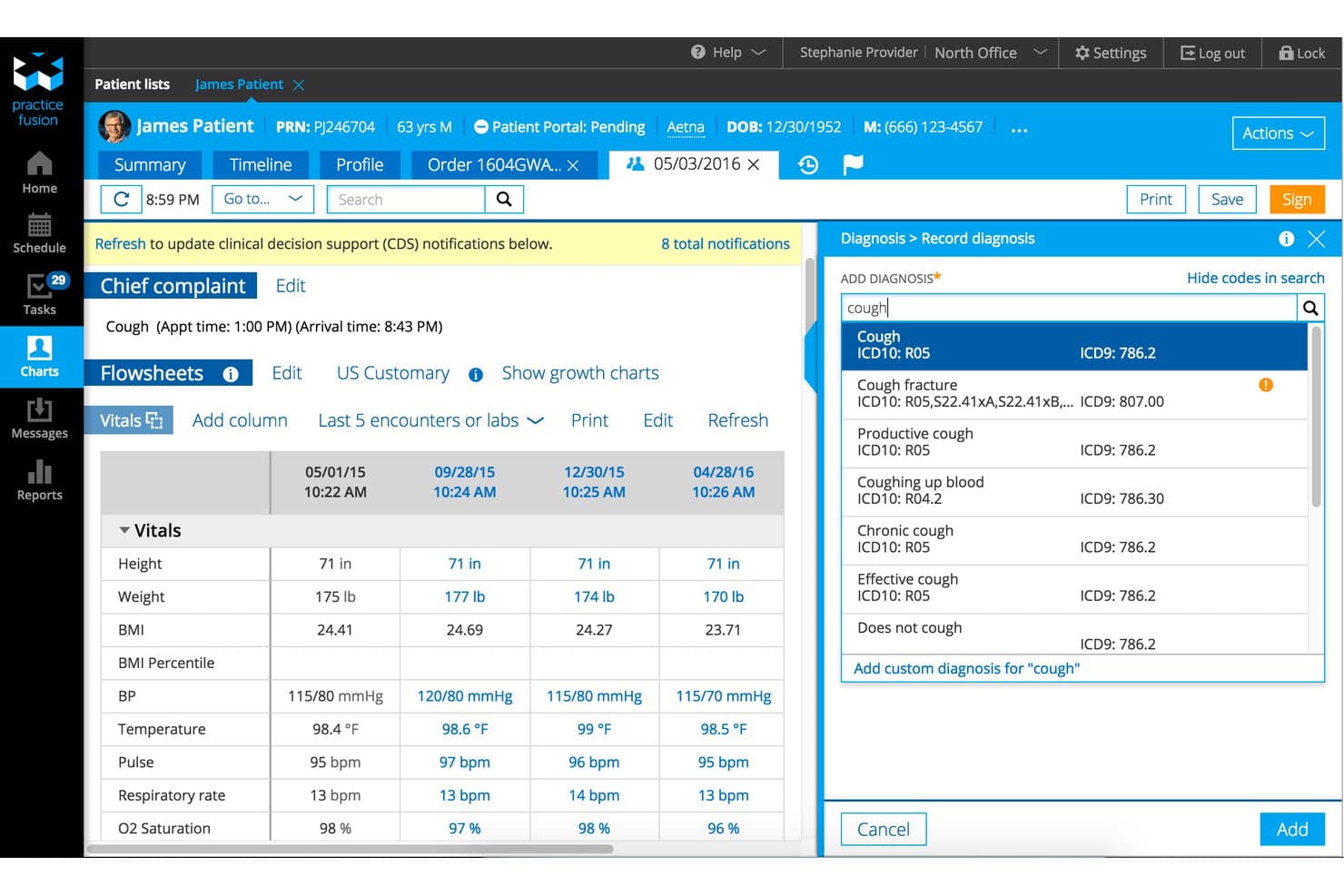
Practice Fusion EHR offers an integrated patient chart view combining vitals flowsheets and real-time diagnosis coding search in a single screen. Practice Fusion EHR is a cloud-based electronic health record system built for independent practices, combining clinical charting, e-prescribing, lab and imaging integrations, a free patient portal, and practice management tools.
Who Is Practice Fusion EHR Best For?
Practice Fusion is a strong fit for independent and small outpatient practices that need an accessible, no-hardware EHR without a steep implementation curve.
Why I Picked Practice Fusion EHR
Practice Fusion EHR earns its spot on my shortlist because it's one of the few EHRs where you can pull up a full patient chart from a tablet at the bedside, a laptop at the front desk, or a phone between appointments, with no software to install. I love that automatic updates run in the background, so there's no IT downtime or version mismatch across your team. The customizable SOAP note templates, validated in pediatric workflows, mean you can complete and sign clinical notes quickly from wherever you're working.
Practice Fusion EHR Key Features
- Integrated lab and imaging connections: Connects with hundreds of diagnostic providers for electronic orders and real-time results.
- HIPAA-compliant patient portal: Lets patients view records, communicate with providers, and request appointments securely.
- Quality and MIPS dashboards: Built-in dashboards track eCQM, Meaningful Use, and MIPS reporting requirements.
- Onshore support and training: Includes live phone, email, and chat support plus one-on-one implementation sessions.
Practice Fusion EHR Integrations
Practice Fusion EHR offers native integrations with Updox, AdvancedMD, Kareo, NueMD, and hundreds of lab and imaging centers. An API is available for custom integrations.
Pros and Cons
Pros:
- Free included patient portal with secure messaging
- Customizable chart templates for primary care
- Cloud access from any internet-connected device
Cons:
- Reports of delayed customer support response
- Telehealth requires a separate paid add-on
Learn more about Practice Fusion EHR: Best with AI-enabled ambient documentation tools
- Free demo available
- From $429/user/month
Visit WebsiteCustomer Rating:3.6/5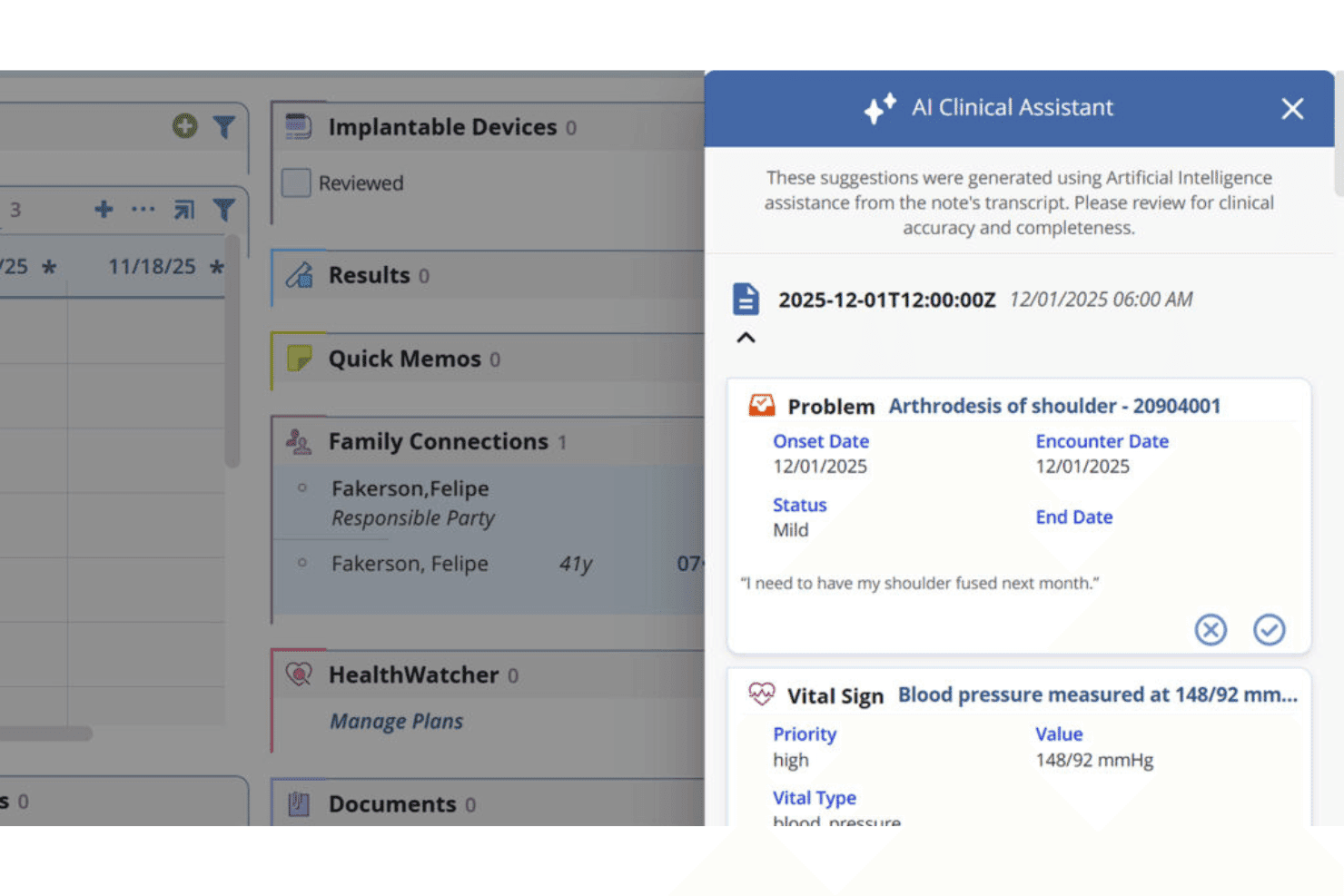
AdvancedMD’s AI Clinical Assistant creates SOAP notes and pre-visit summaries. AdvancedMD EMR is a cloud-based EHR platform that unifies clinical charting, practice management, patient engagement, and revenue cycle management for independent and group medical practices across specialties.
Who Is AdvancedMD EMR Best For?
It's a strong fit for practice managers and billing coordinators at independent and small-to-midsize group practices who need clinical and financial operations under one roof.
Why I Picked AdvancedMD EMR
AdvancedMD EMR earns its spot on my shortlist because its ambient documentation suite goes further than most competitors. I love that the AI Clinical Assistant captures natural conversation during a visit, then generates a structured SOAP note automatically, so physicians aren't transcribing after the appointment ends. The AI Pre-visit Summary also pulls together medications, labs, allergies, and risk factors before the patient even walks in.
AdvancedMD EMR Key Features
- Integrated telehealth module: Schedule and conduct remote video visits directly from the EHR platform.
- Bidirectional lab integration: Order labs and receive results electronically with major lab partners.
- Customizable family practice templates: Adapt visit note templates to suit pediatric, adult, and geriatric workflows.
- Automated MIPS/MACRA reporting: Track quality measures and generate CMS-compliant reports inside the platform.
AdvancedMD EMR Integrations
AdvancedMD EMR offers native integrations with Waystar, Zoom, and state and regional Health Information Exchanges. An API and FHIR APIs are available for custom integrations and data exchange with third-party systems.
Pros and Cons
Pros:
- Seamless telehealth visits integrated in workflows
- Ambulatory care templates support multiple specialties
- AI-powered SOAP note generation saves time
Cons:
- Custom template setup can be complex
- Limited pediatric-specific tools for growth tracking
Learn more about AdvancedMD EMR: Good for small practices with its intuitive and easy-to-learn interface
- 7-day free trial
- From $229/month
Visit WebsiteCustomer Rating:3.6/5
The scheduling feature in Amazing Charts has an intuitive interface. Amazing Charts, as an EHR, is known for its intuitive and user-friendly interface, emphasizing easy-to-use charting and note-taking functions. This EHR is designed for healthcare providers who prioritize simplicity in documenting patient interactions.
Why I Picked Amazing Charts:
When I was comparing various EHR tools, Amazing Charts caught my attention with its user-centric design. I selected this tool because it truly simplifies note-taking and charting for physicians, which is vital in a busy healthcare setting. It stands out for its clear, intuitive user interface that can help reduce the learning curve for new users. The tool is indeed "best for" user-friendly charting and note-taking as it allows doctors to focus more on patient care and less on data entry.
Standout features and integrations:
Some of the important features include the easy-to-use patient chart system, integrated patient portal, and efficient e-prescribing. The charting function stands out with its simplicity and quick data entry. As for integrations, Amazing Charts can sync with a variety of billing systems and labs to streamline workflows, in addition to being compatible with numerous practice management tools.
Pros and Cons
Pros:
- Affordability for smaller practices
- Compatibility with a variety of systems
- Simple, intuitive interface for efficient note-taking
Cons:
- Annual billing cycle may not appeal to all practices
- Fewer features compared to some competitors
- Limited customization options
Learn more about Amazing Charts: Best for unified billing and practice management
- Free demo available
- Pricing upon request
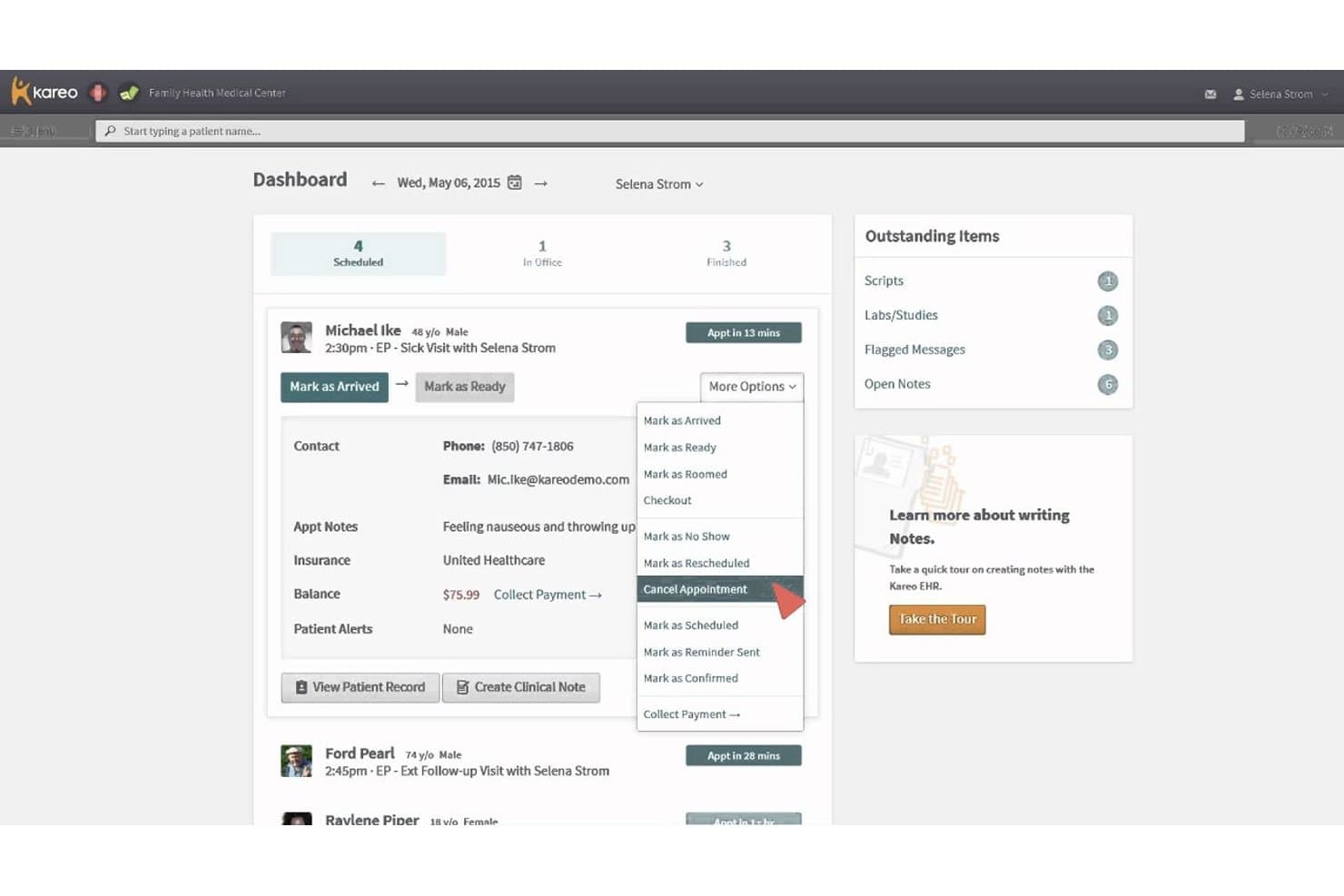
Kareo Clinical EHR offers a dashboard with appointment management options, including cancellation, rescheduling, and patient status updates via a dropdown menu. Kareo Clinical EHR is a cloud-based EHR platform built for independent practices that combines clinical charting, e-prescribing, lab ordering, telehealth, and integrated billing in a single system.
Who Is Kareo Clinical EHR Best For?
It's a strong fit for small to mid-sized independent practices that want clinical documentation and revenue cycle management in one connected platform.
Why I Picked Kareo Clinical EHR
Kareo Clinical EHR earns its spot on my shortlist because of how tightly it connects clinical documentation to revenue cycle management. I like that a completed SOAP note flows directly into claim creation, with real-time eligibility checks and claim scrubbing built in, so billing doesn't lag behind care delivery. The AI Note Assist feature also helps me close notes faster, which means fewer incomplete encounters holding up the billing queue.
Kareo Clinical EHR Key Features
- Integrated telehealth: Built-in HIPAA-compliant video visits connect directly with clinical charting and scheduling.
- E-prescribing with EPCS and PDMP: Allows controlled substance prescribing and real-time prescription drug monitoring.
- Patient portal with forms and messaging: Patients can access records, complete intake forms, and securely message the practice.
- Bidirectional lab and imaging integration: Supports two-way ordering and result retrieval with major labs and imaging centers.
Kareo Clinical EHR Integrations
Kareo Clinical EHR offers native integrations with LabCorp, Quest Diagnostics, Surescripts, Appriss Health, Dragon Medical One, and multiple medical billing partners. An API is available for custom integrations.
Pros and Cons
Pros:
- Real-time prescription monitoring for controlled substances
- SOAP notes sync directly to billing workflow
- Automated claim scrubbing and denial tracking
Cons:
- Data migration can be challenging for new users
- Reports of slow customer support response
Learn more about Kareo Clinical EHR: Best for its highly customizable interface
- Free demo available
- Pricing upon request
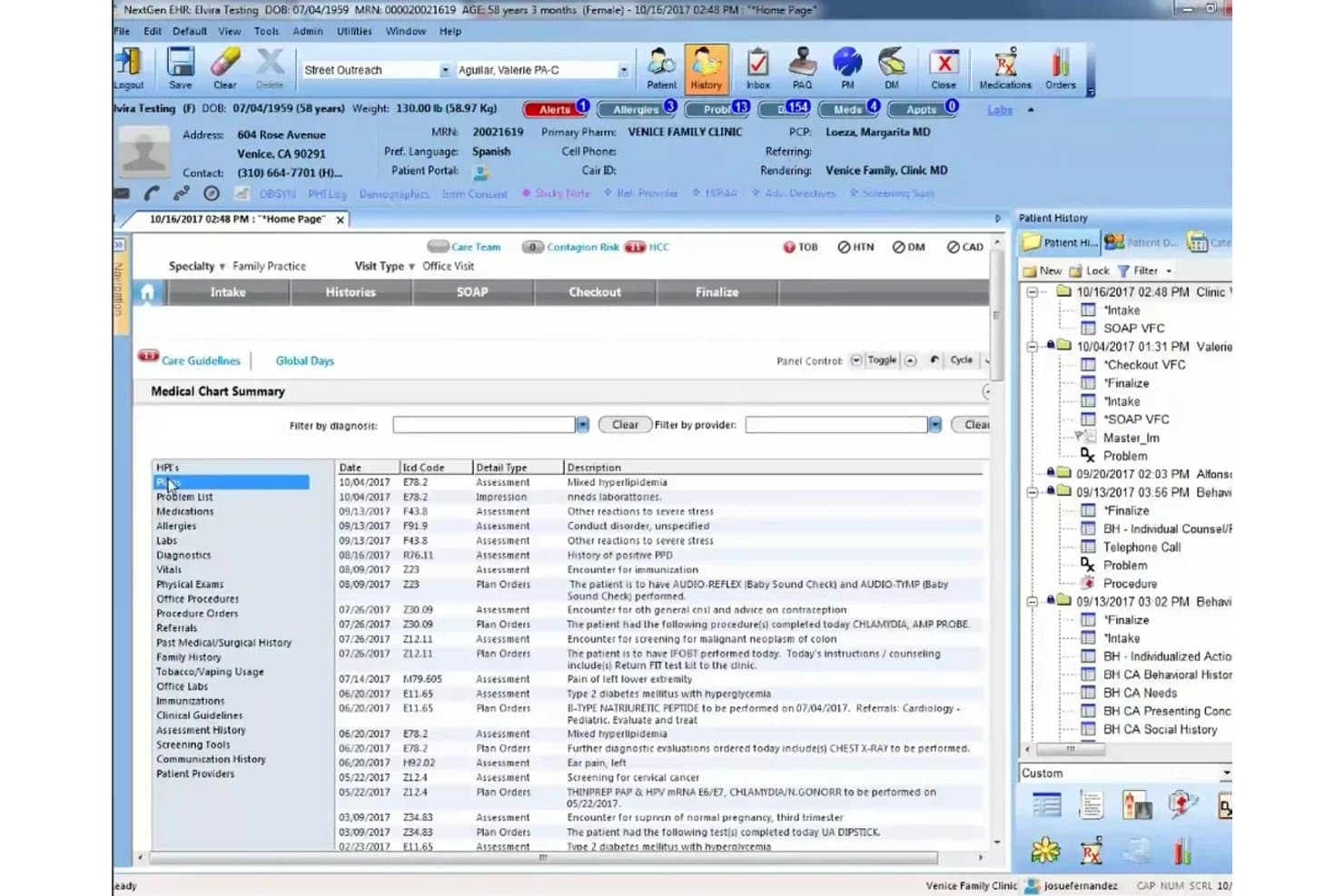
NextGen EHR offers a comprehensive Medical Chart Summary view that consolidates patient diagnoses, ICD codes, assessment types, and visit history in a single streamlined interface. NextGen EHR is an ambulatory-focused electronic health record platform that combines specialty-specific clinical charting, integrated practice management, e-prescribing, billing, and patient engagement tools for independent and enterprise-level practices.
Who Is NextGen EHR Best For?
NextGen EHR is a strong fit for mid-size to large ambulatory practices with 10 or more providers that operate across multiple specialties or locations.
Why I Picked NextGen EHR
I've included NextGen EHR in my top picks because its depth of customization goes well beyond surface-level template editing. I love that clinical teams can configure specialty-specific SOAP note templates, preventive care workflows, and chronic disease management forms to match how their practice actually operates. The ability to build custom quality management reports, tailored to specific compliance programs like MIPS, is something I find genuinely hard to replicate in less configurable platforms.
NextGen EHR Key Features
- Integrated telehealth: Provides built-in video visit functionality with seamless charting integration for virtual appointments.
- MIPS/MACRA reporting dashboards: Tracks and displays quality measures and compliance data for federal incentive programs.
- Population health management tools: Features registries and care gap tracking to support proactive, preventive family medicine workflows.
- Immunization registry connectivity: Offers bidirectional integration with state immunization registries for up-to-date vaccine tracking.
NextGen EHR Integrations
NextGen EHR offers native integrations with LabCorp, Quest Diagnostics, Doctible, Solutionreach, Clearwave, InstaMed, and Kno2. It includes the Mirth Connect interoperability engine, provides access to 725+ labs via NextGen Share, and has an API and marketplace for custom integrations.
Pros and Cons
Pros:
- Real-time reporting for regulatory compliance programs
- Strong specialty-specific templates for family practice
- Deeply customizable charting and workflows
Cons:
- Initial configuration can be resource intensive
- System speed issues reported during peak times
Learn more about NextGen EHR: Best for integrated AI-powered clinical workflows
- Free demo available
- From $280/user/month
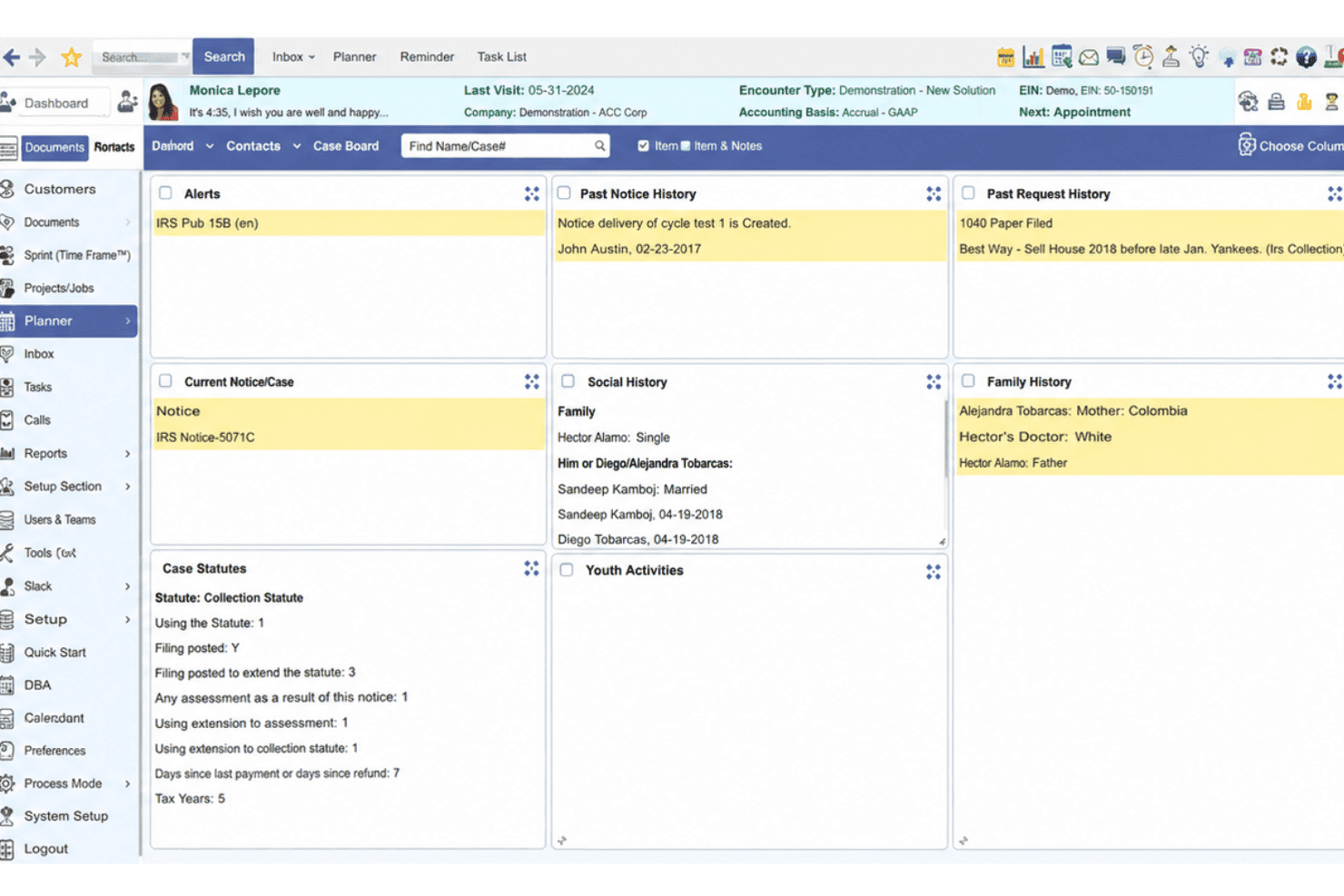
PrognoCIS EHR blends charting, billing, e-prescribing, telehealth, and AI. PrognoCIS EHR is a cloud-based ambulatory EHR platform combining clinical documentation, practice management, integrated billing, e-prescribing, telemedicine, and native AI-powered charting tools across 25+ specialties.
Who Is prognoCIS EHR Best For?
PrognoCIS EHR is a strong fit for independent and mid-size ambulatory practices that need specialty-specific workflows and an all-in-one clinical and billing platform.
Why I Picked prognoCIS EHR
PrognoCIS EHR earns its spot as one of the best on my shortlist because of how deeply its AI layer, PrognoAI, is woven into everyday charting. I particularly like the ambient AI scribe, which generates real-time visit summaries without pulling the provider's attention away from the patient. Unlike tools that bolt on AI as an afterthought, PrognoCIS builds it directly into the documentation workflow, so there's no toggling between systems to get a clean, complete note.
prognoCIS EHR Key Features
- Specialty templates: Customizable charting templates for primary care, pediatrics, and chronic disease management.
- Bidirectional lab integration: Seamless interface for sending orders and receiving results from major diagnostic labs.
- Integrated patient portal: Secure online access for messaging, record requests, appointment scheduling, and billing.
- Quality measure dashboards: Built-in MIPS and MACRA reporting tools for regulatory compliance and incentive tracking.
prognoCIS EHR Integrations
prognoCIS EHR offers native integrations with LabCorp, Quest Diagnostics, Surescripts, and state immunization registries. An API is available for custom integrations, and the platform supports HL7, FHIR, and CDA connectivity for interoperability.
Pros and Cons
Pros:
- Flexible patient portal for online engagement
- Robust specialty templates for ambulatory practices
- AI charting assistant reduces documentation workload
Cons:
- Occasional delays with customer support response
- Pediatric growth charts require manual setup
Learn more about prognoCIS EHR:
Andre EHR-systemer for allmennpraksis
Nedenfor finner du en liste over flere EHR-systemer for allmennpraksis som jeg hadde på kortlisten, men som ikke kom med blant de ti beste. Det er absolutt verdt å se nærmere på dem.
- 11IntergyBest for large practices needing robust analytics
- 12Modernizing MedicineBest for practices needing specialty-specific features
- 13Office Ally EHRBest for practices wanting free functionality for basic needs
- 14SevocityGood for practices seeking personalized customization at no extra charge
- 15EHR Your WayGood for its dictation feature that allows note creation in under a minute
- 16ICANotesGood for behavioral health professionals needing specialized templates
- 17Office PracticumGood for pediatric practices with pediatric-specific workflows
- 18RXNTGood for its affordability and straightforward pricing
- 19eClinicalWorksGood for the incorporation of telehealth and virtual assistance
- 20Cerner MilleniumGood for its wide integration capabilities across different healthcare services
How I Evaluate EHR for Family Practice
I split my evaluation into baseline criteria—like family-practice-specific charting and eRx—and the differentiators that separate a good fit from the right fit for your practice.
Core Functionality (Table Stakes For This List)
When I'm selecting tools for my list, I rank each one on a scale from 0 (does not offer the functionality) to 5 (excels in this area) for each core functionality listed below. Then, I calculate the tool's total score into a percentage. Each tool needs to achieve a minimum total score of 65% to be considered for inclusion.
- Family Practice Charting: I look for specialty-specific templates that cover the full age spectrum—well-child visits, annual physicals, and chronic disease management—rather than generic SOAP notes.
- E-Prescribing (eRx): A solid eRx module should include EPCS support, drug interaction alerts, and formulary checking so prescribers can send scripts directly from the encounter.
- Integrated Practice Management: I evaluate whether scheduling, patient registration, and check-in workflows live inside the EHR rather than requiring a separate PM platform to coordinate.
- Medical Billing & Coding: Coding assistance matters here—I check for ICD-10/CPT suggestions tied to encounter data, claim scrubbing, and clearinghouse connectivity for faster reimbursement cycles.
- Lab & Imaging Integration: Bidirectional connectivity with reference labs and imaging centers is what I look for, so orders go out and results flow back into the patient chart automatically.
- Patient Portal & HIPAA Compliance: The portal should let patients message their care team, view records, and request appointments, all within a platform that holds current ONC certification.
Once I have a list of tools that meet this criteria, I consider what sets each platform apart.
Differentiating Factors (What Sets Vendors Apart)
Here's how I compare and contrast different vendors:
Standout Features
AI-powered clinical documentation is a big differentiator—I look for ambient listening or AI scribe tools that draft notes during the visit so physicians aren't charting after hours. Population health tools also matter, especially care gap alerts that flag overdue screenings or vaccines across your patient panel. For practices participating in CMS incentive programs, built-in MIPS/MACRA dashboards that track quality measures in real time can save hours of manual reporting each quarter.
Beyond Features
Interoperability is a key factor I evaluate—HL7/FHIR support and HIE connectivity determine how well a platform exchanges data with hospitals, specialists, and pharmacies your practice works with. I also consider implementation support, particularly data migration from a legacy system and family-practice-specific onboarding. Pricing transparency matters too. Some vendors bundle PM, billing, and portal access into one subscription, while others charge per add-on, which can dramatically shift total cost of ownership for a growing practice.
Slik velger du det beste EHR-systemet for allmennpraksis
Det er lett å gå seg vill i lange funksjonslister og komplekse prisstrukturer. For å hjelpe deg med å holde fokus når du går gjennom den unike prosessen med å velge programvare, får du her en sjekkliste over faktorer du bør ha i tankene:
| Faktor | Hva du bør vurdere |
|---|---|
| FaktorSkalerbarhet | Hva du bør vurdereKan programvaren vokse sammen med praksisen din? Vurder om den støtter et økende antall pasienter og ansatte uten redusert ytelse. Se etter verktøy som tilbyr fleksible prisplaner etter hvert som du skalerer. |
| FaktorIntegrasjoner | Hva du bør vurdereKan den integreres med de eksisterende systemene dine? Sjekk kompatibilitet med faktureringssystemer, pasientportaler og laboratorietjenester. Manglende integrasjon kan føre til datasiloer og ineffektivitet. |
| FaktorTilpasningsmuligheter | Hva du bør vurdereKan du tilpasse programvaren til behovene i praksisen din? Sørg for at verktøyet tillater tilpassede arbeidsflyter, maler og rapporter. Manglende tilpasningsmuligheter kan føre til et rigid system som ikke dekker de spesifikke kravene dine. |
| FaktorBrukervennlighet | Hva du bør vurdereEr systemet intuitivt for teamet ditt? Vurder brukergrensesnittet og navigasjonen. Et unødvendig komplekst system kan bremse den daglige driften og frustrere de ansatte. |
| FaktorImplementering og opplæring | Hva du bør vurdereHvor lang tid vil det ta å komme i gang? Vurder hvilke opplæringsressurser som er tilgjengelige, og hvilken støtte som tilbys under oppsettet. En smidig opplæringsprosess kan minimere nedetid og fremskynde innføringen. |
| FaktorKostnad | Hva du bør vurderePasser prisen med budsjettet ditt? Gå gjennom hva som er inkludert i hvert prisnivå, samt eventuelle skjulte gebyrer. Vurder de totale eierkostnadene, inkludert opplæring og støtte. |
| FaktorSikkerhetstiltak | Hva du bør vurdereEr pasientdata og personvern beskyttet? Se etter samsvar med HIPAA og andre relevante forskrifter. Sørg for at programvaren tilbyr kryptering, regelmessige oppdateringer og tilgangskontroller for å beskytte sensitiv informasjon. |
| FaktorTilgjengelig brukerstøtte | Hva du bør vurdereEr hjelp lett tilgjengelig når du trenger det? Sjekk om leverandøren tilbyr brukerstøtte døgnet rundt og flere kontaktmetoder. Rask støtte kan forhindre avbrudd i driften av praksisen. |
Hva er EHR-systemer for allmennpraksis?
EHR-systemer for allmennpraksis er digitale plattformer som håndterer pasientjournaler for pasienter i alle aldre. Disse EHR-verktøyene for primærhelsetjenesten brukes av leger innen allmennmedisin og hjelper med å dokumentere alt fra pediatrisk til geriatrisk behandling, samtidig som de håndterer utfordringer som tidkrevende journalføring, koordinering av behandling og personlig tilpasset behandlingsplanlegging.
Funksjoner
Når du velger det beste EHR-systemet for allmennpraksis, bør du se etter følgende viktige funksjoner i EHR-programvare:
- Håndtering av pasientjournaler: Organiserer og lagrer pasientinformasjon på en sikker måte, slik at helsepersonell enkelt kan få tilgang til og oppdatere journaler.
- Timebestilling: Gjør det mulig for personalet å effektivt planlegge, endre og administrere pasientavtaler, noe som reduserer uteblivelser og forbedrer pasientflyten.
- Fakturering og regningsføring: Automatiserer faktureringsprosesser, oppretter fakturaer og sporer betalinger, slik at praksiser kan håndtere økonomien effektivt.
- Tilpassbare maler: Gir mulighet til å tilpasse skjemaer og dokumenter etter praksisens spesifikke behov, noe som effektiviserer arbeidsflyten.
- Muligheter for telemedisin: Gjør virtuelle konsultasjoner mulig, slik at helsepersonell kan tilby behandling på avstand og nå ut til flere pasienter.
- Integrert pasientportal: Gir pasienter nettbasert tilgang til helseopplysninger og timebestilling, noe som øker pasientengasjementet.
- Verktøy for beslutningsstøtte: Hjelper helsepersonell med kliniske beslutninger ved å tilby evidensbaserte anbefalinger.
- Datasikkerhetstiltak: Sørger for at pasientdata beskyttes gjennom kryptering og overholdelse av regelverk som HIPAA.
- Mobil tilgang: Gjør det mulig for helsepersonell å få tilgang til EHR-systemet fra mobile enheter, noe som gir større fleksibilitet i pasientbehandlingen.
- Rapportering og analyse: Genererer rapporter og innsikt om praksisens resultater, noe som bidrar til informerte forretningsbeslutninger.
Fordeler
Implementering av programvare for elektroniske helsejournaler i en allmennpraksis gir flere fordeler for teamet og virksomheten din. Her er noen av fordelene du kan se frem til:
- Bedre pasientbehandling: Tilgang til omfattende pasientjournaler gir et bedre grunnlag for kliniske beslutninger og personlig tilpasset behandling.
- Økt effektivitet: Automatisert timebestilling og fakturering reduserer den administrative arbeidsmengden, slik at personalet kan fokusere mer på pasientkontakt.
- Større pasientengasjement: Pasientportaler gir pasienter enkel tilgang til helseopplysningene sine, noe som forbedrer kommunikasjonen og involveringen i egen behandling.
- Kostnadsbesparelser: Strømlinjeformede faktureringsprosesser og mindre papirarbeid reduserer driftskostnadene og forbedrer den økonomiske styringen.
- Bedre etterlevelse: Datasikkerhetstiltak og funksjoner for overholdelse av regelverk bidrar til å sikre at pasientinformasjon er beskyttet og at juridiske krav oppfylles.
- Muligheter for behandling på avstand: Telemedisinske funksjoner gjør det mulig for praksiser å utvide tjenestene utover de fysiske lokalene, ta imot flere pasienter og øke tilgjengeligheten.
- Datadrevet innsikt: Rapportering og analyse gir verdifull innsikt i praksisens resultater og bidrar til strategisk planlegging og beslutningstaking.
Kostnader & priser
Å velge det beste EHR-systemet for allmennpraksis krever at du sammenligner prismodeller for EHR-systemer og de tilgjengelige abonnementene. Kostnadene varierer basert på funksjoner, teamstørrelse, tillegg og mer. Tabellen nedenfor oppsummerer vanlige abonnementer, gjennomsnittsprisene deres og typiske funksjoner som er inkludert i løsninger med det beste EHR-systemet for allmennpraksis:
Sammenligningstabell for abonnementer for det beste EHR-systemet for allmennpraksis
| Plantype | Gjennomsnittspris | Vanlige funksjoner |
|---|---|---|
| PlantypeGratisplan | Gjennomsnittspris$0/bruker/måned | Vanlige funksjonerGrunnleggende håndtering av pasientjournaler, timebestilling og begrenset kundestøtte. |
| PlantypePersonlig plan | Gjennomsnittspris$20-$50/bruker/måned | Vanlige funksjonerAvansert timebestilling, grunnleggende fakturering og fakturautstedelse, samt e-poststøtte. |
| PlantypeBedriftsplan | Gjennomsnittspris$50-$100/bruker/måned | Vanlige funksjonerTilpassbare maler, mulighet for telemedisin, integrert pasientportal og standardrapportering. |
| PlantypeVirksomhetsplan | Gjennomsnittspris$100-$200/bruker/måned | Vanlige funksjonerOmfattende analyse, komplett integrasjonspakke, prioritert kundestøtte og forbedrede tiltak for datasikkerhet. |
Vanlige spørsmål om EHR for allmennpraksis
Her er noen svar på vanlige spørsmål om EHR for allmennpraksis:
Kan EHR-systemer integreres med eksisterende programvare for praksisadministrasjon?
Ja, mange EHR-systemer tilbyr integrasjoner med programvare for praksisadministrasjon. Kontroller om EHR-systemet støtter verktøyene du bruker i dag, for å sikre sømløs dataflyt. Spør leverandørene om kompatibilitet og integrasjonsmuligheter før du tar en beslutning.
Hvilke sikkerhetstiltak finnes i EHR-systemer for allmennpraksis?
EHR-systemer omfatter vanligvis kryptering, tilgangskontroller og revisjonsspor for å beskytte pasientdata. Sørg for at systemet overholder HIPAA-regelverket, og spør om ytterligere sikkerhetsfunksjoner for å beskytte sensitiv informasjon.
Hvordan forbedrer EHR pasientbehandlingen i allmennpraksiser?
EHR-systemer forbedrer pasientbehandlingen ved å gi enkel tilgang til omfattende medisinske journaler og støtte informerte beslutninger. Funksjoner som elektronisk forskrivning og pasientportaler forbedrer kommunikasjonen og effektiviserer behandlingsprosessene.
Hvilken opplæring og støtte tilbyr EHR-leverandører?
EHR-leverandører tilbyr ofte opplæringsmateriell, webinarer og kundestøtte for å hjelpe med oppstarten. Se etter leverandører som tilbyr kontinuerlig støtte og ressurser, slik at teamet ditt kan bruke systemet effektivt.
Støtter EHR-systemer telemedisin for allmennpraksis?
Mange EHR-systemer har funksjoner for telemedisin, slik at konsultasjoner kan gjennomføres på avstand. Bekreft at systemet du velger, støtter videokonsultasjoner og integreres med arbeidsflyten i praksisen din, slik at pasientene får bedre tilgang til behandling.