

Recensione EpicCare: Vantaggi, Svantaggi, Funzionalità e Prezzi
EpicCare aiuta i fornitori di assistenza sanitaria a gestire le cartelle cliniche dei pazienti, i flussi di lavoro clinici, la pianificazione e il coordinamento dell'assistenza attraverso una piattaforma EMR integrata progettata per operazioni sanitarie connesse.

Recensiamo gli strumenti in modo indipendente e le commissioni ci aiutano a finanziare i nostri test. Consulta la nostra politica sulla trasparenza, la nostra metodologia o suggerisci uno strumento.
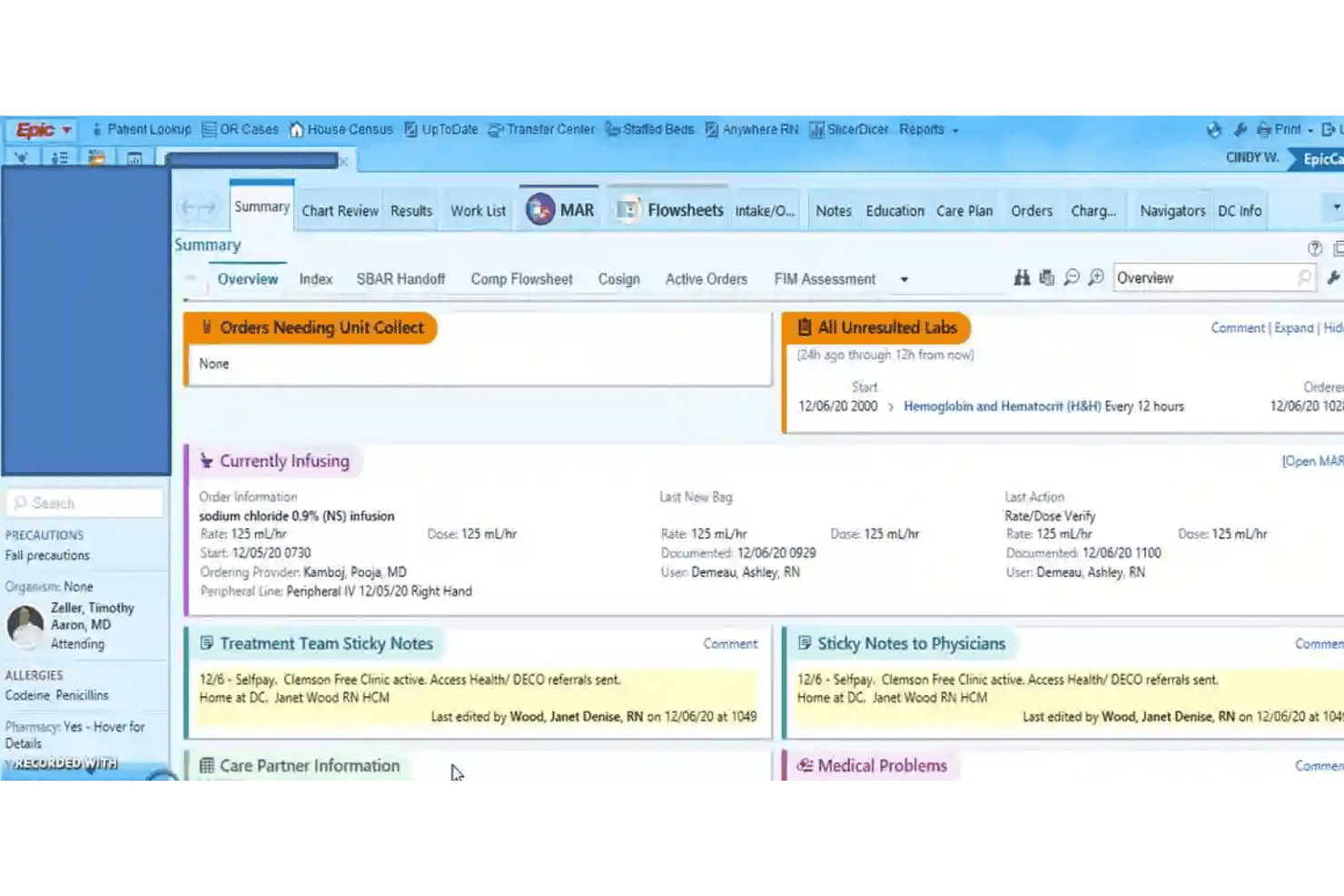
EpicCare is an EMR software built for large health systems and hospital networks with complex, multi-site clinical operations. I'd consider it if your organization needs a single, unified patient record across departments and specialties. If you're evaluating it against a tool like Oracle Health (Cerner), EpicCare has deeper clinical workflow integration and a more connected patient engagement experience through its MyChart portal.
EpicCare Evaluation Summary
4.4/5
- Pricing upon request
- Free demo available
Perché fidarsi dei nostri consigli sui software
6,700+
Reviews
20
Industry experts
16+
Evaluation factors
14
Years
Il nostro team testa e recensisce software dal 2012. In quanto leader di studi medici noi stessi, sappiamo quanto sia difficile — e importante — scegliere il software giusto.
Per questa guida, abbiamo valutato gli strumenti attraverso test pratici e ricerche indipendenti, assegnando un punteggio agli strumenti in base ai nostri criteri di selezione.
Le nostre recensioni riflettono il nostro giudizio editoriale umano, non un discorso di vendita.
EpicCare Overview
If I’m judging EpicCare as an EMR software, I’d say it excels in interoperability, deep customizability, and robust reporting features, especially for large enterprise environments. Compared to many competitors, the interface can feel dense and onboarding takes real investment, but you’re rewarded with reliable integrations and excellent support.
EpicCare is best suited for organizations that want advanced workflows, strong analytics, and comprehensive patient records, like multi-specialty hospitals and academic systems—it’s not overkill if you plan to scale or require detailed compliance tracking.
Pros
- Supports advanced clinical decision support tools.
- Offers extensive reporting and analytics capabilities.
- Enables seamless patient portal and engagement features.
Cons
- System updates may disrupt user workflows.
- Navigation can be complex for new staff.
- Custom forms often require IT assistance to modify.
Is EpicCare Right For Your Needs?
Who Would be a Good Fit for EpicCare?
EpicCare shines in large healthcare organizations, hospitals, and multi-site systems that need scalable, unified workflows and robust compliance. Departments managing complex, multi-provider care find EpicCare especially valuable.
Teams focused on coordinated, integrated patient care and data-driven decisions will get the most from its deep reporting, care coordination, and advanced patient engagement features.
- Large Health SystemsEpicCare supports comprehensive workflows, cross-departmental care, and enterprise reporting for large, multi-site healthcare organizations.
- Academic Medical CentersThe system’s advanced analytics, research modules, and interoperability streamline operations in teaching hospitals and clinical research environments.
- Multispecialty PracticesEpicCare can handle diverse specialty documentation and care plans within one unified system, keeping teams aligned.
- Inpatient Hospital DepartmentsFeatures like real-time order entry and care coordination empower critical care, surgery, and acute units.
- Population Health TeamsEpicCare’s reporting, dashboards, and registries help track and manage population health outcomes.
- Revenue Cycle ManagementThe integrated billing and compliance tools simplify complex claims workflows for high-volume finance teams.
Who Would be a Bad Fit for EpicCare?
EpicCare is rarely the right answer for smaller organizations, simple clinics, or teams seeking minimal onboarding and rapid deployment. Practices without dedicated IT support or the resources for ongoing management may find the technology and training burdens too high. Specialized clinics or mobile healthcare programs needing streamlined, nimble tools will also be better served elsewhere.
- Solo PracticesEpicCare’s complexity, onboarding requirements, and cost far exceed the needs and resources of single-provider clinics.
- Small Specialty ClinicsFor low-volume or single-specialty practices, setup and workflows feel overwhelming and unnecessary.
- Mobile Health ServicesField-based or home-visit care teams may struggle with EpicCare’s heavy infrastructure and connectivity needs.
- Community Health CentersTighter budgets and less technical support make EpicCare’s total cost and complexity a poor fit.
- Behavioral Health ClinicsSome users report EpicCare doesn’t always adapt well to behavioral health workflows or unique documentation needs.
- Urgent Care ChainsQuick-visit, high-turnover environments may not need EpicCare’s extended modules and may prefer lighter EMR solutions.
Come testiamo e valutiamo gli strumenti
Abbiamo trascorso anni a costruire, perfezionare e migliorare il nostro sistema di test e valutazione del software. Il criterio è progettato per cogliere le sfumature della selezione del software e cosa rende uno strumento efficace, concentrandosi sugli aspetti critici del processo decisionale. Qui sotto puoi vedere esattamente come funzionano i nostri test e punteggi in base a sette criteri. Ci consente di offrire una valutazione obiettiva del software basata su funzionalità principali, caratteristiche distintive, facilità d’uso, onboarding, assistenza clienti, integrazioni, recensioni dei clienti e rapporto qualità-prezzo.
Funzionalità Principali (25% del punteggio finale)
Il punto di partenza della nostra valutazione sono sempre le funzionalità principali dello strumento. Ha le funzioni di base che un utente si aspetterebbe? Alcune di queste funzioni principali sono riservate a piani tariffari superiori? In sostanza, ci aspettiamo che uno strumento sia all’altezza delle capacità di base dei suoi concorrenti.
Caratteristiche Distintive (25% del punteggio finale)
Successivamente, valutiamo caratteristiche distintive e insolite che vanno oltre le funzionalità di base tipicamente presenti negli strumenti della stessa categoria. Un punteggio alto riflette funzionalità specializzate o uniche che rendono il prodotto più veloce, efficiente o offrono un valore aggiunto all’utente. Valutiamo anche quanto sia facile integrare con altri strumenti comunemente presenti nella stack tecnologica per espandere funzionalità e utilità del software. Gli strumenti che offrono numerose integrazioni native, connessioni di terze parti e accesso API per creare integrazioni personalizzate ottengono il punteggio migliore.
Facilità d’Uso (10% del punteggio finale)
Consideriamo quanto sia rapido e intuitivo eseguire i compiti definiti nelle funzionalità principali usando lo strumento. Il software con punteggi elevati è ben progettato, intuitivo, offre app mobili, fornisce modelli e fa sembrare semplici anche compiti complessi.
Onboarding (10% del punteggio finale)
Sappiamo quanto sia importante l’adozione rapida da parte del team per una nuova piattaforma, perciò valutiamo quanto sia facile imparare e usare uno strumento con una formazione minima. Valutiamo quanto tempo impiega un membro del team a configurarsi e iniziare a usare lo strumento senza esperienza. Le soluzioni che ottengono il punteggio più alto richiedono poco o nessun supporto.
Assistenza Clienti (10% del punteggio finale)
Esaminiamo quanto sia rapido e semplice sbloccarsi e trovare aiuto tramite telefono, chat dal vivo o knowledge base. Gli strumenti e le aziende che forniscono assistenza in tempo reale ottengono il punteggio migliore, mentre i chatbot ottengono il punteggio più basso.
Recensioni dei Clienti (10% del punteggio finale)
Oltre ai nostri test e valutazioni, consideriamo il net promoter score da parte di clienti attuali e passati. Esaminiamo la probabilità che, data la possibilità, scelgano nuovamente lo strumento per le sue funzioni principali. Un software con punteggio elevato riflette un alto net promoter score da parte di clienti attuali o passati.
Rapporto Qualità-Prezzo (10% del punteggio finale)
Infine, tenendo conto di tutti gli altri criteri, analizziamo il prezzo medio dei piani base rispetto alle caratteristiche principali e valutiamo il valore degli altri criteri. Il software che offre di più, a meno, otterrà un punteggio più alto.
Core Features
Clinical Documentation
EpicCare lets you create and manage patient records using templates, dictation, and adaptive smart tools. This helps clinicians document faster and maintain detailed, standardized notes.
Order Entry and Results Management
Physicians can place lab, imaging, and medication orders directly in patient charts. All results return to the same system, updating in real time for review.
e-Prescribing
With e-prescribing, send controlled substance and standard prescriptions directly to pharmacies. Built-in interaction checks help reduce medication errors.
Patient Portal (MyChart)
Patients get secure access to their health data, test results, and messaging tools with MyChart. They can review appointments, pay bills, and request refills online.
Care Coordination
Track referrals, transitions, and care team communication in one place. EpicCare routes tasks and messages among staff for coordinated patient management.
Reporting and Analytics
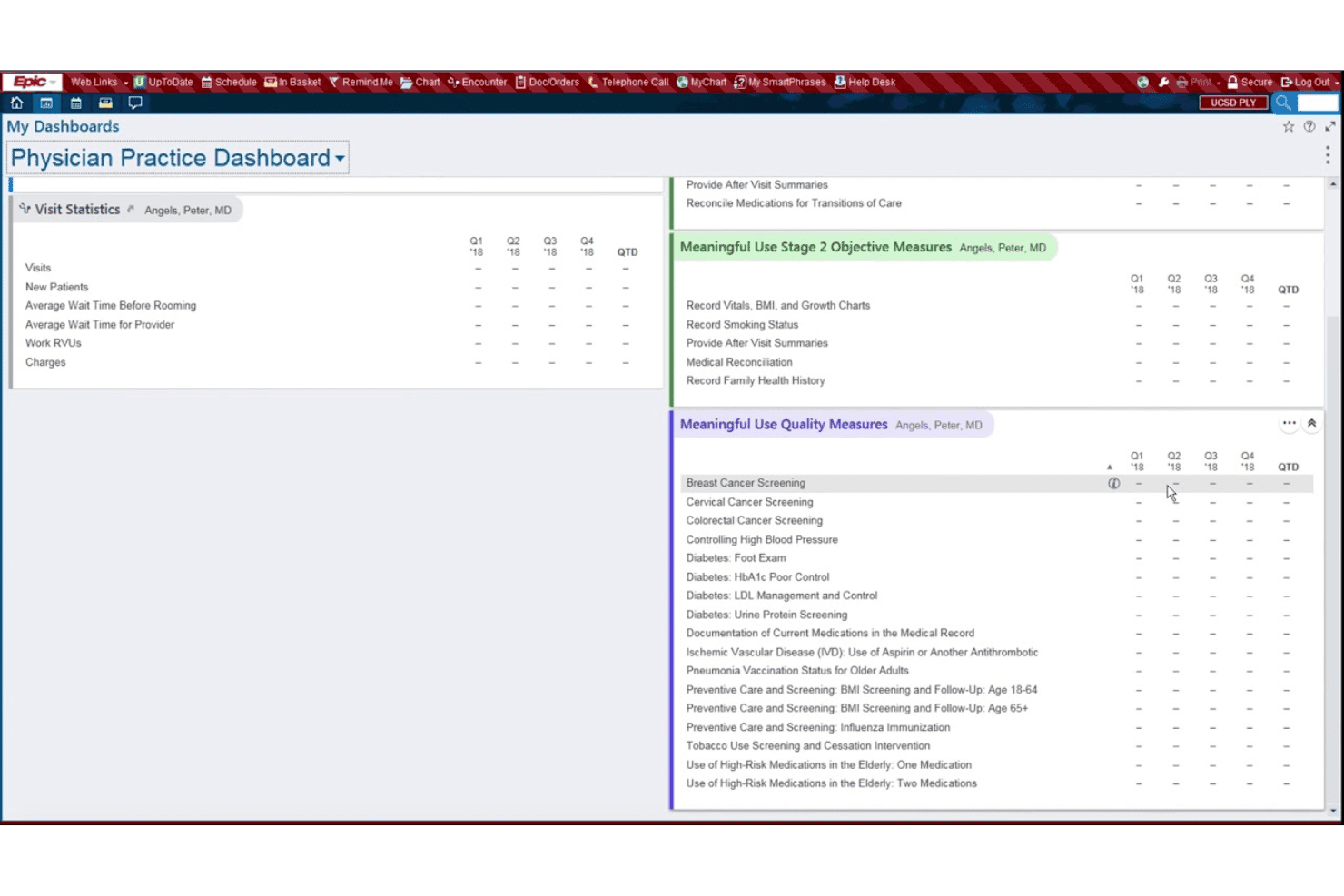
Pull custom reports on population health, compliance, or clinic performance. Built-in dashboards make data easy to visualize and act on.
Ease of Use
EpicCare’s usability is mixed: its depth and custom tools impress experienced users, but many find the interface dense and navigation complex. Routine actions like documentation and order entry are efficient once mastered, yet onboarding usually requires hands-on training.
User reviews consistently mention the steep learning curve, but also note reliable workflows after adjustment.
Integrations
EpicCare integrates with MyChart, Care Everywhere, Haiku, Canto, Rover, EpicCare Link, Cogito, Hyperspace, Willow, and Radiant, among others.
EpicCare also offers APIs and supports FHIR for custom integrations and third-party apps.
EpicCare Specs
- API: Yes
- Appointment Scheduling: Yes
- Athlete Management: No
- Audit Management: Yes
- Calendar Management: Yes
- Compliance Tracking: Yes
- Customer Management: No
- Dashboard: Yes
- Data Export: Yes
- Data Import: Yes
- Data Visualization: Yes
- Electronic Prescribing: Yes
- External Integrations: Yes
- File Sharing: Yes
- File Transfer: No
- Health Management: Yes
- HIPAA Compliance: Yes
- Inventory Tracking: No
- Multi-User: Yes
- Notifications: Yes
- Organization Management: Yes
- Patient Management: Yes
- Project Management: No
- Regulatory Alerts: Yes
- Risk Assessment: No
- Scheduling: No
- Supplier Management: No


