

Capisco le difficoltà legate alla gestione di un'attività sanitaria molto impegnativa. Uno dei problemi più significativi? Assicurarsi che il personale disponga delle conoscenze più aggiornate necessarie per offrire un'assistenza eccezionale, rispettando al contempo normative in continua evoluzione. È qui che entra in gioco un solido sistema di gestione dell'apprendimento (LMS) per il settore sanitario: una piattaforma basata sul cloud che offre formazione online, monitora i progressi formativi e garantisce che siate sempre al passo con le pratiche più recenti.
Un software LMS non si limita a fornire al team le conoscenze di cui ha bisogno, ma è anche uno strumento potente per migliorare l'assistenza ai pazienti. Quindi, perché aspettare? È il momento di esplorare questi LMS e abbracciare il futuro della formazione sanitaria.
Perché fidarsi dei nostri consigli sui software
6,700+
Reviews
20
Industry experts
16+
Evaluation factors
14
Years
Il nostro team testa e recensisce software dal 2012. In quanto leader di studi medici noi stessi, sappiamo quanto sia difficile — e importante — scegliere il software giusto.
Per questa guida, abbiamo valutato gli strumenti attraverso test pratici e ricerche indipendenti, assegnando un punteggio agli strumenti in base ai nostri criteri di selezione.
Le nostre recensioni riflettono il nostro giudizio editoriale umano, non un discorso di vendita.
Tabella comparativa: piattaforme LMS per il settore sanitario
Questa tabella comparativa riassume i dettagli sui prezzi delle migliori piattaforme LMS per il settore sanitario che ho selezionato.
| Tool | Best For | Trial Info | Price | ||
|---|---|---|---|---|---|
| 1 | Ideale per le certificazioni di formazione | Prova gratuita di 14 giorni | Prezzo su richiesta | Website | |
| 2 | Ideale per la creazione di contenuti assistita dall'IA | Prova gratuita disponibile | Da $239/mese (80 utenti) | Website | |
| 3 | Ideale per formazione sanitaria basata sui ruoli | Piano gratuito + demo gratuita disponibile | Da $119/mese (fatturazione annuale) | Website | |
| 4 | Ideale per gestire le competenze cliniche su larga scala | Prova gratuita di 30 giorni + demo gratuita disponibile | Da $3,97/utente/mese | Website | |
| 5 | Ideale per onboarding automatizzato e assegnazione dei corsi | Demo gratuita disponibile | Prezzo su richiesta | Website | |
| 6 | Ideale per un LMS con interfaccia drag-and-drop | Demo gratuita disponibile | A partire da $5/dipendente/mese | Website | |
| 7 | Ideale per integrazioni estese con contenuti di terze parti | Demo gratuita disponibile | A partire da $1,500/anno (fatturati annualmente) | Website | |
| 8 | Ideale per l'apprendimento intuitivo e autodidatta in ambito sanitario | No | Prezzo su richiesta | Website | |
| 9 | Ideale per una rapida implementazione e la formazione sanitaria su larga scala | No | $599 al mese per un massimo di 50 utenti attivi | Website | |
| 10 | Ideale per corsi medici online interattivi e coinvolgenti | No | Prezzo su richiesta | Website |


Recensioni delle migliori piattaforme LMS per il settore sanitario
Di seguito sono riportati i miei riepiloghi dettagliati dei migliori LMS per il settore sanitario inclusi nella mia selezione. Le mie recensioni offrono una panoramica dettagliata delle caratteristiche principali, dei pro e dei contro, delle integrazioni e dei casi d’uso ideali di ogni strumento, per aiutarvi a trovare quello più adatto alle vostre esigenze.
 Ideale per le certificazioni di formazione
- Prova gratuita di 14 giorni
- Prezzo su richiesta
Visit WebsiteCustomer Rating:4.7/5
La dashboard di panoramica della gestione di SkyPrep evidenzia i progressi della formazione, le attività in sospeso e scorciatoie amministrative chiave. SkyPrep è un sistema di gestione dell'apprendimento progettato per aziende e organizzazioni che desiderano erogare in modo efficiente contenuti formativi ed educativi. Consente agli utenti di creare, gestire e monitorare corsi online, valutazioni e percorsi di apprendimento su misura per le loro esigenze specifiche.
Perché ho scelto SkyPrep: Supporta la formazione per certificazioni permettendo di rilasciare attestati con firma elettronica al completamento dei corsi, assicurando che il tuo team soddisfi le qualifiche necessarie. Inoltre, SkyPrep facilita la formazione per la conformità HIPAA e alle policy aziendali, aiutando la tua organizzazione a rispettare le normative essenziali tramite report dettagliati.
Caratteristiche e Integrazioni Principali:
Altre funzionalità includono l’accessibilità da dispositivi mobili, permettendo al tuo team di accedere ai materiali formativi in qualsiasi momento e ovunque, fondamentale per i professionisti sanitari che potrebbero lavorare su turni irregolari. La piattaforma offre anche reportistica sulla conformità, fornendo il monitoraggio in tempo reale dei progressi degli utenti per garantire che tutti i requisiti formativi siano rispettati.
Le integrazioni includono ADP, Workday, SAP SuccessFactors, BambooHR, UKG Ready, UKG Pro, Oracle HCM, Paycom, HubSpot, Salesforce, Zoom e Microsoft Teams.
Pros and Cons
Pros:
- Strumenti efficaci per la creazione dei corsi
- Supporta diversi tipi di contenuti e percorsi di apprendimento
- Fornisce approfondimenti utili e funzionalità di reportistica
Cons:
- La configurazione iniziale può essere complessa
- L'app mobile manca di alcune funzionalità
Learn more about SkyPrep: Ideale per la creazione di contenuti assistita dall'IA
- Prova gratuita disponibile
- Da $239/mese (80 utenti)

Usa l'IA per generare istantaneamente moduli di corso e attività interattive con EducateMe. EducateMe LMS è progettato per soddisfare le esigenze specifiche delle organizzazioni sanitarie offrendo una piattaforma centralizzata per la formazione e lo sviluppo. Si rivolge ad amministratori sanitari e responsabili della formazione alla ricerca di una soluzione che migliori i processi di training dei dipendenti, onboarding e compliance. Grazie ai suoi strumenti di creazione dei contenuti basati sull'intelligenza artificiale e alle analisi sulle performance, EducateMe LMS risponde alle sfide del mantenimento della conformità normativa e del coinvolgimento dei discenti, rendendolo una risorsa preziosa per i team sanitari.
Perché ho scelto EducateMe LMS
Ho scelto EducateMe LMS per il suo potente approccio alla creazione dei contenuti guidato dall’intelligenza artificiale, che consente un notevole risparmio di tempo per gli studi medici e i team healthtech occupati. Diversamente dai sistemi tradizionali che richiedono l’inserimento manuale di ogni modulo, EducateMe utilizza l’IA per elaborare simulazioni di ruolo e domande di verifica delle conoscenze che riflettono scenari clinici reali. Di conseguenza, si rivela una scelta eccellente per le organizzazioni sanitarie in crescita che necessitano di pubblicare materiali formativi di alta qualità senza un team dedicato di instructional designer.
Funzionalità principali di EducateMe LMS
Oltre al coach per simulazioni basato su IA e alle analisi delle prestazioni, ho trovato anche:
- Gestione intelligente dei gruppi: Automatizza il processo di raggruppamento dei discenti per reparto o data di assunzione, assicurando che i professionisti giusti ricevano automaticamente i percorsi formativi corretti.
- Branding white-label: Questa funzionalità permette di personalizzare la piattaforma secondo il branding della propria organizzazione, garantendo un'esperienza formativa coerente.
- Supporto all'apprendimento collaborativo: Favorisce il lavoro di squadra e la condivisione delle conoscenze tra i professionisti sanitari, promuovendo un ambiente di apprendimento collaborativo.
- Supporto file SCORM: Questa compatibilità assicura che i tuoi contenuti e-learning già esistenti possano essere facilmente integrati nella piattaforma, ottimizzando l’utilizzo delle risorse.
Integrazioni di EducateMe LMS
Le integrazioni includono Google Workspace, Slack, Zoom, Salesforce, Figma, Calendly e vari altri strumenti tramite la propria API.
Pros and Cons
Pros:
- Fornisce approfondimenti sull'engagement dei discenti
- Offre creazione centralizzata dei contenuti
- Aggiornamenti regolari mantengono la piattaforma innovativa
Cons:
- Requisito minimo di utenti per la tariffazione
- Mancano funzionalità avanzate di gamification
Learn more about EducateMe LMS: Ideale per formazione sanitaria basata sui ruoli
- Piano gratuito + demo gratuita disponibile
- Da $119/mese (fatturazione annuale)
Visit WebsiteCustomer Rating:4.6/5
La dashboard dei corsi di conformità di TalentLMS mostra i contenuti formativi, i progressi degli utenti e gli strumenti di creazione corsi con IA in un’unica visualizzazione. Probabilmente stai cercando un LMS per il settore sanitario che aiuti i tuoi team clinici e non clinici a rimanere conformi, formati e preparati alle esigenze di un ambiente regolamentato, e TalentLMS soddisfa questi requisiti con una configurazione che ti consente di offrire formazione rapidamente. Che tu stia inserendo nuovo personale, standardizzando le procedure di cura dei pazienti o mantenendo gli aggiornamenti sulle certificazioni obbligatorie, offre un modo flessibile per creare o caricare contenuti e guidare i discenti attraverso percorsi strutturati.
Perché ho scelto TalentLMS
Ho scelto TalentLMS perché il suo supporto per filiali, ruoli utente e percorsi di apprendimento offre alle organizzazioni sanitarie un modo chiaro per fornire formazione specifica per dipartimento e ruolo senza dover creare sistemi separati. Puoi caricare le tue politiche interne, le procedure operative standard e i materiali di formazione clinica, oppure utilizzare strumenti integrati come il generatore di corsi con intelligenza artificiale e le valutazioni per creare contenuti personalizzati secondo i tuoi protocolli. Inoltre, apprezzo che le automazioni gestiscano attività ricorrenti di conformità—come i promemoria per la ri-certificazione o le regole di iscrizione—senza bisogno di monitorarle manualmente. E la suite di report fornisce visibilità sullo stato di completamento tra i team, fondamentale quando audit e controlli regolatori richiedono prova della formazione continua.
Caratteristiche principali di TalentLMS
Oltre ai suoi solidi controlli focalizzati su assegnazione utenti e conformità, TalentLMS offre diverse funzionalità che supportano esigenze formative comuni negli ambienti sanitari:
- Formazione basata sulle competenze: La mappatura delle competenze basata sull’IA aiuta a individuare le lacune e a collegare il personale alla formazione mirata.
- Strumenti per l'apprendimento misto: Permette di combinare moduli online con sessioni in presenza per verifica clinica o esercitazioni pratiche.
- Percorsi di apprendimento: Fornisce sequenze strutturate così il personale sa esattamente quali corsi seguire per il proprio ruolo o percorso di certificazione.
- Gamification: Utilizza punti, badge e classifiche per mantenere alto il coinvolgimento nei corsi obbligatori.
Integrazioni di TalentLMS
TalentLMS offre integrazioni native con strumenti popolari come Zoom, Salesforce, Shopify, WordPress, BambooHR, GoToMeeting, LinkedIn Learning, Microsoft Teams, Slack e Google Workspace. È inoltre disponibile un’API per integrazioni personalizzate, offrendo la flessibilità di adattare la piattaforma alle esigenze specifiche della tua organizzazione.
Pros and Cons
Pros:
- Percorsi di apprendimento chiari supportano la formazione strutturata per personale clinico e non clinico.
- Le regole di automazione riducono la supervisione manuale per le certificazioni ricorrenti.
- Gli strumenti IA per i corsi consentono di sviluppare rapidamente la formazione a partire da materiali esistenti.
Cons:
- L’editor offre flessibilità limitata per moduli medici altamente specializzati.
- La personalizzazione dei report potrebbe non essere sufficiente per esigenze regolatorie complesse.
Learn more about TalentLMS: Ideale per gestire le competenze cliniche su larga scala
- Prova gratuita di 30 giorni + demo gratuita disponibile
- Da $3,97/utente/mese
Visit WebsiteCustomer Rating:4.6/5
iSpring LMS offre una piattaforma centralizzata per formare il personale sanitario su tutto, dalla conformità alle nuove pratiche. iSpring LMS offre funzionalità progettate per supportare l'intero ciclo di formazione sanitaria. Con iSpring LMS, le organizzazioni sanitarie possono integrare i nuovi assunti, gestire la formazione sulla conformità e formare il personale su prodotti e processi di servizio clienti. Offre una gestione sicura dei dati, fondamentale per mantenere la riservatezza e rispettare regolamenti come HIPAA.
Perché ho scelto iSpring LMS: La piattaforma garantisce che il personale sanitario rimanga aggiornato sulle normative vigenti tramite valutazioni a prova di frode e formazione pratica con simulazioni di dialoghi. Le funzionalità avanzate di reportistica e analisi forniscono informazioni dettagliate sulle prestazioni dei dipendenti, aiutando le organizzazioni a mantenere standard elevati e a ridurre il rischio di sanzioni per non conformità. iSpring LMS si distingue anche per le sue capacità di formazione e ricertificazione automatizzate, che consentono di gestire le competenze cliniche su larga scala e migliorare il processo formativo assegnando automaticamente i corsi obbligatori e tracciandone il completamento. Questo è particolarmente importante per la conformità continua.
Funzionalità principali e integrazioni:
Le funzionalità includono uno strumento di creazione corsi integrato che permette di sviluppare rapidamente percorsi interattivi e scorrevoli direttamente nell’LMS. Per contenuti più complessi, come video formativi, giochi di ruolo e scenari ramificati, puoi utilizzare lo strumento di authoring iSpring Suite incluso. I dipendenti possono accedere ai contenuti sui loro dispositivi mobili tramite l’app, anche offline, garantendo una formazione continua anche fuori dall’ufficio o dal centro medico.
Le integrazioni comprendono sistemi informativi per le risorse umane come BambooHR, PeopleWeek e OrangeHRM. La piattaforma si integra anche con software di proctoring e analisi, come ProctorEdu e Power BI. Altre integrazioni includono Zoom, Microsoft Teams, Zapier, Microsoft Outlook, Udemy Business, Oracle PeopleSoft e LinkedIn Learning.
Pros and Cons
Pros:
- Accesso mobile robusto ai materiali formativi
- Formazione automatizzata e (ri)certificazione su larga scala
- Reportistica e analisi avanzate
Cons:
- Potrebbero essere migliori i meccanismi di feedback all'interno della piattaforma
- Opzioni di personalizzazione limitate
Learn more about iSpring LMS: Ideale per onboarding automatizzato e assegnazione dei corsi
- Demo gratuita disponibile
- Prezzo su richiesta
Visit WebsiteCustomer Rating:4.4/5
Mitratech Perform facilita la creazione di programmi educativi e percorsi formativi per onboarding e sviluppo dei dipendenti. Mitratech Perform è un software completo per la gestione delle performance con un LMS che migliora la formazione e lo sviluppo dei professionisti sanitari grazie alla sua interfaccia intuitiva e alle funzionalità avanzate.
Perché ho scelto Mitratech Perform: Offre un onboarding automatizzato, che semplifica l'integrazione dei nuovi assunti nel settore sanitario assegnando automaticamente corsi e valutazioni pertinenti. Inoltre, la funzione di auto-iscrizione semplifica il processo formativo iscrivendo automaticamente i dipendenti ai corsi in base al loro ruolo, dipartimento o anzianità, assicurando che tutto il personale riceva la formazione appropriata senza sovraccarico amministrativo.
Caratteristiche distintive e integrazioni:
Le funzionalità includono creazione di contenuti per i corsi, contenuti multimediali, gamification, creazione di programmi di upskilling, librerie di corsi online, quiz e valutazioni interattive e report formativi. Offre anche strumenti per la gestione delle performance.
Le integrazioni includono ADP Workforce Now, Paylocity, BambooHR, Namely, Ramco, UKG Pro, Syntrio, SFTP, Azure, Okta, Salesforce, Zoom, GoToWebinar e Docusign.
Pros and Cons
Pros:
- Interfaccia facile da usare
- Ottime funzionalità di gestione delle performance
- Reportistica e analisi avanzate
Cons:
- Le opzioni di personalizzazione possono risultare eccessive
- Potrebbe non integrarsi con alcune app sanitarie di terze parti specializzate
Learn more about Mitratech Perform: Ideale per un LMS con interfaccia drag-and-drop
- Demo gratuita disponibile
- A partire da $5/dipendente/mese
Visit WebsiteCustomer Rating:4.8/5
Deel consente di personalizzare l’esperienza di apprendimento tramite vari elementi interattivi, come quiz. Deel è una piattaforma completa progettata per semplificare la gestione delle buste paga, delle risorse umane e della conformità per i team globali. Permette alle aziende di assumere dipendenti e collaboratori in oltre 150 paesi in modo rapido ed efficiente, automatizzando processi essenziali come le buste paga, la gestione dei benefit e la formazione.
Perché ho scelto Deel: Nella sua suite Engage, Deel offre un LMS che consente alle istituzioni sanitarie di progettare e offrire programmi di formazione personalizzati in modo efficiente tramite la sua interfaccia drag-and-drop. Le sue funzionalità di automazione permettono anche l'assegnazione automatica dei corsi in base a specifici criteri, come reparti, date di inizio e ruoli dei dipendenti. L'LMS integra inoltre valutazioni di sviluppo e performance per garantire che l'apprendimento venga applicato nella pratica.
Funzionalità principali e integrazioni:
Le funzionalità includono un framework di progressione di carriera basato sull’IA, valutazioni delle prestazioni personalizzabili, feedback a 360°, analisi avanzate come heatmap e griglie 9-box, oltre a funzionalità di buste paga e conformità.
Le integrazioni comprendono BambooHR, Personio, Workday e altri sistemi HR. Offre anche un'integrazione con Slack e un'API per integrazioni personalizzate.
Pros and Cons
Pros:
- Integrazione con Deel HR
- Interfaccia intuitiva drag-and-drop
- Automatizza i flussi di formazione
Cons:
- Potrebbe offrire più opzioni di personalizzazione
- Curva di apprendimento per i nuovi utenti
Learn more about Deel HR: Ideale per integrazioni estese con contenuti di terze parti
- Demo gratuita disponibile
- A partire da $1,500/anno (fatturati annualmente)
Visit WebsiteCustomer Rating:3.8/5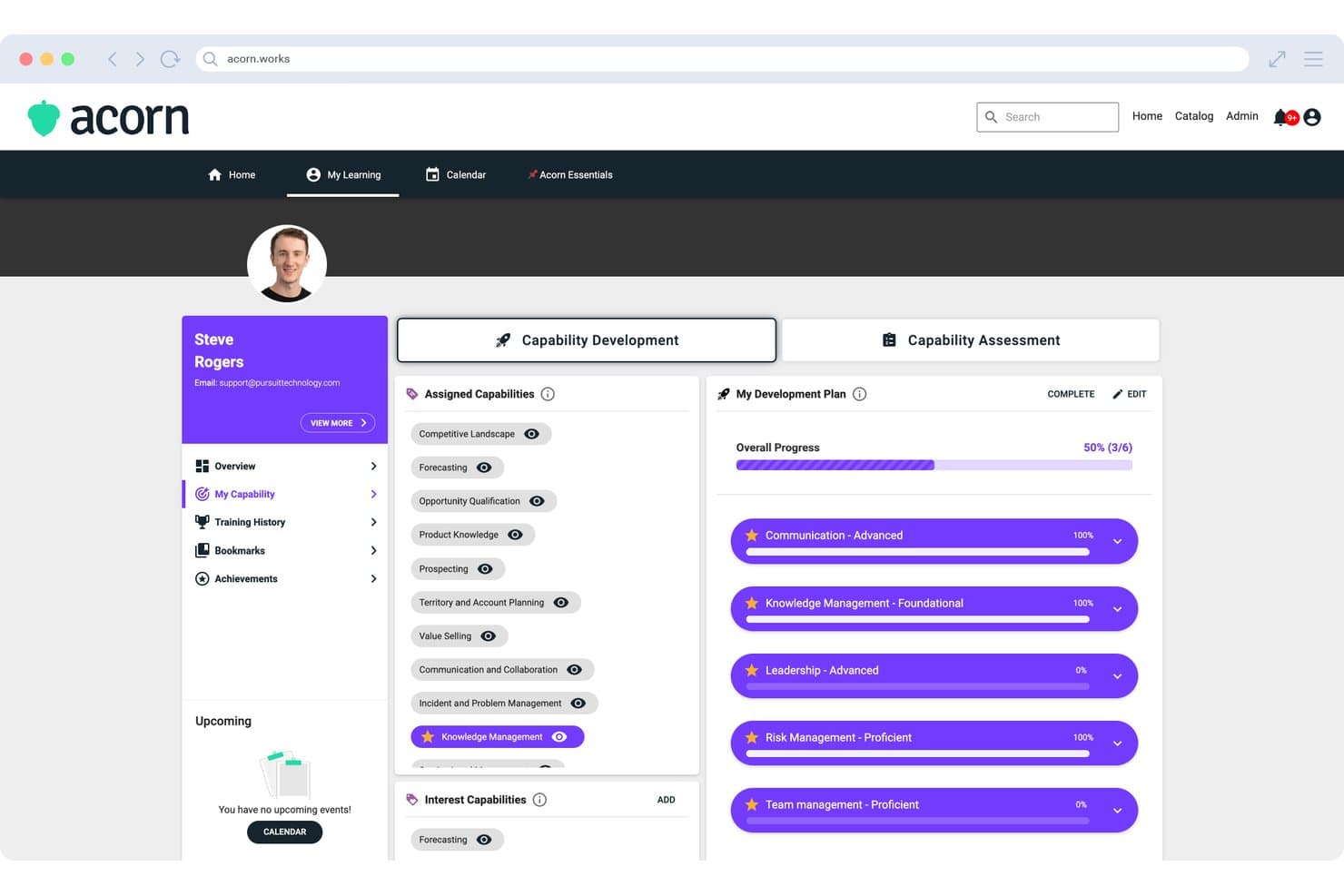
Acorn mostra un Piano di sviluppo delle competenze con competenze assegnate, monitoraggio dei progressi di sviluppo e competenze prioritarie contrassegnate con una stella per i singoli discenti. Acorn è un LMS incentrato sulle prestazioni che combina l'erogazione della formazione, il monitoraggio dei crediti CE, la gestione delle competenze e i flussi di lavoro per l'onboarding in un'unica piattaforma per le organizzazioni sanitarie di medie e grandi dimensioni.
Per chi è più adatto Acorn?
Acorn è progettato per organizzazioni sanitarie e associazioni di medie e grandi dimensioni che gestiscono l'erogazione della formazione CE attraverso reti estese e distribuite di professionisti sanitari.
Perché ho scelto Acorn
Acorn è entrato nella mia rosa dei preferiti grazie al modo in cui riunisce in un'unica piattaforma i contenuti sulla conformità provenienti da tutto il mercato. Apprezzo il fatto che si colleghi nativamente a OpenSesame, Go1, LinkedIn Learning e Skillsoft, e che il suo adattatore universale sincronizzi automaticamente in Acorn i completamenti esterni, così nulla sfugge al controllo. Ho visto che questo è particolarmente importante quando si reperiscono contenuti su HIPAA, OSHA e CE da fornitori diversi: tutto confluisce in un unico registro di verifica consolidato.
Funzionalità principali di Acorn
- Consolidamento dei crediti CE: Monitora e aggiorna automaticamente i crediti e i certificati di formazione continua per il personale clinico attraverso più fonti di contenuti.
- Struttura per ruoli e competenze: Configura le assegnazioni formative in base ai ruoli clinici, ai requisiti di accreditamento e alle valutazioni delle competenze.
- Gestione multi-organizzazione: Supporta portali separati per i discenti, contenuti condivisi e amministrazione centralizzata attraverso reti sanitarie distribuite.
- Applicazione per l'apprendimento mobile: Offre applicazioni native per Android e iOS per accedere in mobilità alla formazione assegnata e ai registri delle certificazioni.
Integrazioni di Acorn
Acorn offre integrazioni native con OpenSesame, Go1, LinkedIn Learning e Skillsoft, oltre a un'API per integrazioni personalizzate.
Pros and Cons
Pros:
- Monitoraggio automatizzato dei crediti CE tra i professionisti sanitari
- La gestione multi-organizzazione è adatta alle reti sanitarie distribuite
- Struttura per le competenze progettata per la mappatura dei ruoli clinici
Cons:
- Nessuna libreria proprietaria di contenuti sulla conformità sanitaria
- Personalizzazione dei report limitata per strutture organizzative complesse
Learn more about Acorn: Ideale per l'apprendimento intuitivo e autodidatta in ambito sanitario
- No
- Prezzo su richiesta
Visit WebsiteCustomer Rating:4.6/5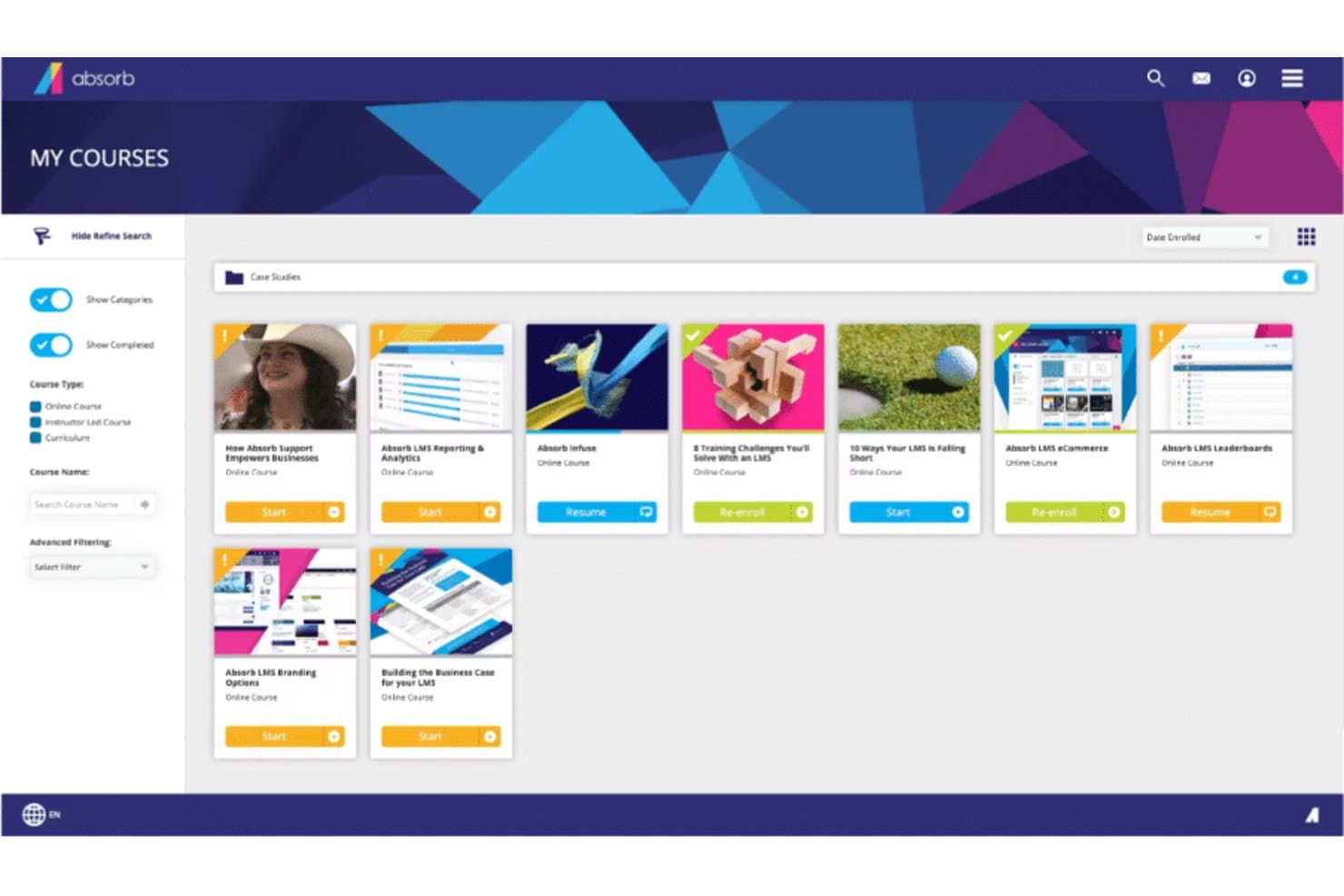
Ecco una panoramica dei corsi di Absorb Absorb è un sistema di gestione dell'apprendimento che offre un'interfaccia moderna e intuitiva, facile da navigare anche per chi ha competenze tecniche limitate. Include una serie di funzionalità come la creazione di corsi, strumenti di valutazione e analisi, rendendolo una scelta eccellente per le organizzazioni che cercano un LMS facile da usare.
Perché ho scelto Absorb: Absorb ha attirato la mia attenzione per il suo design intuitivo e l’interfaccia facile da usare, distinguendosi da altre piattaforme LMS più complesse. La facilità d'uso è un fattore critico per qualsiasi LMS e, in questo senso, Absorb eccelle. Questo mi ha portato a sceglierlo come il miglior LMS per un'interfaccia user-friendly.
Funzionalità e integrazioni principali:
Le principali caratteristiche di Absorb includono la creazione di corsi, strumenti di valutazione, portali per gli studenti e analisi. Inoltre, offre opportunità di apprendimento sociale tramite la sua bacheca. Per quanto riguarda le integrazioni, Absorb può essere integrato con diversi sistemi software come HRIS, CRM e piattaforme di e-commerce, offrendo maggiore comodità agli utenti.
Pros and Cons
Pros:
- Interfaccia facile da usare
- Ampie funzionalità per la gestione dei corsi e il coinvolgimento degli studenti
- Offre integrazione con vari sistemi software
Cons:
- Le informazioni sui prezzi non sono facilmente disponibili
- Potrebbe mancare di funzionalità avanzate rispetto ad altri LMS
- L’interfaccia utente potrebbe risultare troppo semplice per chi cerca un alto livello di personalizzazione
Learn more about Absorb: Ideale per una rapida implementazione e la formazione sanitaria su larga scala
- No
- $599 al mese per un massimo di 50 utenti attivi
Visit WebsiteCustomer Rating:4.6/5
Una schermata della dashboard di LearnUpon LearnUpon è un sistema di gestione dell'apprendimento progettato per supportare la crescita. Offre una piattaforma LMS scalabile che aiuta le aziende a gestire, monitorare e raggiungere i propri diversi obiettivi formativi. È pensato per espandersi in base alle esigenze della tua azienda, motivo per cui l'ho definito il 'migliore per' la scalabilità.
Perché ho scelto LearnUpon: Ho selezionato LearnUpon per la sua capacità di crescere efficacemente insieme alle esigenze formative di un'organizzazione. La sua architettura scalabile garantisce efficienza anche con l'espansione dell'azienda, distinguendolo da altri LMS che potrebbero avere difficoltà con carichi maggiori.
Secondo il mio giudizio, LearnUpon è la scelta ottimale per le aziende che prevedono una crescita significativa ed espansione.
Funzionalità principali e integrazioni:
Le funzionalità che distinguono LearnUpon includono un'interfaccia facile da usare, analisi dettagliate, capacità di eCommerce e un'architettura multi-portale che consente alle aziende di creare ambienti di apprendimento separati per diversi segmenti di pubblico.
Per quanto riguarda le integrazioni, si collega con una vasta gamma di strumenti tra cui Salesforce, Webex e Zoom, rendendolo flessibile e adattabile a diversi flussi di lavoro.
Pros and Cons
Pros:
- Infrastruttura solida e scalabile
- Ampia gamma di integrazioni
- Assistenza clienti eccellente
Cons:
- Il prezzo iniziale è superiore rispetto ad altre piattaforme LMS
- Le funzionalità più avanzate possono richiedere un periodo di apprendimento
- Opzioni di personalizzazione limitate per l'aspetto dei corsi
Learn more about LearnUpon: 10Ideale per corsi medici online interattivi e coinvolgenti
Tovuti
- No
- Prezzo su richiesta
Visit WebsiteCustomer Rating:4.7/5
Ecco una schermata di esempio della dashboard Tovuti su tutti i dispositivi. Tovuti è un sistema completo di gestione dell'apprendimento progettato per supportare un ambiente di apprendimento coinvolgente e interattivo. Offre una suite di strumenti e funzionalità che lo rendono una piattaforma eccellente per sviluppare ed erogare corsi medici online immersivi.
Perché ho scelto Tovuti: Quando stavo selezionando un LMS che potesse davvero rivoluzionare l'educazione medica online, Tovuti è subito emerso. Porta un'interattività e un coinvolgimento unici all'esperienza di apprendimento online, rendendola davvero dinamica.
I suoi strumenti di creazione corsi permettono la realizzazione di contenuti ricchi e coinvolgenti, distinguendosi come la scelta migliore per chi dà priorità all'apprendimento interattivo nell'erogazione dei corsi.
Funzionalità principali e integrazioni:
Tovuti offre uno strumento interattivo di creazione corsi che consente la realizzazione di corsi accattivanti e ricchi di contenuti multimediali. Le lezioni interattive includono elementi come la gamification e i quiz, migliorando l'esperienza formativa.
Inoltre, Tovuti offre una vasta gamma di integrazioni, anche con sistemi popolari come Salesforce, Zoom e WordPress, permettendo una condivisione dati senza soluzione di continuità e il potenziamento delle funzionalità attraverso l'intero stack di strumenti della vostra organizzazione.
Pros and Cons
Pros:
- Strumento interattivo di creazione corsi
- Ampia gamma di integrazioni
- La gamification aumenta il coinvolgimento degli studenti
Cons:
- Nessuna informazione sui prezzi disponibile
- Potrebbe essere troppo complesso per chi lo utilizza per la prima volta
- La personalizzazione può essere impegnativa per utenti non tecnici
Learn more about Tovuti:
Altre piattaforme LMS per il settore sanitario
Di seguito è riportato un elenco di altri strumenti LMS per il settore sanitario che ho selezionato, ma che non sono rientrati tra i primi 10. Vale sicuramente la pena dar loro un’occhiata.
- 11DoceboIdeale per esperienze di apprendimento personalizzate basate sull'IA
- 12eFrontIdeale per la personalizzazione e la sicurezza nella formazione medica
- 13HealthStreamIdeale per la formazione su conformità e regolamentazione in ambito sanitario
- 14MedTrainerIdeale per corsi specifici per il settore sanitario
- 15MedTrainerMigliore per automazione dei flussi di lavoro sanitari e formazione
- 16Litmos LMSIdeale per percorsi di apprendimento flessibili e ottimizzati per dispositivi mobili
- 17CornerstoneIdeale per uno sviluppo solido delle competenze nel settore sanitario
- 18ReliasIdeale per ridurre il rischio e garantire l'alta qualità dell'assistenza ai pazienti
- 19MedBridgeIdeale per migliorare le prestazioni cliniche e il coinvolgimento dei pazienti
- 20ParadisoIdeale per esperienze di apprendimento multilingue e miste
- 21ContinuIdeale per la formazione sanitaria obbligatoria
- 22ConnecteamIdeale per chi cerca un'app LMS mobile conforme HIPAA per i lavoratori in prima linea
- 23Synergy LearningIdeale per sistemi di gestione dell'apprendimento su misura
Come Valuto un LMS per il Settore Sanitario
Dall'inserimento di una nuova squadra di infermieri prima del primo turno fino a garantire che un sistema sanitario con 40 strutture sia sempre pronto per le ispezioni della Joint Commission, le piattaforme LMS per la sanità si collocano all'intersezione tra sicurezza del paziente, conformità del personale e sviluppo clinico. Valuto questi strumenti su due livelli: quello che ogni piattaforma in questa lista deve saper gestire bene solo per qualificarsi — come il monitoraggio della conformità basato sui ruoli e la gestione delle credenziali — e ciò che in realtà distingue una scelta dall'altra, come la profondità delle integrazioni, i flussi di lavoro per i crediti ECM e quanto bene il fornitore comprenda realmente le pressioni a cui sono sottoposti i team sanitari.
Funzionalità di Base (Requisiti Minimi per Questa Lista)
Per gli LMS sanitari, le funzionalità di base che testo e valuto sono:
- Gestione della formazione obbligatoria: Cerco auto-iscrizioni che assegnino i giusti corsi HIPAA, OSHA e controllo infezioni in base a ruolo, dipartimento e struttura — più promemoria automatici che vengono inoltrati ai responsabili quando le scadenze non sono rispettate.
- Monitoraggio dei titoli e delle certificazioni: Verifico se il sistema tiene traccia delle date di scadenza delle licenze, avvia flussi per i rinnovi e avvisa i team addetti prima che una certificazione stia per scadere. Un'infermiera con BLS scaduto è un problema sia per l'organico che per la responsabilità legale, e l’LMS dovrebbe intercettarlo prima di chiunque altro.
- Libreria di contenuti sanitari: Valuto la profondità e la qualità dei corsi preimpostati su temi clinici come la sicurezza dei farmaci, la mobilizzazione dei pazienti e i patogeni a trasmissione ematica. Controllo anche il supporto a SCORM e xAPI così da poter importare contenuti di terze parti senza dover ricreare i corsi da zero.
- Percorsi formativi basati sui ruoli: Esamino quanto la piattaforma differenzi in modo adeguato i requisiti formativi per ogni funzione — un terapista respiratorio, un operatore ausiliario della mensa e uno specialista della fatturazione devono vedere un curriculum completamente diverso già dal primo giorno di inserimento.
- Accesso mobile e flessibile: Metto alla prova l’esperienza da dispositivo mobile per assicurarmi che un'infermiera al turno di notte possa completare un modulo obbligatorio dal cellulare durante una pausa senza dover affrontare una navigazione macchinosa o perdere i progressi. Qui sono importanti anche accesso offline e supporto al microlearning.
- Reportistica pronta per ispezioni: Genero report filtrati per struttura, dipartimento, ruolo e intervallo di date per valutare la rapidità con cui posso reperire la documentazione precisa richiesta da un ispettore della Joint Commission o da enti regionali. Dashboard in tempo reale che mostrano a colpo d’occhio gap di conformità sono uno standard minimo.
- Strumenti per la valutazione delle competenze: Verifico la presenza di flussi per la valutazione strutturata — come check list di abilità che il tutor può completare a bordo letto per verificare la tecnica di inserimento di una flebo di una nuova assunta — e non solo quiz. Il solo completamento dei corsi non dimostra la competenza clinica, e l’LMS deve riflettere questa esigenza.
Se uno strumento non è affidabile su queste esigenze, non è stato preso in considerazione indipendentemente da tutto il resto che offre.
Funzionalità Distintive (Cosa Distingue le Scelte)
Oltre alle basi, cerco profonde integrazioni con sistemi HR e di gestione delle credenziali, tracciamento dei crediti ECM legato ai requisiti degli ordini professionali, gestione multi-sede, sicurezza dati conforme HIPAA con BAA firmata e supporto all’implementazione realmente orientato al settore sanitario. Strumenti che facilitano il rilascio di certificati per ispezioni, l’aggiornamento dei percorsi formativi dopo una modifica normativa o il tracciamento delle competenze pratiche certificate si distinguono davvero in questa categoria.
Cosa Valuto Oltre le Funzionalità
Valuto anche quanto ogni piattaforma si adatti a profili d'acquisto differenti — una clinica rurale da 20 posti letto ha necessità molto diverse rispetto a un sistema sanitario multi-regionale con 15.000 dipendenti. Guardo lo storico del fornitore nel settore sanitario in particolare, la trasparenza sui prezzi e la reale comprensione dei flussi di lavoro clinici da parte dei team di implementazione. Un fornitore che non sa parlare di preparazione alla Joint Commission o di validazione delle competenze infermieristiche durante una demo è un segnale d’allarme, a prescindere da quanto la piattaforma sembri curata.
Come scegliere un LMS per il settore sanitario
È facile perdersi in lunghi elenchi di funzionalità e strutture tariffarie complesse. Per aiutarvi a rimanere concentrati mentre affrontate il vostro processo di selezione del software, ecco un elenco di fattori da tenere a mente:
| Fattore | Cosa considerare |
|---|---|
| FattoreScalabilità | Cosa considerareQuanto bene cresce l'LMS insieme alla vostra attività? Considerate il numero di utenti supportati e se è in grado di gestire una quantità crescente di dati con l'espandersi delle vostre esigenze. |
| FattoreIntegrazioni | Cosa considerareL'LMS si integra con i sistemi esistenti? Cercate la compatibilità con il vostro sistema di cartella clinica elettronica, con gli strumenti HR e con altre soluzioni, per evitare silos di dati e semplificare i flussi di lavoro. |
| FattorePersonalizzazione | Cosa considerarePotete adattare l'LMS alle esigenze della vostra attività? Verificate se consente di personalizzare i percorsi formativi, i cruscotti e i report in base ai vostri processi specifici. |
| FattoreFacilità d'uso | Cosa considerareL'LMS è intuitivo per il personale di tutti i livelli? Un'interfaccia semplice riduce i tempi di formazione e aiuta il personale ad adottare rapidamente il sistema. |
| FattoreImplementazione e inserimento | Cosa considerareQuanto tempo occorre per iniziare? Valutate il processo di configurazione e le risorse disponibili, come video formativi o tour del prodotto, per garantire una transizione fluida. |
| FattoreCosto | Cosa considerareIl prezzo rientra nel vostro budget? Confrontate il costo dei diversi piani e considerate eventuali commissioni nascoste. Cercate soluzioni che offrano un buon equilibrio tra funzionalità e convenienza. |
| FattoreMisure di sicurezza | Cosa considerareQuanto è sicuro l'LMS? Assicuratevi che sia conforme alle normative sulla protezione dei dati e che offra funzionalità come la crittografia e i controlli degli accessi per proteggere le informazioni sensibili. |
| FattoreRequisiti di conformità | Cosa considerareL'LMS supporta le esigenze di conformità del vostro settore? Verificate se offre strumenti per monitorare le certificazioni, gestire le verifiche e rimanere aggiornati sulle modifiche normative. |
Che cos'è un LMS per il settore sanitario?
L'LMS per il settore sanitario è un sistema di gestione dell'apprendimento progettato per il settore sanitario, volto a facilitare la formazione e la gestione della conformità. Questi strumenti sono generalmente utilizzati dai professionisti sanitari, inclusi amministratori, formatori e personale clinico, per migliorare l'efficienza della formazione e garantire la conformità normativa.
Funzionalità come i moduli di formazione online, il monitoraggio dei progressi e la gestione delle certificazioni aiutano a fornire una formazione coerente e a mantenere la conformità agli standard del settore. Nel complesso, questi strumenti offrono un valore significativo migliorando le competenze del personale e garantendo il rispetto delle normative sanitarie.
Funzionalità dell'LMS per il settore sanitario
Quando selezioni un LMS per il settore sanitario, presta attenzione alle seguenti funzionalità chiave:
- Monitoraggio della conformità: aiuta a monitorare e documentare facilmente la formazione dei dipendenti, le certificazioni e i requisiti normativi, garantendo che tutti siano aggiornati sugli standard del settore e sulle aspettative legali.
- Gestione dei corsi: consente di creare, organizzare e aggiornare moduli di formazione per diversi reparti o ruoli, semplificando la distribuzione di nuove politiche e mantenendo tutti informati.
- Strumenti di valutazione: offre quiz, test e sondaggi per valutare la comprensione, individuare le lacune nelle conoscenze e capire dove potrebbe essere necessario un supporto aggiuntivo.
- Reportistica e analisi: fornisce informazioni dettagliate sui tassi di completamento dei corsi, sui progressi degli studenti e sull'efficacia della formazione, consentendo di individuare rapidamente le tendenze e prendere decisioni basate sui dati.
- Accessibilità da dispositivi mobili: consente agli studenti di accedere a corsi, risorse e valutazioni da smartphone o tablet: l'apprendimento può avvenire ovunque, non solo alla scrivania.
- Gestione degli utenti: consente di assegnare ruoli, gestire gruppi di studenti e amministrare facilmente le autorizzazioni, mantenendo il processo di formazione organizzato e sicuro.
- Capacità di integrazione: si collega ad altri sistemi delle risorse umane o sanitari già in uso, semplificando la comunicazione e riducendo il lavoro manuale del team.
- Libreria dei contenuti: offre una selezione integrata di corsi e risorse mediche pertinenti e aggiornati, facendo risparmiare tempo nella creazione dei contenuti e coprendo le principali esigenze formative.
- Percorsi di apprendimento personalizzabili: consente di adattare i percorsi formativi a persone o team diversi, garantendo che ogni studente riceva le informazioni giuste al momento giusto.
Funzionalità comuni dell'intelligenza artificiale negli LMS per il settore sanitario
Oltre alle funzionalità standard degli LMS per il settore sanitario elencate sopra, molte di queste soluzioni stanno integrando l'intelligenza artificiale con funzionalità come:
- Raccomandazioni di apprendimento personalizzate: utilizza l'intelligenza artificiale per suggerire corsi e risorse in base al ruolo, alla cronologia e agli interessi di una persona, rendendo la formazione efficiente e coinvolgente.
- Analisi automatizzata delle lacune nelle competenze: l'intelligenza artificiale esamina le prestazioni degli studenti e individua automaticamente le aree in cui sono necessarie ulteriore formazione o supporto, consentendo di affrontare proattivamente le carenze.
- Chatbot in linguaggio naturale: fornisce supporto e risposte istantanee basati sull'intelligenza artificiale alle domande relative alla formazione, aiutando gli studenti a trovare rapidamente e autonomamente le informazioni.
- Analisi predittiva: l'intelligenza artificiale prevede le future esigenze formative e i potenziali rischi di non conformità analizzando i dati sulla partecipazione, aiutando a rimanere diversi passi avanti.
- Valutazioni adattive: adatta dinamicamente la difficoltà e il tipo di domande in base alle risposte degli studenti in tempo reale, garantendo che le valutazioni riflettano accuratamente il livello di competenza di ogni persona.
Vantaggi
L'implementazione di un LMS per il settore sanitario offre diversi vantaggi al team e all'azienda. Ecco alcuni dei risultati che puoi aspettarti:
- Maggiore conformità: monitora facilmente le certificazioni e i requisiti normativi, garantendo che il team rimanga conforme agli standard del settore.
- Maggiore efficienza della formazione: eroga moduli di formazione online coerenti, riducendo il tempo e le risorse impiegati nelle sessioni formative in presenza.
- Maggiore accessibilità: l'accesso da dispositivi mobili consente al personale di imparare ovunque si trovi, offrendo flessibilità e adattandosi a diversi stili di apprendimento.
- Informazioni migliori sulle prestazioni: le analisi avanzate forniscono dati preziosi sui progressi formativi del personale, aiutando a prendere decisioni informate.
- Esperienze di apprendimento personalizzate: i percorsi di apprendimento personalizzabili rispondono alle esigenze specifiche dei diversi ruoli, migliorando pertinenza e coinvolgimento.
- Inserimento semplificato: i tour interattivi del prodotto e le risorse formative facilitano l'inserimento rapido del nuovo personale.
- Integrazione con altri sistemi: l'integrazione perfetta con gli strumenti esistenti riduce l'inserimento manuale dei dati e migliora l'efficienza dei flussi di lavoro.
Costi e prezzi
La selezione di un LMS per il settore sanitario richiede la comprensione dei vari modelli e piani tariffari disponibili. I costi variano in base alle funzionalità, alle dimensioni del team, ai componenti aggiuntivi e ad altri fattori. La tabella seguente riassume i piani più comuni, i relativi prezzi medi e le funzionalità tipicamente incluse nelle soluzioni LMS per il settore sanitario:
Tabella di confronto dei piani per LMS per il settore sanitario
| Tipo di piano | Prezzo medio | Funzionalità comuni |
|---|---|---|
| Tipo di pianoPiano gratuito | Prezzo medio$0 | Funzionalità comuniModuli di formazione di base, monitoraggio dei progressi e supporto utenti limitato. |
| Tipo di pianoPiano personale | Prezzo medio$5-$25/utente/mese | Funzionalità comuniPercorsi di apprendimento personalizzabili, accesso da dispositivi mobili e gestione delle certificazioni. |
| Tipo di pianoPiano aziendale | Prezzo medio$30-$60/utente/mese | Funzionalità comuniAnalisi avanzate, integrazioni con i sistemi esistenti e supporto potenziato. |
| Tipo di pianoPiano aziendale avanzato | Prezzo medio$70-$100/utente/mese | Funzionalità comuniPersonalizzazione completa, responsabile dedicato dell'account e strumenti per il monitoraggio della conformità. |
Domande frequenti sugli LMS per il settore sanitario
Ecco alcune risposte alle domande comuni sugli LMS per il settore sanitario:
In che modo un LMS per il settore sanitario può migliorare la conformità?
Un LMS per il settore sanitario aiuta a monitorare e gestire la formazione sulla conformità, garantendo che il team soddisfi i requisiti normativi. Fornisce promemoria e report automatici, consentendo di controllare facilmente chi ha completato i corsi necessari. Ciò riduce il rischio di non conformità e di potenziali sanzioni.
Quali sono gli aspetti di sicurezza da considerare per un LMS per il settore sanitario?
La sicurezza è fondamentale negli LMS per il settore sanitario per proteggere i dati sensibili. Cerca funzionalità come la crittografia dei dati, l’autenticazione degli utenti e la conformità a normative come l’HIPAA. Valuta i protocolli di sicurezza del fornitore per garantire che i dati dei pazienti e dell’organizzazione rimangano protetti.
Quali difficoltà si presentano in genere quando si implementa un LMS in un contesto sanitario?
Tra i problemi comuni rientrano la resistenza del personale clinico impegnato, l’allineamento della formazione con i turni di lavoro e la gestione di più ruoli utente (infermieri, medici, personale di supporto). Sarà necessario un piano per l’inserimento, la formazione degli utenti amministratori e la manutenzione dei contenuti, in modo che rimangano pertinenti. Occorre inoltre pianificare la gestione del cambiamento e assicurarsi che la dirigenza sostenga l’implementazione.
Cosa dovremmo considerare riguardo alla scalabilità e alla manutenzione continua dell'LMS?
Se la tua organizzazione cresce (nuovi reparti, sedi, personale da remoto), il tuo LMS deve poter scalare senza cali significativi delle prestazioni. Considera inoltre con quale frequenza i fornitori aggiornano il sistema, quanto è semplice caricare e mantenere i contenuti e come aumenta il lavoro amministrativo con l’espansione. La mancata pianificazione della scalabilità può comportare costi più elevati o la necessità di sostituire il sistema prima del previsto.