

Oncology EHR vendors offer specialized electronic health record systems designed to support cancer care teams with documentation, treatment planning, and care coordination. If you're looking for the best oncology EHR vendors, you need software that can handle the clinical complexity and workflow challenges unique to oncology. Accuracy, compliance, and tailored features are essential for managing treatment regimens and multidisciplinary teams.
In this guide, you’ll find my top picks based on firsthand experience with tools that help oncology providers deliver safe, efficient, and patient-centered care. Use this list to compare solutions and find the right fit for your practice’s needs in 2026.
Why Trust Our Software Recommendations
6,700+
Reviews
20
Industry experts
16+
Evaluation factors
14
Years
Our team has been testing and reviewing software since 2012. As medical practice leaders ourselves, we know how difficult—and important—it is to choose the right software.
For this guide, we evaluated tools using hands-on testing and independent research, scoring tools using our selection criteria.
Our reviews reflect our human editorial judgment, not a sales pitch.
Oncology EHR Vendors Comparison Table
This comparison table outlines pricing for my top oncology EHR picks:
| Tool | Best For | Trial Info | Price | ||
|---|---|---|---|---|---|
| 1 | Best for hospital oncology workflows | Not available | Pricing upon request | Website | |
| 2 | Best for voice-enabled oncology charting | Free demo available | Pricing upon request | Website | |
| 3 | Best for specialty oncology workflows | Free demo available | Pricing upon request | Website | |
| 4 | Best for oncology billing and RCM | Free demo available | Pricing upon request | Website | |
| 5 | Best for connected cancer care | Not available | Pricing upon request | Website | |
| 6 | Best for enterprise cancer care | Not available | Pricing upon request | Website | |
| 7 | Best for oncology data and analytics | Free demo available | Pricing upon request | Website | |
| 8 | Best for community oncology workflows | Free demo available | Pricing upon request | Website | |
| 9 | Best for radiation oncology management | Not available | Pricing upon request | Website | |
| 10 | Best for integrated radiation oncology | Free demo available | Pricing upon request | Website |


Best Oncology EHR Vendors Reviews
Below are my detailed summaries of the best oncology EHR vendors that made it onto my shortlist. My reviews offer a detailed look at the features, best use cases, and integrations of each system to help you find the best one for you.
 Best for hospital oncology workflows
- Not available
- Pricing upon request
Visit WebsiteCustomer Rating:4/5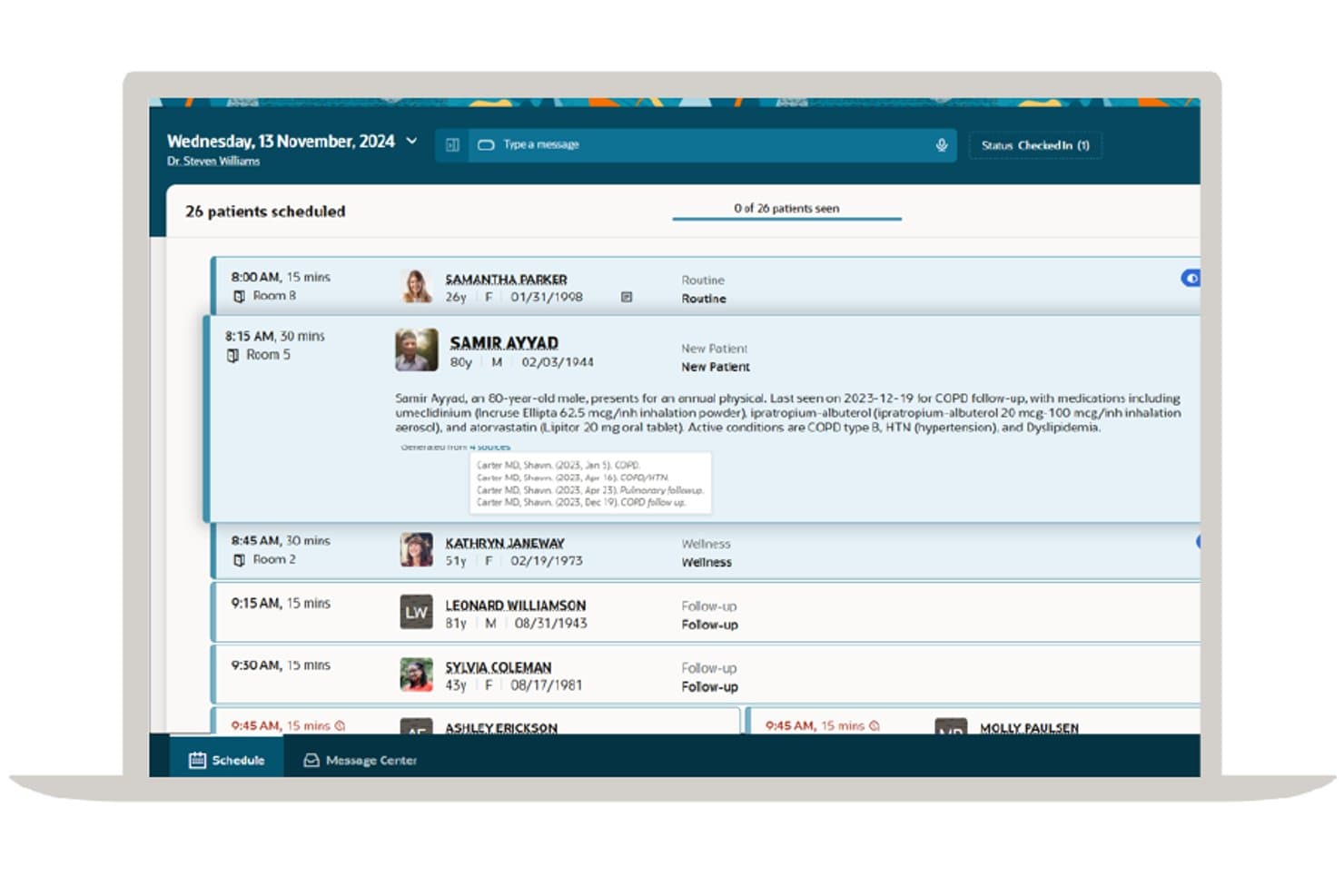
Oracle Health offers an AI-generated patient summary view within its daily schedule interface, surfacing medication history and active conditions at a glance. Oracle Health is a cloud-based, AI-first EHR platform built for hospital and health system oncology, combining chemotherapy regimen management, AJCC-compliant staging, infusion suite workflows, pathology and genomics integration, and revenue cycle tools.
Who Is Oracle Health Best For?
Oracle Health is a natural fit for large hospital systems and academic medical centers running dedicated cancer centers or infusion programs at scale.
Why I Picked Oracle Health
Oracle Health earns its spot on my shortlist because of how deeply it handles hospital-scale oncology workflows natively. I especially like the Infusion Suite's smart pump integration, which captures pause times automatically and feeds that data directly into billing, which matters a lot for J-code accuracy across a high-volume infusion center. AJCC-compliant discrete staging documentation also means clinicians chart TNM staging in structured fields that flow into downstream reporting, not buried in free text.
Oracle Health Key Features
- Integrated lab and pathology modules: Consolidates anatomic pathology, molecular diagnostics, and next-generation sequencing results directly within the oncology EHR.
- Multidisciplinary treatment planning: Supports unified documentation for medical, radiation, and surgical oncology in one patient record.
- Barcode specimen and medication tracking: Enables manual and automated tracking for specimen handling and chemo administration safety.
- Bidirectional interoperability tools: Facilitates easy data exchange with external labs, imaging systems, and hospital enterprise platforms using open APIs.
Oracle Health Integrations
Oracle Health offers native integrations with Surescripts, Haemonetics BloodTrack, Validic, and the Multum Drug Database, plus supports lab device integration, imaging systems, and provides an API for custom integrations.
Pros and Cons
Pros:
- Scales across multi-site hospital oncology networks
- AJCC staging captured in discrete, structured fields
- Native smart pump data feeds into billing directly
Cons:
- Migration from legacy PowerChart adds implementation complexity
- Post-acquisition support quality has declined noticeably
Learn more about Oracle Health: Best for voice-enabled oncology charting
- Free demo available
- Pricing upon request
Visit WebsiteCustomer Rating:3.9/5
ChartLogic offers a Patient Communications settings panel where patients can manage notification preferences via Text, Email, and Voice for appointments, forms, portal messages, and lab results. ChartLogic is an ambulatory EHR platform built for specialty practices, combining voice-driven clinical documentation, oncology-specific templates and flow sheets, practice management, and revenue cycle management in a single suite.
Who Is ChartLogic Best For?
ChartLogic fits solo and small-to-mid-sized hematology and oncology practices where physicians prioritize fast, voice-driven clinical documentation over complex multi-site workflows.
Why I Picked ChartLogic
I've included ChartLogic in my top picks because its voice dictation goes beyond simple note narration. Using what it calls a command-and-control methodology, I can navigate through notes, insert oncology-specific sub-templates, and complete documentation in under 90 seconds. The pre-built hematology and oncology flow sheets mean I'm not starting from scratch, and the custom template builder lets me reshape them around my actual charting workflow.
ChartLogic Key Features
- Note template builder: Create and customize oncology-specific templates and medical charting workflows.
- Integrated practice management: Use built-in scheduling, claims management, eligibility checks, and custom reporting in a single system.
- ONC-certified EHR: Meet regulatory requirements with 2015 Edition ONC-ACB certified electronic health records.
- Multi-location patient tracking: Monitor patient appointments, referrals, and records across different practice sites.
ChartLogic Integrations
ChartLogic offers native integrations with CareCloud Central and connects to hundreds of lab facilities for ePrescribe and lab interfaces. An API is available for custom integrations.
Pros and Cons
Pros:
- ONC-certified for regulatory compliance
- Pre-built hematology and oncology flow sheets included
- Voice notes completed in under 90 seconds
Cons:
- No infusion chair scheduling or drug prep tools
- No chemotherapy regimen or protocol management
Learn more about ChartLogic: Best for specialty oncology workflows
- Free demo available
- Pricing upon request
Visit WebsiteCustomer Rating:3.7/5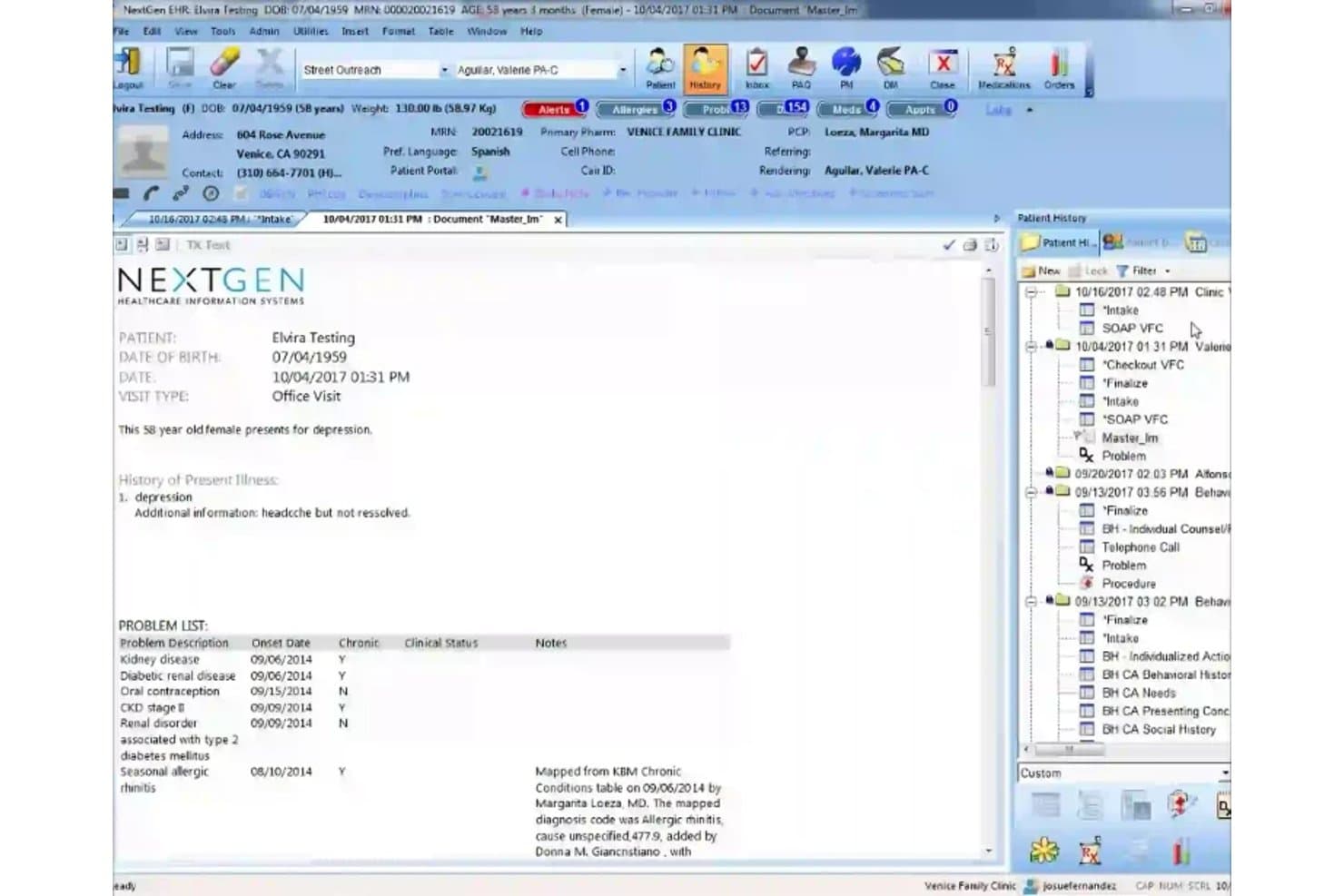
NextGen Healthcare offers a clinical documentation interface displaying patient history, problem lists, and office visit notes within its EHR platform. NextGen Healthcare is a multi-specialty ambulatory EHR platform with configurable oncology and hematology workflows, practice management, revenue cycle management, and AI-powered ambient clinical documentation.
Who Is NextGen Healthcare Best For?
NextGen Healthcare fits multi-specialty ambulatory practices that offer hematology/oncology alongside other service lines and need a single configurable EHR platform.
Why I Picked NextGen Healthcare
I picked NextGen Healthcare as one of the best because its library of 26 specialty-specific clinical templates includes configurable oncology and hematology workflows that go beyond basic note-taking. The specialty template editor lets oncology practices build custom encounter forms with specialty-relevant order sets and clinical decision support rules. I also like Ambient Assist, which converts live patient conversations into structured SOAP notes within 30 seconds of a completed visit, cutting documentation time by up to two hours per provider per day.
NextGen Healthcare Key Features
- Specialty-configurable clinical templates: Oncology and hematology fields can be tailored to fit unique workflows in multi-specialty practices.
- Integrated practice management tools: Schedule, bill, and manage authorizations directly in the EHR environment.
- Lab and diagnostic connectivity: Access results from more than 700 labs and connect with imaging and pathology systems.
- API-driven interoperability: Exchange patient records with external providers, HIEs, and enterprise EHRs using Mirth Connect.
NextGen Healthcare Integrations
NextGen Healthcare offers native integrations with more than 700 labs through NextGen Share Diagnostic Hub and connects with platforms like Clearwave, Doctible, Solutionreach, Commure, Vytalize, and Clinically. An API is available for custom integrations.
Pros and Cons
Pros:
- Strong lab connectivity across hundreds of providers
- Ambient AI documentation cuts charting time significantly
- Configurable specialty templates for oncology workflows
Cons:
- Missing infusion suite management tools
- No dedicated chemotherapy regimen library available
Learn more about NextGen Healthcare: Best for oncology billing and RCM
- Free demo available
- Pricing upon request
Visit WebsiteCustomer Rating:3.5/5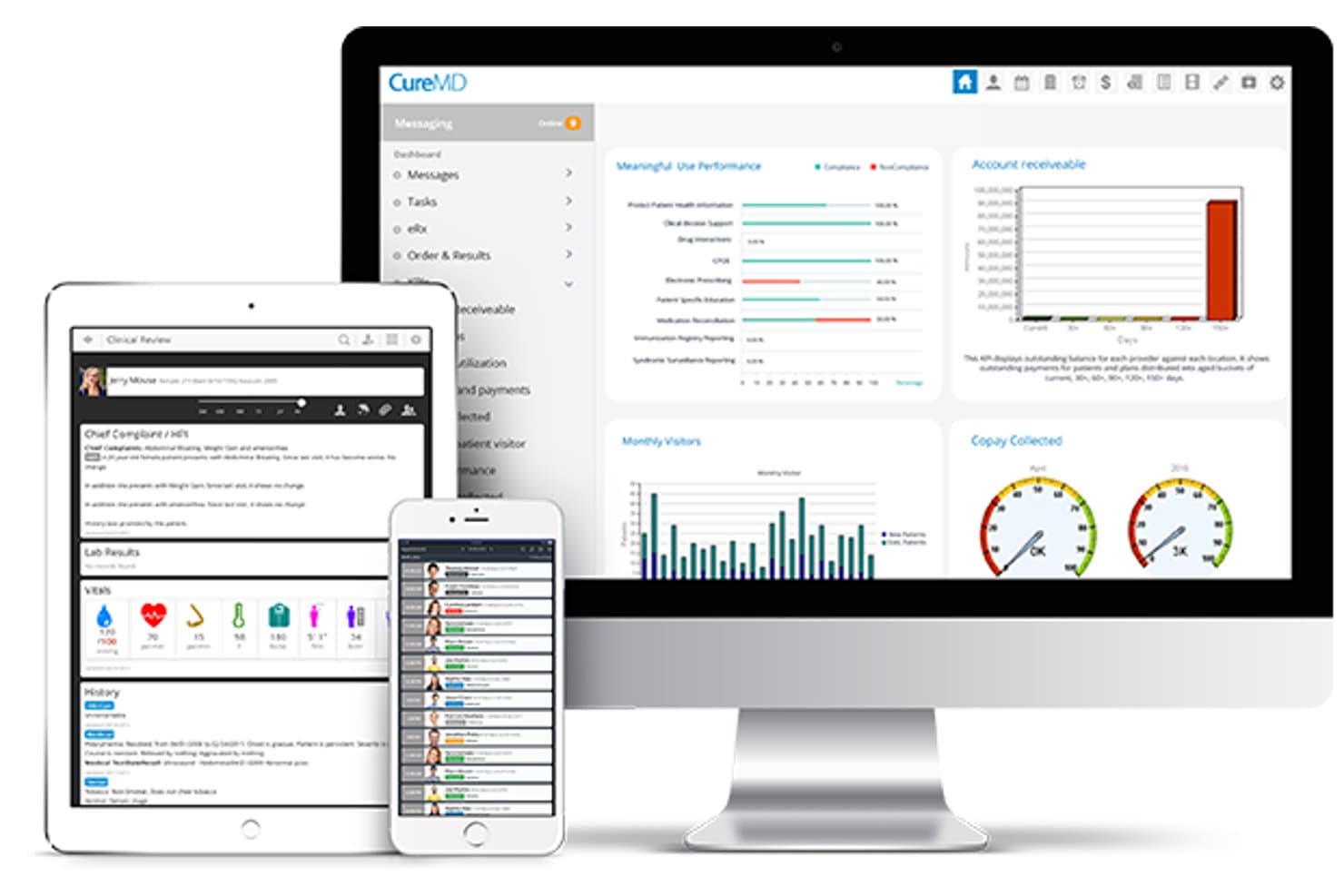
CureMD offers a multi-device EHR platform displaying clinical dashboards, patient records, messaging, and performance analytics across desktop, tablet, and mobile. CureMD is a cloud-based oncology EHR and practice management platform that combines chemotherapy regimen management, oncology-specific charting, infusion workflow tools, and integrated medical billing and RCM in a single system.
Who Is CureMD Best For?
CureMD is a strong fit for small to mid-sized independent medical oncology practices that need a unified EHR and billing system without a large IT infrastructure.
Why I Picked CureMD
I picked CureMD as one of the best because its billing architecture is built specifically around how oncology practices actually get paid. What I like most is how it pulls dosing information and NDC numbers directly from the drug cabinet into the practice management system, which removes a major manual step in J-code billing. It also includes drug utilization forecasting and wastage tracking, so practices can stay on top of buy-and-bill margins without running separate reports.
CureMD Key Features
- Integrated lab and imaging results: Pulls diagnostic, pathology, and radiology data directly into the patient chart for consolidated clinical reference.
- Customizable oncology charting templates: Enables cancer-specific documentation including staging, tumor markers, and longitudinal treatment histories.
- Infusion chair scheduling and workflow: Supports real-time scheduling, drug prep, and administration tracking for infusion suite operations.
- Automated dose calculations and safety alerts: Provides built-in BSA/AUC calculations and oncology-specific decision support throughout the chemo ordering process.
CureMD Integrations
CureMD offers native integrations with e-prescribing networks, health information exchanges, pathology labs, radiology services, hospital networks, and pharmacies. An API is available for custom integrations.
Pros and Cons
Pros:
- Specialty-specific templates for cancer diagnosis documentation
- Built-in MIPS reporting for oncology quality compliance
- Unified EHR and RCM cuts duplicate data entry
Cons:
- Reporting tools require significant manual workarounds
- Customer support availability is limited on weekends
Learn more about CureMD:

Meditech Expanse Oncology offers a comprehensive patient summary dashboard displaying oncology treatment plans, chemotherapy details, lab results, and visit history in a single view. MEDITECH Expanse Oncology is a web-based oncology EHR built on the Expanse platform, combining NCCN-aligned chemotherapy regimen management, infusion scheduling, oncology-specific charting, and genomic data integration into a single patient record.
Who Is Meditech Expanse Oncology Best For?
It's a strong fit for community and regional hospital systems that run outpatient cancer programs and need oncology workflows embedded within their existing Expanse EHR.
Why I Picked Meditech Expanse Oncology
I picked Meditech Expanse Oncology because it keeps the entire cancer care journey inside a single longitudinal record. Synoptic staging data from Expanse Pathology flows directly into oncology workflows, so oncologists have diagnostic context when making treatment decisions. The GenomOncology integration pulls mutational pathway data and therapy recommendations into the same chart, which means clinicians aren't toggling between disconnected systems during high-stakes consultations.
Meditech Expanse Oncology Key Features
- AJCC cancer staging protocols: Oncologists can document cancer staging using embedded AJCC protocols directly in the patient's record.
- Customizable documentation templates: Clinicians use specialty-driven templates designed for oncology, including treatment and survivorship documentation.
- Integrated scheduling for infusion and appointments: Staff schedule infusion chairs and outpatient appointments in a unified web interface.
- Quality Vantage dashboards: Practice administrators gain access to dashboards for monitoring oncology volume, infusion activity, and resource utilization.
Meditech Expanse Oncology Integrations
Meditech Expanse Oncology offers native integrations with GenomOncology, Expanse Pathology, Expanse Genomics, and the Traverse Exchange interoperability network. An API is available for custom integrations.
Pros and Cons
Pros:
- Genomic data flows natively into oncology charting
- Single longitudinal record from diagnosis to survivorship
- NCCN-aligned regimen library with 350+ protocols
Cons:
- Implementation complex for non-MEDITECH hospital systems
- 340B and J-code workflows are not detailed
Learn more about Meditech Expanse Oncology: 6Best for enterprise cancer care
Epic
- Not available
- Pricing upon request
Visit WebsiteCustomer Rating:4.2/5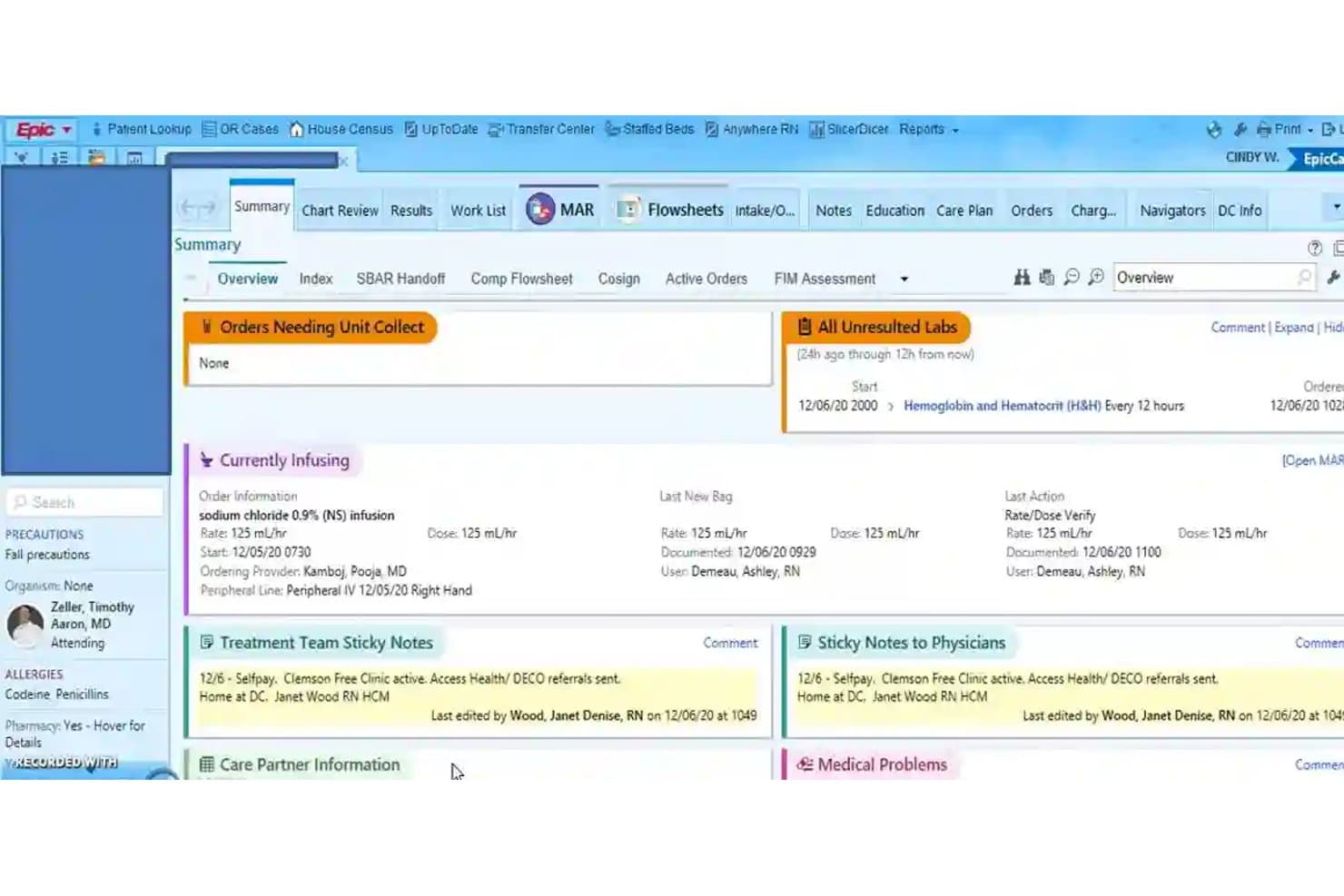
Epic offers a patient summary dashboard displaying active infusions, unresulted labs, treatment team notes, and allergy precautions within its EHR interface. Epic is an enterprise oncology EHR module that handles chemotherapy regimen management, cancer staging documentation, clinical decision support, and longitudinal treatment tracking across inpatient and outpatient care settings.
Who Is Epic Best For?
Epic is built for large academic medical centers and integrated cancer enterprises that already operate within a mature Epic environment.
Why I Picked Epic
Epic earns its spot on my shortlist because of how it handles chemotherapy at enterprise scale. I particularly value its NCCN-aligned protocol library, which lets oncology teams build, customize, and queue multi-cycle regimens ahead of patient visits. On top of that, its lifetime cumulative dose tracking and CPOE-based safety checks catch dangerous errors before they reach administration.
Epic Key Features
- Oncology-specific chart templates: Capture cancer staging, tumor markers, and longitudinal treatment history with structured, oncology-driven documentation.
- Integrated infusion scheduling: Coordinate chair assignments, drug preparation, and administration tracking within a unified workflow.
- Lab and diagnostic connectivity: Consolidate lab, pathology, and imaging results directly into the oncology patient record using native integration.
- Cancer registry reporting: Automate staging data and registry submissions to meet quality and compliance requirements for accredited cancer programs.
Epic Integrations
Epic offers native integrations across the Epic ecosystem, including EpicCare Ambulatory, Willow Pharmacy, Radiant Radiology, and Beaker Lab. It also integrates with Mosaiq for radiation oncology workflows and supports data exchange via HL7 and FHIR APIs.
Pros and Cons
Pros:
- Native cancer registry reporting built in
- Closed-loop chemo safety checks reduce errors
- NCCN-aligned regimen library is continuously updated
Cons:
- Implementation takes months for large organizations
- Requires existing Epic infrastructure to deploy
Learn more about Epic: Best for oncology data and analytics
- Free demo available
- Pricing upon request
Visit WebsiteCustomer Rating:3.4/5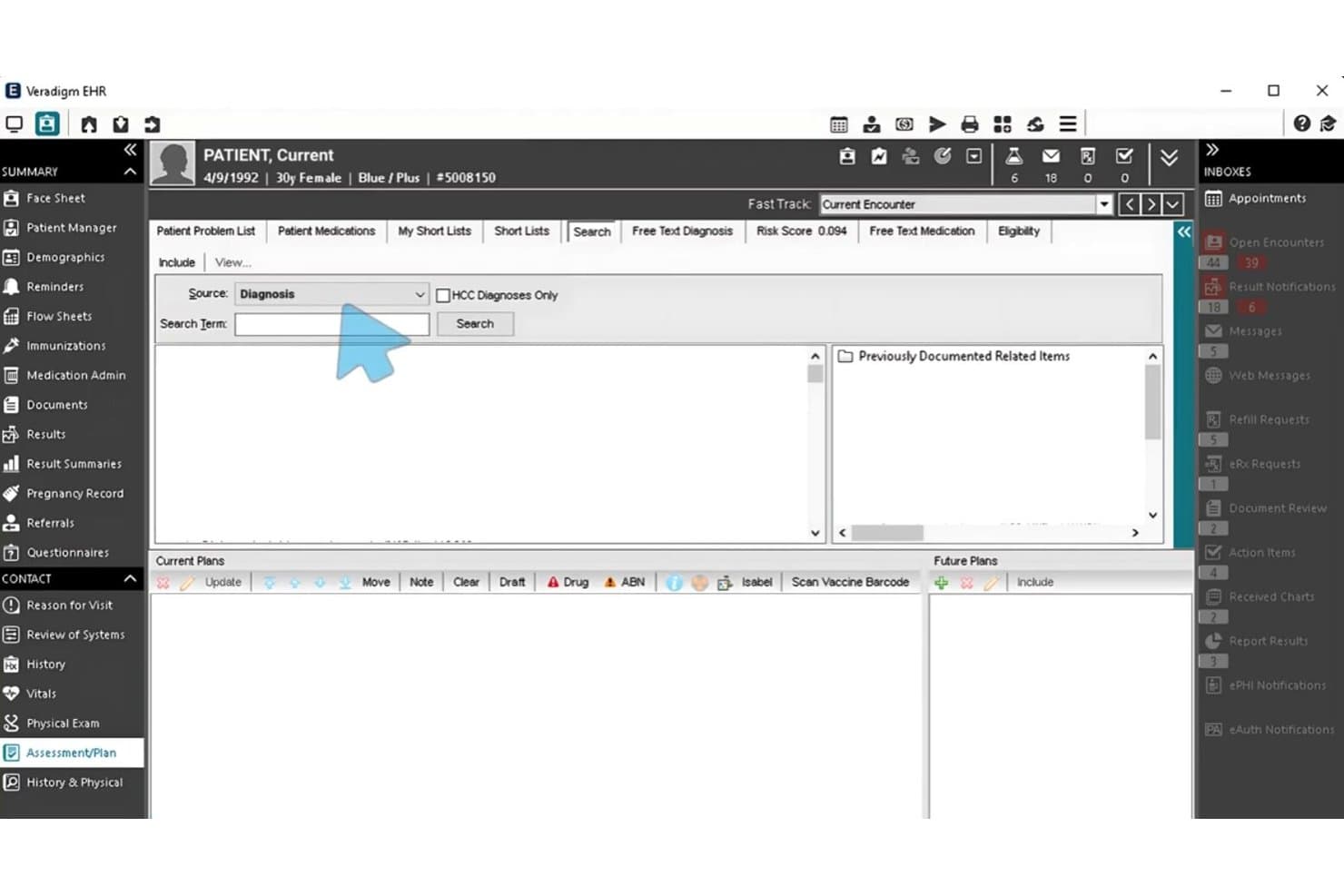
Veradigm offers a diagnosis search interface within its Assessment/Plan module, allowing clinicians to search and document patient diagnoses during encounters. Veradigm is a healthcare data and EHR platform that pairs ambulatory electronic health records with a real-world evidence analytics layer built on over 152 million de-identified patient records, including oncology populations.
Who Is Veradigm Best For?
Veradigm suits multi-specialty health systems and ambulatory practices that need a general-purpose EHR alongside access to large-scale oncology real-world data for research and reporting.
Why I Picked Veradigm
I've included Veradigm in my top picks because its Real-World Evidence Analytics Platform is built on OMOP standards, drawing from over 152 million de-identified patient records that include hematology, radiation oncology, and GYN oncology populations. I like using it to build cancer-specific cohorts and run longitudinal outcome analyses directly from structured EHR data. The platform also links claims and EHR records, which makes it practical for tracing full oncology patient journeys across care settings.
Veradigm Key Features
- Specialty EHR templates: Provides customizable clinical templates for oncology, hematology, and palliative care.
- Integrated diagnostic ordering: Supports direct lab and imaging orders and result retrieval within the EHR system.
- Automated quality reporting: Delivers built-in MIPS and PCMH reporting tools for tracking oncology quality measures.
- Real-time clinical alerts: Surfaces medication interaction warnings and decision support during patient encounters.
Veradigm Integrations
Veradigm offers native integrations with FollowMyHealth, Payerpath, a Diagnostic Ordering and Results Network, and its App Expo for certified third-party apps. An API is available for custom integrations.
Pros and Cons
Pros:
- Bidirectional lab and diagnostic result retrieval
- Automated MIPS reporting for oncology measures
- Large-scale real-world oncology data access
Cons:
- No infusion chair scheduling or workflow
- No native chemotherapy regimen management tools
Learn more about Veradigm: Best for community oncology workflows
- Free demo available
- Pricing upon request
Visit WebsiteCustomer Rating:4.8/5
Flatiron's OncoEMR offers an 'Add Multiple Orders' interface allowing clinicians to select radiology and imaging orders, assign ordering physicians, schedule order dates, and add detailed instructions for oncology workflows. Flatiron OncoEMR is a cloud-based oncology EHR built exclusively for cancer care, combining NCCN-aligned chemotherapy regimen management, oncology-specific charting, clinical decision support, and molecular diagnostic integration.
Who Is Flatiron Best For?
Flatiron OncoEMR is a strong fit for hematology/oncology physicians and practice administrators running multi-site community cancer care operations.
Why I Picked Flatiron
I've included Flatiron OncoEMR in my top picks because it's the only oncology EHR purpose-built around how community practices actually operate. I particularly like how NCCN Order Templates® are built directly into the chart, so clinicians aren't building regimens from scratch at each visit. Flatiron Assist™ then surfaces evidence-based treatment options at the point of care, keeping protocols consistent across a distributed, multi-site practice.
Flatiron Key Features
- AJCC cancer staging templates: Structured fields guide documentation and coding of tumor stage at diagnosis and recurrence.
- Chair scheduling for infusion centers: Assigns patients to chairs and tracks drug administration times in multi-site infusion suites.
- Molecular diagnostics integration: Direct integrations with genomic labs pull biomarker results into the patient chart for precision oncology decision-making.
- Cancer-specific quality measure reporting: Built-in tools support MIPS, OCM, and QOPI reporting workflows required for regulatory compliance.
Flatiron Integrations
Flatiron OncoEMR offers native integrations with DeepScribe, Natera, Adaptive Biotechnologies clonoSEQ, Foundation Medicine, and Abbott Precision Oncology. It also integrates with lab, radiology, and practice management systems. An API is available for custom integrations.
Pros and Cons
Pros:
- Structured biomarker data surfaces targeted therapy options
- Purpose-built exclusively for oncology clinical workflows
- NCCN-aligned regimen library built in natively
Cons:
- Reporting depth lags behind some competitor platforms
- Limited dedicated infusion suite management tools
Learn more about Flatiron: Best for radiation oncology management
- Not available
- Pricing upon request
Visit WebsiteCustomer Rating:5/5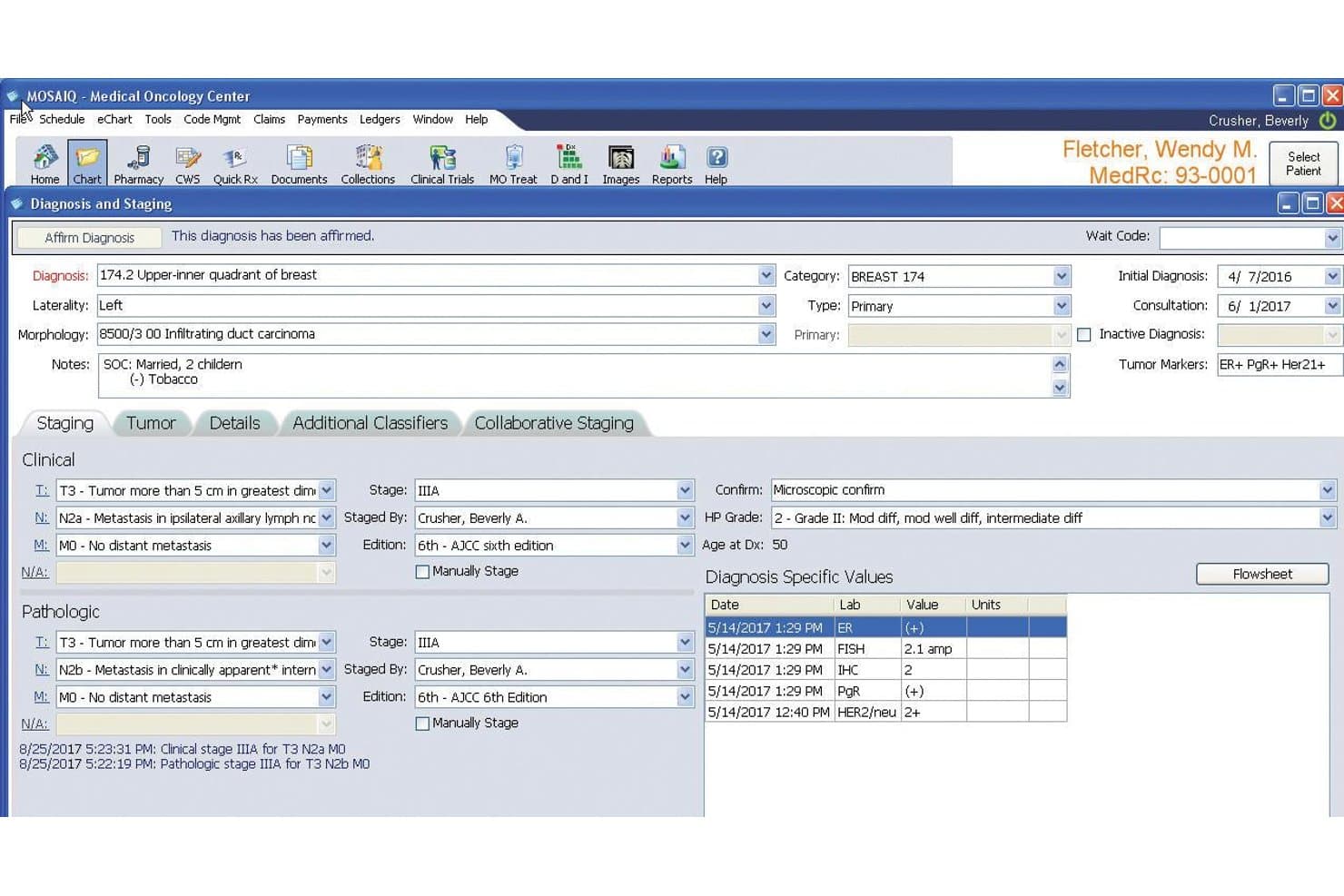
Elekta's MOSAIQ Medical Oncology Center EHR offers a detailed Diagnosis and Staging screen with clinical and pathologic staging, tumor markers, and diagnosis-specific lab values. Elekta is a radiation and medical oncology EHR platform that supports chemotherapy ordering, dose calculation, cancer staging, multidisciplinary treatment documentation, and oncology-specific clinical workflows across the full patient care journey.
Who Is Elekta Best For?
Elekta suits cancer centers and hospital-based oncology departments that need a single platform spanning both radiation and medical oncology workflows.
Why I Picked Elekta
Elekta earns its spot on my shortlist because no other oncology EHR ties radiation therapy delivery as tightly to clinical documentation as MOSAIQ does. It operates as a full oncology information system (OIS), with native connections to Elekta linacs and third-party treatment planning systems inside one charting environment. I also like the MOSAIQ Evaluate module, which lets my team pull treatment plan reviews directly into the patient record without switching applications.
Elekta Key Features
- Oncology-specific regimen builder: Create, save, and customize treatment protocols with cycle tracking and dose adjustments for chemotherapy and immunotherapy.
- Integrated lab and pathology data: Import pathology, genomic, imaging, and lab results directly into the patient chart for complete diagnostic data.
- Comprehensive cancer charting tools: Document TNM staging, tumor markers, longitudinal treatment history, and survivorship details within structured oncology templates.
- Clinical decision support: Access oncology-specific dose calculations, BSA/AUC logic, and drug interaction checks built into the order workflow.
Elekta Integrations
Elekta offers native integrations with Epic, Cerner, Kaiku Health, ProKnow, and Elekta linacs, and supports HL7-based connectivity to lab systems, pharmacies, and cancer registries. An API is available for custom integrations.
Pros and Cons
Pros:
- Strong multidisciplinary tumor board documentation tools
- Cumulative lifetime dose tracking built in
- Unifies radiation and medical oncology workflows
Cons:
- Infusion chair scheduling depth is limited
- Billing features lag dedicated RCM platforms
Learn more about Elekta: Best for integrated radiation oncology
- Free demo available
- Pricing upon request
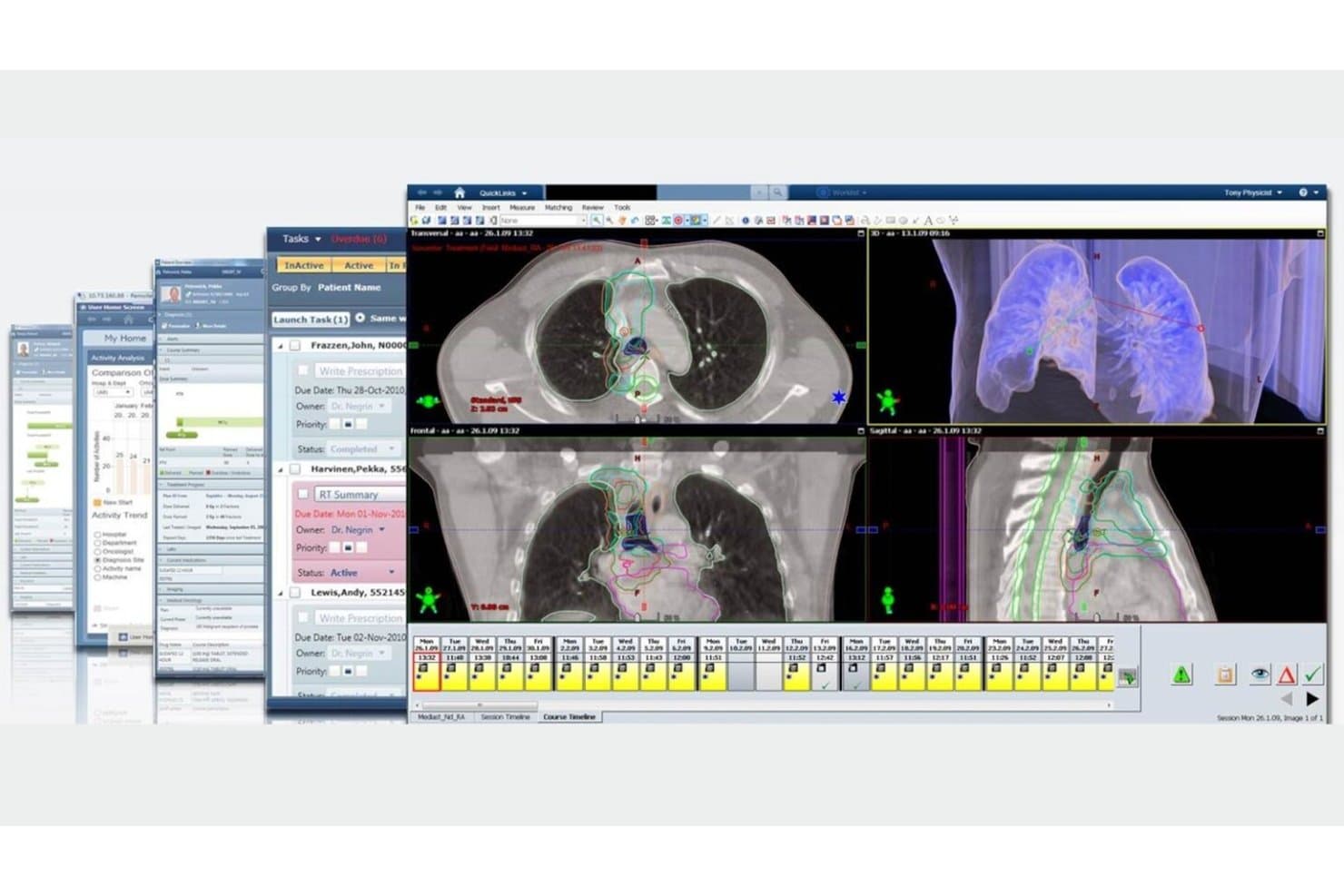
Varian ARIA Oncology Information System offers a multi-panel clinical workspace displaying CT scan imaging with radiation treatment contours, patient task lists, and a course timeline for oncology treatment planning. Varian ARIA Oncology Information System is an oncology-specific EHR and information management platform that combines radiation, medical, and surgical oncology records, treatment planning, scheduling, charge capture, and diagnostic image review into a single clinical system.
Who Is Varian ARIA Oncology Information System Best For?
It's a strong fit for hospital-affiliated cancer centers and enterprise oncology programs already running Varian radiation therapy equipment.
Why I Picked Varian ARIA Oncology Information System
I picked Varian ARIA Oncology Information System because no other oncology EHR connects directly into Varian LINAC systems and Eclipse treatment planning the way it does. My team can pull radiation treatment plans, MV/kV/CT/CBCT imaging, and dose tracking into a single patient record without any manual import steps. ARIA also automates AJCC cancer staging and captures CPT and HCPCS codes across completed treatment activities.
Varian ARIA Oncology Information System Key Features
- Oncology-specific charting templates: Supports AJCC staging, TNM coding, tumor markers, and longitudinal treatment documentation.
- Advanced billing and claim management: Includes oncology claim edits, charge capture, split technical and professional billing, and HL7 export for reimbursement systems.
- Integrated diagnostic imaging review: Allows direct access to MV, kV, CT, CBCT, MR, and PET images within the patient record.
- Performance status and toxicity tracking: Documents ECOG, Karnofsky, and Lansky scales, plus detailed adverse event and toxicity monitoring.
Varian ARIA Oncology Information System Integrations
Varian ARIA Oncology Information System offers native integrations with Eclipse treatment planning, InSightive analytics, Noona patient engagement, LIS and RIS systems, and supports HL7 and DICOM data exchange for interoperability with hospital and lab systems.
Pros and Cons
Pros:
- Supports MV, kV, CT, and PET imaging
- Built-in AJCC staging and toxicity documentation
- Connects directly to Varian LINAC treatment systems
Cons:
- Legacy OIS product is being phased out
- Infusion workflows require a separate add-on module
Learn more about Varian ARIA Oncology Information System:
Other Oncology EHR Vendors
Here are some additional oncology EHR vendors options that didn’t make it onto my shortlist, but are still worth checking out:
- 11Praxis EMRBest for adaptable oncology charting
- 12OncentricBest for oncology EHR and billing
- 13eClinicalWorksBest for coordinated oncology care
- 14WRSHealthBest for oncology treatment planning
- 15InterSystemsBest for unified oncology data
How I Evaluate Oncology EHR Vendors
I evaluate oncology EHRs across two layers: baseline requirements like regimen libraries and infusion workflows, and differentiators like genomic integration and closed-loop chemo safety.
Core Functionality (Table Stakes For This List)
When I'm selecting tools for my list, I rank each one on a scale from 0 (does not offer the functionality) to 5 (excels in this area) for each core functionality listed below. Then, I calculate the tool's total score into a percentage. Each tool needs to achieve a minimum total score of 55% to be considered for inclusion.
- Chemotherapy Regimen Management: I look for NCCN-aligned protocol libraries and the ability to build custom multi-cycle regimens with automated cycle progression.
- Oncology-Specific Charting: I check for TNM staging fields, tumor marker tracking, and longitudinal treatment timelines rather than generic templates.
- Infusion Scheduling & Workflow: Chair scheduling with drug prep coordination and nurse assignments matters, especially for busy multi-chair infusion suites.
- Oncology Billing & Reimbursement: I evaluate J-code support, drug wastage tracking, prior auth workflows, and buy-and-bill handling for high-cost oncolytics.
- Clinical Decision Support: Dose calculations based on BSA/AUC, toxicity monitoring, and regimen-specific drug interaction alerts are what I look for here.
- Lab & Diagnostic Integration: I check whether the system pulls in pathology, imaging, and genomic results via HL7/FHIR rather than requiring manual entry.
Once I have a list of tools that meet the criteria, I consider what sets each platform apart.
Differentiating Factors (What Sets Vendors Apart)
Here's how I compare and contrast different vendors:
Standout Features
Molecular and genomic integration is a big differentiator. I look for systems that natively ingest results from genomic labs and structure biomarker data to drive targeted therapy recommendations. Closed-loop chemo safety features like barcode administration and cumulative lifetime dose tracking add a meaningful layer of protection during high-risk regimens. I also evaluate clinical trials matching—automated patient-to-trial screening based on diagnosis, staging, and prior therapies saves hours of manual eligibility review.
Beyond Features
Practice setting fit matters a lot. I evaluate whether a system scales from a solo community oncology practice to a multi-site cancer network with shared infusion centers. Regulatory reporting is another key factor—I check for built-in QOPI, MIPS, and EOM reporting so your team isn't manually pulling quality data. Interoperability with the broader oncology ecosystem also shapes my assessment. Bidirectional exchange with PACS, radiation systems, and referring providers via FHIR/HL7 keeps care coordination from breaking down between departments.
How to Choose Oncology EHR Vendors
It’s easy to get bogged down in long feature lists and complex pricing structures. To help you stay focused as you work through your unique software selection process, here’s a checklist of factors to keep in mind:
| Factor | What to Consider |
| Scalability | Can the platform handle your current patient volumes and grow with practice expansion or new sites? |
| Integrations | Does the system connect easily with your labs, imaging, PACS, and billing services? |
| Customizability | Are you able to tailor workflows, templates, and reports to suit oncology subspecialties or research needs? |
| Ease of use | Will your clinical and admin staff learn the system quickly, or is it likely to disrupt daily workflows? |
| Implementation and onboarding | What vendor support and training resources exist for a smooth transition and minimizing downtime? |
| Cost | Have you accounted for all costs—setup, subscription, support, data migration—beyond just licensing fees? |
| Security safeguards | Does the system meet healthcare security standards and provide thorough access controls, audit logs, and encryption? |
| Compliance requirements | Is there baked-in support for QOPI, MIPS, EOM, or local accreditation needs relevant to your practice? |
What Are Oncology EHR Vendors?
Oncology EHR vendors provide electronic health record systems specifically designed for cancer care providers, supporting documentation, treatment management, and care coordination unique to oncology. These EHR software platforms help practices manage chemotherapy regimens, track patient progress, integrate lab and diagnostic data, and streamline compliance with oncology-specific billing and reporting standards.
Features of Oncology EHR Vendors
When selecting oncology EHR vendors, keep an eye out for the following key features:
- Chemotherapy regimen management: Includes libraries of evidence-based protocols and tools to build, customize, and track multi-cycle treatment plans for various cancers.
- Oncology-specific charting: Allows detailed documentation of tumor staging, diagnosis, treatment history, and longitudinal timelines specific to oncology patients.
- Infusion scheduling: Supports efficient chair scheduling, coordination of drug preparation, and real-time monitoring of infusion suite operations.
- Oncology billing and reimbursement: Handles J-codes, drug wastage, prior authorizations, and complex buy-and-bill workflows for chemotherapy and immunotherapy drugs.
- Clinical decision support: Provides alerts, dose calculations, toxicity monitoring, and regimen-specific safety checks tailored to oncology care.
- Lab and diagnostic integration: Consolidates pathology, genomic, imaging, and lab results directly into the patient record using HL7 or FHIR standards.
- Closed-loop medication safety: Incorporates barcode administration, dose verification, and cumulative lifetime dose tracking to reduce medication errors with high-risk drugs.
- Multidisciplinary treatment planning: Enables collaboration among medical, surgical, and radiation oncology teams with unified patient timelines and care coordination.
- Quality reporting and compliance tools: Automates data capture for regulatory programs like QOPI, MIPS, and local cancer registry submission.
- Patient portal integration: Offers secure communication, treatment updates, and symptom tracking directly to patients to involve them in their care journey.
Benefits of Oncology EHR Vendors
Implementing oncology EHR vendors provides several benefits for your team and your business. Here are a few you can look forward to:
- Improved care coordination: Integrated treatment plans, lab results, and clinical notes help oncology teams stay aligned across the entire patient journey.
- Enhanced patient safety: Features like barcode medication administration, dose verification, and toxicity tracking reduce medication errors and treatment risks.
- Streamlined oncology billing: Automated J-code handling, drug wastage tracking, and buy-and-bill workflows simplify complex reimbursement processes unique to cancer care.
- Faster clinical decision-making: Access to oncology-specific alerts, decision support, and up-to-date regimen libraries enables clinicians to make timely evidence-based choices.
- Efficient infusion management: Chair scheduling and real-time infusion tracking optimize suite utilization and reduce bottlenecks in busy centers.
- Regulatory compliance support: Built-in tools for QOPI, MIPS, and EOM reporting minimize manual work and help practices meet evolving oncology quality standards.
- Better patient engagement: Patient portals tailored for oncology improve communication, deliver timely updates, and empower patients to track their own symptoms and care.
Costs and Pricing of Oncology EHR Vendors
Selecting oncology EHR vendors requires an understanding of the various pricing models and plans available. Costs vary based on features, team size, add-ons, and more. The table below summarizes common plans, their average prices, and typical features included in oncology EHR vendors solutions:
Plan Comparison Table for Oncology EHR Vendors
| Plan Type | Average Price | Common Features |
| Free Plan | $0 | Limited patient records, basic oncology charting, minimal support, and manual infusion scheduling. |
| Personal Plan | $75-$200/user/month | Core EHR functionality, single-provider access, regimen libraries, basic billing, and simple reports. |
| Business Plan | $300-$500/user/month | Multi-provider support, infusion suite workflows, advanced billing, lab integrations, and compliance tools. |
| Enterprise Plan | $600-$900/user/month | Network-wide interoperability, custom integrations, oncology analytics, dedicated support, and enterprise security. |
Oncology EHR Vendors FAQs
Here are some answers to common questions about oncology EHR vendors:
How are oncology EHR systems different from general EHRs?
Oncology EHRs are designed for cancer care workflows, supporting regimen management, infusion scheduling, staging documentation, and specialized billing, rather than just general charting.
Can oncology EHR vendors integrate with lab and imaging systems?
Yes, most oncology EHR vendors support integrations with pathology, imaging (PACS), and genomic labs so patient data auto-flows into the EHR, reducing manual entry.
What regulatory requirements should oncology EHRs support?
These systems should help with QOPI, MIPS, and EOM quality reporting, as well as support automated data submission for cancer registries and meet strict medication safety guidelines.
Do oncology EHR platforms include clinical trial tracking?
Many modern oncology EHRs offer built-in tools for patient-to-trial matching and enrollment status tracking, making it easier for practices to support clinical research.
How do oncology EHRs handle complex drug billing?
They typically handle J-code mapping, drug wastage, buy-and-bill workflows, and payer-specific compliance, which are essential for accurate oncology reimbursement.