

Medical voice recognition software turns spoken language into clinical documentation, reducing time spent typing patient notes. This guide compares top options based on workflow fit, specialty needs, and clinical accuracy.
Why Trust Our Software Recommendations
6,700+
Reviews
20
Industry experts
16+
Evaluation factors
14
Years
Our team has been testing and reviewing software since 2012. As medical practice leaders ourselves, we know how difficult—and important—it is to choose the right software.
For this guide, we evaluated tools using hands-on testing and independent research, scoring tools using our selection criteria.
Our reviews reflect our human editorial judgment, not a sales pitch.
Comparison Table: Medical Voice Recognition Software
This comparison table summarizes pricing details for my medical voice recognition software selections.
| Tool | Best For | Trial Info | Price | ||
|---|---|---|---|---|---|
| 1 | Best for live remote documentation support | Free demo available | Pricing upon request | Website | |
| 2 | Best for scalable cloud-based speech processing | Free plan available | Pricing upon request | Website | |
| 3 | Best for mobile on-the-go dictation workflows | 7-day free trial | From $39/month | Website | |
| 4 | Best for AI-driven clinical documentation accuracy | 14-day free trial | From $110/user/month (billed annually) | Website | |
| 5 | Best for instant SOAP note generation | Free plan available | Pricing upon request | Website | |
| 6 | Best for ambient patient conversation capture | Free demo available | Pricing upon request | Website | |
| 7 | Best for automated encounter summarization | Not available | Pricing upon request | Website | |
| 8 | Best for voice-driven clinical note creation | Not available | Pricing upon request | Website | |
| 9 | Best multilingual transcription support | 30-day free trial | From €49/month | Website | |
| 10 | Best for real-time EHR integration | Free demo available | Pricing upon request | Website |


Medical Voice Recognition Software Reviews
Below are my detailed summaries of the best medical voice recognition software that made it onto my shortlist. My reviews offer a detailed look at the features, best use cases, and capabilities of each software to help you find the best one for you.
 Best for live remote documentation support
- Free demo available
- Pricing upon request
Visit WebsiteCustomer Rating:4.4/5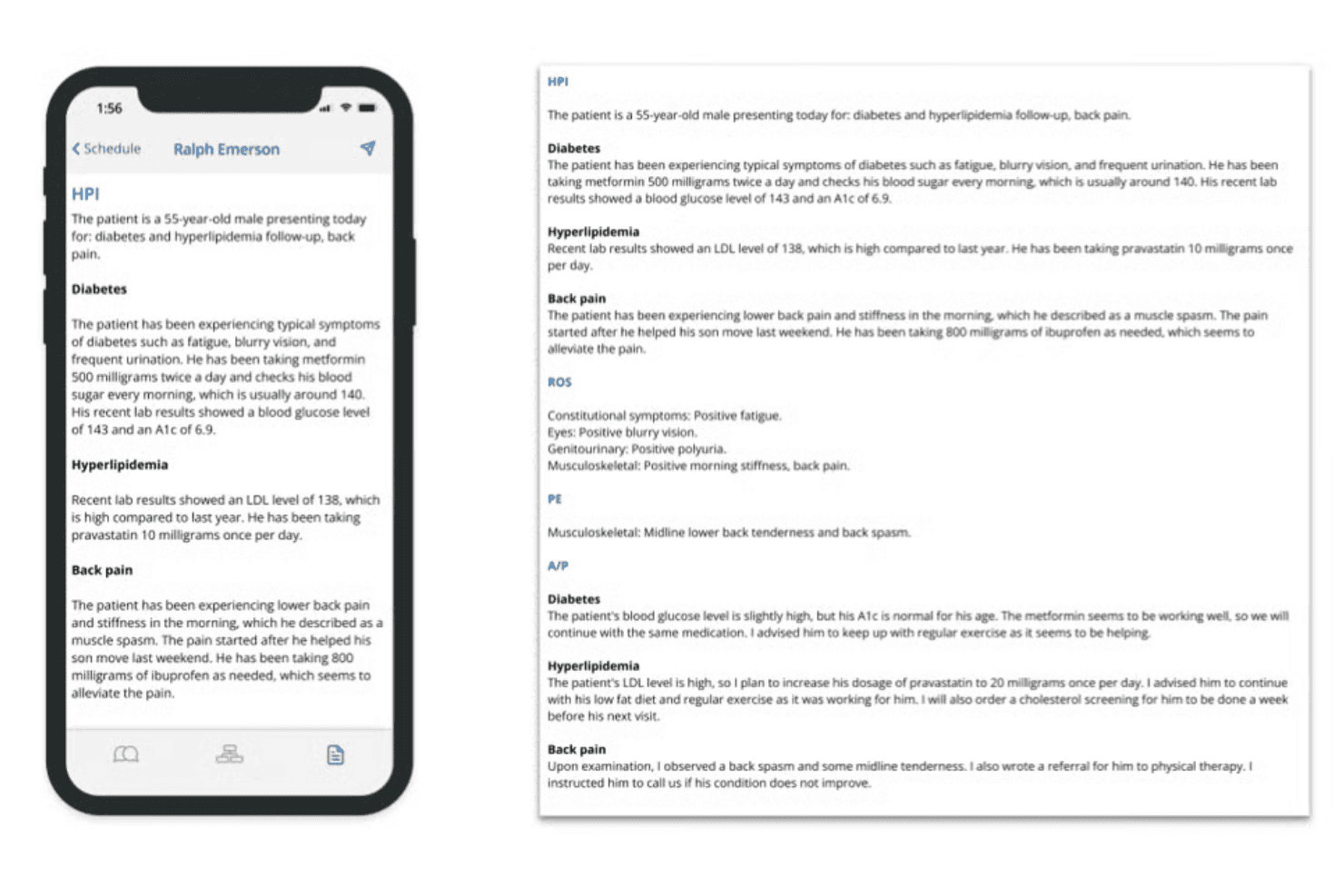
Augmedix captures live conversations and turns them into structured EHR notes. Augmedix is an ambient AI scribe platform that captures live clinician-patient conversations and converts them into structured clinical notes using a combination of specialty-tuned AI models and human medical documentation specialists, with direct EHR integration.
Who Is Augmedix Best For?
Augmedix is a strong fit for hospitals, health systems, and specialty physician groups that handle high patient volumes across complex clinical environments.
Why I Picked Augmedix
Augmedix earns its spot as one of the best on my shortlist because of its Augmedix Live tier, which pairs a dedicated Medical Documentation Specialist with AI to generate signature-ready notes moments after each visit. I love that the MDS gets to know each clinician's preferences over time, so notes arrive already formatted the way a physician expects. Two-way communication with the scribe during the visit also allows real-time corrections before a note ever reaches the EHR.
Augmedix Key Features
- Specialty-tuned AI models: Processes conversations using pretrained medical language models tailored for multiple specialties and subspecialties.
- Bidirectional EHR integration: Directly uploads structured notes to Epic, Cerner, Meditech, athenahealth, and other major EHRs.
- CareCues real-time reminders: Delivers billing or care gap prompts during documentation to support compliance and reimbursement.
- Discrete data entry: Supports entry of labs, imaging orders, and referral letters into the EHR as part of the documentation workflow.
Augmedix Integrations
Augmedix offers native integrations with Epic, Cerner, Meditech, and athenahealth, and provides an API for custom integrations.
Pros and Cons
Pros:
- CareCues surfaces billing reminders during live encounters
- Specialty-tuned models cover multiple clinical disciplines
- Human scribes verify all AI-generated notes
Cons:
- No self-service onboarding without implementation support
- Requires a dedicated wearable or mobile device
Learn more about Augmedix: Best for scalable cloud-based speech processing
- Free plan available
- Pricing upon request
Visit WebsiteCustomer Rating:4.6/5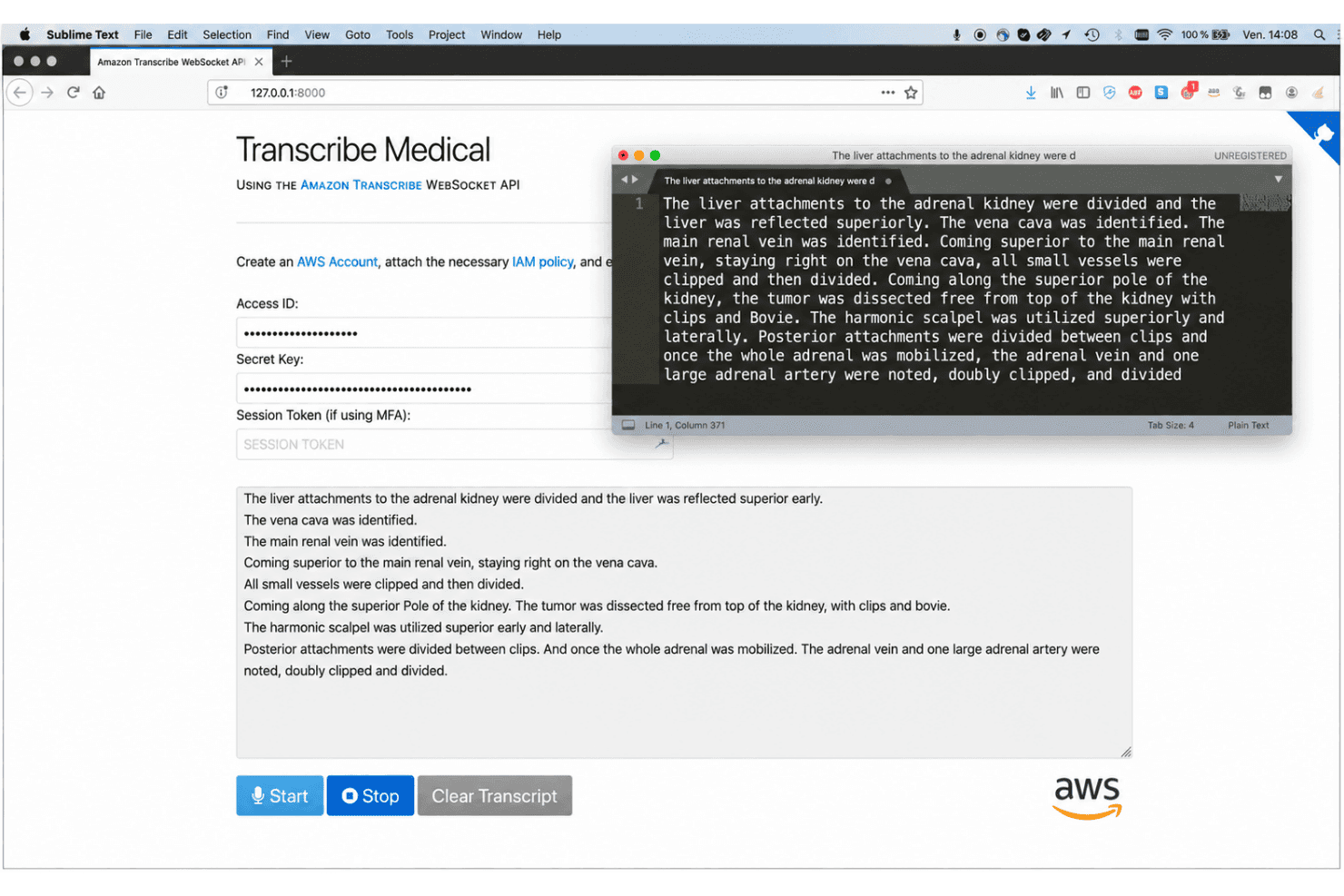
Amazon Transcribe Medical converts clinical speech into real-time medical text. Amazon Transcribe Medical is a cloud-based ASR API that converts clinical speech to text in real time, covering medical terminology across specialties like cardiology, neurology, oncology, and radiology, with support for both dictation and multi-speaker conversational audio.
Who Is Amazon Transcribe Medical Best For?
It's a strong fit for health-tech developers and ISVs building clinical documentation or telehealth applications that require scalable, HIPAA-eligible speech-to-text infrastructure.
Why I Picked Amazon Transcribe Medical
I picked Amazon Transcribe Medical as one of the best because its cloud-native architecture handles concurrent audio workloads that would overwhelm a desktop dictation tool. Its batch API processes pre-recorded files at high concurrency, while the streaming API delivers real-time output across simultaneous sessions. I also appreciate that it covers seven clinical specialties natively, so accuracy holds up across cardiology, oncology, and radiology dictations without custom model training.
Amazon Transcribe Medical Key Features
- Medical specialty vocabularies: Supports terminology for cardiology, neurology, oncology, obstetrics-gynecology, pediatrics, radiology, and urology.
- Speaker diarization: Distinguishes and labels different speakers in multi-party clinical conversations.
- PHI identification: Automatically detects and labels protected health information in transcribed medical audio.
- Word-level timestamps: Outputs each word in the transcript with precise time markers for detailed review or downstream processing.
Amazon Transcribe Medical Integrations
Native integrations are not clearly documented. The tool supports integrations via API for custom workflows and development.
Pros and Cons
Pros:
- HIPAA-eligible with a BAA available
- Seven clinical specialty vocabularies supported natively
- Handles high-volume concurrent audio workloads
Cons:
- Requires developer setup for clinical deployment
- No native EHR field dictation support
Learn more about Amazon Transcribe Medical: Best for mobile on-the-go dictation workflows
- 7-day free trial
- From $39/month
Visit WebsiteCustomer Rating:5/5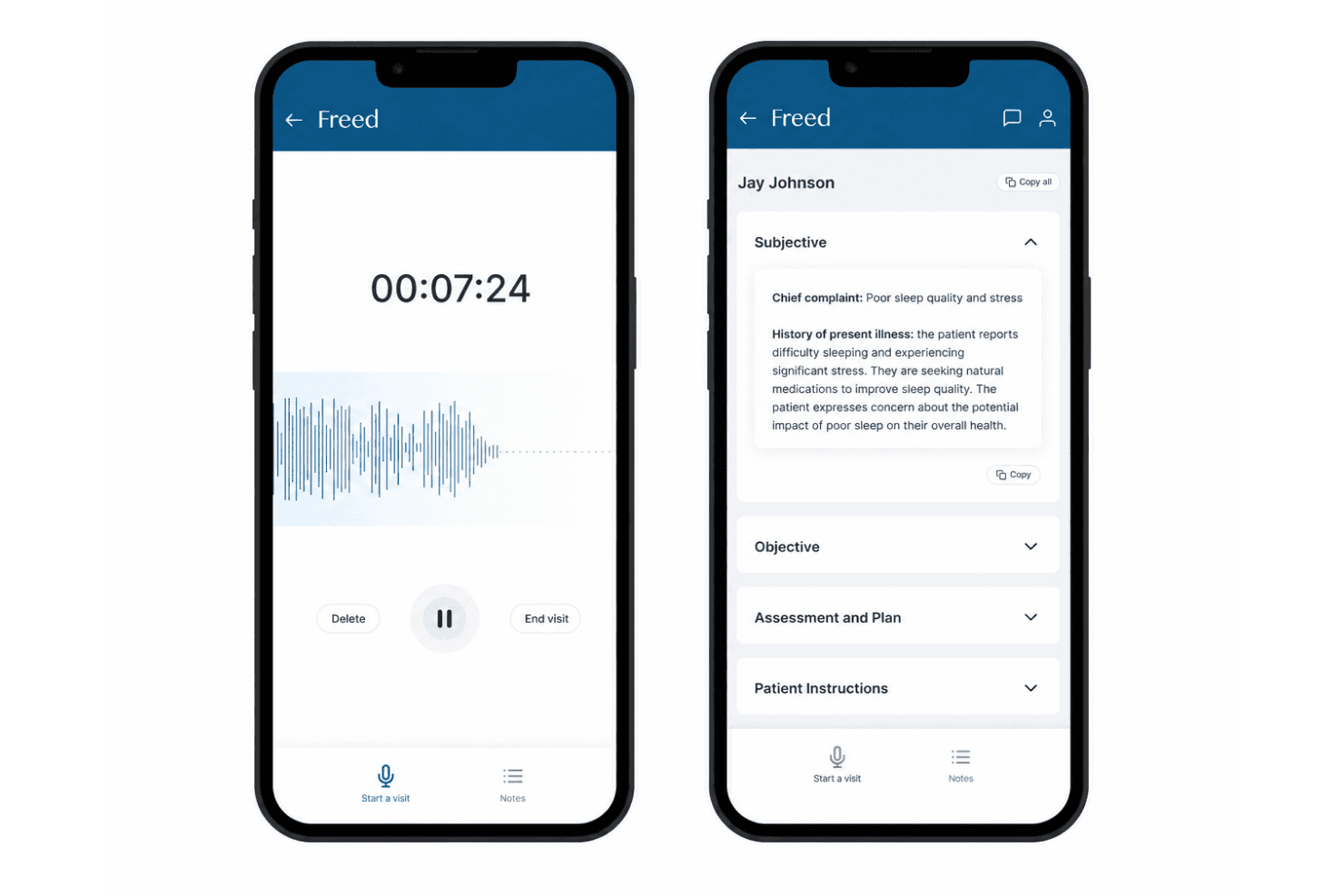
Freed AI captures patient conversations and creates SOAP notes and coding guidance. Freed AI is an ambient AI medical scribe that captures patient conversations in real time and generates SOAP notes, coding recommendations, and clinical documentation across 96 specialties.
Who Is Freed AI Best For?
Freed AI suits independent and small-practice clinicians who need a lightweight, mobile-friendly documentation tool without a complex IT setup.
Why I Picked Freed AI
I picked Freed AI as one of the best because its iOS app (rated 4.8/5 on the App Store) delivers the full ambient scribe experience from a smartphone, something most clinical voice recognition tools treat as an afterthought. Clinicians can open the app between rooms, capture a full encounter, and have a complete SOAP note ready before reaching the next patient. Specialty-specific templates and multilingual capture across 14 languages work just as well on mobile as on desktop.
Freed AI Key Features
- Clinical evidence answers: Instantly provides cited clinical sources connected to the patient note for reference.
- Coding assistant: Recommends ICD-10, CPT, and E/M codes as part of the scribe workflow.
- Multilingual ambient capture: Captures and transcribes encounters in over a dozen languages, outputting notes in English.
- Team template library: Allows groups to share and access a collection of specialty and workflow-specific templates.
Freed AI Integrations
Native integrations include Athenahealth and eClinicalWorks. Freed AI also provides a Chrome helper extension for browser-based EHR workflows. An API is available for custom integrations.
Pros and Cons
Pros:
- Multilingual capture supports over 14 languages
- Covers documentation across 96 medical specialties
- Instantly generates SOAP notes after each encounter
Cons:
- Primarily built for solo or small practices
- No on-premise deployment option available
Learn more about Freed AI: Best for AI-driven clinical documentation accuracy
- 14-day free trial
- From $110/user/month (billed annually)
Visit WebsiteCustomer Rating:4.9/5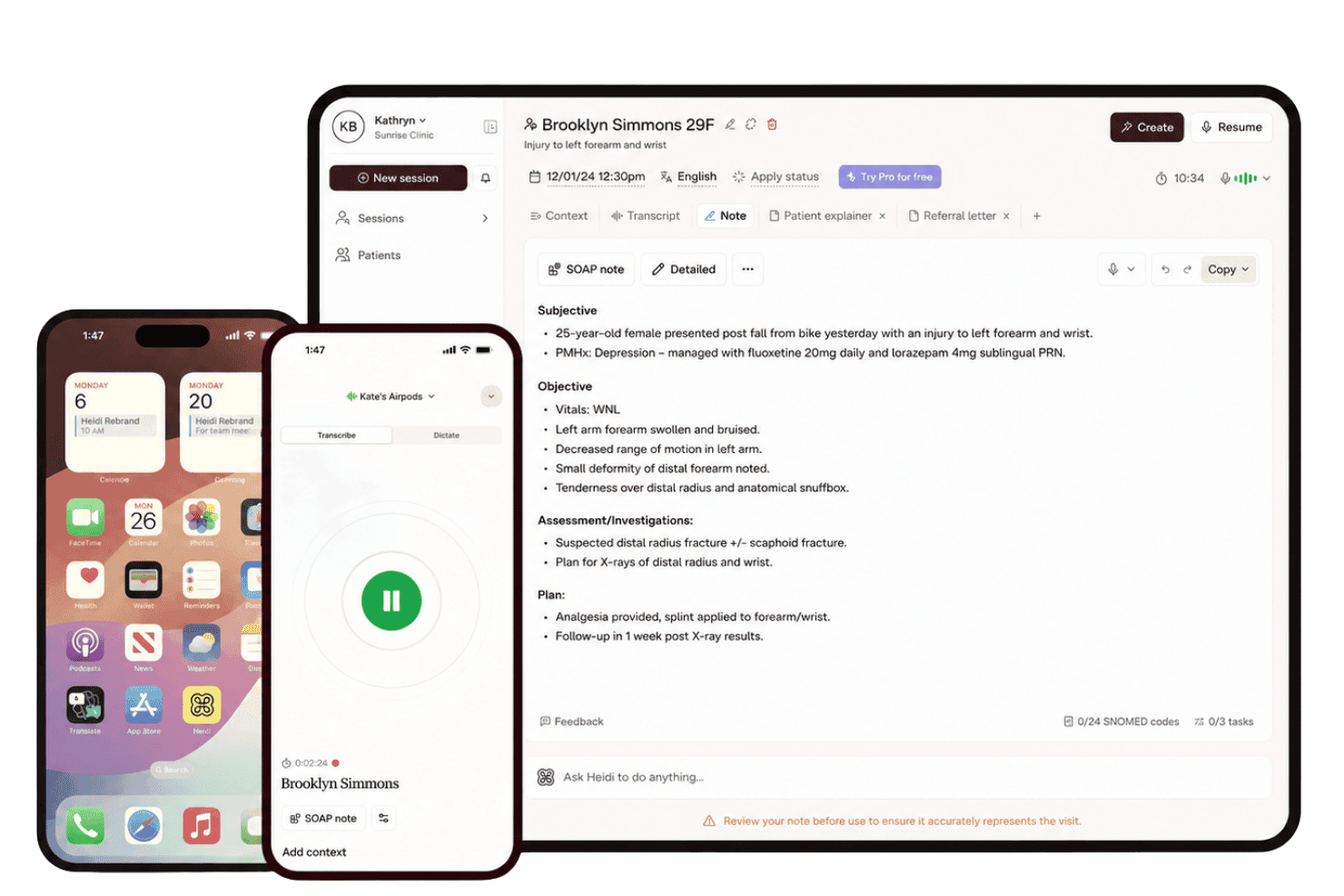
Heidi Health captures patient conversations and converts them into structured notes. Heidi Health is an ambient AI scribe and clinical documentation platform that captures patient encounters via voice, converts them into structured clinical notes, and pushes documentation directly into EHR systems.
Who Is Heidi Health Best For?
Heidi Health suits independent physicians and multi-provider practices that want to cut documentation time without overhauling their existing EHR setup.
Why I Picked Heidi Health
I picked Heidi Health as one of the best because its AI doesn't just transcribe, it structures. The ambient scribe captures a full patient encounter and organizes output into clinician-defined templates, adapting to individual terminology preferences through a personal Word Library. What I find particularly strong is the "Ask Heidi" layer, which lets me refine or restructure notes using conversational commands immediately after a session, without touching a keyboard.
Heidi Health Key Features
- Multi-specialty vocabularies: Recognizes clinical terms, medications, and procedures across 110+ medical specialties and subspecialties.
- Push-to-EHR integrations: Supports direct charting in Epic, Cerner, athenahealth, eClinicalWorks, and dozens of PMS/EHR platforms.
- Ambient listening mode: Captures and transcribes patient-clinician conversations passively for structured documentation.
- Mobile app dictation: Lets clinicians document patient encounters using iOS and Android devices on the go.
Heidi Health Integrations
Heidi Health offers native integrations with Epic, athenahealth, Cerner, eClinicalWorks, Best Practice, Cliniko, Halaxy, MedicalDirector, Nookal, and Zedmed. An API is available for custom integrations.
Pros and Cons
Pros:
- Structured SOAP output requires minimal post-session edits
- Note accuracy adapts to individual clinician terminology
- Ambient mode captures notes without dictation commands
Cons:
- Note quality can dip in noisy clinical environments
- No on-premise deployment for strict data residency needs
Learn more about Heidi Health:
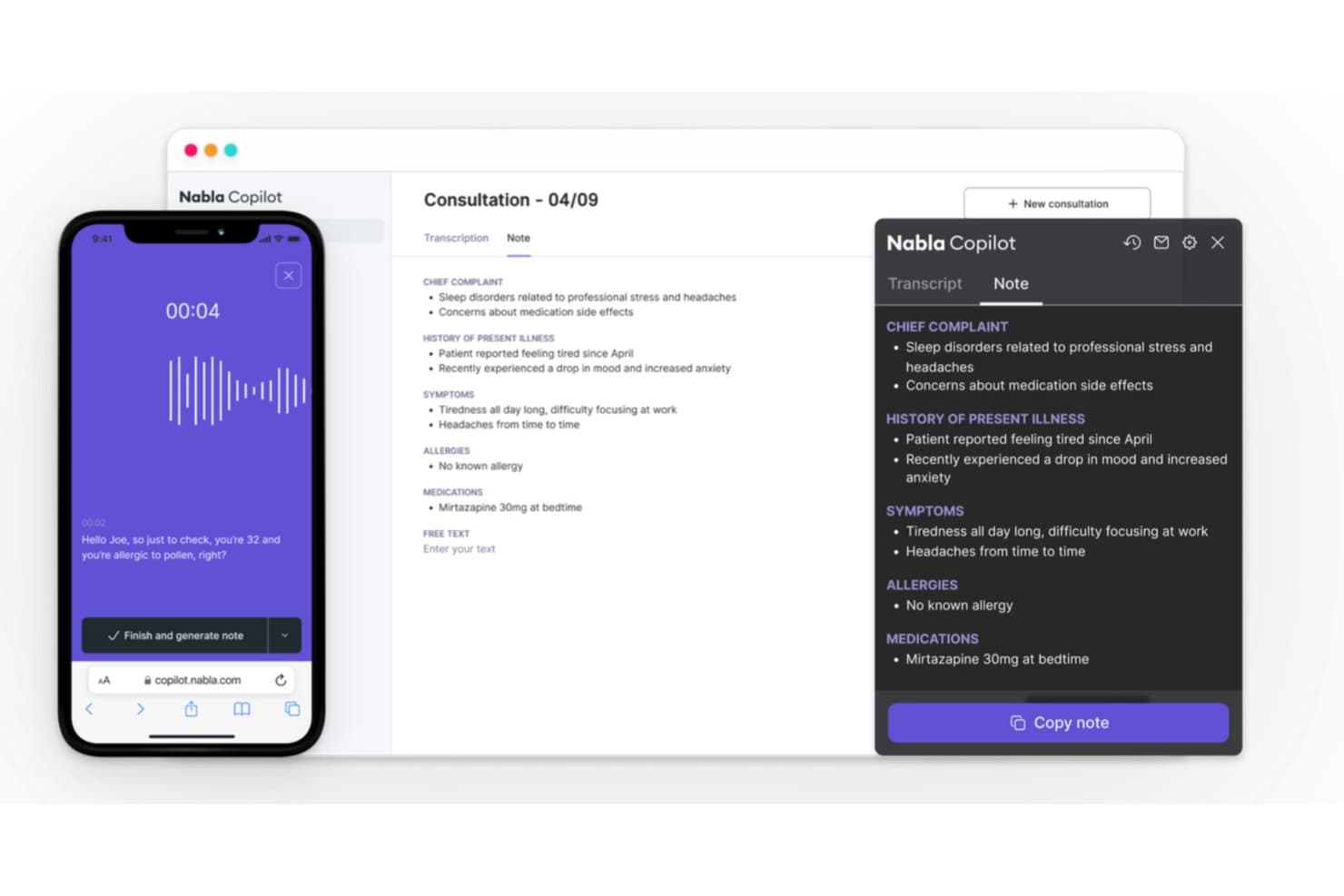
Nabla converts doctor-patient conversations into structured clinical notes. Nabla is an ambient clinical AI platform that combines real-time ambient documentation, clinical-grade dictation, and AI-assisted coding to support clinicians across in-person and virtual patient encounters.
Who Is Nabla Best For?
Nabla suits physicians and clinicians in multi-provider practices or health systems who want to cut documentation time without changing how they conduct patient encounters.
Why I Picked Nabla
I picked Nabla as one of the best because of how it handles the full SOAP note workflow in a single passive step. It listens during the encounter and generates a structured note in roughly five seconds, which means I'm not dictating after the fact or filling in templates manually. The Magic Edit feature lets me shape how the AI writes to match my clinical voice, and the 16 built-in specialty templates cover different visit types without extra setup.
Nabla Key Features
- Multilingual, specialty-specific vocabularies: Supports 55+ medical specialties and over 35 languages for broad clinical terminology recognition.
- EHR-native integration: Connects natively to Epic, Cerner, athenahealth, NextGen, Arya EHR, and Greenway Health.
- AI-assisted coding suggestions: Automatically suggests ICD-10 and E/M codes from clinical documentation within the workflow.
- Customizable note templates: Allows providers to select and personalize documentation templates for different visit types or specialties.
Nabla Integrations
Nabla offers native integrations with Epic, Oracle Health (Cerner), athenahealth, NextGen, Arya EHR, Greenway Health, and Meditech. An API is available for custom integrations.
Pros and Cons
Pros:
- Passive ambient listening needs no dictation commands
- Covers documentation across 55+ medical specialties
- SOAP notes generated in roughly five seconds
Cons:
- Limited voice command navigation within EHR fields
- No on-premise deployment option available
Learn more about Nabla: Best for ambient patient conversation capture
- Free demo available
- Pricing upon request
Visit WebsiteCustomer Rating:4.1/5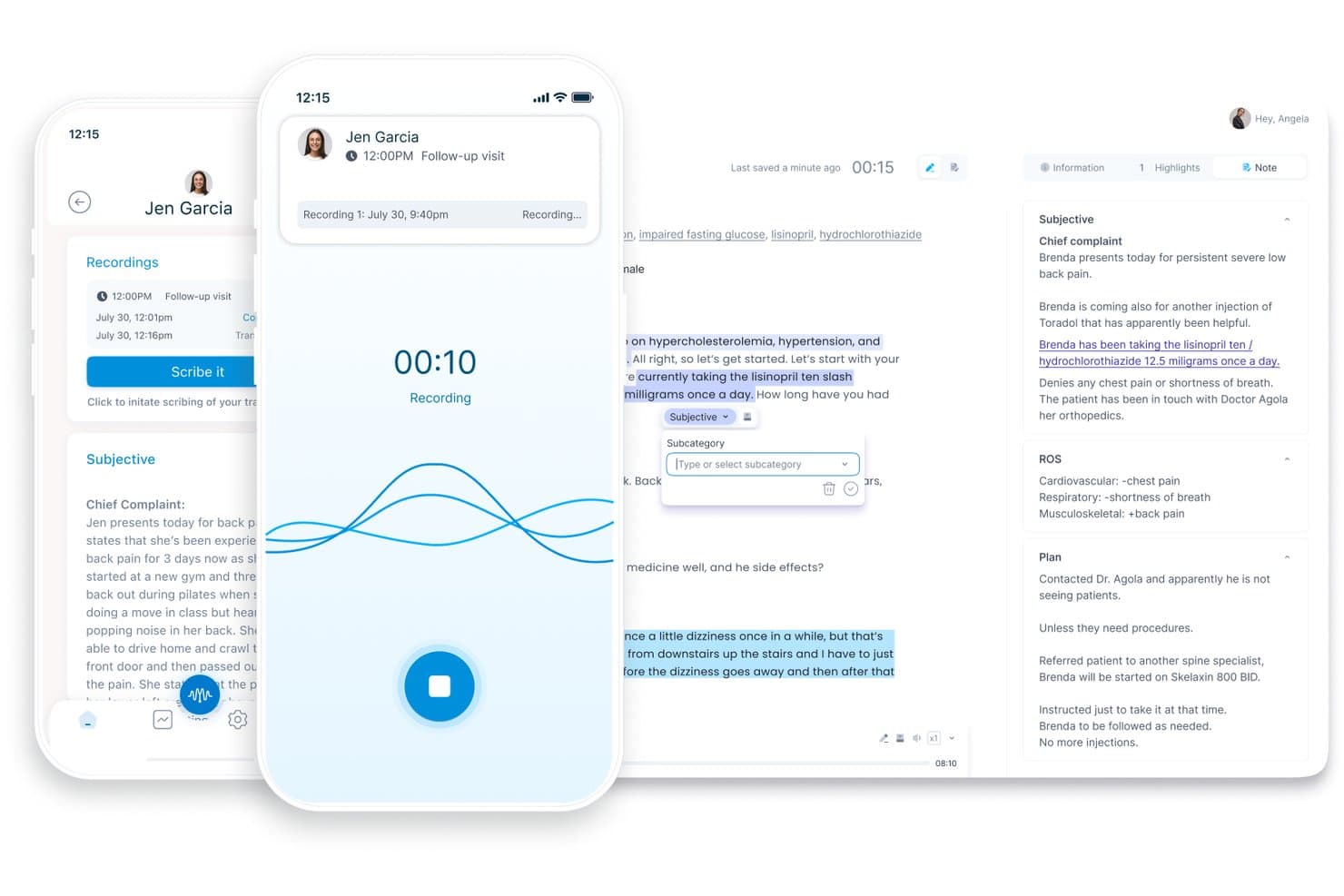
DeepScribe offers an AI-powered voice recording and transcription interface that automatically generates structured clinical notes with subjective, ROS, and plan sections. DeepScribe is an ambient AI medical scribe that captures live clinician-patient conversations and converts them into structured clinical notes, with built-in AI coding and specialty-tuned documentation models across oncology, cardiology, and other complex specialties.
Who Is DeepScribe Best For?
DeepScribe is a strong fit for specialty care physicians—particularly in oncology and cardiology—who handle high volumes of complex, terminology-heavy patient encounters.
Why I Picked DeepScribe
DeepScribe earns its spot on my shortlist because of how it handles ambient patient conversation capture. Unlike dictation tools that require voice commands, DeepScribe listens passively to the encounter and generates a structured note automatically. I particularly like the specialty-tuned models: an oncology note looks nothing like a cardiology note, and DeepScribe handles that distinction natively. The AI Coding layer also pulls E/M, HCC, and ICD-10 codes straight from the conversation.
DeepScribe Key Features
- Customizable templates and macros: Create and refine documentation templates tailored to specialty or provider preferences.
- EHR bidirectional integration: Sync notes directly with Epic, athenahealth, eClinicalWorks, ModMed, and other major EHR platforms.
- Multilingual conversation support: Capture clinical encounters in over 110 supported languages for diverse patient populations.
- HIPAA-compliant data handling: Delivers secure encryption, audit controls, and BAA support for all recorded clinical data.
DeepScribe Integrations
DeepScribe offers native integrations with Epic, athenahealth, eClinicalWorks, DrChrono, AdvancedMD, ModMed, Practice Fusion, Veradigm, Kareo, Elation, and Charm. An API is available for custom integrations.
Pros and Cons
Pros:
- Specialty note models across 50+ disciplines
- Generates HCC and ICD-10 codes automatically
- Passive capture without voice commands needed
Cons:
- Notes occasionally require manual editing after visits
- Accuracy varies with heavy accents or noise
Learn more about DeepScribe: Best for automated encounter summarization
- Not available
- Pricing upon request
Visit WebsiteCustomer Rating:4.2/5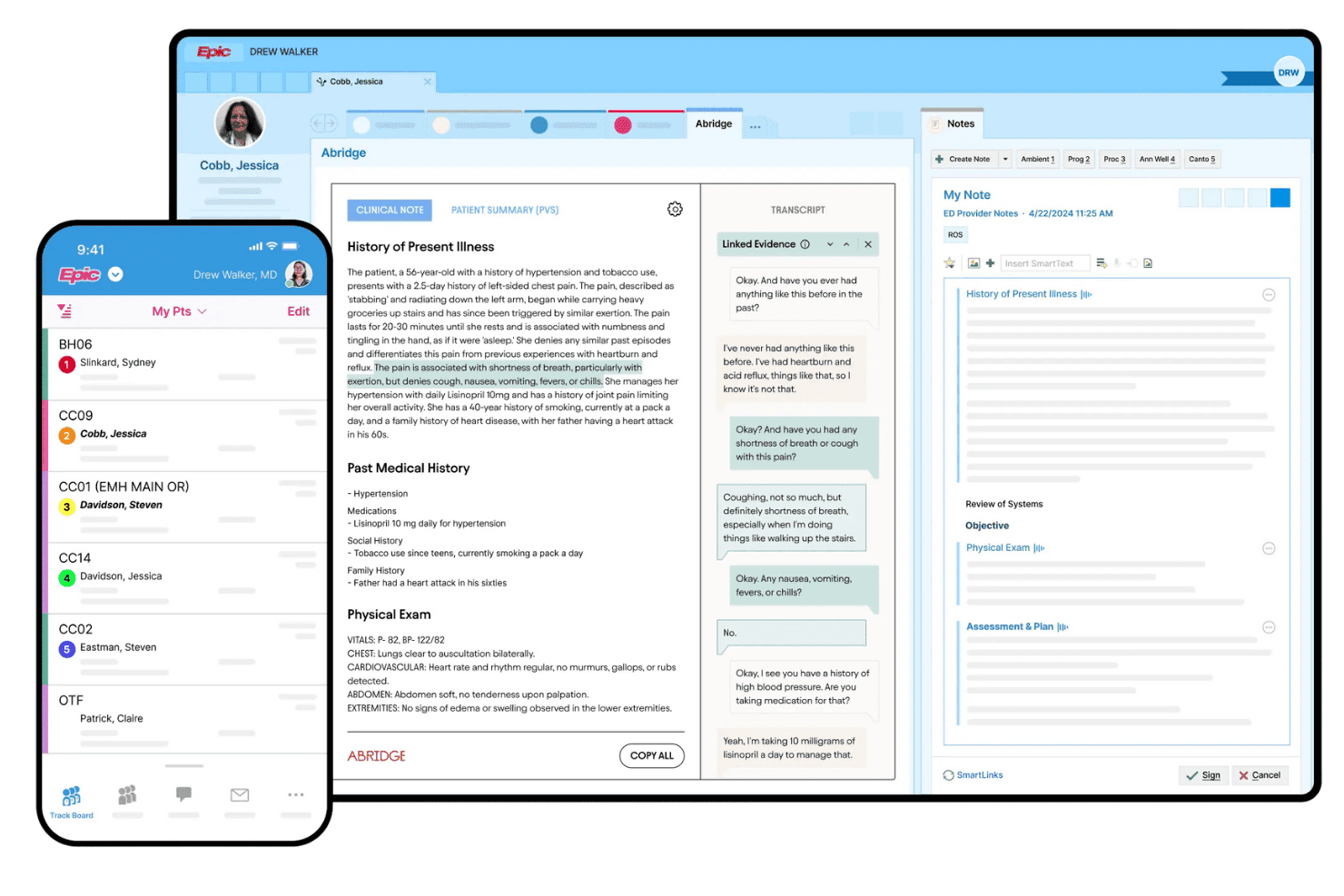
Abridge converts patient conversations into AI-generated clinical documentation. Abridge is an ambient AI scribe platform that passively captures patient-clinician conversations in real time and converts them into structured clinical notes across 50+ specialties and 28+ languages, with deep EHR integration.
Who Is Abridge Best For?
Abridge is built for large health systems and hospital networks that run Epic and need ambient AI documentation deployed at scale across multiple departments and specialties.
Why I Picked Abridge
I've included Abridge in my top picks because its Linked Evidence feature is unlike anything else in the ambient AI scribe space. Every line of a generated note traces back to the exact audio and transcript segment that produced it, so I can verify accuracy without replaying the entire encounter. Notes also form in real time during the conversation, not after, which means documentation gaps get caught before the patient leaves the room.
Abridge Key Features
- Multi-specialty language recognition: Recognizes clinical terminology across 50+ medical specialties and 28+ languages out of the box.
- Epic-native integration: Directly integrates with Epic workflows including Haiku, Canto, and Hyperdrive for seamless note capture and review.
- Enterprise security controls: Offers HIPAA compliance, 256-bit encryption, SOC 2 Type II certification, and single sign-on.
- Structured note generation: Transforms full patient–clinician conversations into SOAP notes and encounter summaries in real time.
Abridge Integrations
Abridge offers native integrations with Epic, Oracle Health, Athenahealth, eClinicalWorks, Allscripts, and NextGen. An API is also available for custom integrations.
Pros and Cons
Pros:
- Covers 50+ specialties and 28+ languages
- Real-time note generation during live encounters
- Linked evidence traces notes to source audio
Cons:
- Designed primarily for large health systems
- Heavily dependent on Epic for full functionality
Learn more about Abridge:
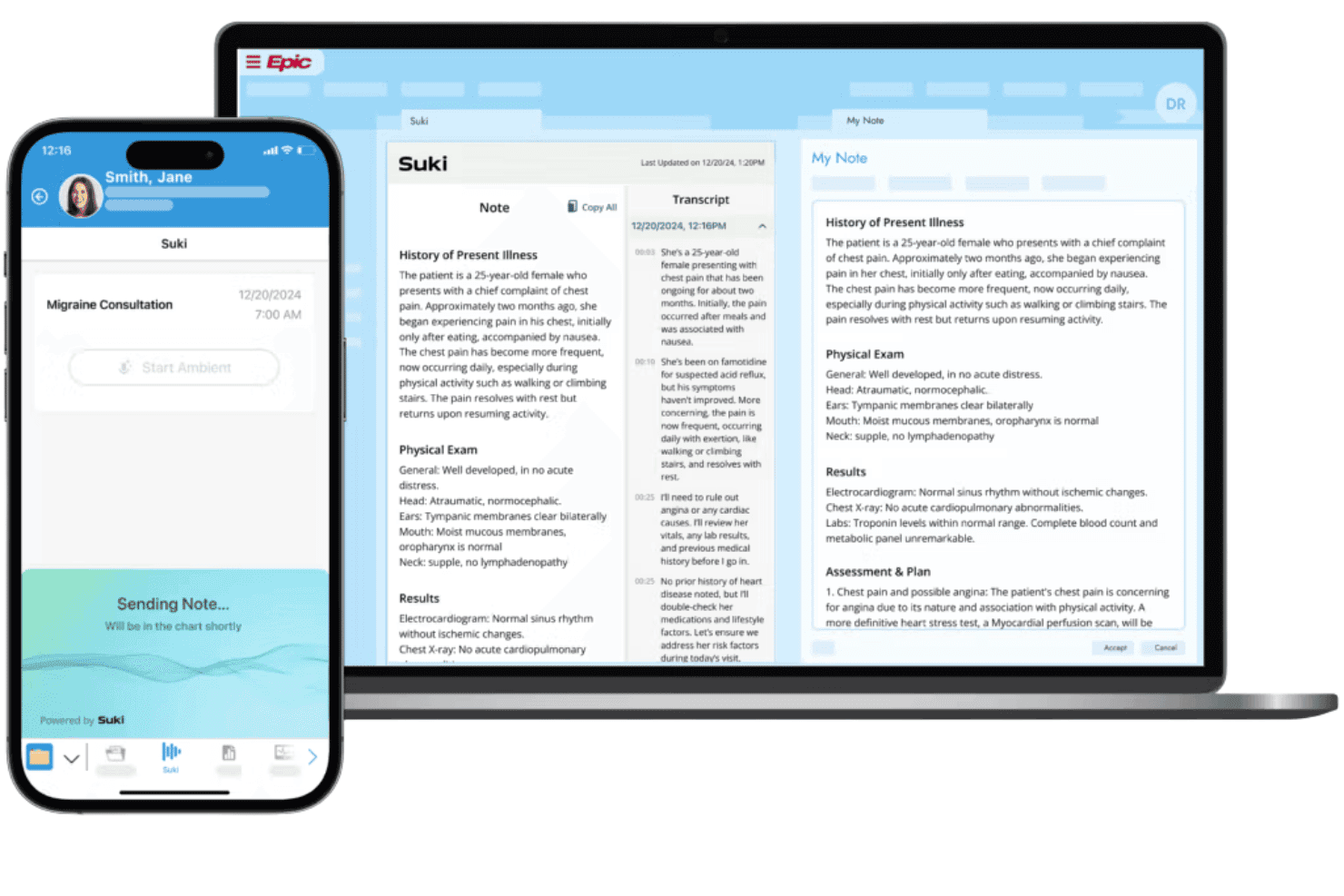
Suki AI turns ambient voice conversations into structured clinical documentation. Suki AI is a voice-first ambient clinical intelligence platform that combines real-time medical dictation, AI-generated note creation, voice command navigation, and EHR integration across 100+ specialties.
Who Is Suki AI Best For?
Suki AI suits physicians and clinicians across specialties who carry heavy documentation loads and want to dictate notes hands-free during or immediately after patient encounters.
Why I Picked Suki AI
I picked Suki AI because it's genuinely voice-first, not just an ambient listener with a voice layer bolted on. During an encounter, I can issue voice commands to stage orders, pull up patient history, and trigger specific note sections without touching a screen. The ambient documentation engine captures the full conversation, differentiates between speaker voices, and writes specialty-specific notes directly into the EHR in real time with sub-300ms latency.
Suki AI Key Features
- Specialty-specific medical vocabularies: Built-in support for clinical terms, drug names, and procedure codes across 100+ specialties.
- Bidirectional EHR integrations: Pushes and pulls structured data directly to and from major EHRs like Epic, Oracle Health, and athenahealth.
- Customizable note templates: Lets you set up reusable templates and macros for faster, standardized clinical documentation.
- Mobile dictation app: Supports secure dictation and documentation from iOS and Android devices, syncing instantly with your EHR.
Suki AI Integrations
Suki AI offers native integrations with Epic, Oracle Health, athenahealth, MEDITECH, MEDENT, and Azalea Health. An API is available for custom integrations.
Pros and Cons
Pros:
- Covers 100+ specialty-specific clinical vocabularies
- Sub-300ms real-time transcription latency
- Passive ambient capture without dictation commands
Cons:
- Voice accuracy varies with strong accents
- Occasional mis-transcriptions require manual correction
Learn more about Suki AI:
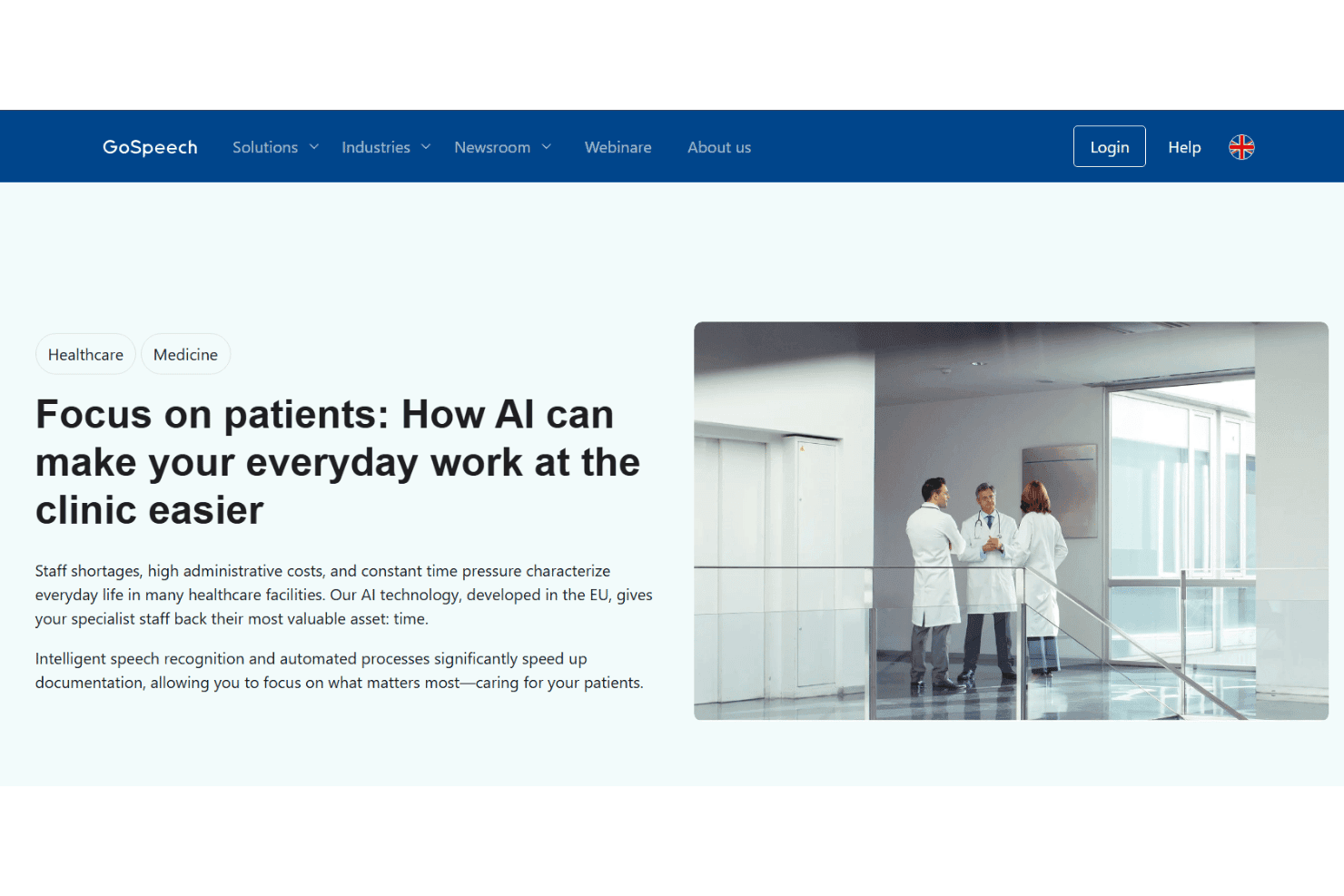
GoSpeech converts medical speech into transcripts and structured SOAP notes. GoSpeech is a medical voice recognition platform from Grundig Business Systems that combines AI-powered clinical transcription, real-time speech-to-text, mobile dictation, and structured SOAP note generation for healthcare documentation workflows.
Who Is GoSpeech Best For?
GoSpeech is a strong fit for European healthcare organizations and clinicians who need GDPR-compliant, multilingual clinical documentation tools.
Why I Picked GoSpeech
I've included GoSpeech in my top picks because its multilingual support goes beyond basic language switching. GoSpeech Medical Translate processes real-time medical translation directly inside hospital infrastructure, keeping patient data local while handling terminology across languages like German, English, French, Spanish, and Italian. I also like that speaker recognition works across dialects, so mixed-language clinical conversations don't derail the transcription output.
GoSpeech Key Features
- Speaker recognition: Identifies and separates multiple speakers automatically in transcriptions.
- Centralized management center: Lets organizations control roles, rights, and usage for all users.
- On-premises deployment: Supports installation on local servers for added European data residency and privacy needs.
- API for custom workflows: Provides open API access so teams can design integrations or automate transcription-related tasks.
GoSpeech Integrations
Native integrations are not clearly documented. GoSpeech offers an open API for custom integrations and supports on-premises deployment for connecting with local health IT systems.
Pros and Cons
Pros:
- Real-time speaker separation in multi-clinician settings
- On-premises deployment for strict data residency
- Strong support for multiple clinical languages
Cons:
- Smaller global presence outside European healthcare markets
- Fewer documented clinical specialty vocabularies than competitors
Learn more about GoSpeech: Best for real-time EHR integration
- Free demo available
- Pricing upon request
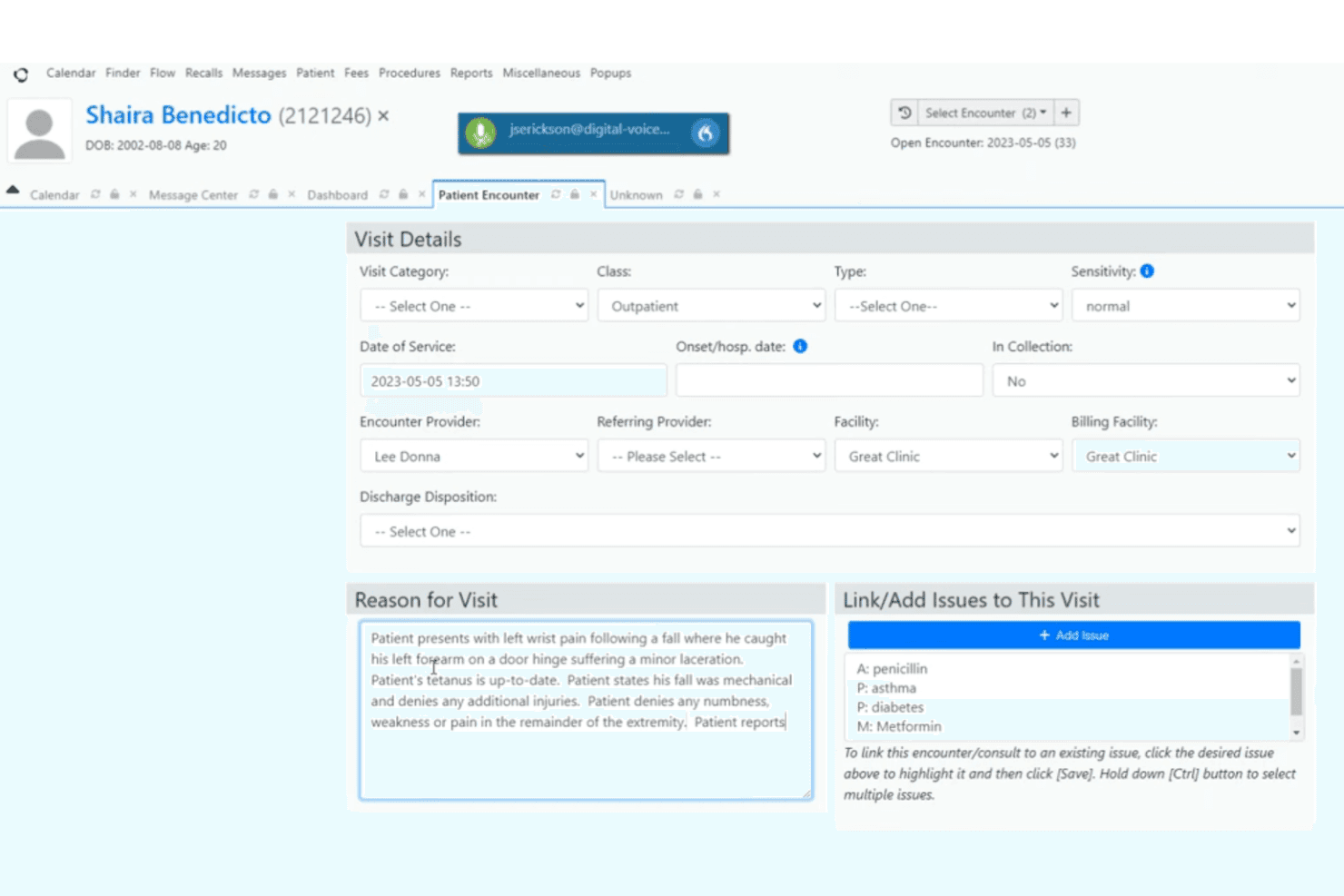
Dragon Medical One turns clinical speech into structured documentation and commands. Dragon Medical One is a cloud-based speech recognition platform designed specifically for clinical documentation, with specialty medical vocabulary, voice-driven EHR navigation, and AutoText templates built in from the start.
Who Is Dragon Medical One Best For?
Dragon Medical One is a strong fit for independent and small-practice physicians who dictate across specialties and need a purpose-built solution without relying on a transcription service.
Why I Picked Dragon Medical One
Dragon Medical One earns its spot on my shortlist because of how deeply it embeds into live EHR workflows. I particularly like the integrated voice skills, which let me navigate charts, place orders, and sign notes without touching a keyboard. It connects natively with Epic (Haiku, Canto, and Rover), Oracle Cerner PowerChart Touch, and MEDITECH Expanse, so dictation lands directly into the right field in real time, with no copy-paste step between the microphone and the patient record.
Dragon Medical One Key Features
- Specialty-specific medical vocabularies: Supports jargon and terminology used in areas like radiology, pathology, and emergency medicine.
- AutoText templates: Lets you create, save, and share custom shortcuts and documentation templates across users or departments.
- PowerMic Mobile integration: Turns your smartphone into a wireless and secure dictation microphone for clinical use.
- Select-and-Say voice control: Enables natural language commands for correcting, formatting, and navigating clinical notes.
Dragon Medical One Integrations
Dragon Medical One offers native integrations with Epic (Haiku, Canto, Rover), Oracle Cerner PowerChart Touch, and MEDITECH Expanse. An API is available for custom integrations.
Pros and Cons
Pros:
- User-specific voice profile adapts over time
- Specialty vocabularies cover 80+ medical fields
- Deep native EHR field-level voice navigation
Cons:
- Initial voice profile setup takes noticeable time
- Requires consistent microphone hardware for accuracy
Learn more about Dragon Medical One:
Other Medical Voice Recognition Software
Here are some additional medical voice recognition software options that didn’t make it onto my shortlist, but are still worth checking out:
- 11SolventumBest for specialty-specific vocabularies
- 12Philips SpeechLiveBest for secure cloud transcription management
- 13Voicebox MDBest for dictation accuracy with diverse accents
- 14LindyBest for instant AI-generated patient notes
- 15Ambience HealthcareBest for multi-specialty voice recognition
- 16Sunoh.aiBest for fully automated medical note creation
- 17Mobius ConveyorBest for universal dictation across devices
- 18nVoq.VoiceBest for customizable workflow automation
- 19Tali AIBest for AI-powered charting assistance
- 20ChartnoteBest for customizable clinical note templates
How I Evaluate Medical Voice Recognition Software
I split my evaluation into baseline criteria—like EHR integration and HIPAA compliance—and the differentiators that separate a useful tool from one that actually fits a busy clinical workflow.
Core Functionality (Table Stakes For This List)
When I'm selecting tools for my list, I rank each one on a scale from 0 (does not offer the functionality) to 5 (excels in this area) for each core functionality listed below. I then calculate the tool's total score into a percentage, using 65% as a benchmark to help assess its overall fit for the list.
- Medical Vocabulary Recognition: I check whether the lexicon covers drug names, procedures, and specialty terms so a cardiologist dictating "troponin" gets it right first try.
- EHR Integration: I evaluate whether dictation flows directly into EHR fields in systems like Epic, Cerner, or athenahealth without copy-paste workarounds.
- Real-Time Transcription: Latency matters during a patient encounter. I look for sub-second conversion so clinicians can review and correct notes while context is fresh.
- HIPAA Compliance: I confirm the vendor provides a BAA, end-to-end encryption, and audit logging—baseline requirements for any tool handling protected health information.
- Voice Command Navigation: Hands-free field navigation is key. I look for commands that let clinicians jump between EHR fields or insert formatting without touching a keyboard mid-exam.
- Custom Templates & Macros: Each provider has go-to phrases and findings. I look for tools that let you build voice-triggered macros and share them across your practice.
Once I have a list of tools that meet the criteria, I consider what sets each platform apart.
Differentiating Factors (What Sets Vendors Apart)
Here's how I compare and contrast different vendors:
Standout Features
Ambient clinical intelligence is a major differentiator. Tools that passively capture patient-clinician conversations and generate structured SOAP notes save clinicians from after-hours charting. I also evaluate specialty-specific vocabularies, since a dermatologist and a cardiologist need very different terminology out of the box. Mobile dictation with desktop handoff matters for providers who round at multiple locations and need notes to sync back to the EHR without manual re-entry.
Beyond Features
Accuracy across accents and background noise is something I evaluate closely, especially for multi-provider practices where clinicians speak different first languages. I also check EHR integration depth—certified connections through marketplaces like Epic App Orchard or Oracle Cerner are more reliable than generic API workarounds. Pricing structure matters too. I look at whether vendors offer per-provider subscriptions that scale from a solo practice to a multi-site health system without forcing a full enterprise contract.
How to Choose a Medical Voice Recognition Software
Wondering how to narrow down the right medical voice recognition software for your practice workflow? Consider this priority matrix:
| If your priority is... | Look for... |
|---|---|
| If your priority is...Native EHR workflows | Look for...Certified, bidirectional integration with your EHR |
| If your priority is...High accuracy for specialty terms | Look for...Proven vocabularies for your specialty |
| If your priority is...Cutting after-hours charting | Look for...Ambient clinical intelligence and auto-SOAP note tools |
| If your priority is...Secure handling of PHI | Look for...HIPAA compliance with BAA and encryption |
| If your priority is...Flexible use across locations | Look for...Mobile dictation apps with desktop handoff |
How to Vet Your Shortlist
- Verify integration: Request a live demo showing voice commands and note syncing in your real EHR, not just a static video.
- Test specialty accuracy: Set up a trial dictation using complex clinical terms unique to your specialty within 5 notes.
- Check security compliance: Request the vendor’s most recent BAA template and SOC 2 (or equivalent) audit summary.
- Confirm template options: Ask support to provide a sample workflow showing how to create and use voice macros or templates in under one week.
- Decide direct EHR integration vs. after-visit note automation: Real-time EHR syncs and ambient AI offer different benefits, so workflow needs matter most.
What Is Medical Voice Recognition Software?
Medical voice recognition software turns spoken medical notes and conversations into digital records. It uses medical terms and speech recognition to support dictation, patient charting, and documentation directly in EHR systems.
The software can make medical documentation faster and more accurate. It also supports different medical specialties, real-time note-taking, and secure workflows that meet HIPAA requirements.
Features of Medical Voice Recognition Software
When selecting medical voice recognition software, keep an eye out for the following key features:
- Medical vocabulary library: Includes up-to-date terminology, drug names, and specialty terms, ensuring accurate capture of complex clinical language in your documentation.
- Real-time transcription: Converts speech to text as you dictate so you can review, edit, and complete patient notes immediately during or after an encounter.
- Direct EHR integration: Connects directly with major EHR systems, letting you enter notes and patient data without leaving your primary charting environment.
- HIPAA-compliant security: Protects patient data with encryption, audit logging, and Business Associate Agreements to support safe handling of sensitive health records.
- Voice command navigation: Enables hands-free navigation of templates, text fields, and clinical workflows so you can complete tasks without touching your keyboard or mouse.
- Custom templates and macros: Lets you build reusable templates and shortcuts for common exam findings or documentation patterns to improve efficiency and consistency.
- Multi-speaker support: Accurately differentiates and transcribes multiple voices in group or patient-family discussions, boosting clarity in collaborative notes.
- Accent adaptation: Recognizes a wide variety of accents and speech patterns, ensuring reliable dictation across providers with diverse language backgrounds.
- Context-aware correction: Offers in-line editing and correction suggestions based on clinical context without disrupting your dictation flow.
- Device compatibility: Works across desktop, mobile, and dictation microphones for flexible note capture and review.
Common Medical Voice Recognition Software AI Features
Beyond the standard medical voice recognition software features listed above, many of these solutions are incorporating AI with features like:
- Ambient clinical intelligence: AI listens passively during patient visits, automatically generating structured SOAP notes from natural conversations without explicit dictation.
- Contextual error correction: AI analyzes clinical context to suggest corrections or flag inconsistencies in dictated notes, reducing manual review and improving documentation quality.
- Predictive text suggestions: AI anticipates and recommends next phrases or sentences based on specialty, patient history, and prior documentation patterns, speeding up note completion.
- Speaker identification: AI distinguishes between multiple speakers—such as physician, patient, and nurse—labeling each contribution for clearer, more organized records.
- Automated coding extraction: AI scans dictated notes to identify and extract relevant billing codes, supporting accurate and efficient medical coding for reimbursement.
- Continuous learning adaptation: AI models learn from user corrections and evolving medical terminology, improving recognition accuracy and adapting to each clinician’s style over time.
Benefits of Medical Voice Recognition Software
Implementing medical voice recognition software provides several benefits for your team and your business. Here are a few you can look forward to:
- Faster clinical documentation: Real-time transcription and direct EHR integration minimize manual charting and reduce time spent on paperwork.
- Greater accuracy in patient notes: Medical vocabularies, specialty dictionaries, and AI-powered error correction help capture complex terminology correctly every time.
- Reduced transcription costs: Automated dictation eliminates the need for outsourced medical transcription or manual data entry services.
- More complete patient records: Voice-triggered macros, templates, and ambient tools capture more complete clinical details.
- Better compliance and data security: HIPAA-compliant workflows, encryption, and audit logging will help ensure regulatory adherence for protected health information.
- Improved provider satisfaction: Reduces after-hours charting, giving clinicians more time for patient care and personal time.
- Adaptability for diverse users: Accent adaptation, device compatibility, and mobile dictation allow a wide range of providers to work efficiently in varied clinical settings.
Costs and Pricing of Medical Voice Recognition Software
Selecting medical voice recognition software requires an understanding of the various pricing models and plans available. Costs vary based on features, team size, add-ons, and more. The table below summarizes common plans, their average prices, and typical features included in medical voice recognition software solutions:
Plan Comparison Table for Medical Voice Recognition Software
| Plan Type | Average Price | Common Features |
|---|---|---|
| Plan TypeFree Plan | Average Price$0 | Common FeaturesBasic speech-to-text, limited vocabulary, cloud-only access, and minimal support. |
| Plan TypePersonal Plan | Average Price$20-$50/user/month | Common FeaturesReal-time transcription, medical vocabulary, direct EHR integration, mobile access, and basic security. |
| Plan TypeBusiness Plan | Average Price$50-$100/user/month | Common FeaturesAdvanced templates, accent adaptation, custom macros, voice command navigation, and priority support. |
| Plan TypeEnterprise Plan | Average Price$100-$200/user/month | Common FeaturesEnterprise integrations, ambient AI features, full HIPAA compliance, audit logs, and dedicated onboarding. |
Medical Voice Recognition Software FAQs
Here are some answers to common questions about medical voice recognition software:
Can medical voice recognition software recognize complex medical terminology and drug names?
Yes, most solutions include specialized medical vocabularies and drug databases to accurately capture complex clinical language used across different specialties. This helps reduce manual corrections and ensures that patient records are precise and complete.
How does medical voice recognition software integrate with electronic health records?
Vendors commonly offer direct integration through certified connections with leading EHR platforms, allowing clinicians to dictate, edit, and sign notes directly in their charting environment. Some solutions also support HL7 or FHIR protocols for broader interoperability.
Is medical voice recognition software secure and HIPAA-compliant?
Yes, reputable platforms are designed to comply with HIPAA standards, using end-to-end encryption, audit logs, and Business Associate Agreements to safeguard protected health information. Always ask for proof of security measures before deployment.
Can the software support different accents and multiple voices in a single encounter?
Most leading tools use AI-based models that adapt to various accents and can differentiate between speakers within the same recording, making documentation in diverse care settings more reliable and accurate.
What kind of support is available for onboarding and troubleshooting?
Vendors usually offer onboarding sessions, training resources, and ongoing user support—sometimes including 24/7 help desks or dedicated account managers for enterprise clients—to ensure smooth adoption and help with troubleshooting.