

HIPAA-compliant call center software is a secure communications platform designed to handle patient information while meeting strict healthcare privacy regulations. If you’re looking for a way to confidently manage sensitive calls, messages, and records without risking breaches or penalties, it’s essential to choose a system built for medical workflow demands.
This guide gives you clear, experience-based advice on the leading options, so you can compare how today’s top tools protect confidentiality, fit into healthcare practices, and keep you ahead of compliance risks.
Why Trust Our Software Recommendations
6,700+
Reviews
20
Industry experts
16+
Evaluation factors
14
Years
Our team has been testing and reviewing software since 2012. As medical practice leaders ourselves, we know how difficult—and important—it is to choose the right software.
For this guide, we evaluated tools using hands-on testing and independent research, scoring tools using our selection criteria.
Our reviews reflect our human editorial judgment, not a sales pitch.
HIPAA-Compliant Call Center Comparison Table
This comparison table summarizes pricing details for my HIPAA-compliant call center.
| Tool | Best For | Trial Info | Price | ||
|---|---|---|---|---|---|
| 1 | Best call analytics for multi-location clinics | Free trial available | From $15/user/month (billed annually) | Website | |
| 2 | Best quick deployment for small practices | 14-day free trial | From $25/user/month (billed annually) | Website | |
| 3 | Best video-enabled patient support options | Free plan available | From $14.16/user/month (billed annually) | Website | |
| 4 | Best omnichannel patient engagement features | Free demo available | Pricing upon request | Website | |
| 5 | Best real-time call transcription with redaction | 14-day free trial + free demo available | Pricing upon request | Website | |
| 6 | Best workflows for appointment scheduling | Free demo available | Pricing upon request | Website | |
| 7 | Best AI-powered routing for healthcare calls | Free trial available | From $75/user/month (billed annually) | Website | |
| 8 | Best agent monitoring and compliance reporting | Free demo available | From $110/agent/month (proactive AI extra) | Website | |
| 9 | Best automated patient outreach tools | Free demo available | From $119/seat/month | Website | |
| 10 | Best for EHR integrations and secure messaging | 14-day free trial | From £18/user/month | Website |


HIPAA-Compliant Call Center Software Reviews
Below are my detailed summaries of the best HIPAA-compliant call center software that made it onto my shortlist. My reviews offer a detailed look at the features, integrations, and best use cases of each software to help you find the best one for you.
 Best call analytics for multi-location clinics
- Free trial available
- From $15/user/month (billed annually)
Visit WebsiteCustomer Rating:4.5/5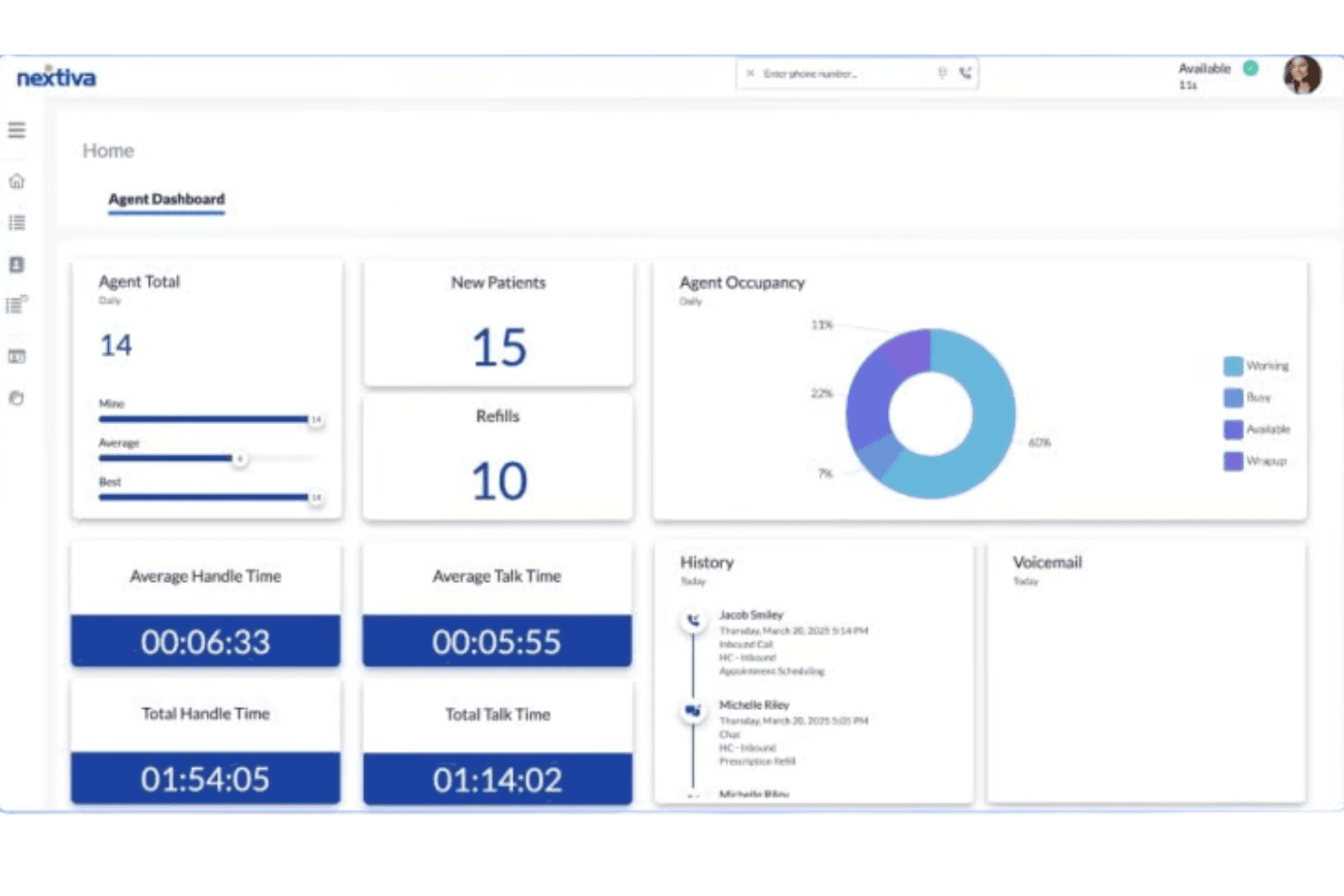
Nextiva offers a HIPAA-compliant call center agent dashboard displaying patient call metrics, occupancy charts, handle times, and call history. Nextiva is a cloud-based UCaaS and contact center platform built for healthcare organizations, combining HIPAA-compliant voice, omnichannel messaging, AI-powered call routing, encrypted call recording, and EHR integrations in one system.
Who Is Nextiva Best For?
Nextiva is a strong fit for multi-location healthcare organizations that need centralized call management, HIPAA-compliant communications, and EHR-connected workflows across departments and sites.
Why I Picked Nextiva
Nextiva earns its spot as one of the best on my shortlist because its call analytics go deeper than most platforms in HIPAA-compliant configurations. I particularly like the AI conversation intelligence layer, which generates call summaries, sentiment scores, and QA scorecards without anyone having to listen to a recording. Notably, Nextiva Analytics is explicitly covered under the HIPAA BAA, meaning call data across every clinic location stays within compliance.
Nextiva Key Features
- HIPAA-compliant fax portal: Manage secure inbound and outbound e-faxes with audit trails and PHI safeguards.
- Epic EHR integration: Connects call workflows directly to Epic for real-time patient verification and appointment sync.
- Role-based permissions: Control agent access to patient data, call recordings, and analytics with healthcare-specific user roles.
- Disaster recovery with 99.999% SLA: Ensures communication continuity and rapid failover for clinics during outages or emergencies.
Nextiva Integrations
Nextiva offers native integrations with Epic, eClinicalWorks, ModMed, Planet DDS, Salesforce, Microsoft Teams, and Microsoft 365. An API is available for custom integrations.
Pros and Cons
Pros:
- AI conversation intelligence includes QA scorecards
- Strong multi-location call analytics dashboard
- HIPAA BAA covers AI-processed call data
Cons:
- Mobile app has limited reporting functionality
- Advanced analytics locked behind enterprise tiers
Learn more about Nextiva: Best quick deployment for small practices
- 14-day free trial
- From $25/user/month (billed annually)
Visit WebsiteCustomer Rating:4.2/5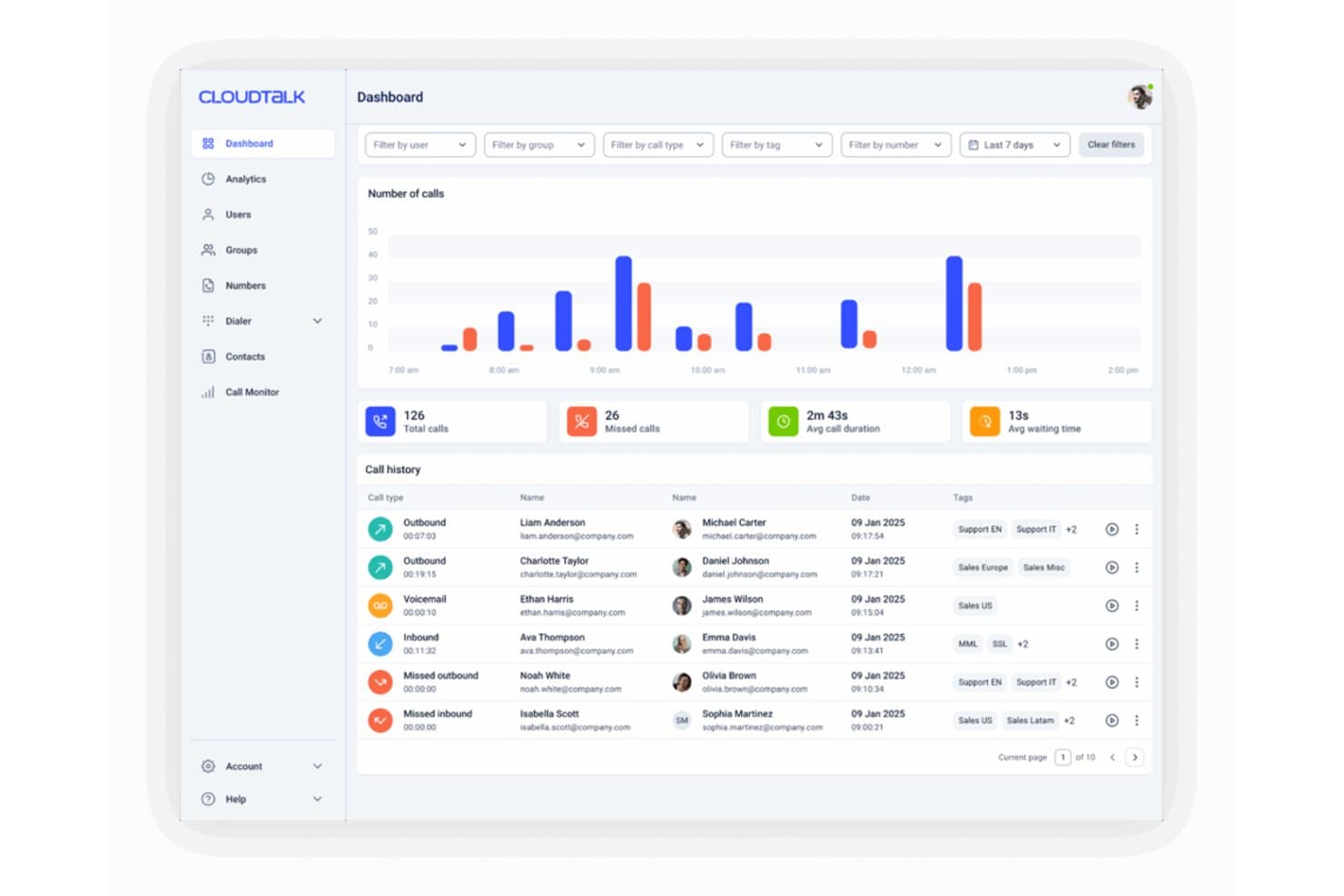
CloudTalk's dashboard displays real-time call metrics, call history, and hourly call volume charts for agent performance monitoring. CloudTalk is a cloud-based calling platform that combines ACD, multi-level IVR routing, encrypted call recording, AI voice agents, and secure SMS in one system.
Who Is CloudTalk Best For?
CloudTalk is a strong fit for small to mid-sized medical practices that need a self-serve, fast-to-deploy call center setup without dedicated IT support.
Why I Picked CloudTalk
CloudTalk earns its spot as one of the best on my shortlist because it's the only HIPAA-compliant call center solution I've tested where you can go live without an IT team, onboarding fees, or a lengthy setup process. I particularly like how the AI Voice Receptionist activates immediately to handle patient scheduling and after-hours routing across 60+ languages. The signed BAA and SOC 2 Type II compliance mean your PHI protections are in place before you take your first call.
CloudTalk Key Features
- Multi-level IVR menus: Configure complex call routing trees that direct patients to specific departments or providers.
- Encrypted call recording: Store all patient calls securely using AES-256 encryption in EU-based data centers.
- HIPAA-secure SMS messaging: Send and receive protected health information through SMS on supported plans.
- Real-time agent analytics: Monitor agent activity, call volumes, and wait times with live dashboards and custom reporting.
CloudTalk Integrations
CloudTalk offers native integrations with Salesforce, HubSpot, Pipedrive, Zendesk, Zoho CRM, Intercom, Freshdesk, Microsoft Dynamics 365, and Slack. It connects with Zapier and provides an API for custom integrations.
Pros and Cons
Pros:
- AI voice agent handles after-hours patient calls automatically
- BAA covers calls, recordings, SMS, and transcripts
- Geo-redundant infrastructure keeps calls live during outages
Cons:
- No native EHR integrations with Epic, Cerner, or athenahealth
- HIPAA settings and access controls are gated to eligible plans
Learn more about CloudTalk: 3Best video-enabled patient support options
Zoom
- Free plan available
- From $14.16/user/month (billed annually)
Visit WebsiteCustomer Rating:4.5/5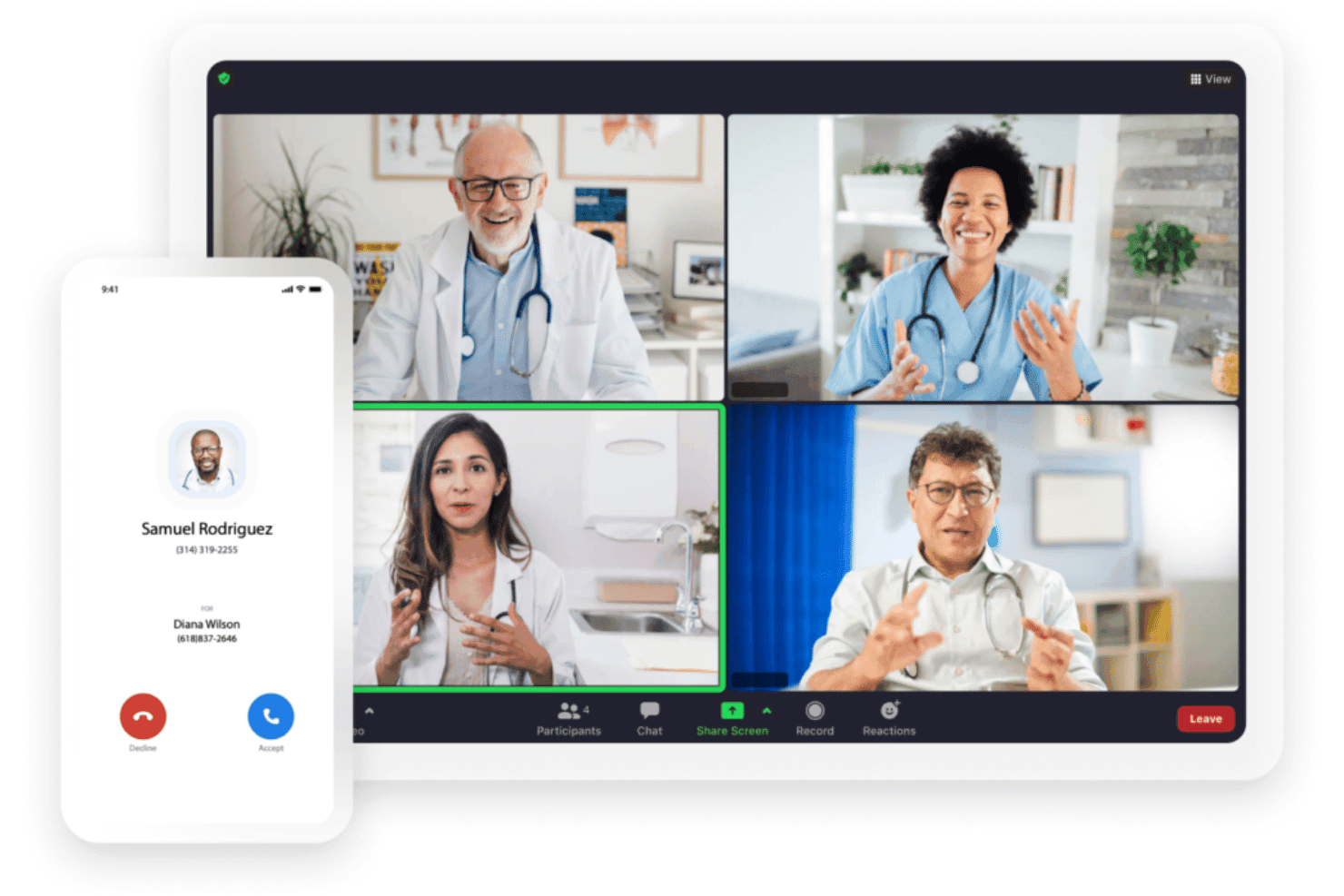
Zoom Contact Center unifies omnichannel routing, IVR, ACD, and workforce tools. Zoom Contact Center is a cloud-native CCaaS platform that combines voice, video, chat, SMS, and email routing with AI-powered IVR, ACD, workforce management, and a unified agent console.
Who Is Zoom Best For?
Zoom Contact Center is a strong fit for mid-market and enterprise healthcare organizations already using Zoom Workplace that need video-enabled patient interactions alongside traditional voice and messaging channels.
Why I Picked Zoom
Zoom Contact Center earns its spot as one of the best on my shortlist because it's the only platform here where video is a native, first-class channel alongside voice, SMS, and chat. I love that patients can escalate from a chat or call directly into a face-to-face video consult without switching apps. The PII redaction feature automatically masks sensitive data during those interactions, which is something I rely on for HIPAA compliance without manual intervention.
Zoom Key Features
- HIPAA-compliant call recording: Encrypts and stores call recordings securely with role-based access and retention controls.
- Visual Flow Editor for IVR: Lets teams build and adjust routing logic without code, supporting complex healthcare call flows.
- SOC 2 + HITRUST reporting: Provides formal attestation with detailed audit trails for PHI interactions and compliance tracking.
- Integrated workforce management: Supports agent scheduling, forecasting, and quality monitoring in the same console.
Zoom Integrations
Zoom Contact Center offers native integrations with Salesforce, ServiceNow, Microsoft Dynamics 365, and supports additional connectivity through the Zoom App Marketplace. An API is available for custom integrations.
Pros and Cons
Pros:
- AI agent assist flags compliance issues live
- Automated PHI redaction in recordings and transcripts
- Native video channel for patient consultations
Cons:
- EHR-native screen pops require additional configuration
- HIPAA BAA not available on lower tiers
Learn more about Zoom: Best omnichannel patient engagement features
- Free demo available
- Pricing upon request
Visit WebsiteCustomer Rating:4.6/5
Bright Pattern offers a quality management interface with chat evaluation forms, agent interaction monitoring, and HIPAA-relevant call scoring tools. Bright Pattern is a cloud-based contact center platform offering voice, SMS, video, chat, and email alongside AI-powered routing, IVR, call recording, and CRM integrations.
Who Is Bright Pattern Best For?
Bright Pattern is a strong fit for mid-size to enterprise healthcare organizations managing high patient contact volumes across multiple locations or departments.
Why I Picked Bright Pattern
Bright Pattern earns its spot on my shortlist because no other platform I've tested handles omnichannel patient communication this thoroughly. I particularly like how patients can move from an SMS appointment reminder to a live voice or video call without losing context. The drag-and-drop scenario builder lets my team configure multi-level IVR routing across departments, and 100% omnichannel quality monitoring covers every channel for HIPAA review.
Bright Pattern Key Features
- HIPAA compliance add-on: Enables encrypted call recording, role-based access, and audit trails aligned with healthcare regulations.
- Secure cloud deployment: Cloud infrastructure ensures encrypted transmission and storage of PHI with rapid scaling across sites.
- Omnichannel quality management: Monitors and records 100% of patient interactions across all supported channels for compliance.
- CRM and ITSM integrations: Connects natively with Salesforce, Microsoft Dynamics 365, Zendesk, ServiceNow, and more for workflow automation.
Bright Pattern Integrations
Bright Pattern offers native integrations with Salesforce, Microsoft Dynamics 365, Zendesk, ServiceNow, Oracle Service Cloud, HubSpot, and Zoho, and provides an open API for custom integrations.
Pros and Cons
Pros:
- AI-powered real-time agent assist built in
- 100% interaction monitoring across all channels
- Covers voice, SMS, video, and chat
Cons:
- Limited self-serve EHR configuration options
- Complex setup for multi-location deployments
Learn more about Bright Pattern: Best real-time call transcription with redaction
- 14-day free trial + free demo available
- Pricing upon request
Visit WebsiteCustomer Rating:4.3/5
Dialpad offers real-time transcription during healthcare video calls, supporting HIPAA-compliant telemedicine consultations between doctors and patients. Dialpad is an AI-native cloud contact center platform for healthcare that combines omnichannel patient communication, ACD routing, call recording, and real-time AI transcription with PII redaction in a single system.
Who Is Dialpad Best For?
Dialpad is a strong fit for mid-size to enterprise healthcare organizations running high-volume patient contact centers across multiple locations.
Why I Picked Dialpad
I picked Dialpad as one of the best because of how it handles real-time transcription in a HIPAA-sensitive environment. DialpadGPT, Dialpad's proprietary model, transcribes live patient calls on every plan, not just premium tiers. What I find most valuable is the automatic PII redaction, which strips sensitive patient data from transcripts as the call progresses. AI Recaps then capture and log action items after every interaction.
Dialpad Key Features
- Skill-based call routing: Route incoming patient calls to the right department or agent using defined logic.
- Omnichannel communication: Handle phone, SMS, video, and digital channels in a single interface.
- Supervisor tools: Access silent monitoring, whisper coaching, barge, and real-time analytics for live oversight.
- Customizable data retention: Set retention policies and manage access controls for recorded calls and transcripts.
Dialpad Integrations
Dialpad offers native integrations with Salesforce, HubSpot, Zendesk, Zoho CRM, ServiceNow, Google Workspace, and Microsoft 365. An API is available for custom integrations.
Pros and Cons
Pros:
- BAA available for contact center plans
- DialpadGPT transcribes calls on every plan
- Real-time PII redaction from live transcripts
Cons:
- Advanced AI analytics require higher-tier plans
- No native EHR or EMR connections
Learn more about Dialpad: Best workflows for appointment scheduling
- Free demo available
- Pricing upon request
Visit WebsiteCustomer Rating:4.4/5
Talkdesk offers a Patient 360 view with HIPAA-relevant patient data, referral orders, and a physical therapy referral panel during an active call. Talkdesk Healthcare Experience Cloud is a purpose-built, HIPAA-compliant contact center platform with AI-powered routing, omnichannel patient communication, EHR integration, and built-in call recording and quality management.
Who Is Talkdesk Best For?
Mid-to-large health systems and multi-location providers that need a dedicated, AI-forward patient contact center with enterprise-grade compliance controls.
Why I Picked Talkdesk
Talkdesk earns its spot on my shortlist because no other platform I've tested matches its depth of pre-built appointment scheduling workflows inside a HIPAA-compliant environment. Autopilot for Healthcare handles primary, specialty, and lab scheduling end-to-end, including patient identification and managing existing appointments, without live agent involvement. I also like the Epic MyChart Password Reset workflow, which lets patients self-serve securely through an automated flow rather than waiting for an agent.
Talkdesk Key Features
- Guardian anomaly monitoring: Continuously monitors for ePHI access anomalies and suspicious activity in real time.
- Interaction Analytics with medical-grade speech-to-text: Transcribes and analyzes patient calls to support compliance and performance review.
- Omnichannel communication workspace: Lets agents handle voice, SMS, email, and messaging in one HIPAA-compliant interface.
- Epic EHR native integration: Connects directly to Epic for call logging, patient screen pops, and secure data synchronization.
Talkdesk Integrations
Talkdesk offers native integrations with Epic, Salesforce, ServiceNow, HubSpot, Oracle, SAP, and Pega. An API is available for custom integrations.
Pros and Cons
Pros:
- AI agent assist guides compliant patient conversations
- HITRUST CSF certified with granular PHI controls
- Pre-built healthcare scheduling automation workflows
Cons:
- Complex implementation requires dedicated IT involvement
- High starting price limits smaller practice access
Learn more about Talkdesk: Best AI-powered routing for healthcare calls
- Free trial available
- From $75/user/month (billed annually)
Visit WebsiteCustomer Rating:4.4/5
Genesys Cloud CX combines AI routing, omnichannel tools, and Epic integration. Genesys Cloud CX is a HIPAA, HITRUST, and FedRAMP-compliant cloud contact center platform with AI-powered call routing, omnichannel patient communication, secure call recording, and a native Epic EHR integration.
Who Is Genesys Cloud CX Best For?
It's a strong fit for enterprise and mid-market health systems managing high patient call volumes across multiple departments, locations, or care teams.
Why I Picked Genesys Cloud CX
I picked Genesys Cloud CX because its Predictive Routing engine uses real-time behavioral signals to connect callers to the right clinician or department before a live agent picks up. I also like Health CX, the native Epic integration that delivers patient screen pops the moment a call connects. On top of that, voice, digital, and screen recording with configurable retention and role-based access means my team can pull any patient call for QA or compliance review without leaving the platform.
Genesys Cloud CX Key Features
- Automated PHI redaction: Detects and removes protected health information from call recordings and transcripts before storage.
- Secure omnichannel routing: Routes voice, SMS, chat, email, and video in a single HIPAA-compliant workspace.
- Consent and verification workflows: Supports configurable patient ID verification and consent prompts on every interaction.
- Customizable audit logs: Tracks and records all user access and actions for compliance, with export-ready logs for audits.
Genesys Cloud CX Integrations
Genesys Cloud CX offers native integrations with Epic, Salesforce, ServiceNow, Microsoft Teams, Zoom, and Okta. An API and AppFoundry marketplace are available for additional integrations and custom workflows.
Pros and Cons
Pros:
- Speech analytics built into the native platform
- Predictive routing uses real-time behavioral signals
- HITRUST CSF certified with independent PHI audits
Cons:
- Workforce management module sold separately
- Complex initial configuration across multiple departments
Learn more about Genesys Cloud CX: Best agent monitoring and compliance reporting
- Free demo available
- From $110/agent/month (proactive AI extra)
Visit WebsiteCustomer Rating:4.3/5
NiCE CXone offers an agent workspace with AI-generated interaction summaries, contact reasons, and event logs to streamline compliant customer service handling. NiCE CXone is a cloud contact center platform built for healthcare organizations that combines omnichannel routing, AI-powered patient self-service, encrypted call recording, and agent monitoring across voice, SMS, and digital channels.
Who Is NiCE CXone Best For?
NiCE CXone is built for mid-to-large healthcare enterprises managing high patient call volumes across multiple departments, locations, or care lines.
Why I Picked NiCE CXone
I picked NiCE CXone as one of the best because its AI-driven QA scoring evaluates agent performance across every recorded interaction, not just sampled calls. I particularly like how supervisors get real-time sentiment alerts directly on the floor view dashboard, which means issues get caught during a call rather than after. The HIPAA-compliant recording layer pairs configurable retention policies with role-based access, so compliance officers can retrieve and audit specific patient calls without touching the broader dataset.
NiCE CXone Key Features
- Omnichannel engagement hub: Supports HIPAA-compliant voice, SMS, email, and chat channels from a single desktop interface.
- EHR and practice management integration: Connects with Epic and other EHRs for patient identification and real-time screen pops.
- Consent and identity verification workflows: Includes configurable patient verification steps and recorded consent capture before PHI discussion.
- Audit log and user access controls: Tracks all agent actions and maintains HIPAA Security Rule-compliant records for every patient interaction.
NiCE CXone Integrations
NiCE CXone offers native integrations with Epic, Salesforce, ServiceNow, Oracle Service Cloud, Microsoft Dynamics 365, Microsoft Teams, Zoom, and Google Workspace, and provides an API for custom integrations.
Pros and Cons
Pros:
- HITRUST CSF certified with full PHI controls
- Real-time supervisor alerts fire during live calls
- AI QA scoring covers every recorded call
Cons:
- Custom reporting requires IT or admin support
- Complex initial setup for multi-location healthcare workflows
Learn more about NiCE CXone: Best automated patient outreach tools
- Free demo available
- From $119/seat/month
Visit WebsiteCustomer Rating:4.1/5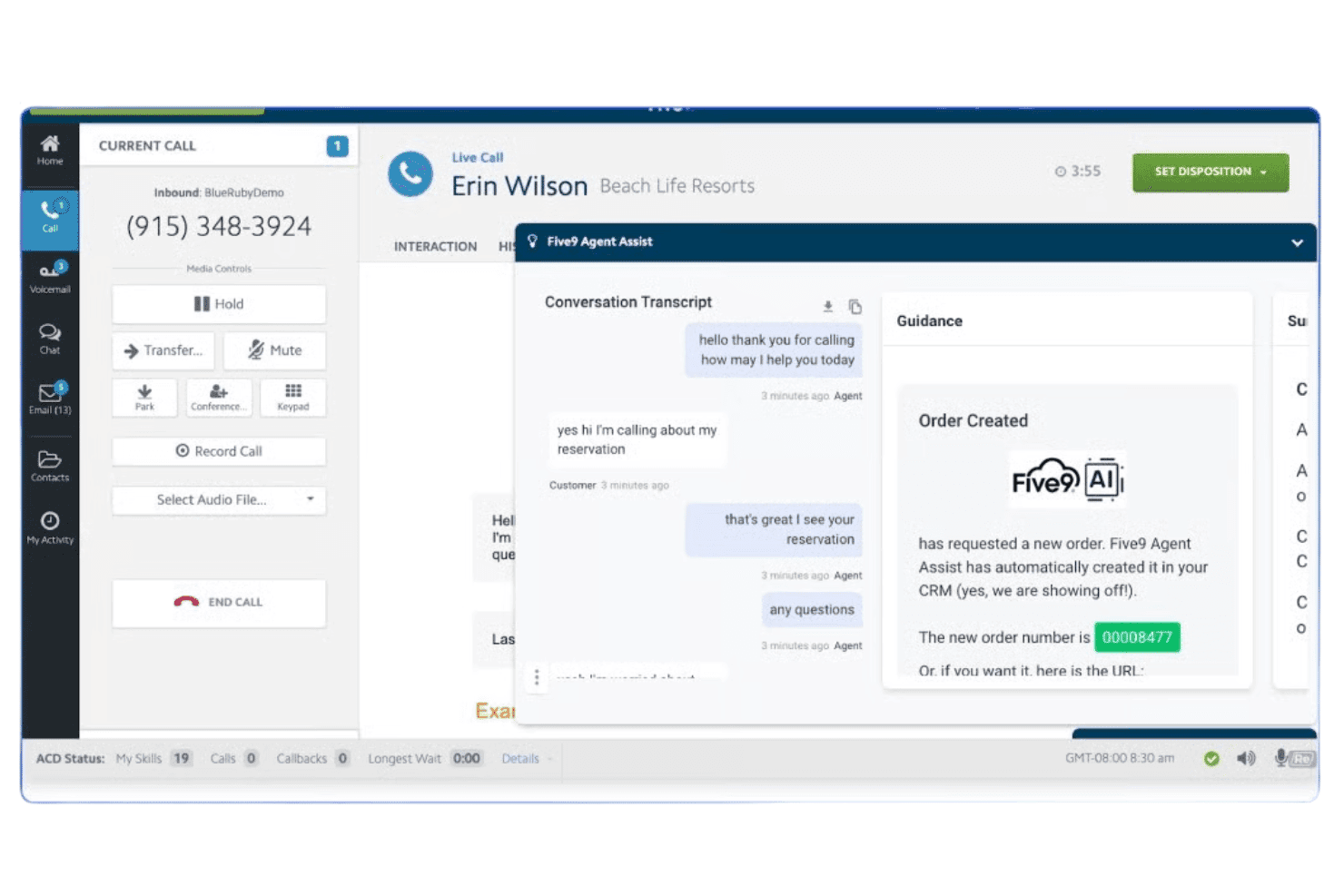
Five9 combines voice, video, SMS, chat, AI routing, IVR, and Epic integration. Five9 is a cloud contact center platform built for healthcare organizations, combining voice, video, SMS, and chat with AI-powered routing, IVR, and direct Epic EHR integration.
Who Is Five9 Best For?
Five9 is a strong fit for mid-to-large healthcare provider networks, hospital systems, and payers that run high-volume contact center operations across multiple locations.
Why I Picked Five9
Five9 earns its spot on my shortlist because its Intelligent Virtual Agents handle the full patient outreach loop without involving a live agent. I particularly like how the IVA manages caller authentication, appointment scheduling via Epic Cadence, and bill payment reminders in a single interaction. The speech-enabled IVR extends this further, letting patients self-serve around the clock while all PHI stays encrypted in transit and at rest under Five9's BAA.
Five9 Key Features
- Epic EHR integration: Agents can view and update patient records and appointments directly through a native Epic connector.
- Omnichannel engagement: Connect with patients using secure voice, video, SMS, chat, and social messaging within one platform.
- Automated compliance controls: Includes audit logs, least-privilege access, and encryption of call recordings, emails, and chat transcripts for HIPAA compliance.
- Workforce engagement tools: Built-in quality management, performance dashboards, and gamification to monitor and coach agent performance.
Five9 Integrations
Five9 offers native integrations with Epic, Salesforce Health Cloud, ServiceNow, Microsoft Dynamics, Zendesk, and Oracle, and provides an API for custom integrations.
Pros and Cons
Pros:
- Native Epic scheduling and call logging
- HITRUST CSF certified for PHI protection
- AI-driven IVA handles patient outreach autonomously
Cons:
- Higher cost locks out smaller practices
- Complex initial setup for healthcare workflows
Learn more about Five9: Best for EHR integrations and secure messaging
- 14-day free trial
- From £18/user/month
Visit WebsiteCustomer Rating:4.2/5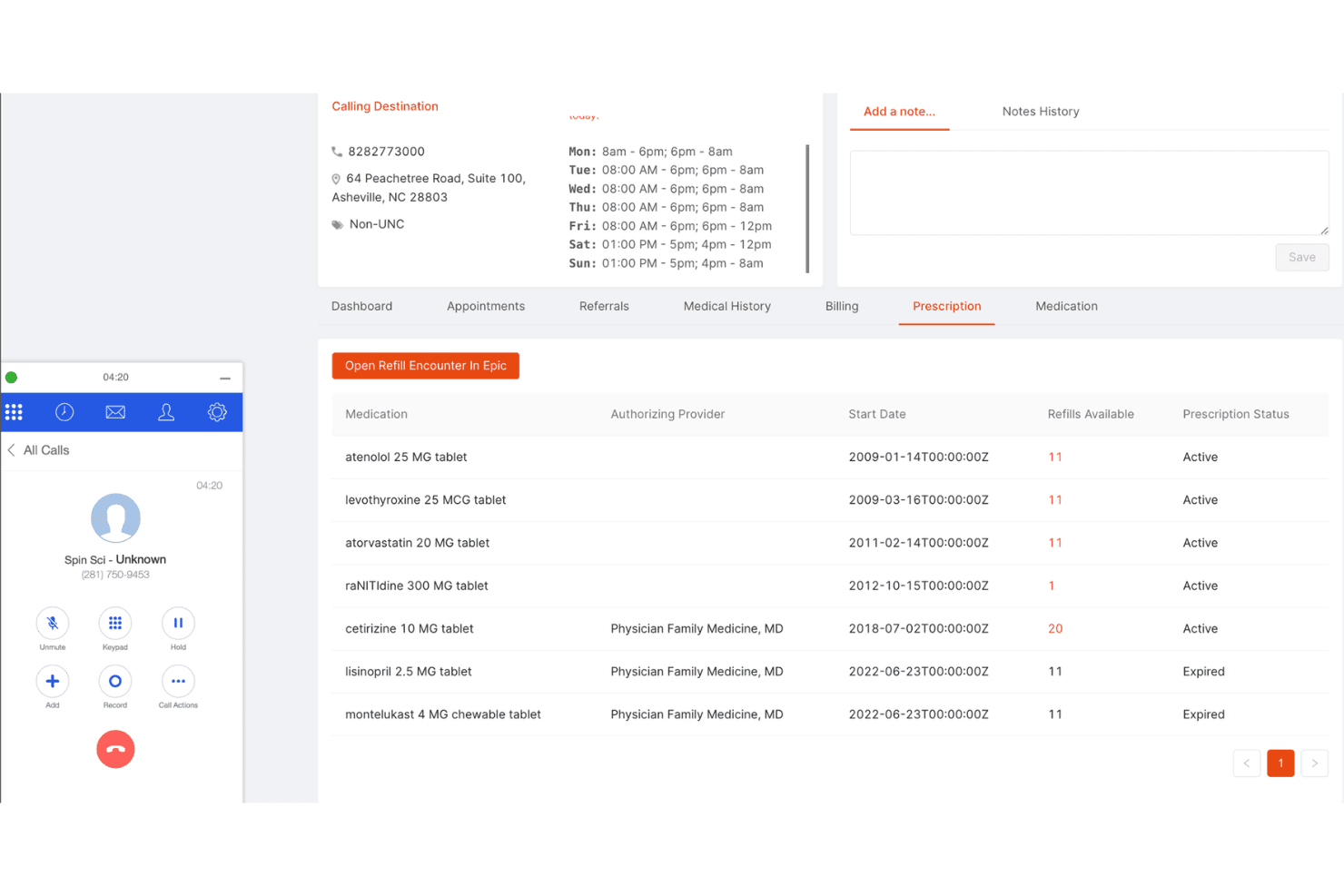
RingCentral supports voice, messaging, video, AI routing, plus EHR integrations. RingCentral is a cloud-based unified communications and contact center platform that combines voice, secure messaging, video, and AI-powered call routing with native EHR integrations for healthcare organizations.
Who Is RingCentral Best For?
RingCentral suits multi-location healthcare organizations and large medical groups that need a single platform for compliant voice, messaging, and contact center operations.
Why I Picked RingCentral
I picked RingCentral because its Patient Assist feature gives agents a real-time screen pop with the caller's name, call reason, and relevant EMR data before they say hello. That's driven by native connections to Epic, Cerner, Athenahealth, and four other major EHRs, not a middleware workaround. I also like that AIR Pro for Healthcare handles appointment scheduling and patient identity verification autonomously, all under a HITRUST CSF certification and signed BAA.
RingCentral Key Features
- HIPAA-compliant omnichannel routing: Route calls, SMS, chat, and video securely through one workspace with end-to-end encryption.
- Consistent call recording and audit logs: Record and retain calls with date-stamped logs and role-based access for compliance reviews.
- AI-powered agent coaching: Use real-time prompts that guide agents during calls and flag potential compliance risks as conversations happen.
- Consent and identity verification workflows: Capture recorded patient consent and verify identity with configurable scripts before discussing PHI.
RingCentral Integrations
RingCentral offers native integrations with Epic, Cerner, Athenahealth, NextGen, Allscripts, eClinicalWorks, and Medtech, and provides an API for custom integrations.
Pros and Cons
Pros:
- Native EHR screen pops across seven platforms
- Real-time AI flagging of live PHI disclosures
- HITRUST CSF certified with a signed BAA
Cons:
- Complex setup for multi-location call routing
- Advanced AI features gated behind higher-tier plans
Learn more about RingCentral:
Other HIPAA-Compliant Call Center Software
Here are some additional HIPAA-compliant call center software options that didn’t make it onto my shortlist, but are still worth checking out:
- 11VonageBest customizable APIs for health IT integrations
- 128x8Best encrypted voice and SMS communication
- 13AircallBest integration with practice management software
- 14JustCallBest automated appointment reminder system
- 15Amazon ConnectBest for cloud-native compliance infrastructures
- 16EmitrrBest all-in-one patient communication platform
- 17QliqSOFTBest secure text-first patient engagement
- 18SynthflowBest AI assistant for triaging patient calls
- 19XimaBest custom reporting for patient call flows
- 20RingRxBest dedicated healthcare call management tools
How I Evaluate HIPAA Compliant Call Center Software
I evaluate these tools across two layers: baseline requirements like BAA coverage and secure call recording, then the differentiators that set purpose-built healthcare platforms apart.
Core Functionality (Table Stakes For This List)
When I'm selecting tools for my list, I rank each one on a scale from 0 (does not offer the functionality) to 5 (excels in this area) for each core functionality listed below. I then calculate the tool's total score into a percentage, using 65% as a benchmark to help assess its overall fit for the list.
- HIPAA Compliance & BAA: I check whether vendors sign a BAA and offer encryption, access controls, and audit logs that align with HIPAA Security Rule requirements.
- Secure Call Recording & Storage: Recording patient calls is standard, so I look for encrypted storage, configurable retention policies, and role-based retrieval controls.
- ACD & IVR Routing: I evaluate how each tool routes patient calls to the right provider or department, including multi-level IVR menus and skill-based distribution.
- EHR/PMS Integration: Connecting to systems like Epic, Cerner, or Athenahealth matters, so I look for native connectors, screen pops, and call logging into patient records.
- Omnichannel Patient Communication: I consider whether the platform supports secure voice, SMS, and messaging so your team can reach patients across multiple touchpoints.
- Agent Performance & Reporting: Dashboards tracking call volume, wait times, and agent activity help you manage daily operations, so I look for real-time and historical reporting.
Once I have a list of tools that meet the criteria, I consider what sets each platform apart.
Differentiating Factors (What Sets Vendors Apart)
Here's how I compare and contrast different vendors:
Standout Features
Automated PHI redaction is one feature I pay close attention to. Tools that detect and strip sensitive patient data from recordings and transcripts before storage reduce your compliance exposure significantly. I also look for consent and verification workflows that prompt agents to confirm patient identity and capture recorded consent before discussing PHI. Real-time agent assist adds another layer by flagging potential PHI disclosures mid-call and suggesting compliant responses on screen.
Beyond Features
BAA terms matter here. I check whether a vendor signs a BAA across all plan tiers or restricts it to enterprise pricing, which can catch smaller practices off guard. Security certifications like HITRUST CSF and SOC 2 Type II give me confidence that a vendor's compliance claims hold up under independent review. Pricing transparency is another factor I evaluate closely, since some platforms gate HIPAA features behind higher tiers and limit access to encryption, audit logs, or compliant recording.
How to Choose a HIPAA-Compliant Call Center Software
Wondering which HIPAA-compliant call center software fits your practice’s top priorities and compliance realities? Use this table to focus your search:
| If your priority is… | Prioritize… |
|---|---|
| If your priority is…Minimizing PHI breach risk | Prioritize…Advanced role-based access and automated PHI redaction |
| If your priority is…Fast scheduling and multi-location routing | Prioritize…Customizable IVR/ACD and EHR/PMS integrations |
| If your priority is…Consistent patient consent capture | Prioritize…Built-in consent and identity verification workflows |
| If your priority is…Audit readiness and security certifications | Prioritize…HITRUST CSF or SOC 2 Type II documentation |
| If your priority is…Seasonal staffing changes or rapid scaling | Prioritize…Flexible user licensing and on-demand BAA availability |
How to Vet Your Shortlist
- Request a Sample BAA: Obtain and review the full Business Associate Agreement before scheduling demos.
- Verify Certifications: Ask for current HITRUST CSF or SOC 2 Type II attestation reports and review testing frequency.
- Run a Demo Workflow: Test call flows for PHI redaction, secure call recording, and screen pop with at least one patient data scenario in a time-limited trial.
- Request Audit Log Access: Ask for a real audit log export after a simulated call session, to confirm event traceability and data types monitored.
- Tradeoff Alert: Balance niche healthcare features and deep integrations versus broader contact center flexibility—prioritize what will most reduce compliance and workflow risk for your team.
What Is HIPAA-Compliant Call Center Software?
HIPAA-compliant call center software is a secure communications platform built to protect patient health information during calls, messages, and data handling in healthcare settings.
These software solutions support secure call routing, encrypted recording, and integration with EHR or practice management systems, ensuring every patient interaction meets strict privacy and documentation standards.
They’re essential for medical practices that must maintain regulatory compliance while managing inbound and outbound patient communications.
Features of HIPAA-Compliant Call Center Software
When selecting HIPAA compliant call center software, keep an eye out for the following key features:
HIPAA compliance with BAA: Vendors must provide a signed Business Associate Agreement and implement encryption, access controls, and audit logs that meet HIPAA Security Rule standards.
Secure call recording: Calls are recorded and stored using end-to-end encryption, with role-based access and configurable retention policies to protect patient conversations.
IVR and ACD routing: Interactive voice response and automatic call distribution route incoming calls to the right department or provider based on patient needs or workflows.
EHR and practice management integration: Direct integration with EHR or practice management systems allows agents to access patient records, initiate screen pops, and document call outcomes.
Omnichannel patient communication: Support for secure voice, SMS, and messaging channels lets you engage patients on their preferred platforms while keeping all PHI protected.
Agent performance dashboards: Real-time and historical dashboards provide insight into call volume, agent activity, wait times, and other healthcare-specific metrics for quality assurance.
Automated PHI redaction: Machine learning algorithms can automatically redact sensitive patient information from call recordings and transcripts before storing or sharing data.
Consent and patient verification workflows: The software includes prompts to verify patient identity and capture consent at key stages, reducing the risk of unauthorized PHI disclosures.
Audit logs and traceability: Detailed event logs track every access, modification, and communication related to PHI, supporting compliance audits and internal reviews.
Configurable access controls: Granular permission settings let administrators define who can access, share, or edit various types of patient information within the system.
Benefits of HIPAA-Compliant Call Center Software
Implementing HIPAA-compliant call center software provides several benefits for your team and your business. Here are a few you can look forward to:
- Protected patient information: Built-in encryption, role-based controls, and audit trails keep sensitive health data secure and support regulatory compliance.
- Streamlined patient access: Automated call routing and omnichannel communications make it easier for patients to schedule, reschedule, or get assistance quickly.
- Audit-ready documentation: Detailed event logs and consent capture simplify compliance reviews, internal audits, and responding to regulator requests.
- Reduced breach risk: Automated PHI redaction and identity verification workflows help prevent unauthorized disclosures in conversations and call recordings.
- Better agent performance tracking: Real-time dashboards and reporting tools allow you to monitor service levels and coach call center agents for ongoing improvement.
- Seamless EHR integration: Direct links to practice management or patient record systems speed up call resolution and ensure documentation is always up to date.
- Scalability during busy periods: Flexible licensing, secure storage, and cloud-based deployment let your call center easily scale to handle patient surges or new locations.
Costs and Pricing of HIPAA-Compliant Call Center Software
Selecting HIPAA-compliant call center software requires an understanding of the various pricing models and plans available. Costs vary based on features, team size, add-ons, and more.
The table below summarizes common plans, their average prices, and typical features included in HIPAA-compliant call center software solutions:
Plan Comparison Table for HIPAA-Compliant Call Center Software
| Plan Type | Average Price | Common Features |
|---|---|---|
| Plan TypeFree Plan | Average Price$0 | Common FeaturesLimited call routing, basic activity logs, and minimal support. |
| Plan TypePersonal Plan | Average Price$20-$50/user/month | Common FeaturesSecure voice calls, call recording, limited reporting, and single-user dashboard access. |
| Plan TypeBusiness Plan | Average Price$50-$120/user/month | Common FeaturesOmnichannel messaging, advanced IVR/ACD, EHR integration, basic analytics, and BAA availability. |
| Plan TypeEnterprise Plan | Average Price$120-$200/user/month | Common FeaturesCustom integrations, PHI redaction, audit logs, real-time agent assist, dedicated support, and full BAA. |
HIPAA-Compliant Call Center Software FAQs
Here are some answers to common questions about HIPAA-Compliant Call Center software:
What makes call center software HIPAA-compliant?
HIPAA-compliant call center software encrypts all communications, signs a Business Associate Agreement (BAA), and tracks access with audit logs to protect patient health information during every interaction.
Do I need a BAA for all HIPAA-compliant call center software plans?
Yes, you need a BAA to ensure regulatory compliance, but some vendors limit BAAs to specific plan tiers, so always verify availability before purchasing.
Can HIPAA-compliant call center software integrate with my existing EHR or practice management system?
Yes, most solutions offer direct integrations with major EHR and practice management platforms to streamline workflows and ensure accurate documentation of patient calls.
What types of patient communication channels are usually supported?
Most HIPAA-compliant platforms support secure voice, SMS, and chat, allowing you to connect with patients wherever they’re most comfortable while maintaining data protection.
How does automated PHI redaction work?
Automated PHI redaction uses machine learning to detect and remove sensitive information from call recordings and transcripts before storage or sharing to minimize breach risk.