

DME billing software is specialized technology that manages claims, invoicing, and compliance for durable medical equipment providers. If you’re comparing DME billing solutions, you need a system that handles complex billing rules, coordinates with payers, and helps your team reduce denials and delays.
Sorting through your options can feel overwhelming—especially when every detail counts for reimbursement and operations. This guide breaks down the top DME billing software for 2026, highlighting what sets each apart so you can choose with confidence and keep your billing process on track.
Why Trust Our Software Recommendations
6,700+
Reviews
20
Industry experts
16+
Evaluation factors
14
Years
Our team has been testing and reviewing software since 2012. As medical practice leaders ourselves, we know how difficult—and important—it is to choose the right software.
For this guide, we evaluated tools using hands-on testing and independent research, scoring tools using our selection criteria.
Our reviews reflect our human editorial judgment, not a sales pitch.
DME Billing Software Comparison Table
The table below compares pricing details for my top DME billing software selections.
| Tool | Best For | Trial Info | Price | ||
|---|---|---|---|---|---|
| 1 | Best for adaptable multi-location billing | Free demo available | Pricing upon request | Website | |
| 2 | Best modular design for configurable solutions | Free demo available | Pricing upon request | Website | |
| 3 | Best rapid implementation for new providers | Free demo available | Pricing upon request | Website | |
| 4 | Best cloud-based access and usability | Free demo available | Pricing upon request | Website | |
| 5 | Best for connected patient intake and billing | Free demo available | Pricing upon request | Website | |
| 6 | Best automation of claims and denials | Free demo available | Pricing upon request | Website | |
| 7 | Best for streamlined revenue cycle management | Free demo available | Pricing upon request | Website | |
| 8 | Best inventory and order management integration | Free demo available | Pricing upon request | Website | |
| 9 | Best customizable workflows for providers | Free demo available | Pricing upon request | Website | |
| 10 | Best enterprise-level interoperability options | Free demo available | Pricing upon request | Website |


Best DME Billing Software Reviews
Below are my detailed summaries of the best DME billing software that made it onto my shortlist. My reviews offer a detailed look at the features, integrations, and best use cases of each software to help you find the best one for you.
 Best for adaptable multi-location billing
- Free demo available
- Pricing upon request
HDMS coordinates HME/DME claims, denials, rentals, inventory, and routing. HDMS is a purpose-built HME/DME billing and patient management platform that handles claims submission, denial management, recurring rental billing, inventory tracking, and delivery routing across single and multi-location operations.
Who Is HDMS (Universal Software Solutions) Best For?
HDMS is a strong fit for HME/DME providers operating across multiple locations who need billing, inventory, and delivery managed in one platform.
Why I Picked HDMS (Universal Software Solutions)
I picked HDMS as one of the best because its inventory and billing architecture is built around multi-location operations from the ground up. I like that it tracks stock across warehouses, supply closets, and mobile inventory vehicles, with location-to-location transfers tied directly to billing records. The Collections and Denials Management Module generates prioritized worklists automatically, so billing teams aren't manually reconciling claims across multiple sites.
HDMS (Universal Software Solutions) Key Features
- Claims and compliance engine: Submits electronic claims in both ANSI X12 and NCPDP formats tailored for DME/HME payers.
- Integrated patient intake workflow: Guides users from referral through intake and billing in a single system.
- Automated reporting tools: Offers standard and customizable reports for operational and financial tracking.
- Pharmacy and infusion billing: Supports processing and billing of infusion, TPN, and standard prescription drugs alongside DME.
HDMS (Universal Software Solutions) Integrations
HDMS offers native integrations with COLLECTPlus, Parachute Platform, McKesson Medical-Surgical, Prometheus Group, Essity (BSN Medical/JOBST), and IMCO Home Care. An API is available for custom integrations.
Pros and Cons
Pros:
- Automated denial workflows and worklists
- Manages inventory and delivery from one system
- Adapts to multi-location HME and DME setups
Cons:
- User interface feels dated to some users
- CMN automation is not fully documented
Learn more about HDMS (Universal Software Solutions): Best modular design for configurable solutions
- Free demo available
- Pricing upon request
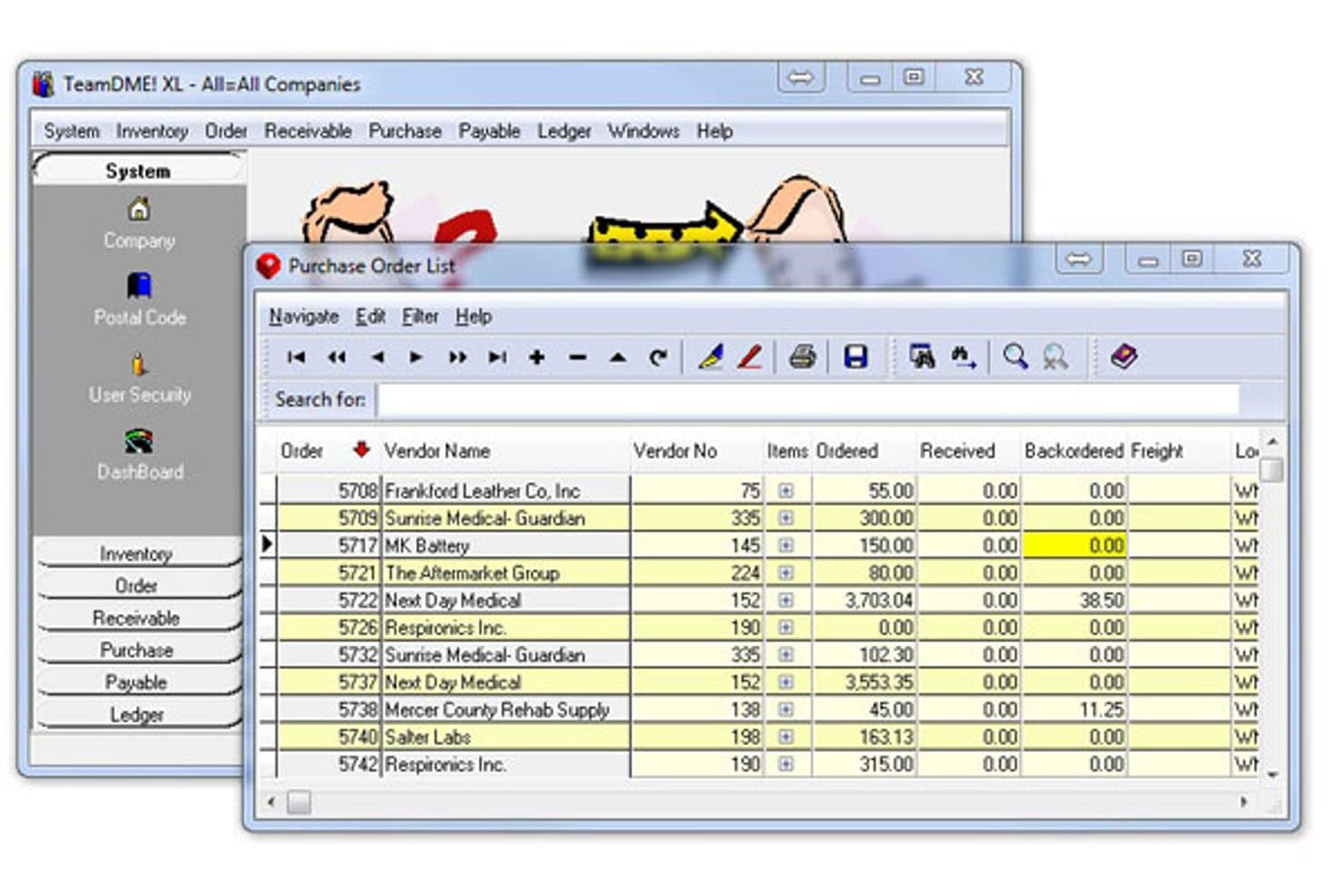
TeamDME! offers a Purchase Order List module displaying vendor names, order numbers, items ordered, received, backordered, and freight details in a tabular interface. TeamDME! is a purpose-built HME/DME billing platform covering electronic claims submission, rental billing, e-eligibility verification, CMN management, inventory tracking, and mobile proof-of-delivery capture in a modular, configurable system.
Who Is TeamDME! Best For?
TeamDME! is a good fit for independent HME/DME suppliers that need a configurable, billing-focused platform built specifically around DMEPOS workflows.
Why I Picked TeamDME!
TeamDME! earns its spot on my shortlist because its modular architecture means you only build out the workflows your operation actually runs, whether that's capped rental tracking, wireless inventory scanning, or mobile proof-of-delivery with serial/lot number capture. I particularly like the monthly billing rejection charts, which break down Medicare denials by payer so billing managers can pinpoint exactly where claim edits or staff training need attention.
TeamDME! Key Features
- Billing wizards: Step-by-step tools for quick, compliant electronic claims submission and processing.
- E-fax integration: Send CMNs, prescriptions, or prior auth forms to physicians and payers directly from the desktop.
- Payment portal: Allow patients or customers to pay invoices online using credit card or check options.
- Data conversion support: Import billing, order, and patient records from systems like Brightree, MedAct, or Fastrack.
TeamDME! Integrations
Native integrations include eFax services, payment card processors, and data conversion tools for systems like Brightree, MedAct, and Fastrack. An API for custom integrations is not clearly documented.
Pros and Cons
Pros:
- Strong Medicare billing rejection reporting
- Modular platform tailored for DME operations
- Mobile proof of delivery with signature capture
Cons:
- Reporting interface feels dated compared to competitors
- Limited automation for secondary payer billing
Learn more about TeamDME!: Best rapid implementation for new providers
- Free demo available
- Pricing upon request
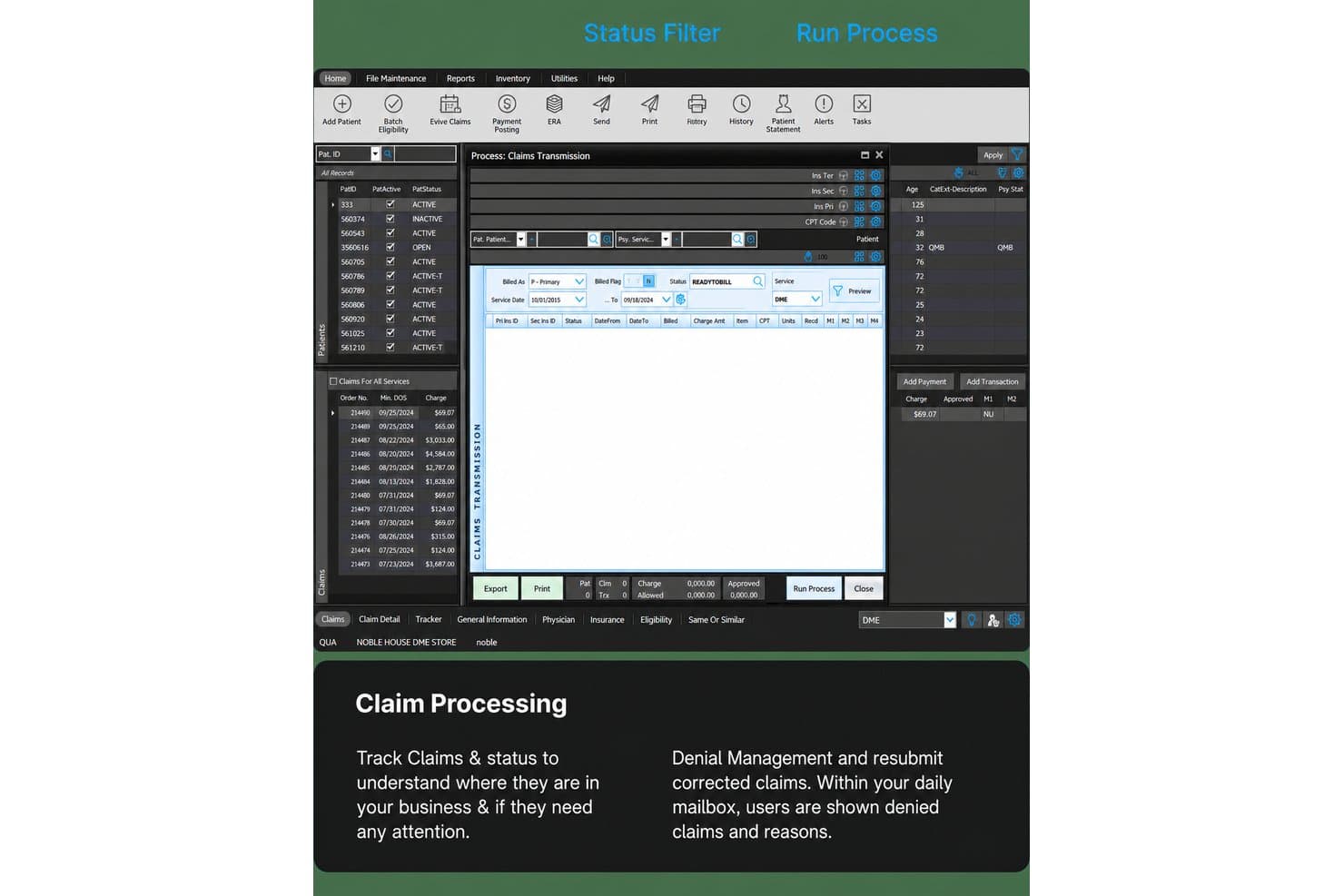
Noble Direct covers DME intake, claims, eligibility, AR, shipping, and reports. Noble*Direct is a DME/HME billing platform built on Microsoft SQL that handles intake, insurance eligibility verification, claims submission, AR management, shipping coordination, and reporting within a single-screen interface.
Who Is Noble Direct Best For?
Noble*Direct is a good fit for small to mid-sized DME and HME providers, including medical supply companies and rehabilitation centers getting their billing operations off the ground.
Why I Picked Noble Direct
Noble*Direct earns its spot on my shortlist because of how quickly a new DME provider can get from signed agreement to live claims submission. The software installs the same day payment clears, and training runs in parallel with payor enrollment paperwork rather than waiting for it to complete. I also like the Flow Control feature, which lets you set customized business rules that guide staff through the correct billing steps from day one, reducing errors before they become denials.
Noble Direct Key Features
- Single-screen homepage: Access patient intake, claims, and transactions without opening multiple tabs or windows.
- Real-time eligibility checks: Verify insurance coverage for Medicare, Medicaid, and commercial payors individually or in batch mode.
- Integrated shipping workflows: Create shipping orders for inventory, drop-ship partners, or in-house delivery straight from the platform.
- Customizable reporting dashboard: Build and export analytics reports and shortcuts tailored to your specific billing and inventory needs.
Noble Direct Integrations
Noble*Direct offers native integrations with Parachute Health, DDP Medical, Milliken, RevSpring, and The Compliance Team. An open API is available for custom integrations.
Pros and Cons
Pros:
- Shipping and delivery modules included
- Workflow rules built for DME and HME billing
- Same-day install and go-live available
Cons:
- No documented eCMN signature or digital renewal
- Limited public peer reviews available
Learn more about Noble Direct: Best cloud-based access and usability
- Free demo available
- Pricing upon request
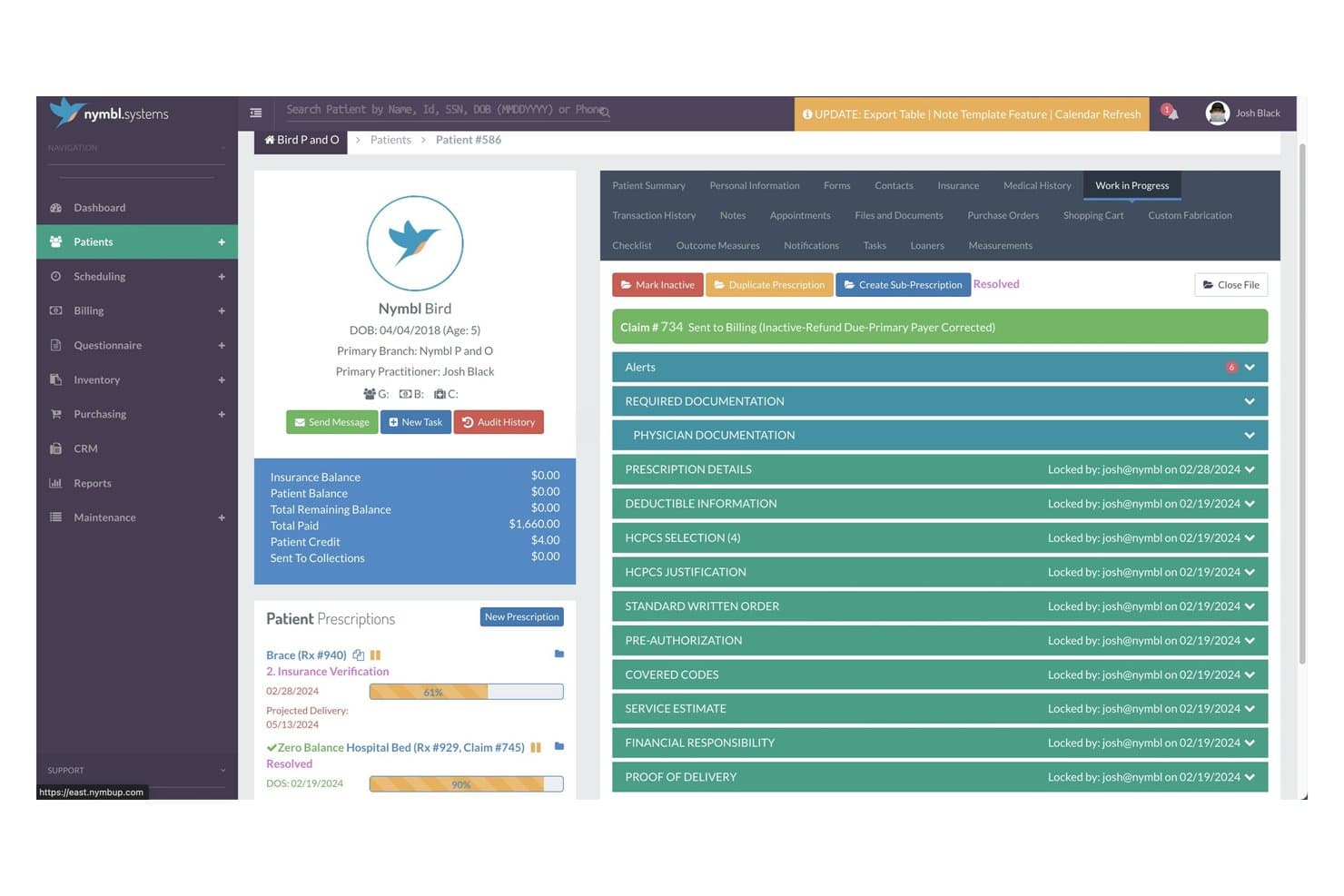
Nymbl Systems offers a comprehensive DME billing workflow screen showing claim status, required documentation, and prescription details for patient management. Nymbl Systems is a cloud-based practice management and billing platform for DME/HME providers, covering electronic claims submission, Medicare capped rental billing, real-time eligibility verification, and integrated inventory management.
Who Is Nymbl Systems Best For?
Nymbl Systems is a strong fit for independent DME and HME providers who need a purpose-built, cloud-accessible billing and practice management platform without on-premise IT infrastructure.
Why I Picked Nymbl Systems
I picked Nymbl Systems because it's one of the few DME billing platforms genuinely built cloud-first, not just cloud-compatible. I like that the single-page patient intake consolidates referral processing and validation rules into one view, so billing staff aren't toggling between screens. In practice, my team can access claims, rental cycles, and patient charts from any device without managing on-premise servers or waiting on scheduled manual updates.
Nymbl Systems Key Features
- Integrated purchasing and inventory: Automatically create and manage purchase orders and track inventory linked to patient records.
- Medicare rental automation: Auto-bill capped rental claims and monitor each rental order’s cycle.
- Integrated scheduling: Manage appointments with drag-and-drop rescheduling and sync with Outlook or Gmail calendars.
- Business intelligence dashboards: Visualize billing, productivity, and profitability data with built-in analytics tools.
Nymbl Systems Integrations
Nymbl Systems offers native integrations with Waystar, Medsender, Parachute Health, Stripe, Empire Medical, SPS, PEL, Cascade, Gmail, and Microsoft Outlook. An API is available for custom integrations.
Pros and Cons
Pros:
- Dedicated workflows for O&P, DME, and CRT
- Modern cloud platform, no local server needed
- Automates Medicare capped rental billing cycles
Cons:
- Limited presence on major software review sites
- CMN and DIF management not clearly supported
Learn more about Nymbl Systems: Best for connected patient intake and billing
- Free demo available
- Pricing upon request
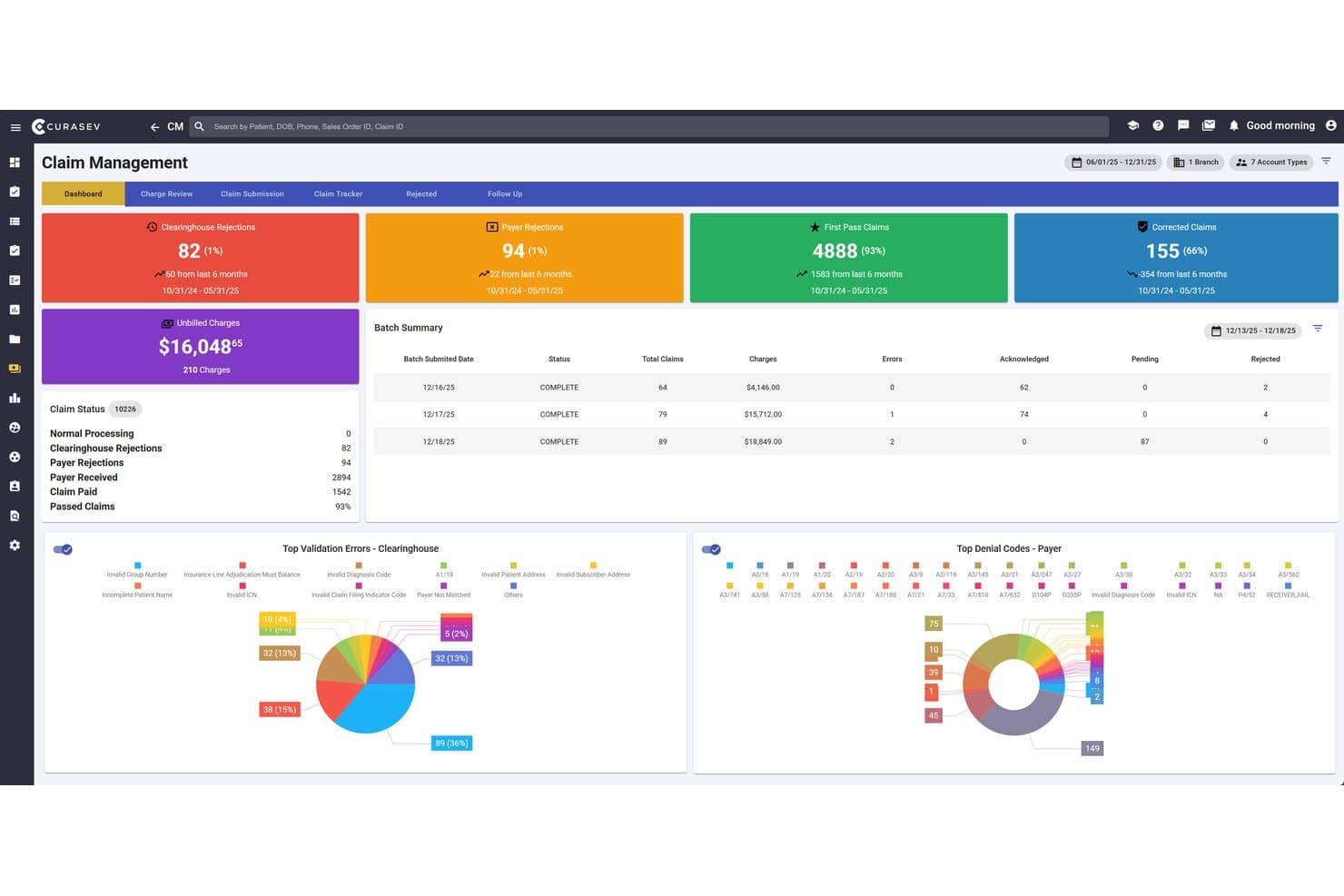
Curasev offers a comprehensive Claim Management dashboard displaying clearinghouse rejections, payer rejections, first pass claims, batch summaries, and top denial codes for DME billing workflows. Curasev is a cloud-based DME and HME billing platform that combines AI-driven document intake, claims processing, recurring rental billing, eligibility verification, inventory tracking, and mobile delivery management.
Who Is Curasev Best For?
Curasev suits DME and HME providers at any stage, from single-location startups to multi-branch organizations managing high referral volumes and complex payer mixes.
Why I Picked Curasev
I picked Curasev because the link between patient intake and billing is genuinely tight. Seva AI reads, classifies, and extracts data from incoming referral documents automatically, checking them against coverage criteria before they ever reach a biller. That means claims are built on verified intake data from the start, and my team isn't manually re-entering the same information twice.
Curasev Key Features
- Automated resupply scheduling: Set up recurring orders for patient supplies and manage inventory needs.
- Mobile delivery management: Track deliveries in real time with route optimization and proof of delivery via mobile app.
- Retail POS integration: Process in-store payments, insurance billing, and product sales within a single system.
- Claim scrubbing and rejection management: Scrub claims for errors before submission and monitor denials or rejections in a centralized dashboard.
Curasev Integrations
Curasev offers native integrations with FedEx, UPS, USPS, Google Drive, Dropbox, OneDrive, Gmail, and Outlook for shipping and document intake, and provides real-time payer eligibility connections. An API is available for custom integrations.
Pros and Cons
Pros:
- Advanced tools for DME rental cycle management
- Real-time payer eligibility and denial tracking
- Intake and billing workflows are fully connected
Cons:
- Few verified independent user reviews available
- CMN and prior auth workflows are limited
Learn more about Curasev: Best automation of claims and denials
- Free demo available
- Pricing upon request
Visit WebsiteCustomer Rating:5/5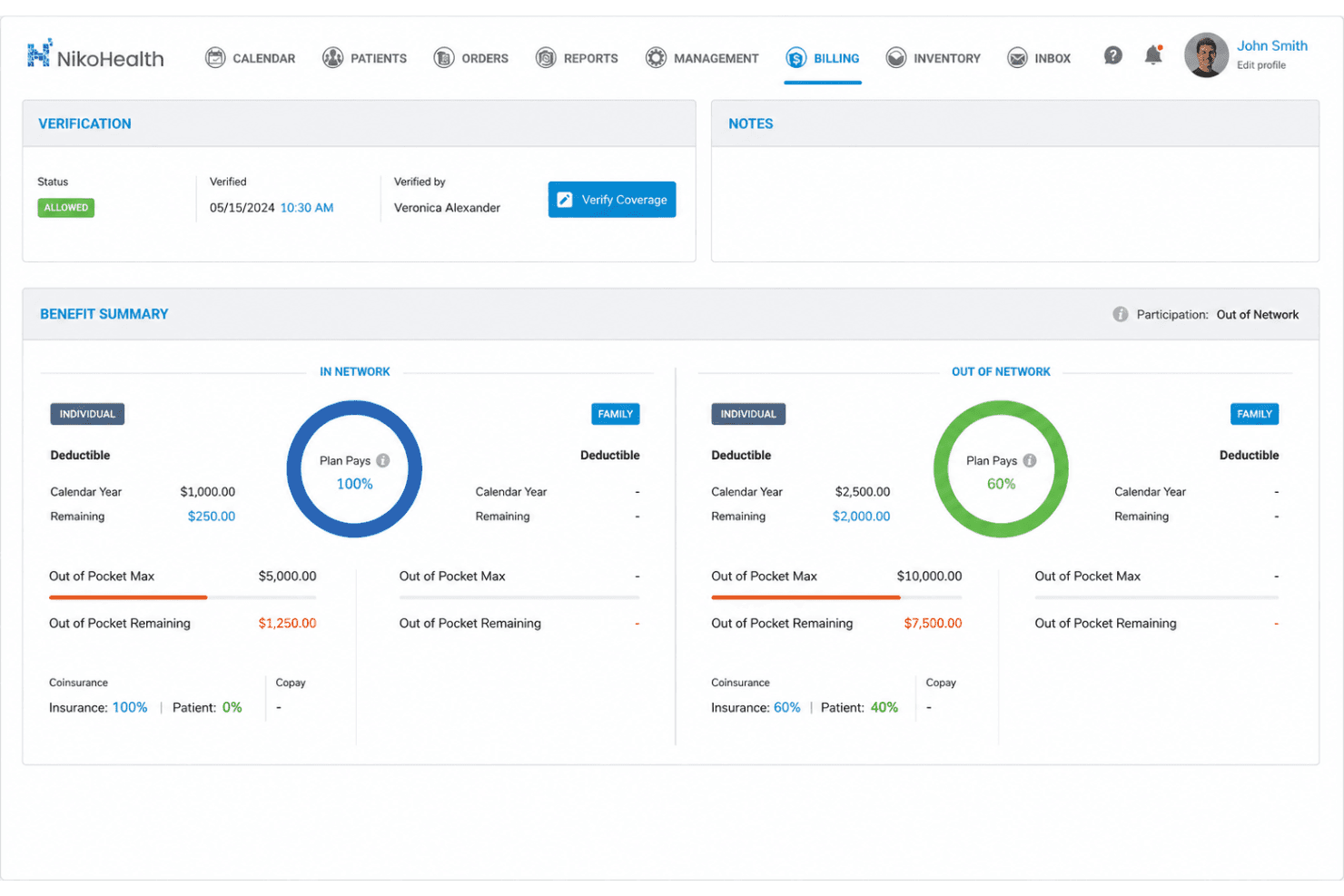
NikoHealth handles claims, rentals, eligibility, approvals, stock, and delivery. NikoHealth is a cloud-based HME/DME billing platform that combines claims management, recurring rental billing, insurance eligibility verification, CMN and prior authorization tracking, inventory management, and delivery workflow integration.
Who Is NikoHealth Best For?
NikoHealth is a strong fit for mid-to-large HME/DME providers managing multiple locations or high claim volumes who need a modern alternative to legacy platforms like Brightree or Fastrack.
Why I Picked NikoHealth
NikoHealth earns its spot on my shortlist because of how it handles denial prevention before a claim ever leaves the system. I love that it scrubs every claim against payer-specific compliance rules and flags missing CMN documentation before submission. On top of that, it automatically identifies discrepancies in payer allowables in real time, so my team catches underpayments without manually auditing remittances.
NikoHealth Key Features
- Recurring rental billing cycles: Handles automated recurring invoices and manages rental equipment billing schedules.
- API-first architecture: Connects easily to e-commerce stores, external CRMs, and data warehouses via open API.
- Inventory and delivery app integration: Links inventory tracking, serial numbers, delivery dispatch, and proof-of-delivery in one workflow.
- Automated insurance eligibility verification: Verifies insurance coverage before order fulfillment and claim submission.
NikoHealth Integrations
NikoHealth offers native integrations with Tennr, CompliantRx, Notable Systems, Celeritas, and Parachute Health. An API is available for custom integrations.
Pros and Cons
Pros:
- Customizable payer rules and documentation logic
- Handles multi-site inventory with delivery app integration
- Automates denial tracking and appeals workflows
Cons:
- Fewer built-in clearinghouse options than competitors
- Reporting customization options are limited
Learn more about NikoHealth: Best for streamlined revenue cycle management
- Free demo available
- Pricing upon request
Brightree drives DME claims, rental billing, CMNs, inventory, and resupply. Brightree is a cloud-based DME billing and business management platform built exclusively for HME/DME providers, covering claims processing, recurring rental billing, CMN management, inventory tracking, and patient resupply in a single system.
Who Is Brightree Best For?
It's a strong fit for mid-to-large HME/DME companies whose revenue model depends primarily on insurance reimbursement rather than retail sales.
Why I Picked Brightree
Brightree earns its spot on my shortlist because of how tightly its RCM tooling is built around DME-specific workflows. I particularly like the Intelligent Document Automation, which handles CMN and prior auth documentation tied directly to HCPCS codes, reducing manual work between order intake and claim submission. The denial management and secondary billing automation keep resubmissions moving without requiring manual follow-up on each rejected claim.
Brightree Key Features
- Mobile delivery management: Drivers use a digital tool for capturing signatures and proof-of-delivery in real time.
- Integrated inventory tracking: Track serial numbers, lot numbers, and quantities tied to billing records in a single dashboard.
- Patient resupply automation: Manage recurring supply shipments with order management, documentation, and engagement tools.
- Retail POS module: Handle in-store transactions and payment processing for cash-and-carry DME sales.
Brightree Integrations
Brightree offers native integrations with ePrescribe networks, patient engagement platforms, and sleep therapy device data sources. An API is available for custom integrations.
Pros and Cons
Pros:
- Advanced denial management with workflow automation
- Integrated patient resupply and inventory modules
- Deep support for CMN and prior auth workflows
Cons:
- Requires dedicated training for most staff
- No public pricing or transparent quotes
Learn more about Brightree: Best inventory and order management integration
- Free demo available
- Pricing upon request
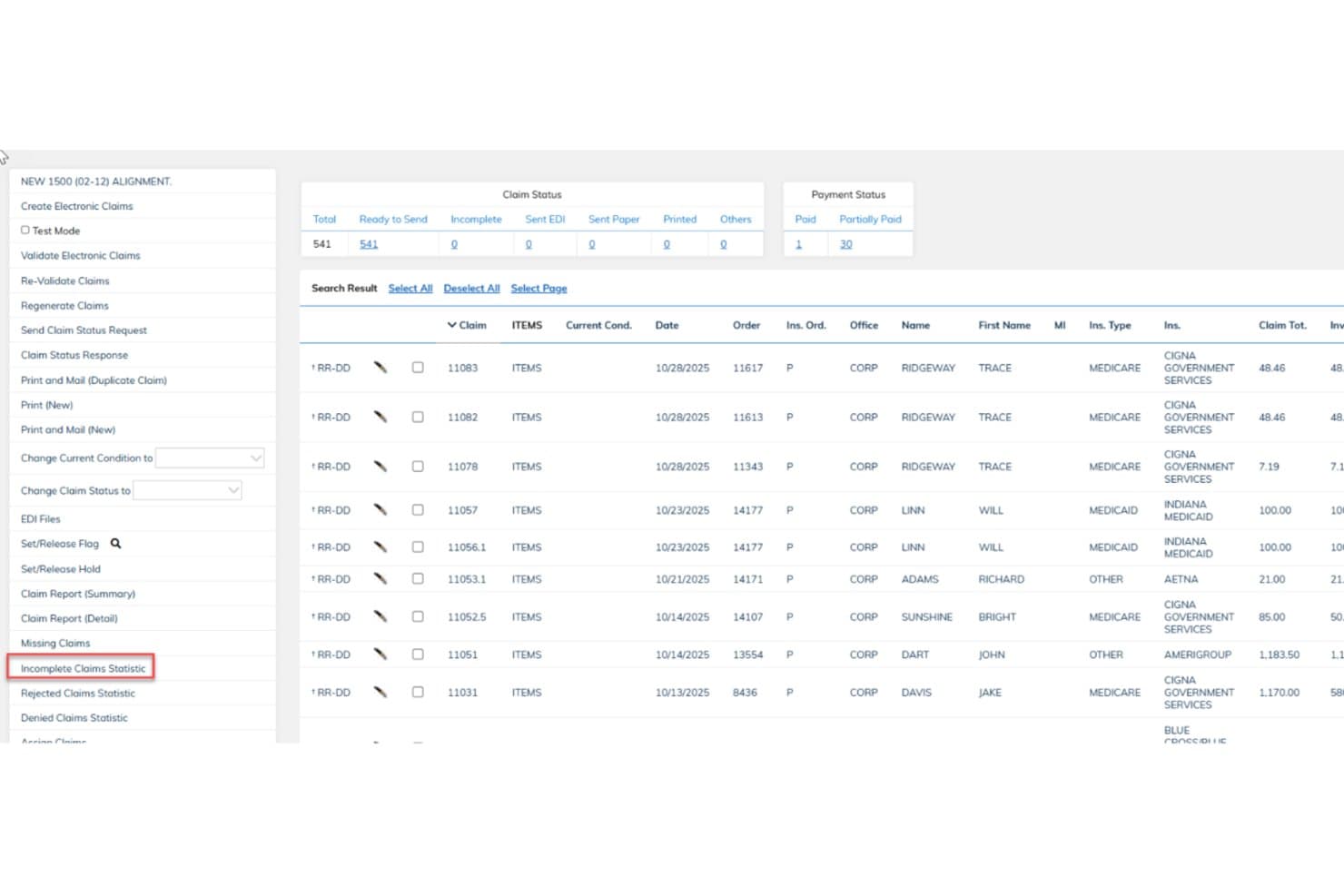
Bonafide (WellSky) offers a claims management screen displaying claim status, payment status, and detailed billing records for DME providers. Bonafide, powered by WellSky, is a cloud-based DME/HME platform that unifies billing and revenue cycle management, patient intake, inventory, document management, and mobile delivery into a single system.
Who Is Bonafide (WellSky) Best For?
Bonafide is a strong fit for mid-to-large DME/HME providers that need an enterprise-grade platform to manage high-volume billing, inventory, and delivery operations.
Why I Picked Bonafide (WellSky)
Bonafide earns its spot as one of the best on my shortlist because the inventory and billing connection here is genuinely tight. I like that barcode scanning, vendor drop-shipping, and serial number tracking all feed directly into billing records, removing any manual handoff between warehouse and billing teams. The mobile delivery module ties this together: drivers capture digital signatures on their phones, and that action triggers billing automatically.
Bonafide (WellSky) Key Features
- Automated DME claims submission: Submit and track electronic 837P claims directly to DME MACs and other payers.
- Real-time eligibility verification: Instantly check patient insurance coverage and benefits to reduce claim denials.
- Digital CMN and documentation management: Generate, store, and manage Certificates of Medical Necessity and supporting documents with alerts and reminders.
- Recurring rental billing automation: Build and manage capped rental cycles with automated conversion to purchase when appropriate.
Bonafide (WellSky) Integrations
Bonafide offers native integrations for real-time X12 communication with payers and vendors, supports vendor drop-shipping, connects with clearinghouses for claims submission, and provides an API for custom integrations.
Pros and Cons
Pros:
- Automated tracking of rental and sales cycles
- Mobile delivery app with e-signature capture
- Real-time inventory sync with billing workflow
Cons:
- Setup process may take several weeks
- Reporting customizations can require vendor assistance
Learn more about Bonafide (WellSky): Best customizable workflows for providers
- Free demo available
- Pricing upon request
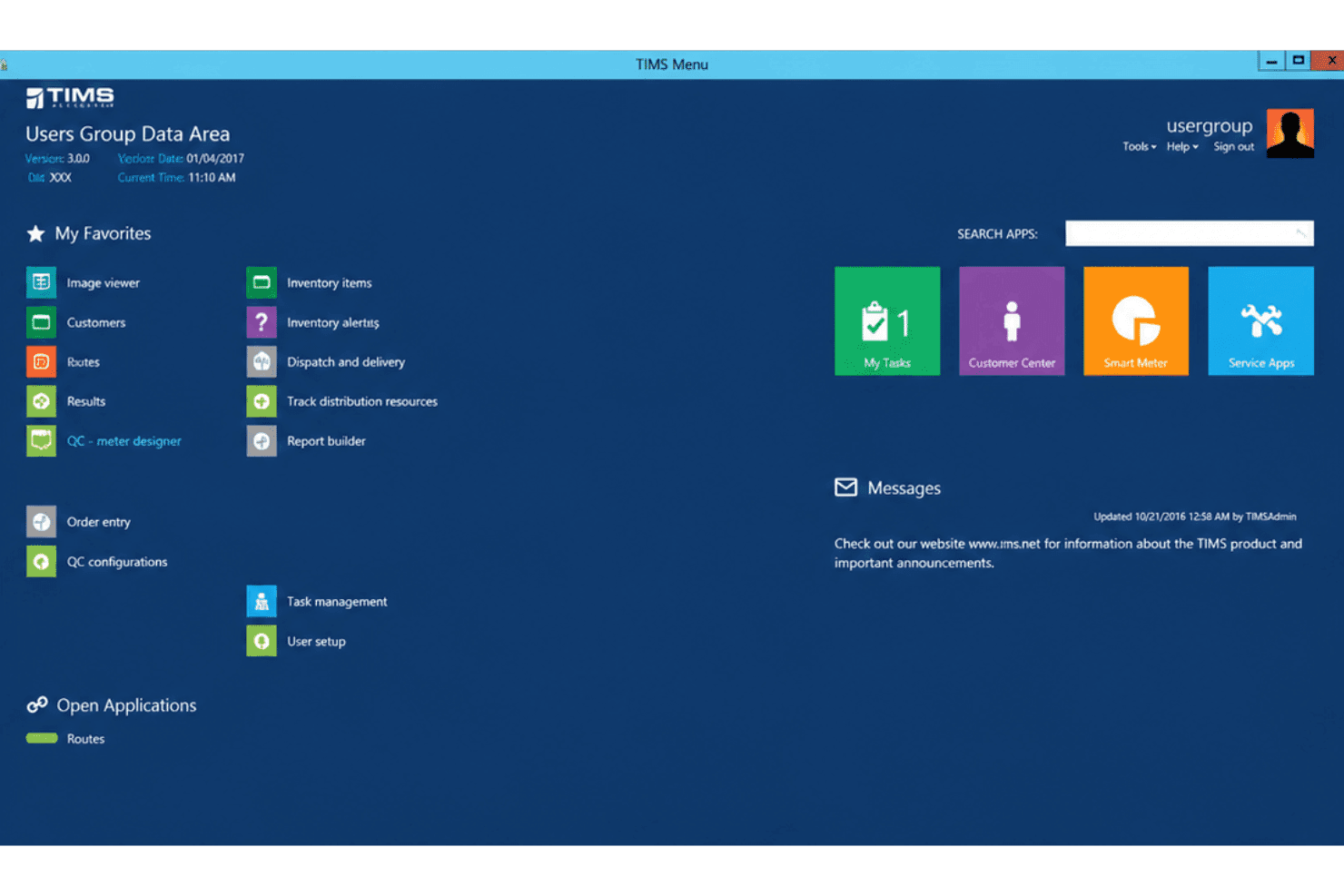
TIMS Software coordinates RCM, claims, rental billing, inventory, and deliveries. TIMS Software is an HME/DME business management platform that handles revenue cycle management, claims processing, recurring rental billing, inventory tracking, and delivery operations within a single system.
Who Is TIMS Software Best For?
TIMS Software is a strong fit for asset-intensive HME/DME providers that need billing, inventory, and delivery workflows tailored to how their specific operation runs.
Why I Picked TIMS Software
TIMS Software earns its spot on my shortlist because of how deeply configurable its billing workflows are. I particularly like the intelligent work queues and payer-specific billing rules engine, which my team can tailor to match how we actually process claims rather than how the software expects us to. TIMS also builds and maintains its software in-house, which means requesting workflow changes that reflect a specific payer mix or denial pattern is genuinely on the table, not just a marketing promise.
TIMS Software Key Features
- Mobile delivery and routing: Lets drivers optimize routes, capture delivery signatures, and process field payments in real time.
- Serialized inventory management: Tracks inventory items by serial number, including drop-shipping and rental assets.
- Clearinghouse integration: Automates claims submission and handles electronic remittances directly within the system.
- Patient resupply automation: Manages auto-enrollment, compliance checks, and recurring qualified resupply orders.
TIMS Software Integrations
TIMS Software offers native integrations with ResMed Data Exchange, FedEx, UPS, and USPS, and provides an API for custom integrations. It also features direct clearinghouse integration for electronic claims processing.
Pros and Cons
Pros:
- In-house support team with configuration expertise
- Handles cap rental and resupply tracking
- Deeply customizable billing and workflow rules
Cons:
- Initial setup requires significant process mapping
- Software updates must be scheduled with vendor
Learn more about TIMS Software:
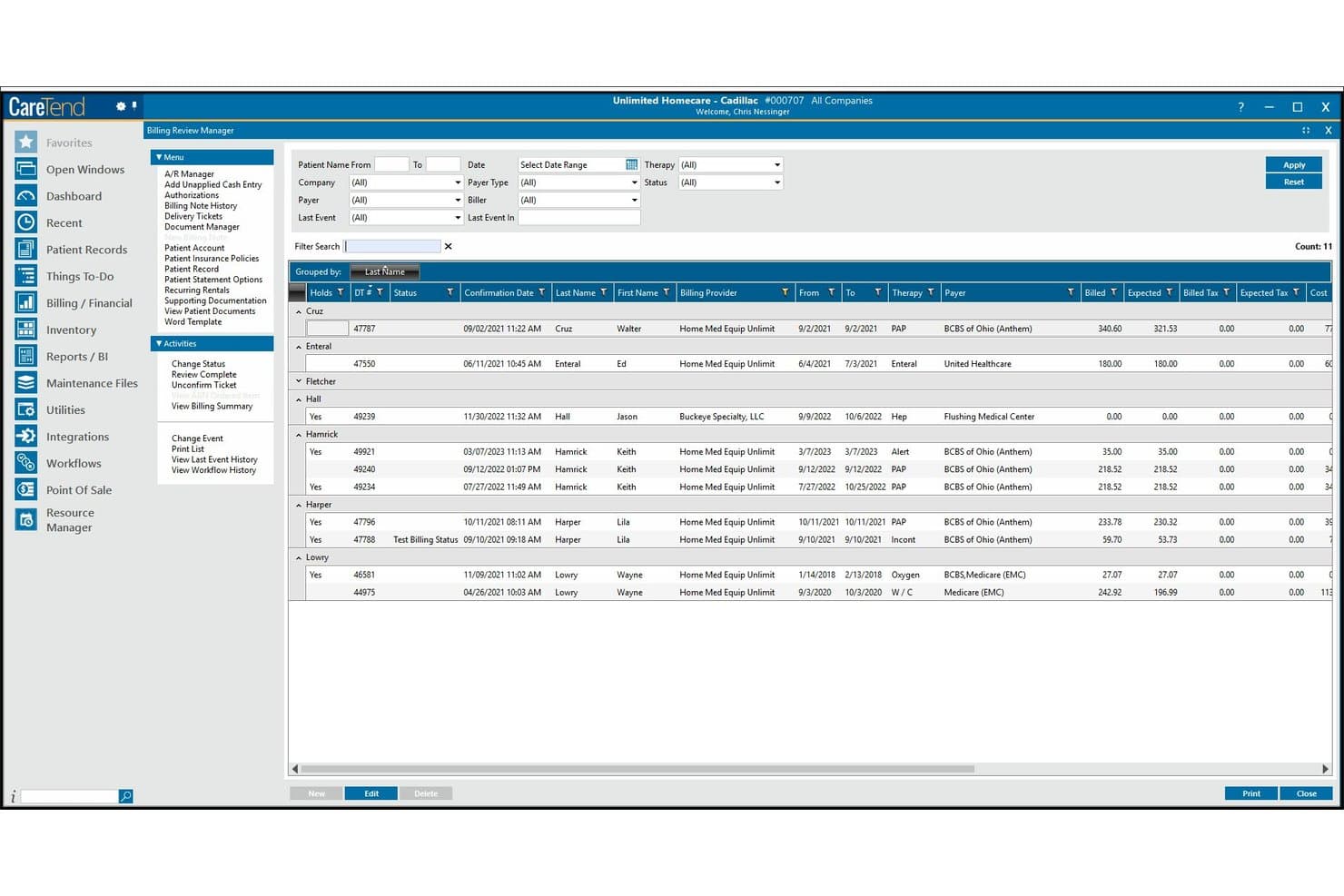
CareTend offers a Billing Review Manager with filtering, grouped patient records, and billing details for DME claims management. CareTend is an HME/DME billing and operations platform from WellSky that covers claims submission, recurring rental billing, inventory tracking, prior authorization management, and delivery documentation in a single system.
Who Is CareTend Best For?
CareTend is a strong fit for mid-to-large HME/DME providers managing multi-site operations who need a unified system across billing, inventory, and delivery.
Why I Picked CareTend
CareTend earns its spot on my shortlist because its open API architecture connects directly to EHRs, HIEs, and payer networks, eliminating manual data re-entry across systems. I particularly like how the CoverMyMeds integration lets my team initiate and track prior authorizations in real time, tied directly to active claims. The WellSky Delivery Manager connection also links electronic proof-of-delivery back to billing records automatically, which is a genuinely useful closed loop for DME providers managing high claim volumes.
CareTend Key Features
- Real-time perpetual inventory: Tracks drugs, supplies, and equipment with barcode-enabled workflows.
- Automated recurring billing: Handles repeating schedules for rentable DME items and therapy services.
- Point-of-sale module: Processes transactions across multiple sites with support for multiple payment types.
- Customizable analytics dashboard: Visualizes financial, billing, and inventory metrics for actionable insight.
CareTend Integrations
CareTend offers native integrations with CoverMyMeds and WellSky Delivery Manager, connects to EHRs and HIEs via open APIs, and provides an API for custom integrations.
Pros and Cons
Pros:
- Delivery documentation linked to patient records
- Automated recurring billing for rental DME items
- Real-time inventory integrated with billing workflows
Cons:
- Reported delays in customer support response
- Migration from CPR+ system can be difficult
Learn more about CareTend:
Other DME Billing Software
Here are some additional DME billing software options that didn’t make it onto my shortlist, but are still worth checking out:
- 11AcuServeBest full-service billing and consulting support
- 12DME WorksBest for flexible reporting and analytics tools
- 13EZClaimBest for small practice document management
- 14Kareo (Tebra)Best direct insurer connections for billing
- 15AloraBest billing compliance for home health providers
- 16ProchantBest dedicated billing team extension
- 17Medforce TechnologiesBest task management and document workflow tools
- 18TennrBest automated insurance document retrieval
- 19DME FlowBest AI-driven claims pre-check and routing
- 20MedbillBest focus on out-of-network reimbursement
How I Evaluate DME Billing Software
I split my evaluation into two layers: the baseline DME billing functions a platform must handle—like rental cycles and CMN tracking—and the differentiators that separate one vendor from another.
Core Functionality (Table Stakes For This List)
When I'm selecting tools for my list, I rank each one on a scale from 0 (does not offer the functionality) to 5 (excels in this area) for each core functionality listed below. Then, I calculate the tool's total score into a percentage. Each tool needs to achieve a minimum total score of 65% to be considered for inclusion.
- DME Claims Processing: I look for electronic 837P submission to DME MACs and clearinghouses, plus claim scrubbing that catches errors before they reach payers.
- CMN & Prior Auth Management: Tracking CMN expirations across hundreds of patients manually is a nightmare. I check for automated alerts and renewal workflows.
- Recurring Rental Billing: Capped rental logic matters here—tools should handle monthly billing cycles, rent-to-purchase conversions, and suspension periods.
- HCPCS & Modifier Coding: I evaluate whether the platform applies DME-specific modifiers like KX, RR, and NU automatically based on order and payer rules.
- Eligibility & Denial Management: Real-time eligibility checks before dispensing equipment and denial worklists with categorized reason codes are what I look for.
- Inventory & Delivery Integration: The billing side should connect to serial number tracking and proof-of-delivery capture so claims have supporting documentation.
Once I have a list of tools that meet the criteria, I consider what sets each platform apart.
Differentiating Factors (What Sets Vendors Apart)
Here's how I compare and contrast different vendors:
Standout Features
Real-time eligibility verification is a major differentiator. I look for tools that confirm coverage and benefits across multiple payers before equipment leaves the warehouse. A denial management dashboard also matters—it should surface denied claims by reason code and guide billers through resubmission or appeal steps. I evaluate how well each platform tracks serialized inventory across warehouses, vehicles, and patient locations, since that data directly supports billing documentation.
Beyond Features
Medicare and payer compliance expertise is a big one—I check whether a platform automatically updates HCPCS codes and fee schedules when CMS publishes changes, and whether it maintains audit trails for RAC or ZPIC reviews. Integration ecosystem matters too, especially connectivity with clearinghouses like Waystar or Availity and e-prescribing tools like Parachute. I also evaluate onboarding support, since migrating from a legacy system with years of rental billing history requires hands-on guidance from specialists who understand DME workflows.
How to Choose DME Billing Software
It’s easy to get bogged down in long feature lists and complex pricing structures. To help you stay focused as you work through your unique software selection process, here’s a checklist of factors to keep in mind:
| Factor | What to Consider |
|---|---|
| FactorScalability | What to ConsiderWill the system adapt as your patient and claim volumes grow, or as you add locations and product lines? Ask about multi-entity and high-claim support. |
| FactorIntegrations | What to ConsiderDoes the tool connect with your EHR, inventory, clearinghouse, and accounting systems? Gaps here can cause duplicate data entry or manual workarounds. |
| FactorCustomizability | What to ConsiderCan you tailor forms, workflows, and reports? Check if you can configure rental logic or CMN document templates to fit your processes. |
| FactorEase of use | What to ConsiderIs the interface intuitive for both new hires and seasoned staff? Get feedback from your billing, intake, and operations teams about daily navigation. |
| FactorImplementation and onboarding | What to ConsiderHow long does deployment take, and what training is offered? Ask about data migration, legacy billing history import, and vendor-led onboarding sessions. |
| FactorCost | What to ConsiderBeyond sticker price, look for per-claim, user-based, or add-on module charges that could impact your long-term budget. |
| FactorSecurity safeguards | What to ConsiderIs the software HIPAA-compliant? Confirm encryption, BAA availability, access controls, and audit logs before you trust it with patient and claims data. |
| FactorCompliance requirements | What to ConsiderWill the vendor keep you updated for new payer rules, CMS changes, audits, or policy shifts? Ask how frequently regulatory updates are handled. |
What Is DME Billing Software?
DME billing software is a specialized platform designed for managing the full billing lifecycle of durable medical equipment claims, including recurring rental cycles and compliance with payer requirements.
It automates core processes like insurance eligibility checks, claims submission, and prior authorization tracking, helping teams coordinate billing, inventory, and documentation workflows tailored to DME delivery and reimbursement needs.
Features of DME Billing Software
When selecting DME billing software, keep an eye out for the following key features:
- DME claims processing: Generates and submits electronic claims specifically formatted for Medicare, Medicaid, and commercial DME payers, reducing manual paperwork and errors.
- Recurring rental billing: Manages complex rental billing cycles and capped rental rules, automatically tracking rent-to-purchase transitions and ensuring correct reimbursement.
- CMN and prior authorization tracking: Automates Certificates of Medical Necessity and handles prior authorization documents, with alerts for expirations or renewals to keep claims compliant.
- HCPCS and modifier management: Stores up-to-date DME-specific codes and modifiers, applying payer rules to every claim for improved billing accuracy.
- Eligibility verification tools: Instantly checks patient insurance details before equipment is dispensed, minimizing billing delays and claim denials.
- Inventory and delivery integration: Links patient billing with inventory systems, tracks serial numbers, and captures proof of delivery for audit and compliance documentation.
- Denial management dashboard: Centralizes tracking of denied claims, categorizes rejection reasons, and facilitates resubmission or appeals to recover lost revenue.
- Audit trails and reporting: Keeps detailed logs of billing actions and creates customizable reports for internal oversight and external compliance reviews.
- Multi-payer connectivity: Supports file submissions and remittance postings across multiple payers, clearinghouses, and government programs.
- Secure HIPAA-compliant environment: Protects patient and claims data with encryption, access controls, and documented safeguards aligned with healthcare regulations.
Benefits of DME Billing Software
Implementing DME billing software provides several benefits for your team and your business. Here are a few you can look forward to:
- Fewer claim denials: Automated eligibility checks and claims scrubbing help ensure payers receive accurate, compliant submissions up front.
- Faster reimbursement: Real-time connectivity to clearinghouses and payers shortens payment cycles by accelerating both claim submission and adjudication.
- Less manual work: Recurring rental billing automation and built-in document management decrease time spent on repetitive data entry and paperwork.
- Improved compliance: Integrated CMN tracking, audit trails, and up-to-date code libraries minimize regulatory risks and support smooth audits.
- Better inventory visibility: Linking inventory, deliveries, and billing workflows provides clearer equipment tracking and proof-of-delivery documentation.
- Easier denial recovery: Centralized denial management helps billing teams quickly identify issues, resubmit claims, and recover revenue that might be lost otherwise.
- More scalable operations: The right platform adapts as you add locations, increase claim volumes, or diversify your DME product offerings.
Costs and Pricing of DME Billing Software
Selecting dme billing software requires an understanding of the various pricing models and plans available. Costs vary based on features, team size, add-ons, and more. The table below summarizes common plans, their average prices, and typical features included in dme billing software solutions:
Plan Comparison Table for DME Billing Software
| Plan Type | Average Price | Common Features |
|---|---|---|
| Plan TypeFree Plan | Average Price$0 | Common FeaturesBasic claims entry, manual billing, limited HCPCS code support, and email-based support. |
| Plan TypePersonal Plan | Average Price$50-$150/month | Common FeaturesSingle-user access, e-claims submission, basic eligibility checks, simple reporting, and limited inventory tracking. |
| Plan TypeBusiness Plan | Average Price$200-$600/month | Common FeaturesMulti-user access, recurring rental billing, automated CMN tracking, denial management, and integration options. |
| Plan TypeEnterprise Plan | Average Price$800-$2,500/month | Common FeaturesAdvanced inventory management, multi-location support, custom workflows, dedicated onboarding, and audit trails. |
DME Billing Software FAQs
Here are some answers to common questions about dme billing software:
How does DME billing software support recurring rentals?
DME billing software tracks monthly rental periods, automates rent-to-purchase conversions when appropriate, and pauses billing during suspension periods, helping teams stay aligned with payer rules for capped rentals.
Can DME billing software integrate with our EHR or inventory system?
Yes, most solutions offer integrations with EHRs, inventory management, and clearinghouses. This connectivity helps reduce manual entry, maintain data accuracy, and ensure all documentation supports claim submissions.
What does the implementation process typically involve?
Implementation usually includes data migration from legacy systems, initial software configuration, training sessions tailored to user roles, and ongoing access to specialists familiar with DME billing workflows.
How does the software manage compliance and audits?
Platforms often update HCPCS codes and payer rules automatically, maintain detailed audit trails, and store supporting documentation, making it easier to prepare for and respond to compliance audits or payer reviews.
Is DME billing software secure and HIPAA-compliant?
Yes, leading platforms use encrypted hosting, role-based access controls, and sign business associate agreements (BAAs) to maintain HIPAA compliance and protect patient data at all times.